156-215.13 Exam Details
-
Exam Code
:156-215.13 -
Exam Name
:Check Point Certified Security Administrator - GAiA -
Certification
:Checkpoint Certifications -
Vendor
:CheckPoint -
Total Questions
:361 Q&As -
Last Updated
:Dec 15, 2021
CheckPoint 156-215.13 Online Questions & Answers
-
Question 81:
You installed Security Management Server on a computer using GAiA in the MegaCorp home office. You use IP address 10.1.1.1. You also installed the Security Gateway on a second SecurePlatform computer, which you plan to ship to another Administrator at a MegaCorp hub office. What is the correct order for pushing SIC certificates to the Gateway before shipping it?
A. 2, 1, 3, 4, 5
B. 2, 3, 4, 5, 1
C. 1, 3, 2, 4, 5
D. 2, 3, 4, 1, 5 -
Question 82:
Study the Rule base and Client Authentication Action properties screen

After being authenticated by the Security Gateway, when a user starts an HTTP connection to a Web site, the user tries to FTP to another site using the command line. What happens to the user? The:
A. FTP connection is dropped by Rule 2.
B. user is prompted from that FTP site only, and does not need to enter his username and password for Client Authentication.
C. user is prompted for authentication by the Security Gateway again.
D. FTP data connection is dropped after the user is authenticated successfully. -
Question 83:
Which command allows Security Policy name and install date verification on a Security Gateway?
A. fw ver -p
B. fw stat -l
C. fw show policy
D. fw ctl pstat -policy -
Question 84:
As a Security Administrator, you must refresh the Client Authentication authorization time-out every time a new user connection is authorized. How do you do this? Enable the Refreshable Timeout setting:
A. in the user object's Authentication screen.
B. in the Gateway object's Authentication screen.
C. in the Global Properties Authentication screen.
D. in the Limit tab of the Client Authentication Action Properties screen. -
Question 85:
You are trying to save a custom log query in R76 SmartView Tracker, but getting the following error:
Could not save
(Error: Database is Read Only) Which of the following is a likely explanation for this?
A. You do not have OS write permissions on the local SmartView Tracker PC in order to save the custom query locally.
B. You do not have the explicit right to save a custom query in your administrator permission profile under SmartConsole customization.
C. Another administrator is currently connected to the Security Management Server with read/ write permissions which impacts your ability to save custom log queries to the Security Management Server.
D. You have read-only rights to the Security Management Server database. -
Question 86:
You are a Security Administrator who has installed Security Gateway R76 on your network. You need to allow a specific IP address range for a partner site to access your intranet Web server. To limit the partner's access for HTTP and FTP
only, you did the following:
1) Created manual Static NAT rules for the Web server.
2) Cleared the following settings in the Global Properties > Network Address Translation screen:
-Allow bi-directional NAT
-
Translate destination on client side Do the above settings limit the partner's access?
A. No. The first setting is not applicable. The second setting will reduce performance.
B. Yes. This will ensure that traffic only matches the specific rule configured for this traffic, and that the Gateway translates the traffic after accepting the packet.
C. Yes. Both of these settings are only applicable to automatic NAT rules.
D. No. The first setting is only applicable to automatic NAT rules. The second setting will force translation by the kernel on the interface nearest to the client. -
Question 87:
The SIC certificate is stored in the directory .
A. $CPDIR/conf
B. $FWDIR/database
C. $CPDIR/registry
D. $FWDIR/conf -
Question 88:
Which rule position in the Rule Base should hold the Cleanup Rule? Why?
A. Last. It explicitly drops otherwise accepted traffic.
B. First. It explicitly accepts otherwise dropped traffic.
C. Last. It serves a logging function before the implicit drop.
D. Before last followed by the Stealth Rule. -
Question 89:
You want to configure a mail alert for every time the policy is installed to a specific Gateway. Where would you configure this alert?
A. In SmartView Monitor, select Gateway > Configure Thresholds and in SmartDashboard select Global Properties > Log and Alerts > Alert Commands.
B. In SmartView Monitor, select Gateway > Configure Thresholds.
C. In SmartDashboard, select Global Properties > Log and Alerts > Alert Commands.
D. You cannot create a mail alert for Policy installation. -
Question 90:
In the Rule Base displayed, user authentication in Rule 4 is configured as fully automatic.
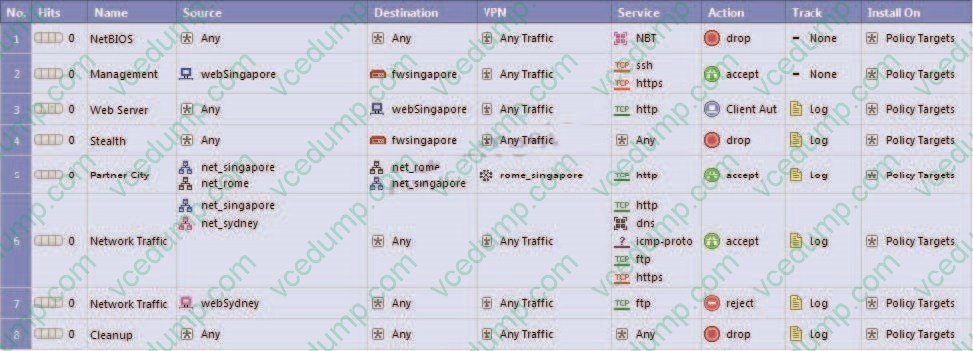
Eric is a member of the LDAP group, MSD_Group. What happens when Eric tries to connect to a server on the Internet?
A. Eric will be blocked because LDAP is not allowed in the Rule Base.
B. Eric will be authenticated and get access to the requested server.
C. Eric will be dropped by the Stealth Rule.
D. None of these things will happen.
Related Exams:
-
156-110
Check Point Certified Security Principles Associate (CCSPA) -
156-115.80
Check Point Certified Security Master - R80 -
156-215
Check Point Security Administration NGX -
156-215.1
Check Point Certified Security Administrator NGX -
156-215.70
Check Point Certified Security Administrator R70 -
156-215.71
Check Point Certified Security Administrator R71 -
156-215.75
Check Point Certified Security Administrator -
156-215.80
Check Point Certified Security Administrator (CCSA) -
156-215.81
Check Point Certified Security Administrator - R81 (CCSA) -
156-215.81.20
Check Point Certified Security Administrator - R81.20 (CCSA)
Tips on How to Prepare for the Exams
Nowadays, the certification exams become more and more important and required by more and more enterprises when applying for a job. But how to prepare for the exam effectively? How to prepare for the exam in a short time with less efforts? How to get a ideal result and how to find the most reliable resources? Here on Vcedump.com, you will find all the answers. Vcedump.com provide not only CheckPoint exam questions, answers and explanations but also complete assistance on your exam preparation and certification application. If you are confused on your 156-215.13 exam preparations and CheckPoint certification application, do not hesitate to visit our Vcedump.com to find your solutions here.