156-215.13 Exam Details
-
Exam Code
:156-215.13 -
Exam Name
:Check Point Certified Security Administrator - GAiA -
Certification
:Checkpoint Certifications -
Vendor
:CheckPoint -
Total Questions
:361 Q&As -
Last Updated
:Dec 15, 2021
CheckPoint 156-215.13 Online Questions & Answers
-
Question 201:
For remote user authentication, which authentication scheme is NOT supported?
A. Check Point Password
B. TACACS
C. SecurID
D. RADIUS -
Question 202:
When Jon first installed his new security system, he forgot to configure DNS servers on his Security Gateway. How could Jon configure DNS servers now that his Security Gateway is in production?
A. Login to the SmartDashboard, edit the firewall Gateway object, select the tab Interfaces > Domain Name Servers.
B. Login to the firewall using SSH and run cpconfig, then select Domain Name Servers.
C. Login to the firewall using SSH and run fwm, then select System Configuration > Domain Name Servers.
D. Login to the firewall using SSH and run sysconfig, then select Domain Name Servers. -
Question 203:
You start to use SmartView Monitor to analyze the packet size distribution of your traffic.
Unfortunately, you get the message:
"There are no machines that contain Firewall Blade and SmartView Monitor."
What should you do to analyze the packet size distribution of your traffic? Give the BEST answer.
A. Enable Monitoring on your Security Management Server.
B. Enable Monitoring on your Security Gateway.
C. Purchase the SmartView Monitor license for your Security Gateway.
D. Purchase the SmartView Monitor license for your Security Management Server. -
Question 204:
You have created a Rule Base for firewall, websydney. Now you are going to create a new policy package with security and address translation rules for a second Gateway.
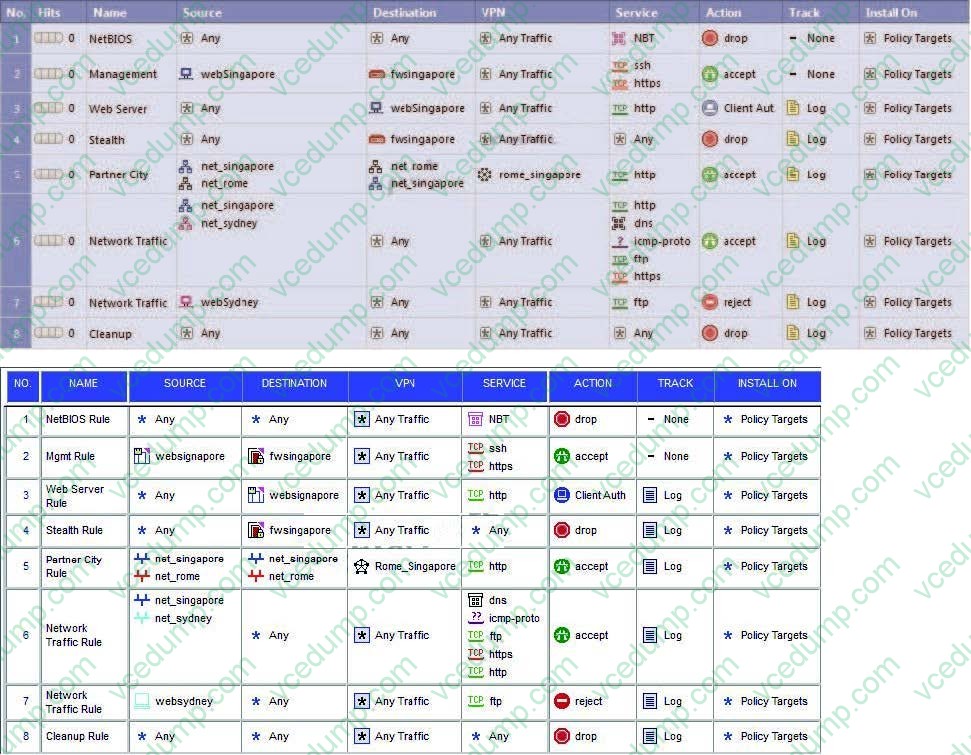
What is TRUE about the new package's NAT rules?
A. NAT rules will be empty in the new package.
B. Rules 4 and 5 will appear in the new package.
C. Rules 1, 2, 3 will appear in the new package.
D. Only rule 1 will appear in the new package. -
Question 205:
What physical machine must have access to the User Center public IP address when checking for new packages with SmartUpdate?
A. SmartUpdate Repository SQL database Server
B. A Security Gateway retrieving the new upgrade package
C. SmartUpdate installed Security Management Server PC
D. SmartUpdate GUI PC -
Question 206:
When using SecurePlatform, it might be necessary to temporarily change the MAC address of the interface eth 0 to 00:0C:29:12:34:56. After restarting the network the old MAC address should be active. How do you configure this change?
A. Edit the file /etc/sysconfig/netconf.C and put the new MAC address in the field
B. As expert user, issue these commands:
C. Open the WebUI, select Network > Connections > eth0. Place the new MAC address in the field Physical Address, and press Apply to save the settings.
D. As expert user, issue the command: # IP link set eth0 addr 00:0C: 29:12:34:56 -
Question 207:
With the User Directory Software Blade, you can create R76 user definitions on a(n) Server.
A. NT Domain
B. SecureID
C. Radius
D. LDAP -
Question 208:
You can include External commands in SmartView Tracker by the menu Tools > Custom Commands.
The Security Management Server is running under SecurePlatform, and the GUI is on a system running Microsoft Windows. How do you run the command traceroute on an IP address?
A. There is no possibility to expand the three pre-defined options Ping, Whois, and Nslookup.
B. Go to the menu Tools > Custom Commands and configure the Windows command tracert.exe to the list.
C. Use the program GUIdbedit to add the command traceroute to the Security Management Server properties.
D. Go to the menu, Tools > Custom Commands and configure the Linux command traceroute to the list. -
Question 209:
Your internal network is configured to be 10.1.1.0/24. This network is behind your perimeter R76 Gateway, which connects to your ISP provider. How do you configure the Gateway to allow this network to go out to the Internet?
A. Do nothing, as long as 10.1.1.0 network has the correct default Gateway.
B. Use Hide NAT for network 10.1.1.0/24 behind the internal interface of your perimeter Gateway.
C. Use automatic Static NAT for network 10.1.1.0/24.
D. Use Hide NAT for network 10.1.1.0/24 behind the external IP address of your perimeter Gateway. -
Question 210:
How can you reset the Security Administrator password that was created during initial Security Management Server installation on SecurePlatform?
A. Export the user database into an ASCII file with fwm dbexport. Open this file with an editor, and delete the Password portion of the file. Then log in to the account without a password. You will be prompted to assign a new password.
B. Launch SmartDashboard in the User Management screen, and edit the cpconfig administrator.
C. Type cpm -a, and provide the existing administrator's account name. Reset the Security Administrator's password.
D. As expert user Type fwm -a, and provide the existing administrator's account name. Reset the Security Administrator's password.
Related Exams:
-
156-110
Check Point Certified Security Principles Associate (CCSPA) -
156-115.80
Check Point Certified Security Master - R80 -
156-215
Check Point Security Administration NGX -
156-215.1
Check Point Certified Security Administrator NGX -
156-215.70
Check Point Certified Security Administrator R70 -
156-215.71
Check Point Certified Security Administrator R71 -
156-215.75
Check Point Certified Security Administrator -
156-215.80
Check Point Certified Security Administrator (CCSA) -
156-215.81
Check Point Certified Security Administrator - R81 (CCSA) -
156-215.81.20
Check Point Certified Security Administrator - R81.20 (CCSA)
Tips on How to Prepare for the Exams
Nowadays, the certification exams become more and more important and required by more and more enterprises when applying for a job. But how to prepare for the exam effectively? How to prepare for the exam in a short time with less efforts? How to get a ideal result and how to find the most reliable resources? Here on Vcedump.com, you will find all the answers. Vcedump.com provide not only CheckPoint exam questions, answers and explanations but also complete assistance on your exam preparation and certification application. If you are confused on your 156-215.13 exam preparations and CheckPoint certification application, do not hesitate to visit our Vcedump.com to find your solutions here.