Simulation
Guidelines
This is a lab item in which tasks will be performed on virtual devices.
1. Refer to the Tasks tab to view the tasks for this lab item.
2. Refer to the Topology tab to access the device console(s) and perform the tasks.
3. Console access is available for all required devices by clicking the device icon or using the tab(s) above the console window.
4. All necessary pre-configurations have been applied.
5. Do not remove any existing configurations from the devices, only those necessary to make the appropriate changes required to fulfill the listed tasks.
6. Do not change the enable password or hostname for any device.
7. Save your configurations to NVRAM before moving to the next item.
8. Click Next at the bottom of the screen to submit this lab and move to the next question.
9. When Next is clicked, the lab closes and cannot be reopened.
Topology
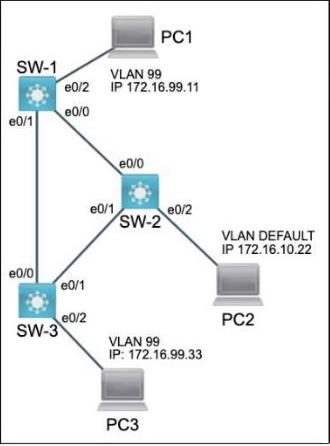
Tasks
All physical cabling is in place and verified. Connectivity for PC1, PC2 and PC3 must be established to the switches. Each port connecting to the PCs must be configured as an end-user port and only allow the designated VLAN.
1. Configure VLAN 99 on all three switches and label it exactly as FINANCIAL
2. Configure the switch ports connecting to PC1, PC2 and PC3
3. Cisco's neighbor discovery protocol has been disabled on SW-1 and must be re-enabled
4. PC1 must not be able to discover SW-1
Not auto-scored - compare your configuration against the model answer.