SOA-C02 Exam Details
-
Exam Code
:SOA-C02 -
Exam Name
:AWS Certified SysOps Administrator - Associate (SOA-C02) -
Certification
:Amazon Certifications -
Vendor
:Amazon -
Total Questions
:657 Q&As -
Last Updated
:Oct 14, 2025
Amazon SOA-C02 Online Questions & Answers
-
Question 401:
A user working in the Amazon EC2 console increased the size of an Amazon Elastic Block Store (Amazon EBS) volume attached to an Amazon EC2 Windows instance. The change is not reflected in the file system. What should a SysOps administrator do to resolve this issue?
A. Extend the file system with operating system-level tools to use the new storage capacity.
B. Reattach the EBS volume to the EC2 instance.
C. Reboot the EC2 instance that is attached to the EBS volume.
D. Take a snapshot of the EBS volume. Replace the original volume with a volume that is created from the snapshot. -
Question 402:
A company needs to launch a public website. The company will deploy the website on Amazon EC2 instances that are in an Auto Scaling group. The Auto Scaling group extends across multiple Availability Zones. The website must be accessed through only https://example.com.
Which solution will meet these requirements?
A. Create an internet-facing Application Load Balancer (ALB). Create an Amazon Route 53 alias record that points to the ALB's DNS name. Configure an HTTP to HTTPS redirect action for the ALB. On the HTTPS listener, create a host-based rule to forward requests for example.com to the website's target group.
B. Create an Amazon CloudFront distribution. Create an internal Network Load Balancer (NLB). Specify the NLB as the distribution's origin. Use an AWS WAF rule for host header filtering. Create an Amazon Route 53 alias record that points to the distribution's DNS name.
C. Create an Amazon CloudFront distribution. Create an internet-facing Application Load Balancer (ALB). Specify the ALB as the distribution's origin. Create an Amazon Route 53 alias record that points to the distribution's DNS name.
D. Create an Amazon CloudFront distribution. Create an internet-facing Application Load Balancer (ALB). Specify the ALB as the distribution's origin. Enable CloudFront Origin Shield. Add a custom Host header that contains the value "example.com". Create an Amazon Route 53 alias record that points to the distribution's DNS name. -
Question 403:
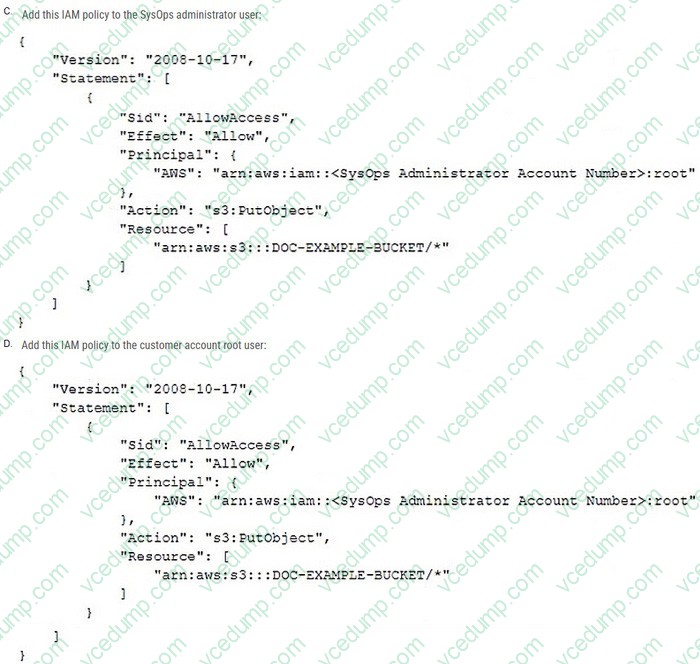
A SysOps administrator is using IAM credentials to try to upload a file to a customer's Amazon S3 bucket that is named DOC-EXAMPLE-BUCKET. The SysOps administrator is receiving an AccessDenied message. Which combination of configuration changes will correct this problem? (Choose two.)
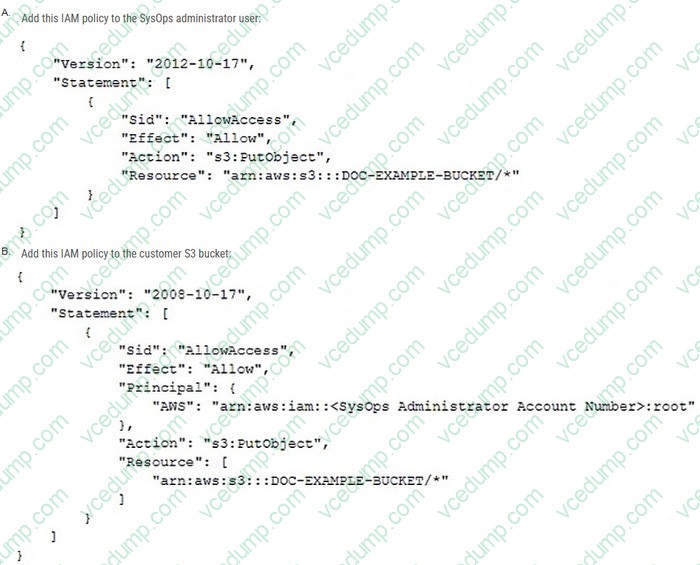
A. Option A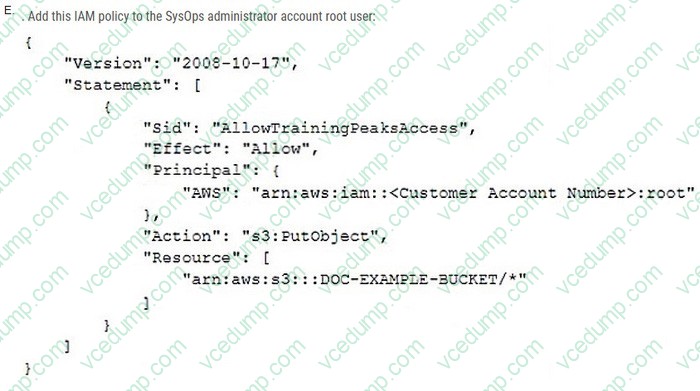
B. Option B
C. Option C
D. Option D
E. Option E -
Question 404:
A company wants to apply an existing Amazon Route 53 private hosted zone to a new VPC to allow for customized resource name resolution within the VPC. The SysOps administrator created the VPC and added the appropriate resource record sets to the private hosted zone.
Which step should the SysOps administrator take to complete the setup?
A. Associate the Route 53 private hosted zone with the VPC.
B. Create a rule in the default security group for the VPC that allows traffic to the Route 53 Resolver.
C. Ensure the VPC network ACLs allow traffic to the Route 53 Resolver.
D. Ensure there is a route to the Route 53 Resolver in each of the VPC route tables. -
Question 405:
A company has an organization in AWS Organizations. The company uses shared VPCs to provide networking resources across accounts A SysOps administrator has been able to successfully launch and manage Amazon EC2 instances in a participant account However the SysOps administrator is now receiving an InstanceLimitExceeded error when the SysOps administrator tries to launch a new EC2 instance.
What should the SysOps administrator do to resolve this error')
A. Request an instance quota increase from the account that owns the VPC
B. Launch additional EC2 instances in a different AWS Region
C. Request an instance quota increase from the parte pant account
D. Launch additional EC2 instances by using a different Amazon Machine image (AMI) -
Question 406:
A company is using an Amazon EC2 instance to inspect inbound traffic. The EC2 instance runs Amazon Linux and has the Amazon CloudWatch agent installed and configured.
The company needs to ingest metrics and logs from the EC2 instance into CloudWatch. The company also needs to receive notification when a specific number of errors occur for rejected web management requests.
Which combination of steps will meet these requirements with the MOST operational efficiency? (Select TWO.)
A. Create an Amazon S3 bucket to store the logs. Configure an S3 event notification that occurs when new logs are added to the S3 bucket.
B. Create an Amazon Simple Queue Service (Amazon SQS) queue. Add the queue as the destination of the Amazon S3 event notification.
C. Create a CloudWatch Logs log group and log stream. Set up IAM permissions for the EC2 instance to write to the log group and log stream.
D. Create an AWS Lambda function to process the logs from CloudWatch. Configure the Amazon S3 event notification to invoke the Lambda function. Configure the Lambda function to publish to an Amazon Simple Notification Service (Amazon SNS) topic.
E. Create a metric filter for the log group. Configure a filter pattern for the errors. Create a CloudWatch alarm that is based on the metric filter. Configure the alarm to publish to an Amazon Simple Notification Service (Amazon SNS) topic when the alarm is in ALARM state. -
Question 407:
An ecommerce company uses an Amazon ElastiCache for Memcached cluster for in- memory caching of popular product queries on the shopping site. When viewing recent Amazon CloudWatch metrics data for the ElastiCache cluster, the SysOps administrator notices a large number of evictions.
Which of the following actions will reduce these evictions? (Choose two.)
A. Add an additional node to the ElastiCache cluster.
B. Increase the ElastiCache time to live (TTL).
C. Increase the individual node size inside the ElastiCache cluster.
D. Put an Elastic Load Balancer in front of the ElastiCache cluster.
E. Use Amazon Simple Queue Service (Amazon SQS) to decouple the ElastiCache cluster. -
Question 408:
A fleet of servers must send local logs to Amazon CloudWatch. How should the servers be configured to meet this requirement?
A. Configure AWS Config to forward events to CloudWatch.
B. Configure a Simple Network Management Protocol {SNMP) agent to forward events to CloudWatch.
C. Install and configure the unified CloudWatch agent.
D. Install and configure the Amazon Inspector agent. -
Question 409:
A SysOps administrator manages an AWS account where developers run CPU-intensive tasks on Amazon EC2 instances. The tasks can take several days to finish running and sometimes need to be repeated several times. The developers
often forget to terminate the instances when the tasks are complete.
The SysOps administrator needs to implement a solution to monitor EC2 CPU utilization and automatically terminate underutilized instances.
Which solution will meet these requirements?
A. Configure an Amazon GuardDuty finding that is based on EC2 CPU utilization. Associate an AWS Lambda function with the GuardDuty finding to terminate any instances that are identified as idle.
B. Configure an Amazon Simple Notification Service (Amazon SNS) topic to receive EC2 utilization messages from the AWS Health Dashboard. Create an AWS Lambda function. Subscribe the Lambda function to the SNS topic. Use the ec2.stop_instances operation to terminate idle instances.
C. Configure a Low Utilization Amazon EC2 Instances check in AWS Trusted Advisor to publish status changes to an Amazon Simple Notification Service (Amazon SNS) topic. Create an AWS Lambda function. Subscribe the Lambda function to the SNS topic. Use the ec2.stop_instances operation to terminate idle instances.
D. Configure an Amazon EventBridge rule for the Low Utilization Amazon EC2 Instances check in AWS Trusted Advisor. Select the EC2 Terminatelnstances API call as the target. -
Question 410:
A SysOps administrator has used AWS Cloud Formation to deploy a sereness application into a production VPC. The application consists of an AWS Lambda function, an Amazon DynamoOB table, and an Amazon API Gateway API. The SysOps administrator must delete the AWS Cloud Formation stack without deleting the DynamoOB table.
Which action should the SysOps administrator take before deleting the AWS Cloud Formation stack?
A. Add a Retain deletion policy to the DynamoOB resource in the AWS CloudFormation stack.
B. Add a Snapshot deletion policy to the DynamoOB resource In the AWS CloudFormation stack.
C. Enable termination protection on the AWS Cloud Formation stack.
D. Update the application's IAM policy with a Deny statement for the dynamodb:DeleteTabie action.
Related Exams:
-
AIF-C01
Amazon AWS Certified AI Practitioner (AIF-C01) -
AIP-C01
AWS Certified Generative AI Developer - Professional -
ANS-C00
AWS Certified Advanced Networking - Specialty (ANS-C00) -
ANS-C01
AWS Certified Advanced Networking - Specialty (ANS-C01) -
AXS-C01
AWS Certified Alexa Skill Builder - Specialty (AXS-C01) -
BDS-C00
AWS Certified Big Data - Speciality (BDS-C00) -
CLF-C02
AWS Certified Cloud Practitioner (CLF-C02) -
DAS-C01
AWS Certified Data Analytics - Specialty (DAS-C01) -
DATA-ENGINEER-ASSOCIATE
AWS Certified Data Engineer - Associate (DEA-C01) -
DBS-C01
AWS Certified Database - Specialty (DBS-C01)
Tips on How to Prepare for the Exams
Nowadays, the certification exams become more and more important and required by more and more enterprises when applying for a job. But how to prepare for the exam effectively? How to prepare for the exam in a short time with less efforts? How to get a ideal result and how to find the most reliable resources? Here on Vcedump.com, you will find all the answers. Vcedump.com provide not only Amazon exam questions, answers and explanations but also complete assistance on your exam preparation and certification application. If you are confused on your SOA-C02 exam preparations and Amazon certification application, do not hesitate to visit our Vcedump.com to find your solutions here.