SOA-C02 Exam Details
-
Exam Code
:SOA-C02 -
Exam Name
:AWS Certified SysOps Administrator - Associate (SOA-C02) -
Certification
:Amazon Certifications -
Vendor
:Amazon -
Total Questions
:657 Q&As -
Last Updated
:Oct 14, 2025
Amazon SOA-C02 Online Questions & Answers
-
Question 511:
A company creates a new Amazon FSx for Windows File Server file system. To help manage costs, the company configures the storage capacity for the file system with minimal room for growth.
The company creates an Amazon Simple Notification Service (Amazon SNS) topic in the same AWS account whore the file system resides. The company subscribes a SysOps administrator's email address to the SNS topic. The SysOps
administrator needs to receive email notification when the file system has less than 100 GB of space available.
Which combination of steps should the SysOps administrator take to meet this requirement? (Choose two.)
A. Create an Amazon EventBridge rule for when the FreeStorageCapacity metric is less than or equal to 100,000,000,000 bytes (100 GB).
B. Create an Amazon CloudWatch alarm for when the FreeStorageCapacity metric is less than or equal to 100,000,000,000 bytes (100 GB).
C. Create an AWS Lambda function that will run when the Amazon CloudWatch alarm enters ALARM state. Configure the Lambda function to publish to the SNS topic.
D. Configure the Amazon EventBridge rule's alarm action to publish to the SNS topic when the rule enters ALARM state.
E. Configure the Amazon CloudWatch alarm action to publish to the SNS topic when the alarm enters ALARM state. -
Question 512:
A company hosts a static website on Amazon S3. The website is served by an Amazon CloudFront distribution with a default TTL of 86,400 seconds. The company recently uploaded an updated version of the website to Amazon S3.
However, users still see the old content when they refresh the site. A SysOps administrator must make the new version of the website visible to users as soon as possible.
Which solution meets these requirements?
A. Adjust the TTL value for the DNS CNAME record that is pointing to the CloudFront distribution.
B. Create an invalidation on the CloudFront distribution for the old S3 objects.
C. Create a new CloudFront distribution. Update the DNS records to point to the new CloudFront distribution.
D. Update the DNS record for the website to point to the S3 bucket. -
Question 513:
A company uses AWS CloudFormation to deploy its application infrastructure Recently, a user accidentally changed a property of a database in a CloudFormation template and performed a stack update that caused an interruption to the application A SysOps administrator must determine how to modify the deployment process to allow the DevOps team to continue to deploy the infrastructure, but prevent against accidental modifications to specific resources.
Which solution will meet these requirements?
A. Set up an AWS Config rule to alert based on changes to any CloudFormation stack An AWS Lambda function can then describe the stack to determine if any protected resources were modified and cancel the operation
B. Set up an Amazon CloudWatch Events event with a rule to trigger based on any CloudFormation API call An AWS Lambda function can then describe the stack to determine if any protected resources were modified and cancel the operation
C. Launch the CloudFormation templates using a stack policy with an explicit allow for all resources and an explicit deny of the protected resources with an action of Update:*.
D. Attach an IAM policy to the DevOps team role that prevents a CloudFormation stack from updating, with a condition based on the specific Amazon Resource Names (ARNs) of the protected resources -
Question 514:
A company's SysOps administrator must ensure that all Amazon EC2 Windows instances that are launched in an AWS account have a third-party agent installed. The third-party agent has an msi package. The company uses AWS Systems Manager for patching, and the Windows instances are tagged appropriately. The third-party agent required periodic updates as new versions are released. The SysOps administrator must deploy these updates automatically
Which combination of steps will meet these requirements with the LEAST operational effort? (Seed TWO.)
A. Create a Systems Manager Distributor package for the third-party agent.
B. Make sure that Systems Manager Inventory Is configured. If Systems Manager Inventory is not configured, set up a new inventory tor instances that is based on the appropriate tag value for Windows.
C. Create a Systems Manager State Manager association to run the AWS- RunRemoteScript document. Populate the details of the third-party agent package. Specify instance tags based on the appropriate tag value for Windows with a schedule of 1 day
D. Create a Systems Manager State Manager- association to run the AWS- ConfigureAWSPackage document. Populate the details of the third-party agent package. Specify instance tags based on the appropriate tag value for Windows with a schedule of 1 day
E. Create a Systems Manager Opsitem with the tag value for Windows Attach the Systems Manager Distributor package to the Opsitem. Create a maintenance window that is specific to the package deployment Configure the maintenance window to cover 24 hours a day. -
Question 515:
A team is managing an AWS account that is a member of an organization in AWS Organizations. The organization has consolidated billing features enabled. The account hosts several applications. A SysOps administrator has applied tags to
resources within the account to reflect the environment. The team needs a report of the breakdown of charges by environment.
What should the SysOps administrator do to meet this requirement?
A. Filter, map, and categorize resource groups in Tag Editor.
B. Ensure that the organization's service control policies (SCPs) allow access to cost allocation tags.
C. Ensure that the IAM credentials that are used to access Cost Explorer have permissions to group cost by tags.
D. Activate the tag keys for cost allocation on the organization's management account. -
Question 516:
A company has a Python script that needs to send an SMS message to a monitoring center. A SysOps administrator must use Amazon EventBridge and AWS Lambda to automatically run the Python script every 60 minutes.
Which solution will meet these requirements?
A. Configure an EventBridge event pattern rule to invoke a Lambda function that runs the Python script. Program the Lambda function to make an API call to send a notification to an Amazon Simple Notification Service (Amazon SNS) topic. Subscribe the appropriate phone number to the SNS topic.
B. Configure an EventBridge event pattern rule to invoke a Lambda function that runs the Python script. Program the Lambda function to make an API call to send a notification to an Amazon Simple Queue Service (Amazon SQS) queue.
C. Configure a schedule in EventBridge Scheduler to invoke a Lambda function that runs the Python script. Program the Lambda function to make an API call to send a notification to an Amazon Simple Notification Service (Amazon SNS) topic. Subscribe the appropriate phone number to the SNS topic.
D. Configure a schedule in EventBridge Scheduler to invoke a Lambda function that runs the Python script. Program the Lambda function to make an API call to send a notification to an Amazon Simple Queue Service (Amazon SQS) queue. -
Question 517:
A company's SysOps administrator deploys a public Network Load Balancer (NLB) in front of the company's web application. The web application does not use any Elastic IP addresses. Users must access the web application by using the company's domain name. The SysOps administrator needs to configure Amazon Route 53 to route traffic to the NLB. Which solution will meet these requirements MOST cost-effectively?
A. Create a Route 53 AAAA record for the NLB.
B. Create a Route 53 alias record for the NLB.
C. Create a Route 53 CAA record for the NLB.
D. Create a Route 53 CNAME record for the NLB. -
Question 518:
CORRECT TEXT
If your AWS Management Console browser does not show that you are logged in to an AWS account, close the browser and relaunch the console by using the AWS Management Console shortcut from the VM desktop.
If the copy-paste functionality is not working in your environment, refer to the instructions file on the VM desktop and use Ctrl+C, Ctrl+V or Command-C, Command-V.
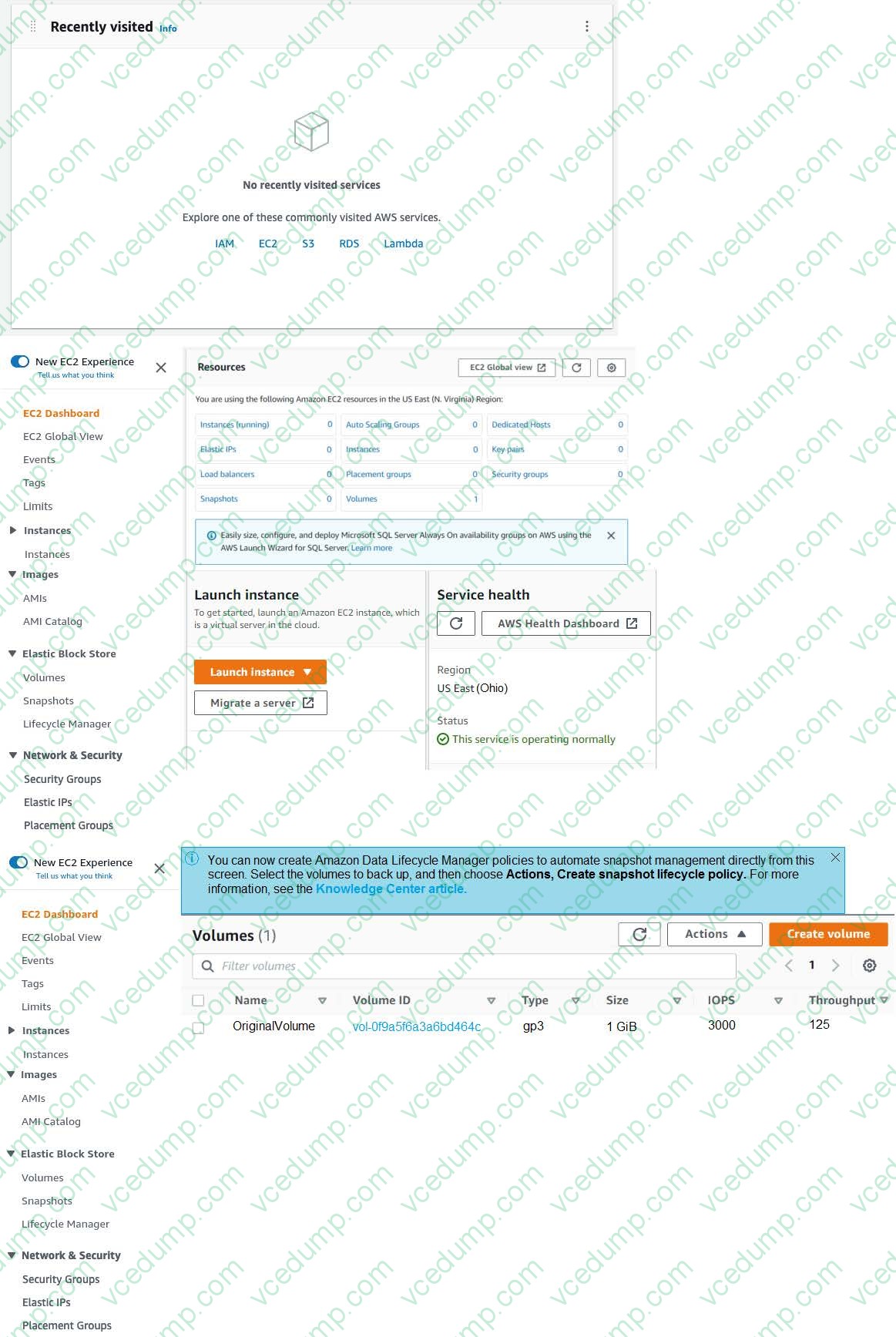
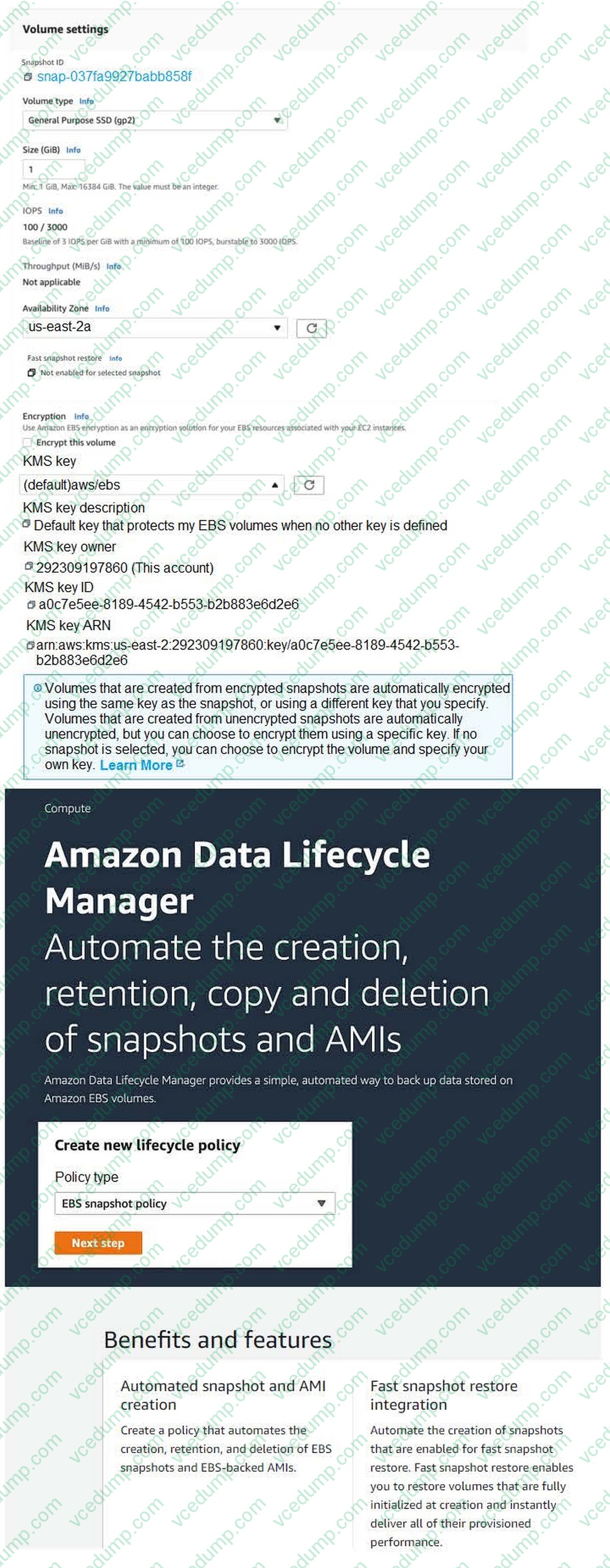
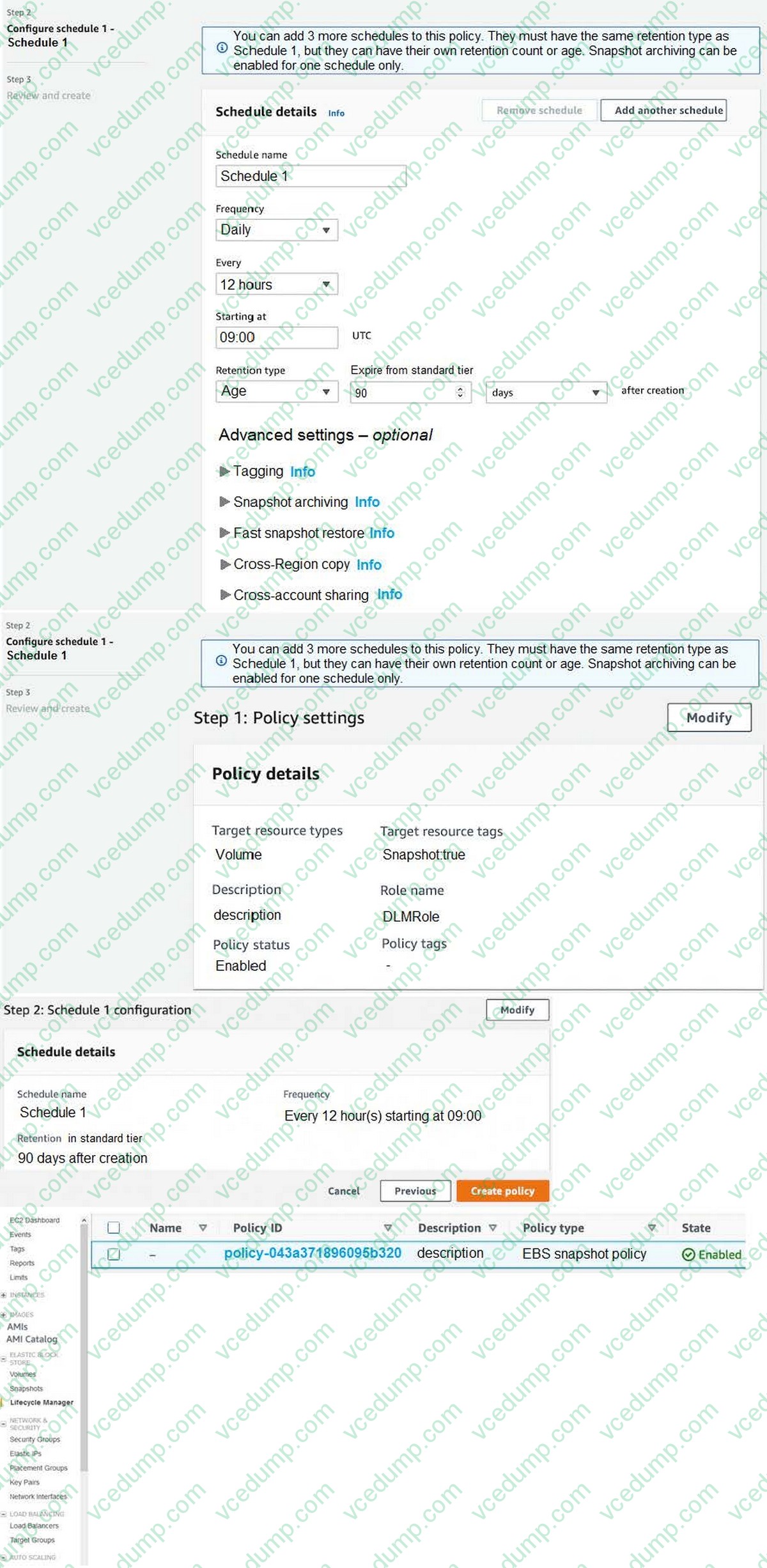
Create a solution to automate Amazon EBS Volume snapshots using Amazon Data Lifecycle Manager.
1. Use the us-east-2 Region for all resources.
2. Unless specified below, use the default configuration settings.
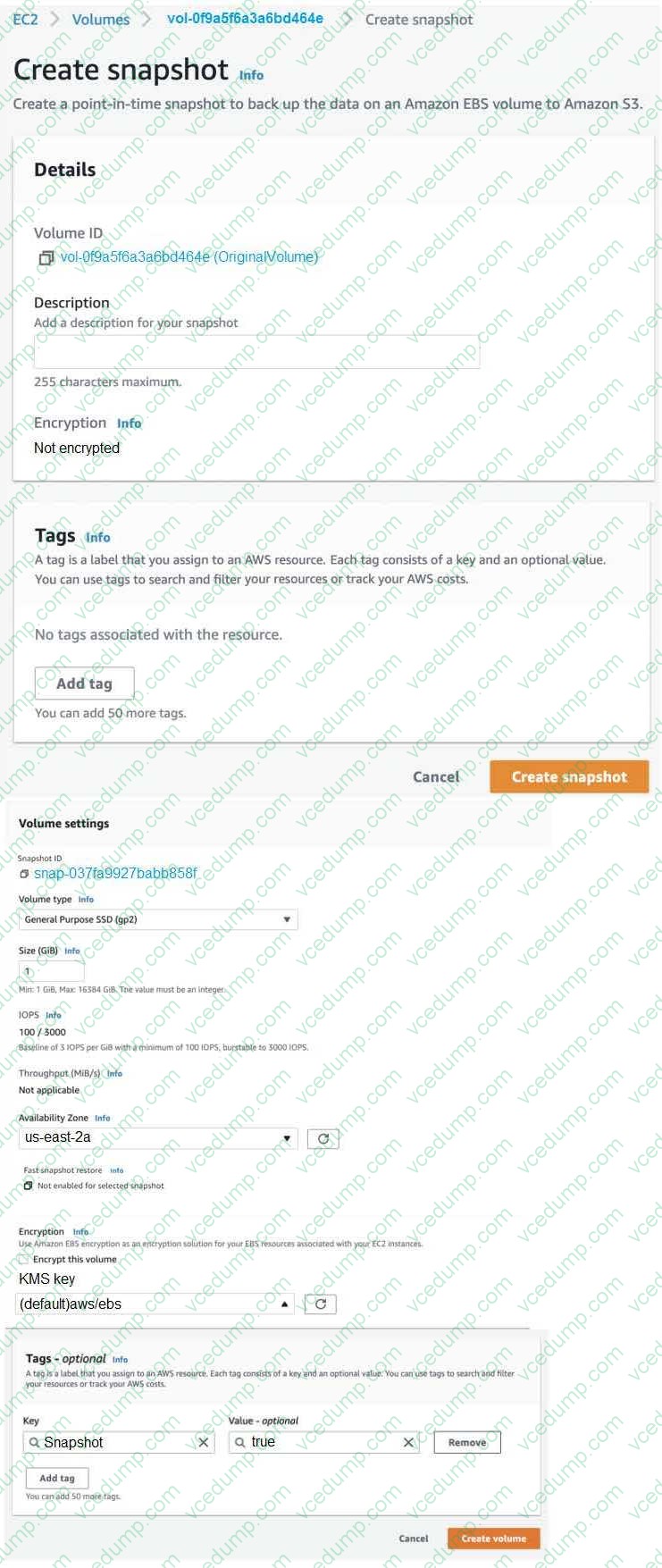
3. Create a snapshot of the existing EBS Volume named OriginalVolume.
4. Create a 1 GB EBS Volume from the snapshot with default encryption.
5. Add the tag Snapshot: true to the new EBS Volume.
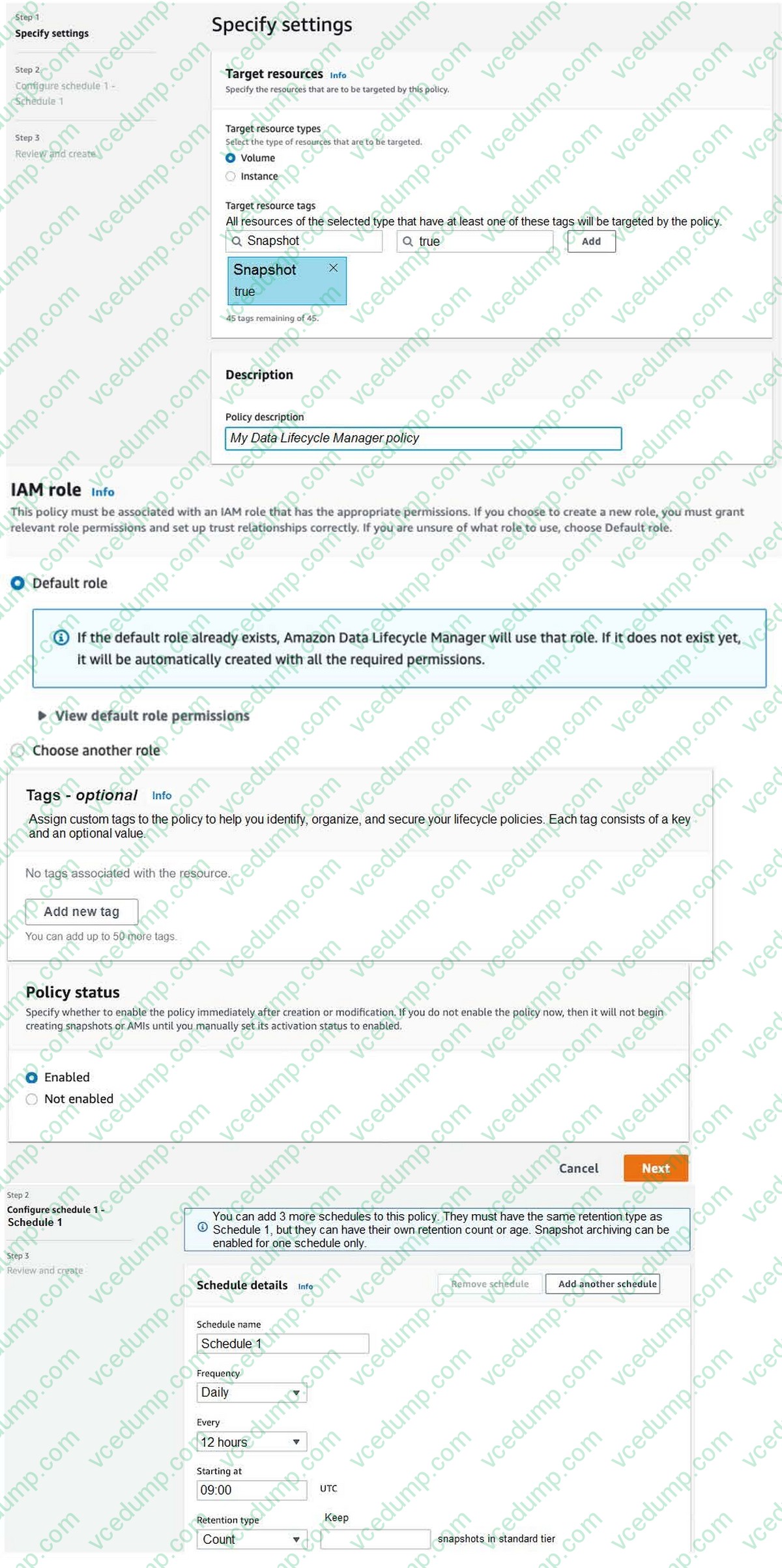
6. Ensure that snapshots of all volumes with the tag Snapshot:true are taken every 6 hours and retained for 90 days.
Do NOT use a cron expression. Ensure this is the only lifecycle policy that exists. Use the IAM role named DLMRole. Important: Click the Next button to complete this lab and continue to the next lab. Once you click the Next button, you will NOT be able to return to this lab.
A. Check the answer in explanation.
B. Place Holder -
Question 519:
A company runs a web application on three Amazon EC2 instances behind an Application Load Balancer (ALB). Web traffic increases significantly during the same 9-hour period every day and causes a decrease in the application's
performance. A SysOps administrator must scale the application ahead of the changes in demand to accommodate the increased traffic.
Which solution will meet these requirements?
A. Create an Amazon CloudWatch alarm to monitor application latency. Configure an alarm action to increase the size of each EC2 instance if the latency threshold is reached.
B. Create an Amazon EventBridge rule to monitor application latency. Configure the rule to add an EC2 instance to the ALB if the latency threshold is reached
C. Deploy the application to an EC2 Auto Scaling group that uses a target tracking scaling policy. Attach the ALB to the Auto Scaling group.
D. Deploy the application to an EC2 Auto Scaling group that uses a scheduled scaling policy. Attach the ALB to the Auto Scaling group. -
Question 520:
A company uses Amazon CloudFront to serve static content to end users. The company's marketing team recently deployed updates to 150 images on the company's website. However, the website is not displaying some of the new images.
A SysOps administrator reviews the CloudFront distribution's cache settings. The default TTL for the distribution is set to 1 week (604,800 seconds).
What should the SysOps administrator do to refresh the cache with the new images in the MOST operationally efficient way?
A. Create a new CloudFront distribution that has the same origin. Set the default TTL to 1 minute (60 seconds). Switch Amazon Route 53 DNS records to use the new distribution.
B. Instruct the marketing team to upload the new images to a different location. When the new images are uploaded, update the website to locate the new images.
C. Issue a CloudFront invalidation request to immediately expire the new images from the marketing team's update.
D. Update the existing CloudFront distribution to reconfigure the default TTL to 1 minute (60 seconds). During submission of the new configuration, include the flag to invalidate objects in the specified path.
Related Exams:
-
AIF-C01
Amazon AWS Certified AI Practitioner (AIF-C01) -
AIP-C01
AWS Certified Generative AI Developer - Professional -
ANS-C00
AWS Certified Advanced Networking - Specialty (ANS-C00) -
ANS-C01
AWS Certified Advanced Networking - Specialty (ANS-C01) -
AXS-C01
AWS Certified Alexa Skill Builder - Specialty (AXS-C01) -
BDS-C00
AWS Certified Big Data - Speciality (BDS-C00) -
CLF-C02
AWS Certified Cloud Practitioner (CLF-C02) -
DAS-C01
AWS Certified Data Analytics - Specialty (DAS-C01) -
DATA-ENGINEER-ASSOCIATE
AWS Certified Data Engineer - Associate (DEA-C01) -
DBS-C01
AWS Certified Database - Specialty (DBS-C01)
Tips on How to Prepare for the Exams
Nowadays, the certification exams become more and more important and required by more and more enterprises when applying for a job. But how to prepare for the exam effectively? How to prepare for the exam in a short time with less efforts? How to get a ideal result and how to find the most reliable resources? Here on Vcedump.com, you will find all the answers. Vcedump.com provide not only Amazon exam questions, answers and explanations but also complete assistance on your exam preparation and certification application. If you are confused on your SOA-C02 exam preparations and Amazon certification application, do not hesitate to visit our Vcedump.com to find your solutions here.