Which feature provides the capability to define an alternate cluster key for a table with an existing cluster key?
A. External table B. Materialized view C. Search optimization D. Result cache
B. Materialized view
Explanation/Reference:
A materialized view is a feature that provides the capability to define an alternate cluster key for a table with an existing cluster key. A materialized view is a pre- computed result set that is stored in Snowflake and can be queried like a regular table. A materialized view can have a different cluster key than the base table, which can improve the performance and efficiency of queries on the materialized view. A materialized view can also support aggregations, joins, and filters on the base table data. A materialized view is automatically refreshed when the underlying data in the base table changes, as long as the AUTO_REFRESH parameter is set to true1. References: Materialized Views | Snowflake Documentation
Question 12:
At which object type level can the APPLY MASKING POLICY, APPLY ROW ACCESS POLICY and APPLY SESSION POLICY privileges be granted?
A. Global B. Database C. Schema D. Table
A. Global
Explanation/Reference:
The object type level at which the APPLY MASKING POLICY, APPLY ROW ACCESS POLICY and APPLY SESSION POLICY privileges can be granted is global. These are account-level privileges that control who can apply or unset these policies on objects such as columns, tables, views, accounts, or users. These privileges are granted to the ACCOUNTADMIN role by default, and can be granted to other roles as needed. The other options are incorrect because they are not the object type level at which these privileges can be granted. Database, schema, and table are lower-level object types that do notsupport these privileges. References: Access Control Privileges | Snowflake Documentation, Using Dynamic Data Masking | Snowflake Documentation, Using Row Access Policies | Snowflake Documentation, Using Session Policies | Snowflake Documentation
Question 13:
A user can change object parameters using which of the following roles?
A. ACCOUNTADMIN, SECURITYADMIN B. SYSADMIN, SECURITYADMIN C. ACCOUNTADMIN, USER with PRIVILEGE D. SECURITYADMIN, USER with PRIVILEGE
C. ACCOUNTADMIN, USER with PRIVILEGE
Explanation/Reference:
According to the Snowflake documentation, object parameters are parameters that can be set on individual objects such as databases, schemas, tables, and stages. Object parameters can be set by users with the appropriate privileges on the objects. For example, to set the object parameter AUTO_REFRESH on a table, the user must have the MODIFY privilege on the table. The ACCOUNTADMIN role has the highest level of privileges on all objects in the account, so it can set any object parameter on any object. However, other roles, such as SECURITYADMIN or SYSADMIN, do not have the same level of privileges on all objects, so they cannot set object parameters on objects they do not own or have the required privileges on. Therefore, the correct answer is C. ACCOUNTADMIN, USER with PRIVILEGE. References: Parameters | Snowflake Documentation Object Parameters | Snowflake Documentation Object Privileges | Snowflake Documentation
Question 14:
An Architect has been asked to clone schema STAGING as it looked one week ago, Tuesday June 1st at 8:00 AM, to recover some objects.
The STAGING schema has 50 days of retention.
The Architect runs the following statement:
CREATE SCHEMA STAGING_CLONE CLONE STAGING at (timestamp => '2021-06-01 08:00:00');
The Architect receives the following error: Time travel data is not available for schema STAGING. The requested time is either beyond the allowed time travel period or before the object creation time.
The Architect then checks the schema history and sees the following:
A. Undrop the STAGING schema and then rerun the CLONE statement. B. Modify the statement: CREATE SCHEMA STAGING_CLONE CLONE STAGING at (timestamp => '2021-05-01 10:00:00'); C. Rename the STAGING schema and perform an UNDROP to retrieve the previous STAGING schema version, then run the CLONE statement. D. Cloning cannot be accomplished because the STAGING schema version was not active during the proposed Time Travel time period.
C. Rename the STAGING schema and perform an UNDROP to retrieve the previous STAGING schema version, then run the CLONE statement.
Explanation/Reference:
The error message indicates that the schema STAGING does not have time travel data available for the requested timestamp, because the current version of the schema was created on2021-06-02 23:00:00, which is after the timestamp of 2021-06-01 08:00:00. Therefore, the CLONE statement cannot access the historical data of the schema at that point in time. Option A is incorrect, because undropping the STAGING schema will not restore the previous version of the schema that was active on 2021-06-01 08:00:00. Instead, it will create a new version of the schema with the same name and no data or objects. Option B is incorrect, because modifying the timestamp to 2021-05-01 10:00:00 will not clone the schema as it looked one week ago, but as it looked when it was first created. This may not reflect the desired state of the schema and its objects. Option C is correct, because renaming the STAGING schema and performing an UNDROP to retrieve the previous STAGING schema version will restore the schema that was dropped on 2021-06-02 23:00:00. This schema has time travel data available for the requested timestamp of 2021-06-01 08:00:00, and can be cloned using the CLONE statement. Option D is incorrect, because cloning can be accomplished by using the UNDROP command to access the previous version of the schema that was active during the proposed time travel period. References: : Cloning Considerations : Understanding and Using Time Travel : CREATE
Question 15:
A company has an inbound share set up with eight tables and five secure views. The company plans to make the share part of its production data pipelines.
Which actions can the company take with the inbound share? (Choose two.)
A. Clone a table from a share. B. Grant modify permissions on the share. C. Create a table from the shared database. D. Create additional views inside the shared database. E. Create a table stream on the shared table.
A. Clone a table from a share. D. Create additional views inside the shared database.
Explanation/Reference:
These two actions are possible with an inbound share, according to the Snowflake documentation and the web search results. An inbound share is a share that is created by another Snowflake account (the provider) and imported into your account (the consumer). An inbound share allows you to access the data shared by the provider, but not to modify or delete it. However, you can perform some actions with the inbound share, such as: Clone a table from a share. You can create a copy of a table from an inbound share using the CREATE TABLE ... CLONE statement. The clone will contain the same data and metadata as the original table, but it will be independent of the share. You can modify or delete the clone as you wish, but it will not reflect any changes made to the original table by the provider1. Create additional views inside the shared database. You can create views on the tables or views from an inbound share using the CREATE VIEW statement. The views will be stored in the shared database, but they will be owned by your account. You can query the views as you would query any other view in your account, but you cannot modify or delete the underlying objects from the share2. The other actions listed are not possible with an inbound share, because they would require modifying the share or the shared objects, which are read-only for the consumer. You cannot grant modify permissions on the share, create a table from the shared database, or create a table stream on the shared table34. References: Cloning Objects from a Share | Snowflake Documentation Creating Views on Shared Data | Snowflake Documentation Importing Data from a Share | Snowflake Documentation Streams on Shared Tables | Snowflake Documentation
Question 16:
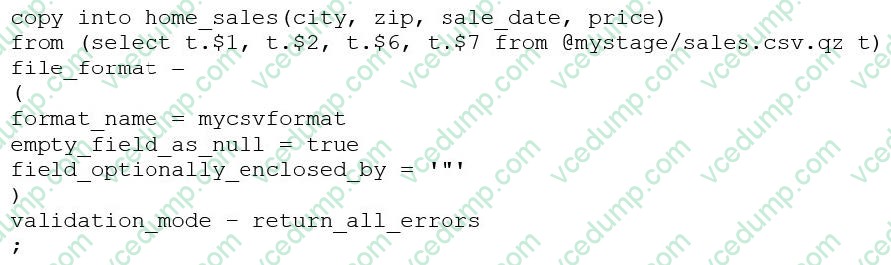
Consider the following COPY command which is loading data with CSV format into a Snowflake table from an internal stage through a data transformation query.
Assuming the syntax is correct, what is the cause of this error?
A. The VALIDATION_MODE parameter supports COPY statements that load data from external stages only. B. The VALIDATION_MODE parameter does not support COPY statements with CSV file formats. C. The VALIDATION_MODE parameter does not support COPY statements that transform data during a load. D. The value return_all_errors of the option VALIDATION_MODE is causing a compilation error.
C. The VALIDATION_MODE parameter does not support COPY statements that transform data during a load.
Explanation/Reference:
The VALIDATION_MODE parameter is used to specify the behavior of the COPY statement when loading data into a table. It is used to specify whether the COPY statement should return an error if any of the rows in the file are invalid or if it should continue loading the valid rows. The VALIDATION_MODE parameter is only supported for COPY statements that load data from external stages1. The query in the question uses a data transformation query to load data from an internal stage. A data transformation query is a query that transforms the data during the load process, such as parsing JSON or XML data, applying functions, or joining with other tables2. According to the documentation, VALIDATION_MODE does not support COPY statements that transform data during a load. If the parameter is specified, the COPY statement returns an error1. Therefore, option C is the correct answer. References: : COPY INTO
: Transforming Data During a Load
Question 17:
There are two databases in an account, named fin_db and hr_db which contain payroll and employee data, respectively. Accountants and Analysts in the company require different permissions on the objects in these databases to perform their jobs. Accountants need read-write access to fin_db but only require read-only access to hr_db because the database is maintained by human resources personnel.
An Architect needs to create a read-only role for certain employees working in the human resources department.
Which permission sets must be granted to this role?
A. USAGE on database hr_db, USAGE on all schemas in database hr_db, SELECT on all tables in database hr_db B. USAGE on database hr_db, SELECT on all schemas in database hr_db, SELECT on all tables in database hr_db C. MODIFY on database hr_db, USAGE on all schemas in database hr_db, USAGE on all tables in database hr_db D. USAGE on database hr_db, USAGE on all schemas in database hr_db, REFERENCES on all tables in database hr_db
A. USAGE on database hr_db, USAGE on all schemas in database hr_db, SELECT on all tables in database hr_db
Explanation/Reference:
To create a read-only role for certain employees working in the human resources department, the role needs to have the following permissions on the hr_db database: Option A is the correct answer because it grants the minimum permissions required for a read-only role on the hr_db database. Option B is incorrect because SELECT on schemas is not a valid permission. Schemas only support USAGE and CREATE permissions. Option C is incorrect because MODIFY on the database is not a valid permission. Databases only support USAGE, CREATE, MONITOR, and OWNERSHIP permissions. Moreover, USAGE on tables is not sufficient for querying the data. Tables support SELECT, INSERT, UPDATE, DELETE, TRUNCATE, REFERENCES, and OWNERSHIP permissions. Option D is incorrect because REFERENCES on tables is not relevant for querying the data. REFERENCES permission allows the role to create foreign key constraints on the tables. References: : https://docs.snowflake.com/en/user-guide/security-access-control- privileges.html#database-privileges : https://docs.snowflake.com/en/user-guide/security-access-control- privileges.html#schema-privileges : https://docs.snowflake.com/en/user-guide/security-access-control- privileges.html#table-privileges
Question 18:
When loading data from stage using COPY INTO, what options can you specify for the ON_ERROR clause? (Choose three.)
A. CONTINUE B. SKIP_FILE C. ABORT_STATEMENT D. FAIL
A. CONTINUE B. SKIP_FILE C. ABORT_STATEMENT
Explanation/Reference:
The ON_ERROR clause is an optional parameter for the COPY INTO command that specifies the behavior of the command when it encounters errors in the files. The ON_ERROR clause can have one of the following values1:
Therefore, options A, B, and C are correct.
References: : COPY INTO
Question 19:
Which system functions does Snowflake provide to monitor clustering information within a table (Choose two.)
A. SYSTEM$CLUSTERING_INFORMATION B. SYSTEM$CLUSTERING_USAGE C. SYSTEM$CLUSTERING_DEPTH D. SYSTEM$CLUSTERING_KEYS E. SYSTEM$CLUSTERING_PERCENT
A. SYSTEM$CLUSTERING_INFORMATION C. SYSTEM$CLUSTERING_DEPTH
Explanation/Reference:
According to the Snowflake documentation, these two system functions are provided by Snowflake to monitor clustering information within a table. A system function is a type of function that allows executing actions or returning information about the system. A clustering key is a feature that allows organizing data across micro-partitions based on one or more columns in the table. Clustering can improve query performance by reducing the number of files to scan. SYSTEM$CLUSTERING_INFORMATION is a system function that returns clustering information, including average clustering depth, for a table based on one or more columns in the table. The function takes a table name and an optional column name or expression as arguments, and returns a JSON string with the clustering information. The clustering information includes the cluster by keys, the total partition count, the total constant partition count, the average overlaps, and the average depth1. SYSTEM$CLUSTERING_DEPTH is a system function that returns the clustering depth for a table based on one or more columns in the table. The function takes a table name and an optional column name or expression as arguments, and returns an integer value with the clustering depth. The clustering depth is the maximum number of overlapping micro-partitions for any micro-partition in the table. A lower clustering depth indicates a better clustering2. References: SYSTEM$CLUSTERING_INFORMATION | Snowflake Documentation SYSTEM$CLUSTERING_DEPTH | Snowflake Documentation
Question 20:
What are purposes for creating a storage integration? (Choose three.)
A. Control access to Snowflake data using a master encryption key that is maintained in the cloud provider's key management service. B. Store a generated identity and access management (IAM) entity for an external cloud provider regardless of the cloud provider that hosts the Snowflake account. C. Support multiple external stages using one single Snowflake object. D. Avoid supplying credentials when creating a stage or when loading or unloading data. E. Create private VPC endpoints that allow direct, secure connectivity between VPCs without traversing the public internet. F. Manage credentials from multiple cloud providers in one single Snowflake object.
B. Store a generated identity and access management (IAM) entity for an external cloud provider regardless of the cloud provider that hosts the Snowflake account. C. Support multiple external stages using one single Snowflake object. D. Avoid supplying credentials when creating a stage or when loading or unloading data.
Explanation/Reference:
A storage integration is a Snowflake object that stores a generated identity and access management (IAM) entity for an external cloud provider, such as Amazon S3, Google Cloud Storage, or Microsoft Azure Blob Storage. This integration allows Snowflake to read data from and write data to an external storage location referenced in an external stage1. One purpose of creating a storage integration is to support multiple external stages using one single Snowflake object. An integration can list buckets (and optional paths) that limitthe locations users can specify when creating external stages that use the integration. Note that many external stage objects can reference different buckets and paths and use the same storage integration for authentication1. Therefore, option C is correct. Another purpose of creating a storage integration is to avoid supplying credentials when creating a stage or when loading or unloading data. Integrations are named, first-class Snowflake objects that avoid the need for passing explicit cloud provider credentials such as secret keys or access tokens. Integration objects store an IAM user ID, and an administrator in your organization grants the IAM user permissions in the cloud provider account1. Therefore, option D is correct. A third purpose of creating a storage integration is to store a generated IAM entity for an external cloud provider regardless of the cloud provider that hosts the Snowflake account. For example, you can create a storage integration for Amazon S3 even if your Snowflake account is hosted on Azure or Google Cloud Platform. This allows you to access data across different cloud platforms using Snowflake1. Therefore, option B is correct. Option A is incorrect, because creating a storage integration does not control access to Snowflake data using a master encryption key. Snowflake encrypts all data using a hierarchical key model, and the master encryption key is managed by Snowflake or by the customer using a cloud provider's key management service. This is independent of the storage integration feature2. Option E is incorrect, because creating a storage integration does not create private VPC endpoints. Private VPC endpoints are a network configuration option that allow direct, secure connectivity between VPCs without traversing the public internet. This is also independent of the storage integration feature3. Option F is incorrect, because creating a storage integration does not manage credentials from multiple cloud providers in one single Snowflake object. A storage integration is specific to one cloud provider, and you need to create separate integrations for each cloud provider you want to access4. References: : Encryption and Decryption : Private Link for Snowflake : CREATE STORAGE INTEGRATION : Option 1: Configuring a Snowflake Storage Integration to Access Amazon S3
Nowadays, the certification exams become more and more important and required by more and more
enterprises when applying for a job. But how to prepare for the exam effectively? How to prepare
for the exam in a short time with less efforts? How to get a ideal result and how to find the
most reliable resources? Here on Vcedump.com, you will find all the answers.
Vcedump.com provide not only Snowflake exam questions,
answers and explanations but also complete assistance on your exam preparation and certification
application. If you are confused on your ARA-C01 exam preparations
and Snowflake certification application, do not hesitate to visit our
Vcedump.com to find your solutions here.