DRAG DROP
You have an Azure AI Foundry project named Projects.
You are developing a web classification Prompt flow named Flow1 in Project1.
The current input of Flow1 is defined as follows.

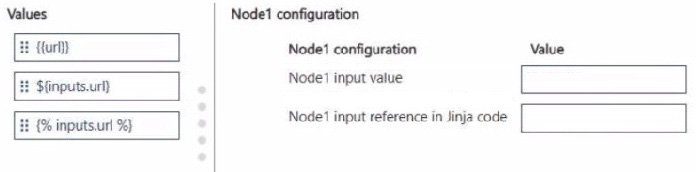
You plan to add a large language model (LLM) node named Node1 to Flow1. Node1 will use an input named url of type string to classify the URL provided as Flow1 input.
In Node1, you will add Jinja code to reference the value of its url input.
You need to ensure Node1 classifies the provided URL values as the Flow1 input.
How should you configure Node1? To answer, move the appropriate values to the correct Node1 configurations. You may use each value once, more than once, or not at all. You may need to move the split bar between panes or scroll to view content.
Drag each option into the matching blank slot.