Preview real exam questions, verified answers and available explanations before choosing a study plan.
Question 1
Single choice
Which of the following describes the correct hierarchy of the elements in the Object Repository tree structure?
A
Screen, Application, Version, UI Element.
B
Application, Version, Screen, UI Element.
C
Application, Screen, UI Element, Version.
D
Version, Application, Screen, UI Element.
Reveal answer detailsClose answer details
Correct answerB
Explanation
The Object Repository tree structure follows a hierarchical order that starts with the Application node, which represents the application or system that contains the UI elements to be automated. Under the Application node, there can be one or more Version nodes, which specify the version of the application or system. Each Version node can have one or more Screen nodes, which represent the different screens or windows of the application or system. Finally, each Screen node can have one or more UI Element nodes, which are the individual UI elements that can be used for automation. (UiPath Automation Developer study guide) References: Object Repository Tree Structure Object Repository
Question 2
Single choice
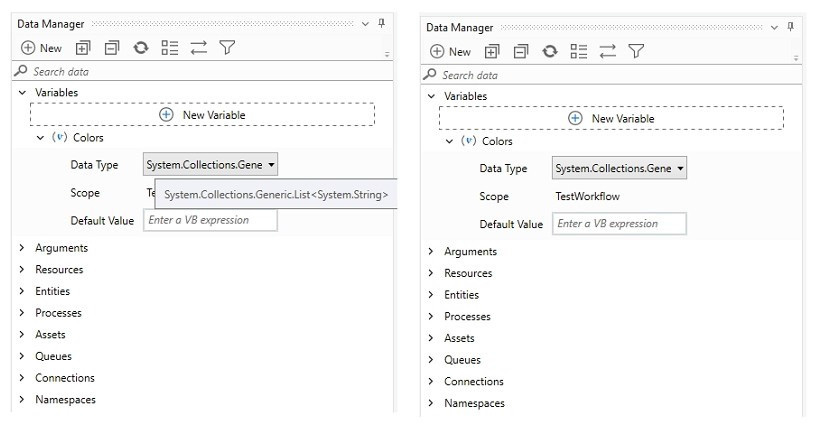
A developer wants to add items to a list of strings using the Invoke Method activity. The list is declared as follows:
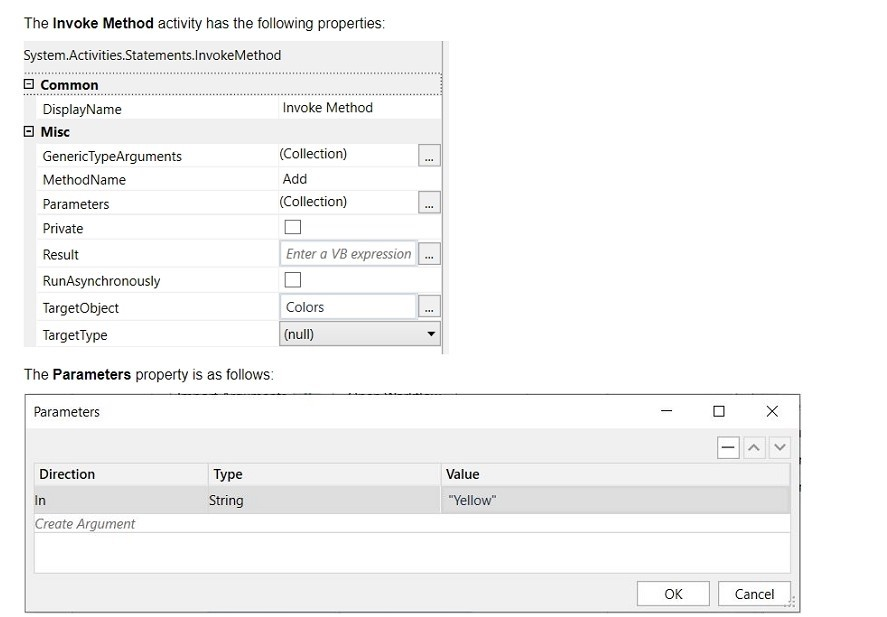
Based on the information shown in the exhibits, what is the outcome of the Invoke Method activity?
A
Colors will contain an item with the value "Colors: Yellow".
B
Colors will contain an item with an empty value.
C
Colors will contain an item with the value "Yellow".
D
An exception will be thrown.
Reveal answer detailsClose answer details
Correct answerC
Explanation
The Invoke Method activity is used to add items to a list of strings. In this case, the list is declared as "Colors". The outcome of the Invoke Method activity will be that the list "Colors" will contain an item with the value "Yellow". This is because the TargetObject property is set to "Colors", which is the list variable, the MethodName property is set to "Add", which is the method of the list class, and the Parameters property is set to "Yellow", which is the value to be added to the list. (UiPath Studio documentation1) References: 1: Invoke Method - UiPath Activities.
Question 3
Single choice
Which of the following is the correct method to manage assets for a specific folder in UiPath Orchestrator?
A
Open the folder's contextual menu by clicking the three-dot icon, then select "Link Resources" and choose "Asset".
B
Select "Tenant" from the sidebar menu, then click the "Assets" tab.
C
Navigate to "Tenant" > "Folders", choose the desired folder, and click the "Manage Access" tab.
D
Select the folder from the sidebar menu, then click the "Assets" tab.
Reveal answer detailsClose answer details
Correct answerD
Explanation
To manage assets for a specific folder in UiPath Orchestrator, you should select the folder from the sidebar menu and then click the "Assets" tab. This allows you to manage assets that are available to the processes running within the selected folder. Therefore, the correct answer is D. References: UiPath Orchestrator Guide: Managing Assets in Orchestrator
Question 4
Single choice
What types of authentication are supported by Connector Builder for Integration Service?
The types of authentication supported by Connector Builder for Integration Service include various OAuth 2.0 flows, Basic authentication, API Key, and Personal Access Token (PAT). The correct option that lists these authentication types is B, which includes OAuth 2.0 Authorization Code, OAuth 2.0 Authorization code with PKCE (Proof Key for Code Exchange), OAuth 2.0 Client Credentials, Basic, API Key, and Personal Access Token (PAT), along with No Authentication. References: UiPath Integration Service Documentation: Authentication Types in Integration Service
Question 5
Single choice
Which activity is part of the Modern Excel Activities in UiPath Studio?
A
Write Range
B
Execute Macro
C
Read Cell
D
For Each Excel Row
Reveal answer detailsClose answer details
Correct answerD
Explanation
"For Each Excel Row" is an activity that belongs to the Modern Excel Activities package in UiPath Studio. It is used to iterate through each row of an Excel file, allowing for operations to be performed on each row. This activity is part of the modern design experience and offers enhanced capabilities compared to classic Excel activities. Therefore, the correct answer is D. References: UiPath Activities Guide: For Each Excel Row
Question 6
Single choice
Which logging level includes the following information by default?
1. Execution Started log entry - generated every time a process is started. 2. Execution Ended log entry - generated every time a process is finalized. 3. Transaction Started log entry - generated every time a transaction item is obtained by the robot from Orchestrator. 4. Transaction Ended log entry - generated every time the robot sets the transaction status to either Success or Failed. 5. Activity Information log entry - generated every time an activity is started, faulted or finished inside a workflow. 6. Arguments and Variables Information log entry - show values of the variables and arguments that are used.
A
Critical
B
Trace
C
Verbose
D
Information
Reveal answer detailsClose answer details
Correct answerC
Explanation
The Verbose logging level includes all the information that is logged by the other levels, plus the values of the variables and arguments that are used in the process 1. By default, the Verbose level includes the following log entries2: Execution Started Execution Ended Transaction Started Transaction Ended Activity Information Arguments and Variables Information https://docs.uipath.com/robot/standalone/2023.4/user-guide/logging-and-log-levels
Question 7
Single choice
A developer stores value "25.11" in a String variable called "InvoiceTotal".
Which expression should be used to convert "InvoiceTotal" to a numeric format with the decimals included?
A
String.ToNumeric(Invoice Total)
B
Clnt(Invoice Total)
C
Invoice Total.IsNumeric
D
Double.Parse(InvoiceTotal)
Reveal answer detailsClose answer details
Correct answerD
Explanation
To convert a string variable "InvoiceTotal" to a numeric format that includes decimals, the expression Double.Parse(InvoiceTotal) should be used. This method converts the string representation of a number in a specified style and culture-specific format to its double-precision floating-point number equivalent. References: Microsoft .NET Documentation: Double.Parse Method
Question 8
Single choice
What is a recommended way to safely store credential information used in a UiPath automation project?
A
Store the username and password as hardcoded values with the Private option enabled on activities
B
Store the username and password in a Config.xlsx Excel file in the Studio project folder
C
Store the username and password in a single Orchestrator asset
D
Store the username and password in a Notepad file on the robot's local machine
Reveal answer detailsClose answer details
Correct answerC
Explanation
Storing the username and password in a single Orchestrator asset is a recommended way to safely store credential information used in a UiPath automation project. This way, the credentials are encrypted and stored in a secure location, and can be accessed by the robot at runtime. Orchestrator assets also allow for easy management and updating of the credentials without modifying the workflow. References: Assets and Managing Assets in Studio from UiPath documentation.
Question 9
Single choice
Which option best describes a process that is considered SEMI-AUTOMATION?
A
Processes where change is frequent, the system environment is volatile, and multiple manual (even non-digital) actions are required.
B
Processes that are digital and involve a highly static system and process environment, so that they can be easily broken into instructions and simple triggers can be defined.
C
Processes that are rather digital and can be automated, but use some technologies that are complex (such as OCR) or require advanced programming skills.
D
Processes that can be broken down into steps that can be clearly automated, and steps that need to stay manual (such as validations or usage of physical security tokens).
Reveal answer detailsClose answer details
Correct answerD
Explanation
A process that is considered semi-automation is one where certain steps can be automated while others must remain manual. This may include actions such as validations or the use of physical security tokens that cannot be automated. Therefore, the best description of semi-automation is option D.
Question 10
Single choice
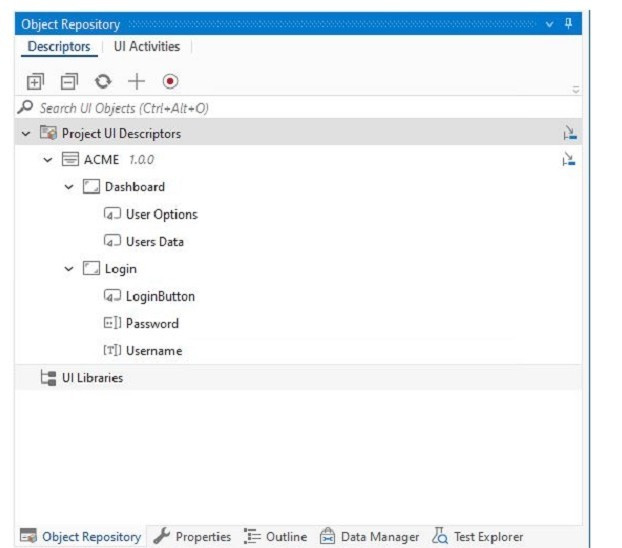
Which of the following options is correct regarding the below Object Repository tree structure?
A
One Screen Two Applications Five UI Elements
B
One Application Two UI Elements Five Screens
C
One Library One Application Two Screens Five UI Elements
D
One Application Two Screens Five UI Elements
Reveal answer detailsClose answer details
Correct answerD
Explanation
The Object Repository tree structure shows one application with two screens and five UI elements. The application is the top-level node, the screens are the second-level nodes, and the UI elements are the third-level nodes. The UI elements have properties, selectors, and images that define them. https://docs.uipath.com/studio/docs/about-the-object-repository
Question 11
Single choice
What is the most appropriate way to convert a designed process into a template after completing the project?
A
Use the "Save As" option to save the project as a new file type and manually change the file extension to create a template.
B
Use the Export as Template option from the UiPath Studio.
C
Create a new Template and move the activities from the existing process to the new Template.
D
There is no way the developer can do this.
Reveal answer detailsClose answer details
Correct answerB
Explanation
In UiPath Studio, to convert a designed process into a template, you should use the "Export as Template" option. This feature packages the project in such a way that it can be reused as a starting point for other automation projects. Therefore, the correct answer is B. References: UiPath Studio Guide: Project Templates
Question 12
Drag & drop
DRAG DROP
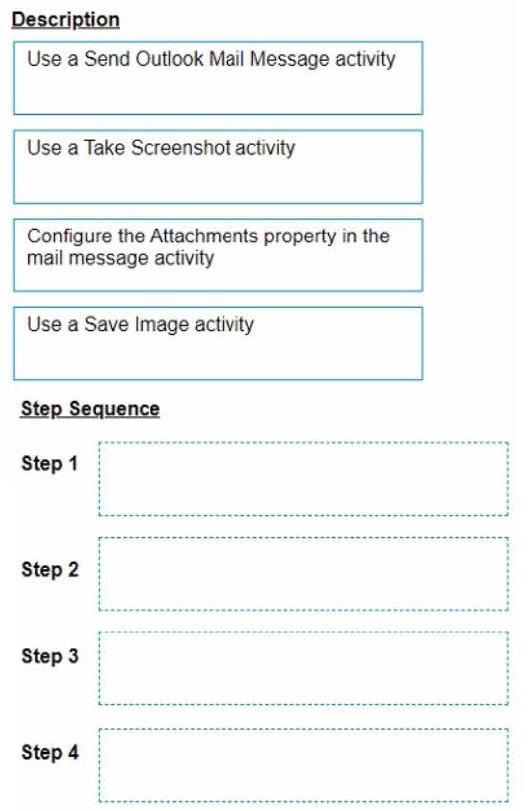
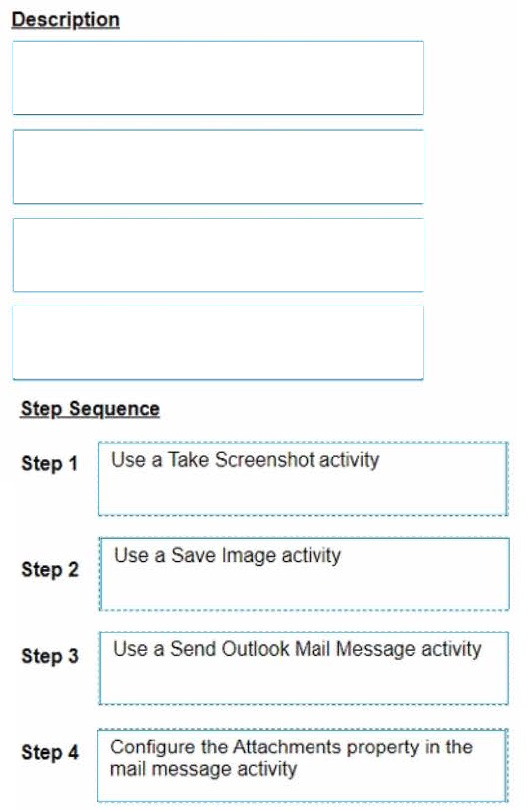
A developer needs to take a screenshot of the state of the machine while the robot is running and then send the screenshot as an email. What is the correct sequence of steps that should be performed?
Instructions: Drag the Description found on the left and drop on the correct Step found on the right.
Reveal answer detailsClose answer details
Explanation
The correct sequence of steps that should be performed is: Step 1 = Use a Take Screenshot activity to capture the state of the machine. The output is an Image variable, for example img_screenshot. Step 2 = Use a Save Image activity to save the image to a local file. Supply the FileName (e.g. screenshot.png) and the Image property should be the variable created in step 1.
Step 3 = Use a Send Outlook Mail Message activity to compose and send the email. Configure the Attachments property to include the file path of the image saved in step 2 (e.g. "C:\Users\username \screenshot.png"). Step 4 = Optionally, use a Delete File activity to delete the image file from the local drive after sending the email. Supply the Path property with the same file path as in step 3. For more information on how to use these activities in UiPath Studio 2021 10, you can refer to these documents: Take Screenshot Save Image Send Outlook Mail Message Delete File
Question 13
Single choice
In the Robotic Enterprise (RE) Framework, at which point should a developer log a clear message with the Logging Level set to "Information," adhering to the best practices for automating a production-level process?
A
Whenever an argument or value is used.
B
Whenever data is fetched from external sources.
C
Whenever an exception is caught in a Catch block.
D
Whenever the robot encounters an error on a Queue Item.
Reveal answer detailsClose answer details
Correct answerC
Explanation
Logging Level "Information" is used to log general information about the process execution, such as the start and end of a transaction 1. When an exception is caught in a Catch block, the developer should log a clear message with this level to indicate the type and source of the error, and the action taken to handle it2.
A developer examines a workflow in which filenames are stored within a collection. The collection is initialized with a single filename.
When adding a new filename to the collection, which collection variable type will cause an error?
A
System.Collections.Generic. Dictionary
B
System.Array
C
System. Data. DataTable
D
System.Collections.Generic.List
Reveal answer detailsClose answer details
Correct answerB
Question 15
Single choice
Which of the following activities can be used to get the state of a button (enabled/disabled)?
A
Get Attribute
B
Check App State
C
Find Element
D
Get Text
Reveal answer detailsClose answer details
Correct answerA
Explanation
The "Get Attribute" activity can be used to get the state of a button (enabled/disabled). This activity retrieves the value of a specified attribute of a UI element, and the "enabled" attribute can be used to determine if a button is currently enabled or disabled. References: UiPath Activities Guide: Get Attribute
Question 16
Single choice
Which of the following functionalities does UiPath Assistant provide?
A
Developing automation workflows in UiPath Studio.
B
Running, managing, and organizing automation workflows on the user's machine.
C
Scheduling and monitoring robot processes in Orchestrator.
D
Analyzing processes to determine optimal automation solutions.
Reveal answer detailsClose answer details
Correct answerB
Explanation
UiPath Assistant is a desktop tool that enables users to easily access, manage, and run automation workflows on their machines. It provides the following functionalities: Viewing all the available automations that the user can run, either from Orchestrator or locally. Adding automations to the launchpad for quick and easy access. Creating custom folders and sections to organize the automations according to the user's preferences. Running automations with a single click or using keyboard shortcuts. Launching robot-powered apps and managing action center tasks directly from the assistant. Customizing the assistant's appearance, name, and avatar to suit the user's personality. Viewing the status and progress of the running automations, as well as the history and logs of the past executions. Connecting to Orchestrator and synchronizing the automations and settings with the cloud. Accessing the help and feedback options, as well as the interactive guided tour. References: Software Robot Assistant - Desktop Automation | UiPath Robot - About UiPath Assistant - UiPath Documentation Portal
Question 17
Single choice
What is the default URL of the OCR server that runs the Computer Vision service?
A
https://server.uipath.com/
B
https://cvserver.uipath.com/
C
https://cv.uipath.com/
D
https://computervision.uipath.com/
Reveal answer detailsClose answer details
Correct answerC
Explanation
The default URL of the OCR server that runs the Computer Vision service is https://cv.uipath.com/. This is the endpoint of the UiPath Computer Vision Cloud service, which provides OCR capabilities for document understanding and UI automation 1. The other options are not valid URLs for the OCR server. References: Document Understanding - UiPath.DocumentUnderstanding.OCR.LocalServer Activities documentation, Introduction section
Question 18
Single choice
What is the main difference between an array and a list in UiPath?
A
An array is a fixed-size collection of elements of the same type while a list is a dynamic-sized collection of elements of the same type,
B
An array is a dynamic-sized collection of elements of the same type while a list is a fixed-size collection of elements of the same type.
C
An array is a fixed-size collection of elements of different types while a list is a dynamic-sized collection of elements of the same type.
D
An array is a fixed-size collection of elements of the same type while a list is a dynamic-sized
collection of elements of different types.
Reveal answer detailsClose answer details
Correct answerA
Explanation
The main difference between an array and a list in UiPath (and .NET in general) is that an array is a fixed-size collection of elements of the same type, whereas a list is a dynamic-sized collection, meaning it can grow or shrink in size as needed. Both arrays and lists hold elements of the same type, but lists offer more flexibility in terms of adding or removing elements after the collection has been created. References: UiPath Studio Guide: The Main Data Types in Studio
Question 19
Single choice
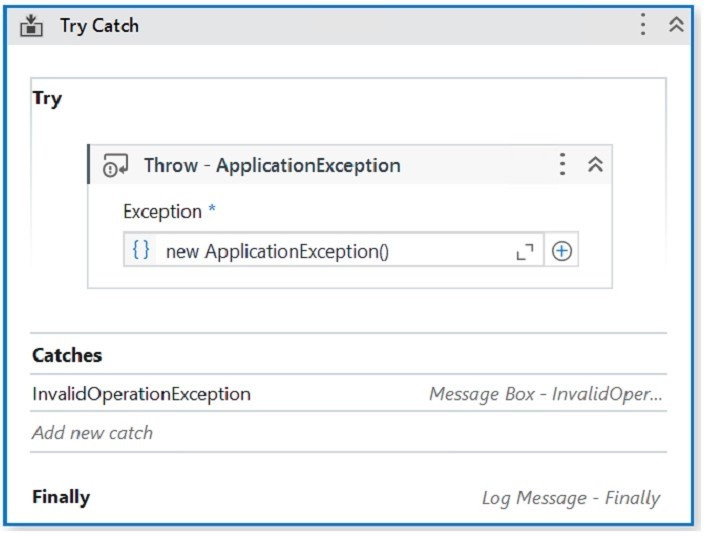
When encountering an ApplicationException, what occurs if the developer chooses InvalidOperationException as the exception handler within the Catches section of the Try Catch activity?
A
The Finally block is executed and the Catches section catches the exception.
B
A runtime error occurs and the Finally block is not executed.
C
No exceptions are happening and the workflow continues to execute.
D
No exception is thrown and the Finally block executes.
Reveal answer detailsClose answer details
Correct answerB
Explanation
The Try Catch activity is used to handle errors and exceptions that may occur during the execution of a workflow 1. It has three sections: Try, Catches, and Finally1. The Try section contains the activities that may throw an exception or an error. If an exception or an error occurs, the execution of the Try section is stopped and the control is passed to the Catches section 1. The Catches section contains one or more exception handlers that specify what type of exception or error to catch and what actions to perform when it is caught. The exception handlers are executed in order, from top to bottom, until a matching exception or error is found. If no matching exception or error is found, the execution of the workflow is stopped and a runtime error is thrown 1. The Finally section contains the activities that are always executed at the end of the Try Catch activity, regardless of whether an exception or error occurred or not. The Finally section is used to perform cleanup actions, such as closing applications, releasing resources, or logging messages 1. In your case, you have configured the properties for the Try Catch activity as follows: The Try section contains a Throw activity with an ApplicationException. The Catches section contains an InvalidOperationException with a Message Box activity and a Log Message activity. The Finally section is empty. This means that the Try Catch activity will throw an ApplicationException in the Try section and look for a matching exception handler in the Catches section. However, since you have chosen InvalidOperationException as the exception handler, which does not match the ApplicationException, the execution of the workflow will be stopped and a runtime error will occur. The Finally section will not be executed. Therefore, option B is correct. References: Try Catch - UiPath Documentation Portal.
Question 20
Single choice
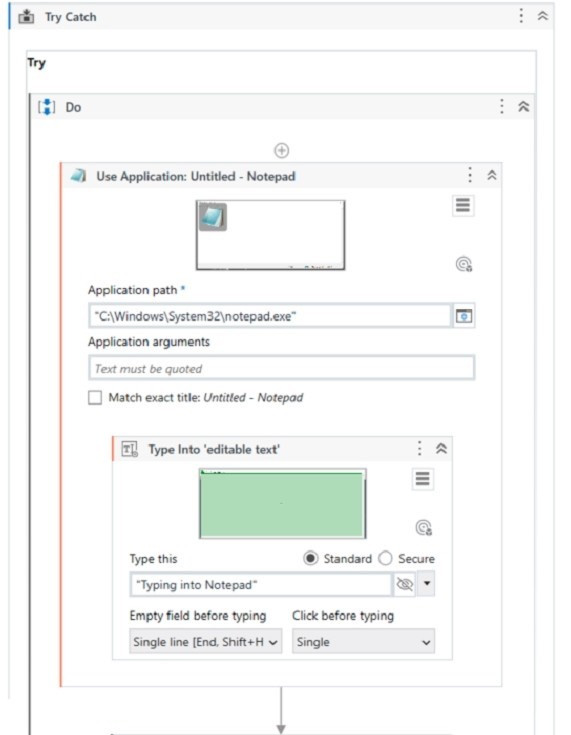
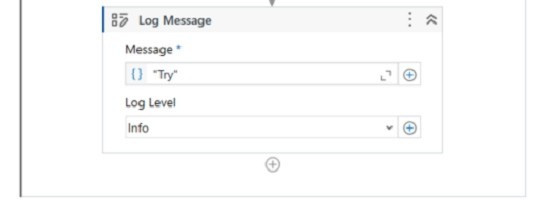
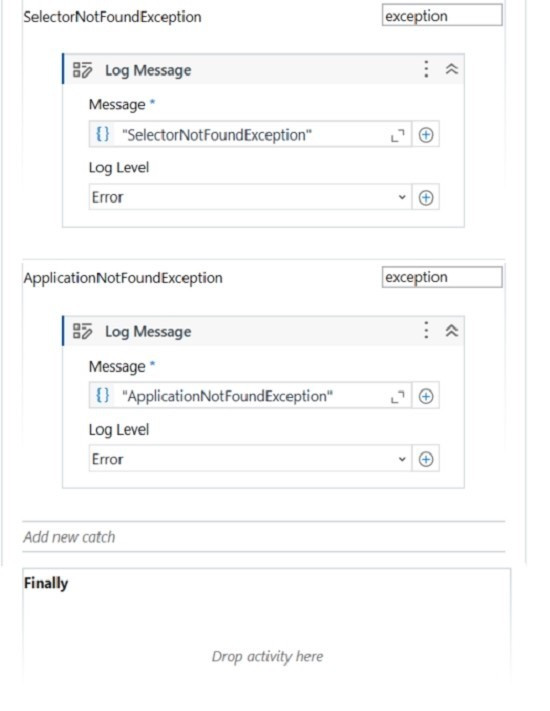
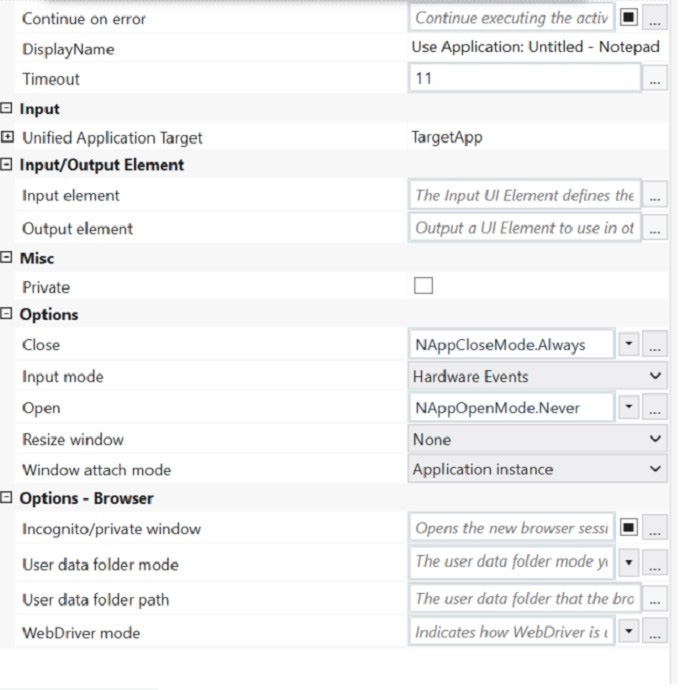
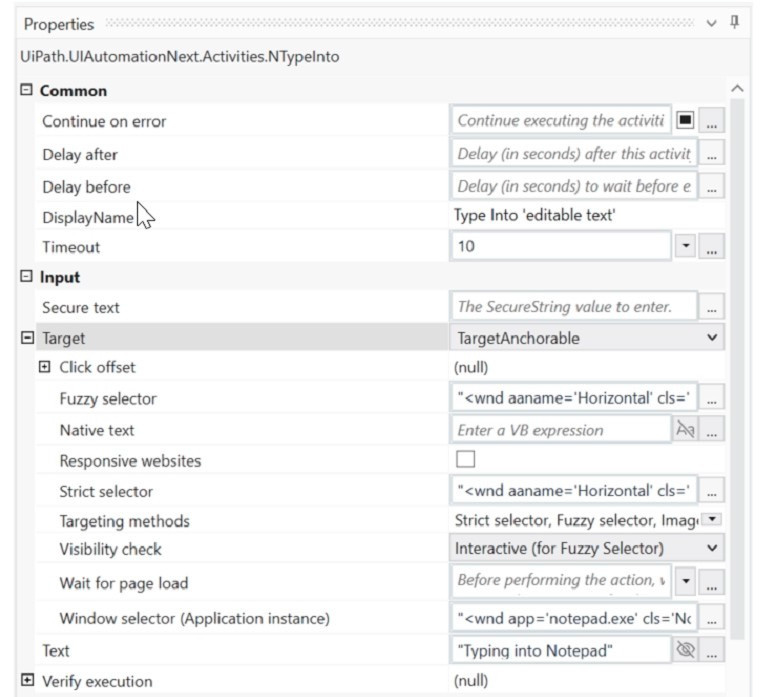
Review the following graphics:
If the automation is executed and Notepad.exe is not running, which Log Message text value is contained in the Output panel?
A
Exception
B
ApplicationNotFoundException
C
Try
D
SelectorNotFoundException
Reveal answer detailsClose answer details
Correct answerD
Explanation
Based on the image you sent, the automation process consists of four steps: opening Notepad.exe, typing some text, saving the file, and closing Notepad.exe. Each step has a Log Message activity that writes a text value to the Output panel. If Notepad.exe is not running, the first step will fail and throw an exception. The exception type is SelectorNotFoundException, because the Open Application activity cannot find the selector for Notepad.exe 1. Therefore, the Log Message text value that is contained in the Output panel is "SelectorNotFoundException", which is option D. References: Open Application documentation.
Question 21
Single choice
Which dependencies are automatically installed when a developer starts a blank process in UiPath Studio?
A
UiPath.Database.Activities and UiPath.Form.Activities.
B
UiPath.Python.Activities and UiPath.Word.Activities.
C
UiPath.System.Activities, UiPath.Excel.Activities, UiPath.Mail.Activities, UiPath.UIAutomation.Activities and UiPath. Testing.Activities.
D
UiPath.PDF.Activities and UiPath. Terminal.Activities.
Reveal answer detailsClose answer details
Correct answerC
Explanation
When a developer starts a blank process in UiPath Studio, the following dependencies are automatically installed by default: UiPath.System.Activities, UiPath.Excel.Activities, UiPath.Mail.Activities, UiPath.UIAutomation.Activities and UiPath. Testing.Activities. These dependencies provide the basic activities and packages that are needed for most automation projects, such as working with data types, files, Excel, email, user interface, and testing. The developer can also add or remove other dependencies as needed, depending on the specific requirements of the automation project. References: Creating a Basic Process, Managing Dependencies.
Question 22
Single choice
Which of the following statements is true about Global Constants?
A
Global Constants can be created only from the Data Manager panel.
B
Global Constants values can be modified during the automation execution.
C
Global Constants have a Direction property (In/Out).
D
Global Constants can be created from the Data Manager panel and from the Variables panel.
Reveal answer detailsClose answer details
Correct answerD
Explanation
Global Constants are a type of variables that can store data in a central location that can be accessed by all workflows and activities in a project. Unlike Global Variables, Global Constants have a fixed value that cannot be modified during the automation execution. Global Constants can be created from two places in UiPath Studio: the Data Manager panel and the Variables panel. The Data Manager panel is a new feature in UiPath 2022.10 that allows the developer to manage all the data elements of a project, such as variables, arguments, data types, and data sources. The Variables panel is a classic feature that allows the developer to create and edit variables for a specific workflow. To create a Global Constant from the Data Manager panel, the developer needs to select the Constants tab, click on the New Constant button, and fill in the required fields, such as name, type, value, and description. To create a Global Constant from the Variables panel, the developer needs to select the Global scope, click on the Create Variable button, and fill in the required fields, such as name, type, value, and description. In both cases, the developer needs to make sure that the Is Constant option is checked, which indicates that the variable is a constant and cannot be changed. References: Global Variables and Constants - UiPath Community Forum Data Manager - UiPath Studio Variables Panel - UiPath Studio
Question 23
Single choice
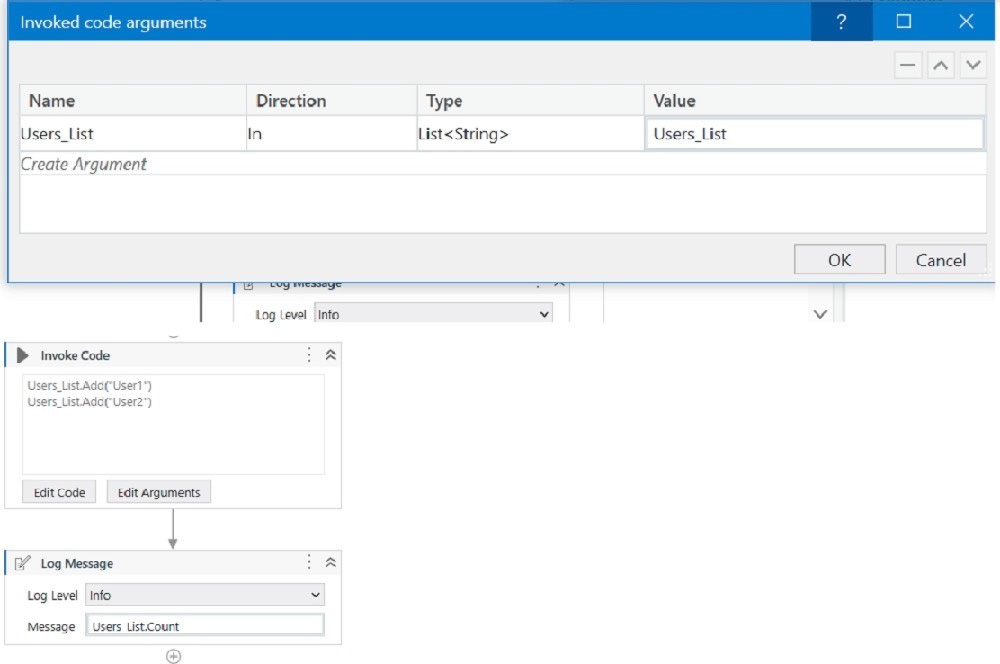
A developer has created a variable of type List of Strings named "UsersList", and initialized it with an empty list: "UsersList = new List(Of String)".
What is printed in the log message after the following Invoke Code is executed?
A
0
B
2
C
Object reference not set to an instance exception is thrown
D
System Argument Exception is thrown
Reveal answer detailsClose answer details
Correct answerA
Explanation
The code is adding two items to the list, but since the list is initialized as an empty list, the count will be 0. References: Data Manipulation with Lists and Dictionaries in Studio course, Lesson 2: Lists, Topic: Creating Lists How to initiate List<String[]>? forum post, Answer by @VishalS
Question 24
Single choice
A developer has defined an Int32 variable called IntVar The developer has written the following expression in a Log Message activity.
Convert. ToBoolean(lntVar)
If IntVar = 0, what is displayed in the Output panel after the execution of the Log Message activity?
A
The value True is displayed
B
A System ArgumentNullException is displayed
C
A System.InvalidCastException is displayed
D
The value False is displayed
Reveal answer detailsClose answer details
Correct answerD
Explanation
The Convert.ToBoolean method converts a specified value to a Boolean value, which can be either True or False. The method can accept different types of values, such as numbers, strings, objects, etc. However, the conversion rules depend on the type of the value. For numbers, the conversion rule is as follows1: If the value is zero, the method returns False. If the value is non-zero, the method returns True. Therefore, if the IntVar variable is an Int32 variable with the value 0, the expression Convert.ToBoolean(IntVar) will return False. The Log Message activity will display the value False in the Output panel after the execution. References: Convert.ToBoolean Method from UiPath documentation.
Question 25
Single choice
Where can you find a list of all the activities that support the Windows compatibility?
A
In the converted project's settings.
B
In the Official feed documentation.
C
In the Activities Guide.
D
In the Windows-Legacy project configuration.
Reveal answer detailsClose answer details
Correct answerC
Explanation
The Activities Guide is a comprehensive documentation of all the official UiPath activity packages that are available on the Official feed. The Activities Guide provides detailed information about each activity, such as the description, properties, examples, and compatibility. The compatibility section indicates which target frameworks are supported by the activity, such as Windows, Windows-Legacy, or Cross-platform. By browsing the Activities Guide, you can find a list of all the activities that support the Windows compatibility, as well as the minimum version required for each activity package. References: Activities Guide - UiPath Documentation Portal Deprecation of the Windows-Legacy Compatibility - UiPath Studio
Question 26
Single choice
What is the output type returned when using a Get Test Data Queue Item activity?
A
Dictionary
B
Dictionary
C
Object
D
Queueltem
Reveal answer detailsClose answer details
Correct answerA
Explanation
The Get Test Data Queue Item activity is used to retrieve a test data queue item from Orchestrator and store it in a variable. The output type of the variable is Dictionary, which means that it is a collection of key-value pairs that can be accessed by using the key name. For example, if the test data queue item contains the fields Name, Age, and Gender, then the output variable can be used to get the values of these fields by using expressions like outputVar("Name"), outputVar("Age"), or outputVar("Gender"). (UiPath Studio documentation1) References: 1: Get Test Data Queue Item - UiPath Activities.
Question 27
Single choice
What role do Triggers play in the UiPath Integration Service?
A
Manage connections between UiPath Studio and third-party applications.
B
Provide a mechanism for starting processes on a scheduled basis from Orchestrator.
C
Assist in the creation of automation projects by providing event-based activities.
D
Provide a mechanism for subscribing to specific events from third-party applications, automatically starting processes in Orchestrator.
Reveal answer detailsClose answer details
Correct answerD
Explanation
Triggers are a feature of UiPath Integration Service that allow you to react to key events in third-party systems, such as data updates, insertions, deletions, or custom events. By configuring triggers, you can start your UiPath processes automatically from Orchestrator when these events occur, enabling near real-time automation workflows across different applications. (UiPath Integration Service documentation1) References: 1: Integration Service - Triggers - UiPath Documentation Portal
Question 28
Single choice
What is the correct method to check how many resources are utilized in a personal workspace in UiPath Orchestrator?
A
Navigate to Tenant > Folders, click the All Workspaces tab, and then click Check Resources for the desired workspace.
B
Navigate to Tenant > Folders, click the Personal Workspaces tab, and then click See Usage for the desired workspace.
C
Navigate to Tenant > Users, click the Personal Workspaces tab, and then click Resources for the desired workspace.
D
Navigate to Tenant > Folders, click the Personal Workspaces tab, and then click Manage Resources for the desired workspace.
Reveal answer detailsClose answer details
Correct answerB
Explanation
To check how many resources are utilized in a personal workspace in UiPath Orchestrator, you can use the See Usage option that displays the current consumption of resources for each workspace. You can also see the total number of resources allocated to all personal workspaces in your tenant. (Orchestrator - Personal Workspaces - UiPath Academy) References: Orchestrator - Personal Workspaces - UiPath Documentation Portal Orchestrator - Personal Workspaces - UiPath Documentation Portal Difference Between Tenant and Personal Workspace - Studio - UiPath Forum Personal Workspace in UiPath Orchestrator - mumas UiPath Personal Workplaces in Orchestrator | UiPath Academy
Question 29
Single choice
A developer needs to create a repetitive process in the REFramework. Following the best practices, which action(s) should be performed to defend against potential robot crashes such as "out of memory"?
A
Build a script that compares current CPU usage values to a threshold and clears data as needed.
B
After every transaction, clear the transaction data, close the applications, and re-open the applications.
C
All "Invoke Workflow File" activities from the Main.xaml file should be marked with the Isolated option.
D
Add a "Clear Collection" activity at the beginning of the Process.xaml workflow.
Reveal answer detailsClose answer details
Correct answerB
Explanation
The REFramework is a template that helps developers create robust and reliable automation processes. It follows the best practices of error handling, logging, and retry mechanisms. One of the best practices is to clear the transaction data, close the applications, and re-open the applications after every transaction. This helps to avoid potential robot crashes such as "out of memory" by freeing up the memory and resources used by the applications. It also ensures that the applications are in a consistent state for the next transaction. References: REFramework documentation, REFramework best practices
Question 30
Single choice
A developer wants to create a process using a Flow Switch activity.
What is a feature of this activity?
A
Supports up to three expressions by default
B
Two Default cases can be defined
C
Default case is executed before the expression is evaluated
D
Default case is executed if no cases match the expression
Reveal answer detailsClose answer details
Correct answerD
Explanation
The Flow Switch activity is a conditional node that provides branching for the flow of control based on a match criterion when more than two alternative branches are required. The Flow Switch activity has an Expression property that can be of any type, and a dictionary of Cases that consists of pairs of keys and activities. The Flow Switch activity evaluates the Expression and compares it against each of the keys in the Cases. If a match is found, the corresponding activity is executed. If no match is found, the Default case is executed, if it is defined. The Default case is an optional activity that serves as a fallback option when none of the cases match the expression. Therefore, the answer is D. Default case is executed if no cases match the expression. References: Flow Switch, About Control Flow
Question 31
Single choice
What is an advantage of utilizing UiPath Orchestrator queues?
A
Capability to modify the retry count at the queue level after its creation.
B
Capability to track the status of Queue Items.
C
Allows several robots to handle the same Queue Item simultaneously.
D
Guarantees each queue is exclusively processed by a single robot, by default.
Reveal answer detailsClose answer details
Correct answerB
Explanation
One of the key advantages of using UiPath Orchestrator queues is the ability to track the status of Queue Items. This feature allows for monitoring the progress of items as they are processed by robots, including whether they are new, in progress, successful, failed, or retried, among other statuses. References: UiPath Orchestrator Guide: About Queues and Transactions
Question 32
Single choice
A developer is automating an invoice process for the finance department using a Dispatcher and Performer model with access to Orchestrator. New invoices are stored in a shared folder each morning Each invoice needs to be processed separately in the finance system as a single unit of work After each invoice is processed in the finance system, a unique output ID must be emailed to the finance team's email address.
How should the developer store the relevant data in Orchestrator?
A
Upload individual invoice data and the finance team's email address as Specific Data in Queue Items
B
Upload the finance team's email address as Specific Data in Queue Items Create an asset for each individual invoice data field
C
Create an asset for each piece of invoice data as well as for the finance team's email address
D
Upload individual invoice data as Specific Data in Queue Items Create an asset for the finance team's email address
Reveal answer detailsClose answer details
Correct answerD
Explanation
The developer should store the relevant data in Orchestrator as follows: Upload individual invoice data as Specific Data in Queue Items. The Specific Data is a collection of key-value pairs that can store additional information for each queue item, such as the invoice number, date, amount, etc. The Specific Data can be added to the queue items using the Add Queue Item activity in the Dispatcher workflow. The Specific Data can be retrieved from the queue items using the Get Transaction Item activity in the Performer workflow. The Specific Data can be used to process each invoice separately in the finance system as a single unit of work 3. Create an asset for the finance team's email address. An asset is a global variable that can store a specific value, such as a text, a number, a boolean, or a credential. An asset can be created and managed in Orchestrator, and accessed by the robots using the Get Asset activity. An asset can be used to store a value that is common for all the queue items, such as the finance team's email address. The asset can be used to email the unique output ID to the finance team after each invoice is processed in the finance system 4. References: About Queues and Transactions and About Assets from UiPath documentation.
Question 33
Single choice
A developer is working with a Purchase Order automation process. The number of shipped containers and the number of items in each container are extracted in two strings, "ShippedContainers" and "ItemsPerContainer". The robot must calculate the total number of items in all shipped containers, as an Integer.
Which expression is suitable for calculating the total number of boxes?
This expression is suitable for calculating the total number of boxes because it converts both strings to integers using the Convert.Tolnt32 method, which is a built-in method in .NET that can handle various formats of numeric strings 1. Then, it multiplies the two integers to get the total number of boxes as an integer. The other expressions are not suitable because they either use incorrect syntax or methods that do not exist or are not reliable for converting strings to integers. References: 1: Convert.Tolnt32 Method
Question 34
Single choice
What functionality can the developer use to improve the reliability of the Type Into activity for text input fields that are impacted by changing orientations?
A
Highlight Elements
B
Find Element
C
Anchor
D
Delay Before
Reveal answer detailsClose answer details
Correct answerC
Explanation
The developer can use the Anchor functionality to improve the reliability of the Type Into activity for text input fields that are impacted by changing orientations. This is because the Anchor functionality allows the developer to specify a particular element as a reference point for the Type Into activity. This ensures that the activity will always be performed in the correct location, even if the orientation of the text input fields changes. References: Type Into - UiPath Activities Anchor Base - UiPath Activities UiPath Anchor Base Tutorial & AnchorPosition Example
Question 35
Single choice
At indication time, the Strict Selector has the following functionalities available:
A
Open in UiExplorer, Copy to clipboard, Show all matches.
B
Refresh, Open in UiExplorer, Copy to clipboard.
C
Accuracy, Open in UiExplorer, Copy to clipboard, Show all matches.
D
Ignore text, Copy to clipboard, Show all matches.
Reveal answer detailsClose answer details
Correct answerC
Explanation
The Strict Selector option allows you to fine-tune the selector by adjusting the accuracy level and showing all the matches in the UI Explorer. The other options are not available at indication time. References: 3: UI Explorer, Topic: Strict Selector Uipath Associate Certification UiRPA Question Latest course, Section 2: UI Automation,
Question 36
Single choice
What is a prerequisite for performing Remote Debugging using a Remote Machine Connection?
A
Studio and the remote robot must be connected to the same Orchestrator tenant.
B
The same user must be signed in Studio and the remote robot.
C
Studio, the remote robot, and Orchestrator are running version 2021.10 or later.
D
TCP/IP connectivity exists between the Studio machine and the remote machine.
Reveal answer detailsClose answer details
Correct answerD
Explanation
Remote Debugging is a feature that allows you to debug a process that is running on a remote machine or robot from your Studio1. To use Remote Debugging, you need to have a Remote Machine Connection, which is a connection type that enables you to interact with a remote machine using its IP address and port number 2. The prerequisite for performing Remote Debugging using a Remote Machine Connection is that TCP/IP connectivity exists between the Studio machine and the remote machine 3. TCP/IP is a protocol that defines how data is transmitted and received over a network 4. Without TCP/IP connectivity, the Studio machine cannot communicate with the remote machine and cannot debug the process. Option A is incorrect because Studio and the remote robot do not need to be connected to the same Orchestrator tenant for Remote Debugging using a Remote Machine Connection5. Option B is incorrect because the same user does not need to be signed in Studio and the remote robot for Remote Debugging using a Remote Machine Connection. Option C is incorrect because Remote Debugging using a Remote Machine Connection does not require Studio, the remote robot, and Orchestrator to be running version 2021.10 or later. Remote Debugging using a Remote Machine Connection was introduced in version 2020.10.
Question 37
Single choice
Which of the following demonstrates the correct syntax for using the Vb.Net "If" Operator?
A
If(condition1, valuelfTrue, valuelfFalse)
B
If(condition1, valuelfTrue) Elself(valuelfFalse)
C
If condition1 Then valuelfTrue Elself valuelfFalse
D
valuelfTrue If condition1 Else valuelfFalse
Reveal answer detailsClose answer details
Correct answerA
Question 38
Single choice
A developer is using the Step Out action in Debug mode to review a process as shown in the following exhibit.
Which functionality does the Step Out action provide?
A
Pauses at an activity that caused an error
B
Re-executes the activity which threw an exception
C
Executes only one activity at a time and then pauses
D
Executes activities in the current container and then pauses
Reveal answer detailsClose answer details
Correct answerD
Explanation
The Step Out action is used for stepping out and pausing the execution at the level of the current container. Step Out completes the execution of activities in the current container, before pausing the debugging. This option works well with nested sequences 1. In the exhibit, the Step Out action will execute all the activities inside the Sequence container and then pause at the next activity in the Main workflow. References: Debugging Actions from UiPath documentation.
Question 39
Single choice
When configuring the Max # of retries for the queue in Orchestrator to "1" for your process, and the queue has 5 transaction items. At runtime, the first transaction item throws a Business Rule Exception.
How does the process proceed?
A
Transaction is not retried and the process stops.
B
Transaction is not retried but remaining transactions continue processing.
C
Transaction is retried only one time.
D
Transaction is retried multiple times until processed successfully.
Reveal answer detailsClose answer details
Correct answerB
Explanation
When a transaction item throws a Business Rule Exception, it means that the item does not meet the business requirements and cannot be processed further 1. Therefore, the transaction item is marked as failed and not retried, regardless of the Max # of retries setting for the queue 2. However, the process does not stop and continues with the remaining transaction items in the queue 3. References: Business Exception vs System Exception forum post, Answer by @loginerror RE Framework MaxRetryNumber and Orchestrator Queue Max # Rertry, again forum post, Answer by @Arpit_Kesharwani
Which of the following describes the correct hierarchy of the elements in the Object Repository tree structure?
A.
Screen, Application, Version, UI Element.
B.
Application, Version, Screen, UI Element.
C.
Application, Screen, UI Element, Version.
D.
Version, Application, Screen, UI Element.
Correct Answer: B
Explanation
Explanation/Reference:
The Object Repository tree structure follows a hierarchical order that starts with the Application node, which represents the application or system that contains the UI elements to be automated. Under the Application node, there can be one or more Version nodes, which specify the version of the application or system. Each Version node can have one or more Screen nodes, which represent the different screens or windows of the application or system. Finally, each Screen node can have one or more UI Element nodes, which are the individual UI elements that can be used for automation. (UiPath Automation Developer study guide) References: Object Repository Tree Structure Object Repository
QUESTION 2
A developer wants to add items to a list of strings using the Invoke Method activity. The list is declared as follows:
Based on the information shown in the exhibits, what is the outcome of the Invoke Method activity?
A.
Colors will contain an item with the value "Colors: Yellow".
B.
Colors will contain an item with an empty value.
C.
Colors will contain an item with the value "Yellow".
D.
An exception will be thrown.
Correct Answer: C
Explanation
Explanation/Reference:
The Invoke Method activity is used to add items to a list of strings. In this case, the list is declared as "Colors". The outcome of the Invoke Method activity will be that the list "Colors" will contain an item with the value "Yellow". This is because the TargetObject property is set to "Colors", which is the list variable, the MethodName property is set to "Add", which is the method of the list class, and the Parameters property is set to "Yellow", which is the value to be added to the list. (UiPath Studio documentation1) References: 1: Invoke Method - UiPath Activities.
QUESTION 3
Which of the following is the correct method to manage assets for a specific folder in UiPath Orchestrator?
A.
Open the folder's contextual menu by clicking the three-dot icon, then select "Link Resources" and choose "Asset".
B.
Select "Tenant" from the sidebar menu, then click the "Assets" tab.
C.
Navigate to "Tenant" > "Folders", choose the desired folder, and click the "Manage Access" tab.
D.
Select the folder from the sidebar menu, then click the "Assets" tab.
Correct Answer: D
Explanation
Explanation/Reference:
To manage assets for a specific folder in UiPath Orchestrator, you should select the folder from the sidebar menu and then click the "Assets" tab. This allows you to manage assets that are available to the processes running within the selected folder. Therefore, the correct answer is D. References: UiPath Orchestrator Guide: Managing Assets in Orchestrator
QUESTION 4
What types of authentication are supported by Connector Builder for Integration Service?
The types of authentication supported by Connector Builder for Integration Service include various OAuth 2.0 flows, Basic authentication, API Key, and Personal Access Token (PAT). The correct option that lists these authentication types is B, which includes OAuth 2.0 Authorization Code, OAuth 2.0 Authorization code with PKCE (Proof Key for Code Exchange), OAuth 2.0 Client Credentials, Basic, API Key, and Personal Access Token (PAT), along with No Authentication. References: UiPath Integration Service Documentation: Authentication Types in Integration Service
QUESTION 5
Which activity is part of the Modern Excel Activities in UiPath Studio?
A.
Write Range
B.
Execute Macro
C.
Read Cell
D.
For Each Excel Row
Correct Answer: D
Explanation
Explanation/Reference:
"For Each Excel Row" is an activity that belongs to the Modern Excel Activities package in UiPath Studio. It is used to iterate through each row of an Excel file, allowing for operations to be performed on each row. This activity is part of the modern design experience and offers enhanced capabilities compared to classic Excel activities. Therefore, the correct answer is D. References: UiPath Activities Guide: For Each Excel Row
QUESTION 6
Which logging level includes the following information by default?
1. Execution Started log entry - generated every time a process is started. 2. Execution Ended log entry - generated every time a process is finalized. 3. Transaction Started log entry - generated every time a transaction item is obtained by the robot from Orchestrator. 4. Transaction Ended log entry - generated every time the robot sets the transaction status to either Success or Failed. 5. Activity Information log entry - generated every time an activity is started, faulted or finished inside a workflow. 6. Arguments and Variables Information log entry - show values of the variables and arguments that are used.
A.
Critical
B.
Trace
C.
Verbose
D.
Information
Correct Answer: C
Explanation
Explanation/Reference:
The Verbose logging level includes all the information that is logged by the other levels, plus the values of the variables and arguments that are used in the process 1. By default, the Verbose level includes the following log entries2: Execution Started Execution Ended Transaction Started Transaction Ended Activity Information Arguments and Variables Information https://docs.uipath.com/robot/standalone/2023.4/user-guide/logging-and-log-levels
QUESTION 7
A developer stores value "25.11" in a String variable called "InvoiceTotal".
Which expression should be used to convert "InvoiceTotal" to a numeric format with the decimals included?
A.
String.ToNumeric(Invoice Total)
B.
Clnt(Invoice Total)
C.
Invoice Total.IsNumeric
D.
Double.Parse(InvoiceTotal)
Correct Answer: D
Explanation
Explanation/Reference:
To convert a string variable "InvoiceTotal" to a numeric format that includes decimals, the expression Double.Parse(InvoiceTotal) should be used. This method converts the string representation of a number in a specified style and culture-specific format to its double-precision floating-point number equivalent. References: Microsoft .NET Documentation: Double.Parse Method
QUESTION 8
What is a recommended way to safely store credential information used in a UiPath automation project?
A.
Store the username and password as hardcoded values with the Private option enabled on activities
B.
Store the username and password in a Config.xlsx Excel file in the Studio project folder
C.
Store the username and password in a single Orchestrator asset
D.
Store the username and password in a Notepad file on the robot's local machine
Correct Answer: C
Explanation
Explanation/Reference:
Storing the username and password in a single Orchestrator asset is a recommended way to safely store credential information used in a UiPath automation project. This way, the credentials are encrypted and stored in a secure location, and can be accessed by the robot at runtime. Orchestrator assets also allow for easy management and updating of the credentials without modifying the workflow. References: Assets and Managing Assets in Studio from UiPath documentation.
QUESTION 9
Which option best describes a process that is considered SEMI-AUTOMATION?
A.
Processes where change is frequent, the system environment is volatile, and multiple manual (even non-digital) actions are required.
B.
Processes that are digital and involve a highly static system and process environment, so that they can be easily broken into instructions and simple triggers can be defined.
C.
Processes that are rather digital and can be automated, but use some technologies that are complex (such as OCR) or require advanced programming skills.
D.
Processes that can be broken down into steps that can be clearly automated, and steps that need to stay manual (such as validations or usage of physical security tokens).
Correct Answer: D
Explanation
Explanation/Reference:
A process that is considered semi-automation is one where certain steps can be automated while others must remain manual. This may include actions such as validations or the use of physical security tokens that cannot be automated. Therefore, the best description of semi-automation is option D.
QUESTION 10
Which of the following options is correct regarding the below Object Repository tree structure?
A.
One Screen Two Applications Five UI Elements
B.
One Application Two UI Elements Five Screens
C.
One Library One Application Two Screens Five UI Elements
D.
One Application Two Screens Five UI Elements
Correct Answer: D
Explanation
Explanation/Reference:
The Object Repository tree structure shows one application with two screens and five UI elements. The application is the top-level node, the screens are the second-level nodes, and the UI elements are the third-level nodes. The UI elements have properties, selectors, and images that define them. https://docs.uipath.com/studio/docs/about-the-object-repository
QUESTION 11
What is the most appropriate way to convert a designed process into a template after completing the project?
A.
Use the "Save As" option to save the project as a new file type and manually change the file extension to create a template.
B.
Use the Export as Template option from the UiPath Studio.
C.
Create a new Template and move the activities from the existing process to the new Template.
D.
There is no way the developer can do this.
Correct Answer: B
Explanation
Explanation/Reference:
In UiPath Studio, to convert a designed process into a template, you should use the "Export as Template" option. This feature packages the project in such a way that it can be reused as a starting point for other automation projects. Therefore, the correct answer is B. References: UiPath Studio Guide: Project Templates
QUESTION 12
DRAG DROP
A developer needs to take a screenshot of the state of the machine while the robot is running and then send the screenshot as an email. What is the correct sequence of steps that should be performed?
Instructions: Drag the Description found on the left and drop on the correct Step found on the right.
Correct Answer:
Explanation
Explanation/Reference:
The correct sequence of steps that should be performed is: Step 1 = Use a Take Screenshot activity to capture the state of the machine. The output is an Image variable, for example img_screenshot. Step 2 = Use a Save Image activity to save the image to a local file. Supply the FileName (e.g. screenshot.png) and the Image property should be the variable created in step 1.
Step 3 = Use a Send Outlook Mail Message activity to compose and send the email. Configure the Attachments property to include the file path of the image saved in step 2 (e.g. "C:\Users\username \screenshot.png"). Step 4 = Optionally, use a Delete File activity to delete the image file from the local drive after sending the email. Supply the Path property with the same file path as in step 3. For more information on how to use these activities in UiPath Studio 2021 10, you can refer to these documents: Take Screenshot Save Image Send Outlook Mail Message Delete File
QUESTION 13
In the Robotic Enterprise (RE) Framework, at which point should a developer log a clear message with the Logging Level set to "Information," adhering to the best practices for automating a production-level process?
A.
Whenever an argument or value is used.
B.
Whenever data is fetched from external sources.
C.
Whenever an exception is caught in a Catch block.
D.
Whenever the robot encounters an error on a Queue Item.
Correct Answer: C
Explanation
Explanation/Reference:
Logging Level "Information" is used to log general information about the process execution, such as the start and end of a transaction 1. When an exception is caught in a Catch block, the developer should log a clear message with this level to indicate the type and source of the error, and the action taken to handle it2.
A developer examines a workflow in which filenames are stored within a collection. The collection is initialized with a single filename.
When adding a new filename to the collection, which collection variable type will cause an error?
A.
System.Collections.Generic. Dictionary
B.
System.Array
C.
System. Data. DataTable
D.
System.Collections.Generic.List
Correct Answer: B
QUESTION 15
Which of the following activities can be used to get the state of a button (enabled/disabled)?
A.
Get Attribute
B.
Check App State
C.
Find Element
D.
Get Text
Correct Answer: A
Explanation
Explanation/Reference:
The "Get Attribute" activity can be used to get the state of a button (enabled/disabled). This activity retrieves the value of a specified attribute of a UI element, and the "enabled" attribute can be used to determine if a button is currently enabled or disabled. References: UiPath Activities Guide: Get Attribute
QUESTION 16
Which of the following functionalities does UiPath Assistant provide?
A.
Developing automation workflows in UiPath Studio.
B.
Running, managing, and organizing automation workflows on the user's machine.
C.
Scheduling and monitoring robot processes in Orchestrator.
D.
Analyzing processes to determine optimal automation solutions.
Correct Answer: B
Explanation
Explanation/Reference:
UiPath Assistant is a desktop tool that enables users to easily access, manage, and run automation workflows on their machines. It provides the following functionalities: Viewing all the available automations that the user can run, either from Orchestrator or locally. Adding automations to the launchpad for quick and easy access. Creating custom folders and sections to organize the automations according to the user's preferences. Running automations with a single click or using keyboard shortcuts. Launching robot-powered apps and managing action center tasks directly from the assistant. Customizing the assistant's appearance, name, and avatar to suit the user's personality. Viewing the status and progress of the running automations, as well as the history and logs of the past executions. Connecting to Orchestrator and synchronizing the automations and settings with the cloud. Accessing the help and feedback options, as well as the interactive guided tour. References: Software Robot Assistant - Desktop Automation | UiPath Robot - About UiPath Assistant - UiPath Documentation Portal
QUESTION 17
What is the default URL of the OCR server that runs the Computer Vision service?
A.
https://server.uipath.com/
B.
https://cvserver.uipath.com/
C.
https://cv.uipath.com/
D.
https://computervision.uipath.com/
Correct Answer: C
Explanation
Explanation/Reference:
The default URL of the OCR server that runs the Computer Vision service is https://cv.uipath.com/. This is the endpoint of the UiPath Computer Vision Cloud service, which provides OCR capabilities for document understanding and UI automation 1. The other options are not valid URLs for the OCR server. References: Document Understanding - UiPath.DocumentUnderstanding.OCR.LocalServer Activities documentation, Introduction section
QUESTION 18
What is the main difference between an array and a list in UiPath?
A.
An array is a fixed-size collection of elements of the same type while a list is a dynamic-sized collection of elements of the same type,
B.
An array is a dynamic-sized collection of elements of the same type while a list is a fixed-size collection of elements of the same type.
C.
An array is a fixed-size collection of elements of different types while a list is a dynamic-sized collection of elements of the same type.
D.
An array is a fixed-size collection of elements of the same type while a list is a dynamic-sized
collection of elements of different types.
Correct Answer: A
Explanation
Explanation/Reference:
The main difference between an array and a list in UiPath (and .NET in general) is that an array is a fixed-size collection of elements of the same type, whereas a list is a dynamic-sized collection, meaning it can grow or shrink in size as needed. Both arrays and lists hold elements of the same type, but lists offer more flexibility in terms of adding or removing elements after the collection has been created. References: UiPath Studio Guide: The Main Data Types in Studio
QUESTION 19
When encountering an ApplicationException, what occurs if the developer chooses InvalidOperationException as the exception handler within the Catches section of the Try Catch activity?
A.
The Finally block is executed and the Catches section catches the exception.
B.
A runtime error occurs and the Finally block is not executed.
C.
No exceptions are happening and the workflow continues to execute.
D.
No exception is thrown and the Finally block executes.
Correct Answer: B
Explanation
Explanation/Reference:
The Try Catch activity is used to handle errors and exceptions that may occur during the execution of a workflow 1. It has three sections: Try, Catches, and Finally1. The Try section contains the activities that may throw an exception or an error. If an exception or an error occurs, the execution of the Try section is stopped and the control is passed to the Catches section 1. The Catches section contains one or more exception handlers that specify what type of exception or error to catch and what actions to perform when it is caught. The exception handlers are executed in order, from top to bottom, until a matching exception or error is found. If no matching exception or error is found, the execution of the workflow is stopped and a runtime error is thrown 1. The Finally section contains the activities that are always executed at the end of the Try Catch activity, regardless of whether an exception or error occurred or not. The Finally section is used to perform cleanup actions, such as closing applications, releasing resources, or logging messages 1. In your case, you have configured the properties for the Try Catch activity as follows: The Try section contains a Throw activity with an ApplicationException. The Catches section contains an InvalidOperationException with a Message Box activity and a Log Message activity. The Finally section is empty. This means that the Try Catch activity will throw an ApplicationException in the Try section and look for a matching exception handler in the Catches section. However, since you have chosen InvalidOperationException as the exception handler, which does not match the ApplicationException, the execution of the workflow will be stopped and a runtime error will occur. The Finally section will not be executed. Therefore, option B is correct. References: Try Catch - UiPath Documentation Portal.
QUESTION 20
Review the following graphics:
If the automation is executed and Notepad.exe is not running, which Log Message text value is contained in the Output panel?
A.
Exception
B.
ApplicationNotFoundException
C.
Try
D.
SelectorNotFoundException
Correct Answer: D
Explanation
Explanation/Reference:
Based on the image you sent, the automation process consists of four steps: opening Notepad.exe, typing some text, saving the file, and closing Notepad.exe. Each step has a Log Message activity that writes a text value to the Output panel. If Notepad.exe is not running, the first step will fail and throw an exception. The exception type is SelectorNotFoundException, because the Open Application activity cannot find the selector for Notepad.exe 1. Therefore, the Log Message text value that is contained in the Output panel is "SelectorNotFoundException", which is option D. References: Open Application documentation.
QUESTION 21
Which dependencies are automatically installed when a developer starts a blank process in UiPath Studio?
A.
UiPath.Database.Activities and UiPath.Form.Activities.
B.
UiPath.Python.Activities and UiPath.Word.Activities.
C.
UiPath.System.Activities, UiPath.Excel.Activities, UiPath.Mail.Activities, UiPath.UIAutomation.Activities and UiPath. Testing.Activities.
D.
UiPath.PDF.Activities and UiPath. Terminal.Activities.
Correct Answer: C
Explanation
Explanation/Reference:
When a developer starts a blank process in UiPath Studio, the following dependencies are automatically installed by default: UiPath.System.Activities, UiPath.Excel.Activities, UiPath.Mail.Activities, UiPath.UIAutomation.Activities and UiPath. Testing.Activities. These dependencies provide the basic activities and packages that are needed for most automation projects, such as working with data types, files, Excel, email, user interface, and testing. The developer can also add or remove other dependencies as needed, depending on the specific requirements of the automation project. References: Creating a Basic Process, Managing Dependencies.
QUESTION 22
Which of the following statements is true about Global Constants?
A.
Global Constants can be created only from the Data Manager panel.
B.
Global Constants values can be modified during the automation execution.
C.
Global Constants have a Direction property (In/Out).
D.
Global Constants can be created from the Data Manager panel and from the Variables panel.
Correct Answer: D
Explanation
Explanation/Reference:
Global Constants are a type of variables that can store data in a central location that can be accessed by all workflows and activities in a project. Unlike Global Variables, Global Constants have a fixed value that cannot be modified during the automation execution. Global Constants can be created from two places in UiPath Studio: the Data Manager panel and the Variables panel. The Data Manager panel is a new feature in UiPath 2022.10 that allows the developer to manage all the data elements of a project, such as variables, arguments, data types, and data sources. The Variables panel is a classic feature that allows the developer to create and edit variables for a specific workflow. To create a Global Constant from the Data Manager panel, the developer needs to select the Constants tab, click on the New Constant button, and fill in the required fields, such as name, type, value, and description. To create a Global Constant from the Variables panel, the developer needs to select the Global scope, click on the Create Variable button, and fill in the required fields, such as name, type, value, and description. In both cases, the developer needs to make sure that the Is Constant option is checked, which indicates that the variable is a constant and cannot be changed. References: Global Variables and Constants - UiPath Community Forum Data Manager - UiPath Studio Variables Panel - UiPath Studio
QUESTION 23
A developer has created a variable of type List of Strings named "UsersList", and initialized it with an empty list: "UsersList = new List(Of String)".
What is printed in the log message after the following Invoke Code is executed?
A.
0
B.
2
C.
Object reference not set to an instance exception is thrown
D.
System Argument Exception is thrown
Correct Answer: A
Explanation
Explanation/Reference:
The code is adding two items to the list, but since the list is initialized as an empty list, the count will be 0. References: Data Manipulation with Lists and Dictionaries in Studio course, Lesson 2: Lists, Topic: Creating Lists How to initiate List<String[]>? forum post, Answer by @VishalS
QUESTION 24
A developer has defined an Int32 variable called IntVar The developer has written the following expression in a Log Message activity.
Convert. ToBoolean(lntVar)
If IntVar = 0, what is displayed in the Output panel after the execution of the Log Message activity?
A.
The value True is displayed
B.
A System ArgumentNullException is displayed
C.
A System.InvalidCastException is displayed
D.
The value False is displayed
Correct Answer: D
Explanation
Explanation/Reference:
The Convert.ToBoolean method converts a specified value to a Boolean value, which can be either True or False. The method can accept different types of values, such as numbers, strings, objects, etc. However, the conversion rules depend on the type of the value. For numbers, the conversion rule is as follows1: If the value is zero, the method returns False. If the value is non-zero, the method returns True. Therefore, if the IntVar variable is an Int32 variable with the value 0, the expression Convert.ToBoolean(IntVar) will return False. The Log Message activity will display the value False in the Output panel after the execution. References: Convert.ToBoolean Method from UiPath documentation.
QUESTION 25
Where can you find a list of all the activities that support the Windows compatibility?
A.
In the converted project's settings.
B.
In the Official feed documentation.
C.
In the Activities Guide.
D.
In the Windows-Legacy project configuration.
Correct Answer: C
Explanation
Explanation/Reference:
The Activities Guide is a comprehensive documentation of all the official UiPath activity packages that are available on the Official feed. The Activities Guide provides detailed information about each activity, such as the description, properties, examples, and compatibility. The compatibility section indicates which target frameworks are supported by the activity, such as Windows, Windows-Legacy, or Cross-platform. By browsing the Activities Guide, you can find a list of all the activities that support the Windows compatibility, as well as the minimum version required for each activity package. References: Activities Guide - UiPath Documentation Portal Deprecation of the Windows-Legacy Compatibility - UiPath Studio
QUESTION 26
What is the output type returned when using a Get Test Data Queue Item activity?
A.
Dictionary
B.
Dictionary
C.
Object
D.
Queueltem
Correct Answer: A
Explanation
Explanation/Reference:
The Get Test Data Queue Item activity is used to retrieve a test data queue item from Orchestrator and store it in a variable. The output type of the variable is Dictionary, which means that it is a collection of key-value pairs that can be accessed by using the key name. For example, if the test data queue item contains the fields Name, Age, and Gender, then the output variable can be used to get the values of these fields by using expressions like outputVar("Name"), outputVar("Age"), or outputVar("Gender"). (UiPath Studio documentation1) References: 1: Get Test Data Queue Item - UiPath Activities.
QUESTION 27
What role do Triggers play in the UiPath Integration Service?
A.
Manage connections between UiPath Studio and third-party applications.
B.
Provide a mechanism for starting processes on a scheduled basis from Orchestrator.
C.
Assist in the creation of automation projects by providing event-based activities.
D.
Provide a mechanism for subscribing to specific events from third-party applications, automatically starting processes in Orchestrator.
Correct Answer: D
Explanation
Explanation/Reference:
Triggers are a feature of UiPath Integration Service that allow you to react to key events in third-party systems, such as data updates, insertions, deletions, or custom events. By configuring triggers, you can start your UiPath processes automatically from Orchestrator when these events occur, enabling near real-time automation workflows across different applications. (UiPath Integration Service documentation1) References: 1: Integration Service - Triggers - UiPath Documentation Portal
QUESTION 28
What is the correct method to check how many resources are utilized in a personal workspace in UiPath Orchestrator?
A.
Navigate to Tenant > Folders, click the All Workspaces tab, and then click Check Resources for the desired workspace.
B.
Navigate to Tenant > Folders, click the Personal Workspaces tab, and then click See Usage for the desired workspace.
C.
Navigate to Tenant > Users, click the Personal Workspaces tab, and then click Resources for the desired workspace.
D.
Navigate to Tenant > Folders, click the Personal Workspaces tab, and then click Manage Resources for the desired workspace.
Correct Answer: B
Explanation
Explanation/Reference:
To check how many resources are utilized in a personal workspace in UiPath Orchestrator, you can use the See Usage option that displays the current consumption of resources for each workspace. You can also see the total number of resources allocated to all personal workspaces in your tenant. (Orchestrator - Personal Workspaces - UiPath Academy) References: Orchestrator - Personal Workspaces - UiPath Documentation Portal Orchestrator - Personal Workspaces - UiPath Documentation Portal Difference Between Tenant and Personal Workspace - Studio - UiPath Forum Personal Workspace in UiPath Orchestrator - mumas UiPath Personal Workplaces in Orchestrator | UiPath Academy
QUESTION 29
A developer needs to create a repetitive process in the REFramework. Following the best practices, which action(s) should be performed to defend against potential robot crashes such as "out of memory"?
A.
Build a script that compares current CPU usage values to a threshold and clears data as needed.
B.
After every transaction, clear the transaction data, close the applications, and re-open the applications.
C.
All "Invoke Workflow File" activities from the Main.xaml file should be marked with the Isolated option.
D.
Add a "Clear Collection" activity at the beginning of the Process.xaml workflow.
Correct Answer: B
Explanation
Explanation/Reference:
The REFramework is a template that helps developers create robust and reliable automation processes. It follows the best practices of error handling, logging, and retry mechanisms. One of the best practices is to clear the transaction data, close the applications, and re-open the applications after every transaction. This helps to avoid potential robot crashes such as "out of memory" by freeing up the memory and resources used by the applications. It also ensures that the applications are in a consistent state for the next transaction. References: REFramework documentation, REFramework best practices
QUESTION 30
A developer wants to create a process using a Flow Switch activity.
What is a feature of this activity?
A.
Supports up to three expressions by default
B.
Two Default cases can be defined
C.
Default case is executed before the expression is evaluated
D.
Default case is executed if no cases match the expression
Correct Answer: D
Explanation
Explanation/Reference:
The Flow Switch activity is a conditional node that provides branching for the flow of control based on a match criterion when more than two alternative branches are required. The Flow Switch activity has an Expression property that can be of any type, and a dictionary of Cases that consists of pairs of keys and activities. The Flow Switch activity evaluates the Expression and compares it against each of the keys in the Cases. If a match is found, the corresponding activity is executed. If no match is found, the Default case is executed, if it is defined. The Default case is an optional activity that serves as a fallback option when none of the cases match the expression. Therefore, the answer is D. Default case is executed if no cases match the expression. References: Flow Switch, About Control Flow
QUESTION 31
What is an advantage of utilizing UiPath Orchestrator queues?
A.
Capability to modify the retry count at the queue level after its creation.
B.
Capability to track the status of Queue Items.
C.
Allows several robots to handle the same Queue Item simultaneously.
D.
Guarantees each queue is exclusively processed by a single robot, by default.
Correct Answer: B
Explanation
Explanation/Reference:
One of the key advantages of using UiPath Orchestrator queues is the ability to track the status of Queue Items. This feature allows for monitoring the progress of items as they are processed by robots, including whether they are new, in progress, successful, failed, or retried, among other statuses. References: UiPath Orchestrator Guide: About Queues and Transactions
QUESTION 32
A developer is automating an invoice process for the finance department using a Dispatcher and Performer model with access to Orchestrator. New invoices are stored in a shared folder each morning Each invoice needs to be processed separately in the finance system as a single unit of work After each invoice is processed in the finance system, a unique output ID must be emailed to the finance team's email address.
How should the developer store the relevant data in Orchestrator?
A.
Upload individual invoice data and the finance team's email address as Specific Data in Queue Items
B.
Upload the finance team's email address as Specific Data in Queue Items Create an asset for each individual invoice data field
C.
Create an asset for each piece of invoice data as well as for the finance team's email address
D.
Upload individual invoice data as Specific Data in Queue Items Create an asset for the finance team's email address
Correct Answer: D
Explanation
Explanation/Reference:
The developer should store the relevant data in Orchestrator as follows: Upload individual invoice data as Specific Data in Queue Items. The Specific Data is a collection of key-value pairs that can store additional information for each queue item, such as the invoice number, date, amount, etc. The Specific Data can be added to the queue items using the Add Queue Item activity in the Dispatcher workflow. The Specific Data can be retrieved from the queue items using the Get Transaction Item activity in the Performer workflow. The Specific Data can be used to process each invoice separately in the finance system as a single unit of work 3. Create an asset for the finance team's email address. An asset is a global variable that can store a specific value, such as a text, a number, a boolean, or a credential. An asset can be created and managed in Orchestrator, and accessed by the robots using the Get Asset activity. An asset can be used to store a value that is common for all the queue items, such as the finance team's email address. The asset can be used to email the unique output ID to the finance team after each invoice is processed in the finance system 4. References: About Queues and Transactions and About Assets from UiPath documentation.
QUESTION 33
A developer is working with a Purchase Order automation process. The number of shipped containers and the number of items in each container are extracted in two strings, "ShippedContainers" and "ItemsPerContainer". The robot must calculate the total number of items in all shipped containers, as an Integer.
Which expression is suitable for calculating the total number of boxes?
This expression is suitable for calculating the total number of boxes because it converts both strings to integers using the Convert.Tolnt32 method, which is a built-in method in .NET that can handle various formats of numeric strings 1. Then, it multiplies the two integers to get the total number of boxes as an integer. The other expressions are not suitable because they either use incorrect syntax or methods that do not exist or are not reliable for converting strings to integers. References: 1: Convert.Tolnt32 Method
QUESTION 34
What functionality can the developer use to improve the reliability of the Type Into activity for text input fields that are impacted by changing orientations?
A.
Highlight Elements
B.
Find Element
C.
Anchor
D.
Delay Before
Correct Answer: C
Explanation
Explanation/Reference:
The developer can use the Anchor functionality to improve the reliability of the Type Into activity for text input fields that are impacted by changing orientations. This is because the Anchor functionality allows the developer to specify a particular element as a reference point for the Type Into activity. This ensures that the activity will always be performed in the correct location, even if the orientation of the text input fields changes. References: Type Into - UiPath Activities Anchor Base - UiPath Activities UiPath Anchor Base Tutorial & AnchorPosition Example
QUESTION 35
At indication time, the Strict Selector has the following functionalities available:
A.
Open in UiExplorer, Copy to clipboard, Show all matches.
B.
Refresh, Open in UiExplorer, Copy to clipboard.
C.
Accuracy, Open in UiExplorer, Copy to clipboard, Show all matches.
D.
Ignore text, Copy to clipboard, Show all matches.
Correct Answer: C
Explanation
Explanation/Reference:
The Strict Selector option allows you to fine-tune the selector by adjusting the accuracy level and showing all the matches in the UI Explorer. The other options are not available at indication time. References: 3: UI Explorer, Topic: Strict Selector Uipath Associate Certification UiRPA Question Latest course, Section 2: UI Automation,
QUESTION 36
What is a prerequisite for performing Remote Debugging using a Remote Machine Connection?
A.
Studio and the remote robot must be connected to the same Orchestrator tenant.
B.
The same user must be signed in Studio and the remote robot.
C.
Studio, the remote robot, and Orchestrator are running version 2021.10 or later.
D.
TCP/IP connectivity exists between the Studio machine and the remote machine.
Correct Answer: D
Explanation
Explanation/Reference:
Remote Debugging is a feature that allows you to debug a process that is running on a remote machine or robot from your Studio1. To use Remote Debugging, you need to have a Remote Machine Connection, which is a connection type that enables you to interact with a remote machine using its IP address and port number 2. The prerequisite for performing Remote Debugging using a Remote Machine Connection is that TCP/IP connectivity exists between the Studio machine and the remote machine 3. TCP/IP is a protocol that defines how data is transmitted and received over a network 4. Without TCP/IP connectivity, the Studio machine cannot communicate with the remote machine and cannot debug the process. Option A is incorrect because Studio and the remote robot do not need to be connected to the same Orchestrator tenant for Remote Debugging using a Remote Machine Connection5. Option B is incorrect because the same user does not need to be signed in Studio and the remote robot for Remote Debugging using a Remote Machine Connection. Option C is incorrect because Remote Debugging using a Remote Machine Connection does not require Studio, the remote robot, and Orchestrator to be running version 2021.10 or later. Remote Debugging using a Remote Machine Connection was introduced in version 2020.10.
QUESTION 37
Which of the following demonstrates the correct syntax for using the Vb.Net "If" Operator?
A.
If(condition1, valuelfTrue, valuelfFalse)
B.
If(condition1, valuelfTrue) Elself(valuelfFalse)
C.
If condition1 Then valuelfTrue Elself valuelfFalse
D.
valuelfTrue If condition1 Else valuelfFalse
Correct Answer: A
QUESTION 38
A developer is using the Step Out action in Debug mode to review a process as shown in the following exhibit.
Which functionality does the Step Out action provide?
A.
Pauses at an activity that caused an error
B.
Re-executes the activity which threw an exception
C.
Executes only one activity at a time and then pauses
D.
Executes activities in the current container and then pauses
Correct Answer: D
Explanation
Explanation/Reference:
The Step Out action is used for stepping out and pausing the execution at the level of the current container. Step Out completes the execution of activities in the current container, before pausing the debugging. This option works well with nested sequences 1. In the exhibit, the Step Out action will execute all the activities inside the Sequence container and then pause at the next activity in the Main workflow. References: Debugging Actions from UiPath documentation.
QUESTION 39
When configuring the Max # of retries for the queue in Orchestrator to "1" for your process, and the queue has 5 transaction items. At runtime, the first transaction item throws a Business Rule Exception.
How does the process proceed?
A.
Transaction is not retried and the process stops.
B.
Transaction is not retried but remaining transactions continue processing.
C.
Transaction is retried only one time.
D.
Transaction is retried multiple times until processed successfully.
Correct Answer: B
Explanation
Explanation/Reference:
When a transaction item throws a Business Rule Exception, it means that the item does not meet the business requirements and cannot be processed further 1. Therefore, the transaction item is marked as failed and not retried, regardless of the Max # of retries setting for the queue 2. However, the process does not stop and continues with the remaining transaction items in the queue 3. References: Business Exception vs System Exception forum post, Answer by @loginerror RE Framework MaxRetryNumber and Orchestrator Queue Max # Rertry, again forum post, Answer by @Arpit_Kesharwani