Preview real exam questions, verified answers and available explanations before choosing a study plan.
Question 1
Single choice
When attempting to retrieve a credential, you receive an error 401 ?Malformed Authorization Token.
What is the cause of the issue?
A
The token is not correctly encoded.
B
The token you are trying to retrieve does not exist.
C
The host does not have access to the credential with the current token.
D
The credential has not been initialized.
Reveal answer detailsClose answer details
Correct answerA
Explanation
= The cause of the issue is that the token is not correctly encoded. A token is a string of characters that represents a credential or an authorization grant for accessing a resource. A token must be encoded according to a specific format and standard, such as Base64, JSON Web Token (JWT), or OAuth 2.0. If the token is malformed, meaning that it does not follow the expected format or standard, the server will reject the token and return an error 401 - Malformed Authorization Token. This error indicates that the token is invalid or expired, and the request is unauthorized. To resolve the issue, the token must be regenerated or refreshed using the correct encoding method and parameters 12. References: = CyberArk Identity: Getting 401 unauthorized Error when using API calls with OAuth2 Client 2, Resolution 1 Troubleshoot CyberArk Vault Synchronizer 1, Error: Forbidden Logon Token is Empty - Cannot logon Unauthorized
Question 2
Drag & drop
DRAG DROP
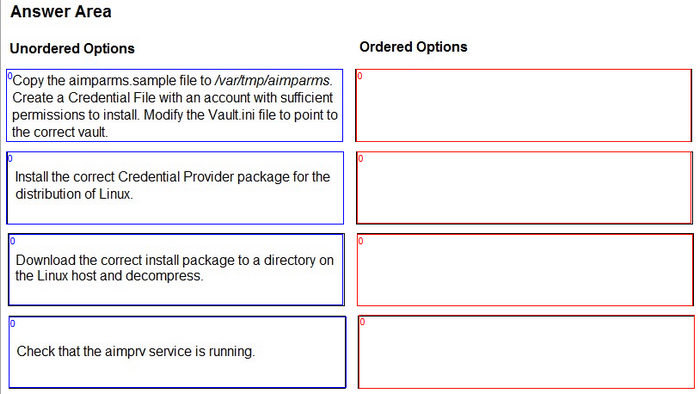
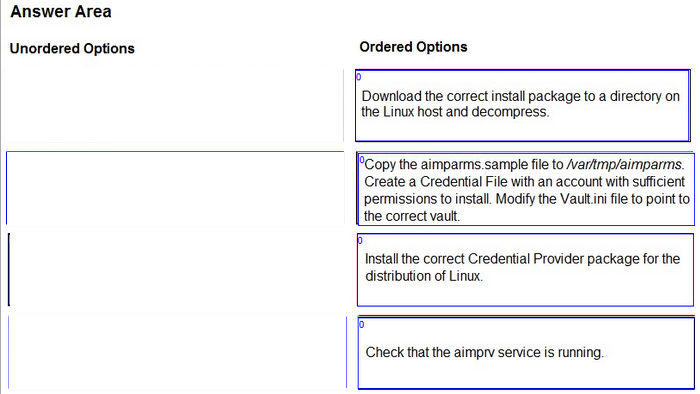
You are installing a Credential Provider on a Linux host. Arrange the installation steps in the correct sequence.
Reveal answer detailsClose answer details
Explanation
The correct sequence of installation steps for a Credential Provider on a Linux host is as follows: Download the correct install package to a directory on the Linux host and decompress 1. Copy the aimparms.sample file to /var/tmp/aimparms. Create a Credential File with an account with sufficient permissions to install. Modify the Vault.ini file to point to the correct vault 2. Install the correct Credential Provider package for the distribution of Linux using the command: rpm -ivh CARKaim-<version+build number>.<distribution>.rpm 2. Check that the aimprv service is running using the command: service aimprv status 2. References: 1: Download the Credential Provider 2: Install Credential Provider on Linux / AIX
Question 3
Single choice
You are setting up the Secrets Provider for Kubernetes to support rotation with Push-to-File mode.
Which deployment option should be used?
A
Init container
B
Application container
C
Sidecar
D
Service Broker
Reveal answer detailsClose answer details
Correct answerC
Explanation
According to the CyberArk Sentry Secrets Manager documentation, the Secrets Provider for Kubernetes can be deployed as an init container or a sidecar in Push-to-File mode. In Push-to-File mode, the Secrets Provider pushes Conjur secrets to one or more secrets files in a shared volume in the same Pod as the application container. The application container can then consume the secrets files from the shared volume. The deployment option that should be used to support rotation with Push-to-File mode is the sidecar, because the sidecar can run continuously and check for updates to the secrets in Conjur. If changes are detected, the sidecar can update the secrets files in the shared volume. The init container, on the other hand, runs to completion and does not support rotation. The application container and the service broker are not valid deployment options for the Secrets Provider for Kubernetes in Push-to-File mode. References: 1: Secrets Provider - Init container/Sidecar - Push-to-File mode 2: Secrets Provider - init container/sidecar - Push-to-File mode
Question 4
Single choice
Which statement is correct about this message?
Message: "[number-of-deleted-rows] rows has successfully deleted "CEADBR009D Finished vacuum"?
A
It notes the number of records deleted from the database and does not require any action.
B
The user specified for Conjur does not have the appropriate permissions to retrieve the audit database (audit .db).
C
When audit retention was performed, the query on the Ul audit database (audit.db) generated an error.
D
The Vault Conjur Synchronizer successfully deleted the password objects that were marked for deletion in the PVWA.
Reveal answer detailsClose answer details
Correct answerA
Explanation
This is the correct answer because the message indicates that the audit retention process has successfully completed and deleted the specified number of rows from the audit database (audit.db). The audit retention process is a scheduled task that runs periodically to delete old audit records from the audit database based on the retention period configured in the Conjur UI. The audit retention process also performs a vacuum operation to reclaim the disk space and optimize the database performance. The message does not require any action from the user, as it is a normal and expected outcome of the audit retention process. This answer is based on the CyberArk Secrets Manager documentation1 and the CyberArk Secrets Manager training course 2. The other options are not correct statements about the message. The message does not imply that the user specified for Conjur does not have the appropriate permissions to retrieve the audit database, as the message is not an error or a warning, but a confirmation of the audit retention process. The user specified for Conjur is the user that is used to connect to the Conjur server and perform operations on the Conjur resources, such as roles, policies, secrets, and audit records. The user specified for Conjur needs to have the appropriate permissions to access the audit database, but the message does not indicate any problem with the user permissions. The message does not imply that when audit retention was performed, the query on the UI audit database generated an error, as the message is not an error or a warning, but a confirmation of the audit retention process. The query on the UI audit database is the query that is used to display the audit records in the Conjur UI. The query on the UI audit database is not related to the audit retention process, which is a background task that runs on the Conjur server and deletes the old audit records from the audit database. The message does not indicate any problem with the query on the UI audit database. The message does not imply that the Vault Conjur Synchronizer successfully deleted the password objects that were marked for deletion in the PVWA, as the message is not related to the Vault Conjur Synchronizer or the password objects. The Vault Conjur Synchronizer is a service that synchronizes secrets from the CyberArk Vault to the Conjur database. The password objects are the accounts in the CyberArk Vault that store the credentials for various platforms and devices. The message is related to the audit retention process, which deletes the old audit records from the audit database. The message does not indicate any problem or action with the Vault Conjur Synchronizer or the password objects.
Question 5
Drag & drop
DRAG DROP
You want to allow retrieval of a secret with the CCP. The safe and the required secrets already exist.
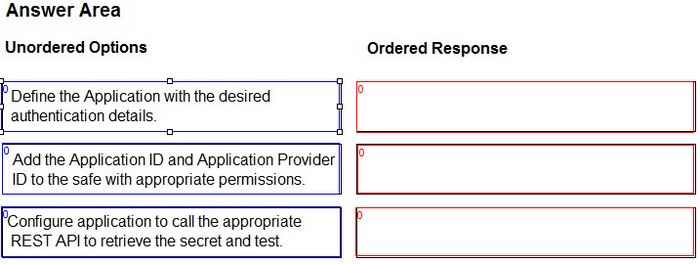
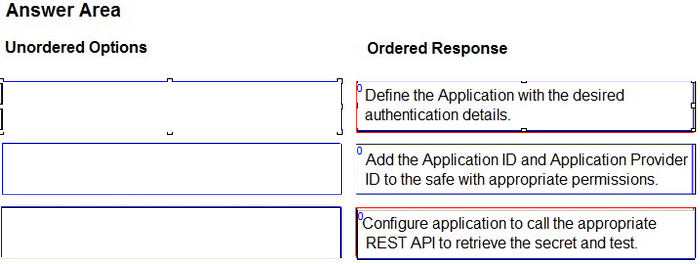
Assuming the CCP is installed, arrange the steps in the correct sequence.
Reveal answer detailsClose answer details
Explanation
The correct order of the steps is: Define the Application with the desired authentication details Add the Application ID and Application Provider ID to the safe with appropriate permissions Configure application to call the appropriate REST API to retrieve the secret and test To allow an application to retrieve a secret with the CCP, the following steps are required: Define the Application with the desired authentication details: This step involves creating an Application object in the Vault with a unique Application ID and an Application Provider ID. The Application Provider ID is used to identify the CCP instance that will serve the request. The Application object also defines the authentication method and parameters that the application will use to connect to the CCP, such as certificate, password, or AppRole. Add the Application ID and Application Provider ID to the safe with appropriate permissions: This step involves granting the Application object the necessary permissions to access the safe and the secret that it needs. The Application ID and the Application Provider ID are added as members of the safe with at least List and Retrieve permissions. The secret name or ID can also be specified as a restriction to limit the access to a specific secret within the safe. Configure application to call the appropriate REST API to retrieve the secret and test: This step involves configuring the application to send a REST API request to the CCP endpoint with the required parameters, such as the Application ID, the Application Provider ID, the safe name, and the secret name or ID. The application should also provide the authentication credentials or token that match the method defined in the Application object. The application should receive a JSON response from the CCP with the secret value and other metadata. The application should test the connection and the secret retrieval before deploying to production. References: CyberArk Secrets Manager Sentry - Secrets Manager - Sample Items & Study Guide Sentry - Secrets Secrets Management Essentials for Developers
Question 6
Single choice
You modified a Conjur host policy to change its annotations for authentication.
How should you load the policy to make those changes?
A
Use the default "append" method (e.g. conjur policy load <branch> <policy-file>).
B
Use the "replace" method (e.g. conjur policy load ?eplace<;branc>;<;policy-fil>;).
C
Use the "delete" method (e.g. conjur policy load ?elete<;branc>;<;policy-fil>;).
D
Use the "update" method (e.g. conjur policy load ?pdate<;branc>;<;policy-fil>;).
Reveal answer detailsClose answer details
Correct answerB
Explanation
= According to the CyberArk Sentry Secrets Manager documentation, the replace method is used to overwrite an existing policy branch with a new policy file. This method is suitable for making changes to the existing resources, such as modifying their annotations, permissions, or attributes. The replace method preserves the existing data and secrets associated with the resources, but removes any resources that are not defined in the new policy file. Therefore, to change the annotations for authentication of a Conjur host, the replace method is the best option. The append method is used to add new resources or data to an existing policy branch, without affecting the existing resources. This method is suitable for creating new hosts, groups, variables, or secrets, but not for modifying the existing ones. The append method will ignore any changes to the existing resources, such as annotations, and will only load the new resources or data. The delete method is used to remove resources or data from an existing policy branch, without affecting the other resources. This method is suitable for deleting hosts, groups, variables, or secrets, but not for modifying them. The delete method will remove any resources or data that are defined in the policy file, and will ignore any resources or data that are not defined in the policy file. The update method is used to modify the data or secrets associated with existing resources, without affecting the resources themselves. This method is suitable for changing the values of variables or secrets, but not for changing the annotations, permissions, or attributes of the resources. The update method will only load the data or secrets that are defined in the policy file, and will ignore any resources or data that are not defined in the policy file. References: = Annotation reference | CyberArk Docs Policy load modes | CyberArk Docs Policy - docs.cyberark.com
Question 7
Single choice
You are setting up a Kubernetes integration with Conjur. With performance as the key deciding factor, namespace and service account will be used as identity characteristics.
Which authentication method should you choose?
A
JWT-based authentication
B
Certificate-based authentication
C
API key authentication
D
Connect (OIDC) authentication
Reveal answer detailsClose answer details
Correct answerA
Explanation
According to the CyberArk Sentry Secrets Manager documentation, JWT-based authentication is the recommended method for authenticating Kubernetes pods with Conjur. JWT-based authentication uses JSON Web Tokens (JWTs) that are issued by the Kubernetes API server and signed by its private key. The JWTs contain the pod's namespace and service account as identity characteristics, which are verified by Conjur against a policy that defines the allowed namespaces and service accounts. JWT-based authentication is fast, scalable, and secure, as it does not require any additional certificates, secrets, or sidecars to be deployed on the pods. JWT-based authentication also supports rotation and revocation of the Kubernetes API server's private key, which enhances the security and resilience of the authentication process. Certificate-based authentication is another method for authenticating Kubernetes pods with Conjur, but it is not the best option for performance. Certificate-based authentication uses X.509 certificates that are generated by a Conjur CA service and injected into the pods as Kubernetes secrets. The certificates contain the pod's namespace and service account as identity characteristics, which are verified by Conjur against a policy that defines the allowed namespaces and service accounts. Certificate-based authentication is secure and reliable, but it requires more resources and steps to generate, inject, and manage the certificates and secrets. Certificate-based authentication also does not support rotation and revocation of the certificates, which may pose a security risk if the certificates are compromised or expired. API key authentication and Connect (OIDC) authentication are not valid methods for authenticating Kubernetes pods with Conjur. API key authentication is used for authenticating hosts, users, and applications that have a Conjur identity and an API key. Connect (OIDC) authentication is used for authenticating users and applications that have an OpenID Connect identity and a token. These methods are not suitable for Kubernetes pods, as they do not use the pod's namespace and service account as identity characteristics, and they require additional secrets or tokens to be stored and managed on the pods. References: = JWT Authenticator | CyberArk Docs Certificate Authenticator | CyberArk Docs API Key Authenticator | CyberArk Docs Connect Authenticator | CyberArk Docs
Question 8
Single choice
If you rename an account or Safe, the Vault Conjur Synchronizer recreates these accounts and safes with their new name and deletes the old accounts or safes.
What does this mean?
A
Their permissions in Coniur must also be recreated to access them.
B
Their permissions in Coniur remain the same.
C
You can not rename an account or safe.
D
The Vault-Conjur Synchronizer will recreate these accounts and safes with their exact same names.
Reveal answer detailsClose answer details
Correct answerA
Explanation
When an account or Safe is renamed in the Vault, the Vault Conjur Synchronizer will create new variables in Conjur with the new name and delete the old variables with the old name. This means that the permissions that were granted to the old variables in Conjur will not apply to the new variables, and they will need to be recreated using delegation policies. Otherwise, the users or hosts that had access to the old variables will not be able to access the new ones. References: Manage Accounts and Safes During Synchronization Vault Synchronizer full policy guide
Question 9
Single choice
What is a possible Conjur node role change?
A
A Standby may be promoted to a Leader.
B
A Follower may be promoted to a Leader.
C
A Standby may be promoted to a Follower.
D
A Leader may be demoted to a Standby in the event of a failover.
Reveal answer detailsClose answer details
Correct answerA
Explanation
According to the CyberArk Sentry Secrets Manager documentation, Conjur is a secrets management solution that consists of a leader node and one or more follower nodes. The leader node is responsible for managing the secrets, policies, and audit records, while the follower nodes are read-only replicas that can serve secrets requests from applications. Additionally, Conjur supports a standby node, which is a special type of follower node that can be promoted to a leader node in case of a leader failure. A standby node is synchronized with the leader node and can take over its role in a disaster recovery scenario. A possible Conjur node role change is when a standby node is promoted to a leader node, either manually or automatically, using the auto-failover feature. A follower node cannot be promoted to a leader node, as it does not have the same data and functionality as the leader node. A standby node cannot be promoted to a follower node, as it already has the same capabilities as a follower node, plus the ability to become a leader node. A leader node cannot be demoted to a standby node in the event of a failover, as it would lose its data and functionality and would not be able to resume its role as a leader node. References: 1: Conjur Architecture 2: Deploying Conjur on AWS 3: Auto-failover
When attempting to retrieve a credential, you receive an error 401 ?Malformed Authorization Token.
What is the cause of the issue?
A.
The token is not correctly encoded.
B.
The token you are trying to retrieve does not exist.
C.
The host does not have access to the credential with the current token.
D.
The credential has not been initialized.
Correct Answer: A
Explanation
Explanation/Reference:
= The cause of the issue is that the token is not correctly encoded. A token is a string of characters that represents a credential or an authorization grant for accessing a resource. A token must be encoded according to a specific format and standard, such as Base64, JSON Web Token (JWT), or OAuth 2.0. If the token is malformed, meaning that it does not follow the expected format or standard, the server will reject the token and return an error 401 - Malformed Authorization Token. This error indicates that the token is invalid or expired, and the request is unauthorized. To resolve the issue, the token must be regenerated or refreshed using the correct encoding method and parameters 12. References: = CyberArk Identity: Getting 401 unauthorized Error when using API calls with OAuth2 Client 2, Resolution 1 Troubleshoot CyberArk Vault Synchronizer 1, Error: Forbidden Logon Token is Empty - Cannot logon Unauthorized
QUESTION 2
DRAG DROP
You are installing a Credential Provider on a Linux host. Arrange the installation steps in the correct sequence.
Correct Answer:
Explanation
Explanation/Reference:
The correct sequence of installation steps for a Credential Provider on a Linux host is as follows: Download the correct install package to a directory on the Linux host and decompress 1. Copy the aimparms.sample file to /var/tmp/aimparms. Create a Credential File with an account with sufficient permissions to install. Modify the Vault.ini file to point to the correct vault 2. Install the correct Credential Provider package for the distribution of Linux using the command: rpm -ivh CARKaim-<version+build number>.<distribution>.rpm 2. Check that the aimprv service is running using the command: service aimprv status 2. References: 1: Download the Credential Provider 2: Install Credential Provider on Linux / AIX
QUESTION 3
You are setting up the Secrets Provider for Kubernetes to support rotation with Push-to-File mode.
Which deployment option should be used?
A.
Init container
B.
Application container
C.
Sidecar
D.
Service Broker
Correct Answer: C
Explanation
Explanation/Reference:
According to the CyberArk Sentry Secrets Manager documentation, the Secrets Provider for Kubernetes can be deployed as an init container or a sidecar in Push-to-File mode. In Push-to-File mode, the Secrets Provider pushes Conjur secrets to one or more secrets files in a shared volume in the same Pod as the application container. The application container can then consume the secrets files from the shared volume. The deployment option that should be used to support rotation with Push-to-File mode is the sidecar, because the sidecar can run continuously and check for updates to the secrets in Conjur. If changes are detected, the sidecar can update the secrets files in the shared volume. The init container, on the other hand, runs to completion and does not support rotation. The application container and the service broker are not valid deployment options for the Secrets Provider for Kubernetes in Push-to-File mode. References: 1: Secrets Provider - Init container/Sidecar - Push-to-File mode 2: Secrets Provider - init container/sidecar - Push-to-File mode
QUESTION 4
Which statement is correct about this message?
Message: "[number-of-deleted-rows] rows has successfully deleted "CEADBR009D Finished vacuum"?
A.
It notes the number of records deleted from the database and does not require any action.
B.
The user specified for Conjur does not have the appropriate permissions to retrieve the audit database (audit .db).
C.
When audit retention was performed, the query on the Ul audit database (audit.db) generated an error.
D.
The Vault Conjur Synchronizer successfully deleted the password objects that were marked for deletion in the PVWA.
Correct Answer: A
Explanation
Explanation/Reference:
This is the correct answer because the message indicates that the audit retention process has successfully completed and deleted the specified number of rows from the audit database (audit.db). The audit retention process is a scheduled task that runs periodically to delete old audit records from the audit database based on the retention period configured in the Conjur UI. The audit retention process also performs a vacuum operation to reclaim the disk space and optimize the database performance. The message does not require any action from the user, as it is a normal and expected outcome of the audit retention process. This answer is based on the CyberArk Secrets Manager documentation1 and the CyberArk Secrets Manager training course 2. The other options are not correct statements about the message. The message does not imply that the user specified for Conjur does not have the appropriate permissions to retrieve the audit database, as the message is not an error or a warning, but a confirmation of the audit retention process. The user specified for Conjur is the user that is used to connect to the Conjur server and perform operations on the Conjur resources, such as roles, policies, secrets, and audit records. The user specified for Conjur needs to have the appropriate permissions to access the audit database, but the message does not indicate any problem with the user permissions. The message does not imply that when audit retention was performed, the query on the UI audit database generated an error, as the message is not an error or a warning, but a confirmation of the audit retention process. The query on the UI audit database is the query that is used to display the audit records in the Conjur UI. The query on the UI audit database is not related to the audit retention process, which is a background task that runs on the Conjur server and deletes the old audit records from the audit database. The message does not indicate any problem with the query on the UI audit database. The message does not imply that the Vault Conjur Synchronizer successfully deleted the password objects that were marked for deletion in the PVWA, as the message is not related to the Vault Conjur Synchronizer or the password objects. The Vault Conjur Synchronizer is a service that synchronizes secrets from the CyberArk Vault to the Conjur database. The password objects are the accounts in the CyberArk Vault that store the credentials for various platforms and devices. The message is related to the audit retention process, which deletes the old audit records from the audit database. The message does not indicate any problem or action with the Vault Conjur Synchronizer or the password objects.
QUESTION 5
DRAG DROP
You want to allow retrieval of a secret with the CCP. The safe and the required secrets already exist.
Assuming the CCP is installed, arrange the steps in the correct sequence.
Correct Answer:
Explanation
Explanation/Reference:
The correct order of the steps is: Define the Application with the desired authentication details Add the Application ID and Application Provider ID to the safe with appropriate permissions Configure application to call the appropriate REST API to retrieve the secret and test To allow an application to retrieve a secret with the CCP, the following steps are required: Define the Application with the desired authentication details: This step involves creating an Application object in the Vault with a unique Application ID and an Application Provider ID. The Application Provider ID is used to identify the CCP instance that will serve the request. The Application object also defines the authentication method and parameters that the application will use to connect to the CCP, such as certificate, password, or AppRole. Add the Application ID and Application Provider ID to the safe with appropriate permissions: This step involves granting the Application object the necessary permissions to access the safe and the secret that it needs. The Application ID and the Application Provider ID are added as members of the safe with at least List and Retrieve permissions. The secret name or ID can also be specified as a restriction to limit the access to a specific secret within the safe. Configure application to call the appropriate REST API to retrieve the secret and test: This step involves configuring the application to send a REST API request to the CCP endpoint with the required parameters, such as the Application ID, the Application Provider ID, the safe name, and the secret name or ID. The application should also provide the authentication credentials or token that match the method defined in the Application object. The application should receive a JSON response from the CCP with the secret value and other metadata. The application should test the connection and the secret retrieval before deploying to production. References: CyberArk Secrets Manager Sentry - Secrets Manager - Sample Items & Study Guide Sentry - Secrets Secrets Management Essentials for Developers
QUESTION 6
You modified a Conjur host policy to change its annotations for authentication.
How should you load the policy to make those changes?
A.
Use the default "append" method (e.g. conjur policy load <branch> <policy-file>).
B.
Use the "replace" method (e.g. conjur policy load ?eplace<;branc>;<;policy-fil>;).
C.
Use the "delete" method (e.g. conjur policy load ?elete<;branc>;<;policy-fil>;).
D.
Use the "update" method (e.g. conjur policy load ?pdate<;branc>;<;policy-fil>;).
Correct Answer: B
Explanation
Explanation/Reference:
= According to the CyberArk Sentry Secrets Manager documentation, the replace method is used to overwrite an existing policy branch with a new policy file. This method is suitable for making changes to the existing resources, such as modifying their annotations, permissions, or attributes. The replace method preserves the existing data and secrets associated with the resources, but removes any resources that are not defined in the new policy file. Therefore, to change the annotations for authentication of a Conjur host, the replace method is the best option. The append method is used to add new resources or data to an existing policy branch, without affecting the existing resources. This method is suitable for creating new hosts, groups, variables, or secrets, but not for modifying the existing ones. The append method will ignore any changes to the existing resources, such as annotations, and will only load the new resources or data. The delete method is used to remove resources or data from an existing policy branch, without affecting the other resources. This method is suitable for deleting hosts, groups, variables, or secrets, but not for modifying them. The delete method will remove any resources or data that are defined in the policy file, and will ignore any resources or data that are not defined in the policy file. The update method is used to modify the data or secrets associated with existing resources, without affecting the resources themselves. This method is suitable for changing the values of variables or secrets, but not for changing the annotations, permissions, or attributes of the resources. The update method will only load the data or secrets that are defined in the policy file, and will ignore any resources or data that are not defined in the policy file. References: = Annotation reference | CyberArk Docs Policy load modes | CyberArk Docs Policy - docs.cyberark.com
QUESTION 7
You are setting up a Kubernetes integration with Conjur. With performance as the key deciding factor, namespace and service account will be used as identity characteristics.
Which authentication method should you choose?
A.
JWT-based authentication
B.
Certificate-based authentication
C.
API key authentication
D.
Connect (OIDC) authentication
Correct Answer: A
Explanation
Explanation/Reference:
According to the CyberArk Sentry Secrets Manager documentation, JWT-based authentication is the recommended method for authenticating Kubernetes pods with Conjur. JWT-based authentication uses JSON Web Tokens (JWTs) that are issued by the Kubernetes API server and signed by its private key. The JWTs contain the pod's namespace and service account as identity characteristics, which are verified by Conjur against a policy that defines the allowed namespaces and service accounts. JWT-based authentication is fast, scalable, and secure, as it does not require any additional certificates, secrets, or sidecars to be deployed on the pods. JWT-based authentication also supports rotation and revocation of the Kubernetes API server's private key, which enhances the security and resilience of the authentication process. Certificate-based authentication is another method for authenticating Kubernetes pods with Conjur, but it is not the best option for performance. Certificate-based authentication uses X.509 certificates that are generated by a Conjur CA service and injected into the pods as Kubernetes secrets. The certificates contain the pod's namespace and service account as identity characteristics, which are verified by Conjur against a policy that defines the allowed namespaces and service accounts. Certificate-based authentication is secure and reliable, but it requires more resources and steps to generate, inject, and manage the certificates and secrets. Certificate-based authentication also does not support rotation and revocation of the certificates, which may pose a security risk if the certificates are compromised or expired. API key authentication and Connect (OIDC) authentication are not valid methods for authenticating Kubernetes pods with Conjur. API key authentication is used for authenticating hosts, users, and applications that have a Conjur identity and an API key. Connect (OIDC) authentication is used for authenticating users and applications that have an OpenID Connect identity and a token. These methods are not suitable for Kubernetes pods, as they do not use the pod's namespace and service account as identity characteristics, and they require additional secrets or tokens to be stored and managed on the pods. References: = JWT Authenticator | CyberArk Docs Certificate Authenticator | CyberArk Docs API Key Authenticator | CyberArk Docs Connect Authenticator | CyberArk Docs
QUESTION 8
If you rename an account or Safe, the Vault Conjur Synchronizer recreates these accounts and safes with their new name and deletes the old accounts or safes.
What does this mean?
A.
Their permissions in Coniur must also be recreated to access them.
B.
Their permissions in Coniur remain the same.
C.
You can not rename an account or safe.
D.
The Vault-Conjur Synchronizer will recreate these accounts and safes with their exact same names.
Correct Answer: A
Explanation
Explanation/Reference:
When an account or Safe is renamed in the Vault, the Vault Conjur Synchronizer will create new variables in Conjur with the new name and delete the old variables with the old name. This means that the permissions that were granted to the old variables in Conjur will not apply to the new variables, and they will need to be recreated using delegation policies. Otherwise, the users or hosts that had access to the old variables will not be able to access the new ones. References: Manage Accounts and Safes During Synchronization Vault Synchronizer full policy guide
QUESTION 9
What is a possible Conjur node role change?
A.
A Standby may be promoted to a Leader.
B.
A Follower may be promoted to a Leader.
C.
A Standby may be promoted to a Follower.
D.
A Leader may be demoted to a Standby in the event of a failover.
Correct Answer: A
Explanation
Explanation/Reference:
According to the CyberArk Sentry Secrets Manager documentation, Conjur is a secrets management solution that consists of a leader node and one or more follower nodes. The leader node is responsible for managing the secrets, policies, and audit records, while the follower nodes are read-only replicas that can serve secrets requests from applications. Additionally, Conjur supports a standby node, which is a special type of follower node that can be promoted to a leader node in case of a leader failure. A standby node is synchronized with the leader node and can take over its role in a disaster recovery scenario. A possible Conjur node role change is when a standby node is promoted to a leader node, either manually or automatically, using the auto-failover feature. A follower node cannot be promoted to a leader node, as it does not have the same data and functionality as the leader node. A standby node cannot be promoted to a follower node, as it already has the same capabilities as a follower node, plus the ability to become a leader node. A leader node cannot be demoted to a standby node in the event of a failover, as it would lose its data and functionality and would not be able to resume its role as a leader node. References: 1: Conjur Architecture 2: Deploying Conjur on AWS 3: Auto-failover