Preview real exam questions, verified answers and available explanations before choosing a study plan.
Question 1
Hotspot
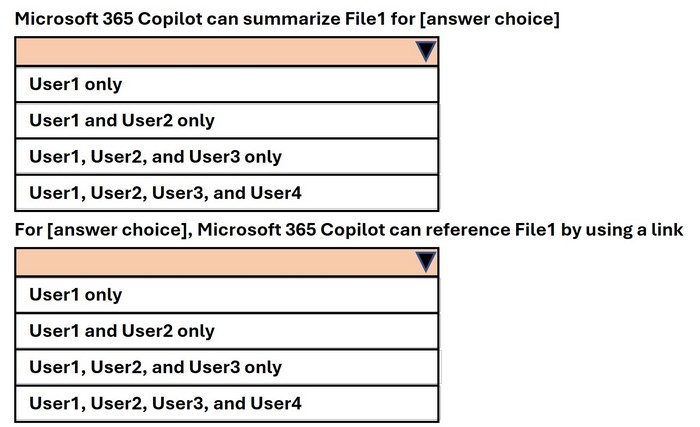
HOTSPOT
You have a Microsoft 365 E5 subscription that contains four users named User1, User2, User3, and User4 and a file named File1.docx.
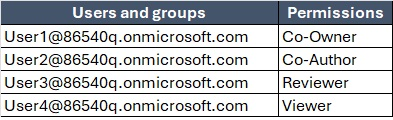
To File1, you apply a sensitivity label that has the permissions shown in the following exhibit.
Assign permissions to speciffc users and groups*
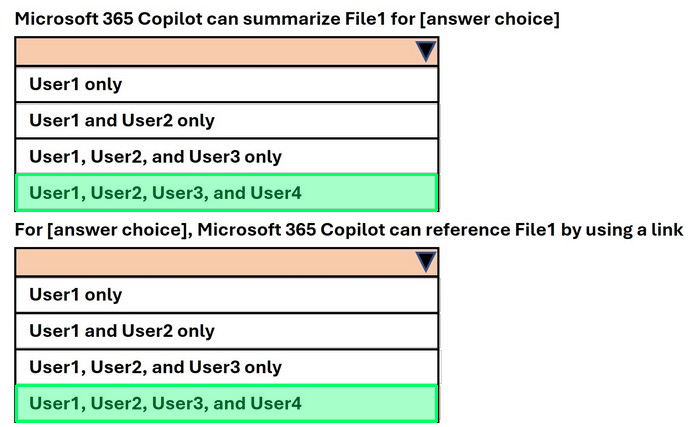
Use the drop-down menus to select the answer choice that completes each statement based on the information presented in the graphic.
NOTE; Each correct selection is worth one point.
Reveal answer detailsClose answer details
Explanation
Step 1 Summarization in Copilot For Microsoft 365 Copilot to summarize a file: The user needs at least View permission. Summarization does not require editing, copying, or ownership rights. Looking at the exhibit: User1 (Co-Owner) # has full access including view. User2 (Co-Author) # has edit and view. User3 (Reviewer) # has read-only rights. User4 (Viewer) # has read rights. All four users can view the document. Therefore, Copilot can summarize File1 for User1, User2, User3, and User4.
Step 2 Referencing a file by link in Copilot For Copilot to reference a file by link (i.e., cite or share within generated content): The user must have rights that include resharing or exporting. Only the Co-Owner has full rights to manage access and allow referencing by link. From the exhibit: User1 (Co-Owner) # Can reference by link. User2 (Co-Author), User3 (Reviewer), User4 (Viewer) # Do not have reshare or link rights. So, only User1 can reference File1 by link. References: Sensitivity labels and Microsoft 365 Copilot
Question 2
Single choice
Note: This question is part of a series of questions that present the same scenario. Each question in the series contains a unique solution that might meet the stated goals. Some question sets might have more than one correct solution, while others might not have a correct solution.
After you answer a question in this section, you will NOT be able to return to it. As a result, these questions will not appear in the review screen.
You have a Microsoft 365 tenant and 500 computers that run Windows 11. The computers are onboarded to Microsoft Purview.
You discover that a third-party application named Tailspin_scanner.exe accessed protected sensitive information on multiple computers. Tailspin_scanner.exe is installed locally on the computers.
You need to block Tailspin_scanner.exe from accessing sensitive documents without preventing the application from accessing other documents.
Solution: From the Microsoft Defender for Cloud Apps, you mark the application as Unsanctioned.
Does this meet the goal?
A
Yes
B
No
Reveal answer detailsClose answer details
Correct answerB
Explanation
Marking an application as Unsanctioned in Defender for Cloud Apps is intended to control cloud-app access and does not create content-aware restrictions for a locally installed executable. It cannot allow Tailspin_scanner.exe to open ordinary documents while blocking only its access to sensitive documents.
Question 3
Hotspot
HOTSPOT
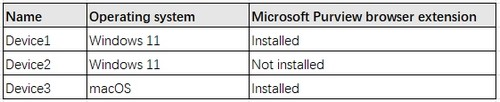
You have a Microsoft 365 E5 subscription. The subscription contains devices that are onboarded to Microsoft Purview and configured as shown in the following table.
The subscription contains the users shown in the following table.
You need to review the activities.
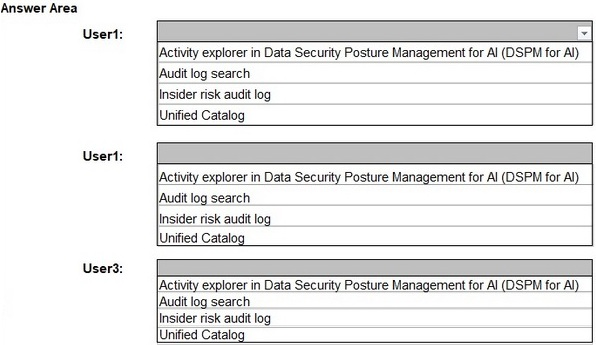
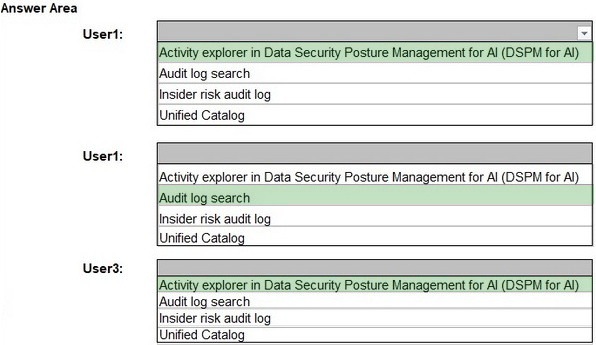
What should you use for each user? To answer, select the appropriate options in the answer area.
NOTE: Each correct selection is worth one point.
Reveal answer detailsClose answer details
Explanation
User1: Since the Microsoft Purview browser extension is installed on Device1, AI-related activity performed by User1 (generating an image using a generative AI website) can be reviewed in Activity explorer in DSPM for AI. User2: Since Device2 does not have the Microsoft Purview browser extension installed, AI-related activity cannot be tracked in DSPM for AI. Instead, Audit log search should be used to review activity such as using Microsoft 365 Copilot. User3: Since Device3 has the Microsoft Purview browser extension installed, AI-related activity (browsing sample content on a generative AI website) can be reviewed using Activity explorer in DSPM for AI.
Question 4
Hotspot
HOTSPOT
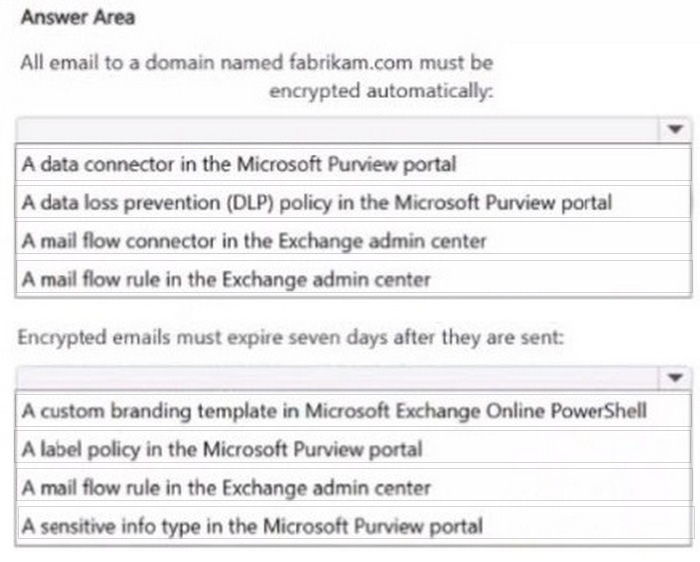
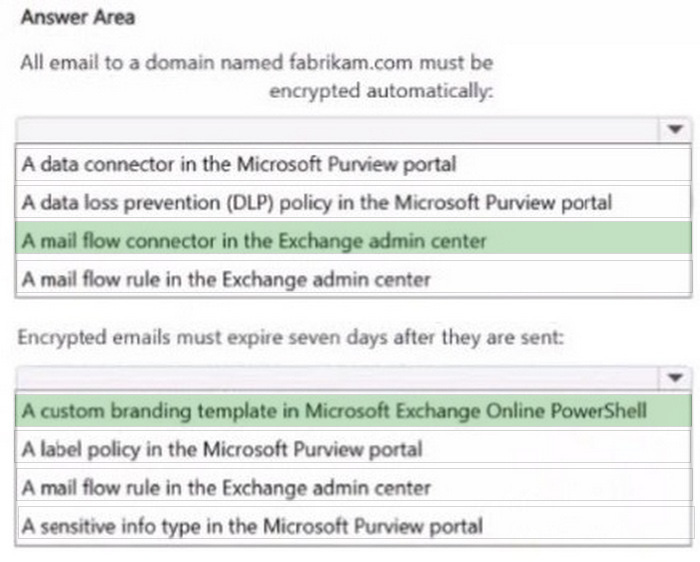
You are implementing Microsoft Purview Advanced Message Encryption for a Microsoft 365 tenant named contoso.com
You need to meet the following requirements:
1. All email to a domain named (abrikam.com must be encrypted automatically. 2. Encrypted emails must expire seven days after they are sent
What should you configure for each requirement? To answer, select the appropriate options in the answer area.
NOTE: Each correct selection is worth one point.
Reveal answer detailsClose answer details
Question 5
Hotspot
HOTSPOT
You have a Microsoft 365 E5 subscription that contains two Microsoft 365 groups named Group1 and Group2. Both groups use the following resources:
A group mailbox
Microsoft Teams channel messages
A Microsoft SharePoint Online teams site
You create the objects shown in the following table.
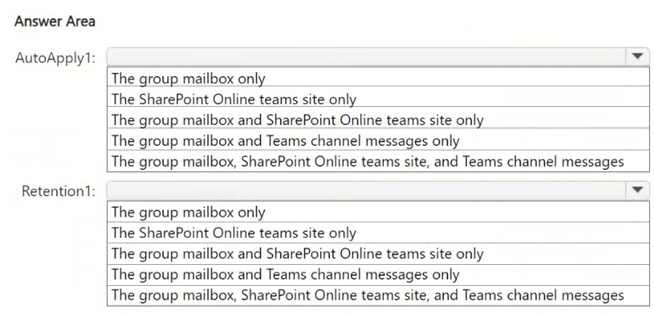
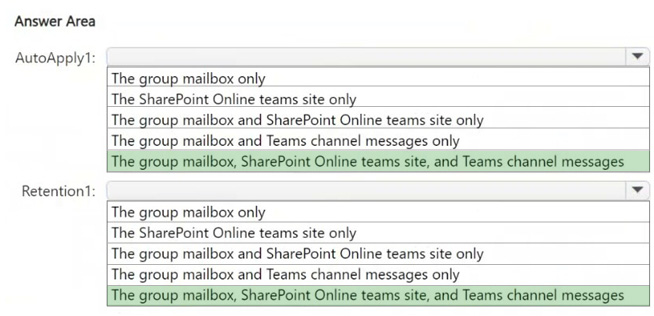
To which resources will AutoApply1 and Retention1 be applied? To answer, select the appropriate options in the answer area.
NOTE: Each correct selection is worth one point.
Reveal answer detailsClose answer details
Explanation
AutoApply1 is an auto-labeling policy that applies RLabel1 to Group1. Auto-labeling policies can apply retention labels across group mailboxes, SharePoint Online sites, and Teams channel messages if they are configured for group resources.
Retention1 is a retention policy applied to Group2. Retention policies for Microsoft 365 groups apply to all group resources, including group mailboxes, SharePoint Online teams sites, and Teams channel messages. Since both AutoApply1 and Retention1 affect entire groups, they apply to all associated resources: group mailbox, SharePoint Online teams site, and Teams channel messages.
Question 6
Single choice
You have a Microsoft 365 subscription.
You configure a Microsoft Purview insider risk management policy named Policy1.
You need to ensure that you will receive real-time recommendations on how to configure the indicator thresholds for Policy1. The solution must ensure that the recommendations are based on a user's activity from the past 10 days.
What should you do first?
A
Create an Insider Risk Indicators connector.
B
Configure the Insider Risk Management Data sharing settings.
C
Create a data loss prevention (DLP) policy
D
Enable insider risk management analytics.
Reveal answer detailsClose answer details
Correct answerD
Explanation
Insider risk management analytics examines recent tenant activity and generates recommendations for policy indicator thresholds. Enabling analytics is therefore the prerequisite for receiving real-time guidance based on the specified past 10 days of user activity. Connectors, data sharing, and DLP policies do not perform this threshold analysis.
Question 7
Single choice
You have a Microsoft 565 E5 tenant that uses Microsoft Teams and contains two users named User1 and User2. You create a data Joss prevention (DIP) policy that is applied to the Teams chat and channel messages location for User1 and User?
Which Teams entities will have DLP protection?
A
1:1/n chats and general channels only
B
1:1/n chats and private channels only
C
1:1/n chats, general channels, and private channels
Reveal answer detailsClose answer details
Correct answerC
Explanation
A DLP policy scoped to the Teams chat and channel messages location protects message content involving the included users across Teams conversation types. This coverage includes 1:1 and group chats, general channels, and private channels, rather than being limited to only one channel category.
Question 8
Hotspot
HOTSPOT
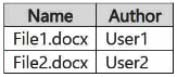
You have a Microsoft 365 E5 subscription that contains two Microsoft SharePoint Online sites named Site1 and Site2. Site1 contains the files shown in the following table.
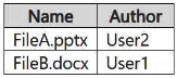
Site2 contains the files shown in the following table.
From the Microsoft Purview portal, you create the content searches shown in the following table.
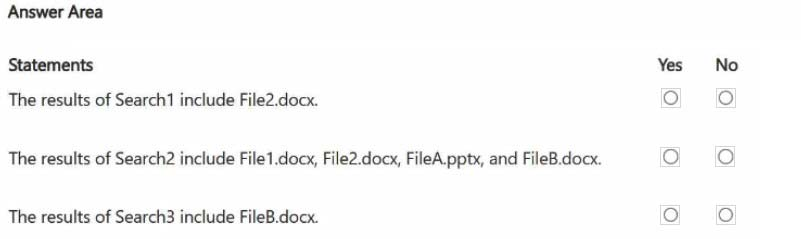
For each of the following statements, select Yes if the statement is true. Otherwise, select No.
NOTE: Each correct selection is worth one point.
Reveal answer detailsClose answer details
Explanation
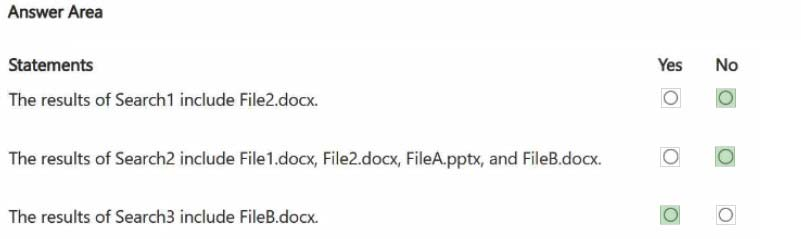
Box 1: No No - The results of Search1 include File2.docx.
Author Mismatch: Search1 requires the author to be User1 (Author: User1). Actual Author: The file File2.docx was authored by User2.
Box 2: No No - The results of Search2 include File1.docx, File2.docx, FileA.pptx, and FileB.docx.
File extension mismatch: Search2 requires a.docx extension (FileExtension:docx). File FileA is a presentation: FileA.pptx is a PowerPoint file, so it is automatically excluded.
Box 3: Yes Yes-The results of Search3 include FileB.docx.
Location Match: Search3 targets site Site2, which is where FileB.docx is stored. Condition Match: Search3 looks for Author: User1. FileB.docx was authored by user User1.
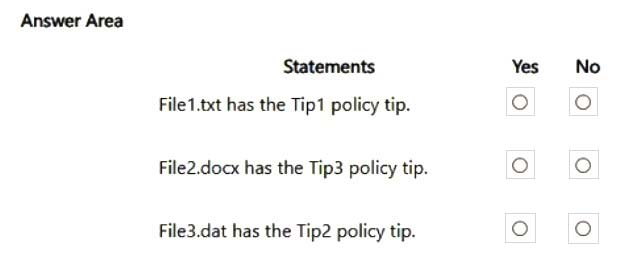
A DLP policy evaluates Exchange and SharePoint, and devices are already onboarded. An endpoint rule for copying sensitive files to USB never runs. Which policy change is required?
A
Add Devices to the DLP policy locations.
B
Add another condition while Devices remains unselected.
C
Publish a policy tip through the Exchange location.
D
Apply a container sensitivity label to the devices.
Reveal answer detailsClose answer details
Correct answerA
Explanation
Device onboarding is already complete, so endpoint readiness is not the missing condition. The policy currently evaluates only Exchange and SharePoint, which leaves the USB rule outside its selected locations. Adding Devices to the DLP policy locations enables evaluation of endpoint file-copy activity.
Question 10
Hotspot
HOTSPOT
You have a new Microsoft 365 E5 tenant.
You need to create a custom trainable classifier that will detect product order forms. The solution must use the principle of least privilege.
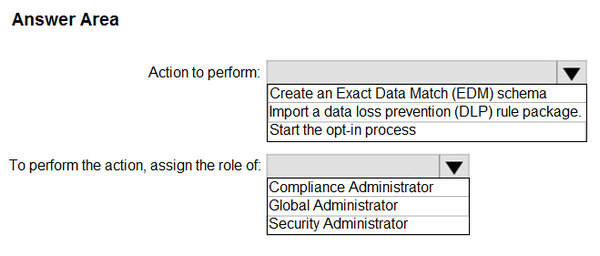
What should you do first? To answer, select the appropriate options in the answer area.
NOTE: Each correct selection is worth one point.
Reveal answer detailsClose answer details
Explanation
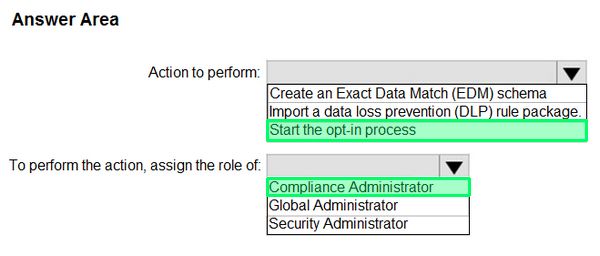
To create a custom trainable classifier in Microsoft Purview (formerly Microsoft Compliance Center), you must first opt into the trainable classifier feature.
Before using custom trainable classifiers, Microsoft requires manual opt-in through the Microsoft Purview compliance portal. Without this step, you cannot create a new classifier. The Compliance Administrator role has the necessary permissions to configure data classification, DLP policies, and trainable classifiers. Global Administrator has higher privileges but is not required for this task, violating the principle of least privilege. Security Administrator is focused on security-related settings but does not manage compliance features like classifiers.
Question 11
Single choice
You are planning a data loss prevention (DLP) solution that will apply to Windows Client computers.
You need to ensure that when users attempt to copy a file that contains sensitive information to a USB storage device, the following requirements are met:
If the users are members of a group named Group1, the users must be allowed to copy the file, and an event must be recorded in the audit log.
All other users must be blocked from copying the file.
What should you create?
A
one DLP policy that contains one DLP rule
B
one DLP policy that contains two DLP rules
C
two DLP policies that each contains one DLP rule
Reveal answer detailsClose answer details
Correct answerB
Explanation
One Endpoint DLP policy can contain both required behaviors, but they need separate rules. One rule targets Group1 and audits the USB copy while allowing it; the second applies to all other users and blocks the copy. Distinct conditions and actions cannot be represented by a single rule.
Question 12
Single choice
You have a Microsoft 365 subscription.
You create a new trainable classifier.
You need to train the classifier.
Which source can you use to train the classifier?
A
an on-premises Microsoft SharePoint Server site
B
an A2ure Files share
C
a Microsoft SharePoint Online site
D
an NFS file share
Reveal answer detailsClose answer details
Correct answerC
Explanation
A trainable classifier learns from example documents stored in a supported Microsoft 365 content source. A Microsoft SharePoint Online site can hold the positive and negative examples used during training. The listed on-premises SharePoint, Azure Files, and NFS sources do not provide the required training source for this classifier.
Question 13
Multiple choice
You have a Microsoft 365 subscription.
You need to ensure that users can apply retention labels to individual documents in their Microsoft SharePoint libraries.
Which two actions should you perform? Each correct answer presents part of the solution.
NOTE: Each correct selection is worth one point.
A
From Microsoft Defender for Cloud Apps, create a file policy.
B
From the SharePoint admin center, modify the Site Settings.
C
From the SharePoint ad min center, modify the records management settings.
D
From the Microsoft Purview portal, publish a label.
E
From the Microsoft Purview portal, create a label.
Reveal answer detailsClose answer details
Correct answersD, E
Explanation
First create the retention label in the Microsoft Purview portal to define its retention behavior. Then publish the label through a label policy so users can see and apply it. Creation defines the control, while publication makes it available for individual documents in SharePoint libraries.
Question 14
Single choice
You have a Microsoft 365 E5 subscription that contains a trainable classifier named Trainable1.
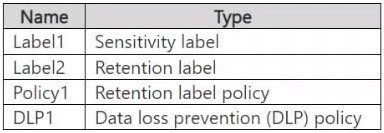
You plan to create the items shown in the following table.
Which items can use Trainable 1?
A
Label2 only
B
Label1 and Label2 only
C
Label1 and Policy1 only
D
Label2, Policy1, and DLP1 only
E
Label1, Label2, Policy1, and DLP1
Reveal answer detailsClose answer details
Correct answerD
Explanation
Trainable classifiers can identify content for retention and DLP decisions. Label2 is a retention label, Policy1 is a retention label policy, and DLP1 is a data loss prevention policy, so each can use Trainable1. Label1 is a sensitivity label and is outside this supported set.
Question 15
Hotspot
HOTSPOT
You have a Microsoft 365 E5 subscription.
You need to ensure that users are prevented from uploading sensitive data to ChatGPT and Google Gemini.
The solution must meet the following requirements:
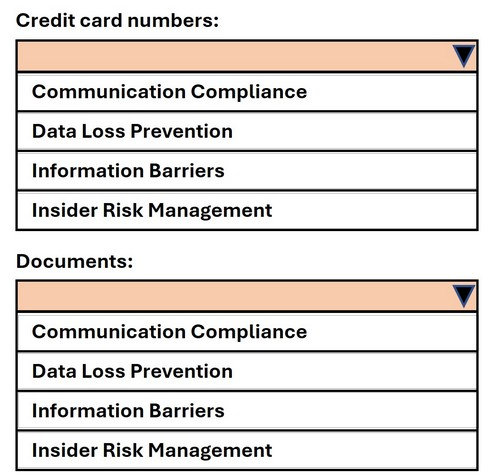
1. Prevent credit card numbers from being pasted into ChatGPT and Gemini. 2. Prevent documents that contain classified data from being uploaded to ChatGPT and Gemini.
Which Microsoft Purview solution should you use for each requirement? To answer, select the appropriate options in the answer area.
NOTE: Each correct selection is worth one point.
Reveal answer detailsClose answer details
Explanation
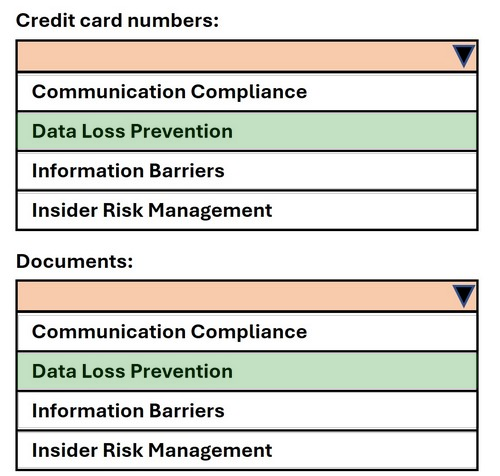
Step 1 Requirement analysis You need to prevent users from: Pasting credit card numbers into ChatGPT/Google Gemini. Uploading classified documents into ChatGPT/Google Gemini. Both scenarios involve AI websites. Microsoft Purview provides Data Security Posture Management for AI and Endpoint DLP integrations that work through Data Loss Prevention (DLP) and Insider Risk Management policies.
Step 2 ?Credit card numbers Credit card numbers are structured sensitive information types (SITs). DLP policies are the correct Microsoft Purview solution for detecting and blocking sensitive info (e.g., credit card, SSN, health ID) from being copied, pasted, or uploaded into restricted destinations like AI apps. Therefore, Data Loss Prevention is the right choice. # Reference: Learn about Endpoint DLP and AI sites
Step 3 ?Documents Documents containing classified or labeled data (via sensitivity labels) fall under insider risk activity detection when exfiltrated. Insider Risk Management policies can monitor and block uploads of classified/labeled files to AI services such as ChatGPT or Gemini. Therefore, Insider Risk Management is the right choice for preventing document uploads. # Reference: Insider Risk Management ?risky AI activity detection
Question 16
Lab simulation
Simulation
Username and password Use the following login credentials as needed:
To enter your username, place your cursor in the Sign in box and select the username below.
To enter your password, place your cursor in the Enter password box and select the password below.
If the Microsoft Edge browser or Microsoft 365 portal does not load successfully, select the Microsoft Edge browser icon from the task bar, type the URL "https://admin microsoft.com", and press Enter.
The following information is for technical support purposes only: Lab Instance: XXXXXXXX.
Task 9
You plan to create a data loss prevention (DLP) policy that will apply to content containing the following keywords:
Tailspin Litware Falcon
You need to create a keyword list that can be used in the DLP policy.
Reveal model answerClose model answer
Create a sensitive information type whose primary element is a keyword list containing Tailspin, Litware, and Falcon.
Explanation
A DLP policy needs a content classification that can recognize the specified terms. A custom sensitive information type provides that reusable classification, and a keyword list can serve as its primary matching element. Placing Tailspin, Litware, and Falcon in the same keyword list allows the sensitive information type to match content containing those keywords.
Question 17
Single choice
You have a Microsoft 365 tenant that is opt-in for trainable classifiers.
You need to ensure that a user named User1 can create custom trainable classifiers. The solution must use the principle of least privilege.
Which role should you assign to User1?
A
Security Administrator
B
Compliance Administrator
C
Global Administrator
D
Security Operator
Reveal answer detailsClose answer details
Correct answerB
Explanation
Creating custom trainable classifiers is a compliance-management function. The Compliance Administrator role grants the relevant compliance configuration authority without the tenant-wide power of Global Administrator. Security Administrator and Security Operator focus on security operations rather than classifier creation.
Question 18
Single choice
You have a Microsoft 365 E5 subscription.
You create a data loss prevention (DLP) policy and select.
Use Notifications to inform your users and help educate them on the proper use of sensitive info.
Which apps will show the policy tip?
A
Outlook on the web only
B
Outlook Win32 only
C
Outlook for iOS and Android only
D
Outlook on the web and Outlook Win32 only
E
Outlook Win32 and Outlook for iOS and Android only
F
Outlook on the web. Outlook Win32, and Outlook for iOS and Android
Reveal answer detailsClose answer details
Correct answerF
Explanation
DLP user notifications and policy tips are supported across the listed Outlook experiences. A matching message can therefore display the policy tip in Outlook on the web, the Outlook Win32 desktop client, and Outlook for iOS and Android. Limiting the result to only one or two of those client families would omit supported notification surfaces.
Question 19
Hotspot
HOTSPOT
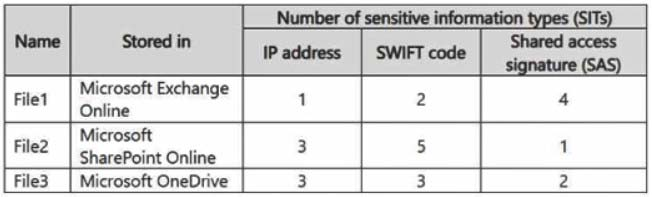
You have a Microsoft 365 subscription that has a retention label named Retention1. The subscription contains the files shown in the following table.
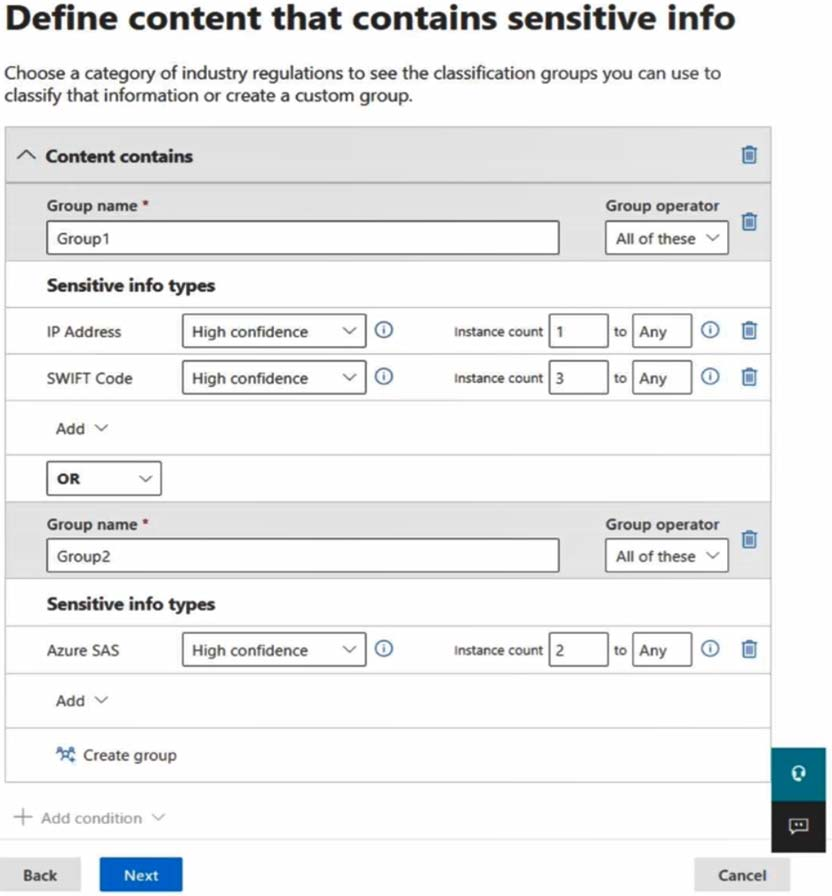
You create an auto-labeling policy named Policy1 that will automatically apply Retention1 as shown in the Auto-labeling policy exhibit. (Click the Auto-labeling policy tab.)
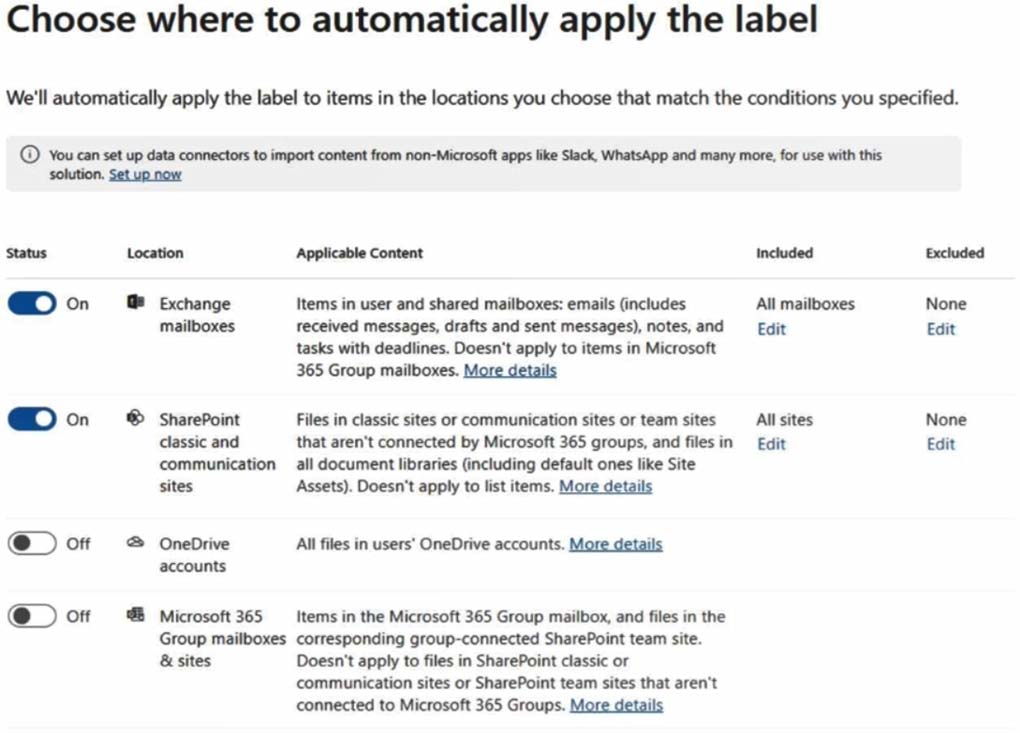
You configure Policy1 to apply Retention1 as shown in the Locations exhibit. (Click the Locations tab.)
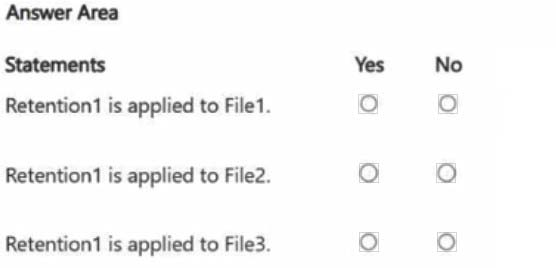
For each of the following statements, select Yes if the statement is true. Otherwise, select No.
NOTE: Each correct selection is worth one point.
Reveal answer detailsClose answer details
Explanation
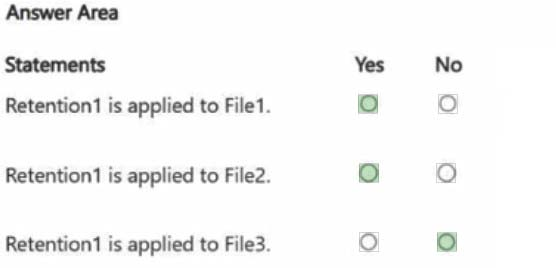
Box 1: Yes Retention1 is applied to File1 - Yes File1 is stored in Microsoft Exchange Online. According to the auto-labeling policy settings, Exchange email is included in the locations where the label will be applied. Additionally, File1 contains sensitive information types (SITs) that meet the conditions for IP Address (instance count 1) and SWIFT Code (instance count 2), which align with the requirements in Group1. Therefore, Retention1 will be applied to File1.
Box 2: Yes Retention1 is applied to File2 - Yes File2 is stored in Microsoft SharePoint Online, which is enabled in the locations for the auto-labeling policy. File2 meets the criteria in Group1 (IP Address with instance count 3 and SWIFT Code with instance count 5), thus satisfying the auto-labeling conditions. Retention1 will be applied to File2.
Box 3: Retention1 is applied to File3 - No Although File3 contains the required sensitive information types (IP Address and SWIFT Code), it is stored in Microsoft OneDrive, which is not included in the configured locations for auto-labeling in the policy. Since OneDrive is disabled in the locations for the policy, Retention1 will not be applied to File3.
Question 20
Single choice
You have a Microsoft 365 E5 tenant that has a retention label named Label1.
You need to create an auto-labeling policy that will apply Label1.
To which location can Label1 be applied?
A
OneDrive accounts
B
Microsoft Entra security groups
C
Microsoft Defender for Cloud Apps
D
Teams chats
Reveal answer detailsClose answer details
Correct answerA
Explanation
An auto-labeling policy for a retention label can inspect supported content stored in OneDrive accounts and apply Label1 when its conditions match. Microsoft Entra security groups are identities rather than content repositories, while Defender for Cloud Apps and Teams chats are not the applicable auto-labeling location for this retention label.
Question 21
Single choice
You have a Microsoft 365 E5 subscription that contains a user named User1.
You deploy Microsoft Purview insider risk management.
You need ensure that insider risk management events related to User1 are visible only to specific users.
What should you create?
A
a global exclusion
B
an indicator variant
C
a priority user group
D
a detection group
Reveal answer detailsClose answer details
Correct answerC
Explanation
A priority user group identifies users whose insider-risk activity requires focused handling and can limit related event visibility to designated reviewers. Adding User1 to such a group supports the required restricted review of User1's events. Exclusions, indicator variants, and detection groups do not provide that priority-user visibility boundary.
Question 22
Single choice
You have a Microsoft 365 subscription.
You need to monitor Microsoft 365 Copilot user prompts and responses for content that has been matched by the Protected Materials trainable classifier.
Which type of policy should you create?
A
communication compliance
B
data loss prevention (DLP)
C
insider risk management
D
retention
Reveal answer detailsClose answer details
Correct answerA
Explanation
Communication compliance evaluates user communications for defined policy conditions and supports reviewing Microsoft 365 Copilot prompts and responses. A policy using the Protected Materials trainable classifier can therefore surface matching interactions for review. DLP enforces data handling, while retention and insider risk policies address different outcomes.
Question 23
Hotspot
HOTSPOT
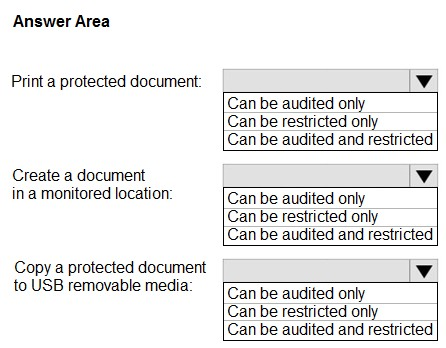
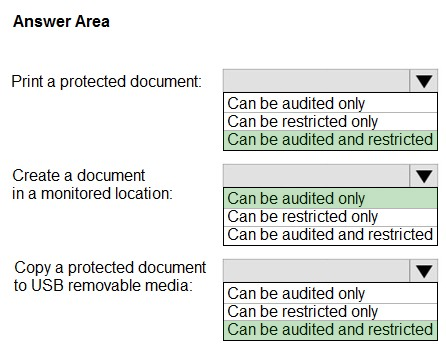
You plan to implement Microsoft 365 Endpoint data loss prevention (Endpoint DLP).
You need to identify which end user activities can be audited on the endpoints, and which activities can be restricted on the endpoints.
What should you identify for each activity? To answer, select the appropriate options in the answer area.
NOTE: Each correct selection is worth one point.
Reveal answer detailsClose answer details
Explanation
References:
Question 24
Single choice
You have a Microsoft SharePoint Online site named Site1 that contains a document library. The library contains more than 1,000 documents. Some of the documents are job applicant resumes. All the documents are in the English language.
You plan to apply a sensitivity label automatically to any document identified as a resume. Only documents that contain work experience, education, and accomplishments must be labeled automatically.
You need to identify and categorize the resumes. The solution must minimize administrative effort.
What should you include in the solution?
A
a trainable classifier
B
a keyword dictionary
C
a function
D
an exact data match (EDM) classifier
Reveal answer detailsClose answer details
Correct answerA
Explanation
A trainable classifier categorizes documents by their overall meaning and structure, making it suitable for recognizing resumes that contain work experience, education, and accomplishments. It avoids maintaining extensive keyword rules and can classify the large English document collection with less administrative effort.
Question 25
Lab simulation
Simulation
Username and password
Use the following login credentials as needed:
To enter your username, place your cursor in the Sign in box and select the username below.
To enter your password, place your cursor in the Enter password box and select the password below.
If the Microsoft Edge browser or Microsoft 365 portal does not load successfully, select the Microsoft Edge browser icon from the task bar, type the URL "https://admin.microsoft.com", and press Enter.
The following information is for technical support purposes only:
Lab Instance: XXXXXXXXX
Task 5
You need to simulate applying the Confidential - Finance label to all the content in the Exchange emails, the SharePoint sites, and the OneDrive accounts that contain the Credit Card Number sensitive info type.
Reveal model answerClose model answer
Create a sensitivity auto-labeling policy that applies Confidential - Finance when Credit Card Number is detected. Scope it to Exchange email, SharePoint sites, and OneDrive accounts, and run it in simulation mode.
Explanation
A sensitivity auto-labeling policy links detection of the Credit Card Number sensitive information type to application of Confidential - Finance. Its locations must include Exchange email, SharePoint sites, and OneDrive accounts so all specified content is evaluated. Running the policy in simulation evaluates the matches without placing the label into active enforcement.
Question 26
Hotspot
HOTSPOT
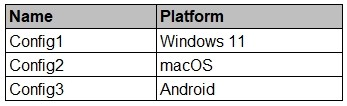
You have a Microsoft 365 E5 subscription that contains the device configurations shown in the following table.
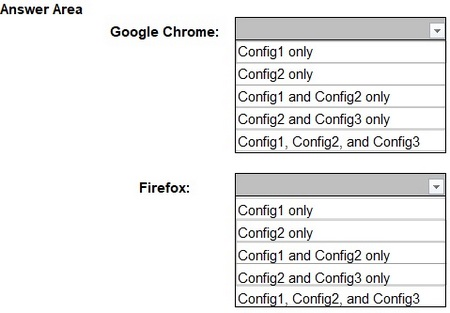
Each configuration uses either Google Chrome or Firefox as a default browser.
You need to implement Microsoft Purview and deploy the Microsoft Purview browser extension to the configurations.
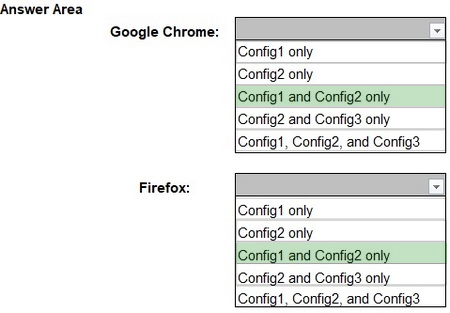
To which configuration can each extension be deployed? To answer, select the appropriate options in the answer area.
NOTE: Each correct selection is worth one point.
Reveal answer detailsClose answer details
Question 27
Hotspot
HOTSPOT
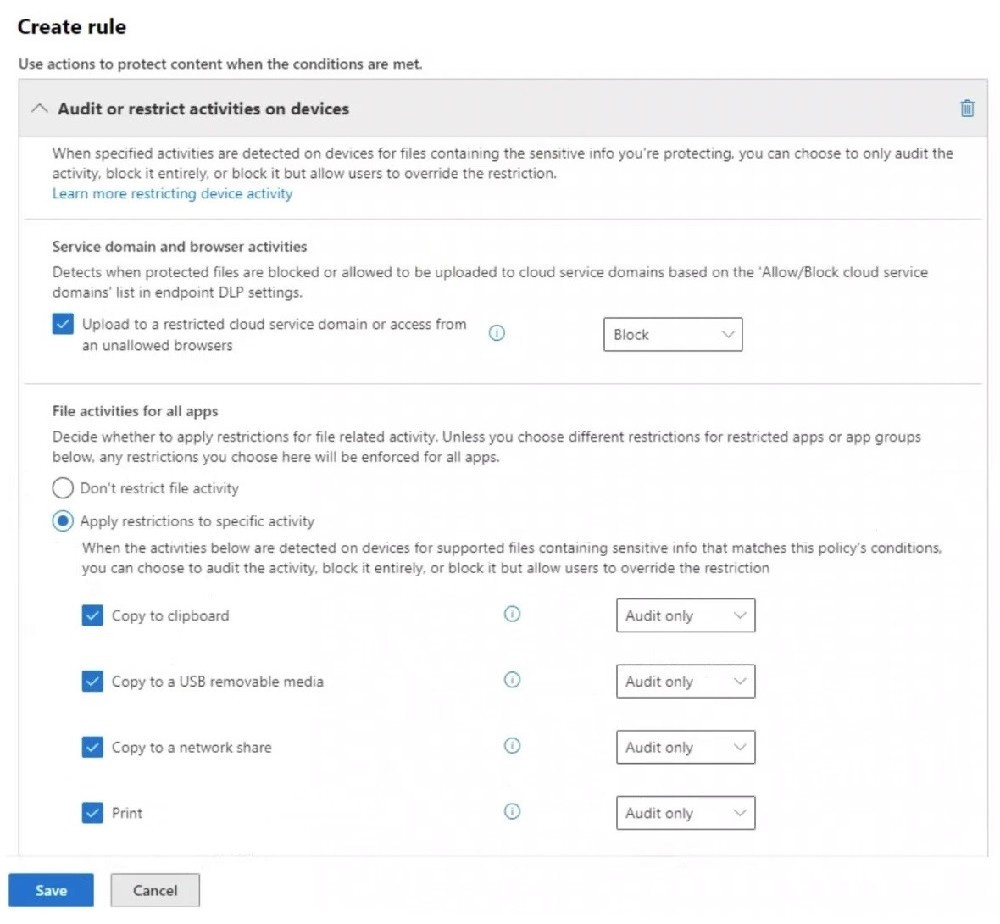
You have a Microsoft 365 E5 subscription that has data loss prevention (DLP) implemented. You plan to export DLP activity by using Activity explorer.
The exported file needs to display the sensitive info type detected for each DLP rule match.
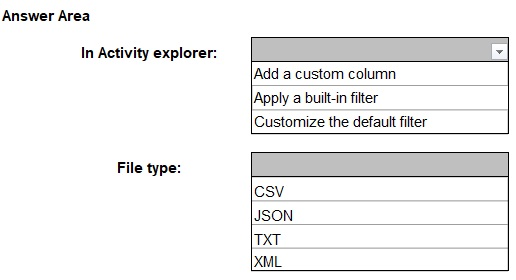
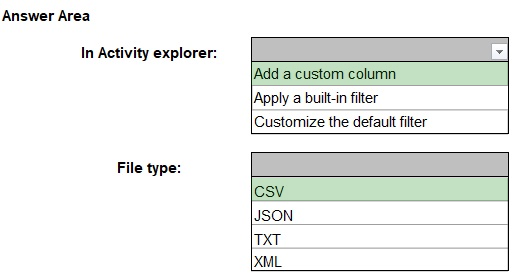
What should you do in Activity explorer before exporting the data, and in which file format is the file exported? To answer, select the appropriate options in the answer area.
NOTE: Each correct selection is worth one point.
Reveal answer detailsClose answer details
Explanation
Box 1: To include the sensitive info type detected for each DLP rule match, you need to add a custom column in Activity Explorer. This ensures that the exported file contains specific details about the detected sensitive information types.
Box 2: DLP activity exports from Activity Explorer are always in CSV (Comma-Separated Values) format. This format allows for easy data analysis and reporting in Excel or other data-processing tools.
Question 28
Hotspot
HOTSPOT
You have a Microsoft 365 E5 subscription that uses Microsoft Purview.
You need to deploy a compliance solution that will detect the accidental oversharing of information outside of an organization. The solution must minimize administrative effort.
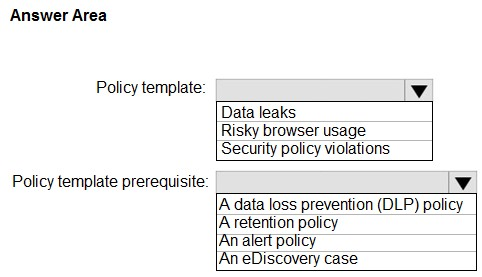
What should you use? To answer, select the appropriate options in the answer area.
NOTE: Each correct selection is worth one point.
Reveal answer detailsClose answer details
Explanation
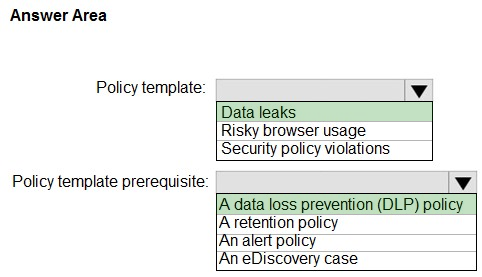
Box 1: Data leaks When using a Data leaks template, you can assign a DLP policy to trigger indicators in the insider risk policy for high severity alerts in your organization. Whenever a high severity alert is generated by a DLP policy rule is added to the Office 365 audit log, insider risk policies created with this template automatically examine the high severity DLP alert. If the alert contains an in-scope user defined in the insider risk policy, the alert is processed by the insider risk policy as a new alert and assigned an insider risk severity and risk score. You can also choose to assign selected indicators as triggering events for a policy. This flexibility and customization helps scope the policy to only the activities covered by the indicators. This policy allows you to evaluate this alert in context with other activities included in the case.
Box 2: A data loss prevention (DLP) policy
Note: Data leaks Protecting data and preventing data leaks is a constant challenge for most organizations, particularly with the rapid growth of new data created by users, devices, and services. Users are empowered to create, store, and share information across services and devices that make managing data leaks increasingly more complex and difficult. Data leaks can include *accidental oversharing of information outside your organization* or data theft with malicious intent. With an assigned Microsoft Purview Data Loss Prevention (DLP) policy, built-in, or customizable triggering events, this template starts scoring real-time detections of suspicious SharePoint Online data downloads, file and folder sharing, printing files, and copying data to personal cloud messaging and storage services.
References:
Question 29
Single choice
You have a Microsoft 365 subscription.
You have a user named User1 Several users have full access to the mailbox of User1.
Some email messages sent to User 1 appeal to have been read and deleted before the user viewed them
When you search the audit log in the Microsoft Purview portal to identify who signed in to the mailbox of User l. the results are blank.
You need to ensure that you can view future sign-ins to the mailbox of User1.
Solution: You run the Set-AuditConfig -Workload Exchange command.
Does that meet the goal?
A
Yes
B
No
Reveal answer detailsClose answer details
Correct answerA
Explanation
The Exchange workload must supply its auditing events before mailbox sign-in activity can appear in the Microsoft Purview audit results. Running Set-AuditConfig -Workload Exchange enables that Exchange auditing configuration, allowing future sign-in events for User1's mailbox to be available for investigation.
Question 30
Single choice
Communication compliance must sample 50 percent of risky messages involving traders across selected email and Teams channels. Named reviewers will evaluate the matches. Which configuration meets the requirement?
A
Configure Endpoint DLP participants, USB activity, blocking, and device administrators.
B
Configure scoped participants and channels, detection, review percentage, and reviewers.
C
Configure Audit workloads, operations, search percentage, and audit investigators.
D
Configure sensitivity label scope, markings, defaults, and label publishers.
Reveal answer detailsClose answer details
Correct answerB
Explanation
The policy scope must identify the trader participants and the selected email and Teams channels. Its detection settings identify risky messages, the review percentage limits sampling to 50 percent, and the reviewer assignment sends those sampled matches to the named people for evaluation.
Question 31
Hotspot
HOTSPOT
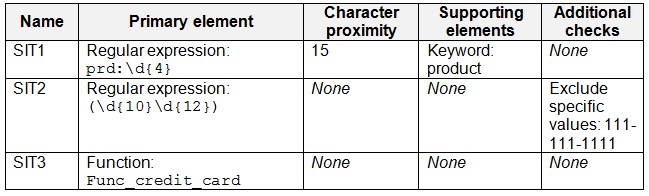
You have a Microsoft 365 E5 subscription that contains the sensitive information types (SITs) shown in the following table.
A user sends the email messages shown in the following table.
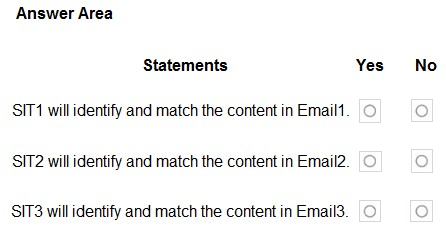
For each of the following statements, select Yes if the statement is true. Otherwise, select No.
NOTE: Each correct selection is worth one point.
Reveal answer detailsClose answer details
Explanation
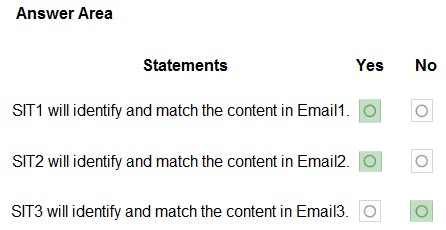
Box 1: Yes Yes - SIT1 will identity and match the content in Email1.
Prd:1234 will match the regular expression of SIT1.
Box 2: Yes Yes - SIT2 will identity and match the content in Email2.
111-111-1111 will match the exclusion of SIT2. However, 123456789012 will match the regular expression of SIT2.
Note: Sensitive information type additional checks Here are the definitions and some examples for the available additional checks.
* Exclude specific matches: This check lets you define keywords to exclude when detecting matches for the pattern you're editing. For example, you might exclude test credit card numbers like '4111111111111111' so that they're not matched as a valid number.
Box 3: No No - SIT3 will identity and match the content in Email3.
The full credit card number is not inclued in Email3.
Note: Sensitive information types (SIT) can use functions as primary elements for identifying sensitive items. For example, the Credit Card Number SIT uses the Func_credit_card function to detect credit card number.
References:
Question 32
Single choice
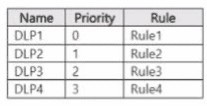
You have a Microsoft 365 E5 subscription that contains a Microsoft SharePoint Online site named Site! and the data loss prevention (DLP) policies shown in the following table.
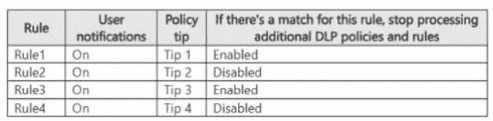
The DLP rules are configured as shown In the following table.
All the policies are assigned to Site1.
You need to ensure that if a user uploads a document to Site1 that matches all the rules, the user will be shown the Tip 2 policy tip.
What should you do?
A
Change the priority of DLP2 to 0.
B
Prevent additional processing of the policies if there is a match for Rule2
C
Change the priority of DLP2 to 3.
D
Enable additional processing of the policies if there is a match for Rule1.
Reveal answer detailsClose answer details
Correct answerA
Explanation
DLP policies are evaluated by priority, with priority 0 processed first. DLP1 currently has priority 0, and Rule1 stops additional DLP policy and rule processing when it matches, preventing Rule2 from supplying Tip 2. Moving DLP2 to priority 0 makes Rule2 run before that stopping rule. Because Rule2 allows additional processing, its Tip 2 can be presented while later evaluation continues.
Question 33
Single choice
You have a Microsoft 365 tenant that has a retention label policy.
You need to configure the policy to meet the following requirements:
Prevent the disabling or deletion of the policy. Ensure that new labels can be added. Prevent the removal of labels.
What should you do?
A
Enable insider risk management.
B
Enable the regulatory record option.
C
Import a file plan.
D
Create a preservation lock.
Reveal answer detailsClose answer details
Correct answerD
Explanation
A preservation lock makes the retention policy immutable in the required direction: the policy cannot be disabled or deleted, and included labels cannot be removed. The locked policy can still be made more restrictive by adding labels. This combination directly provides the requested administrative safeguards for the retention label policy.
Question 34
Hotspot
HOTSPOT
You create a retention label policy named Contoso_Policy that contains the following labels:
1. 10 years then delete 2. 5 years then delete 3. Do not retain
Contoso.Policy is applied to content in Microsoft SharePoint Online sites.
After a couple of days, you discover the following messages on the Properties page of the label policy:
1. Status: Off (Error) 2. It's taking longer than expected to deploy the policy
You need to reinitiate the policy.
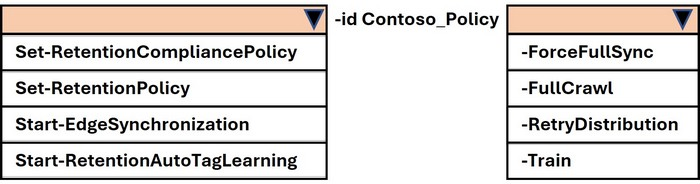
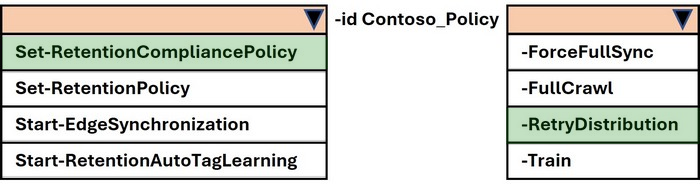
How should you complete the command? To answer, select the appropriate options in the answer area.
NOTE: Each correct selection is worth one point.
Reveal answer detailsClose answer details
Explanation
Step 1 Review scenario You created a retention label policy Contoso_Policy. Status shows Off (Error) with message: "It's taking longer than expected to deploy the policy." Requirement: Reinitiate the policy.
Step 2 Correct PowerShell cmdlet
To manage retention label policies in Microsoft Purview (compliance), the cmdlet is: Set-RetentionCompliancePolicy Other cmdlets: Set-RetentionPolicy # Legacy Exchange Online retention policies, not Purview label policies.
Start-EdgeSynchronization # Sync for Edge Transport servers, not retention.
Start-RetentionAutoTagLearning # Used for auto-tagging learning, not relevant here.
Step 3 Correct parameter To force redistribution of a retention label policy when deployment fails, the parameter is: RetryDistribution Other options: ForceFullSync and -FullCrawl # Apply to search/crawl, not retention. Train # Related to auto-tagging learning models, not retention. Final Verified Answer Set-RetentionCompliancePolicy d Contoso_Policy etryDistribution
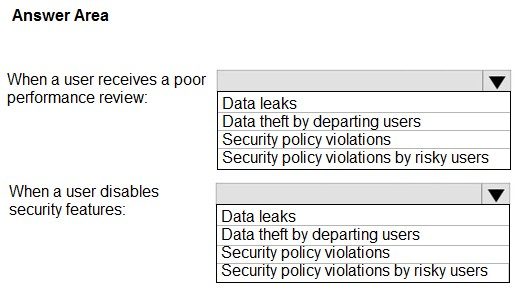
You plan to implement Microsoft Purview insider risk management.
You need to recommend policy templates that meet the following requirements:
Contain risk indicators and scoring for when a user receives a poor performance review. Contain risk indicators and scoring for when a user disables security features on a device.
Which template should you use for each requirement? To answer, select the appropriate options in the answer area.
NOTE: Each correct selection is worth one point.
Reveal answer detailsClose answer details
Explanation
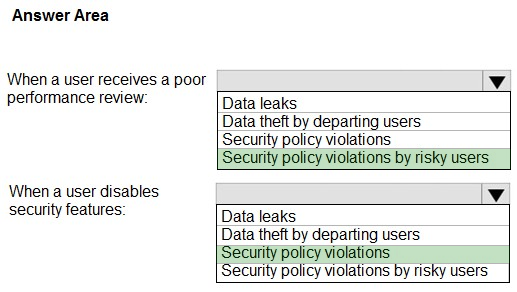
Box 1: Security policy violations by risky users Contain risk indicators and scoring for when a user receives a poor performance review.
Security policy violations by risky users Users that experience employment stressors might be at a higher risk for inadvertent or malicious security policy violations. These stressors could include a user being placed on a performance improvement plan, having a poor performance review, or experiencing a demotion. This policy template starts risk scoring based on these indicators and activities associated with these types of events.
Box 2: Security policy violations Contain risk indicators and scoring for when a user disables security features on a device.
Security policy violations In many organizations, users have permission to install software on their devices or to modify device settings to help with their tasks. Either inadvertently or with malicious intent, users might install malware or *disable important security features* that help protect information on their device or on your network resources. This policy template uses security alerts from Microsoft Defender for Endpoint to start scoring these activities and focus detection and alerts to this risk area. Use this template to provide insights for security policy violations in scenarios when users might have a history of security policy violations that might be an indicator of insider risk.
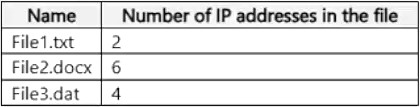
You have a Microsoft SharePoint Online site named Site1 that contains the files shown in the following table.
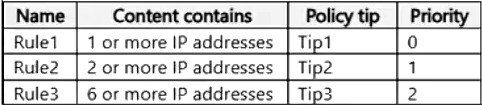
You have a data loss prevention (DLP) policy named DLP1 that has the advanced DLP rules shown in the following table.
You apply DLP1 to Site1.
For each of the following statements, select Yes if the statement is true. Otherwise, select No.
NOTE: Each correct selection is worth one point.
Reveal answer detailsClose answer details
Explanation
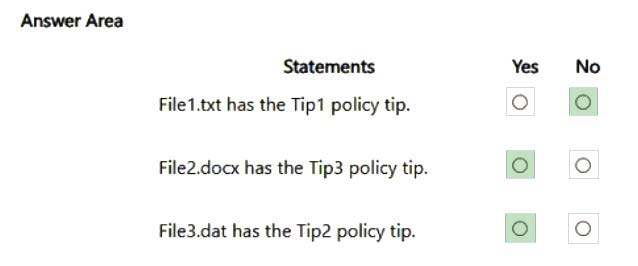
Box 1: No File1 has two IP addresses in it. Both Tip2 and Tip3 rules matches. Tip2 has higher priority.
Note: For the hosted service workloads, like Exchange Online, SharePoint Online and OneDrive for Business, each rule is assigned a priority in the order in which it's created. That means, the rule created first has first priority, the rule created second has second priority, and so on.
When content is evaluated against rules, the rules are processed in priority order. If content matches multiple rules, the first rule evaluated that has the most restrictive action is enforced.
Box 2: Yes File2 has six IP addresses in it. Only Rule3 matches.
Box 3: Yes File3 has four IP addresses in it. Both Rule2 and Rule3 matches. Rule2 has higher priority.
References:
Question 37
Hotspot
HOTSPOT
You have a Microsoft 365 subscription.
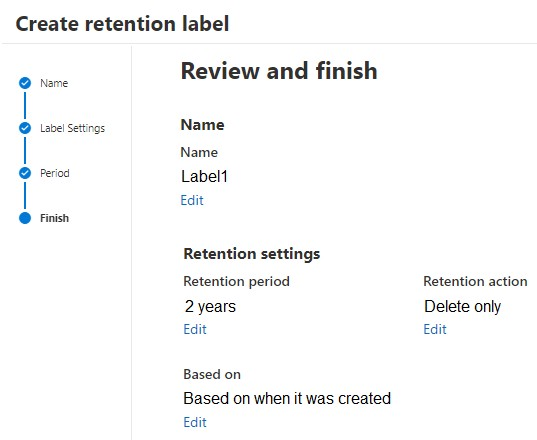
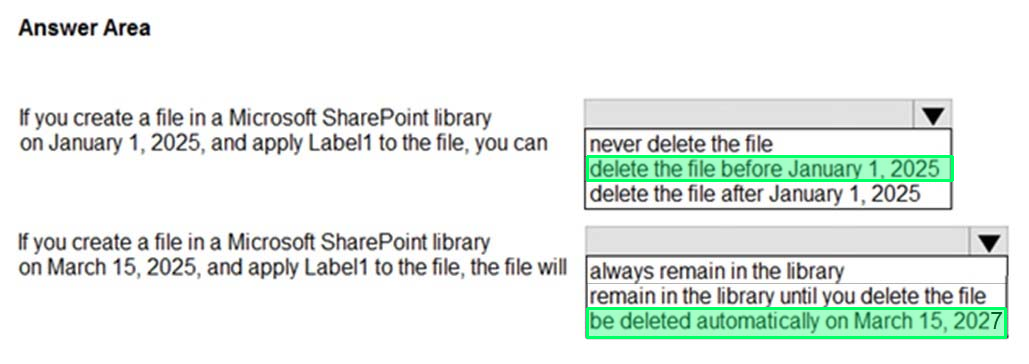
You create a retention label named Label1 as shown in the following exhibit.
You publish Label1 to SharePoint sites.
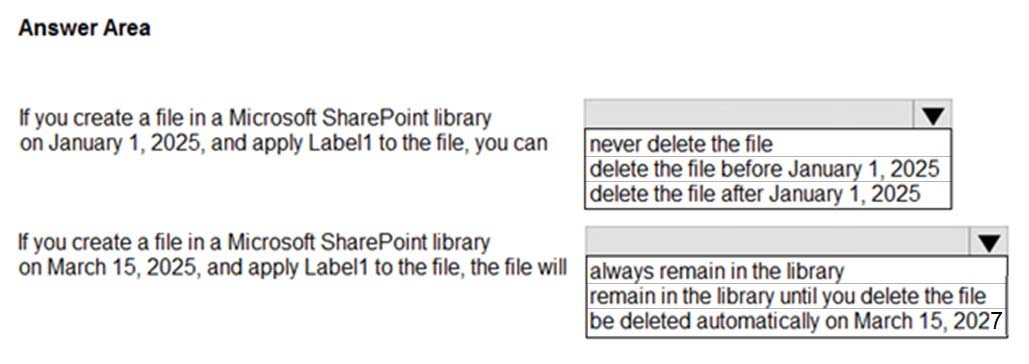
Use the drop-down menus to select the answer choice that completes each statement based on the information presented in the graphic.
NOTE: Each correct selection is worth one point.
Reveal answer detailsClose answer details
Explanation
Box 1: delete the file before January 1, 2025 If you create a file in the Microsoft SharePoint library on January 1, 2025, and apply Label1 to the file, you can_____
Box 2: be deleted automatically on March 15, 2027 If you create a file in the Microsoft SharePoint library on March 15, 2025, and apply Label1 to the file, you can_____
Incorrect: * always remain in the library, remain in the library until you delete the file It will remain for two years, and then it be deleted automatically.
Note: Retention settings that you configure can help you achieve these goals. Managing content commonly requires two actions: Retain content Prevent permanent deletion and remain available for eDiscovery Delete content Permanently delete content from your organization
With these two retention actions, you can configure retention settings for the following outcomes:
Retain-only: Retain content forever or for a specified period of time. Delete-only: Permanently delete content after a specified period of time. *-> Retain and then delete: Retain content for a specified period of time and then permanently delete it.
References:
Question 38
Hotspot
HOTSPOT
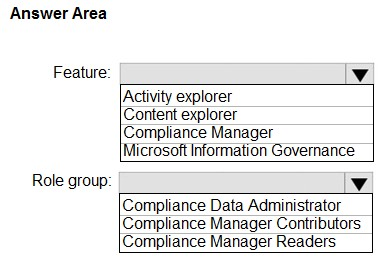
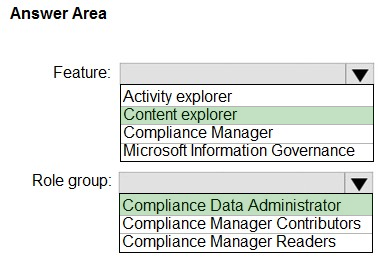
You have a Microsoft 365 E5 tenant that contains a trainable classifier named Classifier1. You need to increase the accuracy of Classifier1. The solution must use the principle of least privilege.
Which feature should you use and to which role group should you be added? To answer, select the appropriate options in the answer area.
NOTE: Each correct selection is worth one point.
Reveal answer detailsClose answer details
Explanation
Box 1: Content Explorer Increase classifier accuracy Classifiers, like sensitive information types (SIT) and trainable classifiers are used in various kinds of policies to identify sensitive information. Like most such models, sometimes they identify an item as being sensitive that isn't. Or, they may not identify an item as being sensitive when it actually is. These are called false positives and false negatives.
This article shows you how to confirm whether items matched by a classifier are true positive (a Match) or a false positive (Not a match) and provide Match/Not a match feedback. You can use that feedback to tune your classifiers to increase accuracy. You can also send redacted versions of the document as well as the Match, Not a Match feedback to Microsoft if you want to help increase the accuracy of the classifiers that Microsoft provides.
The Match, Not a match experience is available in:
* -> Content Explorer Sensitive Information Type Matched Items page Trainable Classifier Matched Items page Microsoft Purview Data Loss Prevention (DLP) Alerts page
Box 2: Compliance data administrator Permissions In order to get access to the content explorer tab, an account must be assigned membership in any one of these roles or role groups.
Microsoft 365 role groups Global administrator Compliance administrator Security administrator *-> Compliance data administrator
References:
Question 39
Single choice
You have a Microsoft 365 E5 subscription.
You need to prevent users from uploading data loss prevention (DLP)-protected documents to the following third-party websites:
1. web1.contoso.com 2. web2.contoso.com
The solution must minimize administrative effort.
To what should you set the Service domains setting for Endpoint DLP?
A
*.contoso.com
B
contoso.com
C
web1.contoso.com and web2.contoso.com
D
web*.contoso.com
Reveal answer detailsClose answer details
Correct answerC
Explanation
The restriction is required for exactly two hosts, so the Service domains list should contain web1.contoso.com and web2.contoso.com. Explicit entries cover both named websites without extending the restriction to every service beneath contoso.com, which keeps the configuration precise and limited in scope.
Question 40
Lab simulation
Simulation
Username and password
Use the following login credentials as needed:
To enter your username, place your cursor in the Sign in box and select the username below.
To enter your password, place your cursor in the Enter password box and select the password below.
If the Microsoft Edge browser or Microsoft 365 portal does not load successfully, select the Microsoft Edge browser icon from the task bar, type the URL "https://admin.microsoft.com", and press Enter.
The following information is for technical support purposes only:
Lab Instance: XXXXXXXXX Task 6 You plan to create an Endpoint data loss prevention (Endpoint DLP) policy that will restrict browsers from uploading files to fabrikam.com.
You need to configure the Endpoint DLP settings so that fabrikam.com can be restricted by the Endpoint DLP policy.
You do NOT need to create an Endpoint DLP policy at this time.
Reveal model answerClose model answer
In Endpoint DLP settings, add fabrikam.com to a sensitive service domain group so Endpoint DLP rules can restrict uploads to it.
Explanation
A browser-upload destination must be classified in Endpoint DLP settings before a policy rule can restrict transfers to it. Adding fabrikam.com to a sensitive service domain group makes that destination available to Endpoint DLP rules. A later policy can then use the group to restrict browser uploads to the specified domain.
Question 41
Multiple choice
You have a data loss prevention (DLP) policy configured for endpoints as shown in the following exhibit.
From a computer named Computer1, a user can sometimes upload files to cloud services and sometimes
cannot. Other users experience the same issue.
What are two possible causes of the issue? Each correct answer presents a complete solution.
NOTE: Each correct selection is worth one point.
A
The unallowed browsers in the Microsoft 365 Endpoint data loss prevention (Endpoint DLP) settings are NOT configured.
B
There are file path exclusions in the Microsoft 365 Endpoint data loss prevention (Endpoint DLP) settings.
C
The Access by restricted apps action is set to Audit only.
D
The Copy to clipboard action is set to Audit only.
E
The computers are NOT onboarded to Microsoft Purview.
Reveal answer detailsClose answer details
Correct answersA, B
Explanation
If unallowed browsers are not configured, browser-dependent enforcement can differ and allow some uploads outside the intended controlled path. File path exclusions create another variation because files stored in excluded locations are exempt from Endpoint DLP evaluation. Either condition can produce intermittent upload behavior.
Question 42
Single choice
You have a Microsoft 365 E5 subscription that contains a group named Group1.
You need to ensure that the members of Group1 can view and export alerts and cases in Microsoft Purview insider risk management. The solution must follow the principle of least privilege.
To which role group should you add to Group1?
A
Insider Risk Management Analysts
B
Insider Risk Management Admins
C
Insider Risk Management Approvers
D
Insider Risk Management Investigators
Reveal answer detailsClose answer details
Correct answerD
Explanation
Viewing and exporting both insider risk alerts and cases are investigation activities. The Insider Risk Management Investigators role group is scoped to working with those records and their case data. It therefore supplies the requested operational access without adding policy configuration or administrative permissions that Group1 does not need.
Question 43
Hotspot
HOTSPOT
You have a Microsoft 365 E5 subscription.
You need to identify documents that contain patent application numbers containing the letters PA followed by eight digits, for example, PA 12345678. The solution must minimize administrative effort.
What should you do? To answer, select the appropriate options in the answer area.
NOTE: Each correct selection is worth one point.
Reveal answer detailsClose answer details
Explanation
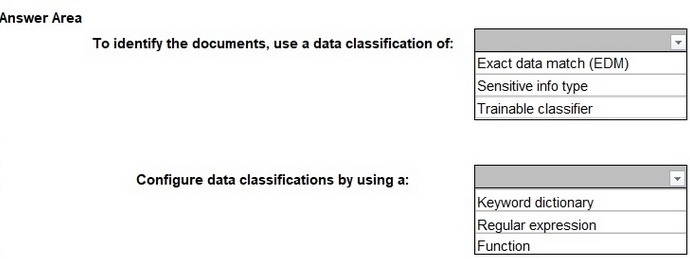
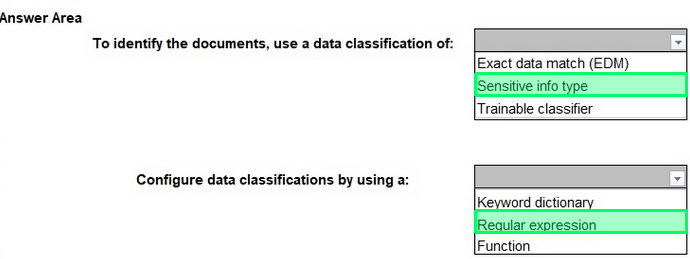
Box 1: Since you are looking for a specific pattern (PA followed by eight digits, e.g., PA 12345678), the best classification method is Sensitive Info Type. Sensitive Info Types allow pattern-based matching to identify structured data. Exact Data Match (EDM) is not needed because you're not comparing against a fixed dataset. Trainable classifier is not appropriate because this is a structured pattern, not an unstructured document classification.
Box 2: Since PA 12345678 follows a structured pattern, the most effective method is Regular Expression (Regex). A Regular Expression (Regex) can be written to match "PA" followed by exactly eight digits (e.g., PA\s\d{8}). Keyword dictionary is not ideal because it works for predefined words, not number patterns. Function is unnecessary because there is no need for checksum validation or predefined validation rules.
Question 44
Single choice
You plan to implement Microsoft Purview Advanced Message Encryption.
You need to ensure that encrypted email sent to external recipients expires after seven days.
What should you create first?
A
a mail flow rule
B
an X.509 version 3 certificate
C
a custom branding template
D
a remote domain in Microsoft Exchange
E
a connector in Microsoft Exchange
Reveal answer detailsClose answer details
Correct answerC
Explanation
Encrypted-message expiration is configured through a custom branding template in Microsoft Purview Advanced Message Encryption. The template holds the expiration behavior that will apply to external recipients. After creating it, a mail flow rule can select the qualifying messages and invoke that configuration, making the custom template the first requirement.
Question 45
Hotspot
HOTSPOT
You have a Microsoft 365 E5 subscription.
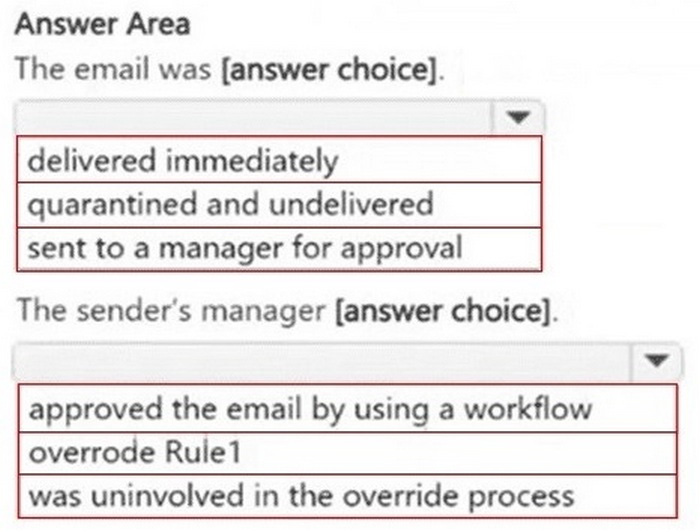
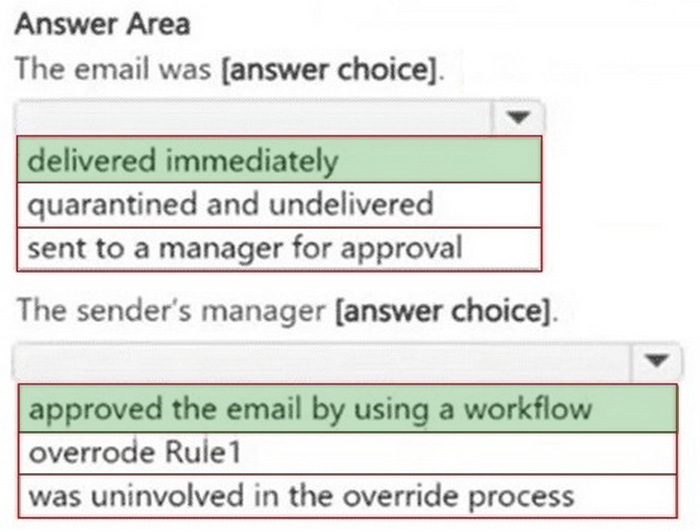
You receive the data loss prevention (DLP) alert shown in the following exhibit. Use the drop-down menus to select the answer choice that completes each statement based on the information presented in the graphic.
NOTE: Each correct selection is worth one point.
Reveal answer detailsClose answer details
Question 46
Single choice
You need to be alerted when users share sensitive documents from Microsoft OneDrive to any users outside your company.
What should you do?
A
From the Microsoft Defender portal, create an activity policy.
B
From the Microsoft Purview portal, start an Advanced eDiscovery search.
C
From the Exchange admin center, create a data loss prevention (DLP) policy.
D
From the Microsoft Defender portal, create a file policy.
Reveal answer detailsClose answer details
Correct answerD
Explanation
A Defender file policy can inspect files in OneDrive, evaluate sensitive-content criteria, and detect when matching documents are shared externally. The policy can then generate the required alert. An activity policy tracks actions more generally, while a search does not provide continuous alerting.
MICROSOFT
Administering Information Security in Microsoft 365
You have a Microsoft 365 E5 subscription that contains four users named User1, User2, User3, and User4 and a file named File1.docx.
To File1, you apply a sensitivity label that has the permissions shown in the following exhibit.
Assign permissions to speciffc users and groups*
Use the drop-down menus to select the answer choice that completes each statement based on the information presented in the graphic.
NOTE; Each correct selection is worth one point.
Correct Answer:
Explanation
Explanation/Reference:
Step 1 Summarization in Copilot For Microsoft 365 Copilot to summarize a file: The user needs at least View permission. Summarization does not require editing, copying, or ownership rights. Looking at the exhibit: User1 (Co-Owner) # has full access including view. User2 (Co-Author) # has edit and view. User3 (Reviewer) # has read-only rights. User4 (Viewer) # has read rights. All four users can view the document. Therefore, Copilot can summarize File1 for User1, User2, User3, and User4.
Step 2 Referencing a file by link in Copilot For Copilot to reference a file by link (i.e., cite or share within generated content): The user must have rights that include resharing or exporting. Only the Co-Owner has full rights to manage access and allow referencing by link. From the exhibit: User1 (Co-Owner) # Can reference by link. User2 (Co-Author), User3 (Reviewer), User4 (Viewer) # Do not have reshare or link rights. So, only User1 can reference File1 by link. References: Sensitivity labels and Microsoft 365 Copilot
QUESTION 2
Note: This question is part of a series of questions that present the same scenario. Each question in the series contains a unique solution that might meet the stated goals. Some question sets might have more than one correct solution, while others might not have a correct solution.
After you answer a question in this section, you will NOT be able to return to it. As a result, these questions will not appear in the review screen.
You have a Microsoft 365 tenant and 500 computers that run Windows 11. The computers are onboarded to Microsoft Purview.
You discover that a third-party application named Tailspin_scanner.exe accessed protected sensitive information on multiple computers. Tailspin_scanner.exe is installed locally on the computers.
You need to block Tailspin_scanner.exe from accessing sensitive documents without preventing the application from accessing other documents.
Solution: From the Microsoft Defender for Cloud Apps, you mark the application as Unsanctioned.
Does this meet the goal?
A.
Yes
B.
No
Correct Answer: B
Explanation
Explanation/Reference:
Marking an application as Unsanctioned in Defender for Cloud Apps is intended to control cloud-app access and does not create content-aware restrictions for a locally installed executable. It cannot allow Tailspin_scanner.exe to open ordinary documents while blocking only its access to sensitive documents.
QUESTION 3
HOTSPOT
You have a Microsoft 365 E5 subscription. The subscription contains devices that are onboarded to Microsoft Purview and configured as shown in the following table.
The subscription contains the users shown in the following table.
You need to review the activities.
What should you use for each user? To answer, select the appropriate options in the answer area.
NOTE: Each correct selection is worth one point.
Correct Answer:
Explanation
Explanation/Reference:
User1: Since the Microsoft Purview browser extension is installed on Device1, AI-related activity performed by User1 (generating an image using a generative AI website) can be reviewed in Activity explorer in DSPM for AI. User2: Since Device2 does not have the Microsoft Purview browser extension installed, AI-related activity cannot be tracked in DSPM for AI. Instead, Audit log search should be used to review activity such as using Microsoft 365 Copilot. User3: Since Device3 has the Microsoft Purview browser extension installed, AI-related activity (browsing sample content on a generative AI website) can be reviewed using Activity explorer in DSPM for AI.
QUESTION 4
HOTSPOT
You are implementing Microsoft Purview Advanced Message Encryption for a Microsoft 365 tenant named contoso.com
You need to meet the following requirements:
1. All email to a domain named (abrikam.com must be encrypted automatically. 2. Encrypted emails must expire seven days after they are sent
What should you configure for each requirement? To answer, select the appropriate options in the answer area.
NOTE: Each correct selection is worth one point.
Correct Answer:
QUESTION 5
HOTSPOT
You have a Microsoft 365 E5 subscription that contains two Microsoft 365 groups named Group1 and Group2. Both groups use the following resources:
A group mailbox
Microsoft Teams channel messages
A Microsoft SharePoint Online teams site
You create the objects shown in the following table.
To which resources will AutoApply1 and Retention1 be applied? To answer, select the appropriate options in the answer area.
NOTE: Each correct selection is worth one point.
Correct Answer:
Explanation
Explanation/Reference:
AutoApply1 is an auto-labeling policy that applies RLabel1 to Group1. Auto-labeling policies can apply retention labels across group mailboxes, SharePoint Online sites, and Teams channel messages if they are configured for group resources.
Retention1 is a retention policy applied to Group2. Retention policies for Microsoft 365 groups apply to all group resources, including group mailboxes, SharePoint Online teams sites, and Teams channel messages. Since both AutoApply1 and Retention1 affect entire groups, they apply to all associated resources: group mailbox, SharePoint Online teams site, and Teams channel messages.
QUESTION 6
You have a Microsoft 365 subscription.
You configure a Microsoft Purview insider risk management policy named Policy1.
You need to ensure that you will receive real-time recommendations on how to configure the indicator thresholds for Policy1. The solution must ensure that the recommendations are based on a user's activity from the past 10 days.
What should you do first?
A.
Create an Insider Risk Indicators connector.
B.
Configure the Insider Risk Management Data sharing settings.
C.
Create a data loss prevention (DLP) policy
D.
Enable insider risk management analytics.
Correct Answer: D
Explanation
Explanation/Reference:
Insider risk management analytics examines recent tenant activity and generates recommendations for policy indicator thresholds. Enabling analytics is therefore the prerequisite for receiving real-time guidance based on the specified past 10 days of user activity. Connectors, data sharing, and DLP policies do not perform this threshold analysis.
QUESTION 7
You have a Microsoft 565 E5 tenant that uses Microsoft Teams and contains two users named User1 and User2. You create a data Joss prevention (DIP) policy that is applied to the Teams chat and channel messages location for User1 and User?
Which Teams entities will have DLP protection?
A.
1:1/n chats and general channels only
B.
1:1/n chats and private channels only
C.
1:1/n chats, general channels, and private channels
Correct Answer: C
Explanation
Explanation/Reference:
A DLP policy scoped to the Teams chat and channel messages location protects message content involving the included users across Teams conversation types. This coverage includes 1:1 and group chats, general channels, and private channels, rather than being limited to only one channel category.
QUESTION 8
HOTSPOT
You have a Microsoft 365 E5 subscription that contains two Microsoft SharePoint Online sites named Site1 and Site2. Site1 contains the files shown in the following table.
Site2 contains the files shown in the following table.
From the Microsoft Purview portal, you create the content searches shown in the following table.
For each of the following statements, select Yes if the statement is true. Otherwise, select No.
NOTE: Each correct selection is worth one point.
Correct Answer:
Explanation
Explanation/Reference:
Box 1: No No - The results of Search1 include File2.docx.
Author Mismatch: Search1 requires the author to be User1 (Author: User1). Actual Author: The file File2.docx was authored by User2.
Box 2: No No - The results of Search2 include File1.docx, File2.docx, FileA.pptx, and FileB.docx.
File extension mismatch: Search2 requires a.docx extension (FileExtension:docx). File FileA is a presentation: FileA.pptx is a PowerPoint file, so it is automatically excluded.
Box 3: Yes Yes-The results of Search3 include FileB.docx.
Location Match: Search3 targets site Site2, which is where FileB.docx is stored. Condition Match: Search3 looks for Author: User1. FileB.docx was authored by user User1.
A DLP policy evaluates Exchange and SharePoint, and devices are already onboarded. An endpoint rule for copying sensitive files to USB never runs. Which policy change is required?
A.
Add Devices to the DLP policy locations.
B.
Add another condition while Devices remains unselected.
C.
Publish a policy tip through the Exchange location.
D.
Apply a container sensitivity label to the devices.
Correct Answer: A
Explanation
Explanation/Reference:
Device onboarding is already complete, so endpoint readiness is not the missing condition. The policy currently evaluates only Exchange and SharePoint, which leaves the USB rule outside its selected locations. Adding Devices to the DLP policy locations enables evaluation of endpoint file-copy activity.
QUESTION 10
HOTSPOT
You have a new Microsoft 365 E5 tenant.
You need to create a custom trainable classifier that will detect product order forms. The solution must use the principle of least privilege.
What should you do first? To answer, select the appropriate options in the answer area.
NOTE: Each correct selection is worth one point.
Correct Answer:
Explanation
Explanation/Reference:
To create a custom trainable classifier in Microsoft Purview (formerly Microsoft Compliance Center), you must first opt into the trainable classifier feature.
Before using custom trainable classifiers, Microsoft requires manual opt-in through the Microsoft Purview compliance portal. Without this step, you cannot create a new classifier. The Compliance Administrator role has the necessary permissions to configure data classification, DLP policies, and trainable classifiers. Global Administrator has higher privileges but is not required for this task, violating the principle of least privilege. Security Administrator is focused on security-related settings but does not manage compliance features like classifiers.
QUESTION 11
You are planning a data loss prevention (DLP) solution that will apply to Windows Client computers.
You need to ensure that when users attempt to copy a file that contains sensitive information to a USB storage device, the following requirements are met:
If the users are members of a group named Group1, the users must be allowed to copy the file, and an event must be recorded in the audit log.
All other users must be blocked from copying the file.
What should you create?
A.
one DLP policy that contains one DLP rule
B.
one DLP policy that contains two DLP rules
C.
two DLP policies that each contains one DLP rule
Correct Answer: B
Explanation
Explanation/Reference:
One Endpoint DLP policy can contain both required behaviors, but they need separate rules. One rule targets Group1 and audits the USB copy while allowing it; the second applies to all other users and blocks the copy. Distinct conditions and actions cannot be represented by a single rule.
QUESTION 12
You have a Microsoft 365 subscription.
You create a new trainable classifier.
You need to train the classifier.
Which source can you use to train the classifier?
A.
an on-premises Microsoft SharePoint Server site
B.
an A2ure Files share
C.
a Microsoft SharePoint Online site
D.
an NFS file share
Correct Answer: C
Explanation
Explanation/Reference:
A trainable classifier learns from example documents stored in a supported Microsoft 365 content source. A Microsoft SharePoint Online site can hold the positive and negative examples used during training. The listed on-premises SharePoint, Azure Files, and NFS sources do not provide the required training source for this classifier.
QUESTION 13
You have a Microsoft 365 subscription.
You need to ensure that users can apply retention labels to individual documents in their Microsoft SharePoint libraries.
Which two actions should you perform? Each correct answer presents part of the solution.
NOTE: Each correct selection is worth one point.
A.
From Microsoft Defender for Cloud Apps, create a file policy.
B.
From the SharePoint admin center, modify the Site Settings.
C.
From the SharePoint ad min center, modify the records management settings.
D.
From the Microsoft Purview portal, publish a label.
E.
From the Microsoft Purview portal, create a label.
Correct Answer: DE
Explanation
Explanation/Reference:
First create the retention label in the Microsoft Purview portal to define its retention behavior. Then publish the label through a label policy so users can see and apply it. Creation defines the control, while publication makes it available for individual documents in SharePoint libraries.
QUESTION 14
You have a Microsoft 365 E5 subscription that contains a trainable classifier named Trainable1.
You plan to create the items shown in the following table.
Which items can use Trainable 1?
A.
Label2 only
B.
Label1 and Label2 only
C.
Label1 and Policy1 only
D.
Label2, Policy1, and DLP1 only
E.
Label1, Label2, Policy1, and DLP1
Correct Answer: D
Explanation
Explanation/Reference:
Trainable classifiers can identify content for retention and DLP decisions. Label2 is a retention label, Policy1 is a retention label policy, and DLP1 is a data loss prevention policy, so each can use Trainable1. Label1 is a sensitivity label and is outside this supported set.
QUESTION 15
HOTSPOT
You have a Microsoft 365 E5 subscription.
You need to ensure that users are prevented from uploading sensitive data to ChatGPT and Google Gemini.
The solution must meet the following requirements:
1. Prevent credit card numbers from being pasted into ChatGPT and Gemini. 2. Prevent documents that contain classified data from being uploaded to ChatGPT and Gemini.
Which Microsoft Purview solution should you use for each requirement? To answer, select the appropriate options in the answer area.
NOTE: Each correct selection is worth one point.
Correct Answer:
Explanation
Explanation/Reference:
Step 1 Requirement analysis You need to prevent users from: Pasting credit card numbers into ChatGPT/Google Gemini. Uploading classified documents into ChatGPT/Google Gemini. Both scenarios involve AI websites. Microsoft Purview provides Data Security Posture Management for AI and Endpoint DLP integrations that work through Data Loss Prevention (DLP) and Insider Risk Management policies.
Step 2 ?Credit card numbers Credit card numbers are structured sensitive information types (SITs). DLP policies are the correct Microsoft Purview solution for detecting and blocking sensitive info (e.g., credit card, SSN, health ID) from being copied, pasted, or uploaded into restricted destinations like AI apps. Therefore, Data Loss Prevention is the right choice. # Reference: Learn about Endpoint DLP and AI sites
Step 3 ?Documents Documents containing classified or labeled data (via sensitivity labels) fall under insider risk activity detection when exfiltrated. Insider Risk Management policies can monitor and block uploads of classified/labeled files to AI services such as ChatGPT or Gemini. Therefore, Insider Risk Management is the right choice for preventing document uploads. # Reference: Insider Risk Management ?risky AI activity detection
QUESTION 16
Simulation
Username and password Use the following login credentials as needed:
To enter your username, place your cursor in the Sign in box and select the username below.
To enter your password, place your cursor in the Enter password box and select the password below.
If the Microsoft Edge browser or Microsoft 365 portal does not load successfully, select the Microsoft Edge browser icon from the task bar, type the URL "https://admin microsoft.com", and press Enter.
The following information is for technical support purposes only: Lab Instance: XXXXXXXX.
Task 9
You plan to create a data loss prevention (DLP) policy that will apply to content containing the following keywords:
Tailspin Litware Falcon
You need to create a keyword list that can be used in the DLP policy.
Correct Answer:
Create a sensitive information type whose primary element is a keyword list containing Tailspin, Litware, and Falcon.
Explanation
Explanation/Reference:
A DLP policy needs a content classification that can recognize the specified terms. A custom sensitive information type provides that reusable classification, and a keyword list can serve as its primary matching element. Placing Tailspin, Litware, and Falcon in the same keyword list allows the sensitive information type to match content containing those keywords.
QUESTION 17
You have a Microsoft 365 tenant that is opt-in for trainable classifiers.
You need to ensure that a user named User1 can create custom trainable classifiers. The solution must use the principle of least privilege.
Which role should you assign to User1?
A.
Security Administrator
B.
Compliance Administrator
C.
Global Administrator
D.
Security Operator
Correct Answer: B
Explanation
Explanation/Reference:
Creating custom trainable classifiers is a compliance-management function. The Compliance Administrator role grants the relevant compliance configuration authority without the tenant-wide power of Global Administrator. Security Administrator and Security Operator focus on security operations rather than classifier creation.
QUESTION 18
You have a Microsoft 365 E5 subscription.
You create a data loss prevention (DLP) policy and select.
Use Notifications to inform your users and help educate them on the proper use of sensitive info.
Which apps will show the policy tip?
A.
Outlook on the web only
B.
Outlook Win32 only
C.
Outlook for iOS and Android only
D.
Outlook on the web and Outlook Win32 only
E.
Outlook Win32 and Outlook for iOS and Android only
F.
Outlook on the web. Outlook Win32, and Outlook for iOS and Android
Correct Answer: F
Explanation
Explanation/Reference:
DLP user notifications and policy tips are supported across the listed Outlook experiences. A matching message can therefore display the policy tip in Outlook on the web, the Outlook Win32 desktop client, and Outlook for iOS and Android. Limiting the result to only one or two of those client families would omit supported notification surfaces.
QUESTION 19
HOTSPOT
You have a Microsoft 365 subscription that has a retention label named Retention1. The subscription contains the files shown in the following table.
You create an auto-labeling policy named Policy1 that will automatically apply Retention1 as shown in the Auto-labeling policy exhibit. (Click the Auto-labeling policy tab.)
You configure Policy1 to apply Retention1 as shown in the Locations exhibit. (Click the Locations tab.)
For each of the following statements, select Yes if the statement is true. Otherwise, select No.
NOTE: Each correct selection is worth one point.
Correct Answer:
Explanation
Explanation/Reference:
Box 1: Yes Retention1 is applied to File1 - Yes File1 is stored in Microsoft Exchange Online. According to the auto-labeling policy settings, Exchange email is included in the locations where the label will be applied. Additionally, File1 contains sensitive information types (SITs) that meet the conditions for IP Address (instance count 1) and SWIFT Code (instance count 2), which align with the requirements in Group1. Therefore, Retention1 will be applied to File1.
Box 2: Yes Retention1 is applied to File2 - Yes File2 is stored in Microsoft SharePoint Online, which is enabled in the locations for the auto-labeling policy. File2 meets the criteria in Group1 (IP Address with instance count 3 and SWIFT Code with instance count 5), thus satisfying the auto-labeling conditions. Retention1 will be applied to File2.
Box 3: Retention1 is applied to File3 - No Although File3 contains the required sensitive information types (IP Address and SWIFT Code), it is stored in Microsoft OneDrive, which is not included in the configured locations for auto-labeling in the policy. Since OneDrive is disabled in the locations for the policy, Retention1 will not be applied to File3.
QUESTION 20
You have a Microsoft 365 E5 tenant that has a retention label named Label1.
You need to create an auto-labeling policy that will apply Label1.
To which location can Label1 be applied?
A.
OneDrive accounts
B.
Microsoft Entra security groups
C.
Microsoft Defender for Cloud Apps
D.
Teams chats
Correct Answer: A
Explanation
Explanation/Reference:
An auto-labeling policy for a retention label can inspect supported content stored in OneDrive accounts and apply Label1 when its conditions match. Microsoft Entra security groups are identities rather than content repositories, while Defender for Cloud Apps and Teams chats are not the applicable auto-labeling location for this retention label.
QUESTION 21
You have a Microsoft 365 E5 subscription that contains a user named User1.
You deploy Microsoft Purview insider risk management.
You need ensure that insider risk management events related to User1 are visible only to specific users.
What should you create?
A.
a global exclusion
B.
an indicator variant
C.
a priority user group
D.
a detection group
Correct Answer: C
Explanation
Explanation/Reference:
A priority user group identifies users whose insider-risk activity requires focused handling and can limit related event visibility to designated reviewers. Adding User1 to such a group supports the required restricted review of User1's events. Exclusions, indicator variants, and detection groups do not provide that priority-user visibility boundary.
QUESTION 22
You have a Microsoft 365 subscription.
You need to monitor Microsoft 365 Copilot user prompts and responses for content that has been matched by the Protected Materials trainable classifier.
Which type of policy should you create?
A.
communication compliance
B.
data loss prevention (DLP)
C.
insider risk management
D.
retention
Correct Answer: A
Explanation
Explanation/Reference:
Communication compliance evaluates user communications for defined policy conditions and supports reviewing Microsoft 365 Copilot prompts and responses. A policy using the Protected Materials trainable classifier can therefore surface matching interactions for review. DLP enforces data handling, while retention and insider risk policies address different outcomes.
QUESTION 23
HOTSPOT
You plan to implement Microsoft 365 Endpoint data loss prevention (Endpoint DLP).
You need to identify which end user activities can be audited on the endpoints, and which activities can be restricted on the endpoints.
What should you identify for each activity? To answer, select the appropriate options in the answer area.
NOTE: Each correct selection is worth one point.
Correct Answer:
Explanation
Explanation/Reference:
References:
QUESTION 24
You have a Microsoft SharePoint Online site named Site1 that contains a document library. The library contains more than 1,000 documents. Some of the documents are job applicant resumes. All the documents are in the English language.
You plan to apply a sensitivity label automatically to any document identified as a resume. Only documents that contain work experience, education, and accomplishments must be labeled automatically.
You need to identify and categorize the resumes. The solution must minimize administrative effort.
What should you include in the solution?
A.
a trainable classifier
B.
a keyword dictionary
C.
a function
D.
an exact data match (EDM) classifier
Correct Answer: A
Explanation
Explanation/Reference:
A trainable classifier categorizes documents by their overall meaning and structure, making it suitable for recognizing resumes that contain work experience, education, and accomplishments. It avoids maintaining extensive keyword rules and can classify the large English document collection with less administrative effort.
QUESTION 25
Simulation
Username and password
Use the following login credentials as needed:
To enter your username, place your cursor in the Sign in box and select the username below.
To enter your password, place your cursor in the Enter password box and select the password below.
If the Microsoft Edge browser or Microsoft 365 portal does not load successfully, select the Microsoft Edge browser icon from the task bar, type the URL "https://admin.microsoft.com", and press Enter.
The following information is for technical support purposes only:
Lab Instance: XXXXXXXXX
Task 5
You need to simulate applying the Confidential - Finance label to all the content in the Exchange emails, the SharePoint sites, and the OneDrive accounts that contain the Credit Card Number sensitive info type.
Correct Answer:
Create a sensitivity auto-labeling policy that applies Confidential - Finance when Credit Card Number is detected. Scope it to Exchange email, SharePoint sites, and OneDrive accounts, and run it in simulation mode.
Explanation
Explanation/Reference:
A sensitivity auto-labeling policy links detection of the Credit Card Number sensitive information type to application of Confidential - Finance. Its locations must include Exchange email, SharePoint sites, and OneDrive accounts so all specified content is evaluated. Running the policy in simulation evaluates the matches without placing the label into active enforcement.
QUESTION 26
HOTSPOT
You have a Microsoft 365 E5 subscription that contains the device configurations shown in the following table.
Each configuration uses either Google Chrome or Firefox as a default browser.
You need to implement Microsoft Purview and deploy the Microsoft Purview browser extension to the configurations.
To which configuration can each extension be deployed? To answer, select the appropriate options in the answer area.
NOTE: Each correct selection is worth one point.
Correct Answer:
QUESTION 27
HOTSPOT
You have a Microsoft 365 E5 subscription that has data loss prevention (DLP) implemented. You plan to export DLP activity by using Activity explorer.
The exported file needs to display the sensitive info type detected for each DLP rule match.
What should you do in Activity explorer before exporting the data, and in which file format is the file exported? To answer, select the appropriate options in the answer area.
NOTE: Each correct selection is worth one point.
Correct Answer:
Explanation
Explanation/Reference:
Box 1: To include the sensitive info type detected for each DLP rule match, you need to add a custom column in Activity Explorer. This ensures that the exported file contains specific details about the detected sensitive information types.
Box 2: DLP activity exports from Activity Explorer are always in CSV (Comma-Separated Values) format. This format allows for easy data analysis and reporting in Excel or other data-processing tools.
QUESTION 28
HOTSPOT
You have a Microsoft 365 E5 subscription that uses Microsoft Purview.
You need to deploy a compliance solution that will detect the accidental oversharing of information outside of an organization. The solution must minimize administrative effort.
What should you use? To answer, select the appropriate options in the answer area.
NOTE: Each correct selection is worth one point.
Correct Answer:
Explanation
Explanation/Reference:
Box 1: Data leaks When using a Data leaks template, you can assign a DLP policy to trigger indicators in the insider risk policy for high severity alerts in your organization. Whenever a high severity alert is generated by a DLP policy rule is added to the Office 365 audit log, insider risk policies created with this template automatically examine the high severity DLP alert. If the alert contains an in-scope user defined in the insider risk policy, the alert is processed by the insider risk policy as a new alert and assigned an insider risk severity and risk score. You can also choose to assign selected indicators as triggering events for a policy. This flexibility and customization helps scope the policy to only the activities covered by the indicators. This policy allows you to evaluate this alert in context with other activities included in the case.
Box 2: A data loss prevention (DLP) policy
Note: Data leaks Protecting data and preventing data leaks is a constant challenge for most organizations, particularly with the rapid growth of new data created by users, devices, and services. Users are empowered to create, store, and share information across services and devices that make managing data leaks increasingly more complex and difficult. Data leaks can include *accidental oversharing of information outside your organization* or data theft with malicious intent. With an assigned Microsoft Purview Data Loss Prevention (DLP) policy, built-in, or customizable triggering events, this template starts scoring real-time detections of suspicious SharePoint Online data downloads, file and folder sharing, printing files, and copying data to personal cloud messaging and storage services.
References:
QUESTION 29
You have a Microsoft 365 subscription.
You have a user named User1 Several users have full access to the mailbox of User1.
Some email messages sent to User 1 appeal to have been read and deleted before the user viewed them
When you search the audit log in the Microsoft Purview portal to identify who signed in to the mailbox of User l. the results are blank.
You need to ensure that you can view future sign-ins to the mailbox of User1.
Solution: You run the Set-AuditConfig -Workload Exchange command.
Does that meet the goal?
A.
Yes
B.
No
Correct Answer: A
Explanation
Explanation/Reference:
The Exchange workload must supply its auditing events before mailbox sign-in activity can appear in the Microsoft Purview audit results. Running Set-AuditConfig -Workload Exchange enables that Exchange auditing configuration, allowing future sign-in events for User1's mailbox to be available for investigation.
QUESTION 30
Communication compliance must sample 50 percent of risky messages involving traders across selected email and Teams channels. Named reviewers will evaluate the matches. Which configuration meets the requirement?
A.
Configure Endpoint DLP participants, USB activity, blocking, and device administrators.
B.
Configure scoped participants and channels, detection, review percentage, and reviewers.
C.
Configure Audit workloads, operations, search percentage, and audit investigators.
D.
Configure sensitivity label scope, markings, defaults, and label publishers.
Correct Answer: B
Explanation
Explanation/Reference:
The policy scope must identify the trader participants and the selected email and Teams channels. Its detection settings identify risky messages, the review percentage limits sampling to 50 percent, and the reviewer assignment sends those sampled matches to the named people for evaluation.
QUESTION 31
HOTSPOT
You have a Microsoft 365 E5 subscription that contains the sensitive information types (SITs) shown in the following table.
A user sends the email messages shown in the following table.
For each of the following statements, select Yes if the statement is true. Otherwise, select No.
NOTE: Each correct selection is worth one point.
Correct Answer:
Explanation
Explanation/Reference:
Box 1: Yes Yes - SIT1 will identity and match the content in Email1.
Prd:1234 will match the regular expression of SIT1.
Box 2: Yes Yes - SIT2 will identity and match the content in Email2.
111-111-1111 will match the exclusion of SIT2. However, 123456789012 will match the regular expression of SIT2.
Note: Sensitive information type additional checks Here are the definitions and some examples for the available additional checks.
* Exclude specific matches: This check lets you define keywords to exclude when detecting matches for the pattern you're editing. For example, you might exclude test credit card numbers like '4111111111111111' so that they're not matched as a valid number.
Box 3: No No - SIT3 will identity and match the content in Email3.
The full credit card number is not inclued in Email3.
Note: Sensitive information types (SIT) can use functions as primary elements for identifying sensitive items. For example, the Credit Card Number SIT uses the Func_credit_card function to detect credit card number.
References:
QUESTION 32
You have a Microsoft 365 E5 subscription that contains a Microsoft SharePoint Online site named Site! and the data loss prevention (DLP) policies shown in the following table.
The DLP rules are configured as shown In the following table.
All the policies are assigned to Site1.
You need to ensure that if a user uploads a document to Site1 that matches all the rules, the user will be shown the Tip 2 policy tip.
What should you do?
A.
Change the priority of DLP2 to 0.
B.
Prevent additional processing of the policies if there is a match for Rule2
C.
Change the priority of DLP2 to 3.
D.
Enable additional processing of the policies if there is a match for Rule1.
Correct Answer: A
Explanation
Explanation/Reference:
DLP policies are evaluated by priority, with priority 0 processed first. DLP1 currently has priority 0, and Rule1 stops additional DLP policy and rule processing when it matches, preventing Rule2 from supplying Tip 2. Moving DLP2 to priority 0 makes Rule2 run before that stopping rule. Because Rule2 allows additional processing, its Tip 2 can be presented while later evaluation continues.
QUESTION 33
You have a Microsoft 365 tenant that has a retention label policy.
You need to configure the policy to meet the following requirements:
Prevent the disabling or deletion of the policy. Ensure that new labels can be added. Prevent the removal of labels.
What should you do?
A.
Enable insider risk management.
B.
Enable the regulatory record option.
C.
Import a file plan.
D.
Create a preservation lock.
Correct Answer: D
Explanation
Explanation/Reference:
A preservation lock makes the retention policy immutable in the required direction: the policy cannot be disabled or deleted, and included labels cannot be removed. The locked policy can still be made more restrictive by adding labels. This combination directly provides the requested administrative safeguards for the retention label policy.
QUESTION 34
HOTSPOT
You create a retention label policy named Contoso_Policy that contains the following labels:
1. 10 years then delete 2. 5 years then delete 3. Do not retain
Contoso.Policy is applied to content in Microsoft SharePoint Online sites.
After a couple of days, you discover the following messages on the Properties page of the label policy:
1. Status: Off (Error) 2. It's taking longer than expected to deploy the policy
You need to reinitiate the policy.
How should you complete the command? To answer, select the appropriate options in the answer area.
NOTE: Each correct selection is worth one point.
Correct Answer:
Explanation
Explanation/Reference:
Step 1 Review scenario You created a retention label policy Contoso_Policy. Status shows Off (Error) with message: "It's taking longer than expected to deploy the policy." Requirement: Reinitiate the policy.
Step 2 Correct PowerShell cmdlet
To manage retention label policies in Microsoft Purview (compliance), the cmdlet is: Set-RetentionCompliancePolicy Other cmdlets: Set-RetentionPolicy # Legacy Exchange Online retention policies, not Purview label policies.
Start-EdgeSynchronization # Sync for Edge Transport servers, not retention.
Start-RetentionAutoTagLearning # Used for auto-tagging learning, not relevant here.
Step 3 Correct parameter To force redistribution of a retention label policy when deployment fails, the parameter is: RetryDistribution Other options: ForceFullSync and -FullCrawl # Apply to search/crawl, not retention. Train # Related to auto-tagging learning models, not retention. Final Verified Answer Set-RetentionCompliancePolicy d Contoso_Policy etryDistribution
You plan to implement Microsoft Purview insider risk management.
You need to recommend policy templates that meet the following requirements:
Contain risk indicators and scoring for when a user receives a poor performance review. Contain risk indicators and scoring for when a user disables security features on a device.
Which template should you use for each requirement? To answer, select the appropriate options in the answer area.
NOTE: Each correct selection is worth one point.
Correct Answer:
Explanation
Explanation/Reference:
Box 1: Security policy violations by risky users Contain risk indicators and scoring for when a user receives a poor performance review.
Security policy violations by risky users Users that experience employment stressors might be at a higher risk for inadvertent or malicious security policy violations. These stressors could include a user being placed on a performance improvement plan, having a poor performance review, or experiencing a demotion. This policy template starts risk scoring based on these indicators and activities associated with these types of events.
Box 2: Security policy violations Contain risk indicators and scoring for when a user disables security features on a device.
Security policy violations In many organizations, users have permission to install software on their devices or to modify device settings to help with their tasks. Either inadvertently or with malicious intent, users might install malware or *disable important security features* that help protect information on their device or on your network resources. This policy template uses security alerts from Microsoft Defender for Endpoint to start scoring these activities and focus detection and alerts to this risk area. Use this template to provide insights for security policy violations in scenarios when users might have a history of security policy violations that might be an indicator of insider risk.
You have a Microsoft SharePoint Online site named Site1 that contains the files shown in the following table.
You have a data loss prevention (DLP) policy named DLP1 that has the advanced DLP rules shown in the following table.
You apply DLP1 to Site1.
For each of the following statements, select Yes if the statement is true. Otherwise, select No.
NOTE: Each correct selection is worth one point.
Correct Answer:
Explanation
Explanation/Reference:
Box 1: No File1 has two IP addresses in it. Both Tip2 and Tip3 rules matches. Tip2 has higher priority.
Note: For the hosted service workloads, like Exchange Online, SharePoint Online and OneDrive for Business, each rule is assigned a priority in the order in which it's created. That means, the rule created first has first priority, the rule created second has second priority, and so on.
When content is evaluated against rules, the rules are processed in priority order. If content matches multiple rules, the first rule evaluated that has the most restrictive action is enforced.
Box 2: Yes File2 has six IP addresses in it. Only Rule3 matches.
Box 3: Yes File3 has four IP addresses in it. Both Rule2 and Rule3 matches. Rule2 has higher priority.
References:
QUESTION 37
HOTSPOT
You have a Microsoft 365 subscription.
You create a retention label named Label1 as shown in the following exhibit.
You publish Label1 to SharePoint sites.
Use the drop-down menus to select the answer choice that completes each statement based on the information presented in the graphic.
NOTE: Each correct selection is worth one point.
Correct Answer:
Explanation
Explanation/Reference:
Box 1: delete the file before January 1, 2025 If you create a file in the Microsoft SharePoint library on January 1, 2025, and apply Label1 to the file, you can_____
Box 2: be deleted automatically on March 15, 2027 If you create a file in the Microsoft SharePoint library on March 15, 2025, and apply Label1 to the file, you can_____
Incorrect: * always remain in the library, remain in the library until you delete the file It will remain for two years, and then it be deleted automatically.
Note: Retention settings that you configure can help you achieve these goals. Managing content commonly requires two actions: Retain content Prevent permanent deletion and remain available for eDiscovery Delete content Permanently delete content from your organization
With these two retention actions, you can configure retention settings for the following outcomes:
Retain-only: Retain content forever or for a specified period of time. Delete-only: Permanently delete content after a specified period of time. *-> Retain and then delete: Retain content for a specified period of time and then permanently delete it.
References:
QUESTION 38
HOTSPOT
You have a Microsoft 365 E5 tenant that contains a trainable classifier named Classifier1. You need to increase the accuracy of Classifier1. The solution must use the principle of least privilege.
Which feature should you use and to which role group should you be added? To answer, select the appropriate options in the answer area.
NOTE: Each correct selection is worth one point.
Correct Answer:
Explanation
Explanation/Reference:
Box 1: Content Explorer Increase classifier accuracy Classifiers, like sensitive information types (SIT) and trainable classifiers are used in various kinds of policies to identify sensitive information. Like most such models, sometimes they identify an item as being sensitive that isn't. Or, they may not identify an item as being sensitive when it actually is. These are called false positives and false negatives.
This article shows you how to confirm whether items matched by a classifier are true positive (a Match) or a false positive (Not a match) and provide Match/Not a match feedback. You can use that feedback to tune your classifiers to increase accuracy. You can also send redacted versions of the document as well as the Match, Not a Match feedback to Microsoft if you want to help increase the accuracy of the classifiers that Microsoft provides.
The Match, Not a match experience is available in:
* -> Content Explorer Sensitive Information Type Matched Items page Trainable Classifier Matched Items page Microsoft Purview Data Loss Prevention (DLP) Alerts page
Box 2: Compliance data administrator Permissions In order to get access to the content explorer tab, an account must be assigned membership in any one of these roles or role groups.
Microsoft 365 role groups Global administrator Compliance administrator Security administrator *-> Compliance data administrator
References:
QUESTION 39
You have a Microsoft 365 E5 subscription.
You need to prevent users from uploading data loss prevention (DLP)-protected documents to the following third-party websites:
1. web1.contoso.com 2. web2.contoso.com
The solution must minimize administrative effort.
To what should you set the Service domains setting for Endpoint DLP?
A.
*.contoso.com
B.
contoso.com
C.
web1.contoso.com and web2.contoso.com
D.
web*.contoso.com
Correct Answer: C
Explanation
Explanation/Reference:
The restriction is required for exactly two hosts, so the Service domains list should contain web1.contoso.com and web2.contoso.com. Explicit entries cover both named websites without extending the restriction to every service beneath contoso.com, which keeps the configuration precise and limited in scope.
QUESTION 40
Simulation
Username and password
Use the following login credentials as needed:
To enter your username, place your cursor in the Sign in box and select the username below.
To enter your password, place your cursor in the Enter password box and select the password below.
If the Microsoft Edge browser or Microsoft 365 portal does not load successfully, select the Microsoft Edge browser icon from the task bar, type the URL "https://admin.microsoft.com", and press Enter.
The following information is for technical support purposes only:
Lab Instance: XXXXXXXXX Task 6 You plan to create an Endpoint data loss prevention (Endpoint DLP) policy that will restrict browsers from uploading files to fabrikam.com.
You need to configure the Endpoint DLP settings so that fabrikam.com can be restricted by the Endpoint DLP policy.
You do NOT need to create an Endpoint DLP policy at this time.
Correct Answer:
In Endpoint DLP settings, add fabrikam.com to a sensitive service domain group so Endpoint DLP rules can restrict uploads to it.
Explanation
Explanation/Reference:
A browser-upload destination must be classified in Endpoint DLP settings before a policy rule can restrict transfers to it. Adding fabrikam.com to a sensitive service domain group makes that destination available to Endpoint DLP rules. A later policy can then use the group to restrict browser uploads to the specified domain.
QUESTION 41
You have a data loss prevention (DLP) policy configured for endpoints as shown in the following exhibit.
From a computer named Computer1, a user can sometimes upload files to cloud services and sometimes
cannot. Other users experience the same issue.
What are two possible causes of the issue? Each correct answer presents a complete solution.
NOTE: Each correct selection is worth one point.
A.
The unallowed browsers in the Microsoft 365 Endpoint data loss prevention (Endpoint DLP) settings are NOT configured.
B.
There are file path exclusions in the Microsoft 365 Endpoint data loss prevention (Endpoint DLP) settings.
C.
The Access by restricted apps action is set to Audit only.
D.
The Copy to clipboard action is set to Audit only.
E.
The computers are NOT onboarded to Microsoft Purview.
Correct Answer: AB
Explanation
Explanation/Reference:
If unallowed browsers are not configured, browser-dependent enforcement can differ and allow some uploads outside the intended controlled path. File path exclusions create another variation because files stored in excluded locations are exempt from Endpoint DLP evaluation. Either condition can produce intermittent upload behavior.
QUESTION 42
You have a Microsoft 365 E5 subscription that contains a group named Group1.
You need to ensure that the members of Group1 can view and export alerts and cases in Microsoft Purview insider risk management. The solution must follow the principle of least privilege.
To which role group should you add to Group1?
A.
Insider Risk Management Analysts
B.
Insider Risk Management Admins
C.
Insider Risk Management Approvers
D.
Insider Risk Management Investigators
Correct Answer: D
Explanation
Explanation/Reference:
Viewing and exporting both insider risk alerts and cases are investigation activities. The Insider Risk Management Investigators role group is scoped to working with those records and their case data. It therefore supplies the requested operational access without adding policy configuration or administrative permissions that Group1 does not need.
QUESTION 43
HOTSPOT
You have a Microsoft 365 E5 subscription.
You need to identify documents that contain patent application numbers containing the letters PA followed by eight digits, for example, PA 12345678. The solution must minimize administrative effort.
What should you do? To answer, select the appropriate options in the answer area.
NOTE: Each correct selection is worth one point.
Correct Answer:
Explanation
Explanation/Reference:
Box 1: Since you are looking for a specific pattern (PA followed by eight digits, e.g., PA 12345678), the best classification method is Sensitive Info Type. Sensitive Info Types allow pattern-based matching to identify structured data. Exact Data Match (EDM) is not needed because you're not comparing against a fixed dataset. Trainable classifier is not appropriate because this is a structured pattern, not an unstructured document classification.
Box 2: Since PA 12345678 follows a structured pattern, the most effective method is Regular Expression (Regex). A Regular Expression (Regex) can be written to match "PA" followed by exactly eight digits (e.g., PA\s\d{8}). Keyword dictionary is not ideal because it works for predefined words, not number patterns. Function is unnecessary because there is no need for checksum validation or predefined validation rules.
QUESTION 44
You plan to implement Microsoft Purview Advanced Message Encryption.
You need to ensure that encrypted email sent to external recipients expires after seven days.
What should you create first?
A.
a mail flow rule
B.
an X.509 version 3 certificate
C.
a custom branding template
D.
a remote domain in Microsoft Exchange
E.
a connector in Microsoft Exchange
Correct Answer: C
Explanation
Explanation/Reference:
Encrypted-message expiration is configured through a custom branding template in Microsoft Purview Advanced Message Encryption. The template holds the expiration behavior that will apply to external recipients. After creating it, a mail flow rule can select the qualifying messages and invoke that configuration, making the custom template the first requirement.
QUESTION 45
HOTSPOT
You have a Microsoft 365 E5 subscription.
You receive the data loss prevention (DLP) alert shown in the following exhibit. Use the drop-down menus to select the answer choice that completes each statement based on the information presented in the graphic.
NOTE: Each correct selection is worth one point.
Correct Answer:
QUESTION 46
You need to be alerted when users share sensitive documents from Microsoft OneDrive to any users outside your company.
What should you do?
A.
From the Microsoft Defender portal, create an activity policy.
B.
From the Microsoft Purview portal, start an Advanced eDiscovery search.
C.
From the Exchange admin center, create a data loss prevention (DLP) policy.
D.
From the Microsoft Defender portal, create a file policy.
Correct Answer: D
Explanation
Explanation/Reference:
A Defender file policy can inspect files in OneDrive, evaluate sensitive-content criteria, and detect when matching documents are shared externally. The policy can then generate the required alert. An activity policy tracks actions more generally, while a search does not provide continuous alerting.