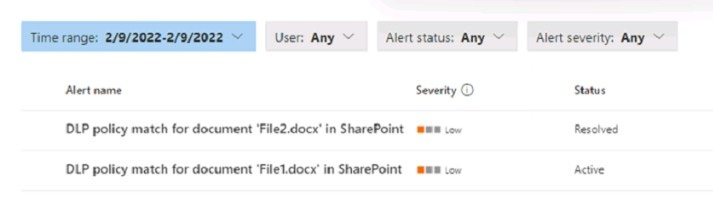
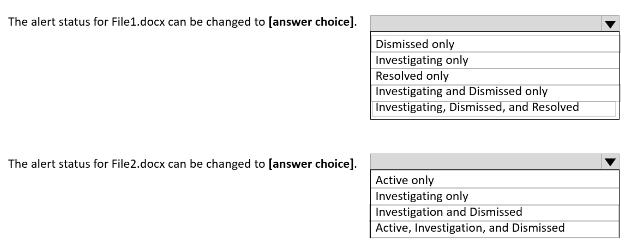
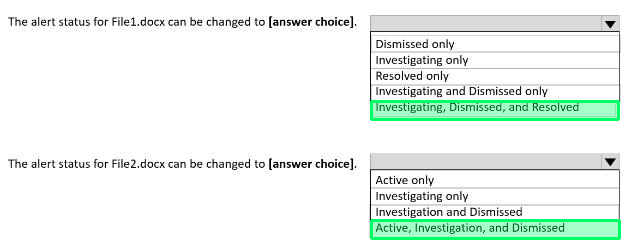
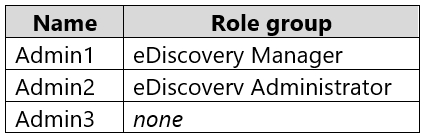
Preview real exam questions, verified answers and available explanations before choosing a study plan.
Question 1
Single choice
You have a Microsoft 365 E5 subscription that uses Privacy risk management.
You need to recommend which type of policy can evaluate the external sharing of personal data on Microsoft SharePoint Online sites.
Which policy type should you recommend?
A
Data overexposure
B
Data transfers
C
Data theft by departing users
D
Data minimization
E
Security policy violations
Reveal answer detailsClose answer details
Correct answerB
Explanation
Policy template types
Privacy Risk Management has three policy templates designed to help you address key areas of concern around protecting personal data. Each template has default settings that you can accept in the quick setup process, or customize using a guided process. When you create a new policy, your first task will be to choose one of the three templates listed below:
Data overexposure: This policy identifies content items containing personal data that may be too broadly accessible by other people. When matches are found, you can set up notifications prompting content owners to quickly apply protection.
*-> Data transfers: This policy can detect personal data transfers across boundaries that you determine, which could involve transfers outside of your organization, or internal transfers across departments or geographic regions. When matches are found, you can set up notifications encouraging senders to revoke access to the content.
Data minimization: This policy identifies content items containing personal data that have been untouched for long periods of time. When matches are found, you can send notifications to content owners prompting them to take quick action to keep or delete the item.
Question 2
Hotspot
HOTSPOT
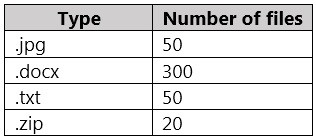
You have a Microsoft SharePoint Online site that contains the following files.
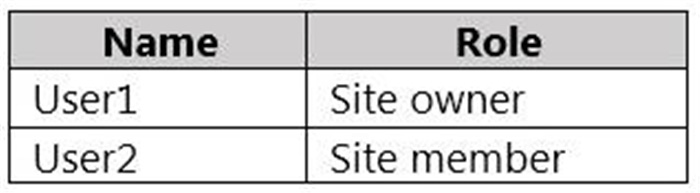
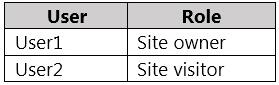
Users are assigned roles for the site as shown in the following table.
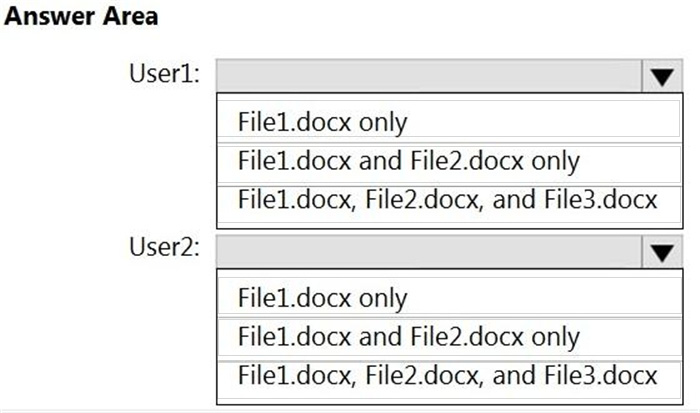
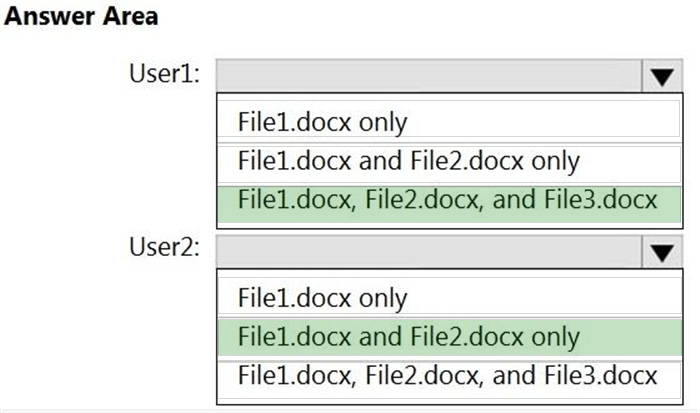
Which files can User1 and User2 view? To answer, select the appropriate options in the answer area.
NOTE: Each correct selection is worth one point.
Reveal answer detailsClose answer details
Question 3
Hotspot
HOTSPOT
You have a Microsoft 365 E5 subscription.
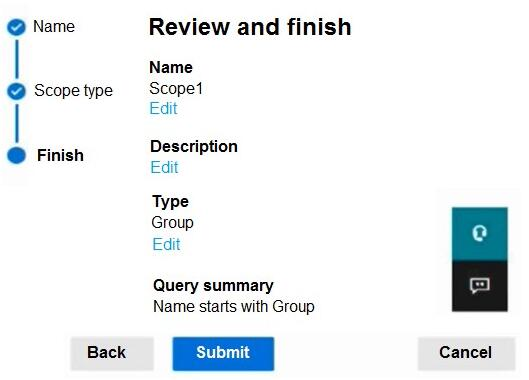
You create an adaptive scope named Scope1 as shown in the following exhibit.
You create a retention policy named Policy1 that includes Scope1.
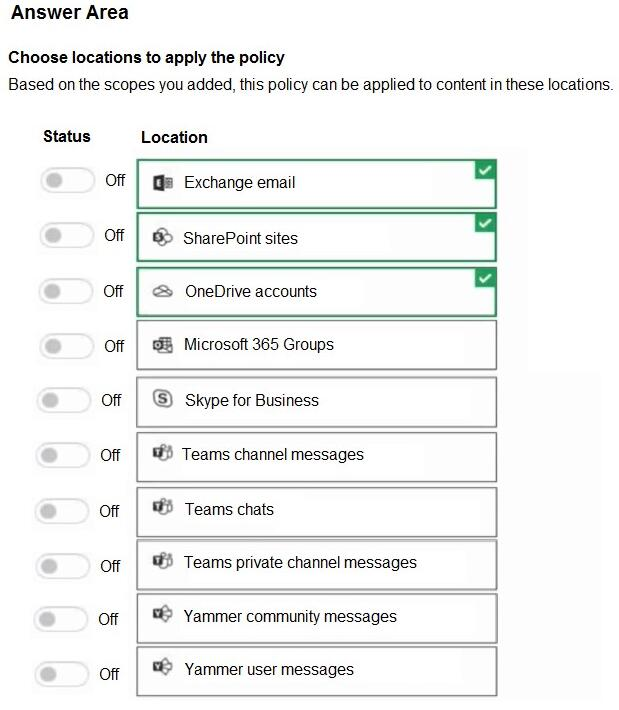
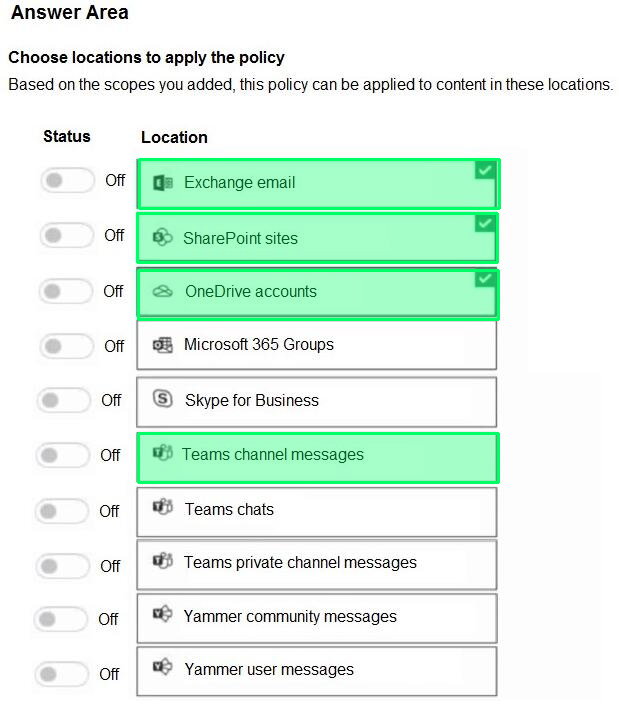
To which three locations can you apply Policy1? To answer, select the appropriate locations in the answer area.
NOTE: Each correct selection is worth one point.
Reveal answer detailsClose answer details
Explanation
Box 1: Exchange email You can apply a retention policy to mailboxes in Exchange Online.
Box 2: SharePoint sites Use a retention policy to manage the data for your organization by deciding proactively whether to retain content, delete content, or retain and then delete the content.
A retention policy lets you do this very efficiently by assigning the same retention settings at the container level to be automatically inherited by content in that container. For example, all items in SharePoint sites, all email messages in users' Exchange mailboxes, all channel messages for teams that are used with Microsoft Teams.
Note: This question is part of a series of questions that present the same scenario. Each question in the series contains a unique solution that might meet the stated goals. Some question sets might have more than one correct solution, while others might not have a correct solution.
After you answer a question in this section, you will NOT be able to return to it. As a result, these questions will not appear in the review screen.
You recently discovered that the developers at your company emailed Azure Storage keys in plain text to third parties.
You need to ensure that when Azure Storage keys are emailed, the emails are encrypted.
Solution: You configure a mail flow rule that matches a sensitive info type.
Does this meet the goal?
A
Yes
B
No
Reveal answer detailsClose answer details
Correct answerA
Question 5
Hotspot
HOTSPOT
You plan to provide a user named User1 with the ability to view data loss prevention (DLP) reports.
You need to identify the following:
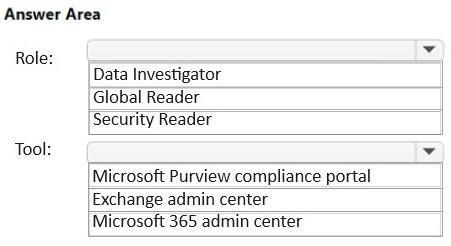
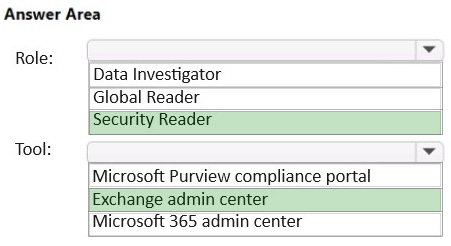
1. Which role you should assign to User1 2. Which tool you should use to assign the role
What should you identify? To answer, select the appropriate options in the answer area.
NOTE: Each correct selection is worth one point.
Reveal answer detailsClose answer details
Explanation
Box 1: Security Reader Role:
Manage permissions for data loss prevention reports To view DLP reports in the Microsoft Purview compliance portal, you must be assigned to the:
*-> Security Reader role in the Exchange admin center. By default, this role is assigned to the Organization Management and Security Reader role groups in the Exchange admin center.
* View-Only DLP Compliance Management role in the Purview compliance portal. By default, this role is assigned to the Compliance Administrator, Organization Management, Security Administrator, and Security Reader role groups in the Purview compliance portal.
* View-Only Recipients role in the Exchange admin center. By default, this role is assigned to the Compliance Management, Organization Management, and View-Only Organization Management role groups in the Exchange admin center.
Incorrect: * Data Investigator Perform searches on mailboxes, SharePoint Online sites, and OneDrive for Business locations.
You plan to assess compliance with ISO/IEC 27001:2013.
From Compliance Manager, you discover that the ISO/IEC 27001:2013 regulatory template for Microsoft 365 is inactive.
What should you do?
A
Purchase a Microsoft 365 E5 subscription.
B
Add a data connector.
C
Add recommended assessments.
D
Create a trainable classifier.
Reveal answer detailsClose answer details
Correct answerC
Question 8
Single choice
You need to provide a user with the ability to view data loss prevention (DLP) alerts in the Microsoft 365 compliance center. The solution must use the principle of least privilege.
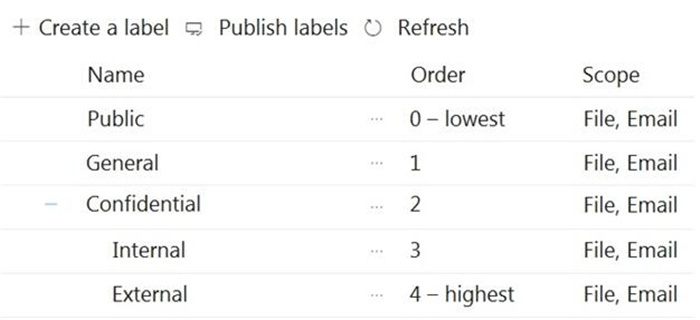
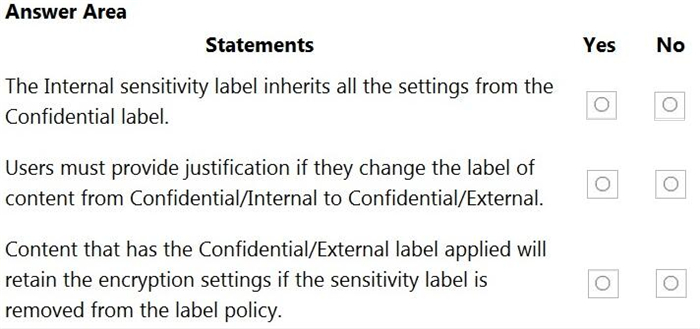
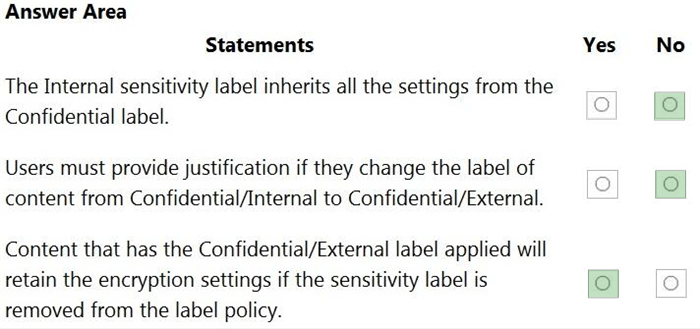
You create sensitivity labels as shown in the Sensitivity Labels exhibit.
The Confidential/External sensitivity label is configured to encrypt files and emails when applied to content.
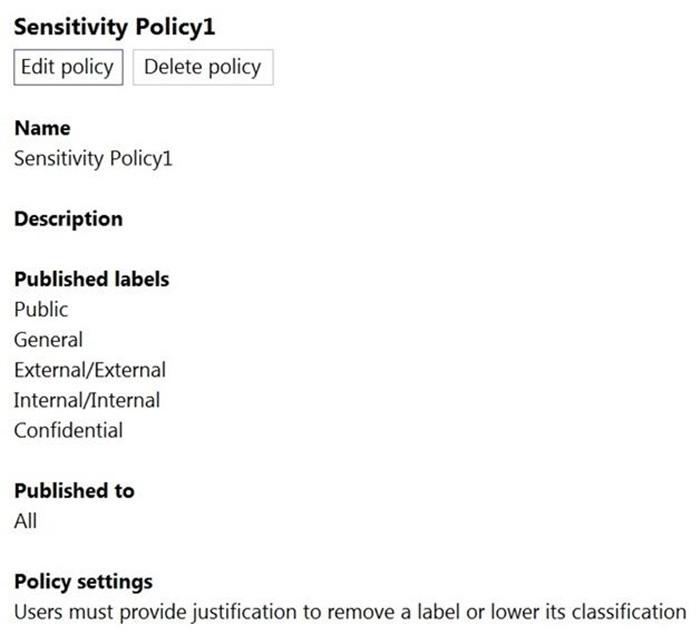
The sensitivity labels are published as shown in the Published exhibit.
For each of the following statements, select Yes if the statement is true. Otherwise, select No.
NOTE: Each correct selection is worth one point.
Reveal answer detailsClose answer details
Question 11
Drag & drop
DRAG DROP
You have a Microsoft 365 E5 subscription.
You need to meet the following requirements:
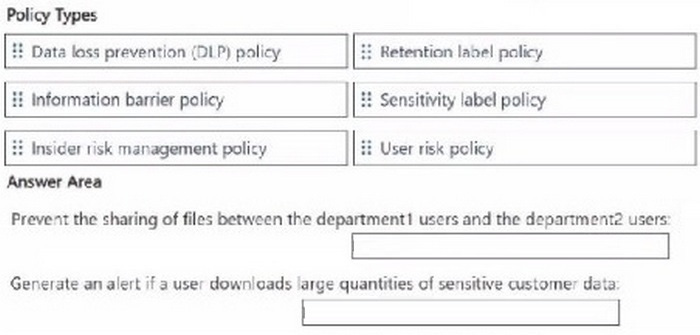
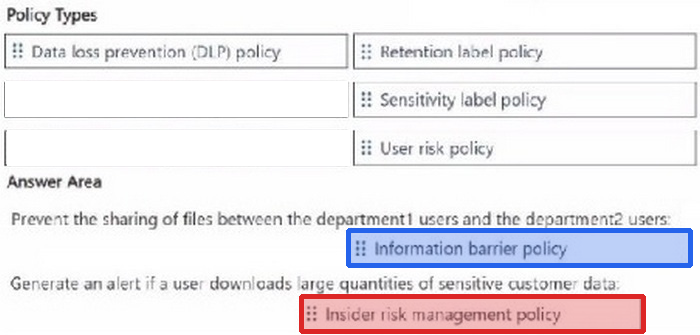
1. Prevent the sharing of files between the users in a department named department1 and the users in a department named department2. 2. Generate an alert if a user downloads large quantities of sensitive customer data.
Which type of policy should you use for each requirement? To answer, drag the appropriate policy types to the correct requirements.
Each policy type may be used once, more than once, or not at all. You may need to drag the split bar between panes or scroll to view content
NOTE: Each correct selection is worth one point.
Reveal answer detailsClose answer details
Question 12
Hotspot
HOTSPOT
You create a data loss prevention (DLP) policy that meets the following requirements:
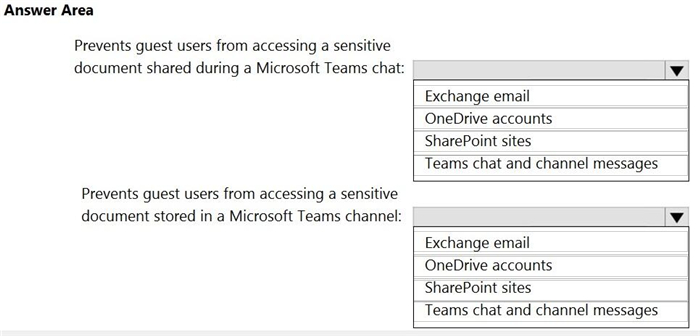
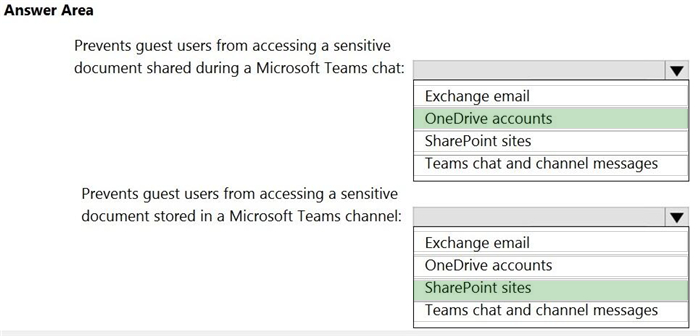
1. Prevents guest users from accessing a sensitive document shared during a Microsoft Teams chat 2. Prevents guest users from accessing a sensitive document stored in a Microsoft Teams channel
Which location should you select for each requirement? To answer, select the appropriate options in the answer area.
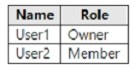
You have a Microsoft 365 subscription that contains a Microsoft SharePoint site named Site1. For Site1, users are assigned the roles shown in the following table.
You publish retention labels to Site1 as shown in the following table.
You publish retention labels to Site1 as shown in the following table.
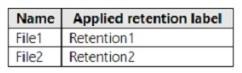
You have the files shown in the following table.
For each of the following statement, select Yes if the statement is true. Otherwise, select No.
NOTE: Each correct selection is worth one point.
Reveal answer detailsClose answer details
Case study
Case Study 2
Overview
Contoso, Ltd. is a consulting company that has a main office in Montreal and three branch offices in Seattle, Boston, and Johannesburg.
Existing Environment
Microsoft 365 Environment
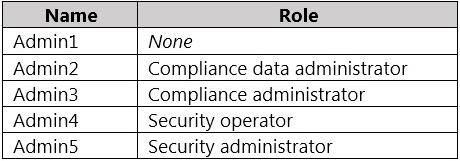
Contoso has a Microsoft 365 E5 tenant. The tenant contains the administrative user accounts shown in the following table.
Users store data in the following locations:
1. SharePoint sites 2. OneDrive accounts 3. Exchange email 4. Exchange public folders 5. Teams chats 6. Teams channel messages
When users in the research department create documents, they must add a 10-digit project code to each document. Project codes that start with the digits 999 are confidential.
SharePoint Online Environment
Contoso has four Microsoft SharePoint Online sites named Site1, Site2, Site3, and Site4.
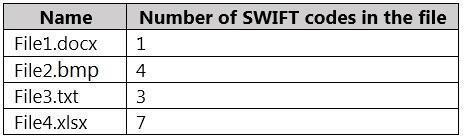
Site2 contains the files shown in the following table.
Two users named User1 and User2 are assigned roles for Site2 as shown in the following table.
Site3 stores documents related to the company's projects. The documents are organized in a folder hierarchy based on the project.
Site4 has the following two retention policies applied:
Name: Site4RetentionPolicy1 - Locations to apply the policy: Site4 - Delete items older than: 2 years - Delete content based on: When items were created
Name: Site4RetentionPolicy2 - Locations to apply the policy: Site4 - Retain items for a specific period: 4 years - Start the retention period based on: When items were created - At the end of the retention period: Do nothing
Problem Statements
Management at Contoso is concerned about data leaks. On several occasions, confidential research department documents were leaked.
Requirements
Planned Changes
Contoso plans to create the following data loss prevention (DLP) policy:
Name: DLPpolicy1 Locations to apply the policy: Site2 Conditions: - Content contains any of these sensitive info types: SWIFT Code - Instance count: 2 to any Actions: Restrict access to the content
Technical Requirements
Contoso must meet the following technical requirements:
1. All administrative users must be able to review DLP reports. 2. Whenever possible, the principle of least privilege must be used. 3. For all users, all Microsoft 365 data must be retained for at least one year. 4. Confidential documents must be detected and protected by using Microsoft 365. 5. Site1 documents that include credit card numbers must be labeled automatically. 6. All administrative users must be able to create Microsoft 365 sensitivity labels. 7. After a project is complete, the documents in Site3 that relate to the project must be retained for 10 years.
Question 16
Testlet 2Single choice
You need to meet the retention requirement for the users' Microsoft 365 data.
What is the minimum number of retention policies that you should use?
A
1
B
2
C
3
D
4
E
6
Reveal answer detailsClose answer details
Correct answerB
Question 17
Hotspot
HOTSPOT
You have the files shown in the following table.
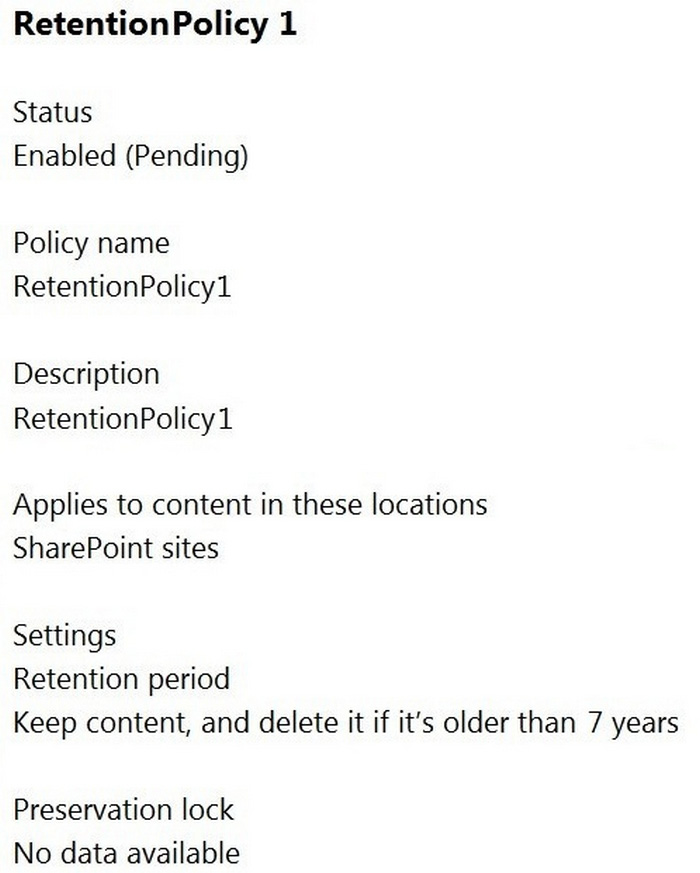
You configure a retention policy as shown in the following exhibit.
The current date is January 1, 2021.
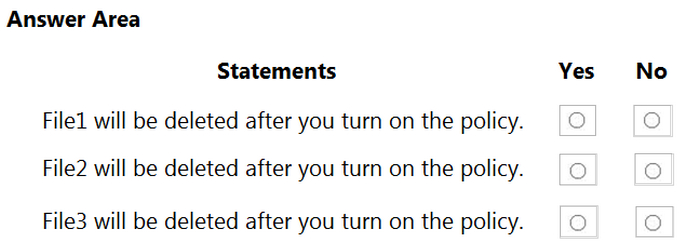
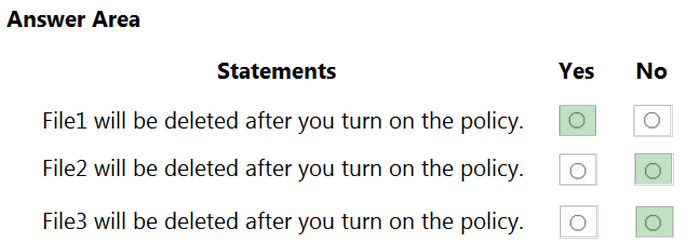
For each of the following statements, select Yes if the statement is true. Otherwise, select No.
Reveal answer detailsClose answer details
Question 18
Drag & drop
DRAG DROP
You have a Microsoft 365 E5 subscription.
You need to prevent the sharing of sensitive information in Microsoft Teams.
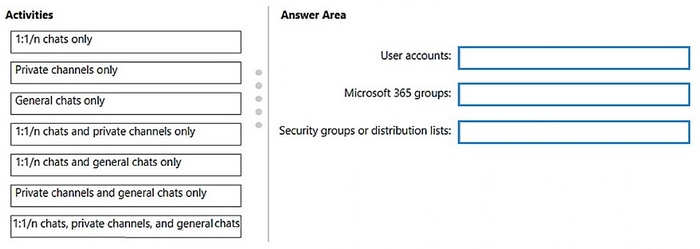
Which entities can you protect by applying a data loss prevention (DLP) policy to each resource? To answer, drag the appropriate activities to the correct entity. Each activity may be used once, more than once, or not at all. You may need to drag the split bar between panes or scroll to view content.
NOTE: Each correct selection is worth one point.
Reveal answer detailsClose answer details
Explanation
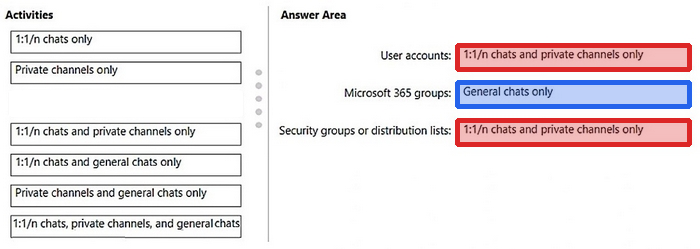
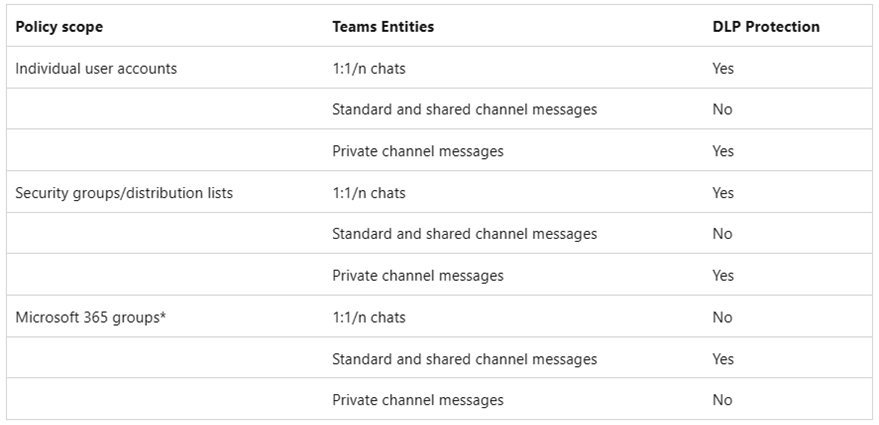
Box 1: 1:1/n chats and private channels only User accounts Scope of DLP protection DLP protection is applied differently to Teams entities, as described in the table that follows.
To scope a DLP Teams policy to all chat types, either scope your policy to All locations, or verify that each Teams user is both in a Microsoft 365 group AND in a security group or distribution list that is scoped to the policy.
* Microsoft 365 groups DLP protection: Standard and shared channel messages
Note When a DLP policy is scoped to Microsoft 365 groups, DLP protection applies to group members using the standard and shared channels associated with the groups they belong to.
Box 3: 1:1/n chats and private channels only Security groups or distribution lists
* Security groups or distribution lists DLP protection: 1:1/n chats Private channel messages
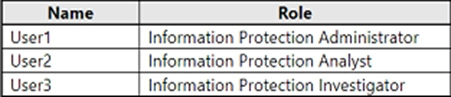
You have a Microsoft 365 E5 subscription that contains the users shown in the following table.
You need to delegate the following tasks:
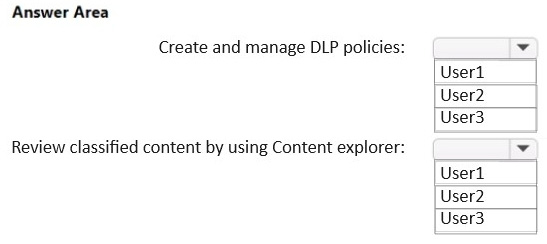
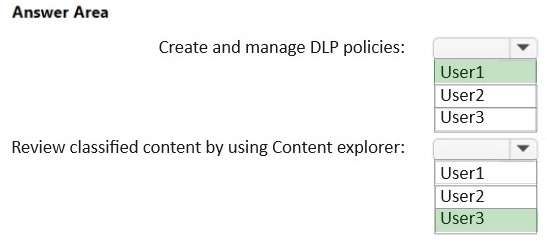
1. Create and manage data loss prevention (DLP) policies. 2. Review classified content by using Content explorer.
The solution must use the principle of least privilege.
Which user should perform each task? To answer, drag the appropriate users to the correct tasks. Each user may be used once, more than once, or not at all. You may need to drag the split bar between panes or scroll to view content.
NOTE: Each correct selection is worth one point.
Reveal answer detailsClose answer details
Explanation
Box 1: User1
Create and manage data loss prevention (DLP) policies.
Information Protection Admins Create, edit, and delete DLP policies, sensitivity labels and their policies, and all classifier types. Manage endpoint DLP settings and simulation mode for auto-labeling policies.
Note: User 1 is Information Protection Administrator. User2 is Information Protection Analyst. User3 is Information Protection Investigator.
Box 2: User3 Review classified content by using Content explorer.
Information Protection Investigator Access and manage DLP alerts, activity explorer, and content explorer. View-only access to DLP policies, sensitivity labels and their policies, and all classifier types.
Incorrect: * Information Protection Analyst Access and manage DLP alerts and activity explorer. View-only access to DLP policies, sensitivity labels and their policies, and all classifier types.
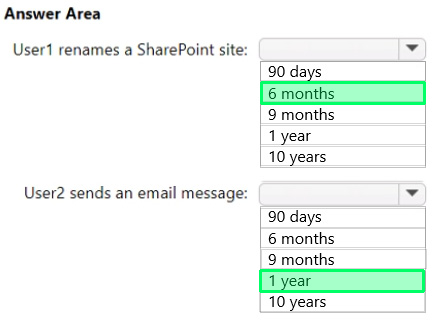
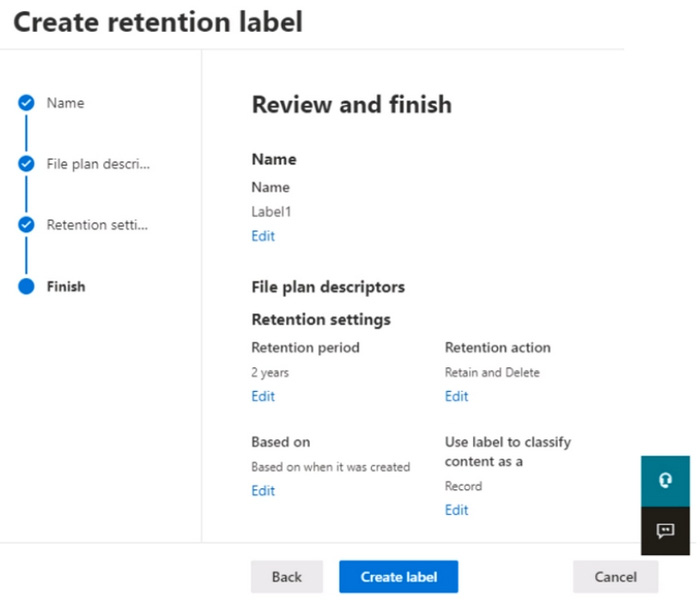
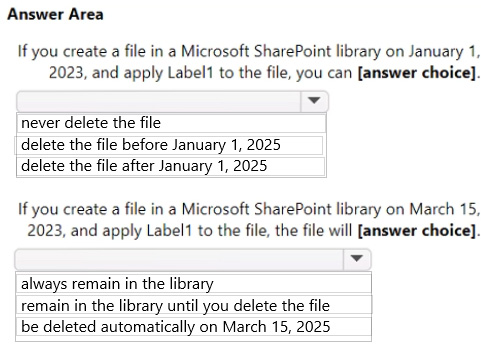
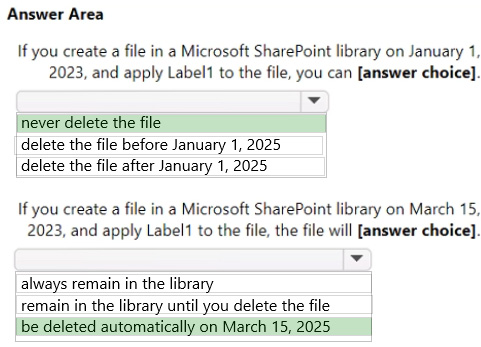
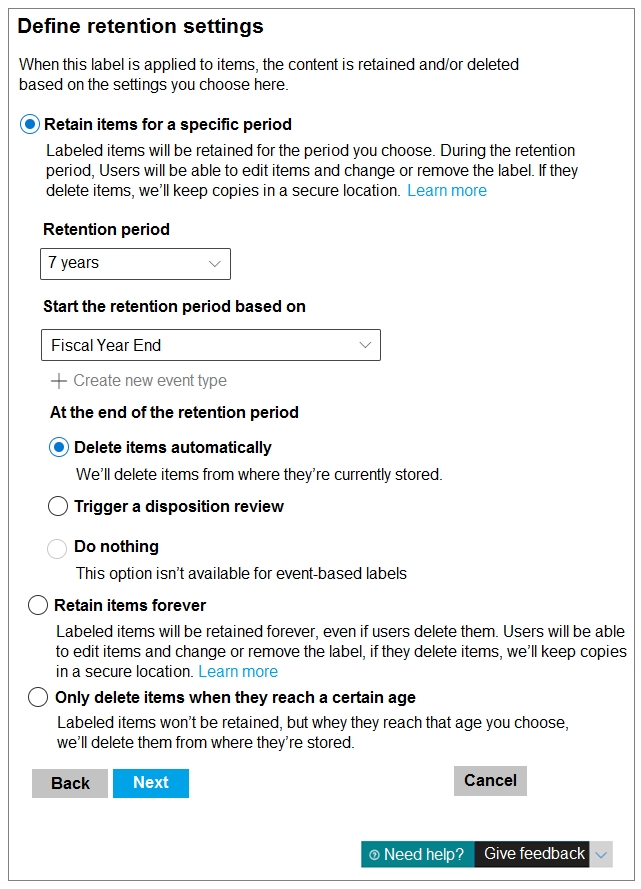
You create a retention label named Label1 as shown in the following exhibit.
You publish Label1 to SharePoint sites.
Use the drop-down menus to select the answer choice that completes each statement based on the information presented in the graphic.
NOTE: Each correct selection is worth one point.
Reveal answer detailsClose answer details
Question 24
Single choice
Note: This question is part of a series of questions that present the same scenario. Each question in the series contains a unique solution that might meet the stated goals. Some question sets might have more than one correct solution, while others might not have a correct solution.
After you answer a question in this section, you will NOT be able to return to it. As a result, these questions will not appear in the review screen.
You are configuring a file policy in Microsoft Cloud App Security.
You need to configure the policy to apply to all files. Alerts must be sent to every file owner who is affected by the policy. The policy must scan for credit card numbers, and alerts must be sent to the Microsoft Teams site of the affected department.
Solution: You use the Build-in DLP inspection method and send alerts to Microsoft Power Automate.
You have a Microsoft 365 tenant and 500 computers that run Windows 10. The computers are onboarded to the Microsoft 365 compliance center.
You discover that a third-party application named Tailspin_scanner.exe accessed protected sensitive information on multiple computers. Tailspin_scanner.exe is installed locally on the computers.
You need to block Tailspin_scanner.exe from accessing sensitive documents without preventing the application from accessing other documents.
Solution: From the Microsoft Defender for Cloud Apps, you mark the application as Unsanctioned.
Does this meet the goal?
A
Yes
B
No
Reveal answer detailsClose answer details
Correct answerB
Explanation
Sanctioning/unsanctioning an app You can unsanction a specific risky app by clicking the three dots at the end of the row. Then select Unsanction. Unsanctioning an app doesn't block use, but enables you to more easily monitor its use with the Cloud Discovery filters. You can then notify users of the unsanctioned app and suggest an alternative safe app for their use, or generate a block script using the Defender for Cloud Apps APIs to block all unsanctioned apps.
Instead Solution: From the Microsoft 365 Endpoint data loss prevention (Endpoint DLP) settings, you add the application to the unallowed apps list.
Unallowed apps is a list of applications that you create which will not be allowed to access a DLP protected file.
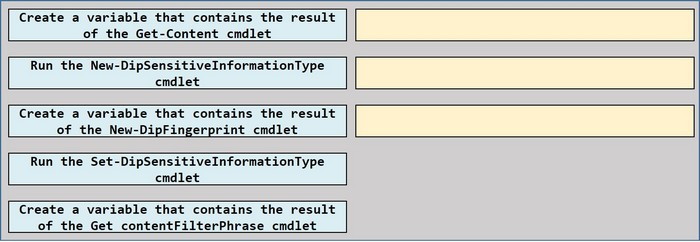
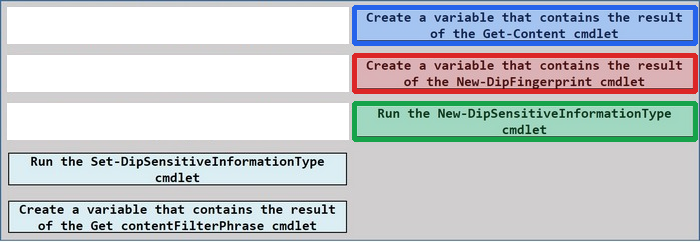
You have a Microsoft 365 tenant that uses data loss prevention (DLP).
You have a custom employee information form named Template 1.docx.
You need to create a classification rule package based on the document fingerprint of Templatel.docx.
Which three actions should you perform in sequence? To answer, move the appropriate actions from the list of actions to the answer area and arrange them in the correct order.
Reveal answer detailsClose answer details
Question 27
Hotspot
HOTSPOT
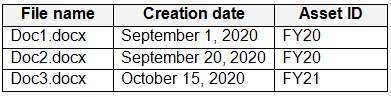
You have the retention label policy shown in the Policy exhibit. (Click the Policy tab.)
Users apply the retention label policy to files and set the asset ID as shown in the following table.
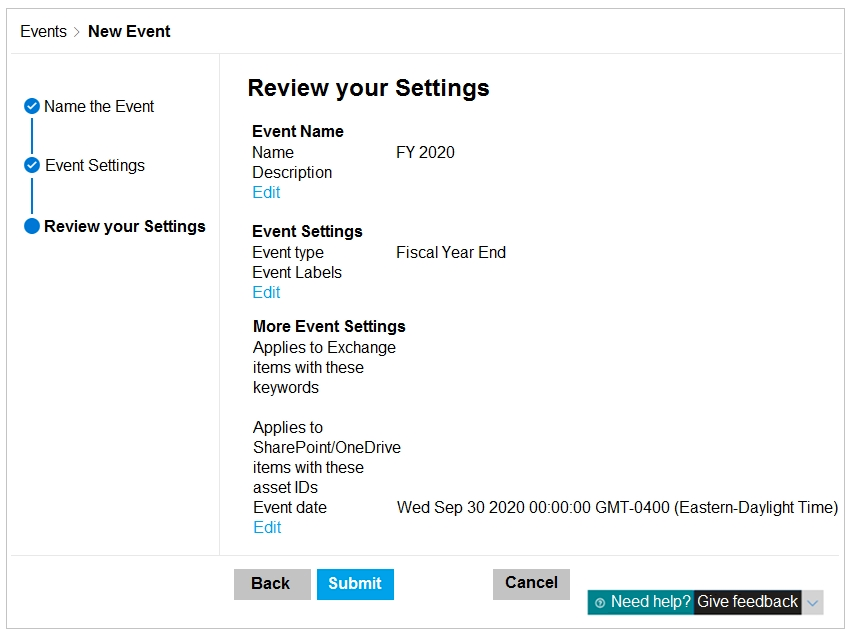
On December 1, 2020, you create the event shown in the Event exhibit. (Click the Event tab.)
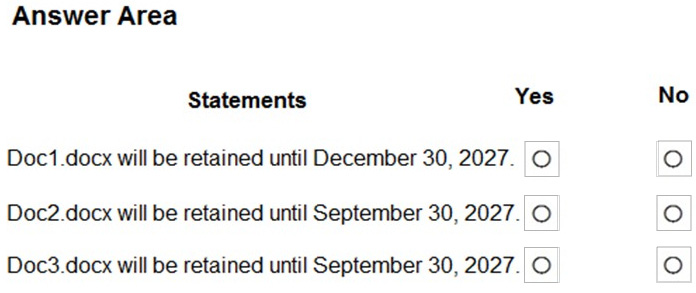
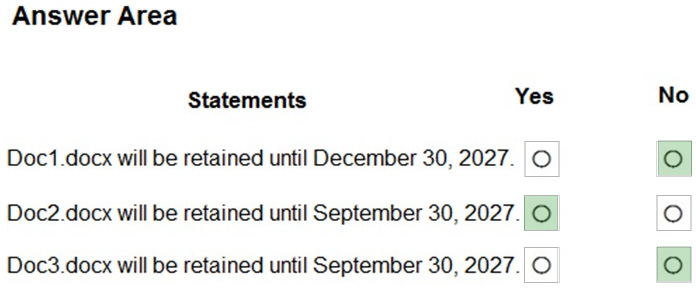
For each of the following statements, select Yes if the statement is true. Otherwise, select No.
NOTE: Each correct selection is worth one point.
Reveal answer detailsClose answer details
Question 28
Single choice
You have a Microsoft 365 E5 subscription that uses Microsoft Purview.
You create a sensitive information type (SIT) named SIT1.
You plan to create the communication compliance policies shown in the following table.
To which policies can you add SIT1 as a condition?
A
Policy1 only
B
Policy3only
C
Policy1 and Policy2 only
D
Policy1 and Policy3 only
E
Policy1. Policy2. and Pohcy3
Reveal answer detailsClose answer details
Correct answerD
Question 29
Hotspot
HOTSPOT
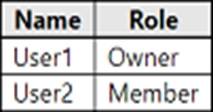
You have a Microsoft SharePoint Online site named Site1 that contains the users shown in following table.
You create the retention labels shown in the following table.
You publish the retention labels to Site1.
Site1 contains the files shown in following table.
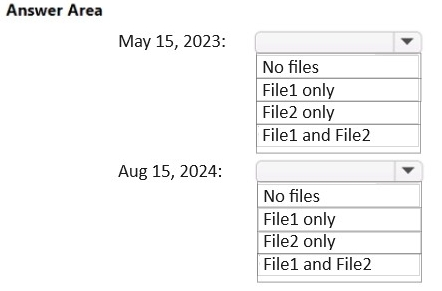
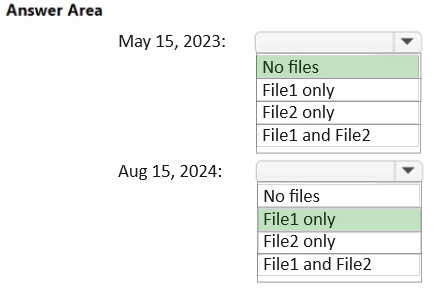
Which files can User1 delete on May 15, 2023, and which files can User2 delete on August 15, 2024? To answer, drag the appropriate files to the correct users. Each file may be used once, more than once, or not at all. You may need to drag the split bar between panes or scroll to view content.
NOTE: Each correct selection is worth one point.
Reveal answer detailsClose answer details
Explanation
Box 1: No files Which files can User1 delete on May 15, 2023?
User1 is owner. File1: File1 has Retention1, which is active for 2 years and then deactivated. Retention1 will be active on May 15, 2023.
File 2: File2 has Retention2, which is active for 1 year and will be active on May 15, 2023.
Box 2: File1 only. Which files can User2 delete on August 15, 2024?
User2 is member.
File1: Can be deleted. File1 has Retention1, which is active for 2 years and then deactivated. Retention1 will not be activated at August 15, 2024.
File 2: Cannot be deleted. File2 has Retention2, which is active for 1 year and then changed to Retention1 which will be active for another 2 years. Retention1 will be active at August 15, 2024.
You have a Microsoft 365 tenant that uses the following sensitivity labels:
1. Confidential 2. Internal 3. External
The labels are published by using a label policy named Policy1.
Users report that Microsoft Office for the web apps do not display the Sensitivity button. The Sensitivity button appears in Microsoft 365 Apps that are installed locally.
You need to ensure that the users can apply sensitivity labels to content when they use Office for the web apps.
What should you do?
A
Modify the scope of the confidential label.
B
Modify the publishing settings of Policy1.
C
Enable sensitivity label support for Office files in Microsoft SharePoint Online and OneDrive.
D
Run the Execute-AzureAdiabelSync cmdlet.
Reveal answer detailsClose answer details
Correct answerC
Question 31
Single choice
Note: This question is part of a series of questions that present the same scenario. Each question in the series contains a unique solution that might meet the stated goals. Some question sets might have more than one correct solution, while others might not have a correct solution.
After you answer a question in this section, you will NOT be able to return to it. As a result, these questions will not appear in the review screen.
You have a Microsoft 365 subscription.
You have a user named User1. Several users have full access to the mailbox of User1.
Some email messages sent to User1 appear to have been read and deleted before the user viewed them.
When you search the audit log in the Microsoft Purview compliance portal to identify who signed in to the mailbox of User1, the results are blank.
You need to ensure that you can view future sign-ins to the mailbox of User1.
Solution: You run the Set-MailboxFolderPermission -Identity "User1" -User [email protected] - AccessRights Owner command.
Does that meet the goal?
A
Yes
B
No
Reveal answer detailsClose answer details
Correct answerB
Question 32
Single choice
You have a Microsoft 365 tenant that is opt-in for trainable classifiers.
You need to ensure that a user named User1 can create custom trainable classifiers. The solution must use the principle of least privilege.
Which role should you assign to User1?
A
Global Administrator
B
Security Operator
C
Security Administrator
D
Compliance Administrator
Reveal answer detailsClose answer details
Correct answerD
Explanation
Permissions To use classifiers in the following scenarios, you need the following permissions:
Note: * Compliance Administrator Users with this role have permissions to manage compliance-related features in the Microsoft Purview compliance portal, Microsoft 365 admin center, Azure, and Microsoft 365 Defender portal. Assignees can also manage all features within the Exchange admin center and create support tickets for Azure and Microsoft 365.
* Security Administrator (too much permissions) This is a privileged role. Users with this role have permissions to manage security-related features in the Microsoft 365 Defender portal, Microsoft Entra ID Protection, Microsoft Entra Authentication, Azure Information Protection, and Microsoft Purview compliance portal.
Question 33
Single choice
You have a Microsoft SharePoint Online site named Site1 that contains the following files:
1. File1.docx 2. File2.xlsx 3. File3.pdf
You have a retention label named Retention1.
You plan to use an auto-labeling policy to apply Retention1 to any content on Site1 that matches the Targeted Harassment trainable classifier.
To which files will Retention1 be applied?
A
File1.docx only
B
File1.docx and File2.xlsx
C
File1.docx and File3.pdf only
D
File1.docx, File2.xlsx, and File3.pdf
Reveal answer detailsClose answer details
Correct answerD
Explanation
Auto-labeling retention policies can handle Word documents, Excel spreadsheets, and PDF documents.
You need to identify resumes that are stored in the subscription by using a built-in trainable classifier.
Solution: You create a retention policy.
Does this meet the goal?
A
Yes
B
No
Reveal answer detailsClose answer details
Correct answerB
Explanation
Correct Solution: You create an auto-labeling policy for a sensitivity label.
A Microsoft Purview trainable classifier is a tool you can train to recognize various types of content by giving it samples to look at. Once trained, you can use it to identify item for application of Office sensitivity labels, Communications compliance policies, and retention label policies.
Sensitivity labels The sensitivity labels can then be applied to Office documents and emails, and other items that support sensitivity labels. Unlike retention labels, which are published to locations such as all Exchange mailboxes, sensitivity labels are published to users or groups.
To get their work done, people in your organization collaborate with others both inside and outside the organization. This means that content no longer stays behind a firewall-it can roam everywhere, across devices, apps, and services. And when it roams, you want it to do so in a secure, protected way that meets your organization's business and compliance policies.
Sensitivity labels from Microsoft Purview Information Protection let you classify and protect your organization's data, while making sure that user productivity and their ability to collaborate isn't hindered.
Note 2: A résumé, sometimes spelled resume, is a document created and used by a person to present their background, skills, and accomplishments. Résumés can be used for a variety of reasons, but most often they are used to secure new employment.
Why is a resume a CV? CV is Latin for Curriculum Vitae (course of life). In the U.S., a C.V is an exhaustive academic summary used for applications for roles in academia, scientific research and medical fields. In Europe, Ireland and New Zealand, the term CV is used to mean the same as a "resume" in the U.S.
You receive an email that contains a list of words that will be used few a sensitive information type.
You need to create a file that can be used as the source of a keyword dictionary.
In which format should you save the list?
A
an XLSX file that contains one word in each cell of the first row
B
a ISV file that contains words separated by tabs
C
a JSON file that that an element tor each word
D
a text file that has one word on each line
Reveal answer detailsClose answer details
Correct answerD
Explanation
Keyword dictionaries can be created either from a text file or from csv file.
Note: There are several versions of this question in the exam. The question has two possible correct answers: 1. a CSV file that contains words separated by commas 2. a text file that has one word on each line
Other incorrect answer options you may see on the exam include the following: 1. a TSV file that contains words separated by tabs 2. a DOCX file that has one word on each line 3. an XML file that contains a keyword tag for each word
Use the drop-down menus to select the answer choice that completes each statement based on the information presented in the graphic.
NOTE: Each correct selection is worth one point.
Reveal answer detailsClose answer details
Case study
Case Study 1
Overview
Fabrikam, Inc. is a consulting company that has a main office in Montreal and six branch offices in New York, Seattle, Miami, Houston, Los Angeles, and Vancouver.
Existing Environment
Cloud Environment
Fabrikam has a Microsoft 365 tenant that contains the following resources:
1. An on-premises Active Directory domain named corp.fabrikam.com that syncs to an Azure Active Directory (Azure AD) tenant 2. Microsoft Cloud App Security connectors configured for all supported cloud applications used by the company
Some users have company Dropbox accounts.
Compliance Configuration
Fabrikam has the following in the Microsoft 365 compliance center:
1. A data loss prevention (DLP) policy is configured. The policy displays a tooltip to users. Users can provide a business justification to override a DLP policy violation. 2. The Azure Information Protection unified labeling scanner is installed and configured. 3. A sensitivity label named Fabrikam Confidential is configured.
An existing third-party records management system is managed by the compliance department.
Human Resources (HR) Management System
The HR department has an Azure SQL database that contains employee information. Each employee has a unique 12-character alphanumeric ID. The database contains confidential employee attributes including
payroll information, date of birth, and personal contact details.
On-Premises Environment
You have an on-premises file server that runs Windows Server 2019 and stores Microsoft Office documents in a shared folder named Data.
All end-user computers are joined to the corp.fabrikam.com domain and run a third-party antimalware application.
Business Processes
Sales Contracts
Users in the sales department receive draft sales contracts from customers by email. The sales contracts are written by the customers and are not in a standard format.
Employment Applications
Employment applications and resumes are received by HR department managers and stored in either mailboxes, Microsoft SharePoint Online sites, OneDrive for Business folders, or Microsoft Teams channels.
The employment application form is downloaded from SharePoint Online and a serial number is assigned to each application.
The resumes are written by the applicants and are in any format.
Requirements
HR Requirements
You need to create a DLP policy that will notify the HR department of a DLP policy violation if a document that contains confidential employee attributes is shared externally. The DLP policy must use an Exact Data Match (EDM) classification derived from a CSV export of the HR department database.
The HR department identifies the following requirements for handling employment applications:
1. Resumes must be identified automatically based on similarities to other resumes received in the past. 2. Employment applications and resumes must be deleted automatically two years after the applications are received. 3. Documents and emails that contain an application serial number must be identified automatically and marked as an employment application.
Sales Requirements
A sensitivity label named Sales Contract must be applied automatically to all draft and finalized sales contracts.
Compliance Requirements
Fabrikam identifies the following compliance requirements:
1. All DLP policies must be applied to computers that run Windows 10, with the least possible changes to the computers. 2. Users in the compliance department must view the justification provided when a user receives a tooltip notification for a DLP violation. 3. If a document that has the Fabrikam Confidential sensitivity label applied is uploaded to Dropbox, the file must be deleted automatically. 4. The Fabrikam Confidential sensitivity label must be applied to existing Microsoft Word documents in the Data shared folder that have a document footer containing the following string: Company use only. 5. Users must be able to manually select that email messages are sent encrypted. The encryption will use Office 365 Message Encryption (OME) v2. Any email containing an attachment that has the Fabrikam Confidential sensitivity label applied must be encrypted automatically by using OME.
6. Existing policies configured in the third-party records management system must be replaced by using Records management in the Microsoft 365 compliance center. The compliance department plans to export the existing policies, and then produce a CSV file that contains matching labels and policies that are compatible with records management in Microsoft 365. The CSV file must be used to configure records management in Microsoft 365.
Executive Requirements
You must be able to restore all email received by Fabrikam executives for up to three years after an email is received, even if the email was deleted permanently.
Question 37
Testlet 1Single choice
You need to recommend a solution to configuration the Microsoft 365 Records management settings by using the CSV file must meet the compliance requirements.
What should you recommend?
A
From the Microsoft 365 compliance center, import the CSV file to a file plan.
B
Use EdmUploadAgent.exe to upload a hash of the CSV to a datastore.
C
Use a PowerShell command that pipes the import csv cmdlet to the New-RetentionPolicy cmdlet.
D
Use a PowerShell command that pipes the import-csv cmdlet to the New-Label cmdlet.
You have a Microsoft SharePoint Online site named Site1 that contains a document library. The library contains more than 1,000 documents. Some of the documents are job applicant resumes. All the documents are in the English language.
You plan to apply a sensitivity label automatically to any document identified as a resume. Only documents that contain work experience, education, and accomplishments must be labeled automatically.
You need to identify and categorize the resumes. The solution must minimize administrative effort.
What should you include in the solution?
A
a trainable classifier
B
an exact data match (EDM) classifier
C
a function
D
a keyword dictionary
Reveal answer detailsClose answer details
Correct answerA
Explanation
A Microsoft Purview trainable classifier is a tool you can train to recognize various types of content by giving it samples to look at. Once trained, you can use it to identify item for application of Office sensitivity labels, Communications compliance policies, and retention label policies.
Creating a custom trainable classifier first involves giving it samples that are human picked and positively match the category. Then, after it has processed those, you test the classifiers ability to predict by giving it a mix of positive and negative samples.
Incorrect: Not B: Exact data match (EDM) is an advanced data loss prevention (DLP) technique that finds specific data values that are important to the organization and need to be protected rather than finding general data patterns or formats only. For example, an organization can detect the exact match of a customer credit card number, rather than detecting only the pattern, to enhance detection accuracy and reduce false positives.
Contoso, Ltd. is a consulting company that has a main office in Montreal and three branch offices in Seattle, Boston, and Johannesburg.
Existing Environment
Microsoft 365 Environment
Contoso has a Microsoft 365 E5 tenant. The tenant contains the administrative user accounts shown in the following table.
Users store data in the following locations:
1. SharePoint sites 2. OneDrive accounts 3. Exchange email 4. Exchange public folders 5. Teams chats 6. Teams channel messages
When users in the research department create documents, they must add a 10-digit project code to each document. Project codes that start with the digits 999 are confidential.
SharePoint Online Environment
Contoso has four Microsoft SharePoint Online sites named Site1, Site2, Site3, and Site4.
Site2 contains the files shown in the following table.
Two users named User1 and User2 are assigned roles for Site2 as shown in the following table.
Site3 stores documents related to the company's projects. The documents are organized in a folder hierarchy based on the project.
Site4 has the following two retention policies applied:
Name: Site4RetentionPolicy1 - Locations to apply the policy: Site4 - Delete items older than: 2 years - Delete content based on: When items were created
Name: Site4RetentionPolicy2 - Locations to apply the policy: Site4 - Retain items for a specific period: 4 years - Start the retention period based on: When items were created - At the end of the retention period: Do nothing
Problem Statements
Management at Contoso is concerned about data leaks. On several occasions, confidential research department documents were leaked.
Requirements
Planned Changes
Contoso plans to create the following data loss prevention (DLP) policy:
Name: DLPpolicy1 Locations to apply the policy: Site2 Conditions: - Content contains any of these sensitive info types: SWIFT Code - Instance count: 2 to any Actions: Restrict access to the content
Technical Requirements
Contoso must meet the following technical requirements:
1. All administrative users must be able to review DLP reports. 2. Whenever possible, the principle of least privilege must be used. 3. For all users, all Microsoft 365 data must be retained for at least one year. 4. Confidential documents must be detected and protected by using Microsoft 365. 5. Site1 documents that include credit card numbers must be labeled automatically. 6. All administrative users must be able to create Microsoft 365 sensitivity labels. 7. After a project is complete, the documents in Site3 that relate to the project must be retained for 10 years.
Question 39
Testlet 2Single choice
You need to meet the technical requirements for the creation of the sensitivity labels.
To which user or users must you grant the Sensitivity label administrator role?
A
Admin1, Admin2, Admin4, and Admin5 only
B
Admin1, Admin2, and Admin3 only
C
Admin1 only
D
Admin1 and Admin4 only
E
Admin1 and Admin5 only
Reveal answer detailsClose answer details
Correct answerD
Explanation
Compliance Data Administrator, Compliance Administrator, and Security Administrator already have the required permissions to create the labels.
Fabrikam, Inc. is a consulting company that has a main office in Montreal and six branch offices in New York, Seattle, Miami, Houston, Los Angeles, and Vancouver.
Existing Environment
Cloud Environment
Fabrikam has a Microsoft 365 tenant that contains the following resources:
1. An on-premises Active Directory domain named corp.fabrikam.com that syncs to an Azure Active Directory (Azure AD) tenant 2. Microsoft Cloud App Security connectors configured for all supported cloud applications used by the company
Some users have company Dropbox accounts.
Compliance Configuration
Fabrikam has the following in the Microsoft 365 compliance center:
1. A data loss prevention (DLP) policy is configured. The policy displays a tooltip to users. Users can provide a business justification to override a DLP policy violation. 2. The Azure Information Protection unified labeling scanner is installed and configured. 3. A sensitivity label named Fabrikam Confidential is configured.
An existing third-party records management system is managed by the compliance department.
Human Resources (HR) Management System
The HR department has an Azure SQL database that contains employee information. Each employee has a unique 12-character alphanumeric ID. The database contains confidential employee attributes including
payroll information, date of birth, and personal contact details.
On-Premises Environment
You have an on-premises file server that runs Windows Server 2019 and stores Microsoft Office documents in a shared folder named Data.
All end-user computers are joined to the corp.fabrikam.com domain and run a third-party antimalware application.
Business Processes
Sales Contracts
Users in the sales department receive draft sales contracts from customers by email. The sales contracts are written by the customers and are not in a standard format.
Employment Applications
Employment applications and resumes are received by HR department managers and stored in either mailboxes, Microsoft SharePoint Online sites, OneDrive for Business folders, or Microsoft Teams channels.
The employment application form is downloaded from SharePoint Online and a serial number is assigned to each application.
The resumes are written by the applicants and are in any format.
Requirements
HR Requirements
You need to create a DLP policy that will notify the HR department of a DLP policy violation if a document that contains confidential employee attributes is shared externally. The DLP policy must use an Exact Data Match (EDM) classification derived from a CSV export of the HR department database.
The HR department identifies the following requirements for handling employment applications:
1. Resumes must be identified automatically based on similarities to other resumes received in the past. 2. Employment applications and resumes must be deleted automatically two years after the applications are received. 3. Documents and emails that contain an application serial number must be identified automatically and marked as an employment application.
Sales Requirements
A sensitivity label named Sales Contract must be applied automatically to all draft and finalized sales contracts.
Compliance Requirements
Fabrikam identifies the following compliance requirements:
1. All DLP policies must be applied to computers that run Windows 10, with the least possible changes to the computers. 2. Users in the compliance department must view the justification provided when a user receives a tooltip notification for a DLP violation. 3. If a document that has the Fabrikam Confidential sensitivity label applied is uploaded to Dropbox, the file must be deleted automatically. 4. The Fabrikam Confidential sensitivity label must be applied to existing Microsoft Word documents in the Data shared folder that have a document footer containing the following string: Company use only. 5. Users must be able to manually select that email messages are sent encrypted. The encryption will use Office 365 Message Encryption (OME) v2. Any email containing an attachment that has the Fabrikam Confidential sensitivity label applied must be encrypted automatically by using OME.
6. Existing policies configured in the third-party records management system must be replaced by using Records management in the Microsoft 365 compliance center. The compliance department plans to export the existing policies, and then produce a CSV file that contains matching labels and policies that are compatible with records management in Microsoft 365. The CSV file must be used to configure records management in Microsoft 365.
Executive Requirements
You must be able to restore all email received by Fabrikam executives for up to three years after an email is received, even if the email was deleted permanently.
Question 40
Testlet 1Single choice
You need to recommend a solution to configure the Microsoft 365 Records management settings by using the CSV file. The solution must meet the compliance requirements.
What should you recommend?
A
Use EdmUploadAgent.exe to upload a hash of the CSV to a datastore.
B
Use a PowerShell command that pipes the Import-Csv cmdlet to the New-RetentionPolicy cmdlet.
C
From the Microsoft 365 compliance center, import the CSV file to a file plan.
D
Use a PowerShell command that pipes the Import-Csv cmdlet to the New-Label cmdlet.
You create a custom sensitive info type that uses Exact Data Match (EDM).
You plan to periodically update and upload the data used for EDM.
What is the maximum frequency with which the data can be uploaded?
A
twice per week
B
twice per day
C
once every six hours
D
once every 48 hours
E
twice per hour
Reveal answer detailsClose answer details
Correct answerB
Question 43
Multiple choice
You have a Microsoft 365 subscription that contains a Microsoft 365 group named Group1. Group1 contains 100 users and has dynamic user membership.
All users have Windows 10 devices and use Microsoft SharePoint Online and Exchange Online.
You create a sensitivity label named Label1 and publish Label1 as the default label for Group1.
You need to ensure that the users in Group must apply Label1 to their email and documents.
Which two actions should you perform? Each correct answer presents part of the solution
NOTE: Each correct selection is worth one point.
A
From the Microsoft Purview compliance portal, create an auto-labeling policy.
B
Install the Active Directory Rights Management Services (AD RMS) client on the Windows 10 devices,
C
From the Microsoft Purview compliance portal, modify the settings of the Label1 policy.
D
Install the Azure Information Protection unified labeling client on the Windows 10 devices.
E
From the Microsoft Entra admin center, set Membership type for Group1 to Assigned.
Reveal answer detailsClose answer details
Correct answersA, C
Explanation
A: Apply a sensitivity label to content automatically
When you create a sensitivity label, you can automatically assign that label to files and emails when it matches conditions that you specify.
This ability to apply sensitivity labels to content automatically is important because: You don't need to train your users when to use each of your classifications. You don't need to rely on users to classify all content correctly. Users no longer need to know about your policies-they can instead focus on their work.
Also similarly to DLP policy configuration, you can choose whether a condition must detect all sensitive information types, or just one of them. And to make your conditions more flexible or complex, you can add groups and use logical operators between the groups.
C: How to configure groups and site settings After sensitivity labels are enabled for containers, you can then configure protection settings for groups and sites in the sensitivity labeling configuration. Until sensitivity labels are enabled for containers, the settings are visible but you can't configure them.
1. Follow the general instructions to create or edit a sensitivity label and make sure you select Groups & sites for the label's scope:
When only this scope is selected for the label, the label won't be displayed in Office apps that support sensitivity labels and can't be applied to files and emails. Having this separation of labels can be helpful for both users and administrators, but can also add to the complexity of your label deployment.
2. Then, on the Define protection settings for groups and sites page, select the options you want to configure.
Etc.
Incorrect: Not B: Active Directory Rights Management Services (AD RMS) is technology used to provide an extra level of security to documents such as email, Microsoft Office documents, and web pages by using encryption to limit access to a document or web page and what can be done with that document or web page.
Not D: The Azure Information Protection unified labeling client for Windows is a downloadable client for organizations that use sensitivity labels to classify and protect documents and emails. This client also has a viewer for organizations that don't have their own information protection infrastructure but want to consume content that has been protected by other organizations that use a Rights Management service from Microsoft.
Not E: The group can be either dynamic or assigned.
Question 44
Single choice
You have a Microsoft 365 E5 subscription that contains the users shown in the following table.
You have the core eDiscovery cases shown in the following table.
You need to ensure that Admin3 can create holds in Case1 and Case2. The solution must use the principle of least privilege.
To what should you add Admin3?
A
the Global Administrator role
B
the eDiscovery Manager role group
C
the Compliance Manager Contributors role group
D
the eDiscovery Administrator role group
Reveal answer detailsClose answer details
Correct answerD
Question 45
Single choice
You are planning a data loss prevention (DLP) solution that will apply to computers that run Windows 10.
You need to ensure that when users attempt to copy a file that contains sensitive information to a USB storage device, the following requirements are met:
1. If the users are members of a group named Group1, the users must be allowed to copy the file, and an event must be recorded in the audit log. 2. All other users must be blocked from copying the file.
What should you create?
A
two DLP policies that each contains one DLP rule
B
one DLP policy that contains one DLP rule
C
one DLP policy that contains two DLP rules
Reveal answer detailsClose answer details
Correct answerA
Question 46
Single choice
You plan to import a file plan to the Microsoft 365 compliance center.
Which object type can you create by importing a records management file plan?
A
retention label policies
B
sensitive info types
C
sensitivity labels
D
retention labels
Reveal answer detailsClose answer details
Correct answerD
Explanation
File plan in Records management allows you to bulk-create retention labels by importing the relevant information from a spreadsheet.
To enter your username, place your cursor in the Sign in box and click on the username below.
To enter your password, place your cursor in the Enter password box and click on the password below.
Microsoft 365 Username: [email protected] Microsoft 365 Password: **********
If the Microsoft 365 portal does not load successfully in the browser, press CTRL-K to reload the portal in a new browser tab.
The following information is for technical support purposes only:
Lab Instance: 12345678
You plan to create a data loss prevention (DIP) policy that will apply to content containing the following keywords:
1. Tailspin 2. Litware 3. Falcon
You need to create a keyword list that can be used in the DLP policy.
You do NOT need to create the DLP policy at this time.
To complete this task, sign in to the appropriate admin center.
Reveal model answerClose model answer
To create a sensitive information type that matches all words in a keyword list, you can use the "All" condition instead of the default "Any" condition. Here are the steps to create such a sensitive information type:
Step 1: Go to the Microsoft 365 compliance center and navigate to the "Sensitive information types" page.
Step 2: Click on "Create a sensitive information type".
Step 3: Choose "Keyword dictionary" as the type of sensitive information you want to create.
Step 4: Enter a name and description for the sensitive information type.
Step 5: In the "Keywords" section, enter all the words you want to match separated by commas. Here we enter: Tailspin, Litware, Falcon
Step 6: Click on "Add condition" and choose "Any" as the condition type.
Step 7: Click on "Create" to create the sensitive information type.
Step 8: Click on "Create" to create the sensitive information type.
With this configuration, the DLP policy will only detect the sensitive information if any the words in the keyword list are present in the content being scanned.
Question 48
Hotspot
HOTSPOT
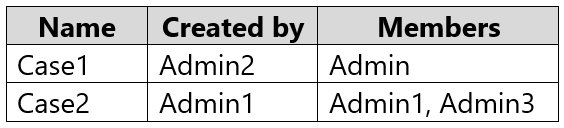
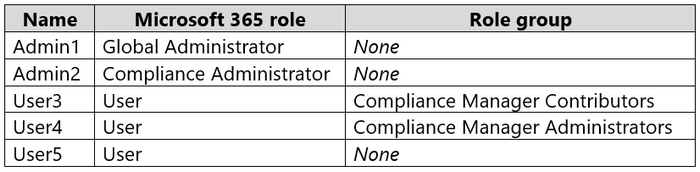
You have a Microsoft 365 E5 subscription that contains the users shown in the following table.
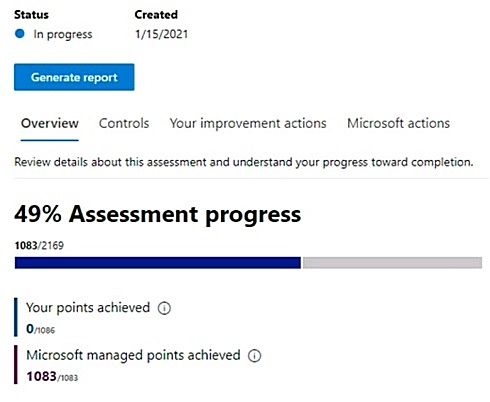
You create an assessment named Assesment1 as shown in the following exhibit.
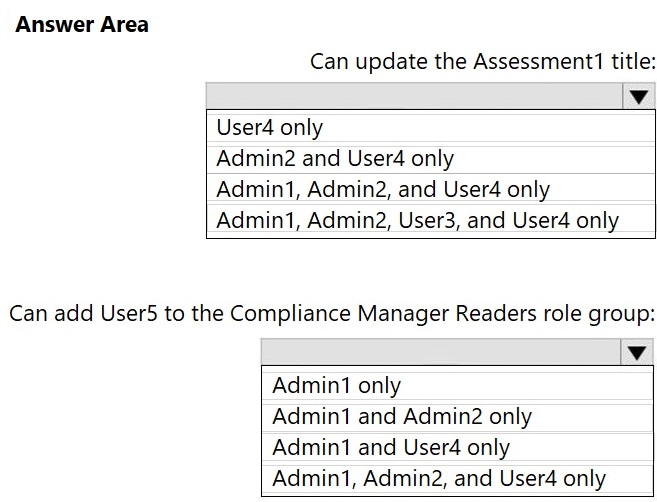
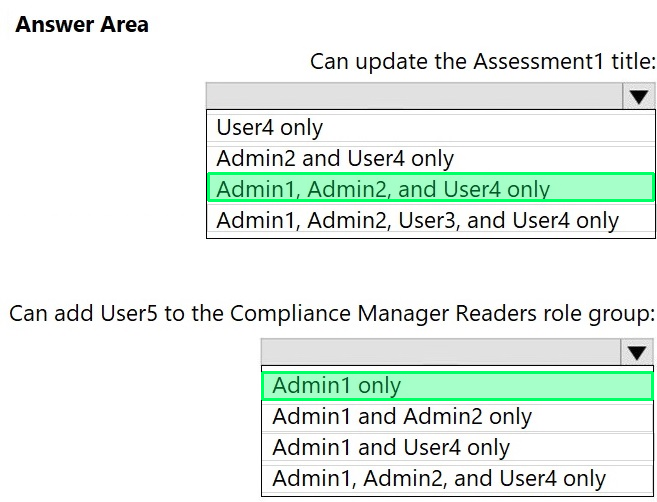
Which users can update the title of Assessment1, and which users can add User5 to the Compliance Manager Readers role group? To answer, select the appropriate options in the answer area.
NOTE: Each correct selection is worth one point.
Reveal answer detailsClose answer details
Question 49
Single choice
You have a Microsoft 365 subscription that contains 100 users and a Microsoft 365 group named Group1.
All users have Windows 10 devices and use Microsoft SharePoint Online and Exchange Online.
A sensitivity label named Label1 is published as the default label for Group1.
You add two sublabels named Sublabel1 and Sublabel2 to Label1.
You need to ensure that the settings in Sublabel1 are applied by default to Group1.
What should you do?
A
Change the order of Sublabel1.
B
Modify the policy of Label1.
C
Delete the policy of Label1 and publish Sublabel1.
D
Duplicate all the settings from Sublabel1 to Label1.
Fabrikam, Inc. is a consulting company that has a main office in Montreal and six branch offices in New York, Seattle, Miami, Houston, Los Angeles, and Vancouver.
Existing Environment
Cloud Environment
Fabrikam has a Microsoft 365 tenant that contains the following resources:
1. An on-premises Active Directory domain named corp.fabrikam.com that syncs to an Azure Active Directory (Azure AD) tenant 2. Microsoft Cloud App Security connectors configured for all supported cloud applications used by the company
Some users have company Dropbox accounts.
Compliance Configuration
Fabrikam has the following in the Microsoft 365 compliance center:
1. A data loss prevention (DLP) policy is configured. The policy displays a tooltip to users. Users can provide a business justification to override a DLP policy violation. 2. The Azure Information Protection unified labeling scanner is installed and configured. 3. A sensitivity label named Fabrikam Confidential is configured.
An existing third-party records management system is managed by the compliance department.
Human Resources (HR) Management System
The HR department has an Azure SQL database that contains employee information. Each employee has a unique 12-character alphanumeric ID. The database contains confidential employee attributes including
payroll information, date of birth, and personal contact details.
On-Premises Environment
You have an on-premises file server that runs Windows Server 2019 and stores Microsoft Office documents in a shared folder named Data.
All end-user computers are joined to the corp.fabrikam.com domain and run a third-party antimalware application.
Business Processes
Sales Contracts
Users in the sales department receive draft sales contracts from customers by email. The sales contracts are written by the customers and are not in a standard format.
Employment Applications
Employment applications and resumes are received by HR department managers and stored in either mailboxes, Microsoft SharePoint Online sites, OneDrive for Business folders, or Microsoft Teams channels.
The employment application form is downloaded from SharePoint Online and a serial number is assigned to each application.
The resumes are written by the applicants and are in any format.
Requirements
HR Requirements
You need to create a DLP policy that will notify the HR department of a DLP policy violation if a document that contains confidential employee attributes is shared externally. The DLP policy must use an Exact Data Match (EDM) classification derived from a CSV export of the HR department database.
The HR department identifies the following requirements for handling employment applications:
1. Resumes must be identified automatically based on similarities to other resumes received in the past. 2. Employment applications and resumes must be deleted automatically two years after the applications are received. 3. Documents and emails that contain an application serial number must be identified automatically and marked as an employment application.
Sales Requirements
A sensitivity label named Sales Contract must be applied automatically to all draft and finalized sales contracts.
Compliance Requirements
Fabrikam identifies the following compliance requirements:
1. All DLP policies must be applied to computers that run Windows 10, with the least possible changes to the computers. 2. Users in the compliance department must view the justification provided when a user receives a tooltip notification for a DLP violation. 3. If a document that has the Fabrikam Confidential sensitivity label applied is uploaded to Dropbox, the file must be deleted automatically. 4. The Fabrikam Confidential sensitivity label must be applied to existing Microsoft Word documents in the Data shared folder that have a document footer containing the following string: Company use only. 5. Users must be able to manually select that email messages are sent encrypted. The encryption will use Office 365 Message Encryption (OME) v2. Any email containing an attachment that has the Fabrikam Confidential sensitivity label applied must be encrypted automatically by using OME.
6. Existing policies configured in the third-party records management system must be replaced by using Records management in the Microsoft 365 compliance center. The compliance department plans to export the existing policies, and then produce a CSV file that contains matching labels and policies that are compatible with records management in Microsoft 365. The CSV file must be used to configure records management in Microsoft 365.
Executive Requirements
You must be able to restore all email received by Fabrikam executives for up to three years after an email is received, even if the email was deleted permanently.
Question 50
Testlet 1Single choice
You need to recommend a solution that meets the compliance requirements for Dropbox.
What should you recommend?
A
Create a DLP policy that applies to devices.
B
Create a file policy in Microsoft Defender for Cloud Apps that uses the built-in DLP inspection method.
C
Create a retention label that enforces the item deletion settings.
D
Edit an existing retention label that enforces the item deletion settings.
Reveal answer detailsClose answer details
Correct answerB
Question 51
Hotspot
HOTSPOT
You have a Microsoft 365 subscription.
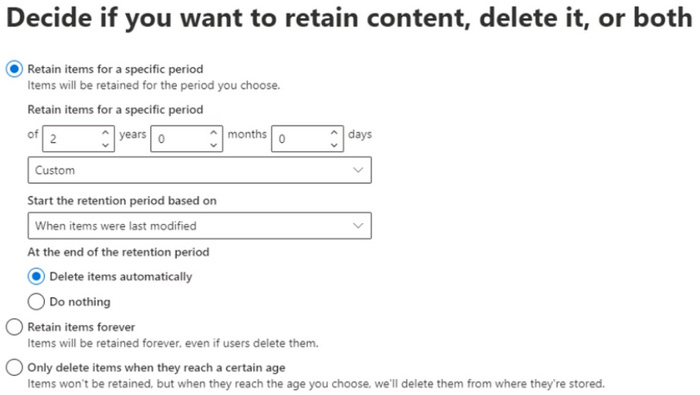
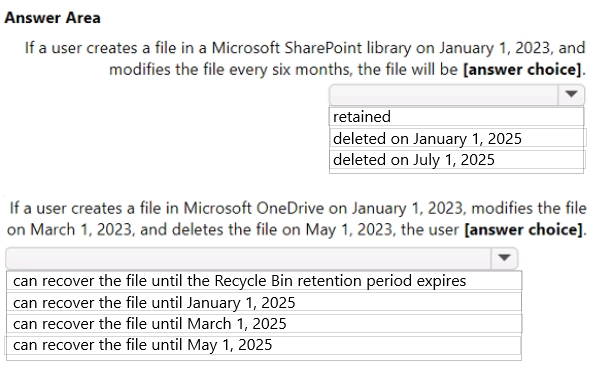
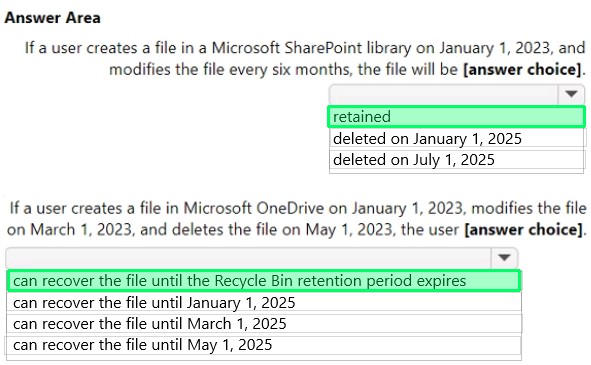
You are creating a retention policy named Retention1 as shown in the exhibit. (Click the Exhibit tab.)
You apply Retention1 to SharePoint sites and OneDrive accounts.
Use the drop-down menus to select the answer choice that completes each statement based on the information presented in the graphic.
NOTE: Each correct selection is worth one point.
Reveal answer detailsClose answer details
Question 52
Single choice
You have a Microsoft 365 E5 subscription that contains a Microsoft SharePoint Online site named Site1.
You need to implement a records management solution for the files stored on Site1. The solution must meet the following requirements:
1. The files must be retained for seven years. 2. Files older than seven years must be deleted automatically.
What should you use to manage the files?
A
a label policy
B
an adaptive scope
C
a file plan
D
a disposition review
Reveal answer detailsClose answer details
Correct answerC
Explanation
Create a file plan to manage records in SharePoint Server. The file plan is the primary records management planning document in SharePoint Server. Although file plans can differ across organizations, they typically:
Describe the kinds of items the organization acknowledges to be records.
Describe what broader category of records the items belong to.
Indicate where records are stored.
Describe retention periods for records.
Delineate who is responsible for managing the various kinds of records.
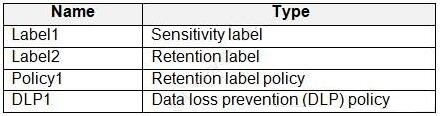
You have a Microsoft 365 E5 subscription that contains a trainable classifier named Trainable1.
You plan to create the items shown in the following table.
Which items can use Trainable1?
A
Label2 only
B
Label1 and Label2 only
C
Label1 and Policy1 only
D
Label2, Policy1, and DLP1 only
Reveal answer detailsClose answer details
Correct answerC
Explanation
A Microsoft Purview trainable classifier is a tool you can train to recognize various types of content by giving it samples to look at. Once trained, you can use it to identify item for application of Office sensitivity labels, Communications compliance policies, and retention label policies.
Once published your classifier will be available as a condition in Office auto-labeling with sensitivity labels, auto-apply retention label policy based on a condition and in Communication compliance.
You have a Microsoft 365 E5 subscription that uses Privacy risk management.
You need to recommend which type of policy can evaluate the external sharing of personal data on Microsoft SharePoint Online sites.
Which policy type should you recommend?
A.
Data overexposure
B.
Data transfers
C.
Data theft by departing users
D.
Data minimization
E.
Security policy violations
Correct Answer: B
Explanation
Explanation/Reference:
Policy template types
Privacy Risk Management has three policy templates designed to help you address key areas of concern around protecting personal data. Each template has default settings that you can accept in the quick setup process, or customize using a guided process. When you create a new policy, your first task will be to choose one of the three templates listed below:
Data overexposure: This policy identifies content items containing personal data that may be too broadly accessible by other people. When matches are found, you can set up notifications prompting content owners to quickly apply protection.
*-> Data transfers: This policy can detect personal data transfers across boundaries that you determine, which could involve transfers outside of your organization, or internal transfers across departments or geographic regions. When matches are found, you can set up notifications encouraging senders to revoke access to the content.
Data minimization: This policy identifies content items containing personal data that have been untouched for long periods of time. When matches are found, you can send notifications to content owners prompting them to take quick action to keep or delete the item.
QUESTION 2
HOTSPOT
You have a Microsoft SharePoint Online site that contains the following files.
Users are assigned roles for the site as shown in the following table.
Which files can User1 and User2 view? To answer, select the appropriate options in the answer area.
NOTE: Each correct selection is worth one point.
Correct Answer:
QUESTION 3
HOTSPOT
You have a Microsoft 365 E5 subscription.
You create an adaptive scope named Scope1 as shown in the following exhibit.
You create a retention policy named Policy1 that includes Scope1.
To which three locations can you apply Policy1? To answer, select the appropriate locations in the answer area.
NOTE: Each correct selection is worth one point.
Correct Answer:
Explanation
Explanation/Reference:
Box 1: Exchange email You can apply a retention policy to mailboxes in Exchange Online.
Box 2: SharePoint sites Use a retention policy to manage the data for your organization by deciding proactively whether to retain content, delete content, or retain and then delete the content.
A retention policy lets you do this very efficiently by assigning the same retention settings at the container level to be automatically inherited by content in that container. For example, all items in SharePoint sites, all email messages in users' Exchange mailboxes, all channel messages for teams that are used with Microsoft Teams.
Note: This question is part of a series of questions that present the same scenario. Each question in the series contains a unique solution that might meet the stated goals. Some question sets might have more than one correct solution, while others might not have a correct solution.
After you answer a question in this section, you will NOT be able to return to it. As a result, these questions will not appear in the review screen.
You recently discovered that the developers at your company emailed Azure Storage keys in plain text to third parties.
You need to ensure that when Azure Storage keys are emailed, the emails are encrypted.
Solution: You configure a mail flow rule that matches a sensitive info type.
Does this meet the goal?
A.
Yes
B.
No
Correct Answer: A
QUESTION 5
HOTSPOT
You plan to provide a user named User1 with the ability to view data loss prevention (DLP) reports.
You need to identify the following:
1. Which role you should assign to User1 2. Which tool you should use to assign the role
What should you identify? To answer, select the appropriate options in the answer area.
NOTE: Each correct selection is worth one point.
Correct Answer:
Explanation
Explanation/Reference:
Box 1: Security Reader Role:
Manage permissions for data loss prevention reports To view DLP reports in the Microsoft Purview compliance portal, you must be assigned to the:
*-> Security Reader role in the Exchange admin center. By default, this role is assigned to the Organization Management and Security Reader role groups in the Exchange admin center.
* View-Only DLP Compliance Management role in the Purview compliance portal. By default, this role is assigned to the Compliance Administrator, Organization Management, Security Administrator, and Security Reader role groups in the Purview compliance portal.
* View-Only Recipients role in the Exchange admin center. By default, this role is assigned to the Compliance Management, Organization Management, and View-Only Organization Management role groups in the Exchange admin center.
Incorrect: * Data Investigator Perform searches on mailboxes, SharePoint Online sites, and OneDrive for Business locations.
You plan to assess compliance with ISO/IEC 27001:2013.
From Compliance Manager, you discover that the ISO/IEC 27001:2013 regulatory template for Microsoft 365 is inactive.
What should you do?
A.
Purchase a Microsoft 365 E5 subscription.
B.
Add a data connector.
C.
Add recommended assessments.
D.
Create a trainable classifier.
Correct Answer: C
QUESTION 8
You need to provide a user with the ability to view data loss prevention (DLP) alerts in the Microsoft 365 compliance center. The solution must use the principle of least privilege.
You create sensitivity labels as shown in the Sensitivity Labels exhibit.
The Confidential/External sensitivity label is configured to encrypt files and emails when applied to content.
The sensitivity labels are published as shown in the Published exhibit.
For each of the following statements, select Yes if the statement is true. Otherwise, select No.
NOTE: Each correct selection is worth one point.
Correct Answer:
QUESTION 11
DRAG DROP
You have a Microsoft 365 E5 subscription.
You need to meet the following requirements:
1. Prevent the sharing of files between the users in a department named department1 and the users in a department named department2. 2. Generate an alert if a user downloads large quantities of sensitive customer data.
Which type of policy should you use for each requirement? To answer, drag the appropriate policy types to the correct requirements.
Each policy type may be used once, more than once, or not at all. You may need to drag the split bar between panes or scroll to view content
NOTE: Each correct selection is worth one point.
Correct Answer:
QUESTION 12
HOTSPOT
You create a data loss prevention (DLP) policy that meets the following requirements:
1. Prevents guest users from accessing a sensitive document shared during a Microsoft Teams chat 2. Prevents guest users from accessing a sensitive document stored in a Microsoft Teams channel
Which location should you select for each requirement? To answer, select the appropriate options in the answer area.
You have a Microsoft 365 subscription that contains a Microsoft SharePoint site named Site1. For Site1, users are assigned the roles shown in the following table.
You publish retention labels to Site1 as shown in the following table.
You publish retention labels to Site1 as shown in the following table.
You have the files shown in the following table.
For each of the following statement, select Yes if the statement is true. Otherwise, select No.
NOTE: Each correct selection is worth one point.
Correct Answer:
Case Study 2
Case Study Questions
Overview
Contoso, Ltd. is a consulting company that has a main office in Montreal and three branch offices in Seattle, Boston, and Johannesburg.
Existing Environment
Microsoft 365 Environment
Contoso has a Microsoft 365 E5 tenant. The tenant contains the administrative user accounts shown in the following table.
Users store data in the following locations:
1. SharePoint sites 2. OneDrive accounts 3. Exchange email 4. Exchange public folders 5. Teams chats 6. Teams channel messages
When users in the research department create documents, they must add a 10-digit project code to each document. Project codes that start with the digits 999 are confidential.
SharePoint Online Environment
Contoso has four Microsoft SharePoint Online sites named Site1, Site2, Site3, and Site4.
Site2 contains the files shown in the following table.
Two users named User1 and User2 are assigned roles for Site2 as shown in the following table.
Site3 stores documents related to the company's projects. The documents are organized in a folder hierarchy based on the project.
Site4 has the following two retention policies applied:
Name: Site4RetentionPolicy1 - Locations to apply the policy: Site4 - Delete items older than: 2 years - Delete content based on: When items were created
Name: Site4RetentionPolicy2 - Locations to apply the policy: Site4 - Retain items for a specific period: 4 years - Start the retention period based on: When items were created - At the end of the retention period: Do nothing
Problem Statements
Management at Contoso is concerned about data leaks. On several occasions, confidential research department documents were leaked.
Requirements
Planned Changes
Contoso plans to create the following data loss prevention (DLP) policy:
Name: DLPpolicy1 Locations to apply the policy: Site2 Conditions: - Content contains any of these sensitive info types: SWIFT Code - Instance count: 2 to any Actions: Restrict access to the content
Technical Requirements
Contoso must meet the following technical requirements:
1. All administrative users must be able to review DLP reports. 2. Whenever possible, the principle of least privilege must be used. 3. For all users, all Microsoft 365 data must be retained for at least one year. 4. Confidential documents must be detected and protected by using Microsoft 365. 5. Site1 documents that include credit card numbers must be labeled automatically. 6. All administrative users must be able to create Microsoft 365 sensitivity labels. 7. After a project is complete, the documents in Site3 that relate to the project must be retained for 10 years.
QUESTION 16
You need to meet the retention requirement for the users' Microsoft 365 data.
What is the minimum number of retention policies that you should use?
A.
1
B.
2
C.
3
D.
4
E.
6
Correct Answer: B
QUESTION 17
HOTSPOT
You have the files shown in the following table.
You configure a retention policy as shown in the following exhibit.
The current date is January 1, 2021.
For each of the following statements, select Yes if the statement is true. Otherwise, select No.
Correct Answer:
QUESTION 18
DRAG DROP
You have a Microsoft 365 E5 subscription.
You need to prevent the sharing of sensitive information in Microsoft Teams.
Which entities can you protect by applying a data loss prevention (DLP) policy to each resource? To answer, drag the appropriate activities to the correct entity. Each activity may be used once, more than once, or not at all. You may need to drag the split bar between panes or scroll to view content.
NOTE: Each correct selection is worth one point.
Correct Answer:
Explanation
Explanation/Reference:
Box 1: 1:1/n chats and private channels only User accounts Scope of DLP protection DLP protection is applied differently to Teams entities, as described in the table that follows.
To scope a DLP Teams policy to all chat types, either scope your policy to All locations, or verify that each Teams user is both in a Microsoft 365 group AND in a security group or distribution list that is scoped to the policy.
* Microsoft 365 groups DLP protection: Standard and shared channel messages
Note When a DLP policy is scoped to Microsoft 365 groups, DLP protection applies to group members using the standard and shared channels associated with the groups they belong to.
Box 3: 1:1/n chats and private channels only Security groups or distribution lists
* Security groups or distribution lists DLP protection: 1:1/n chats Private channel messages
You have a Microsoft 365 E5 subscription that contains the users shown in the following table.
You need to delegate the following tasks:
1. Create and manage data loss prevention (DLP) policies. 2. Review classified content by using Content explorer.
The solution must use the principle of least privilege.
Which user should perform each task? To answer, drag the appropriate users to the correct tasks. Each user may be used once, more than once, or not at all. You may need to drag the split bar between panes or scroll to view content.
NOTE: Each correct selection is worth one point.
Correct Answer:
Explanation
Explanation/Reference:
Box 1: User1
Create and manage data loss prevention (DLP) policies.
Information Protection Admins Create, edit, and delete DLP policies, sensitivity labels and their policies, and all classifier types. Manage endpoint DLP settings and simulation mode for auto-labeling policies.
Note: User 1 is Information Protection Administrator. User2 is Information Protection Analyst. User3 is Information Protection Investigator.
Box 2: User3 Review classified content by using Content explorer.
Information Protection Investigator Access and manage DLP alerts, activity explorer, and content explorer. View-only access to DLP policies, sensitivity labels and their policies, and all classifier types.
Incorrect: * Information Protection Analyst Access and manage DLP alerts and activity explorer. View-only access to DLP policies, sensitivity labels and their policies, and all classifier types.
You create a retention label named Label1 as shown in the following exhibit.
You publish Label1 to SharePoint sites.
Use the drop-down menus to select the answer choice that completes each statement based on the information presented in the graphic.
NOTE: Each correct selection is worth one point.
Correct Answer:
QUESTION 24
Note: This question is part of a series of questions that present the same scenario. Each question in the series contains a unique solution that might meet the stated goals. Some question sets might have more than one correct solution, while others might not have a correct solution.
After you answer a question in this section, you will NOT be able to return to it. As a result, these questions will not appear in the review screen.
You are configuring a file policy in Microsoft Cloud App Security.
You need to configure the policy to apply to all files. Alerts must be sent to every file owner who is affected by the policy. The policy must scan for credit card numbers, and alerts must be sent to the Microsoft Teams site of the affected department.
Solution: You use the Build-in DLP inspection method and send alerts to Microsoft Power Automate.
You have a Microsoft 365 tenant and 500 computers that run Windows 10. The computers are onboarded to the Microsoft 365 compliance center.
You discover that a third-party application named Tailspin_scanner.exe accessed protected sensitive information on multiple computers. Tailspin_scanner.exe is installed locally on the computers.
You need to block Tailspin_scanner.exe from accessing sensitive documents without preventing the application from accessing other documents.
Solution: From the Microsoft Defender for Cloud Apps, you mark the application as Unsanctioned.
Does this meet the goal?
A.
Yes
B.
No
Correct Answer: B
Explanation
Explanation/Reference:
Sanctioning/unsanctioning an app You can unsanction a specific risky app by clicking the three dots at the end of the row. Then select Unsanction. Unsanctioning an app doesn't block use, but enables you to more easily monitor its use with the Cloud Discovery filters. You can then notify users of the unsanctioned app and suggest an alternative safe app for their use, or generate a block script using the Defender for Cloud Apps APIs to block all unsanctioned apps.
Instead Solution: From the Microsoft 365 Endpoint data loss prevention (Endpoint DLP) settings, you add the application to the unallowed apps list.
Unallowed apps is a list of applications that you create which will not be allowed to access a DLP protected file.
You have a Microsoft 365 tenant that uses data loss prevention (DLP).
You have a custom employee information form named Template 1.docx.
You need to create a classification rule package based on the document fingerprint of Templatel.docx.
Which three actions should you perform in sequence? To answer, move the appropriate actions from the list of actions to the answer area and arrange them in the correct order.
Correct Answer:
QUESTION 27
HOTSPOT
You have the retention label policy shown in the Policy exhibit. (Click the Policy tab.)
Users apply the retention label policy to files and set the asset ID as shown in the following table.
On December 1, 2020, you create the event shown in the Event exhibit. (Click the Event tab.)
For each of the following statements, select Yes if the statement is true. Otherwise, select No.
NOTE: Each correct selection is worth one point.
Correct Answer:
QUESTION 28
You have a Microsoft 365 E5 subscription that uses Microsoft Purview.
You create a sensitive information type (SIT) named SIT1.
You plan to create the communication compliance policies shown in the following table.
To which policies can you add SIT1 as a condition?
A.
Policy1 only
B.
Policy3only
C.
Policy1 and Policy2 only
D.
Policy1 and Policy3 only
E.
Policy1. Policy2. and Pohcy3
Correct Answer: D
QUESTION 29
HOTSPOT
You have a Microsoft SharePoint Online site named Site1 that contains the users shown in following table.
You create the retention labels shown in the following table.
You publish the retention labels to Site1.
Site1 contains the files shown in following table.
Which files can User1 delete on May 15, 2023, and which files can User2 delete on August 15, 2024? To answer, drag the appropriate files to the correct users. Each file may be used once, more than once, or not at all. You may need to drag the split bar between panes or scroll to view content.
NOTE: Each correct selection is worth one point.
Correct Answer:
Explanation
Explanation/Reference:
Box 1: No files Which files can User1 delete on May 15, 2023?
User1 is owner. File1: File1 has Retention1, which is active for 2 years and then deactivated. Retention1 will be active on May 15, 2023.
File 2: File2 has Retention2, which is active for 1 year and will be active on May 15, 2023.
Box 2: File1 only. Which files can User2 delete on August 15, 2024?
User2 is member.
File1: Can be deleted. File1 has Retention1, which is active for 2 years and then deactivated. Retention1 will not be activated at August 15, 2024.
File 2: Cannot be deleted. File2 has Retention2, which is active for 1 year and then changed to Retention1 which will be active for another 2 years. Retention1 will be active at August 15, 2024.
You have a Microsoft 365 tenant that uses the following sensitivity labels:
1. Confidential 2. Internal 3. External
The labels are published by using a label policy named Policy1.
Users report that Microsoft Office for the web apps do not display the Sensitivity button. The Sensitivity button appears in Microsoft 365 Apps that are installed locally.
You need to ensure that the users can apply sensitivity labels to content when they use Office for the web apps.
What should you do?
A.
Modify the scope of the confidential label.
B.
Modify the publishing settings of Policy1.
C.
Enable sensitivity label support for Office files in Microsoft SharePoint Online and OneDrive.
D.
Run the Execute-AzureAdiabelSync cmdlet.
Correct Answer: C
QUESTION 31
Note: This question is part of a series of questions that present the same scenario. Each question in the series contains a unique solution that might meet the stated goals. Some question sets might have more than one correct solution, while others might not have a correct solution.
After you answer a question in this section, you will NOT be able to return to it. As a result, these questions will not appear in the review screen.
You have a Microsoft 365 subscription.
You have a user named User1. Several users have full access to the mailbox of User1.
Some email messages sent to User1 appear to have been read and deleted before the user viewed them.
When you search the audit log in the Microsoft Purview compliance portal to identify who signed in to the mailbox of User1, the results are blank.
You need to ensure that you can view future sign-ins to the mailbox of User1.
Solution: You run the Set-MailboxFolderPermission -Identity "User1" -User [email protected] - AccessRights Owner command.
Does that meet the goal?
A.
Yes
B.
No
Correct Answer: B
QUESTION 32
You have a Microsoft 365 tenant that is opt-in for trainable classifiers.
You need to ensure that a user named User1 can create custom trainable classifiers. The solution must use the principle of least privilege.
Which role should you assign to User1?
A.
Global Administrator
B.
Security Operator
C.
Security Administrator
D.
Compliance Administrator
Correct Answer: D
Explanation
Explanation/Reference:
Permissions To use classifiers in the following scenarios, you need the following permissions:
Note: * Compliance Administrator Users with this role have permissions to manage compliance-related features in the Microsoft Purview compliance portal, Microsoft 365 admin center, Azure, and Microsoft 365 Defender portal. Assignees can also manage all features within the Exchange admin center and create support tickets for Azure and Microsoft 365.
* Security Administrator (too much permissions) This is a privileged role. Users with this role have permissions to manage security-related features in the Microsoft 365 Defender portal, Microsoft Entra ID Protection, Microsoft Entra Authentication, Azure Information Protection, and Microsoft Purview compliance portal.
QUESTION 33
You have a Microsoft SharePoint Online site named Site1 that contains the following files:
1. File1.docx 2. File2.xlsx 3. File3.pdf
You have a retention label named Retention1.
You plan to use an auto-labeling policy to apply Retention1 to any content on Site1 that matches the Targeted Harassment trainable classifier.
To which files will Retention1 be applied?
A.
File1.docx only
B.
File1.docx and File2.xlsx
C.
File1.docx and File3.pdf only
D.
File1.docx, File2.xlsx, and File3.pdf
Correct Answer: D
Explanation
Explanation/Reference:
Auto-labeling retention policies can handle Word documents, Excel spreadsheets, and PDF documents.
You need to identify resumes that are stored in the subscription by using a built-in trainable classifier.
Solution: You create a retention policy.
Does this meet the goal?
A.
Yes
B.
No
Correct Answer: B
Explanation
Explanation/Reference:
Correct Solution: You create an auto-labeling policy for a sensitivity label.
A Microsoft Purview trainable classifier is a tool you can train to recognize various types of content by giving it samples to look at. Once trained, you can use it to identify item for application of Office sensitivity labels, Communications compliance policies, and retention label policies.
Sensitivity labels The sensitivity labels can then be applied to Office documents and emails, and other items that support sensitivity labels. Unlike retention labels, which are published to locations such as all Exchange mailboxes, sensitivity labels are published to users or groups.
To get their work done, people in your organization collaborate with others both inside and outside the organization. This means that content no longer stays behind a firewall-it can roam everywhere, across devices, apps, and services. And when it roams, you want it to do so in a secure, protected way that meets your organization's business and compliance policies.
Sensitivity labels from Microsoft Purview Information Protection let you classify and protect your organization's data, while making sure that user productivity and their ability to collaborate isn't hindered.
Note 2: A résumé, sometimes spelled resume, is a document created and used by a person to present their background, skills, and accomplishments. Résumés can be used for a variety of reasons, but most often they are used to secure new employment.
Why is a resume a CV? CV is Latin for Curriculum Vitae (course of life). In the U.S., a C.V is an exhaustive academic summary used for applications for roles in academia, scientific research and medical fields. In Europe, Ireland and New Zealand, the term CV is used to mean the same as a "resume" in the U.S.
You receive an email that contains a list of words that will be used few a sensitive information type.
You need to create a file that can be used as the source of a keyword dictionary.
In which format should you save the list?
A.
an XLSX file that contains one word in each cell of the first row
B.
a ISV file that contains words separated by tabs
C.
a JSON file that that an element tor each word
D.
a text file that has one word on each line
Correct Answer: D
Explanation
Explanation/Reference:
Keyword dictionaries can be created either from a text file or from csv file.
Note: There are several versions of this question in the exam. The question has two possible correct answers: 1. a CSV file that contains words separated by commas 2. a text file that has one word on each line
Other incorrect answer options you may see on the exam include the following: 1. a TSV file that contains words separated by tabs 2. a DOCX file that has one word on each line 3. an XML file that contains a keyword tag for each word
Use the drop-down menus to select the answer choice that completes each statement based on the information presented in the graphic.
NOTE: Each correct selection is worth one point.
Correct Answer:
Case Study 1
Case Study Questions
Overview
Fabrikam, Inc. is a consulting company that has a main office in Montreal and six branch offices in New York, Seattle, Miami, Houston, Los Angeles, and Vancouver.
Existing Environment
Cloud Environment
Fabrikam has a Microsoft 365 tenant that contains the following resources:
1. An on-premises Active Directory domain named corp.fabrikam.com that syncs to an Azure Active Directory (Azure AD) tenant 2. Microsoft Cloud App Security connectors configured for all supported cloud applications used by the company
Some users have company Dropbox accounts.
Compliance Configuration
Fabrikam has the following in the Microsoft 365 compliance center:
1. A data loss prevention (DLP) policy is configured. The policy displays a tooltip to users. Users can provide a business justification to override a DLP policy violation. 2. The Azure Information Protection unified labeling scanner is installed and configured. 3. A sensitivity label named Fabrikam Confidential is configured.
An existing third-party records management system is managed by the compliance department.
Human Resources (HR) Management System
The HR department has an Azure SQL database that contains employee information. Each employee has a unique 12-character alphanumeric ID. The database contains confidential employee attributes including
payroll information, date of birth, and personal contact details.
On-Premises Environment
You have an on-premises file server that runs Windows Server 2019 and stores Microsoft Office documents in a shared folder named Data.
All end-user computers are joined to the corp.fabrikam.com domain and run a third-party antimalware application.
Business Processes
Sales Contracts
Users in the sales department receive draft sales contracts from customers by email. The sales contracts are written by the customers and are not in a standard format.
Employment Applications
Employment applications and resumes are received by HR department managers and stored in either mailboxes, Microsoft SharePoint Online sites, OneDrive for Business folders, or Microsoft Teams channels.
The employment application form is downloaded from SharePoint Online and a serial number is assigned to each application.
The resumes are written by the applicants and are in any format.
Requirements
HR Requirements
You need to create a DLP policy that will notify the HR department of a DLP policy violation if a document that contains confidential employee attributes is shared externally. The DLP policy must use an Exact Data Match (EDM) classification derived from a CSV export of the HR department database.
The HR department identifies the following requirements for handling employment applications:
1. Resumes must be identified automatically based on similarities to other resumes received in the past. 2. Employment applications and resumes must be deleted automatically two years after the applications are received. 3. Documents and emails that contain an application serial number must be identified automatically and marked as an employment application.
Sales Requirements
A sensitivity label named Sales Contract must be applied automatically to all draft and finalized sales contracts.
Compliance Requirements
Fabrikam identifies the following compliance requirements:
1. All DLP policies must be applied to computers that run Windows 10, with the least possible changes to the computers. 2. Users in the compliance department must view the justification provided when a user receives a tooltip notification for a DLP violation. 3. If a document that has the Fabrikam Confidential sensitivity label applied is uploaded to Dropbox, the file must be deleted automatically. 4. The Fabrikam Confidential sensitivity label must be applied to existing Microsoft Word documents in the Data shared folder that have a document footer containing the following string: Company use only. 5. Users must be able to manually select that email messages are sent encrypted. The encryption will use Office 365 Message Encryption (OME) v2. Any email containing an attachment that has the Fabrikam Confidential sensitivity label applied must be encrypted automatically by using OME.
6. Existing policies configured in the third-party records management system must be replaced by using Records management in the Microsoft 365 compliance center. The compliance department plans to export the existing policies, and then produce a CSV file that contains matching labels and policies that are compatible with records management in Microsoft 365. The CSV file must be used to configure records management in Microsoft 365.
Executive Requirements
You must be able to restore all email received by Fabrikam executives for up to three years after an email is received, even if the email was deleted permanently.
QUESTION 37
You need to recommend a solution to configuration the Microsoft 365 Records management settings by using the CSV file must meet the compliance requirements.
What should you recommend?
A.
From the Microsoft 365 compliance center, import the CSV file to a file plan.
B.
Use EdmUploadAgent.exe to upload a hash of the CSV to a datastore.
C.
Use a PowerShell command that pipes the import csv cmdlet to the New-RetentionPolicy cmdlet.
D.
Use a PowerShell command that pipes the import-csv cmdlet to the New-Label cmdlet.
You have a Microsoft SharePoint Online site named Site1 that contains a document library. The library contains more than 1,000 documents. Some of the documents are job applicant resumes. All the documents are in the English language.
You plan to apply a sensitivity label automatically to any document identified as a resume. Only documents that contain work experience, education, and accomplishments must be labeled automatically.
You need to identify and categorize the resumes. The solution must minimize administrative effort.
What should you include in the solution?
A.
a trainable classifier
B.
an exact data match (EDM) classifier
C.
a function
D.
a keyword dictionary
Correct Answer: A
Explanation
Explanation/Reference:
A Microsoft Purview trainable classifier is a tool you can train to recognize various types of content by giving it samples to look at. Once trained, you can use it to identify item for application of Office sensitivity labels, Communications compliance policies, and retention label policies.
Creating a custom trainable classifier first involves giving it samples that are human picked and positively match the category. Then, after it has processed those, you test the classifiers ability to predict by giving it a mix of positive and negative samples.
Incorrect: Not B: Exact data match (EDM) is an advanced data loss prevention (DLP) technique that finds specific data values that are important to the organization and need to be protected rather than finding general data patterns or formats only. For example, an organization can detect the exact match of a customer credit card number, rather than detecting only the pattern, to enhance detection accuracy and reduce false positives.
Contoso, Ltd. is a consulting company that has a main office in Montreal and three branch offices in Seattle, Boston, and Johannesburg.
Existing Environment
Microsoft 365 Environment
Contoso has a Microsoft 365 E5 tenant. The tenant contains the administrative user accounts shown in the following table.
Users store data in the following locations:
1. SharePoint sites 2. OneDrive accounts 3. Exchange email 4. Exchange public folders 5. Teams chats 6. Teams channel messages
When users in the research department create documents, they must add a 10-digit project code to each document. Project codes that start with the digits 999 are confidential.
SharePoint Online Environment
Contoso has four Microsoft SharePoint Online sites named Site1, Site2, Site3, and Site4.
Site2 contains the files shown in the following table.
Two users named User1 and User2 are assigned roles for Site2 as shown in the following table.
Site3 stores documents related to the company's projects. The documents are organized in a folder hierarchy based on the project.
Site4 has the following two retention policies applied:
Name: Site4RetentionPolicy1 - Locations to apply the policy: Site4 - Delete items older than: 2 years - Delete content based on: When items were created
Name: Site4RetentionPolicy2 - Locations to apply the policy: Site4 - Retain items for a specific period: 4 years - Start the retention period based on: When items were created - At the end of the retention period: Do nothing
Problem Statements
Management at Contoso is concerned about data leaks. On several occasions, confidential research department documents were leaked.
Requirements
Planned Changes
Contoso plans to create the following data loss prevention (DLP) policy:
Name: DLPpolicy1 Locations to apply the policy: Site2 Conditions: - Content contains any of these sensitive info types: SWIFT Code - Instance count: 2 to any Actions: Restrict access to the content
Technical Requirements
Contoso must meet the following technical requirements:
1. All administrative users must be able to review DLP reports. 2. Whenever possible, the principle of least privilege must be used. 3. For all users, all Microsoft 365 data must be retained for at least one year. 4. Confidential documents must be detected and protected by using Microsoft 365. 5. Site1 documents that include credit card numbers must be labeled automatically. 6. All administrative users must be able to create Microsoft 365 sensitivity labels. 7. After a project is complete, the documents in Site3 that relate to the project must be retained for 10 years.
QUESTION 39
You need to meet the technical requirements for the creation of the sensitivity labels.
To which user or users must you grant the Sensitivity label administrator role?
A.
Admin1, Admin2, Admin4, and Admin5 only
B.
Admin1, Admin2, and Admin3 only
C.
Admin1 only
D.
Admin1 and Admin4 only
E.
Admin1 and Admin5 only
Correct Answer: D
Explanation
Explanation/Reference:
Compliance Data Administrator, Compliance Administrator, and Security Administrator already have the required permissions to create the labels.
Fabrikam, Inc. is a consulting company that has a main office in Montreal and six branch offices in New York, Seattle, Miami, Houston, Los Angeles, and Vancouver.
Existing Environment
Cloud Environment
Fabrikam has a Microsoft 365 tenant that contains the following resources:
1. An on-premises Active Directory domain named corp.fabrikam.com that syncs to an Azure Active Directory (Azure AD) tenant 2. Microsoft Cloud App Security connectors configured for all supported cloud applications used by the company
Some users have company Dropbox accounts.
Compliance Configuration
Fabrikam has the following in the Microsoft 365 compliance center:
1. A data loss prevention (DLP) policy is configured. The policy displays a tooltip to users. Users can provide a business justification to override a DLP policy violation. 2. The Azure Information Protection unified labeling scanner is installed and configured. 3. A sensitivity label named Fabrikam Confidential is configured.
An existing third-party records management system is managed by the compliance department.
Human Resources (HR) Management System
The HR department has an Azure SQL database that contains employee information. Each employee has a unique 12-character alphanumeric ID. The database contains confidential employee attributes including
payroll information, date of birth, and personal contact details.
On-Premises Environment
You have an on-premises file server that runs Windows Server 2019 and stores Microsoft Office documents in a shared folder named Data.
All end-user computers are joined to the corp.fabrikam.com domain and run a third-party antimalware application.
Business Processes
Sales Contracts
Users in the sales department receive draft sales contracts from customers by email. The sales contracts are written by the customers and are not in a standard format.
Employment Applications
Employment applications and resumes are received by HR department managers and stored in either mailboxes, Microsoft SharePoint Online sites, OneDrive for Business folders, or Microsoft Teams channels.
The employment application form is downloaded from SharePoint Online and a serial number is assigned to each application.
The resumes are written by the applicants and are in any format.
Requirements
HR Requirements
You need to create a DLP policy that will notify the HR department of a DLP policy violation if a document that contains confidential employee attributes is shared externally. The DLP policy must use an Exact Data Match (EDM) classification derived from a CSV export of the HR department database.
The HR department identifies the following requirements for handling employment applications:
1. Resumes must be identified automatically based on similarities to other resumes received in the past. 2. Employment applications and resumes must be deleted automatically two years after the applications are received. 3. Documents and emails that contain an application serial number must be identified automatically and marked as an employment application.
Sales Requirements
A sensitivity label named Sales Contract must be applied automatically to all draft and finalized sales contracts.
Compliance Requirements
Fabrikam identifies the following compliance requirements:
1. All DLP policies must be applied to computers that run Windows 10, with the least possible changes to the computers. 2. Users in the compliance department must view the justification provided when a user receives a tooltip notification for a DLP violation. 3. If a document that has the Fabrikam Confidential sensitivity label applied is uploaded to Dropbox, the file must be deleted automatically. 4. The Fabrikam Confidential sensitivity label must be applied to existing Microsoft Word documents in the Data shared folder that have a document footer containing the following string: Company use only. 5. Users must be able to manually select that email messages are sent encrypted. The encryption will use Office 365 Message Encryption (OME) v2. Any email containing an attachment that has the Fabrikam Confidential sensitivity label applied must be encrypted automatically by using OME.
6. Existing policies configured in the third-party records management system must be replaced by using Records management in the Microsoft 365 compliance center. The compliance department plans to export the existing policies, and then produce a CSV file that contains matching labels and policies that are compatible with records management in Microsoft 365. The CSV file must be used to configure records management in Microsoft 365.
Executive Requirements
You must be able to restore all email received by Fabrikam executives for up to three years after an email is received, even if the email was deleted permanently.
QUESTION 40
You need to recommend a solution to configure the Microsoft 365 Records management settings by using the CSV file. The solution must meet the compliance requirements.
What should you recommend?
A.
Use EdmUploadAgent.exe to upload a hash of the CSV to a datastore.
B.
Use a PowerShell command that pipes the Import-Csv cmdlet to the New-RetentionPolicy cmdlet.
C.
From the Microsoft 365 compliance center, import the CSV file to a file plan.
D.
Use a PowerShell command that pipes the Import-Csv cmdlet to the New-Label cmdlet.
You create a custom sensitive info type that uses Exact Data Match (EDM).
You plan to periodically update and upload the data used for EDM.
What is the maximum frequency with which the data can be uploaded?
A.
twice per week
B.
twice per day
C.
once every six hours
D.
once every 48 hours
E.
twice per hour
Correct Answer: B
QUESTION 43
You have a Microsoft 365 subscription that contains a Microsoft 365 group named Group1. Group1 contains 100 users and has dynamic user membership.
All users have Windows 10 devices and use Microsoft SharePoint Online and Exchange Online.
You create a sensitivity label named Label1 and publish Label1 as the default label for Group1.
You need to ensure that the users in Group must apply Label1 to their email and documents.
Which two actions should you perform? Each correct answer presents part of the solution
NOTE: Each correct selection is worth one point.
A.
From the Microsoft Purview compliance portal, create an auto-labeling policy.
B.
Install the Active Directory Rights Management Services (AD RMS) client on the Windows 10 devices,
C.
From the Microsoft Purview compliance portal, modify the settings of the Label1 policy.
D.
Install the Azure Information Protection unified labeling client on the Windows 10 devices.
E.
From the Microsoft Entra admin center, set Membership type for Group1 to Assigned.
Correct Answer: AC
Explanation
Explanation/Reference:
A: Apply a sensitivity label to content automatically
When you create a sensitivity label, you can automatically assign that label to files and emails when it matches conditions that you specify.
This ability to apply sensitivity labels to content automatically is important because: You don't need to train your users when to use each of your classifications. You don't need to rely on users to classify all content correctly. Users no longer need to know about your policies-they can instead focus on their work.
Also similarly to DLP policy configuration, you can choose whether a condition must detect all sensitive information types, or just one of them. And to make your conditions more flexible or complex, you can add groups and use logical operators between the groups.
C: How to configure groups and site settings After sensitivity labels are enabled for containers, you can then configure protection settings for groups and sites in the sensitivity labeling configuration. Until sensitivity labels are enabled for containers, the settings are visible but you can't configure them.
1. Follow the general instructions to create or edit a sensitivity label and make sure you select Groups & sites for the label's scope:
When only this scope is selected for the label, the label won't be displayed in Office apps that support sensitivity labels and can't be applied to files and emails. Having this separation of labels can be helpful for both users and administrators, but can also add to the complexity of your label deployment.
2. Then, on the Define protection settings for groups and sites page, select the options you want to configure.
Etc.
Incorrect: Not B: Active Directory Rights Management Services (AD RMS) is technology used to provide an extra level of security to documents such as email, Microsoft Office documents, and web pages by using encryption to limit access to a document or web page and what can be done with that document or web page.
Not D: The Azure Information Protection unified labeling client for Windows is a downloadable client for organizations that use sensitivity labels to classify and protect documents and emails. This client also has a viewer for organizations that don't have their own information protection infrastructure but want to consume content that has been protected by other organizations that use a Rights Management service from Microsoft.
Not E: The group can be either dynamic or assigned.
QUESTION 44
You have a Microsoft 365 E5 subscription that contains the users shown in the following table.
You have the core eDiscovery cases shown in the following table.
You need to ensure that Admin3 can create holds in Case1 and Case2. The solution must use the principle of least privilege.
To what should you add Admin3?
A.
the Global Administrator role
B.
the eDiscovery Manager role group
C.
the Compliance Manager Contributors role group
D.
the eDiscovery Administrator role group
Correct Answer: D
QUESTION 45
You are planning a data loss prevention (DLP) solution that will apply to computers that run Windows 10.
You need to ensure that when users attempt to copy a file that contains sensitive information to a USB storage device, the following requirements are met:
1. If the users are members of a group named Group1, the users must be allowed to copy the file, and an event must be recorded in the audit log. 2. All other users must be blocked from copying the file.
What should you create?
A.
two DLP policies that each contains one DLP rule
B.
one DLP policy that contains one DLP rule
C.
one DLP policy that contains two DLP rules
Correct Answer: A
QUESTION 46
You plan to import a file plan to the Microsoft 365 compliance center.
Which object type can you create by importing a records management file plan?
A.
retention label policies
B.
sensitive info types
C.
sensitivity labels
D.
retention labels
Correct Answer: D
Explanation
Explanation/Reference:
File plan in Records management allows you to bulk-create retention labels by importing the relevant information from a spreadsheet.
To enter your username, place your cursor in the Sign in box and click on the username below.
To enter your password, place your cursor in the Enter password box and click on the password below.
Microsoft 365 Username: [email protected] Microsoft 365 Password: **********
If the Microsoft 365 portal does not load successfully in the browser, press CTRL-K to reload the portal in a new browser tab.
The following information is for technical support purposes only:
Lab Instance: 12345678
You plan to create a data loss prevention (DIP) policy that will apply to content containing the following keywords:
1. Tailspin 2. Litware 3. Falcon
You need to create a keyword list that can be used in the DLP policy.
You do NOT need to create the DLP policy at this time.
To complete this task, sign in to the appropriate admin center.
Correct Answer:
To create a sensitive information type that matches all words in a keyword list, you can use the "All" condition instead of the default "Any" condition. Here are the steps to create such a sensitive information type:
Step 1: Go to the Microsoft 365 compliance center and navigate to the "Sensitive information types" page.
Step 2: Click on "Create a sensitive information type".
Step 3: Choose "Keyword dictionary" as the type of sensitive information you want to create.
Step 4: Enter a name and description for the sensitive information type.
Step 5: In the "Keywords" section, enter all the words you want to match separated by commas. Here we enter: Tailspin, Litware, Falcon
Step 6: Click on "Add condition" and choose "Any" as the condition type.
Step 7: Click on "Create" to create the sensitive information type.
Step 8: Click on "Create" to create the sensitive information type.
With this configuration, the DLP policy will only detect the sensitive information if any the words in the keyword list are present in the content being scanned.
QUESTION 48
HOTSPOT
You have a Microsoft 365 E5 subscription that contains the users shown in the following table.
You create an assessment named Assesment1 as shown in the following exhibit.
Which users can update the title of Assessment1, and which users can add User5 to the Compliance Manager Readers role group? To answer, select the appropriate options in the answer area.
NOTE: Each correct selection is worth one point.
Correct Answer:
QUESTION 49
You have a Microsoft 365 subscription that contains 100 users and a Microsoft 365 group named Group1.
All users have Windows 10 devices and use Microsoft SharePoint Online and Exchange Online.
A sensitivity label named Label1 is published as the default label for Group1.
You add two sublabels named Sublabel1 and Sublabel2 to Label1.
You need to ensure that the settings in Sublabel1 are applied by default to Group1.
What should you do?
A.
Change the order of Sublabel1.
B.
Modify the policy of Label1.
C.
Delete the policy of Label1 and publish Sublabel1.
D.
Duplicate all the settings from Sublabel1 to Label1.
Fabrikam, Inc. is a consulting company that has a main office in Montreal and six branch offices in New York, Seattle, Miami, Houston, Los Angeles, and Vancouver.
Existing Environment
Cloud Environment
Fabrikam has a Microsoft 365 tenant that contains the following resources:
1. An on-premises Active Directory domain named corp.fabrikam.com that syncs to an Azure Active Directory (Azure AD) tenant 2. Microsoft Cloud App Security connectors configured for all supported cloud applications used by the company
Some users have company Dropbox accounts.
Compliance Configuration
Fabrikam has the following in the Microsoft 365 compliance center:
1. A data loss prevention (DLP) policy is configured. The policy displays a tooltip to users. Users can provide a business justification to override a DLP policy violation. 2. The Azure Information Protection unified labeling scanner is installed and configured. 3. A sensitivity label named Fabrikam Confidential is configured.
An existing third-party records management system is managed by the compliance department.
Human Resources (HR) Management System
The HR department has an Azure SQL database that contains employee information. Each employee has a unique 12-character alphanumeric ID. The database contains confidential employee attributes including
payroll information, date of birth, and personal contact details.
On-Premises Environment
You have an on-premises file server that runs Windows Server 2019 and stores Microsoft Office documents in a shared folder named Data.
All end-user computers are joined to the corp.fabrikam.com domain and run a third-party antimalware application.
Business Processes
Sales Contracts
Users in the sales department receive draft sales contracts from customers by email. The sales contracts are written by the customers and are not in a standard format.
Employment Applications
Employment applications and resumes are received by HR department managers and stored in either mailboxes, Microsoft SharePoint Online sites, OneDrive for Business folders, or Microsoft Teams channels.
The employment application form is downloaded from SharePoint Online and a serial number is assigned to each application.
The resumes are written by the applicants and are in any format.
Requirements
HR Requirements
You need to create a DLP policy that will notify the HR department of a DLP policy violation if a document that contains confidential employee attributes is shared externally. The DLP policy must use an Exact Data Match (EDM) classification derived from a CSV export of the HR department database.
The HR department identifies the following requirements for handling employment applications:
1. Resumes must be identified automatically based on similarities to other resumes received in the past. 2. Employment applications and resumes must be deleted automatically two years after the applications are received. 3. Documents and emails that contain an application serial number must be identified automatically and marked as an employment application.
Sales Requirements
A sensitivity label named Sales Contract must be applied automatically to all draft and finalized sales contracts.
Compliance Requirements
Fabrikam identifies the following compliance requirements:
1. All DLP policies must be applied to computers that run Windows 10, with the least possible changes to the computers. 2. Users in the compliance department must view the justification provided when a user receives a tooltip notification for a DLP violation. 3. If a document that has the Fabrikam Confidential sensitivity label applied is uploaded to Dropbox, the file must be deleted automatically. 4. The Fabrikam Confidential sensitivity label must be applied to existing Microsoft Word documents in the Data shared folder that have a document footer containing the following string: Company use only. 5. Users must be able to manually select that email messages are sent encrypted. The encryption will use Office 365 Message Encryption (OME) v2. Any email containing an attachment that has the Fabrikam Confidential sensitivity label applied must be encrypted automatically by using OME.
6. Existing policies configured in the third-party records management system must be replaced by using Records management in the Microsoft 365 compliance center. The compliance department plans to export the existing policies, and then produce a CSV file that contains matching labels and policies that are compatible with records management in Microsoft 365. The CSV file must be used to configure records management in Microsoft 365.
Executive Requirements
You must be able to restore all email received by Fabrikam executives for up to three years after an email is received, even if the email was deleted permanently.
QUESTION 50
You need to recommend a solution that meets the compliance requirements for Dropbox.
What should you recommend?
A.
Create a DLP policy that applies to devices.
B.
Create a file policy in Microsoft Defender for Cloud Apps that uses the built-in DLP inspection method.
C.
Create a retention label that enforces the item deletion settings.
D.
Edit an existing retention label that enforces the item deletion settings.
Correct Answer: B
QUESTION 51
HOTSPOT
You have a Microsoft 365 subscription.
You are creating a retention policy named Retention1 as shown in the exhibit. (Click the Exhibit tab.)
You apply Retention1 to SharePoint sites and OneDrive accounts.
Use the drop-down menus to select the answer choice that completes each statement based on the information presented in the graphic.
NOTE: Each correct selection is worth one point.
Correct Answer:
QUESTION 52
You have a Microsoft 365 E5 subscription that contains a Microsoft SharePoint Online site named Site1.
You need to implement a records management solution for the files stored on Site1. The solution must meet the following requirements:
1. The files must be retained for seven years. 2. Files older than seven years must be deleted automatically.
What should you use to manage the files?
A.
a label policy
B.
an adaptive scope
C.
a file plan
D.
a disposition review
Correct Answer: C
Explanation
Explanation/Reference:
Create a file plan to manage records in SharePoint Server. The file plan is the primary records management planning document in SharePoint Server. Although file plans can differ across organizations, they typically:
Describe the kinds of items the organization acknowledges to be records.
Describe what broader category of records the items belong to.
Indicate where records are stored.
Describe retention periods for records.
Delineate who is responsible for managing the various kinds of records.
You have a Microsoft 365 E5 subscription that contains a trainable classifier named Trainable1.
You plan to create the items shown in the following table.
Which items can use Trainable1?
A.
Label2 only
B.
Label1 and Label2 only
C.
Label1 and Policy1 only
D.
Label2, Policy1, and DLP1 only
Correct Answer: C
Explanation
Explanation/Reference:
A Microsoft Purview trainable classifier is a tool you can train to recognize various types of content by giving it samples to look at. Once trained, you can use it to identify item for application of Office sensitivity labels, Communications compliance policies, and retention label policies.
Once published your classifier will be available as a condition in Office auto-labeling with sensitivity labels, auto-apply retention label policy based on a condition and in Communication compliance.