Preview real exam questions, verified answers and available explanations before choosing a study plan.
Question 1
Single choice
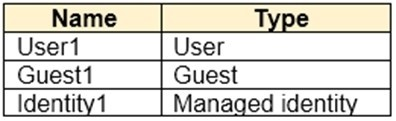
You have an Azure subscription that contains an Azure Automation account named Automation1 and an Azure key vault named Vault1. Vault1 contains a secret named Secret1.
You enable a system-assigned managed identity for Automation1.
You need to ensure that Automation1 can read the contents of Secret1. The solution must meet the following requirements: 1. Prevent Automation1 from accessing other secrets stored in Vault1. 2. Follow the principle of least privilege.
What should you do?
A
From Vault1, configure the Access control (IAM) settings.
B
From Automation1, configure the Identity settings.
C
From Automation1, configure the Run as accounts settings.
D
From Secret1, configure the Access control (IAM) settings.
Reveal answer detailsClose answer details
Correct answerD
Explanation
The system-assigned identity gives Automation1 a security principal, but access still must be granted at the narrowest resource scope. Configuring Access control (IAM) directly on Secret1 permits a role assignment scoped to that secret, allowing Automation1 to read it without granting access to the other secrets in Vault1.
Question 2
Single choice
You have a Microsoft Entra tenant that contains 1,000 users. The users are assigned Microsoft Entra Suite licenses. You are deploying Global Secure Access.
You need to ensure that connections to www.microsoft.com are bypassed by Global Secure Access.
Which profiles should you update?
A
Internet access profile only
B
Microsoft traffic profile only
C
Microsoft traffic profile and Internet access profile only
D
Microsoft traffic profile, Private access profile, and Internet access profile
Reveal answer detailsClose answer details
Correct answerC
Explanation
Traffic bypass must be configured in each forwarding profile that can process the destination. The public Microsoft destination can be classified by the Microsoft traffic profile and the Internet access profile, so excluding it in only one profile would leave the other path subject to Global Secure Access. The Private access profile handles private resources and does not need this change.
Question 3
Hotspot
HOTSPOT
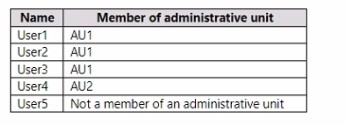
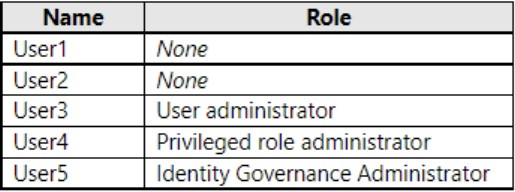
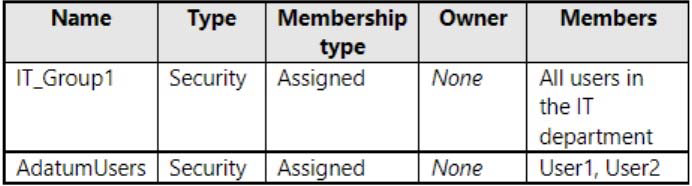
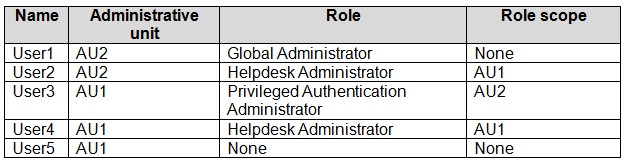
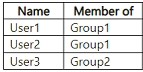
You have a Microsoft 365 E5 subscription that contains the users shown in the following table.
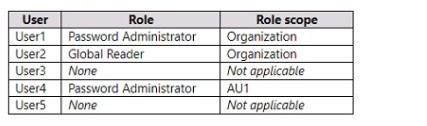
The users are assigned the roles shown in the following table.
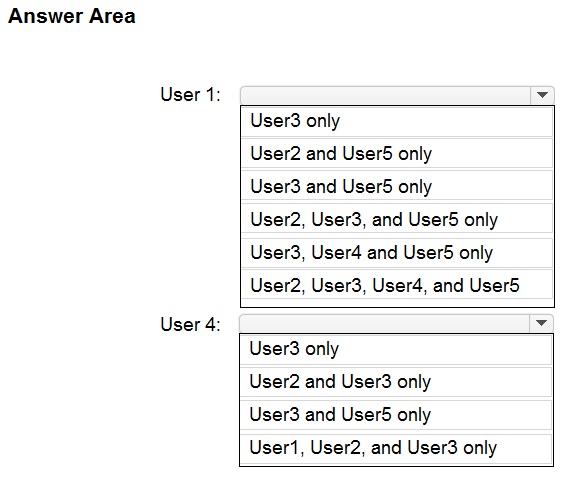
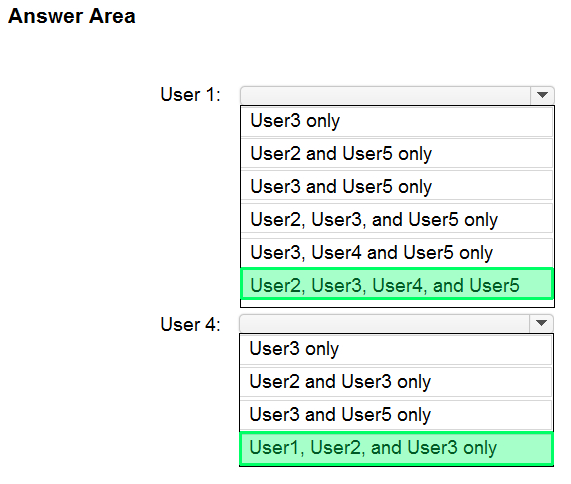
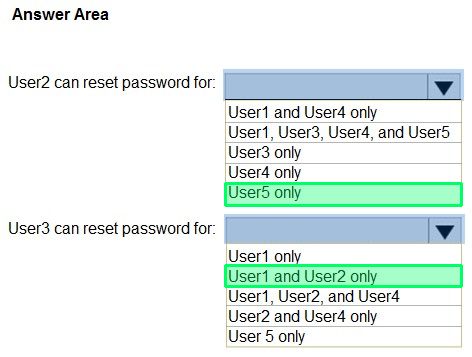
For which users can User1 and User4 reset passwords? To answer, select the appropriate options in the answer area.
NOTE: Each correct selection is worth one point.
Reveal answer detailsClose answer details
Question 4
Single choice
You have a Microsoft 365 E5 subscription that contains a Microsoft SharePoint Online site named Site1 and a Microsoft Teams team named Team1. The subscription contains five security groups named Group1, Group2, Group3, Group4, and Group5.
You need to implement access packages for Site1 and Team1. The solution must meet the following requirements:
1. Members of Group3 must be able to request access to Site1 only. 2. Members of Group1 must be able to request access to Site1 and Team1. 3. Members of Group4 must be able to request access to Site1 and Team1. 4. Only members of Group2 must be able to approve access package requests from Group1 members. 5. Only members of Group5 must be able to approve access package requests from Group3 and Group4 members.
What is the minimum number of access packages you should create?
A
2
B
3
C
4
D
5
Reveal answer detailsClose answer details
Correct answerA
Explanation
Create 2 access packages because an access package can use separate request policies for different requester and approver groups while keeping one resource set. The package containing Site1 and Team1 can have one policy for Group1 requests approved by Group2 and another for Group4 requests approved by Group5. A second package containing only Site1 can serve Group3, with Group5 as approver.
Question 5
Single choice
You have a Microsoft 365 E5 subscription that contains a user named User1. User1 is eligible for the Application Administrator role.
User1 needs to configure a new connector group for an application proxy.
What should you use to activate the role for User1?
A
the Microsoft 365 Defender portal
B
the Microsoft 365 admin center
C
the Microsoft Intune admin center
D
the Microsoft Entra admin center
Reveal answer detailsClose answer details
Correct answerD
Explanation
User1's Application Administrator assignment is eligible, so it must be activated through Privileged Identity Management before the application proxy connector group is configured. Privileged Identity Management for Microsoft Entra roles is administered in the Microsoft Entra admin center. The Defender, Microsoft 365, and Intune portals do not activate this eligible role.
Question 6
Drag & drop
DRAG DROP
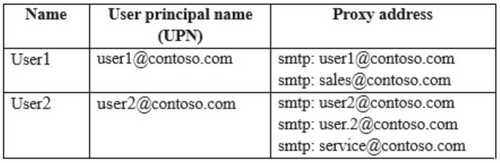
Your network contains an on-premises Active Directory domain named contoso.com that syncs with a Microsoft Entra tenant by using Microsoft Entra Connect. The domain contains the users shown in the following table.
From Active Directory Users and Computers, you update the proxyAddresses attribute for each user as shown in the following table.
You trigger a manual synchronization.
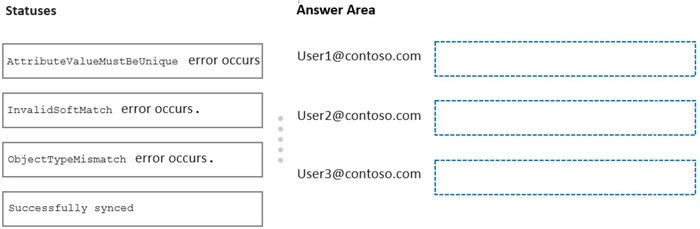
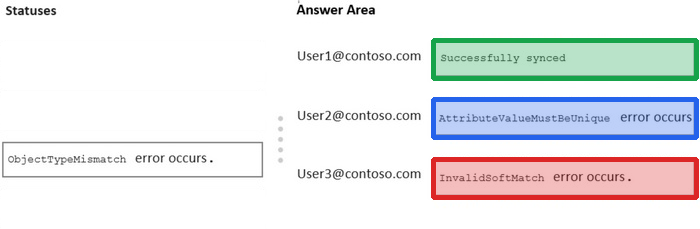
Which sync status will Microsoft Entra Connect sync return for each user? To answer, drag the appropriate status to the correct users. Each status may be used once, more than once, or not at all. You may need to drag the split bar between panes or scroll to view content.
NOTE: Each correct selection is worth one point.
Reveal answer detailsClose answer details
Question 7
Single choice
Your company requires that users request access before they can access corporate applications.
You register a new enterprise application named MyApp1 in Microsoft Entra ID and configure single sign-on (SSO) for MyApp1.
Which settings should you configure next for MyApp1?
A
Self-service
B
Provisioning
C
Application proxy
D
Roles and administrators
Reveal answer detailsClose answer details
Correct answerA
Explanation
The Self-service settings for an enterprise application control whether users can request access and how that request is approved. Configuring Self-service after single sign-on establishes the required request-before-access process for MyApp1. Provisioning creates or updates accounts but does not itself provide the user access-request workflow.
Question 8
Hotspot
HOTSPOT
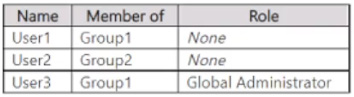
You have a Microsoft 365 E5 subscription that contains a Microsoft Teams team named Team1 and two Microsoft 365 groups named Group1 and Group2. The subscription contains the users shown in the following table.
You create an access package that has the following settings:
- Name: Package1 - Resource roles: o Team1: Owner - Users who can request access: For users in your directory o Specific Users and Groups: Group1 - Require approval: Yes o Require requestor justification: No o How many stages: 1
o First Approver: Team1, User3 o Require approver justification: Yes - Enable new requests: Yes - Expiration: o Access package assignments expire: 7 days o Users can request specific timeline: Yes
For each of the following statements, select Yes if the statement is true. Otherwise, select No.
NOTE: Each correct selection is worth one point.
Reveal answer detailsClose answer details
Explanation
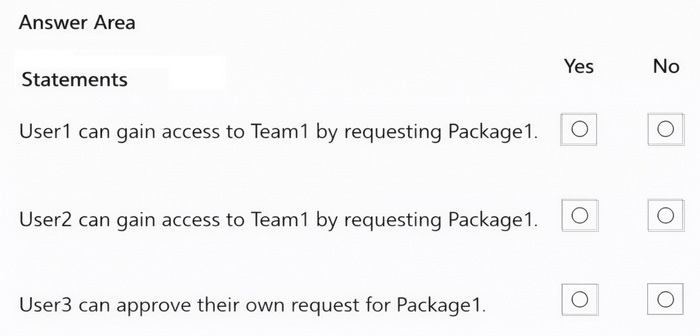
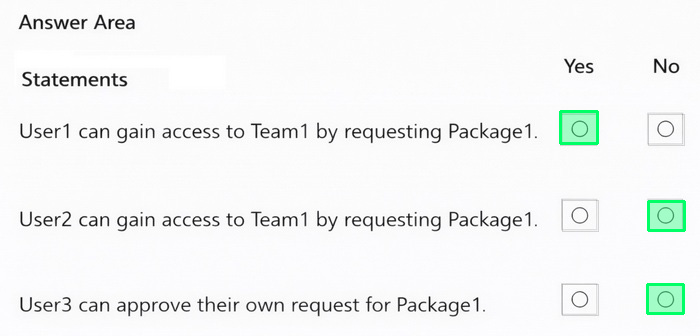
Box 1: Yes - User1 can gain access to Team1 by requesting Package1.
User1 is member of Group1.
Users who can request access: For users in your directory. Specific Users and Groups: Group1
Box 2: No - User2 can gain access to Team1 by requesting Package1. User2 is not member of Group1. Only members of Group1 can request access.
Box 3: No - User3 can approve their own request for Package1.
User3 is member of Group1. User3 is Global Administrator. Group1 can request access. User3 is also First Approver. However, Approvers are not able to approve their own role activation requests.
Litware, Inc. is a pharmaceutical company that has a subsidiary named Fabrikam, Inc.
Litware has offices in Boston and Seattle, but has employees located across the United States. Employees connect remotely to either office by using a VPN connection.
Existing Environment
Identity Environment
The network contains an Active Directory forest named litware.com that is linked to a Microsoft Entra tenant named litware.com. Microsoft Entra Connect uses pass-through authentication and has password hash synchronization disabled.
Litware.com contains a user named User1 who oversees all application development. User1 is NOT assigned to any Microsoft Entra roles.
Litware implements Microsoft Entra Application Proxy.
Fabrikam has a Microsoft Entra tenant named fabrikam.com. The users at Fabrikam access the resources in litware.com by using guest accounts in the litware.com tenant.
Cloud Environment
All the users at Litware have Microsoft 365 Enterprise E5 licenses. All the built-in anomaly detection policies in Microsoft Defender for Cloud Apps are enabled.
Litware has an Azure subscription associated with the litware.com Microsoft Entra tenant. The subscription contains a Microsoft Sentinel instance that uses the Microsoft Entra ID data connector and the Office 365 data connector. Microsoft Sentinel currently collects the Microsoft Entra sign-in logs and audit logs.
On-premises Environment
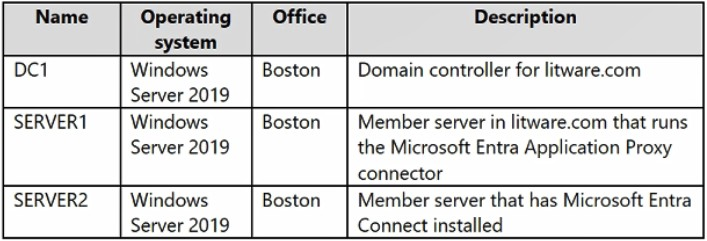
The on-premises network contains the servers shown in the following table.
Both Litware offices connect directly to the internet. Both offices connect to virtual networks in the Azure subscription by using a site-to-site VPN connection. All on-premises domain controllers are prevented from accessing the internet.
Requirements
Delegation Requirements
Litware identifies the following delegation requirements:
Delegate the management of privileged roles by using Microsoft Entra Privileged Identity Management (PIM).
Prevent nonprivileged users from registering applications in the litware.com Microsoft Entra tenant.
Use custom programs for Identity Governance.
Ensure that User1 can create enterprise applications in the Microsoft Entra tenant.
Use the principle of least privilege.
Licensing Requirements
Litware recently added a custom user attribute named LWLicenses to the litware.com Active Directory forest. Litware wants to manage the assignment of Microsoft Entra ID service plans by modifying the value of the LWLicenses attribute. Users who have the appropriate value for LWLicenses must be added automatically to a Microsoft 365 group that has the appropriate licenses assigned.
Management Requirements
Litware wants to create a group named LWGroup1 that will contain all the Microsoft Entra user accounts for Litware but exclude all the Microsoft Entra guest accounts.
Authentication Requirements
Litware identifies the following authentication requirements:
Implement multi-factor authentication (MFA) for all Litware users by using Conditional Access policies.
Exempt users from using MFA to authenticate to Microsoft Entra ID from the Boston office of Litware.
Implement a banned password list for the litware.com forest.
Enforce MFA when accessing on-premises applications.
Automatically detect and remediate externally leaked credentials.
Access Requirements
Litware identifies the following access requirements:
Control all access to all Azure resources and Microsoft Entra ID applications by using Conditional Access policies.
Implement a Conditional Access policy that has session controls for Microsoft SharePoint Online.
Control privileged access to applications by using Microsoft Entra Access Reviews.
Monitoring Requirements
Litware wants to use the Fusion rule in Microsoft Sentinel to detect multi-staged attacks that include a combination of suspicious Microsoft Entra sign-ins followed by anomalous Microsoft Office 365 activity.
Question 9
Testlet 2Single choice
You need to track application access assignments by using Identity Governance. The solution must meet the delegation requirements.
What should you do first?
A
Modify the User consent settings for the enterprise applications.
B
Create a catalog.
C
Create a program.
D
Modify the Admin consent requests settings for the enterprise applications.
Reveal answer detailsClose answer details
Correct answerB
Explanation
A catalog is the initial Identity Governance container for the applications and other resources whose access will be managed. It establishes the scope that can be delegated to catalog owners and used for access assignments. Consent settings govern application permissions rather than delegated management and tracking of user access assignments.
Question 10
Single choice
An access review is complete, but several denied application assignments remain. What should the review owner do?
A
Treat review completion as proof that every target resource removed denied access.
B
Change the recommendations to approvals because recommendations are authoritative decisions.
C
Verify result application, investigate failures, and complete authorized follow-up.
D
Delete the review record so the application reevaluates all assignments.
Reveal answer detailsClose answer details
Correct answerC
Explanation
Completing an access review records its decisions, but the remaining denied assignments demonstrate that the intended removals were not fully applied. The owner should verify application of the results, identify why particular changes failed, and perform the authorized follow-up needed to resolve them. Review completion alone is not proof that each target resource changed.
Question 11
Drag & drop
DRAG DROP
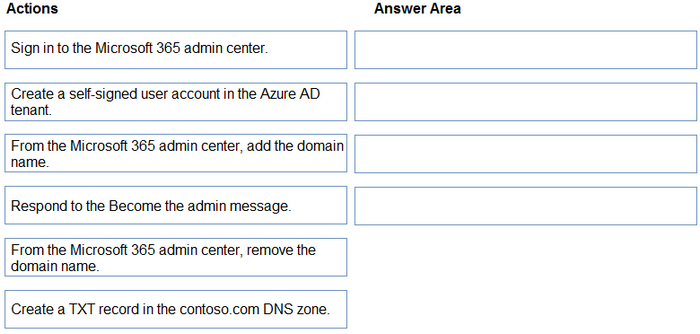
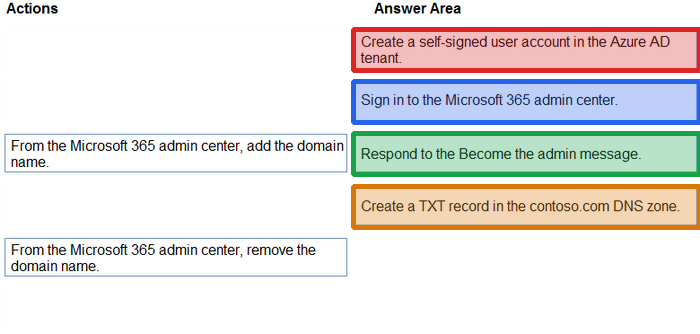
You have an on-premises Microsoft Exchange organization that uses an SMTP address space of contoso.com.
You discover that users use their email address for self-service sign-up to Microsoft 365 services.
You need to gain global administrator privileges to the Azure Active Directory (Azure AD) tenant that contains the self-signed users.
Which four actions should you perform in sequence? To answer, move the appropriate actions from the list of actions to the answer area and arrange them in the correct order.
Reveal answer detailsClose answer details
Question 12
Hotspot
HOTSPOT
You have a Microsoft Entra tenant that has multi-factor authentication (MFA) enabled.
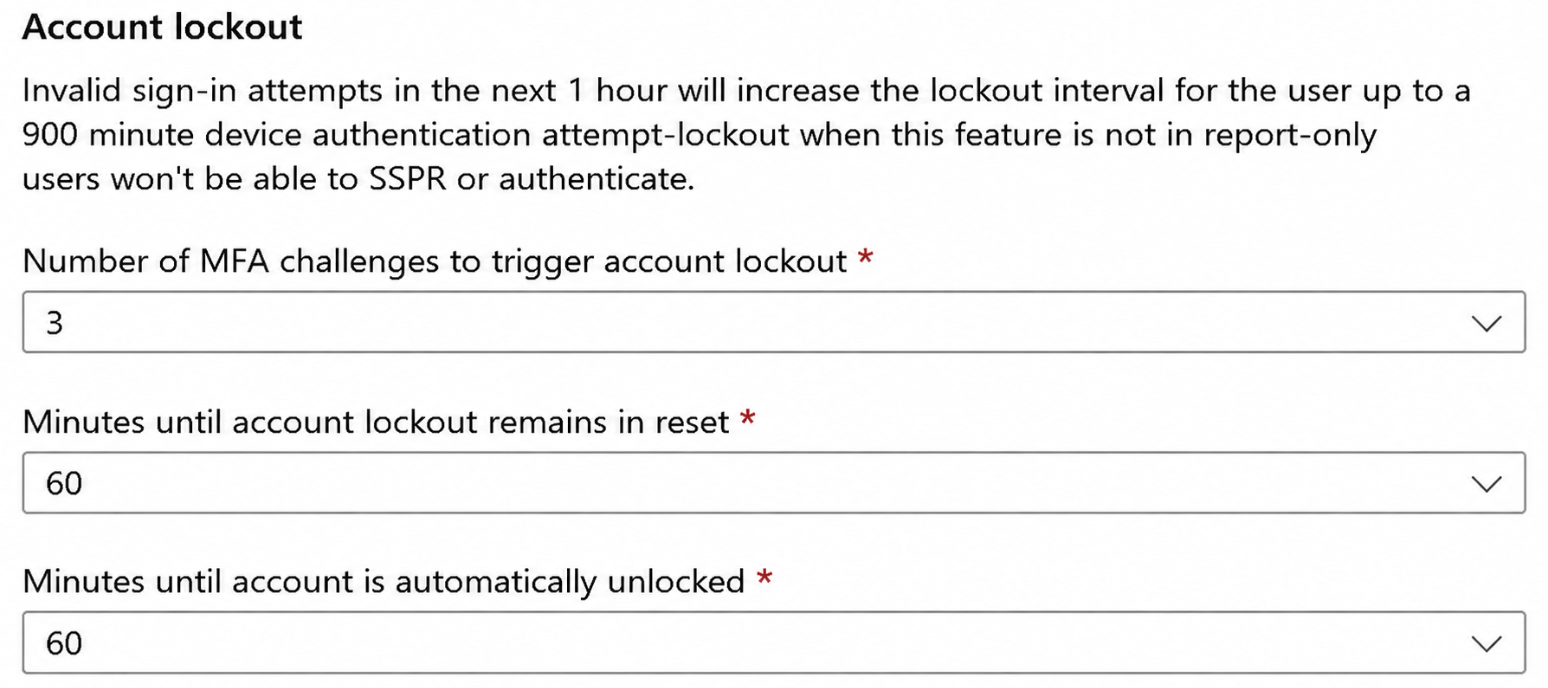
The account lockout settings are configured as shown in the following exhibit.
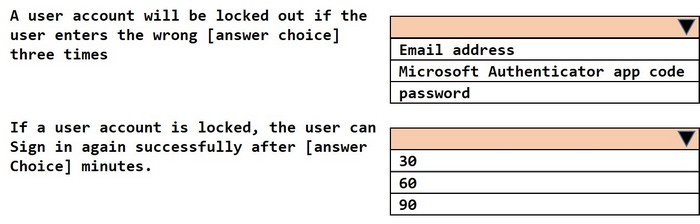
Use the drop-down menus to select the answer choice that completes each statement based on the information presented in the graphic.
NOTE: Each correct selection is worth one point.
Reveal answer detailsClose answer details
Explanation
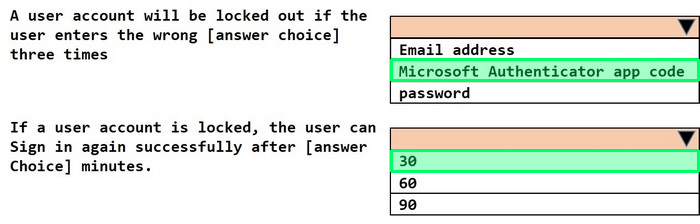
The account lockout threshold is configured as 3 MFA denials. Therefore, three consecutive incorrect Microsoft Authenticator verification codes can trigger the MFA account lockout. The Minutes until account lockout counter is reset value of 60 minutes controls when the failed-attempt counter resets; it isn’t the lockout duration. The Minutes until account is automatically unblocked value is 30 minutes, so after the account is locked, the user can attempt to sign in successfully again after 30 minutes.
Question 13
Single choice
You have a Microsoft Entra tenant.
You configure self-service password reset (SSPR) by using the following settings:
Require users to register when signing in: Yes
Number of methods required to reset: 1
What is a valid authentication method available to users?
A
a smartcard
B
a mobile app code
C
a mobile app notification
D
an email to an address outside your organization
Reveal answer detailsClose answer details
Correct answerB
Explanation
When SSPR is configured to require one authentication method, a verification code from the Microsoft Authenticator app is a valid method for password reset. Under the legacy SSPR behavior tested by this question, when one method is required, the mobile app supports a verification code, while a mobile app notification is available when two methods are required. A smartcard is not an SSPR authentication method. Therefore, a mobile app code is the valid choice.
Question 14
Hotspot
HOTSPOT
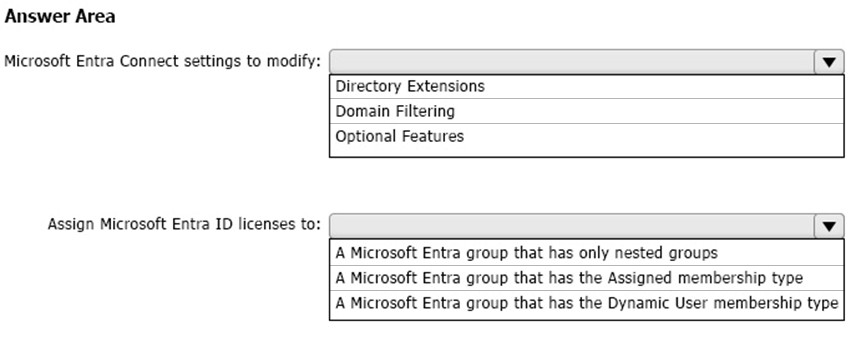
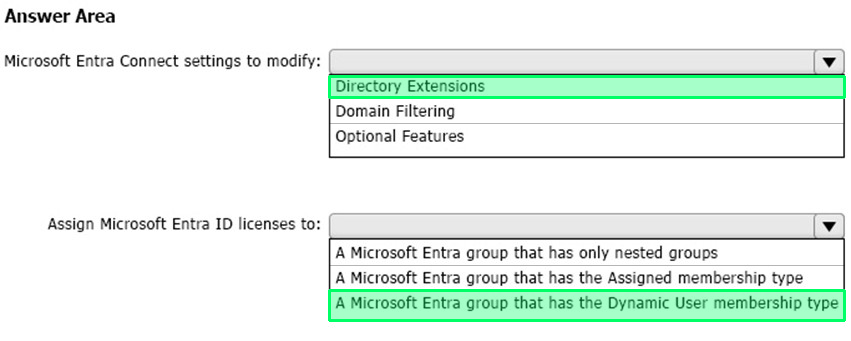
You need to configure the assignment of Microsoft Entra ID licenses to the Litware users. The solution must meet the licensing requirements.
What should you do? To answer, select the appropriate options in the answer area.
NOTE: Each correct selection is worth one point.
Reveal answer detailsClose answer details
Explanation
Litware recently added a custom user attribute named LWLicenses to the litware.com Active Directory forest. Litware wants to manage the assignment of Microsoft Entra ID service plans by modifying the value of the LWLicenses attribute. Users who have the appropriate value for LWLicenses must be added automatically to a Microsoft 365 group that has the appropriate licenses assigned.
Question 15
Single choice
Hybrid users need cloud authentication that minimizes dependency on on-premises sign-in infrastructure. Eligible domain devices should also receive an intranet single sign-on experience. Which combination should be selected?
A
Password hash synchronization with seamless single sign-on
B
Pass-through authentication with all authentication agents removed
C
Seamless single sign-on as the primary authentication method
D
AD FS retained as the only authentication path with no staged migration
Reveal answer detailsClose answer details
Correct answerA
Explanation
Password hash synchronization moves the authentication dependency to the cloud instead of requiring the on-premises sign-in infrastructure for each authentication attempt. Seamless single sign-on complements it by giving eligible domain devices an intranet SSO experience. The two features therefore address the cloud-authentication and intranet-convenience requirements separately.
Question 16
Single choice
A single-page application runs in users' browsers and uses an authorization redirect flow. Which registration configuration is appropriate?
A
Register the exact public-client redirect URI and do not use a client secret.
B
Omit the redirect URI because the application ID determines the return location.
C
Store a long-lived client secret in the browser so the public client can authenticate confidentially.
D
Create the registration and assume it automatically grants all required API permissions.
Reveal answer detailsClose answer details
Correct answerA
Explanation
An authorization redirect must return the browser to a registered, exact redirect URI. Because a single-page application executes in users' browsers, it is a public client and cannot keep a client secret confidential. The registration should therefore identify the public-client redirect location without embedding a secret; API permission grants remain a separate decision.
Question 17
Single choice
You have a Microsoft Entra tenant.
You create an enterprise application collection named HR Apps that has the following settings:
All three apps have the following Properties settings:
1. Enabled for users to sign in: Yes 2. User assignment required: Yes 3. Visible to users: Yes
Users report that when they go to the My Apps portal, they only see App1 and App2.
You need to ensure that the users can also see App3.
What should you do from App3?
A
From Users and groups, add HRUsers.
B
From Single sign-on, configure a sign-on method.
C
From Properties, change User assignment required to No.
D
From Permissions, review the User consent permissions.
Reveal answer detailsClose answer details
Correct answerA
Explanation
App3 requires user assignment, so merely placing it in the HR Apps collection does not assign HRUsers to the application. Adding HRUsers under App3's Users and groups creates the required assignment. Because App3 is enabled and visible, that assignment allows the group's users to see it with App1 and App2 in the My Apps portal.
Question 18
Hotspot
HOTSPOT
Your network contains an on-premises Active Directory Domain Services (AD DS) domain named fabrikam.com. The domain contains an Active Directory Federation Services (AD FS) instance and a member server named Server1 that runs Windows Server. The domain contains the users shown in the following table.
You have a Microsoft Entra tenant named contoso.com that is linked to a Microsoft 365 subscription.
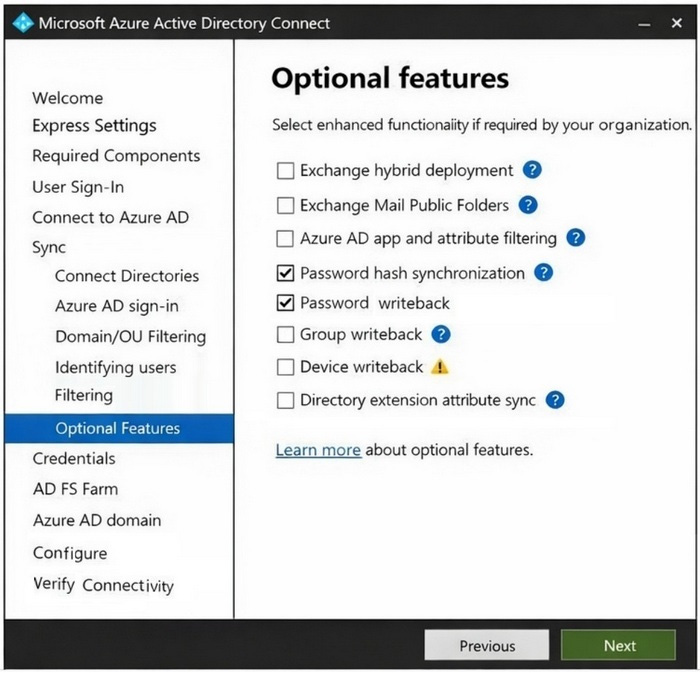
You establish federation between fabrikam.com and contoso.com by using a Microsoft Entra Connect instance that is configured as shown in the following exhibit.
You perform the following tasks in contoso.com:
Create a group named Group1. Disable User2. Enable User3.
For each of the following statements, select Yes if the statement is true. Otherwise, select No.
NOTE: Each correct selection is worth one point.
Reveal answer detailsClose answer details
Explanation
Box 1: No
Group1 is created in contoso.com (Microsoft Entra). User1 is in fabrikam.com (on-premises). From the exhibit we see that "Group writeback" is disabled. User1 cannot be added to Group1.
Note: Plan for Microsoft Entra Connect group writeback Group writeback allows you to write cloud groups back to your on-premises Active Directory instance by using Microsoft Entra Connect Sync. You can use this feature to manage groups in the cloud, while controlling access to on-premises applications and resources.
Box 2: No
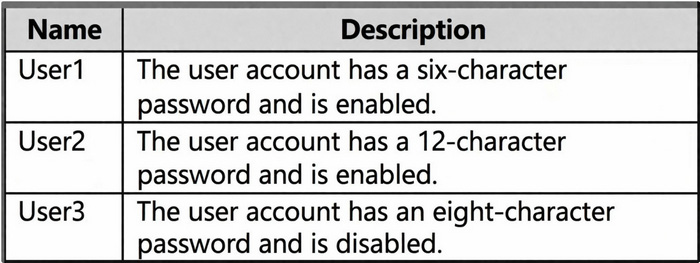
User2 is in fabrikam.com (on-premises), and is enabled. User2 then disabled.
Note: Password hash synchronization is one of the sign-in methods used to accomplish hybrid identity. Microsoft Entra Connect synchronizes a hash of a user's password from an on-premises Active Directory instance to a cloud-based Microsoft Entra instance.
Box 3: Yes
Password writeback is enabled.
Note: Password writeback can be used to synchronize password changes in Microsoft Entra back to your on-premises AD DS environment. Microsoft Entra Connect provides a secure mechanism to send these password changes back to an existing on-premises directory from Microsoft Entra ID.
You have an Azure subscription that contains a user-assigned managed identity named Managed1 in the East US Azure region. The subscription contains the resources shown in the following table.
Which resources can use Managed1 as their identity?
A
WebApp1 only
B
storage1 and WebApp1 only
C
VM1 and WebApp1 only
D
VM1, storage1, and WebApp1
Reveal answer detailsClose answer details
Correct answerC
Explanation
A user-assigned managed identity is a separate identity that can be associated with supported Azure resources. VM1, a virtual machine, and WebApp1, an Azure App Service app, can both use Managed1. The storage account itself cannot use that identity as its own identity, so the supported resources are VM1 and WebApp1 only.
Question 20
Single choice
You have a Microsoft Entra tenant with Privileged Identity Management (PIM). You need to ensure that users activate roles only when required.
What should you configure?
A
Active assignment
B
Eligible assignment
C
Permanent assignment
D
Group-based assignment
Reveal answer detailsClose answer details
Correct answerB
Explanation
An eligible assignment gives a user the right to activate a privileged role when the role is needed, while leaving the role inactive at other times. Privileged Identity Management can apply activation requirements and a limited activation period. An active or permanent assignment would provide the privileges continuously.
Question 21
Hotspot
HOTSPOT
You have an Azure subscription.
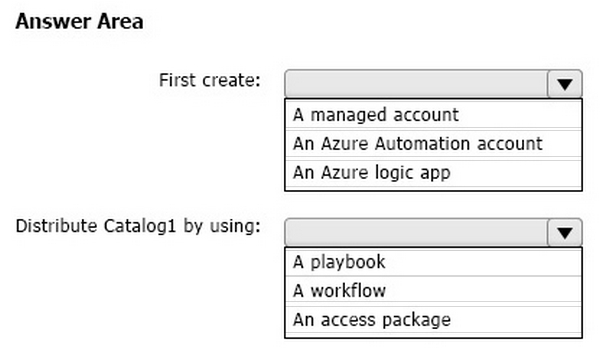
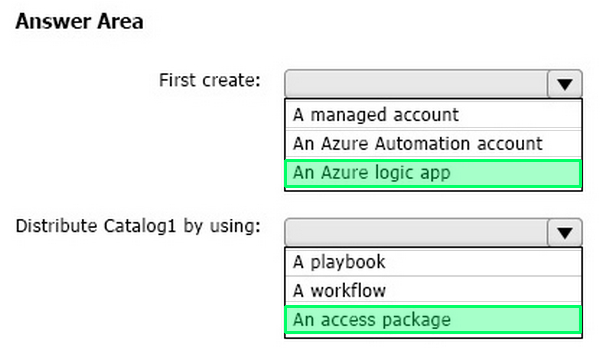
From Entitlement management, you plan to create a catalog named Catalog1 that will contain a custom extension.
What should you create first, and what should you use to distribute the resources in Catalog1? To answer, select the appropriate options in the answer area.
NOTE: Each correct selection is worth one point.
Reveal answer detailsClose answer details
Explanation
An Entitlement Management custom extension uses an Azure Logic App to implement the custom workflow that runs during access package lifecycle events. Therefore, the Logic App must be created before configuring the custom extension. Resources and their roles from a catalog are made available to users through an access package, which defines the resources, request policies, approvals, and lifecycle settings used to grant access.
Question 22
Single choice
You create a new Microsoft 365 E5 tenant.
You need to ensure that when users connect to the Microsoft 365 portal from an anonymous IP address, they are prompted to use multi-factor authentication (MFA).
What should you configure?
A
a sign-in risk policy
B
a user risk policy
C
an MFA registration policy
Reveal answer detailsClose answer details
Correct answerA
Explanation
An anonymous IP address is a property of the current authentication attempt, so it represents sign-in risk rather than persistent evidence that the user account is compromised. A sign-in risk policy can respond to that risky attempt by requiring MFA before access to Microsoft 365 services is granted.
Question 23
Single choice
You have multiple on-premises devices that run either Windows or Linux.
You have a Microsoft 365 E5 subscription.
You configure Microsoft Entra Internet Access.
You need to ensure that all the on-premises devices access the internet by using Global Secure Access.
What should you do in the Microsoft Entra admin center?
A
Deploy the Global Secure Access client.
B
Create a remote network.
C
Create a named location.
D
Create an access package.
Reveal answer detailsClose answer details
Correct answerB
Explanation
A remote network represents an on-premises site whose traffic is connected to Global Secure Access. Configuring it allows both Windows and Linux devices at that site to use the network-based connection without requiring a device client on every machine. A named location only classifies traffic and does not establish this connectivity.
Question 24
Single choice
You have a Microsoft Entra tenant. You need to monitor OAuth app activity.
What should you configure?
A
Activity policy
B
OAuth app policy
C
Access review
D
Conditional Access
Reveal answer detailsClose answer details
Correct answerB
Explanation
An OAuth app policy is designed to evaluate applications that receive OAuth permissions and to monitor their behavior, permission grants, and associated risk. It directly addresses OAuth app activity rather than interactive user access. Conditional Access controls sign-ins, while access reviews periodically validate assignments or memberships.
Question 25
Single choice
Partner users must be created and maintained automatically as B2B collaboration objects in your tenant. Their home tenant's MFA claim should also be trusted for inbound access. Which configuration is required?
A
Outbound cross-tenant access settings only
B
Cross-tenant synchronization only
C
Inbound cross-tenant access settings only
D
Cross-tenant synchronization plus the appropriate inbound cross-tenant trust settings
Reveal answer detailsClose answer details
Correct answerD
Explanation
Cross-tenant synchronization creates and maintains the partner users as B2B collaboration objects in the receiving tenant. Separately, inbound cross-tenant access trust settings determine whether that receiving tenant accepts MFA claims issued by the users' home tenant. Synchronization supplies the objects, while inbound trust supplies the requested MFA behavior, so both are required.
Question 26
Single choice
You have a Microsoft 365 subscription.
You plan to deploy an app named App1 that will have the following configurations:
1. Will be registered in Microsoft Entra 2. Will run as a service without user interaction 3. Will collect audit logs associated with user sign-ins 4. Will access resources by using the Microsoft Graph API
You need to ensure that App1 can access Microsoft Graph.
What should you use?
A
application permissions
B
delegated permissions
C
a custom role-based access control (RBAC) role
D
a built-in role-based access control (RBAC) role
Reveal answer detailsClose answer details
Correct answerA
Explanation
App1 runs as a background service with no signed-in user, so it must call Microsoft Graph as its own application identity. Application permissions authorize that app-only access after administrative consent. Delegated permissions require a user's context and therefore do not fit a service that collects sign-in audit logs without user interaction.
Question 27
Single choice
You have an Azure Active Directory (Azure AD) tenant.
You need to review the Azure AD sign-ins log to investigate sign ins that occurred in the past.
For how long does Azure AD store events in the sign-in log?
A
14 days
B
30 days
C
90 days
D
365 days
Reveal answer detailsClose answer details
Correct answerB
Explanation
Azure Active Directory retains sign-in log events for 30 days in the stated tenant context. An investigation performed within that period can use the sign-in log to review previous authentication activity. The other durations do not represent the applicable built-in sign-in log retention period for this question.
Case study
Case Study 2
Overview
Litware, Inc. is a pharmaceutical company that has a subsidiary named Fabrikam, Inc.
Litware has offices in Boston and Seattle, but has employees located across the United States. Employees connect remotely to either office by using a VPN connection.
Existing Environment
Identity Environment
The network contains an Active Directory forest named litware.com that is linked to a Microsoft Entra tenant named litware.com. Microsoft Entra Connect uses pass-through authentication and has password hash synchronization disabled.
Litware.com contains a user named User1 who oversees all application development. User1 is NOT assigned to any Microsoft Entra roles.
Litware implements Microsoft Entra Application Proxy.
Fabrikam has a Microsoft Entra tenant named fabrikam.com. The users at Fabrikam access the resources in litware.com by using guest accounts in the litware.com tenant.
Cloud Environment
All the users at Litware have Microsoft 365 Enterprise E5 licenses. All the built-in anomaly detection policies in Microsoft Defender for Cloud Apps are enabled.
Litware has an Azure subscription associated with the litware.com Microsoft Entra tenant. The subscription contains a Microsoft Sentinel instance that uses the Microsoft Entra ID data connector and the Office 365 data connector. Microsoft Sentinel currently collects the Microsoft Entra sign-in logs and audit logs.
On-premises Environment
The on-premises network contains the servers shown in the following table.
Both Litware offices connect directly to the internet. Both offices connect to virtual networks in the Azure subscription by using a site-to-site VPN connection. All on-premises domain controllers are prevented from accessing the internet.
Requirements
Delegation Requirements
Litware identifies the following delegation requirements:
Delegate the management of privileged roles by using Microsoft Entra Privileged Identity Management (PIM).
Prevent nonprivileged users from registering applications in the litware.com Microsoft Entra tenant.
Use custom programs for Identity Governance.
Ensure that User1 can create enterprise applications in the Microsoft Entra tenant.
Use the principle of least privilege.
Licensing Requirements
Litware recently added a custom user attribute named LWLicenses to the litware.com Active Directory forest. Litware wants to manage the assignment of Microsoft Entra ID service plans by modifying the value of the LWLicenses attribute. Users who have the appropriate value for LWLicenses must be added automatically to a Microsoft 365 group that has the appropriate licenses assigned.
Management Requirements
Litware wants to create a group named LWGroup1 that will contain all the Microsoft Entra user accounts for Litware but exclude all the Microsoft Entra guest accounts.
Authentication Requirements
Litware identifies the following authentication requirements:
Implement multi-factor authentication (MFA) for all Litware users by using Conditional Access policies.
Exempt users from using MFA to authenticate to Microsoft Entra ID from the Boston office of Litware.
Implement a banned password list for the litware.com forest.
Enforce MFA when accessing on-premises applications.
Automatically detect and remediate externally leaked credentials.
Access Requirements
Litware identifies the following access requirements:
Control all access to all Azure resources and Microsoft Entra ID applications by using Conditional Access policies.
Implement a Conditional Access policy that has session controls for Microsoft SharePoint Online.
Control privileged access to applications by using Microsoft Entra Access Reviews.
Monitoring Requirements
Litware wants to use the Fusion rule in Microsoft Sentinel to detect multi-staged attacks that include a combination of suspicious Microsoft Entra sign-ins followed by anomalous Microsoft Office 365 activity.
Question 28
Testlet 2Hotspot
HOTSPOT
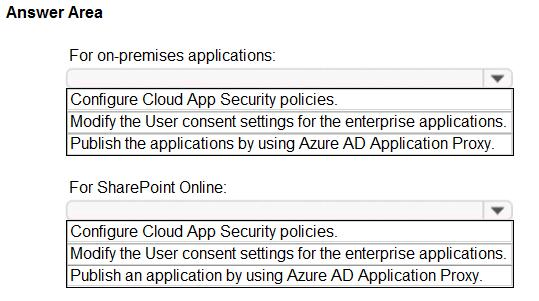
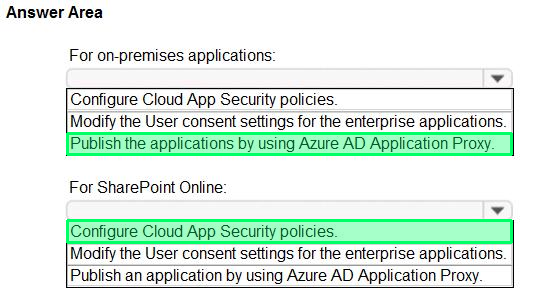
You need to implement on-premises application and SharePoint Online restrictions to meet the authentication requirements and the access requirements.
What should you do? To answer, select the appropriate options in the answer area.
You have a Microsoft Entra tenant that uses self-service password reset (SSPR). You need to ensure that administrators must use two authentication methods when resetting their
passwords.
What should you do?
A
Modify the SSPR registration policy
B
Configure Identity Protection
C
Use the default administrator reset policy
D
Enable password writeback
Reveal answer detailsClose answer details
Correct answerC
Explanation
Microsoft Entra applies a protected default self-service password reset policy to administrator accounts. That administrator reset policy requires two authentication methods, satisfying the stronger verification requirement without changing ordinary user registration settings. Password writeback affects where a new password is written, not how the administrator verifies identity.
Question 30
Lab simulation
Simulation
Use the following login credentials as needed:
To enter your username, place your cursor in the Sign in box and click the username below. To enter your password, place your cursor in the Enter password box and click the password below.
If the Microsoft 365 portal does not load successfully in the browser, press CTRL+K to reload the portal in a new browser tab.
The following information is for technical support purposes only: Lab Instance: 99999999
You need to implement additional security checks before the members of the sg-Executive can access any company apps. The members must meet one of the following conditions:
1. Connect by using a device that is marked as compliant by Microsoft Intune. 2. Connect by using client apps that are protected by app protection policies.
To complete this task, sign in to the appropriate admin center.
Reveal model answerClose model answer
Part 1: Create a Conditional Access policy and assign your test group
Step 1: Sign in to the Microsoft Entra admin center as at least a Conditional Access Administrator.
Step 2: Browse to Protection > Conditional Access, select + New policy, and then select Create new policy.
Step 3: Enter a name for the policy, such as MFA Pilot.
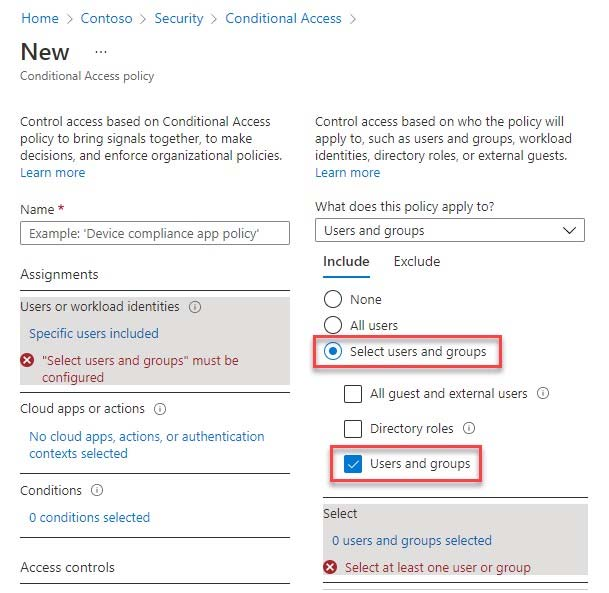
Step 4: Under Assignments, select the current value under Users or workload identities.
Step 5: Under What does this policy apply to?, verify that Users and groups is selected.
Step 6: Under Include, choose Select users and groups, and then select Users and groups.
Since no one is assigned yet, the list of users and groups opens automatically.
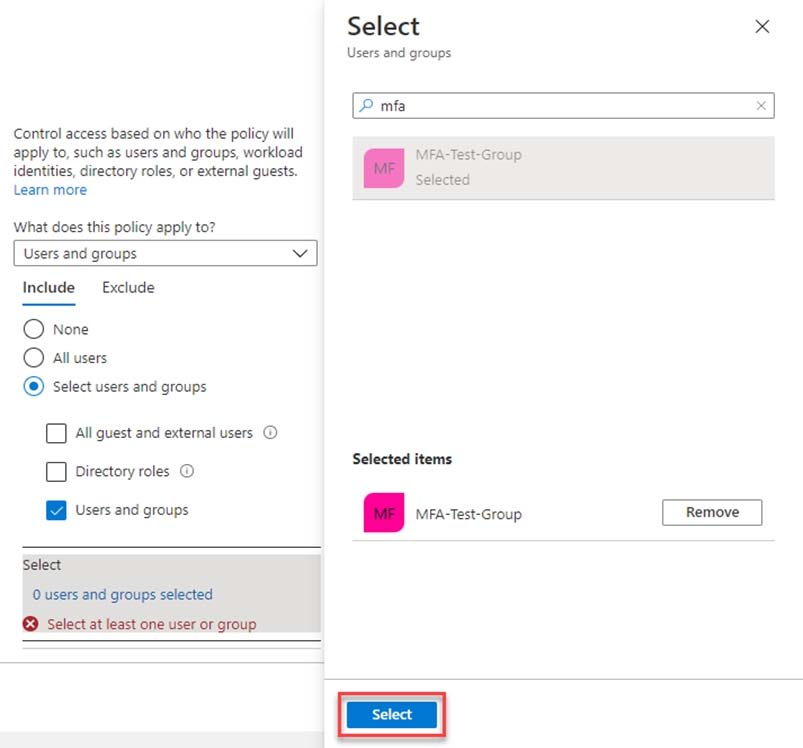
Step 7: Browse for and select your Microsoft Entra group, such as MFA-Test-Group.
[Select the sg-Executive group.]
Then choose Select.
Part 2: Select applications
Configure the apps that require the conditions.
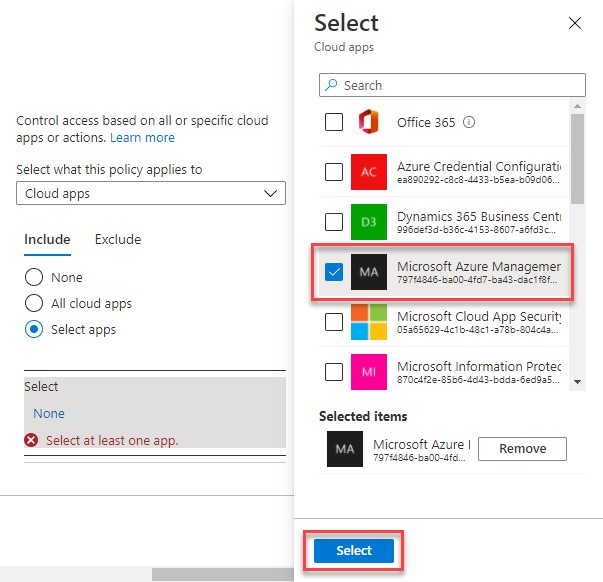
Step 8: Select the current value under Target resources, and then under Select what this policy applies to, select Resources (formerly cloud apps).
Step 9: Under Include, choose Select resources.
Step 10: Choose Select, search for the required application, and select it.
Step 11: Select Windows Azure Service Management API, and then choose Select.
Part 3: Select conditions and access controls
Question: The members must meet one of the following conditions:
Connect by using a device that is marked as compliant by Microsoft Intune.
Connect by using client apps that are protected by app protection policies.
Step 12: Select Conditions > Client apps. Set Configure to Yes, and then select Browser and Mobile apps and desktop clients.
Step 13: Under Access controls > Grant, select Grant access, and then select:
Require device to be marked as compliant
Require app protection policy
For multiple controls, select Require one of the selected controls.
Step 14: For Enable policy, select On, and then select Create to save your changes. By default, Enable policy is set to Report-only.
Question 31
Hotspot
HOTSPOT
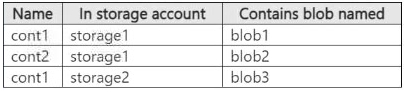
You have an Azure subscription named Sub1 that contains two storage accounts named storage1 and storage2 and the blob containers shown in the following table.
Sub1 contains the users shown in the following table.
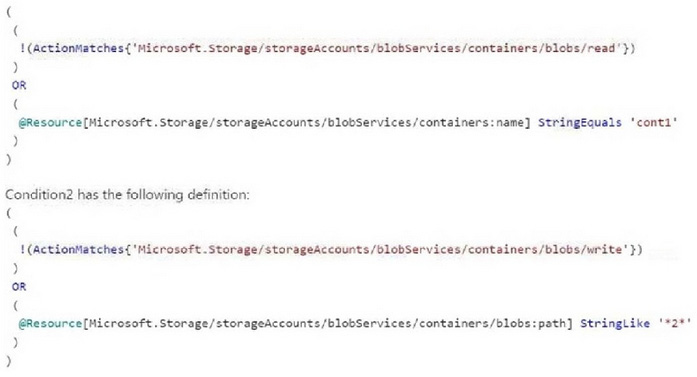
Condition1 has the following definition:
NOTE: Each correct selection is worth one point.
Reveal answer detailsClose answer details
Explanation
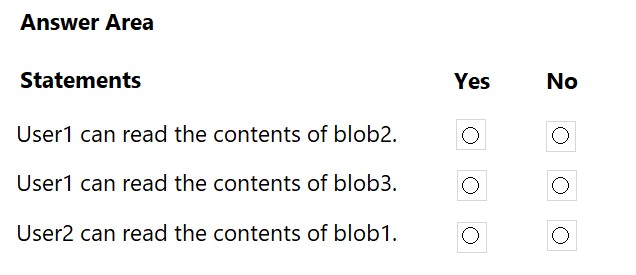
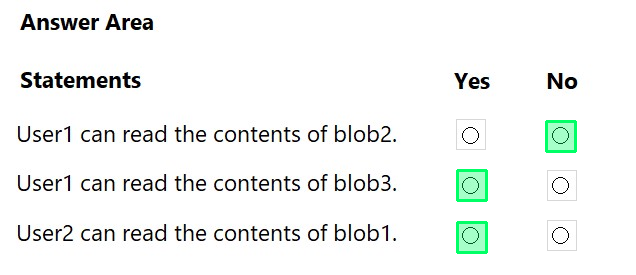
Box 1: No - User1 can read the contents of blob 2.
User1 has the Reader role. Does not apply to the blob container. User1 also has the Storage Blob Data Reader with Condition1. Blob2 is in Cont2. Condition1 will be false: The action is..blob/reads Resource name is cont2 not cont1
Note: Storage Blob Data Reader Read and list Azure Storage containers and blobs.
Box 2: Yes - User1 can read the contents of blob 3.
Blob3 is in cont 1. Condition1 will be true.
Box 3: Yes - User2 can read the contents of blob 1.
User2 has the Reader role. Does not apply to the blob container. User2 also has the Storage Blob Data Owner Role with Condition2. blob1 is in cont1 Condition2 will be true, as the action is read, not a write.
Question 32
Hotspot
HOTSPOT
You have a Microsoft 365 E5 subscription that contains three groups named Group1, Group2, and Group3, and the users shown in the following table.
You create a Conditional Access policy named CA1 that has the following settings:
Users
Include
Users and groups: Group1
Exclude
Users and groups: Group2
Directory roles: Global Administrator
Target resources
Include: All cloud apps
Access controls
Grant: Require multifactor authentication (MFA)
You create a Conditional Access policy named CA2 that has the following settings:
Users
Include
Users and groups: Group2
Exclude
Users and groups: Group3
Target resources
Include: All cloud apps
Access controls
Grant: Block access
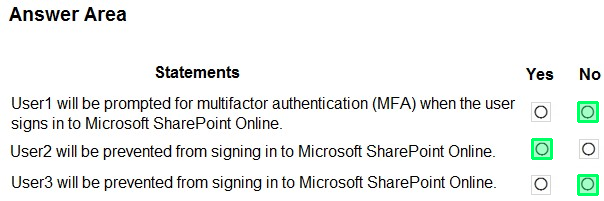
For each of the following statements, select Yes if the statement is true. Otherwise, select No.
NOTE: Each correct selection is worth one point.
- Access controls -- Grant: Block access.
For each of the following statements, select Yes if the statement is true. Otherwise, select No.
NOTE: Each correct selection is worth one point.
Reveal answer detailsClose answer details
Explanation
Box 1: No
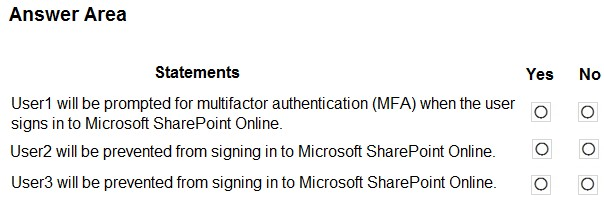
User1 will not be prompted for multifactor authentication (MFA) when signing in to Microsoft SharePoint Online.
User1 is a Global Administrator and a member of Group1. CA1 includes Group1 but excludes the Global Administrator directory role. In Conditional Access, an exclusion takes precedence over an inclusion. Therefore, CA1 does not apply to User1.
CA2 applies to Group2, so it does not apply to User1.
Therefore, User1 will not be prompted for MFA by either Conditional Access policy.
Box 2: Yes
User2 will be prevented from signing in to Microsoft SharePoint Online.
User2 is a member of Group2. CA1 excludes Group2, so CA1 does not apply to User2. CA2 includes Group2 and applies the Block access control to all cloud apps.
Therefore, CA2 blocks User2 from accessing Microsoft SharePoint Online.
Box 3: No
User3 will not be prevented from signing in to Microsoft SharePoint Online.
User3 is a Global Reader and a member of both Group2 and Group3. CA1 excludes Group2, so CA1 does not apply to User3.
CA2 includes Group2 but excludes Group3. Because exclusions take precedence over inclusions, CA2 does not apply to User3.
Therefore, neither CA1 nor CA2 prevents User3 from signing in to Microsoft SharePoint Online.
Question 33
Lab simulation
Simulation
Use the following login credentials as needed:
To enter your username, place your cursor in the Sign in box and click the username below. To enter your password, place your cursor in the Enter password box and click the password below.
If the Microsoft 365 portal does not load successfully in the browser, press CTRL+K to reload the portal in a new browser tab.
The following information is for technical support purposes only: Lab Instance: 99999999
You need to prevent all users from using legacy authentication protocols when authenticating to Microsoft Entra ID.
To complete this task, sign in to the appropriate admin center.
Reveal model answerClose model answer
Block legacy authentication with Microsoft Entra Conditional Access
Common Conditional Access policy: Block legacy authentication
Step 1: Sign in to the Microsoft Entra admin center as at least a Conditional Access Administrator.
Step 2: Browse to Protection > Conditional Access.
Step 3: Select Create new policy.
Step 4: Give your policy a name. We recommend that organizations create a meaningful standard for the names of their policies.
Step 5: Under Assignments, select Users or workload identities.
Step 5a: Under Include, select All users.
Step 5b: Under Exclude, select Users and groups, and choose any accounts that must maintain the ability to use legacy authentication. Microsoft recommends excluding at least one account to prevent yourself from being locked out.
[Skip]
Step 6: Under Target resources > Resources (formerly cloud apps) > Include, select All resources (formerly ‘All cloud apps’).
Step 7: Under Conditions > Client apps, set Configure to Yes, and then select Exchange ActiveSync clients and Other clients.
Step 8: Under Access controls > Grant, select Block access, and then select Select.
Step 9: Confirm your settings and set Enable policy to On.
You have an Azure subscription named Sub1 that contains a user named User1.
You need to ensure that User1 can purchase a Microsoft Entra Permissions Management license for Sub1. The solution must follow the principle of least privilege.
Which role should you assign to User1?
A
Global Administrator
B
Billing Administrator
C
Permissions Management Administrator
D
User Access Administrator
Reveal answer detailsClose answer details
Correct answerB
Explanation
Purchasing the Microsoft Entra Permissions Management license is a billing operation. Billing Administrator grants the purchasing and subscription-billing capability needed for that task without providing the broad directory control of Global Administrator. Permissions Management Administrator manages the service, and User Access Administrator manages Azure access assignments rather than purchases.
Question 35
Single choice
Your company purchases 2 new Microsoft 365 ES subscription and an app named App.
You need to create a Microsoft Defender for Cloud Apps access policy for App1.
What should you do you first? (Choose Correct Answer based on Microsoft Identity and Access Administrator at microsoft.com)
A
Configure a Token configuration for App1.
B
Add an API permission for App.
C
Configure a Conditional Access policy to use app-enforced restrictions.
D
Configure a Conditional Access policy to use Conditional Access App Control.
Reveal answer detailsClose answer details
Correct answerD
Explanation
A Defender for Cloud Apps access policy operates through Conditional Access App Control. The Conditional Access policy must first route App1 sessions to that control path; the access policy can then evaluate the session and allow or block access. Token configuration, API permissions, and app-enforced restrictions do not establish this session-control integration.
Question 36
Single choice
A user named User1 receives an error message when attempting to access the Microsoft Defender for
Cloud Apps portal.
You need to identify the cause of the error. The solution must minimize administrative effort.
What should you use?
A
Log Analytics
B
sign-in logs
C
audit logs
D
provisioning logs
Reveal answer detailsClose answer details
Correct answerB
Explanation
The failure occurs while User1 attempts to access a cloud application, so the sign-in logs provide the relevant authentication record. They expose the application, sign-in status, failure details, and policies involved in the access attempt. Reviewing that single event is the direct, low-effort way to identify why access to the Microsoft Defender for Cloud Apps portal failed.
Question 37
Single choice
You have a Microsoft 365 subscription that contains the following:
1. An Azure Active Directory (Azure AD) tenant that has an Azure Active Directory Premium P2 license 2. A Microsoft SharePoint Online site named Site1 3. A Microsoft Teams team named Team1
You need to create an entitlement management workflow to manage Site1 and Team1.
What should you do first?
A
Create an access package.
B
Create a catalog.
C
Create an administrative unit.
D
Configure an app registration.
Reveal answer detailsClose answer details
Correct answerB
Explanation
A catalog is the entitlement management container that holds resources such as the SharePoint site and Teams team. Those resources must first be associated with a catalog before an access package can bundle their roles and policies for users. Creating the catalog is therefore the first step in building the workflow for Site1 and Team1.
Question 38
Drag & drop
DRAG DROP
Your company has a Microsoft Entra tenant named contoso.com.
The company is developing a web service named App1.
You need to ensure that App1 can use Microsoft Graph to read directory data in contoso.com.
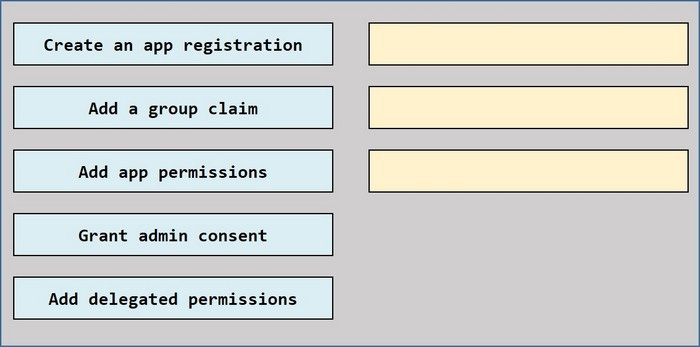
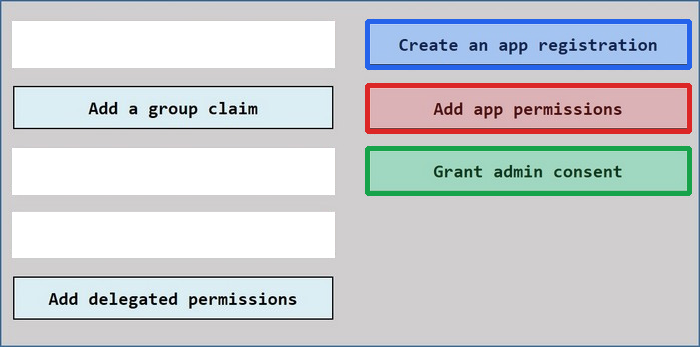
Which three actions should you perform in sequence? To answer, move the appropriate actions from the list of actions to the answer area and arrange then in the correct order.
Reveal answer detailsClose answer details
Explanation
App1 must first be registered in Microsoft Entra ID to establish an application identity. Because App1 is a web service that needs to access Microsoft Graph directory data independently of a signed-in user, application permissions should then be added for Microsoft Graph. Directory-reading application permissions require administrator consent, so Grant admin consent is performed last. Delegated permissions require a signed-in user and therefore are not appropriate for this service-to-service scenario.
Question 39
Hotspot
HOTSPOT
You have a Microsoft 365 E5 subscription that contains three users named User1, User2, and User3.
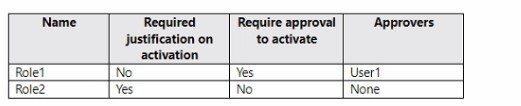
You have two Azure AD roles that have the Activation settings shown in the following table.
The Azure AD roles have the Assignment settings shown in the following table.
The Azure AD roles have the eligible users shown in the following table.
For each of the following statements, select Yes if the statement is true. Otherwise, select No.
NOTE: Each correct selection is worth one point.
Reveal answer detailsClose answer details
Question 40
Single choice
Note: This question is part of a series of questions that present the same scenario. Each question in the series contains a unique solution that might meet the stated goals. Some question sets might have more than one correct solution, while others might not have a correct solution.
After you answer a question in this section, you will NOT be able to return to it. As a result, these questions will not appear in the review screen.
You have a Microsoft 365 tenant.
All users must use the Microsoft Authenticator app for multi-factor authentication (MFA) when accessing Microsoft 365 services.
Some users report that they received an MFA prompt on their Microsoft Authenticator app without initiating a sign-in request.
You need to block the users automatically when they report an MFA request that they did not initiate.
Solution: From the Microsoft Entra admin center, you configure the Notifications settings for multi-factor authentication (MFA).
Does this meet the goal?
A
Yes
B
No
Reveal answer detailsClose answer details
Correct answerB
Explanation
MFA notification settings control messages associated with the service; they do not configure the response to a user reporting an unsolicited authentication request. Automatic blocking requires the fraud-reporting behavior that handles a reported suspicious MFA prompt. Therefore, changing notification settings alone does not achieve the required action.
Question 41
Single choice
You have a Microsoft 365 subscription that is onboarded to Microsoft Entra Permissions Management.
You need to identify managed identities that are assigned permissions and remove any permissions that have been unused for 90 days. The solution must minimize administrative effort.
What should you do in the Entra Permissions Management portal?
A
Configure an Autopilot rule.
B
Schedule a Permissions analytics report.
C
From Microsoft Entra Insights, review Service principals with privileged role assignments.
D
Run an audit query.
Reveal answer detailsClose answer details
Correct answerA
Explanation
An Autopilot rule provides an automated response to unused permissions rather than only reporting or querying them. The rule can identify managed identities whose assigned permissions meet the 90-day inactivity condition and remove those permissions through the configured remediation. This combines detection and cleanup, minimizing the recurring manual effort required by the solution.
Question 42
Lab simulation
Simulation
You have a Microsoft Entra tenant that contains internal and external users.
Your organization collaborates with users from the fabrikam.com domain.
You need to ensure that only users from the fabrikam.com domain can be invited to your Microsoft Entra tenant.
Reveal model answerClose model answer
Section: (none)
Solution
Configure the Collaboration restrictions settings in Microsoft Entra External Identities to allow invitations only to the fabrikam.com domain.
Steps
Step 1: Sign in to the Microsoft Entra admin center as a Global Administrator.
Step 2: Browse to:
Entra ID > External Identities > External collaboration settings
Step 3: Scroll to the Collaboration restrictions section.
Step 4: Select:
Allow invitations only to the specified domains (most restrictive)
This configuration creates an allow list. Domains that aren’t included in the allow list can’t receive B2B collaboration invitations.
Step 5: Under Target domains, enter:
fabrikam.com
Step 6: Select Save.
Result
The collaboration restriction is configured as:
Collaboration restrictions:
Allow invitations only to the specified domains (most restrictive)
Target domains:
fabrikam.com
After the policy is saved, new B2B collaboration invitations can be sent to users from fabrikam.com, while invitations to domains that aren’t on the allow list are blocked.
Question 43
Single choice
Note: This question is part of a series of questions that present the same scenario. Each question in the series contains a unique solution that might meet the stated goals. Some question sets might have more than one correct solution, while others might not have a correct solution.
After you answer a question in this section, you will NOT be able to return to it. As a result, these questions will not appear in the review screen.
You have an Amazon Web Services (AWS) account, a Google Workspace subscription, and a GitHub account.
You deploy an Azure subscription and enable Microsoft 365 Defender
You need to ensure that you can monitor OAuth authentication requests by using Microsoft Defender for Cloud Apps.
Solution: From the Microsoft 365 Defender portal, you add the Microsoft Azure app connector.
Does this meet the goal?
A
Yes
B
No
Reveal answer detailsClose answer details
Correct answerB
Explanation
The Microsoft Azure app connector concerns Azure activity and does not connect the listed third-party service whose OAuth grants must be monitored. Adding it therefore does not provide visibility into OAuth authentication requests for Google Workspace. A connector for the relevant application platform is required, so the proposed Microsoft Azure connector does not meet the goal.
Question 44
Single choice
You have an Azure subscription.
You are evaluating enterprise software as a service (SaaS) apps.
You need to ensure that the apps support automatic provisioning of Azure AD users.
Which specification should the apps support?
A
OAuth 2.0
B
WS-Fed
C
SCIM 2.0
D
LDAP 3
Reveal answer detailsClose answer details
Correct answerC
Explanation
SCIM 2.0 defines a standard protocol for exchanging identity information and automating user provisioning between an identity provider and a SaaS application. An app that supports SCIM can receive user creation, update, and removal operations from Azure AD. OAuth and WS-Fed address authentication, while LDAP is a directory access protocol.
Question 45
Single choice
You have a Microsoft Entra tenant. You need to block legacy authentication protocols.
Which condition should you configure in Conditional Access?
A
Device platforms
B
Client apps
C
Locations
D
User risk
Reveal answer detailsClose answer details
Correct answerB
Explanation
The Client apps condition distinguishes modern clients from legacy authentication clients and protocols. A Conditional Access policy can target the legacy client categories with this condition and apply a block control. Device platform, location, and user risk describe different aspects of a sign-in and do not identify the authentication protocol.
Question 46
Single choice
You have a Microsoft Entra tenant. You need to ensure that high-risk sign-ins trigger additional verification without blocking access.
What should you configure?
A
Conditional Access with MFA requirement
B
Identity Protection sign-in risk policy
C
Access reviews
D
Authentication methods policy
Reveal answer detailsClose answer details
Correct answerB
Explanation
Identity Protection evaluates the detected risk associated with a sign-in. Its sign-in risk policy can permit access only after the user completes additional verification, such as MFA. This remediates the high-risk event through verification while avoiding an unconditional block on the user's access.
Question 47
Single choice
You have a Microsoft 365 E5 subscription that uses Microsoft Defender for Cloud Apps.
You discover that users connect to unsanctioned third-party apps.
You need to automatically identify and block the use of unsanctioned apps that have a risk score of 5 or higher and generate more than 200 GB of daily traffic. The solution must minimize administrative effort.
What should you do?
A
From the Microsoft Defender portal, create an app governance policy.
B
Create an app discovery policy by using the New popular app template.
C
From the Microsoft Entra admin center, create a Conditional Access policy.
D
Create an app discovery policy by using the New risky app template.
Reveal answer detailsClose answer details
Correct answerD
Explanation
The New risky app template starts an app discovery policy with criteria intended for discovered applications whose risk warrants action. The policy can be refined with the risk-score and daily-traffic thresholds and configured to apply the unsanctioned governance action automatically. This combines identification and blocking criteria without repeatedly reviewing apps by hand.
Case study
Case Study 3
Overview
ADatum Corporation is a consulting company in Montreal.
ADatum recently acquired a Vancouver-based company named Litware, Inc.
Existing Environment
ADatum Environment
The on-premises network of ADatum contains an Active Directory Domain Services (AD DS) forest named adatum.com.
ADatum has a Microsoft 365 E5 subscription. The subscription contains a verified domain that syncs with the adatum.com AD DS domain by using Microsoft Entra Connect.
ADatum has a Microsoft Entra tenant named adatum.com. The tenant has Security defaults disabled.
The tenant contains the users shown in the following table.
The tenant contains the users assigned roles as shown in the following table.
Litware Environment
Litware has an AD DS forest named litware.com.
Problem Statements
ADatum identifies the following issues:
Multiple users in the sales department have up to five devices. The sales department users report that sometimes they must contact the support department to join their devices to the Microsoft Entra tenant because they have reached their device limit.
A recent security incident reveals that several users leaked their credentials, a suspicious browser was used for a sign-in, and resources were accessed from an anonymous IP address.
When you attempt to assign the Cloud Device Administrators role to IT_Group1, the group does NOT appear in the selection list.
Anyone in the organization can invite guest users, including other guests and non-administrators.
The helpdesk spends too much time resetting user passwords.
Users currently use only passwords for authentication.
Requirements
Planned Changes
ADatum plans to implement the following changes:
Configure self-service password reset (SSPR).
Configure multi-factor authentication (MFA) for all users.
Configure an access review for an access package named Package1.
Require admin approval for application access to organizational data.
Sync the AD DS users and groups of litware.com with the Microsoft Entra tenant.
Ensure that only users that are assigned specific admin roles can invite guest users.
Increase the maximum number of devices that can be joined or registered to Microsoft Entra ID to 10.
Technical Requirements
ADatum identifies the following technical requirements:
Users assigned the User administrator role must be able to request permission to use the role when needed for up to one year.
Users must be prompted to register for MFA and provided with an option to bypass the registration for a grace period.
Users must provide one authentication method to reset their password by using SSPR.
Available methods must include:
Email
Phone
Security questions
The Microsoft Authenticator app
Trust relationships must NOT be established between the adatum.com and litware.com AD DS domains.
The principle of least privilege must be used.
Question 48
Testlet 3Single choice
You need to resolve the issue of the guest user invitations.
What should you do for the Azure AD tenant?
A
Configure the Continuous access evaluation settings.
B
Modify the External collaboration settings.
C
Configure the Access reviews settings.
D
Configure a Conditional Access policy.
Reveal answer detailsClose answer details
Correct answerB
Explanation
External collaboration settings govern guest invitation behavior in the Azure AD tenant, including who can invite external users and which collaboration restrictions apply. Modifying these settings therefore addresses an invitation problem at its governing control. Continuous access evaluation and Conditional Access affect session or sign-in enforcement, while access reviews evaluate existing access rather than controlling invitations.
Question 49
Single choice
You have a Microsoft Entra tenant.
For the tenant, Users can register applications is set to No.
A user named Admin1 must deploy a new cloud app named App1.
You need to ensure that Admin1 can register App1 in Microsoft Entra ID. The solution must use the principle of least privilege.
Which role should you assign to Admin1?
A
Managed Application Contributor for subscription1
B
Application developer in Microsoft Entra ID
C
Cloud application administrator in Microsoft Entra ID
D
App Configuration Data Owner for Subscription1
Reveal answer detailsClose answer details
Correct answerB
Explanation
The Application Developer role permits Admin1 to create application registrations even though ordinary users are prevented from registering applications. It grants the specific application-development capability needed for App1 without the broader administrative authority of Cloud Application Administrator, satisfying least privilege.
Question 50
Single choice
You have an Azure Active Directory (Azure AD) tenant that contains the objects shown in the following table.
Which objects can you add as members to Group3?
A
User2 and Group2 only
B
User2, Group1, and Group2 only
C
User1, User2, Group1 and Group2
D
User1 and User2 only
E
User2 only
Reveal answer detailsClose answer details
Correct answerE
Explanation
A mail-enabled security group can contain mail-enabled recipients, but it does not support nesting the listed group types as members. User2 has the Microsoft Office 365 Enterprise E5 license that provides the required mail-enabled user capability. User1 has no license, Group1 is only a security group, and Group2 is a Microsoft 365 group, so User2 is the only eligible object.
Question 51
Hotspot
HOTSPOT
You have a Microsoft 365 subscription.
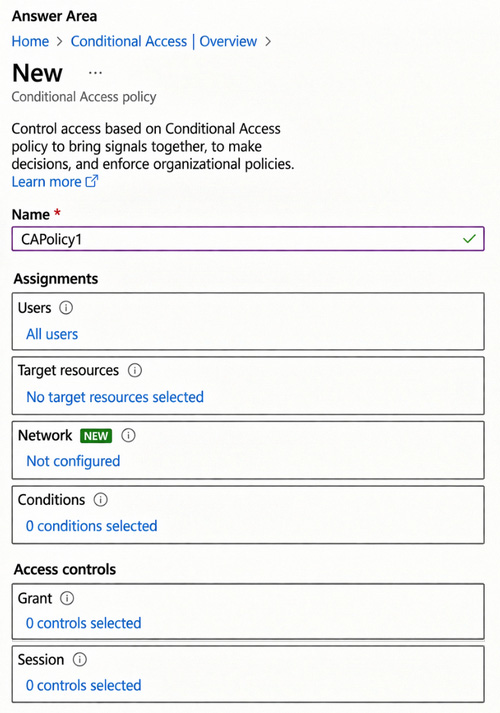
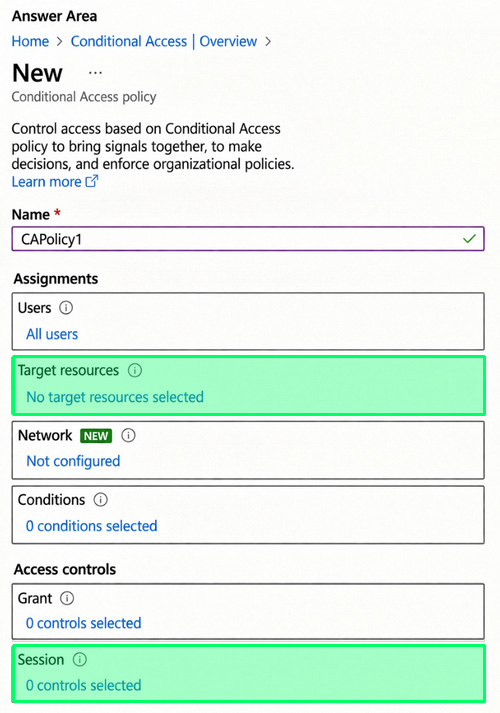
You configure a Global Secure Access security profile named SecurityProfile1.
You need to create a Conditional Access policy named CAPolicy1 that will use SecurityProfile1.
Which two settings should you configure to ensure that CAPolicy1 uses SecurityProfile1? To answer, select the appropriate settings in the answer area.
NOTE: Each correct selection is worth one point.
Reveal answer detailsClose answer details
Explanation
Box 1: Target resources Apply Conditional Access policies to Global Secure Access traffic
1. Under Target resources > Resources (formerly cloud apps). 1a. Choose All internet resources with Global Secure Access
Box 2: Access controls: Grant
1. Under Access controls > Grant. 2a. Select Require multifactor authentication, Require device to be marked as compliant, and Require Microsoft Entra hybrid joined device 2b. For multiple controls select Require one of the selected controls. 2. Select Select.
You have a Microsoft 365 subscription that contains a user named User1.
You need to ensure that User1 can create access reviews for Azure AD roles. The solution must use the principle of least privilege.
Which role should you assign to User1?
A
Privileged Role Administrator
B
Identity Governance Administrator
C
User Administrator
D
User Access Administrator
Reveal answer detailsClose answer details
Correct answerA
Explanation
Access reviews for Azure AD role assignments are part of privileged role governance. Privileged Role Administrator has the authority needed to manage those role assignments and create their access reviews. Assigning that role gives User1 the required role-specific capability without using a broader or unrelated user-management role.
Question 53
Hotspot
HOTSPOT
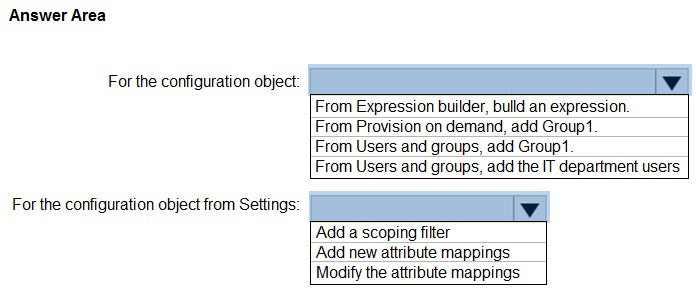
You have a Microsoft Entra tenant named contoso.com that contains a group named Group1. Group1 contains 50 users in your company's IT department and 50 uses in your company's accounts department.
You have a partner company that has a Microsoft Entra tenant named fabrikam.com.
You configure cross-tenant synchronization between contoso.com and fabrikam.com.
You need to sync the members of Group1 to fabrikam.com. The solution must meet the following requirements:
- Ensure that only the IT department users sync with fabrikam.com. - Minimize administrative effort.
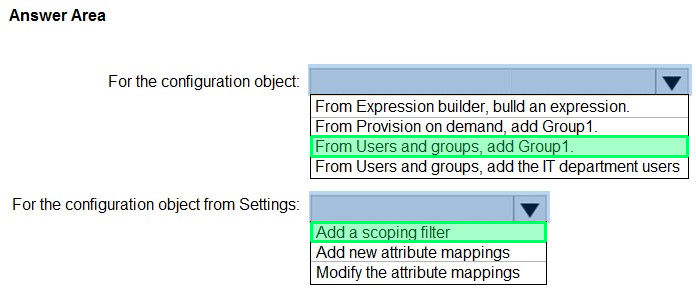
What should you do in the Cross-tenant synchronization settings? To answer, select the appropriate options in the answer area.
NOTE: Each correct selection is worth one point.
Reveal answer detailsClose answer details
Explanation
Box 1: From Users and groups, add Group1. For the configuration object.
Configuration Object Assignment Users and Groups Assignment: Assign the existing group Group1 containing the 100 users directly to the synchronization configuration object.
Box 2: Add a scoping filter For the configuration object from Settings.
Configuration Object Settings Provisioning Scope: Expand Settings within the configuration provisioning blade and change the Scope option to Sync only assigned users and groups.
Scoping Filter: Under Mappings, edit the user provisioning mappings (Provision Microsoft Entra ID Users). Add a Source Object Scope filter targeting the user's department attribute (e.g., department EQUALS IT).
The company has a call center that contains 300 users. In the call center, the users share desktop computers and might use a different computer every day. The call center computers are NOT configured for biometric identification.
The users are prohibited from having a mobile phone in the call center.
You need to require multi-factor authentication (MFA) for the call center users when they access Microsoft 365 services.
What should you include in the solution?
A
a named network location
B
the Microsoft Authenticator app
C
Windows Hello for Business authentication
D
FIDO2 tokens
Reveal answer detailsClose answer details
Correct answerD
Explanation
FIDO2 tokens provide a physical authentication method that users can carry between shared desktop computers. They do not depend on a mobile phone or biometric hardware built into a particular workstation, so they satisfy the call center restrictions while providing an additional authentication factor.
Question 55
Single choice
Note: This question is part of a series of questions that present the same scenario. Each question in the series contains a unique solution that might meet the stated goals. Some question sets might have more than one correct solution, while others might not have a correct solution.
After you answer a question in this section, you will NOT be able to return to it. As a result, these questions will not appear in the review screen.
You have an Azure Active Directory (Azure AD) tenant that syncs to an Active Directory forest.
You discover that when a user account is disabled in Active Directory, the disabled user can still authenticate to Azure AD for up to 30 minutes.
You need to ensure that when a user account is disabled in Active Directory, the user account is immediately prevented from authenticating to Azure AD.
Solution: You configure conditional access policies.
Does this meet the goal?
A
Yes
B
No
Reveal answer detailsClose answer details
Correct answerB
Explanation
Conditional Access evaluates cloud sign-ins against its configured users, applications, conditions, and controls. It does not immediately transfer an on-premises account-disable change to Azure AD. Until the disabled state reaches the tenant or authentication is validated on-premises, the policy cannot enforce that new state, so this solution does not meet the goal.
Question 56
Single choice
You have a Microsoft 365 tenant.
In Microsoft Entra ID, you configure the terms of use.
You need to ensure that only users who accept the terms of use can access the resources in the tenant. Other users must be denied access.
What should you configure?
A
an access policy in Microsoft Defender for Cloud Apps
B
Terms and conditions in Microsoft Intune
C
a conditional access policy in Microsoft Entra ID
D
a compliance policy in Microsoft Intune
Reveal answer detailsClose answer details
Correct answerC
Explanation
Terms of use acceptance can be imposed as a grant requirement in a Microsoft Entra ID Conditional Access policy. The policy evaluates access attempts and permits the targeted resources only after the user accepts the configured terms; users who do not accept them are denied. Intune compliance or terms settings do not enforce the tenant-wide Entra access decision described.
Question 57
Hotspot
HOTSPOT
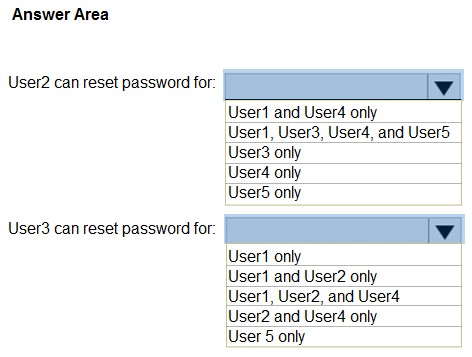
You have a Microsoft 365 E5 subscription that contains two administrative units named AU1 and AU2.
You create five users as shown in the following table.
For which users can User2 and User3 reset passwords? To answer, select the appropriate options in the answer area.
NOTE: Each correct selection is worth one point.
Reveal answer detailsClose answer details
Explanation
Box 1: User5 only User User2 can reset the password for User5 only. A Helpdesk Administrator scoped to an administrative unit (AU) can only reset passwords for users who meet both of the following criteria: Scope Match: The target user must be a member of the Administrative Unit that the administrator has scope over (AU1 for User2).
Role Permission: A Helpdesk Administrator can only reset passwords for non-administrators and other Helpdesk Administrators. They cannot reset passwords for highly privileged roles like Global Administrator or Privileged Authentication Administrator.
User5: Can reset. User5 is located within AU1 (in scope) and holds no role (non-administrator), making them fully manageable by User2.
Incorrect: User1: Cannot reset. User1 is located in AU2 (out of User2's AU1 scope) and holds the Global Administrator role, which is too privileged for a Helpdesk Administrator to modify.
User3: Cannot reset. Although User3 is located within AU1, they hold the Privileged Authentication Administrator role. A Helpdesk Administrator does not have the permission to reset passwords for privileged identity roles.
User4: Can reset. User4 is located within AU1 (in scope) and holds the Helpdesk Administrator role. A standard Helpdesk Administrator cannot reset the password for another Helpdesk Administrator (or any other administrative user).To reset the password for an administrative account, the acting admin requires at least the Privileged Authentication Administrator or Global Administrator role.
Box 2: User1 and User2 only User3 can reset the password for User 1 (User1) only.
Role Permissions: The Privileged Authentication Administrator role has the authority to view, set, and reset password/non-password authentication credentials for all users, including high-privilege accounts like Global Administrators.
Administrative Unit Scope: A user's physical membership placement does not restrict where they can manage users; their assigned scope determines their boundary. Since User3 is assigned this role with a scope of AU2, they can only manage users who are members of AU2.
Evaluating Target Users in AU2: User1 is in AU2 (Global Administrator). Because User3's Privileged Authentication Administrator permissions are scoped to AU2, and this specific role is highly privileged enough to reset Global Administrators, User3 can reset User1's password.
User2 is also in AU2 (Helpdesk Administrator with scope AU1). However, in standard Microsoft Entra ID scoping rules, a Helpdesk Administrator role is considered an object managed under the directory level, but the user object itself resides in AU2. Because User3 can manage any user in AU2, User3 can reset User2's password.
You plan to deploy a third-party software as a service (SaaS) app named App1.
You need to onboard App1 to Microsoft Defender for Cloud Apps.
The solution must ensure that you can implement session control policies.
What should you do first?
A
From the Microsoft Defender portal, configure Cloud discovery.
B
From the Microsoft Entra admin center, configure a traffic forwarding profile.
C
From the Microsoft Entra admin center, configure single sign-on (SSO) for App1.
D
From the Microsoft Defender portal, create an OAuth app policy.
Reveal answer detailsClose answer details
Correct answerC
Explanation
Session control policies operate during an application's authenticated session. Configuring single sign-on for App1 integrates its authentication with Microsoft Entra, providing the sign-in path through which Defender for Cloud Apps can apply session controls. Cloud discovery inventories usage, while an OAuth policy governs OAuth app behavior rather than establishing this session path.
Question 59
Single choice
You have an Azure subscription named Sub1 that contains a resource group named RG1. RG1 contains an Azure Cosmos DB database named DB1 and an Azure Kubernetes Service (AKS) cluster named AKS1. AKS1 uses a managed identity.
You need to ensure that AKS1 can access DB1. The solution must meet the following requirements:
1. Ensure that AKS1 uses the managed identity to access DB1. 2. Follow the principle of least privilege.
Which role should you assign to the managed identity of AKS1?
A
For Sub1, assign the Owner role.
B
For DB1, assign the Azure Cosmos DB Account Reader Role role.
C
For RG1, assign the Azure Cosmos DB Data Reader Role role.
D
For RG1, assign the Reader role.
Reveal answer detailsClose answer details
Correct answerC
Explanation
AKS1 must use its managed identity for data access rather than receive broad resource-management authority. The Azure Cosmos DB Data Reader Role supplies read access to Cosmos DB data, and assigning it at RG1 covers DB1. Owner is excessive, while Reader and the Account Reader role address management information rather than the required database data access.
Question 60
Hotspot
HOTSPOT
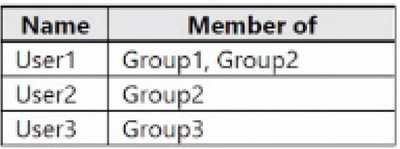
You have an Azure subscription named Sub1 that contains two resource groups named RG1 and RG2. Sub1 contains the users shown in the following table.
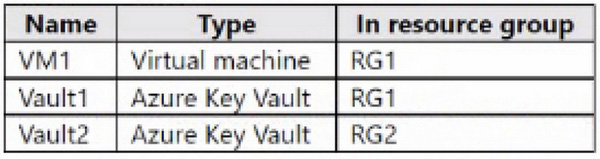
Sub1 contains the resources shown in the following table.
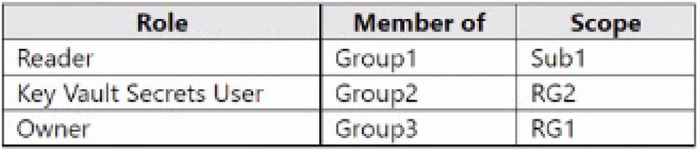
You create the role-based access control (RBAC) role assignments shown in the following table.
For each of the following statements, select Yes if the statement is true. Otherwise, select No NOTE: Each correct selection is worth one point.
Reveal answer detailsClose answer details
Explanation
User1 inherits the Reader role from Group1 at the subscription scope, but Reader provides management-plane read access and does not allow reading Key Vault secret contents. User2 is a member of Group2, which has the Key Vault Secrets User role scoped to RG2, so User2 can read secrets in Vault2 because Vault2 is in RG2. User3 is a member of Group3, which has the Owner role scoped to RG1, so User3 can manage resources in RG1, including updating the configuration of VM1.
Question 61
Single choice
You have an Azure Active Directory (Azure AD) tenant that contains a user named User1 and the conditional access policies shown in the following table.
You need to evaluate which policies will be applied to User1 when User1 attempts to sign-in from various IP addresses.
Which feature should you use?
A
Access reviews
B
Identity Secure Score
C
The What If tool
D
the Microsoft 365 network connectivity test tool
Reveal answer detailsClose answer details
Correct answerC
Explanation
The What If tool evaluates Conditional Access policy applicability for a simulated sign-in. You can supply User1 and vary sign-in attributes such as the source IP address to determine which enabled policies would apply and what controls they would impose. This performs the requested evaluation without requiring User1 to conduct repeated real sign-ins.
Question 62
Single choice
You have an Azure subscription. The subscription contains 50 virtual machines that run Windows Server and have Login with Microsoft Entra ID enabled.
Users report that they cannot sign in to the virtual machines by using their Microsoft Entra credentials.
You need to ensure that the users can sign in to the virtual machines.
What should you do first?
A
From the Microsoft Entra admin center, delete the device registrations of the virtual machines.
B
Revoke the primary refresh token.
C
Enable SSH client support for OpenSSH.
D
Ensure that the virtual machines can access https://enterpriseregistration.windows.net.
Reveal answer detailsClose answer details
Correct answerD
Explanation
Microsoft Entra sign-in for these Windows Server virtual machines depends on connectivity to the enterprise registration service. Ensuring that the machines can reach the enterprise registration endpoint allows the device identity operations required by Microsoft Entra login. Deleting registrations or revoking user tokens would not repair blocked service connectivity.
Question 63
Single choice
You have a Microsoft Entra tenant that contains three users named User1, User2, and User3.
You need to configure just-in-time (JIT) access to admin roles by using Privileged Identity Management (PIM). The solution must meet the following requirements:
1. Ensure that User1 can use the User Administrator role without approval. 2. Ensure that User2 can use the User Administrator role once User3 has approved the role request of User2.
What should you create first?
A
role assignments
B
administrative units
C
security groups
D
Conditional Access policies
Reveal answer detailsClose answer details
Correct answerA
Explanation
PIM requires role assignments that establish who has the role actively or is eligible to activate it. Creating the assignments first associates User1 and User2 with the User Administrator role. The relevant activation and approval behavior can then distinguish immediate use from a request that must be approved by User3.
Question 64
Hotspot
HOTSPOT
You have a Microsoft Entra tenant that contains two remote networks named RemoteNetwork1 and RemoteNetwork2 and the users shown in the following table.
You have the devices shown in the following table.
Name: CAPolicy1
Assignments
Users: Group1, Group2
Target resources: All internet resources with Global Secure Access
Access controls
Grant: Require multifactor authentication
Enable policy: On
Global Secure Access traffic forwarding is configured as shown in the following exhibit.
For each of the following statements, select Yes if the statement is true. Otherwise, select No.
NOTE: Each correct selection is worth one point.
Reveal answer detailsClose answer details
Explanation
Yes, Yes, No
User1's traffic to Microsoft services is forwarded through Global Secure Access from RemoteNetwork1, so the Conditional Access policy targeting internet resources with Global Secure Access is evaluated and requires MFA.
User2's device traffic is forwarded through Global Secure Access from RemoteNetwork1 even without the client, so the policy is evaluated and requires MFA.
User3 is on RemoteNetwork2, which isn't assigned to the Microsoft traffic forwarding profile, so the sign-in to Exchange Online isn't evaluated under the Global Secure Access internet-resources policy and MFA isn't required by that policy.
Question 65
Single choice
A supported built-in Microsoft Entra role contains all and only the actions a team needs, and it can be assigned at the required limited scope. Which role design follows least privilege?
A
Create a tenant-scoped custom role with additional actions for possible future work.
B
Assign a broader built-in role at tenant scope because its display name matches the team.
C
Create a custom role with the same actions because custom roles are inherently safer.
D
Assign the existing built-in role at the required limited scope.
Reveal answer detailsClose answer details
Correct answerD
Explanation
The existing built-in role already contains exactly the needed actions, so creating another role does not reduce the permission set. Assigning that role at the required limited scope also restricts where those actions can be exercised. Least privilege is achieved by minimizing both the allowed actions and their reach, rather than granting broader tenant-wide authority.
Question 66
Single choice
Your company has a Microsoft Entra tenant that contains a user named User1.
The company has two departments named marketing and finance.
You need to grant permissions to User1 to manage only the users in the marketing department. The solution must ensure that User1 does NOT have permissions to manage the users in the finance department.
What should you create first?
A
a management group
B
an administrative unit
C
a resource group
D
a Microsoft 365 group
Reveal answer detailsClose answer details
Correct answerB
Explanation
An administrative unit creates a directory-management boundary containing a defined subset of users. Placing the marketing users in that unit allows a suitable Microsoft Entra role assignment for User1 to be scoped to them, leaving finance users outside the delegated scope. Resource and management groups do not create this directory-user boundary.
Question 67
Single choice
You have a Microsoft Entra tenant. You need to ensure that users must request admin approval before granting permissions to apps.
What should you configure?
A
Conditional Access
B
Admin consent workflow
C
Access reviews
D
Identity governance
Reveal answer detailsClose answer details
Correct answerB
Explanation
The admin consent workflow provides a formal request-and-review path when users cannot grant an application's requested permissions themselves. Users submit a request, designated reviewers evaluate it, and consent is granted only after approval. Conditional Access controls resource access and does not provide this application-permission approval process.
Question 68
Single choice
You have a Microsoft 365 subscription.
You plan to deploy an app named App1 that will have the following configurations:
1. Will be registered in Microsoft Entra 2. Will access the signed-in user's Microsoft Outlook calendar by using the Microsoft Graph API
You need to ensure that App1 can access Microsoft Graph.
What should you use?
A
application permissions
B
delegated permissions
C
a custom role-based access control (RBAC) role
D
a built-in role-based access control (RBAC) role
Reveal answer detailsClose answer details
Correct answerB
Explanation
App1 accesses Microsoft Graph while a user is signed in and acts on that user's Outlook calendar. Delegated permissions represent this user-present model: the app receives permission to operate on behalf of the signed-in user within the granted scope. Application permissions are intended for app-only access without a signed-in user.
Question 69
Single choice
A daemon calls an API without a signed-in user. Which permission model should it use?
A
A delegated permission bounded only by the daemon's application role
B
An application permission with the required consent and target-resource authorization
C
A delegated permission that allows the daemon to exceed a user's access
D
A user consent grant that also assigns every user to the enterprise application
Reveal answer detailsClose answer details
Correct answerB
Explanation
A daemon operates without a user security context, so delegated permissions cannot represent its access. Application permission gives the service its own identity, but that identity still receives only the permissions that have been consented to and authorized on the target resource. This supports unattended API access without borrowing or exceeding a user's rights.
Question 70
Single choice
You plan to deploy a new Azure AD tenant.
Which multifactor authentication (MFA) method will be enabled by default for the tenant?
A
Microsoft Authenticator
B
SMS
C
voice call
D
email OTP
Reveal answer detailsClose answer details
Correct answerA
Explanation
A newly deployed Azure AD tenant has Microsoft Authenticator enabled as its default multifactor authentication method. It supports MFA through app-based approval or verification codes. SMS, voice call, and email OTP are separate authentication methods and are not the default MFA method identified for the new tenant.
Question 71
Hotspot
HOTSPOT
You have a Microsoft Entra tenant that contains two groups named Group1 and Group2 and the users shown in the following table.
Group2 is a member of Group1.
You configure an access review that has the following settings: 1. Name: Review 1 2. Select what to review: Teams + Groups 3. Review scope: Select Teams + groups 4. Group: Group1 5. Scope: Guest users only 6. Select reviewers: Group owner(s) For each of the following statements, select Yes if the statement is true. Otherwise, select No. NOTE: Each correct selection is worth one point.
Reveal answer detailsClose answer details
Explanation
The review is scoped to Guest users only, so User1 and User4, who are member users, aren’t included. User3 is the owner of Group1 and therefore acts as the reviewer. Microsoft Entra access reviews automatically flatten nested groups for review purposes, so users from Group2 can appear individually in the review of Group1. User5 is a guest user in Group2, which is nested in Group1, so User3 can review User5’s access. Microsoft notes, however, that if a nested-group user is denied, the system doesn’t automatically remove that user from the nested group itself.
Question 72
Single choice
You have a Microsoft Entra tenant and a .NET web app named App1.
You need to register App1 for Microsoft Entra ID authentication.
What should you configure for App1?
A
the executable name
B
the bundle ID
C
the package name
D
the redirect URI
Reveal answer detailsClose answer details
Correct answerD
Explanation
A web app registration requires a redirect URI so Microsoft Entra ID knows where to return the authentication response after the user signs in. The URI binds the web authentication flow to an approved callback endpoint for App1. Executable names, bundle IDs, and package names identify other application forms rather than a .NET web callback.
Question 73
Single choice
Note: This question is part of a series of questions that present the same scenario. Each question in the series contains a unique solution that might meet the stated goals. Some question sets might have more than one correct solution, while others might not have a correct solution.
After you answer a question in this section, you will NOT be able to return to it. As a result, these questions will not appear in the review screen.
You use Azure Monitor to analyze Microsoft Entra ID activity logs.
You receive more than 100 email alerts each day for failed Microsoft Entra ID user sign-in attempts.
You need to ensure that a new security administrator receives the alerts instead of you.
Solution: From Microsoft Entra ID, you create an assignment for the Insights Administrator role.
Does this meet the goal?
A
Yes
B
No
Reveal answer detailsClose answer details
Correct answerB
Explanation
The Insights Administrator role permits work with monitoring insights but does not change the recipient configured for an Azure Monitor alert. Alert delivery is determined by the alert rule's action group or notification action. Assigning that directory role to the new security administrator therefore does not redirect the existing email alerts.
Question 74
Hotspot
HOTSPOT
Your network contains an on-premises Active Directory domain that syncs to an Azure Active Directory (Azure AD) tenant. The tenant contains the groups shown in the following table.
The tenant contains the users shown in the following table.
You create an access review as shown in the following table.
For each of the following statements, select Yes if the statement is true. Otherwise, select No. NOTE: Each correct selection is worth one point.
Reveal answer detailsClose answer details
Explanation
User1's membership cannot be managed since he is a member of a nested group. User2's membership cannot be managed since he is a part of Group2 which is an AD group (not AAD). User3 is not the member of Group2.
Question 75
Single choice
You have an Azure Active Directory (Azure AD) tenant that contains the objects shown in the following table.
Which objects can you add as eligible in Azure Privileged identity Management (PIM) for an Azure AD role?
A
User1 only
B
User1 and Identity1 only
C
User1. Guest1, and Identity
D
User1 and Guest1 only
Reveal answer detailsClose answer details
Correct answerD
Explanation
Privileged Identity Management can make user accounts and guest user accounts eligible for an Azure AD role. User1 and Guest1 are identities that can receive such role assignments and activate them when required. Identity1 is a managed identity rather than a user or guest, so it cannot be added as eligible in this role scenario.
You have an Azure subscription that contains an Azure Automation account named Automation1 and an Azure key vault named Vault1. Vault1 contains a secret named Secret1.
You enable a system-assigned managed identity for Automation1.
You need to ensure that Automation1 can read the contents of Secret1. The solution must meet the following requirements: 1. Prevent Automation1 from accessing other secrets stored in Vault1. 2. Follow the principle of least privilege.
What should you do?
A.
From Vault1, configure the Access control (IAM) settings.
B.
From Automation1, configure the Identity settings.
C.
From Automation1, configure the Run as accounts settings.
D.
From Secret1, configure the Access control (IAM) settings.
Correct Answer: D
Explanation
Explanation/Reference:
The system-assigned identity gives Automation1 a security principal, but access still must be granted at the narrowest resource scope. Configuring Access control (IAM) directly on Secret1 permits a role assignment scoped to that secret, allowing Automation1 to read it without granting access to the other secrets in Vault1.
QUESTION 2
You have a Microsoft Entra tenant that contains 1,000 users. The users are assigned Microsoft Entra Suite licenses. You are deploying Global Secure Access.
You need to ensure that connections to www.microsoft.com are bypassed by Global Secure Access.
Which profiles should you update?
A.
Internet access profile only
B.
Microsoft traffic profile only
C.
Microsoft traffic profile and Internet access profile only
D.
Microsoft traffic profile, Private access profile, and Internet access profile
Correct Answer: C
Explanation
Explanation/Reference:
Traffic bypass must be configured in each forwarding profile that can process the destination. The public Microsoft destination can be classified by the Microsoft traffic profile and the Internet access profile, so excluding it in only one profile would leave the other path subject to Global Secure Access. The Private access profile handles private resources and does not need this change.
QUESTION 3
HOTSPOT
You have a Microsoft 365 E5 subscription that contains the users shown in the following table.
The users are assigned the roles shown in the following table.
For which users can User1 and User4 reset passwords? To answer, select the appropriate options in the answer area.
NOTE: Each correct selection is worth one point.
Correct Answer:
QUESTION 4
You have a Microsoft 365 E5 subscription that contains a Microsoft SharePoint Online site named Site1 and a Microsoft Teams team named Team1. The subscription contains five security groups named Group1, Group2, Group3, Group4, and Group5.
You need to implement access packages for Site1 and Team1. The solution must meet the following requirements:
1. Members of Group3 must be able to request access to Site1 only. 2. Members of Group1 must be able to request access to Site1 and Team1. 3. Members of Group4 must be able to request access to Site1 and Team1. 4. Only members of Group2 must be able to approve access package requests from Group1 members. 5. Only members of Group5 must be able to approve access package requests from Group3 and Group4 members.
What is the minimum number of access packages you should create?
A.
2
B.
3
C.
4
D.
5
Correct Answer: A
Explanation
Explanation/Reference:
Create 2 access packages because an access package can use separate request policies for different requester and approver groups while keeping one resource set. The package containing Site1 and Team1 can have one policy for Group1 requests approved by Group2 and another for Group4 requests approved by Group5. A second package containing only Site1 can serve Group3, with Group5 as approver.
QUESTION 5
You have a Microsoft 365 E5 subscription that contains a user named User1. User1 is eligible for the Application Administrator role.
User1 needs to configure a new connector group for an application proxy.
What should you use to activate the role for User1?
A.
the Microsoft 365 Defender portal
B.
the Microsoft 365 admin center
C.
the Microsoft Intune admin center
D.
the Microsoft Entra admin center
Correct Answer: D
Explanation
Explanation/Reference:
User1's Application Administrator assignment is eligible, so it must be activated through Privileged Identity Management before the application proxy connector group is configured. Privileged Identity Management for Microsoft Entra roles is administered in the Microsoft Entra admin center. The Defender, Microsoft 365, and Intune portals do not activate this eligible role.
QUESTION 6
DRAG DROP
Your network contains an on-premises Active Directory domain named contoso.com that syncs with a Microsoft Entra tenant by using Microsoft Entra Connect. The domain contains the users shown in the following table.
From Active Directory Users and Computers, you update the proxyAddresses attribute for each user as shown in the following table.
You trigger a manual synchronization.
Which sync status will Microsoft Entra Connect sync return for each user? To answer, drag the appropriate status to the correct users. Each status may be used once, more than once, or not at all. You may need to drag the split bar between panes or scroll to view content.
NOTE: Each correct selection is worth one point.
Correct Answer:
QUESTION 7
Your company requires that users request access before they can access corporate applications.
You register a new enterprise application named MyApp1 in Microsoft Entra ID and configure single sign-on (SSO) for MyApp1.
Which settings should you configure next for MyApp1?
A.
Self-service
B.
Provisioning
C.
Application proxy
D.
Roles and administrators
Correct Answer: A
Explanation
Explanation/Reference:
The Self-service settings for an enterprise application control whether users can request access and how that request is approved. Configuring Self-service after single sign-on establishes the required request-before-access process for MyApp1. Provisioning creates or updates accounts but does not itself provide the user access-request workflow.
QUESTION 8
HOTSPOT
You have a Microsoft 365 E5 subscription that contains a Microsoft Teams team named Team1 and two Microsoft 365 groups named Group1 and Group2. The subscription contains the users shown in the following table.
You create an access package that has the following settings:
- Name: Package1 - Resource roles: o Team1: Owner - Users who can request access: For users in your directory o Specific Users and Groups: Group1 - Require approval: Yes o Require requestor justification: No o How many stages: 1
o First Approver: Team1, User3 o Require approver justification: Yes - Enable new requests: Yes - Expiration: o Access package assignments expire: 7 days o Users can request specific timeline: Yes
For each of the following statements, select Yes if the statement is true. Otherwise, select No.
NOTE: Each correct selection is worth one point.
Correct Answer:
Explanation
Explanation/Reference:
Box 1: Yes - User1 can gain access to Team1 by requesting Package1.
User1 is member of Group1.
Users who can request access: For users in your directory. Specific Users and Groups: Group1
Box 2: No - User2 can gain access to Team1 by requesting Package1. User2 is not member of Group1. Only members of Group1 can request access.
Box 3: No - User3 can approve their own request for Package1.
User3 is member of Group1. User3 is Global Administrator. Group1 can request access. User3 is also First Approver. However, Approvers are not able to approve their own role activation requests.
Litware, Inc. is a pharmaceutical company that has a subsidiary named Fabrikam, Inc.
Litware has offices in Boston and Seattle, but has employees located across the United States. Employees connect remotely to either office by using a VPN connection.
Existing Environment
Identity Environment
The network contains an Active Directory forest named litware.com that is linked to a Microsoft Entra tenant named litware.com. Microsoft Entra Connect uses pass-through authentication and has password hash synchronization disabled.
Litware.com contains a user named User1 who oversees all application development. User1 is NOT assigned to any Microsoft Entra roles.
Litware implements Microsoft Entra Application Proxy.
Fabrikam has a Microsoft Entra tenant named fabrikam.com. The users at Fabrikam access the resources in litware.com by using guest accounts in the litware.com tenant.
Cloud Environment
All the users at Litware have Microsoft 365 Enterprise E5 licenses. All the built-in anomaly detection policies in Microsoft Defender for Cloud Apps are enabled.
Litware has an Azure subscription associated with the litware.com Microsoft Entra tenant. The subscription contains a Microsoft Sentinel instance that uses the Microsoft Entra ID data connector and the Office 365 data connector. Microsoft Sentinel currently collects the Microsoft Entra sign-in logs and audit logs.
On-premises Environment
The on-premises network contains the servers shown in the following table.
Both Litware offices connect directly to the internet. Both offices connect to virtual networks in the Azure subscription by using a site-to-site VPN connection. All on-premises domain controllers are prevented from accessing the internet.
Requirements
Delegation Requirements
Litware identifies the following delegation requirements:
Delegate the management of privileged roles by using Microsoft Entra Privileged Identity Management (PIM).
Prevent nonprivileged users from registering applications in the litware.com Microsoft Entra tenant.
Use custom programs for Identity Governance.
Ensure that User1 can create enterprise applications in the Microsoft Entra tenant.
Use the principle of least privilege.
Licensing Requirements
Litware recently added a custom user attribute named LWLicenses to the litware.com Active Directory forest. Litware wants to manage the assignment of Microsoft Entra ID service plans by modifying the value of the LWLicenses attribute. Users who have the appropriate value for LWLicenses must be added automatically to a Microsoft 365 group that has the appropriate licenses assigned.
Management Requirements
Litware wants to create a group named LWGroup1 that will contain all the Microsoft Entra user accounts for Litware but exclude all the Microsoft Entra guest accounts.
Authentication Requirements
Litware identifies the following authentication requirements:
Implement multi-factor authentication (MFA) for all Litware users by using Conditional Access policies.
Exempt users from using MFA to authenticate to Microsoft Entra ID from the Boston office of Litware.
Implement a banned password list for the litware.com forest.
Enforce MFA when accessing on-premises applications.
Automatically detect and remediate externally leaked credentials.
Access Requirements
Litware identifies the following access requirements:
Control all access to all Azure resources and Microsoft Entra ID applications by using Conditional Access policies.
Implement a Conditional Access policy that has session controls for Microsoft SharePoint Online.
Control privileged access to applications by using Microsoft Entra Access Reviews.
Monitoring Requirements
Litware wants to use the Fusion rule in Microsoft Sentinel to detect multi-staged attacks that include a combination of suspicious Microsoft Entra sign-ins followed by anomalous Microsoft Office 365 activity.
QUESTION 9
You need to track application access assignments by using Identity Governance. The solution must meet the delegation requirements.
What should you do first?
A.
Modify the User consent settings for the enterprise applications.
B.
Create a catalog.
C.
Create a program.
D.
Modify the Admin consent requests settings for the enterprise applications.
Correct Answer: B
Explanation
Explanation/Reference:
A catalog is the initial Identity Governance container for the applications and other resources whose access will be managed. It establishes the scope that can be delegated to catalog owners and used for access assignments. Consent settings govern application permissions rather than delegated management and tracking of user access assignments.
QUESTION 10
An access review is complete, but several denied application assignments remain. What should the review owner do?
A.
Treat review completion as proof that every target resource removed denied access.
B.
Change the recommendations to approvals because recommendations are authoritative decisions.
C.
Verify result application, investigate failures, and complete authorized follow-up.
D.
Delete the review record so the application reevaluates all assignments.
Correct Answer: C
Explanation
Explanation/Reference:
Completing an access review records its decisions, but the remaining denied assignments demonstrate that the intended removals were not fully applied. The owner should verify application of the results, identify why particular changes failed, and perform the authorized follow-up needed to resolve them. Review completion alone is not proof that each target resource changed.
QUESTION 11
DRAG DROP
You have an on-premises Microsoft Exchange organization that uses an SMTP address space of contoso.com.
You discover that users use their email address for self-service sign-up to Microsoft 365 services.
You need to gain global administrator privileges to the Azure Active Directory (Azure AD) tenant that contains the self-signed users.
Which four actions should you perform in sequence? To answer, move the appropriate actions from the list of actions to the answer area and arrange them in the correct order.
Correct Answer:
QUESTION 12
HOTSPOT
You have a Microsoft Entra tenant that has multi-factor authentication (MFA) enabled.
The account lockout settings are configured as shown in the following exhibit.
Use the drop-down menus to select the answer choice that completes each statement based on the information presented in the graphic.
NOTE: Each correct selection is worth one point.
Correct Answer:
Explanation
Explanation/Reference:
The account lockout threshold is configured as 3 MFA denials. Therefore, three consecutive incorrect Microsoft Authenticator verification codes can trigger the MFA account lockout. The Minutes until account lockout counter is reset value of 60 minutes controls when the failed-attempt counter resets; it isn’t the lockout duration. The Minutes until account is automatically unblocked value is 30 minutes, so after the account is locked, the user can attempt to sign in successfully again after 30 minutes.
QUESTION 13
You have a Microsoft Entra tenant.
You configure self-service password reset (SSPR) by using the following settings:
Require users to register when signing in: Yes
Number of methods required to reset: 1
What is a valid authentication method available to users?
A.
a smartcard
B.
a mobile app code
C.
a mobile app notification
D.
an email to an address outside your organization
Correct Answer: B
Explanation
Explanation/Reference:
When SSPR is configured to require one authentication method, a verification code from the Microsoft Authenticator app is a valid method for password reset. Under the legacy SSPR behavior tested by this question, when one method is required, the mobile app supports a verification code, while a mobile app notification is available when two methods are required. A smartcard is not an SSPR authentication method. Therefore, a mobile app code is the valid choice.
QUESTION 14
HOTSPOT
You need to configure the assignment of Microsoft Entra ID licenses to the Litware users. The solution must meet the licensing requirements.
What should you do? To answer, select the appropriate options in the answer area.
NOTE: Each correct selection is worth one point.
Correct Answer:
Explanation
Explanation/Reference:
Litware recently added a custom user attribute named LWLicenses to the litware.com Active Directory forest. Litware wants to manage the assignment of Microsoft Entra ID service plans by modifying the value of the LWLicenses attribute. Users who have the appropriate value for LWLicenses must be added automatically to a Microsoft 365 group that has the appropriate licenses assigned.
QUESTION 15
Hybrid users need cloud authentication that minimizes dependency on on-premises sign-in infrastructure. Eligible domain devices should also receive an intranet single sign-on experience. Which combination should be selected?
A.
Password hash synchronization with seamless single sign-on
B.
Pass-through authentication with all authentication agents removed
C.
Seamless single sign-on as the primary authentication method
D.
AD FS retained as the only authentication path with no staged migration
Correct Answer: A
Explanation
Explanation/Reference:
Password hash synchronization moves the authentication dependency to the cloud instead of requiring the on-premises sign-in infrastructure for each authentication attempt. Seamless single sign-on complements it by giving eligible domain devices an intranet SSO experience. The two features therefore address the cloud-authentication and intranet-convenience requirements separately.
QUESTION 16
A single-page application runs in users' browsers and uses an authorization redirect flow. Which registration configuration is appropriate?
A.
Register the exact public-client redirect URI and do not use a client secret.
B.
Omit the redirect URI because the application ID determines the return location.
C.
Store a long-lived client secret in the browser so the public client can authenticate confidentially.
D.
Create the registration and assume it automatically grants all required API permissions.
Correct Answer: A
Explanation
Explanation/Reference:
An authorization redirect must return the browser to a registered, exact redirect URI. Because a single-page application executes in users' browsers, it is a public client and cannot keep a client secret confidential. The registration should therefore identify the public-client redirect location without embedding a secret; API permission grants remain a separate decision.
QUESTION 17
You have a Microsoft Entra tenant.
You create an enterprise application collection named HR Apps that has the following settings:
All three apps have the following Properties settings:
1. Enabled for users to sign in: Yes 2. User assignment required: Yes 3. Visible to users: Yes
Users report that when they go to the My Apps portal, they only see App1 and App2.
You need to ensure that the users can also see App3.
What should you do from App3?
A.
From Users and groups, add HRUsers.
B.
From Single sign-on, configure a sign-on method.
C.
From Properties, change User assignment required to No.
D.
From Permissions, review the User consent permissions.
Correct Answer: A
Explanation
Explanation/Reference:
App3 requires user assignment, so merely placing it in the HR Apps collection does not assign HRUsers to the application. Adding HRUsers under App3's Users and groups creates the required assignment. Because App3 is enabled and visible, that assignment allows the group's users to see it with App1 and App2 in the My Apps portal.
QUESTION 18
HOTSPOT
Your network contains an on-premises Active Directory Domain Services (AD DS) domain named fabrikam.com. The domain contains an Active Directory Federation Services (AD FS) instance and a member server named Server1 that runs Windows Server. The domain contains the users shown in the following table.
You have a Microsoft Entra tenant named contoso.com that is linked to a Microsoft 365 subscription.
You establish federation between fabrikam.com and contoso.com by using a Microsoft Entra Connect instance that is configured as shown in the following exhibit.
You perform the following tasks in contoso.com:
Create a group named Group1. Disable User2. Enable User3.
For each of the following statements, select Yes if the statement is true. Otherwise, select No.
NOTE: Each correct selection is worth one point.
Correct Answer:
Explanation
Explanation/Reference:
Box 1: No
Group1 is created in contoso.com (Microsoft Entra). User1 is in fabrikam.com (on-premises). From the exhibit we see that "Group writeback" is disabled. User1 cannot be added to Group1.
Note: Plan for Microsoft Entra Connect group writeback Group writeback allows you to write cloud groups back to your on-premises Active Directory instance by using Microsoft Entra Connect Sync. You can use this feature to manage groups in the cloud, while controlling access to on-premises applications and resources.
Box 2: No
User2 is in fabrikam.com (on-premises), and is enabled. User2 then disabled.
Note: Password hash synchronization is one of the sign-in methods used to accomplish hybrid identity. Microsoft Entra Connect synchronizes a hash of a user's password from an on-premises Active Directory instance to a cloud-based Microsoft Entra instance.
Box 3: Yes
Password writeback is enabled.
Note: Password writeback can be used to synchronize password changes in Microsoft Entra back to your on-premises AD DS environment. Microsoft Entra Connect provides a secure mechanism to send these password changes back to an existing on-premises directory from Microsoft Entra ID.
You have an Azure subscription that contains a user-assigned managed identity named Managed1 in the East US Azure region. The subscription contains the resources shown in the following table.
Which resources can use Managed1 as their identity?
A.
WebApp1 only
B.
storage1 and WebApp1 only
C.
VM1 and WebApp1 only
D.
VM1, storage1, and WebApp1
Correct Answer: C
Explanation
Explanation/Reference:
A user-assigned managed identity is a separate identity that can be associated with supported Azure resources. VM1, a virtual machine, and WebApp1, an Azure App Service app, can both use Managed1. The storage account itself cannot use that identity as its own identity, so the supported resources are VM1 and WebApp1 only.
QUESTION 20
You have a Microsoft Entra tenant with Privileged Identity Management (PIM). You need to ensure that users activate roles only when required.
What should you configure?
A.
Active assignment
B.
Eligible assignment
C.
Permanent assignment
D.
Group-based assignment
Correct Answer: B
Explanation
Explanation/Reference:
An eligible assignment gives a user the right to activate a privileged role when the role is needed, while leaving the role inactive at other times. Privileged Identity Management can apply activation requirements and a limited activation period. An active or permanent assignment would provide the privileges continuously.
QUESTION 21
HOTSPOT
You have an Azure subscription.
From Entitlement management, you plan to create a catalog named Catalog1 that will contain a custom extension.
What should you create first, and what should you use to distribute the resources in Catalog1? To answer, select the appropriate options in the answer area.
NOTE: Each correct selection is worth one point.
Correct Answer:
Explanation
Explanation/Reference:
An Entitlement Management custom extension uses an Azure Logic App to implement the custom workflow that runs during access package lifecycle events. Therefore, the Logic App must be created before configuring the custom extension. Resources and their roles from a catalog are made available to users through an access package, which defines the resources, request policies, approvals, and lifecycle settings used to grant access.
QUESTION 22
You create a new Microsoft 365 E5 tenant.
You need to ensure that when users connect to the Microsoft 365 portal from an anonymous IP address, they are prompted to use multi-factor authentication (MFA).
What should you configure?
A.
a sign-in risk policy
B.
a user risk policy
C.
an MFA registration policy
Correct Answer: A
Explanation
Explanation/Reference:
An anonymous IP address is a property of the current authentication attempt, so it represents sign-in risk rather than persistent evidence that the user account is compromised. A sign-in risk policy can respond to that risky attempt by requiring MFA before access to Microsoft 365 services is granted.
QUESTION 23
You have multiple on-premises devices that run either Windows or Linux.
You have a Microsoft 365 E5 subscription.
You configure Microsoft Entra Internet Access.
You need to ensure that all the on-premises devices access the internet by using Global Secure Access.
What should you do in the Microsoft Entra admin center?
A.
Deploy the Global Secure Access client.
B.
Create a remote network.
C.
Create a named location.
D.
Create an access package.
Correct Answer: B
Explanation
Explanation/Reference:
A remote network represents an on-premises site whose traffic is connected to Global Secure Access. Configuring it allows both Windows and Linux devices at that site to use the network-based connection without requiring a device client on every machine. A named location only classifies traffic and does not establish this connectivity.
QUESTION 24
You have a Microsoft Entra tenant. You need to monitor OAuth app activity.
What should you configure?
A.
Activity policy
B.
OAuth app policy
C.
Access review
D.
Conditional Access
Correct Answer: B
Explanation
Explanation/Reference:
An OAuth app policy is designed to evaluate applications that receive OAuth permissions and to monitor their behavior, permission grants, and associated risk. It directly addresses OAuth app activity rather than interactive user access. Conditional Access controls sign-ins, while access reviews periodically validate assignments or memberships.
QUESTION 25
Partner users must be created and maintained automatically as B2B collaboration objects in your tenant. Their home tenant's MFA claim should also be trusted for inbound access. Which configuration is required?
A.
Outbound cross-tenant access settings only
B.
Cross-tenant synchronization only
C.
Inbound cross-tenant access settings only
D.
Cross-tenant synchronization plus the appropriate inbound cross-tenant trust settings
Correct Answer: D
Explanation
Explanation/Reference:
Cross-tenant synchronization creates and maintains the partner users as B2B collaboration objects in the receiving tenant. Separately, inbound cross-tenant access trust settings determine whether that receiving tenant accepts MFA claims issued by the users' home tenant. Synchronization supplies the objects, while inbound trust supplies the requested MFA behavior, so both are required.
QUESTION 26
You have a Microsoft 365 subscription.
You plan to deploy an app named App1 that will have the following configurations:
1. Will be registered in Microsoft Entra 2. Will run as a service without user interaction 3. Will collect audit logs associated with user sign-ins 4. Will access resources by using the Microsoft Graph API
You need to ensure that App1 can access Microsoft Graph.
What should you use?
A.
application permissions
B.
delegated permissions
C.
a custom role-based access control (RBAC) role
D.
a built-in role-based access control (RBAC) role
Correct Answer: A
Explanation
Explanation/Reference:
App1 runs as a background service with no signed-in user, so it must call Microsoft Graph as its own application identity. Application permissions authorize that app-only access after administrative consent. Delegated permissions require a user's context and therefore do not fit a service that collects sign-in audit logs without user interaction.
QUESTION 27
You have an Azure Active Directory (Azure AD) tenant.
You need to review the Azure AD sign-ins log to investigate sign ins that occurred in the past.
For how long does Azure AD store events in the sign-in log?
A.
14 days
B.
30 days
C.
90 days
D.
365 days
Correct Answer: B
Explanation
Explanation/Reference:
Azure Active Directory retains sign-in log events for 30 days in the stated tenant context. An investigation performed within that period can use the sign-in log to review previous authentication activity. The other durations do not represent the applicable built-in sign-in log retention period for this question.
Case Study 2
Case Study Questions
Overview
Litware, Inc. is a pharmaceutical company that has a subsidiary named Fabrikam, Inc.
Litware has offices in Boston and Seattle, but has employees located across the United States. Employees connect remotely to either office by using a VPN connection.
Existing Environment
Identity Environment
The network contains an Active Directory forest named litware.com that is linked to a Microsoft Entra tenant named litware.com. Microsoft Entra Connect uses pass-through authentication and has password hash synchronization disabled.
Litware.com contains a user named User1 who oversees all application development. User1 is NOT assigned to any Microsoft Entra roles.
Litware implements Microsoft Entra Application Proxy.
Fabrikam has a Microsoft Entra tenant named fabrikam.com. The users at Fabrikam access the resources in litware.com by using guest accounts in the litware.com tenant.
Cloud Environment
All the users at Litware have Microsoft 365 Enterprise E5 licenses. All the built-in anomaly detection policies in Microsoft Defender for Cloud Apps are enabled.
Litware has an Azure subscription associated with the litware.com Microsoft Entra tenant. The subscription contains a Microsoft Sentinel instance that uses the Microsoft Entra ID data connector and the Office 365 data connector. Microsoft Sentinel currently collects the Microsoft Entra sign-in logs and audit logs.
On-premises Environment
The on-premises network contains the servers shown in the following table.
Both Litware offices connect directly to the internet. Both offices connect to virtual networks in the Azure subscription by using a site-to-site VPN connection. All on-premises domain controllers are prevented from accessing the internet.
Requirements
Delegation Requirements
Litware identifies the following delegation requirements:
Delegate the management of privileged roles by using Microsoft Entra Privileged Identity Management (PIM).
Prevent nonprivileged users from registering applications in the litware.com Microsoft Entra tenant.
Use custom programs for Identity Governance.
Ensure that User1 can create enterprise applications in the Microsoft Entra tenant.
Use the principle of least privilege.
Licensing Requirements
Litware recently added a custom user attribute named LWLicenses to the litware.com Active Directory forest. Litware wants to manage the assignment of Microsoft Entra ID service plans by modifying the value of the LWLicenses attribute. Users who have the appropriate value for LWLicenses must be added automatically to a Microsoft 365 group that has the appropriate licenses assigned.
Management Requirements
Litware wants to create a group named LWGroup1 that will contain all the Microsoft Entra user accounts for Litware but exclude all the Microsoft Entra guest accounts.
Authentication Requirements
Litware identifies the following authentication requirements:
Implement multi-factor authentication (MFA) for all Litware users by using Conditional Access policies.
Exempt users from using MFA to authenticate to Microsoft Entra ID from the Boston office of Litware.
Implement a banned password list for the litware.com forest.
Enforce MFA when accessing on-premises applications.
Automatically detect and remediate externally leaked credentials.
Access Requirements
Litware identifies the following access requirements:
Control all access to all Azure resources and Microsoft Entra ID applications by using Conditional Access policies.
Implement a Conditional Access policy that has session controls for Microsoft SharePoint Online.
Control privileged access to applications by using Microsoft Entra Access Reviews.
Monitoring Requirements
Litware wants to use the Fusion rule in Microsoft Sentinel to detect multi-staged attacks that include a combination of suspicious Microsoft Entra sign-ins followed by anomalous Microsoft Office 365 activity.
QUESTION 28
HOTSPOT
You need to implement on-premises application and SharePoint Online restrictions to meet the authentication requirements and the access requirements.
What should you do? To answer, select the appropriate options in the answer area.
You have a Microsoft Entra tenant that uses self-service password reset (SSPR). You need to ensure that administrators must use two authentication methods when resetting their
passwords.
What should you do?
A.
Modify the SSPR registration policy
B.
Configure Identity Protection
C.
Use the default administrator reset policy
D.
Enable password writeback
Correct Answer: C
Explanation
Explanation/Reference:
Microsoft Entra applies a protected default self-service password reset policy to administrator accounts. That administrator reset policy requires two authentication methods, satisfying the stronger verification requirement without changing ordinary user registration settings. Password writeback affects where a new password is written, not how the administrator verifies identity.
QUESTION 30
Simulation
Use the following login credentials as needed:
To enter your username, place your cursor in the Sign in box and click the username below. To enter your password, place your cursor in the Enter password box and click the password below.
If the Microsoft 365 portal does not load successfully in the browser, press CTRL+K to reload the portal in a new browser tab.
The following information is for technical support purposes only: Lab Instance: 99999999
You need to implement additional security checks before the members of the sg-Executive can access any company apps. The members must meet one of the following conditions:
1. Connect by using a device that is marked as compliant by Microsoft Intune. 2. Connect by using client apps that are protected by app protection policies.
To complete this task, sign in to the appropriate admin center.
Correct Answer:
Part 1: Create a Conditional Access policy and assign your test group
Step 1: Sign in to the Microsoft Entra admin center as at least a Conditional Access Administrator.
Step 2: Browse to Protection > Conditional Access, select + New policy, and then select Create new policy.
Step 3: Enter a name for the policy, such as MFA Pilot.
Step 4: Under Assignments, select the current value under Users or workload identities.
Step 5: Under What does this policy apply to?, verify that Users and groups is selected.
Step 6: Under Include, choose Select users and groups, and then select Users and groups.
Since no one is assigned yet, the list of users and groups opens automatically.
Step 7: Browse for and select your Microsoft Entra group, such as MFA-Test-Group.
[Select the sg-Executive group.]
Then choose Select.
Part 2: Select applications
Configure the apps that require the conditions.
Step 8: Select the current value under Target resources, and then under Select what this policy applies to, select Resources (formerly cloud apps).
Step 9: Under Include, choose Select resources.
Step 10: Choose Select, search for the required application, and select it.
Step 11: Select Windows Azure Service Management API, and then choose Select.
Part 3: Select conditions and access controls
Question: The members must meet one of the following conditions:
Connect by using a device that is marked as compliant by Microsoft Intune.
Connect by using client apps that are protected by app protection policies.
Step 12: Select Conditions > Client apps. Set Configure to Yes, and then select Browser and Mobile apps and desktop clients.
Step 13: Under Access controls > Grant, select Grant access, and then select:
Require device to be marked as compliant
Require app protection policy
For multiple controls, select Require one of the selected controls.
Step 14: For Enable policy, select On, and then select Create to save your changes. By default, Enable policy is set to Report-only.
QUESTION 31
HOTSPOT
You have an Azure subscription named Sub1 that contains two storage accounts named storage1 and storage2 and the blob containers shown in the following table.
Sub1 contains the users shown in the following table.
Condition1 has the following definition:
NOTE: Each correct selection is worth one point.
Correct Answer:
Explanation
Explanation/Reference:
Box 1: No - User1 can read the contents of blob 2.
User1 has the Reader role. Does not apply to the blob container. User1 also has the Storage Blob Data Reader with Condition1. Blob2 is in Cont2. Condition1 will be false: The action is..blob/reads Resource name is cont2 not cont1
Note: Storage Blob Data Reader Read and list Azure Storage containers and blobs.
Box 2: Yes - User1 can read the contents of blob 3.
Blob3 is in cont 1. Condition1 will be true.
Box 3: Yes - User2 can read the contents of blob 1.
User2 has the Reader role. Does not apply to the blob container. User2 also has the Storage Blob Data Owner Role with Condition2. blob1 is in cont1 Condition2 will be true, as the action is read, not a write.
QUESTION 32
HOTSPOT
You have a Microsoft 365 E5 subscription that contains three groups named Group1, Group2, and Group3, and the users shown in the following table.
You create a Conditional Access policy named CA1 that has the following settings:
Users
Include
Users and groups: Group1
Exclude
Users and groups: Group2
Directory roles: Global Administrator
Target resources
Include: All cloud apps
Access controls
Grant: Require multifactor authentication (MFA)
You create a Conditional Access policy named CA2 that has the following settings:
Users
Include
Users and groups: Group2
Exclude
Users and groups: Group3
Target resources
Include: All cloud apps
Access controls
Grant: Block access
For each of the following statements, select Yes if the statement is true. Otherwise, select No.
NOTE: Each correct selection is worth one point.
- Access controls -- Grant: Block access.
For each of the following statements, select Yes if the statement is true. Otherwise, select No.
NOTE: Each correct selection is worth one point.
Correct Answer:
Explanation
Explanation/Reference:
Box 1: No
User1 will not be prompted for multifactor authentication (MFA) when signing in to Microsoft SharePoint Online.
User1 is a Global Administrator and a member of Group1. CA1 includes Group1 but excludes the Global Administrator directory role. In Conditional Access, an exclusion takes precedence over an inclusion. Therefore, CA1 does not apply to User1.
CA2 applies to Group2, so it does not apply to User1.
Therefore, User1 will not be prompted for MFA by either Conditional Access policy.
Box 2: Yes
User2 will be prevented from signing in to Microsoft SharePoint Online.
User2 is a member of Group2. CA1 excludes Group2, so CA1 does not apply to User2. CA2 includes Group2 and applies the Block access control to all cloud apps.
Therefore, CA2 blocks User2 from accessing Microsoft SharePoint Online.
Box 3: No
User3 will not be prevented from signing in to Microsoft SharePoint Online.
User3 is a Global Reader and a member of both Group2 and Group3. CA1 excludes Group2, so CA1 does not apply to User3.
CA2 includes Group2 but excludes Group3. Because exclusions take precedence over inclusions, CA2 does not apply to User3.
Therefore, neither CA1 nor CA2 prevents User3 from signing in to Microsoft SharePoint Online.
QUESTION 33
Simulation
Use the following login credentials as needed:
To enter your username, place your cursor in the Sign in box and click the username below. To enter your password, place your cursor in the Enter password box and click the password below.
If the Microsoft 365 portal does not load successfully in the browser, press CTRL+K to reload the portal in a new browser tab.
The following information is for technical support purposes only: Lab Instance: 99999999
You need to prevent all users from using legacy authentication protocols when authenticating to Microsoft Entra ID.
To complete this task, sign in to the appropriate admin center.
Correct Answer:
Block legacy authentication with Microsoft Entra Conditional Access
Common Conditional Access policy: Block legacy authentication
Step 1: Sign in to the Microsoft Entra admin center as at least a Conditional Access Administrator.
Step 2: Browse to Protection > Conditional Access.
Step 3: Select Create new policy.
Step 4: Give your policy a name. We recommend that organizations create a meaningful standard for the names of their policies.
Step 5: Under Assignments, select Users or workload identities.
Step 5a: Under Include, select All users.
Step 5b: Under Exclude, select Users and groups, and choose any accounts that must maintain the ability to use legacy authentication. Microsoft recommends excluding at least one account to prevent yourself from being locked out.
[Skip]
Step 6: Under Target resources > Resources (formerly cloud apps) > Include, select All resources (formerly ‘All cloud apps’).
Step 7: Under Conditions > Client apps, set Configure to Yes, and then select Exchange ActiveSync clients and Other clients.
Step 8: Under Access controls > Grant, select Block access, and then select Select.
Step 9: Confirm your settings and set Enable policy to On.
You have an Azure subscription named Sub1 that contains a user named User1.
You need to ensure that User1 can purchase a Microsoft Entra Permissions Management license for Sub1. The solution must follow the principle of least privilege.
Which role should you assign to User1?
A.
Global Administrator
B.
Billing Administrator
C.
Permissions Management Administrator
D.
User Access Administrator
Correct Answer: B
Explanation
Explanation/Reference:
Purchasing the Microsoft Entra Permissions Management license is a billing operation. Billing Administrator grants the purchasing and subscription-billing capability needed for that task without providing the broad directory control of Global Administrator. Permissions Management Administrator manages the service, and User Access Administrator manages Azure access assignments rather than purchases.
QUESTION 35
Your company purchases 2 new Microsoft 365 ES subscription and an app named App.
You need to create a Microsoft Defender for Cloud Apps access policy for App1.
What should you do you first? (Choose Correct Answer based on Microsoft Identity and Access Administrator at microsoft.com)
A.
Configure a Token configuration for App1.
B.
Add an API permission for App.
C.
Configure a Conditional Access policy to use app-enforced restrictions.
D.
Configure a Conditional Access policy to use Conditional Access App Control.
Correct Answer: D
Explanation
Explanation/Reference:
A Defender for Cloud Apps access policy operates through Conditional Access App Control. The Conditional Access policy must first route App1 sessions to that control path; the access policy can then evaluate the session and allow or block access. Token configuration, API permissions, and app-enforced restrictions do not establish this session-control integration.
QUESTION 36
A user named User1 receives an error message when attempting to access the Microsoft Defender for
Cloud Apps portal.
You need to identify the cause of the error. The solution must minimize administrative effort.
What should you use?
A.
Log Analytics
B.
sign-in logs
C.
audit logs
D.
provisioning logs
Correct Answer: B
Explanation
Explanation/Reference:
The failure occurs while User1 attempts to access a cloud application, so the sign-in logs provide the relevant authentication record. They expose the application, sign-in status, failure details, and policies involved in the access attempt. Reviewing that single event is the direct, low-effort way to identify why access to the Microsoft Defender for Cloud Apps portal failed.
QUESTION 37
You have a Microsoft 365 subscription that contains the following:
1. An Azure Active Directory (Azure AD) tenant that has an Azure Active Directory Premium P2 license 2. A Microsoft SharePoint Online site named Site1 3. A Microsoft Teams team named Team1
You need to create an entitlement management workflow to manage Site1 and Team1.
What should you do first?
A.
Create an access package.
B.
Create a catalog.
C.
Create an administrative unit.
D.
Configure an app registration.
Correct Answer: B
Explanation
Explanation/Reference:
A catalog is the entitlement management container that holds resources such as the SharePoint site and Teams team. Those resources must first be associated with a catalog before an access package can bundle their roles and policies for users. Creating the catalog is therefore the first step in building the workflow for Site1 and Team1.
QUESTION 38
DRAG DROP
Your company has a Microsoft Entra tenant named contoso.com.
The company is developing a web service named App1.
You need to ensure that App1 can use Microsoft Graph to read directory data in contoso.com.
Which three actions should you perform in sequence? To answer, move the appropriate actions from the list of actions to the answer area and arrange then in the correct order.
Correct Answer:
Explanation
Explanation/Reference:
App1 must first be registered in Microsoft Entra ID to establish an application identity. Because App1 is a web service that needs to access Microsoft Graph directory data independently of a signed-in user, application permissions should then be added for Microsoft Graph. Directory-reading application permissions require administrator consent, so Grant admin consent is performed last. Delegated permissions require a signed-in user and therefore are not appropriate for this service-to-service scenario.
QUESTION 39
HOTSPOT
You have a Microsoft 365 E5 subscription that contains three users named User1, User2, and User3.
You have two Azure AD roles that have the Activation settings shown in the following table.
The Azure AD roles have the Assignment settings shown in the following table.
The Azure AD roles have the eligible users shown in the following table.
For each of the following statements, select Yes if the statement is true. Otherwise, select No.
NOTE: Each correct selection is worth one point.
Correct Answer:
QUESTION 40
Note: This question is part of a series of questions that present the same scenario. Each question in the series contains a unique solution that might meet the stated goals. Some question sets might have more than one correct solution, while others might not have a correct solution.
After you answer a question in this section, you will NOT be able to return to it. As a result, these questions will not appear in the review screen.
You have a Microsoft 365 tenant.
All users must use the Microsoft Authenticator app for multi-factor authentication (MFA) when accessing Microsoft 365 services.
Some users report that they received an MFA prompt on their Microsoft Authenticator app without initiating a sign-in request.
You need to block the users automatically when they report an MFA request that they did not initiate.
Solution: From the Microsoft Entra admin center, you configure the Notifications settings for multi-factor authentication (MFA).
Does this meet the goal?
A.
Yes
B.
No
Correct Answer: B
Explanation
Explanation/Reference:
MFA notification settings control messages associated with the service; they do not configure the response to a user reporting an unsolicited authentication request. Automatic blocking requires the fraud-reporting behavior that handles a reported suspicious MFA prompt. Therefore, changing notification settings alone does not achieve the required action.
QUESTION 41
You have a Microsoft 365 subscription that is onboarded to Microsoft Entra Permissions Management.
You need to identify managed identities that are assigned permissions and remove any permissions that have been unused for 90 days. The solution must minimize administrative effort.
What should you do in the Entra Permissions Management portal?
A.
Configure an Autopilot rule.
B.
Schedule a Permissions analytics report.
C.
From Microsoft Entra Insights, review Service principals with privileged role assignments.
D.
Run an audit query.
Correct Answer: A
Explanation
Explanation/Reference:
An Autopilot rule provides an automated response to unused permissions rather than only reporting or querying them. The rule can identify managed identities whose assigned permissions meet the 90-day inactivity condition and remove those permissions through the configured remediation. This combines detection and cleanup, minimizing the recurring manual effort required by the solution.
QUESTION 42
Simulation
You have a Microsoft Entra tenant that contains internal and external users.
Your organization collaborates with users from the fabrikam.com domain.
You need to ensure that only users from the fabrikam.com domain can be invited to your Microsoft Entra tenant.
Correct Answer:
Section: (none)
Solution
Configure the Collaboration restrictions settings in Microsoft Entra External Identities to allow invitations only to the fabrikam.com domain.
Steps
Step 1: Sign in to the Microsoft Entra admin center as a Global Administrator.
Step 2: Browse to:
Entra ID > External Identities > External collaboration settings
Step 3: Scroll to the Collaboration restrictions section.
Step 4: Select:
Allow invitations only to the specified domains (most restrictive)
This configuration creates an allow list. Domains that aren’t included in the allow list can’t receive B2B collaboration invitations.
Step 5: Under Target domains, enter:
fabrikam.com
Step 6: Select Save.
Result
The collaboration restriction is configured as:
Collaboration restrictions:
Allow invitations only to the specified domains (most restrictive)
Target domains:
fabrikam.com
After the policy is saved, new B2B collaboration invitations can be sent to users from fabrikam.com, while invitations to domains that aren’t on the allow list are blocked.
QUESTION 43
Note: This question is part of a series of questions that present the same scenario. Each question in the series contains a unique solution that might meet the stated goals. Some question sets might have more than one correct solution, while others might not have a correct solution.
After you answer a question in this section, you will NOT be able to return to it. As a result, these questions will not appear in the review screen.
You have an Amazon Web Services (AWS) account, a Google Workspace subscription, and a GitHub account.
You deploy an Azure subscription and enable Microsoft 365 Defender
You need to ensure that you can monitor OAuth authentication requests by using Microsoft Defender for Cloud Apps.
Solution: From the Microsoft 365 Defender portal, you add the Microsoft Azure app connector.
Does this meet the goal?
A.
Yes
B.
No
Correct Answer: B
Explanation
Explanation/Reference:
The Microsoft Azure app connector concerns Azure activity and does not connect the listed third-party service whose OAuth grants must be monitored. Adding it therefore does not provide visibility into OAuth authentication requests for Google Workspace. A connector for the relevant application platform is required, so the proposed Microsoft Azure connector does not meet the goal.
QUESTION 44
You have an Azure subscription.
You are evaluating enterprise software as a service (SaaS) apps.
You need to ensure that the apps support automatic provisioning of Azure AD users.
Which specification should the apps support?
A.
OAuth 2.0
B.
WS-Fed
C.
SCIM 2.0
D.
LDAP 3
Correct Answer: C
Explanation
Explanation/Reference:
SCIM 2.0 defines a standard protocol for exchanging identity information and automating user provisioning between an identity provider and a SaaS application. An app that supports SCIM can receive user creation, update, and removal operations from Azure AD. OAuth and WS-Fed address authentication, while LDAP is a directory access protocol.
QUESTION 45
You have a Microsoft Entra tenant. You need to block legacy authentication protocols.
Which condition should you configure in Conditional Access?
A.
Device platforms
B.
Client apps
C.
Locations
D.
User risk
Correct Answer: B
Explanation
Explanation/Reference:
The Client apps condition distinguishes modern clients from legacy authentication clients and protocols. A Conditional Access policy can target the legacy client categories with this condition and apply a block control. Device platform, location, and user risk describe different aspects of a sign-in and do not identify the authentication protocol.
QUESTION 46
You have a Microsoft Entra tenant. You need to ensure that high-risk sign-ins trigger additional verification without blocking access.
What should you configure?
A.
Conditional Access with MFA requirement
B.
Identity Protection sign-in risk policy
C.
Access reviews
D.
Authentication methods policy
Correct Answer: B
Explanation
Explanation/Reference:
Identity Protection evaluates the detected risk associated with a sign-in. Its sign-in risk policy can permit access only after the user completes additional verification, such as MFA. This remediates the high-risk event through verification while avoiding an unconditional block on the user's access.
QUESTION 47
You have a Microsoft 365 E5 subscription that uses Microsoft Defender for Cloud Apps.
You discover that users connect to unsanctioned third-party apps.
You need to automatically identify and block the use of unsanctioned apps that have a risk score of 5 or higher and generate more than 200 GB of daily traffic. The solution must minimize administrative effort.
What should you do?
A.
From the Microsoft Defender portal, create an app governance policy.
B.
Create an app discovery policy by using the New popular app template.
C.
From the Microsoft Entra admin center, create a Conditional Access policy.
D.
Create an app discovery policy by using the New risky app template.
Correct Answer: D
Explanation
Explanation/Reference:
The New risky app template starts an app discovery policy with criteria intended for discovered applications whose risk warrants action. The policy can be refined with the risk-score and daily-traffic thresholds and configured to apply the unsanctioned governance action automatically. This combines identification and blocking criteria without repeatedly reviewing apps by hand.
Case Study 3
Case Study Questions
Overview
ADatum Corporation is a consulting company in Montreal.
ADatum recently acquired a Vancouver-based company named Litware, Inc.
Existing Environment
ADatum Environment
The on-premises network of ADatum contains an Active Directory Domain Services (AD DS) forest named adatum.com.
ADatum has a Microsoft 365 E5 subscription. The subscription contains a verified domain that syncs with the adatum.com AD DS domain by using Microsoft Entra Connect.
ADatum has a Microsoft Entra tenant named adatum.com. The tenant has Security defaults disabled.
The tenant contains the users shown in the following table.
The tenant contains the users assigned roles as shown in the following table.
Litware Environment
Litware has an AD DS forest named litware.com.
Problem Statements
ADatum identifies the following issues:
Multiple users in the sales department have up to five devices. The sales department users report that sometimes they must contact the support department to join their devices to the Microsoft Entra tenant because they have reached their device limit.
A recent security incident reveals that several users leaked their credentials, a suspicious browser was used for a sign-in, and resources were accessed from an anonymous IP address.
When you attempt to assign the Cloud Device Administrators role to IT_Group1, the group does NOT appear in the selection list.
Anyone in the organization can invite guest users, including other guests and non-administrators.
The helpdesk spends too much time resetting user passwords.
Users currently use only passwords for authentication.
Requirements
Planned Changes
ADatum plans to implement the following changes:
Configure self-service password reset (SSPR).
Configure multi-factor authentication (MFA) for all users.
Configure an access review for an access package named Package1.
Require admin approval for application access to organizational data.
Sync the AD DS users and groups of litware.com with the Microsoft Entra tenant.
Ensure that only users that are assigned specific admin roles can invite guest users.
Increase the maximum number of devices that can be joined or registered to Microsoft Entra ID to 10.
Technical Requirements
ADatum identifies the following technical requirements:
Users assigned the User administrator role must be able to request permission to use the role when needed for up to one year.
Users must be prompted to register for MFA and provided with an option to bypass the registration for a grace period.
Users must provide one authentication method to reset their password by using SSPR.
Available methods must include:
Email
Phone
Security questions
The Microsoft Authenticator app
Trust relationships must NOT be established between the adatum.com and litware.com AD DS domains.
The principle of least privilege must be used.
QUESTION 48
You need to resolve the issue of the guest user invitations.
What should you do for the Azure AD tenant?
A.
Configure the Continuous access evaluation settings.
B.
Modify the External collaboration settings.
C.
Configure the Access reviews settings.
D.
Configure a Conditional Access policy.
Correct Answer: B
Explanation
Explanation/Reference:
External collaboration settings govern guest invitation behavior in the Azure AD tenant, including who can invite external users and which collaboration restrictions apply. Modifying these settings therefore addresses an invitation problem at its governing control. Continuous access evaluation and Conditional Access affect session or sign-in enforcement, while access reviews evaluate existing access rather than controlling invitations.
QUESTION 49
You have a Microsoft Entra tenant.
For the tenant, Users can register applications is set to No.
A user named Admin1 must deploy a new cloud app named App1.
You need to ensure that Admin1 can register App1 in Microsoft Entra ID. The solution must use the principle of least privilege.
Which role should you assign to Admin1?
A.
Managed Application Contributor for subscription1
B.
Application developer in Microsoft Entra ID
C.
Cloud application administrator in Microsoft Entra ID
D.
App Configuration Data Owner for Subscription1
Correct Answer: B
Explanation
Explanation/Reference:
The Application Developer role permits Admin1 to create application registrations even though ordinary users are prevented from registering applications. It grants the specific application-development capability needed for App1 without the broader administrative authority of Cloud Application Administrator, satisfying least privilege.
QUESTION 50
You have an Azure Active Directory (Azure AD) tenant that contains the objects shown in the following table.
Which objects can you add as members to Group3?
A.
User2 and Group2 only
B.
User2, Group1, and Group2 only
C.
User1, User2, Group1 and Group2
D.
User1 and User2 only
E.
User2 only
Correct Answer: E
Explanation
Explanation/Reference:
A mail-enabled security group can contain mail-enabled recipients, but it does not support nesting the listed group types as members. User2 has the Microsoft Office 365 Enterprise E5 license that provides the required mail-enabled user capability. User1 has no license, Group1 is only a security group, and Group2 is a Microsoft 365 group, so User2 is the only eligible object.
QUESTION 51
HOTSPOT
You have a Microsoft 365 subscription.
You configure a Global Secure Access security profile named SecurityProfile1.
You need to create a Conditional Access policy named CAPolicy1 that will use SecurityProfile1.
Which two settings should you configure to ensure that CAPolicy1 uses SecurityProfile1? To answer, select the appropriate settings in the answer area.
NOTE: Each correct selection is worth one point.
Correct Answer:
Explanation
Explanation/Reference:
Box 1: Target resources Apply Conditional Access policies to Global Secure Access traffic
1. Under Target resources > Resources (formerly cloud apps). 1a. Choose All internet resources with Global Secure Access
Box 2: Access controls: Grant
1. Under Access controls > Grant. 2a. Select Require multifactor authentication, Require device to be marked as compliant, and Require Microsoft Entra hybrid joined device 2b. For multiple controls select Require one of the selected controls. 2. Select Select.
You have a Microsoft 365 subscription that contains a user named User1.
You need to ensure that User1 can create access reviews for Azure AD roles. The solution must use the principle of least privilege.
Which role should you assign to User1?
A.
Privileged Role Administrator
B.
Identity Governance Administrator
C.
User Administrator
D.
User Access Administrator
Correct Answer: A
Explanation
Explanation/Reference:
Access reviews for Azure AD role assignments are part of privileged role governance. Privileged Role Administrator has the authority needed to manage those role assignments and create their access reviews. Assigning that role gives User1 the required role-specific capability without using a broader or unrelated user-management role.
QUESTION 53
HOTSPOT
You have a Microsoft Entra tenant named contoso.com that contains a group named Group1. Group1 contains 50 users in your company's IT department and 50 uses in your company's accounts department.
You have a partner company that has a Microsoft Entra tenant named fabrikam.com.
You configure cross-tenant synchronization between contoso.com and fabrikam.com.
You need to sync the members of Group1 to fabrikam.com. The solution must meet the following requirements:
- Ensure that only the IT department users sync with fabrikam.com. - Minimize administrative effort.
What should you do in the Cross-tenant synchronization settings? To answer, select the appropriate options in the answer area.
NOTE: Each correct selection is worth one point.
Correct Answer:
Explanation
Explanation/Reference:
Box 1: From Users and groups, add Group1. For the configuration object.
Configuration Object Assignment Users and Groups Assignment: Assign the existing group Group1 containing the 100 users directly to the synchronization configuration object.
Box 2: Add a scoping filter For the configuration object from Settings.
Configuration Object Settings Provisioning Scope: Expand Settings within the configuration provisioning blade and change the Scope option to Sync only assigned users and groups.
Scoping Filter: Under Mappings, edit the user provisioning mappings (Provision Microsoft Entra ID Users). Add a Source Object Scope filter targeting the user's department attribute (e.g., department EQUALS IT).
The company has a call center that contains 300 users. In the call center, the users share desktop computers and might use a different computer every day. The call center computers are NOT configured for biometric identification.
The users are prohibited from having a mobile phone in the call center.
You need to require multi-factor authentication (MFA) for the call center users when they access Microsoft 365 services.
What should you include in the solution?
A.
a named network location
B.
the Microsoft Authenticator app
C.
Windows Hello for Business authentication
D.
FIDO2 tokens
Correct Answer: D
Explanation
Explanation/Reference:
FIDO2 tokens provide a physical authentication method that users can carry between shared desktop computers. They do not depend on a mobile phone or biometric hardware built into a particular workstation, so they satisfy the call center restrictions while providing an additional authentication factor.
QUESTION 55
Note: This question is part of a series of questions that present the same scenario. Each question in the series contains a unique solution that might meet the stated goals. Some question sets might have more than one correct solution, while others might not have a correct solution.
After you answer a question in this section, you will NOT be able to return to it. As a result, these questions will not appear in the review screen.
You have an Azure Active Directory (Azure AD) tenant that syncs to an Active Directory forest.
You discover that when a user account is disabled in Active Directory, the disabled user can still authenticate to Azure AD for up to 30 minutes.
You need to ensure that when a user account is disabled in Active Directory, the user account is immediately prevented from authenticating to Azure AD.
Solution: You configure conditional access policies.
Does this meet the goal?
A.
Yes
B.
No
Correct Answer: B
Explanation
Explanation/Reference:
Conditional Access evaluates cloud sign-ins against its configured users, applications, conditions, and controls. It does not immediately transfer an on-premises account-disable change to Azure AD. Until the disabled state reaches the tenant or authentication is validated on-premises, the policy cannot enforce that new state, so this solution does not meet the goal.
QUESTION 56
You have a Microsoft 365 tenant.
In Microsoft Entra ID, you configure the terms of use.
You need to ensure that only users who accept the terms of use can access the resources in the tenant. Other users must be denied access.
What should you configure?
A.
an access policy in Microsoft Defender for Cloud Apps
B.
Terms and conditions in Microsoft Intune
C.
a conditional access policy in Microsoft Entra ID
D.
a compliance policy in Microsoft Intune
Correct Answer: C
Explanation
Explanation/Reference:
Terms of use acceptance can be imposed as a grant requirement in a Microsoft Entra ID Conditional Access policy. The policy evaluates access attempts and permits the targeted resources only after the user accepts the configured terms; users who do not accept them are denied. Intune compliance or terms settings do not enforce the tenant-wide Entra access decision described.
QUESTION 57
HOTSPOT
You have a Microsoft 365 E5 subscription that contains two administrative units named AU1 and AU2.
You create five users as shown in the following table.
For which users can User2 and User3 reset passwords? To answer, select the appropriate options in the answer area.
NOTE: Each correct selection is worth one point.
Correct Answer:
Explanation
Explanation/Reference:
Box 1: User5 only User User2 can reset the password for User5 only. A Helpdesk Administrator scoped to an administrative unit (AU) can only reset passwords for users who meet both of the following criteria: Scope Match: The target user must be a member of the Administrative Unit that the administrator has scope over (AU1 for User2).
Role Permission: A Helpdesk Administrator can only reset passwords for non-administrators and other Helpdesk Administrators. They cannot reset passwords for highly privileged roles like Global Administrator or Privileged Authentication Administrator.
User5: Can reset. User5 is located within AU1 (in scope) and holds no role (non-administrator), making them fully manageable by User2.
Incorrect: User1: Cannot reset. User1 is located in AU2 (out of User2's AU1 scope) and holds the Global Administrator role, which is too privileged for a Helpdesk Administrator to modify.
User3: Cannot reset. Although User3 is located within AU1, they hold the Privileged Authentication Administrator role. A Helpdesk Administrator does not have the permission to reset passwords for privileged identity roles.
User4: Can reset. User4 is located within AU1 (in scope) and holds the Helpdesk Administrator role. A standard Helpdesk Administrator cannot reset the password for another Helpdesk Administrator (or any other administrative user).To reset the password for an administrative account, the acting admin requires at least the Privileged Authentication Administrator or Global Administrator role.
Box 2: User1 and User2 only User3 can reset the password for User 1 (User1) only.
Role Permissions: The Privileged Authentication Administrator role has the authority to view, set, and reset password/non-password authentication credentials for all users, including high-privilege accounts like Global Administrators.
Administrative Unit Scope: A user's physical membership placement does not restrict where they can manage users; their assigned scope determines their boundary. Since User3 is assigned this role with a scope of AU2, they can only manage users who are members of AU2.
Evaluating Target Users in AU2: User1 is in AU2 (Global Administrator). Because User3's Privileged Authentication Administrator permissions are scoped to AU2, and this specific role is highly privileged enough to reset Global Administrators, User3 can reset User1's password.
User2 is also in AU2 (Helpdesk Administrator with scope AU1). However, in standard Microsoft Entra ID scoping rules, a Helpdesk Administrator role is considered an object managed under the directory level, but the user object itself resides in AU2. Because User3 can manage any user in AU2, User3 can reset User2's password.
You plan to deploy a third-party software as a service (SaaS) app named App1.
You need to onboard App1 to Microsoft Defender for Cloud Apps.
The solution must ensure that you can implement session control policies.
What should you do first?
A.
From the Microsoft Defender portal, configure Cloud discovery.
B.
From the Microsoft Entra admin center, configure a traffic forwarding profile.
C.
From the Microsoft Entra admin center, configure single sign-on (SSO) for App1.
D.
From the Microsoft Defender portal, create an OAuth app policy.
Correct Answer: C
Explanation
Explanation/Reference:
Session control policies operate during an application's authenticated session. Configuring single sign-on for App1 integrates its authentication with Microsoft Entra, providing the sign-in path through which Defender for Cloud Apps can apply session controls. Cloud discovery inventories usage, while an OAuth policy governs OAuth app behavior rather than establishing this session path.
QUESTION 59
You have an Azure subscription named Sub1 that contains a resource group named RG1. RG1 contains an Azure Cosmos DB database named DB1 and an Azure Kubernetes Service (AKS) cluster named AKS1. AKS1 uses a managed identity.
You need to ensure that AKS1 can access DB1. The solution must meet the following requirements:
1. Ensure that AKS1 uses the managed identity to access DB1. 2. Follow the principle of least privilege.
Which role should you assign to the managed identity of AKS1?
A.
For Sub1, assign the Owner role.
B.
For DB1, assign the Azure Cosmos DB Account Reader Role role.
C.
For RG1, assign the Azure Cosmos DB Data Reader Role role.
D.
For RG1, assign the Reader role.
Correct Answer: C
Explanation
Explanation/Reference:
AKS1 must use its managed identity for data access rather than receive broad resource-management authority. The Azure Cosmos DB Data Reader Role supplies read access to Cosmos DB data, and assigning it at RG1 covers DB1. Owner is excessive, while Reader and the Account Reader role address management information rather than the required database data access.
QUESTION 60
HOTSPOT
You have an Azure subscription named Sub1 that contains two resource groups named RG1 and RG2. Sub1 contains the users shown in the following table.
Sub1 contains the resources shown in the following table.
You create the role-based access control (RBAC) role assignments shown in the following table.
For each of the following statements, select Yes if the statement is true. Otherwise, select No NOTE: Each correct selection is worth one point.
Correct Answer:
Explanation
Explanation/Reference:
User1 inherits the Reader role from Group1 at the subscription scope, but Reader provides management-plane read access and does not allow reading Key Vault secret contents. User2 is a member of Group2, which has the Key Vault Secrets User role scoped to RG2, so User2 can read secrets in Vault2 because Vault2 is in RG2. User3 is a member of Group3, which has the Owner role scoped to RG1, so User3 can manage resources in RG1, including updating the configuration of VM1.
QUESTION 61
You have an Azure Active Directory (Azure AD) tenant that contains a user named User1 and the conditional access policies shown in the following table.
You need to evaluate which policies will be applied to User1 when User1 attempts to sign-in from various IP addresses.
Which feature should you use?
A.
Access reviews
B.
Identity Secure Score
C.
The What If tool
D.
the Microsoft 365 network connectivity test tool
Correct Answer: C
Explanation
Explanation/Reference:
The What If tool evaluates Conditional Access policy applicability for a simulated sign-in. You can supply User1 and vary sign-in attributes such as the source IP address to determine which enabled policies would apply and what controls they would impose. This performs the requested evaluation without requiring User1 to conduct repeated real sign-ins.
QUESTION 62
You have an Azure subscription. The subscription contains 50 virtual machines that run Windows Server and have Login with Microsoft Entra ID enabled.
Users report that they cannot sign in to the virtual machines by using their Microsoft Entra credentials.
You need to ensure that the users can sign in to the virtual machines.
What should you do first?
A.
From the Microsoft Entra admin center, delete the device registrations of the virtual machines.
B.
Revoke the primary refresh token.
C.
Enable SSH client support for OpenSSH.
D.
Ensure that the virtual machines can access https://enterpriseregistration.windows.net.
Correct Answer: D
Explanation
Explanation/Reference:
Microsoft Entra sign-in for these Windows Server virtual machines depends on connectivity to the enterprise registration service. Ensuring that the machines can reach the enterprise registration endpoint allows the device identity operations required by Microsoft Entra login. Deleting registrations or revoking user tokens would not repair blocked service connectivity.
QUESTION 63
You have a Microsoft Entra tenant that contains three users named User1, User2, and User3.
You need to configure just-in-time (JIT) access to admin roles by using Privileged Identity Management (PIM). The solution must meet the following requirements:
1. Ensure that User1 can use the User Administrator role without approval. 2. Ensure that User2 can use the User Administrator role once User3 has approved the role request of User2.
What should you create first?
A.
role assignments
B.
administrative units
C.
security groups
D.
Conditional Access policies
Correct Answer: A
Explanation
Explanation/Reference:
PIM requires role assignments that establish who has the role actively or is eligible to activate it. Creating the assignments first associates User1 and User2 with the User Administrator role. The relevant activation and approval behavior can then distinguish immediate use from a request that must be approved by User3.
QUESTION 64
HOTSPOT
You have a Microsoft Entra tenant that contains two remote networks named RemoteNetwork1 and RemoteNetwork2 and the users shown in the following table.
You have the devices shown in the following table.
Name: CAPolicy1
Assignments
Users: Group1, Group2
Target resources: All internet resources with Global Secure Access
Access controls
Grant: Require multifactor authentication
Enable policy: On
Global Secure Access traffic forwarding is configured as shown in the following exhibit.
For each of the following statements, select Yes if the statement is true. Otherwise, select No.
NOTE: Each correct selection is worth one point.
Correct Answer:
Explanation
Explanation/Reference:
Yes, Yes, No
User1's traffic to Microsoft services is forwarded through Global Secure Access from RemoteNetwork1, so the Conditional Access policy targeting internet resources with Global Secure Access is evaluated and requires MFA.
User2's device traffic is forwarded through Global Secure Access from RemoteNetwork1 even without the client, so the policy is evaluated and requires MFA.
User3 is on RemoteNetwork2, which isn't assigned to the Microsoft traffic forwarding profile, so the sign-in to Exchange Online isn't evaluated under the Global Secure Access internet-resources policy and MFA isn't required by that policy.
QUESTION 65
A supported built-in Microsoft Entra role contains all and only the actions a team needs, and it can be assigned at the required limited scope. Which role design follows least privilege?
A.
Create a tenant-scoped custom role with additional actions for possible future work.
B.
Assign a broader built-in role at tenant scope because its display name matches the team.
C.
Create a custom role with the same actions because custom roles are inherently safer.
D.
Assign the existing built-in role at the required limited scope.
Correct Answer: D
Explanation
Explanation/Reference:
The existing built-in role already contains exactly the needed actions, so creating another role does not reduce the permission set. Assigning that role at the required limited scope also restricts where those actions can be exercised. Least privilege is achieved by minimizing both the allowed actions and their reach, rather than granting broader tenant-wide authority.
QUESTION 66
Your company has a Microsoft Entra tenant that contains a user named User1.
The company has two departments named marketing and finance.
You need to grant permissions to User1 to manage only the users in the marketing department. The solution must ensure that User1 does NOT have permissions to manage the users in the finance department.
What should you create first?
A.
a management group
B.
an administrative unit
C.
a resource group
D.
a Microsoft 365 group
Correct Answer: B
Explanation
Explanation/Reference:
An administrative unit creates a directory-management boundary containing a defined subset of users. Placing the marketing users in that unit allows a suitable Microsoft Entra role assignment for User1 to be scoped to them, leaving finance users outside the delegated scope. Resource and management groups do not create this directory-user boundary.
QUESTION 67
You have a Microsoft Entra tenant. You need to ensure that users must request admin approval before granting permissions to apps.
What should you configure?
A.
Conditional Access
B.
Admin consent workflow
C.
Access reviews
D.
Identity governance
Correct Answer: B
Explanation
Explanation/Reference:
The admin consent workflow provides a formal request-and-review path when users cannot grant an application's requested permissions themselves. Users submit a request, designated reviewers evaluate it, and consent is granted only after approval. Conditional Access controls resource access and does not provide this application-permission approval process.
QUESTION 68
You have a Microsoft 365 subscription.
You plan to deploy an app named App1 that will have the following configurations:
1. Will be registered in Microsoft Entra 2. Will access the signed-in user's Microsoft Outlook calendar by using the Microsoft Graph API
You need to ensure that App1 can access Microsoft Graph.
What should you use?
A.
application permissions
B.
delegated permissions
C.
a custom role-based access control (RBAC) role
D.
a built-in role-based access control (RBAC) role
Correct Answer: B
Explanation
Explanation/Reference:
App1 accesses Microsoft Graph while a user is signed in and acts on that user's Outlook calendar. Delegated permissions represent this user-present model: the app receives permission to operate on behalf of the signed-in user within the granted scope. Application permissions are intended for app-only access without a signed-in user.
QUESTION 69
A daemon calls an API without a signed-in user. Which permission model should it use?
A.
A delegated permission bounded only by the daemon's application role
B.
An application permission with the required consent and target-resource authorization
C.
A delegated permission that allows the daemon to exceed a user's access
D.
A user consent grant that also assigns every user to the enterprise application
Correct Answer: B
Explanation
Explanation/Reference:
A daemon operates without a user security context, so delegated permissions cannot represent its access. Application permission gives the service its own identity, but that identity still receives only the permissions that have been consented to and authorized on the target resource. This supports unattended API access without borrowing or exceeding a user's rights.
QUESTION 70
You plan to deploy a new Azure AD tenant.
Which multifactor authentication (MFA) method will be enabled by default for the tenant?
A.
Microsoft Authenticator
B.
SMS
C.
voice call
D.
email OTP
Correct Answer: A
Explanation
Explanation/Reference:
A newly deployed Azure AD tenant has Microsoft Authenticator enabled as its default multifactor authentication method. It supports MFA through app-based approval or verification codes. SMS, voice call, and email OTP are separate authentication methods and are not the default MFA method identified for the new tenant.
QUESTION 71
HOTSPOT
You have a Microsoft Entra tenant that contains two groups named Group1 and Group2 and the users shown in the following table.
Group2 is a member of Group1.
You configure an access review that has the following settings: 1. Name: Review 1 2. Select what to review: Teams + Groups 3. Review scope: Select Teams + groups 4. Group: Group1 5. Scope: Guest users only 6. Select reviewers: Group owner(s) For each of the following statements, select Yes if the statement is true. Otherwise, select No. NOTE: Each correct selection is worth one point.
Correct Answer:
Explanation
Explanation/Reference:
The review is scoped to Guest users only, so User1 and User4, who are member users, aren’t included. User3 is the owner of Group1 and therefore acts as the reviewer. Microsoft Entra access reviews automatically flatten nested groups for review purposes, so users from Group2 can appear individually in the review of Group1. User5 is a guest user in Group2, which is nested in Group1, so User3 can review User5’s access. Microsoft notes, however, that if a nested-group user is denied, the system doesn’t automatically remove that user from the nested group itself.
QUESTION 72
You have a Microsoft Entra tenant and a .NET web app named App1.
You need to register App1 for Microsoft Entra ID authentication.
What should you configure for App1?
A.
the executable name
B.
the bundle ID
C.
the package name
D.
the redirect URI
Correct Answer: D
Explanation
Explanation/Reference:
A web app registration requires a redirect URI so Microsoft Entra ID knows where to return the authentication response after the user signs in. The URI binds the web authentication flow to an approved callback endpoint for App1. Executable names, bundle IDs, and package names identify other application forms rather than a .NET web callback.
QUESTION 73
Note: This question is part of a series of questions that present the same scenario. Each question in the series contains a unique solution that might meet the stated goals. Some question sets might have more than one correct solution, while others might not have a correct solution.
After you answer a question in this section, you will NOT be able to return to it. As a result, these questions will not appear in the review screen.
You use Azure Monitor to analyze Microsoft Entra ID activity logs.
You receive more than 100 email alerts each day for failed Microsoft Entra ID user sign-in attempts.
You need to ensure that a new security administrator receives the alerts instead of you.
Solution: From Microsoft Entra ID, you create an assignment for the Insights Administrator role.
Does this meet the goal?
A.
Yes
B.
No
Correct Answer: B
Explanation
Explanation/Reference:
The Insights Administrator role permits work with monitoring insights but does not change the recipient configured for an Azure Monitor alert. Alert delivery is determined by the alert rule's action group or notification action. Assigning that directory role to the new security administrator therefore does not redirect the existing email alerts.
QUESTION 74
HOTSPOT
Your network contains an on-premises Active Directory domain that syncs to an Azure Active Directory (Azure AD) tenant. The tenant contains the groups shown in the following table.
The tenant contains the users shown in the following table.
You create an access review as shown in the following table.
For each of the following statements, select Yes if the statement is true. Otherwise, select No. NOTE: Each correct selection is worth one point.
Correct Answer:
Explanation
Explanation/Reference:
User1's membership cannot be managed since he is a member of a nested group. User2's membership cannot be managed since he is a part of Group2 which is an AD group (not AAD). User3 is not the member of Group2.
QUESTION 75
You have an Azure Active Directory (Azure AD) tenant that contains the objects shown in the following table.
Which objects can you add as eligible in Azure Privileged identity Management (PIM) for an Azure AD role?
A.
User1 only
B.
User1 and Identity1 only
C.
User1. Guest1, and Identity
D.
User1 and Guest1 only
Correct Answer: D
Explanation
Explanation/Reference:
Privileged Identity Management can make user accounts and guest user accounts eligible for an Azure AD role. User1 and Guest1 are identities that can receive such role assignments and activate them when required. Identity1 is a managed identity rather than a user or guest, so it cannot be added as eligible in this role scenario.