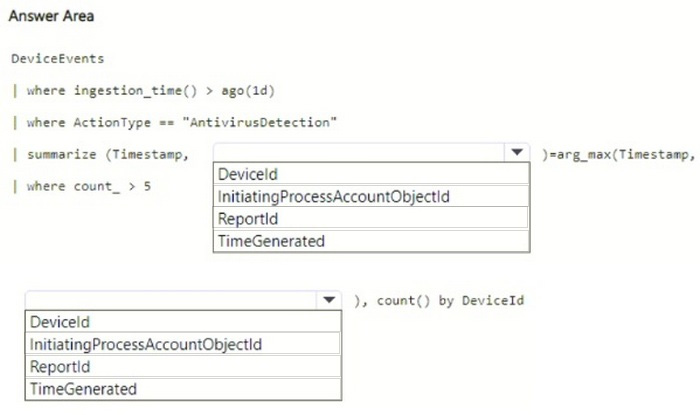
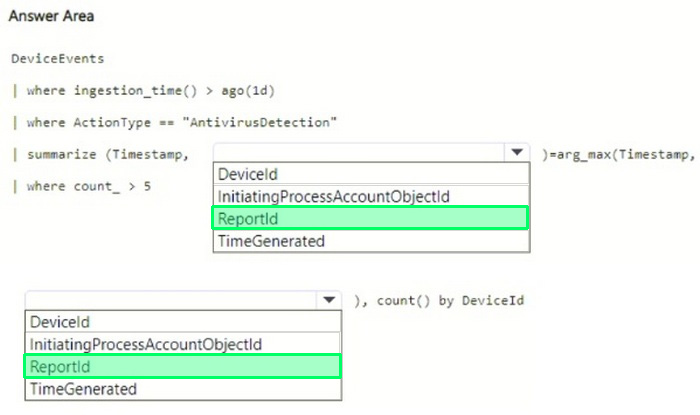
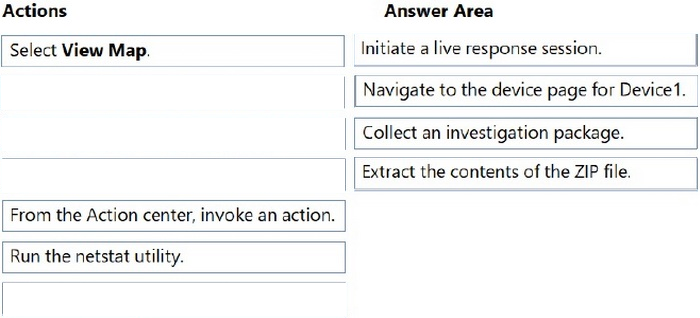
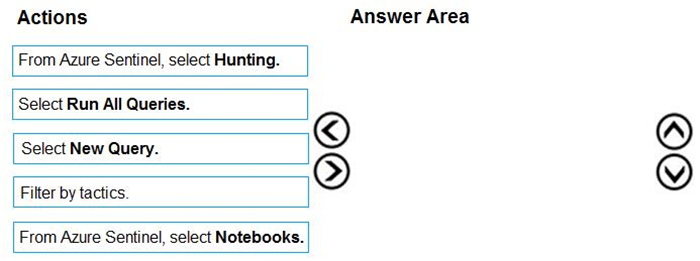
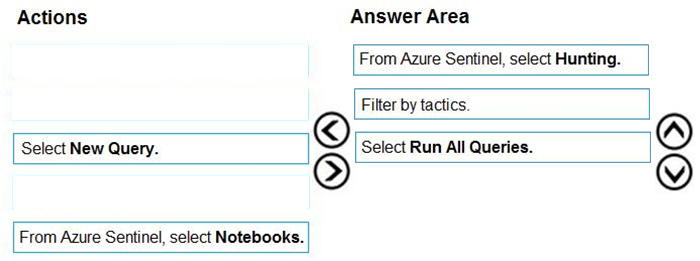
You have a Microsoft 365 subscription that uses Microsoft Defender XDR.
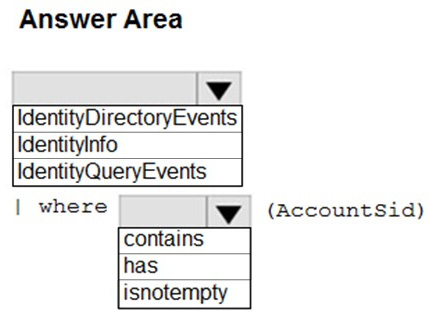
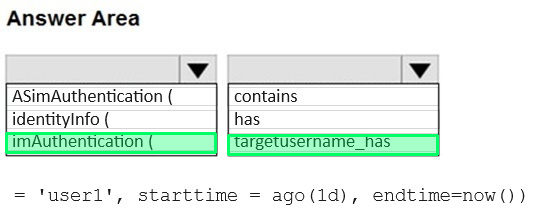
You need to create a custom detection rule that will identify devices that had more than five antivirus detections within the last 24 hours.
How should you complete the query? To answer, select the appropriate options in the answer area.
NOTE: Each correct selection is worth one point.
Reveal answer detailsClose answer details
Question 3
Single choice
You have a Microsoft Sentinel workspace named SW1.
You need to identify which anomaly rules are enabled in SW1.
What should you review in Microsoft Sentinel?
A
Content hub
B
Entity behavior
C
Analytics
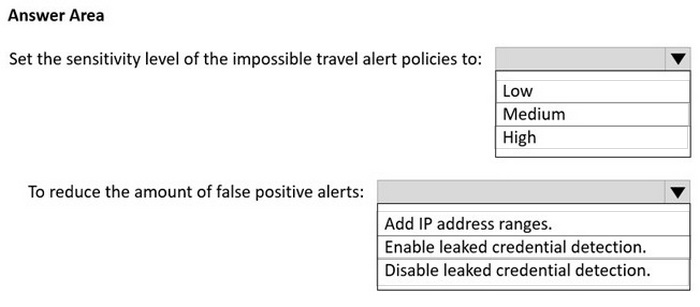
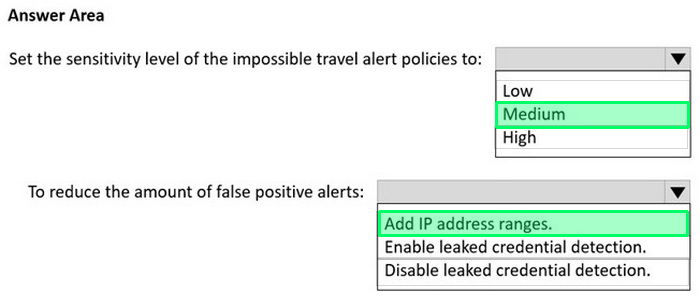
D
Settings
Reveal answer detailsClose answer details
Correct answerC
Question 4
Single choice
Your company uses Azure Sentinel to manage alerts from more than 10,000 IoT devices.
A security manager at the company reports that tracking security threats is increasingly difficult due to the large number of incidents.
You need to recommend a solution to provide a custom visualization to simplify the investigation of threats and to infer threats by using machine learning.
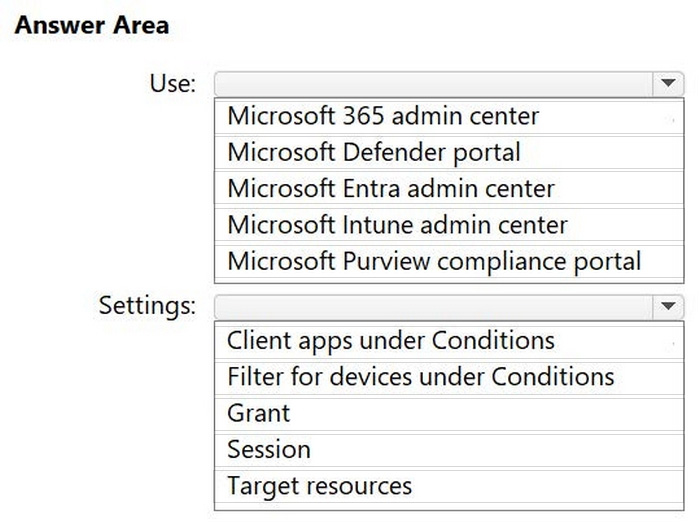
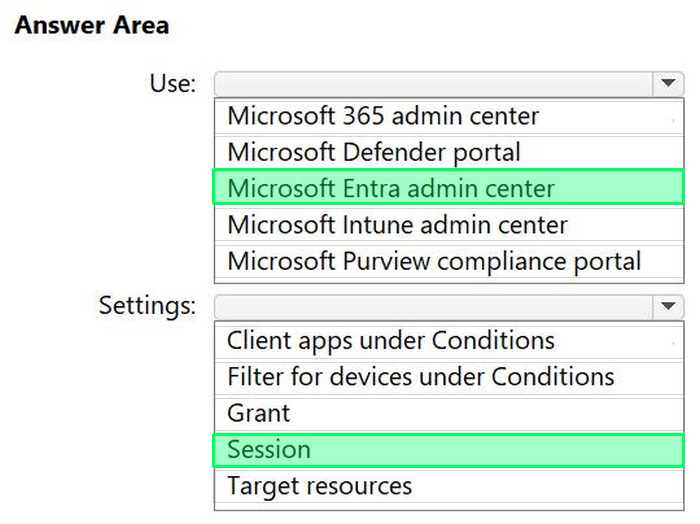
You have a Microsoft 365 E5 subscription that has a Conditional Access policy named Policy1. You need to perform the following actions:
1. Create a Conditional Access App Control custom policy named Custom1. 2. Configure Policy1 to use Custom1.
What should you use co create Custom1, and in which settings of Policy1 should you enable Conditional Access App Control?
To answer, select the appropriate options in the answer area. NOTE: Each correct selection is worth one point.
Reveal answer detailsClose answer details
Question 6
Hotspot
HOTSPOT
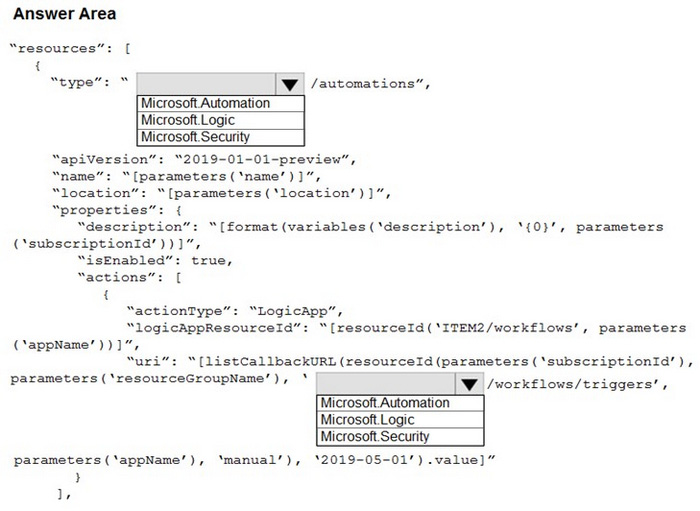
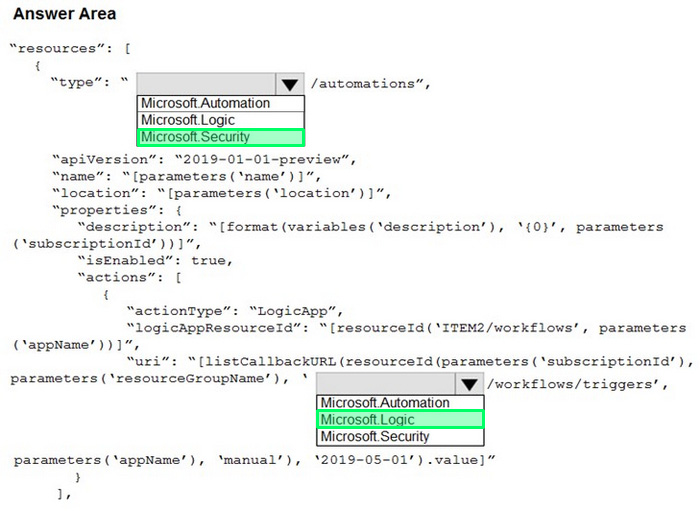
You need to use an Azure Resource Manager template to create a workflow automation that will trigger an automatic remediation when specific security alerts are received by Azure Security Center.
How should you complete the portion of the template that will provision the required Azure resources? To answer, select the appropriate options in the answer area.
Note: This section contains one or more sets of questions with the same scenario and problem. Each question presents a unique solution to the problem. You must determine whether the solution meets the
stated goals. More than one solution in the set might solve the problem. It is also possible that none of the solutions in the set solve the problem.
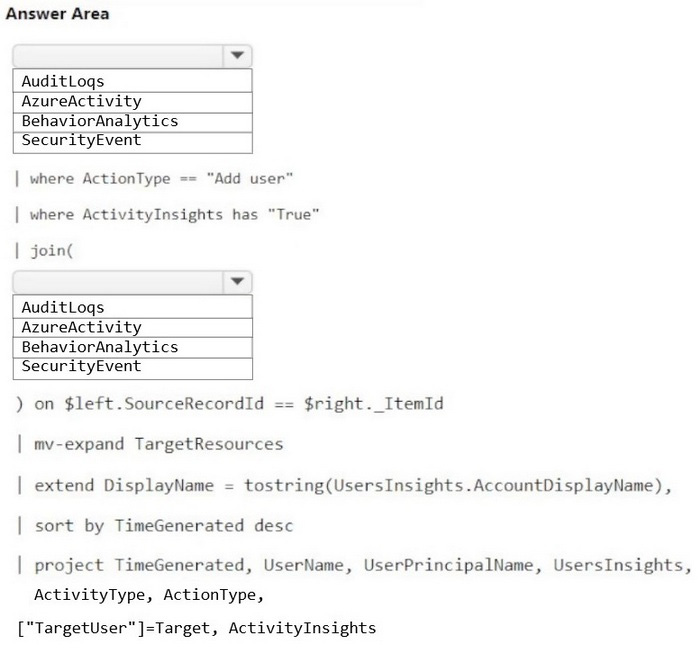
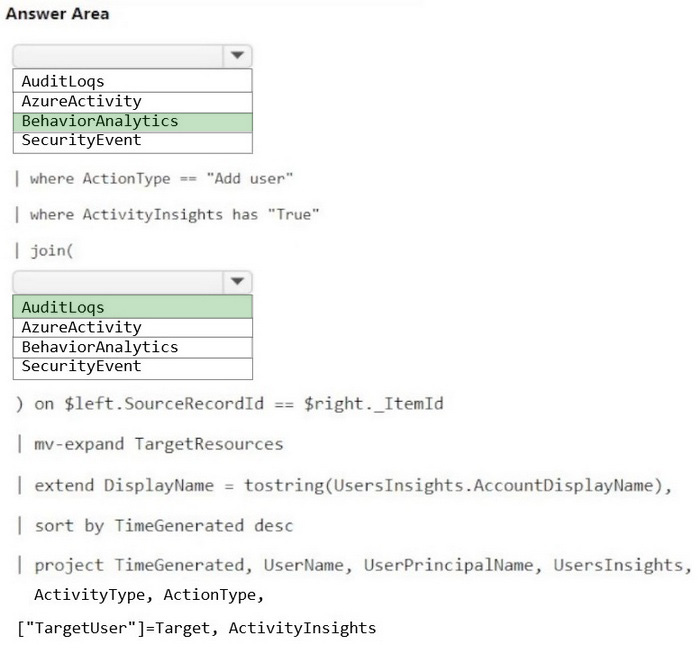
After you answer a question in this section, you will NOT be able to return. As a result, these questions do not appear on the Review Screen.
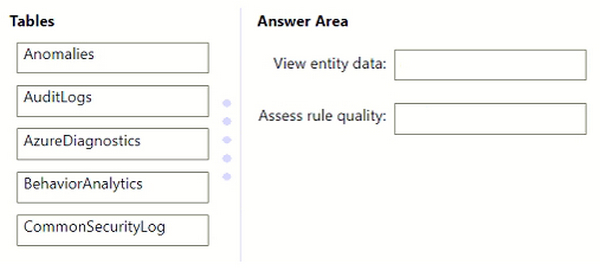
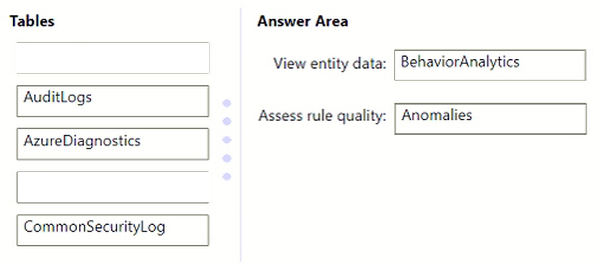
You have a Microsoft 365 subscription.
You have 1,000 Windows devices that have a third-party antivirus product installed and Microsoft Defender Antivirus in passive mode.
You need to ensure that the devices are protected from malicious artifacts that were undetected by the third-party antivirus product.
Solution: You enable automated investigation and response (AIR).
Does this meet the goal?
A
Yes
B
No
Reveal answer detailsClose answer details
Correct answerB
Question 8
Single choice
You have a Microsoft 365 subscription that uses Microsoft Purview and Microsoft Teams.
You have a team named Team1 that has a project named Project1.
You need to identify any Project1 files that were stored on the team site of Team1 between February 1, 2023, and February 10, 2023.
AuditLogs - | where Timestamp > ago(10d) | where FileName contains "Project1"
D
AuditLogs - | where Timestamp between (datetime(2023-02-01)..datetime(2023-02-10)) | where FileName contains "Project1"
Reveal answer detailsClose answer details
Correct answerB
Case study
Case Study 4
Overview Adatum Corporation is a United States-based financial services company that has regional offices in New York, Chicago, and San Francisco.
Existing Environment
Identity Environment
The on-premises network contains an Active Directory Domain Services (AD DS) forest named corp.adatum.com that syncs with an Azure AD tenant named adatum.com. All user and group management tasks are performed in corp.adatum.com. The corp.adatum.com domain contains a group named Group1 that syncs with adatum.com.
Licensing Status
All the users at Adatum are assigned a Microsoft 365 ES license and an Azure Active Directory Premium P2 license.
Cloud Environment
The cloud environment contains a Microsoft 365 subscription, an Azure subscription linked to the adatum.com tenant, and the resources shown in the following table.
On-premises Environment
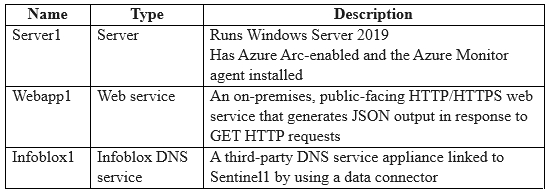
The on-premises network contains the resources shown in the following table.
Requirements
Planned changes
Adatum plans to perform the following changes:
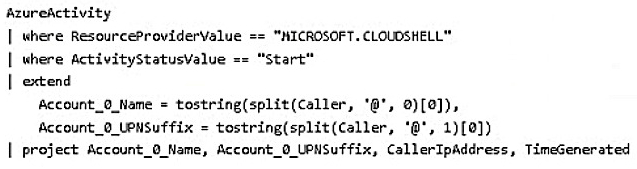
Implement a query named rulequery1 that will include the following KQL query.
Implement a Microsoft Sentinel scheduled rule that generates incidents based on rulequery1.
Microsoft Defender for Cloud Requirements
Adatum identifies the following Microsoft Defender for Cloud requirements:
1. The members of Group1 must be able to enable Defender for Cloud plans and apply regulatory compliance initiatives. 2. Microsoft Defender for Servers Plan 2 must be enabled on all the Azure virtual machines. 3. Server2 must be excluded from agentless scanning.
Microsoft Sentinel Requirements
Adatum identifies the following Microsoft Sentinel requirements:
1. Implement an Advanced Security Information Model (ASIM) query that will return a count of DNS requests that results in an NXDOMAIN response from Infoblox1. 2. Ensure that multiple alerts generated by rulequery1 in response to a single user launching Azure Cloud Shell multiple times are consolidated as a single incident. 3. Implement the Windows Security Events via AMA connector for Microsoft Sentinel and configure it to monitor the Security event log of Server1. 4. Ensure that incidents generated by rulequery1 are closed automatically if Azure Cloud Shell is launched by the company's SecOps team. 5. Implement a custom Microsoft Sentinel workbook named Workbook1 that will include a query to dynamically retrieve data from Webapp1. 6. Implement a Microsoft Sentinel near-real-time (NRT) analytics rule that detects sign-ins to a designated break glass account. 7. Ensure that HuntingQuery1 runs automatically when the Hunting page of Microsoft Sentinel in the
Azure portal is accessed. 8. Ensure that higher than normal volumes of password resets for corp.adatum.com user accounts are detected. 9. Minimize the overhead associated with queries that use ASIM parsers. 10. Ensure that the Group1 members can create and edit playbooks. 11. Use built-in ASIM parsers whenever possible.
Business Requirements
Adatum identifies the following business requirements:
1. Follow the principle of least privilege whenever possible. 2. Minimize administrative effort whenever possible.
Question 9
Testlet 4Hotspot
HOTSPOT
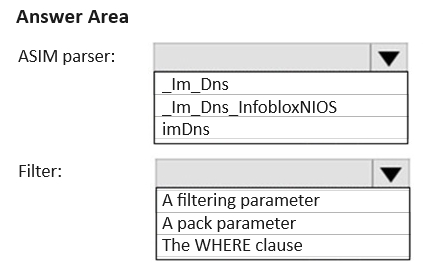
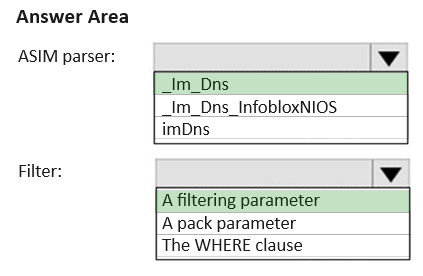
You need to implement the ASIM query for DNS requests. The solution must meet the Microsoft Sentinel requirements. How should you configure the query? To answer, select the appropriate options in the answer area. NOTE: Each correct selection is worth one point.
Reveal answer detailsClose answer details
Case study
Case Study 2
Overview
Litware Inc. is a renewable company.
Litware has offices in Boston and Seattle. Litware also has remote users located across the United States. To access Litware resources, including cloud resources, the remote users establish a VPN connection to either office.
Existing Environment
Identity Environment
The network contains an Active Directory forest named litware.com that syncs to an Azure Active Directory (Azure AD) tenant named litware.com.
Microsoft 365 Environment
Litware has a Microsoft 365 E5 subscription linked to the litware.com Azure AD tenant. Microsoft Defender for Endpoint is deployed to all computers that run Windows 10. All Microsoft Cloud App Security built-in anomaly detection policies are enabled.
Azure Environment
Litware has an Azure subscription linked to the litware.com Azure AD tenant. The subscription contains resources in the East US Azure region as shown in the following table.
Network Environment
Each Litware office connects directly to the internet and has a site-to-site VPN connection to the virtual networks in the Azure subscription.
On-premises Environment
The on-premises network contains the computers shown in the following table.
Current problems
Cloud App Security frequently generates false positive alerts when users connect to both offices simultaneously.
Planned Changes
Litware plans to implement the following changes:
1. Create and configure Azure Sentinel in the Azure subscription. 2. Validate Azure Sentinel functionality by using Azure AD test user accounts.
Business Requirements
Litware identifies the following business requirements:
1. The principle of least privilege must be used whenever possible. 2. Costs must be minimized, as long as all other requirements are met. 3. Logs collected by Log Analytics must provide a full audit trail of user activities. 4. All domain controllers must be protected by using Microsoft Defender for Identity.
Azure Information Protection Requirements
All files that have security labels and are stored on the Windows 10 computers must be available from the Azure Information Protection - Data discovery dashboard.
Microsoft Defender for Endpoint requirements
All Cloud App Security unsanctioned apps must be blocked on the Windows 10 computers by using Microsoft Defender for Endpoint.
Microsoft Cloud App Security requirements
Cloud App Security must identify whether a user connection is anomalous based on tenant-level data.
Azure Defender Requirements
All servers must send logs to the same Log Analytics workspace.
Azure Sentinel Requirements
Litware must meet the following Azure Sentinel requirements:
1. Integrate Azure Sentinel and Cloud App Security. 2. Ensure that a user named admin1 can configure Azure Sentinel playbooks. 3. Create an Azure Sentinel analytics rule based on a custom query. The rule must automatically initiate the execution of a playbook. 4. Add notes to events that represent data access from a specific IP address to provide the ability to
reference the IP address when navigating through an investigation graph while hunting. 5. Create a test rule that generates alerts when inbound access to Microsoft Office 365 by the Azure AD test user accounts is detected. Alerts generated by the rule must be grouped into individual incidents, with one incident per test user account.
Question 10
Testlet 2Hotspot
HOTSPOT
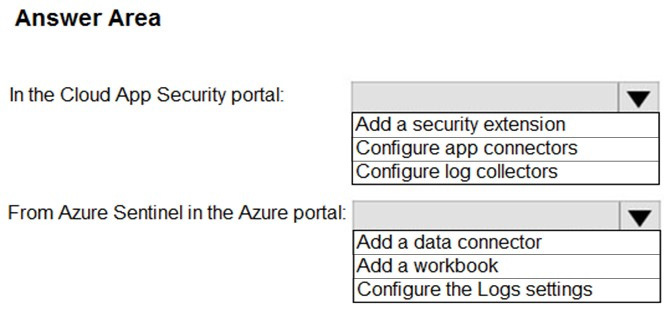
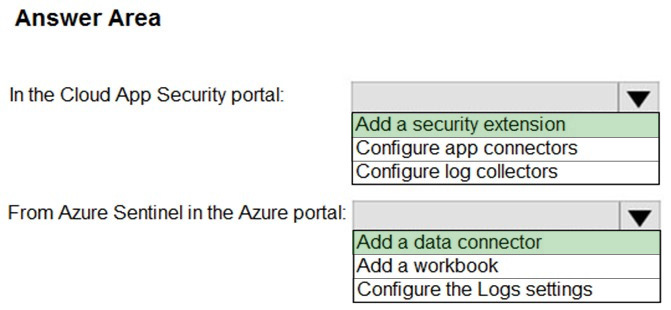
You need to configure the Azure Sentinel integration to meet the Azure Sentinel requirements.
What should you do? To answer, select the appropriate options in the answer area.
Note: This question is part of a series of questions that present the same scenario. Each question in the series contains a unique solution that might meet the stated goals. Some question sets might have more than one correct solution, while others might not have a correct solution.
After you answer a question in this section, you will NOT be able to return to it. As a result, these questions will not appear in the review screen.
You are configuring Azure Sentinel.
You need to create an incident in Azure Sentinel when a sign-in to an Azure virtual machine from a malicious IP address is detected.
You have a Microsoft 365 E5 subscription that uses Microsoft Defender 365.
Your network contains an on-premises Active Directory Domain Services (AD DS) domain that syncs with Azure AD.
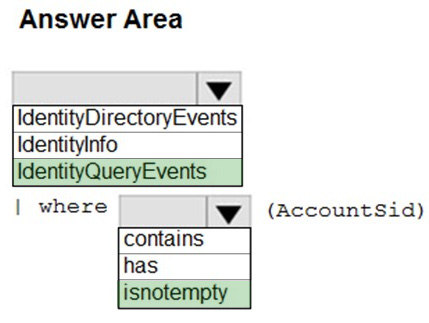
You need to identify LDAP requests by AD DS users to enumerate AD DS objects.
How should you complete the KQL query? To answer, select the appropriate options in the answer area.
NOTE: Each correct selection is worth one point.
Reveal answer detailsClose answer details
Explanation
Box 1: IdentityQueryEvents
The IdentityQueryEvents table in the advanced hunting schema contains information about queries performed against Active Directory objects, such as users, groups, devices, and domains.
Box 2: isnotempty Example: IdentityQueryEvents | where isnotempty(AccountSid) | take 100
// IdentityQueryEvents // - contains query activities performed against Active Directory objects, such as users, groups, devices, and domains monitored by Azure ATP // - Includes SAMR, DNS and LDAP requests
// ---------------
Incorrect: * IdentityInfo The IdentityInfo table in the advanced hunting schema contains information about user accounts obtained from various services, including Azure Active Directory.
* IdentityDirectoryEvents IdentityDirectoryEvents The IdentityDirectoryEvents table in the advanced hunting schema contains events involving an on-premises domain controller running Active Directory (AD). This table captures various identity-related events, like password changes, password expiration, and user principal name (UPN) changes. It also captures system events on the domain controller, like scheduling of tasks and PowerShell activity.
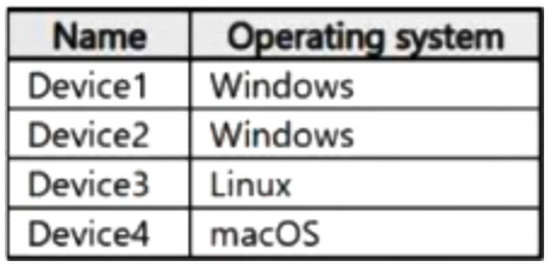
You have a Microsoft 365 subscription that uses Microsoft Defender for Endpoint and contains the devices shown in the following table.
You initiate a live response session on each device.
You need to collect a Defender for Endpoint investigation package from each device.
On which devices can you collect the package by running advanced live response commands from the command-line interface (CLI)?
A
Device1 and Device2 only
B
Device1, Device2, and Device3 only
C
Device3 and Device4 only
D
Device1, Devke2, Device3, and Device4
Reveal answer detailsClose answer details
Correct answerC
Question 15
Single choice
You have a Microsoft 365 E5 subscription that uses Microsoft Copilot for Security.
You start a Copilot for Security session and enter five prompts that each provide responses.
You need to create a promptbook that will use the prompts but will NOT contain the responses. The solution must minimize administrative effort.
What should you do?
A
Select each prompt, and then select Create promptbook.
B
Create a new promptbook and include each prompt.
C
Enter a new prompt that has the following input: Create a promptbook from my session prompts.
D
Share the session, and then select Create promptbook.
Reveal answer detailsClose answer details
Correct answerA
Case study
Case Study 3
Overview
Fabrikam, Inc. is a financial services company.
The company has branch offices in New York, London, and Singapore. Fabrikam has remote users located across the globe. The remote users access company resources, including cloud resources, by using a VPN connection to a branch office.
Existing Environment
Identity Environment
The network contains an Active Directory Domain Services (AD DS) forest named fabrikam.com that syncs with an Azure AD tenant named fabrikam.com. To sync the forest, Fabrikam uses Azure AD Connect with pass-through authentication enabled and password hash synchronization disabled.
The fabrikam.com forest contains two global groups named Group1 and Group2.
Microsoft 365 Environment
All the users at Fabrikam are assigned a Microsoft 365 E5 license and an Azure Active Directory Premium Plan 2 license.
Fabrikam implements Microsoft Defender for Identity and Microsoft Defender for Cloud Apps and enables log collectors.
Azure Environment
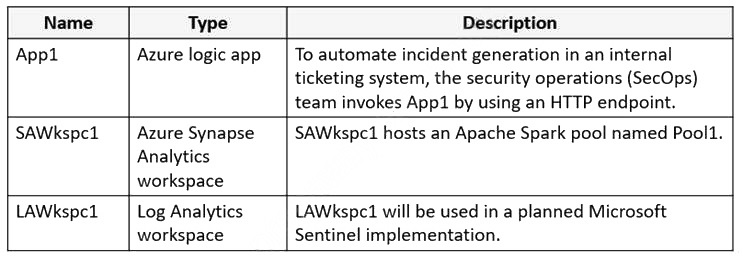
Fabrikam has an Azure subscription that contains the resources shown in the following table.
Amazon Web Services (AWS) Environment
Fabrikam has an Amazon Web Services (AWS) account named Account1. Account1 contains 100 Amazon Elastic Compute Cloud (EC2) instances that run a custom Windows Server 2022. The image includes Microsoft SQL Server 2019 and does NOT have any agents installed.
Current Issues
When the users use the VPN connections, Microsoft 365 Defender raises a high volume of impossible travel alerts that are false positives.
Defender for Identity raises a high volume of Suspected DCSync attack alerts that are false positives.
Requirements
Planned changes
Fabrikam plans to implement the following services:
1. Microsoft Defender for Cloud 2. Microsoft Sentinel
Business Requirements
Fabrikam identifies the following business requirements:
1. Use the principle of least privilege, whenever possible. 2. Minimize administrative effort.
Microsoft Defender for Cloud Apps Requirements
Fabrikam identifies the following Microsoft Defender for Cloud Apps requirements:
1. Ensure that impossible travel alert policies are based on the previous activities of each user. 2. Reduce the amount of impossible travel alerts that are false positives.
Microsoft Defender for Identity Requirements
Minimize the administrative effort required to investigate the false positive alerts.
Microsoft Defender for Cloud Requirements
Fabrikam identifies the following Microsoft Defender for Cloud requirements:
1. Ensure that the members of Group2 can modify security policies.
2. Ensure that the members of Group1 can assign regulatory compliance policy initiatives at the Azure subscription level. 3. Automate the deployment of the Azure Connected Machine agent for Azure Arc-enabled servers to the existing and future resources of Account1. 4. Minimize the administrative effort required to investigate the false positive alerts.
Microsoft Sentinel Requirements
Fabrikam identifies the following Microsoft Sentinel requirements:
1. Query for NXDOMAIN DNS requests from the last seven days by using built-in Advanced Security Information Model (ASIM) unifying parsers. 2. From AWS EC2 instances, collect Windows Security event log entries that include local group membership changes. 3. Identify anomalous activities of Azure AD users by using User and Entity Behavior Analytics (UEBA). 4. Evaluate the potential impact of compromised Azure AD user credentials by using UEBA. 5. Ensure that App1 is available for use in Microsoft Sentinel automation rules. 6. Identify the mean time to triage for incidents generated during the last 30 days. 7. Identify the mean time to close incidents generated during the last 30 days. 8. Ensure that the members of Group1 can create and run playbooks. 9. Ensure that the members of Group1 can manage analytics rules. 10. Run hunting queries on Pool1 by using Jupyter notebooks. 11. Ensure that the members of Group2 can manage incidents. 12. Maximize the performance of data queries. 13. Minimize the amount of collected data.
Question 16
Testlet 3Hotspot
HOTSPOT
You need to meet the Microsoft Defender for Cloud Apps requirements.
What should you do? To answer, select the appropriate options in the answer area.
NOTE: Each correct selection is worth one point.
Reveal answer detailsClose answer details
Question 17
Single choice
Note: This question is part of a series of questions that present the same scenario. Each question in the series contains a unique solution that might meet the stated goals. Some question sets might have more than one correct solution, while others might not have a correct solution.
After you answer a question in this section, you will NOT be able to return to it. As a result, these questions will not appear in the review screen.
You use Azure Security Center. You receive a security alert in Security Center.
You need to view recommendations to resolve the alert in Security Center.
Solution: From Security alerts, you select the alert, select Take Action, and then expand the Mitigate the threat section.
You provision Azure Sentinel for a new Azure subscription.
You are configuring the Security Events connector.
While creating a new rule from a template in the connector, you decide to generate a new alert for every event.
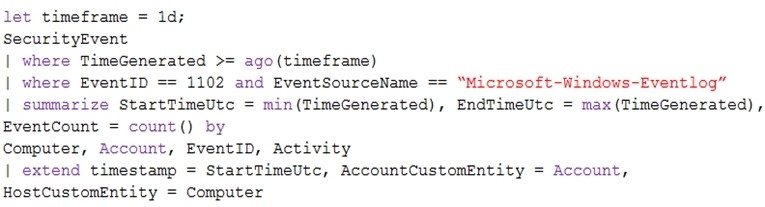
You create the following rule query.
By which two components can you group alerts into incidents? Each correct answer presents a complete solution.
NOTE: Each correct selection is worth one point.
A
user
B
resource group
C
IP address
D
computer
Reveal answer detailsClose answer details
Correct answersA, D
Explanation
To group alerts into incidents in Azure Sentinel, you can use any combination of the available grouping fields. In this case, since the rule query does not include information on resource groups or IP addresses, only user and computer can be used to group alerts into incidents.
Grouping alerts by user and computer can help you identify patterns of activity and better understand the scope and impact of potential security threats. By grouping alerts into incidents, you can also more easily manage and track your response to security incidents.
Question 19
Single choice
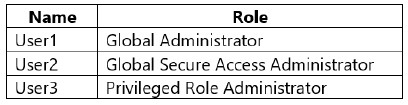
You have a Microsoft 365 E5 subscription that contains the users shown in the following table.
You configure Microsoft Entra Internet Access.
Which users can manage Microsoft Entra Internet Access?
A
User1 only
B
User2 only
C
User3 only
D
User1 and User2 only
E
User1, User2 and User3
Reveal answer detailsClose answer details
Correct answerD
Case study
Case Study 3
Overview
Fabrikam, Inc. is a financial services company.
The company has branch offices in New York, London, and Singapore. Fabrikam has remote users located across the globe. The remote users access company resources, including cloud resources, by using a VPN connection to a branch office.
Existing Environment
Identity Environment
The network contains an Active Directory Domain Services (AD DS) forest named fabrikam.com that syncs with an Azure AD tenant named fabrikam.com. To sync the forest, Fabrikam uses Azure AD Connect with pass-through authentication enabled and password hash synchronization disabled.
The fabrikam.com forest contains two global groups named Group1 and Group2.
Microsoft 365 Environment
All the users at Fabrikam are assigned a Microsoft 365 E5 license and an Azure Active Directory Premium Plan 2 license.
Fabrikam implements Microsoft Defender for Identity and Microsoft Defender for Cloud Apps and enables log collectors.
Azure Environment
Fabrikam has an Azure subscription that contains the resources shown in the following table.
Amazon Web Services (AWS) Environment
Fabrikam has an Amazon Web Services (AWS) account named Account1. Account1 contains 100 Amazon Elastic Compute Cloud (EC2) instances that run a custom Windows Server 2022. The image includes Microsoft SQL Server 2019 and does NOT have any agents installed.
Current Issues
When the users use the VPN connections, Microsoft 365 Defender raises a high volume of impossible travel alerts that are false positives.
Defender for Identity raises a high volume of Suspected DCSync attack alerts that are false positives.
Requirements
Planned changes
Fabrikam plans to implement the following services:
1. Microsoft Defender for Cloud 2. Microsoft Sentinel
Business Requirements
Fabrikam identifies the following business requirements:
1. Use the principle of least privilege, whenever possible. 2. Minimize administrative effort.
Microsoft Defender for Cloud Apps Requirements
Fabrikam identifies the following Microsoft Defender for Cloud Apps requirements:
1. Ensure that impossible travel alert policies are based on the previous activities of each user. 2. Reduce the amount of impossible travel alerts that are false positives.
Microsoft Defender for Identity Requirements
Minimize the administrative effort required to investigate the false positive alerts.
Microsoft Defender for Cloud Requirements
Fabrikam identifies the following Microsoft Defender for Cloud requirements:
1. Ensure that the members of Group2 can modify security policies.
2. Ensure that the members of Group1 can assign regulatory compliance policy initiatives at the Azure subscription level. 3. Automate the deployment of the Azure Connected Machine agent for Azure Arc-enabled servers to the existing and future resources of Account1. 4. Minimize the administrative effort required to investigate the false positive alerts.
Microsoft Sentinel Requirements
Fabrikam identifies the following Microsoft Sentinel requirements:
1. Query for NXDOMAIN DNS requests from the last seven days by using built-in Advanced Security Information Model (ASIM) unifying parsers. 2. From AWS EC2 instances, collect Windows Security event log entries that include local group membership changes. 3. Identify anomalous activities of Azure AD users by using User and Entity Behavior Analytics (UEBA). 4. Evaluate the potential impact of compromised Azure AD user credentials by using UEBA. 5. Ensure that App1 is available for use in Microsoft Sentinel automation rules. 6. Identify the mean time to triage for incidents generated during the last 30 days. 7. Identify the mean time to close incidents generated during the last 30 days. 8. Ensure that the members of Group1 can create and run playbooks. 9. Ensure that the members of Group1 can manage analytics rules. 10. Run hunting queries on Pool1 by using Jupyter notebooks. 11. Ensure that the members of Group2 can manage incidents. 12. Maximize the performance of data queries. 13. Minimize the amount of collected data.
Question 20
Testlet 3Single choice
You have an Azure subscription that uses Microsoft Defender for Cloud.
You have a GitHub account named Account1 that contains 10 repositories.
You need to ensure that Defender for Cloud can access the repositories in Account1.
What should you do first in the Microsoft Defender for Cloud portal?
A
Enable integrations.
B
Enable a plan.
C
Add an environment.
D
Enable security policies.
Reveal answer detailsClose answer details
Correct answerC
Explanation
Connect your GitHub repositories to Microsoft Defender for Cloud
Connect your GitHub account To connect your GitHub account to Microsoft Defender for Cloud:
1. Sign in to the Azure portal. 2. Go to Microsoft Defender for Cloud > Environment settings. 3. Select Add environment. 4. Select GitHub. 5. Enter a name (limit of 20 characters), and then select your subscription, resource group, and region. 6. Etc.
You have a Microsoft 365 E5 subscription that uses Microsoft SharePoint Online.
You delete users from the subscription.
You need to be notified if the deleted users downloaded numerous documents from SharePoint Online sites during the month before their accounts were deleted.
What should you use?
A
a file policy in Microsoft Defender for Cloud Apps
B
an access review policy
C
an alert policy in Microsoft Defender for Office 365
D
an insider risk policy
Reveal answer detailsClose answer details
Correct answerC
Explanation
Alert policies let you categorize the alerts that are triggered by a policy, apply the policy to all users in your organization, set a threshold level for when an alert is triggered, and decide whether to receive email notifications when alerts are triggered.
Default alert policies include: Unusual external user file activity - Generates an alert when an unusually large number of activities are performed on files in SharePoint or OneDrive by users outside of your organization. This includes activities such as accessing files, downloading files, and deleting files. This policy has a High severity setting.
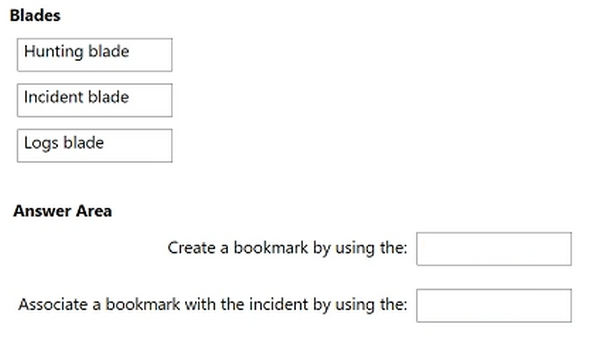
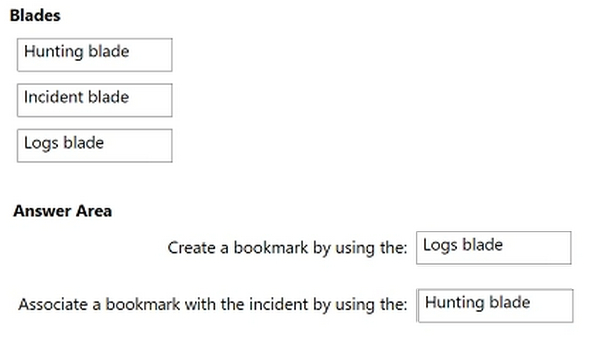
You have a Microsoft Sentinel workspace that contains an Azure AD data connector.
You need to associate a bookmark with an Azure AD-related incident.
What should you do? To answer, drag the appropriate blades to the correct tasks. Each blade may be used once, more than once, or not at all. You may need to drag the split bar between panes or scroll to view content
NOTE: Each correct selection is worth one point.
Reveal answer detailsClose answer details
Explanation
Box 1: Hunting blade Create a bookmark
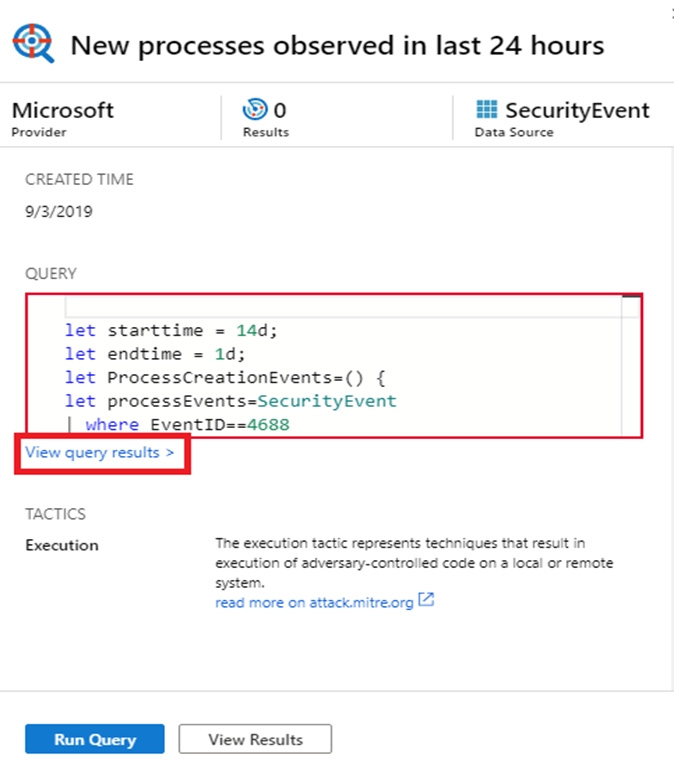
Add a bookmark 1. In the Azure portal, navigate to Microsoft Sentinel > Threat management > Hunting to run queries for suspicious and anomalous behavior.
2. Select one of the hunting queries and on the right, in the hunting query details, select Run Query.
3. Select View query results. For example:
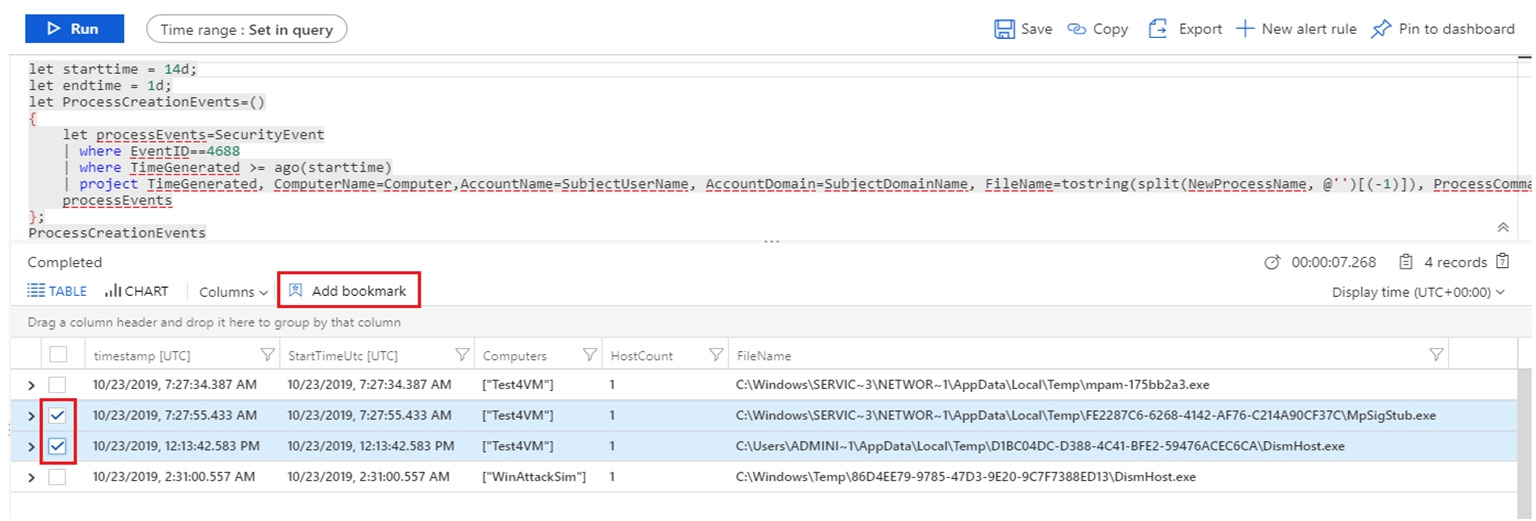
This action opens the query results in the Logs pane.
4. From the log query results list, use the checkboxes to select one or more rows that contain the information you find interesting.
5. Select Add bookmark:
6. On the right, in the Add bookmark pane, optionally, update the bookmark name, add tags, and notes to help you identify what was interesting about the item.
7. Etc.
Box 2: Hunting blade Associate a bookmark with incident
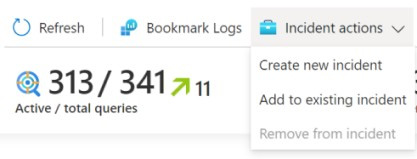
You can also create an incident from one or more bookmarks, or add one or more bookmarks to an existing incident. Select a checkbox to the left of any bookmarks you want to use, and then select Incident actions > Create new incident or Add to existing incident. Triage and investigate the incident like any other.
Note: Add bookmarks to a new or existing incident 1. In the Azure portal, navigate to Microsoft Sentinel > Threat management > Hunting > Bookmarks tab, and select the bookmark or bookmarks you want to add to an incident.
2. Select Incident actions from the command bar:
3. Select either Create new incident or Add to existing incident, as appropriate. Then:
For a new incident: Optionally update the details for the incident, and then select Create. For adding a bookmark to an existing incident: Select one incident, and then select Add.
To view the bookmark within the incident: Navigate to Microsoft Sentinel > Threat management > Incidents and select the incident with your bookmark. Select View full details, and then select the Bookmarks tab.
You have a Microsoft 365 E5 subscription that contains a Microsoft SharePoint Online site named Site1.
You need to enable Microsoft Defender for Cloud Apps session control for Site1.
Which type of policy should you create first?
A
access
B
session
C
app governance
D
Conditional Access
Reveal answer detailsClose answer details
Correct answerB
Question 24
Single choice
You have an Azure subscription that uses Microsoft Sentinel.
You detect a new threat by using a hunting query.
You need to ensure that Microsoft Sentinel automatically detects the threat. The solution must minimize administrative effort.
What should you do?
A
Create a playbook.
B
Create a watchlist.
C
Create an analytics rule.
D
Add the query to a workbook.
Reveal answer detailsClose answer details
Correct answerC
Explanation
By creating an analytics rule, you can set up a query that will automatically run and alert you when the threat is detected, without having to manually run the query. This will help minimize administrative effort, as you can set up the rule once and it will run on a schedule, alerting you when the threat is detected. References: https://docs.microsoft.com/en-us/azure/sentinel/analytics-create-rule
Question 25
Single choice
You have a Microsoft 365 subscription that uses Microsoft Defender XDR. Microsoft Purview, and Exchange Online.
You have a partner company named Contoso, Ltd.
You need to review all the emails that contain PDF attachments and were received from Contoso during the past month. The solution must minimize administrative effort.
What should you use?
A
Advanced Hunting
B
Content explorer
C
Content search
D
Activity explorer
Reveal answer detailsClose answer details
Correct answerC
Question 26
Hotspot
HOTSPOT
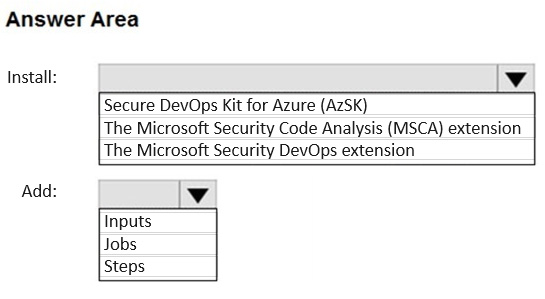
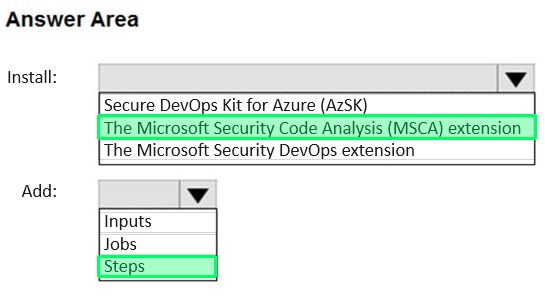
You have an Azure DevOps organization that uses Microsoft Defender for DevOps. The organization contains an Azure DevOps repository named Repo1 and an Azure Pipelines pipeline named Pipeline1. Pipeline1 is used to build and deploy code stored in Repo1.
You need to ensure that when Pipeline1 runs, Microsoft Defender for Cloud can perform secret scanning of the code in Repo1.
What should you install in the organization, and what should you add to the YAML file of Pipeline"!? To answer, select the appropriate options in the answer area.
NOTE: Each correct selection is worth one point.
Reveal answer detailsClose answer details
Question 27
Single choice
You have an Azure Sentinel deployment in the East US Azure region.
You create a Log Analytics workspace named LogsWest in the West US Azure region.
You need to ensure that you can use scheduled analytics rules in the existing Azure Sentinel deployment to generate alerts based on queries to LogsWest.
What should you do first?
A
Deploy Azure Data Catalog to the West US Azure region.
B
Modify the workspace settings of the existing Azure Sentinel deployment.
C
Add Azure Sentinel to a workspace.
D
Create a data connector in Azure Sentinel.
Reveal answer detailsClose answer details
Correct answerC
Explanation
Cross-workspace queries can now be included in scheduled analytics rules. You can use cross-workspace analytics rules in a central SOC, and across tenants (using Azure Lighthouse) as in the case of an MSSP, subject to the following limitations:
1. Up to 20 workspaces can be included in a single query. 2. Azure Sentinel must be deployed on every workspace referenced in the query. 3. Alerts generated by a cross-workspace analytics rule, and the incidents created from them, exist only in the workspace where the rule was defined. They will not be displayed in any of the other workspaces referenced in the query.
You plan to create a custom Azure Sentinel query that will track anomalous Azure Active Directory (Azure AD) sign-in activity and present the activity as a time chart aggregated by day.
You need to create a query that will be used to display the time chart.
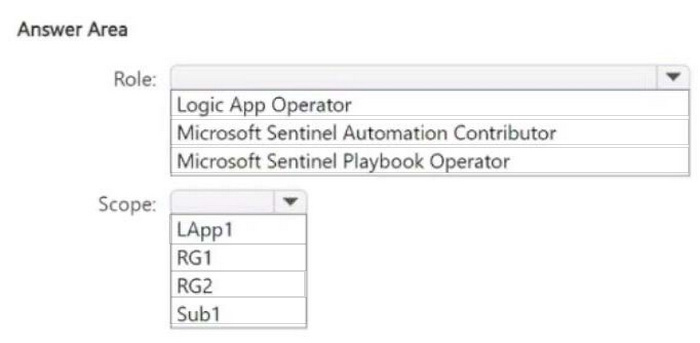
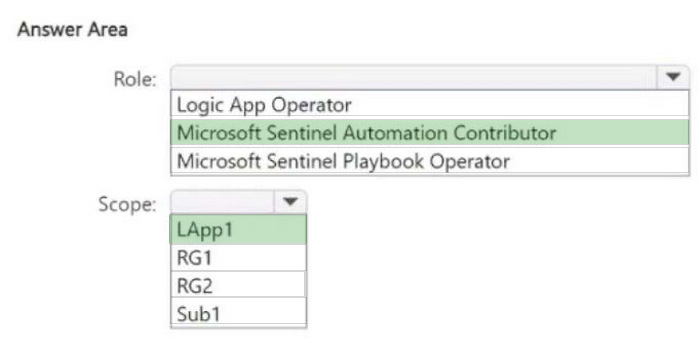
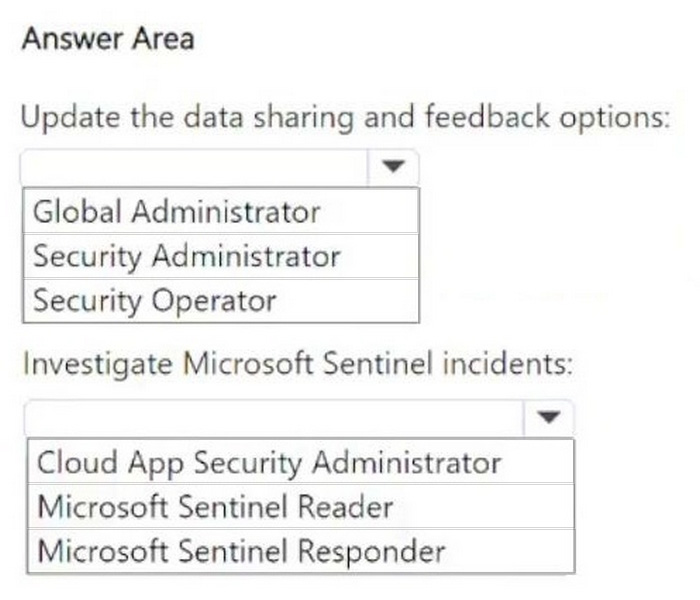
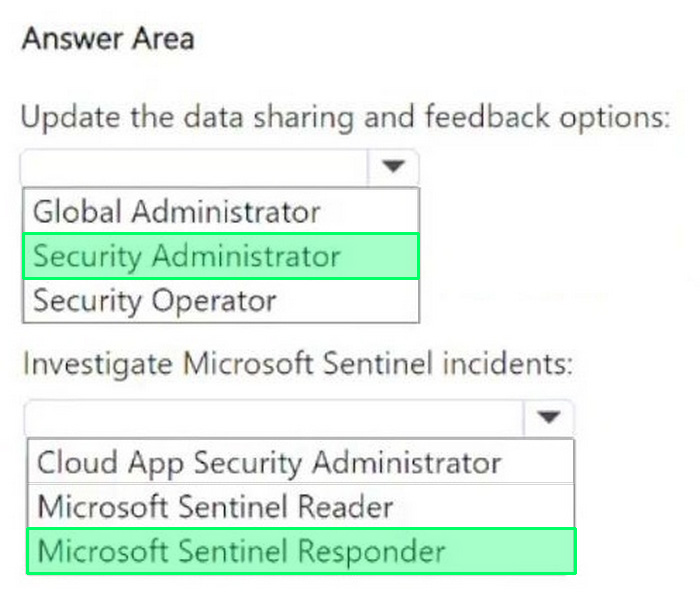
You have an Azure subscription named Sub1 that is linked to a Microsoft Entra tenant named contoso.com. Contoso.com contains a user named User1. Sub1 contains a Microsoft Sentinel workspace.
You provision a Microsoft Copilot for Security capacity. You need to ensure that User1 can use Copilot for Security to perform the following tasks:
1. Update the data sharing and feedback options. 2. Investigate Microsoft Sentinel incidents.
The solution must follow the principle of least privilege.
Which role should you assign to User1 for each task?
To answer, select the appropriate options in the answer area. NOTE: Each correct selection is worth one
point.
Reveal answer detailsClose answer details
Question 33
Single choice
You have a Microsoft 365 subscription that contains a user named User1 and two Windows devices named Device1 and Device2. Device1 and Device2 are onboarded to Microsoft Defender for Endpoint.
The following events occur.
1. User1 signs in to Device1. 2. Automatic attack disruption in Microsoft Defender XDR responds to an attack on Device1 and contains User1. 3. User1 attempts to connect to Device2.
Which protocols will Device2 block when User1 attempts to connect to Device2?
A
RDP only
B
RPC only
C
SMB only
D
RDP and RPC only
E
SMB and RPC only
F
RDP, RPC, and SMB
Reveal answer detailsClose answer details
Correct answerF
Question 34
Single choice
You have an Azure Sentinel workspace.
You need to test a playbook manually in the Azure portal. From where can you run the test in Azure Sentinel?
You have two Azure subscriptions that use Microsoft Defender for Cloud.
You need to ensure that specific Defender for Cloud security alerts are suppressed at the root management group level. The solution must minimize administrative effort.
What should you do in the Azure portal?
A
Create an Azure Policy assignment.
B
Modify the Workload protections settings in Defender for Cloud.
C
Create an alert rule in Azure Monitor.
D
Modify the alert settings in Defender for Cloud.
Reveal answer detailsClose answer details
Correct answerA
Explanation
You can use alerts suppression rules to suppress false positives or other unwanted security alerts from Defender for Cloud.
Note: To create a rule directly in the Azure portal:
1. From Defender for Cloud's security alerts page: Select the specific alert you don't want to see anymore, and from the details pane, select Take action. Or, select the suppression rules link at the top of the page, and from the suppression rules page select Create new suppression rule:
2. In the new suppression rule pane, enter the details of your new rule. Your rule can dismiss the alert on all resources so you don't get any alerts like this one in the future. Your rule can dismiss the alert on specific criteria - when it relates to a specific IP address, process name, user account, Azure resource, or location.
You have a Microsoft 365 E5 subscription that uses Microsoft Defender for Identity.
From the Microsoft Defender portal, you investigate an incident on a device named Device1 of a user named User1. The incident contains the following Defender for Identity alert.
Suspected identity theft (pass-the-ticket) (external ID 2018)
You need to contain the incident without affecting users and devices. The solution must minimize administrative effort.
What should you do?
A
Disable User1 only.
B
Quarantine Device1 only.
C
Reset the password for all the accounts that previously signed in to Device1.
D
Disable User1 and quarantine Device1.
E
Disable User1, quarantine Device1, and reset the password for all the accounts that previously signed in to Device1.
Reveal answer detailsClose answer details
Correct answerE
Question 37
Hotspot
HOTSPOT
You have a Microsoft Sentinel workspace named sws1.
You need to create a query that will detect when a user creates an unusually large numbers of Azure AD user accounts.
How should you complete the query? To answer, select the appropriate options in the answer area.
NOTE: Each correct selection is worth one point.
Reveal answer detailsClose answer details
Question 38
Drag & drop
DRAG DROP
You have a Microsoft Sentinel workspace named SW1.
In SW1, you enable User and Entity Behavior Analytics (UEBA).
You need to use KQL to perform the following tasks:
1. View the entity data that has fields for each type of entity. 2. Assess the quality of rules by analyzing how well a rule performs.
Which table should you use in KQL for each task? To answer, drag the appropriate tables to the correct tasks. Each table may be used once, more than once, or not at all. You may need to drag the split bar between panes or scroll to view content.
NOTE: Each correct selection is worth one point.
Reveal answer detailsClose answer details
Question 39
Hotspot
HOTSPOT
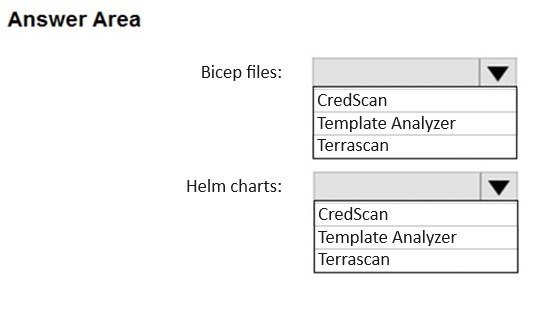
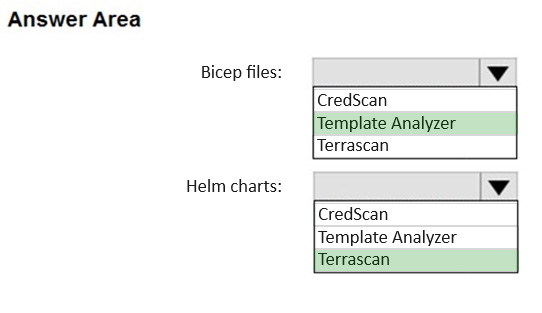
You have an Azure DevOps organization that contains an Azure Repos repository named Repo1 and is onboarded to Microsoft Defender for DevOps.
You create infrastructure as code (IaC) files and store them in Repo1. The IaC files are formatted as Bicep files and Helm charts.
You need to configure Defender for DevOps to identify misconfigurations in the IaC files.
Which scanning tool should you use for each type of files? To answer, select the appropriate options in the answer area.
NOTE: Each correct selection is worth one point.
Reveal answer detailsClose answer details
Question 40
Hotspot
HOTSPOT
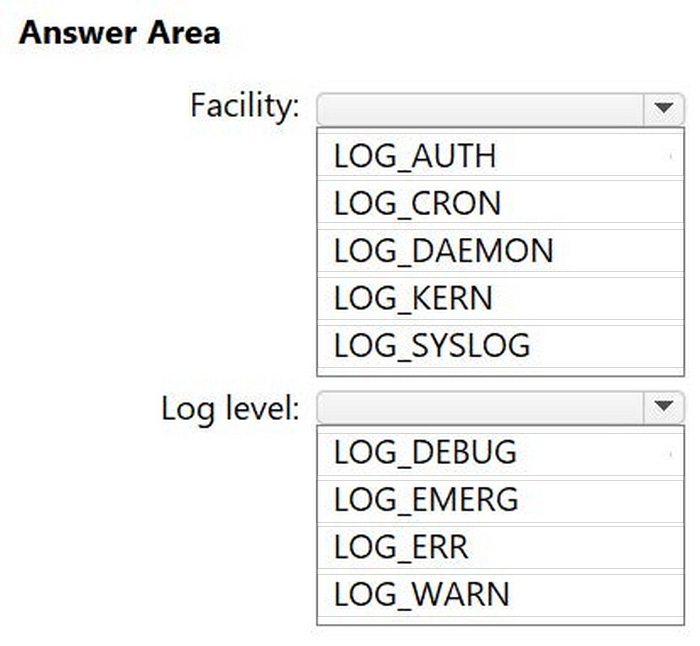
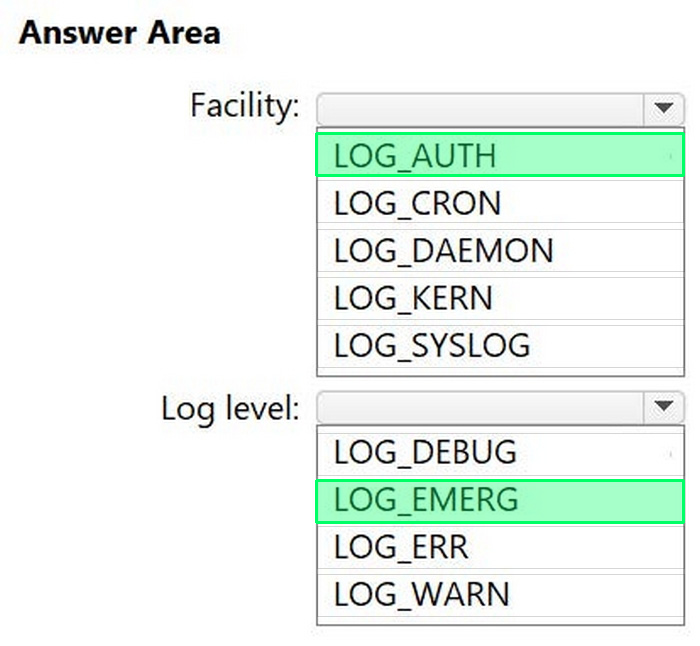
You have an on-premises Linux server that runs a background process named App1 and has the Azure Connected Machine agent installed. You have a Microsoft Sentinel workspace named WS1.
You need to configure a data collection rule (DCR) named DCR1 that will use the Syslog via AMA connector to collect messages related to App1.
The solution must meet the following requirements:
1. Only collect messages that have a priority level of critical. 2. Minimize the volume of data collected.
Which facility and log level should you configure for DCR1? To answer, select the appropriate options in the answer area.
NOTE: Each correct selection is worth one point.
Reveal answer detailsClose answer details
Question 41
Single choice
Note: This section contains one or more sets of questions with the same scenario and problem. Each question presents a unique solution to the problem. You must determine whether the solution meets the stated goals. More than one solution in the set might solve the problem. It is also possible that none of the solutions in the set solve the problem.
After you answer a question in this section, you will NOT be able to return. As a result, these questions do not appear on the Review Screen.
You have a Microsoft 365 subscription.
You have 1,000 Windows devices that have a third-party antivirus product installed and Microsoft Defender Antivirus in passive mode.
You need to ensure that the devices are protected from malicious artifacts that were undetected by the third-party antivirus product.
Solution: You configure endpoint detection and response (EDR) in block mode.
Does this meet the goal?
A
Yes
B
No
Reveal answer detailsClose answer details
Correct answerA
Question 42
Single choice
You have a third-party security information and event management (SIEM) solution.
You need to ensure that the SIEM solution can generate alerts for Azure Active Directory (Azure AD) sign-events in near real time.
What should you do to route events to the SIEM solution?
A
Create an Azure Sentinel workspace that has a Security Events connector.
B
Configure the Diagnostics settings in Azure AD to stream to an event hub.
C
Create an Azure Sentinel workspace that has an Azure Active Directory connector.
D
Configure the Diagnostics settings in Azure AD to archive to a storage account.
You have an Azure subscription that uses Microsoft Defender for Servers Plan 1 and contains a server named Server1.
You enable agentless scanning.
You need to prevent Server1 from being scanned. The solution must minimize administrative effort.
What should you do?
A
Create an exclusion tag.
B
Upgrade the subscription to Defender for Servers Plan 2.
C
Create a governance rule.
D
Create an exclusion group.
Reveal answer detailsClose answer details
Correct answerA
Explanation
Exclude machines from scanning Agentless scanning applies to all of the eligible machines in the subscription. To prevent specific machines from being scanned, you can exclude machines from agentless scanning based on your pre-existing environment tags. When Defender for Cloud performs the continuous discovery for machines, excluded machines are skipped.
To configure machines for exclusion:
1. From Defender for Cloud's menu, open Environment settings.
2. Select the relevant subscription or multicloud connector.
3. For either the Defender Cloud Security Posture Management (CSPM) or Defender for Servers P2 plan, select Settings.
4. For agentless scanning, select Edit configuration.
5. Enter the tag name and value that applies to the machines that you want to exempt. You can enter multiple tag:value pairs.
6. Select Save to apply the changes.
Note: Defender for Servers Plan 1 is entry-level and must be enabled at the subscription level.
Features include: Foundational cloud security posture management (CSPM), which is provided free by Defender for Cloud.
Defender for Servers Plan 2 provides all features. The plan must be enabled at the subscription level and at the workspace level to get full feature coverage. Features include:
All the functionality that's provided by Defender for Servers Plan 1. More extended detection and response (XDR) capabilities.
Your company stores the data of every project in a different Azure subscription. All the subscriptions use the same Microsoft Entra tenant.
Every project consists of multiple Azure virtual machines that run Windows Server. The Windows events of the virtual machines are stored in a Log Analytics workspace in each machine's respective subscription.
You deploy Microsoft Sentinel to a new Azure subscription.
You need to perform hunting queries in Microsoft Sentinel to search across all the Log Analytics workspaces of all the subscriptions.
Which two actions should you perform? Each correct answer presents part of the solution. NOTE: Each correct selection is worth one point.
A
Create a query that uses the resource expression and the alias operator.
B
Use the alias statement.
C
Add the Microsoft Sentinel solution to each workspace.
D
Create a query that uses the workspace expression and the union operator.
E
Add the Security Events connector to the Microsoft Sentinel workspace.
Reveal answer detailsClose answer details
Correct answersC, D
Question 46
Drag & drop
DRAG DROP
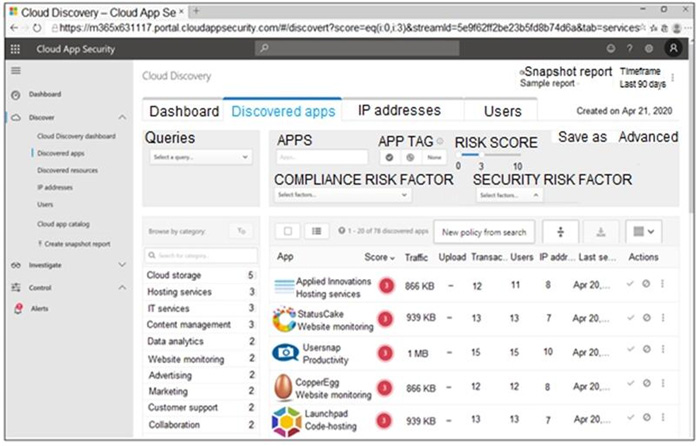
You open the Cloud App Security portal as shown in the following exhibit.
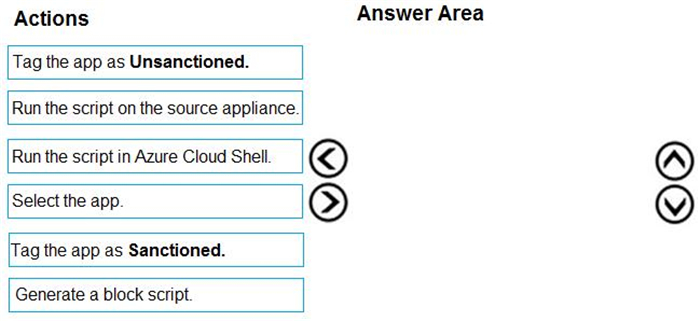
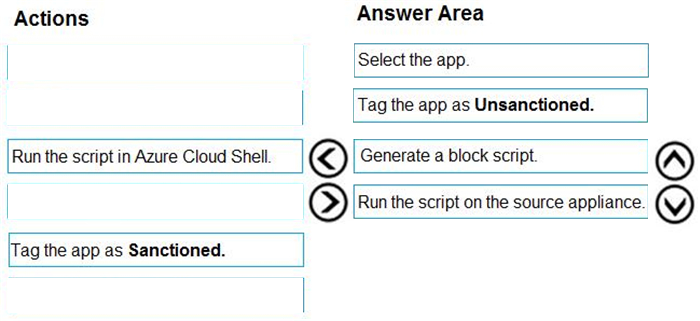
You need to remediate the risk for the Launchpad app.
Which four actions should you perform in sequence? To answer, move the appropriate actions from the list of actions to the answer area and arrange them in the correct order.
You have a Microsoft 365 E5 subscription that uses Microsoft Defender 365.
You need to ensure that you can investigate threats by using data in the unified audit log of Microsoft Defender for Cloud Apps.
What should you configure first?
A
the User enrichment settings
B
the Azure connector
C
the Office 365 connector
D
the Automatic log upload settings
Reveal answer detailsClose answer details
Correct answerC
Explanation
How to connect Microsoft 365 to Defender for Cloud Apps 1. In the Microsoft 365 Defender portal, select Settings. Then choose Cloud Apps. Under Connected apps, select App Connectors.
2. In the App connectors page, select +Connect an app, and then select Microsoft 365.
3. In the Select Microsoft 365 components page, select the options you require, and then select Connect.
4. On the Follow the link page, select Connect Microsoft 365.
5. After Microsoft 365 is displayed as successfully connected, select Done.
6. In the Microsoft 365 Defender portal, select Settings. Then choose Cloud Apps. Under Connected apps, select App Connectors. Make sure the status of the connected App Connector is Connected.
You have an Azure subscription that contains a user named User1 and a Microsoft Sentinel workspace named WS1.
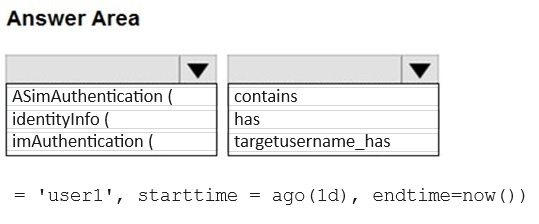
You deploy Advanced Security Information Model (ASIM) authentication parsers to WS1.
You need to use the parsers to query the authentication events generated by User1 during the last 24 hours. The solution must maximize the performance of the query.
How should you complete the query? To answer, select the appropriate options in the answer area.
NOTE: Each correct selection is worth one point.
Reveal answer detailsClose answer details
Question 51
Hotspot
HOTSPOT
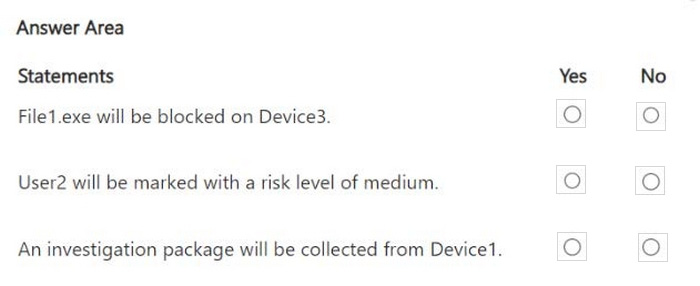
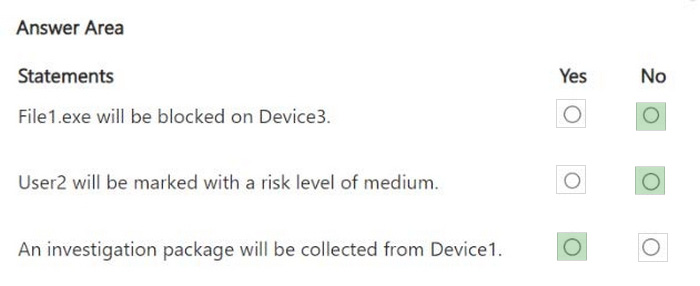
You have a Microsoft 365 subscription that contains three users named User1, User2 and User3 and the resources shown in the following table.
You have a Microsoft Defender XDR detection rule named Rule1 that has the following configurations:
1. Scope:DevGroup1 2. File hash: File1.exe 3. Actions o Devices: Collect investigation package 4. User: Mark as compromised 5. Files: Block
Each user attempts to run File1.exe on their device.
For each of the following statements, select Yes if the statement is true. Otherwise, select No. NOTE: Each correct selection is worth one point.
Reveal answer detailsClose answer details
Question 52
Single choice
You have a Microsoft Sentinel workspace named SW1.
In SW1, you investigate an incident that is associated with the following entities:
1. Host 2. IP address 3. User account 4. Malware name
Which entity can be labeled as an indicator of compromise (IoC) directly from the incident's page?
A
malware name
B
host
C
user account
D
IP address
Reveal answer detailsClose answer details
Correct answerD
Question 53
Single choice
You have 1,000 on-premises Windows 11 Pro devices that are onboarded to Microsoft Defender for Endpoint.
You have a Microsoft 365 subscription that uses Microsoft Defender XDR.
You identify that an attacker performed the following actions on a device:
1. Modified the filesystem path of a registry-based antivirus exclusion 2. Downloaded a malicious file to the file system path
You initiate a live response session on the device.
You need to undo the registry change.
Which command should you run?
A
remediate
B
registry
C
scan
D
analyze
Reveal answer detailsClose answer details
Correct answerA
Question 54
Single choice
You have a Microsoft 365 subscription that uses Azure Defender.
You have 100 virtual machines in a resource group named RG1.
You assign the Security Admin roles to a new user named SecAdmin1.
You need to ensure that SecAdmin1 can apply quick fixes to the virtual machines by using Azure Defender. The solution must use the principle of least privilege.
Which role should you assign to SecAdmin1?
A
the Security Reader role for the subscription
B
the Contributor for the subscription
C
the Contributor role for RG1
D
the Owner role for RG1
Reveal answer detailsClose answer details
Correct answerC
Question 55
Single choice
You have a Microsoft Sentinel workspace named workspace1 that contains custom Kusto queries.
You need to create a Python-based Jupyter notebook that will create visuals. The visuals will display the results of the queries and be pinned to a dashboard. The solution must minimize development effort.
What should you use to create the visuals?
A
plotly
B
TensorFlow
C
msticpy
D
matplotlib
Reveal answer detailsClose answer details
Correct answerC
Explanation
msticpy is a library for InfoSec investigation and hunting in Jupyter Notebooks. It includes functionality to: query log data from multiple sources. enrich the data with Threat Intelligence, geolocations and Azure resource data. extract Indicators of Activity (IoA) from logs and unpack encoded data.
MSTICPy reduces the amount of code that customers need to write for Microsoft Sentinel, and provides:
Data query capabilities, against Microsoft Sentinel tables, Microsoft Defender for Endpoint, Splunk, and other data sources. Threat intelligence lookups with TI providers, such as VirusTotal and AlienVault OTX. Enrichment functions like geolocation of IP addresses, Indicator of Compromise (IoC) extraction, and WhoIs lookups. Visualization tools using event timelines, process trees, and geo mapping. Advanced analyses, such as time series decomposition, anomaly detection, and clustering.
Your on-premises network contains two Active Directory Domain Services (AD DS) domains named contoso.com and fabrikam.com. Contoso.com contains a group named Group1. Fabrikam.com contains a group named Group2.
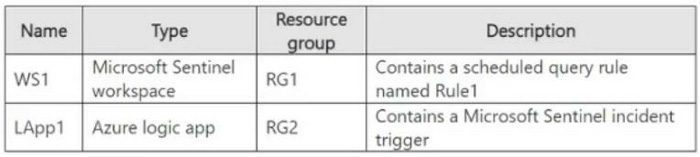
You have a Microsoft Sentinel workspace named WS1 that contains a scheduled query rule named Rule1. Rule1 generates alerts in response to anomalous AD DS security events. Each alert creates an incident.
You need to implement an incident triage solution that meets the following requirements:
1. Security incidents from contoso.com must be assigned to Group1.
2. Security incidents from fabrikam.com must be assigned to Group2. 3. Administrative effort must be minimized.
What should you include in the solution?
A
a playbook that is triggered by the creation of an incident
B
a playbook that is triggered by the creation of an alert
C
one automation rule assigned to Rule1
D
two automation rules assigned to Rule1
Reveal answer detailsClose answer details
Correct answerD
Question 57
Drag & drop
DRAG DROP
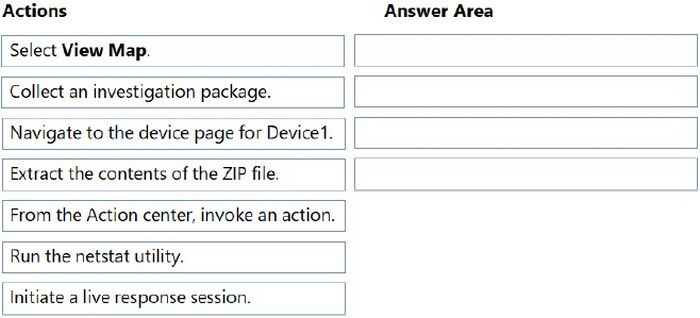
You have an on-premises Windows 11 Pro device named Device1 that is onboarded to Microsoft Defender for Endpoint.
You have a Microsoft 365 subscription.
You need to identify the processes running on Device1 and which network connections the processes have open.
The solution must minimize administrative effort.
Which four actions should you perform in the Microsoft Defender portal in sequence? To answer, move the appropriate actions from the list of actions to the answer area and arrange them in the correct order.
Reveal answer detailsClose answer details
Question 58
Multiple choice
You have a Microsoft Sentinel workspace.
You need to prevent a built-in Advanced Security Information Model (ASIM) parser from being updated automatically.
What are two ways to achieve this goal? Each correct answer presents a complete solution.
NOTE: Each correct selection is worth one point.
A
Redeploy the built-in parse and specify a CallerContext parameter of any and a SourceSpecificParse parameter of any.
B
Create a hunting query that references the built-in parse.
C
Redeploy the built-in parse and specify a CallerContext parameter of built-in.
D
Build a custom unify parse and include the build-parse version
E
Create an analytics rule that includes the built-in parse
Reveal answer detailsClose answer details
Correct answersA, D
Question 59
Single choice
You have a Microsoft 365 subscription that uses Microsoft Defender for Cloud Apps and has Cloud Discovery enabled.
You need to enrich the Cloud Discovery data. The solution must ensure that usernames in the Cloud Discovery traffic logs are associated with the user principal name (UPN) of the corresponding Microsoft Entra ID user accounts.
What should you do first?
A
From Conditional Access App Control, configure User monitoring.
B
Create a Microsoft 365 app connector.
C
Enable automatic redirection to Microsoft 365 Defender.
D
Create an Azure app connector.
Reveal answer detailsClose answer details
Correct answerB
Question 60
Drag & drop
DRAG DROP
You have an Azure Sentinel deployment.
You need to query for all suspicious credential access activities.
Which three actions should you perform in sequence? To answer, move the appropriate actions from the list of actions to the answer area and arrange them in the correct order.
You have an Azure subscription that uses Microsoft Defender for Endpoint.
You need to ensure that you can allow or block a user-specified range of IP addresses and URLs.
What should you enable first in the advanced features from the Endpoints Settings in the Microsoft 365 Defender portal?
A
endpoint detection and response (EDR) in block mode
B
custom network indicators
C
web content filtering
D
Live response for servers
Reveal answer detailsClose answer details
Correct answerB
Explanation
Custom network indicators Configures devices to allow or block connections to IP addresses, domains, or URLs in your custom indicator lists. To use this feature, devices must be running Windows 10 version 1709 or later. They should also have network protection in block mode and version 4.18.1906.3 or later of the antimalware platform (see KB 4052623). Note that network protection leverages reputation services that process requests in locations that might be outside of the location you have selected for your Microsoft Defender for Endpoint data.
You have a Microsoft 365 subscription that uses Microsoft Defender XDR.
You need to create a custom detection rule that will identify devices that had more than five antivirus detections within the last 24 hours.
How should you complete the query? To answer, select the appropriate options in the answer area.
NOTE: Each correct selection is worth one point.
Correct Answer:
QUESTION 3
You have a Microsoft Sentinel workspace named SW1.
You need to identify which anomaly rules are enabled in SW1.
What should you review in Microsoft Sentinel?
A.
Content hub
B.
Entity behavior
C.
Analytics
D.
Settings
Correct Answer: C
QUESTION 4
Your company uses Azure Sentinel to manage alerts from more than 10,000 IoT devices.
A security manager at the company reports that tracking security threats is increasingly difficult due to the large number of incidents.
You need to recommend a solution to provide a custom visualization to simplify the investigation of threats and to infer threats by using machine learning.
You have a Microsoft 365 E5 subscription that has a Conditional Access policy named Policy1. You need to perform the following actions:
1. Create a Conditional Access App Control custom policy named Custom1. 2. Configure Policy1 to use Custom1.
What should you use co create Custom1, and in which settings of Policy1 should you enable Conditional Access App Control?
To answer, select the appropriate options in the answer area. NOTE: Each correct selection is worth one point.
Correct Answer:
QUESTION 6
HOTSPOT
You need to use an Azure Resource Manager template to create a workflow automation that will trigger an automatic remediation when specific security alerts are received by Azure Security Center.
How should you complete the portion of the template that will provision the required Azure resources? To answer, select the appropriate options in the answer area.
Note: This section contains one or more sets of questions with the same scenario and problem. Each question presents a unique solution to the problem. You must determine whether the solution meets the
stated goals. More than one solution in the set might solve the problem. It is also possible that none of the solutions in the set solve the problem.
After you answer a question in this section, you will NOT be able to return. As a result, these questions do not appear on the Review Screen.
You have a Microsoft 365 subscription.
You have 1,000 Windows devices that have a third-party antivirus product installed and Microsoft Defender Antivirus in passive mode.
You need to ensure that the devices are protected from malicious artifacts that were undetected by the third-party antivirus product.
Solution: You enable automated investigation and response (AIR).
Does this meet the goal?
A.
Yes
B.
No
Correct Answer: B
QUESTION 8
You have a Microsoft 365 subscription that uses Microsoft Purview and Microsoft Teams.
You have a team named Team1 that has a project named Project1.
You need to identify any Project1 files that were stored on the team site of Team1 between February 1, 2023, and February 10, 2023.
AuditLogs - | where Timestamp > ago(10d) | where FileName contains "Project1"
D.
AuditLogs - | where Timestamp between (datetime(2023-02-01)..datetime(2023-02-10)) | where FileName contains "Project1"
Correct Answer: B
Case Study 4
Case Study Questions
Overview Adatum Corporation is a United States-based financial services company that has regional offices in New York, Chicago, and San Francisco.
Existing Environment
Identity Environment
The on-premises network contains an Active Directory Domain Services (AD DS) forest named corp.adatum.com that syncs with an Azure AD tenant named adatum.com. All user and group management tasks are performed in corp.adatum.com. The corp.adatum.com domain contains a group named Group1 that syncs with adatum.com.
Licensing Status
All the users at Adatum are assigned a Microsoft 365 ES license and an Azure Active Directory Premium P2 license.
Cloud Environment
The cloud environment contains a Microsoft 365 subscription, an Azure subscription linked to the adatum.com tenant, and the resources shown in the following table.
On-premises Environment
The on-premises network contains the resources shown in the following table.
Requirements
Planned changes
Adatum plans to perform the following changes:
Implement a query named rulequery1 that will include the following KQL query.
Implement a Microsoft Sentinel scheduled rule that generates incidents based on rulequery1.
Microsoft Defender for Cloud Requirements
Adatum identifies the following Microsoft Defender for Cloud requirements:
1. The members of Group1 must be able to enable Defender for Cloud plans and apply regulatory compliance initiatives. 2. Microsoft Defender for Servers Plan 2 must be enabled on all the Azure virtual machines. 3. Server2 must be excluded from agentless scanning.
Microsoft Sentinel Requirements
Adatum identifies the following Microsoft Sentinel requirements:
1. Implement an Advanced Security Information Model (ASIM) query that will return a count of DNS requests that results in an NXDOMAIN response from Infoblox1. 2. Ensure that multiple alerts generated by rulequery1 in response to a single user launching Azure Cloud Shell multiple times are consolidated as a single incident. 3. Implement the Windows Security Events via AMA connector for Microsoft Sentinel and configure it to monitor the Security event log of Server1. 4. Ensure that incidents generated by rulequery1 are closed automatically if Azure Cloud Shell is launched by the company's SecOps team. 5. Implement a custom Microsoft Sentinel workbook named Workbook1 that will include a query to dynamically retrieve data from Webapp1. 6. Implement a Microsoft Sentinel near-real-time (NRT) analytics rule that detects sign-ins to a designated break glass account. 7. Ensure that HuntingQuery1 runs automatically when the Hunting page of Microsoft Sentinel in the
Azure portal is accessed. 8. Ensure that higher than normal volumes of password resets for corp.adatum.com user accounts are detected. 9. Minimize the overhead associated with queries that use ASIM parsers. 10. Ensure that the Group1 members can create and edit playbooks. 11. Use built-in ASIM parsers whenever possible.
Business Requirements
Adatum identifies the following business requirements:
1. Follow the principle of least privilege whenever possible. 2. Minimize administrative effort whenever possible.
QUESTION 9
HOTSPOT
You need to implement the ASIM query for DNS requests. The solution must meet the Microsoft Sentinel requirements. How should you configure the query? To answer, select the appropriate options in the answer area. NOTE: Each correct selection is worth one point.
Correct Answer:
Case Study 2
Case Study Questions
Overview
Litware Inc. is a renewable company.
Litware has offices in Boston and Seattle. Litware also has remote users located across the United States. To access Litware resources, including cloud resources, the remote users establish a VPN connection to either office.
Existing Environment
Identity Environment
The network contains an Active Directory forest named litware.com that syncs to an Azure Active Directory (Azure AD) tenant named litware.com.
Microsoft 365 Environment
Litware has a Microsoft 365 E5 subscription linked to the litware.com Azure AD tenant. Microsoft Defender for Endpoint is deployed to all computers that run Windows 10. All Microsoft Cloud App Security built-in anomaly detection policies are enabled.
Azure Environment
Litware has an Azure subscription linked to the litware.com Azure AD tenant. The subscription contains resources in the East US Azure region as shown in the following table.
Network Environment
Each Litware office connects directly to the internet and has a site-to-site VPN connection to the virtual networks in the Azure subscription.
On-premises Environment
The on-premises network contains the computers shown in the following table.
Current problems
Cloud App Security frequently generates false positive alerts when users connect to both offices simultaneously.
Planned Changes
Litware plans to implement the following changes:
1. Create and configure Azure Sentinel in the Azure subscription. 2. Validate Azure Sentinel functionality by using Azure AD test user accounts.
Business Requirements
Litware identifies the following business requirements:
1. The principle of least privilege must be used whenever possible. 2. Costs must be minimized, as long as all other requirements are met. 3. Logs collected by Log Analytics must provide a full audit trail of user activities. 4. All domain controllers must be protected by using Microsoft Defender for Identity.
Azure Information Protection Requirements
All files that have security labels and are stored on the Windows 10 computers must be available from the Azure Information Protection - Data discovery dashboard.
Microsoft Defender for Endpoint requirements
All Cloud App Security unsanctioned apps must be blocked on the Windows 10 computers by using Microsoft Defender for Endpoint.
Microsoft Cloud App Security requirements
Cloud App Security must identify whether a user connection is anomalous based on tenant-level data.
Azure Defender Requirements
All servers must send logs to the same Log Analytics workspace.
Azure Sentinel Requirements
Litware must meet the following Azure Sentinel requirements:
1. Integrate Azure Sentinel and Cloud App Security. 2. Ensure that a user named admin1 can configure Azure Sentinel playbooks. 3. Create an Azure Sentinel analytics rule based on a custom query. The rule must automatically initiate the execution of a playbook. 4. Add notes to events that represent data access from a specific IP address to provide the ability to
reference the IP address when navigating through an investigation graph while hunting. 5. Create a test rule that generates alerts when inbound access to Microsoft Office 365 by the Azure AD test user accounts is detected. Alerts generated by the rule must be grouped into individual incidents, with one incident per test user account.
QUESTION 10
HOTSPOT
You need to configure the Azure Sentinel integration to meet the Azure Sentinel requirements.
What should you do? To answer, select the appropriate options in the answer area.
Note: This question is part of a series of questions that present the same scenario. Each question in the series contains a unique solution that might meet the stated goals. Some question sets might have more than one correct solution, while others might not have a correct solution.
After you answer a question in this section, you will NOT be able to return to it. As a result, these questions will not appear in the review screen.
You are configuring Azure Sentinel.
You need to create an incident in Azure Sentinel when a sign-in to an Azure virtual machine from a malicious IP address is detected.
You have a Microsoft 365 E5 subscription that uses Microsoft Defender 365.
Your network contains an on-premises Active Directory Domain Services (AD DS) domain that syncs with Azure AD.
You need to identify LDAP requests by AD DS users to enumerate AD DS objects.
How should you complete the KQL query? To answer, select the appropriate options in the answer area.
NOTE: Each correct selection is worth one point.
Correct Answer:
Explanation
Explanation/Reference:
Box 1: IdentityQueryEvents
The IdentityQueryEvents table in the advanced hunting schema contains information about queries performed against Active Directory objects, such as users, groups, devices, and domains.
Box 2: isnotempty Example: IdentityQueryEvents | where isnotempty(AccountSid) | take 100
// IdentityQueryEvents // - contains query activities performed against Active Directory objects, such as users, groups, devices, and domains monitored by Azure ATP // - Includes SAMR, DNS and LDAP requests
// ---------------
Incorrect: * IdentityInfo The IdentityInfo table in the advanced hunting schema contains information about user accounts obtained from various services, including Azure Active Directory.
* IdentityDirectoryEvents IdentityDirectoryEvents The IdentityDirectoryEvents table in the advanced hunting schema contains events involving an on-premises domain controller running Active Directory (AD). This table captures various identity-related events, like password changes, password expiration, and user principal name (UPN) changes. It also captures system events on the domain controller, like scheduling of tasks and PowerShell activity.
You have a Microsoft 365 subscription that uses Microsoft Defender for Endpoint and contains the devices shown in the following table.
You initiate a live response session on each device.
You need to collect a Defender for Endpoint investigation package from each device.
On which devices can you collect the package by running advanced live response commands from the command-line interface (CLI)?
A.
Device1 and Device2 only
B.
Device1, Device2, and Device3 only
C.
Device3 and Device4 only
D.
Device1, Devke2, Device3, and Device4
Correct Answer: C
QUESTION 15
You have a Microsoft 365 E5 subscription that uses Microsoft Copilot for Security.
You start a Copilot for Security session and enter five prompts that each provide responses.
You need to create a promptbook that will use the prompts but will NOT contain the responses. The solution must minimize administrative effort.
What should you do?
A.
Select each prompt, and then select Create promptbook.
B.
Create a new promptbook and include each prompt.
C.
Enter a new prompt that has the following input: Create a promptbook from my session prompts.
D.
Share the session, and then select Create promptbook.
Correct Answer: A
Case Study 3
Case Study Questions
Overview
Fabrikam, Inc. is a financial services company.
The company has branch offices in New York, London, and Singapore. Fabrikam has remote users located across the globe. The remote users access company resources, including cloud resources, by using a VPN connection to a branch office.
Existing Environment
Identity Environment
The network contains an Active Directory Domain Services (AD DS) forest named fabrikam.com that syncs with an Azure AD tenant named fabrikam.com. To sync the forest, Fabrikam uses Azure AD Connect with pass-through authentication enabled and password hash synchronization disabled.
The fabrikam.com forest contains two global groups named Group1 and Group2.
Microsoft 365 Environment
All the users at Fabrikam are assigned a Microsoft 365 E5 license and an Azure Active Directory Premium Plan 2 license.
Fabrikam implements Microsoft Defender for Identity and Microsoft Defender for Cloud Apps and enables log collectors.
Azure Environment
Fabrikam has an Azure subscription that contains the resources shown in the following table.
Amazon Web Services (AWS) Environment
Fabrikam has an Amazon Web Services (AWS) account named Account1. Account1 contains 100 Amazon Elastic Compute Cloud (EC2) instances that run a custom Windows Server 2022. The image includes Microsoft SQL Server 2019 and does NOT have any agents installed.
Current Issues
When the users use the VPN connections, Microsoft 365 Defender raises a high volume of impossible travel alerts that are false positives.
Defender for Identity raises a high volume of Suspected DCSync attack alerts that are false positives.
Requirements
Planned changes
Fabrikam plans to implement the following services:
1. Microsoft Defender for Cloud 2. Microsoft Sentinel
Business Requirements
Fabrikam identifies the following business requirements:
1. Use the principle of least privilege, whenever possible. 2. Minimize administrative effort.
Microsoft Defender for Cloud Apps Requirements
Fabrikam identifies the following Microsoft Defender for Cloud Apps requirements:
1. Ensure that impossible travel alert policies are based on the previous activities of each user. 2. Reduce the amount of impossible travel alerts that are false positives.
Microsoft Defender for Identity Requirements
Minimize the administrative effort required to investigate the false positive alerts.
Microsoft Defender for Cloud Requirements
Fabrikam identifies the following Microsoft Defender for Cloud requirements:
1. Ensure that the members of Group2 can modify security policies.
2. Ensure that the members of Group1 can assign regulatory compliance policy initiatives at the Azure subscription level. 3. Automate the deployment of the Azure Connected Machine agent for Azure Arc-enabled servers to the existing and future resources of Account1. 4. Minimize the administrative effort required to investigate the false positive alerts.
Microsoft Sentinel Requirements
Fabrikam identifies the following Microsoft Sentinel requirements:
1. Query for NXDOMAIN DNS requests from the last seven days by using built-in Advanced Security Information Model (ASIM) unifying parsers. 2. From AWS EC2 instances, collect Windows Security event log entries that include local group membership changes. 3. Identify anomalous activities of Azure AD users by using User and Entity Behavior Analytics (UEBA). 4. Evaluate the potential impact of compromised Azure AD user credentials by using UEBA. 5. Ensure that App1 is available for use in Microsoft Sentinel automation rules. 6. Identify the mean time to triage for incidents generated during the last 30 days. 7. Identify the mean time to close incidents generated during the last 30 days. 8. Ensure that the members of Group1 can create and run playbooks. 9. Ensure that the members of Group1 can manage analytics rules. 10. Run hunting queries on Pool1 by using Jupyter notebooks. 11. Ensure that the members of Group2 can manage incidents. 12. Maximize the performance of data queries. 13. Minimize the amount of collected data.
QUESTION 16
HOTSPOT
You need to meet the Microsoft Defender for Cloud Apps requirements.
What should you do? To answer, select the appropriate options in the answer area.
NOTE: Each correct selection is worth one point.
Correct Answer:
QUESTION 17
Note: This question is part of a series of questions that present the same scenario. Each question in the series contains a unique solution that might meet the stated goals. Some question sets might have more than one correct solution, while others might not have a correct solution.
After you answer a question in this section, you will NOT be able to return to it. As a result, these questions will not appear in the review screen.
You use Azure Security Center. You receive a security alert in Security Center.
You need to view recommendations to resolve the alert in Security Center.
Solution: From Security alerts, you select the alert, select Take Action, and then expand the Mitigate the threat section.
You provision Azure Sentinel for a new Azure subscription.
You are configuring the Security Events connector.
While creating a new rule from a template in the connector, you decide to generate a new alert for every event.
You create the following rule query.
By which two components can you group alerts into incidents? Each correct answer presents a complete solution.
NOTE: Each correct selection is worth one point.
A.
user
B.
resource group
C.
IP address
D.
computer
Correct Answer: AD
Explanation
Explanation/Reference:
To group alerts into incidents in Azure Sentinel, you can use any combination of the available grouping fields. In this case, since the rule query does not include information on resource groups or IP addresses, only user and computer can be used to group alerts into incidents.
Grouping alerts by user and computer can help you identify patterns of activity and better understand the scope and impact of potential security threats. By grouping alerts into incidents, you can also more easily manage and track your response to security incidents.
QUESTION 19
You have a Microsoft 365 E5 subscription that contains the users shown in the following table.
You configure Microsoft Entra Internet Access.
Which users can manage Microsoft Entra Internet Access?
A.
User1 only
B.
User2 only
C.
User3 only
D.
User1 and User2 only
E.
User1, User2 and User3
Correct Answer: D
Case Study 3
Case Study Questions
Overview
Fabrikam, Inc. is a financial services company.
The company has branch offices in New York, London, and Singapore. Fabrikam has remote users located across the globe. The remote users access company resources, including cloud resources, by using a VPN connection to a branch office.
Existing Environment
Identity Environment
The network contains an Active Directory Domain Services (AD DS) forest named fabrikam.com that syncs with an Azure AD tenant named fabrikam.com. To sync the forest, Fabrikam uses Azure AD Connect with pass-through authentication enabled and password hash synchronization disabled.
The fabrikam.com forest contains two global groups named Group1 and Group2.
Microsoft 365 Environment
All the users at Fabrikam are assigned a Microsoft 365 E5 license and an Azure Active Directory Premium Plan 2 license.
Fabrikam implements Microsoft Defender for Identity and Microsoft Defender for Cloud Apps and enables log collectors.
Azure Environment
Fabrikam has an Azure subscription that contains the resources shown in the following table.
Amazon Web Services (AWS) Environment
Fabrikam has an Amazon Web Services (AWS) account named Account1. Account1 contains 100 Amazon Elastic Compute Cloud (EC2) instances that run a custom Windows Server 2022. The image includes Microsoft SQL Server 2019 and does NOT have any agents installed.
Current Issues
When the users use the VPN connections, Microsoft 365 Defender raises a high volume of impossible travel alerts that are false positives.
Defender for Identity raises a high volume of Suspected DCSync attack alerts that are false positives.
Requirements
Planned changes
Fabrikam plans to implement the following services:
1. Microsoft Defender for Cloud 2. Microsoft Sentinel
Business Requirements
Fabrikam identifies the following business requirements:
1. Use the principle of least privilege, whenever possible. 2. Minimize administrative effort.
Microsoft Defender for Cloud Apps Requirements
Fabrikam identifies the following Microsoft Defender for Cloud Apps requirements:
1. Ensure that impossible travel alert policies are based on the previous activities of each user. 2. Reduce the amount of impossible travel alerts that are false positives.
Microsoft Defender for Identity Requirements
Minimize the administrative effort required to investigate the false positive alerts.
Microsoft Defender for Cloud Requirements
Fabrikam identifies the following Microsoft Defender for Cloud requirements:
1. Ensure that the members of Group2 can modify security policies.
2. Ensure that the members of Group1 can assign regulatory compliance policy initiatives at the Azure subscription level. 3. Automate the deployment of the Azure Connected Machine agent for Azure Arc-enabled servers to the existing and future resources of Account1. 4. Minimize the administrative effort required to investigate the false positive alerts.
Microsoft Sentinel Requirements
Fabrikam identifies the following Microsoft Sentinel requirements:
1. Query for NXDOMAIN DNS requests from the last seven days by using built-in Advanced Security Information Model (ASIM) unifying parsers. 2. From AWS EC2 instances, collect Windows Security event log entries that include local group membership changes. 3. Identify anomalous activities of Azure AD users by using User and Entity Behavior Analytics (UEBA). 4. Evaluate the potential impact of compromised Azure AD user credentials by using UEBA. 5. Ensure that App1 is available for use in Microsoft Sentinel automation rules. 6. Identify the mean time to triage for incidents generated during the last 30 days. 7. Identify the mean time to close incidents generated during the last 30 days. 8. Ensure that the members of Group1 can create and run playbooks. 9. Ensure that the members of Group1 can manage analytics rules. 10. Run hunting queries on Pool1 by using Jupyter notebooks. 11. Ensure that the members of Group2 can manage incidents. 12. Maximize the performance of data queries. 13. Minimize the amount of collected data.
QUESTION 20
You have an Azure subscription that uses Microsoft Defender for Cloud.
You have a GitHub account named Account1 that contains 10 repositories.
You need to ensure that Defender for Cloud can access the repositories in Account1.
What should you do first in the Microsoft Defender for Cloud portal?
A.
Enable integrations.
B.
Enable a plan.
C.
Add an environment.
D.
Enable security policies.
Correct Answer: C
Explanation
Explanation/Reference:
Connect your GitHub repositories to Microsoft Defender for Cloud
Connect your GitHub account To connect your GitHub account to Microsoft Defender for Cloud:
1. Sign in to the Azure portal. 2. Go to Microsoft Defender for Cloud > Environment settings. 3. Select Add environment. 4. Select GitHub. 5. Enter a name (limit of 20 characters), and then select your subscription, resource group, and region. 6. Etc.
You have a Microsoft 365 E5 subscription that uses Microsoft SharePoint Online.
You delete users from the subscription.
You need to be notified if the deleted users downloaded numerous documents from SharePoint Online sites during the month before their accounts were deleted.
What should you use?
A.
a file policy in Microsoft Defender for Cloud Apps
B.
an access review policy
C.
an alert policy in Microsoft Defender for Office 365
D.
an insider risk policy
Correct Answer: C
Explanation
Explanation/Reference:
Alert policies let you categorize the alerts that are triggered by a policy, apply the policy to all users in your organization, set a threshold level for when an alert is triggered, and decide whether to receive email notifications when alerts are triggered.
Default alert policies include: Unusual external user file activity - Generates an alert when an unusually large number of activities are performed on files in SharePoint or OneDrive by users outside of your organization. This includes activities such as accessing files, downloading files, and deleting files. This policy has a High severity setting.
You have a Microsoft Sentinel workspace that contains an Azure AD data connector.
You need to associate a bookmark with an Azure AD-related incident.
What should you do? To answer, drag the appropriate blades to the correct tasks. Each blade may be used once, more than once, or not at all. You may need to drag the split bar between panes or scroll to view content
NOTE: Each correct selection is worth one point.
Correct Answer:
Explanation
Explanation/Reference:
Box 1: Hunting blade Create a bookmark
Add a bookmark 1. In the Azure portal, navigate to Microsoft Sentinel > Threat management > Hunting to run queries for suspicious and anomalous behavior.
2. Select one of the hunting queries and on the right, in the hunting query details, select Run Query.
3. Select View query results. For example:
This action opens the query results in the Logs pane.
4. From the log query results list, use the checkboxes to select one or more rows that contain the information you find interesting.
5. Select Add bookmark:
6. On the right, in the Add bookmark pane, optionally, update the bookmark name, add tags, and notes to help you identify what was interesting about the item.
7. Etc.
Box 2: Hunting blade Associate a bookmark with incident
You can also create an incident from one or more bookmarks, or add one or more bookmarks to an existing incident. Select a checkbox to the left of any bookmarks you want to use, and then select Incident actions > Create new incident or Add to existing incident. Triage and investigate the incident like any other.
Note: Add bookmarks to a new or existing incident 1. In the Azure portal, navigate to Microsoft Sentinel > Threat management > Hunting > Bookmarks tab, and select the bookmark or bookmarks you want to add to an incident.
2. Select Incident actions from the command bar:
3. Select either Create new incident or Add to existing incident, as appropriate. Then:
For a new incident: Optionally update the details for the incident, and then select Create. For adding a bookmark to an existing incident: Select one incident, and then select Add.
To view the bookmark within the incident: Navigate to Microsoft Sentinel > Threat management > Incidents and select the incident with your bookmark. Select View full details, and then select the Bookmarks tab.
You have a Microsoft 365 E5 subscription that contains a Microsoft SharePoint Online site named Site1.
You need to enable Microsoft Defender for Cloud Apps session control for Site1.
Which type of policy should you create first?
A.
access
B.
session
C.
app governance
D.
Conditional Access
Correct Answer: B
QUESTION 24
You have an Azure subscription that uses Microsoft Sentinel.
You detect a new threat by using a hunting query.
You need to ensure that Microsoft Sentinel automatically detects the threat. The solution must minimize administrative effort.
What should you do?
A.
Create a playbook.
B.
Create a watchlist.
C.
Create an analytics rule.
D.
Add the query to a workbook.
Correct Answer: C
Explanation
Explanation/Reference:
By creating an analytics rule, you can set up a query that will automatically run and alert you when the threat is detected, without having to manually run the query. This will help minimize administrative effort, as you can set up the rule once and it will run on a schedule, alerting you when the threat is detected. References: https://docs.microsoft.com/en-us/azure/sentinel/analytics-create-rule
QUESTION 25
You have a Microsoft 365 subscription that uses Microsoft Defender XDR. Microsoft Purview, and Exchange Online.
You have a partner company named Contoso, Ltd.
You need to review all the emails that contain PDF attachments and were received from Contoso during the past month. The solution must minimize administrative effort.
What should you use?
A.
Advanced Hunting
B.
Content explorer
C.
Content search
D.
Activity explorer
Correct Answer: C
QUESTION 26
HOTSPOT
You have an Azure DevOps organization that uses Microsoft Defender for DevOps. The organization contains an Azure DevOps repository named Repo1 and an Azure Pipelines pipeline named Pipeline1. Pipeline1 is used to build and deploy code stored in Repo1.
You need to ensure that when Pipeline1 runs, Microsoft Defender for Cloud can perform secret scanning of the code in Repo1.
What should you install in the organization, and what should you add to the YAML file of Pipeline"!? To answer, select the appropriate options in the answer area.
NOTE: Each correct selection is worth one point.
Correct Answer:
QUESTION 27
You have an Azure Sentinel deployment in the East US Azure region.
You create a Log Analytics workspace named LogsWest in the West US Azure region.
You need to ensure that you can use scheduled analytics rules in the existing Azure Sentinel deployment to generate alerts based on queries to LogsWest.
What should you do first?
A.
Deploy Azure Data Catalog to the West US Azure region.
B.
Modify the workspace settings of the existing Azure Sentinel deployment.
C.
Add Azure Sentinel to a workspace.
D.
Create a data connector in Azure Sentinel.
Correct Answer: C
Explanation
Explanation/Reference:
Cross-workspace queries can now be included in scheduled analytics rules. You can use cross-workspace analytics rules in a central SOC, and across tenants (using Azure Lighthouse) as in the case of an MSSP, subject to the following limitations:
1. Up to 20 workspaces can be included in a single query. 2. Azure Sentinel must be deployed on every workspace referenced in the query. 3. Alerts generated by a cross-workspace analytics rule, and the incidents created from them, exist only in the workspace where the rule was defined. They will not be displayed in any of the other workspaces referenced in the query.
You plan to create a custom Azure Sentinel query that will track anomalous Azure Active Directory (Azure AD) sign-in activity and present the activity as a time chart aggregated by day.
You need to create a query that will be used to display the time chart.
You have an Azure subscription named Sub1 that is linked to a Microsoft Entra tenant named contoso.com. Contoso.com contains a user named User1. Sub1 contains a Microsoft Sentinel workspace.
You provision a Microsoft Copilot for Security capacity. You need to ensure that User1 can use Copilot for Security to perform the following tasks:
1. Update the data sharing and feedback options. 2. Investigate Microsoft Sentinel incidents.
The solution must follow the principle of least privilege.
Which role should you assign to User1 for each task?
To answer, select the appropriate options in the answer area. NOTE: Each correct selection is worth one
point.
Correct Answer:
QUESTION 33
You have a Microsoft 365 subscription that contains a user named User1 and two Windows devices named Device1 and Device2. Device1 and Device2 are onboarded to Microsoft Defender for Endpoint.
The following events occur.
1. User1 signs in to Device1. 2. Automatic attack disruption in Microsoft Defender XDR responds to an attack on Device1 and contains User1. 3. User1 attempts to connect to Device2.
Which protocols will Device2 block when User1 attempts to connect to Device2?
A.
RDP only
B.
RPC only
C.
SMB only
D.
RDP and RPC only
E.
SMB and RPC only
F.
RDP, RPC, and SMB
Correct Answer: F
QUESTION 34
You have an Azure Sentinel workspace.
You need to test a playbook manually in the Azure portal. From where can you run the test in Azure Sentinel?
You have two Azure subscriptions that use Microsoft Defender for Cloud.
You need to ensure that specific Defender for Cloud security alerts are suppressed at the root management group level. The solution must minimize administrative effort.
What should you do in the Azure portal?
A.
Create an Azure Policy assignment.
B.
Modify the Workload protections settings in Defender for Cloud.
C.
Create an alert rule in Azure Monitor.
D.
Modify the alert settings in Defender for Cloud.
Correct Answer: A
Explanation
Explanation/Reference:
You can use alerts suppression rules to suppress false positives or other unwanted security alerts from Defender for Cloud.
Note: To create a rule directly in the Azure portal:
1. From Defender for Cloud's security alerts page: Select the specific alert you don't want to see anymore, and from the details pane, select Take action. Or, select the suppression rules link at the top of the page, and from the suppression rules page select Create new suppression rule:
2. In the new suppression rule pane, enter the details of your new rule. Your rule can dismiss the alert on all resources so you don't get any alerts like this one in the future. Your rule can dismiss the alert on specific criteria - when it relates to a specific IP address, process name, user account, Azure resource, or location.
You have a Microsoft 365 E5 subscription that uses Microsoft Defender for Identity.
From the Microsoft Defender portal, you investigate an incident on a device named Device1 of a user named User1. The incident contains the following Defender for Identity alert.
Suspected identity theft (pass-the-ticket) (external ID 2018)
You need to contain the incident without affecting users and devices. The solution must minimize administrative effort.
What should you do?
A.
Disable User1 only.
B.
Quarantine Device1 only.
C.
Reset the password for all the accounts that previously signed in to Device1.
D.
Disable User1 and quarantine Device1.
E.
Disable User1, quarantine Device1, and reset the password for all the accounts that previously signed in to Device1.
Correct Answer: E
QUESTION 37
HOTSPOT
You have a Microsoft Sentinel workspace named sws1.
You need to create a query that will detect when a user creates an unusually large numbers of Azure AD user accounts.
How should you complete the query? To answer, select the appropriate options in the answer area.
NOTE: Each correct selection is worth one point.
Correct Answer:
QUESTION 38
DRAG DROP
You have a Microsoft Sentinel workspace named SW1.
In SW1, you enable User and Entity Behavior Analytics (UEBA).
You need to use KQL to perform the following tasks:
1. View the entity data that has fields for each type of entity. 2. Assess the quality of rules by analyzing how well a rule performs.
Which table should you use in KQL for each task? To answer, drag the appropriate tables to the correct tasks. Each table may be used once, more than once, or not at all. You may need to drag the split bar between panes or scroll to view content.
NOTE: Each correct selection is worth one point.
Correct Answer:
QUESTION 39
HOTSPOT
You have an Azure DevOps organization that contains an Azure Repos repository named Repo1 and is onboarded to Microsoft Defender for DevOps.
You create infrastructure as code (IaC) files and store them in Repo1. The IaC files are formatted as Bicep files and Helm charts.
You need to configure Defender for DevOps to identify misconfigurations in the IaC files.
Which scanning tool should you use for each type of files? To answer, select the appropriate options in the answer area.
NOTE: Each correct selection is worth one point.
Correct Answer:
QUESTION 40
HOTSPOT
You have an on-premises Linux server that runs a background process named App1 and has the Azure Connected Machine agent installed. You have a Microsoft Sentinel workspace named WS1.
You need to configure a data collection rule (DCR) named DCR1 that will use the Syslog via AMA connector to collect messages related to App1.
The solution must meet the following requirements:
1. Only collect messages that have a priority level of critical. 2. Minimize the volume of data collected.
Which facility and log level should you configure for DCR1? To answer, select the appropriate options in the answer area.
NOTE: Each correct selection is worth one point.
Correct Answer:
QUESTION 41
Note: This section contains one or more sets of questions with the same scenario and problem. Each question presents a unique solution to the problem. You must determine whether the solution meets the stated goals. More than one solution in the set might solve the problem. It is also possible that none of the solutions in the set solve the problem.
After you answer a question in this section, you will NOT be able to return. As a result, these questions do not appear on the Review Screen.
You have a Microsoft 365 subscription.
You have 1,000 Windows devices that have a third-party antivirus product installed and Microsoft Defender Antivirus in passive mode.
You need to ensure that the devices are protected from malicious artifacts that were undetected by the third-party antivirus product.
Solution: You configure endpoint detection and response (EDR) in block mode.
Does this meet the goal?
A.
Yes
B.
No
Correct Answer: A
QUESTION 42
You have a third-party security information and event management (SIEM) solution.
You need to ensure that the SIEM solution can generate alerts for Azure Active Directory (Azure AD) sign-events in near real time.
What should you do to route events to the SIEM solution?
A.
Create an Azure Sentinel workspace that has a Security Events connector.
B.
Configure the Diagnostics settings in Azure AD to stream to an event hub.
C.
Create an Azure Sentinel workspace that has an Azure Active Directory connector.
D.
Configure the Diagnostics settings in Azure AD to archive to a storage account.
You have an Azure subscription that uses Microsoft Defender for Servers Plan 1 and contains a server named Server1.
You enable agentless scanning.
You need to prevent Server1 from being scanned. The solution must minimize administrative effort.
What should you do?
A.
Create an exclusion tag.
B.
Upgrade the subscription to Defender for Servers Plan 2.
C.
Create a governance rule.
D.
Create an exclusion group.
Correct Answer: A
Explanation
Explanation/Reference:
Exclude machines from scanning Agentless scanning applies to all of the eligible machines in the subscription. To prevent specific machines from being scanned, you can exclude machines from agentless scanning based on your pre-existing environment tags. When Defender for Cloud performs the continuous discovery for machines, excluded machines are skipped.
To configure machines for exclusion:
1. From Defender for Cloud's menu, open Environment settings.
2. Select the relevant subscription or multicloud connector.
3. For either the Defender Cloud Security Posture Management (CSPM) or Defender for Servers P2 plan, select Settings.
4. For agentless scanning, select Edit configuration.
5. Enter the tag name and value that applies to the machines that you want to exempt. You can enter multiple tag:value pairs.
6. Select Save to apply the changes.
Note: Defender for Servers Plan 1 is entry-level and must be enabled at the subscription level.
Features include: Foundational cloud security posture management (CSPM), which is provided free by Defender for Cloud.
Defender for Servers Plan 2 provides all features. The plan must be enabled at the subscription level and at the workspace level to get full feature coverage. Features include:
All the functionality that's provided by Defender for Servers Plan 1. More extended detection and response (XDR) capabilities.
Your company stores the data of every project in a different Azure subscription. All the subscriptions use the same Microsoft Entra tenant.
Every project consists of multiple Azure virtual machines that run Windows Server. The Windows events of the virtual machines are stored in a Log Analytics workspace in each machine's respective subscription.
You deploy Microsoft Sentinel to a new Azure subscription.
You need to perform hunting queries in Microsoft Sentinel to search across all the Log Analytics workspaces of all the subscriptions.
Which two actions should you perform? Each correct answer presents part of the solution. NOTE: Each correct selection is worth one point.
A.
Create a query that uses the resource expression and the alias operator.
B.
Use the alias statement.
C.
Add the Microsoft Sentinel solution to each workspace.
D.
Create a query that uses the workspace expression and the union operator.
E.
Add the Security Events connector to the Microsoft Sentinel workspace.
Correct Answer: CD
QUESTION 46
DRAG DROP
You open the Cloud App Security portal as shown in the following exhibit.
You need to remediate the risk for the Launchpad app.
Which four actions should you perform in sequence? To answer, move the appropriate actions from the list of actions to the answer area and arrange them in the correct order.
You have a Microsoft 365 E5 subscription that uses Microsoft Defender 365.
You need to ensure that you can investigate threats by using data in the unified audit log of Microsoft Defender for Cloud Apps.
What should you configure first?
A.
the User enrichment settings
B.
the Azure connector
C.
the Office 365 connector
D.
the Automatic log upload settings
Correct Answer: C
Explanation
Explanation/Reference:
How to connect Microsoft 365 to Defender for Cloud Apps 1. In the Microsoft 365 Defender portal, select Settings. Then choose Cloud Apps. Under Connected apps, select App Connectors.
2. In the App connectors page, select +Connect an app, and then select Microsoft 365.
3. In the Select Microsoft 365 components page, select the options you require, and then select Connect.
4. On the Follow the link page, select Connect Microsoft 365.
5. After Microsoft 365 is displayed as successfully connected, select Done.
6. In the Microsoft 365 Defender portal, select Settings. Then choose Cloud Apps. Under Connected apps, select App Connectors. Make sure the status of the connected App Connector is Connected.
You have an Azure subscription that contains a user named User1 and a Microsoft Sentinel workspace named WS1.
You deploy Advanced Security Information Model (ASIM) authentication parsers to WS1.
You need to use the parsers to query the authentication events generated by User1 during the last 24 hours. The solution must maximize the performance of the query.
How should you complete the query? To answer, select the appropriate options in the answer area.
NOTE: Each correct selection is worth one point.
Correct Answer:
QUESTION 51
HOTSPOT
You have a Microsoft 365 subscription that contains three users named User1, User2 and User3 and the resources shown in the following table.
You have a Microsoft Defender XDR detection rule named Rule1 that has the following configurations:
1. Scope:DevGroup1 2. File hash: File1.exe 3. Actions o Devices: Collect investigation package 4. User: Mark as compromised 5. Files: Block
Each user attempts to run File1.exe on their device.
For each of the following statements, select Yes if the statement is true. Otherwise, select No. NOTE: Each correct selection is worth one point.
Correct Answer:
QUESTION 52
You have a Microsoft Sentinel workspace named SW1.
In SW1, you investigate an incident that is associated with the following entities:
1. Host 2. IP address 3. User account 4. Malware name
Which entity can be labeled as an indicator of compromise (IoC) directly from the incident's page?
A.
malware name
B.
host
C.
user account
D.
IP address
Correct Answer: D
QUESTION 53
You have 1,000 on-premises Windows 11 Pro devices that are onboarded to Microsoft Defender for Endpoint.
You have a Microsoft 365 subscription that uses Microsoft Defender XDR.
You identify that an attacker performed the following actions on a device:
1. Modified the filesystem path of a registry-based antivirus exclusion 2. Downloaded a malicious file to the file system path
You initiate a live response session on the device.
You need to undo the registry change.
Which command should you run?
A.
remediate
B.
registry
C.
scan
D.
analyze
Correct Answer: A
QUESTION 54
You have a Microsoft 365 subscription that uses Azure Defender.
You have 100 virtual machines in a resource group named RG1.
You assign the Security Admin roles to a new user named SecAdmin1.
You need to ensure that SecAdmin1 can apply quick fixes to the virtual machines by using Azure Defender. The solution must use the principle of least privilege.
Which role should you assign to SecAdmin1?
A.
the Security Reader role for the subscription
B.
the Contributor for the subscription
C.
the Contributor role for RG1
D.
the Owner role for RG1
Correct Answer: C
QUESTION 55
You have a Microsoft Sentinel workspace named workspace1 that contains custom Kusto queries.
You need to create a Python-based Jupyter notebook that will create visuals. The visuals will display the results of the queries and be pinned to a dashboard. The solution must minimize development effort.
What should you use to create the visuals?
A.
plotly
B.
TensorFlow
C.
msticpy
D.
matplotlib
Correct Answer: C
Explanation
Explanation/Reference:
msticpy is a library for InfoSec investigation and hunting in Jupyter Notebooks. It includes functionality to: query log data from multiple sources. enrich the data with Threat Intelligence, geolocations and Azure resource data. extract Indicators of Activity (IoA) from logs and unpack encoded data.
MSTICPy reduces the amount of code that customers need to write for Microsoft Sentinel, and provides:
Data query capabilities, against Microsoft Sentinel tables, Microsoft Defender for Endpoint, Splunk, and other data sources. Threat intelligence lookups with TI providers, such as VirusTotal and AlienVault OTX. Enrichment functions like geolocation of IP addresses, Indicator of Compromise (IoC) extraction, and WhoIs lookups. Visualization tools using event timelines, process trees, and geo mapping. Advanced analyses, such as time series decomposition, anomaly detection, and clustering.
Your on-premises network contains two Active Directory Domain Services (AD DS) domains named contoso.com and fabrikam.com. Contoso.com contains a group named Group1. Fabrikam.com contains a group named Group2.
You have a Microsoft Sentinel workspace named WS1 that contains a scheduled query rule named Rule1. Rule1 generates alerts in response to anomalous AD DS security events. Each alert creates an incident.
You need to implement an incident triage solution that meets the following requirements:
1. Security incidents from contoso.com must be assigned to Group1.
2. Security incidents from fabrikam.com must be assigned to Group2. 3. Administrative effort must be minimized.
What should you include in the solution?
A.
a playbook that is triggered by the creation of an incident
B.
a playbook that is triggered by the creation of an alert
C.
one automation rule assigned to Rule1
D.
two automation rules assigned to Rule1
Correct Answer: D
QUESTION 57
DRAG DROP
You have an on-premises Windows 11 Pro device named Device1 that is onboarded to Microsoft Defender for Endpoint.
You have a Microsoft 365 subscription.
You need to identify the processes running on Device1 and which network connections the processes have open.
The solution must minimize administrative effort.
Which four actions should you perform in the Microsoft Defender portal in sequence? To answer, move the appropriate actions from the list of actions to the answer area and arrange them in the correct order.
Correct Answer:
QUESTION 58
You have a Microsoft Sentinel workspace.
You need to prevent a built-in Advanced Security Information Model (ASIM) parser from being updated automatically.
What are two ways to achieve this goal? Each correct answer presents a complete solution.
NOTE: Each correct selection is worth one point.
A.
Redeploy the built-in parse and specify a CallerContext parameter of any and a SourceSpecificParse parameter of any.
B.
Create a hunting query that references the built-in parse.
C.
Redeploy the built-in parse and specify a CallerContext parameter of built-in.
D.
Build a custom unify parse and include the build-parse version
E.
Create an analytics rule that includes the built-in parse
Correct Answer: AD
QUESTION 59
You have a Microsoft 365 subscription that uses Microsoft Defender for Cloud Apps and has Cloud Discovery enabled.
You need to enrich the Cloud Discovery data. The solution must ensure that usernames in the Cloud Discovery traffic logs are associated with the user principal name (UPN) of the corresponding Microsoft Entra ID user accounts.
What should you do first?
A.
From Conditional Access App Control, configure User monitoring.
B.
Create a Microsoft 365 app connector.
C.
Enable automatic redirection to Microsoft 365 Defender.
D.
Create an Azure app connector.
Correct Answer: B
QUESTION 60
DRAG DROP
You have an Azure Sentinel deployment.
You need to query for all suspicious credential access activities.
Which three actions should you perform in sequence? To answer, move the appropriate actions from the list of actions to the answer area and arrange them in the correct order.
You have an Azure subscription that uses Microsoft Defender for Endpoint.
You need to ensure that you can allow or block a user-specified range of IP addresses and URLs.
What should you enable first in the advanced features from the Endpoints Settings in the Microsoft 365 Defender portal?
A.
endpoint detection and response (EDR) in block mode
B.
custom network indicators
C.
web content filtering
D.
Live response for servers
Correct Answer: B
Explanation
Explanation/Reference:
Custom network indicators Configures devices to allow or block connections to IP addresses, domains, or URLs in your custom indicator lists. To use this feature, devices must be running Windows 10 version 1709 or later. They should also have network protection in block mode and version 4.18.1906.3 or later of the antimalware platform (see KB 4052623). Note that network protection leverages reputation services that process requests in locations that might be outside of the location you have selected for your Microsoft Defender for Endpoint data.