You work as a Network Administrator for Perfect Solutions Inc. The company has a Linux-based network.
You want to view the status of the current processes running on a Linux computer. You also want to save the output to the ProStat.txt file. Which of the following commands will you use to accomplish the task?
-
A
-
B
-
C
-
D
Reveal answer details
Close answer details
Correct answerC
ExplanationThe ps command reports the status of processes that are currently running on a Linux computer.
What is > command?
The > command is used for storing the output generated by different commands. It creates a file specified to store the output. If the specified file already exists, it overwrites that file.
You work as the Network Technician for Tech Perfect Inc. The company has a Linux-based network. You are currently working on vim. You opened a file in four windows in a single vim screen. You want to jump from one window to another. Which of the following key-combinations should you use to accomplish the task?
-
A
-
B
-
C
-
D
Reveal answer details
Close answer details
Correct answerC
ExplanationCtrl-w key-combination with an arrow key is used to jump from one window to another. This will move you to the next window in whichever direction the arrow would normally move your cursor. Instead of the arrow keys, you can also use vi's traditional h, j, k and l keys for the same effect. Answer options B and A are incorrect. Ctrl-w, s and Ctrl-w, v key-combinations are used to view a file in two windows in a single vim screen.
Ctrl-w, s splits the screen horizontally and Ctrl-w, v splits the screen vertically. Answer option D is incorrect. Ctrl-w, q is used to quit from your current window.
You work as the Network Administrator for Perfect solutions Inc. The company has a Linux-based Network. You are working as a root user. You want to know what the day will be on 20 July 2010. Which of the following commands should you use to accomplish this task?
-
A
-
B
-
C
-
D
Reveal answer details
Close answer details
Correct answerC
ExplanationThe cal 7 2010 command will display the calendar of July 2010.
What is the cal command?
The cal command prints an ASCII calendar of the current month.
Syntax: cal [month] [year]
Given a month and year as arguments, cal displays the calendar for that particular month of the given year.
When a single numeric argument (such as 2005) is given, cal will display a calendar for the given year.
Always use a fourdigit year. For example, the command cal 05 will display the calendar for the year 05, not the year
2005. Answer option B is incorrect. The cal 20 July command will display only the month and year, and not the date.
Answer option A is incorrect. The cal command will display the calendar of the current month.
Answer option D is incorrect. The date command will display the current date and time of the system.
Which of the following commands will you run to do case-sensitive search for files named foobar.png?
-
A
-
B
-
C
-
D
Reveal answer details
Close answer details
Correct answerD
ExplanationYou will use find -name foobar.png command to do case-senstive search for files named foobar.png.
What is the find command?
The find command can perform a search based on a variety of search limitations. It searches through one or more directory tree(s) of a filesystem, locating files based on some user-specified criteria. By default, find returns all files in the current working directory. Further, find allows a user to specify an action to be taken on each matched file. Thus, it is an extremely powerful command for applying actions to many files.
The find command can be used with a wild card (*), but it works best when we know the name of the file or directory we are looking for.
The find command can search your system for files that comply with certain numeric criteria, such as the size of the file (-size), the number of links to the file (-links), the date of the last change to the files data (- mtime), or the date of the last time the file was read (- atime). All these criteria accept a numeric value.
When a numeric value is provided to find, it looks for an exact match, more than the number, or less than the number. Answer option B is incorrect. The find -iname foobar.png command will do case-insensitive search for files named foobar.png.
Answer option C is incorrect. The grep-name foobar.png is an invalid command.
What is the grep command?
The grep command is used to search for a specific pattern of text in a file. It helps administrators in searching large amounts of text for a certain error message or name. Answer option A is incorrect. The locate -name foobar.png is an invalid command.
What is the locate command?
The locate command is used to search for matching files in a database that is usually updated daily by a cron job. On the forthcoming Linux operating systems, this command is usually replaced by the slocate command, which stores permissions as well as paths and thus prevents users from prying into directories.
One more advantage of the locate command is that it matches against any part of a pathname, not just the file itself.
You run the ps -aux command on the terminal. You get the following output: You notice that the process id 24224 is showing the status message S on the stat column. What does this indicate?
-
A
The process id 24224 is in sleeping status.
-
B
The process id 24224 is hanged.
-
C
The process id 24224 is in stopped status.
-
D
The process id 24224 is in running status.
Reveal answer details
Close answer details
Correct answerA
ExplanationAccording to the scenario, the S status message shows that the process id 24224 is in sleeping status.
The ps -aux command reports the status of processes currently running on a Linux computer. It shows the following status messages: 
Question 6
Multiple choice
You are a newly appointed Technician for company.com Inc. You are working on the Red Hat operating system. As you are about to leave for some important work, you want to shut down your system immediately. Which of the following commands can you use to accomplish this? Each correct answer represents a complete solution. Choose all that apply.
-
A
-
B
-
C
-
D
Reveal answer details
Close answer details
Correct answersA, C, D
ExplanationThe shutdown -h now, halt -h, and poweroff -h commands can be used to shut down the Red Hat operating system immediately.
Answer option B is incorrect. This is an invalid answer and hence cannot be used to shut down the system.
Question 7
Fill in the blank
Fill in the blank with the command to complete the statement below. Do not enter the full path of the command. The ___________ command is used to remove the print jobs that have been queued for printing by using a secure connection.
Reveal answer details
Close answer details
Accepted answerlprm -E
ExplanationThe lprm command is used to remove the print jobs that have been queued for printing. If no arguments are supplied, the current job on the default destination is cancelled. The command syntax for the lprm command is as follows: lprm [-E] [-U username] [-h server[:port]] [-P destination[/instance]] [-] [job ID(s)] where, 
Question 8
Multiple choice
Which of the following commands can be used by a user to display the list of contents existing in his current user account? Each correct answer represents a complete solution. Choose all that apply.
-
A
-
B
-
C
-
D
Reveal answer details
Close answer details
Correct answersA, B
ExplanationThe ls ~ and echo * commands can be used by a user to display the list of contents existing in his current user account. While ~ forces a command to perform queries in the user's home directory, ls displays the contents of the home directory.
You work as the Network Administrator for Perfect Solutions Inc. The company has a Linux-based network. You are a root user on the Red Hat operating system. You want to view all files with a size of over 50 megabytes on your system. Which of the following commands should you use to accomplish the task?
-
A
-
B
-
C
-
D
Reveal answer details
Close answer details
Correct answerA
ExplanationThis command will search for files with a size of over 50 megabytes. The -size option tells find to search files according to the size of files, and +50M will tell the find command to search files over 50 megabytes.
Answer option C is incorrect. This command will search for files with a size of exactly 50 megabytes.
Answer option B is incorrect. This command will search for files with a size of less than 50 megabytes.
Answer option D is incorrect. - must be prefixed with size, otherwise shell will not recognize this command, and display an error message.
Question 10
Single choice
Which of the following commands can be used to delete all jobs queued in a printer? Each correct answer represents a complete solution. Choose all that apply.
-
A
-
B
-
C
-
D
Reveal answer details
Close answer details
Correct answerA
ExplanationThe lprm - and lprm -a all commands can be used to delete all jobs queued in a printer. The lprm command is used to remove the print jobs that have been queued for printing. If no arguments are supplied, the current job on the default destination is cancelled. The command syntax for the lprm command is as follows: lprm [-E] [-U username] [-h server[:port]] [-P destination[/instance]] [-] [job ID(s)] where,  Answer options B and C are incorrect. These are not valid lprm command syntaxes.
Question 11
Single choice
Which of the following commands copies files between hosts on a network and uses the same authentication as ssh, and will ask for passwords or passphrases if they are needed for authentication?
-
A
-
B
-
C
-
D
Reveal answer details
Close answer details
Correct answerA
ExplanationThe scp command copies files between hosts on a network. It uses ssh for data transfer, and uses the same authentication and provides the same security as ssh. Unlike rcp, scp will ask for passwords or passphrases if they are needed for authentication. Any file name may contain a host and user specification to indicate that the file is to be copied to/from that host. Copies between two remote hosts are permitted.
Answer option B is incorrect. The rcp command copies files between machines. The rcp command does not prompt for passwords; it uses Kerberos authentication when connecting to rhost.
Answer option C is incorrect. The cp command copies files and directories. It is generally used to make a backup copy of a file or to copy a file from one directory to another. Answer
option D is incorrect. The mv command moves files and directories from one directory to another or renames a file or directory.
Question 12
Single choice
Which of the following commands is used to append the list of files in the /tmp directory to an existing file named deletelater.txt?
-
A
ls /tmp > deletelater.txt
-
B
-
C
-
D
ls /tmp >> deletelater.txt
Reveal answer details
Close answer details
Correct answerD
ExplanationThe ls command is used to list files on a Linux computer. The syntax of the ls command is as follows:
ls [option] [directory name]
Several options are used with the ls command. Following is a list of some important options: 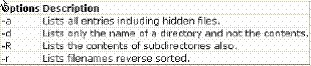 For example, the following command displays all the files (including hidden files) in the /home directory and the contents in the subdirectories: What is >> command?
The >> command is used for storing the output generated by different commands. It creates a file specified to store the output. If the specified file already exists, it appends that file.
Answer option A is incorrect. The > command is used for storing the output generated by different commands. It creates a file specified to store the output. If the specified file already exists, it overwrites that file.
Answer options C and B are incorrect. Improper syntax has been followed in these answer options.
Question 13
Multiple choice
Which of the following statements are true about file permissions? Each correct answer represents a complete solution. Choose three.
-
A
The execute permission means that the file can be run if it is a program or script.
-
B
The write permission means that the file can be edited and saved.
-
C
The read permission means that only the file name can be read not the contents of the file.
-
D
The read permission means that the contents of the file can be seen with a command such as cat or less.
Reveal answer details
Close answer details
Correct answersA, B, D
ExplanationThe read permission allows a user to read a file. The content of a file can be seen by cat or less commands. When the read permission is set for a directory, it allows a user to read the names of files in the directory (but not to find out any other information about them including file type, ownership, size, etc.).
The write permission means that a user is permitted to write in a file. So, if a file has the write permission it can be edited and saved.
The execute permission grants a user the ability to execute a file. This permission must be set for executable binaries.
Answer option C is incorrect. If a file has the read permission, its contents can also be read not only the file name.
Question 14
Single choice
You work as a Network Administrator for McNeil Inc. The company has a Linux-based network. You have just created a directory named Sales on a file server. David, a Sales Manager, has to use this directory to keep sales reports. David reports that he is unable to save his reports in the directory. When you list the directory using the LS command, you get the following result: drwxr-xr-x 2 root root 2048 Jan 2 2006 Sales What is the most likely cause?
-
A
David does not have the Write permission on the directory.
-
B
David is working on his local computer's login.
-
C
The Sales directory has been deleted by accident.
-
D
The Sales directory is not properly mounted.
Reveal answer details
Close answer details
Correct answerA
ExplanationThe most likely cause of the issue is that David does not have the Write permission on the Sales directory.
The listing of the directory shows that root is the owner of the Sales directory. The permissions on the Sales directory are rwxr-xr-x. The permission character set has three sets of three permissions that are Read, Write, and Execute. The first set, which is rwx, represents the Read, Write, and Execute permissions to the owner of the file. The second set, which is r-x, provides the Read and Execute permissions to the group root. The third set, which is r-x, provides the Read and Execute permissions to other users. In order to resolve the issue, you will have to make David the owner of the Sales directory. For this, you will have to run the following command: chown david sales After becoming the owner of the directory, David will automatically get the Write permission, and he will be able to store his files in the directory.
Setting permissions on files and folders in Linux Answer option B is incorrect. As the listing shows that David is not the owner of the folder, this will not make any difference.
Answer options D and C are incorrect. According to the question, the directory is properly listed, and mounting or deletion is not an issue.
Question 15
Single choice
You want to terminate your X session. Which of the following key combinations will you use to accomplish this?
-
A
-
B
-
C
-
D
Reveal answer details
Close answer details
Correct answerB
ExplanationThe Ctrl+Alt+Backspace key combination is used to terminate the X session. Answer option A is incorrect.
The Ctrl+Alt+F7 key combination is used to switch from a virtual console back to the X terminal.
Answer option C is incorrect. The Ctrl+Alt+Fn key combination is used to switch from graphical mode to the nth (n varies from 1-6) virtual console running in text mode. Answer
option D is incorrect. Ctrl+Alt+A is not a valid key combination to terminate the X session.
Question 16
Single choice
Which of the following is NOT true about the inode table in the Linux operating system?
-
A
It contains the location information where data is stored in the hard disk.
-
B
It contains information about what type of access permission of the file is available to whom.
-
C
It contains the last access time, last modification time, however it does not store the last inode change time.
-
D
It contains the file type of the specified file.
Reveal answer details
Close answer details
Correct answerC
ExplanationThe inode table contains the last access time, last modification time as well as the last inode change time of a file.
What type of data is stored in an inode table?
An inode table contains a list of all files in an ext2 and ext3 filesystem. An inode ( index node) is an entry in the table, containing information about a file (the metadata). Some important data stored in the inode table are as follows: The file type (regular file, directory, etc.)
File permissions Link count: The number of file names associated with the inode number. The user ID number of file owner and the group ID number of the associated group. Timestamps, including last access time, last modification time, and last inode change time.
Location of the data on the hard disk.
Answer options D, B, and A are incorrect. The inode table contains all these information, the file type, file permissions on the specified file, location of data on the hard disk.
Question 17
Single choice
You are a newly appointed network technician at Net Perfect Inc. The company has a Linux-based network. You want to install a package named firefox on your Linux system. Which of the following commands will you use to accomplish the task?
-
A
-
B
-
C
-
D
Reveal answer details
Close answer details
Correct answerC
ExplanationYou will use the yum install firefox command to install the package named firefox in the Linux system. This command will search the configured repositories for the package named firefox, and if found, will install the latest version, pulling in dependencies if needed. Answer options B and D are incorrect. The -ivh and i options are not used with the yum command. Answer option A is incorrect. The yum update firefox command is used to update a package in the Linux system. It is not used to install a package in Linux. If run without any specified package, the update option will update every currently installed package. If one or more packages are specified, yum will only update the listed packages. While updating packages, yum will ensure that all dependencies are satisfied.
Question 18
Single choice
You work as a Network Administrator for Maverick Inc. The company has a Linux-based network. You are working on a Linux computer. You want to see the environment variables that are set on your computer. Which of the following commands will you use?
-
A
-
B
-
C
-
D
Reveal answer details
Close answer details
Correct answerA
ExplanationThe env command is used to list the environment variables that are set on a Linux computer.
The programs that run on a Linux computer are known as processes. When a user starts a program, a new process is created. This process runs within what is called an environment. A user can set parameters in this environment so that the running program can find the desired values. The following syntax is used to set a parameter to a variable: VARIABLE=value This would set a parameter by the name VARIABLE with the value that you provide. Some of the commonly used environment variables are HOME, PATH, PS1, etc. Answer option B is incorrect. The rm command is used to delete files from a directory on a Linux computer.
Answer option C is incorrect. The ls command is used to list files on a Linux computer. Answer
option D is incorrect. The echo $shell command will provide the name of the current shell that a user is using.
Question 19
Single choice
You want to run a program in future. However, you do not want to run it more than once. Which of the following commands will you use to accomplish the task?
-
A
-
B
-
C
-
D
Reveal answer details
Close answer details
Correct answerB
ExplanationIn order to accomplish the task, you will use the at command. The at command is used to set a specific command or batch file to execute at a certain time.
Syntax:
at [option] schedule time Several options are used with the at command. Following is a list of some important options:  The atd daemon monitors the queue of the at commands and executes them at a specified time.
Example:
The following command will create a list of jobs to be executed at 8:00 AM on 22nd August 2004. at 08:00 22.08.2004
at> ls<enter>
at> pwd<enter>
<ctrl> + <d>
The <ctrl> + <d> key combination is used to end the list of commands. The jobs can be removed from an at queue by using the atrm command. Note: The at command cannot schedule recurring jobs. Answer option C is incorrect. You will not run the crontab command, since it runs a program repeatedly. The crontab command is used to view and edit the crontab files, which are used to organize the cron facility.
Each user has access to the cron facility through a crontab file. Some of the frequently used crontab command options are as follows:  Answer option A is incorrect. In computing, rsync is a software application for Unix systems. It synchronizes files and directories from one location to another while minimizing data transfer using delta encoding. It can copy or display directory contents and copy files, optionally using compression and recursion.
In daemon mode, rsync listens to the default TCP port of 873, serving files in the native rsync protocol or via a remote shell such as RSH or SSH. In the latter case, the rsync client executable must be installed on both the local and remote hosts.
Answer option D is incorrect. The sync command is used to flush filesystem buffers. It ensures that all disk writes have been completed before the processor is halted or rebooted. Generally, it is preferable to use reboot or halt to shut down a system, as they may perform additional actions such as resynchronizing the hardware clock and flushing internal caches before performing a final sync.
Question 20
Single choice
Which of the following commands is used to change file access permissions in Linux?
-
A
-
B
-
C
-
D
Reveal answer details
Close answer details
Correct answerB
ExplanationThe chmod command is used to change file access permissions in Linux.
Syntax: chmod [option] [mode] <file1, file2, ...>
Option: The following is a list of some important options that can be provided with the command: 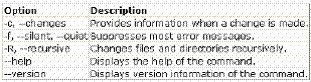 Mode: Mode is written in the following format:
[ugoa] [+-=] [rwxXstugo]
The combination of ugoa specifies the users for whom the file access permissions will be changed. In ugoa, u is for the user who owns the file, g is for other users in the file group, o is for other users not in the file group, and a is for all users.
The operator + adds the specified permissions to the existing permissions of each file. The
- operator removes, and the = character specifies that the specified permissions are the only permissions for that file. The combination of rwxXstugo is permission type. In rwxXstugo, r is for read, w is for write, x is for execute, X is to execute only if the file is a directory or already has execute permission for some user, s is to set user or group ID on execution, t is to save program text on swap device, u are the permissions that the user who owns the file currently has for it, g are the permissions that other users in the file group have for the file, and o are the permissions that other users not in the file group have for the file. Answer option A is incorrect. The chown command is used to change the user or group ownership of the files specified with the command.
Answer option D is incorrect. The chgrp command is used to change only the group ownership of the files specified with the command.
What is the chgrp command?
The chgrp (from change group) command is used by unprivileged users to change the group associated with a file. Unlike the chown command, chgrp allows regular users to change groups, but only to one of which they are a member. The general syntax of the chgrp command is as follows:
chgrp group target1 [target2 ..]
The group parameter indicates the new group with which the targets should be associated. The target1 parameter indicates the files or directories for which the change should be made.
The target2 parameter indicates the optional additional files or directories for which the change should be made.
For example:  The above command changes the group associated with ttt to 'system', provided the executing user is a member of that group.
Answer option C is incorrect. There is no such command as chperm in Linux.
Question 21
Single choice
Which of the following files does the /var directory NOT contain?
-
A
-
B
-
C
-
D
Reveal answer details
Close answer details
Correct answerB
ExplanationKernel files do not change regularly and therefore are contained in the /boot directory, not in the
/var directory.
What is the /var directory? According to the Filesystem Hierarchy Standard, the /var directory contains regularly-changing system files. This comprises spool directories and files, and administrative and logging data.
Answer option A is incorrect. System log files are stored in the /var directory. Answer options D and C are incorrect. Print spool files and email-spools are variable data files and therefore are contained in the /var directory.
Question 22
Single choice
John works as a Network Administrator for Perfect Solutions Inc. The company has a Linux-based network. John is working as the root user on the Linux operating system. He wants to delete all files whose names end with a number. Which of the following commands will John use to accomplish the task?
-
A
-
B
-
C
-
D
Reveal answer details
Close answer details
Correct answerA
ExplanationThe rm *[0-9] command deletes all files whose names end with a number. Answer option B is incorrect.
The rm [^0-9] command deletes all files except those having names ending with a number.
Answer option C is incorrect. The rm ^[0-9] command deletes all files whose names begin with a number.
Answer option D is incorrect. The rm [0-9]* command also deletes all files whose names begin with a number.
Question 23
Single choice
Which of the following commands will you use to lists the jobs that are running in the background and in the foreground?
-
A
-
B
-
C
-
D
Reveal answer details
Close answer details
Correct answerD
ExplanationThe jobs command lists the jobs that are running in the background and in the foreground. If the prompt is returned with no information, no jobs are present.
Syntax:
jobs [-p | -l] [-n] [-p] [-x] [job id]
Some important options used with jobs command are as follows:  Answer option A is incorrect. The top command is used to produce a frequently-updated list of processes.
By default, the processes are ordered by percentage of CPU usage, with only the "top" CPU consumers shown. This command shows how much processing power and memory are being used, as well as other information about the running processes. The following figure demonstrates the output of the top command: 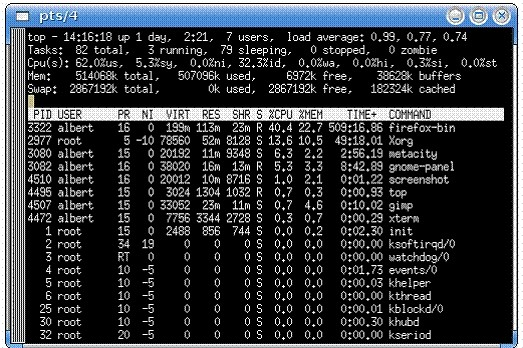 Answer option B is incorrect. The bg command can be used to resume in the background when a process is suspended.
Answer option C is incorrect. There is no such command as job.
|