Question 1
Multiple choice
What are two main features in Amazon Web Services (AWS) network access control lists (ACLs)? (Choose two.)
-
A
You cannot use Network ACL and Security Group at the same time.
-
B
The default network ACL is configured to allow all traffic
-
C
NetworkACLs are stateless, and inbound and outbound rules are used for traffic filtering
-
D
Network ACLs are tied to an instance
Reveal answer details
Close answer details
Correct answersB, C
ExplanationB. The default network ACL is configured to allow all traffic. This means that when you create a VPC, AWS
automatically creates a default network ACL for that VPC, and associates it with all the subnets in the VPC1. By default, the default network ACL allows all inbound and outbound IPv4 traffic and, if applicable, IPv6 traffic. You can modify the default network ACL, but you cannot delete it. C. Network ACLs are stateless, and inbound and outbound rules are used for traffic filtering. This means that network ACLs do not keep track of the traffic that they allow or deny, and they evaluate each packet separately. Therefore, you need to create both inbound and outbound rules for each type of traffic that you want to allow or deny.
For example, if you want to allow SSH traffic from a specific IP address to your subnet, you need to create an inbound rule to allow TCP port 22 from that IP address, and an outbound rule to allow TCP port 1024- 65535 (the ephemeral ports) to that IP address.
The other options are incorrect because: You can use network ACL and security group at the same time. Network ACL and security group are two different types of security layers for your VPC that can work together to control traffic. Network ACLacts as a firewall for your subnets, while security group acts as a firewall for your instances. You can use both of them to create a more granular and effective security policy for your VPC. Network ACLs are not tied to an instance. Network ACLs are associated with subnets, not instances. This means that network ACLs apply to all the instances in the subnets that they are associated with. You cannot associate a network ACL with a specific instance. However, you can associate a security group with a specific instance or multiple instances.
Refer to the exhibit. 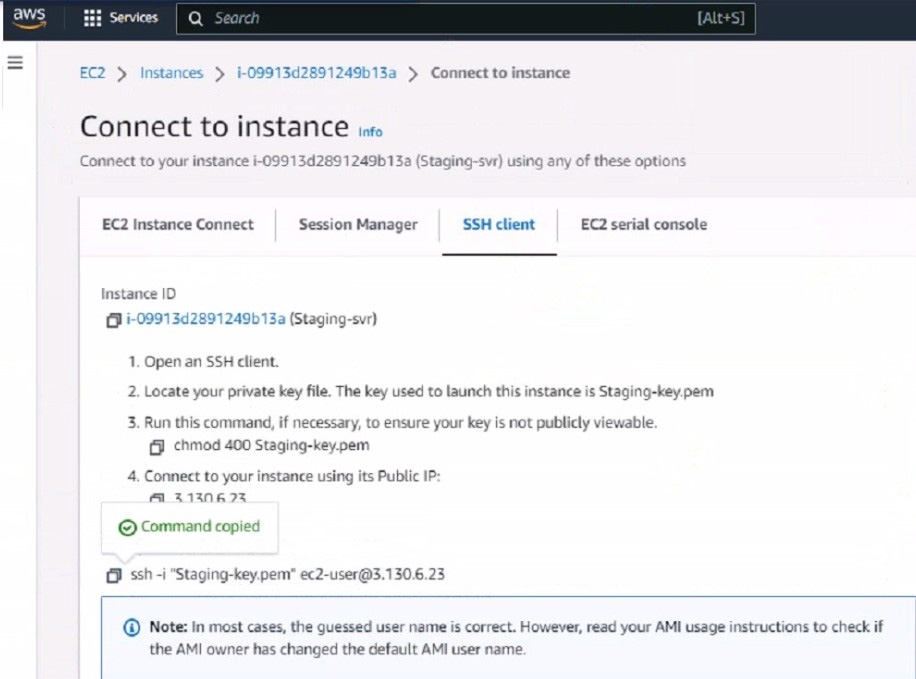 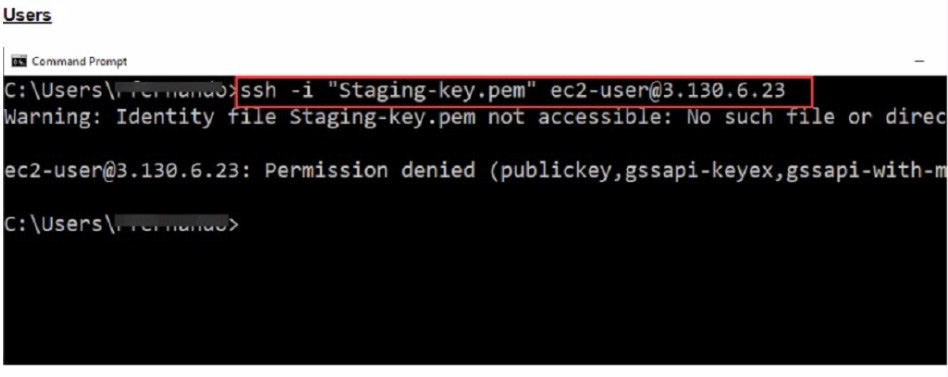 What could be the reason that the administrator cannot access the EC2 instance?
-
A
You must elevate the permissions to access the EC2 instance
-
B
You must run the chmod 400 Staging-key.peracommand before accessing the instance.
-
C
There is no . pem key created on in Amazon Web Services (AWS)
-
D
The directory location of the . pem file is incorrect.
Reveal answer details
Close answer details
Correct answerD
ExplanationThe reason the administrator cannot access the EC2 instance could be: D.The directory location of the .pem file is incorrect. SSH Key Location:When initiating an SSH connection to an AWS EC2 instance, you must specify the private key file (.pem file) location that corresponds to the public key used when the instance was launched. The error "Warning: Identity file Staging-key.pem not accessible: No such file or directory" indicates that the SSH client cannot find the .pem file at the specified location. Correct File Path:The administrator needs to ensure that the path to theStaging-key.pemfile is correctly specified when running the SSH command. If the file is not in the current directory from which the command is executed, the full or relative path to the file must be provided.
References:
This behavior is in line with standard SSH connection practices and AWS guidelines for
accessing EC2 instances. It is a common issue that occurs when the private key file is not located in the directory from which the SSH command is being executed or the path provided is incorrect.
How does Terraform keep track of provisioned resources?
-
A
It uses the terraform. tf state file
-
B
Terraform does not keep the state of resources created
-
C
It uses the terraform. tfvars file.
-
D
It uses the database. tf file.
Reveal answer details
Close answer details
Correct answerA
ExplanationTerraform manages and tracks the state of infrastructure resources through a file known as terraform.tfstate. This file is automatically created by Terraform and is updated after the application of a Terraform plan to capture the current state of the resources. State File Purpose:Theterraform.tfstatefile contains a JSON object that records the IDs and properties of resources Terraform manages, so that it can map real-world resources to your configuration, keep track of metadata, and improve performance for large infrastructures.
State File Management:This file is crucial for Terraform to perform resource updates, deletions, and for creating dependencies. It's essentially the 'source of truth' for Terraform about your managed infrastructure and services.
References:
This behavior is documented in Terraform's official documentation, which explains how theterraform.tfstatefile is used to keep track of the infrastructure Terraform is managing.
What is the main advantage of using SD-WAN Transit Gateway Connect over traditional SD-WAN?
-
A
It eliminates the use of ECMP
-
B
You can use GRE-based tunnel attachments
-
C
You can combine it with IPsec to achieve higher bandwidth
-
D
You can use BGP over IPsec for maximum throughput
Reveal answer details
Close answer details
Correct answerB
ExplanationSimplified and Scalable Connectivity: Transit Gateway Connect allows you to establish GRE tunnels to your SD-WAN appliances natively within the AWS network. This eliminates the complexity of managing individual IPsec VPN connections, especially as your cloud presence grows. Potential for Enhanced Performance: GRE offers lower overhead compared to IPsec, which can result in higher throughput for bandwidth-intensive SD-WAN applications.
Flexibility: While IPsec is supported for scenarios requiring strong encryption, the focus on GRE highlights the performance and scalability benefits that are often prioritized when integrating SD-WAN with AWS.
Dynamic Routing: The integration with BGP further streamlines network management by automating route updates and distribution.
Addressing the IPsec Consideration: It's important to acknowledge that SD-WAN Transit Gateway Connect does support IPsec. If your question is specifically framed within the context of Fortinet's FCSS 7.2 materials and they emphasize the hybrid usage of GRE and IPsec, then a modified answer might be appropriate:
Question 5
Multiple choice
Which two Amazon Web Services (AWS) features do you use for the transit virtual private cloud (VPC) automation process to add new spoke N/PCs? (Choose two )
-
A
-
B
-
C
-
D
Reveal answer details
Close answer details
Correct answersC, D
ExplanationFor automating the process of adding new spoke VPCs in a transit VPC architecture within Amazon Web Services (AWS), the two relevant features are: AWS Transit Gateway (Option C):This service is crucial for managing connectivity between VPCs and other networks without routing traffic through the public internet. It acts as a hub that controls how traffic is routed among all the connected networks, which simplifies network management and minimizes latency.
Amazon CloudWatch (Option D):CloudWatch provides monitoring and observability services that are essential for managing the health and performance of the AWS infrastructure, including Transit Gateways.
It allows administrators to set alarms and react to changes in AWS resources, which is vital for the dynamic addition and integration of new spoke VPCs into the transit VPC architecture.
References:
AWS official documentation on Transit Gateways and CloudWatch details these services' roles in enhancing network management and monitoring, essential for effective and automated transit VPC operations.
Refer to the exhibit. 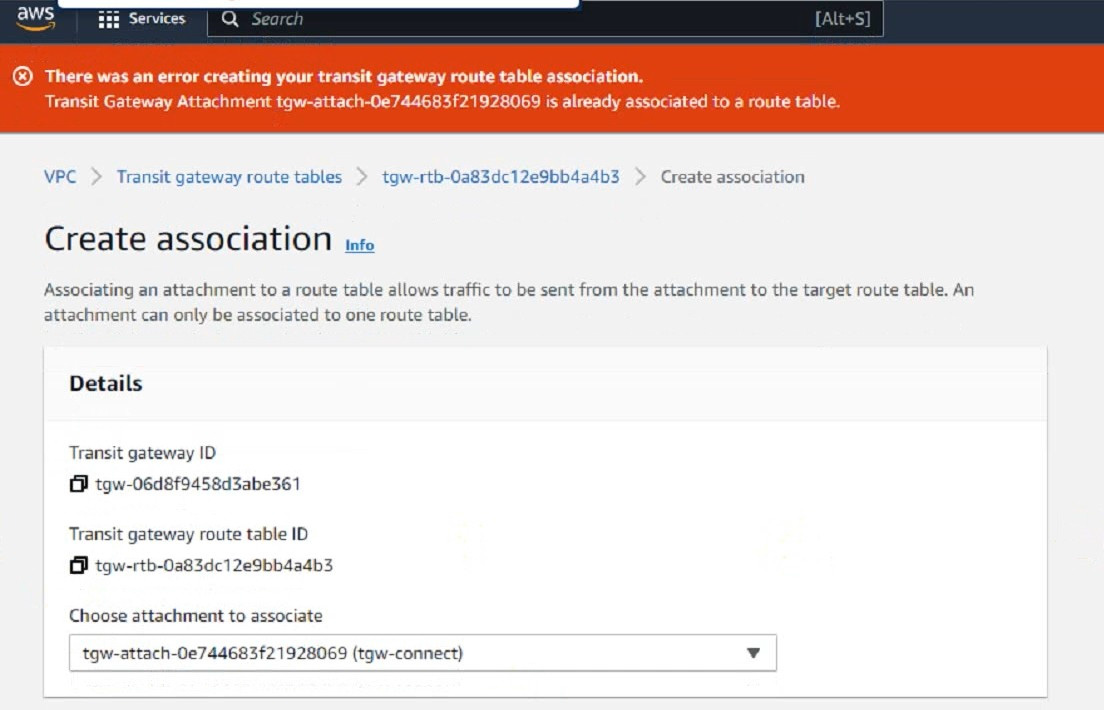 You are configuring a second route table on a Transit Gateway to accommodate east-west traffic inspection between two VPCs_However, you are getting an error during the transit gateway route table association With the Connect attachment. Which action Should you take to fulfill your requirement?
-
A
Add both Associations and Propagations in the second TGW route table.
-
B
Delete the both Connect and Transport attachments from the first TGW route table
-
C
Add a static route in the Routes section
-
D
In the second route table: create a propagation with the Connect attachment.
Reveal answer details
Close answer details
Correct answerD
ExplanationThe error message indicates that the Connect attachment is already associated with another transit gateway route table. You cannot associate the same attachment with more than one route table. However, you can propagate the same attachment to multiple route tables. Therefore, to fulfill your requirement of configuring a second route table for east-west traffic inspection between two VPCs, you need to create a propagation with the Connect attachment in the second route table. This will allow the second route table to learn the routes from the Connect attachment and forward the traffic to the securityVPC. You also need to associate the second route table with the Transport attachment, which is the transit gateway attachment for the security VPC.
References:
Transit gateway route tables - Amazon VPC | AWS Documentation Getting started with transit gateways -
Amazon VPC | AWS Documentation Configuring TGW route tables | FortiGate Public Cloud 7.4.0 | Fortinet
Document Library
How does the immutable infrastructure strategy work in automation?
-
A
It runs a single live environment for configuration changes.
-
B
It runs one idle and a single live environment for configuration changes.
-
C
It runs two live environments for configuration changes.
-
D
It runs one idle and two live environments for configuration changes.
Reveal answer details
Close answer details
Correct answerC
ExplanationImmutable infrastructure is a DevOps approach that emphasizes the creation of disposable resources instead of modifying existing ones. This approach helps to achieve stability, consistency, and predictability in IT operations by reducing the risk of configuration drift and eliminating stateful components.
One way to implement immutable infrastructure is to use a blue-green deployment strategy, which runs two live environments for configuration changes. The blue environment is the current production environment, while the green environment is the new version of the application or service. When the green environment is ready, the traffic is switched from blue to green, and the blue environment is destroyed or kept as a backup. This way, there is no need to update or patch the existing infrastructure, but rather replace it with a new one.
References:
1: Immutable Infrastructure, Architecture, and its benefits
2: Introduction to Immutable Infrastructure ?BMC Software | Blogs
Question 8
Multiple choice
Refer to Exhibit: 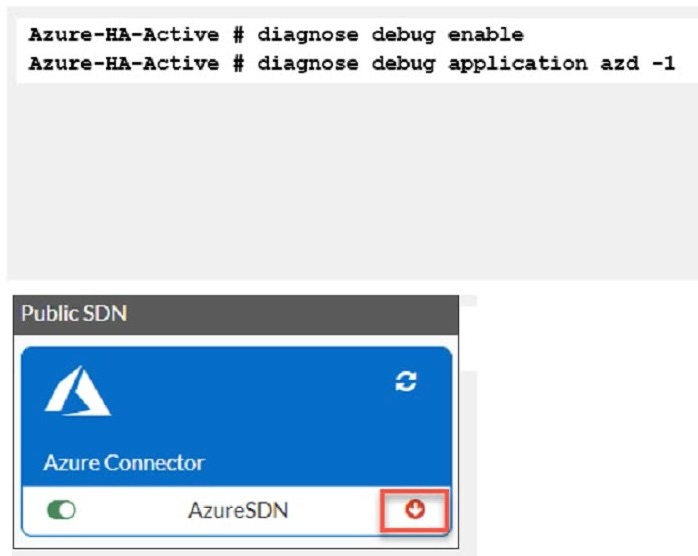 You are troubleshooting a Microsoft Azure SDN connector issue on your FortiGate VM in Azure Which three settings should you check while troubleshooting this problem? (Choose three.)
-
A
Use the show vdom command to see hidden VDOMs.
-
B
use the diag sys va command.
-
C
Ensure FortiGate port4 can resolve DNS.
-
D
Ensure FortiGate portl has internet access
-
E
Ensure IP address 169.254.169_254 is not blocked
Reveal answer details
Close answer details
Correct answersC, D, E
ExplanationThe three settings that should be checked while troubleshooting this problem are: Ensure FortiGate port4 can resolve DNS. This is because the Azure SDN connector requires DNS resolution to communicate with the Azure API1. If the FortiGate port4 cannot resolve DNS, the SDN connector will not be able to retrieve the Azure resources and display them in the GUI. Ensure FortiGate portl has internet access. This is because the Azure SDN connector requires internet access to communicate with the Azure API1. If the FortiGate portl does not have internet access, the SDNconnector will not be able to connect to the Azure cloud and display an error in the CLI. Ensure IP address 169.254.169_254 is not blocked. This is because the Azure SDN connector uses this IP address to obtain metadata information from the Azure instance 2. If this IP address is blocked by a firewall policy or a network ACL, the SDN connector will not be able to get the required information and display an error in the
CLI.
Refer to the exhibit 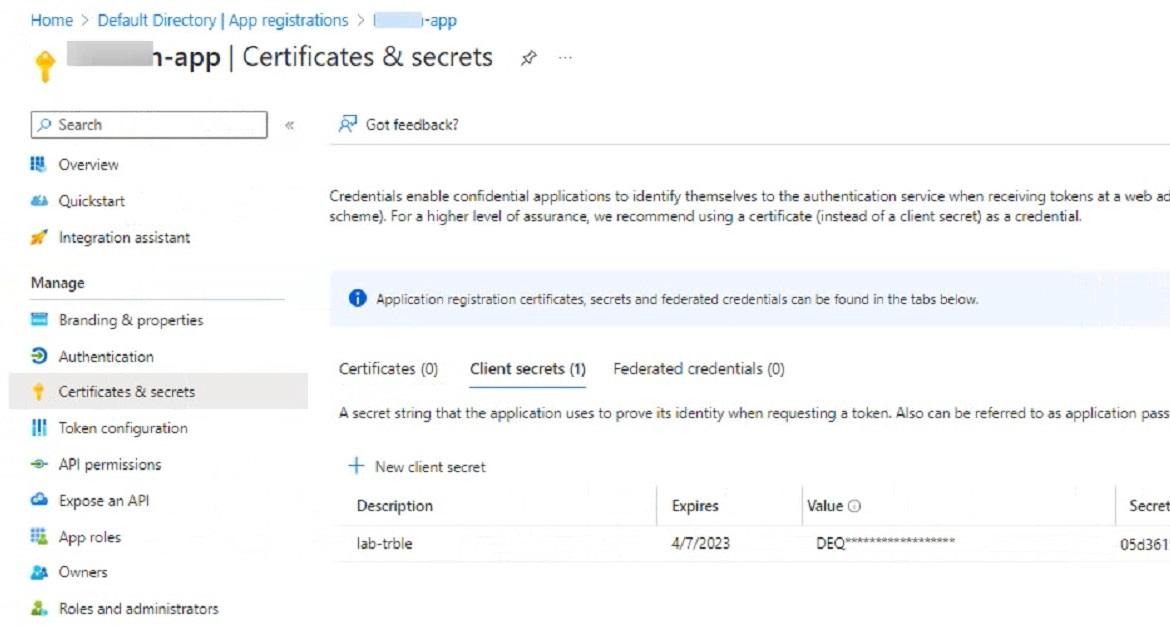 An administrator is trying to deploy a FortiGate VM in Microsoft Azure using Terraform However, during the configuration, the Azure client secret is no longer visible in the Azure portal. How would the administrator obtain the Azure client secret to configure on Terratorm?
-
A
The administrator must create a new Azure account
-
B
Log in to the Azure CLI with power user to obtain the client secret
-
C
The administrator can create a new client secret
-
D
The administrator must obtain the client secret through Azure Cloud Shell.
Reveal answer details
Close answer details
Correct answerC
ExplanationThe Azure client secret is a one-time value that is only visible when it is created. If the administrator loses or forgets the client secret, they cannot retrieve it from the Azure portal. However, they can create a new client secret and use it to configure Terraform. To create a new client secret, they need to follow these steps: Sign in to the Azure portal and navigate to the Azure Active Directory service. Select the application name under the App Registrations. Select Certificates & Secrets > New client secret to create a new client
secret. Add a description and an expiration date for the client secret and select Add. Copy the value of the new client secret immediately as it will not be shown again.
References:
Generate new Client Secret and link to key-vault | Microsoft Learn Azure Quickstart - Set and retrieve a
secret from Key Vault using Azure portal | Microsoft Learn
|