You have configured an application control profile, set peer-to-peer traffic to Block under the Categories tab. and applied it to the firewall policy. However, your peer-to-peer traffic on known ports is passing through the FortiGate without being blocked. What FortiGate settings should you check to resolve this issue?
-
A
FortiGuard category ratings
-
B
Network Protocol Enforcement
-
C
Replacement Messages for UDP-based Applications
-
D
Application and Filter Overrides
Reveal answer details
Close answer details
Correct answerB
ExplanationWhen the Application sensor receives traffic on that port, the protocol decoder will try to determine if the received data matches the HTTPS traffic In this case it will not match because it is P2P traffic, so this will class as violation and blocked The protocol decoder also try to determine what type of traffic it is, and even if it could not figure out it is P2P traffic, it still count as a violation because even though it does not know what it is, it knows for fact it is not HTTPS
Question 2
Multiple choice
Refer to the exhibit. 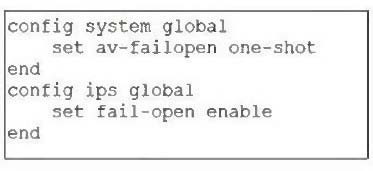 Based on this partial configuration, what are the two possible outcomes when FortiGate enters conserve mode? (Choose two.)
-
A
FortiGate drops new sessions requiring inspection.
-
B
Administrators must restart FortiGate to allow new sessions.
-
C
Administrators cannot change the configuration.
-
D
FortiGate skips quarantine actions.
Reveal answer details
Close answer details
Question 3
Multiple choice
Refer to the exhibits. 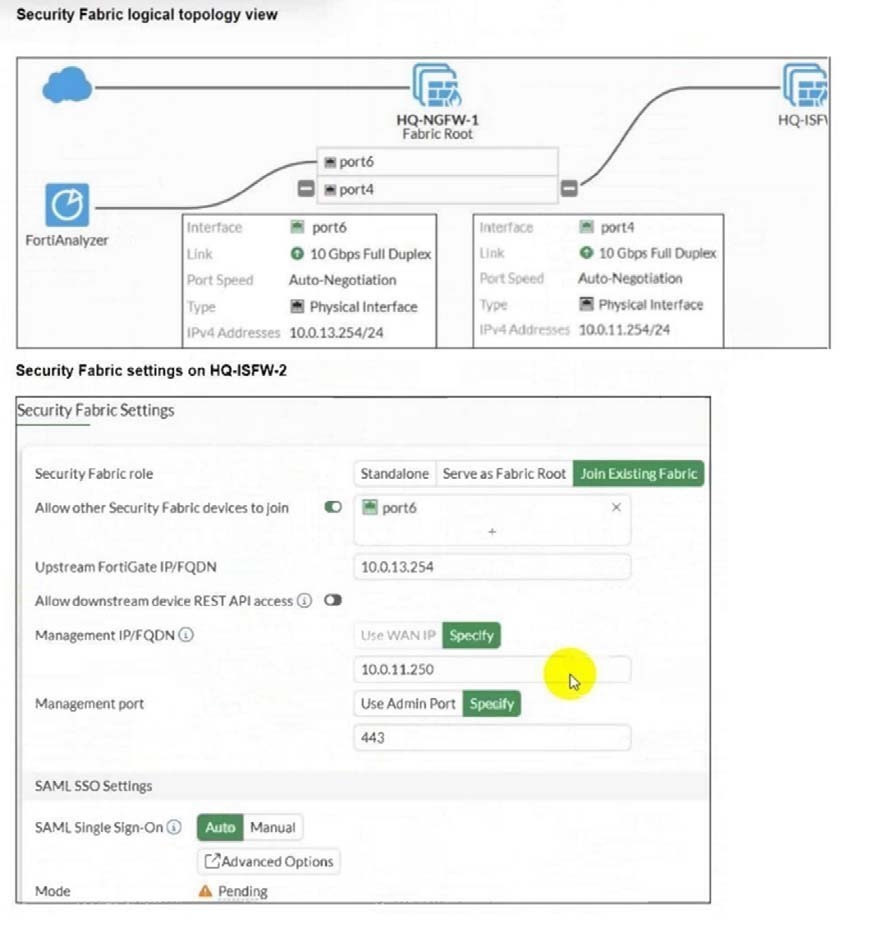 An administrator wants to add HQ-ISFW-2 in the Security Fabric. HQ-ISFW-2 is in the same subnet as HQ-ISFW. After configuring the Security Fabric settings on HQ-ISFW-2, the status stays Pending. What can be the two possible reasons? (Choose two.)
-
A
Upstream FortiGate IP must be set to 10.0.11.254.
-
B
SAML Single Sign-On must be set to Manual.
-
C
HQ-ISFW-2 must be authorized on HQ-ISFW.
-
D
Management IP must be set to 10.0.13.254.
Reveal answer details
Close answer details
Correct answersA, C
ExplanationAccording to the FortiOS 7.6 Security Fabric documentation and Study Guide, several conditions must be met for a downstream FortiGate to successfully join a Security Fabric. First, the Upstream FortiGate IP/ FQDN configured on the downstream device must point to the IP address of the interface on the upstream device that is listening for fabric connections. In the provided logical topology, the Fabric Root (HQ-NGFW- 1) uses port4 with the IP 10.0.11.254 to connect to the internal segmentation firewalls (ISFWs). Since HQ-
ISFW-2 is in the same subnet as HQ-ISFW, it is physically and logically connected to the network segment serviced by port 4. Therefore, the current configuration of 10.0.13.254 (which is port6, likely the WAN side) is incorrect, and it must be set to 10.0.11.254 (Statement A).
Second, once the downstream device successfully reaches the upstream device, it enters a Pending state.
For security purposes, FortiOS does not allow devices to join the fabric automatically; the administrator of the upstream device (in this case, HQ-ISFW or the root) must manually authorize the new device (Statement C) in the Fabric Management console. Until this authorization is granted, the status will remain
" Pending " and no fabric data will be synchronized. Statements B and D are incorrect as SAML settings do not block the initial fabric join, and the management IP should be the local device ' s IP, not the upstream ' s IP.
Question 4
Multiple choice
Refer to the exhibits. 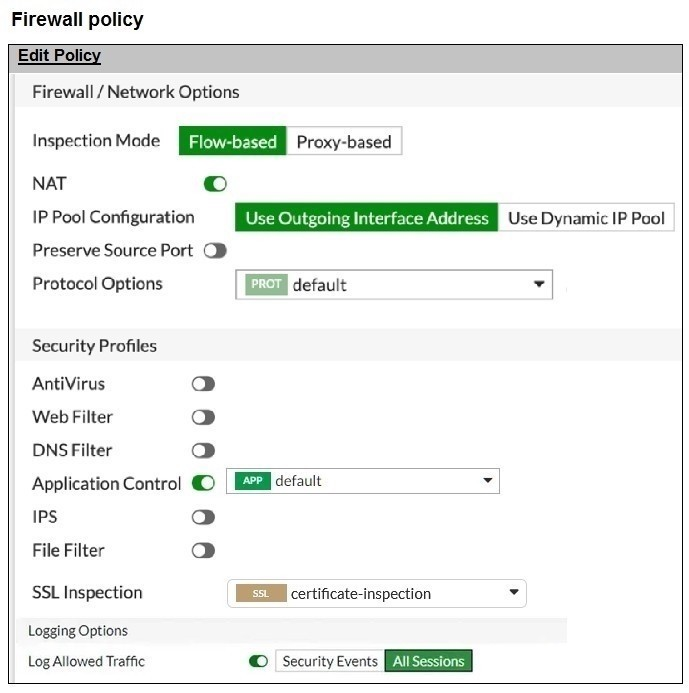 You have implemented the application sensor and the corresponding firewall policy as shown in the exhibits. You cannot access any of the Google applications, but you are able to access www.fortinet.com. Which two actions would you take to resolve the issue? (Choose two.)
-
A
Set SSL inspection to deep-content inspection.
-
B
Move up Google in the Application and Filter Overrides section to set its priority lot
-
C
Add " Google " .com to the URL category in the security profile.
-
D
Change the Inspection mode to Flow-based
-
E
Set the action for Google in the Application and Filter Overrides section to Allow
Reveal answer details
Close answer details
Correct answersB, E
ExplanationFrom the exhibits:
The firewall policy has Application Control enabled and uses certificate-inspection for SSL inspection. The application sensor has Application and Filter Overrides with the following order (priority): Excessive-Bandwidth with action Block Google (vendor filter) with action Monitor
In FortiOS, Application and Filter Overrides are evaluated by priority (top-down). The first matching override is applied. If traffic matches an earlier override with Block, it will be blocked even if a later override
would Monitor/Allow it.
Why Google apps fail while www.fortinet.com works: Many Google applications can be detected as (or can trigger) the Excessive-Bandwidth behavior/signature depending on the specific service and traffic pattern. Because Excessive-Bandwidth (Block) is above Google (Monitor), Google-related traffic may match the first rule and be blocked before the Google override is evaluated. Access to www.fortinet.com works because that traffic is not matching the Excessive-
Bandwidth override.
Therefore, to resolve:
B. Move up Google in the Application and Filter Overrides section to set its priority higher This ensures
Google matches the Google override before any broader blocking override is applied. E. Set the action for Google in the Application and Filter Overrides section to Allow This explicitly permits Google applications once the higher-priority match occurs (stronger than Monitor for troubleshooting and ensuring access).
Why the other options are not the best fit here: A (deep-content inspection) can help identify more HTTPS applications, but the exhibit already shows a specific Google override configured; the immediate issue is the override evaluation order and action. C
relates to Web Filter URL categories, but the problem is occurring under Application Control behavior / vendor overrides.
D (flow-based) is not required to fix an override priority/action conflict.
Question 5
Multiple choice
Which two statements are true about FortiGate firewall policy IDs? (Choose two answers)
-
A
The policy ID determines the order in which firewall policies are evaluated.
-
B
A policy ID cannot be changed after the policy is created.
-
C
Using edit 0 in the CLI creates a policy and lets FortiOS assign the next available ID.
-
D
The administrator must manually specify the policy ID when creating a policy in the GUI.
Reveal answer details
Close answer details
Correct answersB, C
ExplanationA policy ID is a unique identifier for internal tracking, but it is not the same as the top-down policy sequence used during traffic evaluation. After a firewall policy exists, its ID is not directly editable. In the CLI, using edit 0 is the standard shortcut to create a new policy while allowing FortiOS to assign the next available ID automatically. The GUI does not require the administrator to manually enter a policy ID, so that statement is incorrect.
Refer to the exhibit. 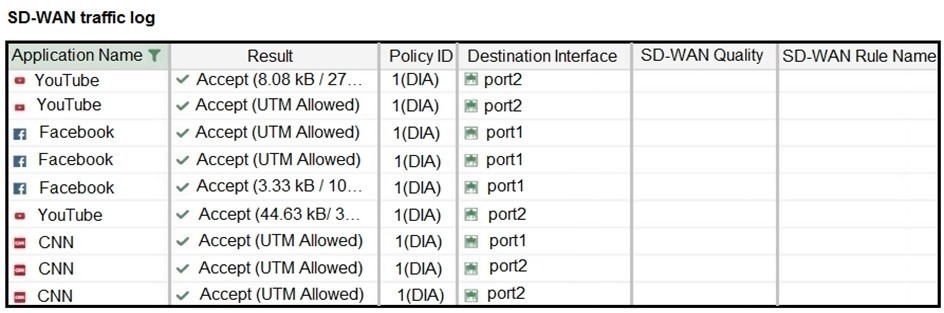 The administrator configured SD-WAN rules and set the FortiGate traffic log page to display SD-WAN-specific columns: SD-WAN Quality and SD-WAN Rule Name. FortiGate allows the traffic according to policy ID 1 placed at the top. This is the policy that allows SD-WAN traffic. Despite these settings, the traffic logs do not show the name of the SD-WAN rule used to steer those traffic flows. What could be the reason?
-
A
SD-WAN rule names do not appear immediately. The administrator must refresh the page.
-
B
There is no application control profile applied to the firewall policy.
-
C
Destinations in the SD-WAN rules are configured for each application, but feature visibility is not enabled.
-
D
FortiGate load balanced the traffic according to the implicit SD-WAN rule.
Reveal answer details
Close answer details
Correct answerD
ExplanationIn FortiOS 7.6, SD-WAN steering decisions are recorded in traffic logs only when traffic matches an explicit SD-WAN rule (SD-WAN service rule). When no configured SD-WAN rule matches a session, FortiGate uses the implicit (default) SD-WAN rule/behavior to select a member (often resulting in load-balancing or default selection based on the configured SD-WAN algorithm). In the exhibit, traffic is permitted by firewall policy ID 1, and the Destination Interface alternates between port1 and port2, but SD-WAN Rule Name remains empty. This is consistent with the sessions being forwarded by the implicit SD-WAN rule, which does not populate a named rule in the log columns.
Why the other options are not correct:
A: SD-WAN rule name logging is not a "delayed display" behavior requiring refresh; it is populated per- session when an explicit rule matches.
B: Application Control is not required for SD-WAN rule name to appear. Rule name logging depends on SD-WAN rule match, not on whether Application Control is enabled.
C: Feature visibility affects GUI display options, but the exhibit already shows the SD-WAN columns enabled; the issue is that no explicit SD-WAN rule is being hit.
Question 7
Multiple choice
Which two statements describe automation stitches? (Choose two answers)
-
A
A single automation stitch can contain multiple triggers
-
B
Triggers can come from external connectors
-
C
Multiple actions in a stitch can run in parallel
-
D
Actions are limited to devices inside the Security Fabric only
Reveal answer details
Close answer details
Correct answersB, C
ExplanationAutomation stitches support a flexible response model. Triggers can originate from external connectors, and multiple actions can be configured to run in parallel. A stitch is typically built around a single trigger, not multiple triggers grouped together in the same stitch. Actions are not limited to Security Fabric devices because stitches can also interact with external services and systems.
An administrator enabled full SSL inspection. Users now receive certificate warnings when opening any HTTPS website, but HTTP sites open normally. What is the most likely reason?
-
A
The users' browsers do not trust the CA certificate used by FortiGate for SSL inspection
-
B
The firewall policy is in flow-based inspection mode
-
C
The destination servers are using expired certificates
-
D
The web filter profile is set to monitor instead of block
Reveal answer details
Close answer details
Correct answerA
ExplanationWith full SSL inspection, FortiGate performs a man-in-the-middle process and presents substitute certificates to clients, signed by the inspection CA configured on the FortiGate. If the endpoint browser or operating system does not trust that CA, certificate warnings appear for HTTPS traffic. HTTP does not use certificates, so no warning is shown there. Inspection mode and web filter action do not create this specific trust warning, and widespread server certificate expiry across all websites is not the realistic explanation.
Question 9
Multiple choice
You are encountering connectivity problems caused by intermediate devices blocking IPsec traffic. In which two ways can you effectively resolve the problem? (Choose two answers)
-
A
You can use SSL VPN tunnel mode to prevent problems with blocked ESP and UDP ports (500 or
4500).
-
B
You can turn on fragmentation to fix large certificate negotiation problems.
-
C
You can configure a hub-and-spoke topology with SSL VPN tunnels to bypass blocked UDP ports.
-
D
You should use the protocol IKEv2.
Reveal answer details
Close answer details
Correct answersA, B
Explanation"IKE uses UDP port 500. If NAT-T is enabled in a NAT scenario, IKE uses UDP port 4500." "IKEv2 provides a simpler operation, which is the result of using a single exchange mode and requiring less messages to bring up the tunnel." For the specific workaround asked in this question, Fortinet's official documentation states that for an IP-level VPN, SSL VPN tunnel mode is useful to avoid issues caused by intermediate devices such as "ESP packets being blocked," "UDP ports 500 or 4500 being blocked," and "fragments being dropped, causing IKE negotiation that uses large certificates to fail if the peer does not support IKE fragmentation." ( Fortinet Document Library ) Fortinet's official documentation also states: "The ip-fragmentation command controls packet fragmentation before IPsec encapsulation, which can benefit packet loss in some environments." ( Fortinet Document Library ) Technical Deep Dive: The correct answers are and . A B
A is correct because SSL VPN tunnel mode can bypass the classic IPsec transport problems caused by intermediate devices filtering ESP or blocking UDP 500/4500. Fortinet explicitly documents this as a practical workaround. ( Fortinet Document Library )
B is correct because enabling fragmentation helps when IKE negotiation uses large certificates and fragments are being dropped in transit. Fortinet documents this exact failure scenario and the related fragmentation control. ( Fortinet Document Library )
Why the others are not correct: C is not the key fix. Hub-and-spoke is a topology choice, not the actual mechanism that solves blocked
ESP or UDP 500/4500.
D is not sufficient for this problem. IKEv2 uses fewer messages, but it still relies on IPsec/IKE transport and does not itself solve intermediate devices blocking ESP or UDP 500/4500. The source PDF mentions simpler operation, not blocked-port avoidance.
So, the two effective fixes are:
Use SSL VPN tunnel mode
Enable fragmentation
Question 10
Multiple choice
A FortiGate has the following memory threshold settings: green: 82 red: 88 extreme: 95
Current memory usage is 90%. Which two outcomes are expected at this time? (Choose two answers)
-
A
FortiGate has entered conserve mode
-
B
FortiGate drops all new sessions
-
C
FortiGate rejects configuration changes
-
D
FortiGate reboots automatically
Reveal answer details
Close answer details
Correct answersA, C
ExplanationMemory usage above the red threshold means FortiGate has entered conserve mode. In conserve mode, FortiGate restricts behavior that could increase memory usage further, including rejecting configuration changes. Because the usage is still below the extreme threshold, FortiGate does not yet drop all new sessions. Automatic reboot is not the expected built-in response for this condition.
Question 11
Single choice
Which statement correctly describes NetAPI polling mode for the FSSO collector agent?
-
A
The collector agent uses a Windows API to query DCs for user logins.
-
B
The NetSessionEnum function is used to track user logouts.
-
C
NetAPI polling can increase bandwidth usage in large networks.
-
D
The collector agent must search Windows application event logs.
Reveal answer details
Close answer details
Correct answerB
ExplanationNetAPI: Polls temporary sessions created on the DC when a user logs on or logs off and calls the NetSessionEnum function on Windows. It's faster than the WinSec and WMI methods; however, it can miss some logon events if a DC is under heavy system load. This is because sessions can be quickly created and purged form RAM, before the agent has a chance to poll and notify FG.
Question 12
Single choice
Refer to the exhibit. 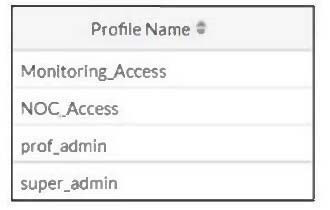 The NOC team connects to the FortiGate GUI with the NOC_Access admin profile. They request that their
GUI sessions do not disconnect too early during inactivity. What must the administrator configure to answer this specific request from the NOC team?
-
A
Increase the admintimeout value under config system accprofile noc Access.
-
B
increase the of line value of the override idle Timeout parameter in the NOC_Access admin profile.
-
C
Move NOC_Access to the top of the list to ensure all profile settings take effect.
-
D
Ensure that all NOC_Access users are assigned the super_admin role to guarantee access.
Reveal answer details
Close answer details
Correct answerB
ExplanationIn FortiOS 7.6, GUI session inactivity timeout behavior for administrators is controlled by admin profiles, not by general access permissions or profile ordering.
How GUI idle timeout works in FortiOS 7.6
FortiGate has a global admin timeout (admintimeout), but Admin profiles can override this value using the Override idle timeout setting. When Override idle timeout is enabled in an admin profile, the timeout value defined inside that profile takes precedence over the global setting. The exhibit shows that the NOC team logs in using the NOC_Access admin profile.
Therefore, to prevent their GUI sessions from disconnecting too quickly during inactivity, the timeout must be adjusted within that specific admin profile.
Why option B is correct
B. Increase the value of the Override Idle Timeout parameter in the NOC_Access admin profile. This
directly controls how long GUI sessions remain active when users assigned to NOC_Access are idle. It affects only the NOC team, which matches the requirement precisely. This is the recommended and documented approach in FortiOS 7.6.
Why the other options are incorrect
A. Increase admintimeout under config system accprofileIncorrect. admintimeout is a global admin setting,
not configured under accprofile, and it would affect all administrators, not just NOC users. C. Move NOC_Access to the top of the listIncorrect. Admin profile order has no impact on session timeout behavior.
D. Assign super_admin roleIncorrect and insecure. Super_admin does not control idle timeout and would
unnecessarily grant full privileges.
Question 13
Single choice
Refer to the exhibit. 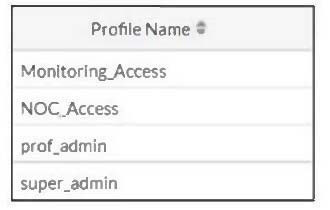 The NOC team connects to the FortiGate GUI with the NOC_Access admin profile. They request that their
GUI sessions do not disconnect too early during inactivity. What must the administrator configure to answer this specific request from the NOC team?
-
A
Move NOC_Access to the top of the list to ensure all profile settings take effect.
-
B
Increase the offline value of the Override Idle Timeout parameter in the NOC_Access admin profile.
-
C
Ensure that all NOC_Access users are assigned the super_admin role to guarantee access.
-
D
Increase the admintimeout value under config system accprofile NOC_Access.
Reveal answer details
Close answer details
Correct answerD
ExplanationAccording to the FortiOS 7.6 Administrator Study Guide, while there is a global administrative idle timeout setting that applies to all users by default (typically 5 minutes), FortiOS allows for granular control through Administrator Profiles. The Override Idle Timeout feature is specifically designed to allow different timeout values for different access profiles, which is ide 1 al for environments like a Network Operations Center (NOC) where persistent monitoring is required. 23 To implement this, the administrator must modify the s 4 pecific access profile settings. By using the command config system accprofile 5 and editing the NOC_Access profile, the administrator can enable the admintimeout-override and then increase the admintimeout value (Statement D). This configuration ensures that only the users assigned to that specific profile benefit from the extended session duration, maintaining a higher security posture for other administrative accounts that still follow the global timeout. Other options, such as changing the profile order (A) or assigning the super_admin role (C), do not address the specific requirement for inactivity timeout management. Option B is incorrect as " offline value " is not a standard parameter for this feature.
Question 14
Single choice
Refer to the exhibit. 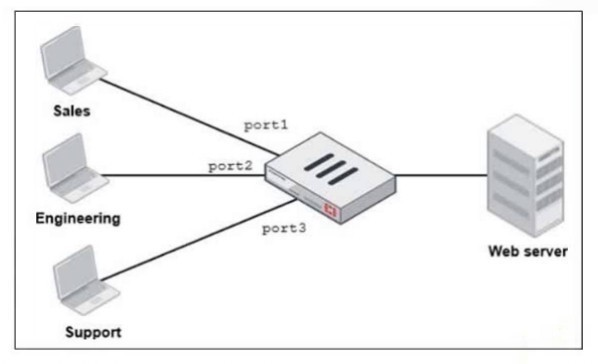 FortiGate has two separate firewall policies for Sales and Engineering to access the same web server with the same security profiles. Which action must the administrator perform to consolidate the two policies into one?
-
A
Select port1 and port2 subnets in a single firewall policy.
-
B
Create an Aggregate interface that includes port1 and port2 to create a single firewall policy.
-
C
Replace port1 and port2 with the any interface in a single firewall policy.
-
D
Enable Multiple Interface Policies to select port1 and port2 in the same firewall policy.
Reveal answer details
Close answer details
Correct answerD
Explanation"By default, you can select only a single interface as the incoming interface and a single interface as the outgoing interface. This is because the option to select multiple interfaces, or any interface in a firewall policy, is disabled on the GUI. However, you can enable the Multiple Interface Policies option on the Feature Visibility page to disable the single interface restriction." "You can also specify multiple interfaces, or use the any option, if you configure a firewall policy on the CLI, regardless of the default GUI setting."
Technical Deep Dive:
The correct answer is . D
The policies are identical except for the incoming interface: one is for Sales and one is for Engineering.
FortiGate GUI policy creation normally restricts you to one incoming interface per policy. To consolidate both into a single GUI policy, the administrator must enable Multiple Interface Policies so both port1 and port2 can be selected in the same rule.
Why the others are wrong: A is not enough, because policy matching also includes the incoming interface, not just the source subnets.
B changes the network design and is unnecessary.
C would work too broadly by matching traffic from any interface, which is not the intended controlled consolidation. A matching CLI-style concept would be: config firewall policy edit < id >
set srcintf " port1 " " port2 "
set dstintf " < server-interface > "
set srcaddr " Sales_Subnet " " Engineering_Subnet "
set dstaddr " < web-server > "
set service " HTTP " " HTTPS "
set action accept
next
end
That preserves a single policy while still being specific about which interfaces are allowed.
Question 15
Single choice
You are onboarding an agentless, secure web gateway (SWG) endpoint for secure internet access (SIA). What will happen to the user ' s nonweb traffic? (Choose one answer)
-
A
All the nonweb traffic will bypass FortiSASE.
-
B
The endpoint will use split tunneling to redirect nonweb traffic to FortiSASE.
-
C
FortiSASE will use Firewall-as-a-Service (FWaaS) to redirect nonweb traffic.
-
D
FortiSASE will use SWG to redirect nonweb traffic to FortiExtender.
Reveal answer details
Close answer details
Correct answerA
Explanation"In this use case, FortiSASE acts as an SWG and distributes a proxy auto-configuration (PAC) file to end users, enabling the FortiSASE SWG service as an explicit web proxy. SWG deployment secures only web traffic protocols, such as HTTP and HTTPS."
"All other nonweb traffic bypasses FortiSASE and is forwarded directly to the internet." Technical Deep Dive: The correct answer is . A In agentless SWG-based SIA, FortiSASE is operating as an explicit web proxy using a PAC file. That model captures only web protocols, specifically HTTP and HTTPS. It does not create a full tunnel for the endpoint like agent-based FortiClient deployment does.
So the design implication is simple: nonweb traffic does not traverse FortiSASE in this onboarding model. It goes directly to the internet from the endpoint.
Why the other options are wrong: B is wrong because this is not split-tunnel VPN behavior.
C is wrong because FWaaS does not automatically capture nonweb traffic in the agentless SWG model. D is wrong because SWG does not redirect nonweb traffic to FortiExtender.
This is an important deployment distinction: Agent-based SIA can steer broader endpoint traffic through FortiSASE.
Agentless SWG SIA secures only browser-based web traffic.
Question 16
Single choice
When configuring the connection between FortiGate and FortiAnalyzer, which option indicates that reliable traffic is enabled? (Choose one answer)
-
A
The connection status shows a green check icon
-
B
The interface status is set to up
-
C
A padlock icon appears in the connection settings
-
D
The logging mode is set to real-time
Reveal answer details
Close answer details
Correct answerC
Explanation"When you enable reliable logging on FortiGate, the log transport delivery method changes from UDP to TCP. TCP provides reliable data transfer, guaranteeing that the transferred data remains intact and arrives in the same order in which it was sent."
"Optionally, if using reliable logging, you can encrypt communications using SSL-encrypted OFTP traffic, so when a log message is generated, it is safely transmitted across an unsecured network." Technical Deep Dive: The correct answer is. The study guide explicitly ties C reliable logging to TCP transport and optionally to SSL-encrypted OFTP. Among the choices, the padlock icon is the only one that meaningfully indicates secure, reliable log transport behavior. A green check icon usually indicates that the FortiGate-
FortiAnalyzer connection is simply up, not specifically that reliable logging is enabled. Interface status being up is unrelated, and real-time logging mode describes delivery behavior, not the reliable transport indicator itself.
So, exam-wise, the best answer is . C
From the CLI perspective, reliable logging changes the transport from UDP to TCP, and with encryption enabled it uses SSL-protected OFTP. That is why the GUI indicator associated with secure transport is the most relevant visual clue here.
Question 17
Multiple choice
An administrator wants to form an HA cluster using the FGCP protocol. Which two requirements must the administrator ensure both members fulfill? (Choose two answers)
-
A
They must have the same HA group ID.
-
B
They must have the heartbeat interfaces in the same subnet.
-
C
They must have the same number of configured VDOMs.
-
D
They must have the same hard drive configuration.
Reveal answer details
Close answer details
Correct answersA, D
Explanation"To successfully form an HA cluster, you must ensure that the members have the same:
- Model: hardware model or VM model
- Firmware version
- Licensing: includes the FortiGuard license, virtual domain (VDOM) license, FortiClient license, and so on -Hard drive configuration: the same number and size of drives and partitions
- Operating mode: the operating mode-NAT mode or transparent mode-of the management VDOM." "From a configuration and setup point of view, you must ensure that the HA settings on each member have the same group ID, group name, password, and heartbeat interface settings. Try to place all heartbeat interfaces in the same broadcast domain, or for two-member clusters, connect them directly." Technical Deep Dive: The correct answers are A and D.
A is correct because FGCP cluster formation requires matching HA parameters, and group ID is explicitly one of them. If the group ID differs, the units will not consider each other part of the same cluster during HA discovery and election. D is correct because FortiGate HA expects hardware parity in critical platform characteristics, including hard drive configuration. If disk layout differs, the members do not satisfy the HA formation prerequisites. B is incorrect because the study guide does not require heartbeat interfaces to be in the same IP subnet. The requirement is that heartbeat links be in the same broadcast domain, or directly connected in a two-node design. In practice, heartbeat links are Layer 2 adjacency links; IP subnet
matching is not the stated requirement.
C is incorrect because the guide does not say both units must start with the same number of configured VDOMs. What must match is the licensing level and the operating mode of the management VDOM. After cluster formation, the primary synchronizes its configuration to the secondary.
A practical verification set before forming FGCP HA is: get system status
show system ha
diagnose sys ha status
Operationally, FGCP then uses the heartbeat links for member discovery, health monitoring, election, and config/session synchronization. On supported hardware, session forwarding and HA processing can still benefit from FortiGate's ASIC-assisted architecture, but HA state, config sync, and election logic remain control-plane functions handled by FortiOS.
|