An administrator has been directed to configure Volumes to Nutanix's best practices for security. What should the administrate!
do to be compliant?
-
A
Enable at-rest encryption on Volume Groups.
-
B
Configure Volume Groups to use CHAP.
-
C
Use data services IP for external host connectivity.
-
D
Segment iSCSI traffic to a physically separate network.
Reveal answer details
Close answer details
Correct answerB
ExplanationExplanation: Nutanix Volumes is a feature that allows users to create and manage block storage devices (volume groups) on a Nutanix cluster. Volume groups can be accessed by external hosts using the iSCSI protocol. To secure volume groups from unauthorized access, Nutanix recommends configuring CHAP (Challenge-Handshake Authentication Protocol) for each volume group in Prism Element. CHAP is a security feature that authenticates iSCSI initiators and targets before allowing access to a volume group.
CHAP requires both the initiator and the target to have a shared secret (a password) that is used to generate a challenge and a response during the authentication process. CHAP can prevent unauthorized access to volume groups and protect data from malicious attacks.
References:
Nutanix Volumes Administration Guide, page 25
Nutanix Volumes Security Guide
What is the network requirement for a File Analytics deployment?
-
A
Must use the CVM not work
-
B
Must use the Backplane network
-
C
Must use the Storage-side network
-
D
Must use the Client-side network
Reveal answer details
Close answer details
Correct answerD
ExplanationExplanation: Nutanix File Analytics is a feature that provides insights into the usage and activity of file data stored on Nutanix Files. File Analytics consists of a File Analytics VM (FAVM) that runs on a Nutanix cluster and communicates with the File Server VMs (FSVMs) that host the file shares. The FAVM collects metadata and statistics from the FSVMs and displays them in a graphical user interface (GUI). The FAVM must be deployed on the same network as the FSVMs, which is the Client-side network. This network is used for communication between File Analytics and FSVMs, as well as for accessing the File Analytics UI from a web browser. The Client-side network must have DHCP enabled and must be routable from the external hosts that access the file shares and File Analytics UI.
References:
Nutanix Files Administration Guide, page 93
Nutanix File Analytics Deployment Guide
Question 3
Multiple choice
What are two network requirements for a four-node FSVM deployment? (Choose two.)
-
A
Four available IP addresses on the Storage network
-
B
Five available IP addresses on the Client network
-
C
Five available IP addresses on the Storage network
-
D
Four available IP addresses on the Client network
Reveal answer details
Close answer details
Correct answersB, C
ExplanationExplanation: The two network requirements for a four-node FSVM deployment are five available IP addresses on the Client network and five available IP addresses on the Storage network. The Client network is used for communication between the FSVMs and the clients, while the Storage network is used for communication between the FSVMs and the CVMs. For each FSVM, one Client IP and one Storage IP are required. Additionally, one extra Client IP is required for the file server VIP (Virtual IP), which is used as a single point of access for all shares and exports on the file server.
References:
Nutanix Files Administration Guide, page 28
Nutanix Files Solution Guide, page 7
An administrator needs to ensure maximum performance, throughput, and redundancy for the company's
Oracle RAC on Linux implementation, while using the native method for securing workloads. Which configuration meets these requirements?
-
A
Flies with a distributed share and ABE
-
B
Files with a general purpose share and File Blocking
-
C
Volumes with MPIO and a single vDisk
-
D
Volumes with CHAP and multiple vDisks
Reveal answer details
Close answer details
Correct answerC
ExplanationExplanation: Volumes is a feature that allows users to create and manage block storage devices (volume groups) on a Nutanix cluster. Volume groups can be accessed by external hosts using the iSCSI protocol.
To ensure maximum performance, throughput, and redundancy for Oracle RAC on Linux implementation, while using the native method for securing workloads, the recommended configuration is to use Volumes with MPIO (Multipath I/O) and a single vDisk (virtual disk). MPIO is a technique that allows multiple paths between an iSCSI initiator and an iSCSI target, which improves performance and availability. A single vDisk is a logical unit number (LUN) that can be assigned to multiple hosts in a volume group, which simplifies management and reduces overhead.
References:
Nutanix Volumes Administration Guide, page 13
Nutanix Volumes Best Practices Guide
Refer to the exhibit. 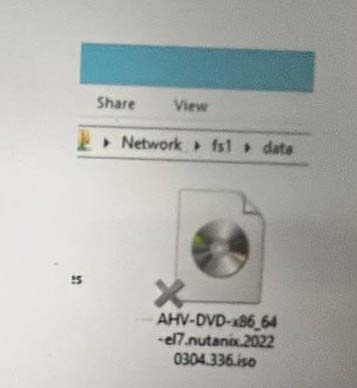 What does the `'X'' represent on the icon?
-
A
-
B
-
C
-
D
Reveal answer details
Close answer details
Correct answerC
ExplanationThe "X" on the icon represents a distributed shared file, which is a file that belongs to a distributed share or export. A distributed share or export is a type of SMB share or NFS export that distributes the hosting of top-level directories across multiple FSVMs. The "X" indicates that the file is not hosted by the current FSVM, but by another FSVM in the cluster. The "X" also helps to identify which files are eligible for migration when using the Nutanix Files Migration Tool.
References:
Nutanix Files Administration Guide, page 34
Nutanix Files Migration Tool User Guide, page 10
Which protocols are supported by Files?
-
A
SMBv2 SMBv3, NFSv2, NFSv3
-
B
SMBv1. SMBv2, NFSv2, NFSv3
-
C
SMBv1. SMBv2, NFSv3, NFSv4
-
D
SMBv2 SMBv3, NFSv3, NFSv4
Reveal answer details
Close answer details
Correct answerD
ExplanationExplanation: The protocols that are supported by Files are SMBv2, SMBv3, NFSv3, and NFSv4. SMB (Server Message Block) is a protocol that allows clients to access files, printers, and other resources on a network. NFS (Network File System) is a protocol that allows clients to access files on a remote server as if they were local. Files supports both SMB and NFS protocols for creating shares and exports that can be
accessed by different types of clients.
References:
Nutanix Files Administration Guide, page 31
Nutanix
Files Solution Guide, page 6
Question 7
Multiple choice
Which two platform are currently supported for Smart Tiering? (Choose two.)
-
A
-
B
-
C
-
D
Reveal answer details
Close answer details
Correct answersB, D
ExplanationExplanation: The two platforms that are currently supported for Smart Tiering are AWS Standard and Azure Blob. Smart Tiering is a feature that allows administrators to tier data from Files to cloud storage based on file age, file size, and file type. Smart Tiering can help reduce the storage cost and optimize the performance of Files. Smart Tiering currently supports AWS Standard and Azure Blob as the cloud storage platforms, and more platforms will be added in the future.
References:
Nutanix Files Administration Guide,
page 99
Nutanix Files Solution Guide, page 11
An organization currently has a Files cluster for their office data including all department shares. Most of the data is considered cold Data and they are looking to migrate to free up space for future growth or newer data. The organization has recently added an additional node with more storage. In addition, the organization is using the Public Cloud for .. storage needs. What will be the best way to achieve this requirement?
-
A
Migrate cold data from the Files to tape storage.
-
B
Backup the data using a third-party software and replicate to the cloud.
-
C
Setup another cluster and replicate the data with Protection Domain.
-
D
Enable Smart Tiering in Files within the File Console.
Reveal answer details
Close answer details
An administrator has been asked to confirm the ability of a physical windows Server 2019 host to boot from storage on a Nutanix AOS cluster. Which statement is true regarding this confirmation by the administrator?
-
A
Physical servers may boot from an object bucket from the data services IP and MPIO is required.
-
B
Physical servers may boot from a volume group from the data services IP and MPIO is not required.
-
C
Physical servers may boot from a volume group from the data services IP and MPIO is
-
D
Physical servers may boot from an object bucket from the data services IP address and MPIO is not required.
Reveal answer details
Close answer details
Correct answerC
ExplanationExplanation: Nutanix Volumes allows physical servers to boot from a volume group that is exposed as an iSCSI target from the data services IP. To ensure high availability and load balancing, multipath I/O (MPIO) is required on the physical server. Object buckets cannot be used for booting physical servers 1.
References:
Nutanix Volumes Administration Guide1
Question 10
Single choice
An administrator is required to place all iSCSI traffic on an isolated network. How can the administrator meet this requirement?
-
A
Create a new network interface on the CVMs via ncli.
-
B
Create a Volumes network in Prism Central.
-
C
Configure network segmentation for Volumes.
-
D
Configure the Data Services IP on an isolated network.
Reveal answer details
Close answer details
Correct answerC
ExplanationExplanation: The administrator can meet this requirement by configuring network segmentation for Volumes. Network segmentation is a feature that allows administrators to isolate network traffic for different types of services, such as Volumes, Files, or Objects, on a Nutanix cluster. Network segmentation can improve the security, performance, and manageability of network traffic. By configuring network segmentation for Volumes, the administrator can place all iSCSI traffic on an isolated network and prevent it from interfering with other services or applications.
References:
Nutanix Volumes Administration Guide,
page 15
Nutanix Volumes Solution Guide, page 7
Question 11
Single choice
An administrator is planning to upgrade all ESXi hypervisors in a cluster hosting Files. When performing one-click hypervisor upgrades, what prerequisite must be performed?
-
A
Enable the anti-affinity rules on all FSVMs.
-
B
Manually migrate the FSVMs.
-
C
-
D
Disable the anti-affinity rules on all FSVMs.
Reveal answer details
Close answer details
Correct answerD
ExplanationExplanation: The prerequisite that must be performed before performing one-click hypervisor upgrades is to disable the anti-affinity rules on all FSVMs. Anti-affinity rules are rules that prevent two or more VMs from running on the same host at the same time. Anti-affinity rules can improve the availability and performance of FSVMs by distributing them across different hosts in a cluster. However, anti-affinity rules can interfere with one-click hypervisor upgrades, which require all VMs on a host to be migrated to another host before upgrading the host. Therefore, the administrator must disable the anti-affinity rules on all FSVMs before performing one-click hypervisor upgrades, and re-enable them after the upgrades are
completed.
References:
Nutanix Files Administration Guide, page 22
Nutanix Files Upgrade Guide
Question 12
Single choice
Which error logs should the administrator be reviewing to determine why the relates service is down?
-
A
-
B
-
C
-
D
Reveal answer details
Close answer details
Correct answerC
ExplanationExplanation: The error log that the administrator should review to determine why the relay service is down is Cerebro.ERROR. Cerebro is a service that runs on each FSVM and provides relay functionality for Data Lens. Relay service is responsible for collecting metadata and statistics from FSVMs and sending them to Data Lens via HTTPS. If Cerebro.ERROR log shows any errors or exceptions related to relay service, it can indicate that relay service is down or not functioning properly.
References:
Nutanix Files Administration Guide, page 23
Nutanix Data Lens User Guide
|