An administrator has been asked to confirm the ability of a physical windows Server 2019 host to boot from storage on a Nutanix AOS cluster. Which statement is true regarding this confirmation by the administrator?
-
A
Physical servers may boot from an object bucket from the data services IP and MPIO is required.
-
B
Physical servers may boot from a volume group from the data services IP and MPIO is not required.
-
C
Physical servers may boot from a volume group from the data services IP and MPIO is
-
D
Physical servers may boot from an object bucket from the data services IP address and MPIO is not required.
Reveal answer details
Close answer details
Correct answerC
ExplanationExplanation: Nutanix Volumes allows physical servers to boot from a volume group that is exposed as an iSCSI target from the data services IP. To ensure high availability and load balancing, multipath I/O (MPIO) is required on the physical server. Object buckets cannot be used for booting physical servers 1.
References:
Nutanix Volumes Administration Guide1
Refer to the exhibit. 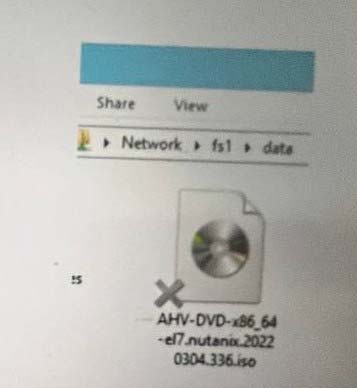 What does the `'X'' represent on the icon?
-
A
-
B
-
C
-
D
Reveal answer details
Close answer details
Correct answerC
ExplanationThe "X" on the icon represents a distributed shared file, which is a file that belongs to a distributed share or export. A distributed share or export is a type of SMB share or NFS export that distributes the hosting of top-level directories across multiple FSVMs. The "X" indicates that the file is not hosted by the current FSVM, but by another FSVM in the cluster. The "X" also helps to identify which files are eligible for migration when using the Nutanix Files Migration Tool.
References:
Nutanix Files Administration Guide, page 34
Nutanix Files Migration Tool User Guide, page 10
Question 3
Multiple choice
Which two platform are currently supported for Smart Tiering? (Choose two.)
-
A
-
B
-
C
-
D
Reveal answer details
Close answer details
Correct answersB, D
ExplanationExplanation: The two platforms that are currently supported for Smart Tiering are AWS Standard and Azure Blob. Smart Tiering is a feature that allows administrators to tier data from Files to cloud storage based on file age, file size, and file type. Smart Tiering can help reduce the storage cost and optimize the performance of Files. Smart Tiering currently supports AWS Standard and Azure Blob as the cloud storage platforms, and more platforms will be added in the future.
References:
Nutanix Files Administration Guide,
page 99
Nutanix Files Solution Guide, page 11
An administrator has performed an AOS upgrade, but noticed that the compression on containers is not happening. What is the delay before compression begins on the Files container?
-
A
-
B
-
C
-
D
Reveal answer details
Close answer details
Correct answerC
ExplanationExplanation: The delay before compression begins on the Files container is 12 hours. Compression is a feature that reduces the storage space required for data by applying an algorithm that eliminates redundant or unnecessary bits. Compression can improve the storage efficiency and performance of Files.
Compression is enabled by default on the Files container and runs in the background as a low-priority task.
Compression does not start immediately after an AOS upgrade, but waits for 12 hours to avoid interfering with other high-priority tasks or operations.
References:
Nutanix Files Administration Guide, page 24;
Nutanix Files Solution Guide, page 10
An administrator is upgrading Files from version 3.7 to 4.1 in the highly secured environment the pre-upgrade check fail with below error: FileServer preupgrade check failed with cause (s) Sub task poll timed out What initial troubleshooting step should the administrator take?
-
A
Examine the failed tasks on the FSVMs
-
B
Check the there is enough disk space on FSVMs.
-
C
Verify connectivity between the FSVMs.
-
D
Increase upgrades timeout from ecli
Reveal answer details
Close answer details
Correct answerC
ExplanationExplanation: One of the possible causes of a failed pre-upgrade check for Files is network connectivity issues between the FSVMs. The administrator should verify that there are no firewall rules or network policies that block the communication between the FSVMs on ports 22 (SSH), 9440 (HTTPS), and 2009 (RPC). The administrator can use tools such as ping, traceroute, and telnet to test the connectivity between the FSVMs.
References:
Nutanix Support Portal - Troubleshooting Nutanix Files Upgrade Issues
An administrator ha having difficulty enabling Data Lens for a file server. What is the most likely cause of this issue?
-
A
The file server has blacklisted file types.
-
B
SSR is enabled on the file server.
-
C
The file server has been cloned.
-
D
The file server is in a Protection Domain.
Reveal answer details
Close answer details
Correct answerC
ExplanationExplanation: The most likely cause of this issue is that the file server has been cloned. Cloning a file server is not a supported operation and can cause various problems, such as Data Lens not being able to enable or disable for the cloned file server. To avoid this issue, the administrator should use the scale-out feature to add more FSVMs to an existing file server, or create a new file server from scratch.
References:
Nutanix Files Administration Guide, page 28
Nutanix Files Troubleshooting Guide, page 11
What is the minimum and maximum file size limitations for Smart Tiering?
-
A
64 KiB minimum and 15 TiB maximum
-
B
128 IOB minimum and 5 TiB maximum
-
C
64 KiB minimum and 5 TiB maximum
-
D
128 KiB minimum and 13 TiB maximum
Reveal answer details
Close answer details
Correct answerC
ExplanationExplanation: Smart Tiering is a feature that allows Files to tier data across different storage tiers based on the file size and access frequency. Smart Tiering supports files with a minimum size of 64 KiB and a maximum size of 5 TiB2.
References:
Nutanix Files Administration Guide2
An administrator has been tasked with creating a distributed share on a single-node cluster, but has been unable to successfully complete the task. Why is this task failing?
-
A
File server version should be greater than 3.8.0
-
B
AOS version should be greater than 6.0.
-
C
Number of distributed shares limit reached.
-
D
Distributed shares require multiple nodes.
Reveal answer details
Close answer details
Correct answerD
ExplanationExplanation: A distributed share is a type of SMB share or NFS export that distributes the hosting of top- level directories across multiple FSVMs, which improves load balancing and performance. A distributed share cannot be created on a single-node cluster, because there is only one FSVM available. A distributed share requires at least two nodes in the cluster to distribute the directories. Therefore, the task of creating a distributed share on a single-node cluster will fail.
References:
Nutanix Files Administration Guide, page
33
Nutanix Files Solution Guide, page 8
An administrator is required to place all iSCSI traffic on an isolated network. How can the administrator meet this requirement?
-
A
Create a new network interface on the CVMs via ncli.
-
B
Create a Volumes network in Prism Central.
-
C
Configure network segmentation for Volumes.
-
D
Configure the Data Services IP on an isolated network.
Reveal answer details
Close answer details
Correct answerC
ExplanationExplanation: The administrator can meet this requirement by configuring network segmentation for Volumes. Network segmentation is a feature that allows administrators to isolate network traffic for different types of services, such as Volumes, Files, or Objects, on a Nutanix cluster. Network segmentation can improve the security, performance, and manageability of network traffic. By configuring network segmentation for Volumes, the administrator can place all iSCSI traffic on an isolated network and prevent it from interfering with other services or applications.
References:
Nutanix Volumes Administration Guide,
page 15
Nutanix Volumes Solution Guide, page 7
Question 10
Single choice
The Administrator needs to review the following graphs, as displayed in the exhibit. * Storage Used * Open Connections * Number of Files * Top Shares by Current Capacity * Top Shares by current Connections Where should the administrator complete this action?
-
A
-
B
Files Console Data Management View
-
C
Files Console Monitoring View
-
D
Files Console Dashboard View
Reveal answer details
Close answer details
Correct answerD
ExplanationExplanation: The Files Console Dashboard View provides an overview of the Files cluster performance and usage, including the following graphs: Storage Used: Shows the total storage used by the Files cluster, including data, metadata, and snapshots.
Open Connections: Shows the number of active SMB and NFS connections to the Files cluster.
Number of Files: Shows the number of files stored in the Files cluster, excluding snapshots.
Top Shares by Current Capacity: Shows the top five shares by current capacity usage in the Files cluster.
Top Shares by Current Connections: Shows the top five shares by current connection count in the Files cluster 2.
References:
Nutanix Files Administration Guide2
Question 11
Single choice
An administrator has received an alert AI60068 - ADSDuplicationIPDetected details of alert as follows: 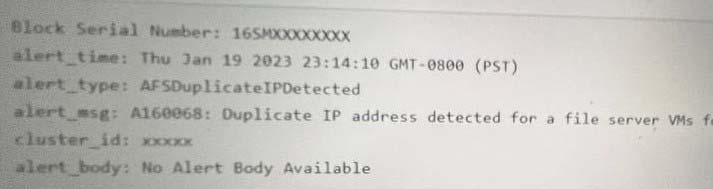 Which error log should the administrator review to determine the related Duplicate IP address involved?
-
A
-
B
-
C
-
D
Reveal answer details
Close answer details
Correct answerB
ExplanationExplanation: The Minerva_cvm.log file contains information about the Minerva service, which is responsible for managing the FSVMs and their communication with Prism Central. The Minerva_cvm.log file can be used to troubleshoot issues related to Nutanix Files, such as duplicate IP address detection.
The log file can be found in /home/nutanix/data/logs/minerva on any CVM in the cluster.
References:
Nutanix Support Portal - Troubleshooting Nutanix Files
Question 12
Single choice
Which Nutanix Unified Storage capability allows for monitoring usage for all Files deployment globally?
-
A
-
B
-
C
-
D
Reveal answer details
Close answer details
Correct answerD
ExplanationExplanation: Data Lens is a feature that provides insights into the data stored in Files across multiple sites, including different geographical locations. Data Lens allows administrators to monitor usage, performance, capacity, and growth trends for all Files deployments globally. Data Lens also provides reports on file types, sizes, owners, permissions, and access patterns 3.
References:
Nutanix Data Lens Administration Guide3
|