Please wait while the virtual machine loads. Once loaded, you may proceed to the lab section. This may take a few minutes, and the wait time will not be deducted from your overall test time.
When the Next button is available, click it to access the lab section. In this section, you will perform a set of tasks in a live environment. While most functionality will be available to you as it would be in a live environment, some functionality (e.g., copy and paste, ability to navigate to external websites) will not be possible by design.
Scoring is based on the outcome of performing the tasks stated in the lab. In other words, it doesn't matter how you accomplish the task, if you successfully perform it, you will earn credit for that task.
Labs are not timed separately, and this exam may have more than one lab that you must complete. You can use as much time as you would like to complete each lab. But, you should manage your time appropriately to ensure that you are able to complete the lab(s) and all other sections of the exam in the time provided.
Please note that once you submit your work by clicking the Next button within a lab, you will NOT be able to return to the lab.
Use the following login credentials as needed:
To enter your username, place your cursor in the Sign in box and click on the username below.
To enter your password, place your cursor in the Enter password box and click on the password below.
Microsoft 365 Username: [email protected] Microsoft 365 Password: xxxxxx
If the Microsoft 365 portal does not load successfully in the browser, press CTRL-K to reload the portal in a new browser tab.
The following information is for technical support purposes only. Lab Instance: XXXXXX
To complete this task, sign in to the Microsoft 365 admin center.
Question 3
Testlet 5Lab simulation
Simulation
You need to ensure that a notification email is sent to [email protected] when a user marks an email message as Not Junk in Microsoft Outlook.
To complete this task, sign in to the Microsoft 365 admin center.
Reveal model answerClose model answer
Go to the Microsoft 365 Defender portal and under Email & collaboration select Policies & rules > Alert policy.
An alert policy consists of the following settings and conditions. - Activity the alert is tracking. You create a policy to track an activity or in some cases a few related activities, such a sharing a file with an external user by sharing it, assigning access permissions, or creating an anonymous link. When a user performs the activity defined by the policy, an alert is triggered based on the alert threshold settings. - Activity conditions. For most activities, you can define additional conditions that must be met to trigger an alert. Common conditions include IP addresses (so that an alert is triggered when the user performs the activity on a computer with a specific IP address or within an IP address range), whether an alert is triggered if a specific user or users perform that activity, and whether the activity is performed on a specific file name or URL. You can also configure a condition that triggers an alert when the activity is performed by any user in your organization. The available conditions are dependent on the selected activity.
You can also define user tags as a condition of an alert policy. This results in the alerts triggered by the policy to include the context of the impacted user. You can use system user tags or custom user tags. - When the alert is triggered. You can configure a setting that defines how often an activity can occur before an alert is triggered. This allows you to set up a policy to generate an alert every time an activity matches the policy conditions, when a certain threshold is exceeded, or when the occurrence of the activity the alert is tracking becomes unusual for your organization.
If you select the setting based on unusual activity, Microsoft establishes a baseline value that defines the normal frequency for the selected activity. It takes up to seven days to establish this baseline, during which alerts won't be generated. After the baseline is established, an alert is triggered when the frequency of the activity tracked by the alert policy greatly exceeds the baseline value. For auditing-related activities (such as file and folder activities), you can establish a baseline based on a single user or based on all users in your organization; for malware-related activities, you can establish a baseline based on a single malware family, a single recipient, or all messages in your organization. - Alert category. To help with tracking and managing the alerts generated by a policy, you can assign one of the following categories to a policy. - Data loss prevention - Information governance - Mail flow - Permissions - Threat management - Others
When an activity occurs that matches the conditions of the alert policy, the alert that's generated is tagged with the category defined in this setting. This allows you to track and manage alerts that have the same category setting on the Alerts page in the compliance center because you can sort and filter alerts based on category. - Alert severity. Similar to the alert category, you assign a severity attribute (Low, Medium, High, or Informational) to alert policies. Like the alert category, when an activity occurs that matches the conditions of the alert policy, the alert that's generated is tagged with the same severity level that's set for the alert policy. Again, this allows you to track and manage alerts that have the same severity setting on
the Alerts page. For example, you can filter the list of alerts so that only alerts with a High severity are displayed. - Email notifications. You can set up the policy so that email notifications are sent (or not sent) to a list of users when an alert is triggered. You can also set a daily notification limit so that once the maximum number of notifications has been reached, no more notifications are sent for the alert during that day. In addition to email notifications, you or other administrators can view the alerts that are triggered by a policy on the Alerts page. Consider enabling email notifications for alert policies of a specific category or that have a higher severity setting.
ADatum Corporation is a consulting company that has a main office in Montreal.
ADatum has a Microsoft 365 E5 tenant named adatum.com and uses Microsoft Exchange Online for messaging services.
Existing Environment
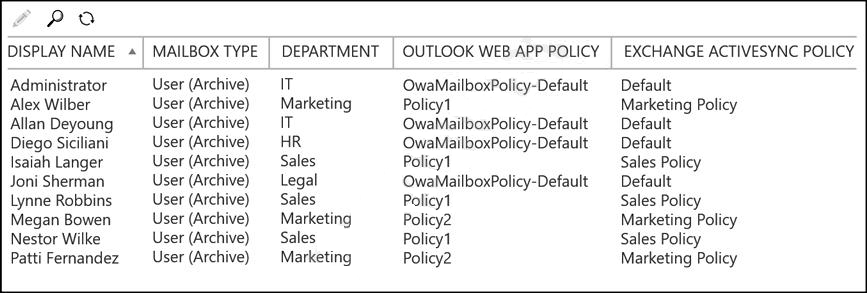
Mailboxes
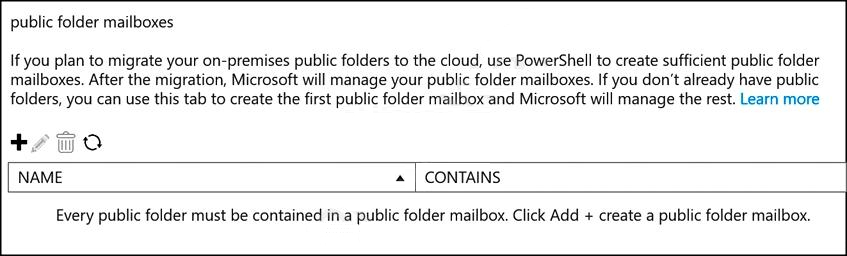
Public Folder Mailboxes
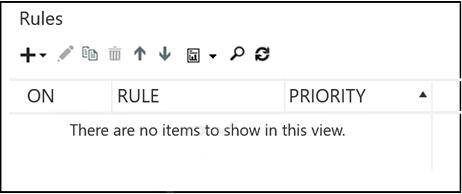
Rules
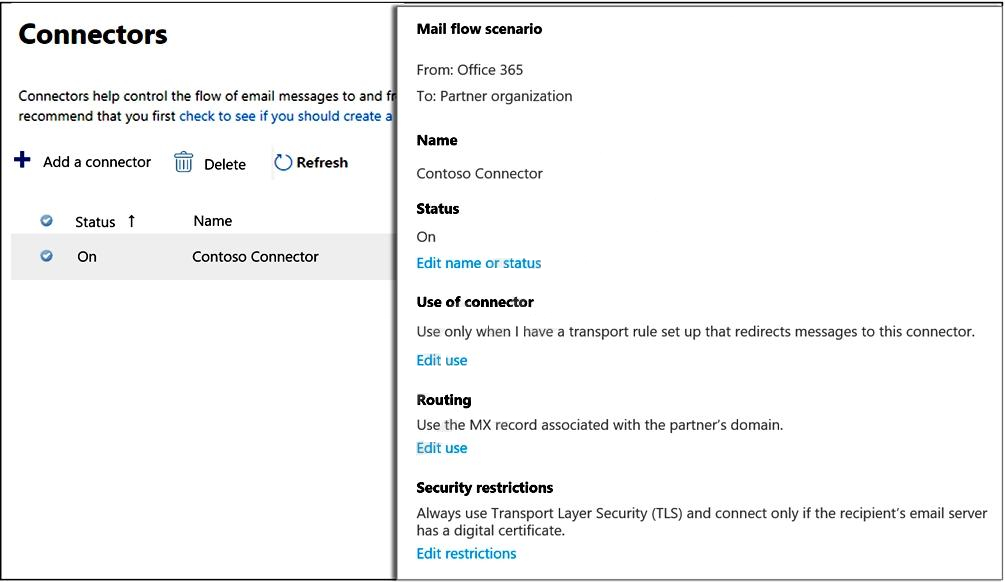
Connectors
Safe Attachments Policies
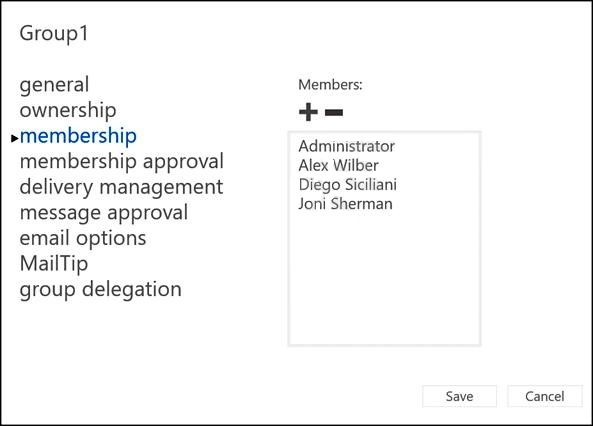
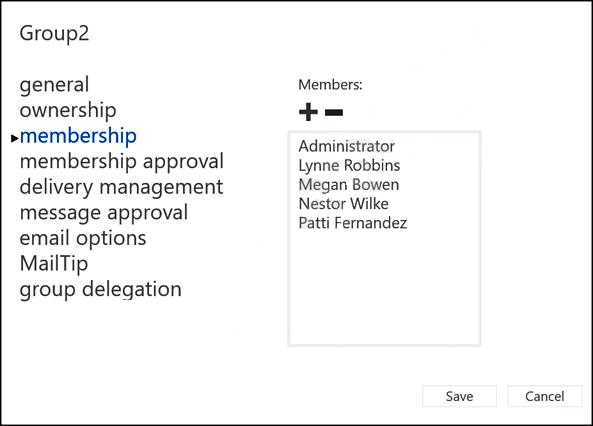
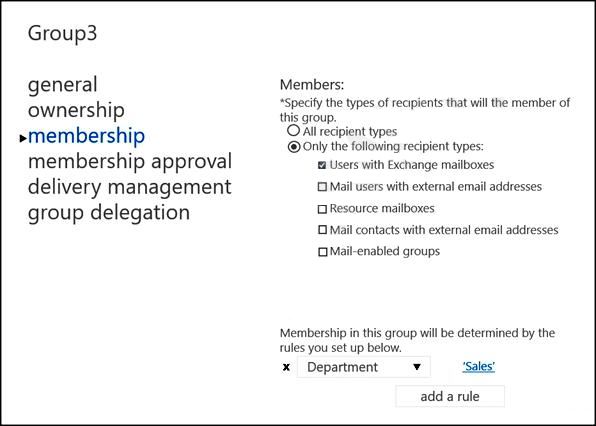
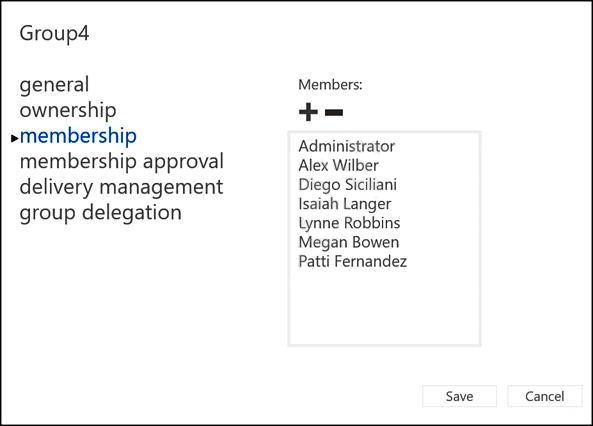
Groups
Group Membership
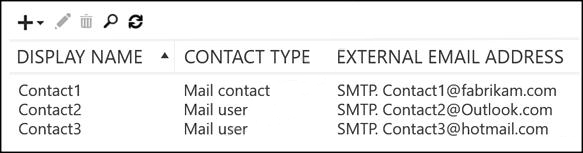
Contacts
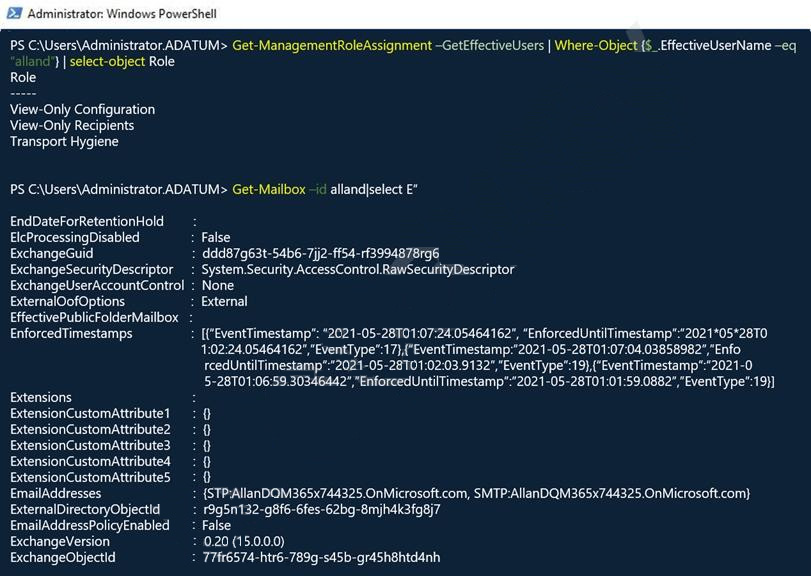
Allan Deyoung Role Assignments and Mailbox Details
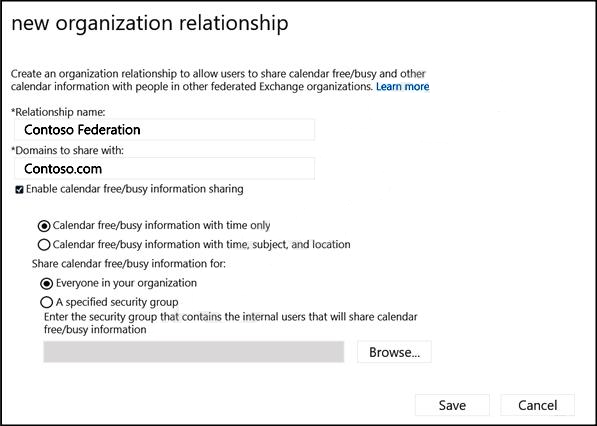
Organization Sharing
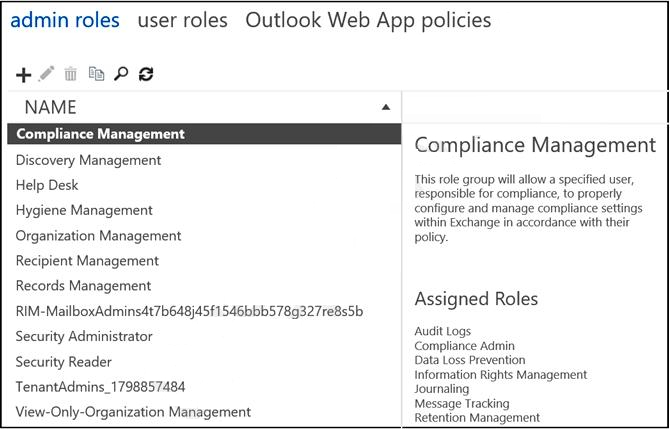
Roles
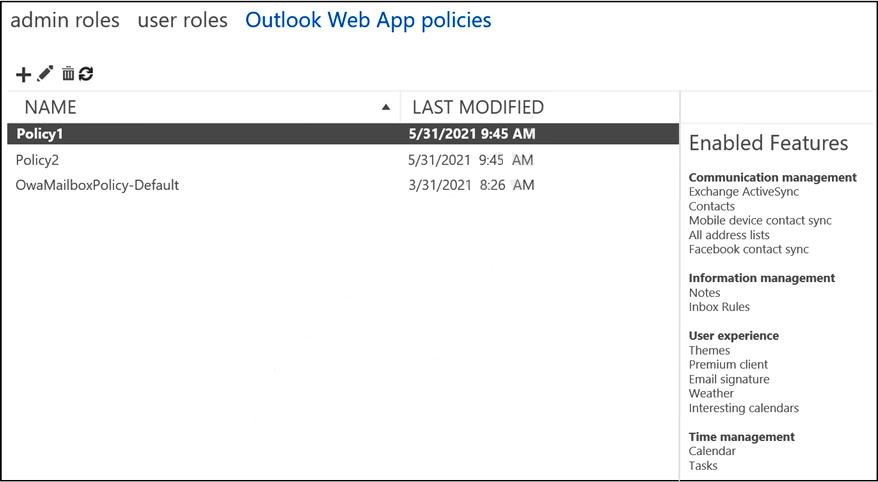
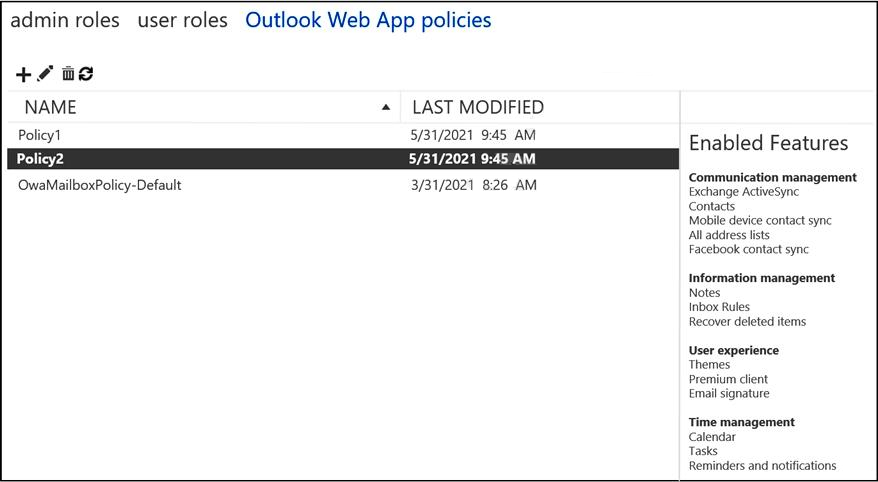
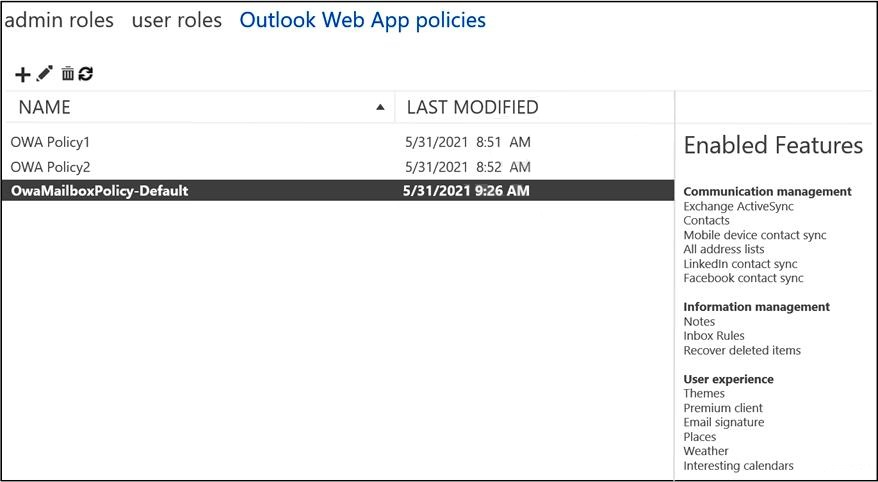
Outlook Web App Policies
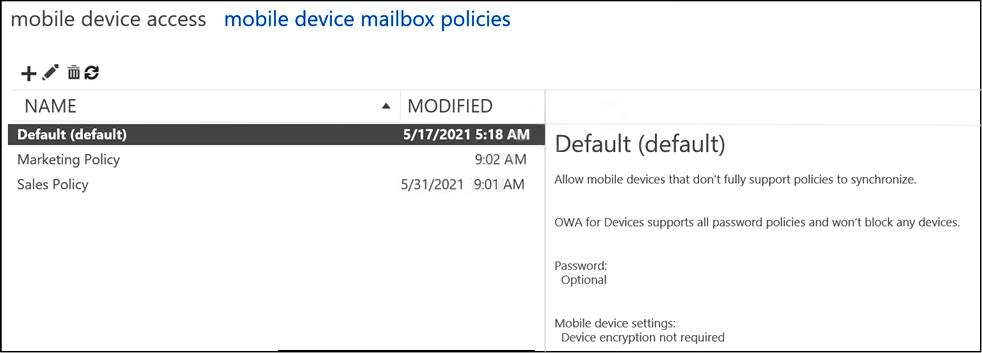
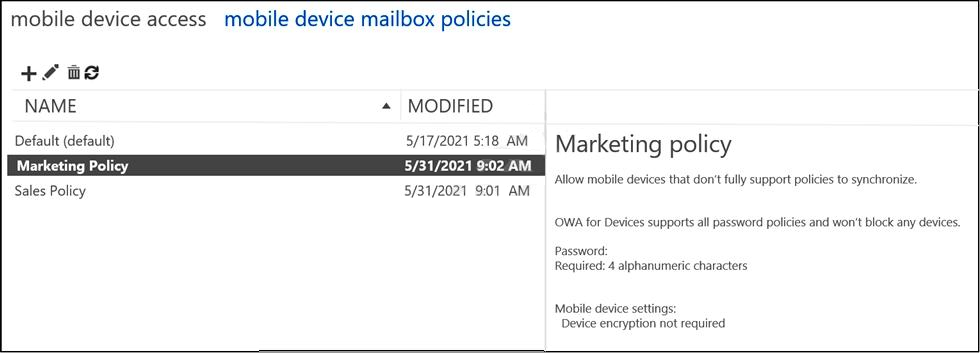
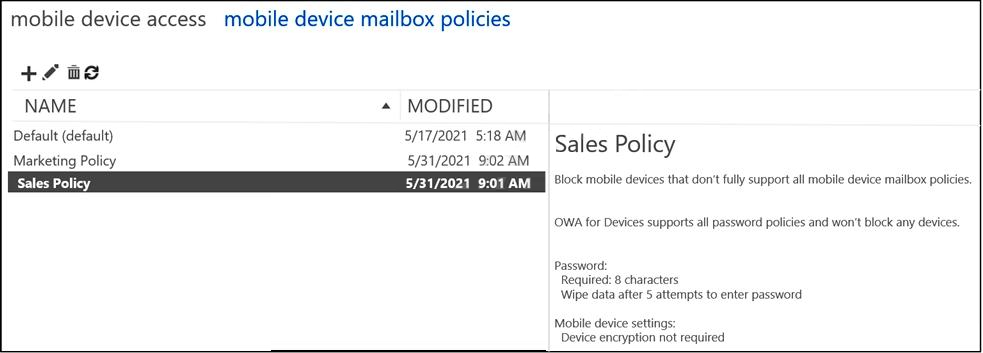
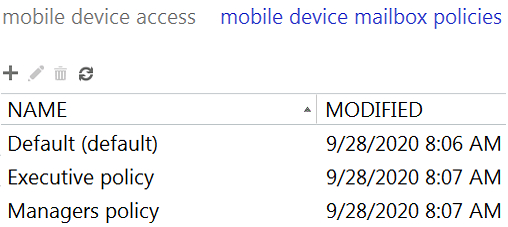
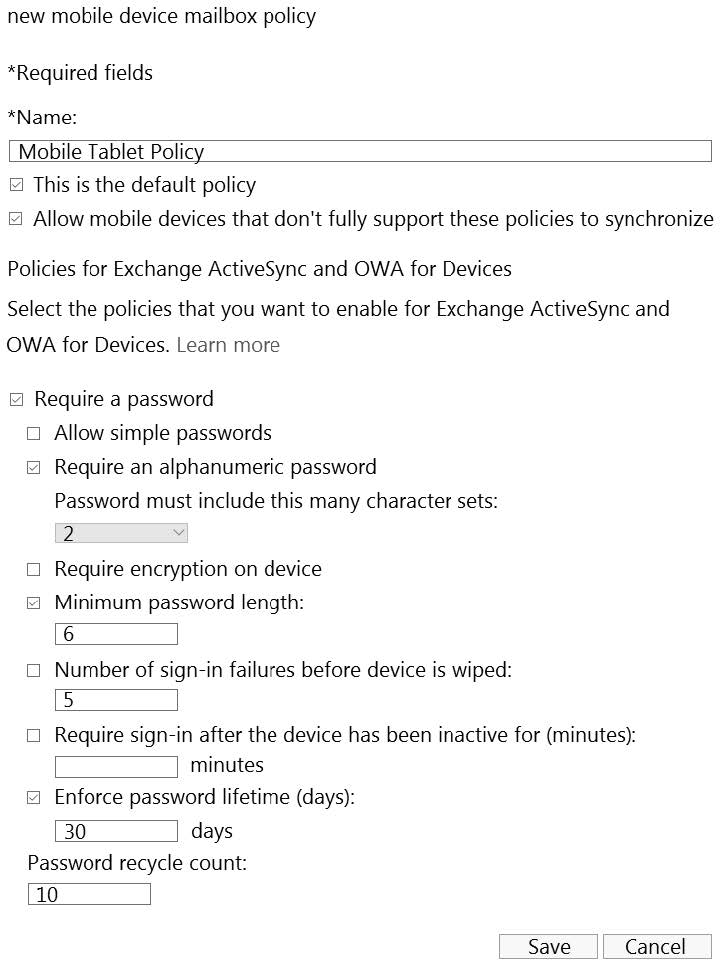
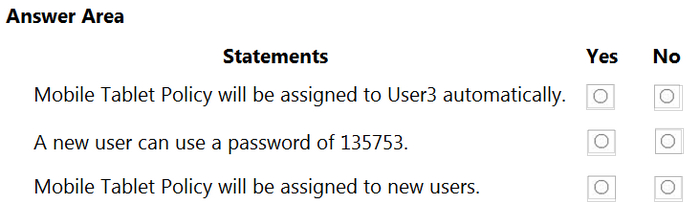
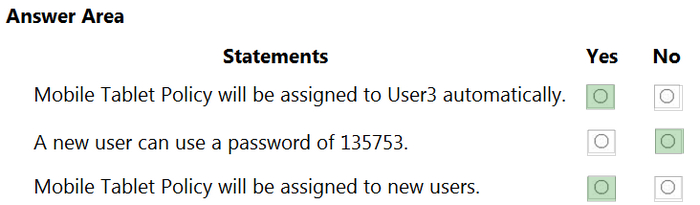
Mobile Device Mailbox Policies
Question 4
Testlet 4Single choice
You have a Microsoft Exchange Online tenant that contains an email domain named contoso.com.
You have a partner organization that uses an email domain named fabrikam.com.
You plan to add a connector to secure the email messages sent from fabrikam.com to contoso.com.
You need to ensure that only fabrikam.com can use the connector.
What should you do?
A
Configure the connector to verify the contoso.com domain with a certificate.
B
Configure the connector to verify the fabrikam.com domain with a certificate.
C
Add fabrikam.com as a remote domain.
D
Add fabrikam.com as an accepted domain.
Reveal answer detailsClose answer details
Correct answerB
Explanation
Using connectors to exchange email with a partner organization By default, Microsoft 365 or Office 365 sends mails using TLS encryption, provided that the destination server also supports TLS. If your partner organization supports TLS, you only need to create a connector if you want to enforce certain security restrictions - for example, you always want TLS applied, or you require certificate verification whenever mail is sent from your partner to your organization.
Set up a connector to apply security restrictions to mail sent from your partner organization to Microsoft
365 or Office 365
You can set up a connector to apply security restrictions to email that your partner organization sends to you.
* Details omitted*
7. Click Next. The Security restrictions screen appears.
8. Check the check box for Reject email messages if they aren't sent over TLS.
Note It is optional to choose the option of And require that the subject name of the certificate that the partner uses to authenticate with Office 365 matches this domain name. If you choose this option, enter the domain name of the partner organization.
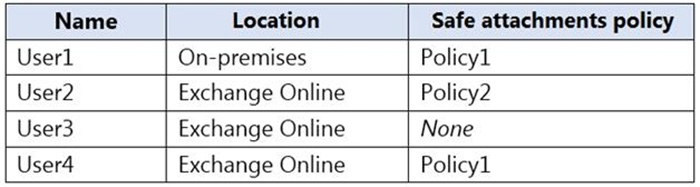
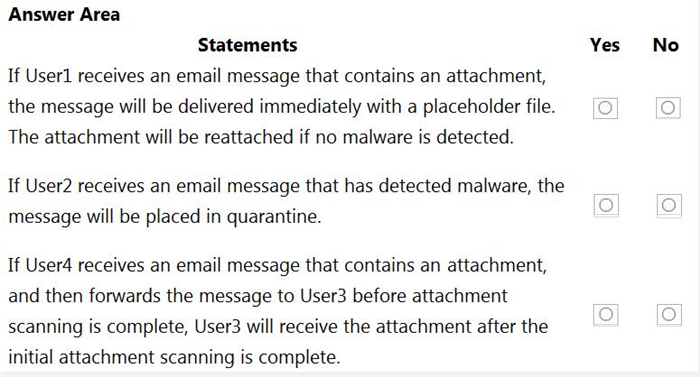
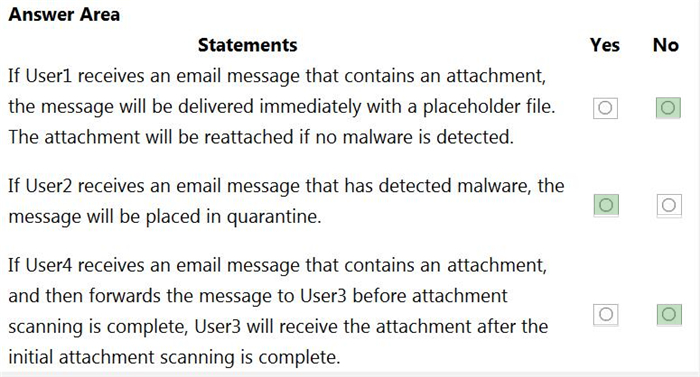
You have a Microsoft Exchange Online tenant that uses Microsoft Defender for Office 365.
You need to create a new Safe Attachments policy named Policy1 that meets the following requirements:
1. Immediately delivers email messages that contain attachments and replaces the attachments with placeholders 2. Reattaches the attachments after scanning is complete 3. Quarantines malicious attachments
Which action should you select for Policy1?
A
Monitor
B
Block
C
Dynamic Delivery
D
Replace
Reveal answer detailsClose answer details
Correct answerC
Question 7
Testlet 4Single choice
You have a Microsoft Exchange Server 2019 organization.
You plan to migrate all mailboxes to Exchange Online.
You need to provide a user with the ability to perform the mailbox migrations. The solution must use the principle of least privilege.
Fabrikam, Inc. is a consulting company that has a main office in Montreal.
Fabrikam has a partnership with a company named Litware, Inc.
Existing Environment
Network Environment
The on-premises network of Fabrikam contains an Active Directory domain named fabrikam.com.
Fabrikam has a Microsoft 365 tenant named fabrikam.com. All users have Microsoft 365 Enterprise E5 licenses.
User accounts sync between Active Directory Domain Services (AD DS) and the Microsoft 365 tenant.
Fabrikam.com contains the users and devices shown in the following table.
Fabrikam currently leases mobile devices from several mobile operators.
Microsoft Exchange Online Environment
All users are assigned an Outlook Web App policy named FilesPolicy.
In-Place Archiving is disabled for Exchange Online.
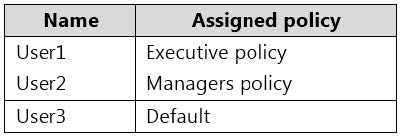
You have the users shown in the following table.
User1 and User3 use Microsoft Outlook for iOS and Android to access email from their mobile device. User2 uses a native Android email app.
A Safe Links policy in Microsoft Defender for Office 365 is applied to the fabrikam.com tenant. The marketing department uses a mail-enabled public folder named FabrikamProject.
Default MRM Policy is disabled for the fabrikam.com tenant.
Problem Statements
Fabrikam identifies the following issues:
1. Users report that they receive phishing emails containing embedded links. 2. Users download and save ASPX files when they use Outlook on the web. 3. Email between Fabrikam and Litware is unencrypted during transit. 4. User2 reports that he lost his mobile device.
Requirements
Planned Changes
Fabrikam plans to implement the following changes:
1. Configure FilesPolicy to prevent Outlook on the web users from downloading attachments that have the ASPX extension. 2. Purchase a new smartboard and configure the smartboard as a booking resource in Exchange Online. 3. Ensure that the new smartboard can only be booked for a maximum of one hour. 4. Allow only Admin1 to accept or deny booking requests for the new smartboard. 5. Standardize mobile device costs by moving to a single mobile device operator. 6. Migrate the FabrikamProject public folder to Microsoft SharePoint Online. 7. Enable In-Place Archiving for users in the marketing department. 8. Encrypt all email between Fabrikam and Litware.
Technical Requirements
Fabrikam identifies the following technical requirements:
1. Ensure that the planned Sharepoint site for FabrikamProject only contains content that was created during the last 12 months. 2. Any existing file types that are currently configured as blocked or allowed in the FilesPolicy policy must remain intact. 3. When users leave the company, remove their licenses and ensure that their mailbox is accessible to Admin1 and Admin2. 4. Generate a report that identifies mobile devices and the mobile device operator of each device. 5. Use the principle of least privilege. 6. Minimize administrative effort.
Retention requirements
Fabrikam identifies the following retention requirements for all users:
1. Enable users to tag items for deletion after one year. 2. Enable users to tag items for deletion after two years. 3. Enable users to tag items to be archived after one year. 4. Automatically delete items in the Junk Email folder after 30 days. 5. Automatically delete items in the Sent Items folder after 300 days. 6. Ensure that any items without a retention tag are moved to the Archive mailbox two years after they were created and permanently deleted seven years after they were created.
Question 9
Testlet 3Hotspot
HOTSPOT
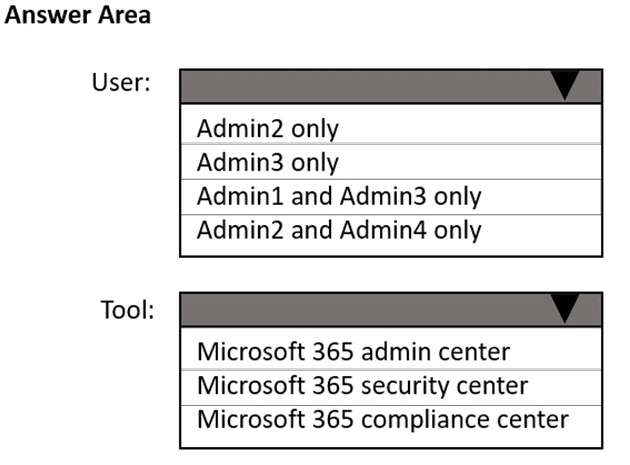
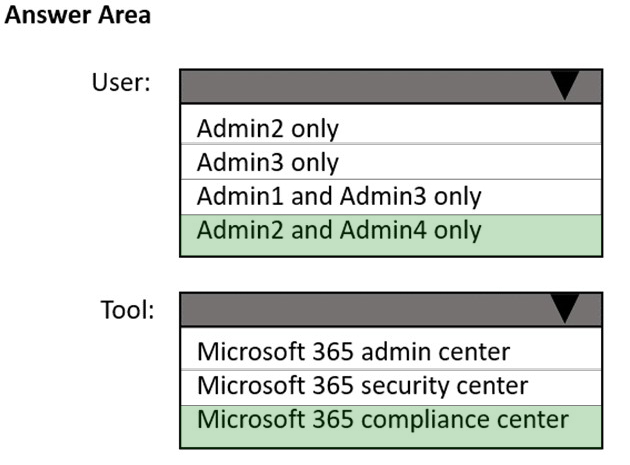
You need to ensure that In-Place Archiving is enabled for the marketing department users.
Which user should perform the change, and which tool should the user use? To answer, select the appropriate options in the answer area.
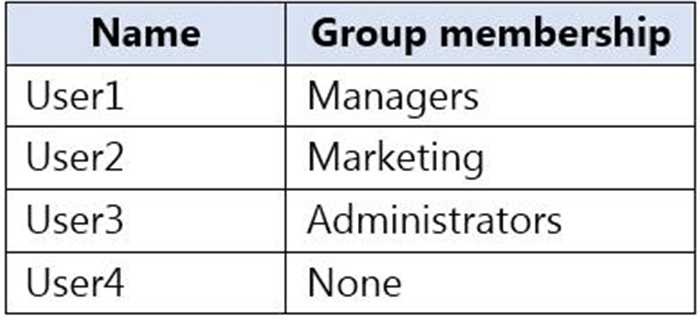
You have a Microsoft Exchange Online tenant that contains three Azure Active Directory (Azure AD) security groups named Administrators, Managers, and Marketing. The tenant contains the users shown in the following table.
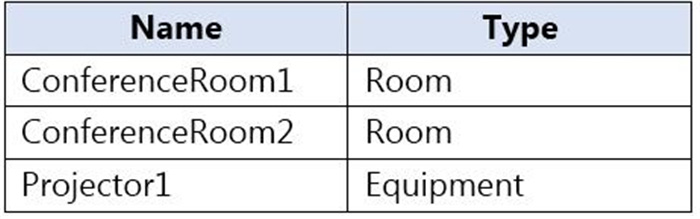
The tenant contains the resources shown in the following table.
ConferenceRoom1 has he following policy.
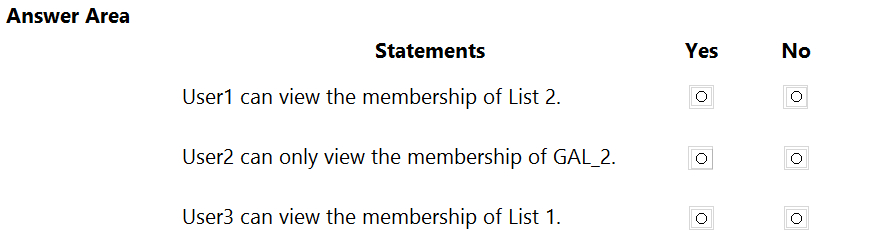
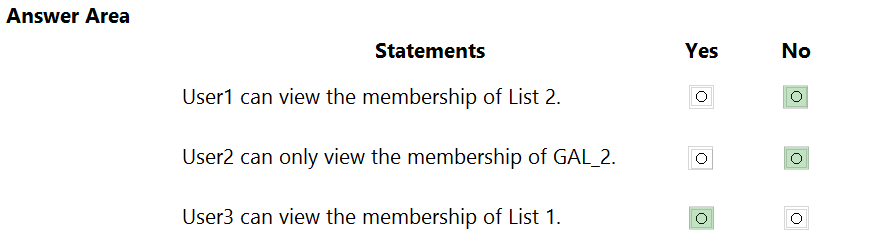
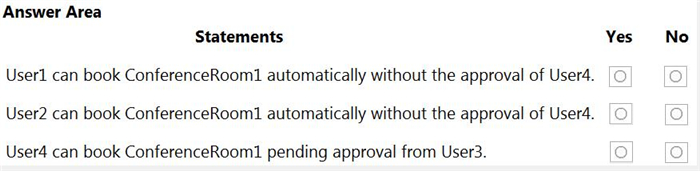
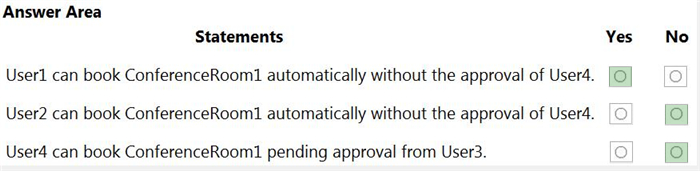
For each of the following statements, select Yes if the statement is true. Otherwise, select No.
NOTE: Each correct selection is worth one point.
Reveal answer detailsClose answer details
Question 12
Testlet 4Multiple choice
You have a hybrid deployment between a Microsoft Exchange Online tenant and an on-premises Exchange Server 2019 organization.
The tenant uses an email domain named @contoso.com.
You recently purchased an email domain named fabrikam.com.
You need to ensure that all the users in the tenant can receive email messages by using the @fabrikam.com email domain. The solution must ensure that the users can continue to receive email by using the @contoso.com email domain.
Which three actions should you perform? Each correct answer presents part of the solution. NOTE; Each correct selection is worth one point.
A
From Azure AD Connect add a domain for fabrikam.com.
B
From the on-premises Exchange admin center, add an accepted domain for fabrikam.com.
C
From the Exchange Management Shell, create a script that runs the
D
From the Microsoft 365 admin center, verify the fabrikam.com email domain
E
From the on-premises Exchange admin center, modify the email address policy
F
From the Microsoft 365 admin center, add the fabrikam.com email domain.
Reveal answer detailsClose answer details
Correct answersB, D, E
Question 13
Testlet 4Single choice
You have hybrid deployment between a Microsoft Exchange Online tenant and an onpremises Exchange Server 2019 organization. The deployment uses Azure AD Connect.
All incoming email is delivered to Exchange Online. You have 10 mail-enabled public folders hosted on an on-premises Mailbox server. Customers receive an error when an email message is sent to a public folder.
You need to ensure that all the mail-enabled public folders can receive email messages from the internet. The solution must ensure that messages can be delivered only to valid recipients.
Solution: From Azure AD Connect, select Exchange Mail Public Folders.
Does this meet the goal?
A
Yes
B
No
Reveal answer detailsClose answer details
Correct answerA
Explanation
From Azure AD Connect, selecting Exchange Mail Public Folders will ensure that all the mail-enabled public folders can receive email messages from the internet and that messages can be delivered only to valid recipients. This is according to the Microsoft 365 Messaging documentation ( https://docs.microsoft.com/en-us/exchange/hybriddeployment/hybrid-mail-flow).
Question 14
Testlet 4Single choice
You have a Microsoft Exchange Online tenant.
You plan to place a hold on all email messages stored in the mailbox of a user named User1.
What should you create first?
A
an eDiscovery case
B
a data loss prevention (DLP) policy
C
an information barrier segment
D
a sensitive info type
Reveal answer detailsClose answer details
Correct answerA
Explanation
You create eDiscovery holds in eDiscovery (Standard) case. You can use a Microsoft Purview eDiscovery (Standard) case to create holds to preserve content that might be relevant to the case. You can place a hold on the Exchange mailboxes and OneDrive for Business accounts of people you're investigating in the case. You can also place a hold on the mailboxes and sites that are associated with Microsoft Teams, Microsoft 365 groups, and Yammer Groups. When you place content locations on hold, content is preserved until you remove the content location from the hold or until you delete the hold.
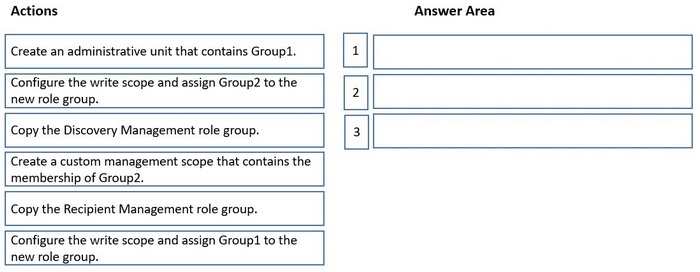
You have a Microsoft Exchange Online tenant that contains two groups named Group1 and Group2.
You need to ensure that the members of Group1 can perform In-Place eDiscovery searches only for the members of Group2.
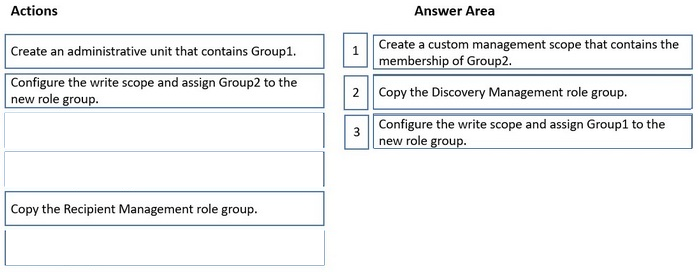
Which three actions should you perform in sequence? To answer, move the appropriate actions from the list of actions to the answer area and arrange them in the correct order.
Reveal answer detailsClose answer details
Explanation
Step 1: Create a custom management scope that contains the membership of Group2. You can use a custom management scope to let specific people or groups use In-Place eDiscovery to search a subset of mailboxes in your Exchange Online organization.
1. Organize users into distribution groups for eDiscovery To search a subset of mailboxes in your organization or to narrow the scope of source mailboxes that a discovery manager can search, you'll need to group the subset of mailboxes into one or more distribution groups. When you create a custom management scope in step 2, you'll use these distribution groups as the recipient filter to create a custom management scope. This allows a discovery manager to search only the mailboxes of the users who are members of a specified group.)
2. Create a custom management scope Now you'll create a custom management scope that's defined by the membership of a distribution group (using the MemberOfGroup recipient filter). When this scope is applied to a role group used for eDiscovery, members of the role group can search the mailboxes of users who are members of the distribution group that was used to create the custom management scope.
Step 2: Copy the Recipient Management role group Assign eDiscovery permissions in Exchange Online If you want users to be able to use Microsoft Exchange Server In-Place eDiscovery, you must first authorize them by adding them to the Discovery Management role group. Members of the Discovery Management role group have Full Access mailbox permissions for the Discovery mailbox that's created by Exchange Setup. 3: Create a management role group In this step, you create a new management role group and assign the custom scope that you created.
Step 3: Configure the write scope and assign Group1 to the new role group.
You have an Exchange Online tenant that contains several hundred mailboxes.
Several users report that email messages from an SMTP domain named @fabrikam.com often fail to be delivered to their mailbox.
You need to increase the likelihood that the email messages from the @fabrikam.com are delivered successfully to the users in the tenant.
A
From the Security & Compliance admin center, modify the anti-spam policy settings.
B
From the Security & Compliance admin center, modify the DKIM settings.
C
From your public DNS zones, create a Sender Policy Framework (SPF) TXT record.
D
From the Security & Compliance admin center, create a new ATP anti-phishing policy.
Reveal answer detailsClose answer details
Correct answerA
Question 17
Testlet 4Single choice
Note: This question is part of a series of questions that present the same scenario. Each question in the series contains a unique solution that might meet the stated goals. Some question sets might have more than one correct solution, while others might not have a correct solution.
After you answer a question in this section, you will NOT be able to return to it. As a result, these questions will not appear in the review screen.
You have a Microsoft 365 E5 subscription.
You need to ensure that a user named User1 can review audit reports from the Microsoft 365 security center. User1 must be prevented from tracing messages from the Security admin center.
Solution: You assign the Reports reader role to User1.
Does this meet the goal?
A
Yes
B
No
Reveal answer detailsClose answer details
Correct answerB
Case study
Case Study 3
Overview
Fabrikam, Inc. is a consulting company that has a main office in Montreal.
Fabrikam has a partnership with a company named Litware, Inc.
Existing Environment
Network Environment
The on-premises network of Fabrikam contains an Active Directory domain named fabrikam.com.
Fabrikam has a Microsoft 365 tenant named fabrikam.com. All users have Microsoft 365 Enterprise E5 licenses.
User accounts sync between Active Directory Domain Services (AD DS) and the Microsoft 365 tenant.
Fabrikam.com contains the users and devices shown in the following table.
Fabrikam currently leases mobile devices from several mobile operators.
Microsoft Exchange Online Environment
All users are assigned an Outlook Web App policy named FilesPolicy.
In-Place Archiving is disabled for Exchange Online.
You have the users shown in the following table.
User1 and User3 use Microsoft Outlook for iOS and Android to access email from their mobile device. User2 uses a native Android email app.
A Safe Links policy in Microsoft Defender for Office 365 is applied to the fabrikam.com tenant. The marketing department uses a mail-enabled public folder named FabrikamProject.
Default MRM Policy is disabled for the fabrikam.com tenant.
Problem Statements
Fabrikam identifies the following issues:
1. Users report that they receive phishing emails containing embedded links. 2. Users download and save ASPX files when they use Outlook on the web. 3. Email between Fabrikam and Litware is unencrypted during transit. 4. User2 reports that he lost his mobile device.
Requirements
Planned Changes
Fabrikam plans to implement the following changes:
1. Configure FilesPolicy to prevent Outlook on the web users from downloading attachments that have the ASPX extension. 2. Purchase a new smartboard and configure the smartboard as a booking resource in Exchange Online. 3. Ensure that the new smartboard can only be booked for a maximum of one hour. 4. Allow only Admin1 to accept or deny booking requests for the new smartboard. 5. Standardize mobile device costs by moving to a single mobile device operator. 6. Migrate the FabrikamProject public folder to Microsoft SharePoint Online. 7. Enable In-Place Archiving for users in the marketing department. 8. Encrypt all email between Fabrikam and Litware.
Technical Requirements
Fabrikam identifies the following technical requirements:
1. Ensure that the planned Sharepoint site for FabrikamProject only contains content that was created during the last 12 months. 2. Any existing file types that are currently configured as blocked or allowed in the FilesPolicy policy must remain intact. 3. When users leave the company, remove their licenses and ensure that their mailbox is accessible to Admin1 and Admin2. 4. Generate a report that identifies mobile devices and the mobile device operator of each device. 5. Use the principle of least privilege. 6. Minimize administrative effort.
Retention requirements
Fabrikam identifies the following retention requirements for all users:
1. Enable users to tag items for deletion after one year. 2. Enable users to tag items for deletion after two years. 3. Enable users to tag items to be archived after one year. 4. Automatically delete items in the Junk Email folder after 30 days. 5. Automatically delete items in the Sent Items folder after 300 days. 6. Ensure that any items without a retention tag are moved to the Archive mailbox two years after they were created and permanently deleted seven years after they were created.
Question 18
Testlet 3Hotspot
HOTSPOT
You need to modify FilesPolicy to prevent users from downloading ASPX files. The solution must meet the technical requirements.
How should you complete the command? To answer, select the appropriate options in the answer area.
Your network contains an Active Directory domain named corp.contoso.com. The domain contains client computers that have Microsoft Office 36S Apps installed. You have a hybrid deployment that contains a Microsoft Exchange Online tenant and an on-premises Exchange Server 2019 server named Server1. All recipients use an email address suffix of Contoso.com.
You migrate all the Exchange Server recipients to Exchange Online, and then decommission Server1.
Users connected to the internal network report that they receive an Autodiscover error when they open Microsoft Outlook.
You need to ensure that all users can connect successfully to their mailbox by using Outlook.
Which two actions should you perform? Each correct answer presents a complete solution.
NOTE: Each correct selection is worth one point.
A
From the corp.contoso.com DNS zone, modify the Autodiscover host (A) record.
B
Add an accepted domain.
C
From the contoso.com DNS zone, modify the Autodiscover alias (CNAME) record
D
Modify the name of the TLS certificate.
E
From the domain, modify the Autodiscover service connection point (SCP).
Reveal answer detailsClose answer details
Correct answersC, E
Question 21
Testlet 4Single choice
Note: This question is part of a series of questions that present the same scenario. Each question in the series contains a unique solution that might meet the stated goals. Some question sets might have more than one correct solution, while others might not have a correct solution.
After you answer a question in this section, you will NOT be able to return to it. As a result, these questions will not appear in the review screen.
You have a Microsoft Exchange Server 2019 hybrid deployment. All user mailboxes are hosted in Microsoft 365. All outbound SMTP email is routed through the on-premises Exchange organization.
A corporate security policy requires that you must prevent credit card numbers from being sent to internet recipients by using email.
You need to configure the deployment to meet the security policy requirement.
Solution: From Microsoft 365, you create a data loss prevention (DLP) policy.
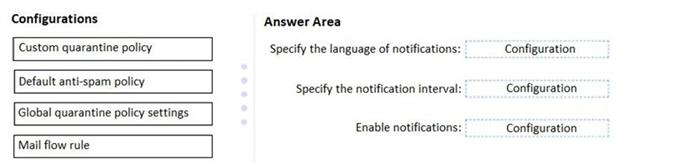
You have a Microsoft Exchange Online tenant that uses Microsoft Defender for Office 365.
You create a new anti-phishing policy named Policy1.
You need to ensure that users are notified every five days about all the email messages quarantined by Policy1.
Which two actions should you perform? Each correct answer presents part of the solution.
NOTE: Each correct selection is worth one point.
A
Add a custom quarantine policy and assign the policy to Policy1.
B
Modify the DefaultFullAccessPolicy quarantine policy and assign the policy to Policy1.
C
Modify the AdminOnlyAccessPolicy quarantine policy and assign the policy to Policy1.
D
Configure the User reported messages settings.
E
Modify the global settings for quarantine policies.
Reveal answer detailsClose answer details
Correct answersA, E
Explanation
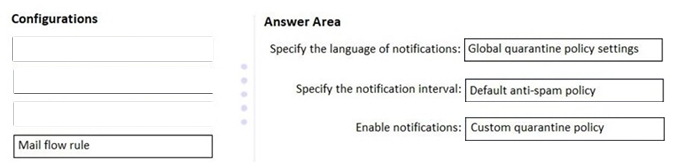
Explanation: Step 1: Create quarantine policies in the Microsoft 365 Defender portal Step 2: Assign a quarantine policy to supported features In supported protection features that quarantine email messages, you can assign a quarantine policy to the available quarantine actions.
Step 3: Assign quarantine policies in supported policies in the Microsoft 365 Defender portal
Note: Quarantine policies define what users are allowed to do to quarantined messages based on why the message was quarantined (for supported features). For more information, see Quarantine policies. Quarantine polices also control whether the affected recipients (including shared mailboxes) get periodic quarantine notifications about their quarantined messages. Quarantine notifications are the replacement for end-user spam notifications for all supported protection features (not just anti-spam policy verdicts).
Incorrect: Not B, not C: Quarantine notifications are not turned on in the built-in quarantine notifications named AdminOnlyAccessPolicy or DefaultFullAccessPolicy. Quarantine notifications are turned on in the built-in quarantine policy named NotificationEnabledPolicy if your organization has it. Otherwise, to turn on quarantine notifications in quarantine policies, you need to create and configure a new quarantine policy.
You have a Microsoft 365 tenant that contains a user named User1.
User1 reports that she cannot configure a mail profile in Microsoft Outlook for Windows.
User1 receives the following error message: "Encrypted connection to your mail server is not available."
You verify that User1 is assigned a Microsoft Office 365 Enterprise F3 license and can send email messages from her account by using Outlook on the web.
You need to ensure that User1 can connect to Outlook successfully.
What should you do?
A
Run the Microsoft Support and Recovery Assistant for Office 365.
B
Activate the installation of Office 365 ProPlus.
C
Modify the license assigned to User1.
D
Install a new certificate on the computer of User1.
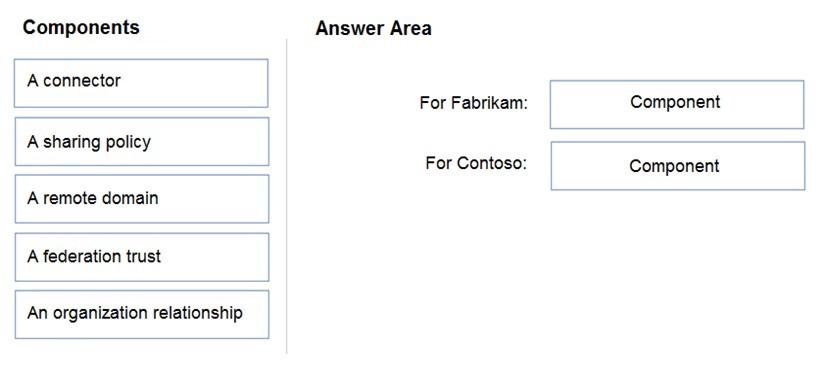
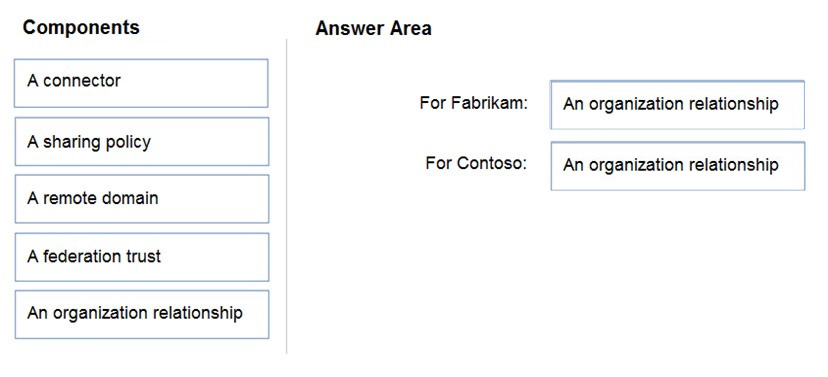
Your company named Contoso, Ltd. has a Microsoft Exchange Server 2019 hybrid deployment.
A partner company named Fabrikam, Inc. uses an Exchange Online subscription for email.
You need to ensure that all the users at Fabrikam can view the free/busy information of the users at Contoso.
What should you configure? To answer, drag the appropriate components to the correct companies. Each component may be used once, more than once, or not at all. You may need to drag the split bar between panes or scroll to view content.
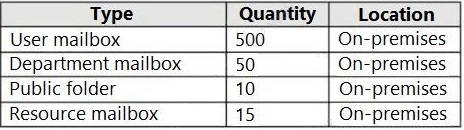
You have a hybrid deployment between a Microsoft Exchange Online tenant and an on-premises Exchange Server 2019 organization. The deployment contains the resources shown in the following table.
You need to migrate the mailboxes from the on-premises Exchange Server 2019 organization to Exchange Online. The department mailboxes will be migrated to shared mailboxes.
What is the minimum number of Exchange Online licenses required?
A
500
B
515
C
550
D
550
Reveal answer detailsClose answer details
Correct answerC
Explanation
The user mailboxes and the department mailboxes.
Note: Mailbox types Exchange supports the following mailbox types:
User mailboxes: User mailboxes are assigned to individual users in your Exchange organization. User mailboxes provide your users with a rich collaboration platform.
Resource mailboxes: Resource mailboxes are special mailboxes designed to be used for scheduling resources. Like all mailbox types, a resource mailbox has an associated Active Directory user account, but it must be a disabled account.
Your network contains an Active Directory domain named fabrikam.com.
You have a Microsoft Exchange Server 2019 organization that contains two Mailbox servers in a database availability group (DAG).
You plan to implement a hybrid deployment by using the Exchange Modern Hybrid connection option.
Which three configurations will be transferred automatically from the on-premises organization to Exchange Online? Each correct answer presents part of the solution.
You are configuring a hybrid deployment between a Microsoft Exchange Online tenant and an on-premises Exchange Server 2019 organization.
The Exchange Server organization contains two servers named Server1 and Server2.
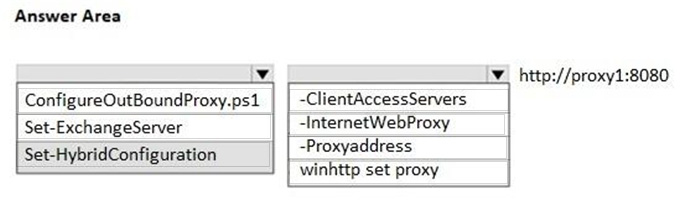
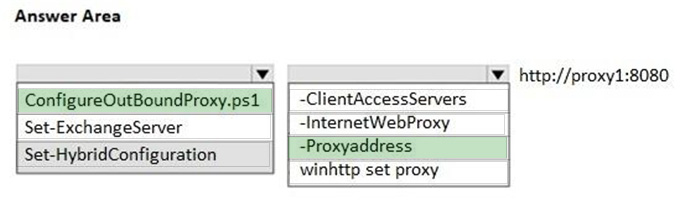
You have a proxy server named Proxy1 that is accessible by using http://proxy1:8080.
You install the Microsoft Hybrid Agent on Server1 and Server2.
You need to ensure that the Hybrid Agent uses only Proxy1 to connect to Microsoft Online Services.
How should you complete the PowerShell command? To answer, select the appropriate options in the answer area.
NOTE: Each correct selection is worth one point.
Reveal answer detailsClose answer details
Explanation
Explanation:
Box 1: ConfigureOutBoundProxy.ps1 Microsoft Hybrid Agent The Agent supports outbound unauthenticated proxy servers, but you need to do more configuration after the installation. Run the ConfigureOutBoundProxy.ps1 script located in \Program Files\Microsoft Hybrid Service\ on the computer where the Agent is installed. For example:
Incorrect: * Set-ExchangeServer Set-ExchangeServer ExchangePowerShell Applies to: Exchange Server 2010, Exchange Server 2013, Exchange Server 2016, Exchange Server 2019
This cmdlet is available only in on-premises Exchange. Use the Set-ExchangeServer cmdlet to set Exchange attributes in Active Directory for a specified server.
* Set-HybridConfiguration Set-HybridConfiguration Applies to: Exchange Server 2010, Exchange Server 2013, Exchange Server 2016, Exchange Server 2019
This cmdlet is available only in on-premises Exchange.
Use the Set-HybridConfiguration cmdlet to modify the hybrid deployment between your on-premises Exchange organization and Exchange Online in a Microsoft 365 for enterprises organization.
* -InternetWebProxy Set-HybridConfiguration - No such parameter.
-InternetWebProxy Set-ExchangeServer - The InternetWebProxy parameter specifies the web proxy server that the Exchange server uses to reach the internet. A valid value for this parameter is the URL of the web proxy server.
* winhttp set proxy
* -ClientAccessServers This parameter is functional only in Exchange Server 2010.
The ClientAccessServers parameter specifies the Exchange 2010 SP2 or later servers with the Client Access server role installed that will be configured to support the hybrid deployment features. At least one Client Access server must be defined and be externally accessible from the Internet on ports 80 and 443. The servers will be configured to enable the following:
You have an on-premises Microsoft Exchange Server 2019 organization and a firewall that filters all the traffic to and from the organization.
You purchase a Microsoft 365 E5 subscription.
You plan to use the Hybrid Configuration wizard to configure a hybrid deployment between Exchange Online and the on-premises Exchange organization.
You need to identify which ports are required to support configuring the hybrid deployment.
Which two ports should you open on the firewall? Each correct answer presents part of the solution.
NOTE: Each correct selection is worth one point.
A
25
B
80
C
443
D
995
E
587
Reveal answer detailsClose answer details
Correct answersA, C
Explanation
Before you create and configure a hybrid deployment using the Hybrid Configuration wizard, your existing on-premises Exchange organization needs to meet certain requirements. If you don't meet these requirements, you won't be able to complete the steps within the Hybrid Configuration wizard and you won't be able to configure a hybrid deployment between your on-premises Exchange organization and Exchange Online.
Hybrid deployment protocols, ports, and endpoints You need to configure the following protocols, ports, and connection endpoints in the firewall that protects your on-premises organization as described in the following table.
Exchange Online endpoints TCP/25 (SMTP/TLS) On-premises Exchange Servers configured to host receive connectors for secure mail transport with Exchange Online in the Hybrid Configuration wizard
Exchange Online endpoints TCP/443 (HTTPS) On-premises Exchange Servers used to publish Exchange Web Services and Autodiscover to Internet
Incorrect: Exchange 2019/2016 Mailbox/Edge, Exchange 2013 CAS/Edge 80 For hybrid functionality, Exchange Servers needs outbound connectivity to various Certificate Revocation List (CRL) endpoints mentioned here. We strongly recommend letting Windows maintain the Certificate Trust List (CTL) on your machine. Otherwise, this must be maintained manually on a regular basis. To allow Windows to maintain the CTL, the URL must be reachable from the computer on which Exchange Server is installed.
Fabrikam, Inc. is a consulting company that has a main office in Montreal.
Fabrikam has a partnership with a company named Litware, Inc.
Existing Environment
Network Environment
The on-premises network of Fabrikam contains an Active Directory domain named fabrikam.com.
Fabrikam has a Microsoft 365 tenant named fabrikam.com. All users have Microsoft 365 Enterprise E5 licenses.
User accounts sync between Active Directory Domain Services (AD DS) and the Microsoft 365 tenant.
Fabrikam.com contains the users and devices shown in the following table.
Fabrikam currently leases mobile devices from several mobile operators.
Microsoft Exchange Online Environment
All users are assigned an Outlook Web App policy named FilesPolicy.
In-Place Archiving is disabled for Exchange Online.
You have the users shown in the following table.
User1 and User3 use Microsoft Outlook for iOS and Android to access email from their mobile device. User2 uses a native Android email app.
A Safe Links policy in Microsoft Defender for Office 365 is applied to the fabrikam.com tenant. The marketing department uses a mail-enabled public folder named FabrikamProject.
Default MRM Policy is disabled for the fabrikam.com tenant.
Problem Statements
Fabrikam identifies the following issues:
1. Users report that they receive phishing emails containing embedded links. 2. Users download and save ASPX files when they use Outlook on the web. 3. Email between Fabrikam and Litware is unencrypted during transit. 4. User2 reports that he lost his mobile device.
Requirements
Planned Changes
Fabrikam plans to implement the following changes:
1. Configure FilesPolicy to prevent Outlook on the web users from downloading attachments that have the ASPX extension. 2. Purchase a new smartboard and configure the smartboard as a booking resource in Exchange Online. 3. Ensure that the new smartboard can only be booked for a maximum of one hour. 4. Allow only Admin1 to accept or deny booking requests for the new smartboard. 5. Standardize mobile device costs by moving to a single mobile device operator. 6. Migrate the FabrikamProject public folder to Microsoft SharePoint Online. 7. Enable In-Place Archiving for users in the marketing department. 8. Encrypt all email between Fabrikam and Litware.
Technical Requirements
Fabrikam identifies the following technical requirements:
1. Ensure that the planned Sharepoint site for FabrikamProject only contains content that was created during the last 12 months. 2. Any existing file types that are currently configured as blocked or allowed in the FilesPolicy policy must remain intact. 3. When users leave the company, remove their licenses and ensure that their mailbox is accessible to Admin1 and Admin2. 4. Generate a report that identifies mobile devices and the mobile device operator of each device. 5. Use the principle of least privilege. 6. Minimize administrative effort.
Retention requirements
Fabrikam identifies the following retention requirements for all users:
1. Enable users to tag items for deletion after one year. 2. Enable users to tag items for deletion after two years. 3. Enable users to tag items to be archived after one year. 4. Automatically delete items in the Junk Email folder after 30 days. 5. Automatically delete items in the Sent Items folder after 300 days. 6. Ensure that any items without a retention tag are moved to the Archive mailbox two years after they were created and permanently deleted seven years after they were created.
Question 31
Testlet 3Single choice
You need to identify which users clicked the links in the phishing emails.
Please wait while the virtual machine loads. Once loaded, you may proceed to the lab section. This may take a few minutes, and the wait time will not be deducted from your overall test time.
When the Next button is available, click it to access the lab section. In this section, you will perform a set of tasks in a live environment. While most functionality will be available to you as it would be in a live environment, some functionality (e.g., copy and paste, ability to navigate to external websites) will not be possible by design.
Scoring is based on the outcome of performing the tasks stated in the lab. In other words, it doesn't matter how you accomplish the task, if you successfully perform it, you will earn credit for that task.
Labs are not timed separately, and this exam may have more than one lab that you must complete. You can use as much time as you would like to complete each lab. But, you should manage your time appropriately to ensure that you are able to complete the lab(s) and all other sections of the exam in the time provided.
Please note that once you submit your work by clicking the Next button within a lab, you will NOT be able to return to the lab.
Use the following login credentials as needed:
To enter your username, place your cursor in the Sign in box and click on the username below.
To enter your password, place your cursor in the Enter password box and click on the password below.
Microsoft 365 Username: [email protected] Microsoft 365 Password: xxxxxx
If the Microsoft 365 portal does not load successfully in the browser, press CTRL-K to reload the portal in a new browser tab.
The following information is for technical support purposes only. Lab Instance: XXXXXX
To complete this task, sign in to the Microsoft 365 admin center.
Question 32
Testlet 5Lab simulation
Simulation
You need to ensure that the email messages in mailboxes and the documents in Microsoft OneDrive folders of all the users in your organization are retained for only five years.
To complete this task, sign in to the Microsoft 365 admin center.
Reveal model answerClose model answer
1. From the Microsoft 365 compliance center, select Policies > Retention. 2. Select New retention policy to start the Create retention policy configuration, and name your new retention policy. 3. For the Choose the type of retention policy to create page, select Static. Adaptive policies don't support the locations for Exchange public folders or Skype for Business. 4. Depending on your selected scope: - On the Choose locations page, toggle on or off any of the locations except the locations for Teams and Yammer. For each location, you can leave it at the default to apply the policy to the entire location. 5. Information specific to locations: - Exchange email and Exchange public folders - SharePoint sites and OneDrive accounts - Microsoft 365 Groups - Skype for Business 6. For Decide if you want to retain content, delete it, or both page, specify the configuration options for retaining and deleting content. You can create a retention policy that just retains content without deleting, retains and then deletes after a specified period of time, or just deletes content after a specified period of time. 7. Complete the configuration and save your settings.
Contoso, Ltd. is a national freight company in the United States. The company has 15,000 employees.
Physical Locations
Contoso has a main office in Houston and 10 branch offices that each contain 1,000, employees.
Existing Environment
Active Directory and Microsoft Exchange Server Environments
The network contains an Active Directory forest named contoso.com. The forest contains one root domain named contoso.com and 10 child domains. All domain controllers run Windows Server 2019.
The forest has Active Directory Certificate Services (AD CS) and Active Directory Federation Services (AD FS) deployed.
You have a hybrid deployment of Exchange Server 2019 and Microsoft Office 365.
There are 2,000 user mailboxes in Exchange Online.
Each office contains two domain controllers and two Mailbox servers. The main office also contains an Edge Transport server.
The organization contains 100 public folders. The folders contain 80 GB of content.
All email messages sent to contoso.com are delivered to Exchange Online. All messages sent to on-premises mailboxes are routed through the Edge Transport server.
Advanced Threat Protection (ATP) is enabled and configured for the Office 365 tenant.
Network Infrastructure
Each office connects directly to the Internet by using a local connection. The offices connect to each other by using a WAN link.
Requirements
Planned Changes
Contoso plans to implement the following changes:
1. For all new users in the on-premises organization, provide an email address that uses the value of the Last Name attribute and the first two letters of the First Name attribute as a prefix. 2. Decommission the public folders and replace the folders with a Microsoft 365 solution that maintains web access to the content.
Technical Requirements
Contoso identifies the following technical requirements:
1. All email messages sent from an SMTP domain named adatum.com must never be identified as spam. 2. Any solution to replace the public folders must include the ability to collaborate with shared calendars.
Security Requirements
Contoso identifies the following security requirements:
1. The principle of least privilege must be applied to all users and permissions. 2. All email messages sent from an SMTP domain named fabrikam.com to contoso.com must be encrypted. 3. All users must be protected from accessing unsecure websites when they click on URLs embedded in email messages. 4. If a user attempts to send an email message to a distribution group that contains more than 15 members by using Outlook, the user must receive a warning before sending the message.
Problem Statements
Recently, a user named HelpdeskUser1 erroneously created several mailboxes. HelpdeskUser1 is a member of the Recipient Management management role group.
Users who have a mailbox in Office 365 report that it takes a long time for email messages containing attachments to be delivered.
Exhibit
Exchange Online Connector
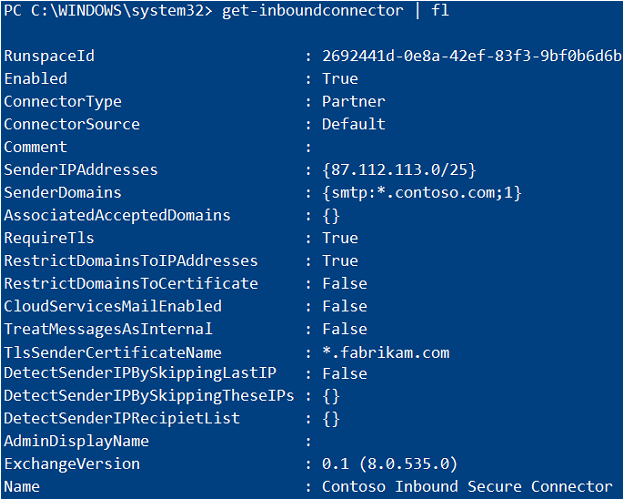
You configure a connector as shown in the following exhibit.
Question 33
Testlet 1Single choice
You need to recommend a solution for the public folders that supports the planned changes and meets the technical requirements.
ADatum Corporation is a consulting company that has a main office in Montreal.
ADatum has a Microsoft 365 E5 tenant named adatum.com and uses Microsoft Exchange Online for messaging services.
Existing Environment
Mailboxes
Public Folder Mailboxes
Rules
Connectors
Safe Attachments Policies
Groups
Group Membership
Contacts
Allan Deyoung Role Assignments and Mailbox Details
Organization Sharing
Roles
Outlook Web App Policies
Mobile Device Mailbox Policies
Question 34
Testlet 4Single choice
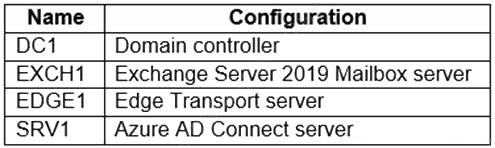
You have a Microsoft 365 E5 subscription and an on premises Microsoft Exchange Server 2019 organization that contains the servers shown in the following table.
You run the Hybrid Configuration wizard on EXCH1.
After running the wizard, you discover that Outlook on the web redirection.
You need to disable Outlook on the web redirection.
What should you do?
A
Run the Update-HybridConfiguration cmdlet.
B
Reconfigure Azure AD Connect.
C
Rerun the Hybrid Configuration wizard.
D
Run the Set-HybridConfiguration cmdlet.
Reveal answer detailsClose answer details
Correct answerD
Explanation
Use the Set-HybridConfiguration cmdlet to modify the hybrid deployment between your on-premises Exchange organization and Exchange Online in a Microsoft 365 for enterprises organization.
The -Features parameter The Features parameter specifies the features enabled for the hybrid configuration. One or more of the following values separated by commas can be entered. When using the Hybrid Configuration wizard, all features are enabled by default. * OWARedirection: Enables automatic Microsoft Outlook on the web redirection to either the on-premises Exchange or Exchange Online organizations depending on where the user mailbox is located. * etc.
Example PowerShell
Set-HybridConfiguration -Features OnlineArchive,MailTips,OWARedirection,FreeBusy,MessageTracking This example disables the secure mail and centralized transport hybrid deployment features, but keeps the Exchange Online Archive, MailTips, Outlook on the web redirection, free/busy and message tracking features enabled between the on-premises Exchange and Exchange Online organizations.
Incorrect: Not A: Use the Update-HybridConfiguration cmdlet to define the credentials that are used to update the hybrid configuration object.
You have a Microsoft Exchange Online tenant that contains a user named User1 and a shared mailbox named Project1.
You plan to delegate User1 permission to send email messages from Project1.
You need to ensure that the messages appear to come directly from Project1.
Which permission should you assign to User1?
A
Full Access
B
Contributor
C
Send As
D
Send on Behalf
Reveal answer detailsClose answer details
Correct answerC
Explanation
Explanation: Which permissions should you use? You can use the following permissions with a shared mailbox.
Send As: The Send As permission lets a user impersonate the shared mailbox when sending mail. For example, if Kweku logs into the shared mailbox Marketing Department and sends an email, it will look like the Marketing Department sent the email.
Incorrect: Full Access: The Full Access permission lets a user open the shared mailbox and act as the owner of that mailbox. After accessing the shared mailbox, a user can create calendar items; read, view, delete, and change email messages; create tasks and calendar contacts. However, a user with Full Access permission can't send email from the shared mailbox unless they also have Send As or Send on Behalf permission.
Send on Behalf: The Send on Behalf permission lets a user send email on behalf of the shared mailbox. For example, if John logs into the shared mailbox Reception Building 32 and sends an email, it looks like the mail was sent by "John on behalf of Reception Building 32". You can't use the EAC to grant Send on Behalf permissions, you must use Set-Mailbox cmdlet with the GrantSendonBehalf parameter.
Note: This question is part of a series of questions that present the same scenario. Each question in the series contains a unique solution that might meet the stated goals. Some question sets might have more than one correct solution, while others might not have a correct solution.
After you answer a question in this section, you will NOT be able to return to it. As a result, these questions will not appear in the review screen.
You have a Microsoft Exchange Online tenant that uses an email domain named contoso.com.
You need to prevent all users from performing the following tasks:
Sending out-of-office replies to an email domain named fabrikam.com. Sending automatic replies to an email domain named adatum.com.
The solution must ensure that all the users can send out-of-office replies and automatic replies to other email domains on the internet.
Note: This question is part of a series of questions that present the same scenario. Each question in the series contains a unique solution that might meet the stated goals. Some question sets might have more than one correct solution, while others might not have a correct solution.
After you answer a question in this section, you will NOT be able to return to it. As a result, these questions will not appear in the review screen.
You have a Microsoft Exchange Online tenant that contains 1,000 mailboxes.
All the users in the sales department at your company are in a group named Sales. The company is implementing a new policy to restrict the use of email attachments for the users in the Sales group.
You need to prevent all email messages that contain attachments from being delivered to the users in the Sales group.
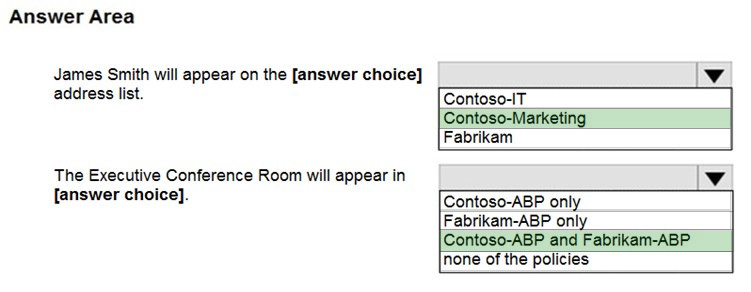
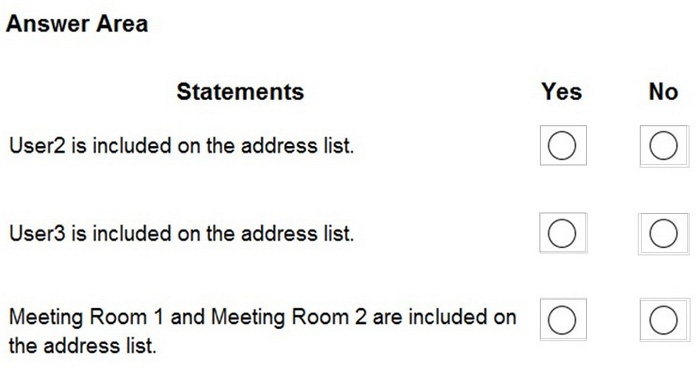
You have the shared mailboxes shown in the following table.
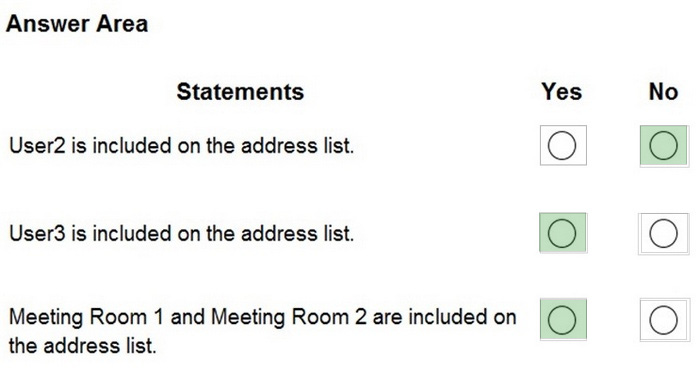
For each of the following statements, select Yes if the statement is true. Otherwise, select No.
NOTE: Each correct selection is worth one point.
Reveal answer detailsClose answer details
Explanation
Box 1: No User2 is from France. Only users from Canada or Mexico are included.
Note: Use the New-AddressList cmdlet to create address lists and apply them to recipients. To create flexible filters that use any available recipient property and that aren't subject to these limitations, you can use the RecipientFilter parameter to create an OPath filter.
Box 2: Yes Marketing is in the Title and User3 is from Canada.
Box 3: Yes Meeting Room 1 has Sales in the Title and Country is Canada. Meeting Room 2 has Marketing in the Title and Country is Mexico.
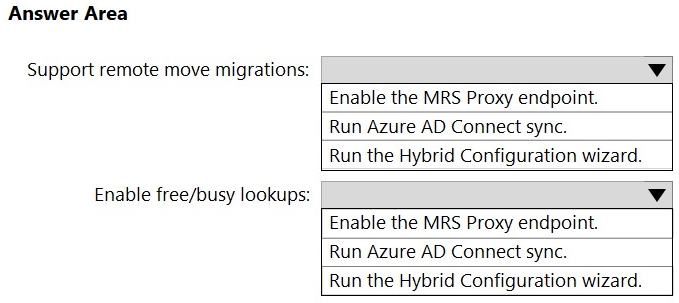
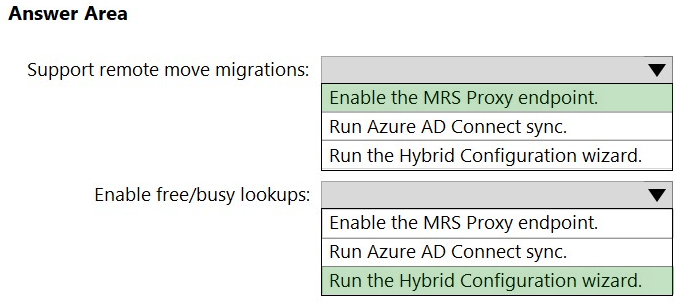
You need to configure a hybrid deployment between a Microsoft Exchange Online tenant and an on-premises Exchange Server 2019 organization that contains a server named Server1. The solution must meet the following requirements:
1. Support remote move migrations of mailboxes from Server1 to Exchange Online. 2. Enable free/busy lookups between Server1 and Exchange Online.
What should you do for each requirement? To answer, select the appropriate options in the answer area.
NOTE: Each correct selection is worth one point.
Reveal answer detailsClose answer details
Explanation
Box 1: Enable the MRS Proxy endpoint. Support remote move migrations of mailboxes from Server1 to Exchange Online.
Move mailboxes between on-premises and Exchange Online organizations in hybrid deployments
Step 1: Create a migration endpoint
Prior to performing on-boarding and off-boarding remote move migrations in an Exchange hybrid deployment, we recommend that you create Exchange remote migration endpoints. The migration endpoint contains the connection settings for an on-premises Exchange server that is running the MRS proxy service, which is required to perform remote move migrations to and from Exchange Online.
Step 2: Enable the MRSProxy service
If the MRSProxy service isn't already enabled for your on-premises Exchange servers, follow these steps in the Exchange admin center (EAC):
Open the EAC, and then navigate to Servers > Virtual Directories.
Select the Client Access server, and then select the EWS virtual directory and click Edit Edit icon..
Select the MRS Proxy enabled check box, and then click Save.
Box 2: Run the Hybrid Configuration wizard. Enable free/busy lookups between Server1 and Exchange Online.
Shared free/busy calendar access is automatically configured by the Hybrid Configuration wizard in all scenarios.
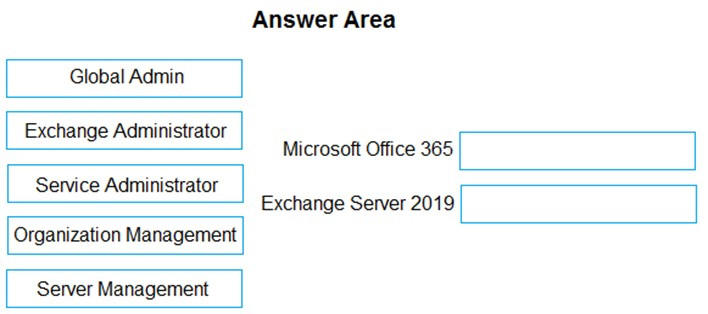
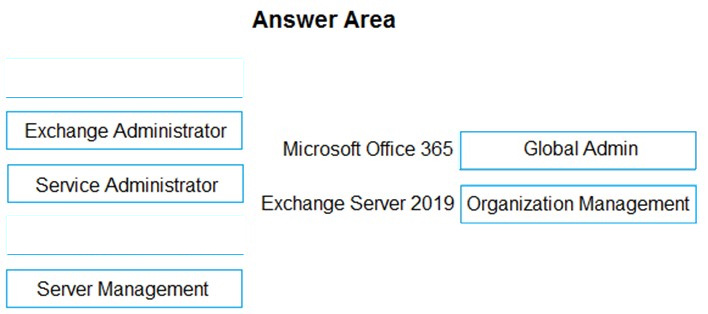
You have a Microsoft Exchange Server 2019 organization.
You plan to implement a hybrid deployment between Exchange Online and Exchange Server.
You need to install the Exchange Online Hybrid Agent. The solution must use the principle of least privilege.
To which roles should you be assigned to perform the installation? To answer, drag the appropriate roles to the correct products. Each role may be used once, more than once, or not at all. You may need to drag the split bar between panes or scroll to view content.
You have a Microsoft Exchange Online tenant that uses a third-party email hygiene system named Service1. Service1 blocks all encrypted email.
All external email is routed through Service1 by using a connector.
Users classify email by using sensitivity labels. Emails classified as Secret are encrypted automatically.
You need to ensure that the users can send emails classified as Secret to external recipients.
Which two items should you create? Each correct answer presents part of the solution.
NOTE: Each correct selection is worth one point.
A
a remote domain
B
a connector
C
a data loss prevention (DLP) policy
D
a mail flow rule
E
a label policy
Reveal answer detailsClose answer details
Correct answersB, D
Explanation
Use an additional Connector and a Mail Flow Rule to bypass the third-party email hygiene system for emails that have the Secret sensitivity label. Emails with the sensitivity label will use the new connector. All other emails will use the existing connector.
Lynne Robbins and the users in the sales department plan to collaborate on a project with a partner company named Contoso, Ltd. that has an email domain named contoso.com.
You need to ensure that only the sales department users can share all their calendar free/busy information with the users in contoso.com.
How should you configure the organization relationship?
A
Select Calendar free/busy information with time only and enter Group1.
B
Select Calendar free/busy information with time, subject, and location and enter Group2.
C
Select Calendar free/busy information with time, subject, and location and enter Group3.
D
Select Calendar free/busy information with time only and enter Group3.
E
Select Calendar free/busy information with time only and enter Group2.
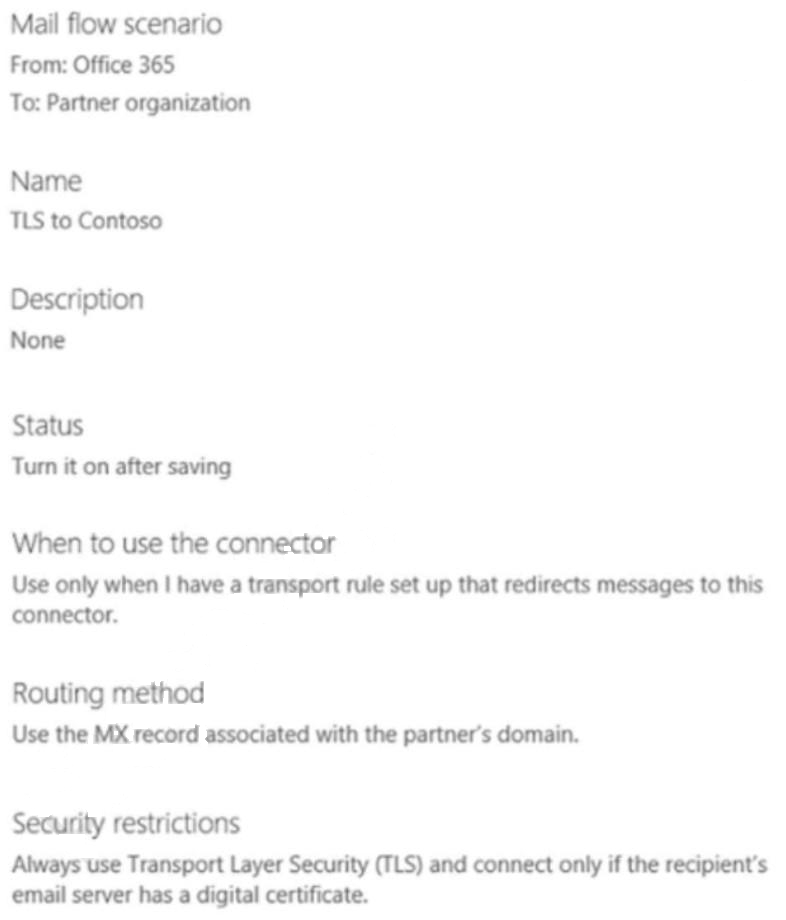
You create a connector to a partner company named Contoso as shown in the following exhibit.
You need to ensure that email messages containing the word Confidential and sent to contoso.com
recipients are sent by using the TLS to Contoso connector.
What should you do?
A
Create a data loss prevention (DLP) policy.
B
Configure a new rule.
C
Configure Organization Sharing.
D
Add contoso.com as a remote domain.
Reveal answer detailsClose answer details
Correct answerB
Explanation
When to use the connector. Use only when I have transport rule set up that redirections messages to this connector.
Question 50
Testlet 4Single choice
You need to ensure that Alex Wilber can recover deleted items when using Outlook on the web.
Which two actions should you perform? Each correct answer presents a complete solution.
NOTE: Each correct selection is worth one point.
A
Assign Sales Policy to Alex Wilbur.
B
Modify Marketing Policy.
C
Remove Alex Wilbur from all groups.
D
Assign Policy2 to Alex Wilbur.
E
Modify Policy1.
Reveal answer detailsClose answer details
Correct answerD
Question 51
Testlet 4Single choice
Your on-premises network contains a proxy server and a firewall. The proxy server is configured to inspect the contents of HTTP and HTTPS sessions to identify disallowed content. Only the proxy server can connect to the internet through the firewall.
You implement Microsoft Exchange Online.
Users report that they receive an error message when they attempt to connect to their mailbox by using Microsoft Outlook.
From the internal network, you connect to https://outlookoffice.com/mail and discover a certificate error.
You discover that the certificate error contains information about a certificate issued by your company's internal certification authority (CA).
You need to ensure that all the users can connect successfully to their mailbox.
What should you do?
A
Install a new root CA certificate on the client computer of each user.
B
Configure client computers to bypass the proxy server when they access https://*.microsoft.com.
C
Disable HTTPS content inspection on the proxy server.
D
Install a new root CA certificate on the proxy server.
Contoso, Ltd. is a national freight company in the United States. The company has 15,000 employees.
Physical Locations
Contoso has a main office in Houston and 10 branch offices that each contain 1,000, employees.
Existing Environment
Active Directory and Microsoft Exchange Server Environments
The network contains an Active Directory forest named contoso.com. The forest contains one root domain named contoso.com and 10 child domains. All domain controllers run Windows Server 2019.
The forest has Active Directory Certificate Services (AD CS) and Active Directory Federation Services (AD FS) deployed.
You have a hybrid deployment of Exchange Server 2019 and Microsoft Office 365.
There are 2,000 user mailboxes in Exchange Online.
Each office contains two domain controllers and two Mailbox servers. The main office also contains an Edge Transport server.
The organization contains 100 public folders. The folders contain 80 GB of content.
All email messages sent to contoso.com are delivered to Exchange Online. All messages sent to on-premises mailboxes are routed through the Edge Transport server.
Advanced Threat Protection (ATP) is enabled and configured for the Office 365 tenant.
Network Infrastructure
Each office connects directly to the Internet by using a local connection. The offices connect to each other by using a WAN link.
Requirements
Planned Changes
Contoso plans to implement the following changes:
1. For all new users in the on-premises organization, provide an email address that uses the value of the Last Name attribute and the first two letters of the First Name attribute as a prefix. 2. Decommission the public folders and replace the folders with a Microsoft 365 solution that maintains web access to the content.
Technical Requirements
Contoso identifies the following technical requirements:
1. All email messages sent from an SMTP domain named adatum.com must never be identified as spam. 2. Any solution to replace the public folders must include the ability to collaborate with shared calendars.
Security Requirements
Contoso identifies the following security requirements:
1. The principle of least privilege must be applied to all users and permissions. 2. All email messages sent from an SMTP domain named fabrikam.com to contoso.com must be encrypted. 3. All users must be protected from accessing unsecure websites when they click on URLs embedded in email messages. 4. If a user attempts to send an email message to a distribution group that contains more than 15 members by using Outlook, the user must receive a warning before sending the message.
Problem Statements
Recently, a user named HelpdeskUser1 erroneously created several mailboxes. HelpdeskUser1 is a member of the Recipient Management management role group.
Users who have a mailbox in Office 365 report that it takes a long time for email messages containing attachments to be delivered.
Exhibit
Exchange Online Connector
You configure a connector as shown in the following exhibit.
Question 52
Testlet 1Single choice
You need to resolve the email delivery delay issue.
What should you do?
A
From the Security & Compliance admin center, modify the safe attachments policy.
B
From the Exchange admin center in Exchange Online, modify the antimalware policy.
C
From the Exchange admin center in Exchange Online, modify the spam filter policy.
D
From the Security & Compliance admin center, create a supervision policy.
ADatum Corporation is a consulting company that has a main office in Montreal.
ADatum has a Microsoft 365 E5 tenant named adatum.com and uses Microsoft Exchange Online for messaging services.
Existing Environment
Mailboxes
Public Folder Mailboxes
Rules
Connectors
Safe Attachments Policies
Groups
Group Membership
Contacts
Allan Deyoung Role Assignments and Mailbox Details
Organization Sharing
Roles
Outlook Web App Policies
Mobile Device Mailbox Policies
Question 53
Testlet 4Single choice
You have a Microsoft Exchange Online tenant that contains a custom role group named RG1.
You need to prevent users assigned to RG1 from running a specific cmdlet.
Which cmdlet should you run to modify RG1?
A
Remove-ManagementRoleEntry
B
Disable-CmdletExtensionAgent
C
Remove-ManagementRoleAssignment
D
Set-ManagementScope
Reveal answer detailsClose answer details
Correct answerC
Explanation
Use the Remove-ManagementRoleEntry cmdlet to remove existing management role entries.
Example: Remove-ManagementRoleEntry "Tier 1 Help Desk\New-Mailbox"
This example removes the New-Mailbox role entry from the Tier 1 Help Desk role.
Incorrect: * Use the Set-ManagementScope cmdlet to change an existing management scope.
* Use the Disable-CmdletExtensionAgent cmdlet to disable existing cmdlet extension agents. Cmdlet extension agents are used by Exchange cmdlets in Exchange Server 2010 and later. Cmdlets provided by other Microsoft or third-party products can't use cmdlet extension agents.
When you disable a cmdlet extension agent, the agent is disabled for the entire organization. When an agent is disabled, it's not made available to cmdlets. Cmdlets can no longer use the agent to perform additional operations.
* Use the Remove-ManagementRoleAssignment cmdlet to remove management role assignments. When you remove a role assignment, the management role group, management role assignment, user, or universal security group (USG) that was assigned the associated role can no longer access the cmdlets or parameters made available by the role.
Microsoft Exchange Online custom role group " Set-ManagementScope"
Please wait while the virtual machine loads. Once loaded, you may proceed to the lab section. This may take a few minutes, and the wait time will not be deducted from your overall test time.
When the Next button is available, click it to access the lab section. In this section, you will perform a set of tasks in a live environment. While most functionality will be available to you as it would be in a live environment, some functionality (e.g., copy and paste, ability to navigate to external websites) will not be possible by design.
Scoring is based on the outcome of performing the tasks stated in the lab. In other words, it doesn't matter how you accomplish the task, if you successfully perform it, you will earn credit for that task.
Labs are not timed separately, and this exam may have more than one lab that you must complete. You can use as much time as you would like to complete each lab. But, you should manage your time appropriately to ensure that you are able to complete the lab(s) and all other sections of the exam in the time provided.
Please note that once you submit your work by clicking the Next button within a lab, you will NOT be able to return to the lab.
Use the following login credentials as needed:
To enter your username, place your cursor in the Sign in box and click on the username below.
To enter your password, place your cursor in the Enter password box and click on the password below.
Microsoft 365 Username: [email protected] Microsoft 365 Password: xxxxxx
If the Microsoft 365 portal does not load successfully in the browser, press CTRL-K to reload the portal in a new browser tab.
The following information is for technical support purposes only. Lab Instance: XXXXXX
To complete this task, sign in to the Microsoft 365 admin center.
Question 54
Testlet 5Lab simulation
Simulation
You need to ensure that a user named Miriam Graham has the required rights to create new recipients by using the Exchange Online admin center. Miriam must be prevented from managing recipients.
The solution must use the principle of least privilege.
To complete this task, sign in to the Microsoft 365 admin center.
Reveal model answerClose model answer
1. From the Microsoft 365 admin center dashboard, go to Admin > Exchange. 2. In the Exchange admin center, go to Roles > Admin roles, select the Recipient Management role group. 3. In Assigned section, add Miriam Graham to the role group. 4. When you're finished, click Save.
ADatum Corporation is a consulting company that has a main office in Montreal.
ADatum has a Microsoft 365 E5 tenant named adatum.com and uses Microsoft Exchange Online for messaging services.
Existing Environment
Mailboxes
Public Folder Mailboxes
Rules
Connectors
Safe Attachments Policies
Groups
Group Membership
Contacts
Allan Deyoung Role Assignments and Mailbox Details
Organization Sharing
Roles
Outlook Web App Policies
Mobile Device Mailbox Policies
Question 55
Testlet 4Single choice
You have a Microsoft Exchange Online tenant.
You plan to place a hold on all email messages stored in the mailbox of a user named User1.
What should you create first?
A
an eDiscovery case
B
sensitive info type
C
a data loss prevention (DLP) policy
D
an information barrier segment
Reveal answer detailsClose answer details
Correct answerA
Explanation
You can use an eDiscovery case to create and manage eDiscovery holds that can be applied to user mailboxes and other content locations in Microsoft Purview1. You can also use an eDiscovery case to search for and export content from mailboxes and other locations 1. An eDiscovery case is different from a Litigation Hold, which is a hold that is applied to user mailboxes in Exchange Online1. A Litigation Hold isn't identified by a GUID1. A sensitive info type is a predefined or custom entity that can be used to identify and protect sensitive data in Microsoft Purview2. It is not related to placing a hold on email messages. A data loss prevention (DLP) policy is a policy that helps prevent the accidental or intentional sharing of sensitive information outside your organization 2. It is not related to placing a hold on email messages. An information barrier segment is a group of users who are allowed or blocked from communicating with each other in Microsoft Teams or SharePoint Online2. It is not related to placing a hold on email messages.
Question 56
Testlet 4Single choice
You have a Microsoft Exchange Online tenant that contains a public folder named PF1.
You need to ensure that email sent to [email protected] is posted to F1.
What should you do?
A
Create a shared mailbox.
B
Mail-enable the public folder.
C
Create a public folder mailbox.
D
Create a mail flow rule.
Reveal answer detailsClose answer details
Correct answerB
Explanation
Mail-enable or mail-disable a public folder Public folders are designed for shared access and provide an easy and effective way to collect, organize, and share information with other people in your workgroup or organization. Mail-enabling a public folder allows users to post to the public folder by sending an email message to it. When a public folder is mail-enabled additional settings become available for the public folder in the Exchange admin center (EAC), such as email addresses and mail quotas.
Users use Microsoft Outlook as their primary email client.
The users report that email messages received from a partner company are often delayed before being delivered.
You need to analyze the message header of one of the delayed messages to identify the cause of the delay.
What are two actions that you can perform? Each correct answer presents a complete solution.
NOTE: Each correct selection is worth one point.
A
From Message trace in the Exchange admin center, create a custom query.
B
From the Exchange admin center, review the Queued messages report.
C
Run the Microsoft Remote Connectivity Analyzer.
D
From Outlook, review the properties of the message.
E
From the Exchange admin center, review the mail flow rules.
Reveal answer detailsClose answer details
Correct answersC, D
Explanation
C: Message Header Analyzer Header Analyzers, such as the one included in Microsoft Remote Connectivity Analyzer, can help you view and analyze message headers by displaying the information in a user-friendly manner and also by calling out various issues, such as suspected delivery delays that may require your attention.
D: How to View Message Headers Outlook 2013, Outlook 2010, or Outlook 2007 Although these versions of Outlook differ slightly, the process for viewing message headers is basically the same. For any version, follow these steps:
1. Open the message.
2. On the File tab, click Properties in the Info area.
3. Or, click the Dialog Box Launcher in the lower-right corner of the Tags group on the Ribbon.
4. In the Properties dialog box, locate the message headers in the Internet headers area.
Please wait while the virtual machine loads. Once loaded, you may proceed to the lab section. This may take a few minutes, and the wait time will not be deducted from your overall test time.
When the Next button is available, click it to access the lab section. In this section, you will perform a set of tasks in a live environment. While most functionality will be available to you as it would be in a live environment, some functionality (e.g., copy and paste, ability to navigate to external websites) will not be possible by design.
Scoring is based on the outcome of performing the tasks stated in the lab. In other words, it doesn't matter how you accomplish the task, if you successfully perform it, you will earn credit for that task.
Labs are not timed separately, and this exam may have more than one lab that you must complete. You can use as much time as you would like to complete each lab. But, you should manage your time appropriately to ensure that you are able to complete the lab(s) and all other sections of the exam in the time provided.
Please note that once you submit your work by clicking the Next button within a lab, you will NOT be able to return to the lab.
Use the following login credentials as needed:
To enter your username, place your cursor in the Sign in box and click on the username below.
To enter your password, place your cursor in the Enter password box and click on the password below.
Microsoft 365 Username: [email protected] Microsoft 365 Password: xxxxxx
If the Microsoft 365 portal does not load successfully in the browser, press CTRL-K to reload the portal in a new browser tab.
The following information is for technical support purposes only. Lab Instance: XXXXXX
To complete this task, sign in to the Microsoft 365 admin center.
Question 58
Testlet 5Lab simulation
Simulation
You need to reduce the likelihood that malicious links contained in emails received by mailboxes in @lab.CloudCredential(1).TenantName are opened.
To complete this task, sign in to the Exchange admin center.
Reveal model answerClose model answer
1. Navigate to the Exchange Admin Center, and then choose the Advanced Threats section of the EAC. 2. Click the Safe Links tab to examine all existing Safe Links policies:
3. After navigating to the Safe Links policy page, choose the Add button (+) to create a new policy. The New Safe Links Policy window opens. - In the resulting window we'll be presented with the options available for creating our new Safe Links policy. 4. In Name enter an appropriate, unique, name that describes this policy. In the description enter some text that provides a little more detail for anyone trying to make sense of the options selected here. 5. Next we'll choose the action to take for URLs. We can leave this Off, if for example we are creating a policy to exclude a group of users that would otherwise be affected by another Safe Links policy. 6. The checkbox Do not track user click can be selected if you do not wish to use the reporting functionality available at a later date. This is a key feature when understanding which users clicked a link that was later found to be a threat, so be careful about choosing to disable user click tracking. 7. Our final check box provides options for click-through is a link is found to be dangerous. In some circumstances you may trust users to click-through links, or they may request the ability to do so. In most circumstances you will not want a user to click-through the malicious link. 8. Some URLs, such as those for internal addresses or even trusted partners, may not require re-writing. Enter these URLs here. 9. Finally, we will select the scope for the rule under the Applied to section. 10. Using similar conditions to transport rules we can select who this rule applies to including: - Individual recipients - Recipient domains - Members of distribution groups 11. The same conditions can be used for exceptions. When you have configured your rule, choose Save.
After saving the new Safe Links rule it will be shown in the EAC list. Just like Transport Rules, you can use the Enabled column to enable or disable the Safe Links policy.
ADatum Corporation is a consulting company that has a main office in Montreal.
ADatum has a Microsoft 365 E5 tenant named adatum.com and uses Microsoft Exchange Online for messaging services.
Existing Environment
Mailboxes
Public Folder Mailboxes
Rules
Connectors
Safe Attachments Policies
Groups
Group Membership
Contacts
Allan Deyoung Role Assignments and Mailbox Details
Organization Sharing
Roles
Outlook Web App Policies
Mobile Device Mailbox Policies
Question 59
Testlet 4Single choice
You have a Microsoft Exchange Online tenant.
All users are assigned only an Office 365 Enterprise E3 license.
You need to ensure that the users can use only Microsoft Outlook to connect to their Microsoft 365 mailbox when they connect from an Android device.
What should you create?
A
a conditional access policy in Azure Active Directory (Azure AD)
B
a connection filter policy in Exchange Online Protection (EOP)
C
an Outlook Web App policy in Exchange Online
D
an app protection policy in Microsoft Endpoint Manager
Reveal answer detailsClose answer details
Correct answerA
Explanation
Office 365 Enterprise E3 includes Azure Active Directory Premium P1 which is required for Azure conditional access policies.
Question 60
Testlet 4Hotspot
HOTSPOT
You have a Microsoft Exchange Online tenant that contains two users named Admin1 and Admin2. The users are assigned the roles shown in the following table.
Admin1 performs the following actions:
1. From the Microsoft 365 admin center, adds a new user named User1 who is assigned a Microsoft Office 365 Enterprise E5 license 2. From Exchange Online PowerShell, runs the New-Mailbox cmdlet
Admin2 performs the following actions:
1. From Exchange Online PowerShell, runs the Search-Mailbox cmdlet and specifies the - DeleteContent switch 2. From Exchange Online PowerShell, runs the Test-ApplicationAccessPolicy cmdlet
Which actions are recorded in the administrator audit log? To answer, select the appropriate options in the answer area.
NOTE: Each correct selection is worth one point.
Reveal answer detailsClose answer details
Explanation
Box 1: No actions are recorded. Recipient Management - Members have administrative access to create or modify Exchange Online recipients within the Exchange Online organization. Default roles assigned: Distribution Groups Mail Recipient Creation Mail Recipients Message Tracking Migration Move Mailboxes Recipient Policies Reset Password Team Mailboxes Exchange Online Receipt management role
Box 2: All actions are recorded. Organization Management - Members have administrative access to the entire Exchange Online organization and can perform almost any task in Exchange Online.
You have a Microsoft Exchange Server 2019 hybrid deployment.
All Mailbox servers and domain controllers are in the same site.
You deploy an Edge Transport server.
You need to ensure that all SMTP traffic between the on-premises organization and Exchange Online is routed through the Edge Transport server.
Which four actions should you perform in sequence? To answer, move the appropriate actions from the list of actions to the answer area and arrange them in the correct order.
Reveal answer detailsClose answer details
Question 62
Testlet 4Single choice
Note: This question is part of a series of questions that present the same scenario. Each question in the series contains a unique solution that might meet the stated goals. Some question sets might have more than one correct solution, while others might not have a correct solution.
After you answer a question in this section, you will NOT be able to return to it. As a result, these questions will not appear in the review screen.
Your company has an Exchange Online tenant that contains 2,000 mailboxes. A partner company named Fabrikam, Inc. uses a third-party messaging solution. The outbound SMTP server for Fabrikam uses an IP address of 131.107.2.22.
You discover that several email messages from the fabrikam.com domain are erroneously marked as spam.
You need to ensure that all the email messages sent from the fabrikam.com domain are delivered successfully to the user mailboxes of your company.
Solution: You create a spam filter policy.
Does this meet the goal?
A
Yes
B
No
Reveal answer detailsClose answer details
Correct answerA
Explanation
Add Fabrikam.com to the `Domain allow list' in a spam filter policy.
Question 63
Testlet 4Hotspot
HOTSPOT
You have a Microsoft Exchange Online tenant that contains three users named User1, User2, and User3.
Mobile device mailbox policies are configured as shown in the following exhibit.
The users are configured as shown in the following table.
You create a new mobile device mailbox policy as shown in the following exhibit.
For each of the following statements, select Yes if the statement is true. Otherwise, select No.
You have a Microsoft Exchange Online tenant that uses Microsoft Defender for Office 365.
You have the policies shown in the following table.
You need to track any modifications made to Policy! by the identifying following:
1. The name of the user that modified the policy 2. The old and new values of settings modified in Policy! 3. How the modifications compare to the baseline settings of Standard Preset Security Policy
What should you use in the Microsoft 365 Defender portal?
A user named User1 reports that an email message sent from an external user two days ago was NOT yet delivered. Other email messages were delivered successfully.
You need to troubleshoot the delivery issue.
What should you do?
A
From the Exchange admin center, start a message trace.
B
From the Microsoft Remote Connectivity Analyzer, select Message Analyzer.
C
From the Microsoft Remote Connectivity Analyzer, run the Inbound SMTP Email connectivity test.
D
From Microsoft Purview, run a content search.
E
From the device of User1, run the Microsoft Support and Recovery Assistant.
Reveal answer detailsClose answer details
Correct answerC
Explanation
Remote Connectivity Analyzer tests for Exchange Online
The Microsoft Exchange Remote Connectivity Analyzer (ExRCA) helps you make sure that connectivity for your Exchange service is set up correctly. If you're having problems, it can also help you find and fix these problems. The ExRCA website can run tests to check for Microsoft Exchange ActiveSync, Exchange Web Services, Microsoft Outlook, and internet email connectivity.
Remote Connectivity Analyzer tests You can perform several tests with the ExRCA. The following tests work on Exchange 2010 and later versions, including Exchange Online:
Exchange DNS (only available in the Office 365 tab) Exchange ActiveSync Exchange Web Services Outlook Internet email
Internet email tests You can run the following tests for internet email:
Inbound SMTP E-Mail: This test walks through the steps an internet email server uses to send inbound SMTP email to your domain. Etc.
You have a Microsoft Exchange Server 2019 hybrid deployment.
You use Advanced Threat Protection (ATP).
You have safe attachments policies configured as shown in the following table.
You have the users shown in the following table.
For each of the following statements, select Yes if the statement is true. Otherwise, select No.
NOTE: Each correct selection is worth one point.
Reveal answer detailsClose answer details
Question 67
Testlet 4Single choice
You have a Microsoft Exchange Online tenant that contains a mailbox named Sales.
You need to create a copy of all the external email sent from the Sales mailbox to an alternate location.
What should you create?
A
a journaling rule
B
a retention policy
C
a records management file plan
D
a data loss prevention (DLP) policy
Reveal answer detailsClose answer details
Correct answerA
Explanation
Explanation: Journaling in Exchange Online When possible, we recommend that you use Microsoft 365 retention to archive and manage data in-place to meet your compliance requirements. However, some organizations might need to use a third-party solution to receive a copy of emails for storage or other scenarios. Configure journaling to store that data outside Exchange.
Journal rules The following are key aspects of journal rules:
Journal rule scope: Defines which messages are journaled by the Journaling agent. Journal recipient: Specifies the SMTP address of the recipient you want to journal. Journaling mailbox: Specifies one or more mailboxes used for collecting journal reports.
Incorrect: * a retention policy Managing content commonly requires two actions:
* Retain content Prevent permanent deletion and remain available for eDiscovery * Delete content Permanently delete content from your organization
With these two retention actions, you can configure retention settings for the following outcomes:
Retain-only: Retain content forever or for a specified period of time. Delete-only: Permanently delete content after a specified period of time. Retain and then delete: Retain content for a specified period of time and then permanently delete it.
These retention settings work with content in place that saves you the additional overheads of creating and configuring additional storage when you need to retain content for compliance reasons. In addition, you don't need to implement customized processes to copy and synchronize this data.
You have a Microsoft Exchange Online tenant that uses Exchange Online Protection (EOP) with the default settings.
You plan to configure quarantine settings to meet the following requirements:
Specify the language of notifications. Specify the notification interval. Enable notifications.
What should you configure for each requirement? To answer, drag the appropriate configurations to the correct requirements. Each configuration may be used once, more than once, or not at all. You may need to drag the split bar between panes or scroll to view content.
NOTE: Each correct selection is worth one point.
Reveal answer detailsClose answer details
Explanation
Explanation:
Box 1: Global quarantine policy settings Specify the language of notifications.
Admins can use the global settings in quarantine policies to customize the sender's display name, disclaimer text in different languages, and the company logo that's used in quarantine notifications.
Box 2: Default anti-spam policy Specify the notification interval.
Use the EAC to configure end-user spam notifications 1. In the Exchange admin center (EAC), navigate to Protection > Spam filter.
2. Select the spam filter policy for which you want to enable end-user spam notifications (they are disabled by default).
3. In the right pane, where the summary information about your policy appears, click the Configure End-user spam notifications link.
4. In the subsequent dialog box, you can configure the following options:
Enable end-user spam notifications Select this check box in order to enable end-user spam notifications for this policy. (Conversely, if this policy is enabled, you can clear this check box in order to disable end-user spam notifications for this policy.)
Send end-user spam notifications every (days) Specify how often to send end-user spam notifications. The default is 3 days. You can specify between 1 and 15 days. If you specify 7 days, for example, the notification will include a list of all messages intended for that user within the past 7 days that were sent to the spam quarantine instead.
Notification language Using the drop-down list, select the language in which to write end-user spam notifications for this policy.
5. Click Save. A summary of your spam filter policy settings, including your end-user spam notification settings, appears in the right pane.
Quarantine notifications are not turned on in the built-in quarantine notifications named AdminOnlyAccessPolicy or DefaultFullAccessPolicy. Quarantine notifications are turned on in the following built-in quarantine policies:
NotificationEnabledPolicy if your organization has it. DefaultFullAccessWithNotificationPolicy that's used in preset security policies. Otherwise, to turn on quarantine notifications in quarantine policies, you need to create and configure a new quarantine policy.
All users use an email address suffix of @contoso.com.
You need to ensure that all the email messages sent to users who use an email address suffix of @fabrikam.com are encrypted automatically. The solution must ensure that the messages can be inspected for data loss prevention (DLP) rules before they are encrypted.
You discover that a virus has infected the mailboxes of several users. The users are currently spreading the virus by emailing attachments that contain the virus.
You need to temporarily prevent all users from emailing attachments while you remove the virus from all the mailboxes.
Please wait while the virtual machine loads. Once loaded, you may proceed to the lab section. This may take a few minutes, and the wait time will not be deducted from your overall test time.
When the Next button is available, click it to access the lab section. In this section, you will perform a set of tasks in a live environment. While most functionality will be available to you as it would be in a live environment, some functionality (e.g., copy and paste, ability to navigate to external websites) will not be possible by design.
Scoring is based on the outcome of performing the tasks stated in the lab. In other words, it doesn't matter how you accomplish the task, if you successfully perform it, you will earn credit for that task.
Labs are not timed separately, and this exam may have more than one lab that you must complete. You can use as much time as you would like to complete each lab. But, you should manage your time appropriately to ensure that you are able to complete the lab(s) and all other sections of the exam in the time provided.
Please note that once you submit your work by clicking the Next button within a lab, you will NOT be able to return to the lab.
Use the following login credentials as needed:
To enter your username, place your cursor in the Sign in box and click on the username below.
To enter your password, place your cursor in the Enter password box and click on the password below.
Microsoft 365 Username: [email protected] Microsoft 365 Password: xxxxxx
If the Microsoft 365 portal does not load successfully in the browser, press CTRL-K to reload the portal in a new browser tab.
The following information is for technical support purposes only. Lab Instance: XXXXXX
To complete this task, sign in to the Microsoft 365 admin center.
QUESTION 3
Simulation
You need to ensure that a notification email is sent to [email protected] when a user marks an email message as Not Junk in Microsoft Outlook.
To complete this task, sign in to the Microsoft 365 admin center.
Correct Answer:
Go to the Microsoft 365 Defender portal and under Email & collaboration select Policies & rules > Alert policy.
An alert policy consists of the following settings and conditions. - Activity the alert is tracking. You create a policy to track an activity or in some cases a few related activities, such a sharing a file with an external user by sharing it, assigning access permissions, or creating an anonymous link. When a user performs the activity defined by the policy, an alert is triggered based on the alert threshold settings. - Activity conditions. For most activities, you can define additional conditions that must be met to trigger an alert. Common conditions include IP addresses (so that an alert is triggered when the user performs the activity on a computer with a specific IP address or within an IP address range), whether an alert is triggered if a specific user or users perform that activity, and whether the activity is performed on a specific file name or URL. You can also configure a condition that triggers an alert when the activity is performed by any user in your organization. The available conditions are dependent on the selected activity.
You can also define user tags as a condition of an alert policy. This results in the alerts triggered by the policy to include the context of the impacted user. You can use system user tags or custom user tags. - When the alert is triggered. You can configure a setting that defines how often an activity can occur before an alert is triggered. This allows you to set up a policy to generate an alert every time an activity matches the policy conditions, when a certain threshold is exceeded, or when the occurrence of the activity the alert is tracking becomes unusual for your organization.
If you select the setting based on unusual activity, Microsoft establishes a baseline value that defines the normal frequency for the selected activity. It takes up to seven days to establish this baseline, during which alerts won't be generated. After the baseline is established, an alert is triggered when the frequency of the activity tracked by the alert policy greatly exceeds the baseline value. For auditing-related activities (such as file and folder activities), you can establish a baseline based on a single user or based on all users in your organization; for malware-related activities, you can establish a baseline based on a single malware family, a single recipient, or all messages in your organization. - Alert category. To help with tracking and managing the alerts generated by a policy, you can assign one of the following categories to a policy. - Data loss prevention - Information governance - Mail flow - Permissions - Threat management - Others
When an activity occurs that matches the conditions of the alert policy, the alert that's generated is tagged with the category defined in this setting. This allows you to track and manage alerts that have the same category setting on the Alerts page in the compliance center because you can sort and filter alerts based on category. - Alert severity. Similar to the alert category, you assign a severity attribute (Low, Medium, High, or Informational) to alert policies. Like the alert category, when an activity occurs that matches the conditions of the alert policy, the alert that's generated is tagged with the same severity level that's set for the alert policy. Again, this allows you to track and manage alerts that have the same severity setting on
the Alerts page. For example, you can filter the list of alerts so that only alerts with a High severity are displayed. - Email notifications. You can set up the policy so that email notifications are sent (or not sent) to a list of users when an alert is triggered. You can also set a daily notification limit so that once the maximum number of notifications has been reached, no more notifications are sent for the alert during that day. In addition to email notifications, you or other administrators can view the alerts that are triggered by a policy on the Alerts page. Consider enabling email notifications for alert policies of a specific category or that have a higher severity setting.
ADatum Corporation is a consulting company that has a main office in Montreal.
ADatum has a Microsoft 365 E5 tenant named adatum.com and uses Microsoft Exchange Online for messaging services.
Existing Environment
Mailboxes
Public Folder Mailboxes
Rules
Connectors
Safe Attachments Policies
Groups
Group Membership
Contacts
Allan Deyoung Role Assignments and Mailbox Details
Organization Sharing
Roles
Outlook Web App Policies
Mobile Device Mailbox Policies
QUESTION 4
You have a Microsoft Exchange Online tenant that contains an email domain named contoso.com.
You have a partner organization that uses an email domain named fabrikam.com.
You plan to add a connector to secure the email messages sent from fabrikam.com to contoso.com.
You need to ensure that only fabrikam.com can use the connector.
What should you do?
A.
Configure the connector to verify the contoso.com domain with a certificate.
B.
Configure the connector to verify the fabrikam.com domain with a certificate.
C.
Add fabrikam.com as a remote domain.
D.
Add fabrikam.com as an accepted domain.
Correct Answer: B
Explanation
Explanation/Reference:
Using connectors to exchange email with a partner organization By default, Microsoft 365 or Office 365 sends mails using TLS encryption, provided that the destination server also supports TLS. If your partner organization supports TLS, you only need to create a connector if you want to enforce certain security restrictions - for example, you always want TLS applied, or you require certificate verification whenever mail is sent from your partner to your organization.
Set up a connector to apply security restrictions to mail sent from your partner organization to Microsoft
365 or Office 365
You can set up a connector to apply security restrictions to email that your partner organization sends to you.
* Details omitted*
7. Click Next. The Security restrictions screen appears.
8. Check the check box for Reject email messages if they aren't sent over TLS.
Note It is optional to choose the option of And require that the subject name of the certificate that the partner uses to authenticate with Office 365 matches this domain name. If you choose this option, enter the domain name of the partner organization.
You have a Microsoft Exchange Online tenant that uses Microsoft Defender for Office 365.
You need to create a new Safe Attachments policy named Policy1 that meets the following requirements:
1. Immediately delivers email messages that contain attachments and replaces the attachments with placeholders 2. Reattaches the attachments after scanning is complete 3. Quarantines malicious attachments
Which action should you select for Policy1?
A.
Monitor
B.
Block
C.
Dynamic Delivery
D.
Replace
Correct Answer: C
QUESTION 7
You have a Microsoft Exchange Server 2019 organization.
You plan to migrate all mailboxes to Exchange Online.
You need to provide a user with the ability to perform the mailbox migrations. The solution must use the principle of least privilege.
Fabrikam, Inc. is a consulting company that has a main office in Montreal.
Fabrikam has a partnership with a company named Litware, Inc.
Existing Environment
Network Environment
The on-premises network of Fabrikam contains an Active Directory domain named fabrikam.com.
Fabrikam has a Microsoft 365 tenant named fabrikam.com. All users have Microsoft 365 Enterprise E5 licenses.
User accounts sync between Active Directory Domain Services (AD DS) and the Microsoft 365 tenant.
Fabrikam.com contains the users and devices shown in the following table.
Fabrikam currently leases mobile devices from several mobile operators.
Microsoft Exchange Online Environment
All users are assigned an Outlook Web App policy named FilesPolicy.
In-Place Archiving is disabled for Exchange Online.
You have the users shown in the following table.
User1 and User3 use Microsoft Outlook for iOS and Android to access email from their mobile device. User2 uses a native Android email app.
A Safe Links policy in Microsoft Defender for Office 365 is applied to the fabrikam.com tenant. The marketing department uses a mail-enabled public folder named FabrikamProject.
Default MRM Policy is disabled for the fabrikam.com tenant.
Problem Statements
Fabrikam identifies the following issues:
1. Users report that they receive phishing emails containing embedded links. 2. Users download and save ASPX files when they use Outlook on the web. 3. Email between Fabrikam and Litware is unencrypted during transit. 4. User2 reports that he lost his mobile device.
Requirements
Planned Changes
Fabrikam plans to implement the following changes:
1. Configure FilesPolicy to prevent Outlook on the web users from downloading attachments that have the ASPX extension. 2. Purchase a new smartboard and configure the smartboard as a booking resource in Exchange Online. 3. Ensure that the new smartboard can only be booked for a maximum of one hour. 4. Allow only Admin1 to accept or deny booking requests for the new smartboard. 5. Standardize mobile device costs by moving to a single mobile device operator. 6. Migrate the FabrikamProject public folder to Microsoft SharePoint Online. 7. Enable In-Place Archiving for users in the marketing department. 8. Encrypt all email between Fabrikam and Litware.
Technical Requirements
Fabrikam identifies the following technical requirements:
1. Ensure that the planned Sharepoint site for FabrikamProject only contains content that was created during the last 12 months. 2. Any existing file types that are currently configured as blocked or allowed in the FilesPolicy policy must remain intact. 3. When users leave the company, remove their licenses and ensure that their mailbox is accessible to Admin1 and Admin2. 4. Generate a report that identifies mobile devices and the mobile device operator of each device. 5. Use the principle of least privilege. 6. Minimize administrative effort.
Retention requirements
Fabrikam identifies the following retention requirements for all users:
1. Enable users to tag items for deletion after one year. 2. Enable users to tag items for deletion after two years. 3. Enable users to tag items to be archived after one year. 4. Automatically delete items in the Junk Email folder after 30 days. 5. Automatically delete items in the Sent Items folder after 300 days. 6. Ensure that any items without a retention tag are moved to the Archive mailbox two years after they were created and permanently deleted seven years after they were created.
QUESTION 9
HOTSPOT
You need to ensure that In-Place Archiving is enabled for the marketing department users.
Which user should perform the change, and which tool should the user use? To answer, select the appropriate options in the answer area.
You have a Microsoft Exchange Online tenant that contains three Azure Active Directory (Azure AD) security groups named Administrators, Managers, and Marketing. The tenant contains the users shown in the following table.
The tenant contains the resources shown in the following table.
ConferenceRoom1 has he following policy.
For each of the following statements, select Yes if the statement is true. Otherwise, select No.
NOTE: Each correct selection is worth one point.
Correct Answer:
QUESTION 12
You have a hybrid deployment between a Microsoft Exchange Online tenant and an on-premises Exchange Server 2019 organization.
The tenant uses an email domain named @contoso.com.
You recently purchased an email domain named fabrikam.com.
You need to ensure that all the users in the tenant can receive email messages by using the @fabrikam.com email domain. The solution must ensure that the users can continue to receive email by using the @contoso.com email domain.
Which three actions should you perform? Each correct answer presents part of the solution. NOTE; Each correct selection is worth one point.
A.
From Azure AD Connect add a domain for fabrikam.com.
B.
From the on-premises Exchange admin center, add an accepted domain for fabrikam.com.
C.
From the Exchange Management Shell, create a script that runs the
D.
From the Microsoft 365 admin center, verify the fabrikam.com email domain
E.
From the on-premises Exchange admin center, modify the email address policy
F.
From the Microsoft 365 admin center, add the fabrikam.com email domain.
Correct Answer: BDE
QUESTION 13
You have hybrid deployment between a Microsoft Exchange Online tenant and an onpremises Exchange Server 2019 organization. The deployment uses Azure AD Connect.
All incoming email is delivered to Exchange Online. You have 10 mail-enabled public folders hosted on an on-premises Mailbox server. Customers receive an error when an email message is sent to a public folder.
You need to ensure that all the mail-enabled public folders can receive email messages from the internet. The solution must ensure that messages can be delivered only to valid recipients.
Solution: From Azure AD Connect, select Exchange Mail Public Folders.
Does this meet the goal?
A.
Yes
B.
No
Correct Answer: A
Explanation
Explanation/Reference:
From Azure AD Connect, selecting Exchange Mail Public Folders will ensure that all the mail-enabled public folders can receive email messages from the internet and that messages can be delivered only to valid recipients. This is according to the Microsoft 365 Messaging documentation ( https://docs.microsoft.com/en-us/exchange/hybriddeployment/hybrid-mail-flow).
QUESTION 14
You have a Microsoft Exchange Online tenant.
You plan to place a hold on all email messages stored in the mailbox of a user named User1.
What should you create first?
A.
an eDiscovery case
B.
a data loss prevention (DLP) policy
C.
an information barrier segment
D.
a sensitive info type
Correct Answer: A
Explanation
Explanation/Reference:
You create eDiscovery holds in eDiscovery (Standard) case. You can use a Microsoft Purview eDiscovery (Standard) case to create holds to preserve content that might be relevant to the case. You can place a hold on the Exchange mailboxes and OneDrive for Business accounts of people you're investigating in the case. You can also place a hold on the mailboxes and sites that are associated with Microsoft Teams, Microsoft 365 groups, and Yammer Groups. When you place content locations on hold, content is preserved until you remove the content location from the hold or until you delete the hold.
You have a Microsoft Exchange Online tenant that contains two groups named Group1 and Group2.
You need to ensure that the members of Group1 can perform In-Place eDiscovery searches only for the members of Group2.
Which three actions should you perform in sequence? To answer, move the appropriate actions from the list of actions to the answer area and arrange them in the correct order.
Correct Answer:
Explanation
Explanation/Reference:
Step 1: Create a custom management scope that contains the membership of Group2. You can use a custom management scope to let specific people or groups use In-Place eDiscovery to search a subset of mailboxes in your Exchange Online organization.
1. Organize users into distribution groups for eDiscovery To search a subset of mailboxes in your organization or to narrow the scope of source mailboxes that a discovery manager can search, you'll need to group the subset of mailboxes into one or more distribution groups. When you create a custom management scope in step 2, you'll use these distribution groups as the recipient filter to create a custom management scope. This allows a discovery manager to search only the mailboxes of the users who are members of a specified group.)
2. Create a custom management scope Now you'll create a custom management scope that's defined by the membership of a distribution group (using the MemberOfGroup recipient filter). When this scope is applied to a role group used for eDiscovery, members of the role group can search the mailboxes of users who are members of the distribution group that was used to create the custom management scope.
Step 2: Copy the Recipient Management role group Assign eDiscovery permissions in Exchange Online If you want users to be able to use Microsoft Exchange Server In-Place eDiscovery, you must first authorize them by adding them to the Discovery Management role group. Members of the Discovery Management role group have Full Access mailbox permissions for the Discovery mailbox that's created by Exchange Setup. 3: Create a management role group In this step, you create a new management role group and assign the custom scope that you created.
Step 3: Configure the write scope and assign Group1 to the new role group.
You have an Exchange Online tenant that contains several hundred mailboxes.
Several users report that email messages from an SMTP domain named @fabrikam.com often fail to be delivered to their mailbox.
You need to increase the likelihood that the email messages from the @fabrikam.com are delivered successfully to the users in the tenant.
A.
From the Security & Compliance admin center, modify the anti-spam policy settings.
B.
From the Security & Compliance admin center, modify the DKIM settings.
C.
From your public DNS zones, create a Sender Policy Framework (SPF) TXT record.
D.
From the Security & Compliance admin center, create a new ATP anti-phishing policy.
Correct Answer: A
QUESTION 17
Note: This question is part of a series of questions that present the same scenario. Each question in the series contains a unique solution that might meet the stated goals. Some question sets might have more than one correct solution, while others might not have a correct solution.
After you answer a question in this section, you will NOT be able to return to it. As a result, these questions will not appear in the review screen.
You have a Microsoft 365 E5 subscription.
You need to ensure that a user named User1 can review audit reports from the Microsoft 365 security center. User1 must be prevented from tracing messages from the Security admin center.
Solution: You assign the Reports reader role to User1.
Does this meet the goal?
A.
Yes
B.
No
Correct Answer: B
Case Study 3
Case Study Questions
Overview
Fabrikam, Inc. is a consulting company that has a main office in Montreal.
Fabrikam has a partnership with a company named Litware, Inc.
Existing Environment
Network Environment
The on-premises network of Fabrikam contains an Active Directory domain named fabrikam.com.
Fabrikam has a Microsoft 365 tenant named fabrikam.com. All users have Microsoft 365 Enterprise E5 licenses.
User accounts sync between Active Directory Domain Services (AD DS) and the Microsoft 365 tenant.
Fabrikam.com contains the users and devices shown in the following table.
Fabrikam currently leases mobile devices from several mobile operators.
Microsoft Exchange Online Environment
All users are assigned an Outlook Web App policy named FilesPolicy.
In-Place Archiving is disabled for Exchange Online.
You have the users shown in the following table.
User1 and User3 use Microsoft Outlook for iOS and Android to access email from their mobile device. User2 uses a native Android email app.
A Safe Links policy in Microsoft Defender for Office 365 is applied to the fabrikam.com tenant. The marketing department uses a mail-enabled public folder named FabrikamProject.
Default MRM Policy is disabled for the fabrikam.com tenant.
Problem Statements
Fabrikam identifies the following issues:
1. Users report that they receive phishing emails containing embedded links. 2. Users download and save ASPX files when they use Outlook on the web. 3. Email between Fabrikam and Litware is unencrypted during transit. 4. User2 reports that he lost his mobile device.
Requirements
Planned Changes
Fabrikam plans to implement the following changes:
1. Configure FilesPolicy to prevent Outlook on the web users from downloading attachments that have the ASPX extension. 2. Purchase a new smartboard and configure the smartboard as a booking resource in Exchange Online. 3. Ensure that the new smartboard can only be booked for a maximum of one hour. 4. Allow only Admin1 to accept or deny booking requests for the new smartboard. 5. Standardize mobile device costs by moving to a single mobile device operator. 6. Migrate the FabrikamProject public folder to Microsoft SharePoint Online. 7. Enable In-Place Archiving for users in the marketing department. 8. Encrypt all email between Fabrikam and Litware.
Technical Requirements
Fabrikam identifies the following technical requirements:
1. Ensure that the planned Sharepoint site for FabrikamProject only contains content that was created during the last 12 months. 2. Any existing file types that are currently configured as blocked or allowed in the FilesPolicy policy must remain intact. 3. When users leave the company, remove their licenses and ensure that their mailbox is accessible to Admin1 and Admin2. 4. Generate a report that identifies mobile devices and the mobile device operator of each device. 5. Use the principle of least privilege. 6. Minimize administrative effort.
Retention requirements
Fabrikam identifies the following retention requirements for all users:
1. Enable users to tag items for deletion after one year. 2. Enable users to tag items for deletion after two years. 3. Enable users to tag items to be archived after one year. 4. Automatically delete items in the Junk Email folder after 30 days. 5. Automatically delete items in the Sent Items folder after 300 days. 6. Ensure that any items without a retention tag are moved to the Archive mailbox two years after they were created and permanently deleted seven years after they were created.
QUESTION 18
HOTSPOT
You need to modify FilesPolicy to prevent users from downloading ASPX files. The solution must meet the technical requirements.
How should you complete the command? To answer, select the appropriate options in the answer area.
Your network contains an Active Directory domain named corp.contoso.com. The domain contains client computers that have Microsoft Office 36S Apps installed. You have a hybrid deployment that contains a Microsoft Exchange Online tenant and an on-premises Exchange Server 2019 server named Server1. All recipients use an email address suffix of Contoso.com.
You migrate all the Exchange Server recipients to Exchange Online, and then decommission Server1.
Users connected to the internal network report that they receive an Autodiscover error when they open Microsoft Outlook.
You need to ensure that all users can connect successfully to their mailbox by using Outlook.
Which two actions should you perform? Each correct answer presents a complete solution.
NOTE: Each correct selection is worth one point.
A.
From the corp.contoso.com DNS zone, modify the Autodiscover host (A) record.
B.
Add an accepted domain.
C.
From the contoso.com DNS zone, modify the Autodiscover alias (CNAME) record
D.
Modify the name of the TLS certificate.
E.
From the domain, modify the Autodiscover service connection point (SCP).
Correct Answer: CE
QUESTION 21
Note: This question is part of a series of questions that present the same scenario. Each question in the series contains a unique solution that might meet the stated goals. Some question sets might have more than one correct solution, while others might not have a correct solution.
After you answer a question in this section, you will NOT be able to return to it. As a result, these questions will not appear in the review screen.
You have a Microsoft Exchange Server 2019 hybrid deployment. All user mailboxes are hosted in Microsoft 365. All outbound SMTP email is routed through the on-premises Exchange organization.
A corporate security policy requires that you must prevent credit card numbers from being sent to internet recipients by using email.
You need to configure the deployment to meet the security policy requirement.
Solution: From Microsoft 365, you create a data loss prevention (DLP) policy.
You have a Microsoft Exchange Online tenant that uses Microsoft Defender for Office 365.
You create a new anti-phishing policy named Policy1.
You need to ensure that users are notified every five days about all the email messages quarantined by Policy1.
Which two actions should you perform? Each correct answer presents part of the solution.
NOTE: Each correct selection is worth one point.
A.
Add a custom quarantine policy and assign the policy to Policy1.
B.
Modify the DefaultFullAccessPolicy quarantine policy and assign the policy to Policy1.
C.
Modify the AdminOnlyAccessPolicy quarantine policy and assign the policy to Policy1.
D.
Configure the User reported messages settings.
E.
Modify the global settings for quarantine policies.
Correct Answer: AE
Explanation
Explanation/Reference:
Explanation: Step 1: Create quarantine policies in the Microsoft 365 Defender portal Step 2: Assign a quarantine policy to supported features In supported protection features that quarantine email messages, you can assign a quarantine policy to the available quarantine actions.
Step 3: Assign quarantine policies in supported policies in the Microsoft 365 Defender portal
Note: Quarantine policies define what users are allowed to do to quarantined messages based on why the message was quarantined (for supported features). For more information, see Quarantine policies. Quarantine polices also control whether the affected recipients (including shared mailboxes) get periodic quarantine notifications about their quarantined messages. Quarantine notifications are the replacement for end-user spam notifications for all supported protection features (not just anti-spam policy verdicts).
Incorrect: Not B, not C: Quarantine notifications are not turned on in the built-in quarantine notifications named AdminOnlyAccessPolicy or DefaultFullAccessPolicy. Quarantine notifications are turned on in the built-in quarantine policy named NotificationEnabledPolicy if your organization has it. Otherwise, to turn on quarantine notifications in quarantine policies, you need to create and configure a new quarantine policy.
You have a Microsoft 365 tenant that contains a user named User1.
User1 reports that she cannot configure a mail profile in Microsoft Outlook for Windows.
User1 receives the following error message: "Encrypted connection to your mail server is not available."
You verify that User1 is assigned a Microsoft Office 365 Enterprise F3 license and can send email messages from her account by using Outlook on the web.
You need to ensure that User1 can connect to Outlook successfully.
What should you do?
A.
Run the Microsoft Support and Recovery Assistant for Office 365.
B.
Activate the installation of Office 365 ProPlus.
C.
Modify the license assigned to User1.
D.
Install a new certificate on the computer of User1.
Your company named Contoso, Ltd. has a Microsoft Exchange Server 2019 hybrid deployment.
A partner company named Fabrikam, Inc. uses an Exchange Online subscription for email.
You need to ensure that all the users at Fabrikam can view the free/busy information of the users at Contoso.
What should you configure? To answer, drag the appropriate components to the correct companies. Each component may be used once, more than once, or not at all. You may need to drag the split bar between panes or scroll to view content.
You have a hybrid deployment between a Microsoft Exchange Online tenant and an on-premises Exchange Server 2019 organization. The deployment contains the resources shown in the following table.
You need to migrate the mailboxes from the on-premises Exchange Server 2019 organization to Exchange Online. The department mailboxes will be migrated to shared mailboxes.
What is the minimum number of Exchange Online licenses required?
A.
500
B.
515
C.
550
D.
550
Correct Answer: C
Explanation
Explanation/Reference:
The user mailboxes and the department mailboxes.
Note: Mailbox types Exchange supports the following mailbox types:
User mailboxes: User mailboxes are assigned to individual users in your Exchange organization. User mailboxes provide your users with a rich collaboration platform.
Resource mailboxes: Resource mailboxes are special mailboxes designed to be used for scheduling resources. Like all mailbox types, a resource mailbox has an associated Active Directory user account, but it must be a disabled account.
Your network contains an Active Directory domain named fabrikam.com.
You have a Microsoft Exchange Server 2019 organization that contains two Mailbox servers in a database availability group (DAG).
You plan to implement a hybrid deployment by using the Exchange Modern Hybrid connection option.
Which three configurations will be transferred automatically from the on-premises organization to Exchange Online? Each correct answer presents part of the solution.
You are configuring a hybrid deployment between a Microsoft Exchange Online tenant and an on-premises Exchange Server 2019 organization.
The Exchange Server organization contains two servers named Server1 and Server2.
You have a proxy server named Proxy1 that is accessible by using http://proxy1:8080.
You install the Microsoft Hybrid Agent on Server1 and Server2.
You need to ensure that the Hybrid Agent uses only Proxy1 to connect to Microsoft Online Services.
How should you complete the PowerShell command? To answer, select the appropriate options in the answer area.
NOTE: Each correct selection is worth one point.
Correct Answer:
Explanation
Explanation/Reference:
Explanation:
Box 1: ConfigureOutBoundProxy.ps1 Microsoft Hybrid Agent The Agent supports outbound unauthenticated proxy servers, but you need to do more configuration after the installation. Run the ConfigureOutBoundProxy.ps1 script located in \Program Files\Microsoft Hybrid Service\ on the computer where the Agent is installed. For example:
Incorrect: * Set-ExchangeServer Set-ExchangeServer ExchangePowerShell Applies to: Exchange Server 2010, Exchange Server 2013, Exchange Server 2016, Exchange Server 2019
This cmdlet is available only in on-premises Exchange. Use the Set-ExchangeServer cmdlet to set Exchange attributes in Active Directory for a specified server.
* Set-HybridConfiguration Set-HybridConfiguration Applies to: Exchange Server 2010, Exchange Server 2013, Exchange Server 2016, Exchange Server 2019
This cmdlet is available only in on-premises Exchange.
Use the Set-HybridConfiguration cmdlet to modify the hybrid deployment between your on-premises Exchange organization and Exchange Online in a Microsoft 365 for enterprises organization.
* -InternetWebProxy Set-HybridConfiguration - No such parameter.
-InternetWebProxy Set-ExchangeServer - The InternetWebProxy parameter specifies the web proxy server that the Exchange server uses to reach the internet. A valid value for this parameter is the URL of the web proxy server.
* winhttp set proxy
* -ClientAccessServers This parameter is functional only in Exchange Server 2010.
The ClientAccessServers parameter specifies the Exchange 2010 SP2 or later servers with the Client Access server role installed that will be configured to support the hybrid deployment features. At least one Client Access server must be defined and be externally accessible from the Internet on ports 80 and 443. The servers will be configured to enable the following:
You have an on-premises Microsoft Exchange Server 2019 organization and a firewall that filters all the traffic to and from the organization.
You purchase a Microsoft 365 E5 subscription.
You plan to use the Hybrid Configuration wizard to configure a hybrid deployment between Exchange Online and the on-premises Exchange organization.
You need to identify which ports are required to support configuring the hybrid deployment.
Which two ports should you open on the firewall? Each correct answer presents part of the solution.
NOTE: Each correct selection is worth one point.
A.
25
B.
80
C.
443
D.
995
E.
587
Correct Answer: AC
Explanation
Explanation/Reference:
Before you create and configure a hybrid deployment using the Hybrid Configuration wizard, your existing on-premises Exchange organization needs to meet certain requirements. If you don't meet these requirements, you won't be able to complete the steps within the Hybrid Configuration wizard and you won't be able to configure a hybrid deployment between your on-premises Exchange organization and Exchange Online.
Hybrid deployment protocols, ports, and endpoints You need to configure the following protocols, ports, and connection endpoints in the firewall that protects your on-premises organization as described in the following table.
Exchange Online endpoints TCP/25 (SMTP/TLS) On-premises Exchange Servers configured to host receive connectors for secure mail transport with Exchange Online in the Hybrid Configuration wizard
Exchange Online endpoints TCP/443 (HTTPS) On-premises Exchange Servers used to publish Exchange Web Services and Autodiscover to Internet
Incorrect: Exchange 2019/2016 Mailbox/Edge, Exchange 2013 CAS/Edge 80 For hybrid functionality, Exchange Servers needs outbound connectivity to various Certificate Revocation List (CRL) endpoints mentioned here. We strongly recommend letting Windows maintain the Certificate Trust List (CTL) on your machine. Otherwise, this must be maintained manually on a regular basis. To allow Windows to maintain the CTL, the URL must be reachable from the computer on which Exchange Server is installed.
Fabrikam, Inc. is a consulting company that has a main office in Montreal.
Fabrikam has a partnership with a company named Litware, Inc.
Existing Environment
Network Environment
The on-premises network of Fabrikam contains an Active Directory domain named fabrikam.com.
Fabrikam has a Microsoft 365 tenant named fabrikam.com. All users have Microsoft 365 Enterprise E5 licenses.
User accounts sync between Active Directory Domain Services (AD DS) and the Microsoft 365 tenant.
Fabrikam.com contains the users and devices shown in the following table.
Fabrikam currently leases mobile devices from several mobile operators.
Microsoft Exchange Online Environment
All users are assigned an Outlook Web App policy named FilesPolicy.
In-Place Archiving is disabled for Exchange Online.
You have the users shown in the following table.
User1 and User3 use Microsoft Outlook for iOS and Android to access email from their mobile device. User2 uses a native Android email app.
A Safe Links policy in Microsoft Defender for Office 365 is applied to the fabrikam.com tenant. The marketing department uses a mail-enabled public folder named FabrikamProject.
Default MRM Policy is disabled for the fabrikam.com tenant.
Problem Statements
Fabrikam identifies the following issues:
1. Users report that they receive phishing emails containing embedded links. 2. Users download and save ASPX files when they use Outlook on the web. 3. Email between Fabrikam and Litware is unencrypted during transit. 4. User2 reports that he lost his mobile device.
Requirements
Planned Changes
Fabrikam plans to implement the following changes:
1. Configure FilesPolicy to prevent Outlook on the web users from downloading attachments that have the ASPX extension. 2. Purchase a new smartboard and configure the smartboard as a booking resource in Exchange Online. 3. Ensure that the new smartboard can only be booked for a maximum of one hour. 4. Allow only Admin1 to accept or deny booking requests for the new smartboard. 5. Standardize mobile device costs by moving to a single mobile device operator. 6. Migrate the FabrikamProject public folder to Microsoft SharePoint Online. 7. Enable In-Place Archiving for users in the marketing department. 8. Encrypt all email between Fabrikam and Litware.
Technical Requirements
Fabrikam identifies the following technical requirements:
1. Ensure that the planned Sharepoint site for FabrikamProject only contains content that was created during the last 12 months. 2. Any existing file types that are currently configured as blocked or allowed in the FilesPolicy policy must remain intact. 3. When users leave the company, remove their licenses and ensure that their mailbox is accessible to Admin1 and Admin2. 4. Generate a report that identifies mobile devices and the mobile device operator of each device. 5. Use the principle of least privilege. 6. Minimize administrative effort.
Retention requirements
Fabrikam identifies the following retention requirements for all users:
1. Enable users to tag items for deletion after one year. 2. Enable users to tag items for deletion after two years. 3. Enable users to tag items to be archived after one year. 4. Automatically delete items in the Junk Email folder after 30 days. 5. Automatically delete items in the Sent Items folder after 300 days. 6. Ensure that any items without a retention tag are moved to the Archive mailbox two years after they were created and permanently deleted seven years after they were created.
QUESTION 31
You need to identify which users clicked the links in the phishing emails.
Please wait while the virtual machine loads. Once loaded, you may proceed to the lab section. This may take a few minutes, and the wait time will not be deducted from your overall test time.
When the Next button is available, click it to access the lab section. In this section, you will perform a set of tasks in a live environment. While most functionality will be available to you as it would be in a live environment, some functionality (e.g., copy and paste, ability to navigate to external websites) will not be possible by design.
Scoring is based on the outcome of performing the tasks stated in the lab. In other words, it doesn't matter how you accomplish the task, if you successfully perform it, you will earn credit for that task.
Labs are not timed separately, and this exam may have more than one lab that you must complete. You can use as much time as you would like to complete each lab. But, you should manage your time appropriately to ensure that you are able to complete the lab(s) and all other sections of the exam in the time provided.
Please note that once you submit your work by clicking the Next button within a lab, you will NOT be able to return to the lab.
Use the following login credentials as needed:
To enter your username, place your cursor in the Sign in box and click on the username below.
To enter your password, place your cursor in the Enter password box and click on the password below.
Microsoft 365 Username: [email protected] Microsoft 365 Password: xxxxxx
If the Microsoft 365 portal does not load successfully in the browser, press CTRL-K to reload the portal in a new browser tab.
The following information is for technical support purposes only. Lab Instance: XXXXXX
To complete this task, sign in to the Microsoft 365 admin center.
QUESTION 32
Simulation
You need to ensure that the email messages in mailboxes and the documents in Microsoft OneDrive folders of all the users in your organization are retained for only five years.
To complete this task, sign in to the Microsoft 365 admin center.
Correct Answer:
1. From the Microsoft 365 compliance center, select Policies > Retention. 2. Select New retention policy to start the Create retention policy configuration, and name your new retention policy. 3. For the Choose the type of retention policy to create page, select Static. Adaptive policies don't support the locations for Exchange public folders or Skype for Business. 4. Depending on your selected scope: - On the Choose locations page, toggle on or off any of the locations except the locations for Teams and Yammer. For each location, you can leave it at the default to apply the policy to the entire location. 5. Information specific to locations: - Exchange email and Exchange public folders - SharePoint sites and OneDrive accounts - Microsoft 365 Groups - Skype for Business 6. For Decide if you want to retain content, delete it, or both page, specify the configuration options for retaining and deleting content. You can create a retention policy that just retains content without deleting, retains and then deletes after a specified period of time, or just deletes content after a specified period of time. 7. Complete the configuration and save your settings.
Contoso, Ltd. is a national freight company in the United States. The company has 15,000 employees.
Physical Locations
Contoso has a main office in Houston and 10 branch offices that each contain 1,000, employees.
Existing Environment
Active Directory and Microsoft Exchange Server Environments
The network contains an Active Directory forest named contoso.com. The forest contains one root domain named contoso.com and 10 child domains. All domain controllers run Windows Server 2019.
The forest has Active Directory Certificate Services (AD CS) and Active Directory Federation Services (AD FS) deployed.
You have a hybrid deployment of Exchange Server 2019 and Microsoft Office 365.
There are 2,000 user mailboxes in Exchange Online.
Each office contains two domain controllers and two Mailbox servers. The main office also contains an Edge Transport server.
The organization contains 100 public folders. The folders contain 80 GB of content.
All email messages sent to contoso.com are delivered to Exchange Online. All messages sent to on-premises mailboxes are routed through the Edge Transport server.
Advanced Threat Protection (ATP) is enabled and configured for the Office 365 tenant.
Network Infrastructure
Each office connects directly to the Internet by using a local connection. The offices connect to each other by using a WAN link.
Requirements
Planned Changes
Contoso plans to implement the following changes:
1. For all new users in the on-premises organization, provide an email address that uses the value of the Last Name attribute and the first two letters of the First Name attribute as a prefix. 2. Decommission the public folders and replace the folders with a Microsoft 365 solution that maintains web access to the content.
Technical Requirements
Contoso identifies the following technical requirements:
1. All email messages sent from an SMTP domain named adatum.com must never be identified as spam. 2. Any solution to replace the public folders must include the ability to collaborate with shared calendars.
Security Requirements
Contoso identifies the following security requirements:
1. The principle of least privilege must be applied to all users and permissions. 2. All email messages sent from an SMTP domain named fabrikam.com to contoso.com must be encrypted. 3. All users must be protected from accessing unsecure websites when they click on URLs embedded in email messages. 4. If a user attempts to send an email message to a distribution group that contains more than 15 members by using Outlook, the user must receive a warning before sending the message.
Problem Statements
Recently, a user named HelpdeskUser1 erroneously created several mailboxes. HelpdeskUser1 is a member of the Recipient Management management role group.
Users who have a mailbox in Office 365 report that it takes a long time for email messages containing attachments to be delivered.
Exhibit
Exchange Online Connector
You configure a connector as shown in the following exhibit.
QUESTION 33
You need to recommend a solution for the public folders that supports the planned changes and meets the technical requirements.
ADatum Corporation is a consulting company that has a main office in Montreal.
ADatum has a Microsoft 365 E5 tenant named adatum.com and uses Microsoft Exchange Online for messaging services.
Existing Environment
Mailboxes
Public Folder Mailboxes
Rules
Connectors
Safe Attachments Policies
Groups
Group Membership
Contacts
Allan Deyoung Role Assignments and Mailbox Details
Organization Sharing
Roles
Outlook Web App Policies
Mobile Device Mailbox Policies
QUESTION 34
You have a Microsoft 365 E5 subscription and an on premises Microsoft Exchange Server 2019 organization that contains the servers shown in the following table.
You run the Hybrid Configuration wizard on EXCH1.
After running the wizard, you discover that Outlook on the web redirection.
You need to disable Outlook on the web redirection.
What should you do?
A.
Run the Update-HybridConfiguration cmdlet.
B.
Reconfigure Azure AD Connect.
C.
Rerun the Hybrid Configuration wizard.
D.
Run the Set-HybridConfiguration cmdlet.
Correct Answer: D
Explanation
Explanation/Reference:
Use the Set-HybridConfiguration cmdlet to modify the hybrid deployment between your on-premises Exchange organization and Exchange Online in a Microsoft 365 for enterprises organization.
The -Features parameter The Features parameter specifies the features enabled for the hybrid configuration. One or more of the following values separated by commas can be entered. When using the Hybrid Configuration wizard, all features are enabled by default. * OWARedirection: Enables automatic Microsoft Outlook on the web redirection to either the on-premises Exchange or Exchange Online organizations depending on where the user mailbox is located. * etc.
Example PowerShell
Set-HybridConfiguration -Features OnlineArchive,MailTips,OWARedirection,FreeBusy,MessageTracking This example disables the secure mail and centralized transport hybrid deployment features, but keeps the Exchange Online Archive, MailTips, Outlook on the web redirection, free/busy and message tracking features enabled between the on-premises Exchange and Exchange Online organizations.
Incorrect: Not A: Use the Update-HybridConfiguration cmdlet to define the credentials that are used to update the hybrid configuration object.
You have a Microsoft Exchange Online tenant that contains a user named User1 and a shared mailbox named Project1.
You plan to delegate User1 permission to send email messages from Project1.
You need to ensure that the messages appear to come directly from Project1.
Which permission should you assign to User1?
A.
Full Access
B.
Contributor
C.
Send As
D.
Send on Behalf
Correct Answer: C
Explanation
Explanation/Reference:
Explanation: Which permissions should you use? You can use the following permissions with a shared mailbox.
Send As: The Send As permission lets a user impersonate the shared mailbox when sending mail. For example, if Kweku logs into the shared mailbox Marketing Department and sends an email, it will look like the Marketing Department sent the email.
Incorrect: Full Access: The Full Access permission lets a user open the shared mailbox and act as the owner of that mailbox. After accessing the shared mailbox, a user can create calendar items; read, view, delete, and change email messages; create tasks and calendar contacts. However, a user with Full Access permission can't send email from the shared mailbox unless they also have Send As or Send on Behalf permission.
Send on Behalf: The Send on Behalf permission lets a user send email on behalf of the shared mailbox. For example, if John logs into the shared mailbox Reception Building 32 and sends an email, it looks like the mail was sent by "John on behalf of Reception Building 32". You can't use the EAC to grant Send on Behalf permissions, you must use Set-Mailbox cmdlet with the GrantSendonBehalf parameter.
Note: This question is part of a series of questions that present the same scenario. Each question in the series contains a unique solution that might meet the stated goals. Some question sets might have more than one correct solution, while others might not have a correct solution.
After you answer a question in this section, you will NOT be able to return to it. As a result, these questions will not appear in the review screen.
You have a Microsoft Exchange Online tenant that uses an email domain named contoso.com.
You need to prevent all users from performing the following tasks:
Sending out-of-office replies to an email domain named fabrikam.com. Sending automatic replies to an email domain named adatum.com.
The solution must ensure that all the users can send out-of-office replies and automatic replies to other email domains on the internet.
Note: This question is part of a series of questions that present the same scenario. Each question in the series contains a unique solution that might meet the stated goals. Some question sets might have more than one correct solution, while others might not have a correct solution.
After you answer a question in this section, you will NOT be able to return to it. As a result, these questions will not appear in the review screen.
You have a Microsoft Exchange Online tenant that contains 1,000 mailboxes.
All the users in the sales department at your company are in a group named Sales. The company is implementing a new policy to restrict the use of email attachments for the users in the Sales group.
You need to prevent all email messages that contain attachments from being delivered to the users in the Sales group.
You have the shared mailboxes shown in the following table.
For each of the following statements, select Yes if the statement is true. Otherwise, select No.
NOTE: Each correct selection is worth one point.
Correct Answer:
Explanation
Explanation/Reference:
Box 1: No User2 is from France. Only users from Canada or Mexico are included.
Note: Use the New-AddressList cmdlet to create address lists and apply them to recipients. To create flexible filters that use any available recipient property and that aren't subject to these limitations, you can use the RecipientFilter parameter to create an OPath filter.
Box 2: Yes Marketing is in the Title and User3 is from Canada.
Box 3: Yes Meeting Room 1 has Sales in the Title and Country is Canada. Meeting Room 2 has Marketing in the Title and Country is Mexico.
You need to configure a hybrid deployment between a Microsoft Exchange Online tenant and an on-premises Exchange Server 2019 organization that contains a server named Server1. The solution must meet the following requirements:
1. Support remote move migrations of mailboxes from Server1 to Exchange Online. 2. Enable free/busy lookups between Server1 and Exchange Online.
What should you do for each requirement? To answer, select the appropriate options in the answer area.
NOTE: Each correct selection is worth one point.
Correct Answer:
Explanation
Explanation/Reference:
Box 1: Enable the MRS Proxy endpoint. Support remote move migrations of mailboxes from Server1 to Exchange Online.
Move mailboxes between on-premises and Exchange Online organizations in hybrid deployments
Step 1: Create a migration endpoint
Prior to performing on-boarding and off-boarding remote move migrations in an Exchange hybrid deployment, we recommend that you create Exchange remote migration endpoints. The migration endpoint contains the connection settings for an on-premises Exchange server that is running the MRS proxy service, which is required to perform remote move migrations to and from Exchange Online.
Step 2: Enable the MRSProxy service
If the MRSProxy service isn't already enabled for your on-premises Exchange servers, follow these steps in the Exchange admin center (EAC):
Open the EAC, and then navigate to Servers > Virtual Directories.
Select the Client Access server, and then select the EWS virtual directory and click Edit Edit icon..
Select the MRS Proxy enabled check box, and then click Save.
Box 2: Run the Hybrid Configuration wizard. Enable free/busy lookups between Server1 and Exchange Online.
Shared free/busy calendar access is automatically configured by the Hybrid Configuration wizard in all scenarios.
You have a Microsoft Exchange Server 2019 organization.
You plan to implement a hybrid deployment between Exchange Online and Exchange Server.
You need to install the Exchange Online Hybrid Agent. The solution must use the principle of least privilege.
To which roles should you be assigned to perform the installation? To answer, drag the appropriate roles to the correct products. Each role may be used once, more than once, or not at all. You may need to drag the split bar between panes or scroll to view content.
You have a Microsoft Exchange Online tenant that uses a third-party email hygiene system named Service1. Service1 blocks all encrypted email.
All external email is routed through Service1 by using a connector.
Users classify email by using sensitivity labels. Emails classified as Secret are encrypted automatically.
You need to ensure that the users can send emails classified as Secret to external recipients.
Which two items should you create? Each correct answer presents part of the solution.
NOTE: Each correct selection is worth one point.
A.
a remote domain
B.
a connector
C.
a data loss prevention (DLP) policy
D.
a mail flow rule
E.
a label policy
Correct Answer: BD
Explanation
Explanation/Reference:
Use an additional Connector and a Mail Flow Rule to bypass the third-party email hygiene system for emails that have the Secret sensitivity label. Emails with the sensitivity label will use the new connector. All other emails will use the existing connector.
Lynne Robbins and the users in the sales department plan to collaborate on a project with a partner company named Contoso, Ltd. that has an email domain named contoso.com.
You need to ensure that only the sales department users can share all their calendar free/busy information with the users in contoso.com.
How should you configure the organization relationship?
A.
Select Calendar free/busy information with time only and enter Group1.
B.
Select Calendar free/busy information with time, subject, and location and enter Group2.
C.
Select Calendar free/busy information with time, subject, and location and enter Group3.
D.
Select Calendar free/busy information with time only and enter Group3.
E.
Select Calendar free/busy information with time only and enter Group2.
You create a connector to a partner company named Contoso as shown in the following exhibit.
You need to ensure that email messages containing the word Confidential and sent to contoso.com
recipients are sent by using the TLS to Contoso connector.
What should you do?
A.
Create a data loss prevention (DLP) policy.
B.
Configure a new rule.
C.
Configure Organization Sharing.
D.
Add contoso.com as a remote domain.
Correct Answer: B
Explanation
Explanation/Reference:
When to use the connector. Use only when I have transport rule set up that redirections messages to this connector.
QUESTION 50
You need to ensure that Alex Wilber can recover deleted items when using Outlook on the web.
Which two actions should you perform? Each correct answer presents a complete solution.
NOTE: Each correct selection is worth one point.
A.
Assign Sales Policy to Alex Wilbur.
B.
Modify Marketing Policy.
C.
Remove Alex Wilbur from all groups.
D.
Assign Policy2 to Alex Wilbur.
E.
Modify Policy1.
Correct Answer: D
QUESTION 51
Your on-premises network contains a proxy server and a firewall. The proxy server is configured to inspect the contents of HTTP and HTTPS sessions to identify disallowed content. Only the proxy server can connect to the internet through the firewall.
You implement Microsoft Exchange Online.
Users report that they receive an error message when they attempt to connect to their mailbox by using Microsoft Outlook.
From the internal network, you connect to https://outlookoffice.com/mail and discover a certificate error.
You discover that the certificate error contains information about a certificate issued by your company's internal certification authority (CA).
You need to ensure that all the users can connect successfully to their mailbox.
What should you do?
A.
Install a new root CA certificate on the client computer of each user.
B.
Configure client computers to bypass the proxy server when they access https://*.microsoft.com.
C.
Disable HTTPS content inspection on the proxy server.
D.
Install a new root CA certificate on the proxy server.
Contoso, Ltd. is a national freight company in the United States. The company has 15,000 employees.
Physical Locations
Contoso has a main office in Houston and 10 branch offices that each contain 1,000, employees.
Existing Environment
Active Directory and Microsoft Exchange Server Environments
The network contains an Active Directory forest named contoso.com. The forest contains one root domain named contoso.com and 10 child domains. All domain controllers run Windows Server 2019.
The forest has Active Directory Certificate Services (AD CS) and Active Directory Federation Services (AD FS) deployed.
You have a hybrid deployment of Exchange Server 2019 and Microsoft Office 365.
There are 2,000 user mailboxes in Exchange Online.
Each office contains two domain controllers and two Mailbox servers. The main office also contains an Edge Transport server.
The organization contains 100 public folders. The folders contain 80 GB of content.
All email messages sent to contoso.com are delivered to Exchange Online. All messages sent to on-premises mailboxes are routed through the Edge Transport server.
Advanced Threat Protection (ATP) is enabled and configured for the Office 365 tenant.
Network Infrastructure
Each office connects directly to the Internet by using a local connection. The offices connect to each other by using a WAN link.
Requirements
Planned Changes
Contoso plans to implement the following changes:
1. For all new users in the on-premises organization, provide an email address that uses the value of the Last Name attribute and the first two letters of the First Name attribute as a prefix. 2. Decommission the public folders and replace the folders with a Microsoft 365 solution that maintains web access to the content.
Technical Requirements
Contoso identifies the following technical requirements:
1. All email messages sent from an SMTP domain named adatum.com must never be identified as spam. 2. Any solution to replace the public folders must include the ability to collaborate with shared calendars.
Security Requirements
Contoso identifies the following security requirements:
1. The principle of least privilege must be applied to all users and permissions. 2. All email messages sent from an SMTP domain named fabrikam.com to contoso.com must be encrypted. 3. All users must be protected from accessing unsecure websites when they click on URLs embedded in email messages. 4. If a user attempts to send an email message to a distribution group that contains more than 15 members by using Outlook, the user must receive a warning before sending the message.
Problem Statements
Recently, a user named HelpdeskUser1 erroneously created several mailboxes. HelpdeskUser1 is a member of the Recipient Management management role group.
Users who have a mailbox in Office 365 report that it takes a long time for email messages containing attachments to be delivered.
Exhibit
Exchange Online Connector
You configure a connector as shown in the following exhibit.
QUESTION 52
You need to resolve the email delivery delay issue.
What should you do?
A.
From the Security & Compliance admin center, modify the safe attachments policy.
B.
From the Exchange admin center in Exchange Online, modify the antimalware policy.
C.
From the Exchange admin center in Exchange Online, modify the spam filter policy.
D.
From the Security & Compliance admin center, create a supervision policy.
ADatum Corporation is a consulting company that has a main office in Montreal.
ADatum has a Microsoft 365 E5 tenant named adatum.com and uses Microsoft Exchange Online for messaging services.
Existing Environment
Mailboxes
Public Folder Mailboxes
Rules
Connectors
Safe Attachments Policies
Groups
Group Membership
Contacts
Allan Deyoung Role Assignments and Mailbox Details
Organization Sharing
Roles
Outlook Web App Policies
Mobile Device Mailbox Policies
QUESTION 53
You have a Microsoft Exchange Online tenant that contains a custom role group named RG1.
You need to prevent users assigned to RG1 from running a specific cmdlet.
Which cmdlet should you run to modify RG1?
A.
Remove-ManagementRoleEntry
B.
Disable-CmdletExtensionAgent
C.
Remove-ManagementRoleAssignment
D.
Set-ManagementScope
Correct Answer: C
Explanation
Explanation/Reference:
Use the Remove-ManagementRoleEntry cmdlet to remove existing management role entries.
Example: Remove-ManagementRoleEntry "Tier 1 Help Desk\New-Mailbox"
This example removes the New-Mailbox role entry from the Tier 1 Help Desk role.
Incorrect: * Use the Set-ManagementScope cmdlet to change an existing management scope.
* Use the Disable-CmdletExtensionAgent cmdlet to disable existing cmdlet extension agents. Cmdlet extension agents are used by Exchange cmdlets in Exchange Server 2010 and later. Cmdlets provided by other Microsoft or third-party products can't use cmdlet extension agents.
When you disable a cmdlet extension agent, the agent is disabled for the entire organization. When an agent is disabled, it's not made available to cmdlets. Cmdlets can no longer use the agent to perform additional operations.
* Use the Remove-ManagementRoleAssignment cmdlet to remove management role assignments. When you remove a role assignment, the management role group, management role assignment, user, or universal security group (USG) that was assigned the associated role can no longer access the cmdlets or parameters made available by the role.
Microsoft Exchange Online custom role group " Set-ManagementScope"
Please wait while the virtual machine loads. Once loaded, you may proceed to the lab section. This may take a few minutes, and the wait time will not be deducted from your overall test time.
When the Next button is available, click it to access the lab section. In this section, you will perform a set of tasks in a live environment. While most functionality will be available to you as it would be in a live environment, some functionality (e.g., copy and paste, ability to navigate to external websites) will not be possible by design.
Scoring is based on the outcome of performing the tasks stated in the lab. In other words, it doesn't matter how you accomplish the task, if you successfully perform it, you will earn credit for that task.
Labs are not timed separately, and this exam may have more than one lab that you must complete. You can use as much time as you would like to complete each lab. But, you should manage your time appropriately to ensure that you are able to complete the lab(s) and all other sections of the exam in the time provided.
Please note that once you submit your work by clicking the Next button within a lab, you will NOT be able to return to the lab.
Use the following login credentials as needed:
To enter your username, place your cursor in the Sign in box and click on the username below.
To enter your password, place your cursor in the Enter password box and click on the password below.
Microsoft 365 Username: [email protected] Microsoft 365 Password: xxxxxx
If the Microsoft 365 portal does not load successfully in the browser, press CTRL-K to reload the portal in a new browser tab.
The following information is for technical support purposes only. Lab Instance: XXXXXX
To complete this task, sign in to the Microsoft 365 admin center.
QUESTION 54
Simulation
You need to ensure that a user named Miriam Graham has the required rights to create new recipients by using the Exchange Online admin center. Miriam must be prevented from managing recipients.
The solution must use the principle of least privilege.
To complete this task, sign in to the Microsoft 365 admin center.
Correct Answer:
1. From the Microsoft 365 admin center dashboard, go to Admin > Exchange. 2. In the Exchange admin center, go to Roles > Admin roles, select the Recipient Management role group. 3. In Assigned section, add Miriam Graham to the role group. 4. When you're finished, click Save.
ADatum Corporation is a consulting company that has a main office in Montreal.
ADatum has a Microsoft 365 E5 tenant named adatum.com and uses Microsoft Exchange Online for messaging services.
Existing Environment
Mailboxes
Public Folder Mailboxes
Rules
Connectors
Safe Attachments Policies
Groups
Group Membership
Contacts
Allan Deyoung Role Assignments and Mailbox Details
Organization Sharing
Roles
Outlook Web App Policies
Mobile Device Mailbox Policies
QUESTION 55
You have a Microsoft Exchange Online tenant.
You plan to place a hold on all email messages stored in the mailbox of a user named User1.
What should you create first?
A.
an eDiscovery case
B.
sensitive info type
C.
a data loss prevention (DLP) policy
D.
an information barrier segment
Correct Answer: A
Explanation
Explanation/Reference:
You can use an eDiscovery case to create and manage eDiscovery holds that can be applied to user mailboxes and other content locations in Microsoft Purview1. You can also use an eDiscovery case to search for and export content from mailboxes and other locations 1. An eDiscovery case is different from a Litigation Hold, which is a hold that is applied to user mailboxes in Exchange Online1. A Litigation Hold isn't identified by a GUID1. A sensitive info type is a predefined or custom entity that can be used to identify and protect sensitive data in Microsoft Purview2. It is not related to placing a hold on email messages. A data loss prevention (DLP) policy is a policy that helps prevent the accidental or intentional sharing of sensitive information outside your organization 2. It is not related to placing a hold on email messages. An information barrier segment is a group of users who are allowed or blocked from communicating with each other in Microsoft Teams or SharePoint Online2. It is not related to placing a hold on email messages.
QUESTION 56
You have a Microsoft Exchange Online tenant that contains a public folder named PF1.
You need to ensure that email sent to [email protected] is posted to F1.
What should you do?
A.
Create a shared mailbox.
B.
Mail-enable the public folder.
C.
Create a public folder mailbox.
D.
Create a mail flow rule.
Correct Answer: B
Explanation
Explanation/Reference:
Mail-enable or mail-disable a public folder Public folders are designed for shared access and provide an easy and effective way to collect, organize, and share information with other people in your workgroup or organization. Mail-enabling a public folder allows users to post to the public folder by sending an email message to it. When a public folder is mail-enabled additional settings become available for the public folder in the Exchange admin center (EAC), such as email addresses and mail quotas.
Users use Microsoft Outlook as their primary email client.
The users report that email messages received from a partner company are often delayed before being delivered.
You need to analyze the message header of one of the delayed messages to identify the cause of the delay.
What are two actions that you can perform? Each correct answer presents a complete solution.
NOTE: Each correct selection is worth one point.
A.
From Message trace in the Exchange admin center, create a custom query.
B.
From the Exchange admin center, review the Queued messages report.
C.
Run the Microsoft Remote Connectivity Analyzer.
D.
From Outlook, review the properties of the message.
E.
From the Exchange admin center, review the mail flow rules.
Correct Answer: CD
Explanation
Explanation/Reference:
C: Message Header Analyzer Header Analyzers, such as the one included in Microsoft Remote Connectivity Analyzer, can help you view and analyze message headers by displaying the information in a user-friendly manner and also by calling out various issues, such as suspected delivery delays that may require your attention.
D: How to View Message Headers Outlook 2013, Outlook 2010, or Outlook 2007 Although these versions of Outlook differ slightly, the process for viewing message headers is basically the same. For any version, follow these steps:
1. Open the message.
2. On the File tab, click Properties in the Info area.
3. Or, click the Dialog Box Launcher in the lower-right corner of the Tags group on the Ribbon.
4. In the Properties dialog box, locate the message headers in the Internet headers area.
Please wait while the virtual machine loads. Once loaded, you may proceed to the lab section. This may take a few minutes, and the wait time will not be deducted from your overall test time.
When the Next button is available, click it to access the lab section. In this section, you will perform a set of tasks in a live environment. While most functionality will be available to you as it would be in a live environment, some functionality (e.g., copy and paste, ability to navigate to external websites) will not be possible by design.
Scoring is based on the outcome of performing the tasks stated in the lab. In other words, it doesn't matter how you accomplish the task, if you successfully perform it, you will earn credit for that task.
Labs are not timed separately, and this exam may have more than one lab that you must complete. You can use as much time as you would like to complete each lab. But, you should manage your time appropriately to ensure that you are able to complete the lab(s) and all other sections of the exam in the time provided.
Please note that once you submit your work by clicking the Next button within a lab, you will NOT be able to return to the lab.
Use the following login credentials as needed:
To enter your username, place your cursor in the Sign in box and click on the username below.
To enter your password, place your cursor in the Enter password box and click on the password below.
Microsoft 365 Username: [email protected] Microsoft 365 Password: xxxxxx
If the Microsoft 365 portal does not load successfully in the browser, press CTRL-K to reload the portal in a new browser tab.
The following information is for technical support purposes only. Lab Instance: XXXXXX
To complete this task, sign in to the Microsoft 365 admin center.
QUESTION 58
Simulation
You need to reduce the likelihood that malicious links contained in emails received by mailboxes in @lab.CloudCredential(1).TenantName are opened.
To complete this task, sign in to the Exchange admin center.
Correct Answer:
1. Navigate to the Exchange Admin Center, and then choose the Advanced Threats section of the EAC. 2. Click the Safe Links tab to examine all existing Safe Links policies:
3. After navigating to the Safe Links policy page, choose the Add button (+) to create a new policy. The New Safe Links Policy window opens. - In the resulting window we'll be presented with the options available for creating our new Safe Links policy. 4. In Name enter an appropriate, unique, name that describes this policy. In the description enter some text that provides a little more detail for anyone trying to make sense of the options selected here. 5. Next we'll choose the action to take for URLs. We can leave this Off, if for example we are creating a policy to exclude a group of users that would otherwise be affected by another Safe Links policy. 6. The checkbox Do not track user click can be selected if you do not wish to use the reporting functionality available at a later date. This is a key feature when understanding which users clicked a link that was later found to be a threat, so be careful about choosing to disable user click tracking. 7. Our final check box provides options for click-through is a link is found to be dangerous. In some circumstances you may trust users to click-through links, or they may request the ability to do so. In most circumstances you will not want a user to click-through the malicious link. 8. Some URLs, such as those for internal addresses or even trusted partners, may not require re-writing. Enter these URLs here. 9. Finally, we will select the scope for the rule under the Applied to section. 10. Using similar conditions to transport rules we can select who this rule applies to including: - Individual recipients - Recipient domains - Members of distribution groups 11. The same conditions can be used for exceptions. When you have configured your rule, choose Save.
After saving the new Safe Links rule it will be shown in the EAC list. Just like Transport Rules, you can use the Enabled column to enable or disable the Safe Links policy.
ADatum Corporation is a consulting company that has a main office in Montreal.
ADatum has a Microsoft 365 E5 tenant named adatum.com and uses Microsoft Exchange Online for messaging services.
Existing Environment
Mailboxes
Public Folder Mailboxes
Rules
Connectors
Safe Attachments Policies
Groups
Group Membership
Contacts
Allan Deyoung Role Assignments and Mailbox Details
Organization Sharing
Roles
Outlook Web App Policies
Mobile Device Mailbox Policies
QUESTION 59
You have a Microsoft Exchange Online tenant.
All users are assigned only an Office 365 Enterprise E3 license.
You need to ensure that the users can use only Microsoft Outlook to connect to their Microsoft 365 mailbox when they connect from an Android device.
What should you create?
A.
a conditional access policy in Azure Active Directory (Azure AD)
B.
a connection filter policy in Exchange Online Protection (EOP)
C.
an Outlook Web App policy in Exchange Online
D.
an app protection policy in Microsoft Endpoint Manager
Correct Answer: A
Explanation
Explanation/Reference:
Office 365 Enterprise E3 includes Azure Active Directory Premium P1 which is required for Azure conditional access policies.
QUESTION 60
HOTSPOT
You have a Microsoft Exchange Online tenant that contains two users named Admin1 and Admin2. The users are assigned the roles shown in the following table.
Admin1 performs the following actions:
1. From the Microsoft 365 admin center, adds a new user named User1 who is assigned a Microsoft Office 365 Enterprise E5 license 2. From Exchange Online PowerShell, runs the New-Mailbox cmdlet
Admin2 performs the following actions:
1. From Exchange Online PowerShell, runs the Search-Mailbox cmdlet and specifies the - DeleteContent switch 2. From Exchange Online PowerShell, runs the Test-ApplicationAccessPolicy cmdlet
Which actions are recorded in the administrator audit log? To answer, select the appropriate options in the answer area.
NOTE: Each correct selection is worth one point.
Correct Answer:
Explanation
Explanation/Reference:
Box 1: No actions are recorded. Recipient Management - Members have administrative access to create or modify Exchange Online recipients within the Exchange Online organization. Default roles assigned: Distribution Groups Mail Recipient Creation Mail Recipients Message Tracking Migration Move Mailboxes Recipient Policies Reset Password Team Mailboxes Exchange Online Receipt management role
Box 2: All actions are recorded. Organization Management - Members have administrative access to the entire Exchange Online organization and can perform almost any task in Exchange Online.
You have a Microsoft Exchange Server 2019 hybrid deployment.
All Mailbox servers and domain controllers are in the same site.
You deploy an Edge Transport server.
You need to ensure that all SMTP traffic between the on-premises organization and Exchange Online is routed through the Edge Transport server.
Which four actions should you perform in sequence? To answer, move the appropriate actions from the list of actions to the answer area and arrange them in the correct order.
Correct Answer:
QUESTION 62
Note: This question is part of a series of questions that present the same scenario. Each question in the series contains a unique solution that might meet the stated goals. Some question sets might have more than one correct solution, while others might not have a correct solution.
After you answer a question in this section, you will NOT be able to return to it. As a result, these questions will not appear in the review screen.
Your company has an Exchange Online tenant that contains 2,000 mailboxes. A partner company named Fabrikam, Inc. uses a third-party messaging solution. The outbound SMTP server for Fabrikam uses an IP address of 131.107.2.22.
You discover that several email messages from the fabrikam.com domain are erroneously marked as spam.
You need to ensure that all the email messages sent from the fabrikam.com domain are delivered successfully to the user mailboxes of your company.
Solution: You create a spam filter policy.
Does this meet the goal?
A.
Yes
B.
No
Correct Answer: A
Explanation
Explanation/Reference:
Add Fabrikam.com to the `Domain allow list' in a spam filter policy.
QUESTION 63
HOTSPOT
You have a Microsoft Exchange Online tenant that contains three users named User1, User2, and User3.
Mobile device mailbox policies are configured as shown in the following exhibit.
The users are configured as shown in the following table.
You create a new mobile device mailbox policy as shown in the following exhibit.
For each of the following statements, select Yes if the statement is true. Otherwise, select No.
You have a Microsoft Exchange Online tenant that uses Microsoft Defender for Office 365.
You have the policies shown in the following table.
You need to track any modifications made to Policy! by the identifying following:
1. The name of the user that modified the policy 2. The old and new values of settings modified in Policy! 3. How the modifications compare to the baseline settings of Standard Preset Security Policy
What should you use in the Microsoft 365 Defender portal?
A user named User1 reports that an email message sent from an external user two days ago was NOT yet delivered. Other email messages were delivered successfully.
You need to troubleshoot the delivery issue.
What should you do?
A.
From the Exchange admin center, start a message trace.
B.
From the Microsoft Remote Connectivity Analyzer, select Message Analyzer.
C.
From the Microsoft Remote Connectivity Analyzer, run the Inbound SMTP Email connectivity test.
D.
From Microsoft Purview, run a content search.
E.
From the device of User1, run the Microsoft Support and Recovery Assistant.
Correct Answer: C
Explanation
Explanation/Reference:
Remote Connectivity Analyzer tests for Exchange Online
The Microsoft Exchange Remote Connectivity Analyzer (ExRCA) helps you make sure that connectivity for your Exchange service is set up correctly. If you're having problems, it can also help you find and fix these problems. The ExRCA website can run tests to check for Microsoft Exchange ActiveSync, Exchange Web Services, Microsoft Outlook, and internet email connectivity.
Remote Connectivity Analyzer tests You can perform several tests with the ExRCA. The following tests work on Exchange 2010 and later versions, including Exchange Online:
Exchange DNS (only available in the Office 365 tab) Exchange ActiveSync Exchange Web Services Outlook Internet email
Internet email tests You can run the following tests for internet email:
Inbound SMTP E-Mail: This test walks through the steps an internet email server uses to send inbound SMTP email to your domain. Etc.
You have a Microsoft Exchange Server 2019 hybrid deployment.
You use Advanced Threat Protection (ATP).
You have safe attachments policies configured as shown in the following table.
You have the users shown in the following table.
For each of the following statements, select Yes if the statement is true. Otherwise, select No.
NOTE: Each correct selection is worth one point.
Correct Answer:
QUESTION 67
You have a Microsoft Exchange Online tenant that contains a mailbox named Sales.
You need to create a copy of all the external email sent from the Sales mailbox to an alternate location.
What should you create?
A.
a journaling rule
B.
a retention policy
C.
a records management file plan
D.
a data loss prevention (DLP) policy
Correct Answer: A
Explanation
Explanation/Reference:
Explanation: Journaling in Exchange Online When possible, we recommend that you use Microsoft 365 retention to archive and manage data in-place to meet your compliance requirements. However, some organizations might need to use a third-party solution to receive a copy of emails for storage or other scenarios. Configure journaling to store that data outside Exchange.
Journal rules The following are key aspects of journal rules:
Journal rule scope: Defines which messages are journaled by the Journaling agent. Journal recipient: Specifies the SMTP address of the recipient you want to journal. Journaling mailbox: Specifies one or more mailboxes used for collecting journal reports.
Incorrect: * a retention policy Managing content commonly requires two actions:
* Retain content Prevent permanent deletion and remain available for eDiscovery * Delete content Permanently delete content from your organization
With these two retention actions, you can configure retention settings for the following outcomes:
Retain-only: Retain content forever or for a specified period of time. Delete-only: Permanently delete content after a specified period of time. Retain and then delete: Retain content for a specified period of time and then permanently delete it.
These retention settings work with content in place that saves you the additional overheads of creating and configuring additional storage when you need to retain content for compliance reasons. In addition, you don't need to implement customized processes to copy and synchronize this data.
You have a Microsoft Exchange Online tenant that uses Exchange Online Protection (EOP) with the default settings.
You plan to configure quarantine settings to meet the following requirements:
Specify the language of notifications. Specify the notification interval. Enable notifications.
What should you configure for each requirement? To answer, drag the appropriate configurations to the correct requirements. Each configuration may be used once, more than once, or not at all. You may need to drag the split bar between panes or scroll to view content.
NOTE: Each correct selection is worth one point.
Correct Answer:
Explanation
Explanation/Reference:
Explanation:
Box 1: Global quarantine policy settings Specify the language of notifications.
Admins can use the global settings in quarantine policies to customize the sender's display name, disclaimer text in different languages, and the company logo that's used in quarantine notifications.
Box 2: Default anti-spam policy Specify the notification interval.
Use the EAC to configure end-user spam notifications 1. In the Exchange admin center (EAC), navigate to Protection > Spam filter.
2. Select the spam filter policy for which you want to enable end-user spam notifications (they are disabled by default).
3. In the right pane, where the summary information about your policy appears, click the Configure End-user spam notifications link.
4. In the subsequent dialog box, you can configure the following options:
Enable end-user spam notifications Select this check box in order to enable end-user spam notifications for this policy. (Conversely, if this policy is enabled, you can clear this check box in order to disable end-user spam notifications for this policy.)
Send end-user spam notifications every (days) Specify how often to send end-user spam notifications. The default is 3 days. You can specify between 1 and 15 days. If you specify 7 days, for example, the notification will include a list of all messages intended for that user within the past 7 days that were sent to the spam quarantine instead.
Notification language Using the drop-down list, select the language in which to write end-user spam notifications for this policy.
5. Click Save. A summary of your spam filter policy settings, including your end-user spam notification settings, appears in the right pane.
Quarantine notifications are not turned on in the built-in quarantine notifications named AdminOnlyAccessPolicy or DefaultFullAccessPolicy. Quarantine notifications are turned on in the following built-in quarantine policies:
NotificationEnabledPolicy if your organization has it. DefaultFullAccessWithNotificationPolicy that's used in preset security policies. Otherwise, to turn on quarantine notifications in quarantine policies, you need to create and configure a new quarantine policy.
All users use an email address suffix of @contoso.com.
You need to ensure that all the email messages sent to users who use an email address suffix of @fabrikam.com are encrypted automatically. The solution must ensure that the messages can be inspected for data loss prevention (DLP) rules before they are encrypted.
You discover that a virus has infected the mailboxes of several users. The users are currently spreading the virus by emailing attachments that contain the virus.
You need to temporarily prevent all users from emailing attachments while you remove the virus from all the mailboxes.