Preview real exam questions, verified answers and available explanations before choosing a study plan.
Question 1
Hotspot
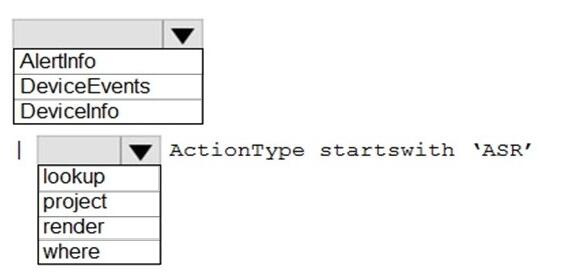
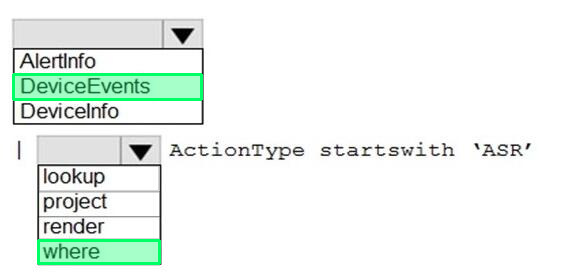
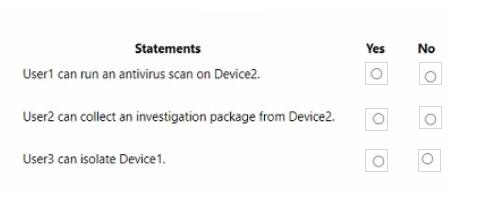
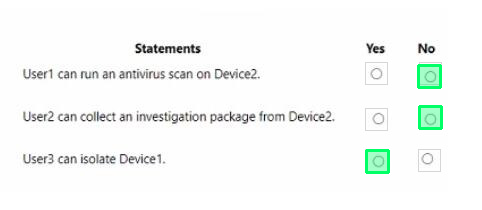
HOTSPOT
You have a Microsoft 365 E5 tenant that contains 100 Windows 10 devices.
You plan to attack surface reduction (ASR) rules for the Windows 10 devices.
You configure the ASR rules in audit mode and collect audit data in a Log Analytics workspace.
You need to find the ASR rules that match the activities on the devices.
How should you complete the Kusto query? To answer, select the appropriate options in the answer area.
NOTE: Each correct selection is worth one point.
Reveal answer detailsClose answer details
Question 2
Hotspot
HOTSPOT
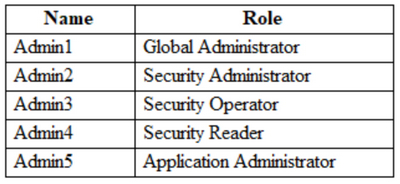
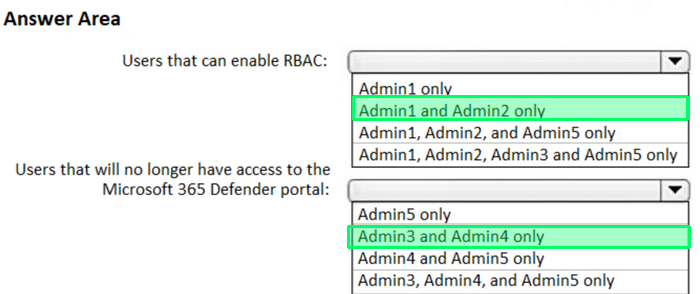
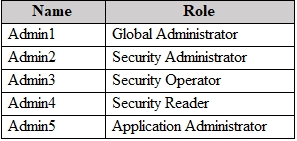
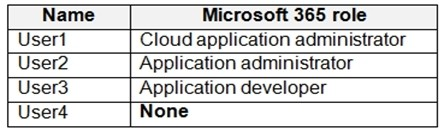
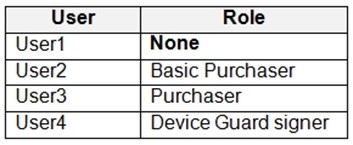
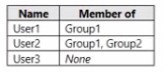
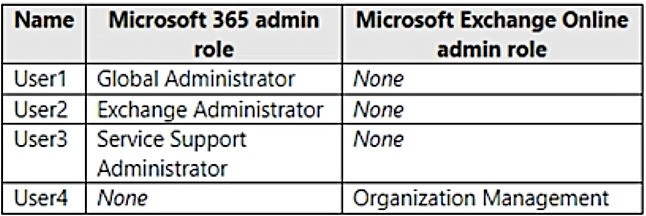
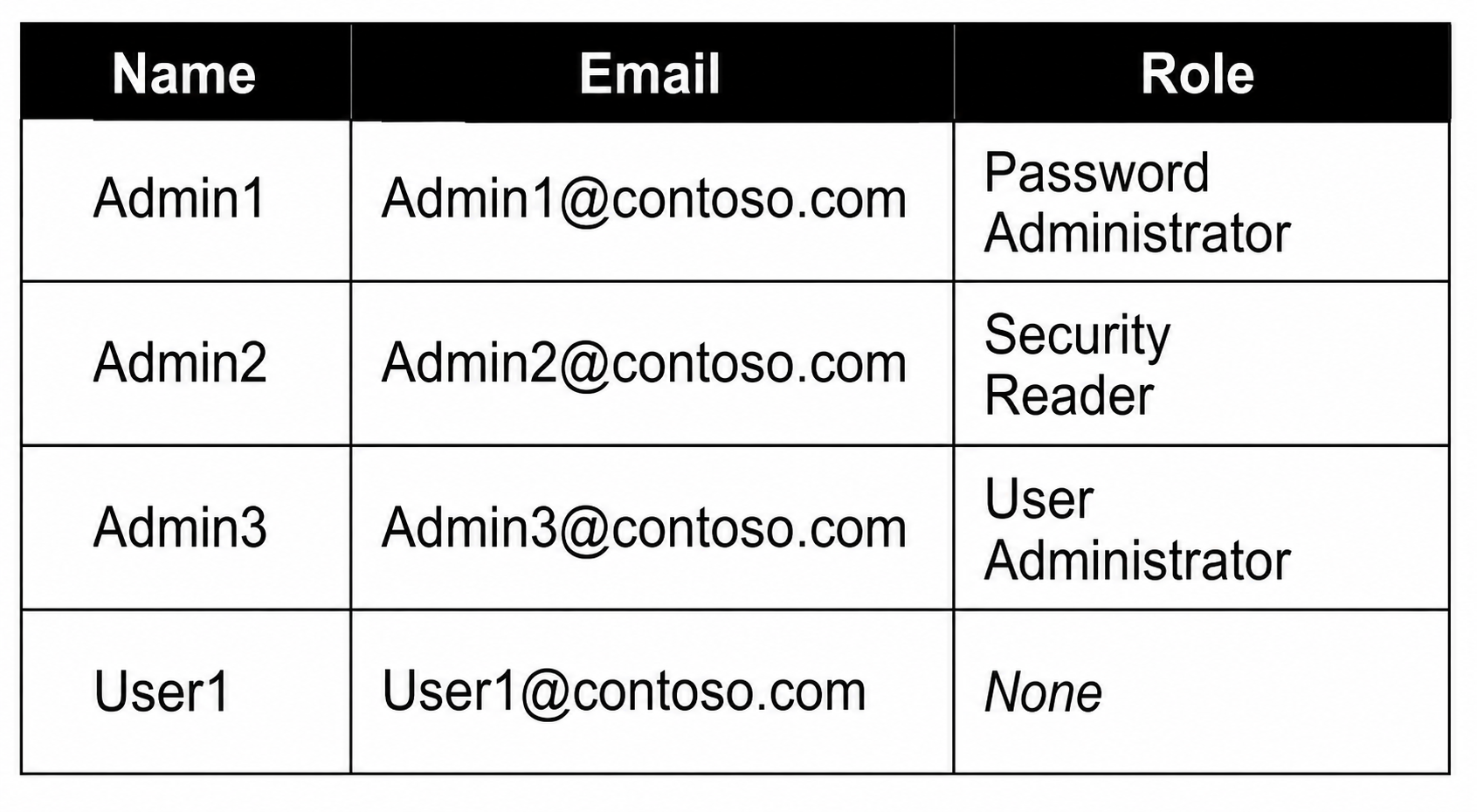
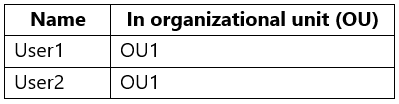
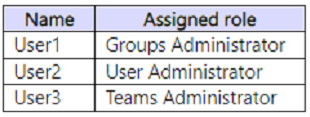
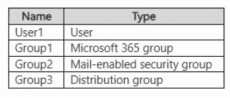
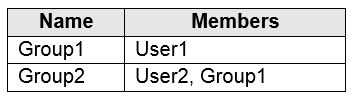
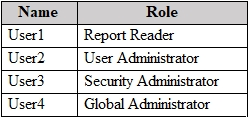
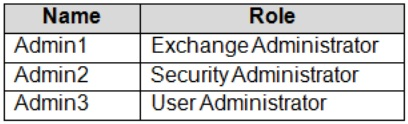
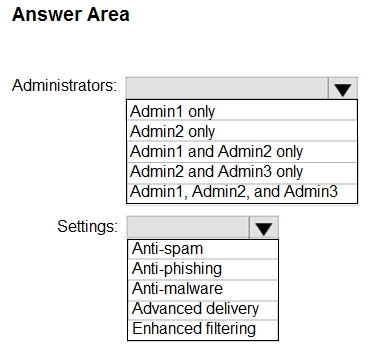
You have a Microsoft 365 E5 subscription that contains the users shown in the following table.
You are implementing Microsoft Defender for Endpoint.
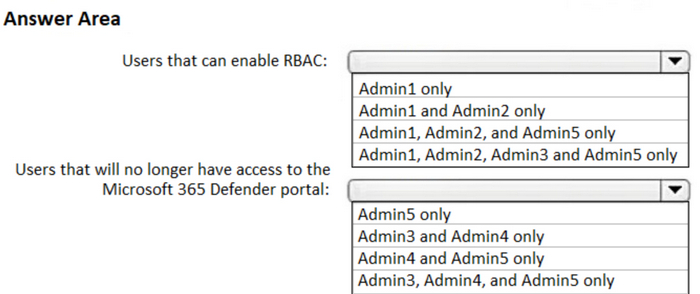
You need to enable role-based access control (RBAC) to restrict access to the Microsoft 365 Defender portal.
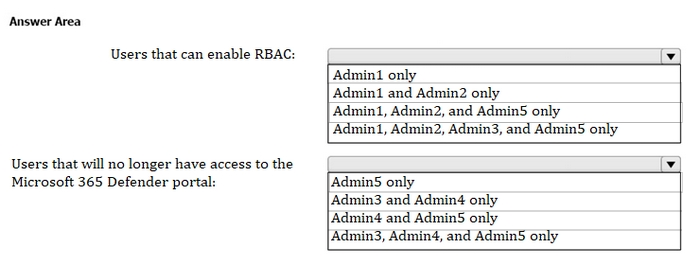
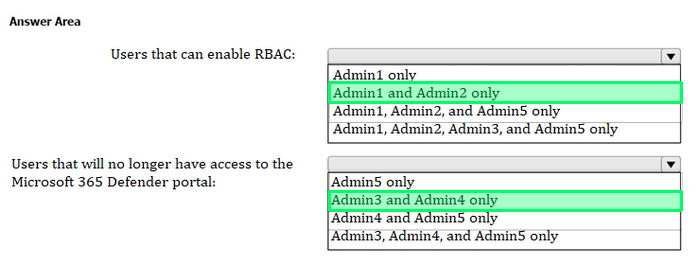
Which users can enable RBAC, and which users will no longer have access to the Microsoft 365 Defender portal after RBAC is enabled? To answer, select the appropriate options in the answer area.
NOTE: Each correct selection is worth one point.
Reveal answer detailsClose answer details
Question 3
Single choice
You have a Microsoft 365 E5 subscription that contains devices onboarded to Microsoft Defender for Endpoint. You integrate Microsoft Defender for Cloud Apps with Defender for Endpoint.
You need identify which cloud apps and services were used most during the last 30 days What should you do?
A
Generate a Cloud Discovery snapshot report.
B
Generate a monthly security summary report
C
Create a threat analytics alert notification.
D
Generate a Cloud Discovery executive report
Reveal answer detailsClose answer details
Correct answerB
Question 4
Single choice
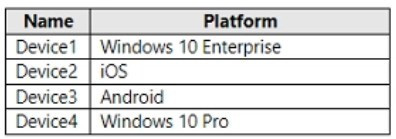
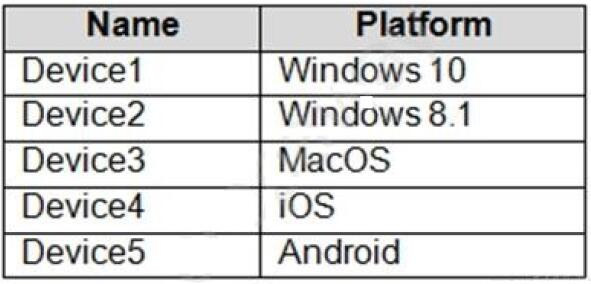
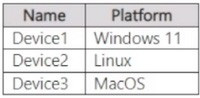
You have a Microsoft 365 E5 tenant that contains the devices shown in the following table.
The devices are managed by using Microsoft Intune.
You plan to use a configuration profile to assign the Delivery Optimization settings.
Which devices will support the settings?
A
Device1 only
B
Device1 and Device4
C
Device1, Device3, and Device4
D
Device1, Device2, Device3, and Device4
Reveal answer detailsClose answer details
Correct answerA
Question 5
Hotspot
HOTSPOT
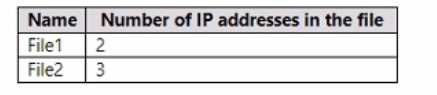
You have a Microsoft 365 E5 subscription that contains a Microsoft SharePoint site named Sitel. Site! contains the files shown in the following table.
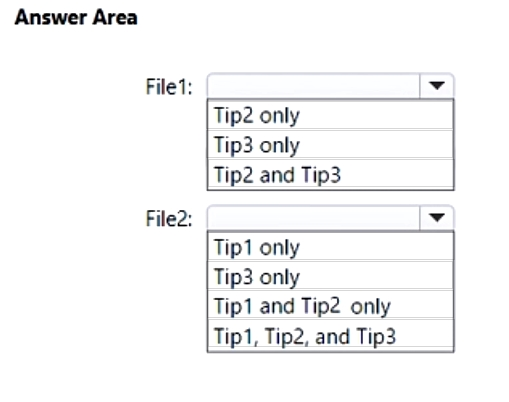
You have a data loss prevention (DLP) policy named DLP1 that has the advanced DLP rules shown in the following table.
You apply DLP1 to Site1.
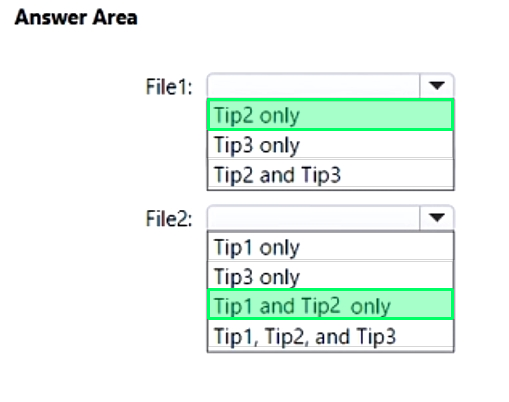
Which policy tip is displayed for each file? To answer, select the appropriate options in the answer area.
NOTE: Each correct selection is worth one point.
Reveal answer detailsClose answer details
Question 6
Single choice
Note: This question is part of a series of questions that present the same scenario. Each question in the series contains a unique solution that might meet the stated goals. Some question sets might have more than one correct solution, while others might not have a correct solution.
After you answer a question in this section, you will NOT be able to return to it. As a result, these questions will not appear in the review screen.
You have a computer that runs Windows 10. You need to verify which version of Windows 10 is installed. Solution: From the Settings app, you select System, and then you select About to view information about the system.
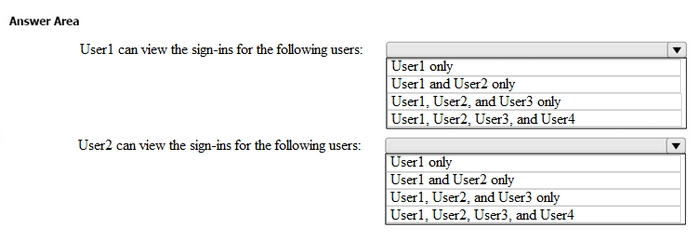
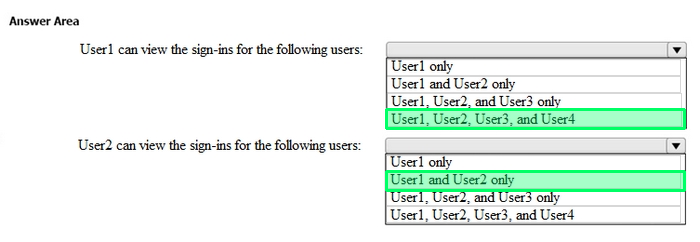
Does this meet the goal?
A
Yes
B
No
Reveal answer detailsClose answer details
Correct answerA
Question 7
Single choice
You have a Microsoft J65 E5 subscription.
You integrate Microsoft Defender for Endpoint with Microsoft Intune.
You need to ensure that devices automatically onboard to Defender for Endpoint when they are enrolled in Intune.
Solution: You enable co-management.
Does this meet the goal?
A
Yes
B
No
Reveal answer detailsClose answer details
Correct answerA
Question 8
Hotspot
HOTSPOT
You have a Microsoft 365 E5 subscription that contains the users shown in the following table.
You are implementing Microsoft Defender for Endpoint.
You need to enable role-based access control (RBAC) to restrict access to the Microsoft 365 Defender portal.
Which users can enable RBAC, and which users will no longer have access to the Microsoft 365 Defender portal after RBAC is enabled? To answer, select the appropriate options in the answer area.
NOTE: Each correct selection is worth one point.
Reveal answer detailsClose answer details
Question 9
Single choice
You have a Microsoft 365 E5 subscription.
You plan to configure multi-factor authentication (MFA).
You need to select an authentication method for users. The solution must ensure that each time a user is prompted for MFA, the application name that requires MFA is provided.
What should you select?
A
Microsoft Authenticator
B
a FID02 security key
C
a voice call
D
SMS
E
email OTP
Reveal answer detailsClose answer details
Correct answerA
Question 10
Single choice
You have a Microsoft 365 E5 tenant.
You configure sensitivity labels.
Users report that the Sensitivity button is unavailable in Microsoft Word for the web. The Sensitivity button is available in Microsoft 365 Word.
You need to ensure that the users can apply the sensitivity labels when they use Word for the web.
What should you do?
A
Copy policies from Azure Information Protection to the Microsoft Purview compliance portal.
B
Publish the sensitivity labels.
C
Create an auto-labeling policy
D
Enable sensitivity labels for files in Microsoft SharePoint Online and OneDrive.
Reveal answer detailsClose answer details
Correct answerD
Question 11
Single choice
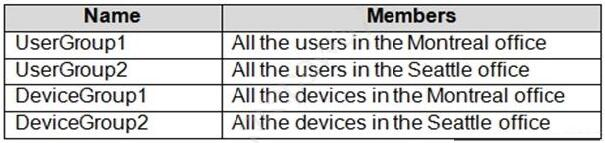
You have a Microsoft 365 tenant that contains two groups named Group1 and Group2.
You need to prevent the members or Group1 from communicating with the members of Group2 by using Microsoft Teams. The solution must comply with regulatory requirements and must not affect other user in the tenant.
What should you use?
A
information barriers
B
communication compliance policies
C
moderated distribution groups
D
administrator units in Azure Active Directory (Azure AD)
Reveal answer detailsClose answer details
Correct answerA
Question 12
Multiple choice
Your company has on-premises servers and an Azure AD tenant.
Several months ago, the Azure AD Connect Hearth agent was installed on all the servers.
You review the health status of all the servers regularly.
Recently, you attempted to view the health status of a server named Server1 and discovered that the server is NOT listed on the Azure AD Connect Servers list.
You suspect that another administrator removed Server1 from the list.
You need to ensure that you can view the health status of Server1.
What are two possible ways to achieve the goal? Each correct answer presents a complete solution.
NOTE: Each correct selection is worth one point.
A
From Azure Cloud shell, run the Connect-Azure AD cmdlet.
B
From Server1, change the Azure AD Connect Health Services Startup type to Automatic (Delayed Start)
C
From Server1, change the Azure AD Connect Health Services Startup type to Automatic
D
From Windows PowerShell, run the Rejister-ArureADConnectHealthsyncAgent cmdlet.
E
From Server1, reinstall the Azure AD Connect Health agent
Reveal answer detailsClose answer details
Correct answersD, E
Question 13
Single choice
Your network contains an on-premises Active Directory domain. The domain contains domain controllers that run Windows Server 2019. The functional level of the forest and the domain is Windows Server 2012 R2.
The domain contains 100 computers that run Windows 10 and a member server named Server1 that runs Windows Server 2012 R2.
You plan to use Server1 to manage the domain and to configure Windows 10 Group Policy settings.
You install the Group Policy Management Console (GPMC) on Server1.
You need to configure the Windows Update for Business Group Policy settings on Server1.
Solution: You raise the domain functional level to Windows Server 2019. You copy the Group Policy Administrative Templates from a Windows 10 computer to the Netlogon share on all the domain controllers.
Does this meet the goal?
A
Yes
B
No
Reveal answer detailsClose answer details
Correct answerB
Question 14
Single choice
Note: This question is part of a series of questions that present the same scenario. Each question in the series contains a unique solution that might meet the stated goals. Some question sets might have more than one correct solution, while others might not have a correct solution.
After you answer a question in this section, you will NOT be able to return to it. As a result, these questions will not appear in the review screen.
You have a Microsoft 365 E5 subscription. You create an account for a new security administrator named SecAdmin1. You need to ensure that SecAdmin1 can manage Microsoft Defender for Office 365 settings and policies for Microsoft Teams, SharePoint, and OneDrive.
Solution: From the Microsoft Entra admin center, you assign SecAdmin1 the Security Administrator role. Does this meet the goal?
A
Yes
B
No
Reveal answer detailsClose answer details
Correct answerA
Explanation
You need to assign the Security Administrator role.
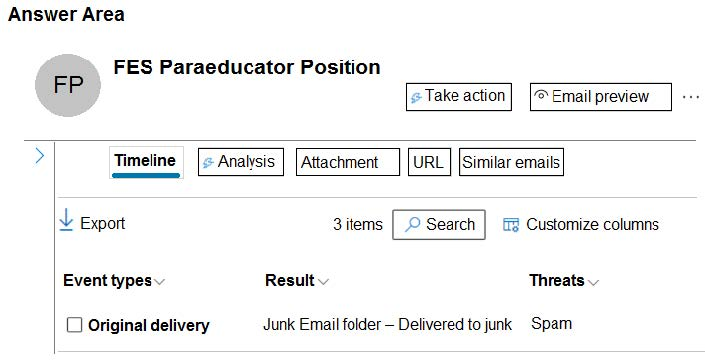
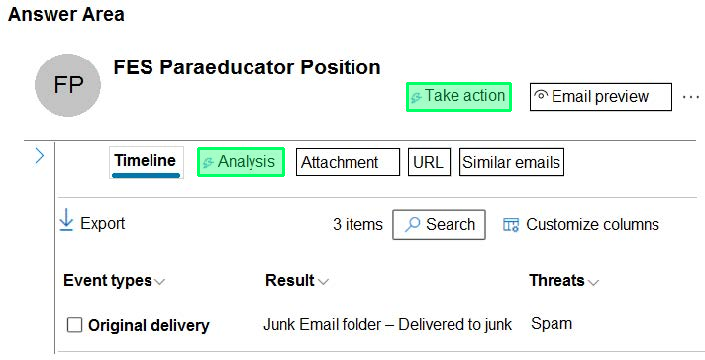
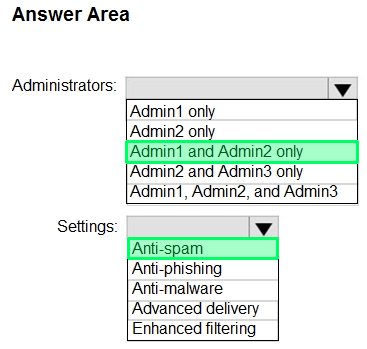
You are investigating a suspicious email message that generated alerts in the Microsoft Defender portal.
You need to examine the email message header and submit the message to Microsoft for review.
Which two settings should you use? To answer, select the appropriate settings in the answer area.
NOTE: Each correct selection is worth one point.
Reveal answer detailsClose answer details
Question 16
Hotspot
HOTSPOT
Your company has a Microsoft 365 E5 tenant.
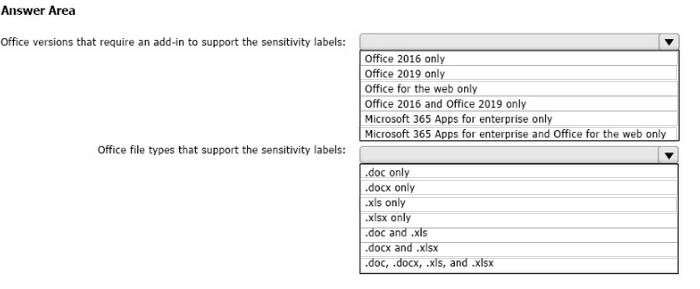
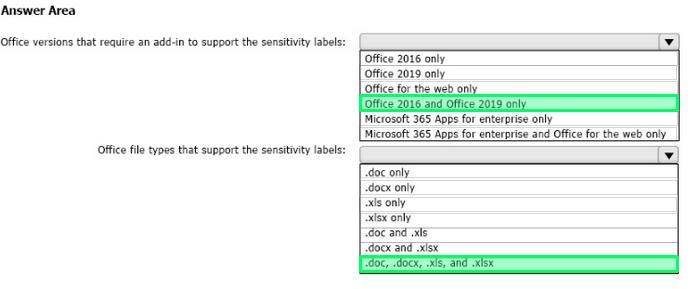
Users at the company use the following versions of Microsoft Office:
Microsoft 365 Apps for enterprise Office for the web Office 2016 Office 2019
The company currently uses the following Office file types:
docx xlsx doc xls
You plan to use sensitivity labels. You need to identify the following: Which versions of Office require an add-in to support the sensitivity labels. Which file types support the sensitivity labels.
What should you identify? To answer, select the appropriate options in the answer area, NOTE: Each correct selection is worth one point.
Reveal answer detailsClose answer details
Question 17
Hotspot
HOTSPOT
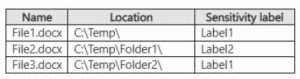
You have a Microsoft 365 E5 subscription that contains two sensitivity labels named Label1 and Label2. The subscription contains a Windows device named Device1 that is onboarded to Microsoft Purview. Device1 contains the files shown in the following table:
You create a data loss prevention (DLP) policy named Policy1 that has the following configurations:
Locations: Windows 10 devices
Condition: Content is labeled with Label1
Action: Audit or block activities where the user attempts to print
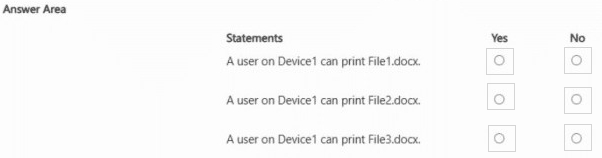
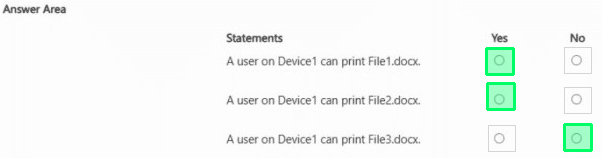
You need to identify whether a user on Device1 can print each file.
Reveal answer detailsClose answer details
Question 18
Single choice
Your network contains an Active Directory domain. You deploy an Azure AD tenant.
Another administrator configures the domain to synchronize to Azure AD.
You discover that 10 user accounts in an organizational unit (OU) are NOT synchronized to Azure AD. All the other user accounts synchronized successfully. You review Azure AD Connect Health and discover that all the user account synchronizations completed successfully.
You need to ensure that the 10 user accounts are synchronized to Azure AD.
Solution: You run idfix.exe and export the 10 user accounts.
Does this meet the goal?
A
Yes
B
No
Reveal answer detailsClose answer details
Correct answerB
Explanation
The question states that "all the user account synchronizations completed successfully". If there were problems with the 10 accounts that needed fixing with idfix.exe, there would have been synchronization errors in Azure AD Connect Health. It is likely that the 10 user accounts are being excluded from the synchronization cycle by a filtering rule.
You have a Microsoft 365 E5 tenant that contains the users shown in the following table.
Users are assigned Microsoft Store for Business roles as shown in the following table.
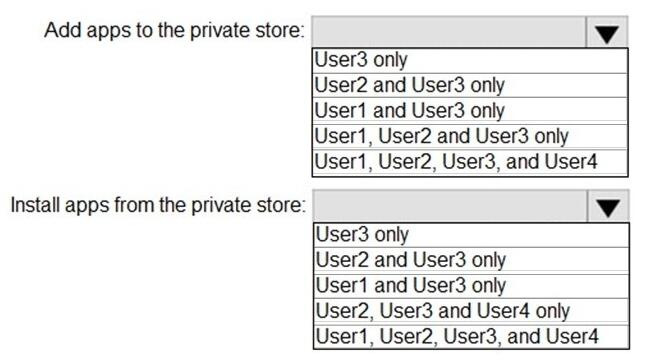
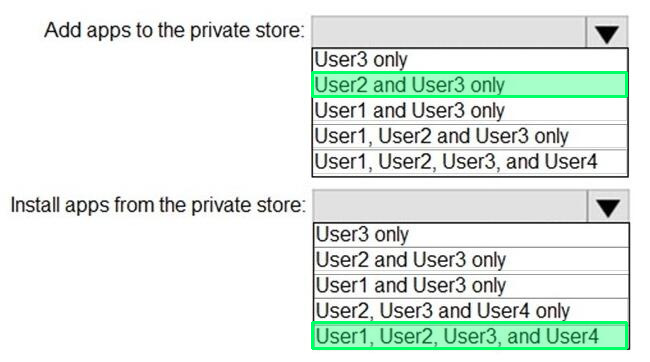
Which users can add apps to the private store in Microsoft Store for Business, and which users can install apps from the private store? To answer, select the appropriate options in the answer area.
NOTE: Each correct selection is worth one point.
Reveal answer detailsClose answer details
Question 20
Single choice
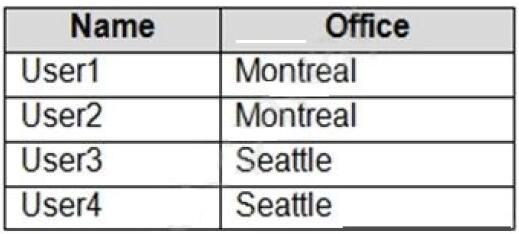
You need to configure Microsoft Entra Connect Sync to support the planned changes for the Montreal Users and Seattle Users OUs.
What should you do?
A
From PowerShell, run the Add-ADSyncConnectorAttributeInclusion cmdlet.
B
From the Microsoft Entra Connect wizard, select Customize synchronization options.
C
From PowerShell, run the Start-ADSyncSyncCycle cmdlet.
D
From the Microsoft Entra Connect wizard, select Manage federation.
Reveal answer detailsClose answer details
Correct answerB
Question 21
Hotspot
HOTSPOT
You have a Microsoft 365 E5 subscription.
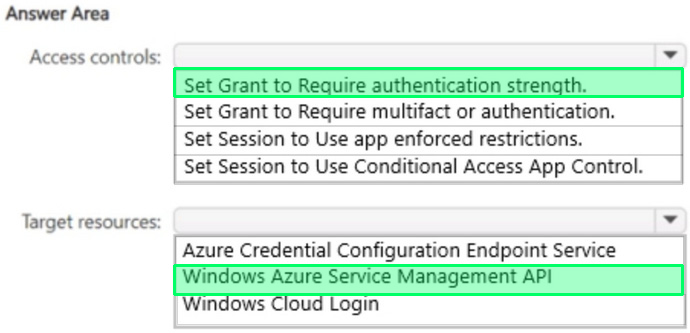
You plan to create a Conditional Access policy named Policy1.
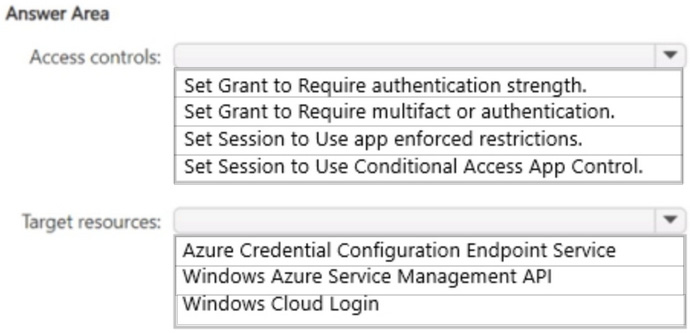
You need to ensure that only Passwordless MFA authentication methods are used when administrators attempt to access the Azure portal. Azure PowerShell, or Azure Command-Line Interface (CLI).
How should you configure Policy1? To answer, select the appropriate options in the answer area.
NOTE: Each correct selection is worth one point.
Reveal answer detailsClose answer details
Question 22
Hotspot
HOTSPOT
You have a Microsoft 365 E5 subscription.
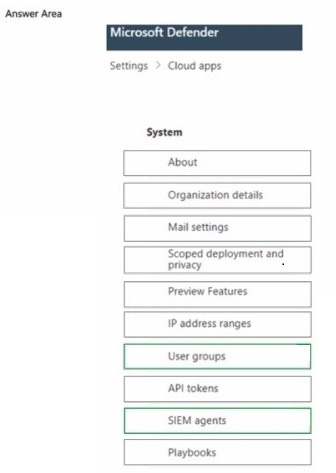
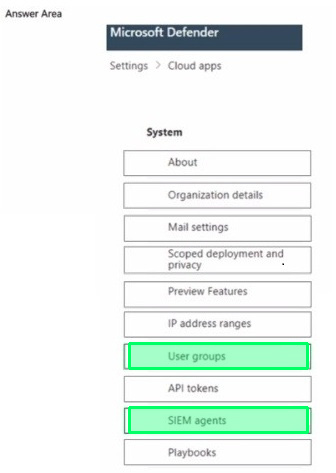
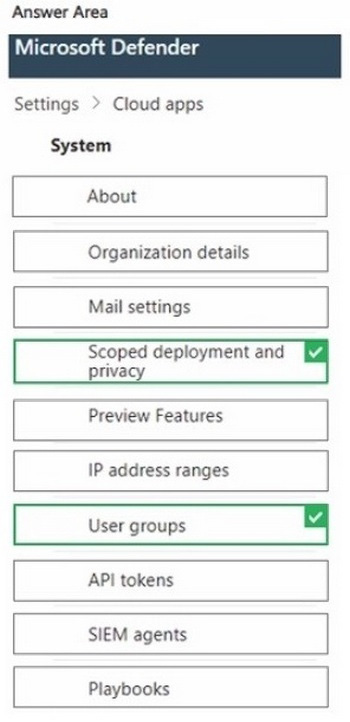
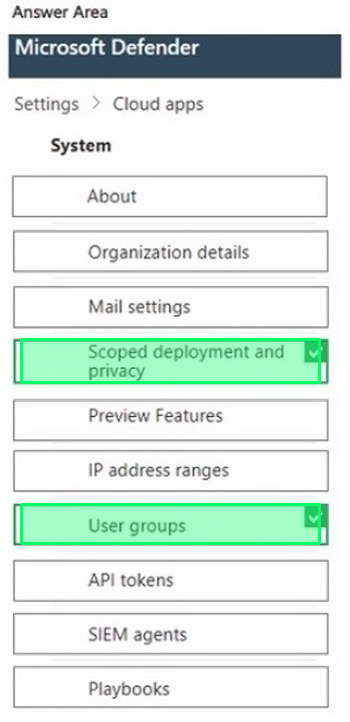
You connect a cloud app that contains a group named Group1 to Microsoft Defender for Cloud Apps.
You need to configure the Cloud apps settings to monitor all activities performed by the members of Group1.
Which two settings should you configure? To answer, select the appropriate settings in the answer area.
NOTE: Each correct selection is worth one point.
Reveal answer detailsClose answer details
Question 23
Single choice
You have a Microsoft 365 subscription.
You register two applications named App1 and App2 to Azure AD.
You need to ensure that users who connect to App1 require multi-factor authentication (MFA). MFA is required only for App1.
What should you do?
A
From the Microsoft Entra admin center, create a conditional access policy
B
From the Microsoft 365 admin center, configure the Modem authentication settings.
C
From the Enterprise applications blade of the Microsoft Entra admin center, configure the Users settings.
D
From Multi-Factor Authentication, configure the service settings.
Reveal answer detailsClose answer details
Correct answerA
Explanation
Use Conditional Access policies If your organization has more granular sign-in security needs, Conditional Access policies can offer you more control. Conditional Access lets you create and define policies that react to sign in events and request additional actions before a user is granted access to an application or service.
(You have a Microsoft 365 E5 subscription that contains 1,000 Windows devices. You need to review the exposure score of the devices.
Which portal should you use?)
A
the Microsoft Intune admin center
B
the Microsoft Purview portal
C
the Microsoft Defender portal
D
the Microsoft 365 admin center
Reveal answer detailsClose answer details
Correct answerC
Explanation
The correct answer is the Microsoft Defender portal.
Exposure Score is a security metric provided by Microsoft Defender for Endpoint. It measures an organization's overall security posture by evaluating device configuration, vulnerabilities, and security controls across endpoints.
Microsoft documentation defines Exposure Score as part of the Microsoft Defender Vulnerability Management experience, which is accessed through the Microsoft Defender portal.
The Exposure Score helps administrators: Understand how vulnerable devices are across the organization Track improvements to security posture over time Prioritize remediation actions based on risk Microsoft explicitly states that Exposure Score is viewed and managed within the Microsoft Defender portal, which serves as the central dashboard for Defender for Endpoint, Defender for Office 365, and related security services.
Why the other options are incorrect
A. the Microsoft Intune admin center
Intune focuses on device management, compliance, and configuration profiles. While it provides device health and compliance reporting, it does not display the Defender Exposure Score.
B. the Microsoft Purview portal
Microsoft Purview is used for data governance, compliance, insider risk, and information protection. It has no functionality related to endpoint exposure scoring.
D. the Microsoft 365 admin center
The Microsoft 365 admin center is designed for tenant-wide administration such as users, licenses, and services. It does not provide detailed endpoint security metrics like Exposure Score.
Question 25
Hotspot
HOTSPOT
You have several devices enrolled in Microsoft Endpoint Manager.
You have a Microsoft Azure Active Directory (Azure AD) tenant that includes the users shown in the following table.
The device type restrictions in Endpoint Manager are configured as shown in the following table.
Reveal answer detailsClose answer details
Question 26
Single choice
You have a Microsoft 365 subscription that contains the users shown in the following table.
You plan to use Exchange Online to manage email for a DNS domain.
An administrator adds the DNS domain to the subscription.
The DNS domain has a status of Incomplete setup.
You need to identify which user can complete the setup of the DNS domain. The solution must use the principle of least privilege.
Which user should you identify?
A
User1
B
User2
C
User3
D
User4
Reveal answer detailsClose answer details
Correct answerA
Question 27
Hotspot
HOTSPOT
You have a Microsoft 365 E5 subscription that.
You need to identify whenever a sensitivity label is applied, changed, or removed within the subscription.
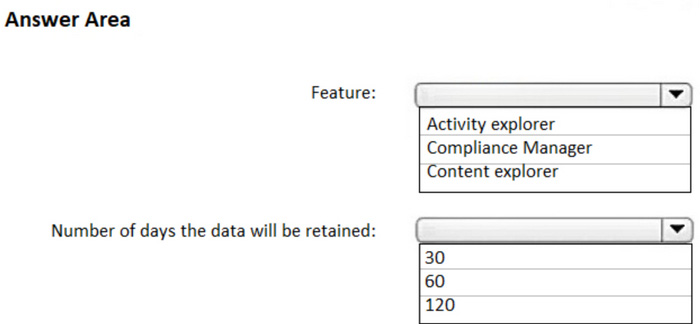
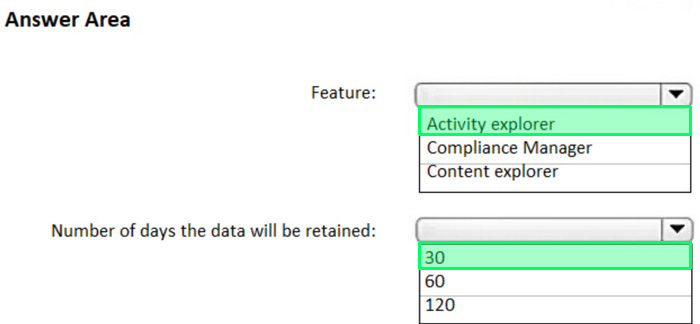
Which feature should you use, and how many days will the data be retained? To answer, select the appropriate options in the answer area.
NOTE Each correct selection is worth one point.
Reveal answer detailsClose answer details
Question 28
Hotspot
HOTSPOT
You have a Microsoft 365 E5 subscription that contains the users shown in the following table:
You use Microsoft Entra ID Protection.
For the Users at risk detected alerts setting, you configure the following:
Recipient: Admin1 Alert on user risk level at or above: Medium
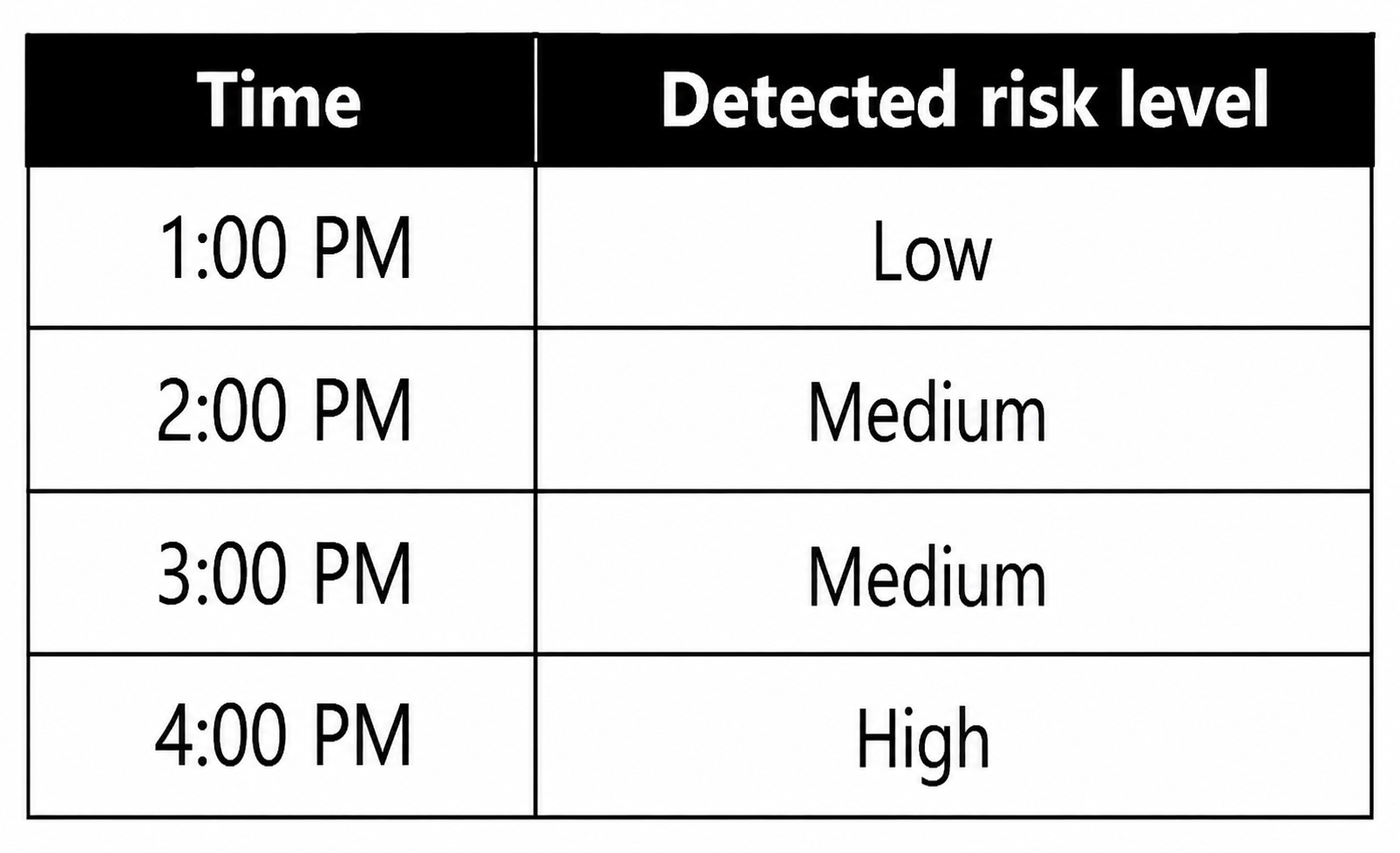
User1 signs in to Microsoft 365 services and is assigned the detected risk levels shown in the following table:
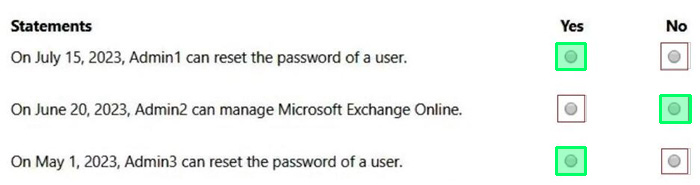
For each of the following statements, select Yes if the statement is true. Otherwise, select No.
Reveal answer detailsClose answer details
Explanation
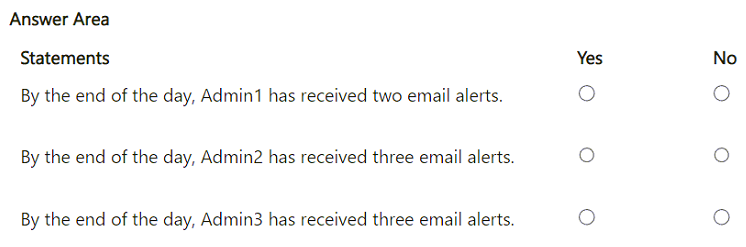
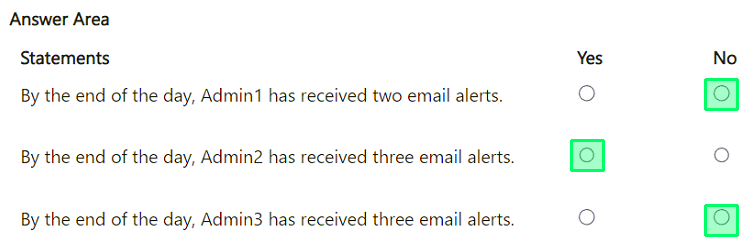
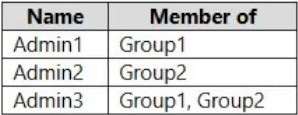
Statement Answer By the end of the day, Admin1 has received two email alerts. No By the end of the day, Admin2 has received three email alerts. Yes By the end of the day, Admin3 has received three email alerts. No Microsoft Entra ID Protection sends Users at risk detected email alerts when a user's risk level reaches the configured threshold. Here, the threshold is Medium or above, so the 1:00 PM Low risk event does not generate an alert. The 2:00 PM Medium event generates one alert, the 3:00 PM Medium event generates another because Microsoft states that later risk detections can trigger additional emails even if the recalculated risk remains at the configured level, and the 4:00 PM High event generates a third alert because it is still above the configured threshold. Microsoft also states that extra emails are suppressed only within a five-second period; these events are one hour apart, so that suppression rule does not reduce the count. Admin1 receives the alerts because Admin1 is explicitly configured as a recipient, but the statement says two alerts; the correct count is three, so it is No. Admin2 receives three alerts because Security Reader users are automatically included by default for ID Protection notifications when they have a valid email or alternate email. Admin3 does not receive the alerts because User Administrator is not one of the automatically included roles and is not configured as a recipient.
Question 29
Hotspot
HOTSPOT
You have a Microsoft 365 E5 subscription that contains the users shown in the following table.
You add the following assignment for the User Administrator role:
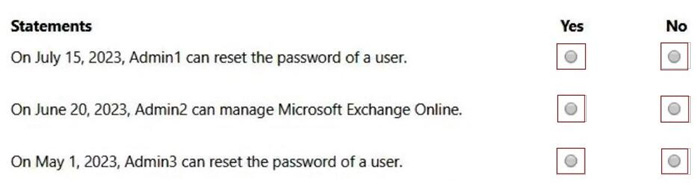
Scope type: Directory Selected members: Group1 Assignment type: Active Assignment starts: Mar 15, 2023 Assignment ends: Aug 15, 2023
You add the following assignment for the Exchange Administrator role:
Scope type: Directory Selected members: Group2 Assignment type: Eligible Assignment starts: Jun 15, 2023 Assignment ends: Oct 15, 2023 For each of the following statements, select Yes if the statement is true. Otherwise, select No.
NOTE: Each correct selection is worth one point.
Reveal answer detailsClose answer details
Question 30
Hotspot
HOTSPOT
You have a Microsoft 365 E5 subscription.
You need to ensure that an alert is generated when an app is registered in Microsoft Entra and is assigned the Directory.Readwrite.ALL Microsoft Graph permission.
What should you do? To answer, select the appropriate options in the answer area.
NOTE: Each correct selection is worth one point.
Reveal answer detailsClose answer details
Case study
Case Study 3
Overview General Overviews Litware, Inc. is a technology research company. The company has a main office in Montreal and a branch office in Seattle.
Environment Existing Environment The network contains an on-premises Active Directory domain named litware.com. The domain contains the users shown in the following table.
Microsoft Cloud Environment Litware has a Microsoft 365 subscription that contains a verified domain named litware.com. The subscription syncs to the on-premises domain. Litware uses Microsoft Intune for device management and has the enrolled devices shown in the following table.
Litware.com contains the security groups shown in the following table.
Litware uses Microsoft SharePoint Online and Microsoft Teams for collaboration. The verified domain is linked to an Azure Active Directory (Azure AD) tenant named litware.com. Audit log search is turned on for the litware.com tenant.
Problem Statements Litware identifies the following issues: Users open email attachments that contain malicious content. Devices without an assigned compliance policy show a status of Compliant. User1 reports that the Sensitivity option in Microsoft Office for the web fails to appear. Internal product codes and confidential supplier ID numbers are often shared during Microsoft Teams meetings and chat sessions that include guest users and external users.
Requirements Planned Changes Litware plans to implement the following changes: Implement device configuration profiles that will configure the endpoint protection template settings for supported devices. Configure information governance for Microsoft OneDrive, SharePoint Online, and Microsoft Teams. Implement data loss prevention (DLP) policies to protect confidential information. Grant User2 permissions to review the audit logs of he litware.com tenant. Deploy new devices to the Seattle office as shown in the following table.
Implement a notification system for when DLP policies are triggered. Configure a Safe Attachments policy for the litware.com tenant.
Technical Requirements Litware identifies the following technical requirements: Retention settings must be applied automatically to all the data stored in SharePoint Online sites, OneDrive accounts, and Microsoft Teams channel messages, and the data must be retained for five years. Emails messages that contain attachments must be delivered immediately, and placeholder must be provided for the attachments until scanning is complete. All the Windows 10 devices in the Seattle office must be enrolled in Intune automatically when the devices are joined to or registered with Azure AD. Devices without an assigned compliance policy must show a status of Not Compliant in the Microsoft Endpoint Manager admin center. A notification must appear in the Microsoft 365 compliance center when a DLP policy is triggered. User2 must be granted the permissions to review audit logs for the following activities: - Admin activities in Microsoft Exchange Online - Admin activities in SharePoint Online - Admin activities in Azure AD Users must be able to apply sensitivity labels to documents by using Office for the web. Windows Autopilot must be used for device provisioning, whenever possible. A DLP policy must be created to meet the following requirements: - Confidential information must not be shared in Microsoft Teams chat sessions, meetings, or channel messages. - Messages that contain internal product codes or supplier ID numbers must be blocked and deleted. The principle of least privilege must be used.
Question 31
Testlet 3Single choice
You need to create the Safe Attachments policy to meet the technical requirements.
You need to add additional onmicrosoft.com domains to the subscription. The additional domains must be assignable as email addresses for users.
What is the maximum number of onmicrosoft.com domains the subscription can contain?
A
1
B
2
C
5
D
10
Reveal answer detailsClose answer details
Correct answerC
Explanation
You are limited to five onmicrosoft.com domains in your Microsoft 365 environment, so make sure to check for spelling and to assess your need if you choose to create a new one.
You are reviewing alerts in the Microsoft 365 Defender portal.
How long are the alerts retained in the portal?
A
30 days
B
60 days
C
3 months
D
6 months
E
12 months
Reveal answer detailsClose answer details
Correct answerD
Question 34
Hotspot
HOTSPOT
You have a Microsoft 365 E5 subscription that contains the groups shown in the following table.
All the groups are deleted.
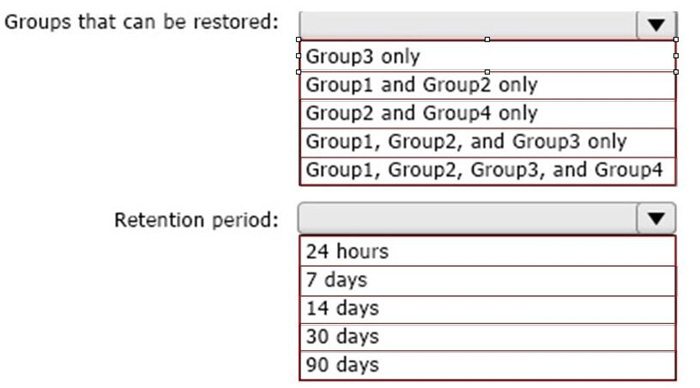
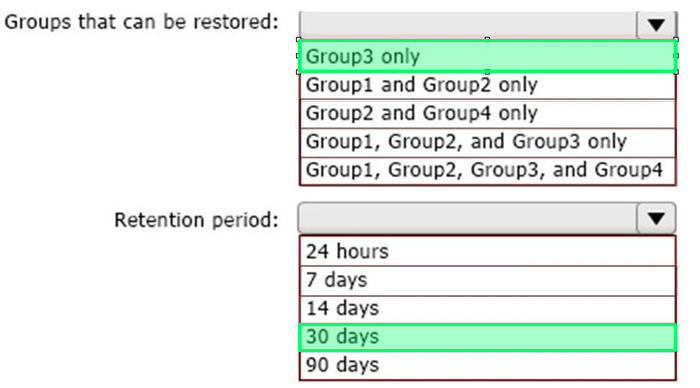
Which groups can be restored, and what is the retention period? To answer, select the appropriate options in the answer area.
NOTE: Each correct selection is worth one point.
Reveal answer detailsClose answer details
Question 35
Single choice
You have a Microsoft 365 E5 subscription that contains Windows 11 devices. All the devices are onboarded to Microsoft Defender for Endpoint.
You need to compare the configuration of the devices against industry standard benchmarks.
What should you use?
A
Events
B
Initiatives
C
Attack surface map
D
Security baselines assessment
Reveal answer detailsClose answer details
Correct answerD
Question 36
Single choice
You have a Microsoft 365 E5 subscription.
You plan to create an anti-malware policy named Policy1. You need to ensure that Policy1 can detect malicious email messages that were already delivered to a user's mailbox.
What should you do in the Microsoft Defender portal?
A
Enable zero-hour auto purge (ZAP).
B
Modify the common attachments filter.
C
Configure a quarantine policy.
D
Enable enhanced filtering.
Reveal answer detailsClose answer details
Correct answerA
Question 37
Single choice
You have a Microsoft 365 E5 subscription.
You need to ensure that administrators receive an email when Microsoft 365 Defender detects a sign-in from a risky IP address.
What should you create?
A
a vulnerability notification rule
B
an alert
C
an incident assignment filter
D
an incident notification rule
Reveal answer detailsClose answer details
Correct answerB
Explanation
C - incident notification rule. Risky sign in is not available underbalert policy
Question 38
Single choice
You have a Microsoft 365 E5 subscription that contains the devices shown in the following table.
You plan to create an Endpoint security policy by using the Defender Update controls template.
To which devices can you apply the policy?
A
Device1 only
B
Device1 and Device2 only
C
Device1 and Device3 only
D
Device1, Device2, and Device3
Reveal answer detailsClose answer details
Correct answerA
Question 39
Hotspot
HOTSPOT
Your network contains an on-premises Active Directory Domain Services (AD DS) domain named contoso. com.
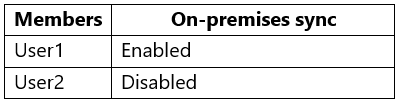
The domain contains the users shown in the following table.
You have a Microsoft Entra tenant that syncs with contoso.com by using Microsoft Entra Connect Sync.
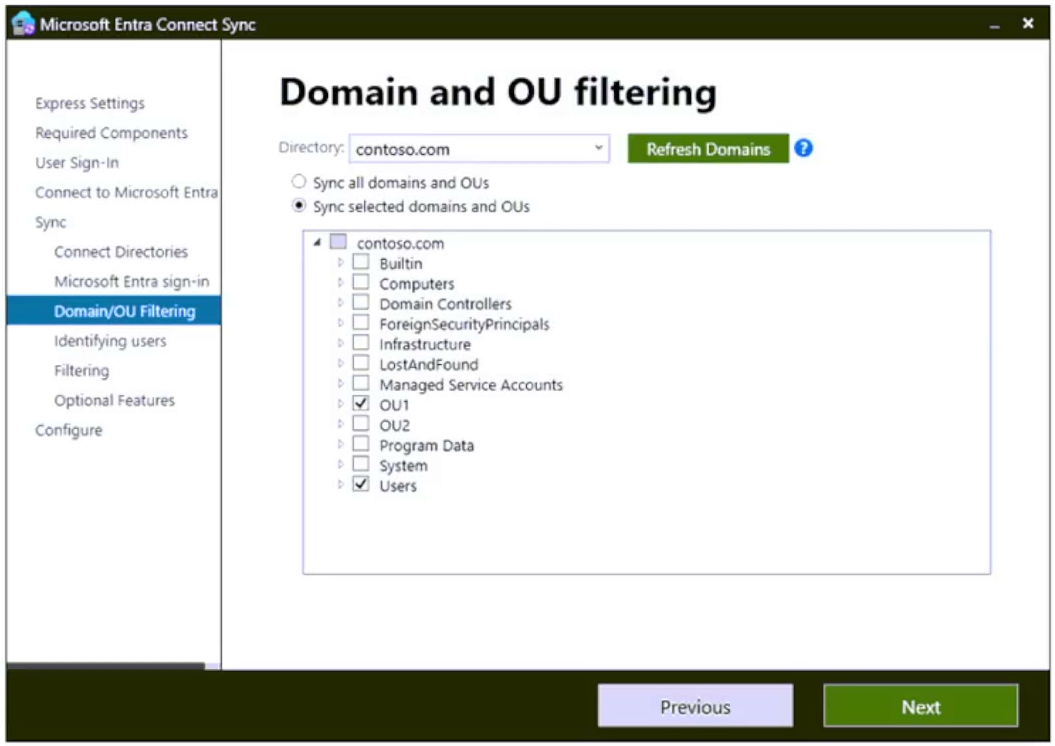
Microsoft Entra Connect Sync is configured as shown in the exhibit. (Click the Exhibit tab.)
The Microsoft Entra tenant contains a cloud-only group named Group1 as shown in the following table.
You perform the following tasks at 10 AM: - In contoso.com. you move User1 to 0U2. - In the Microsoft Entra tenant, you delete User2. - In contoso.com. you create a computer account named Comp1 in 0U1 and update the description of Comp1.
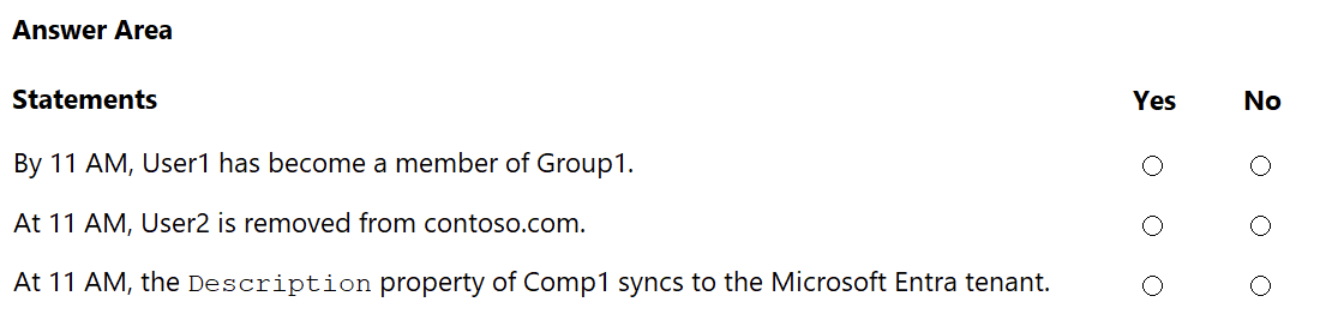
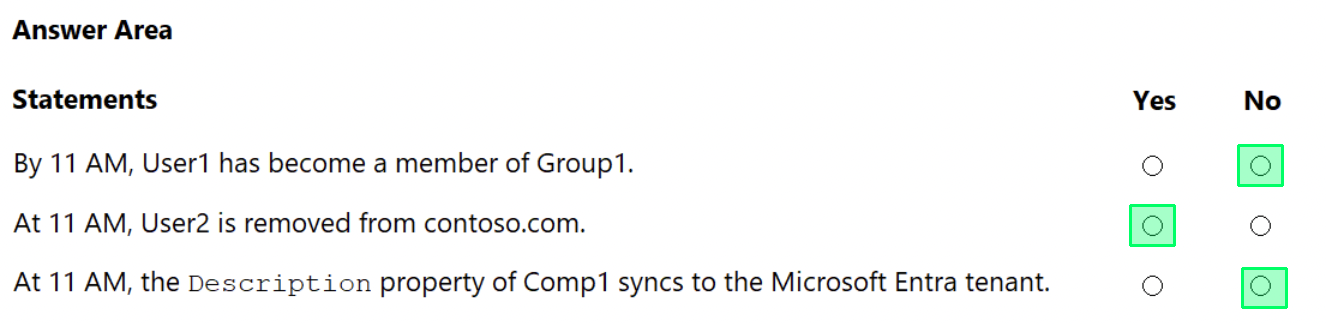
For each of the following statements, select Yes if the statement is true. Otherwise, select No. NOTE: Each correct selection is worth one point.
Reveal answer detailsClose answer details
Question 40
Single choice
You have a Microsoft E5 subscription.
You need to ensure that administrators who need to manage Microsoft Exchange Online are assigned the Exchange Administrator role for five hours at a time.
You have a Microsoft 365 tenant that contains 1,000 iOS devices enrolled in Microsoft Intune. You plan to purchase volume-purchased apps and deploy the apps to the devices. You need to track used licenses and manage the apps by using Intune.
Contoso, Ltd Overview Contoso, Ltd. is a consulting company that has a main office in Montreal and two branch offices in Seattle and New York. The company has the employees and devices shown in the following table.
Contoso recently purchased a Microsoft 365 ES subscription.
Existing Environment Requirement The network contains an on-premises Active Directory forest named contoso.com. The forest contains the servers shown in the following table.
All servers run Windows Server 2016. All desktops and laptops are Windows 10 Enterprise and are joined to the domain. The mobile devices of the users in the Montreal and Seattle offices run Android. The mobile devices of the users in the New York office run iOS. The domain is synced to Azure Active Directory (Azure AD) and includes the users shown in the following table.
The domain also includes a group named Group1.
Planned Changes Contoso plans to implement the following changes: -Implement Microsoft 365. -Manage devices by using Microsoft Intune. -Implement Azure Advanced Threat Protection (ATP). -Every September, apply the latest feature updates to all Windows computers. Every March, apply the
latest feature updates to the computers in the New York office only.
Technical Requirements Contoso identifies the following technical requirements: -When a Windows 10 device is joined to Azure AD, the device must enroll in Intune automaticity. -Dedicated support technicians must enroll all the Montreal office mobile devices in Intune. -User1 must be able to enroll all the New York office mobile devices in Intune. -Azure ATP sensors must be installed and must NOT use port mirroring. -Whenever possible, the principle of least privilege must be used. -A Microsoft Store for Business must be created.
Compliance Requirements Contoso identifies the following compliance requirements: -Ensure that the users in Group1 can only access Microsoft Exchange Online from devices that are enrolled in Intune and configured in accordance with the corporate policy. -Configure Windows Information Protection (W1P) for the Windows 10 devices.
Question 42
Testlet 1Single choice
Note: This question is part of a series of questions that present the same scenario. Each question in the series contains a unique solution that might meet the stated goals. Some question sets might have more than one correct solution, while others might not have a correct solution. After you answer a question in this section, you will NOT be able to return to it. As a result, these questions will not appear in the review screen. Your network contains an Active Directory domain named contoso.com that is synced to Microsoft Azure Active Directory (Azure AD). You manage Windows 10 devices by using Microsoft System Center Configuration Manager (Current Branch). You configure a pilot for co-management. You add a new device named Device1 to the domain. You install the Configuration Manager client on Device1. You need to ensure that you can manage Device1 by using Microsoft Intune and Configuration Manager. Solution: Define a Configuration Manager device collection as the pilot collection. Add Device1 to the collection. Does this meet the goal?
A
Yes
B
No
Reveal answer detailsClose answer details
Correct answerA
Explanation
Device1 has the Configuration Manager client installed so you can manage Device1 by using Configuration Manager. To manage Device1 by using Microsoft Intune, the device has to be enrolled in Microsoft Intune. In the Co-management Pilot configuration, you configure a Configuration Manager Device Collection that determines which devices are auto-enrolled in Microsoft Intune. You need to add Device1 to the Device Collection so that it auto-enrols in Microsoft Intune. You will then be able to manage Device1 using Microsoft Intune. References: https://docs.microsoft.com/enus/configmgr/comanage/how-to-enable
Question 43
Hotspot
HOTSPOT
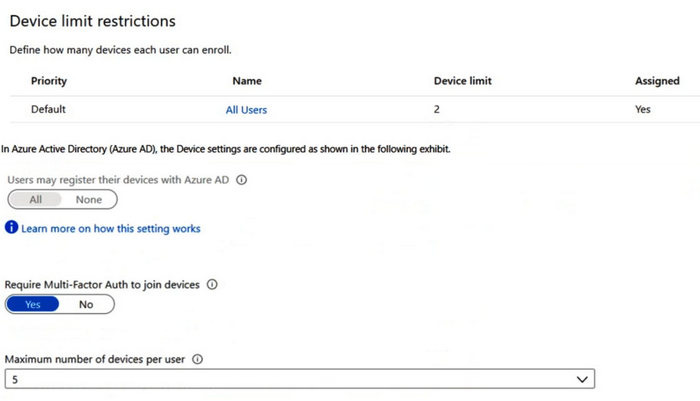
You have 2,500 Windows 10 devices and a Microsoft 365 E5 tenant that contains two users named User1 and User2. The devices are not enrollment in Microsoft Intune.
In Microsoft Endpoint Manager, the Device limit restrictions are configured as shown in the following exhibit.
From Microsoft Endpoint Manager, you add User2 as a device enrollment manager (DEM).
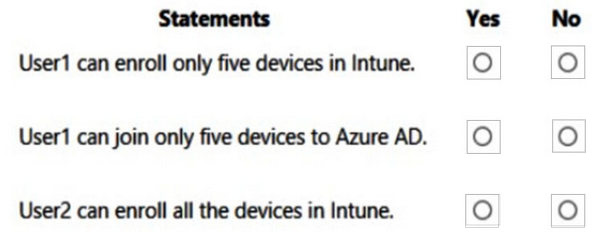
For each of the following statement, select Yes if the statement is true. Otherwise, select No.
NOTE: Each correct selection is worth one point.
Reveal answer detailsClose answer details
Question 44
Single choice
You have a Microsoft 365 subscription that uses Microsoft Defender for Endpoint.
All the devices in your organization are onboarded to Microsoft Defender for Endpoint.
You need to ensure that an alert is generated if malicious activity was detected on a device during the last 24 hours.
What should you do?
A
From the Microsoft Purview compliance portal, create a data loss prevention (DLP) policy.
B
From Alerts queue, create a suppression rule and assign an alert.
C
From Advanced hunting, create a query and a detection rule.
D
From the Microsoft Purview compliance portal, create an audit log search.
Reveal answer detailsClose answer details
Correct answerC
Case study
Case Study 1
Case Study Questions
Contoso, Ltd Overview Contoso, Ltd. is a consulting company that has a main office in Montreal and two branch offices in Seattle and New York. The company has the employees and devices shown in the following table.
Contoso recently purchased a Microsoft 365 ES subscription.
Existing Environment Requirement The network contains an on-premises Active Directory forest named contoso.com. The forest contains the servers shown in the following table.
All servers run Windows Server 2016. All desktops and laptops are Windows 10 Enterprise and are joined to the domain. The mobile devices of the users in the Montreal and Seattle offices run Android. The mobile devices of the users in the New York office run iOS. The domain is synced to Azure Active Directory (Azure AD) and includes the users shown in the following table.
The domain also includes a group named Group1.
Planned Changes Contoso plans to implement the following changes: -Implement Microsoft 365. -Manage devices by using Microsoft Intune. -Implement Azure Advanced Threat Protection (ATP). -Every September, apply the latest feature updates to all Windows computers. Every March, apply the
latest feature updates to the computers in the New York office only.
Technical Requirements Contoso identifies the following technical requirements: -When a Windows 10 device is joined to Azure AD, the device must enroll in Intune automaticity. -Dedicated support technicians must enroll all the Montreal office mobile devices in Intune. -User1 must be able to enroll all the New York office mobile devices in Intune. -Azure ATP sensors must be installed and must NOT use port mirroring. -Whenever possible, the principle of least privilege must be used. -A Microsoft Store for Business must be created.
Compliance Requirements Contoso identifies the following compliance requirements: -Ensure that the users in Group1 can only access Microsoft Exchange Online from devices that are enrolled in Intune and configured in accordance with the corporate policy. -Configure Windows Information Protection (W1P) for the Windows 10 devices.
Question 45
Testlet 1Single choice
Note: This question is part of a series of questions that present the same scenario. Each question in the series contains a unique solution that might meet the stated goals. Some question sets might have more than one correct solution, while others might not have a correct solution. After you answer a question in this section, you will NOT be able to return to it. As a result, these questions will not appear in the review screen. Your network contains an Active Directory domain named contoso.com that is synced to Microsoft Azure Active Directory (Azure AD).
You manage Windows 10 devices by using Microsoft System Center Configuration Manager (Current Branch). You configure a pilot for co-management. You add a new device named Device1 to the domain. You install the Configuration Manager client on Device1. You need to ensure that you can manage Device1 by using Microsoft Intune and Configuration Manager. Solution: You create a device configuration profile from the Device Management admin center. Does this meet the goal?
A
Yes
B
No
Reveal answer detailsClose answer details
Correct answerB
Explanation
It looks like the given answer is correct. There is an on-premises Active Directory synced to Azure Active Directory (Azure AD) So the co-management path1 - Auto-enroll existing clients 1. Hybrid Azure AD 2. Client agent setting for hybrid Azure ADjoin 3. Configure auto-enrollment of devices to Intune 4. Enable co-management in Configuration Manager https://docs.microsoft.com/enus/mem/configmgr/comanage/tutorial-co-manage-client
Question 46
Single choice
You have a Microsoft 365 E5 subscription that contains the groups shown in the following exhibit.
To which groups can you assign Microsoft 365 E5 licenses?
A
Group! and Group2 only
B
Group2 and Group3 only
C
Group3 and Group4 only
D
Group 1, Group2. and Group3 only
E
Group2, Group3, and Group4 only
Reveal answer detailsClose answer details
Correct answerE
Question 47
Single choice
You have a Microsoft 365 E5 subscription.
You create an account for a new security administrator named SecAdmin1.
You need to ensure that SecAdmin1 can manage Office 365 Advanced Threat Protection (ATP) settings and policies for Microsoft Teams, SharePoint, and OneDrive.
Solution: From the Azure Active Directory admin center, you assign SecAdmin1 the Teams Service Administrator role. Does this meet the goal?
A
Yes
B
No
Reveal answer detailsClose answer details
Correct answerB
Explanation
You need to assign the Security Administrator role.
You have a Microsoft 365 E5 subscription that contains the users shown in the following table.
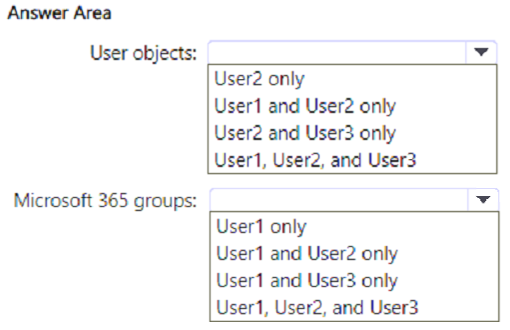
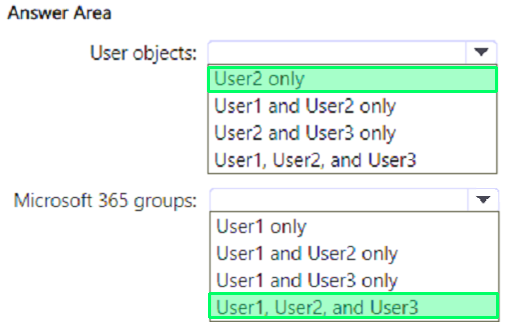
Which users can create user objects, and which users can create Microsoft 365 groups? To answer, select the appropriate options in the answer area.
NOTE: Each correct selection is worth one point.
Reveal answer detailsClose answer details
Explanation
User objects User2 only Microsoft 365 groups User1, User2, and User3 User2 only can create user objects because User2 has the User Administrator role. Microsoft's Microsoft Entra built-in role reference states that the User Administrator role includes the permission to create users and manage users. The Groups Administrator role is scoped to group management, not user object creation. The Teams Administrator role manages the Teams workload and does not grant general Microsoft Entra user creation rights.
For Microsoft 365 groups, the correct selection is User1, User2, and User3. Microsoft states that the Groups Administrator role can create and manage groups across workloads, including Teams, SharePoint, Yammer, and Outlook, so User1 qualifies. The User Administrator role includes the ability to create and manage all groups, so User2 qualifies. The Teams Administrator role also explicitly grants the ability to create and manage all Microsoft 365 groups, because Teams administration depends on Microsoft 365 group-backed teams.
Therefore, choose User2 only for user objects and User1, User2, and User3 for Microsoft 365 groups.
Question 49
Hotspot
HOTSPOT
You have Microsoft 365 subscription.
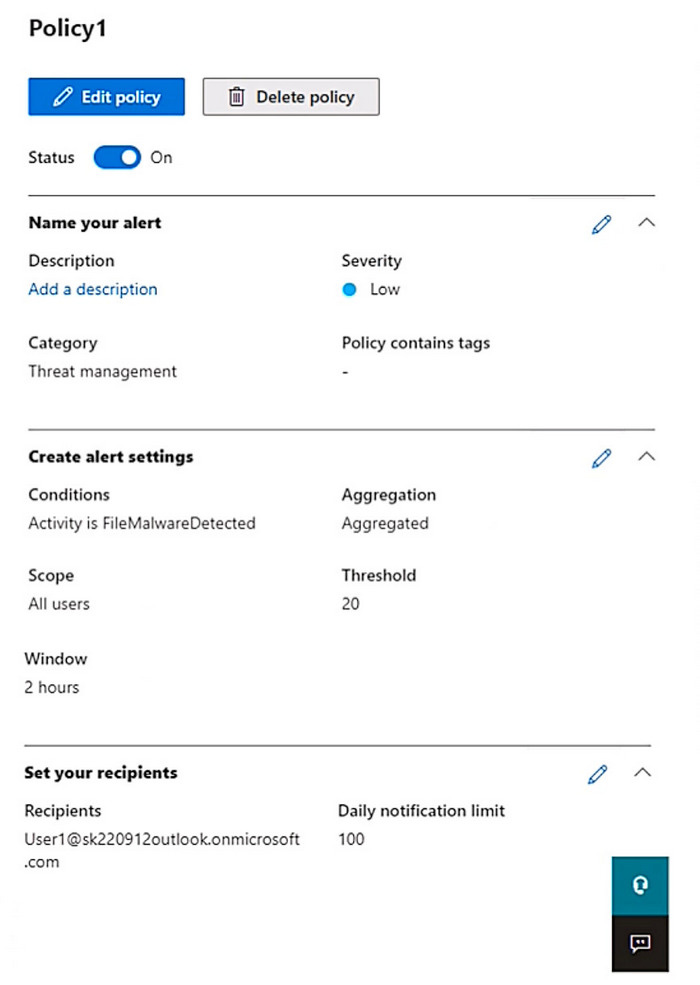
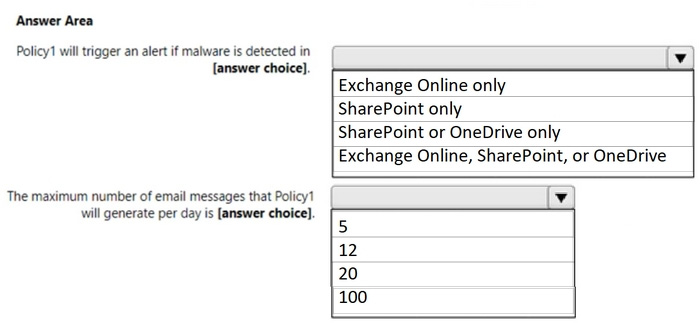
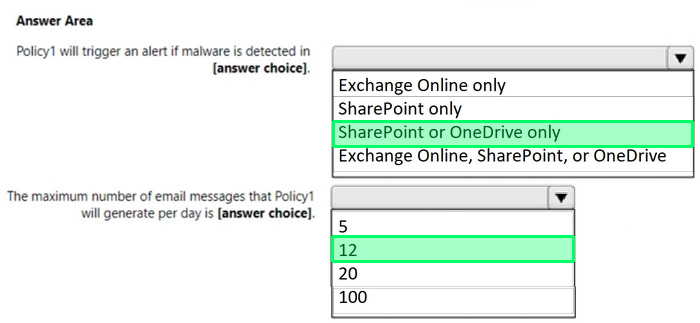
You create an alert policy as shown in the following exhibit.
Use the drop-down menus to select the answer choice that completes each statement based on the information presented in the graphic
NOTE: Each correct selection is worth one point.
Reveal answer detailsClose answer details
Question 50
Single choice
You have a Microsoft 365 tenant. You plan to manage incidents in the tenant by using the Microsoft 365 Defender.
Which Microsoft service source will appear on the Incidents page of the Microsoft 365 Defender portal?
A
Microsoft Sentinel
B
Microsoft Defender for Cloud
C
Azure Arc
D
Microsoft Defender for Identity
Reveal answer detailsClose answer details
Correct answerD
Question 51
Single choice
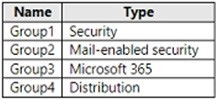
You have a Microsoft 365 E5 subscription that contains the identities shown in the following table:
You create a shared mailbox named Shared1.
Which identities can you add to Shared1 as a member?
A
User1 only
B
User1 and Group1 only
C
User1 and Group2 only
D
User1 and Group3 only
E
User1, Group2, and Group3 only
Reveal answer detailsClose answer details
Correct answerC
Question 52
Hotspot
HOTSPOT
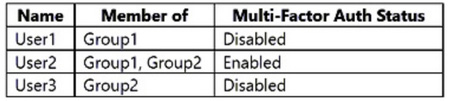
You configure a multi-factor authentication (MFA) registration policy that has the following settings:
Grant: Require multi-factor authentication 4. Enable policy: On
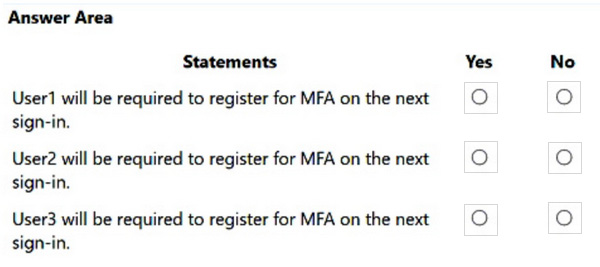
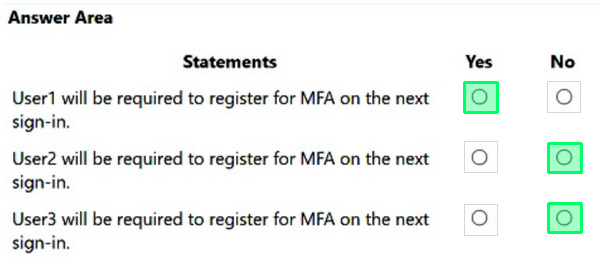
For each of the following statements, select Yes if the statement is true. Otherwise, select No.
NOTE: Each correct selection is worth one point.
Reveal answer detailsClose answer details
Question 53
Single choice
You plan to use Azure Sentinel and Microsoft Cloud App Security. You need to connect Cloud App Security to Azure Sentinel.
What should you do in the Cloud App Security admin center?
A
From Automatic log upload, add a log collector.
B
From Automatic log upload, add a data source.
C
From Connected apps, add an app connector.
D
From Security extension, add a SIEM agent.
Reveal answer detailsClose answer details
Correct answerD
Question 54
Hotspot
HOTSPOT
You have a Microsoft 365 E5 subscription.
All company-owned Windows 11 devices are onboarded to Microsoft Defender for Endpoint.
You need to configure Defender for Endpoint to meet the following requirements:
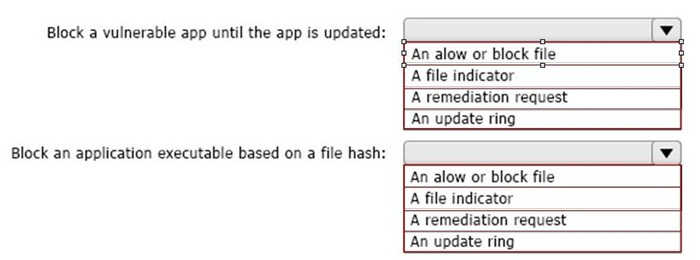
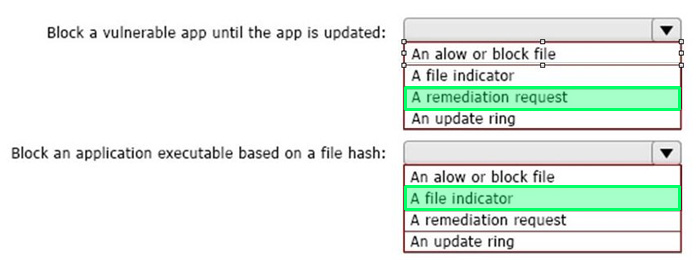
Block a vulnerable app until the app is updated. Block an application executable based on a file hash.
The solution must minimize administrative effort.
What should you configure for each requirement? To answer, select the appropriate options in the answer area.
NOTE: Each correct selection is worth one point.
Reveal answer detailsClose answer details
Question 55
Hotspot
HOTSPOT
Your network contains an on-premises Active Directory Domain Services (AD DS) domain named contoso. com.
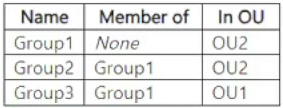
Contoso.com contains the users shown in the following table.
Contoso.com contains the groups shown in the following table.
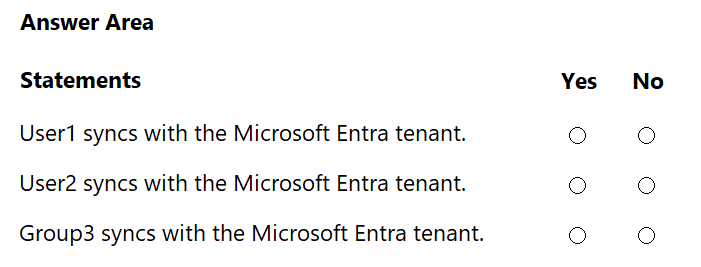
Group3 has no members. You have a Microsoft Entra tenant. You deploy Microsoft Entra Cloud Sync and configure a scoping filter by using the following entry: CN=Group1,OU=OU2,DC=contoso,DC=com For each of the following statements, select Yes if the statement is true. Otherwise, select No.
Reveal answer detailsClose answer details
Explanation
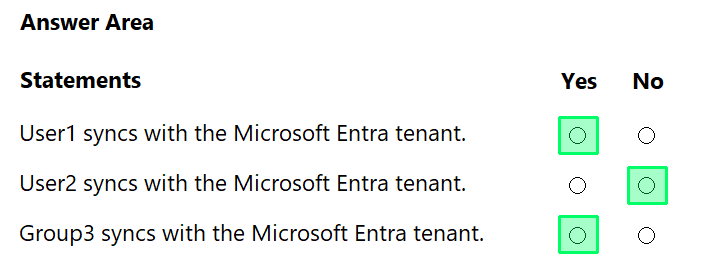
User1: Yes User2: No Group3: Yes Microsoft Entra Cloud Sync scoping can be configured by using selected Active Directory security groups or selected organizational units. Microsoft states that Cloud Sync scoping filters define which objects appear in Microsoft Entra ID, and that for security groups and OUs, the administrator supplies the distinguished name. In this case, the distinguished name points to Group1, so Group1 is the scoping group. Objects that are direct members of Group1 are in scope.
User1 syncs because User1 is a direct member of Group1. The user's OU does not block synchronization here because the configured scope is the Group1 DN, not an OU-only filter. User2 does not sync because User2 is a member of Group2, and Group2 is a member of Group1. That is nested group membership. Microsoft explicitly states that nested groups cannot be used with group scoping and that nested objects beyond the first level are not included when scoping by security groups.
Group3 syncs because Group3 itself is a direct member of Group1. The fact that Group3 has no members is irrelevant; the group object is still directly in scope. Reference topics: Microsoft Entra Cloud Sync scoping filters, selected security groups, distinguished names, and nested group limitations.
Question 56
Hotspot
HOTSPOT
You have a Microsoft 365 E5 subscription that contains two users named Admin1 and Admin2.
All users are assigned a Microsoft 365 Enterprise E5 license and auditing is turned on.
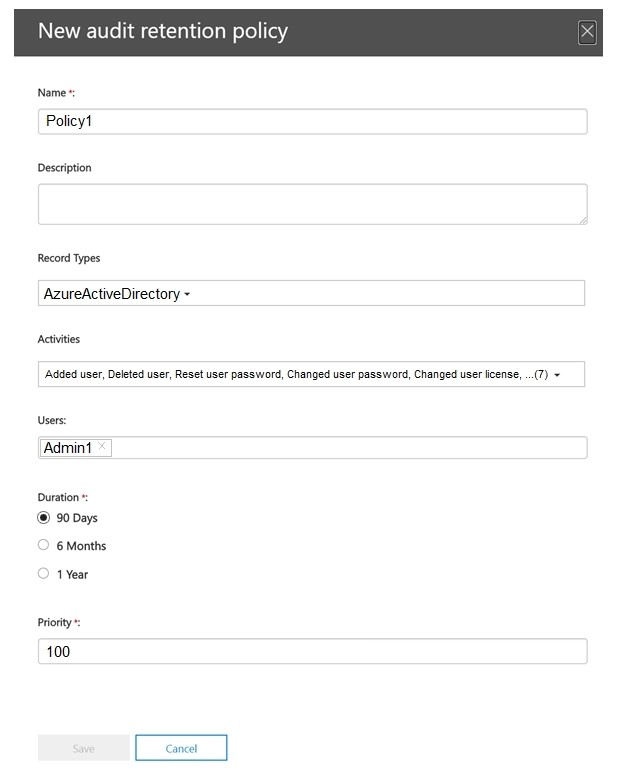
You create the audit retention policy shown in the exhibit. (Click the Exhibit tab.)
After Policy1 is created, the following actions are performed:
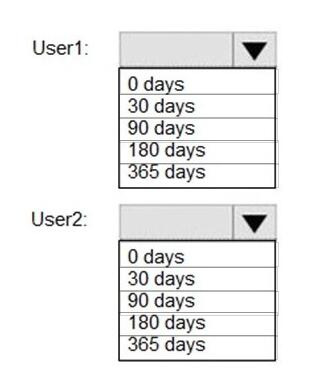
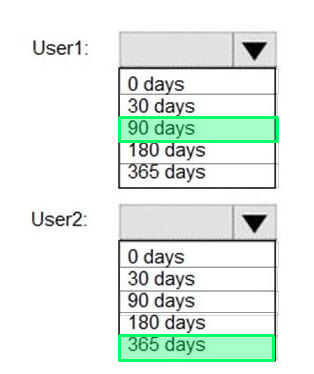
Admin1 creates a user named User1. Admin2 creates a user named User2. How long will the audit events for the creation of User1 and User2 be retained? To answer, select the
appropriate options in the answer area.
NOTE: Each correct selection is worth one point.
Reveal answer detailsClose answer details
Question 57
Hotspot
HOTSPOT
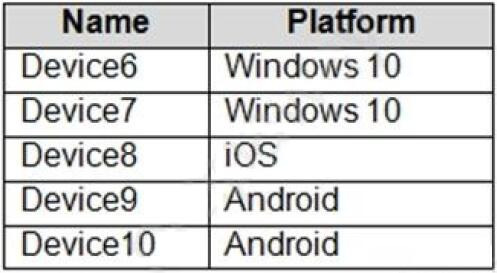
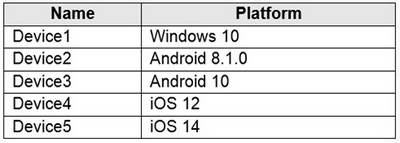
You have a Microsoft 365 E5 tenant that contains five devices enrolled in Microsoft Intune as shown in the following table.
All the devices have an app named App1 installed.
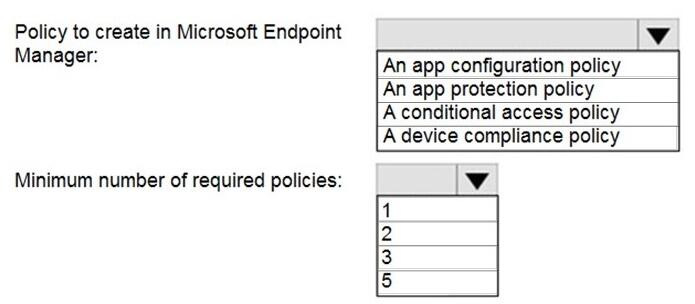
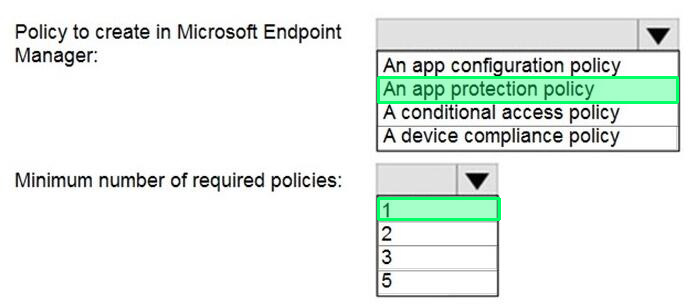
You need to prevent users from copying data from App1 and pasting the data into other apps.
Which policy should you create in Microsoft Endpoint Manager, and what is the minimum number of required policies? To answer, select the appropriate options in the answer area.
NOTE: Each correct selection is worth one point.
Reveal answer detailsClose answer details
Question 58
Hotspot
HOTSPOT
You have a Microsoft 365 E5 tenant.
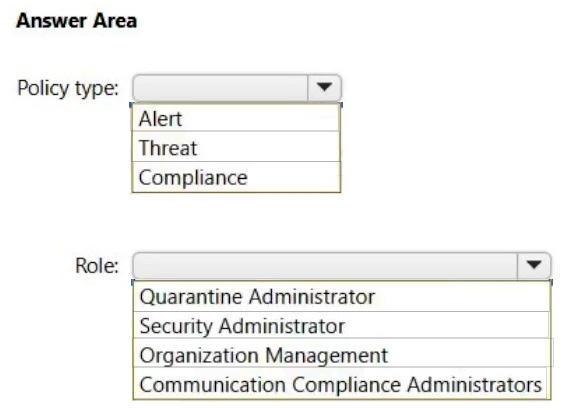
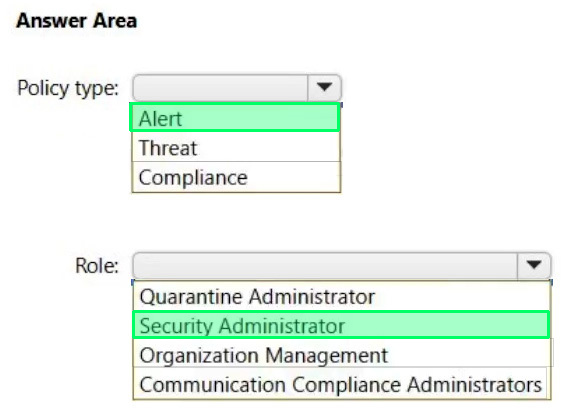
You need to ensure that administrators are notified when a user receives an email message that contains malware. The solution must use the principle of least privilege.
Which type of policy should you create, and which Microsoft Purview solutions role is required to create the policy? To answer, select the appropriate options in the answer area.
NOTE: Each correct selection is worth one point.
Reveal answer detailsClose answer details
Question 59
Single choice
You have a Microsoft 365 E5 subscription that contains a user named User1
You create a retention label named Retention1 that is published to all locations.
You need to ensure that User1 can label email messages by using Retention1 as soon as possible.
Which cmdlet should you run in Microsoft Exchange Online PowerShell?
A
Start-MpScan
B
Start-Process
C
Start-ManagedFolderAsslstant
D
Start-AppBackgroundTask
Reveal answer detailsClose answer details
Correct answerC
Question 60
Single choice
You have a Microsoft 365 tenant.
You plan to manage incidents in the tenant by using the Microsoft 365 security center.
Which Microsoft service source will appear on the Incidents page of the Microsoft 365 security center?
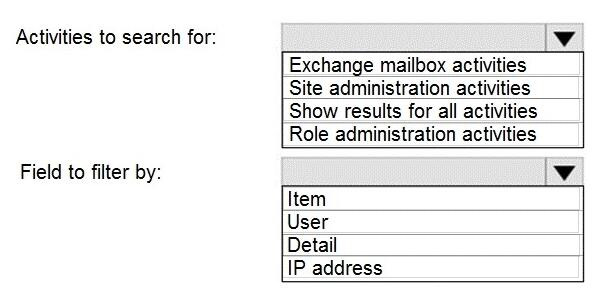
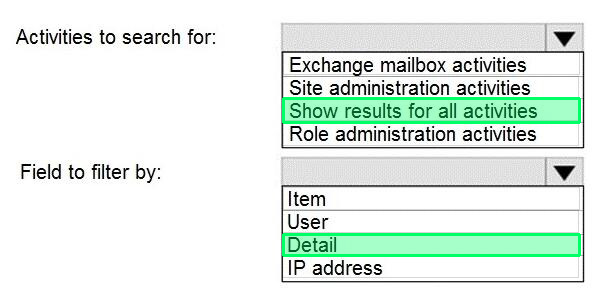
Your network uses an IP address space of 51.40.15.0/24.
An Exchange Online administrator recently created a role named Role1 from a computer on the network.
You need to identify the name of the administrator by using an audit log search.
For which activities should you search and by which field should you filter in the audit log search? To answer, select the appropriate options in the answer area.
NOTE: Each correct selection is worth one point.
Reveal answer detailsClose answer details
Question 62
Hotspot
HOTSPOT
You have a Microsoft 365 E5 tenant that contains two users named User1 and User2 and the groups shown in the following table.
You have a Microsoft Intune enrollment policy that has the following settings: MDM user scope: Some Groups: Group1
MAM user scope: Some Groups: Group2 You purchase the devices shown in the following table.
For each of the following statements, select Yes if the statement is true. Otherwise, select No. NOTE: Each correct selection is worth one point.
You have a Microsoft 365 E5 subscription and use Microsoft Defender for Cloud Apps. The subscription contains users that have Windows 11 devices.
You need to use the Cloud Discovery snapshot report to analyze cloud app usage on the devices.
What should you do before generating a report?
A
Create an activity policy.
B
Deploy the Azure Monitor Agent on the devices.
C
Create an app discovery policy.
D
Export traffic logs from firewalls and proxies.
Reveal answer detailsClose answer details
Correct answerD
Question 64
Hotspot
HOTSPOT
You have a Microsoft 365 subscription that uses an Azure AD tenant named contoso.com. The tenant contains the users shown in the following table.
From the Sign-ins blade of the Microsoft Entra admin center for which users can User1 and User2 view the sign-ins? To answer, select the appropriate options in the answer area.
NOTE: Each correct selection is worth one point.
Reveal answer detailsClose answer details
Question 65
Hotspot
HOTSPOT
You have a Microsoft 365 E5 subscription that contains a user named User1 and the administrators shown in the following table.
User1 reports that after sending 1,000 email messages in the morning, the user is blocked from sending additional emails. You need to identify the following:
Which administrators can unblock User1 What to configure to allow User1 to send at least 2,000 emails per day without being blocked
What should you identify? To answer, select the appropriate options in the answer area.
NOTE: Each correct selection is worth one point.
Reveal answer detailsClose answer details
Question 66
Single choice
Your network contains an Active Directory domain and an Azure AD tenant.
The network uses a firewall that contains a list of allowed outbound domains.
You begin to implement directory synchronization.
You discover that the firewall configuration contains only the following domain names in the list of allowed domains:
1. *.microsoft.com 2. *.office.com
Directory synchronization fails.
You need to ensure that directory synchronization completes successfully.
What is the best approach to achieve the goal? More than one answer choice may achieve the goal. Select the BEST answer.
A
From the firewall, modify the list of allowed outbound domains.
B
From Azure AD Connect, modify the Customize synchronization options task.
C
From the firewall, create a list of allowed inbound domains.
D
Deploy an Azure AD Connect sync server in staging mode.
E
From the firewall, allow the IP address range of the Azure data center for outbound communication.
Reveal answer detailsClose answer details
Correct answerA
Question 67
Hotspot
HOTSPOT
You have a Microsoft 365 E5 subscription that contains a user named User1 and the administrators shown in the following table.
User1 reports that after sending 1.000 email messages in the morning, the user is blocked from sending additional emails.
You need to identify the following:
1. Which administrators can unblock User1 2. What to configure to allow User1 to send at least 2.000 emails per day without being blocked
What should you identify? To answer, select the appropriate options in the answer area. NOTE: Each correct selection is worth one point.
Reveal answer detailsClose answer details
Question 68
Single choice
Your network contains an on-premises Active Directory domain. The domain contains domain controllers that run Windows Server 2019. The functional level of the forest and the domain is Windows Server 2012 R2.
The domain contains 100 computers that run Windows 10 and a member server named Server1 that runs Windows Server 2012 R2.
You plan to use Server1 to manage the domain and to configure Windows 10 Group Policy settings.
You install the Group Policy Management Console (GPMC) on Server1.
You need to configure the Windows Update for Business Group Policy settings on Server1.
Solution: You upgrade Server1 to Windows Server 2019.
Does this meet the goal?
A
Yes
B
No
Reveal answer detailsClose answer details
Correct answerA
Question 69
Single choice
You have a Microsoft 365 E5 subscription and use Microsoft Defender for Cloud Apps.
You register a cloud app named App1 in Microsoft Entra ID.
You need to create an access policy for App1.
What should you do first?
A
Configure an app connector to Defender for Cloud Apps.
B
Add a security information and event management (SIEM) agent to Defender for Cloud Apps.
C
Create an app tag for App1.
D
Deploy Conditional Access App Control to App1.
Reveal answer detailsClose answer details
Correct answerC
Question 70
Hotspot
HOTSPOT
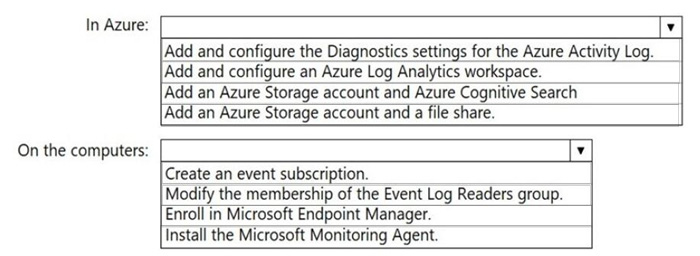
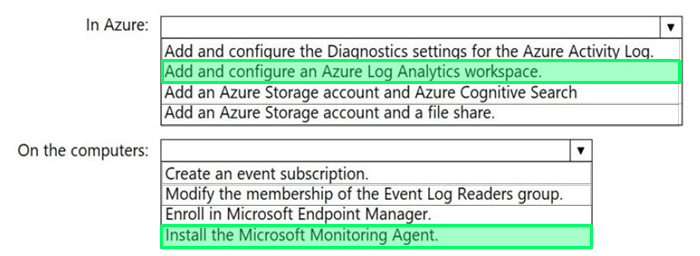
You have an Azure subscription and an on-premises Active Directory domain. The domain contains 50
computers that run Windows 10.
You need to centrally monitor System log events from the computers.
What should you do? To answer, select the appropriate options in the answer area.
NOTE: Each correct selection is worth one point.
Reveal answer detailsClose answer details
Case study
Case Study 1
Case Study Questions
Contoso, Ltd Overview Contoso, Ltd. is a consulting company that has a main office in Montreal and two branch offices in Seattle and New York. The company has the employees and devices shown in the following table.
Contoso recently purchased a Microsoft 365 ES subscription.
Existing Environment Requirement The network contains an on-premises Active Directory forest named contoso.com. The forest contains the servers shown in the following table.
All servers run Windows Server 2016. All desktops and laptops are Windows 10 Enterprise and are joined to the domain. The mobile devices of the users in the Montreal and Seattle offices run Android. The mobile devices of the users in the New York office run iOS. The domain is synced to Azure Active Directory (Azure AD) and includes the users shown in the following table.
The domain also includes a group named Group1.
Planned Changes Contoso plans to implement the following changes: -Implement Microsoft 365. -Manage devices by using Microsoft Intune. -Implement Azure Advanced Threat Protection (ATP). -Every September, apply the latest feature updates to all Windows computers. Every March, apply the
latest feature updates to the computers in the New York office only.
Technical Requirements Contoso identifies the following technical requirements: -When a Windows 10 device is joined to Azure AD, the device must enroll in Intune automaticity. -Dedicated support technicians must enroll all the Montreal office mobile devices in Intune. -User1 must be able to enroll all the New York office mobile devices in Intune. -Azure ATP sensors must be installed and must NOT use port mirroring. -Whenever possible, the principle of least privilege must be used. -A Microsoft Store for Business must be created.
Compliance Requirements Contoso identifies the following compliance requirements: -Ensure that the users in Group1 can only access Microsoft Exchange Online from devices that are enrolled in Intune and configured in accordance with the corporate policy. -Configure Windows Information Protection (W1P) for the Windows 10 devices.
Question 71
Testlet 1Single choice
On which server should you install the Azure ATP sensor?
You need to sync a subset of users from both forests to Microsoft Entra ID.
The solution must support device objects and device writeback.
What should you use?
A
Microsoft Entra Cloud Sync
B
Microsoft Entra Domain Services
C
Microsoft Entra Connect Sync
D
Active Directory Federation Services (AD FS)
Reveal answer detailsClose answer details
Correct answerC
Explanation
Comprehensive and Detailed Explanation From Exact Extract of Microsoft 365 Admin documents guides:
The correct answer is Microsoft Entra Connect Sync because it is the only Microsoft-supported solution that meets all of the stated requirements.
1. Support for multiple on-premises AD DS forests
Microsoft Entra Connect Sync is designed to synchronize identities from multiple on-premises Active Directory forests into a single Microsoft Entra tenant. Microsoft documentation explicitly states that when multiple forests are present, they can all be synchronized as long as they are reachable by the same Entra Connect server. A forest trust between contoso.com and fabrikam.com is a supported and common configuration.
2. Ability to sync only a subset of users
Microsoft Entra Connect Sync supports filtering and scoping at multiple levels (domain-based, OU-based, or attribute-based). Microsoft documentation lists pilot deployments and limited user synchronization as a primary use case, allowing administrators to synchronize only selected users from each forest.
3. Support for device objects and hybrid device scenarios
Microsoft Entra Connect Sync supports hybrid device identity , including Microsoft Entra hybrid joined devices. These devices are registered both in on-premises Active Directory and in Microsoft Entra ID, which is required for many Microsoft 365 and Conditional Access scenarios.
4. Device writeback support
Device writeback is a feature that allows device objects from Microsoft Entra ID to be written back into on-premises Active Directory. Microsoft documentation clearly identifies device writeback as a feature of Microsoft Entra Connect Sync .
Important documented behavior: Device writeback is supported when device objects and users are correctly located and configured in the same forest.
Device writeback is not a feature of Cloud Sync or federation services.
Why the other options are incorrect
A. Microsoft Entra Cloud Sync
Cloud Sync is a lightweight provisioning agent and does not provide the full hybrid identity feature set required for this scenario. Microsoft documentation associates advanced device features and device writeback with Microsoft Entra Connect Sync, not Cloud Sync.
B. Microsoft Entra Domain Services
Microsoft Entra Domain Services is a managed domain service used to run legacy, domain-joined workloads in Azure. It does not synchronize on-premises forests into Microsoft Entra ID and is not a replacement for Entra Connect in hybrid identity scenarios.
D. Active Directory Federation Services (AD FS)
AD FS is an authentication and federation service. It does not synchronize users or devices to Microsoft Entra ID and does not support device writeback. Microsoft documentation positions AD FS as an authentication method, not a directory synchronization solution.
Question 73
Single choice
You have a Microsoft 365 subscription.
You need to prevent users from accessing your Microsoft SharePoint Online sites unless the users are connected to your on-premises network.
Solution: From the Endpoint Management admin center, you create a device configuration profile.
Does this meet the goal?
A
Yes
B
No
Reveal answer detailsClose answer details
Correct answerB
Explanation
You need to create a trusted location and a conditional access policy.
Question 74
Hotspot
HOTSPOT
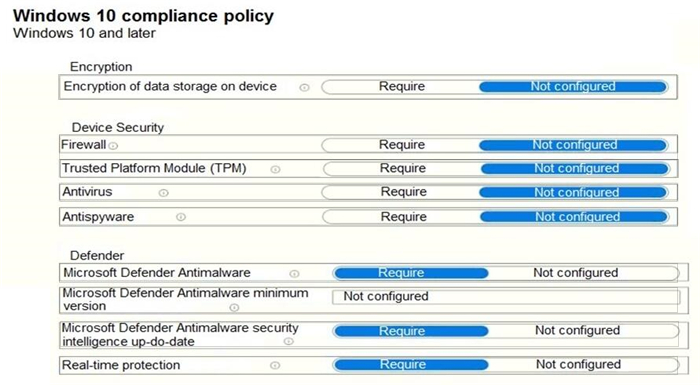
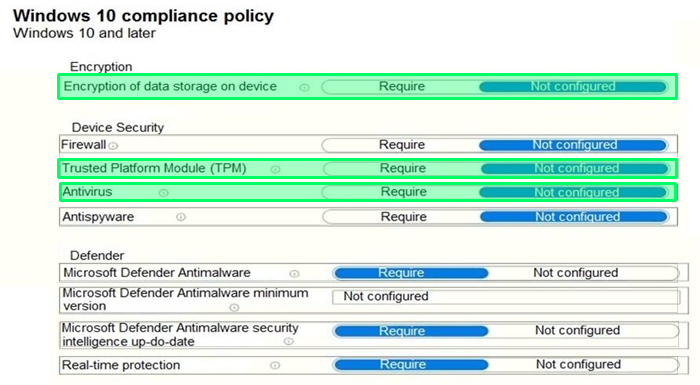
You have a Microsoft 365 E5 tenant that contains 500 Windows 10 devices and a Windows 10 compliance policy.
You deploy a third-party antivirus solution to the devices. You need to ensure that the devices are marked as compliant.
Which three settings should you modify in the compliance policy? To answer, select the appropriate settings in the answer area.
NOTE: Each correct selection is worth one point.
Reveal answer detailsClose answer details
Question 75
Hotspot
HOTSPOT
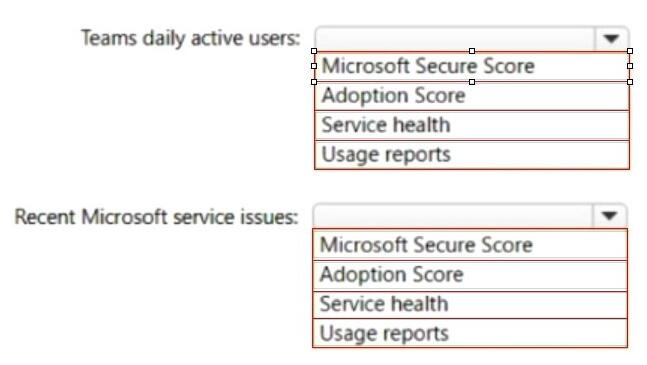
You have a Microsoft 365 subscription.
You need to review metrics for the following:
The daily active users in Microsoft Teams
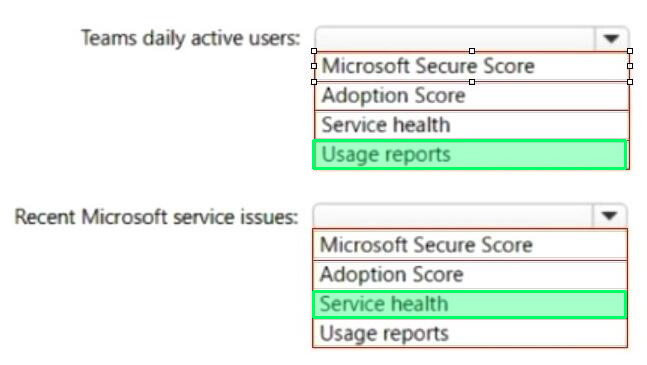
Recent Microsoft service issues
What should you use? To answer, select the appropriate options in the answer area.
NOTE: Each correct selection is worth one point.
Reveal answer detailsClose answer details
Question 76
Hotspot
HOTSPOT
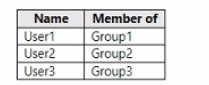
You have an Azure AD tenant that contains the users shown in the following table.
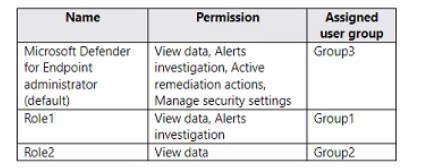
Your company uses Microsoft Defender for Endpoint. Microsoft Defender for Endpoint contains the roles shown in the following table.
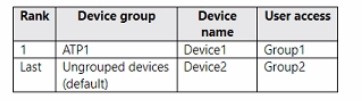
Microsoft Defender for Endpoint contains the device groups shown in the following table.
For each of the following statements, select Yes if the statement is true. Otherwise, select No.
NOTE: Each correct selection is worth one point.
Reveal answer detailsClose answer details
Question 77
Single choice
You have a computer that runs Windows 10.
You need to verify which version of Windows 10 is installed.
Solution: From the Settings app, you select System, and then you select About to view information about the system.
You have a Microsoft 365 E5 subscription and use Microsoft Defender for Endpoint. The subscription contains Windows 11 devices.
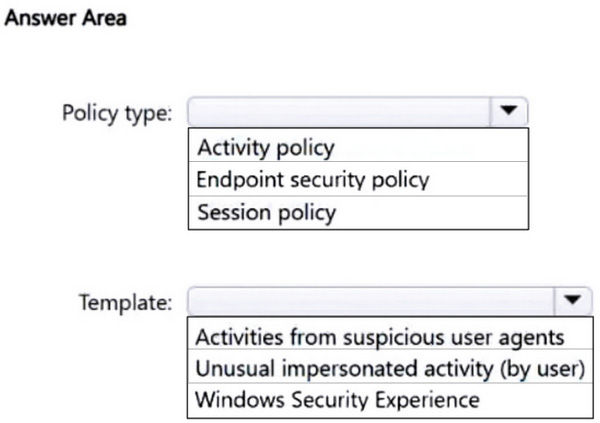
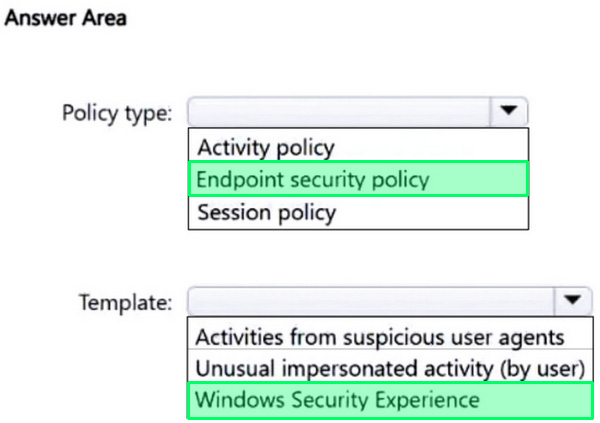
You need to create a policy to restrict users from accessing the Device security settings and the Account protection settings in Windows Defender Security Center on the devices.
Which type of policy should you create, and which template should you use? To answer, select the appropriate options in the answer area.
NOTE: Each correct selection is worth one point.
Reveal answer detailsClose answer details
Case study
Case Study 2
Overview Existing Environment This is a case study Case studies are not timed separately. You can use as much exam time as you would like to complete each case. However, there may be additional case studies and sections on this exam. You must manage your time to ensure that you are able to complete all questions included on this exam in the time provided. To answer the questions included in a case study, you will need to reference information that is provided in the case study. Case studies might contain exhibits and other resources that provide more information about the scenario that is described in the case study. Each question is independent of the other questions in this case study. At the end of this case study, a review screen will appear. This screen allows you to review your answers and to make changes before you move to the next section of the exam. After you begin a new section, you cannot return to this section.
To start the case study To display the first question in this case study, click the Next button. Use the buttons in the left pane to explore the content of the case study before you answer the questions. Clicking these buttons displays information such as business requirements, existing environment, and problem statements. When you are ready to answer a question, click the Question button to return to the question.
Current Infrastructure A. Datum recently purchased a Microsoft 365 subscription. All user files are migrated to Microsoft 365. All mailboxes are hosted in Microsoft 365. The users in each office have email suffixes that include the country of the user, for example, [email protected] or user2#uk.ad3tum.com. Each office has a security information and event management (SIEM) appliance. The appliances come from three different vendors. A. Datum uses and processes Personally Identifiable Information (PII).
Problem Statements Requirements A. Datum entered into litigation. The legal department must place a hold on all the documents of a user named User1 that are in Microsoft 365.
Business Goals A. Datum warns to be fully compliant with all the relevant data privacy laws in the regions where it operates. A. Datum wants to minimize the cost of hardware and software whenever possible.
Technical Requirements A. Datum identifies the following technical requirements: Centrally perform log analysis for all offices. Aggregate all data from the SIEM appliances to a central cloud repository for later analysis. Ensure that a SharePoint administrator can identify who accessed a specific file stored in a document library. Provide the users in the finance department with access to Service assurance information in Microsoft Office 365. Ensure that documents and email messages containing the PII data of European Union (EU) citizens are preserved for 10 years. If a user attempts to download 1,000 or more files from Microsoft SharePoint Online within 30 minutes, notify a security administrator and suspend the user's user account. A security administrator requires a report that shows which Microsoft 36S users signed in Based on the report, the security administrator will create a policy to require multi-factor authentication when a sign in is high risk.
Ensure that the users in the New York office can only send email messages that contain sensitive US. PII data to other New York office users. Email messages must be monitored to ensure compliance. Auditors in the New York office must have access to reports that show the sent and received email messages containing sensitive U.S. PII data.
Question 79
Testlet 2Single choice
You need to meet the technical requirement for the EU PII data.
What should you create?
A
a retention policy from the Security & Compliance admin center.
B
a retention policy from the Exchange admin center
C
a data loss prevention (DLP) policy from the Exchange admin center
D
a data loss prevention (DLP) policy from the Security & Compliance admin center
You have a Microsoft 365 E5 subscription that uses Microsoft Defender for Office 365 and contains a user named User1.
User1 emails a product catalog in the PDF format to 300 vendors. Only 200 vendors receive the email message, and User1 is blocked from sending email until the next day.
You need to prevent this issue from reoccurring.
What should you configure?
A
anti-spam policies
B
Safe Attachments policies
C
anti-phishing policies
D
anti-malware policies
Reveal answer detailsClose answer details
Correct answerA
Question 84
Single choice
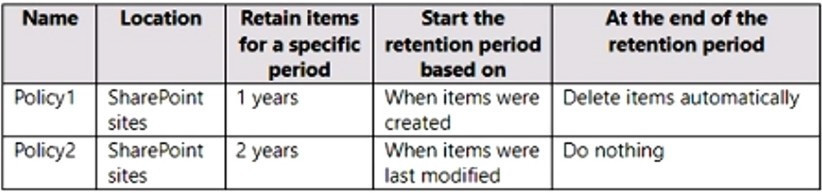
You have a Microsoft 365 subscription. You have the retention policies shown in the following table.
Both policies are applied to a Microsoft SharePoint site named Site1 that contains a file named File1.docx.
File1.docx was created on January 1, 2022 and last modified on January 31,2022. The file was NOT modified again.
When will File1. docx be deleted automatically?
A
January 1,2023
B
January 1,2024
C
January 31, 2023
D
January 31, 2024
E
never
Reveal answer detailsClose answer details
Correct answerD
Explanation
Retention wins over deletion. Note: Explanation for the four different principles:
1. Retention wins over deletion. Content won't be permanently deleted when it also has retention settings to retain it. While this principle ensures that content is preserved for compliance reasons, the delete process can still be initiated (user-initiated or system-initiated) and consequently, might remove the content from users' main view. However, permanent deletion is suspended. 2. Etc. References: https://learn.microsoft.com/en-us/microsoft-365/compliance/retention
Question 85
Single choice
You have a Microsoft 365 E5 subscription.
You create a user named Admin1.
You need to ensure that Admin1 can view Endpoint security policies from the Microsoft Defender portal.
The solution must follow the principle of least privilege.
Which Microsoft Entra role should you assign to Admin1?
A
Security Administrator
B
Cloud Device Administrator
C
Global Reader
D
Security Reader
E
Security Operator
Reveal answer detailsClose answer details
Correct answerD
Question 86
Single choice
You have a Microsoft 365 tenant that contains 500 Windows 10 devices and a Microsoft Endpoint Manager device compliance policy.
You need to ensure that only devices marked as compliant can access Microsoft Office 365 apps.
You have a Microsoft 365 E5 subscription that contains a Microsoft SharePoint site named site1. You need to ensure that site1 meets the following requirements:
Retains all data for 10 years Prevents the sharing of data outside the organization
Which two items should you create and apply to site1? Each correct answer presents part of the solution. NOTE: Each correct selection is worth one point.
A
a retention policy
B
a sensitive info type
C
a data loss prevention (DLP) policy
D
a sensitivity label
E
a retention label
F
a retention label policy
Reveal answer detailsClose answer details
Correct answersA, C
Question 88
Single choice
You have a Microsoft 365 E5 subscription.
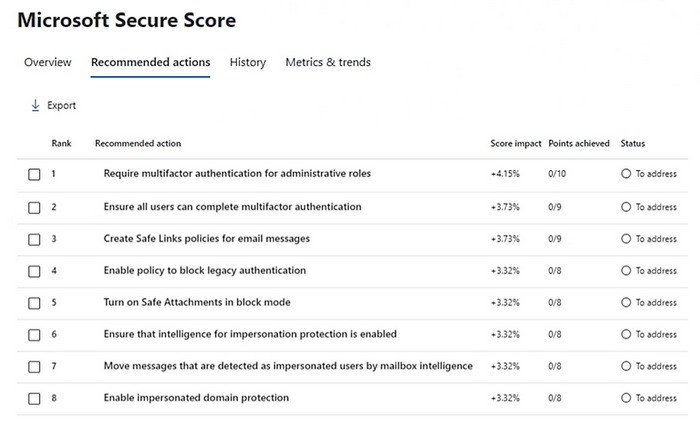
Your company's Microsoft Secure Score recommends the actions shown in the following exhibit.
You select Create Safe Links policies for email messages and change Status to Risk accepted in the Status & action plan settings.
How does the change affect the Secure Score?
A
remains the same
B
increases by 1 point
C
increases by 9 points
D
decreases by 1 point
E
decreases by 9 points
Reveal answer detailsClose answer details
Correct answerA
Question 89
Single choice
You have a Microsoft 365 subscription.
From the Microsoft 365 Defender, you create a role group named US eDiscovery Managers by copying the eDiscovery Manager role group.
You need to ensure that the users in the new role group can only perform content searches of mailbox content for users in the United States.
Solution: From the Microsoft 365 Defender, you modify the roles of the US eDiscovery Managers role group.
Does this meet the goal?
A
Yes
B
No
Reveal answer detailsClose answer details
Correct answerB
Case study
Case Study 5
Case Study Questions
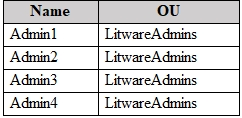
Litware, Irk Litware, Irk. is a consulting company that has a main office in Montreal and a branch office in Seattle? Ltware collaborates with a third-party company named A. Datum Corporation. The network of Litware contains an Active Directory domain named litware.com. The domain contains three organizational units (OUs) named LitwareAdmins, Montreal Users, and Seattle Users and the users shown in the following table.
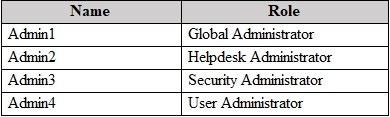
The domain contains 2,000 Windows 10 Pro devices and 100 servers that run Windows Server 2019. Litware has a pilot Microsoft 365 subscription that includes Microsoft Office 365 Enterprise E3 licenses and Azure AD Premium P2 licenses. The subscription contains a verified DNS domain named litware.com. Azure AD Connect is installed and has the following configurations: - Password hash synchronization is enabled. - Synchronization is enabled for the UtwareAdmins OU only. Users are assigned the roles shown in the following table.
Self-service password reset (SSPR) is enabled. The Azure AD tenant has Security defaults enabled. Litware identifies the following issues: - Admin1 cannot create conditional access policies. - Admin4 receives an error when attempting to use SSPR. - Users access new Office 365 service and feature updates before the updates are reviewed by Admin2. Litware plans to implement the following changes: - Implement Microsoft Intune. - Implement Microsoft Teams. - Implement Microsoft Defender for Office 365. - Ensure that users can install Office 365 apps on their device. - Convert all the Windows 10 Pro devices to Windows 10 Enterprise E5. - Configure Azure AD Connect to sync the Montreal Users OU and the Seattle Users OU. Litware identifies the following technical requirements: - Administrators must be able to specify which version of an Office 365 desktop app will be available to users and to roll back to previous versions. - Only Admin2 must have access to new Office 365 service and feature updates before they are released to the company. - Litware users must be able to invite A. Datum users to participate in the following activities: o Join Microsoft Teams channels, o Join Microsoft Teams chats, o Access shared files. - Just in time access to critical administrative roles must be required. - Microsoft 365 incidents and advisories must be reviewed monthly. - Office 365 service status notifications must be sent to Admin2. - The principle of least privilege must be used.
Question 90
Testlet 5Single choice
You need to configure Azure AD Connect to support the planned changes for the Montreal Users and Seattle Users OUs.
What should you do?
A
From the Microsoft Azure AD Connect wizard, select Customize synchronization options.
B
From PowerShell, run the Add-ADSyncConnectorAttnbuteinclusion cmdlet.
C
From PowerShell, run the start-ADSyncSyncCycle cmdlet.
D
From the Microsoft Azure AD Connect wizard, select Manage federation.
Reveal answer detailsClose answer details
Correct answerA
Question 91
Multiple choice
You have a Microsoft 365 E5 subscription and use Microsoft Defender for Cloud Apps.
You need to ensure that when a user-based alert is triggered in Defender for Cloud Apps, the user is marked as compromised.
Which two options can you use to automate the response?
A
a block script
B
a custom detection rule
C
a user tag
D
an automated remediation level
E
a Microsoft Power Automate playbook
Reveal answer detailsClose answer details
Correct answersD, E
MICROSOFT
Microsoft 365 Certified: Enterprise Administrator Expert
You have a Microsoft 365 E5 tenant that contains 100 Windows 10 devices.
You plan to attack surface reduction (ASR) rules for the Windows 10 devices.
You configure the ASR rules in audit mode and collect audit data in a Log Analytics workspace.
You need to find the ASR rules that match the activities on the devices.
How should you complete the Kusto query? To answer, select the appropriate options in the answer area.
NOTE: Each correct selection is worth one point.
Correct Answer:
QUESTION 2
HOTSPOT
You have a Microsoft 365 E5 subscription that contains the users shown in the following table.
You are implementing Microsoft Defender for Endpoint.
You need to enable role-based access control (RBAC) to restrict access to the Microsoft 365 Defender portal.
Which users can enable RBAC, and which users will no longer have access to the Microsoft 365 Defender portal after RBAC is enabled? To answer, select the appropriate options in the answer area.
NOTE: Each correct selection is worth one point.
Correct Answer:
QUESTION 3
You have a Microsoft 365 E5 subscription that contains devices onboarded to Microsoft Defender for Endpoint. You integrate Microsoft Defender for Cloud Apps with Defender for Endpoint.
You need identify which cloud apps and services were used most during the last 30 days What should you do?
A.
Generate a Cloud Discovery snapshot report.
B.
Generate a monthly security summary report
C.
Create a threat analytics alert notification.
D.
Generate a Cloud Discovery executive report
Correct Answer: B
QUESTION 4
You have a Microsoft 365 E5 tenant that contains the devices shown in the following table.
The devices are managed by using Microsoft Intune.
You plan to use a configuration profile to assign the Delivery Optimization settings.
Which devices will support the settings?
A.
Device1 only
B.
Device1 and Device4
C.
Device1, Device3, and Device4
D.
Device1, Device2, Device3, and Device4
Correct Answer: A
QUESTION 5
HOTSPOT
You have a Microsoft 365 E5 subscription that contains a Microsoft SharePoint site named Sitel. Site! contains the files shown in the following table.
You have a data loss prevention (DLP) policy named DLP1 that has the advanced DLP rules shown in the following table.
You apply DLP1 to Site1.
Which policy tip is displayed for each file? To answer, select the appropriate options in the answer area.
NOTE: Each correct selection is worth one point.
Correct Answer:
QUESTION 6
Note: This question is part of a series of questions that present the same scenario. Each question in the series contains a unique solution that might meet the stated goals. Some question sets might have more than one correct solution, while others might not have a correct solution.
After you answer a question in this section, you will NOT be able to return to it. As a result, these questions will not appear in the review screen.
You have a computer that runs Windows 10. You need to verify which version of Windows 10 is installed. Solution: From the Settings app, you select System, and then you select About to view information about the system.
Does this meet the goal?
A.
Yes
B.
No
Correct Answer: A
QUESTION 7
You have a Microsoft J65 E5 subscription.
You integrate Microsoft Defender for Endpoint with Microsoft Intune.
You need to ensure that devices automatically onboard to Defender for Endpoint when they are enrolled in Intune.
Solution: You enable co-management.
Does this meet the goal?
A.
Yes
B.
No
Correct Answer: A
QUESTION 8
HOTSPOT
You have a Microsoft 365 E5 subscription that contains the users shown in the following table.
You are implementing Microsoft Defender for Endpoint.
You need to enable role-based access control (RBAC) to restrict access to the Microsoft 365 Defender portal.
Which users can enable RBAC, and which users will no longer have access to the Microsoft 365 Defender portal after RBAC is enabled? To answer, select the appropriate options in the answer area.
NOTE: Each correct selection is worth one point.
Correct Answer:
QUESTION 9
You have a Microsoft 365 E5 subscription.
You plan to configure multi-factor authentication (MFA).
You need to select an authentication method for users. The solution must ensure that each time a user is prompted for MFA, the application name that requires MFA is provided.
What should you select?
A.
Microsoft Authenticator
B.
a FID02 security key
C.
a voice call
D.
SMS
E.
email OTP
Correct Answer: A
QUESTION 10
You have a Microsoft 365 E5 tenant.
You configure sensitivity labels.
Users report that the Sensitivity button is unavailable in Microsoft Word for the web. The Sensitivity button is available in Microsoft 365 Word.
You need to ensure that the users can apply the sensitivity labels when they use Word for the web.
What should you do?
A.
Copy policies from Azure Information Protection to the Microsoft Purview compliance portal.
B.
Publish the sensitivity labels.
C.
Create an auto-labeling policy
D.
Enable sensitivity labels for files in Microsoft SharePoint Online and OneDrive.
Correct Answer: D
QUESTION 11
You have a Microsoft 365 tenant that contains two groups named Group1 and Group2.
You need to prevent the members or Group1 from communicating with the members of Group2 by using Microsoft Teams. The solution must comply with regulatory requirements and must not affect other user in the tenant.
What should you use?
A.
information barriers
B.
communication compliance policies
C.
moderated distribution groups
D.
administrator units in Azure Active Directory (Azure AD)
Correct Answer: A
QUESTION 12
Your company has on-premises servers and an Azure AD tenant.
Several months ago, the Azure AD Connect Hearth agent was installed on all the servers.
You review the health status of all the servers regularly.
Recently, you attempted to view the health status of a server named Server1 and discovered that the server is NOT listed on the Azure AD Connect Servers list.
You suspect that another administrator removed Server1 from the list.
You need to ensure that you can view the health status of Server1.
What are two possible ways to achieve the goal? Each correct answer presents a complete solution.
NOTE: Each correct selection is worth one point.
A.
From Azure Cloud shell, run the Connect-Azure AD cmdlet.
B.
From Server1, change the Azure AD Connect Health Services Startup type to Automatic (Delayed Start)
C.
From Server1, change the Azure AD Connect Health Services Startup type to Automatic
D.
From Windows PowerShell, run the Rejister-ArureADConnectHealthsyncAgent cmdlet.
E.
From Server1, reinstall the Azure AD Connect Health agent
Correct Answer: DE
QUESTION 13
Your network contains an on-premises Active Directory domain. The domain contains domain controllers that run Windows Server 2019. The functional level of the forest and the domain is Windows Server 2012 R2.
The domain contains 100 computers that run Windows 10 and a member server named Server1 that runs Windows Server 2012 R2.
You plan to use Server1 to manage the domain and to configure Windows 10 Group Policy settings.
You install the Group Policy Management Console (GPMC) on Server1.
You need to configure the Windows Update for Business Group Policy settings on Server1.
Solution: You raise the domain functional level to Windows Server 2019. You copy the Group Policy Administrative Templates from a Windows 10 computer to the Netlogon share on all the domain controllers.
Does this meet the goal?
A.
Yes
B.
No
Correct Answer: B
QUESTION 14
Note: This question is part of a series of questions that present the same scenario. Each question in the series contains a unique solution that might meet the stated goals. Some question sets might have more than one correct solution, while others might not have a correct solution.
After you answer a question in this section, you will NOT be able to return to it. As a result, these questions will not appear in the review screen.
You have a Microsoft 365 E5 subscription. You create an account for a new security administrator named SecAdmin1. You need to ensure that SecAdmin1 can manage Microsoft Defender for Office 365 settings and policies for Microsoft Teams, SharePoint, and OneDrive.
Solution: From the Microsoft Entra admin center, you assign SecAdmin1 the Security Administrator role. Does this meet the goal?
A.
Yes
B.
No
Correct Answer: A
Explanation
Explanation/Reference:
You need to assign the Security Administrator role.
You are investigating a suspicious email message that generated alerts in the Microsoft Defender portal.
You need to examine the email message header and submit the message to Microsoft for review.
Which two settings should you use? To answer, select the appropriate settings in the answer area.
NOTE: Each correct selection is worth one point.
Correct Answer:
QUESTION 16
HOTSPOT
Your company has a Microsoft 365 E5 tenant.
Users at the company use the following versions of Microsoft Office:
Microsoft 365 Apps for enterprise Office for the web Office 2016 Office 2019
The company currently uses the following Office file types:
docx xlsx doc xls
You plan to use sensitivity labels. You need to identify the following: Which versions of Office require an add-in to support the sensitivity labels. Which file types support the sensitivity labels.
What should you identify? To answer, select the appropriate options in the answer area, NOTE: Each correct selection is worth one point.
Correct Answer:
QUESTION 17
HOTSPOT
You have a Microsoft 365 E5 subscription that contains two sensitivity labels named Label1 and Label2. The subscription contains a Windows device named Device1 that is onboarded to Microsoft Purview. Device1 contains the files shown in the following table:
You create a data loss prevention (DLP) policy named Policy1 that has the following configurations:
Locations: Windows 10 devices
Condition: Content is labeled with Label1
Action: Audit or block activities where the user attempts to print
You need to identify whether a user on Device1 can print each file.
Correct Answer:
QUESTION 18
Your network contains an Active Directory domain. You deploy an Azure AD tenant.
Another administrator configures the domain to synchronize to Azure AD.
You discover that 10 user accounts in an organizational unit (OU) are NOT synchronized to Azure AD. All the other user accounts synchronized successfully. You review Azure AD Connect Health and discover that all the user account synchronizations completed successfully.
You need to ensure that the 10 user accounts are synchronized to Azure AD.
Solution: You run idfix.exe and export the 10 user accounts.
Does this meet the goal?
A.
Yes
B.
No
Correct Answer: B
Explanation
Explanation/Reference:
The question states that "all the user account synchronizations completed successfully". If there were problems with the 10 accounts that needed fixing with idfix.exe, there would have been synchronization errors in Azure AD Connect Health. It is likely that the 10 user accounts are being excluded from the synchronization cycle by a filtering rule.
You have a Microsoft 365 E5 tenant that contains the users shown in the following table.
Users are assigned Microsoft Store for Business roles as shown in the following table.
Which users can add apps to the private store in Microsoft Store for Business, and which users can install apps from the private store? To answer, select the appropriate options in the answer area.
NOTE: Each correct selection is worth one point.
Correct Answer:
QUESTION 20
You need to configure Microsoft Entra Connect Sync to support the planned changes for the Montreal Users and Seattle Users OUs.
What should you do?
A.
From PowerShell, run the Add-ADSyncConnectorAttributeInclusion cmdlet.
B.
From the Microsoft Entra Connect wizard, select Customize synchronization options.
C.
From PowerShell, run the Start-ADSyncSyncCycle cmdlet.
D.
From the Microsoft Entra Connect wizard, select Manage federation.
Correct Answer: B
QUESTION 21
HOTSPOT
You have a Microsoft 365 E5 subscription.
You plan to create a Conditional Access policy named Policy1.
You need to ensure that only Passwordless MFA authentication methods are used when administrators attempt to access the Azure portal. Azure PowerShell, or Azure Command-Line Interface (CLI).
How should you configure Policy1? To answer, select the appropriate options in the answer area.
NOTE: Each correct selection is worth one point.
Correct Answer:
QUESTION 22
HOTSPOT
You have a Microsoft 365 E5 subscription.
You connect a cloud app that contains a group named Group1 to Microsoft Defender for Cloud Apps.
You need to configure the Cloud apps settings to monitor all activities performed by the members of Group1.
Which two settings should you configure? To answer, select the appropriate settings in the answer area.
NOTE: Each correct selection is worth one point.
Correct Answer:
QUESTION 23
You have a Microsoft 365 subscription.
You register two applications named App1 and App2 to Azure AD.
You need to ensure that users who connect to App1 require multi-factor authentication (MFA). MFA is required only for App1.
What should you do?
A.
From the Microsoft Entra admin center, create a conditional access policy
B.
From the Microsoft 365 admin center, configure the Modem authentication settings.
C.
From the Enterprise applications blade of the Microsoft Entra admin center, configure the Users settings.
D.
From Multi-Factor Authentication, configure the service settings.
Correct Answer: A
Explanation
Explanation/Reference:
Use Conditional Access policies If your organization has more granular sign-in security needs, Conditional Access policies can offer you more control. Conditional Access lets you create and define policies that react to sign in events and request additional actions before a user is granted access to an application or service.
(You have a Microsoft 365 E5 subscription that contains 1,000 Windows devices. You need to review the exposure score of the devices.
Which portal should you use?)
A.
the Microsoft Intune admin center
B.
the Microsoft Purview portal
C.
the Microsoft Defender portal
D.
the Microsoft 365 admin center
Correct Answer: C
Explanation
Explanation/Reference:
The correct answer is the Microsoft Defender portal.
Exposure Score is a security metric provided by Microsoft Defender for Endpoint. It measures an organization's overall security posture by evaluating device configuration, vulnerabilities, and security controls across endpoints.
Microsoft documentation defines Exposure Score as part of the Microsoft Defender Vulnerability Management experience, which is accessed through the Microsoft Defender portal.
The Exposure Score helps administrators: Understand how vulnerable devices are across the organization Track improvements to security posture over time Prioritize remediation actions based on risk Microsoft explicitly states that Exposure Score is viewed and managed within the Microsoft Defender portal, which serves as the central dashboard for Defender for Endpoint, Defender for Office 365, and related security services.
Why the other options are incorrect
A. the Microsoft Intune admin center
Intune focuses on device management, compliance, and configuration profiles. While it provides device health and compliance reporting, it does not display the Defender Exposure Score.
B. the Microsoft Purview portal
Microsoft Purview is used for data governance, compliance, insider risk, and information protection. It has no functionality related to endpoint exposure scoring.
D. the Microsoft 365 admin center
The Microsoft 365 admin center is designed for tenant-wide administration such as users, licenses, and services. It does not provide detailed endpoint security metrics like Exposure Score.
QUESTION 25
HOTSPOT
You have several devices enrolled in Microsoft Endpoint Manager.
You have a Microsoft Azure Active Directory (Azure AD) tenant that includes the users shown in the following table.
The device type restrictions in Endpoint Manager are configured as shown in the following table.
Correct Answer:
QUESTION 26
You have a Microsoft 365 subscription that contains the users shown in the following table.
You plan to use Exchange Online to manage email for a DNS domain.
An administrator adds the DNS domain to the subscription.
The DNS domain has a status of Incomplete setup.
You need to identify which user can complete the setup of the DNS domain. The solution must use the principle of least privilege.
Which user should you identify?
A.
User1
B.
User2
C.
User3
D.
User4
Correct Answer: A
QUESTION 27
HOTSPOT
You have a Microsoft 365 E5 subscription that.
You need to identify whenever a sensitivity label is applied, changed, or removed within the subscription.
Which feature should you use, and how many days will the data be retained? To answer, select the appropriate options in the answer area.
NOTE Each correct selection is worth one point.
Correct Answer:
QUESTION 28
HOTSPOT
You have a Microsoft 365 E5 subscription that contains the users shown in the following table:
You use Microsoft Entra ID Protection.
For the Users at risk detected alerts setting, you configure the following:
Recipient: Admin1 Alert on user risk level at or above: Medium
User1 signs in to Microsoft 365 services and is assigned the detected risk levels shown in the following table:
For each of the following statements, select Yes if the statement is true. Otherwise, select No.
Correct Answer:
Explanation
Explanation/Reference:
Statement Answer By the end of the day, Admin1 has received two email alerts. No By the end of the day, Admin2 has received three email alerts. Yes By the end of the day, Admin3 has received three email alerts. No Microsoft Entra ID Protection sends Users at risk detected email alerts when a user's risk level reaches the configured threshold. Here, the threshold is Medium or above, so the 1:00 PM Low risk event does not generate an alert. The 2:00 PM Medium event generates one alert, the 3:00 PM Medium event generates another because Microsoft states that later risk detections can trigger additional emails even if the recalculated risk remains at the configured level, and the 4:00 PM High event generates a third alert because it is still above the configured threshold. Microsoft also states that extra emails are suppressed only within a five-second period; these events are one hour apart, so that suppression rule does not reduce the count. Admin1 receives the alerts because Admin1 is explicitly configured as a recipient, but the statement says two alerts; the correct count is three, so it is No. Admin2 receives three alerts because Security Reader users are automatically included by default for ID Protection notifications when they have a valid email or alternate email. Admin3 does not receive the alerts because User Administrator is not one of the automatically included roles and is not configured as a recipient.
QUESTION 29
HOTSPOT
You have a Microsoft 365 E5 subscription that contains the users shown in the following table.
You add the following assignment for the User Administrator role:
Scope type: Directory Selected members: Group1 Assignment type: Active Assignment starts: Mar 15, 2023 Assignment ends: Aug 15, 2023
You add the following assignment for the Exchange Administrator role:
Scope type: Directory Selected members: Group2 Assignment type: Eligible Assignment starts: Jun 15, 2023 Assignment ends: Oct 15, 2023 For each of the following statements, select Yes if the statement is true. Otherwise, select No.
NOTE: Each correct selection is worth one point.
Correct Answer:
QUESTION 30
HOTSPOT
You have a Microsoft 365 E5 subscription.
You need to ensure that an alert is generated when an app is registered in Microsoft Entra and is assigned the Directory.Readwrite.ALL Microsoft Graph permission.
What should you do? To answer, select the appropriate options in the answer area.
NOTE: Each correct selection is worth one point.
Correct Answer:
Case Study 3
Case Study Questions
Overview General Overviews Litware, Inc. is a technology research company. The company has a main office in Montreal and a branch office in Seattle.
Environment Existing Environment The network contains an on-premises Active Directory domain named litware.com. The domain contains the users shown in the following table.
Microsoft Cloud Environment Litware has a Microsoft 365 subscription that contains a verified domain named litware.com. The subscription syncs to the on-premises domain. Litware uses Microsoft Intune for device management and has the enrolled devices shown in the following table.
Litware.com contains the security groups shown in the following table.
Litware uses Microsoft SharePoint Online and Microsoft Teams for collaboration. The verified domain is linked to an Azure Active Directory (Azure AD) tenant named litware.com. Audit log search is turned on for the litware.com tenant.
Problem Statements Litware identifies the following issues: Users open email attachments that contain malicious content. Devices without an assigned compliance policy show a status of Compliant. User1 reports that the Sensitivity option in Microsoft Office for the web fails to appear. Internal product codes and confidential supplier ID numbers are often shared during Microsoft Teams meetings and chat sessions that include guest users and external users.
Requirements Planned Changes Litware plans to implement the following changes: Implement device configuration profiles that will configure the endpoint protection template settings for supported devices. Configure information governance for Microsoft OneDrive, SharePoint Online, and Microsoft Teams. Implement data loss prevention (DLP) policies to protect confidential information. Grant User2 permissions to review the audit logs of he litware.com tenant. Deploy new devices to the Seattle office as shown in the following table.
Implement a notification system for when DLP policies are triggered. Configure a Safe Attachments policy for the litware.com tenant.
Technical Requirements Litware identifies the following technical requirements: Retention settings must be applied automatically to all the data stored in SharePoint Online sites, OneDrive accounts, and Microsoft Teams channel messages, and the data must be retained for five years. Emails messages that contain attachments must be delivered immediately, and placeholder must be provided for the attachments until scanning is complete. All the Windows 10 devices in the Seattle office must be enrolled in Intune automatically when the devices are joined to or registered with Azure AD. Devices without an assigned compliance policy must show a status of Not Compliant in the Microsoft Endpoint Manager admin center. A notification must appear in the Microsoft 365 compliance center when a DLP policy is triggered. User2 must be granted the permissions to review audit logs for the following activities: - Admin activities in Microsoft Exchange Online - Admin activities in SharePoint Online - Admin activities in Azure AD Users must be able to apply sensitivity labels to documents by using Office for the web. Windows Autopilot must be used for device provisioning, whenever possible. A DLP policy must be created to meet the following requirements: - Confidential information must not be shared in Microsoft Teams chat sessions, meetings, or channel messages. - Messages that contain internal product codes or supplier ID numbers must be blocked and deleted. The principle of least privilege must be used.
QUESTION 31
You need to create the Safe Attachments policy to meet the technical requirements.
You need to add additional onmicrosoft.com domains to the subscription. The additional domains must be assignable as email addresses for users.
What is the maximum number of onmicrosoft.com domains the subscription can contain?
A.
1
B.
2
C.
5
D.
10
Correct Answer: C
Explanation
Explanation/Reference:
You are limited to five onmicrosoft.com domains in your Microsoft 365 environment, so make sure to check for spelling and to assess your need if you choose to create a new one.
You are reviewing alerts in the Microsoft 365 Defender portal.
How long are the alerts retained in the portal?
A.
30 days
B.
60 days
C.
3 months
D.
6 months
E.
12 months
Correct Answer: D
QUESTION 34
HOTSPOT
You have a Microsoft 365 E5 subscription that contains the groups shown in the following table.
All the groups are deleted.
Which groups can be restored, and what is the retention period? To answer, select the appropriate options in the answer area.
NOTE: Each correct selection is worth one point.
Correct Answer:
QUESTION 35
You have a Microsoft 365 E5 subscription that contains Windows 11 devices. All the devices are onboarded to Microsoft Defender for Endpoint.
You need to compare the configuration of the devices against industry standard benchmarks.
What should you use?
A.
Events
B.
Initiatives
C.
Attack surface map
D.
Security baselines assessment
Correct Answer: D
QUESTION 36
You have a Microsoft 365 E5 subscription.
You plan to create an anti-malware policy named Policy1. You need to ensure that Policy1 can detect malicious email messages that were already delivered to a user's mailbox.
What should you do in the Microsoft Defender portal?
A.
Enable zero-hour auto purge (ZAP).
B.
Modify the common attachments filter.
C.
Configure a quarantine policy.
D.
Enable enhanced filtering.
Correct Answer: A
QUESTION 37
You have a Microsoft 365 E5 subscription.
You need to ensure that administrators receive an email when Microsoft 365 Defender detects a sign-in from a risky IP address.
What should you create?
A.
a vulnerability notification rule
B.
an alert
C.
an incident assignment filter
D.
an incident notification rule
Correct Answer: B
Explanation
Explanation/Reference:
C - incident notification rule. Risky sign in is not available underbalert policy
QUESTION 38
You have a Microsoft 365 E5 subscription that contains the devices shown in the following table.
You plan to create an Endpoint security policy by using the Defender Update controls template.
To which devices can you apply the policy?
A.
Device1 only
B.
Device1 and Device2 only
C.
Device1 and Device3 only
D.
Device1, Device2, and Device3
Correct Answer: A
QUESTION 39
HOTSPOT
Your network contains an on-premises Active Directory Domain Services (AD DS) domain named contoso. com.
The domain contains the users shown in the following table.
You have a Microsoft Entra tenant that syncs with contoso.com by using Microsoft Entra Connect Sync.
Microsoft Entra Connect Sync is configured as shown in the exhibit. (Click the Exhibit tab.)
The Microsoft Entra tenant contains a cloud-only group named Group1 as shown in the following table.
You perform the following tasks at 10 AM: - In contoso.com. you move User1 to 0U2. - In the Microsoft Entra tenant, you delete User2. - In contoso.com. you create a computer account named Comp1 in 0U1 and update the description of Comp1.
For each of the following statements, select Yes if the statement is true. Otherwise, select No. NOTE: Each correct selection is worth one point.
Correct Answer:
QUESTION 40
You have a Microsoft E5 subscription.
You need to ensure that administrators who need to manage Microsoft Exchange Online are assigned the Exchange Administrator role for five hours at a time.
You have a Microsoft 365 tenant that contains 1,000 iOS devices enrolled in Microsoft Intune. You plan to purchase volume-purchased apps and deploy the apps to the devices. You need to track used licenses and manage the apps by using Intune.
Contoso, Ltd Overview Contoso, Ltd. is a consulting company that has a main office in Montreal and two branch offices in Seattle and New York. The company has the employees and devices shown in the following table.
Contoso recently purchased a Microsoft 365 ES subscription.
Existing Environment Requirement The network contains an on-premises Active Directory forest named contoso.com. The forest contains the servers shown in the following table.
All servers run Windows Server 2016. All desktops and laptops are Windows 10 Enterprise and are joined to the domain. The mobile devices of the users in the Montreal and Seattle offices run Android. The mobile devices of the users in the New York office run iOS. The domain is synced to Azure Active Directory (Azure AD) and includes the users shown in the following table.
The domain also includes a group named Group1.
Planned Changes Contoso plans to implement the following changes: -Implement Microsoft 365. -Manage devices by using Microsoft Intune. -Implement Azure Advanced Threat Protection (ATP). -Every September, apply the latest feature updates to all Windows computers. Every March, apply the
latest feature updates to the computers in the New York office only.
Technical Requirements Contoso identifies the following technical requirements: -When a Windows 10 device is joined to Azure AD, the device must enroll in Intune automaticity. -Dedicated support technicians must enroll all the Montreal office mobile devices in Intune. -User1 must be able to enroll all the New York office mobile devices in Intune. -Azure ATP sensors must be installed and must NOT use port mirroring. -Whenever possible, the principle of least privilege must be used. -A Microsoft Store for Business must be created.
Compliance Requirements Contoso identifies the following compliance requirements: -Ensure that the users in Group1 can only access Microsoft Exchange Online from devices that are enrolled in Intune and configured in accordance with the corporate policy. -Configure Windows Information Protection (W1P) for the Windows 10 devices.
QUESTION 42
Note: This question is part of a series of questions that present the same scenario. Each question in the series contains a unique solution that might meet the stated goals. Some question sets might have more than one correct solution, while others might not have a correct solution. After you answer a question in this section, you will NOT be able to return to it. As a result, these questions will not appear in the review screen. Your network contains an Active Directory domain named contoso.com that is synced to Microsoft Azure Active Directory (Azure AD). You manage Windows 10 devices by using Microsoft System Center Configuration Manager (Current Branch). You configure a pilot for co-management. You add a new device named Device1 to the domain. You install the Configuration Manager client on Device1. You need to ensure that you can manage Device1 by using Microsoft Intune and Configuration Manager. Solution: Define a Configuration Manager device collection as the pilot collection. Add Device1 to the collection. Does this meet the goal?
A.
Yes
B.
No
Correct Answer: A
Explanation
Explanation/Reference:
Device1 has the Configuration Manager client installed so you can manage Device1 by using Configuration Manager. To manage Device1 by using Microsoft Intune, the device has to be enrolled in Microsoft Intune. In the Co-management Pilot configuration, you configure a Configuration Manager Device Collection that determines which devices are auto-enrolled in Microsoft Intune. You need to add Device1 to the Device Collection so that it auto-enrols in Microsoft Intune. You will then be able to manage Device1 using Microsoft Intune. References: https://docs.microsoft.com/enus/configmgr/comanage/how-to-enable
QUESTION 43
HOTSPOT
You have 2,500 Windows 10 devices and a Microsoft 365 E5 tenant that contains two users named User1 and User2. The devices are not enrollment in Microsoft Intune.
In Microsoft Endpoint Manager, the Device limit restrictions are configured as shown in the following exhibit.
From Microsoft Endpoint Manager, you add User2 as a device enrollment manager (DEM).
For each of the following statement, select Yes if the statement is true. Otherwise, select No.
NOTE: Each correct selection is worth one point.
Correct Answer:
QUESTION 44
You have a Microsoft 365 subscription that uses Microsoft Defender for Endpoint.
All the devices in your organization are onboarded to Microsoft Defender for Endpoint.
You need to ensure that an alert is generated if malicious activity was detected on a device during the last 24 hours.
What should you do?
A.
From the Microsoft Purview compliance portal, create a data loss prevention (DLP) policy.
B.
From Alerts queue, create a suppression rule and assign an alert.
C.
From Advanced hunting, create a query and a detection rule.
D.
From the Microsoft Purview compliance portal, create an audit log search.
Correct Answer: C
Case Study 1
Case Study Questions
Case Study Questions
Contoso, Ltd Overview Contoso, Ltd. is a consulting company that has a main office in Montreal and two branch offices in Seattle and New York. The company has the employees and devices shown in the following table.
Contoso recently purchased a Microsoft 365 ES subscription.
Existing Environment Requirement The network contains an on-premises Active Directory forest named contoso.com. The forest contains the servers shown in the following table.
All servers run Windows Server 2016. All desktops and laptops are Windows 10 Enterprise and are joined to the domain. The mobile devices of the users in the Montreal and Seattle offices run Android. The mobile devices of the users in the New York office run iOS. The domain is synced to Azure Active Directory (Azure AD) and includes the users shown in the following table.
The domain also includes a group named Group1.
Planned Changes Contoso plans to implement the following changes: -Implement Microsoft 365. -Manage devices by using Microsoft Intune. -Implement Azure Advanced Threat Protection (ATP). -Every September, apply the latest feature updates to all Windows computers. Every March, apply the
latest feature updates to the computers in the New York office only.
Technical Requirements Contoso identifies the following technical requirements: -When a Windows 10 device is joined to Azure AD, the device must enroll in Intune automaticity. -Dedicated support technicians must enroll all the Montreal office mobile devices in Intune. -User1 must be able to enroll all the New York office mobile devices in Intune. -Azure ATP sensors must be installed and must NOT use port mirroring. -Whenever possible, the principle of least privilege must be used. -A Microsoft Store for Business must be created.
Compliance Requirements Contoso identifies the following compliance requirements: -Ensure that the users in Group1 can only access Microsoft Exchange Online from devices that are enrolled in Intune and configured in accordance with the corporate policy. -Configure Windows Information Protection (W1P) for the Windows 10 devices.
QUESTION 45
Note: This question is part of a series of questions that present the same scenario. Each question in the series contains a unique solution that might meet the stated goals. Some question sets might have more than one correct solution, while others might not have a correct solution. After you answer a question in this section, you will NOT be able to return to it. As a result, these questions will not appear in the review screen. Your network contains an Active Directory domain named contoso.com that is synced to Microsoft Azure Active Directory (Azure AD).
You manage Windows 10 devices by using Microsoft System Center Configuration Manager (Current Branch). You configure a pilot for co-management. You add a new device named Device1 to the domain. You install the Configuration Manager client on Device1. You need to ensure that you can manage Device1 by using Microsoft Intune and Configuration Manager. Solution: You create a device configuration profile from the Device Management admin center. Does this meet the goal?
A.
Yes
B.
No
Correct Answer: B
Explanation
Explanation/Reference:
It looks like the given answer is correct. There is an on-premises Active Directory synced to Azure Active Directory (Azure AD) So the co-management path1 - Auto-enroll existing clients 1. Hybrid Azure AD 2. Client agent setting for hybrid Azure ADjoin 3. Configure auto-enrollment of devices to Intune 4. Enable co-management in Configuration Manager https://docs.microsoft.com/enus/mem/configmgr/comanage/tutorial-co-manage-client
QUESTION 46
You have a Microsoft 365 E5 subscription that contains the groups shown in the following exhibit.
To which groups can you assign Microsoft 365 E5 licenses?
A.
Group! and Group2 only
B.
Group2 and Group3 only
C.
Group3 and Group4 only
D.
Group 1, Group2. and Group3 only
E.
Group2, Group3, and Group4 only
Correct Answer: E
QUESTION 47
You have a Microsoft 365 E5 subscription.
You create an account for a new security administrator named SecAdmin1.
You need to ensure that SecAdmin1 can manage Office 365 Advanced Threat Protection (ATP) settings and policies for Microsoft Teams, SharePoint, and OneDrive.
Solution: From the Azure Active Directory admin center, you assign SecAdmin1 the Teams Service Administrator role. Does this meet the goal?
A.
Yes
B.
No
Correct Answer: B
Explanation
Explanation/Reference:
You need to assign the Security Administrator role.
You have a Microsoft 365 E5 subscription that contains the users shown in the following table.
Which users can create user objects, and which users can create Microsoft 365 groups? To answer, select the appropriate options in the answer area.
NOTE: Each correct selection is worth one point.
Correct Answer:
Explanation
Explanation/Reference:
User objects User2 only Microsoft 365 groups User1, User2, and User3 User2 only can create user objects because User2 has the User Administrator role. Microsoft's Microsoft Entra built-in role reference states that the User Administrator role includes the permission to create users and manage users. The Groups Administrator role is scoped to group management, not user object creation. The Teams Administrator role manages the Teams workload and does not grant general Microsoft Entra user creation rights.
For Microsoft 365 groups, the correct selection is User1, User2, and User3. Microsoft states that the Groups Administrator role can create and manage groups across workloads, including Teams, SharePoint, Yammer, and Outlook, so User1 qualifies. The User Administrator role includes the ability to create and manage all groups, so User2 qualifies. The Teams Administrator role also explicitly grants the ability to create and manage all Microsoft 365 groups, because Teams administration depends on Microsoft 365 group-backed teams.
Therefore, choose User2 only for user objects and User1, User2, and User3 for Microsoft 365 groups.
QUESTION 49
HOTSPOT
You have Microsoft 365 subscription.
You create an alert policy as shown in the following exhibit.
Use the drop-down menus to select the answer choice that completes each statement based on the information presented in the graphic
NOTE: Each correct selection is worth one point.
Correct Answer:
QUESTION 50
You have a Microsoft 365 tenant. You plan to manage incidents in the tenant by using the Microsoft 365 Defender.
Which Microsoft service source will appear on the Incidents page of the Microsoft 365 Defender portal?
A.
Microsoft Sentinel
B.
Microsoft Defender for Cloud
C.
Azure Arc
D.
Microsoft Defender for Identity
Correct Answer: D
QUESTION 51
You have a Microsoft 365 E5 subscription that contains the identities shown in the following table:
You create a shared mailbox named Shared1.
Which identities can you add to Shared1 as a member?
A.
User1 only
B.
User1 and Group1 only
C.
User1 and Group2 only
D.
User1 and Group3 only
E.
User1, Group2, and Group3 only
Correct Answer: C
QUESTION 52
HOTSPOT
You configure a multi-factor authentication (MFA) registration policy that has the following settings:
Grant: Require multi-factor authentication 4. Enable policy: On
For each of the following statements, select Yes if the statement is true. Otherwise, select No.
NOTE: Each correct selection is worth one point.
Correct Answer:
QUESTION 53
You plan to use Azure Sentinel and Microsoft Cloud App Security. You need to connect Cloud App Security to Azure Sentinel.
What should you do in the Cloud App Security admin center?
A.
From Automatic log upload, add a log collector.
B.
From Automatic log upload, add a data source.
C.
From Connected apps, add an app connector.
D.
From Security extension, add a SIEM agent.
Correct Answer: D
QUESTION 54
HOTSPOT
You have a Microsoft 365 E5 subscription.
All company-owned Windows 11 devices are onboarded to Microsoft Defender for Endpoint.
You need to configure Defender for Endpoint to meet the following requirements:
Block a vulnerable app until the app is updated. Block an application executable based on a file hash.
The solution must minimize administrative effort.
What should you configure for each requirement? To answer, select the appropriate options in the answer area.
NOTE: Each correct selection is worth one point.
Correct Answer:
QUESTION 55
HOTSPOT
Your network contains an on-premises Active Directory Domain Services (AD DS) domain named contoso. com.
Contoso.com contains the users shown in the following table.
Contoso.com contains the groups shown in the following table.
Group3 has no members. You have a Microsoft Entra tenant. You deploy Microsoft Entra Cloud Sync and configure a scoping filter by using the following entry: CN=Group1,OU=OU2,DC=contoso,DC=com For each of the following statements, select Yes if the statement is true. Otherwise, select No.
Correct Answer:
Explanation
Explanation/Reference:
User1: Yes User2: No Group3: Yes Microsoft Entra Cloud Sync scoping can be configured by using selected Active Directory security groups or selected organizational units. Microsoft states that Cloud Sync scoping filters define which objects appear in Microsoft Entra ID, and that for security groups and OUs, the administrator supplies the distinguished name. In this case, the distinguished name points to Group1, so Group1 is the scoping group. Objects that are direct members of Group1 are in scope.
User1 syncs because User1 is a direct member of Group1. The user's OU does not block synchronization here because the configured scope is the Group1 DN, not an OU-only filter. User2 does not sync because User2 is a member of Group2, and Group2 is a member of Group1. That is nested group membership. Microsoft explicitly states that nested groups cannot be used with group scoping and that nested objects beyond the first level are not included when scoping by security groups.
Group3 syncs because Group3 itself is a direct member of Group1. The fact that Group3 has no members is irrelevant; the group object is still directly in scope. Reference topics: Microsoft Entra Cloud Sync scoping filters, selected security groups, distinguished names, and nested group limitations.
QUESTION 56
HOTSPOT
You have a Microsoft 365 E5 subscription that contains two users named Admin1 and Admin2.
All users are assigned a Microsoft 365 Enterprise E5 license and auditing is turned on.
You create the audit retention policy shown in the exhibit. (Click the Exhibit tab.)
After Policy1 is created, the following actions are performed:
Admin1 creates a user named User1. Admin2 creates a user named User2. How long will the audit events for the creation of User1 and User2 be retained? To answer, select the
appropriate options in the answer area.
NOTE: Each correct selection is worth one point.
Correct Answer:
QUESTION 57
HOTSPOT
You have a Microsoft 365 E5 tenant that contains five devices enrolled in Microsoft Intune as shown in the following table.
All the devices have an app named App1 installed.
You need to prevent users from copying data from App1 and pasting the data into other apps.
Which policy should you create in Microsoft Endpoint Manager, and what is the minimum number of required policies? To answer, select the appropriate options in the answer area.
NOTE: Each correct selection is worth one point.
Correct Answer:
QUESTION 58
HOTSPOT
You have a Microsoft 365 E5 tenant.
You need to ensure that administrators are notified when a user receives an email message that contains malware. The solution must use the principle of least privilege.
Which type of policy should you create, and which Microsoft Purview solutions role is required to create the policy? To answer, select the appropriate options in the answer area.
NOTE: Each correct selection is worth one point.
Correct Answer:
QUESTION 59
You have a Microsoft 365 E5 subscription that contains a user named User1
You create a retention label named Retention1 that is published to all locations.
You need to ensure that User1 can label email messages by using Retention1 as soon as possible.
Which cmdlet should you run in Microsoft Exchange Online PowerShell?
A.
Start-MpScan
B.
Start-Process
C.
Start-ManagedFolderAsslstant
D.
Start-AppBackgroundTask
Correct Answer: C
QUESTION 60
You have a Microsoft 365 tenant.
You plan to manage incidents in the tenant by using the Microsoft 365 security center.
Which Microsoft service source will appear on the Incidents page of the Microsoft 365 security center?
Your network uses an IP address space of 51.40.15.0/24.
An Exchange Online administrator recently created a role named Role1 from a computer on the network.
You need to identify the name of the administrator by using an audit log search.
For which activities should you search and by which field should you filter in the audit log search? To answer, select the appropriate options in the answer area.
NOTE: Each correct selection is worth one point.
Correct Answer:
QUESTION 62
HOTSPOT
You have a Microsoft 365 E5 tenant that contains two users named User1 and User2 and the groups shown in the following table.
You have a Microsoft Intune enrollment policy that has the following settings: MDM user scope: Some Groups: Group1
MAM user scope: Some Groups: Group2 You purchase the devices shown in the following table.
For each of the following statements, select Yes if the statement is true. Otherwise, select No. NOTE: Each correct selection is worth one point.
You have a Microsoft 365 E5 subscription and use Microsoft Defender for Cloud Apps. The subscription contains users that have Windows 11 devices.
You need to use the Cloud Discovery snapshot report to analyze cloud app usage on the devices.
What should you do before generating a report?
A.
Create an activity policy.
B.
Deploy the Azure Monitor Agent on the devices.
C.
Create an app discovery policy.
D.
Export traffic logs from firewalls and proxies.
Correct Answer: D
QUESTION 64
HOTSPOT
You have a Microsoft 365 subscription that uses an Azure AD tenant named contoso.com. The tenant contains the users shown in the following table.
From the Sign-ins blade of the Microsoft Entra admin center for which users can User1 and User2 view the sign-ins? To answer, select the appropriate options in the answer area.
NOTE: Each correct selection is worth one point.
Correct Answer:
QUESTION 65
HOTSPOT
You have a Microsoft 365 E5 subscription that contains a user named User1 and the administrators shown in the following table.
User1 reports that after sending 1,000 email messages in the morning, the user is blocked from sending additional emails. You need to identify the following:
Which administrators can unblock User1 What to configure to allow User1 to send at least 2,000 emails per day without being blocked
What should you identify? To answer, select the appropriate options in the answer area.
NOTE: Each correct selection is worth one point.
Correct Answer:
QUESTION 66
Your network contains an Active Directory domain and an Azure AD tenant.
The network uses a firewall that contains a list of allowed outbound domains.
You begin to implement directory synchronization.
You discover that the firewall configuration contains only the following domain names in the list of allowed domains:
1. *.microsoft.com 2. *.office.com
Directory synchronization fails.
You need to ensure that directory synchronization completes successfully.
What is the best approach to achieve the goal? More than one answer choice may achieve the goal. Select the BEST answer.
A.
From the firewall, modify the list of allowed outbound domains.
B.
From Azure AD Connect, modify the Customize synchronization options task.
C.
From the firewall, create a list of allowed inbound domains.
D.
Deploy an Azure AD Connect sync server in staging mode.
E.
From the firewall, allow the IP address range of the Azure data center for outbound communication.
Correct Answer: A
QUESTION 67
HOTSPOT
You have a Microsoft 365 E5 subscription that contains a user named User1 and the administrators shown in the following table.
User1 reports that after sending 1.000 email messages in the morning, the user is blocked from sending additional emails.
You need to identify the following:
1. Which administrators can unblock User1 2. What to configure to allow User1 to send at least 2.000 emails per day without being blocked
What should you identify? To answer, select the appropriate options in the answer area. NOTE: Each correct selection is worth one point.
Correct Answer:
QUESTION 68
Your network contains an on-premises Active Directory domain. The domain contains domain controllers that run Windows Server 2019. The functional level of the forest and the domain is Windows Server 2012 R2.
The domain contains 100 computers that run Windows 10 and a member server named Server1 that runs Windows Server 2012 R2.
You plan to use Server1 to manage the domain and to configure Windows 10 Group Policy settings.
You install the Group Policy Management Console (GPMC) on Server1.
You need to configure the Windows Update for Business Group Policy settings on Server1.
Solution: You upgrade Server1 to Windows Server 2019.
Does this meet the goal?
A.
Yes
B.
No
Correct Answer: A
QUESTION 69
You have a Microsoft 365 E5 subscription and use Microsoft Defender for Cloud Apps.
You register a cloud app named App1 in Microsoft Entra ID.
You need to create an access policy for App1.
What should you do first?
A.
Configure an app connector to Defender for Cloud Apps.
B.
Add a security information and event management (SIEM) agent to Defender for Cloud Apps.
C.
Create an app tag for App1.
D.
Deploy Conditional Access App Control to App1.
Correct Answer: C
QUESTION 70
HOTSPOT
You have an Azure subscription and an on-premises Active Directory domain. The domain contains 50
computers that run Windows 10.
You need to centrally monitor System log events from the computers.
What should you do? To answer, select the appropriate options in the answer area.
NOTE: Each correct selection is worth one point.
Correct Answer:
Case Study 1
Case Study Questions
Case Study Questions
Contoso, Ltd Overview Contoso, Ltd. is a consulting company that has a main office in Montreal and two branch offices in Seattle and New York. The company has the employees and devices shown in the following table.
Contoso recently purchased a Microsoft 365 ES subscription.
Existing Environment Requirement The network contains an on-premises Active Directory forest named contoso.com. The forest contains the servers shown in the following table.
All servers run Windows Server 2016. All desktops and laptops are Windows 10 Enterprise and are joined to the domain. The mobile devices of the users in the Montreal and Seattle offices run Android. The mobile devices of the users in the New York office run iOS. The domain is synced to Azure Active Directory (Azure AD) and includes the users shown in the following table.
The domain also includes a group named Group1.
Planned Changes Contoso plans to implement the following changes: -Implement Microsoft 365. -Manage devices by using Microsoft Intune. -Implement Azure Advanced Threat Protection (ATP). -Every September, apply the latest feature updates to all Windows computers. Every March, apply the
latest feature updates to the computers in the New York office only.
Technical Requirements Contoso identifies the following technical requirements: -When a Windows 10 device is joined to Azure AD, the device must enroll in Intune automaticity. -Dedicated support technicians must enroll all the Montreal office mobile devices in Intune. -User1 must be able to enroll all the New York office mobile devices in Intune. -Azure ATP sensors must be installed and must NOT use port mirroring. -Whenever possible, the principle of least privilege must be used. -A Microsoft Store for Business must be created.
Compliance Requirements Contoso identifies the following compliance requirements: -Ensure that the users in Group1 can only access Microsoft Exchange Online from devices that are enrolled in Intune and configured in accordance with the corporate policy. -Configure Windows Information Protection (W1P) for the Windows 10 devices.
QUESTION 71
On which server should you install the Azure ATP sensor?
You need to sync a subset of users from both forests to Microsoft Entra ID.
The solution must support device objects and device writeback.
What should you use?
A.
Microsoft Entra Cloud Sync
B.
Microsoft Entra Domain Services
C.
Microsoft Entra Connect Sync
D.
Active Directory Federation Services (AD FS)
Correct Answer: C
Explanation
Explanation/Reference:
Comprehensive and Detailed Explanation From Exact Extract of Microsoft 365 Admin documents guides:
The correct answer is Microsoft Entra Connect Sync because it is the only Microsoft-supported solution that meets all of the stated requirements.
1. Support for multiple on-premises AD DS forests
Microsoft Entra Connect Sync is designed to synchronize identities from multiple on-premises Active Directory forests into a single Microsoft Entra tenant. Microsoft documentation explicitly states that when multiple forests are present, they can all be synchronized as long as they are reachable by the same Entra Connect server. A forest trust between contoso.com and fabrikam.com is a supported and common configuration.
2. Ability to sync only a subset of users
Microsoft Entra Connect Sync supports filtering and scoping at multiple levels (domain-based, OU-based, or attribute-based). Microsoft documentation lists pilot deployments and limited user synchronization as a primary use case, allowing administrators to synchronize only selected users from each forest.
3. Support for device objects and hybrid device scenarios
Microsoft Entra Connect Sync supports hybrid device identity , including Microsoft Entra hybrid joined devices. These devices are registered both in on-premises Active Directory and in Microsoft Entra ID, which is required for many Microsoft 365 and Conditional Access scenarios.
4. Device writeback support
Device writeback is a feature that allows device objects from Microsoft Entra ID to be written back into on-premises Active Directory. Microsoft documentation clearly identifies device writeback as a feature of Microsoft Entra Connect Sync .
Important documented behavior: Device writeback is supported when device objects and users are correctly located and configured in the same forest.
Device writeback is not a feature of Cloud Sync or federation services.
Why the other options are incorrect
A. Microsoft Entra Cloud Sync
Cloud Sync is a lightweight provisioning agent and does not provide the full hybrid identity feature set required for this scenario. Microsoft documentation associates advanced device features and device writeback with Microsoft Entra Connect Sync, not Cloud Sync.
B. Microsoft Entra Domain Services
Microsoft Entra Domain Services is a managed domain service used to run legacy, domain-joined workloads in Azure. It does not synchronize on-premises forests into Microsoft Entra ID and is not a replacement for Entra Connect in hybrid identity scenarios.
D. Active Directory Federation Services (AD FS)
AD FS is an authentication and federation service. It does not synchronize users or devices to Microsoft Entra ID and does not support device writeback. Microsoft documentation positions AD FS as an authentication method, not a directory synchronization solution.
QUESTION 73
You have a Microsoft 365 subscription.
You need to prevent users from accessing your Microsoft SharePoint Online sites unless the users are connected to your on-premises network.
Solution: From the Endpoint Management admin center, you create a device configuration profile.
Does this meet the goal?
A.
Yes
B.
No
Correct Answer: B
Explanation
Explanation/Reference:
You need to create a trusted location and a conditional access policy.
QUESTION 74
HOTSPOT
You have a Microsoft 365 E5 tenant that contains 500 Windows 10 devices and a Windows 10 compliance policy.
You deploy a third-party antivirus solution to the devices. You need to ensure that the devices are marked as compliant.
Which three settings should you modify in the compliance policy? To answer, select the appropriate settings in the answer area.
NOTE: Each correct selection is worth one point.
Correct Answer:
QUESTION 75
HOTSPOT
You have a Microsoft 365 subscription.
You need to review metrics for the following:
The daily active users in Microsoft Teams
Recent Microsoft service issues
What should you use? To answer, select the appropriate options in the answer area.
NOTE: Each correct selection is worth one point.
Correct Answer:
QUESTION 76
HOTSPOT
You have an Azure AD tenant that contains the users shown in the following table.
Your company uses Microsoft Defender for Endpoint. Microsoft Defender for Endpoint contains the roles shown in the following table.
Microsoft Defender for Endpoint contains the device groups shown in the following table.
For each of the following statements, select Yes if the statement is true. Otherwise, select No.
NOTE: Each correct selection is worth one point.
Correct Answer:
QUESTION 77
You have a computer that runs Windows 10.
You need to verify which version of Windows 10 is installed.
Solution: From the Settings app, you select System, and then you select About to view information about the system.
You have a Microsoft 365 E5 subscription and use Microsoft Defender for Endpoint. The subscription contains Windows 11 devices.
You need to create a policy to restrict users from accessing the Device security settings and the Account protection settings in Windows Defender Security Center on the devices.
Which type of policy should you create, and which template should you use? To answer, select the appropriate options in the answer area.
NOTE: Each correct selection is worth one point.
Correct Answer:
Case Study 2
Case Study Questions
Overview Existing Environment This is a case study Case studies are not timed separately. You can use as much exam time as you would like to complete each case. However, there may be additional case studies and sections on this exam. You must manage your time to ensure that you are able to complete all questions included on this exam in the time provided. To answer the questions included in a case study, you will need to reference information that is provided in the case study. Case studies might contain exhibits and other resources that provide more information about the scenario that is described in the case study. Each question is independent of the other questions in this case study. At the end of this case study, a review screen will appear. This screen allows you to review your answers and to make changes before you move to the next section of the exam. After you begin a new section, you cannot return to this section.
To start the case study To display the first question in this case study, click the Next button. Use the buttons in the left pane to explore the content of the case study before you answer the questions. Clicking these buttons displays information such as business requirements, existing environment, and problem statements. When you are ready to answer a question, click the Question button to return to the question.
Current Infrastructure A. Datum recently purchased a Microsoft 365 subscription. All user files are migrated to Microsoft 365. All mailboxes are hosted in Microsoft 365. The users in each office have email suffixes that include the country of the user, for example, [email protected] or user2#uk.ad3tum.com. Each office has a security information and event management (SIEM) appliance. The appliances come from three different vendors. A. Datum uses and processes Personally Identifiable Information (PII).
Problem Statements Requirements A. Datum entered into litigation. The legal department must place a hold on all the documents of a user named User1 that are in Microsoft 365.
Business Goals A. Datum warns to be fully compliant with all the relevant data privacy laws in the regions where it operates. A. Datum wants to minimize the cost of hardware and software whenever possible.
Technical Requirements A. Datum identifies the following technical requirements: Centrally perform log analysis for all offices. Aggregate all data from the SIEM appliances to a central cloud repository for later analysis. Ensure that a SharePoint administrator can identify who accessed a specific file stored in a document library. Provide the users in the finance department with access to Service assurance information in Microsoft Office 365. Ensure that documents and email messages containing the PII data of European Union (EU) citizens are preserved for 10 years. If a user attempts to download 1,000 or more files from Microsoft SharePoint Online within 30 minutes, notify a security administrator and suspend the user's user account. A security administrator requires a report that shows which Microsoft 36S users signed in Based on the report, the security administrator will create a policy to require multi-factor authentication when a sign in is high risk.
Ensure that the users in the New York office can only send email messages that contain sensitive US. PII data to other New York office users. Email messages must be monitored to ensure compliance. Auditors in the New York office must have access to reports that show the sent and received email messages containing sensitive U.S. PII data.
QUESTION 79
You need to meet the technical requirement for the EU PII data.
What should you create?
A.
a retention policy from the Security & Compliance admin center.
B.
a retention policy from the Exchange admin center
C.
a data loss prevention (DLP) policy from the Exchange admin center
D.
a data loss prevention (DLP) policy from the Security & Compliance admin center
You have a Microsoft 365 E5 subscription that uses Microsoft Defender for Office 365 and contains a user named User1.
User1 emails a product catalog in the PDF format to 300 vendors. Only 200 vendors receive the email message, and User1 is blocked from sending email until the next day.
You need to prevent this issue from reoccurring.
What should you configure?
A.
anti-spam policies
B.
Safe Attachments policies
C.
anti-phishing policies
D.
anti-malware policies
Correct Answer: A
QUESTION 84
You have a Microsoft 365 subscription. You have the retention policies shown in the following table.
Both policies are applied to a Microsoft SharePoint site named Site1 that contains a file named File1.docx.
File1.docx was created on January 1, 2022 and last modified on January 31,2022. The file was NOT modified again.
When will File1. docx be deleted automatically?
A.
January 1,2023
B.
January 1,2024
C.
January 31, 2023
D.
January 31, 2024
E.
never
Correct Answer: D
Explanation
Explanation/Reference:
Retention wins over deletion. Note: Explanation for the four different principles:
1. Retention wins over deletion. Content won't be permanently deleted when it also has retention settings to retain it. While this principle ensures that content is preserved for compliance reasons, the delete process can still be initiated (user-initiated or system-initiated) and consequently, might remove the content from users' main view. However, permanent deletion is suspended. 2. Etc. References: https://learn.microsoft.com/en-us/microsoft-365/compliance/retention
QUESTION 85
You have a Microsoft 365 E5 subscription.
You create a user named Admin1.
You need to ensure that Admin1 can view Endpoint security policies from the Microsoft Defender portal.
The solution must follow the principle of least privilege.
Which Microsoft Entra role should you assign to Admin1?
A.
Security Administrator
B.
Cloud Device Administrator
C.
Global Reader
D.
Security Reader
E.
Security Operator
Correct Answer: D
QUESTION 86
You have a Microsoft 365 tenant that contains 500 Windows 10 devices and a Microsoft Endpoint Manager device compliance policy.
You need to ensure that only devices marked as compliant can access Microsoft Office 365 apps.
You have a Microsoft 365 E5 subscription that contains a Microsoft SharePoint site named site1. You need to ensure that site1 meets the following requirements:
Retains all data for 10 years Prevents the sharing of data outside the organization
Which two items should you create and apply to site1? Each correct answer presents part of the solution. NOTE: Each correct selection is worth one point.
A.
a retention policy
B.
a sensitive info type
C.
a data loss prevention (DLP) policy
D.
a sensitivity label
E.
a retention label
F.
a retention label policy
Correct Answer: AC
QUESTION 88
You have a Microsoft 365 E5 subscription.
Your company's Microsoft Secure Score recommends the actions shown in the following exhibit.
You select Create Safe Links policies for email messages and change Status to Risk accepted in the Status & action plan settings.
How does the change affect the Secure Score?
A.
remains the same
B.
increases by 1 point
C.
increases by 9 points
D.
decreases by 1 point
E.
decreases by 9 points
Correct Answer: A
QUESTION 89
You have a Microsoft 365 subscription.
From the Microsoft 365 Defender, you create a role group named US eDiscovery Managers by copying the eDiscovery Manager role group.
You need to ensure that the users in the new role group can only perform content searches of mailbox content for users in the United States.
Solution: From the Microsoft 365 Defender, you modify the roles of the US eDiscovery Managers role group.
Does this meet the goal?
A.
Yes
B.
No
Correct Answer: B
Case Study 5
Case Study Questions
Case Study Questions
Litware, Irk Litware, Irk. is a consulting company that has a main office in Montreal and a branch office in Seattle? Ltware collaborates with a third-party company named A. Datum Corporation. The network of Litware contains an Active Directory domain named litware.com. The domain contains three organizational units (OUs) named LitwareAdmins, Montreal Users, and Seattle Users and the users shown in the following table.
The domain contains 2,000 Windows 10 Pro devices and 100 servers that run Windows Server 2019. Litware has a pilot Microsoft 365 subscription that includes Microsoft Office 365 Enterprise E3 licenses and Azure AD Premium P2 licenses. The subscription contains a verified DNS domain named litware.com. Azure AD Connect is installed and has the following configurations: - Password hash synchronization is enabled. - Synchronization is enabled for the UtwareAdmins OU only. Users are assigned the roles shown in the following table.
Self-service password reset (SSPR) is enabled. The Azure AD tenant has Security defaults enabled. Litware identifies the following issues: - Admin1 cannot create conditional access policies. - Admin4 receives an error when attempting to use SSPR. - Users access new Office 365 service and feature updates before the updates are reviewed by Admin2. Litware plans to implement the following changes: - Implement Microsoft Intune. - Implement Microsoft Teams. - Implement Microsoft Defender for Office 365. - Ensure that users can install Office 365 apps on their device. - Convert all the Windows 10 Pro devices to Windows 10 Enterprise E5. - Configure Azure AD Connect to sync the Montreal Users OU and the Seattle Users OU. Litware identifies the following technical requirements: - Administrators must be able to specify which version of an Office 365 desktop app will be available to users and to roll back to previous versions. - Only Admin2 must have access to new Office 365 service and feature updates before they are released to the company. - Litware users must be able to invite A. Datum users to participate in the following activities: o Join Microsoft Teams channels, o Join Microsoft Teams chats, o Access shared files. - Just in time access to critical administrative roles must be required. - Microsoft 365 incidents and advisories must be reviewed monthly. - Office 365 service status notifications must be sent to Admin2. - The principle of least privilege must be used.
QUESTION 90
You need to configure Azure AD Connect to support the planned changes for the Montreal Users and Seattle Users OUs.
What should you do?
A.
From the Microsoft Azure AD Connect wizard, select Customize synchronization options.
B.
From PowerShell, run the Add-ADSyncConnectorAttnbuteinclusion cmdlet.
C.
From PowerShell, run the start-ADSyncSyncCycle cmdlet.
D.
From the Microsoft Azure AD Connect wizard, select Manage federation.
Correct Answer: A
QUESTION 91
You have a Microsoft 365 E5 subscription and use Microsoft Defender for Cloud Apps.
You need to ensure that when a user-based alert is triggered in Defender for Cloud Apps, the user is marked as compromised.
Which two options can you use to automate the response?