Preview real exam questions, verified answers and available explanations before choosing a study plan.
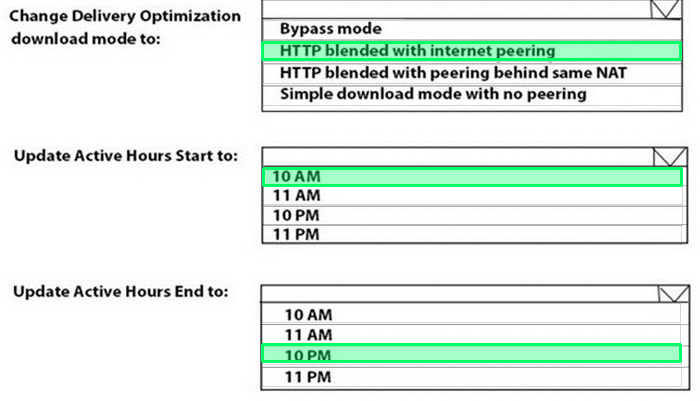
Question 1
Drag & drop
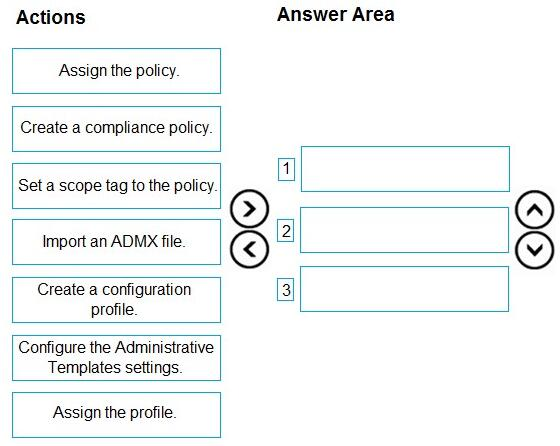
DRAG DROP
You have an on-premises Active Directory domain that syncs to Azure AD tenant.
The tenant contains computers that run Windows 10. The computers are hybrid Azure AD joined and enrolled in Microsoft Intune. The Microsoft Office settings on the computers are configured by using a Group Policy Object (GPO).
You need to migrate the GPO to Intune.
Which three actions should you perform in sequence? To answer, move the appropriate actions from the list of actions to the answer area and arrange them in the correct order.
Reveal answer detailsClose answer details
Explanation
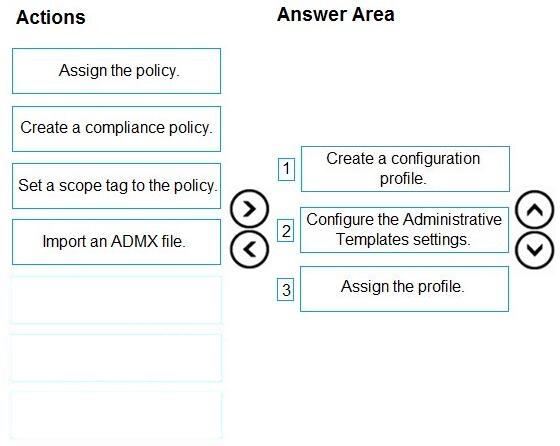
Step 1: Create a configuration profile Create the template 1) Sign in to the Microsoft Endpoint Manager admin center. 2) Select Devices > Configuration profiles > Create profile. 3) Etc.
Step 2: Configure the Administrative Template settings. Find some settings. There are thousands of settings available in these templates.
Step 3: Assign the profile. The template is created, but may not be doing anything yet. Be sure to assign the template (also called a profile) and monitor its status.
You have a computer named Computer1 that runs Windows 11.
A user named User1 plans to use Remote Desktop to connect to Computer1.
You need to ensure that the device of User1 is authenticated before the Remote Desktop connection is established and the sign in page appears.
What should you do on Computer1?
A
Turn on Reputation-based protection
B
Enable Network Level Authentication (NLA)
C
Turn on Network Discovery
D
Configure the Remote Desktop Configuration service
Reveal answer detailsClose answer details
Correct answerB
Explanation
What is Network Level Authentication? Network level authentication is used for authenticating Remote Desktop services, such as Windows RDP, and Remote Desktop Connection (RDP Client). You might also hear it called front authentication.
What is Network Level Authentication (NLA) used for?
Before you can start a remote desktop session, the user will need to authenticate themselves - ie, prove that they are who they say they are. Using network level authentication means that a false connection can't be made, which would use up CPU and cause a strain on the resources of the network. This offers a level of security against some cyberattacks such as Denial of Service attacks, where multiple requests are made all at once towards a network, overwhelming its ability to cope. To combat this, you can turn on network level authentication to authenticate the user's credentials before starting a remote access session. If the user's credentials aren't authenticated, then the connection is simply denied.
All Windows devices are enrolled in Microsoft Intune.
You need to deploy the Remote Help app to all the devices. The solution must minimize administrative effort.
Which type of app should you deploy?
A
Windows app (Win32)
B
line-of-business (LOB)
C
Microsoft 365
D
Microsoft Store
Reveal answer detailsClose answer details
Correct answerA
Question 5
Hotspot
HOTSPOT
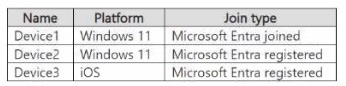
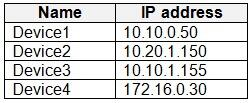
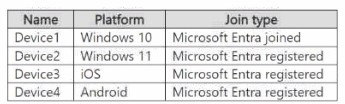
You have a Microsoft 365 E5 subscription that contains the devices shown in the following table.
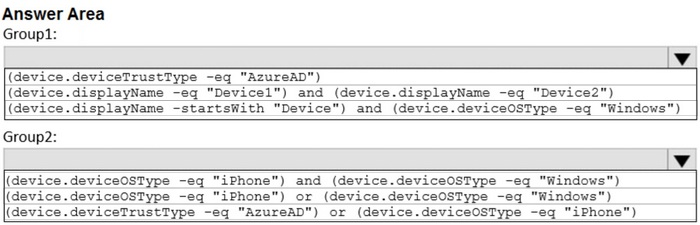
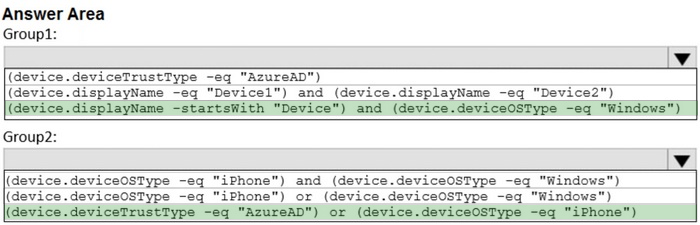
You need to create two dynamic device groups named Group1 and Group2. The solution must meet the following requirements:
1. Group1 must contain Device1 and Device2 only. 2. Group2 must contain Device1 and Device3 only.
Which device membership rule should you configure for each group? To answer, select the appropriate options in the answer area. NOTE: Each correct selection is worth one point.
Reveal answer detailsClose answer details
Question 6
Hotspot
HOTSPOT
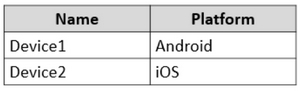
You have an Azure AD tenant that contains the users shown in the following table.
You have the devices shown in the following table.
You have a Conditional Access policy named CAPolicy1 that has the following settings:
Assignments Users or workload identities: User 1. User1 Cloud apps or actions: Office 365 Exchange Online Conditions: Device platforms: Windows, iOS
Access controls Grant Require multi-factor authentication
You have a Conditional Access policy named CAPolicy2 that has the following settings:
Assignments Users or workload identities: Used, User2 Cloud apps or actions: Office 365 Exch Conditions
Device platforms: Android, iOS
Filter for devices
Device matching the rule: Exclude filtered devices from policy
Rule syntax: device. displayName-contains "1"
Access controls
Grant Block access
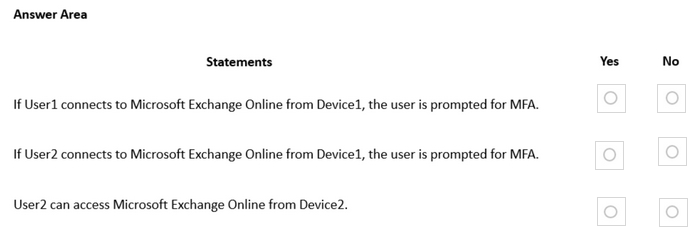
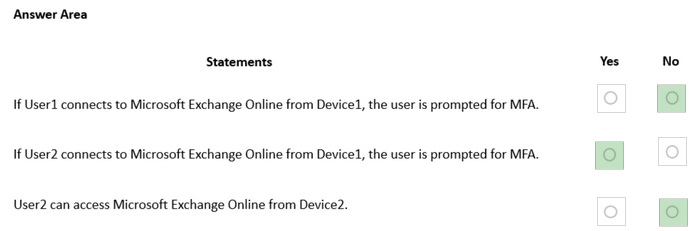
For each of the following statements, select Yes if the statement is true. Otherwise, select No.
Reveal answer detailsClose answer details
Question 7
Single choice
You have a Microsoft 365 E5 subscription.
You use Microsoft Intune to manage all devices.
You need to prepare a Win32 app named App1.exe for deployment.
What should you do first?
A
From the Microsoft Intune admin center, create an app configuration policy.
B
Change App1.exe to the INTUNEWIN format.
C
From the Microsoft 365 Apps admin center, create a deployment configuration.
D
Upload App1.exe to Azure Blob Storage.
Reveal answer detailsClose answer details
Correct answerB
Question 8
Single choice
You have a Microsoft 365 subscription that uses Microsoft Intune Suite.
You use Microsoft Intune to manage devices.
Auto-enrollment in Intune is configured.
You have 100 Windows 11 devices in a workgroup.
You need to connect the devices to the corporate wireless network and enroll 100 new Windows 11 devices in Intune.
What should you use?
A
a provisioning package
B
a Group Policy Object (GPO)
C
mobile device management (MDM) automatic enrollment
D
a device configuration policy
Reveal answer detailsClose answer details
Correct answerA
Question 9
Drag & drop
DRAG DROP
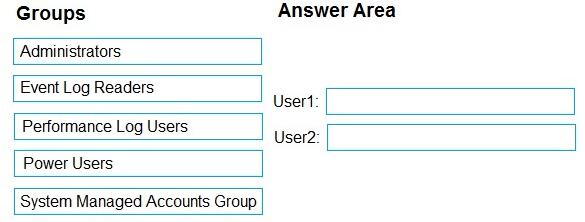
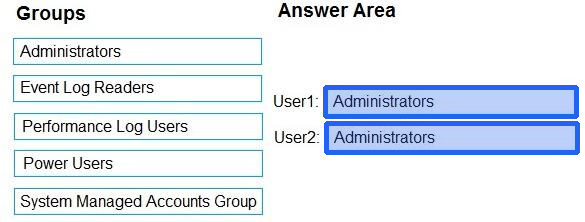
You have a computer that runs Windows 10 and contains two local users named User1 and User2.
You need to ensure that the users can perform the following actions:
User1 must be able to adjust the date and time. User2 must be able to clear Windows logs.
The solution must use the principle of least privilege.
To which group should you add each user? To answer, drag the appropriate groups to the correct users. Each group may be used once, more than once, or not at all. You may need to drag the split bar between panes or scroll to view content.
NOTE: Each correct selection is worth one point.
Reveal answer detailsClose answer details
Question 10
Single choice
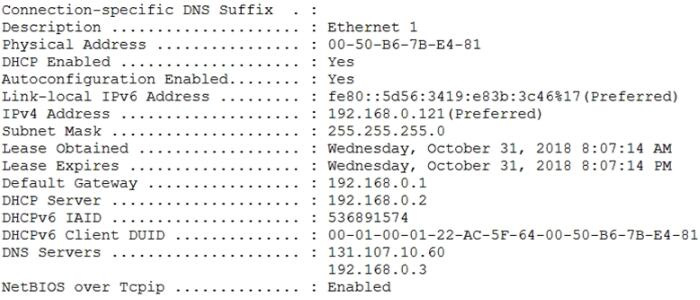
A user has a computer that runs Windows 10. When the user connects the computer to the corporate network, the user cannot access the internal corporate servers. The user can access servers on the Internet. You run the ipconfig command and receive the following output.
You send a ping request and successfully ping the default gateway, the DNS servers, and the DHCP server.
Which configuration on the computer causes the issue?
A
the DNS servers
B
the IPv4 address
C
the subnet mask
D
the default gateway address
Reveal answer detailsClose answer details
Correct answerA
Question 11
Multiple choice
You have a Microsoft 365 E5 subscription and 100 unmanaged iPad devices.
You need to deploy a specific iOS update to the devices. Users must be prevented from manually installing a more recent version of iOS.
Which two actions should you perform? Each correct answer presents part of the solution.
NOTE: Each correct selection is worth one point.
A
Create a device configuration profile.
B
Enroll the devices in Microsoft Intune by using the Intune Company Portal.
C
Create a compliance policy.
D
Create an iOS app provisioning profile.
E
Enroll the devices in Microsoft Intune by using Apple Business Manager.
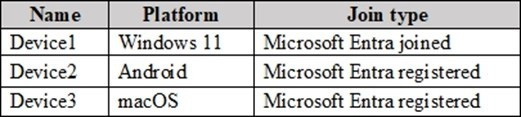
You have a Microsoft 365 subscription that contains devices enrolled in Microsoft Intune as shown in the following table.
On which devices can you use Device query?
A
Device1 only
B
Device1 and Device2 only
C
Device1 and Device3 only
D
Device1, Device2, and Device3
Reveal answer detailsClose answer details
Correct answerA
Explanation
The Device query feature in Microsoft Intune allows querying for specific device details, such as installed software and patch levels. This feature is available for Microsoft Entra joined devices, which in this case is Device1 (Windows 11). Devices that are only Microsoft Entra registered (such as Device2 and Device3) do not support the full range of device querying features available for fully joined devices.
Question 13
Hotspot
HOTSPOT
You have a Microsoft 365 subscription.
You have 25 Microsoft Surface Hub devices that you plan to manage by using Microsoft Intune.
You need to configure the devices to meet the following requirements:
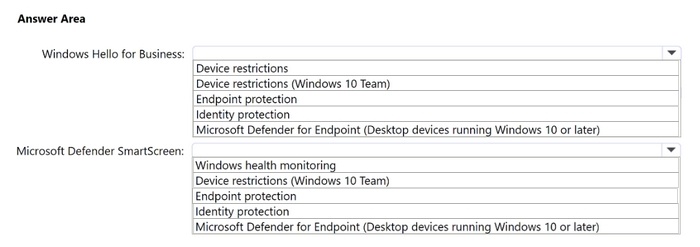
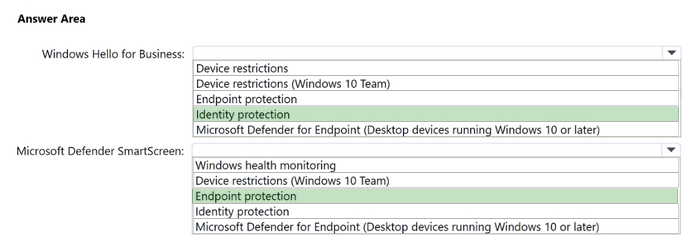
1. Enable Windows Hello for Business.
2. Configure Microsoft Defender SmartScreen to block users from running unverified files.
Which profile type template should you use for each requirement? To answer, select the appropriate options in the answer area.
NOTE: Each correct selection is worth one point.
Reveal answer detailsClose answer details
Question 14
Single choice
You have a Microsoft 365 subscription that contains Windows 11 devices enrolled in Microsoft Intune.
You need to use Device query to identify whether a critical security patch was installed on a device.
Which table should you target?
A
WindowsQfe
B
WindowsRegistry
C
FileInfo
D
OsVersion
E
SystemInfo
Reveal answer detailsClose answer details
Correct answerA
Explanation
The WindowsQfe (Quick Fix Engineering) table contains information about updates, hotfixes, and security patches installed on a Windows device. To determine whether a critical security patch has been installed, this is the appropriate table to query, as it provides details on all the installed updates.
Question 15
Hotspot
HOTSPOT
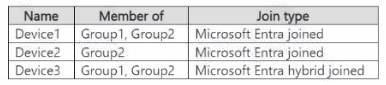
You have a Microsoft 365 E5 tenant that contains Windows devices enrolled in Microsoft Intune as shown in the following table.
You create an Endpoint Privilege Management (EPM) elevation settings policy named ElevationSettmgsl that has the following settings:
1. Endpoint Privilege Management: Enabled 2. Default elevation response: Require user confirmation 3. Validation: Business justification
Assignments: Group1 Each device contains a file named File1.exe that can be run only by an administrator. You create an EPM elevation rules policy named ElevattonRules1 that has the following settings:
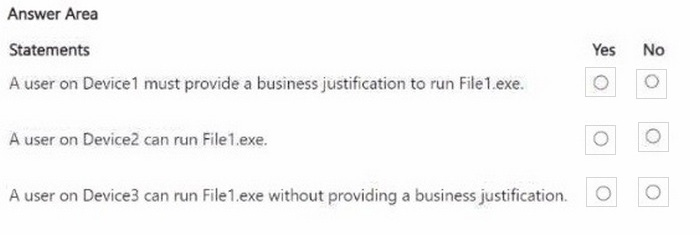
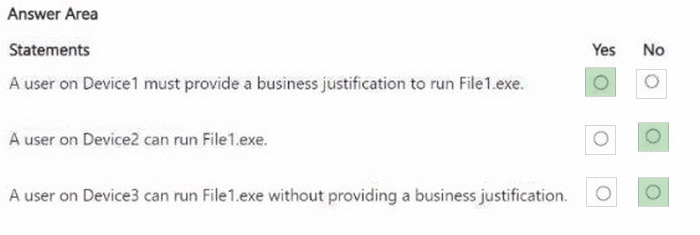
For each of the following statements, select Yes if the statement is true. Otherwise, select
NOTE: Each correct selection is worth one point.
Reveal answer detailsClose answer details
Question 16
Hotspot
HOTSPOT
You have a Microsoft Entra tenant that contains the devices shown in the following table.
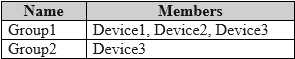
The tenant contains the groups shown in the following table.
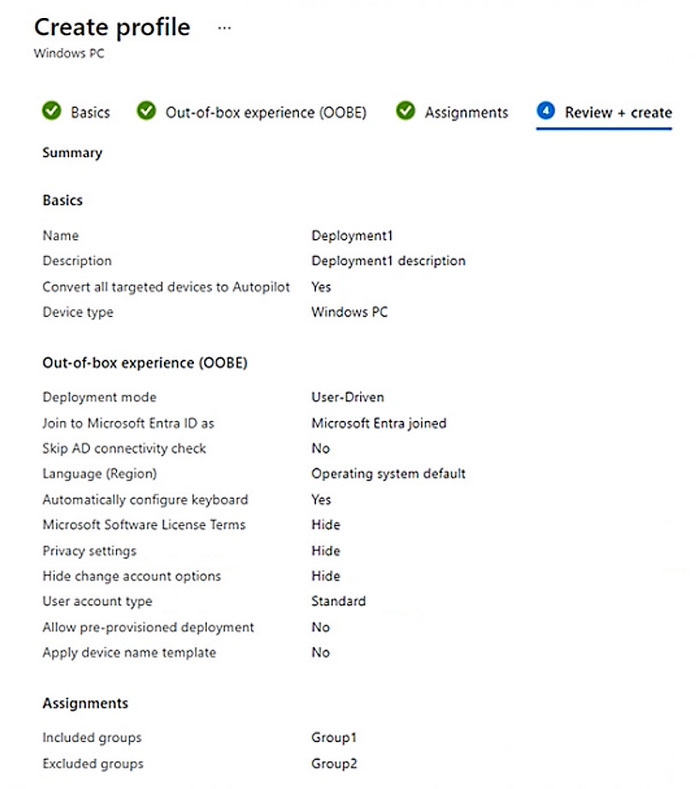
You create a Windows Autopilot deployment profile as shown in the Deployment Profile exhibit. (Click the
Deployment Profile tab.)
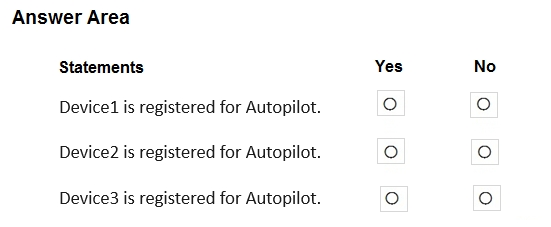
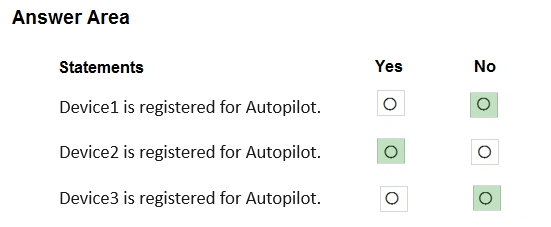
For each of the following statements, select Yes if the statement is true. Otherwise, select No.
NOTE: Each correct selection is worth one point.
Reveal answer detailsClose answer details
Question 17
Single choice
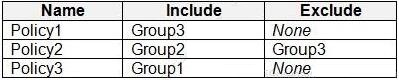
You have a Microsoft 365 E5 subscription that contains the groups shown in the following table.
You create a Conditional Access policy named CAPolicy1 that will block access to Microsoft Exchange Online from iOS devices. You assign CAPolicy1 to Group1.
You discover that User1 can still connect to Exchange Online from an iOS device.
You need to ensure that CAPolicy1 is enforced.
What should you do?
A
Configure a new terms of use (TOU).
B
Assign CAPolicy1 to Group2.
C
Enable CAPolicy1
D
Add a condition in CAPolicy1 to filter for devices.
Reveal answer detailsClose answer details
Correct answerC
Question 18
Hotspot
HOTSPOT
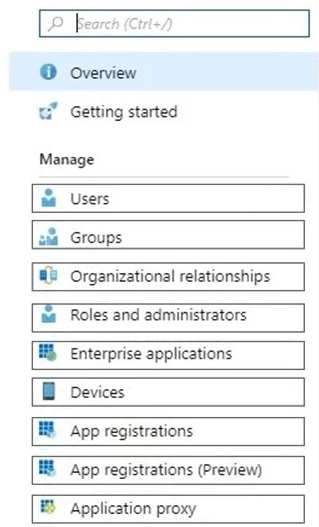
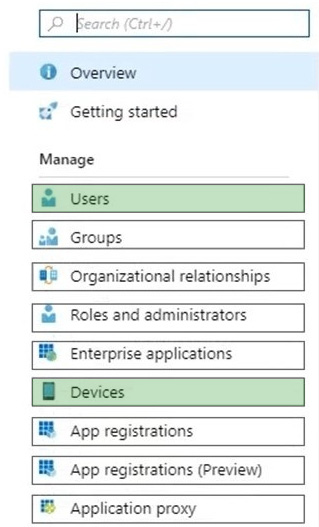
You need to meet the technical requirements for Windows AutoPilot.
Which two settings should you configure from the Azure Active Directory blade? To answer, select the appropriate settings in the answer area.
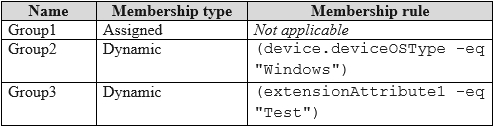
You have a Microsoft 365 E5 subscription that contains the security groups shown in the following table.
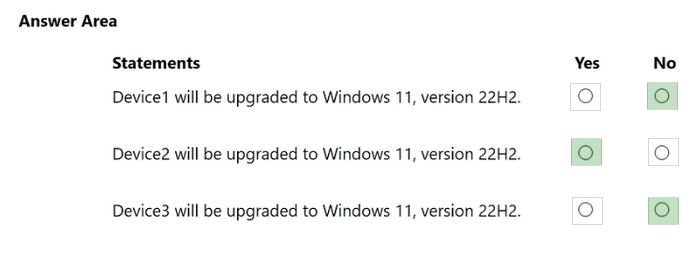
The subscription contains devices that run Windows 11, version 21H2 as shown in the following table.
You have a feature update deployment profile named Deployment1 as shown in the following table.
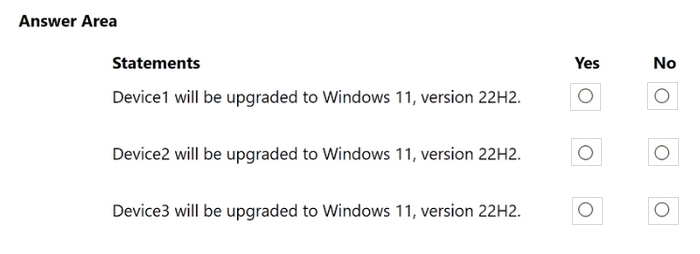
For each of the following statements, select Yes if the statement is true. Otherwise, select No.
NOTE: Each correct selection is worth one point.
Reveal answer detailsClose answer details
Question 20
Hotspot
HOTSPOT
You have a Microsoft 365 E5 subscription that contains a computer named Computer1 that runs Windows 11. Computer1 is enrolled in Microsoft Intune.
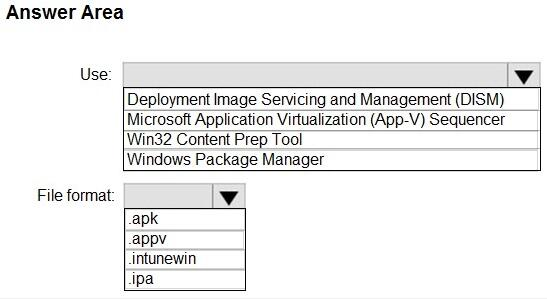
You need to deploy an app named App1 to Computer1. The App1 installation will use multiple files.
What should you use to package App1, and which file format will be used? To answer, select the appropriate options in the answer area.
NOTE: Each correct selection is worth one point.
Reveal answer detailsClose answer details
Explanation
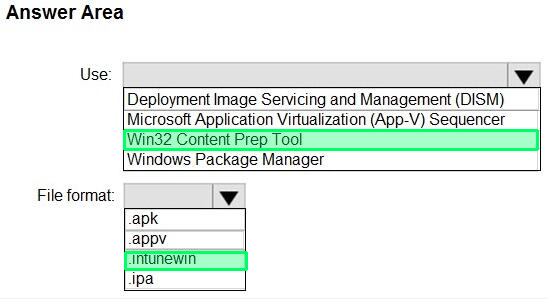
Box 1: Win32 Content Prep Tool Use:
In Microsoft Intune, there isn't a direct way to deploy .exe files. Instead, you need to package the .exe file using one of the supported formats, such as .intunewin or .msi, before deploying it. Here are two common methods to deploy .exe files via Intune:
Wrap the .exe file in a .intunewin package:
* Create an application package by using the Microsoft Win32 Content Prep Tool (IntuneWinAppUtil.exe). This tool allows you to convert a .exe file into a .intunewin package.
* Download the IntuneWinAppUtil.exe tool from the Microsoft Download Center. Open a command prompt and run the following command to convert the .exe file into a .intunewin package:
* IntuneWinAppUtil.exe -c <path_to_exe_file> -s <path_to_setup_file> -o <output_path> Replace <path_to_exe_file> with the path to the .exe file, <path_to_setup_file> with the path to the setup file or installation script, and <output_path> with the desired output folder for the .intunewin package.
Box 2: . intunewin File format:
Does Intune support .exe files? In Microsoft Intune, there isn't a direct way to deploy .exe files. Instead, you need to package the .exe file using one of the supported formats, such as . intunewin or . msi, before deploying it.
You have an Azure AD tenant named contoso.com that contains the users shown in the following table.
For contoso.com, the Mobility (MDM and MAM) settings have the following configurations:
MDM user scope: Group1 MAM user scope: Group2
You purchase the devices shown in the following table:
For each of the following statements, select Yes if the statement is true. Otherwise, select No.
Reveal answer detailsClose answer details
Question 26
Single choice
You are creating a device configuration profile in Microsoft Intune.
You need to configure specific OMA-URI settings in the profile.
Which profile type template should you use?
A
Device restrictions (Windows 10 Team)
B
Identity protection
C
Custom
D
Device restrictions
Reveal answer detailsClose answer details
Correct answerC
Explanation
Windows client custom profiles use Open Mobile Alliance Uniform Resource Identifier (OMA-URI) settings to configure different features. These settings are typically used by mobile device manufacturers to control features on the device.
You have a Microsoft 365 subscription that contains the devices shown in the following table.
All the devices will be reimaged and licensed by using subscription activation.
The devices are assigned to the users shown in the following table.
For each of the following statements, select Yes if the statement is true. Otherwise, select No.
NOTE: Each correct selection is worth one point.
Reveal answer detailsClose answer details
Explanation
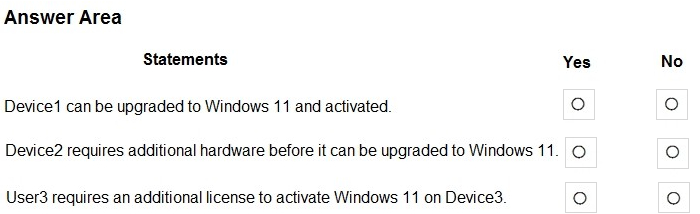
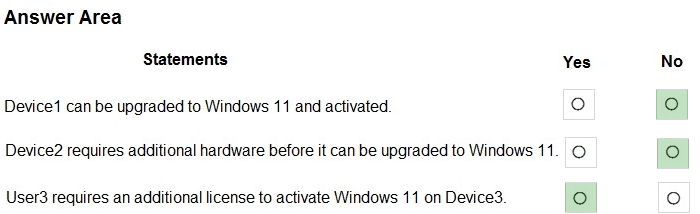
Box 1: No Device1 has 14 GB RAM, 256 GB storage, and TPM version 1.2.
TPM 2.0 is required to run Windows 11, as an important building block for security-related features. TPM 2.0 is used in Windows 11 for a number of features, including Windows Hello for identity protection and BitLocker for data protection.
Note: Since July 28, 2016, all new device models, lines, or series (or if you're updating the hardware configuration of an existing model, line, or series with a major update, such as CPU, graphic cards) must implement and enable by default TPM 2.0 (details in section 3.7 of the Minimum hardware requirements page). The requirement to enable TPM 2.0 only applies to the manufacturing of new devices.
Box 2: No Device2 has 4 GB RAM, 64 GB storage, and TPM version 2.0. This is fine. At least 4 GB is required. At least 64 GB storage is required.
Device2 is assigned to User2. There is a Microsoft 365 E3 license for this assignment. Microsoft 365 E3 is for Windows 11 Pro.
Box 3: Yes Device3 meets the Windows 11 requirements. There is no Windows 11 license for Device3.
You need to download a report that lists all the devices that are NOT enrolled in Microsoft Intune and are assigned an app protection policy.
What should you select in the Microsoft Endpoint Manager admin center?
A
Apps. and then App protection policies
B
Apps. and then Monitor
C
Devices, and then Monitor
D
Reports, and the Device compliance
Reveal answer detailsClose answer details
Correct answerB
Explanation
You can check if an App Protection policy is assigned and verify if a device is enrolled in Intune. It's the only option that can confirm both on a single dashboard. You need to modify the columns but that's expected if you're looking for a granular report such as this. View the App protection status report
Sign in to the Microsoft Intune admin center. Select Apps > Monitor > App protection status. https://learn.microsoft.com/en-us/mem/intune/apps/app-protection-policies-monitor
Question 30
Multiple choice
Your company uses Microsoft Intune to manage devices.
You need to ensure that only Android devices that use Android work profiles can enroll in Intune.
Which two configurations should you perform in the device enrollment restrictions? Each correct answer presents part of the solution.
NOTE: Each correct selection is worth one point.
A
From Platform Settings, set Android device administrator Personally Owned to Block.
B
From Platform Settings, set Android Enterprise (work profile) to Allow.
C
From Platform Settings, set Android device administrator Personally Owned to Allow.
D
From Platform Settings, set Android device administrator to Block.
Reveal answer detailsClose answer details
Correct answersB, D
Explanation
Set up enrollment of Android Enterprise personally-owned work profile devices Set up enrollment for bring-your-own-device (BYOD) and personal device scenarios using the Android Enterprise personally-owned work profile management solution. During enrollment, a work profile is created on the device to house work apps and work data. The work profile can be managed by Microsoft Intune policies. Personal apps and data stay separate in another part of the device and remain unaffected by Intune.
Set up enrollment Complete these steps to set up enrollment for Android Enterprise devices in BYOD scenarios.
1. Sign in to the Microsoft Intune admin center.
2. Go to Devices > Enrollment device platform restrictions to set up enrollment restrictions. By default, Android Enterprise work profile is marked as allowed for personal devices enrolling in Intune. You can allow or block enrollment in device platform restrictions. Your options:
Block: Personal devices that enroll will use the Android device administrator management solution, unless device administrator enrollment is also blocked.
Allow (set by default): Personal devices that support the work profile management solution will enroll with a work profile. Android devices that don't support Android Enterprise are enrolled using the Android device administrator solution, unless device administrator enrollment is blocked.
Any device that supports Android Enterprise personal work profiles also supports the Android device administrator management solution, so if you don't want Android device administrator to be a part of enrollments, make sure to block the platform.
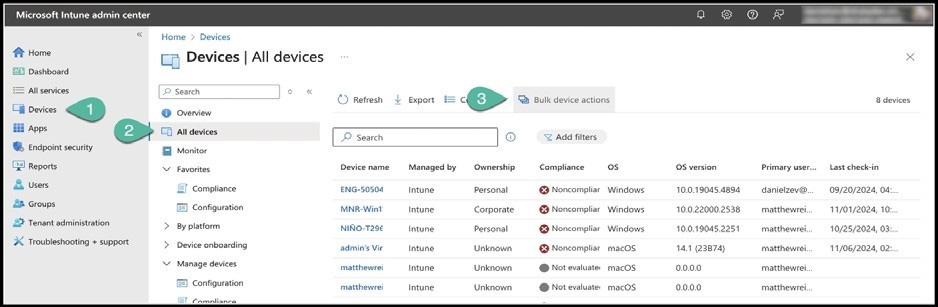
2. Enter the following configurations: 2a. Select Windows for OS 2b. Select Sync for Device action
3. On the Devices page, select from 1 to 100 devices. Select Next. 4. On the Review + create page, ensure your settings are correct, and select Create.
Note: Intune service, Use bulk device actions You can use bulk device actions for the following remote actions:
Autopilot reset Collect diagnostics Custom notifications Delete Rename Restart Retire Sync Wipe Update cellular data plan
You have a Microsoft Deployment Toolkit (MDT) server named MDT1.
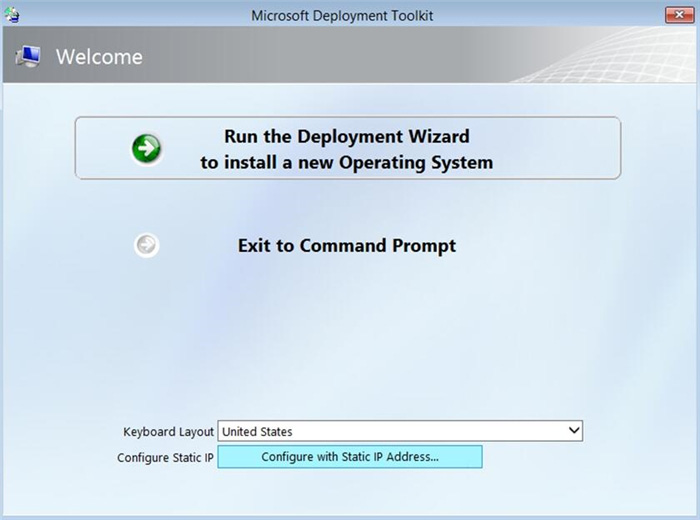
When computers start from the LiteTouchPE_x64.iso image and connect to MDT1, the welcome screen appears as shown in the following exhibit.
You need to prevent the welcome screen from appearing when the computers connect to MDT1.
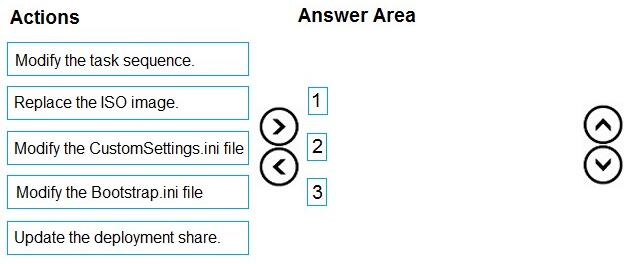
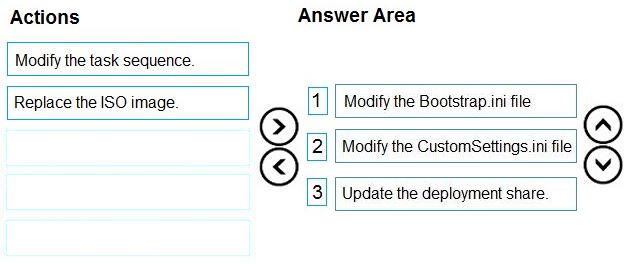
Which three actions should you perform in sequence? To answer, move the appropriate actions from the list of actions to the answer area and arrange them in the correct order.
Reveal answer detailsClose answer details
Explanation
Step 1: Modify the CustomSettings.ini file CustomSettings.ini (CS) may be edited to include information that you wish to take into account prior to beginning the deployment process-such as data that will exist as variables that can be called upon as needed. This is extremely useful when working with multiple sites or when you want certain settings to apply to desktops, while mobile devices receive a different set of settings.
Example of line included: SkipBDDWelcome=NO
Step 2: Modify the task sequence Create the deployment task sequence, example: 1. Using the Deployment Workbench, right-click Task Sequences under the MDT Production node, select New Folder and create a folder with the name: Windows 10.
2. Right-click the Windows 10 folder created in the previous step, and then select New Task Sequence.
Use the following settings for the New Task Sequence Wizard:
Task sequence ID: W10-X64-001 Task sequence name: Windows 10 Enterprise x64 Custom Image Etc.
Step 3: Update the deployment share Configure the MDT production deployment share, example:
1. On SRV1, open an elevated Windows PowerShell prompt and enter the following commands:
copy-item "C:\Program Files\Microsoft Deployment Toolkit\Templates\Bootstrap.ini" C:\MDTProd\Control \Bootstrap.ini -Force copy-item "C:\Program Files\Microsoft Deployment Toolkit\Templates\CustomSettings.ini" C:\MDTProd \Control\CustomSettings.ini -Force In the Deployment Workbench console on SRV1, right-click the MDT Production deployment share and then select Properties.
Select the Rules tab and replace the rules with the following text (don't select OK yet):
You have computers that run Windows 10 and are managed by using Microsoft Intune.
Users store their files in a folder named D:\Folder1.
You need to ensure that only a trusted list of applications is granted write access to D:\Folder1.
What should you configure in the device configuration profile?
A
Microsoft Defender Exploit Guard
B
Microsoft Defender Application Guard
C
Microsoft Defender SmartScreen
D
Microsoft Defender Application Control
Reveal answer detailsClose answer details
Correct answerA
Explanation
The four components of Windows Defender Exploit Guard are: 1. Controlled folder access: Protects sensitive data from ransomware by blocking untrusted processes from accessing your protected folders 2. Attack Surface Reduction (ASR) 3. Exploit protection 4. Network protection
You have a Microsoft 365 E5 subscription and 25 Apple iPads.
You need to enroll the iPads in Microsoft Intune by using the Apple Configurator enrollment method.
What should you do first?
A
Configure an Apply MDM push certificate.
B
Add your user account as a device enrollment manager (DEM).
C
Modify the enrollment restrictions.
D
Upload a file that has the device identifiers for each iPad.
Reveal answer detailsClose answer details
Correct answerA
Explanation
Set up iOS/iPadOS device enrollment with Apple Configurator
Prerequisites Physical access to iOS/iPadOS devices Set MDM authority An Apple MDM push certificate Device serial numbers (Setup Assistant enrollment only) USB connection cables macOS computer running Apple Configurator 2.0
Note: Upload and renew your Apple MDM push certificates in Microsoft Intune. An Apple MDM Push certificate is required to manage iOS/iPadOS and macOS devices in Microsoft Intune, and enables devices to enroll via:
The Intune Company Portal app. Apple bulk enrollment methods, such as the Device Enrollment Program, Apple School Manager, and Apple Configurator. Certificates must be renewed annually.
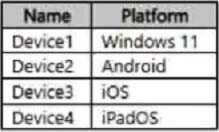
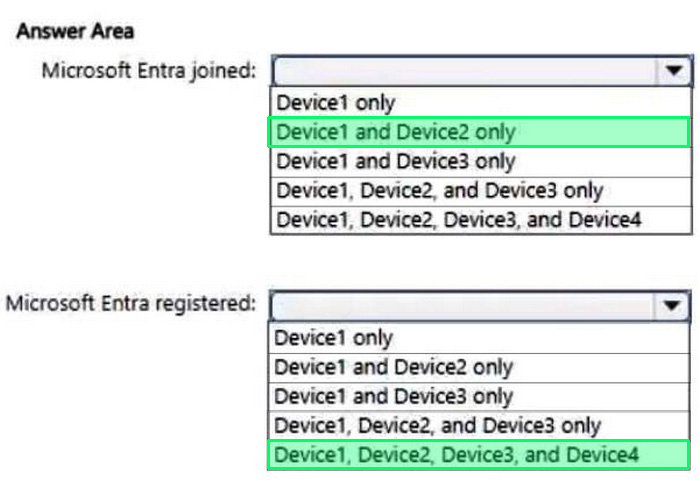
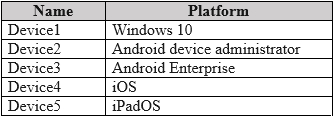
You have a Microsoft Entra tenant that contains the devices shown in the following table.
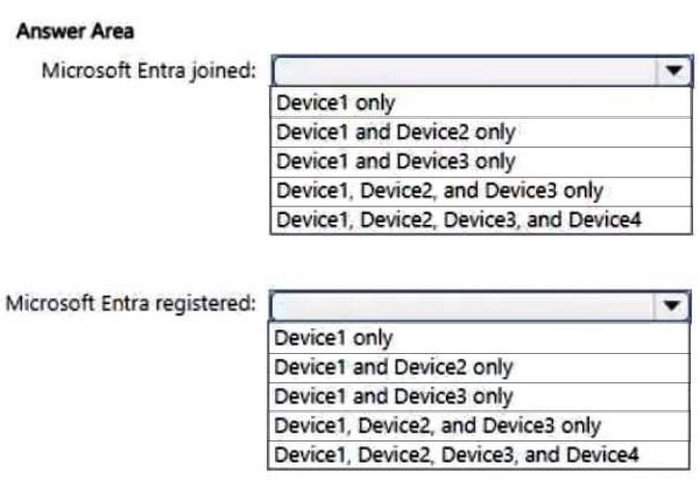
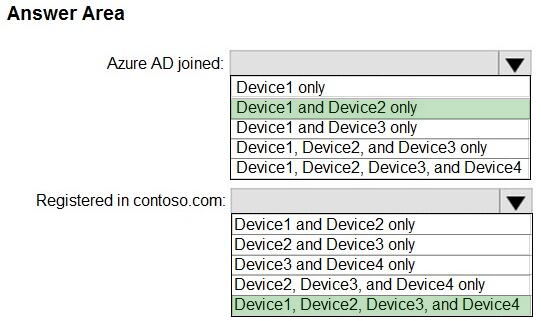
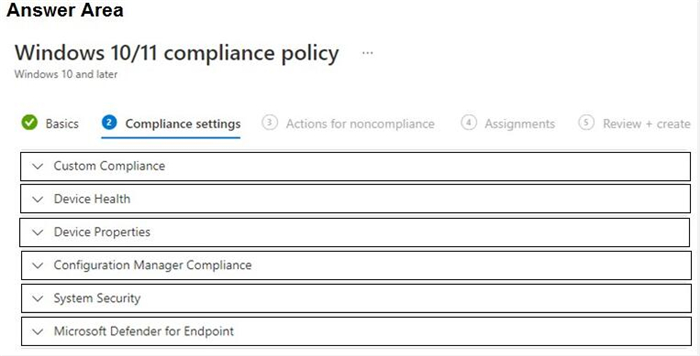
Which devices can be Microsoft Entra joined, and which devices can be Microsoft Entra registered? To answer, select the appropriate options in the answer area.
NOTE: Each correct selection is worth one point.
Reveal answer detailsClose answer details
Explanation
Box 1: Device1 and Device2 only Azure Entra joined
Review supported devices Hybrid Azure AD join supports a broad range of Windows devices. Because the configuration for devices running older versions of Windows requires other steps, the supported devices are grouped into two categories:
1. Windows current devices 2. Windows 11 3. Windows 10 4. Windows Server 2016 5. Windows Server 2019
Box 2: Device, Device2, Device3, and Device4 Registered in contoso.com
Azure Entra registered devices The goal of Azure AD registered - also known as Workplace joined - devices is to provide your users with support for bring your own device (BYOD) or mobile device scenarios. In these scenarios, a user can access your organization's resources using a personal device.
Operating Systems: ++Windows 10 or newer, iOS, Android, macOS, Ubuntu 20.04/22.04 LTS iPAD OS uses iOS.
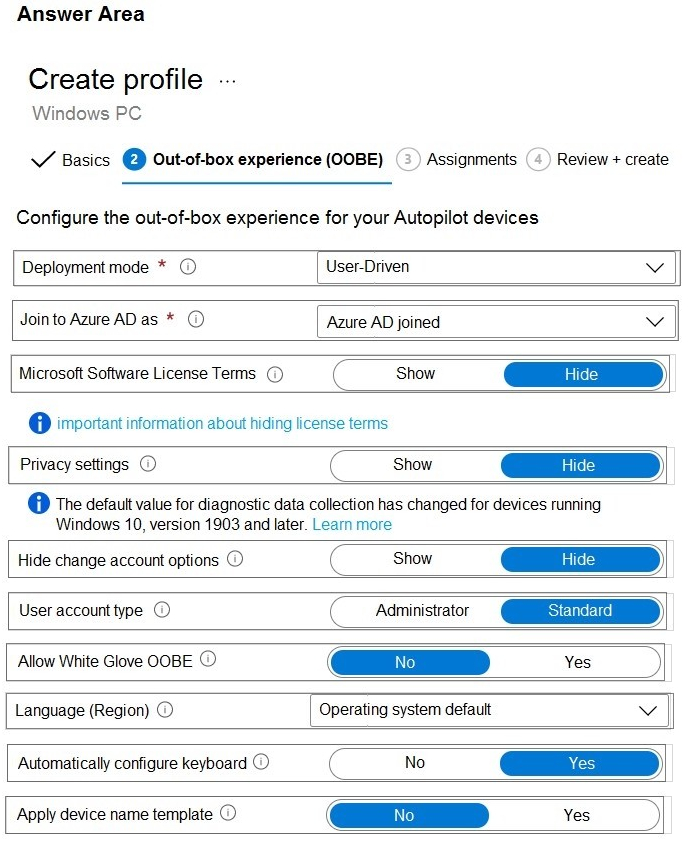
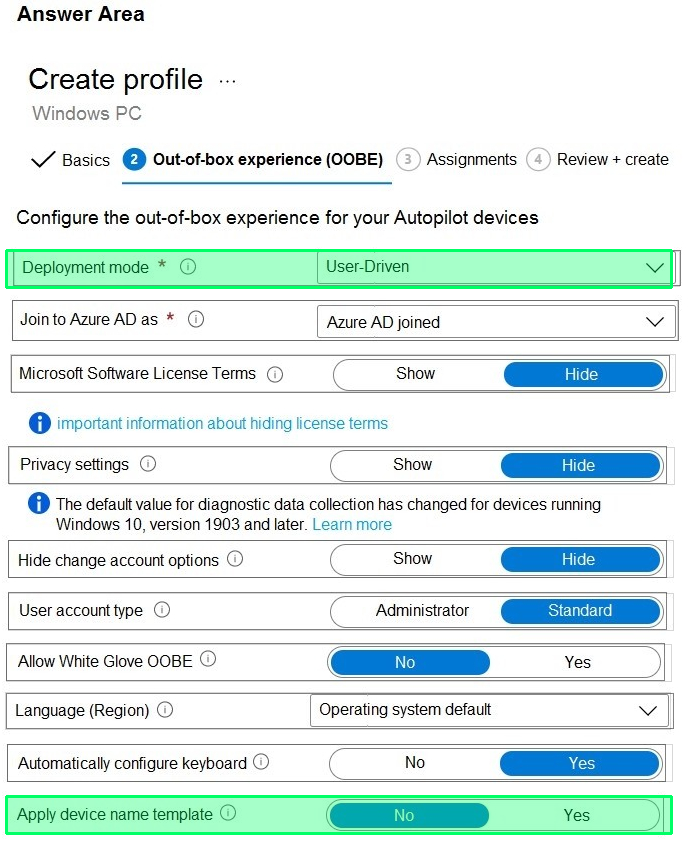
You create a Windows Autopilot deployment profile.
You need to configure the profile settings to meet the following requirements:
1. Automatically enroll new devices and provision system apps without requiring end-user authentication 2. Include the hardware serial number in the computer name.
Which two settings should you configure? To answer, select the appropriate settings in the answer area.
NOTE: Each correct selection is worth one point.
Reveal answer detailsClose answer details
Question 37
Hotspot
HOTSPOT
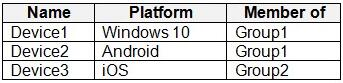
You have a Microsoft 365 tenant that uses Microsoft Intune to manage the devices shown in the following table.
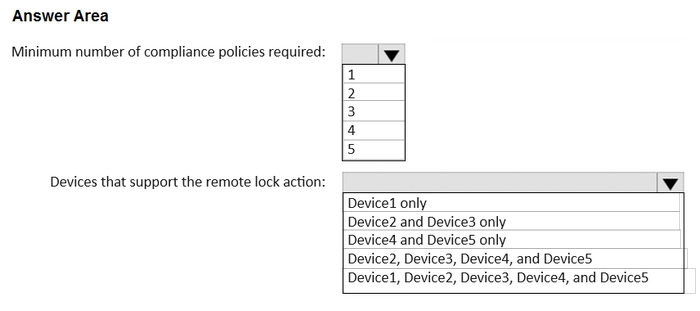
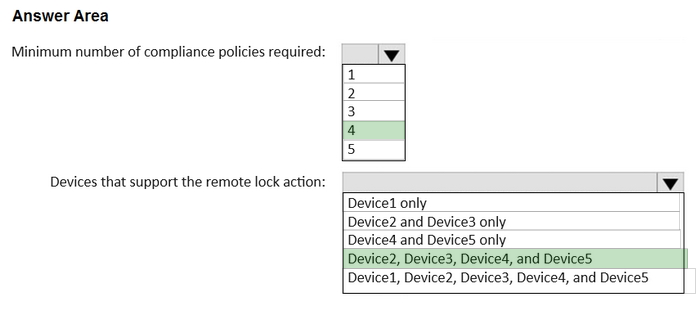
You need to deploy a compliance solution that meets the following requirements:
1. Marks the devices as Not Compliant if they do not meet compliance policies 2. Remotely locks noncompliant devices
What is the minimum number of compliance policies required, and which devices support the remote lock action? To answer, select the appropriate options in the answer area.
NOTE: Each correct selection is worth one point.
Reveal answer detailsClose answer details
Question 38
Hotspot
HOTSPOT
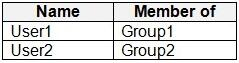
You have an Azure AD tenant that contains the users shown in the following table.
You have devices enrolled in Microsoft Intune as shown in the following table.
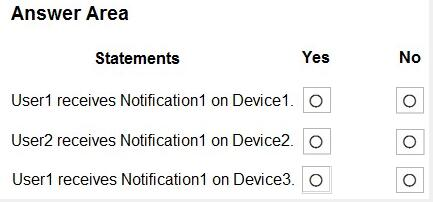
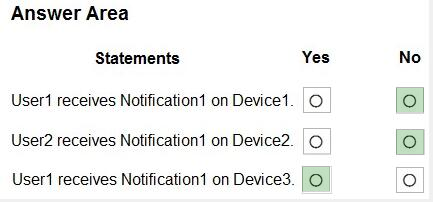
From Intune, you create and send a custom notification named Notification1 to Group1.
For each of the following statements, select Yes if the statement is true. Otherwise, select No.
NOTE: Each correct selection is worth one point.
Reveal answer detailsClose answer details
Question 39
Hotspot
HOTSPOT
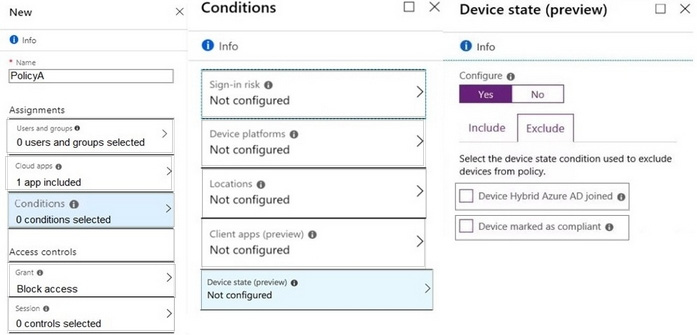
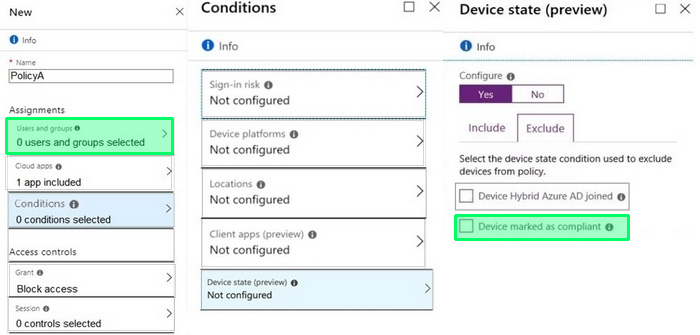
You need a new conditional access policy that has an assignment for Office 365 Exchange Online.
You need to configure the policy to meet the technical requirements for Group4.
Which two settings should you configure in the policy? To answer, select the appropriate settings in the answer area.
You have a Microsoft Entra tenant named contoso.com that contains a group named Contoso Help Desk.
You need to ensure that Contoso Help Desk is added to the local Administrators group whenever a Windows device is joined to contoso.com.
What should you do?
A
Assign the Cloud Device Administrator role to Contoso Help Desk.
B
Assign the Microsoft Entra Joined Device Local Administrator role to Contoso Help Desk.
C
Configure the Enterprise State Roaming settings.
D
Enable Microsoft Entra Local Administrator Password Solution (LAPS) for contoso.com.
Reveal answer detailsClose answer details
Correct answerB
Explanation
The Microsoft Entra Joined Device Local Administrator role allows members of a group to be automatically added to the local Administrators group on Windows devices that are joined to the Microsoft Entra tenant. By assigning this role to the Contoso Help Desk group, you ensure that members of this group are granted local administrator privileges on all devices joined to contoso.com.
Question 41
Multiple choice
You have a Microsoft 365 subscription. All devices run Windows 10.
You need to prevent users from enrolling the devices in the Windows Insider Program.
What two configurations should you perform from the Microsoft Intune admin center? Each correct answer is a complete solution.
NOTE: Each correct selection is worth one point.
A
a device restrictions device configuration profile
B
an app configuration policy
C
a Windows 10 and later security baseline
D
a custom device configuration profile
E
a Windows 10 and later update ring
Reveal answer detailsClose answer details
Correct answersD, E
Explanation
D: Microsoft Intune includes many built-in settings to control different features on a device. You can also create custom profiles, which are created similar to built-in profiles. Custom profiles are great when you want to use device settings and features that aren't built in to Intune. These profiles include features and settings for you to control on devices in your organization. For example, you can create a custom profile that sets the same feature for every Windows device.
E Set up Insider Preview builds using Intune 1. Log in to the Azure portal and select Intune. 2. Go to Software Updates > Windows 10 Update Rings and select + Create to make an Update Ring policy.
Add a name and select the Settings section to configure its settings.
You have a Microsoft 365 subscription and use Microsoft Intune Suite.
The subscription contains devices enrolled in Intune as shown in the following table.
Which devices support Device query?
A
Device1 only
B
Device2 only
C
Device1 and Device2 only
D
Device1, Device2, Device3, and Device4
Reveal answer detailsClose answer details
Correct answerC
Question 43
Hotspot
HOTSPOT
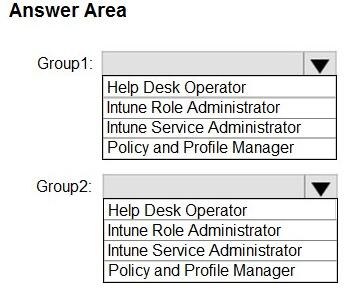
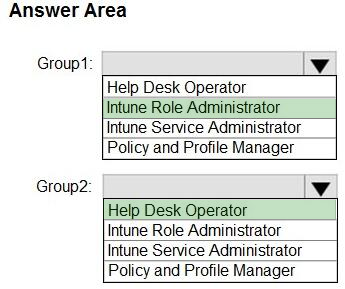
You have a Microsoft 365 subscription that contains two security groups named Group1 and Group2. Microsoft 365 uses Microsoft Intune Suite.
You use Microsoft Intune to manage devices.
You need to assign roles in Intune to meet the following requirements:
1. The members of Group1 must manage Intune roles and assignments. 2. The members of Group2 must assign existing apps and policies to users and devices.
The solution must follow the principle of least privilege.
Which role should you assign to each group? To answer, select the appropriate options in the answer area.
You have a Microsoft 365 subscription that includes Microsoft Intune. The subscription contains Windows 11 devices enrolled in Intune. The subscription contains three groups named Departement1, Department2, and Department3.
You need to deploy Microsoft 365 Apps to the Windows 11 devices. The solution must meet the following requirements:
1. Users in Department1 and Department2 must receive the full Microsoft 365 Apps suite, including Microsoft Project and Visio. 2. Users in Department3 must receive the full Microsoft 365 Apps suite, including Microsoft Project, but without Visio. 3. All other users must receive the full Microsoft 365 Apps suite without Microsoft Project or Visio.
What is the minimum number of deployments you should create?
A
1
B
2
C
3
D
4
Reveal answer detailsClose answer details
Correct answerC
Question 45
Single choice
Note: This section contains one or more sets of questions with the same scenario and problem. Each question presents a unique solution to the problem. You must determine whether the solution meets the stated goals. More than one solution in the set might solve the problem. It is also possible that none of the solutions in the set solve the problem.
After you answer a question in this section, you will NOT be able to return. As a result, these questions do not appear on the Review Screen.
You have a Microsoft 365 E5 subscription. The subscription contains devices that are Microsoft Entra joined and enrolled in Microsoft Intune
You create a user named User1.
You need to ensure that User1 can rotate BitLocker recovery keys by using Intune.
Solution: From the Microsoft Entra admin center, you assign the Helpdesk Administrator role to User1.
Does this meet the goal?
A
Yes
B
No
Reveal answer detailsClose answer details
Correct answerB
Explanation
Correct: From the Microsoft Intune admin center, you assign the Endpoint Security Manager role to User1. From the Microsoft Intune admin center, you assign the Help Desk Operator role to User1.
Incorrect: From the Microsoft Entra admin center, you assign the Helpdesk Administrator role to User1.
Note: Role-based access controls to manage BitLocker To manage BitLocker in Intune, an account must be assigned an Intune role-based access control (RBAC) role that includes the Remote tasks permission with the Rotate BitLockerKeys (preview) right set to Yes.
You can add this permission and right to your own custom RBAC roles or use one of the following built-in RBAC roles that include this right:
Help Desk Operator Endpoint Security Administrator
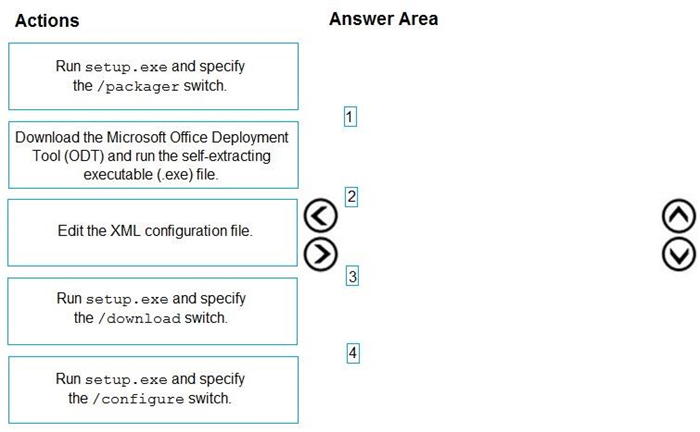
You have a Microsoft 365 E5 subscription and a computer that runs Windows 11.
You need to create a customized installation of Microsoft 365 Apps for enterprise.
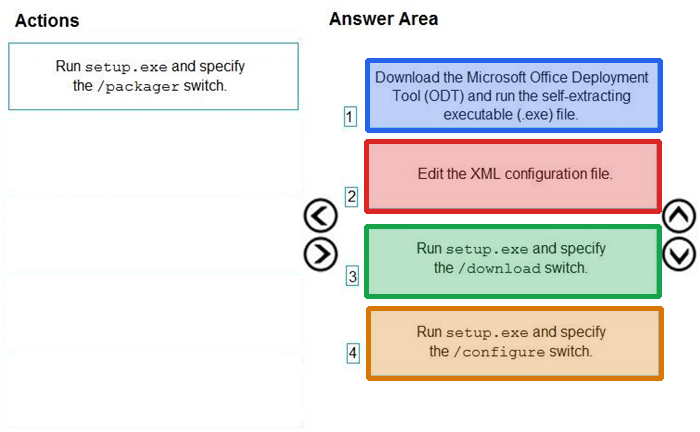
Which four actions should you perform in sequence? To answer, move the appropriate cmdlets from the list of cmdlets to the answer area and arrange them in the correct order.
Reveal answer detailsClose answer details
Explanation
1. Download ODT application 2. Create a configuration file (XML) 3. setup.exe /download to download the installation files 4. setup.exe /configure to deploy the application
https://learn.microsoft.com/en-us/deployoffice/deploy-microsoft-365-apps-local-source 1. Download ODT application 2. Create a configuration file (XML) 3. setup.exe /download to download the installation files 4. setup.exe /configure to deploy the application https://learn.microsoft.com/en-us/deployoffice/deploy-microsoft-365-apps-local-source https://learn.microsoft.com/en-us/deployoffice/overview-office-deployment-tool#download-the-installation- files-for-microsoft-365-apps upvoted 29 times
Question 47
Hotspot
HOTSPOT
You have an Azure AD tenant named contoso.com.
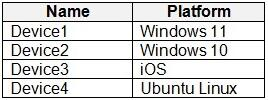
You have the devices shown in the following table.
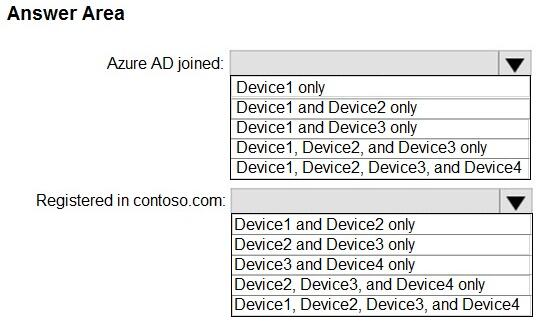
Which devices can be Azure AD joined, and which devices can be registered in contoso.com? To answer, select the appropriate options in the answer area.
NOTE: Each correct selection is worth one point.
Reveal answer detailsClose answer details
Explanation
Azure AD join capable Devices: https://learn.microsoft.com/en-us/azure/active-directory/devices/concept-directory-join Azure AD registered Devices: https://learn.microsoft.com/en-us/azure/active-directory/devices/concept-device-registration
Question 48
Hotspot
HOTSPOT
You have a Microsoft 365 subscription. The subscription contains 1,000 computers that run Windows 11 and are enrolled in Microsoft Intune.
You plan to create a compliance policy that has the following options enabled:
1. Require Secure Boot to be enabled on the device. 2. Require the device to be at or under the machine risk score.
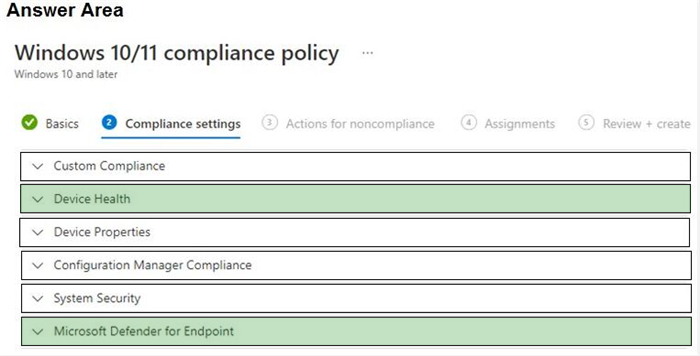
Which two Compliance settings should you configure? To answer, select the appropriate settings in the answer area.
NOTE: Each correct selection is worth one point.
Reveal answer detailsClose answer details
Explanation
Device health https://learn.microsoft.com/en-us/mem/intune/enrollment/windows-enrollment-status Microsoft Defender for Endpoint https://learn.microsoft.com/en-us/mem/intune/protect/compliance-policy-create-windows#microsoft-defender-for-endpoint
Question 49
Single choice
You are replacing 100 company-owned Windows devices.
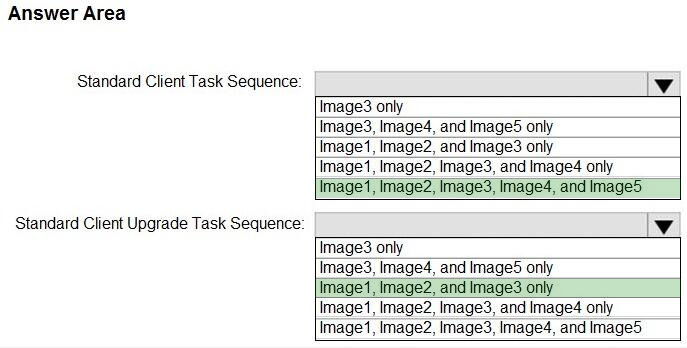
You need to use the Microsoft Deployment Toolkit (MDT) to securely wipe and decommission the devices. The solution must meet the following requirements:
1. Back up the user state. 2. Minimize administrative effort.
Which task sequence template should you use?
A
Standard Client Task Sequence
B
Standard Client Replace Task Sequence
C
Litetouch OEM Task Sequence
D
Sysprep and Capture
Reveal answer detailsClose answer details
Correct answerB
Explanation
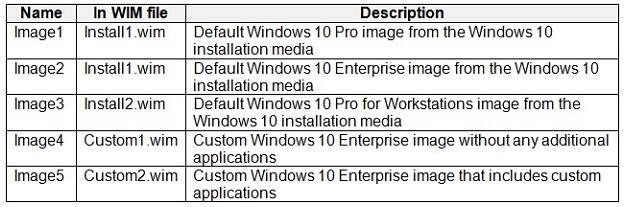
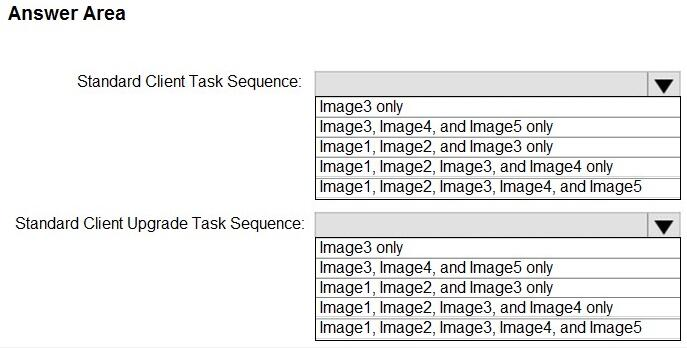
Standard Client Replace task sequence. Used to run User State Migration Tool (USMT) backup and the optional full Windows Imaging (WIM) backup action. Can also be used to do a secure wipe of a machine that is going to be decommissioned.
You have a Microsoft 365 E5 subscription that contains 10 Android Enterprise devices. Each device has a corporate-owned work profile and is enrolled in Microsoft Intune.
You need to configure the devices to run a single app in kiosk mode.
Which Configuration settings should you modify in the device restrictions profile?
A
Users and Accounts
B
General
C
System security
D
Device experience
Reveal answer detailsClose answer details
Correct answerD
Explanation
Android Enterprise device settings list to allow or restrict features on corporate-owned devices using Intune
Device experience Use these settings to configure a kiosk-style experience on your dedicated devices, or to customize the home screen experiences on your fully managed devices. You can configure devices to run one app, or run many apps. When a device is set with kiosk mode, only the apps you add are available.
Note: You can control and restrict on Android Enterprise devices owned by your organization. As part of your mobile device management (MDM) solution, use these settings to allow or disable features, run apps on dedicated devices, control security, and more.
You have a Microsoft 365 E5 subscription that includes Microsoft Intune and contains a user named Admin1.
Admin1 must use the Microsoft Intune admin center to perform the following tasks:
1. Create and assign apps and policies to users and devices by using Intune. 2. Create, assign, and delete Windows 365 Cloud PC provisioning policies.
You need to assign the required roles to Admin1. The solution must meet the following requirements:
1. Follow the principle of least privilege. 2. Minimize administrative effort.
What should you do?
A
Assign Admin1 the Help Desk Operator role.
B
Assign Admin1 the Cloud PC Reader role.
C
Assign Admin1 the Cloud PC Administrator role.
D
Create a custom Microsoft Entra role and assign the role to Admin1.
E
Create a custom Intune role and assign the role to Admin1.
Reveal answer detailsClose answer details
Correct answerE
Question 52
Single choice
You use Windows Admin Center to remotely administer computers that run Windows 10.
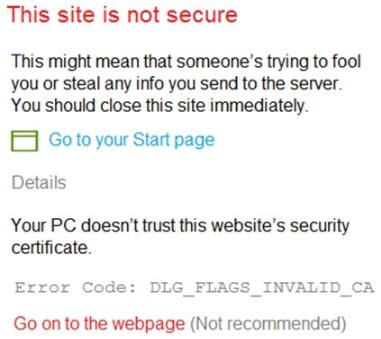
When connecting to Windows Admin Center, you receive the message shown in the following exhibit.
You need to prevent the message from appearing when you connect to Windows Admin Center.
To which certificate store should you import the certificate?
A
Client Authentication Issuers
B
Personal
C
Trusted Root Certification Authorities
Reveal answer detailsClose answer details
Correct answerC
Explanation
"Error Code: DLG_FLAGS_INVALID_CA" while login to Admin Console after enabling HTTPS in PowerCenter.
Solution To resolve this issue, add the CA-signed certificates to the "Trusted Root Certification Authorities" in the browser. After adding the certificates, restart the browser.
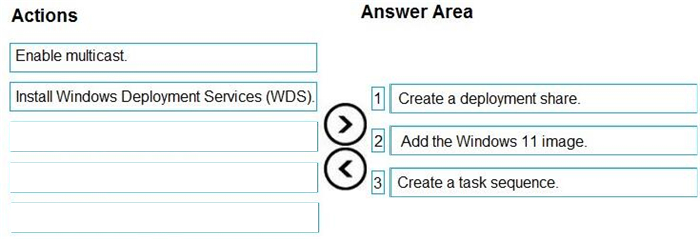
You install the Microsoft Deployment Toolkit (MDT) on a server.
You have a custom image of Windows 11.
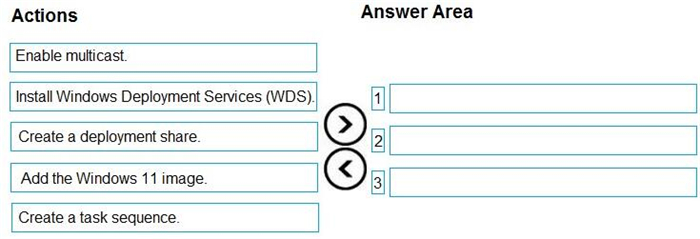
You need to deploy the image to 100 devices by using MDT.
Which three actions should you perform in sequence? To answer, move the appropriate actions from the list of actions to the answer area and arrange them in the correct order.
Reveal answer detailsClose answer details
Explanation
Step 1: Create a deployment share. Set up the MDT production deployment share.
Step 2: Add the Windows 11 image. Add a custom image. The next step is to add a reference image into the deployment share with the setup files required to successfully deploy Windows 11.
Step 3: Create a task sequence. Create the deployment task sequence.
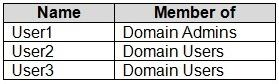
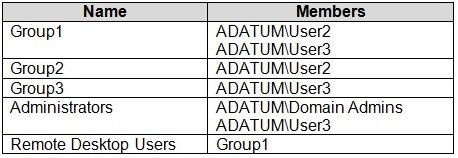
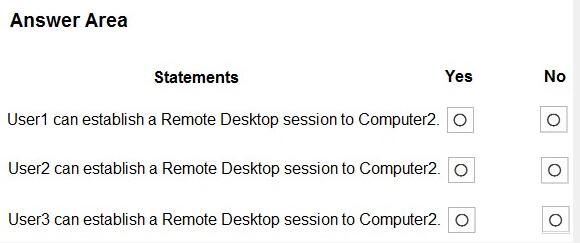
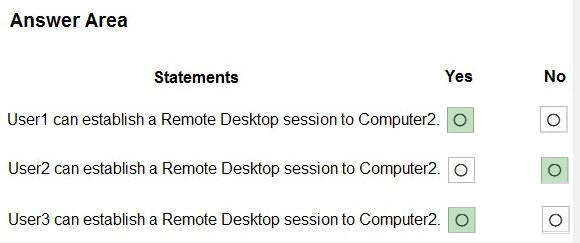
Your network contains an Active Directory domain named adatum.com. The domain contains two computers named Computer1 and Computer2 that run Windows 10. Remote Desktop is enabled on Computer2.
The domain contains the user accounts shown in the following table.
Computer2 contains the local groups shown in the following table.
The relevant user rights assignments for Computer2 are shown in the following table.
For each of the following statements, select Yes if the statement is true. Otherwise, select No.
NOTE: Each correct selection is worth one point.
Reveal answer detailsClose answer details
Question 55
Single choice
You have a Microsoft 365 subscription.
You use app protection policies to protect corporate data on Android devices.
You need to ensure that any user connecting from an Android device can only access the corporate data if they connect from an app that supports mobile application management (MAM).
What should you configure?
A
an app configuration policy
B
a Conditional Access policy
C
a device configuration profile
D
a device compliance policy
Reveal answer detailsClose answer details
Correct answerB
Explanation
Mobile Application Management (MAM) Common Conditional Access policy: Require approved client apps or app protection policy
In Conditional Access policy, you can require that an Intune app protection policy is present on the client app before access is available to the selected applications. These mobile application management (MAM) app protection policies allow you to manage and protect your organization's data within specific applications.
To apply this grant control, Conditional Access requires that the device is registered in Microsoft Entra ID, which requires using a broker app. The broker app can be either Microsoft Authenticator for iOS or Microsoft Company Portal for Android devices. If a broker app isn't installed on the device when the user attempts to authenticate, the user is redirected to the app store to install the broker app. App protection policies are generally available for iOS and Android, and in public preview for Microsoft Edge on Windows
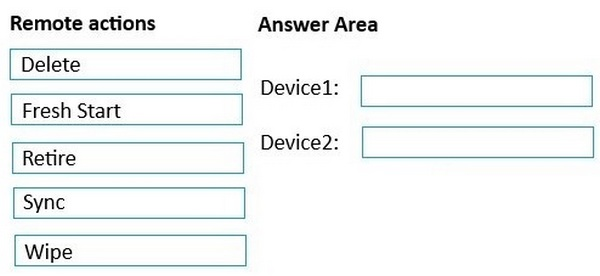
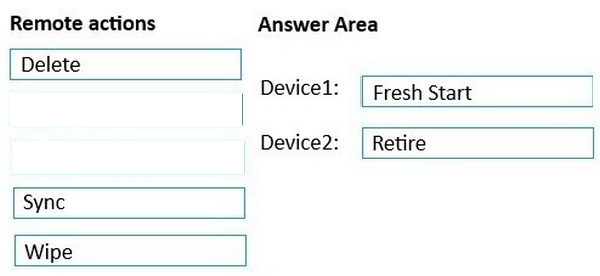
You have a Microsoft 365 subscription that contains the following devices enrolled in Microsoft Intune:
1. A corporate-owned Windows device named Device1 2. A personally-owned Android device named Device2
You need to use a remote action on each device.
The solution must meet the following requirements:
1. Repurpose Device1 by returning the device to the factory default settings. 2. Remove only corporate data from Device2 and remove the device from Intune when the device checks in.
Which remote action should you use on each device? To answer, drag the appropriate remote actions to the correct devices. Each remote action may be used once, more than once, or not at all. You may need to drag the split bar between panes or scroll to view content.
Reveal answer detailsClose answer details
Question 57
Multiple choice
You have 100 computers that run Windows 10 and connect to an Azure Log Analytics workspace.
Which three types of data can you collect from the computers by using Log Analytics? Each correct answer presents a complete solution.
You have a Microsoft 365 subscription that contains 1,000 Android devices enrolled in Microsoft Intune. You create an app configuration policy that contains the following settings:
Which two types of apps can be associated with the policy? Each correct answer presents a complete solution. NOTE: Each correct selection is worth one point.
A
Built-in Android app
B
Managed Google Play store app
C
Web link
D
Android Enterprise system app
E
Android store app
Reveal answer detailsClose answer details
Correct answersB, D
Question 59
Single choice
You need to meet the device management requirements for the developers.
What should you implement?
A
folder redirection
B
Enterprise State Roaming
C
home folders
D
known folder redirection in Microsoft OneDrive
Reveal answer detailsClose answer details
Correct answerB
Explanation
Litware identifies the following device management requirements: Ensure that Microsoft Edge Favorites are accessible from all computers to which the developers sign in.
Enterprise State Roaming allows for the synchronization of Microsoft Edge browser setting, including favorites and reading list, across devices.
You need to manage operating system updates for corporate-owned Android Enterprise devices enrolled in Microsoft Intune.
What should you use?
A
a compliance policy
B
an Android FOTA deployment
C
an Endpoint security policy
D
a configuration profile
Reveal answer detailsClose answer details
Correct answerD
Case study
Case Study 1
Overview
Contoso, Ltd. is a consulting company that has a main office in Montreal and two branch offices in Seattle and New York.
Contoso has the users and computers shown in the following table.
The company has IT, human resources (HR), legal (LEG), marketing (MKG), and finance (FIN) departments.
Contoso recently purchased a Microsoft 365 subscription.
The company is opening a new branch office in Phoenix. Most of the users in the Phoenix office will work from home.
Existing Environment
The network contains an Active Directory domain named contoso.com that is synced to Azure AD.
All member servers run Windows Server 2016. All laptops and desktop computers run Windows 10 Enterprise.
The computers are managed by using Microsoft Configuration Manager. The mobile devices are managed by using Microsoft Intune.
The naming convention for the computers is the department acronym, followed by a hyphen, and then four numbers, for example FIN-6785. All the computers are joined to the on-premises Active Directory domain.
Each department has an organizational unit (OU) that contains a child OU named Computers. Each computer account is in the Computers OU of its respective department.
Intune Configuration
The domain has the users shown in the following table.
User2 is a device enrollment manager (DEM) in Intune.
The devices enrolled in Intune are shown in the following table.
The device compliance policies in Intune are configured as shown in the following table.
The device compliance policies have the assignments shown in the following table.
The device limit restrictions in Intune are configured as shown in the following table.
Requirements
Planned changes
Contoso plans to implement the following changes: Provide new computers to the Phoenix office users. The new computers have Windows 10 Pro preinstalled and were purchased already. Implement co-management for the computers.
Technical Requirements
Contoso must meet the following technical requirements:
Ensure that the users in a group named Group4 can only access Microsoft Exchange Online from devices that are enrolled in Intune. Deploy Windows 10 Enterprise to the computers of the Phoenix office users by using Windows Autopilot. Create a provisioning package for new computers in the HR department. Block iOS devices from sending diagnostic and usage telemetry data. Use the principle of least privilege whenever possible. Enable the users in the MKG department to use App1. Pilot co-management for the IT department.
Question 62
Testlet 1Hotspot
HOTSPOT
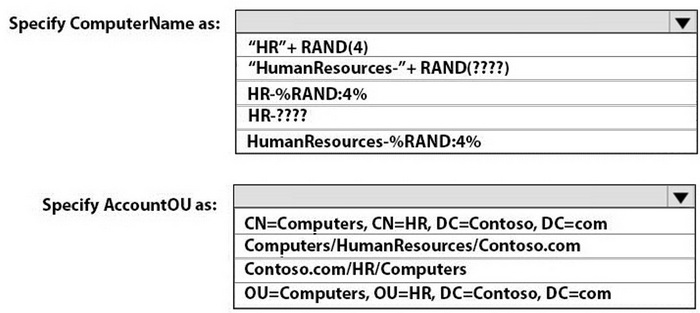
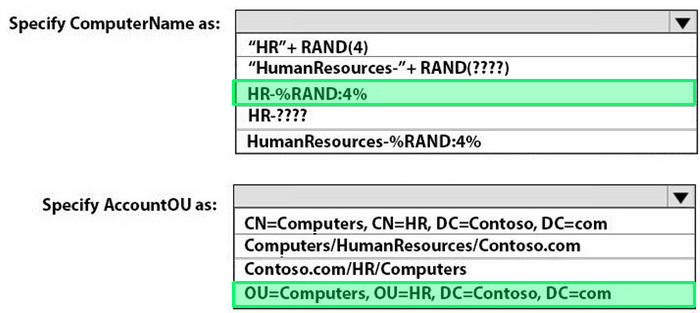
You need to meet the technical requirements for the new HR department computers.
How should you configure the provisioning package? To answer, select the appropriate options in the answer area.
NOTE: Each correct selection is worth one point.
Reveal answer detailsClose answer details
Question 63
Hotspot
HOTSPOT
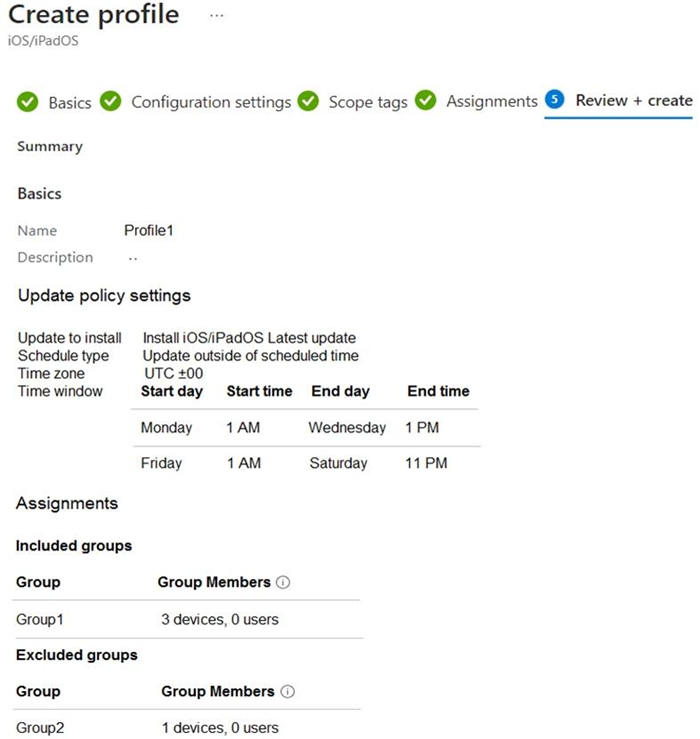
You have a Microsoft 365 E5 subscription that uses Microsoft Intune.
Devices are enrolled in Intune as shown in the following table.
The devices are the members of groups as shown in the following table.
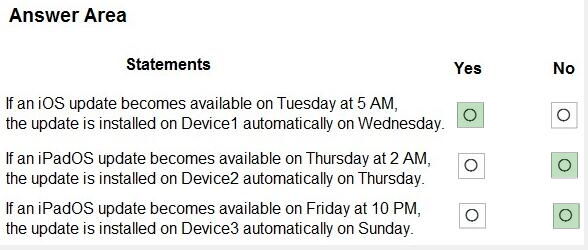
You create an iOS/iPadOS update profile as shown in the following exhibit.
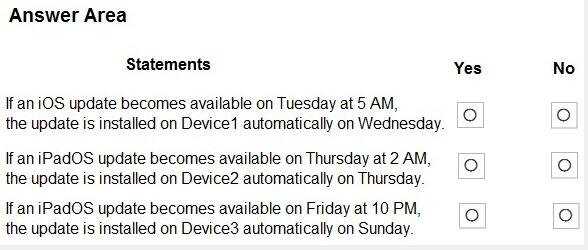
For each of the following statements, select Yes if the statement is true. Otherwise, select No.
NOTE: Each correct selection is worth one point.
Reveal answer detailsClose answer details
Question 64
Single choice
Note: This section contains one or more sets of questions with the same scenario and problem. Each question presents a unique solution to the problem. You must determine whether the solution meets the stated goals. More than one solution in the set might solve the problem. It is also possible that none of the solutions in the set solve the problem.
After you answer a question in this section, you will NOT be able to return. As a result, these questions do not appear on the Review Screen.
You have a Microsoft Entra tenant named contoso.com. You purchase an Android device named Device1.
You need to register Device1 in contoso.com.
Solution: You use Microsoft Entra Connect.
Does this meet the goal?
A
Yes
B
No
Reveal answer detailsClose answer details
Correct answerB
Explanation
Microsoft Entra Connect is a tool used to synchronize on-premises Active Directory with Microsoft Entra ID (Azure AD). It is not used for registering mobile devices. Microsoft Entra Connect does not handle device enrollment or registration for mobile devices such as Android.
Question 65
Single choice
You have a Microsoft 365 subscription that uses Microsoft Intune Suite.
You use Microsoft Intune to manage devices.
You have the devices shown in the following table.
Which devices can be changed to Windows 11 Enterprise by using subscription activation?
A
Device3 only
B
Device2 and Device3 only
C
Device1 and Device2 only
D
Device1, Device2, and Device3
Reveal answer detailsClose answer details
Correct answerB
Explanation
Subscription activation is available for qualifying devices running Windows 10 or Windows 11. You can't use subscription activation to upgrade from Windows 10 to Windows 11. https://learn.microsoft.com/en-us/windows/deployment/windows-10-subscription-activation
You have an on-premises Active Directory domain that syncs to Azure AD tenant.
The tenant contains computers that run Windows 10. The computers are hybrid Azure AD joined and enrolled in Microsoft Intune. The Microsoft Office settings on the computers are configured by using a Group Policy Object (GPO).
You need to migrate the GPO to Intune.
Which three actions should you perform in sequence? To answer, move the appropriate actions from the list of actions to the answer area and arrange them in the correct order.
Correct Answer:
Explanation
Explanation/Reference:
Step 1: Create a configuration profile Create the template 1) Sign in to the Microsoft Endpoint Manager admin center. 2) Select Devices > Configuration profiles > Create profile. 3) Etc.
Step 2: Configure the Administrative Template settings. Find some settings. There are thousands of settings available in these templates.
Step 3: Assign the profile. The template is created, but may not be doing anything yet. Be sure to assign the template (also called a profile) and monitor its status.
You have a computer named Computer1 that runs Windows 11.
A user named User1 plans to use Remote Desktop to connect to Computer1.
You need to ensure that the device of User1 is authenticated before the Remote Desktop connection is established and the sign in page appears.
What should you do on Computer1?
A.
Turn on Reputation-based protection
B.
Enable Network Level Authentication (NLA)
C.
Turn on Network Discovery
D.
Configure the Remote Desktop Configuration service
Correct Answer: B
Explanation
Explanation/Reference:
What is Network Level Authentication? Network level authentication is used for authenticating Remote Desktop services, such as Windows RDP, and Remote Desktop Connection (RDP Client). You might also hear it called front authentication.
What is Network Level Authentication (NLA) used for?
Before you can start a remote desktop session, the user will need to authenticate themselves - ie, prove that they are who they say they are. Using network level authentication means that a false connection can't be made, which would use up CPU and cause a strain on the resources of the network. This offers a level of security against some cyberattacks such as Denial of Service attacks, where multiple requests are made all at once towards a network, overwhelming its ability to cope. To combat this, you can turn on network level authentication to authenticate the user's credentials before starting a remote access session. If the user's credentials aren't authenticated, then the connection is simply denied.
All Windows devices are enrolled in Microsoft Intune.
You need to deploy the Remote Help app to all the devices. The solution must minimize administrative effort.
Which type of app should you deploy?
A.
Windows app (Win32)
B.
line-of-business (LOB)
C.
Microsoft 365
D.
Microsoft Store
Correct Answer: A
QUESTION 5
HOTSPOT
You have a Microsoft 365 E5 subscription that contains the devices shown in the following table.
You need to create two dynamic device groups named Group1 and Group2. The solution must meet the following requirements:
1. Group1 must contain Device1 and Device2 only. 2. Group2 must contain Device1 and Device3 only.
Which device membership rule should you configure for each group? To answer, select the appropriate options in the answer area. NOTE: Each correct selection is worth one point.
Correct Answer:
QUESTION 6
HOTSPOT
You have an Azure AD tenant that contains the users shown in the following table.
You have the devices shown in the following table.
You have a Conditional Access policy named CAPolicy1 that has the following settings:
Assignments Users or workload identities: User 1. User1 Cloud apps or actions: Office 365 Exchange Online Conditions: Device platforms: Windows, iOS
Access controls Grant Require multi-factor authentication
You have a Conditional Access policy named CAPolicy2 that has the following settings:
Assignments Users or workload identities: Used, User2 Cloud apps or actions: Office 365 Exch Conditions
Device platforms: Android, iOS
Filter for devices
Device matching the rule: Exclude filtered devices from policy
Rule syntax: device. displayName-contains "1"
Access controls
Grant Block access
For each of the following statements, select Yes if the statement is true. Otherwise, select No.
Correct Answer:
QUESTION 7
You have a Microsoft 365 E5 subscription.
You use Microsoft Intune to manage all devices.
You need to prepare a Win32 app named App1.exe for deployment.
What should you do first?
A.
From the Microsoft Intune admin center, create an app configuration policy.
B.
Change App1.exe to the INTUNEWIN format.
C.
From the Microsoft 365 Apps admin center, create a deployment configuration.
D.
Upload App1.exe to Azure Blob Storage.
Correct Answer: B
QUESTION 8
You have a Microsoft 365 subscription that uses Microsoft Intune Suite.
You use Microsoft Intune to manage devices.
Auto-enrollment in Intune is configured.
You have 100 Windows 11 devices in a workgroup.
You need to connect the devices to the corporate wireless network and enroll 100 new Windows 11 devices in Intune.
What should you use?
A.
a provisioning package
B.
a Group Policy Object (GPO)
C.
mobile device management (MDM) automatic enrollment
D.
a device configuration policy
Correct Answer: A
QUESTION 9
DRAG DROP
You have a computer that runs Windows 10 and contains two local users named User1 and User2.
You need to ensure that the users can perform the following actions:
User1 must be able to adjust the date and time. User2 must be able to clear Windows logs.
The solution must use the principle of least privilege.
To which group should you add each user? To answer, drag the appropriate groups to the correct users. Each group may be used once, more than once, or not at all. You may need to drag the split bar between panes or scroll to view content.
NOTE: Each correct selection is worth one point.
Correct Answer:
QUESTION 10
A user has a computer that runs Windows 10. When the user connects the computer to the corporate network, the user cannot access the internal corporate servers. The user can access servers on the Internet. You run the ipconfig command and receive the following output.
You send a ping request and successfully ping the default gateway, the DNS servers, and the DHCP server.
Which configuration on the computer causes the issue?
A.
the DNS servers
B.
the IPv4 address
C.
the subnet mask
D.
the default gateway address
Correct Answer: A
QUESTION 11
You have a Microsoft 365 E5 subscription and 100 unmanaged iPad devices.
You need to deploy a specific iOS update to the devices. Users must be prevented from manually installing a more recent version of iOS.
Which two actions should you perform? Each correct answer presents part of the solution.
NOTE: Each correct selection is worth one point.
A.
Create a device configuration profile.
B.
Enroll the devices in Microsoft Intune by using the Intune Company Portal.
C.
Create a compliance policy.
D.
Create an iOS app provisioning profile.
E.
Enroll the devices in Microsoft Intune by using Apple Business Manager.
You have a Microsoft 365 subscription that contains devices enrolled in Microsoft Intune as shown in the following table.
On which devices can you use Device query?
A.
Device1 only
B.
Device1 and Device2 only
C.
Device1 and Device3 only
D.
Device1, Device2, and Device3
Correct Answer: A
Explanation
Explanation/Reference:
The Device query feature in Microsoft Intune allows querying for specific device details, such as installed software and patch levels. This feature is available for Microsoft Entra joined devices, which in this case is Device1 (Windows 11). Devices that are only Microsoft Entra registered (such as Device2 and Device3) do not support the full range of device querying features available for fully joined devices.
QUESTION 13
HOTSPOT
You have a Microsoft 365 subscription.
You have 25 Microsoft Surface Hub devices that you plan to manage by using Microsoft Intune.
You need to configure the devices to meet the following requirements:
1. Enable Windows Hello for Business.
2. Configure Microsoft Defender SmartScreen to block users from running unverified files.
Which profile type template should you use for each requirement? To answer, select the appropriate options in the answer area.
NOTE: Each correct selection is worth one point.
Correct Answer:
QUESTION 14
You have a Microsoft 365 subscription that contains Windows 11 devices enrolled in Microsoft Intune.
You need to use Device query to identify whether a critical security patch was installed on a device.
Which table should you target?
A.
WindowsQfe
B.
WindowsRegistry
C.
FileInfo
D.
OsVersion
E.
SystemInfo
Correct Answer: A
Explanation
Explanation/Reference:
The WindowsQfe (Quick Fix Engineering) table contains information about updates, hotfixes, and security patches installed on a Windows device. To determine whether a critical security patch has been installed, this is the appropriate table to query, as it provides details on all the installed updates.
QUESTION 15
HOTSPOT
You have a Microsoft 365 E5 tenant that contains Windows devices enrolled in Microsoft Intune as shown in the following table.
You create an Endpoint Privilege Management (EPM) elevation settings policy named ElevationSettmgsl that has the following settings:
1. Endpoint Privilege Management: Enabled 2. Default elevation response: Require user confirmation 3. Validation: Business justification
Assignments: Group1 Each device contains a file named File1.exe that can be run only by an administrator. You create an EPM elevation rules policy named ElevattonRules1 that has the following settings:
For each of the following statements, select Yes if the statement is true. Otherwise, select
NOTE: Each correct selection is worth one point.
Correct Answer:
QUESTION 16
HOTSPOT
You have a Microsoft Entra tenant that contains the devices shown in the following table.
The tenant contains the groups shown in the following table.
You create a Windows Autopilot deployment profile as shown in the Deployment Profile exhibit. (Click the
Deployment Profile tab.)
For each of the following statements, select Yes if the statement is true. Otherwise, select No.
NOTE: Each correct selection is worth one point.
Correct Answer:
QUESTION 17
You have a Microsoft 365 E5 subscription that contains the groups shown in the following table.
You create a Conditional Access policy named CAPolicy1 that will block access to Microsoft Exchange Online from iOS devices. You assign CAPolicy1 to Group1.
You discover that User1 can still connect to Exchange Online from an iOS device.
You need to ensure that CAPolicy1 is enforced.
What should you do?
A.
Configure a new terms of use (TOU).
B.
Assign CAPolicy1 to Group2.
C.
Enable CAPolicy1
D.
Add a condition in CAPolicy1 to filter for devices.
Correct Answer: C
QUESTION 18
HOTSPOT
You need to meet the technical requirements for Windows AutoPilot.
Which two settings should you configure from the Azure Active Directory blade? To answer, select the appropriate settings in the answer area.
You have a Microsoft 365 E5 subscription that contains the security groups shown in the following table.
The subscription contains devices that run Windows 11, version 21H2 as shown in the following table.
You have a feature update deployment profile named Deployment1 as shown in the following table.
For each of the following statements, select Yes if the statement is true. Otherwise, select No.
NOTE: Each correct selection is worth one point.
Correct Answer:
QUESTION 20
HOTSPOT
You have a Microsoft 365 E5 subscription that contains a computer named Computer1 that runs Windows 11. Computer1 is enrolled in Microsoft Intune.
You need to deploy an app named App1 to Computer1. The App1 installation will use multiple files.
What should you use to package App1, and which file format will be used? To answer, select the appropriate options in the answer area.
NOTE: Each correct selection is worth one point.
Correct Answer:
Explanation
Explanation/Reference:
Box 1: Win32 Content Prep Tool Use:
In Microsoft Intune, there isn't a direct way to deploy .exe files. Instead, you need to package the .exe file using one of the supported formats, such as .intunewin or .msi, before deploying it. Here are two common methods to deploy .exe files via Intune:
Wrap the .exe file in a .intunewin package:
* Create an application package by using the Microsoft Win32 Content Prep Tool (IntuneWinAppUtil.exe). This tool allows you to convert a .exe file into a .intunewin package.
* Download the IntuneWinAppUtil.exe tool from the Microsoft Download Center. Open a command prompt and run the following command to convert the .exe file into a .intunewin package:
* IntuneWinAppUtil.exe -c <path_to_exe_file> -s <path_to_setup_file> -o <output_path> Replace <path_to_exe_file> with the path to the .exe file, <path_to_setup_file> with the path to the setup file or installation script, and <output_path> with the desired output folder for the .intunewin package.
Box 2: . intunewin File format:
Does Intune support .exe files? In Microsoft Intune, there isn't a direct way to deploy .exe files. Instead, you need to package the .exe file using one of the supported formats, such as . intunewin or . msi, before deploying it.
You have an Azure AD tenant named contoso.com that contains the users shown in the following table.
For contoso.com, the Mobility (MDM and MAM) settings have the following configurations:
MDM user scope: Group1 MAM user scope: Group2
You purchase the devices shown in the following table:
For each of the following statements, select Yes if the statement is true. Otherwise, select No.
Correct Answer:
QUESTION 26
You are creating a device configuration profile in Microsoft Intune.
You need to configure specific OMA-URI settings in the profile.
Which profile type template should you use?
A.
Device restrictions (Windows 10 Team)
B.
Identity protection
C.
Custom
D.
Device restrictions
Correct Answer: C
Explanation
Explanation/Reference:
Windows client custom profiles use Open Mobile Alliance Uniform Resource Identifier (OMA-URI) settings to configure different features. These settings are typically used by mobile device manufacturers to control features on the device.
You have a Microsoft 365 subscription that contains the devices shown in the following table.
All the devices will be reimaged and licensed by using subscription activation.
The devices are assigned to the users shown in the following table.
For each of the following statements, select Yes if the statement is true. Otherwise, select No.
NOTE: Each correct selection is worth one point.
Correct Answer:
Explanation
Explanation/Reference:
Box 1: No Device1 has 14 GB RAM, 256 GB storage, and TPM version 1.2.
TPM 2.0 is required to run Windows 11, as an important building block for security-related features. TPM 2.0 is used in Windows 11 for a number of features, including Windows Hello for identity protection and BitLocker for data protection.
Note: Since July 28, 2016, all new device models, lines, or series (or if you're updating the hardware configuration of an existing model, line, or series with a major update, such as CPU, graphic cards) must implement and enable by default TPM 2.0 (details in section 3.7 of the Minimum hardware requirements page). The requirement to enable TPM 2.0 only applies to the manufacturing of new devices.
Box 2: No Device2 has 4 GB RAM, 64 GB storage, and TPM version 2.0. This is fine. At least 4 GB is required. At least 64 GB storage is required.
Device2 is assigned to User2. There is a Microsoft 365 E3 license for this assignment. Microsoft 365 E3 is for Windows 11 Pro.
Box 3: Yes Device3 meets the Windows 11 requirements. There is no Windows 11 license for Device3.
You need to download a report that lists all the devices that are NOT enrolled in Microsoft Intune and are assigned an app protection policy.
What should you select in the Microsoft Endpoint Manager admin center?
A.
Apps. and then App protection policies
B.
Apps. and then Monitor
C.
Devices, and then Monitor
D.
Reports, and the Device compliance
Correct Answer: B
Explanation
Explanation/Reference:
You can check if an App Protection policy is assigned and verify if a device is enrolled in Intune. It's the only option that can confirm both on a single dashboard. You need to modify the columns but that's expected if you're looking for a granular report such as this. View the App protection status report
Sign in to the Microsoft Intune admin center. Select Apps > Monitor > App protection status. https://learn.microsoft.com/en-us/mem/intune/apps/app-protection-policies-monitor
QUESTION 30
Your company uses Microsoft Intune to manage devices.
You need to ensure that only Android devices that use Android work profiles can enroll in Intune.
Which two configurations should you perform in the device enrollment restrictions? Each correct answer presents part of the solution.
NOTE: Each correct selection is worth one point.
A.
From Platform Settings, set Android device administrator Personally Owned to Block.
B.
From Platform Settings, set Android Enterprise (work profile) to Allow.
C.
From Platform Settings, set Android device administrator Personally Owned to Allow.
D.
From Platform Settings, set Android device administrator to Block.
Correct Answer: BD
Explanation
Explanation/Reference:
Set up enrollment of Android Enterprise personally-owned work profile devices Set up enrollment for bring-your-own-device (BYOD) and personal device scenarios using the Android Enterprise personally-owned work profile management solution. During enrollment, a work profile is created on the device to house work apps and work data. The work profile can be managed by Microsoft Intune policies. Personal apps and data stay separate in another part of the device and remain unaffected by Intune.
Set up enrollment Complete these steps to set up enrollment for Android Enterprise devices in BYOD scenarios.
1. Sign in to the Microsoft Intune admin center.
2. Go to Devices > Enrollment device platform restrictions to set up enrollment restrictions. By default, Android Enterprise work profile is marked as allowed for personal devices enrolling in Intune. You can allow or block enrollment in device platform restrictions. Your options:
Block: Personal devices that enroll will use the Android device administrator management solution, unless device administrator enrollment is also blocked.
Allow (set by default): Personal devices that support the work profile management solution will enroll with a work profile. Android devices that don't support Android Enterprise are enrolled using the Android device administrator solution, unless device administrator enrollment is blocked.
Any device that supports Android Enterprise personal work profiles also supports the Android device administrator management solution, so if you don't want Android device administrator to be a part of enrollments, make sure to block the platform.
2. Enter the following configurations: 2a. Select Windows for OS 2b. Select Sync for Device action
3. On the Devices page, select from 1 to 100 devices. Select Next. 4. On the Review + create page, ensure your settings are correct, and select Create.
Note: Intune service, Use bulk device actions You can use bulk device actions for the following remote actions:
Autopilot reset Collect diagnostics Custom notifications Delete Rename Restart Retire Sync Wipe Update cellular data plan
You have a Microsoft Deployment Toolkit (MDT) server named MDT1.
When computers start from the LiteTouchPE_x64.iso image and connect to MDT1, the welcome screen appears as shown in the following exhibit.
You need to prevent the welcome screen from appearing when the computers connect to MDT1.
Which three actions should you perform in sequence? To answer, move the appropriate actions from the list of actions to the answer area and arrange them in the correct order.
Correct Answer:
Explanation
Explanation/Reference:
Step 1: Modify the CustomSettings.ini file CustomSettings.ini (CS) may be edited to include information that you wish to take into account prior to beginning the deployment process-such as data that will exist as variables that can be called upon as needed. This is extremely useful when working with multiple sites or when you want certain settings to apply to desktops, while mobile devices receive a different set of settings.
Example of line included: SkipBDDWelcome=NO
Step 2: Modify the task sequence Create the deployment task sequence, example: 1. Using the Deployment Workbench, right-click Task Sequences under the MDT Production node, select New Folder and create a folder with the name: Windows 10.
2. Right-click the Windows 10 folder created in the previous step, and then select New Task Sequence.
Use the following settings for the New Task Sequence Wizard:
Task sequence ID: W10-X64-001 Task sequence name: Windows 10 Enterprise x64 Custom Image Etc.
Step 3: Update the deployment share Configure the MDT production deployment share, example:
1. On SRV1, open an elevated Windows PowerShell prompt and enter the following commands:
copy-item "C:\Program Files\Microsoft Deployment Toolkit\Templates\Bootstrap.ini" C:\MDTProd\Control \Bootstrap.ini -Force copy-item "C:\Program Files\Microsoft Deployment Toolkit\Templates\CustomSettings.ini" C:\MDTProd \Control\CustomSettings.ini -Force In the Deployment Workbench console on SRV1, right-click the MDT Production deployment share and then select Properties.
Select the Rules tab and replace the rules with the following text (don't select OK yet):
You have computers that run Windows 10 and are managed by using Microsoft Intune.
Users store their files in a folder named D:\Folder1.
You need to ensure that only a trusted list of applications is granted write access to D:\Folder1.
What should you configure in the device configuration profile?
A.
Microsoft Defender Exploit Guard
B.
Microsoft Defender Application Guard
C.
Microsoft Defender SmartScreen
D.
Microsoft Defender Application Control
Correct Answer: A
Explanation
Explanation/Reference:
The four components of Windows Defender Exploit Guard are: 1. Controlled folder access: Protects sensitive data from ransomware by blocking untrusted processes from accessing your protected folders 2. Attack Surface Reduction (ASR) 3. Exploit protection 4. Network protection
You have a Microsoft 365 E5 subscription and 25 Apple iPads.
You need to enroll the iPads in Microsoft Intune by using the Apple Configurator enrollment method.
What should you do first?
A.
Configure an Apply MDM push certificate.
B.
Add your user account as a device enrollment manager (DEM).
C.
Modify the enrollment restrictions.
D.
Upload a file that has the device identifiers for each iPad.
Correct Answer: A
Explanation
Explanation/Reference:
Set up iOS/iPadOS device enrollment with Apple Configurator
Prerequisites Physical access to iOS/iPadOS devices Set MDM authority An Apple MDM push certificate Device serial numbers (Setup Assistant enrollment only) USB connection cables macOS computer running Apple Configurator 2.0
Note: Upload and renew your Apple MDM push certificates in Microsoft Intune. An Apple MDM Push certificate is required to manage iOS/iPadOS and macOS devices in Microsoft Intune, and enables devices to enroll via:
The Intune Company Portal app. Apple bulk enrollment methods, such as the Device Enrollment Program, Apple School Manager, and Apple Configurator. Certificates must be renewed annually.
You have a Microsoft Entra tenant that contains the devices shown in the following table.
Which devices can be Microsoft Entra joined, and which devices can be Microsoft Entra registered? To answer, select the appropriate options in the answer area.
NOTE: Each correct selection is worth one point.
Correct Answer:
Explanation
Explanation/Reference:
Box 1: Device1 and Device2 only Azure Entra joined
Review supported devices Hybrid Azure AD join supports a broad range of Windows devices. Because the configuration for devices running older versions of Windows requires other steps, the supported devices are grouped into two categories:
1. Windows current devices 2. Windows 11 3. Windows 10 4. Windows Server 2016 5. Windows Server 2019
Box 2: Device, Device2, Device3, and Device4 Registered in contoso.com
Azure Entra registered devices The goal of Azure AD registered - also known as Workplace joined - devices is to provide your users with support for bring your own device (BYOD) or mobile device scenarios. In these scenarios, a user can access your organization's resources using a personal device.
Operating Systems: ++Windows 10 or newer, iOS, Android, macOS, Ubuntu 20.04/22.04 LTS iPAD OS uses iOS.
You create a Windows Autopilot deployment profile.
You need to configure the profile settings to meet the following requirements:
1. Automatically enroll new devices and provision system apps without requiring end-user authentication 2. Include the hardware serial number in the computer name.
Which two settings should you configure? To answer, select the appropriate settings in the answer area.
NOTE: Each correct selection is worth one point.
Correct Answer:
QUESTION 37
HOTSPOT
You have a Microsoft 365 tenant that uses Microsoft Intune to manage the devices shown in the following table.
You need to deploy a compliance solution that meets the following requirements:
1. Marks the devices as Not Compliant if they do not meet compliance policies 2. Remotely locks noncompliant devices
What is the minimum number of compliance policies required, and which devices support the remote lock action? To answer, select the appropriate options in the answer area.
NOTE: Each correct selection is worth one point.
Correct Answer:
QUESTION 38
HOTSPOT
You have an Azure AD tenant that contains the users shown in the following table.
You have devices enrolled in Microsoft Intune as shown in the following table.
From Intune, you create and send a custom notification named Notification1 to Group1.
For each of the following statements, select Yes if the statement is true. Otherwise, select No.
NOTE: Each correct selection is worth one point.
Correct Answer:
QUESTION 39
HOTSPOT
You need a new conditional access policy that has an assignment for Office 365 Exchange Online.
You need to configure the policy to meet the technical requirements for Group4.
Which two settings should you configure in the policy? To answer, select the appropriate settings in the answer area.
You have a Microsoft Entra tenant named contoso.com that contains a group named Contoso Help Desk.
You need to ensure that Contoso Help Desk is added to the local Administrators group whenever a Windows device is joined to contoso.com.
What should you do?
A.
Assign the Cloud Device Administrator role to Contoso Help Desk.
B.
Assign the Microsoft Entra Joined Device Local Administrator role to Contoso Help Desk.
C.
Configure the Enterprise State Roaming settings.
D.
Enable Microsoft Entra Local Administrator Password Solution (LAPS) for contoso.com.
Correct Answer: B
Explanation
Explanation/Reference:
The Microsoft Entra Joined Device Local Administrator role allows members of a group to be automatically added to the local Administrators group on Windows devices that are joined to the Microsoft Entra tenant. By assigning this role to the Contoso Help Desk group, you ensure that members of this group are granted local administrator privileges on all devices joined to contoso.com.
QUESTION 41
You have a Microsoft 365 subscription. All devices run Windows 10.
You need to prevent users from enrolling the devices in the Windows Insider Program.
What two configurations should you perform from the Microsoft Intune admin center? Each correct answer is a complete solution.
NOTE: Each correct selection is worth one point.
A.
a device restrictions device configuration profile
B.
an app configuration policy
C.
a Windows 10 and later security baseline
D.
a custom device configuration profile
E.
a Windows 10 and later update ring
Correct Answer: DE
Explanation
Explanation/Reference:
D: Microsoft Intune includes many built-in settings to control different features on a device. You can also create custom profiles, which are created similar to built-in profiles. Custom profiles are great when you want to use device settings and features that aren't built in to Intune. These profiles include features and settings for you to control on devices in your organization. For example, you can create a custom profile that sets the same feature for every Windows device.
E Set up Insider Preview builds using Intune 1. Log in to the Azure portal and select Intune. 2. Go to Software Updates > Windows 10 Update Rings and select + Create to make an Update Ring policy.
Add a name and select the Settings section to configure its settings.
You have a Microsoft 365 subscription and use Microsoft Intune Suite.
The subscription contains devices enrolled in Intune as shown in the following table.
Which devices support Device query?
A.
Device1 only
B.
Device2 only
C.
Device1 and Device2 only
D.
Device1, Device2, Device3, and Device4
Correct Answer: C
QUESTION 43
HOTSPOT
You have a Microsoft 365 subscription that contains two security groups named Group1 and Group2. Microsoft 365 uses Microsoft Intune Suite.
You use Microsoft Intune to manage devices.
You need to assign roles in Intune to meet the following requirements:
1. The members of Group1 must manage Intune roles and assignments. 2. The members of Group2 must assign existing apps and policies to users and devices.
The solution must follow the principle of least privilege.
Which role should you assign to each group? To answer, select the appropriate options in the answer area.
You have a Microsoft 365 subscription that includes Microsoft Intune. The subscription contains Windows 11 devices enrolled in Intune. The subscription contains three groups named Departement1, Department2, and Department3.
You need to deploy Microsoft 365 Apps to the Windows 11 devices. The solution must meet the following requirements:
1. Users in Department1 and Department2 must receive the full Microsoft 365 Apps suite, including Microsoft Project and Visio. 2. Users in Department3 must receive the full Microsoft 365 Apps suite, including Microsoft Project, but without Visio. 3. All other users must receive the full Microsoft 365 Apps suite without Microsoft Project or Visio.
What is the minimum number of deployments you should create?
A.
1
B.
2
C.
3
D.
4
Correct Answer: C
QUESTION 45
Note: This section contains one or more sets of questions with the same scenario and problem. Each question presents a unique solution to the problem. You must determine whether the solution meets the stated goals. More than one solution in the set might solve the problem. It is also possible that none of the solutions in the set solve the problem.
After you answer a question in this section, you will NOT be able to return. As a result, these questions do not appear on the Review Screen.
You have a Microsoft 365 E5 subscription. The subscription contains devices that are Microsoft Entra joined and enrolled in Microsoft Intune
You create a user named User1.
You need to ensure that User1 can rotate BitLocker recovery keys by using Intune.
Solution: From the Microsoft Entra admin center, you assign the Helpdesk Administrator role to User1.
Does this meet the goal?
A.
Yes
B.
No
Correct Answer: B
Explanation
Explanation/Reference:
Correct: From the Microsoft Intune admin center, you assign the Endpoint Security Manager role to User1. From the Microsoft Intune admin center, you assign the Help Desk Operator role to User1.
Incorrect: From the Microsoft Entra admin center, you assign the Helpdesk Administrator role to User1.
Note: Role-based access controls to manage BitLocker To manage BitLocker in Intune, an account must be assigned an Intune role-based access control (RBAC) role that includes the Remote tasks permission with the Rotate BitLockerKeys (preview) right set to Yes.
You can add this permission and right to your own custom RBAC roles or use one of the following built-in RBAC roles that include this right:
Help Desk Operator Endpoint Security Administrator
You have a Microsoft 365 E5 subscription and a computer that runs Windows 11.
You need to create a customized installation of Microsoft 365 Apps for enterprise.
Which four actions should you perform in sequence? To answer, move the appropriate cmdlets from the list of cmdlets to the answer area and arrange them in the correct order.
Correct Answer:
Explanation
Explanation/Reference:
1. Download ODT application 2. Create a configuration file (XML) 3. setup.exe /download to download the installation files 4. setup.exe /configure to deploy the application
https://learn.microsoft.com/en-us/deployoffice/deploy-microsoft-365-apps-local-source 1. Download ODT application 2. Create a configuration file (XML) 3. setup.exe /download to download the installation files 4. setup.exe /configure to deploy the application https://learn.microsoft.com/en-us/deployoffice/deploy-microsoft-365-apps-local-source https://learn.microsoft.com/en-us/deployoffice/overview-office-deployment-tool#download-the-installation- files-for-microsoft-365-apps upvoted 29 times
QUESTION 47
HOTSPOT
You have an Azure AD tenant named contoso.com.
You have the devices shown in the following table.
Which devices can be Azure AD joined, and which devices can be registered in contoso.com? To answer, select the appropriate options in the answer area.
NOTE: Each correct selection is worth one point.
Correct Answer:
Explanation
Explanation/Reference:
Azure AD join capable Devices: https://learn.microsoft.com/en-us/azure/active-directory/devices/concept-directory-join Azure AD registered Devices: https://learn.microsoft.com/en-us/azure/active-directory/devices/concept-device-registration
QUESTION 48
HOTSPOT
You have a Microsoft 365 subscription. The subscription contains 1,000 computers that run Windows 11 and are enrolled in Microsoft Intune.
You plan to create a compliance policy that has the following options enabled:
1. Require Secure Boot to be enabled on the device. 2. Require the device to be at or under the machine risk score.
Which two Compliance settings should you configure? To answer, select the appropriate settings in the answer area.
NOTE: Each correct selection is worth one point.
Correct Answer:
Explanation
Explanation/Reference:
Device health https://learn.microsoft.com/en-us/mem/intune/enrollment/windows-enrollment-status Microsoft Defender for Endpoint https://learn.microsoft.com/en-us/mem/intune/protect/compliance-policy-create-windows#microsoft-defender-for-endpoint
QUESTION 49
You are replacing 100 company-owned Windows devices.
You need to use the Microsoft Deployment Toolkit (MDT) to securely wipe and decommission the devices. The solution must meet the following requirements:
1. Back up the user state. 2. Minimize administrative effort.
Which task sequence template should you use?
A.
Standard Client Task Sequence
B.
Standard Client Replace Task Sequence
C.
Litetouch OEM Task Sequence
D.
Sysprep and Capture
Correct Answer: B
Explanation
Explanation/Reference:
Standard Client Replace task sequence. Used to run User State Migration Tool (USMT) backup and the optional full Windows Imaging (WIM) backup action. Can also be used to do a secure wipe of a machine that is going to be decommissioned.
You have a Microsoft 365 E5 subscription that contains 10 Android Enterprise devices. Each device has a corporate-owned work profile and is enrolled in Microsoft Intune.
You need to configure the devices to run a single app in kiosk mode.
Which Configuration settings should you modify in the device restrictions profile?
A.
Users and Accounts
B.
General
C.
System security
D.
Device experience
Correct Answer: D
Explanation
Explanation/Reference:
Android Enterprise device settings list to allow or restrict features on corporate-owned devices using Intune
Device experience Use these settings to configure a kiosk-style experience on your dedicated devices, or to customize the home screen experiences on your fully managed devices. You can configure devices to run one app, or run many apps. When a device is set with kiosk mode, only the apps you add are available.
Note: You can control and restrict on Android Enterprise devices owned by your organization. As part of your mobile device management (MDM) solution, use these settings to allow or disable features, run apps on dedicated devices, control security, and more.
You have a Microsoft 365 E5 subscription that includes Microsoft Intune and contains a user named Admin1.
Admin1 must use the Microsoft Intune admin center to perform the following tasks:
1. Create and assign apps and policies to users and devices by using Intune. 2. Create, assign, and delete Windows 365 Cloud PC provisioning policies.
You need to assign the required roles to Admin1. The solution must meet the following requirements:
1. Follow the principle of least privilege. 2. Minimize administrative effort.
What should you do?
A.
Assign Admin1 the Help Desk Operator role.
B.
Assign Admin1 the Cloud PC Reader role.
C.
Assign Admin1 the Cloud PC Administrator role.
D.
Create a custom Microsoft Entra role and assign the role to Admin1.
E.
Create a custom Intune role and assign the role to Admin1.
Correct Answer: E
QUESTION 52
You use Windows Admin Center to remotely administer computers that run Windows 10.
When connecting to Windows Admin Center, you receive the message shown in the following exhibit.
You need to prevent the message from appearing when you connect to Windows Admin Center.
To which certificate store should you import the certificate?
A.
Client Authentication Issuers
B.
Personal
C.
Trusted Root Certification Authorities
Correct Answer: C
Explanation
Explanation/Reference:
"Error Code: DLG_FLAGS_INVALID_CA" while login to Admin Console after enabling HTTPS in PowerCenter.
Solution To resolve this issue, add the CA-signed certificates to the "Trusted Root Certification Authorities" in the browser. After adding the certificates, restart the browser.
You install the Microsoft Deployment Toolkit (MDT) on a server.
You have a custom image of Windows 11.
You need to deploy the image to 100 devices by using MDT.
Which three actions should you perform in sequence? To answer, move the appropriate actions from the list of actions to the answer area and arrange them in the correct order.
Correct Answer:
Explanation
Explanation/Reference:
Step 1: Create a deployment share. Set up the MDT production deployment share.
Step 2: Add the Windows 11 image. Add a custom image. The next step is to add a reference image into the deployment share with the setup files required to successfully deploy Windows 11.
Step 3: Create a task sequence. Create the deployment task sequence.
Your network contains an Active Directory domain named adatum.com. The domain contains two computers named Computer1 and Computer2 that run Windows 10. Remote Desktop is enabled on Computer2.
The domain contains the user accounts shown in the following table.
Computer2 contains the local groups shown in the following table.
The relevant user rights assignments for Computer2 are shown in the following table.
For each of the following statements, select Yes if the statement is true. Otherwise, select No.
NOTE: Each correct selection is worth one point.
Correct Answer:
QUESTION 55
You have a Microsoft 365 subscription.
You use app protection policies to protect corporate data on Android devices.
You need to ensure that any user connecting from an Android device can only access the corporate data if they connect from an app that supports mobile application management (MAM).
What should you configure?
A.
an app configuration policy
B.
a Conditional Access policy
C.
a device configuration profile
D.
a device compliance policy
Correct Answer: B
Explanation
Explanation/Reference:
Mobile Application Management (MAM) Common Conditional Access policy: Require approved client apps or app protection policy
In Conditional Access policy, you can require that an Intune app protection policy is present on the client app before access is available to the selected applications. These mobile application management (MAM) app protection policies allow you to manage and protect your organization's data within specific applications.
To apply this grant control, Conditional Access requires that the device is registered in Microsoft Entra ID, which requires using a broker app. The broker app can be either Microsoft Authenticator for iOS or Microsoft Company Portal for Android devices. If a broker app isn't installed on the device when the user attempts to authenticate, the user is redirected to the app store to install the broker app. App protection policies are generally available for iOS and Android, and in public preview for Microsoft Edge on Windows
You have a Microsoft 365 subscription that contains the following devices enrolled in Microsoft Intune:
1. A corporate-owned Windows device named Device1 2. A personally-owned Android device named Device2
You need to use a remote action on each device.
The solution must meet the following requirements:
1. Repurpose Device1 by returning the device to the factory default settings. 2. Remove only corporate data from Device2 and remove the device from Intune when the device checks in.
Which remote action should you use on each device? To answer, drag the appropriate remote actions to the correct devices. Each remote action may be used once, more than once, or not at all. You may need to drag the split bar between panes or scroll to view content.
Correct Answer:
QUESTION 57
You have 100 computers that run Windows 10 and connect to an Azure Log Analytics workspace.
Which three types of data can you collect from the computers by using Log Analytics? Each correct answer presents a complete solution.
You have a Microsoft 365 subscription that contains 1,000 Android devices enrolled in Microsoft Intune. You create an app configuration policy that contains the following settings:
Which two types of apps can be associated with the policy? Each correct answer presents a complete solution. NOTE: Each correct selection is worth one point.
A.
Built-in Android app
B.
Managed Google Play store app
C.
Web link
D.
Android Enterprise system app
E.
Android store app
Correct Answer: BD
QUESTION 59
You need to meet the device management requirements for the developers.
What should you implement?
A.
folder redirection
B.
Enterprise State Roaming
C.
home folders
D.
known folder redirection in Microsoft OneDrive
Correct Answer: B
Explanation
Explanation/Reference:
Litware identifies the following device management requirements: Ensure that Microsoft Edge Favorites are accessible from all computers to which the developers sign in.
Enterprise State Roaming allows for the synchronization of Microsoft Edge browser setting, including favorites and reading list, across devices.
You need to manage operating system updates for corporate-owned Android Enterprise devices enrolled in Microsoft Intune.
What should you use?
A.
a compliance policy
B.
an Android FOTA deployment
C.
an Endpoint security policy
D.
a configuration profile
Correct Answer: D
Case Study 1
Case Study Questions
Overview
Contoso, Ltd. is a consulting company that has a main office in Montreal and two branch offices in Seattle and New York.
Contoso has the users and computers shown in the following table.
The company has IT, human resources (HR), legal (LEG), marketing (MKG), and finance (FIN) departments.
Contoso recently purchased a Microsoft 365 subscription.
The company is opening a new branch office in Phoenix. Most of the users in the Phoenix office will work from home.
Existing Environment
The network contains an Active Directory domain named contoso.com that is synced to Azure AD.
All member servers run Windows Server 2016. All laptops and desktop computers run Windows 10 Enterprise.
The computers are managed by using Microsoft Configuration Manager. The mobile devices are managed by using Microsoft Intune.
The naming convention for the computers is the department acronym, followed by a hyphen, and then four numbers, for example FIN-6785. All the computers are joined to the on-premises Active Directory domain.
Each department has an organizational unit (OU) that contains a child OU named Computers. Each computer account is in the Computers OU of its respective department.
Intune Configuration
The domain has the users shown in the following table.
User2 is a device enrollment manager (DEM) in Intune.
The devices enrolled in Intune are shown in the following table.
The device compliance policies in Intune are configured as shown in the following table.
The device compliance policies have the assignments shown in the following table.
The device limit restrictions in Intune are configured as shown in the following table.
Requirements
Planned changes
Contoso plans to implement the following changes: Provide new computers to the Phoenix office users. The new computers have Windows 10 Pro preinstalled and were purchased already. Implement co-management for the computers.
Technical Requirements
Contoso must meet the following technical requirements:
Ensure that the users in a group named Group4 can only access Microsoft Exchange Online from devices that are enrolled in Intune. Deploy Windows 10 Enterprise to the computers of the Phoenix office users by using Windows Autopilot. Create a provisioning package for new computers in the HR department. Block iOS devices from sending diagnostic and usage telemetry data. Use the principle of least privilege whenever possible. Enable the users in the MKG department to use App1. Pilot co-management for the IT department.
QUESTION 62
HOTSPOT
You need to meet the technical requirements for the new HR department computers.
How should you configure the provisioning package? To answer, select the appropriate options in the answer area.
NOTE: Each correct selection is worth one point.
Correct Answer:
QUESTION 63
HOTSPOT
You have a Microsoft 365 E5 subscription that uses Microsoft Intune.
Devices are enrolled in Intune as shown in the following table.
The devices are the members of groups as shown in the following table.
You create an iOS/iPadOS update profile as shown in the following exhibit.
For each of the following statements, select Yes if the statement is true. Otherwise, select No.
NOTE: Each correct selection is worth one point.
Correct Answer:
QUESTION 64
Note: This section contains one or more sets of questions with the same scenario and problem. Each question presents a unique solution to the problem. You must determine whether the solution meets the stated goals. More than one solution in the set might solve the problem. It is also possible that none of the solutions in the set solve the problem.
After you answer a question in this section, you will NOT be able to return. As a result, these questions do not appear on the Review Screen.
You have a Microsoft Entra tenant named contoso.com. You purchase an Android device named Device1.
You need to register Device1 in contoso.com.
Solution: You use Microsoft Entra Connect.
Does this meet the goal?
A.
Yes
B.
No
Correct Answer: B
Explanation
Explanation/Reference:
Microsoft Entra Connect is a tool used to synchronize on-premises Active Directory with Microsoft Entra ID (Azure AD). It is not used for registering mobile devices. Microsoft Entra Connect does not handle device enrollment or registration for mobile devices such as Android.
QUESTION 65
You have a Microsoft 365 subscription that uses Microsoft Intune Suite.
You use Microsoft Intune to manage devices.
You have the devices shown in the following table.
Which devices can be changed to Windows 11 Enterprise by using subscription activation?
A.
Device3 only
B.
Device2 and Device3 only
C.
Device1 and Device2 only
D.
Device1, Device2, and Device3
Correct Answer: B
Explanation
Explanation/Reference:
Subscription activation is available for qualifying devices running Windows 10 or Windows 11. You can't use subscription activation to upgrade from Windows 10 to Windows 11. https://learn.microsoft.com/en-us/windows/deployment/windows-10-subscription-activation