Preview real exam questions, verified answers and available explanations before choosing a study plan.
Case study
Case Study 1
requirements, existing environment, and problem statements. When you are ready to answer a question, click the Question button to return to the question.
Current environment
Deliveries
1. The company receives daily truckloads of products from their vendors, warehouses the products briefly, and then ships orders based on a weekly delivery cycle to each customer's store. 2. Customers have regular standing orders that are revised and finished one week prior to delivery. 3. Best for You Organics has a fleet of trucks that make deliveries according to planned routes. 4. The company also has a floating route for trucks to deliver rush orders. The route is being used more often by customers and has overwhelmed the warehouse with exception processing.
Duties
The company wants to provide greater separation of duties between activities in the office and activities in the warehouse.
The accounting team enters orders for the sales team, sends pick tickers back to the warehouse, and organizes shipping documents. The accounting team invoices the orders when they receive instructions from the warehouse that an order shipped.
Employees have expressed frustration because they need to work longer hours to accommodate the increase in sales.
The company does not use the Advanced Warehousing function.
Requirements
Salespeople
1. Salespeople must be able to manage opportunities that are converted to quotes. 2. Salespeople must be able to release orders to the warehouse to be fulfilled once a quote is final. 3. Salespeople must be trained on how to determine if inventory is available when they are completing the quote to avoid promising inventory that is not on hand because all orders are processed one week in advance of delivery.
Team responsibilities
Deliveries must be shipped daily by employees in the warehouse. The office must be responsible for completing the invoicing process.
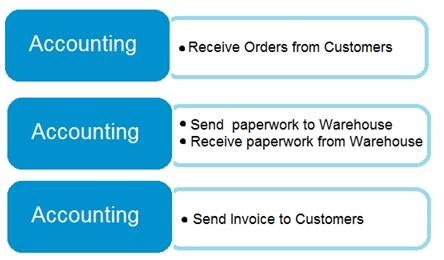
The current team responsibilities are shown in the following graphic:
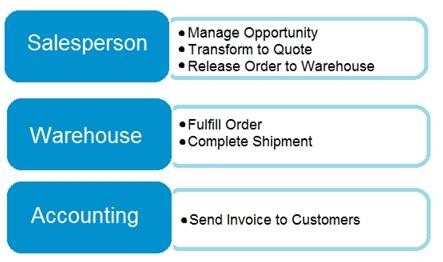
The required team responsibilities are shown in the following graphic:
Vendor management
1. The company contracts with each vendor for regular discounts at the invoice level. 2. The company requires a pre-set discount percentage to calculate automatically when the purchaser completes a purchase order. 3. The company must be able to see a copy of the completed purchase order in the system when they have new contract negotiations with their vendors.
Customer and inventory management
1. Sales invoices must be automatically emailed by the system to customers. 2. A template must be used for emails sent to customers. The template must not be altered. 3. Customers who pre-pay their invoices must not receive a copy of their invoices. 4. The company warehouses all products as Case quantities. The company has difficulty recording accurate costs for product returns. The company wants to expand their capabilities for managing returns by setting up all inventory in a quantity of Each.
Reporting
The company must be able to answer two key questions when they report financial results:
1. Which customers are buying which items? 2.
Which salespeople are selling in which regions?
When discussing customers, the company must refer to each Customer Group as follows:
1. Big Box 2. Franchise 3. Private
When discussing items, the company must refer to each Item Group as follows:
1. The company must be able to track salesperson performance within certain regions to calculate commission. 2. Each salesperson must be assigned only to a single region. 3. This commission data is currently recorded inconsistently, resulting in incorrect combinations that require manual correction. The company must have some level of automation to manage this.
Issues
Issue 1
The accounting team needs an improved process for reconciling inventory to the general ledger.
1. Posted transactions are changing financial reporting in periods that have been closed. 2. Unexpected changes in inventory cost for previous months are causing costing inaccuracies. 3. The system must restrict the adjustment of costs for closed months. 4. The new policy will be to restrict all users to posting in the current month only, with the exception of a few employees from the accounting team. 5. The calendar fiscal year for company must begin on June 1.
Issue 2
The accounting team uses a complex manual accrual process to determine the accounting impact of items received but not invoiced. The system must streamline the item accrual process.
Issue 3
The company often receives a higher quantity of produce items than what they order because vendors allow for spoilage or damage of produce in transit. The company does not want to allow over receipt on non-produce items.
Issue 4
The company has received comments from their auditors that invoices are not being properly compared to received inventory documents before they are posted. The company does not use warehouse management and always handles processes directly from the purchase order. The company always has the following documents:
1. purchase order from the procurement department 2. receiving document from the warehouse 3. electronic invoice from the vendor
Question 1
Testlet 1Drag & drop
DRAG DROP
You need to advise the company on how to process existing sales orders.
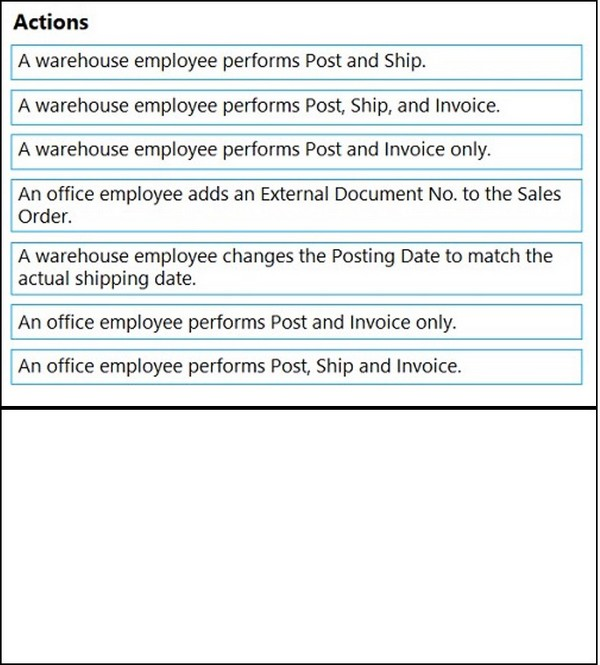
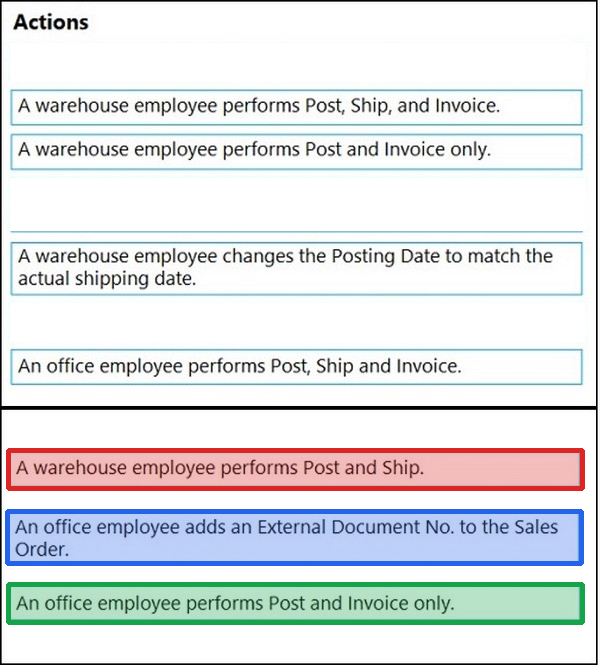
Which three actions should you recommend be performed in sequence? To answer, move the appropriate actions from the list of actions to the answer area and arrange them in the correct order.
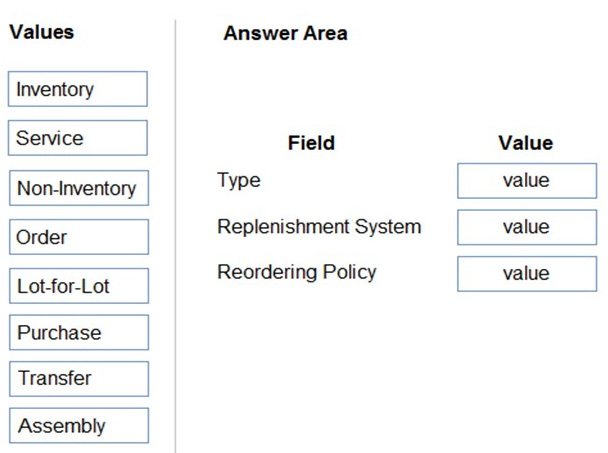
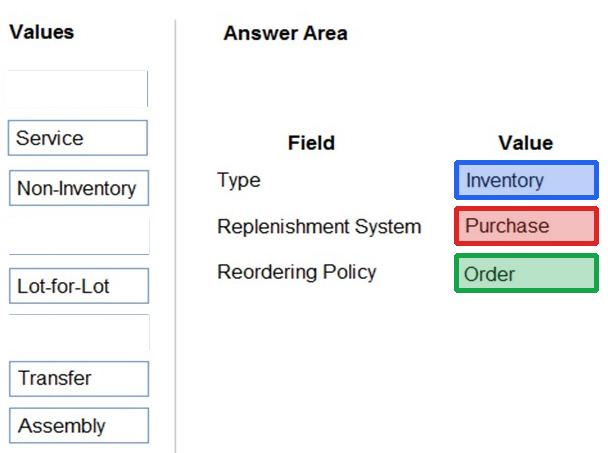
You are setting up a new item in Dynamics 365 Business Central. The item is a tangible good with an inventory asset value. The item is acquired by purchase specifically for each new instance of demand from an order.
You need to configure the Type, Replenishment System, and Reordering Policy fields on the item card to achieve the stated requirements.
How should you configure each field? To answer, drag the appropriate values to the correct fields. Each value may be used once, more than once, or not at all. You may need to drag the split bar between panes or scroll to view content.
A company is implementing Dynamics 365 Business Central.
The company must be able to assign transactions to unique and sequential numbers.
Some transactions require multiple number series that can be used interchangeably.
You need to configure number series to meet the requirements.
What should you do?
A
Define number series codes on journal templates.
B
Create relationships between number series.
C
Enable transaction tracking.
D
Set up approval workflows.
Reveal answer detailsClose answer details
Correct answerB
Question 5
Single choice
You are implementing Dynamics 365 Business Central for a company. The company provides subscription services to their customers. The subscription invoices are almost identical each month.
The company wants to set up recurring sales lines for subscription invoices.
You need to create systems for creating subscription invoices.
Solution: Create a new recurring sales line. Open the relevant customers and attach the Recurring Sales Lines code to the customer. Then, run the Create Recurring Sales Invoices batch to create the invoices.
requirements, existing environment, and problem statements. When you are ready to answer a question, click the Question button to return to the question.
Background
Wide World Importers is a family-owned importer of specialty cooking ingredients and prepackaged foods from the Mediterranean. When first established, the company's products were sold at farmers markets, All sales were on a cash-only basis.
Products are now sold locally to restaurant owners and chefs in a family-owned building with a warehouse. Products are no longer sold at farmers markets. Cash and carry sales generate most of the revenue for the company.
The founder of Wide World Importers is turning over control of the company to the younger generation in the family. These family members want to use Dynamics 365 Business Central to support their efforts to grow and diversify the business. They recently started to build a new line of business selling and shipping products to specialty retailers outside their local area through a network of brokers and representatives.
The company uses QuickBooks, but the family is concerned that QuickBooks is not capable of supporting their new business model.
There are 30 full-time and part-time employees who work in sales, purchasing, shipping, customer service, accounts payable, accounts receivable, and finance. The family does not plan to hire additional personnel to support the new line of business.
Current environment
Cash and carry sales
1. When a customer makes a purchase at the company's cash and carry desk, the sale is handwritten on a three-part form. 2. The cash and carry associate retrieves the items listed on the order from the warehouse. 3. Special prices and discounts are used to move products that will expire soon or that are overstocked. 4. Cash is accepted for payments. 5. The cash drawer is balanced at the end of every day. A deposit is created for the cash and given to the accountant. 6. One-line sales invoices are saved in QuickBooks for each cash and carry sale to a miscellaneous customer. 7. Customer details for cash and carry sales are not kept in QuickBooks.
Brokered sales orders
1. Brokered sales are called in to customer service by the brokers and sometimes directly by customers. The sales are entered into QuickBooks. 2. Because inventory is not tracked in QuickBooks, the generic item Brokered Item is used. 3. Two copies of the packing slip and printed from QuickBooks and sent to the warehouse.
Order picking
1. The warehouse manager provides a container and the two copies of the packing slip to a picker. 2. Items that are out of stock are marked on both copies of the packing slip. 3. The shipping amount is determined and written on the packing slips. 4. One copy of the completed packing slip is placed in a basket for customer service. 5. Completed orders are boxed up with a copy of the invoice and shipped to customers.
Order invoicing
1. Throughout the day, the customer service manager collects the packing slip copies and updates the invoices in QuickBooks. 2. The customer service manager adds a line for shipping with the amount provided by the packer. 3. The customer service manager prints a copy of the final invoice and sends it to the warehouse. 4. The accountant uses Microsoft Word to create weekly invoices for all shipments invoiced in QuickBooks during the week for some customers.
Deposits
1. The accountant receives the deposit bag from the cash and carry sales desk at the end of every day. 2. Receipts are recorded in QuickBooks against cash and carry and brokered sales based on the deposit slips.
Brokers commission
1. Brokers fees are paid as a percentage of sales. 2. A Sales by Product/Service Summary report is run in QuickBooks every month for Brokered Item to calculate what is owned.
Requirements
Customers
1. Users with permission must be able to quickly add new customers. 2. The original source of all customers in the accounting system must be identified to be from cash and carry or brokered sales. 3. The company needs to keep a record of special price promotions given to specific customers. 4. Customers must be identified with a unique general business posting group so that the correct freight G/L account is used in sales transactions.
Sales
1. The customer source must be used to identify the business line, and the customer source must be indicated on every sales transactions. 2. Customer service and cash and carry desk associates must be able to enter sales into Dynamics 365 Business Central by customer. 3. Excess paper must be eliminated, and paper management must be reduced. 4. If a customer is not already listed in the system, a cash and carry associate or customer service associate must be able to quickly add the new customer in the process of recording the first sale. 5. A point-of-sale system is not needed, but users must be able to record which items are purchased by customers, accept and record their payment, and print receipts indicating paid in full.
Items
1. The sales manager and warehouse manager must be able to set a specific timeframe for special promotion discounts on items. 2. For special promotions, discounts must be consistent for all items in a product line using a single discount calculation. 3. Special pricing may be given to a retail chain or buying group. This pricing must be automatically applied when an order is taken for any of these customers. The original price must be recorded with each sale. 4. Customers must always be charged the lowest amount for an item at the time of the sale. For example, an overstocked olive oil has a regular price of $20 per unit. Customers in a buying group for restaurants can buy it for $18 per unit. There is an autumn promotion price for the item at $19 per unit. However, on a specific day only, there is an overstock special at a 15 percent discount off the regular price.
Sales invoices
Warehouse workers must be able to indicate the following in the system for each order: 1. the items picked 2. the shipping charges 3. notifications, if any, that customer service needs to provide to the customer Items sold at a discount must show the original price, discount, and net amount on each line of the invoice. Invoices must be posted at the cash and carry desk at the time of sale. For orders, accounting must post invoices and send them to customers. Warehouse employees must be able to indicate what has been shipped on an order. They will use the G/L account for shipping charges. They need to use the correct G/L account for sales versus cost through proper assignment of sales and purchase accounts in the general posting setup. Some of the brokered customers require one invoice per week regardless of the number of orders or shipments.
Accounts
1. Payment terms vary by customer. 2. The amount paid to brokers must be calculated from sales after invoice discounts. 3. Broker vendors must be easily identifiable from other vendors in lists 4. Commission paid on sales not collected within 120 days must be deducted from brokers' next compensation payment.
Reporting
Wide World Importers requires reporting on the following:
1. the overall profitability of each line of business at any time for any given period 2. the cost of outbound shipping in the overall profitability of sales by business line in all related reports 3. freight sales and cost by account in the trial balance 4. the cost of brokers' compensation in reporting the overall profitability of sales by business line 5. the effect of item discount promotions in financial statements.
Issues
Pricing
1. Spreadsheets are used to maintain special item pricing and discounts. The only source of product line discount information is a whiteboard in the warehouse. The price charged is frequently incorrect. 2. Customers complain when they think they think they have not received the best price available. Promotions are sometimes applied in error after a special pricing event ends, for example, when discounts are offered temporarily to reduce overstock. 3. Management cannot see original versus actual price on all sales. Discounts given by brokers requires spreadsheets and comparison between price list and price on sales invoice. Management needs to be able to quickly see the discount
given on each sale.
Payment terms
1. Agreed-upon payment terms are frequently entered incorrectly on orders, causing cashflow issues. 2. Invoices already paid in full exist on the sales aging reports. The frequent cause of this issue is that sales from the cash and carry desk are not indicated as cash sales and are not posted as paid in full. 3. Some buying groups require that all invoices sent during a month be due on the 20th of the following month.
Invoicing
1. Paperwork is frequently misplaced between the warehouse, customer service, and accounting. 2. Invoices that are posted in the accounting system based on shipments and invoices that are sent to customers weekly do not match due to errors transferring the data from one document to another. 3. Users are selecting the incorrect freight type (expense versus sales) on purchase and sales transactions, making it difficult to reconcile freight costs. 4. Sales placed from the cash and carry desk by customers originally acquired through a broker are not being recognized with the correct customer source. Reporting by business line is inaccurate.
Accounts
1. Users often forget which fields to use to enter information when they add new customers to QuickBooks. This results in errors and inconsistencies in data and affects sales reporting. Confidence in sales reporting accuracy is low. 2. Adding new brokers is a different process than adding other purchase vendors. Users often forget which fields to select and how to correctly assign the vendor number to add new brokers. 3. Manual entries to certain G/L accounts cause reconciliation issues.
Question 6
Testlet 2Multiple choice
You need to configure the new customer creation process.
Which two areas must you configure? Each correct answer presents part of the solution
requirements, existing environment, and problem statements. When you are ready to answer a question, click the Question button to return to the question.
Current environment
Deliveries
1. The company receives daily truckloads of products from their vendors, warehouses the products briefly, and then ships orders based on a weekly delivery cycle to each customer's store. 2. Customers have regular standing orders that are revised and finished one week prior to delivery. 3. Best for You Organics has a fleet of trucks that make deliveries according to planned routes. 4. The company also has a floating route for trucks to deliver rush orders. The route is being used more often by customers and has overwhelmed the warehouse with exception processing.
Duties
The company wants to provide greater separation of duties between activities in the office and activities in the warehouse.
The accounting team enters orders for the sales team, sends pick tickers back to the warehouse, and organizes shipping documents. The accounting team invoices the orders when they receive instructions from the warehouse that an order shipped.
Employees have expressed frustration because they need to work longer hours to accommodate the increase in sales.
The company does not use the Advanced Warehousing function.
Requirements
Salespeople
1. Salespeople must be able to manage opportunities that are converted to quotes. 2. Salespeople must be able to release orders to the warehouse to be fulfilled once a quote is final. 3. Salespeople must be trained on how to determine if inventory is available when they are completing the quote to avoid promising inventory that is not on hand because all orders are processed one week in advance of delivery.
Team responsibilities
Deliveries must be shipped daily by employees in the warehouse. The office must be responsible for completing the invoicing process.
The current team responsibilities are shown in the following graphic:
The required team responsibilities are shown in the following graphic:
Vendor management
1. The company contracts with each vendor for regular discounts at the invoice level. 2. The company requires a pre-set discount percentage to calculate automatically when the purchaser completes a purchase order. 3. The company must be able to see a copy of the completed purchase order in the system when they have new contract negotiations with their vendors.
Customer and inventory management
1. Sales invoices must be automatically emailed by the system to customers. 2. A template must be used for emails sent to customers. The template must not be altered. 3. Customers who pre-pay their invoices must not receive a copy of their invoices. 4. The company warehouses all products as Case quantities. The company has difficulty recording accurate costs for product returns. The company wants to expand their capabilities for managing returns by setting up all inventory in a quantity of Each.
Reporting
The company must be able to answer two key questions when they report financial results:
1. Which customers are buying which items? 2.
Which salespeople are selling in which regions?
When discussing customers, the company must refer to each Customer Group as follows:
1. Big Box 2. Franchise 3. Private
When discussing items, the company must refer to each Item Group as follows:
1. The company must be able to track salesperson performance within certain regions to calculate commission. 2. Each salesperson must be assigned only to a single region. 3. This commission data is currently recorded inconsistently, resulting in incorrect combinations that require manual correction. The company must have some level of automation to manage this.
Issues
Issue 1
The accounting team needs an improved process for reconciling inventory to the general ledger.
1. Posted transactions are changing financial reporting in periods that have been closed. 2. Unexpected changes in inventory cost for previous months are causing costing inaccuracies. 3. The system must restrict the adjustment of costs for closed months. 4. The new policy will be to restrict all users to posting in the current month only, with the exception of a few employees from the accounting team. 5. The calendar fiscal year for company must begin on June 1.
Issue 2
The accounting team uses a complex manual accrual process to determine the accounting impact of items received but not invoiced. The system must streamline the item accrual process.
Issue 3
The company often receives a higher quantity of produce items than what they order because vendors allow for spoilage or damage of produce in transit. The company does not want to allow over receipt on non-produce items.
Issue 4
The company has received comments from their auditors that invoices are not being properly compared to received inventory documents before they are posted. The company does not use warehouse management and always handles processes directly from the purchase order. The company always has the following documents:
1. purchase order from the procurement department 2. receiving document from the warehouse 3. electronic invoice from the vendor
Question 7
Testlet 1Hotspot
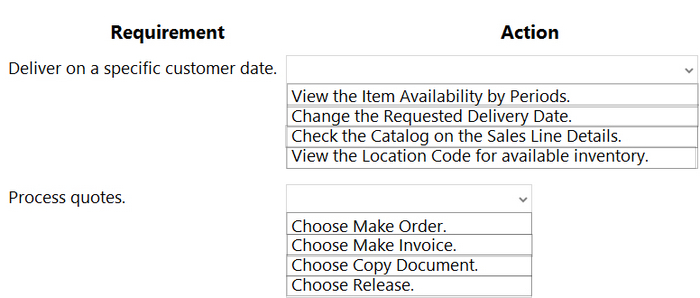
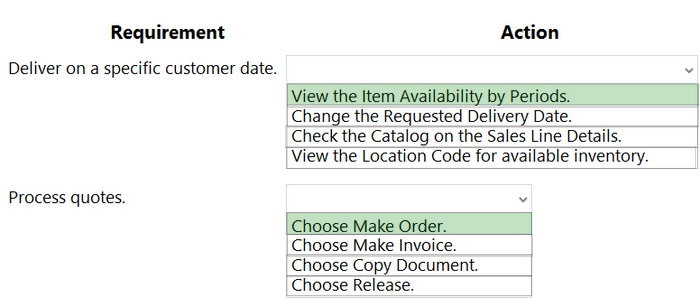
HOTSPOT
You need to create the process for salespeople.
What should you do? To answer, selaect the appropriate options in the answer area.
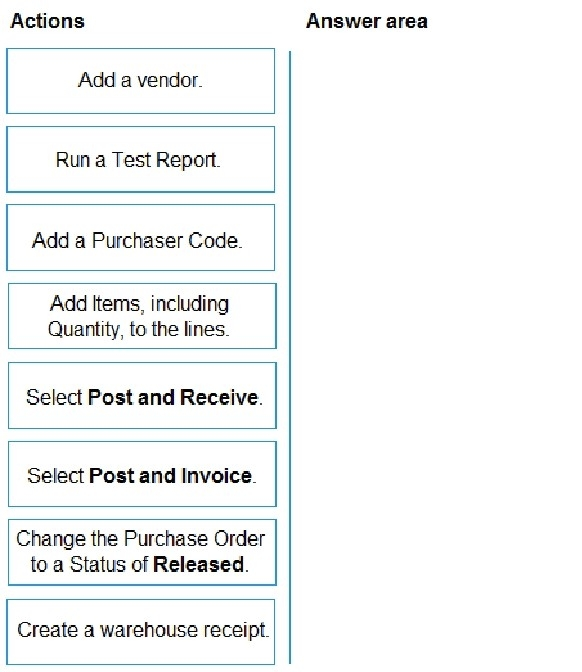
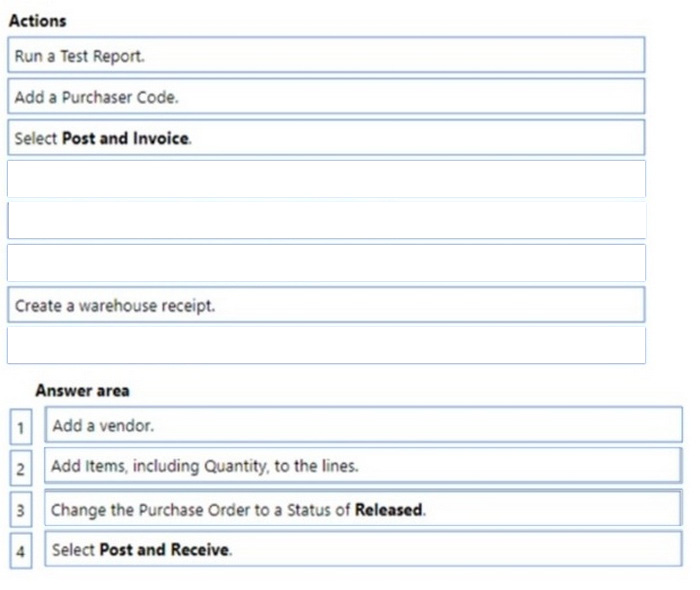
You need to advise a company how to process a purchase order in the system for a company.
Which four actions should you perform in sequence? To answer, move the appropriate actions from the list of actions to the answer area and arrange them in the correct order.
Reveal answer detailsClose answer details
Question 9
Multiple choice
You are implementing Dynamics 365 Business Central for a customer.
The customer wants to upload starting entries for all master data through a general journal on the last day of the current month.
You need to upload the data according to this requirement.
Which three functions should you select? Each correct answer presents a complete solution.
NOTE: Each correct selection is worth one point.
A
Vendors Opening balance
B
G/L Accounts Opening balance
C
Calculate Inventory
D
Get Standard Journals
E
Customers Opening balance
Reveal answer detailsClose answer details
Correct answersA, B, E
Question 10
Drag & drop
DRAG DROP
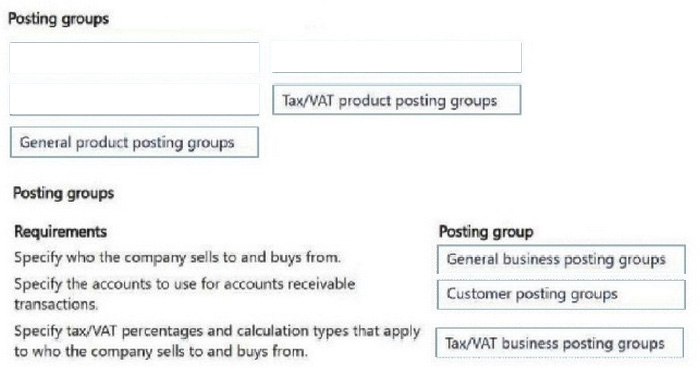
You are setting up new customers and items in Dynamics 365 Business Central.
You need to configure the system.
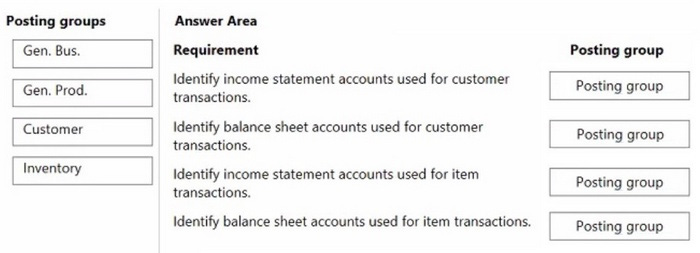
Which posting group should you use? To answer, drag the appropriate posting groups to the correct use cases. Each posting group may be used once, more than once, or not at all. You may need to drag the split bar between panes or scroll to view content.
NOTE: Each correct selection is worth one point.
Reveal answer detailsClose answer details
Explanation
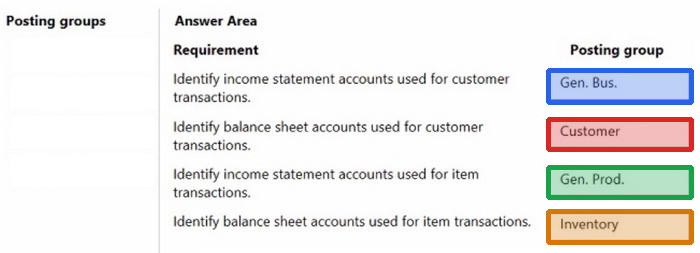
Box 1: Gen. Bus. General Business The revenue posting (income statement) is determined by the combination of the general business posting group and the general product posting group.
Box 2: Customer The accounts receivable posting (balance sheet) is determined by the customer posting group.
Box 3: Gen. Prod. General product The cost of goods sold posting (income statement) is determined by the combination of general business posting group and general product posting group.
Box 4: Inventory The inventory posting (balance sheet) is determined by the inventory posting group.
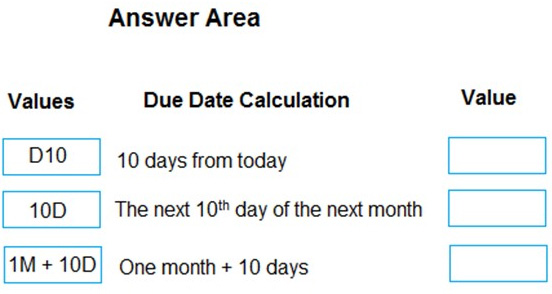
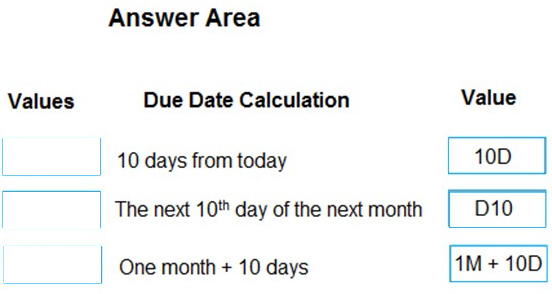
You need to configure payment terms with the correct due date calculation formula.
What should you do? To answer, drag the appropriate values to the correct requirements. Each value may be used once, more than once, or not at all. You may need to drag the split bar between panes or scroll to view content.
Note: This question is part of a series of questions that present the same scenario. Each question in the series contains a unique solution that might meet the stated goals. Some question sets might have more than one correct solution, while others might not have a correct solution.
After you answer a question in this section, you will NOT be able to return to it. As a result, these questions will not appear in the review screen.
A company uses Dynamics 365 Business Central. The company works with physical goods.
The system must automatically populate the Type field on the document line when a user creates a purchase order.
You need to configure the system.
Solution: On the Purchases & Payables Setup page, set the default document line type to Item.
Does the solution meet the goal?
A
Yes
B
No
Reveal answer detailsClose answer details
Correct answerA
Question 13
Drag & drop
DRAG DROP
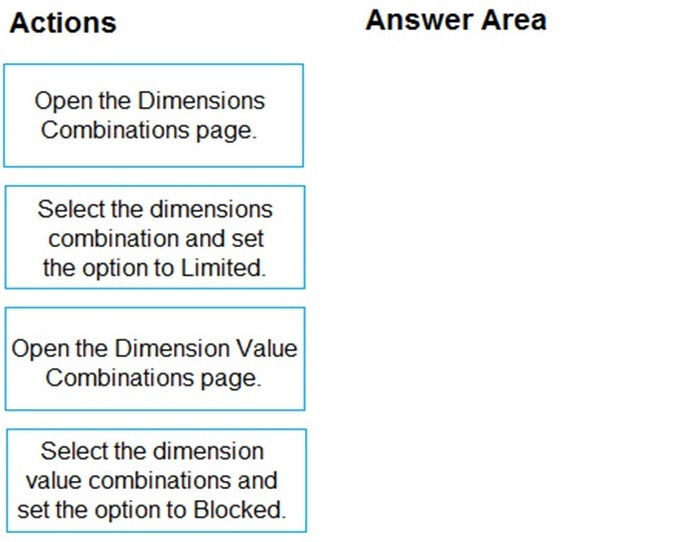
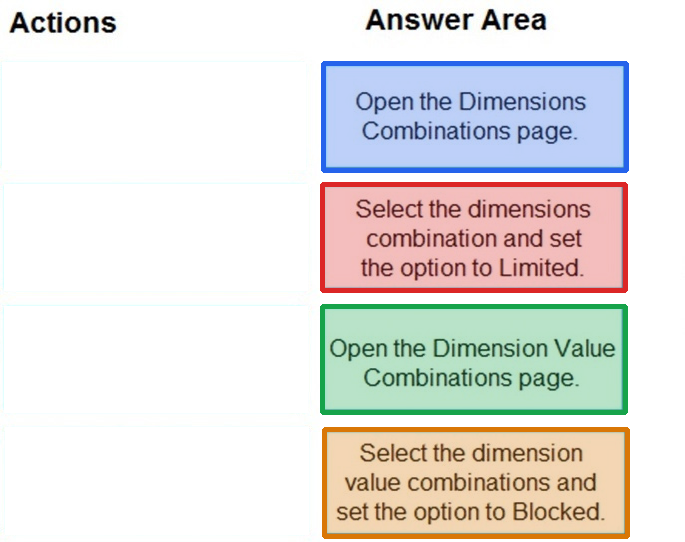
The company uses Dynamics 365 Business Central. You create several dimensions that will be used to perform cost analyses.
Some dimension value combinations are not allowed when posting purchase transactions.
You need to set up dimension combinations.
In which order should you perform the actions? To answer, move all the actions from the .list of actions and arrange them in the correct order.
A company has been using Dynamics 365 Business Central for many years.
A new accounting manager for the company reviews the chart of accounts. The manager wants to remove some general ledger accounts.
The Check G/L Account Usage field is selected in the General Ledger Setup.
You need to assist with the account deletions.
What is one requirement that enables deletion of a general ledger account?
A
The account cannot be used in any posting groups or posting setup
B
The account cannot be used in any account schedule.
C
The general ledger account cannot allow for direct posting.
D
The account must have ledger entries.
Reveal answer detailsClose answer details
Correct answerA
Explanation
If the Check G/L Account Usage field is selected in the General Ledger Setup, then the account must not be used in any posting groups or posting setup before it can be deleted. This is to prevent discrepancies in the general ledger.
If the account is used in any posting groups or posting setup, then it will not be possible to delete it. The other options are not requirements for deleting a general ledger account.
Question 16
Drag & drop
DRAG DROP
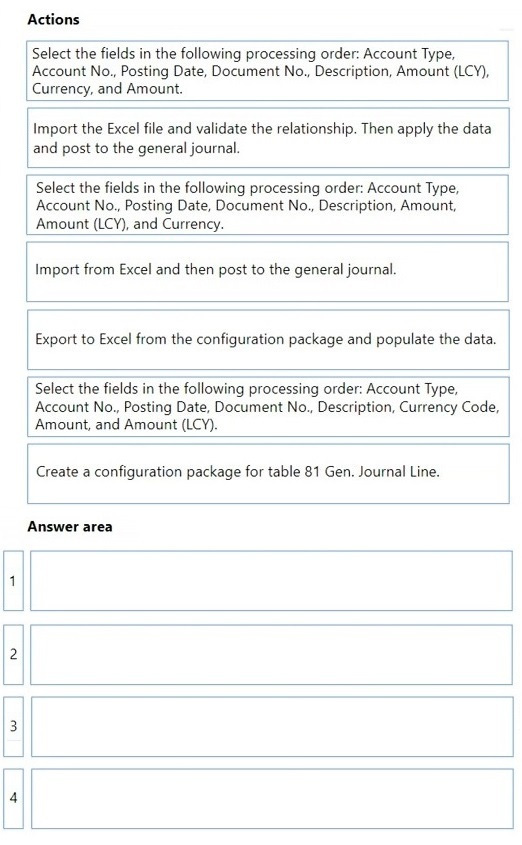
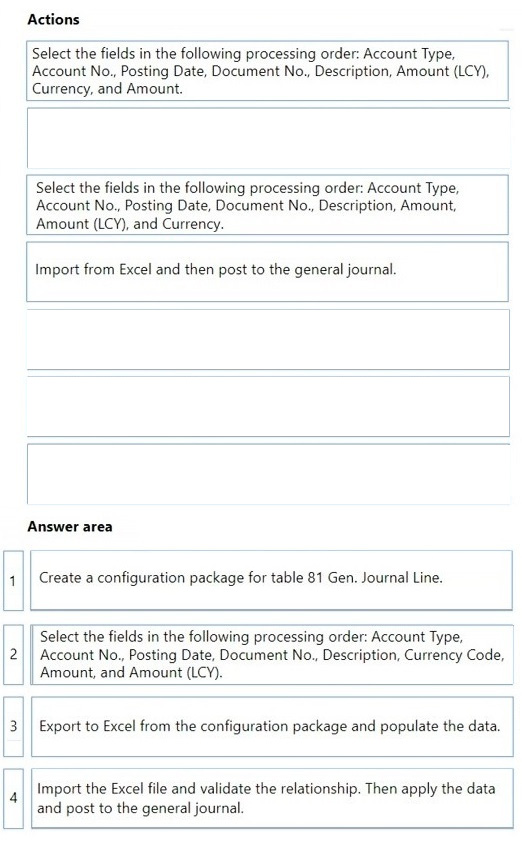
A company implements Dynamics 365 Business Central.
The company stores master data for vendor opening balances in an Excel file. Most of the vendors use a foreign currency for open balances. The balancing account is preselected on the journal batch.
You need to import the vendor opening balances by using configuration packages.
Which four actions should you perform in sequence? To answer, move the appropriate actions from the list of actions to the answer area and arrange them in the correct order.
Reveal answer detailsClose answer details
Question 17
Drag & drop
DRAG DROP
A company uses Dynamics 365 Business Central.
The company bills thousands of sales invoices for recurring subscription services on a monthly basis.
You need to ensure recurring sales invoices are automatically created for the same subscription services.
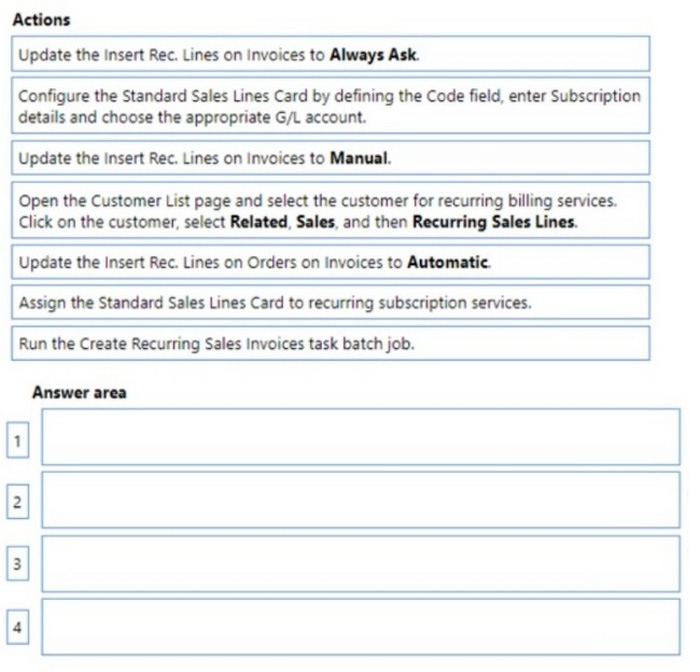
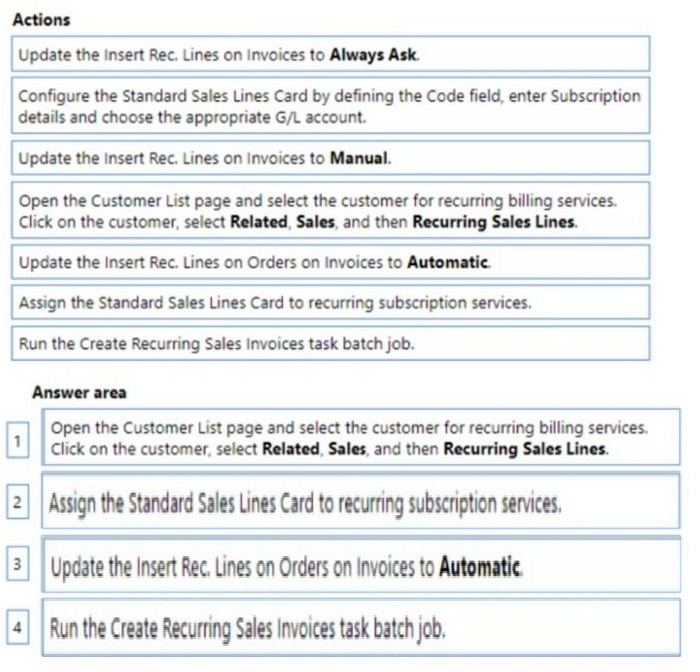
Which four actions should you perform in sequence? To answer, move the appropriate actions from the list of actions to the answer area and arrange them in the correct order.
Reveal answer detailsClose answer details
Explanation
Step 1: Open the Customer List page and select the customer for recurring billing services. Click on the customer, select Related Sales, and then Recurring Sales Lines.
If you often need to create sales lines with similar information, you can set up standard lines that you can then insert on recurring sales documents, for example, for recurring replenishment orders.
Set up recurring sales lines Choose the Search icon, enter Recurring Sales Lines, and then choose the related link. On the Recurring Sales Lines page, choose the New action. On the General FastTab, fill the fields as necessary. Hover over a field to read a short description. On the Lines FastTab, enter information in the fields to prepare sales lines that reflect the standard lines that you expect to use as recurring lines on sales documents.
Step 2: Assign the Standard Sales line card to reoccurring subscription services. Assign recurring sales lines to a customer. Assign one or more recurring sales lines to a customer so that they are available to insert on sales documents for that customer.
Choose the Search icon, enter Customers, and then choose the related link.
Open the card for a relevant customer.
Choose the Recurring Sales Lines action.
On the Recurring Sales Lines page, select codes for the recurring sales lines that you want to be able to insert on sales documents for the customer.
Fill in the other fields to define when, how, and where the recurring sales lines are to be used.
If you plan to use the recurring sales lines set together with the Create Recurring Sales Invoices batch job, use the Valid From Date and Valid To Date fields to restrict when the recurring sales lines are used for creation of invoices.
6. In the four fields where you select how the lines are inserted on four document types, select one of the following options. * Automatic(correct, see step 3 below): * Manual (incorrect) * Always ask (incorrect)
Step 3: Update the Insert Rec. Lines on Orders on Invoices to automatic * Automatic If multiple recurring sales lines exist for the customer, you will get a notification from where you can pick which one to insert. If only one recurring sales line exists, it will be inserted automatically.
This only works if the new document was created from a document list, for example by choosing the New action on the Sales Orders page. It does not work if the document was created from a customer card, for example.
Step 4: Run the Create Recurring invoices task batch job. Create multiple sales invoices based on recurring sales lines. You can use the Create Recurring Sales Invoices batch job to create sales invoices according to standard sales lines that are assigned to the customers and with posting dates within the valid-from and valid-to dates that you specify on the standard sales lines.
Choose the Search icon, enter Create Recurring Sales Invoices, and then choose the related link.
On the Create Recurring Sales Invoices page, fill in the fields as necessary. In the Code filter field, enter the code for standard sales lines that are assigned to a customer that you want to create sales invoices for. Choose the OK button.
Sales invoices are created for the customers with the specified standard customer sales code, and any specified direct-debit information, for posting on the specified date.
Incorrect: * Configure the Standard Sales Lines Card..
Note: This question is part of a series of questions that present the same scenario. Each question in the series contains a unique solution that might meet the stated goals. Some question sets might have more than one correct solution, while others might not have a correct solution.
After you answer a question in this section, you will NOT be able to return to it. As a result, these questions will not appear in the review screen.
A manufacturing company is using Dynamics 365 Business Central for fixed assets.
The company used a purchase order to acquire a new machine. The company received a separate invoice from a different vendor for the installation and delivery fees related to the purchase.
The company requires these acquisition costs to be added to the machine so that the total acquisition cost can be capitalized and then depreciated over the useful life of the asset.
You need to configure the solution.
Solution: Open the fixed asset G/L journal. Add the fixed asset number of the machine and choose appreciation for the fixed asset posting type. Add the sum of the installation and delivery fees to the Amount field. Insert the fixed asset balance account and post the journal.
Does the solution meet the goal?
A
Yes
B
No
Reveal answer detailsClose answer details
Correct answerB
Question 19
Single choice
A company uses Dynamics 365 Business Central.
The company must be able to control the periods when users will post deferrals in the system.
You need to configure the system.
From which page should you configure the system?
A
User tasks
B
User Card
C
User Setup
D
Deferral Template Card
Reveal answer detailsClose answer details
Correct answerC
Question 20
Hotspot
HOTSPOT
A company uses Dynamics 365 Business Central.
You need to customize sales invoice printouts to meet the following requirements:
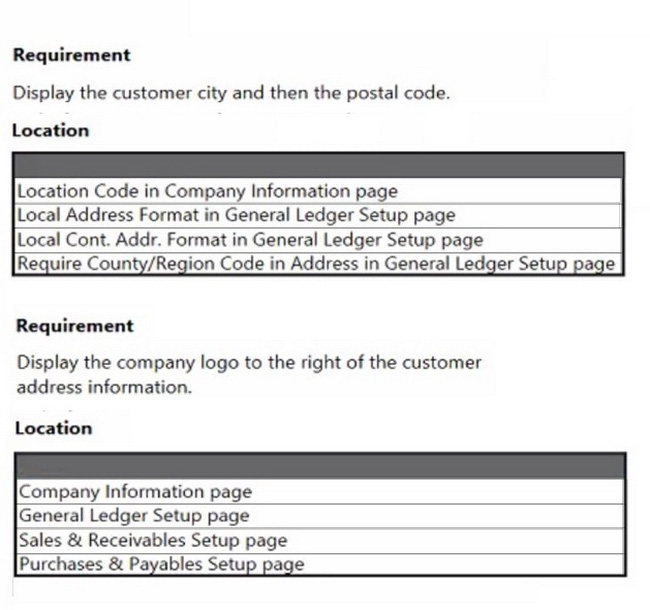
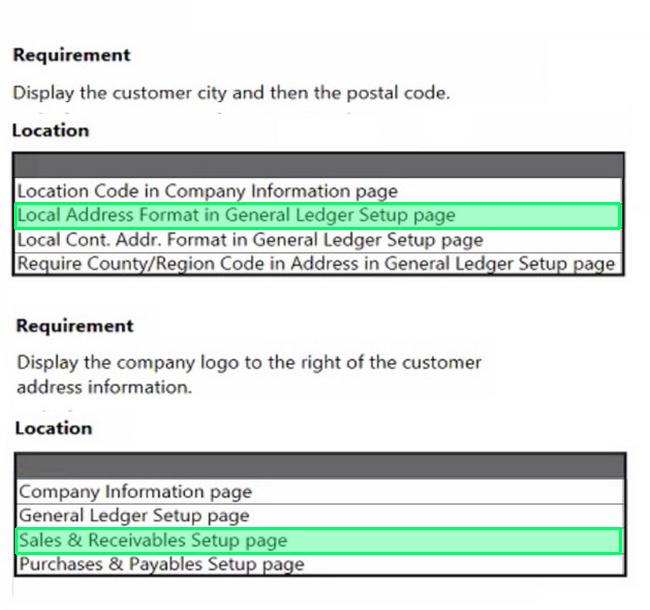
1. Display the customer city and then the postal code. 2. Display the company logo to the right of the customer address information.
Where should you make the configuration change? To answer, select the appropriate options in the answer area.
NOTE: Each correct selection is worth one point.
Reveal answer detailsClose answer details
Explanation
Box 1: Local Address Format in General Ledger Setup page Local Address Format: Here you can specify the format in which addresses must appear on printouts. ie, Post Code+City, City+Post Code, City+County+Post Code, Blank Line+Post Code+City,formats.
Note: The General Ledger Setup page specifies how you handle many different accounting issues in your company. For example, you use this page to specify invoice rounding details, the currency code for your local currency, address formats, and whether you want to use an additional reporting currency.
Box 2: Company information page Company Logo in Business Central Enter Company Information in Tell me, and then choose the related link.
Then you can find a setting of the Company Logo on the Company Information page. Picture: Specifies the picture that has been set up for the company, such as a company logo.
requirements, existing environment, and problem statements. When you are ready to answer a question, click the Question button to return to the question.
Background
Fabrikam, Inc., is a manufacturer of products for the gift industry. The company plans to implement Business Central as its new enterprise resource planning (ERP) system.
The company sells to two types of customers: wholesale and retail. Retail customers order at special events and online. Wholesale customers send in orders by email.
Current Environment
Order processing
1. The company uses a purchase order (PO) workflow for any PO over $500. 2. The system has been fully configured for sales order prepayments and will check for a prepayment invoice at posting. 3. Customers can special order products with a prepayment that is due on receipt.
Invoicing
1. Wholesale customer payment terms are net 30, with a 2% discount if paid within 10 days. 2. Retail customer payment terms are payable on receipt or shipment.
Reporting
The company uses headcount (number of employees) and square footage for statistical accounts.
Integrations
The company currently uses Outlook, Excel, Word, and Teams to communicate internally and externally with customers and vendors.
Requirements
Order processing
1. The company must be able to combine multiple purchase receipts into one vendor invoice. 2. Posted vendor invoices must be reverted when damages are reported or a product is returned to the vendor. 3. Fully invoiced POs must not appear on the PO list page. 4. Customer prepayments vary based on customer relationship. Special orders from new customers have a 25% prepayment. Established customers have only a 15% prepayment. 5. The company must be able to approve POs by email without opening Business Central. 6. Customers often reorder the same items with similar quantities. The system must be configured to ask the user if recurring lines should be added to sales orders.
Invoicing
1. Customer revenue must be posted to separate general ledger (G/L) accounts based on customer type. The G/L account must have subcategories for wholesale and retail revenue. 2. Accounts receivable must be posted to separate G/L accounts based on customer type. The G/L account must have subcategories for wholesale and retail accounts receivable. 3. Currently, inventory is sold at a cost based on purchase and sales over a period.
Reporting
1. Financial reports must include statistical accounts. 2. The financial report structure must map to account categories.
Integrations
The company requires the following integration capabilities:
1. Create sales orders while collaborating with customers by email. 2. Edit customer information while messaging the sales team in a group chat. 3. Communicate a brochure to all customers at once about a sales campaign.
General ledger posting accounts
The company requires the following G/L posting accounts:
1. Order entry takes too long for wholesale customers. 2. Vendors ship partial orders but send one monthly invoice. The company is unable to associate one invoice with multiple POs in the current environment. 3. Inventory reconciliation was difficult in the company's old system because it allowed users to sell more inventory than was physically available. 4. Users must log in to the system to provide workflow approvals.
Question 21
Testlet 4Multiple choice
You need to configure workflows to meet the order processing requirements of the company.
Which two solutions should you use? Each correct answer presents part of the solution.
NOTE: Each correct selection is worth one point.
A
Create a purchase order approval workflow.
B
Use Business Central as the engine for the workflow.
C
Use Power Automate as the engine for the workflow.
D
Create a purchase invoice approval workflow.
Reveal answer detailsClose answer details
Correct answersA, B
Question 22
Single choice
You are a functional consultant configuring items in Dynamics 365 Business Central.
You are configuring multiple units of measure for an item that has a base unit of measure of PCS and an additional unit of measure of BOX. One BOX holds 20 PCS of an item.
You need to define the relationship between the units of measure.
Which value should you populate on the Item Units of Measure page for the item?
A
For the BOX unit of measure, set the Qty. per Unit of Measure to 0.05.
B
For the BOX unit of measure, set the Qty. per Unit of Measure to 20.
C
For the PCS unit of measure, set the Qty. per Unit of Measure to 0.05.
D
For the PCS unit of measure, set the Qty. per Unit of Measure to 20.
Reveal answer detailsClose answer details
Correct answerB
Explanation
In the Qty. per Unit of Measure field, enter how many units of the base unit of measure the new unit of measure contains.
One box contains 20 PCS.
Incorrect: Note PCS unit of measure (which is the base unit)
In the Base Unit of Measure field at the bottom of the window, you can view or change the item's base unit of measure. You can also change the base unit of measure in the Base Unit of Measure field on the item card. In the Item Units of Measure page, the base unit of measure must have the value 1 in the Qty. per Unit of Measure field.
A company recently implemented Business Central. The company uses Teams extensively for day-to-day collaboration.
The company finance manager must be able to search for contacts and share Business Central records in Teams.
You need to install the Business Central app in Teams.
What should you do first?
A
Select the Share action on Attachment Documents in Business Central.
B
Search for Teams App Centralized Deployment in Business Central.
C
Add a Planner tab to a team channel.
D
Manage apps in the Business Central admin center.
Reveal answer detailsClose answer details
Correct answerB
Question 24
Drag & drop
DRAG DROP
You are implementing Dynamics 365 Business Central for a company.
The company must perform inventory valuation according to the following business rules:
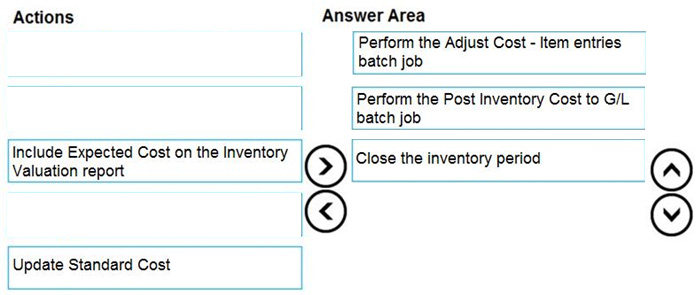
Use the first in, first out (FIFO) costing method for all items. Include received items that are not yet invoiced on balance sheets. Lock inventory value by closing the month.
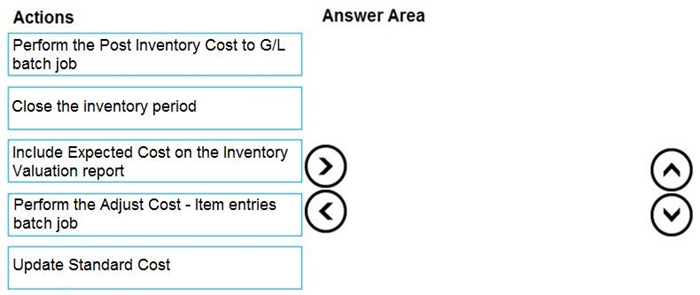
You need to recommend a process for the company's accounting department to use.
Which three actions should you recommend be performed in sequence? To answer, move the appropriate actions from the list of actions to the answer area and arrange them in the correct order.
You are configuring Dynamics 365 Business Central for a company.
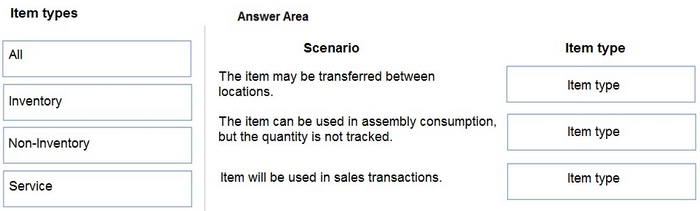
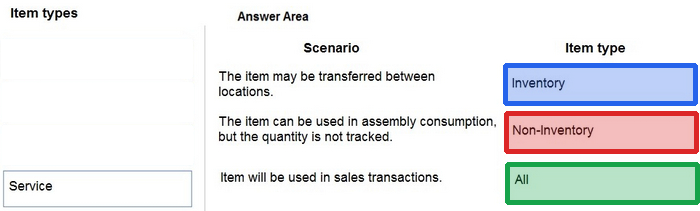
You need to create items.
Which item types should you use? To answer, drag the appropriate item types to the correct scenarios. Each item type may be used once, more than once, or not at all. You may need to drag the split bar between panes or scroll to view content.
NOTE: Each correct selection is worth one point.
Reveal answer detailsClose answer details
Question 26
Drag & drop
DRAG DROP
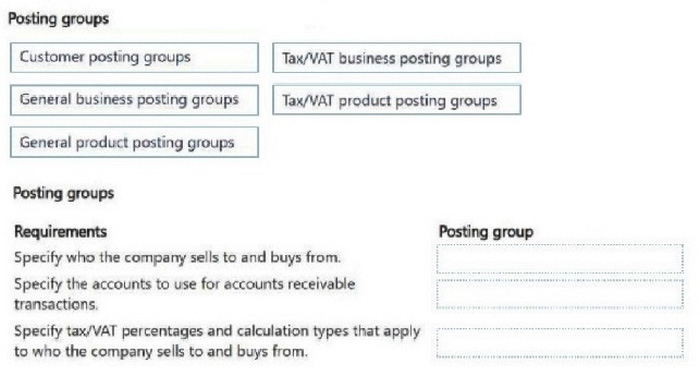
You are implementing Dynamics 365 Business Central for a company. You set up the chart of accounts.
The finance manager must map general ledger accounts to posting groups to automate transaction posting.
You need to map entities to the general ledger accounts.
Which posting groups should you set up? To answer, move the appropriate posting groups to the correct requirements. You may use each posting group once, more than once, or not at all. You may need to move the split bar between panes or scroll to view content.
NOTE: Each correct selection is worth one point.
Reveal answer detailsClose answer details
Question 27
Drag & drop
DRAG DROP
A client uses Dynamics 365 Business Central.
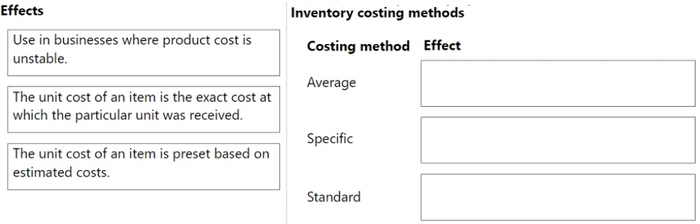
The client must create a manufacturing company and a sales company in Business Central. Each company must be a separate legal entity.
The client must select a costing method to use.
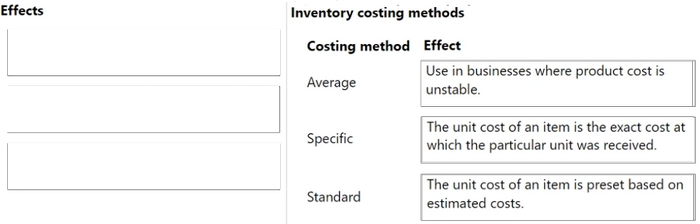
You need to explain the effects of the different costing methods.
What should you describe for each costing method? To answer, move the appropriate effect to the correct costing method. You may use each effect once, more than once, or not at all. You may need to drag the split bar between panes or scroll to view content.
NOTE: Each correct selection is worth one point.
Reveal answer detailsClose answer details
Question 28
Single choice
A company uses Dynamics 365 Business Central.
When users create sales documents, the system must display an alert that shows the customer's remaining credit. The alert must also notify the user if the customer has any overdue payments.
You need to configure a credit limit and overdue payment warning.
What should you do?
A
Configure the Block Customer field.
B
Configure the Late Payment Predict extension.
C
Select Both Warnings in the Credit Warnings field.
D
Enable the Exact Cost Reversing Mandatory field.
Reveal answer detailsClose answer details
Correct answerC
Explanation
Business Central enables you to determine how you want users to be informed when a customer is over their credit limit. To begin, search for and pull up the Sales & Receivables Setup. Under the General FastTab, locate 'Credit Warnings.' Within this field, you can determine if you want a notification to display at the top of the Sales Order for:
(1) Credit Limits (2) Overdue Balance (3) Credit Limits and Overdue Balance (4) No notifications
Question 29
Drag & drop
DRAG DROP
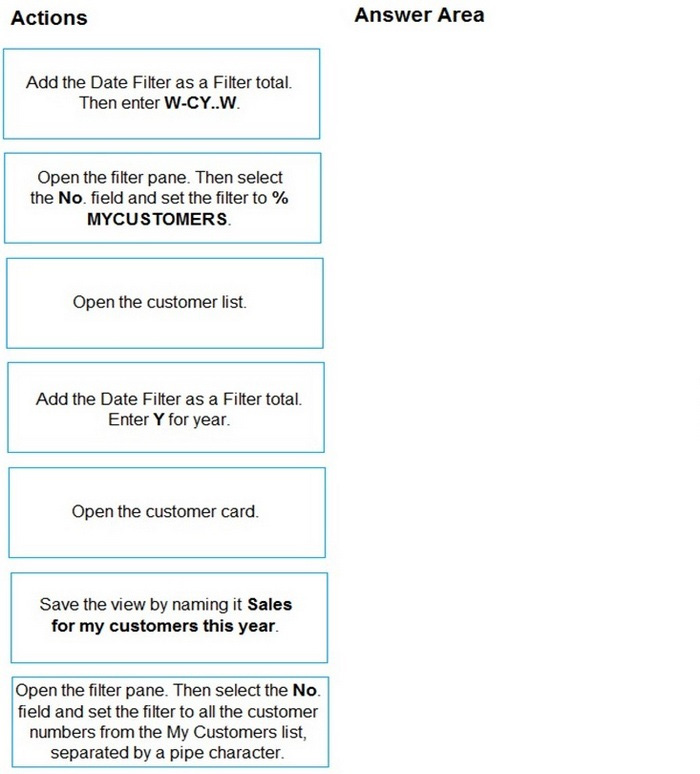
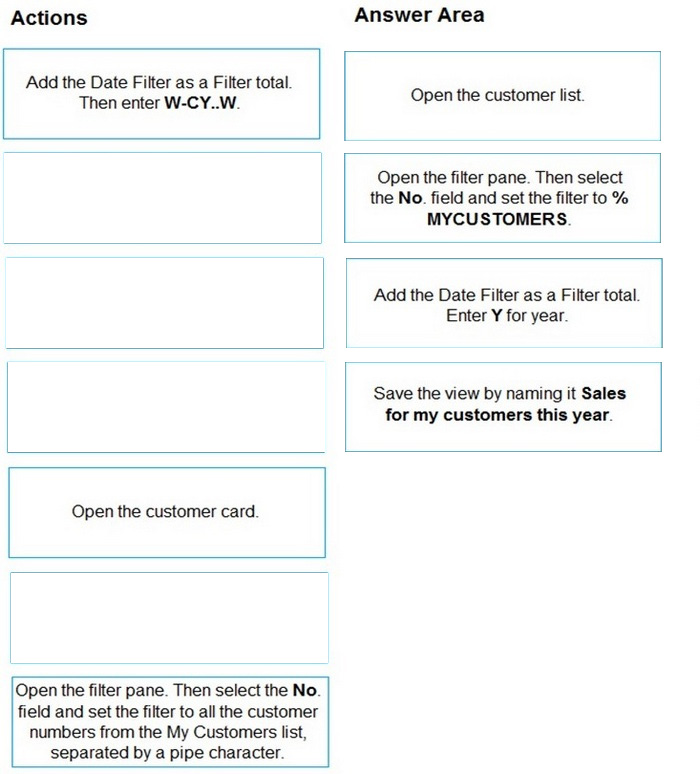
You are setting up a new company for a customer.
The customer wants you to filter the view to show all customers in the My Customers list and calculate the year-to-date sales.
You need to apply the filter.
Which four actions should you perform in sequence? To answer, move the appropriate entities from the list of actions to the answer area and arrange them in the correct order.
NOTE: More than one order of answer choices is correct. You will receive credit for any of the correct orders you select.
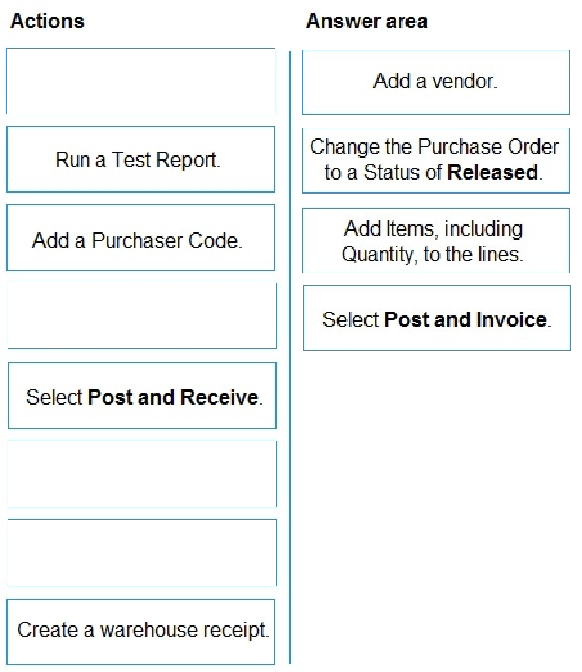
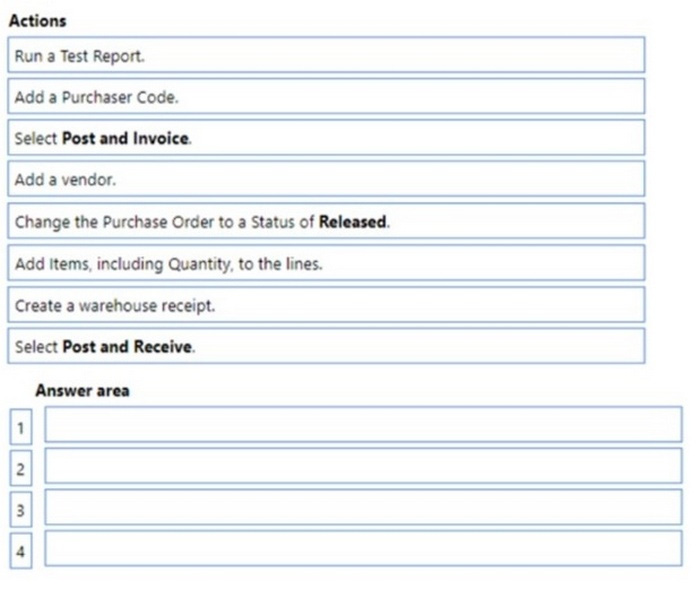
You need to configure the purchase order process for a company.
Which four actions should you perform in sequence? To answer, move the appropriate actions from the list of actions to the answer area and arrange them in the correct order.
Reveal answer detailsClose answer details
Explanation
Step 1: Change the Purchase Order to a status of Released.
Step 2: Create a warehouse receipt. When items arrive at a warehouse that is not set up for warehouse receipt processing, you simply record the receipt on the related business document, such as a purchase order, a sales return order, or an inbound transfer order.
Step 3: Add items including quantity to the lines Receive items with a purchase order The following describes how to receive items with a purchase order. The steps are similar to those for sales return orders and transfer orders.
1. Choose Search icon, enter Purchase Orders, then choose the related link.
2. Open an existing purchase order, or create a new one. Learn more at Record Purchases.
3. In the Qty. to Receive field, enter the received quantity. (Step 3)
4. Choose the Post action. (Step 4)
The value in the Qty. Received field is updated. If this is a partial receipt, then the value is lower than the value in the Quantity field.
requirements, existing environment, and problem statements. When you are ready to answer a question, click the Question button to return to the question.
Background
Fabrikam, Inc., is a manufacturer of products for the gift industry. The company plans to implement Business Central as its new enterprise resource planning (ERP) system.
The company sells to two types of customers: wholesale and retail. Retail customers order at special events and online. Wholesale customers send in orders by email.
Current Environment
Order processing
1. The company uses a purchase order (PO) workflow for any PO over $500. 2. The system has been fully configured for sales order prepayments and will check for a prepayment invoice at posting. 3. Customers can special order products with a prepayment that is due on receipt.
Invoicing
1. Wholesale customer payment terms are net 30, with a 2% discount if paid within 10 days. 2. Retail customer payment terms are payable on receipt or shipment.
Reporting
The company uses headcount (number of employees) and square footage for statistical accounts.
Integrations
The company currently uses Outlook, Excel, Word, and Teams to communicate internally and externally with customers and vendors.
Requirements
Order processing
1. The company must be able to combine multiple purchase receipts into one vendor invoice. 2. Posted vendor invoices must be reverted when damages are reported or a product is returned to the vendor. 3. Fully invoiced POs must not appear on the PO list page. 4. Customer prepayments vary based on customer relationship. Special orders from new customers have a 25% prepayment. Established customers have only a 15% prepayment. 5. The company must be able to approve POs by email without opening Business Central. 6. Customers often reorder the same items with similar quantities. The system must be configured to ask the user if recurring lines should be added to sales orders.
Invoicing
1. Customer revenue must be posted to separate general ledger (G/L) accounts based on customer type. The G/L account must have subcategories for wholesale and retail revenue. 2. Accounts receivable must be posted to separate G/L accounts based on customer type. The G/L account must have subcategories for wholesale and retail accounts receivable. 3. Currently, inventory is sold at a cost based on purchase and sales over a period.
Reporting
1. Financial reports must include statistical accounts. 2. The financial report structure must map to account categories.
Integrations
The company requires the following integration capabilities:
1. Create sales orders while collaborating with customers by email. 2. Edit customer information while messaging the sales team in a group chat. 3. Communicate a brochure to all customers at once about a sales campaign.
General ledger posting accounts
The company requires the following G/L posting accounts:
1. Order entry takes too long for wholesale customers. 2. Vendors ship partial orders but send one monthly invoice. The company is unable to associate one invoice with multiple POs in the current environment. 3. Inventory reconciliation was difficult in the company's old system because it allowed users to sell more inventory than was physically available. 4. Users must log in to the system to provide workflow approvals.
Question 31
Testlet 4Drag & drop
DRAG DROP
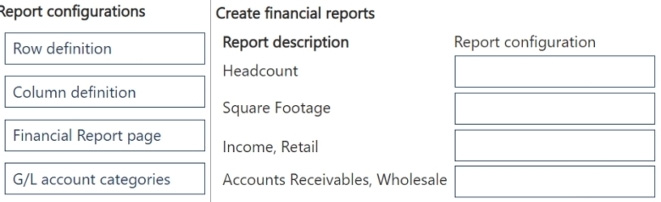
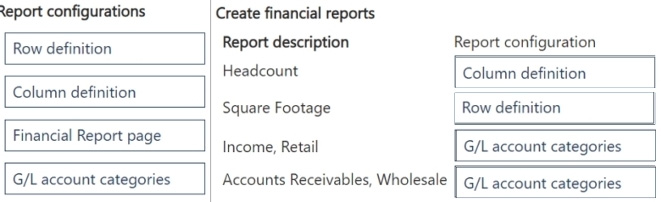
You need to create financial reports per company reporting requirements.
Which report configuration should you use to add the report descriptions to financial reports? To answer, move the appropriate report configurations to the correct report descriptions. You may use each report configuration once, more than once, or not at all. You may need to move the split bar between panes or scroll to view content.
NOTE: Each correct selection is worth one point.
Reveal answer detailsClose answer details
Case study
Case Study 3
requirements, existing environment, and problem statements. If the case study has an All Information tab, note that the information displayed is identical to the information displayed on the subsequent tabs. When you are ready to answer a question, click the Question button to return to the question.
Background
Northwind Traders is an independent, familyowned business. The company distributes natural pet products in the Northwest region of the country/region. Products are purchased directly from manufacturers and distributed by using its own fleet of trucks.
When the company started, deliveries were within a threehour radius of the warehouse. Due to regional growth, current deliveries require drivers to stay overnight on some routes. The company plans to open a second warehouse to expand the region and eliminate overnights for route drivers. The company also plans to hire a second group of employees to run operations in this new location. The finance and accounting teams will remain in the original location.
The company uses a thirdparty system for financials and order management. The finance department stated that the company's fiscal year begins on July 1 and ends on June 30. The mm/dd/yyyy date format is used.
As part of the expansion, the owner plans to upgrade to an ERP system and use Business Central to fulfill the company requirements and manage growth.
Current environment
Orders
Orders are emailed to customer service and manually keyed into the inventory system.
Pricing and discounts
1. Customer pricing is determined by the customer market type. Customer market types are Retail, Veterinarian, and Breeder. Each customer is associated with only one market type. 2. Vendors offer monthly promotions to customers by item, brand, or item category. 3. Invoices should show each customer's base price, the discount amount, and the net price.
Accounts payable
The company wants to expand vendor payment options in the new system.
Requirement
Customers
The sales team must be able to do the following: 1. Quickly set up new customers with the proper settings based on customer type. 2. Identify customers by market type. Customer posting groups will be used to identify which market the customer belongs to. 3. Base price is determined by the customer market type. 4. The sales department should receive a warning when entering the order if a customer is over their credit limit.
Sales
1. Customer discounts are offered for specific time frames by item, brand, or product category. Discounts should be added to sales lines automatically. 2. Discounts must post to a unique general ledger (G/L) account. 3. The business needs to be able to track revenue by location, market, and product category dimensions. Locations 100 and 200 will be set as default dimensions on the two warehouse locations. Food, treats, toys, and supplies are the required product categories, which will be set as default dimensions on the item cards. Each customer card will have a default market dimension. 4. The sales manager wants to delete canceled orders and automatically archive them.
Warehouse
1. Orders will be fulfilled from two possible warehouse locations. 2. Product will be transferred between locations by using transfer orders.
Sales invoices
Invoices will be posted after delivery. Invoices will be emailed to the customer. The sales department must be able to quickly correct posted invoices for the following scenarios: 1. Posted invoices that have not been paid. 2. Posted invoices that have been paid. 3. Posted invoices created from sales orders. 4. Posted invoices not created from sales orders.
Accounting
1. The finance department requires that the company has 12 monthly accounting periods per fiscal year. 2. Finance department users must be able to reconcile the accounts receivable (AR) subledger to the G/L account at month end. 3. AR department users need the ability to settle and close invoices when customers take payment discounts after the payment discount date has passed. AR users should be allowed to accept or reject the payment tolerance. 4. Accounts payable (AP) department users must be able to pay vendors by electronic funds transfer (EFT) and use a payment journal batch named EFT to process payments. 5. When viewing G/L entries, the finance and accounting teams must be able to see debits and credits instead of a positive or negative amount. 6. The company needs to be able to track expenses by department and location. The departments are sales, operations, and administration. 7. AR must be able to correct cash application entries.
Issues
Payment application
1. Customers may have several stores that are responsible for their own orders and payments. 2. Occasionally, AR clerks mistakenly apply payments to the incorrect customer invoice.
Invoicing
1. When items are delivered, customers refuse the items for reasons such as damaged or wrong item. 2. After the invoices are posted, they must be corrected, which is timeconsuming.
Warehouse
The sales department and warehouse managers must have visibility into products that are in the process of being transferred between locations.
Accounts
1. Customer accounts are difficult to view by market type. 2. The finance team does not have the ability to report revenue by customer type.
Accounting
1. AR users often find variances between the AR subledger and G/L account. 2. Customers often take the payment discount after the payment discount date has passed, leaving open invoices for small amounts. 3. The AP department is unable to pay vendors by EFT in the current system. 4. Finance and accounting team members have trouble validating postings when they use only the amounts field on G/L entries. 5. The finance department is unable to run financial reports by market. All revenue postings must reference a market.
Question 32
Testlet 3Multiple choice
You need to train the Accounts Receivable (AR) department how to correct customer payment application issues.
What are two possible ways to achieve this? Each correct answer presents a complete solution.
NOTE: Each correct selection is worth one point.
A
Unapply entries from the customer ledger entries.
B
Unapply entries from the detailed customer ledger entries.
C
Unapply entries from the customer card.
D
Apply entries from the Detailed Customer Ledger Entries page.
Reveal answer detailsClose answer details
Correct answersB, C
Question 33
Single choice
You are implementing Dynamics 365 Business Central.
You use infinite items such as water, electricity, and natural gas.
You need to set up the items.
Which item type should you use for infinite items?
A company uses Dynamics 365 Business Central to manage receivables.
You must import a series of payments from a bank account and automatically match the payments against similar ledger entries already entered in Business Central.
You need to import and apply the payments to the ledger entries that are automatically matched by the system.
Which form should you use?
A
Payment services
B
Payment Application Rules
C
Payment Reconciliation Journal
D
Payment Registration
Reveal answer detailsClose answer details
Correct answerC
Explanation
You must regularly reconcile your bank, receivables, and payables accounts by applying payments recorded in the bank to their related open (unpaid) invoices and credit memos or other open entries in Business Central.
You can perform this task on the Payment Reconciliation Journal page, for example, by importing a bank statement file or feed to quickly register the payments. Payments are applied to open customer or vendor ledger entries based on matches between payment text and entry information.
Note: The Payment Reconciliation Journal page specifies payments, either incoming or outgoing, that have been recorded as transactions on your online bank account or on a payment service and that you can apply to their related open customer, vendor, and bank account ledger entries. The lines in the journal can be filled in by importing a bank statement as a bank feed or file or by manually entering transactions that you make on your payment service.
Note: This question is part of a series of questions that present the same scenario. Each question in the series contains a unique solution that might meet the stated goals. Some question sets might have more than one correct solution, while others might not have a correct solution.
After you answer a question in this section, you will NOT be able to return to it. As a result, these questions will not appear in the review screen.
You must streamline monthly invoicing by automating repetitive entries for monthly charges when managing subscriptions.
You need to add default general ledger (GL) accounts to a Customer Card.
Solution: Apply a Microsoft Word template on the Customer Card.
Does the solution meet the goal?
A
Yes
B
No
Reveal answer detailsClose answer details
Correct answerB
Question 36
Hotspot
HOTSPOT
You are implementing Dynamics 365 Business Central.
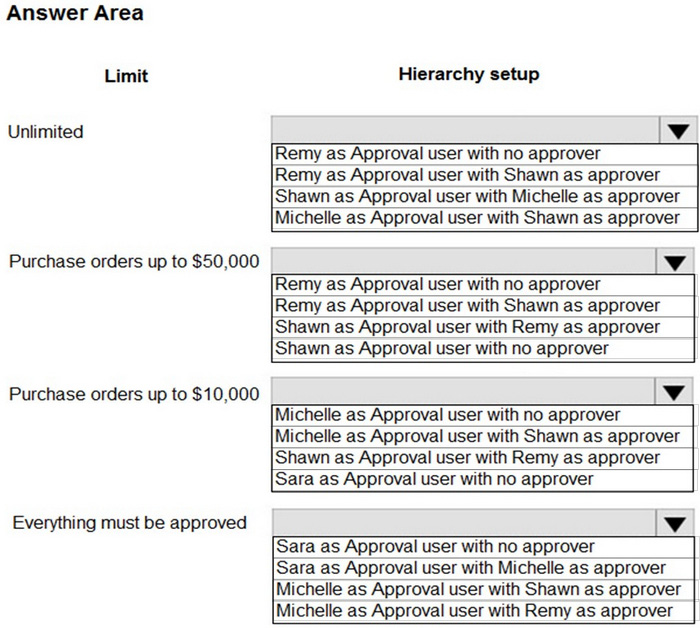
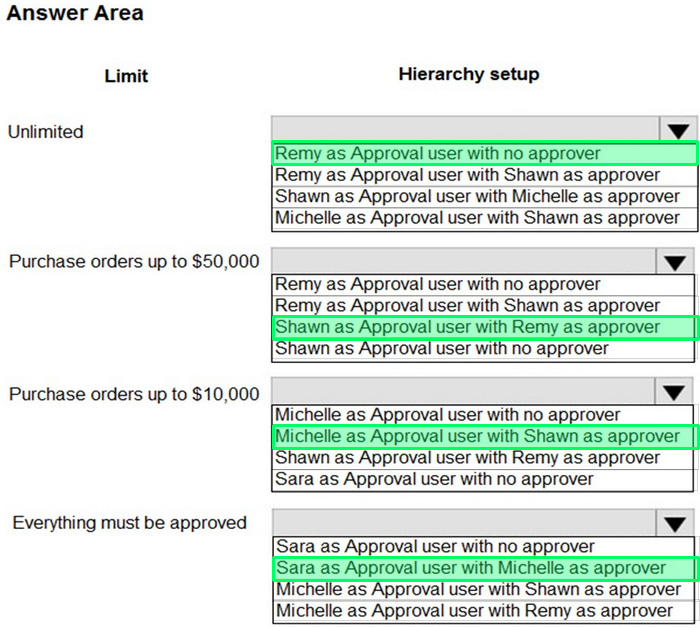
The accounting manager wants to set up a complete Purchase Document Approval system with an approval hierarchy that meets the following requirements:
1. Sara processes all purchase orders. Any purchase orders that Sara processes must be approved. 2. Michelle can approve purchase orders up to $10,000. 3. Shawn can approve the orders up to $50,000. 4. Purchase orders above $50,000 must be approved by Remy.
You need to create the hierarchy.
Which hierarchy setup should be used for each limit? To answer, select the appropriate options in the answer area.
requirements, existing environment, and problem statements. When you are ready to answer a question, click the Question button to return to the question.
Background
Wide World Importers is a family-owned importer of specialty cooking ingredients and prepackaged foods from the Mediterranean. When first established, the company's products were sold at farmers markets, All sales were on a cash-only basis.
Products are now sold locally to restaurant owners and chefs in a family-owned building with a warehouse. Products are no longer sold at farmers markets. Cash and carry sales generate most of the revenue for the company.
The founder of Wide World Importers is turning over control of the company to the younger generation in the family. These family members want to use Dynamics 365 Business Central to support their efforts to grow and diversify the business. They recently started to build a new line of business selling and shipping products to specialty retailers outside their local area through a network of brokers and representatives.
The company uses QuickBooks, but the family is concerned that QuickBooks is not capable of supporting their new business model.
There are 30 full-time and part-time employees who work in sales, purchasing, shipping, customer service, accounts payable, accounts receivable, and finance. The family does not plan to hire additional personnel to support the new line of business.
Current environment
Cash and carry sales
1. When a customer makes a purchase at the company's cash and carry desk, the sale is handwritten on a three-part form. 2. The cash and carry associate retrieves the items listed on the order from the warehouse. 3. Special prices and discounts are used to move products that will expire soon or that are overstocked. 4. Cash is accepted for payments. 5. The cash drawer is balanced at the end of every day. A deposit is created for the cash and given to the accountant. 6. One-line sales invoices are saved in QuickBooks for each cash and carry sale to a miscellaneous customer. 7. Customer details for cash and carry sales are not kept in QuickBooks.
Brokered sales orders
1. Brokered sales are called in to customer service by the brokers and sometimes directly by customers. The sales are entered into QuickBooks. 2. Because inventory is not tracked in QuickBooks, the generic item Brokered Item is used. 3. Two copies of the packing slip and printed from QuickBooks and sent to the warehouse.
Order picking
1. The warehouse manager provides a container and the two copies of the packing slip to a picker. 2. Items that are out of stock are marked on both copies of the packing slip. 3. The shipping amount is determined and written on the packing slips. 4. One copy of the completed packing slip is placed in a basket for customer service. 5. Completed orders are boxed up with a copy of the invoice and shipped to customers.
Order invoicing
1. Throughout the day, the customer service manager collects the packing slip copies and updates the invoices in QuickBooks. 2. The customer service manager adds a line for shipping with the amount provided by the packer. 3. The customer service manager prints a copy of the final invoice and sends it to the warehouse. 4. The accountant uses Microsoft Word to create weekly invoices for all shipments invoiced in QuickBooks during the week for some customers.
Deposits
1. The accountant receives the deposit bag from the cash and carry sales desk at the end of every day. 2. Receipts are recorded in QuickBooks against cash and carry and brokered sales based on the deposit slips.
Brokers commission
1. Brokers fees are paid as a percentage of sales. 2. A Sales by Product/Service Summary report is run in QuickBooks every month for Brokered Item to calculate what is owned.
Requirements
Customers
1. Users with permission must be able to quickly add new customers. 2. The original source of all customers in the accounting system must be identified to be from cash and carry or brokered sales. 3. The company needs to keep a record of special price promotions given to specific customers. 4. Customers must be identified with a unique general business posting group so that the correct freight G/L account is used in sales transactions.
Sales
1. The customer source must be used to identify the business line, and the customer source must be indicated on every sales transactions. 2. Customer service and cash and carry desk associates must be able to enter sales into Dynamics 365 Business Central by customer. 3. Excess paper must be eliminated, and paper management must be reduced. 4. If a customer is not already listed in the system, a cash and carry associate or customer service associate must be able to quickly add the new customer in the process of recording the first sale. 5. A point-of-sale system is not needed, but users must be able to record which items are purchased by customers, accept and record their payment, and print receipts indicating paid in full.
Items
1. The sales manager and warehouse manager must be able to set a specific timeframe for special promotion discounts on items. 2. For special promotions, discounts must be consistent for all items in a product line using a single discount calculation. 3. Special pricing may be given to a retail chain or buying group. This pricing must be automatically applied when an order is taken for any of these customers. The original price must be recorded with each sale. 4. Customers must always be charged the lowest amount for an item at the time of the sale. For example, an overstocked olive oil has a regular price of $20 per unit. Customers in a buying group for restaurants can buy it for $18 per unit. There is an autumn promotion price for the item at $19 per unit. However, on a specific day only, there is an overstock special at a 15 percent discount off the regular price.
Sales invoices
Warehouse workers must be able to indicate the following in the system for each order: 1. the items picked 2. the shipping charges 3. notifications, if any, that customer service needs to provide to the customer Items sold at a discount must show the original price, discount, and net amount on each line of the invoice. Invoices must be posted at the cash and carry desk at the time of sale. For orders, accounting must post invoices and send them to customers. Warehouse employees must be able to indicate what has been shipped on an order. They will use the G/L account for shipping charges. They need to use the correct G/L account for sales versus cost through proper assignment of sales and purchase accounts in the general posting setup. Some of the brokered customers require one invoice per week regardless of the number of orders or shipments.
Accounts
1. Payment terms vary by customer. 2. The amount paid to brokers must be calculated from sales after invoice discounts. 3. Broker vendors must be easily identifiable from other vendors in lists 4. Commission paid on sales not collected within 120 days must be deducted from brokers' next compensation payment.
Reporting
Wide World Importers requires reporting on the following:
1. the overall profitability of each line of business at any time for any given period 2. the cost of outbound shipping in the overall profitability of sales by business line in all related reports 3. freight sales and cost by account in the trial balance 4. the cost of brokers' compensation in reporting the overall profitability of sales by business line 5. the effect of item discount promotions in financial statements.
Issues
Pricing
1. Spreadsheets are used to maintain special item pricing and discounts. The only source of product line discount information is a whiteboard in the warehouse. The price charged is frequently incorrect. 2. Customers complain when they think they think they have not received the best price available. Promotions are sometimes applied in error after a special pricing event ends, for example, when discounts are offered temporarily to reduce overstock. 3. Management cannot see original versus actual price on all sales. Discounts given by brokers requires spreadsheets and comparison between price list and price on sales invoice. Management needs to be able to quickly see the discount
given on each sale.
Payment terms
1. Agreed-upon payment terms are frequently entered incorrectly on orders, causing cashflow issues. 2. Invoices already paid in full exist on the sales aging reports. The frequent cause of this issue is that sales from the cash and carry desk are not indicated as cash sales and are not posted as paid in full. 3. Some buying groups require that all invoices sent during a month be due on the 20th of the following month.
Invoicing
1. Paperwork is frequently misplaced between the warehouse, customer service, and accounting. 2. Invoices that are posted in the accounting system based on shipments and invoices that are sent to customers weekly do not match due to errors transferring the data from one document to another. 3. Users are selecting the incorrect freight type (expense versus sales) on purchase and sales transactions, making it difficult to reconcile freight costs. 4. Sales placed from the cash and carry desk by customers originally acquired through a broker are not being recognized with the correct customer source. Reporting by business line is inaccurate.
Accounts
1. Users often forget which fields to use to enter information when they add new customers to QuickBooks. This results in errors and inconsistencies in data and affects sales reporting. Confidence in sales reporting accuracy is low. 2. Adding new brokers is a different process than adding other purchase vendors. Users often forget which fields to select and how to correctly assign the vendor number to add new brokers. 3. Manual entries to certain G/L accounts cause reconciliation issues.
Question 37
Testlet 2Single choice
A customer in the restaurant buying group purchases olive oil on the date of the overstock special.
You need to verify the sales price of the product for the customer.
Which price will the system generate?
A
$15.30
B
$16.15
C
$17.00
D
$18.00
Reveal answer detailsClose answer details
Correct answerC
Explanation
An overstocked olive oil has a regular price of $20 per unit. However, on a specific day only, there is an overstock special at a 15 percent discount off the regular price.
The 15% is deducted from the 'regular' price ($20), not the special price that the restaurant buying group pay ($18).
Question 38
Testlet 2Single choice
You need to configure sales for the cash and carry desk.
What should you select?
A
Payment Service
B
Direct Debit Mandate with a value of OneOff for Type of Payment
C
Payment Method with a value of Bank Account for Balance Account
D
Payment Terms with a value of 0D for Due Date Calculation
Reveal answer detailsClose answer details
Correct answerD
Question 39
Multiple choice
A company operates from India. The company procures materials from Sweden.
You need to set up invoice discount terms for a vendor based in Sweden.
Which three pieces of information should you enter? Each correct answer presents part of the solution.
Note: This question is part of a series of questions that present the same scenario. Each question in the series contains a unique solution that might meet the stated goals. Some question sets might have more than one correct solution, while others might not have a correct solution.
After you answer a question in this section, you will NOT be able to return to it. As a result, these questions will not appear in the review screen.
A company uses Dynamics 365 Business Central. The company works with physical goods.
The system must automatically populate the Type field on the document line when a user creates a purchase order.
You need to configure the system.
Solution: On the Vendor Card page, select a document layout and then select a custom layout for reports.
Does the solution meet the goal?
A
Yes
B
No
Reveal answer detailsClose answer details
Correct answerB
Question 41
Drag & drop
DRAG DROP
A company uses Business Central.
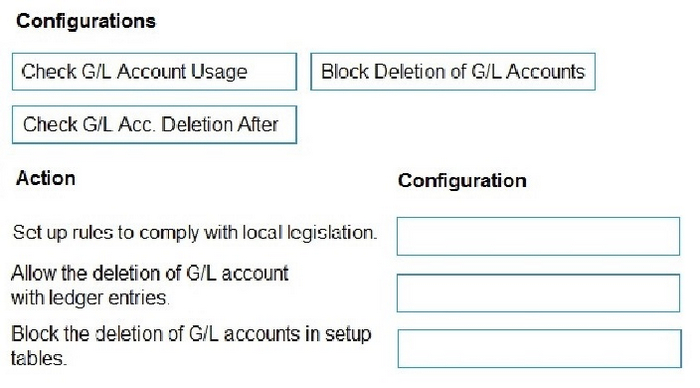
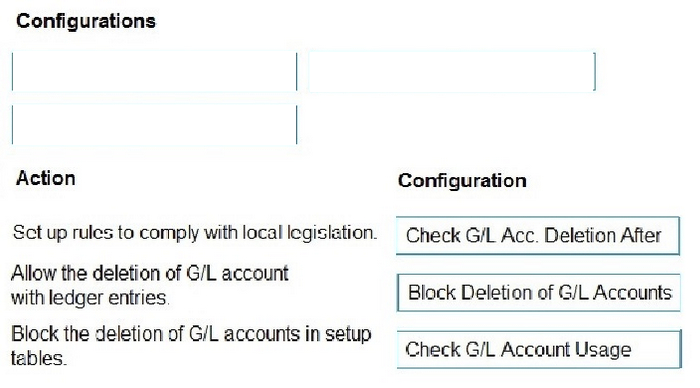
The finance manager requires the ability to delete zero balance general ledger (G/L) accounts.
You need to configure the system.
Which configuration should you use? To answer, move the appropriate configurations to the correct actions. You may use each configuration once, more than once, or not at all. You may need to move the split bar between panes or scroll to view content.
NOTE: Each correct selection is worth one point.
Reveal answer detailsClose answer details
Question 42
Single choice
A company uses Dynamics 365 Business Central.
You need to ensure that sales invoice discounts are calculated automatically.
What should you configure?
A
Discount Posting setting on the Sales & Receivables Setup page
B
Calc. Inv. Discount setting on the Sales & Receivables Setup page
C
Calc. Inv. Discount setting on the Purchase & Payables Setup page
D
Show Amounts setting on the General Ledger Setup page
Reveal answer detailsClose answer details
Correct answerB
Explanation
If you invoice discounts to be calculated automatically, you can specify this on the Sales & Receivables Setup page.
If you want invoice discounts to be calculated automatically, on the Sales & Receivables Setup page, turn on the Calc Inv. Discount toggle.
A company uses Dynamics 365 Business Central. The company has a customer that will also be a vendor for the company in the next financial year.
The company plans to consolidate the customer and vendor balances to reduce unnecessary payments on receipts and reduce the amount of transaction fees.
You need to configure the contact card.
Which option should you configure first?
A
Create as Employee
B
Create as Customer
C
Create as Bank
D
Create as Vendor
Reveal answer detailsClose answer details
Correct answerD
Question 44
Drag & drop
DRAG DROP
A company uses Dynamics 365 Business Central.
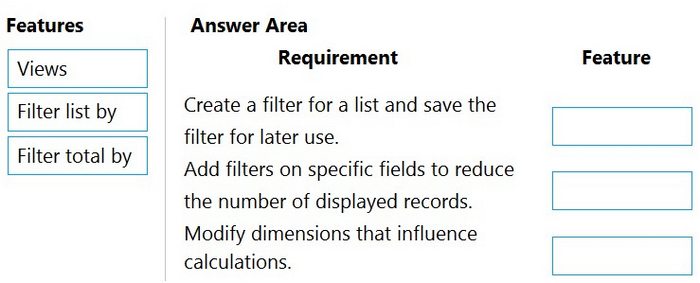
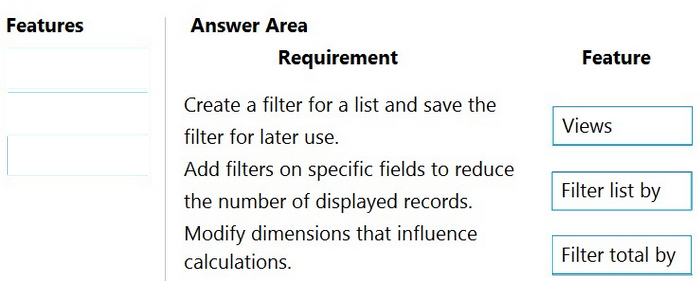
You need to create filters for ledger entries.
Which features should you use? To answer, drag the appropriate features to the correct requirements. Each feature may be used once, more than once, or not at all. You may need to drag the split bar between panes or scroll to view content.
NOTE: Each correct selection is worth one point.
Reveal answer detailsClose answer details
Explanation
Box 1: Views Some lists include the Views section. Views are variations of the list that have been preconfigured with filters. You can define and save as many views as you want per list. The views will be available to you on any device you sign into.
Box 2: Filter list by Filter list by: This section is where you add filters on specific fields to reduce the number of displayed records. To add a filter, choose the + Filter action. Then, type the name of the field that you want to filter the list by or pick a field from the drop-down list.
Box 3: Filter totals by Some lists that display calculated fields, such as amounts and quantities, will include the Filter totals by section where you can adjust various dimensions that influence calculations.
requirements, existing environment, and problem statements. When you are ready to answer a question, click the Question button to return to the question.
Current environment
Deliveries
1. The company receives daily truckloads of products from their vendors, warehouses the products briefly, and then ships orders based on a weekly delivery cycle to each customer's store. 2. Customers have regular standing orders that are revised and finished one week prior to delivery. 3. Best for You Organics has a fleet of trucks that make deliveries according to planned routes. 4. The company also has a floating route for trucks to deliver rush orders. The route is being used more often by customers and has overwhelmed the warehouse with exception processing.
Duties
The company wants to provide greater separation of duties between activities in the office and activities in the warehouse.
The accounting team enters orders for the sales team, sends pick tickers back to the warehouse, and organizes shipping documents. The accounting team invoices the orders when they receive instructions from the warehouse that an order shipped.
Employees have expressed frustration because they need to work longer hours to accommodate the increase in sales.
The company does not use the Advanced Warehousing function.
Requirements
Salespeople
1. Salespeople must be able to manage opportunities that are converted to quotes. 2. Salespeople must be able to release orders to the warehouse to be fulfilled once a quote is final. 3. Salespeople must be trained on how to determine if inventory is available when they are completing the quote to avoid promising inventory that is not on hand because all orders are processed one week in advance of delivery.
Team responsibilities
Deliveries must be shipped daily by employees in the warehouse. The office must be responsible for completing the invoicing process.
The current team responsibilities are shown in the following graphic:
The required team responsibilities are shown in the following graphic:
Vendor management
1. The company contracts with each vendor for regular discounts at the invoice level. 2. The company requires a pre-set discount percentage to calculate automatically when the purchaser completes a purchase order. 3. The company must be able to see a copy of the completed purchase order in the system when they have new contract negotiations with their vendors.
Customer and inventory management
1. Sales invoices must be automatically emailed by the system to customers. 2. A template must be used for emails sent to customers. The template must not be altered. 3. Customers who pre-pay their invoices must not receive a copy of their invoices. 4. The company warehouses all products as Case quantities. The company has difficulty recording accurate costs for product returns. The company wants to expand their capabilities for managing returns by setting up all inventory in a quantity of Each.
Reporting
The company must be able to answer two key questions when they report financial results:
1. Which customers are buying which items? 2.
Which salespeople are selling in which regions?
When discussing customers, the company must refer to each Customer Group as follows:
1. Big Box 2. Franchise 3. Private
When discussing items, the company must refer to each Item Group as follows:
1. The company must be able to track salesperson performance within certain regions to calculate commission. 2. Each salesperson must be assigned only to a single region. 3. This commission data is currently recorded inconsistently, resulting in incorrect combinations that require manual correction. The company must have some level of automation to manage this.
Issues
Issue 1
The accounting team needs an improved process for reconciling inventory to the general ledger.
1. Posted transactions are changing financial reporting in periods that have been closed. 2. Unexpected changes in inventory cost for previous months are causing costing inaccuracies. 3. The system must restrict the adjustment of costs for closed months. 4. The new policy will be to restrict all users to posting in the current month only, with the exception of a few employees from the accounting team. 5. The calendar fiscal year for company must begin on June 1.
Issue 2
The accounting team uses a complex manual accrual process to determine the accounting impact of items received but not invoiced. The system must streamline the item accrual process.
Issue 3
The company often receives a higher quantity of produce items than what they order because vendors allow for spoilage or damage of produce in transit. The company does not want to allow over receipt on non-produce items.
Issue 4
The company has received comments from their auditors that invoices are not being properly compared to received inventory documents before they are posted. The company does not use warehouse management and always handles processes directly from the purchase order. The company always has the following documents:
1. purchase order from the procurement department 2. receiving document from the warehouse 3. electronic invoice from the vendor
QUESTION 1
DRAG DROP
You need to advise the company on how to process existing sales orders.
Which three actions should you recommend be performed in sequence? To answer, move the appropriate actions from the list of actions to the answer area and arrange them in the correct order.
You are setting up a new item in Dynamics 365 Business Central. The item is a tangible good with an inventory asset value. The item is acquired by purchase specifically for each new instance of demand from an order.
You need to configure the Type, Replenishment System, and Reordering Policy fields on the item card to achieve the stated requirements.
How should you configure each field? To answer, drag the appropriate values to the correct fields. Each value may be used once, more than once, or not at all. You may need to drag the split bar between panes or scroll to view content.
A company is implementing Dynamics 365 Business Central.
The company must be able to assign transactions to unique and sequential numbers.
Some transactions require multiple number series that can be used interchangeably.
You need to configure number series to meet the requirements.
What should you do?
A.
Define number series codes on journal templates.
B.
Create relationships between number series.
C.
Enable transaction tracking.
D.
Set up approval workflows.
Correct Answer: B
QUESTION 5
You are implementing Dynamics 365 Business Central for a company. The company provides subscription services to their customers. The subscription invoices are almost identical each month.
The company wants to set up recurring sales lines for subscription invoices.
You need to create systems for creating subscription invoices.
Solution: Create a new recurring sales line. Open the relevant customers and attach the Recurring Sales Lines code to the customer. Then, run the Create Recurring Sales Invoices batch to create the invoices.
requirements, existing environment, and problem statements. When you are ready to answer a question, click the Question button to return to the question.
Background
Wide World Importers is a family-owned importer of specialty cooking ingredients and prepackaged foods from the Mediterranean. When first established, the company's products were sold at farmers markets, All sales were on a cash-only basis.
Products are now sold locally to restaurant owners and chefs in a family-owned building with a warehouse. Products are no longer sold at farmers markets. Cash and carry sales generate most of the revenue for the company.
The founder of Wide World Importers is turning over control of the company to the younger generation in the family. These family members want to use Dynamics 365 Business Central to support their efforts to grow and diversify the business. They recently started to build a new line of business selling and shipping products to specialty retailers outside their local area through a network of brokers and representatives.
The company uses QuickBooks, but the family is concerned that QuickBooks is not capable of supporting their new business model.
There are 30 full-time and part-time employees who work in sales, purchasing, shipping, customer service, accounts payable, accounts receivable, and finance. The family does not plan to hire additional personnel to support the new line of business.
Current environment
Cash and carry sales
1. When a customer makes a purchase at the company's cash and carry desk, the sale is handwritten on a three-part form. 2. The cash and carry associate retrieves the items listed on the order from the warehouse. 3. Special prices and discounts are used to move products that will expire soon or that are overstocked. 4. Cash is accepted for payments. 5. The cash drawer is balanced at the end of every day. A deposit is created for the cash and given to the accountant. 6. One-line sales invoices are saved in QuickBooks for each cash and carry sale to a miscellaneous customer. 7. Customer details for cash and carry sales are not kept in QuickBooks.
Brokered sales orders
1. Brokered sales are called in to customer service by the brokers and sometimes directly by customers. The sales are entered into QuickBooks. 2. Because inventory is not tracked in QuickBooks, the generic item Brokered Item is used. 3. Two copies of the packing slip and printed from QuickBooks and sent to the warehouse.
Order picking
1. The warehouse manager provides a container and the two copies of the packing slip to a picker. 2. Items that are out of stock are marked on both copies of the packing slip. 3. The shipping amount is determined and written on the packing slips. 4. One copy of the completed packing slip is placed in a basket for customer service. 5. Completed orders are boxed up with a copy of the invoice and shipped to customers.
Order invoicing
1. Throughout the day, the customer service manager collects the packing slip copies and updates the invoices in QuickBooks. 2. The customer service manager adds a line for shipping with the amount provided by the packer. 3. The customer service manager prints a copy of the final invoice and sends it to the warehouse. 4. The accountant uses Microsoft Word to create weekly invoices for all shipments invoiced in QuickBooks during the week for some customers.
Deposits
1. The accountant receives the deposit bag from the cash and carry sales desk at the end of every day. 2. Receipts are recorded in QuickBooks against cash and carry and brokered sales based on the deposit slips.
Brokers commission
1. Brokers fees are paid as a percentage of sales. 2. A Sales by Product/Service Summary report is run in QuickBooks every month for Brokered Item to calculate what is owned.
Requirements
Customers
1. Users with permission must be able to quickly add new customers. 2. The original source of all customers in the accounting system must be identified to be from cash and carry or brokered sales. 3. The company needs to keep a record of special price promotions given to specific customers. 4. Customers must be identified with a unique general business posting group so that the correct freight G/L account is used in sales transactions.
Sales
1. The customer source must be used to identify the business line, and the customer source must be indicated on every sales transactions. 2. Customer service and cash and carry desk associates must be able to enter sales into Dynamics 365 Business Central by customer. 3. Excess paper must be eliminated, and paper management must be reduced. 4. If a customer is not already listed in the system, a cash and carry associate or customer service associate must be able to quickly add the new customer in the process of recording the first sale. 5. A point-of-sale system is not needed, but users must be able to record which items are purchased by customers, accept and record their payment, and print receipts indicating paid in full.
Items
1. The sales manager and warehouse manager must be able to set a specific timeframe for special promotion discounts on items. 2. For special promotions, discounts must be consistent for all items in a product line using a single discount calculation. 3. Special pricing may be given to a retail chain or buying group. This pricing must be automatically applied when an order is taken for any of these customers. The original price must be recorded with each sale. 4. Customers must always be charged the lowest amount for an item at the time of the sale. For example, an overstocked olive oil has a regular price of $20 per unit. Customers in a buying group for restaurants can buy it for $18 per unit. There is an autumn promotion price for the item at $19 per unit. However, on a specific day only, there is an overstock special at a 15 percent discount off the regular price.
Sales invoices
Warehouse workers must be able to indicate the following in the system for each order: 1. the items picked 2. the shipping charges 3. notifications, if any, that customer service needs to provide to the customer Items sold at a discount must show the original price, discount, and net amount on each line of the invoice. Invoices must be posted at the cash and carry desk at the time of sale. For orders, accounting must post invoices and send them to customers. Warehouse employees must be able to indicate what has been shipped on an order. They will use the G/L account for shipping charges. They need to use the correct G/L account for sales versus cost through proper assignment of sales and purchase accounts in the general posting setup. Some of the brokered customers require one invoice per week regardless of the number of orders or shipments.
Accounts
1. Payment terms vary by customer. 2. The amount paid to brokers must be calculated from sales after invoice discounts. 3. Broker vendors must be easily identifiable from other vendors in lists 4. Commission paid on sales not collected within 120 days must be deducted from brokers' next compensation payment.
Reporting
Wide World Importers requires reporting on the following:
1. the overall profitability of each line of business at any time for any given period 2. the cost of outbound shipping in the overall profitability of sales by business line in all related reports 3. freight sales and cost by account in the trial balance 4. the cost of brokers' compensation in reporting the overall profitability of sales by business line 5. the effect of item discount promotions in financial statements.
Issues
Pricing
1. Spreadsheets are used to maintain special item pricing and discounts. The only source of product line discount information is a whiteboard in the warehouse. The price charged is frequently incorrect. 2. Customers complain when they think they think they have not received the best price available. Promotions are sometimes applied in error after a special pricing event ends, for example, when discounts are offered temporarily to reduce overstock. 3. Management cannot see original versus actual price on all sales. Discounts given by brokers requires spreadsheets and comparison between price list and price on sales invoice. Management needs to be able to quickly see the discount
given on each sale.
Payment terms
1. Agreed-upon payment terms are frequently entered incorrectly on orders, causing cashflow issues. 2. Invoices already paid in full exist on the sales aging reports. The frequent cause of this issue is that sales from the cash and carry desk are not indicated as cash sales and are not posted as paid in full. 3. Some buying groups require that all invoices sent during a month be due on the 20th of the following month.
Invoicing
1. Paperwork is frequently misplaced between the warehouse, customer service, and accounting. 2. Invoices that are posted in the accounting system based on shipments and invoices that are sent to customers weekly do not match due to errors transferring the data from one document to another. 3. Users are selecting the incorrect freight type (expense versus sales) on purchase and sales transactions, making it difficult to reconcile freight costs. 4. Sales placed from the cash and carry desk by customers originally acquired through a broker are not being recognized with the correct customer source. Reporting by business line is inaccurate.
Accounts
1. Users often forget which fields to use to enter information when they add new customers to QuickBooks. This results in errors and inconsistencies in data and affects sales reporting. Confidence in sales reporting accuracy is low. 2. Adding new brokers is a different process than adding other purchase vendors. Users often forget which fields to select and how to correctly assign the vendor number to add new brokers. 3. Manual entries to certain G/L accounts cause reconciliation issues.
QUESTION 6
You need to configure the new customer creation process.
Which two areas must you configure? Each correct answer presents part of the solution
requirements, existing environment, and problem statements. When you are ready to answer a question, click the Question button to return to the question.
Current environment
Deliveries
1. The company receives daily truckloads of products from their vendors, warehouses the products briefly, and then ships orders based on a weekly delivery cycle to each customer's store. 2. Customers have regular standing orders that are revised and finished one week prior to delivery. 3. Best for You Organics has a fleet of trucks that make deliveries according to planned routes. 4. The company also has a floating route for trucks to deliver rush orders. The route is being used more often by customers and has overwhelmed the warehouse with exception processing.
Duties
The company wants to provide greater separation of duties between activities in the office and activities in the warehouse.
The accounting team enters orders for the sales team, sends pick tickers back to the warehouse, and organizes shipping documents. The accounting team invoices the orders when they receive instructions from the warehouse that an order shipped.
Employees have expressed frustration because they need to work longer hours to accommodate the increase in sales.
The company does not use the Advanced Warehousing function.
Requirements
Salespeople
1. Salespeople must be able to manage opportunities that are converted to quotes. 2. Salespeople must be able to release orders to the warehouse to be fulfilled once a quote is final. 3. Salespeople must be trained on how to determine if inventory is available when they are completing the quote to avoid promising inventory that is not on hand because all orders are processed one week in advance of delivery.
Team responsibilities
Deliveries must be shipped daily by employees in the warehouse. The office must be responsible for completing the invoicing process.
The current team responsibilities are shown in the following graphic:
The required team responsibilities are shown in the following graphic:
Vendor management
1. The company contracts with each vendor for regular discounts at the invoice level. 2. The company requires a pre-set discount percentage to calculate automatically when the purchaser completes a purchase order. 3. The company must be able to see a copy of the completed purchase order in the system when they have new contract negotiations with their vendors.
Customer and inventory management
1. Sales invoices must be automatically emailed by the system to customers. 2. A template must be used for emails sent to customers. The template must not be altered. 3. Customers who pre-pay their invoices must not receive a copy of their invoices. 4. The company warehouses all products as Case quantities. The company has difficulty recording accurate costs for product returns. The company wants to expand their capabilities for managing returns by setting up all inventory in a quantity of Each.
Reporting
The company must be able to answer two key questions when they report financial results:
1. Which customers are buying which items? 2.
Which salespeople are selling in which regions?
When discussing customers, the company must refer to each Customer Group as follows:
1. Big Box 2. Franchise 3. Private
When discussing items, the company must refer to each Item Group as follows:
1. The company must be able to track salesperson performance within certain regions to calculate commission. 2. Each salesperson must be assigned only to a single region. 3. This commission data is currently recorded inconsistently, resulting in incorrect combinations that require manual correction. The company must have some level of automation to manage this.
Issues
Issue 1
The accounting team needs an improved process for reconciling inventory to the general ledger.
1. Posted transactions are changing financial reporting in periods that have been closed. 2. Unexpected changes in inventory cost for previous months are causing costing inaccuracies. 3. The system must restrict the adjustment of costs for closed months. 4. The new policy will be to restrict all users to posting in the current month only, with the exception of a few employees from the accounting team. 5. The calendar fiscal year for company must begin on June 1.
Issue 2
The accounting team uses a complex manual accrual process to determine the accounting impact of items received but not invoiced. The system must streamline the item accrual process.
Issue 3
The company often receives a higher quantity of produce items than what they order because vendors allow for spoilage or damage of produce in transit. The company does not want to allow over receipt on non-produce items.
Issue 4
The company has received comments from their auditors that invoices are not being properly compared to received inventory documents before they are posted. The company does not use warehouse management and always handles processes directly from the purchase order. The company always has the following documents:
1. purchase order from the procurement department 2. receiving document from the warehouse 3. electronic invoice from the vendor
QUESTION 7
HOTSPOT
You need to create the process for salespeople.
What should you do? To answer, selaect the appropriate options in the answer area.
You need to advise a company how to process a purchase order in the system for a company.
Which four actions should you perform in sequence? To answer, move the appropriate actions from the list of actions to the answer area and arrange them in the correct order.
Correct Answer:
QUESTION 9
You are implementing Dynamics 365 Business Central for a customer.
The customer wants to upload starting entries for all master data through a general journal on the last day of the current month.
You need to upload the data according to this requirement.
Which three functions should you select? Each correct answer presents a complete solution.
NOTE: Each correct selection is worth one point.
A.
Vendors Opening balance
B.
G/L Accounts Opening balance
C.
Calculate Inventory
D.
Get Standard Journals
E.
Customers Opening balance
Correct Answer: ABE
QUESTION 10
DRAG DROP
You are setting up new customers and items in Dynamics 365 Business Central.
You need to configure the system.
Which posting group should you use? To answer, drag the appropriate posting groups to the correct use cases. Each posting group may be used once, more than once, or not at all. You may need to drag the split bar between panes or scroll to view content.
NOTE: Each correct selection is worth one point.
Correct Answer:
Explanation
Explanation/Reference:
Box 1: Gen. Bus. General Business The revenue posting (income statement) is determined by the combination of the general business posting group and the general product posting group.
Box 2: Customer The accounts receivable posting (balance sheet) is determined by the customer posting group.
Box 3: Gen. Prod. General product The cost of goods sold posting (income statement) is determined by the combination of general business posting group and general product posting group.
Box 4: Inventory The inventory posting (balance sheet) is determined by the inventory posting group.
You need to configure payment terms with the correct due date calculation formula.
What should you do? To answer, drag the appropriate values to the correct requirements. Each value may be used once, more than once, or not at all. You may need to drag the split bar between panes or scroll to view content.
Note: This question is part of a series of questions that present the same scenario. Each question in the series contains a unique solution that might meet the stated goals. Some question sets might have more than one correct solution, while others might not have a correct solution.
After you answer a question in this section, you will NOT be able to return to it. As a result, these questions will not appear in the review screen.
A company uses Dynamics 365 Business Central. The company works with physical goods.
The system must automatically populate the Type field on the document line when a user creates a purchase order.
You need to configure the system.
Solution: On the Purchases & Payables Setup page, set the default document line type to Item.
Does the solution meet the goal?
A.
Yes
B.
No
Correct Answer: A
QUESTION 13
DRAG DROP
The company uses Dynamics 365 Business Central. You create several dimensions that will be used to perform cost analyses.
Some dimension value combinations are not allowed when posting purchase transactions.
You need to set up dimension combinations.
In which order should you perform the actions? To answer, move all the actions from the .list of actions and arrange them in the correct order.
A company has been using Dynamics 365 Business Central for many years.
A new accounting manager for the company reviews the chart of accounts. The manager wants to remove some general ledger accounts.
The Check G/L Account Usage field is selected in the General Ledger Setup.
You need to assist with the account deletions.
What is one requirement that enables deletion of a general ledger account?
A.
The account cannot be used in any posting groups or posting setup
B.
The account cannot be used in any account schedule.
C.
The general ledger account cannot allow for direct posting.
D.
The account must have ledger entries.
Correct Answer: A
Explanation
Explanation/Reference:
If the Check G/L Account Usage field is selected in the General Ledger Setup, then the account must not be used in any posting groups or posting setup before it can be deleted. This is to prevent discrepancies in the general ledger.
If the account is used in any posting groups or posting setup, then it will not be possible to delete it. The other options are not requirements for deleting a general ledger account.
QUESTION 16
DRAG DROP
A company implements Dynamics 365 Business Central.
The company stores master data for vendor opening balances in an Excel file. Most of the vendors use a foreign currency for open balances. The balancing account is preselected on the journal batch.
You need to import the vendor opening balances by using configuration packages.
Which four actions should you perform in sequence? To answer, move the appropriate actions from the list of actions to the answer area and arrange them in the correct order.
Correct Answer:
QUESTION 17
DRAG DROP
A company uses Dynamics 365 Business Central.
The company bills thousands of sales invoices for recurring subscription services on a monthly basis.
You need to ensure recurring sales invoices are automatically created for the same subscription services.
Which four actions should you perform in sequence? To answer, move the appropriate actions from the list of actions to the answer area and arrange them in the correct order.
Correct Answer:
Explanation
Explanation/Reference:
Step 1: Open the Customer List page and select the customer for recurring billing services. Click on the customer, select Related Sales, and then Recurring Sales Lines.
If you often need to create sales lines with similar information, you can set up standard lines that you can then insert on recurring sales documents, for example, for recurring replenishment orders.
Set up recurring sales lines Choose the Search icon, enter Recurring Sales Lines, and then choose the related link. On the Recurring Sales Lines page, choose the New action. On the General FastTab, fill the fields as necessary. Hover over a field to read a short description. On the Lines FastTab, enter information in the fields to prepare sales lines that reflect the standard lines that you expect to use as recurring lines on sales documents.
Step 2: Assign the Standard Sales line card to reoccurring subscription services. Assign recurring sales lines to a customer. Assign one or more recurring sales lines to a customer so that they are available to insert on sales documents for that customer.
Choose the Search icon, enter Customers, and then choose the related link.
Open the card for a relevant customer.
Choose the Recurring Sales Lines action.
On the Recurring Sales Lines page, select codes for the recurring sales lines that you want to be able to insert on sales documents for the customer.
Fill in the other fields to define when, how, and where the recurring sales lines are to be used.
If you plan to use the recurring sales lines set together with the Create Recurring Sales Invoices batch job, use the Valid From Date and Valid To Date fields to restrict when the recurring sales lines are used for creation of invoices.
6. In the four fields where you select how the lines are inserted on four document types, select one of the following options. * Automatic(correct, see step 3 below): * Manual (incorrect) * Always ask (incorrect)
Step 3: Update the Insert Rec. Lines on Orders on Invoices to automatic * Automatic If multiple recurring sales lines exist for the customer, you will get a notification from where you can pick which one to insert. If only one recurring sales line exists, it will be inserted automatically.
This only works if the new document was created from a document list, for example by choosing the New action on the Sales Orders page. It does not work if the document was created from a customer card, for example.
Step 4: Run the Create Recurring invoices task batch job. Create multiple sales invoices based on recurring sales lines. You can use the Create Recurring Sales Invoices batch job to create sales invoices according to standard sales lines that are assigned to the customers and with posting dates within the valid-from and valid-to dates that you specify on the standard sales lines.
Choose the Search icon, enter Create Recurring Sales Invoices, and then choose the related link.
On the Create Recurring Sales Invoices page, fill in the fields as necessary. In the Code filter field, enter the code for standard sales lines that are assigned to a customer that you want to create sales invoices for. Choose the OK button.
Sales invoices are created for the customers with the specified standard customer sales code, and any specified direct-debit information, for posting on the specified date.
Incorrect: * Configure the Standard Sales Lines Card..
Note: This question is part of a series of questions that present the same scenario. Each question in the series contains a unique solution that might meet the stated goals. Some question sets might have more than one correct solution, while others might not have a correct solution.
After you answer a question in this section, you will NOT be able to return to it. As a result, these questions will not appear in the review screen.
A manufacturing company is using Dynamics 365 Business Central for fixed assets.
The company used a purchase order to acquire a new machine. The company received a separate invoice from a different vendor for the installation and delivery fees related to the purchase.
The company requires these acquisition costs to be added to the machine so that the total acquisition cost can be capitalized and then depreciated over the useful life of the asset.
You need to configure the solution.
Solution: Open the fixed asset G/L journal. Add the fixed asset number of the machine and choose appreciation for the fixed asset posting type. Add the sum of the installation and delivery fees to the Amount field. Insert the fixed asset balance account and post the journal.
Does the solution meet the goal?
A.
Yes
B.
No
Correct Answer: B
QUESTION 19
A company uses Dynamics 365 Business Central.
The company must be able to control the periods when users will post deferrals in the system.
You need to configure the system.
From which page should you configure the system?
A.
User tasks
B.
User Card
C.
User Setup
D.
Deferral Template Card
Correct Answer: C
QUESTION 20
HOTSPOT
A company uses Dynamics 365 Business Central.
You need to customize sales invoice printouts to meet the following requirements:
1. Display the customer city and then the postal code. 2. Display the company logo to the right of the customer address information.
Where should you make the configuration change? To answer, select the appropriate options in the answer area.
NOTE: Each correct selection is worth one point.
Correct Answer:
Explanation
Explanation/Reference:
Box 1: Local Address Format in General Ledger Setup page Local Address Format: Here you can specify the format in which addresses must appear on printouts. ie, Post Code+City, City+Post Code, City+County+Post Code, Blank Line+Post Code+City,formats.
Note: The General Ledger Setup page specifies how you handle many different accounting issues in your company. For example, you use this page to specify invoice rounding details, the currency code for your local currency, address formats, and whether you want to use an additional reporting currency.
Box 2: Company information page Company Logo in Business Central Enter Company Information in Tell me, and then choose the related link.
Then you can find a setting of the Company Logo on the Company Information page. Picture: Specifies the picture that has been set up for the company, such as a company logo.
requirements, existing environment, and problem statements. When you are ready to answer a question, click the Question button to return to the question.
Background
Fabrikam, Inc., is a manufacturer of products for the gift industry. The company plans to implement Business Central as its new enterprise resource planning (ERP) system.
The company sells to two types of customers: wholesale and retail. Retail customers order at special events and online. Wholesale customers send in orders by email.
Current Environment
Order processing
1. The company uses a purchase order (PO) workflow for any PO over $500. 2. The system has been fully configured for sales order prepayments and will check for a prepayment invoice at posting. 3. Customers can special order products with a prepayment that is due on receipt.
Invoicing
1. Wholesale customer payment terms are net 30, with a 2% discount if paid within 10 days. 2. Retail customer payment terms are payable on receipt or shipment.
Reporting
The company uses headcount (number of employees) and square footage for statistical accounts.
Integrations
The company currently uses Outlook, Excel, Word, and Teams to communicate internally and externally with customers and vendors.
Requirements
Order processing
1. The company must be able to combine multiple purchase receipts into one vendor invoice. 2. Posted vendor invoices must be reverted when damages are reported or a product is returned to the vendor. 3. Fully invoiced POs must not appear on the PO list page. 4. Customer prepayments vary based on customer relationship. Special orders from new customers have a 25% prepayment. Established customers have only a 15% prepayment. 5. The company must be able to approve POs by email without opening Business Central. 6. Customers often reorder the same items with similar quantities. The system must be configured to ask the user if recurring lines should be added to sales orders.
Invoicing
1. Customer revenue must be posted to separate general ledger (G/L) accounts based on customer type. The G/L account must have subcategories for wholesale and retail revenue. 2. Accounts receivable must be posted to separate G/L accounts based on customer type. The G/L account must have subcategories for wholesale and retail accounts receivable. 3. Currently, inventory is sold at a cost based on purchase and sales over a period.
Reporting
1. Financial reports must include statistical accounts. 2. The financial report structure must map to account categories.
Integrations
The company requires the following integration capabilities:
1. Create sales orders while collaborating with customers by email. 2. Edit customer information while messaging the sales team in a group chat. 3. Communicate a brochure to all customers at once about a sales campaign.
General ledger posting accounts
The company requires the following G/L posting accounts:
1. Order entry takes too long for wholesale customers. 2. Vendors ship partial orders but send one monthly invoice. The company is unable to associate one invoice with multiple POs in the current environment. 3. Inventory reconciliation was difficult in the company's old system because it allowed users to sell more inventory than was physically available. 4. Users must log in to the system to provide workflow approvals.
QUESTION 21
You need to configure workflows to meet the order processing requirements of the company.
Which two solutions should you use? Each correct answer presents part of the solution.
NOTE: Each correct selection is worth one point.
A.
Create a purchase order approval workflow.
B.
Use Business Central as the engine for the workflow.
C.
Use Power Automate as the engine for the workflow.
D.
Create a purchase invoice approval workflow.
Correct Answer: AB
QUESTION 22
You are a functional consultant configuring items in Dynamics 365 Business Central.
You are configuring multiple units of measure for an item that has a base unit of measure of PCS and an additional unit of measure of BOX. One BOX holds 20 PCS of an item.
You need to define the relationship between the units of measure.
Which value should you populate on the Item Units of Measure page for the item?
A.
For the BOX unit of measure, set the Qty. per Unit of Measure to 0.05.
B.
For the BOX unit of measure, set the Qty. per Unit of Measure to 20.
C.
For the PCS unit of measure, set the Qty. per Unit of Measure to 0.05.
D.
For the PCS unit of measure, set the Qty. per Unit of Measure to 20.
Correct Answer: B
Explanation
Explanation/Reference:
In the Qty. per Unit of Measure field, enter how many units of the base unit of measure the new unit of measure contains.
One box contains 20 PCS.
Incorrect: Note PCS unit of measure (which is the base unit)
In the Base Unit of Measure field at the bottom of the window, you can view or change the item's base unit of measure. You can also change the base unit of measure in the Base Unit of Measure field on the item card. In the Item Units of Measure page, the base unit of measure must have the value 1 in the Qty. per Unit of Measure field.
A company recently implemented Business Central. The company uses Teams extensively for day-to-day collaboration.
The company finance manager must be able to search for contacts and share Business Central records in Teams.
You need to install the Business Central app in Teams.
What should you do first?
A.
Select the Share action on Attachment Documents in Business Central.
B.
Search for Teams App Centralized Deployment in Business Central.
C.
Add a Planner tab to a team channel.
D.
Manage apps in the Business Central admin center.
Correct Answer: B
QUESTION 24
DRAG DROP
You are implementing Dynamics 365 Business Central for a company.
The company must perform inventory valuation according to the following business rules:
Use the first in, first out (FIFO) costing method for all items. Include received items that are not yet invoiced on balance sheets. Lock inventory value by closing the month.
You need to recommend a process for the company's accounting department to use.
Which three actions should you recommend be performed in sequence? To answer, move the appropriate actions from the list of actions to the answer area and arrange them in the correct order.
You are configuring Dynamics 365 Business Central for a company.
You need to create items.
Which item types should you use? To answer, drag the appropriate item types to the correct scenarios. Each item type may be used once, more than once, or not at all. You may need to drag the split bar between panes or scroll to view content.
NOTE: Each correct selection is worth one point.
Correct Answer:
QUESTION 26
DRAG DROP
You are implementing Dynamics 365 Business Central for a company. You set up the chart of accounts.
The finance manager must map general ledger accounts to posting groups to automate transaction posting.
You need to map entities to the general ledger accounts.
Which posting groups should you set up? To answer, move the appropriate posting groups to the correct requirements. You may use each posting group once, more than once, or not at all. You may need to move the split bar between panes or scroll to view content.
NOTE: Each correct selection is worth one point.
Correct Answer:
QUESTION 27
DRAG DROP
A client uses Dynamics 365 Business Central.
The client must create a manufacturing company and a sales company in Business Central. Each company must be a separate legal entity.
The client must select a costing method to use.
You need to explain the effects of the different costing methods.
What should you describe for each costing method? To answer, move the appropriate effect to the correct costing method. You may use each effect once, more than once, or not at all. You may need to drag the split bar between panes or scroll to view content.
NOTE: Each correct selection is worth one point.
Correct Answer:
QUESTION 28
A company uses Dynamics 365 Business Central.
When users create sales documents, the system must display an alert that shows the customer's remaining credit. The alert must also notify the user if the customer has any overdue payments.
You need to configure a credit limit and overdue payment warning.
What should you do?
A.
Configure the Block Customer field.
B.
Configure the Late Payment Predict extension.
C.
Select Both Warnings in the Credit Warnings field.
D.
Enable the Exact Cost Reversing Mandatory field.
Correct Answer: C
Explanation
Explanation/Reference:
Business Central enables you to determine how you want users to be informed when a customer is over their credit limit. To begin, search for and pull up the Sales & Receivables Setup. Under the General FastTab, locate 'Credit Warnings.' Within this field, you can determine if you want a notification to display at the top of the Sales Order for:
(1) Credit Limits (2) Overdue Balance (3) Credit Limits and Overdue Balance (4) No notifications
QUESTION 29
DRAG DROP
You are setting up a new company for a customer.
The customer wants you to filter the view to show all customers in the My Customers list and calculate the year-to-date sales.
You need to apply the filter.
Which four actions should you perform in sequence? To answer, move the appropriate entities from the list of actions to the answer area and arrange them in the correct order.
NOTE: More than one order of answer choices is correct. You will receive credit for any of the correct orders you select.
You need to configure the purchase order process for a company.
Which four actions should you perform in sequence? To answer, move the appropriate actions from the list of actions to the answer area and arrange them in the correct order.
Correct Answer:
Explanation
Explanation/Reference:
Step 1: Change the Purchase Order to a status of Released.
Step 2: Create a warehouse receipt. When items arrive at a warehouse that is not set up for warehouse receipt processing, you simply record the receipt on the related business document, such as a purchase order, a sales return order, or an inbound transfer order.
Step 3: Add items including quantity to the lines Receive items with a purchase order The following describes how to receive items with a purchase order. The steps are similar to those for sales return orders and transfer orders.
1. Choose Search icon, enter Purchase Orders, then choose the related link.
2. Open an existing purchase order, or create a new one. Learn more at Record Purchases.
3. In the Qty. to Receive field, enter the received quantity. (Step 3)
4. Choose the Post action. (Step 4)
The value in the Qty. Received field is updated. If this is a partial receipt, then the value is lower than the value in the Quantity field.
requirements, existing environment, and problem statements. When you are ready to answer a question, click the Question button to return to the question.
Background
Fabrikam, Inc., is a manufacturer of products for the gift industry. The company plans to implement Business Central as its new enterprise resource planning (ERP) system.
The company sells to two types of customers: wholesale and retail. Retail customers order at special events and online. Wholesale customers send in orders by email.
Current Environment
Order processing
1. The company uses a purchase order (PO) workflow for any PO over $500. 2. The system has been fully configured for sales order prepayments and will check for a prepayment invoice at posting. 3. Customers can special order products with a prepayment that is due on receipt.
Invoicing
1. Wholesale customer payment terms are net 30, with a 2% discount if paid within 10 days. 2. Retail customer payment terms are payable on receipt or shipment.
Reporting
The company uses headcount (number of employees) and square footage for statistical accounts.
Integrations
The company currently uses Outlook, Excel, Word, and Teams to communicate internally and externally with customers and vendors.
Requirements
Order processing
1. The company must be able to combine multiple purchase receipts into one vendor invoice. 2. Posted vendor invoices must be reverted when damages are reported or a product is returned to the vendor. 3. Fully invoiced POs must not appear on the PO list page. 4. Customer prepayments vary based on customer relationship. Special orders from new customers have a 25% prepayment. Established customers have only a 15% prepayment. 5. The company must be able to approve POs by email without opening Business Central. 6. Customers often reorder the same items with similar quantities. The system must be configured to ask the user if recurring lines should be added to sales orders.
Invoicing
1. Customer revenue must be posted to separate general ledger (G/L) accounts based on customer type. The G/L account must have subcategories for wholesale and retail revenue. 2. Accounts receivable must be posted to separate G/L accounts based on customer type. The G/L account must have subcategories for wholesale and retail accounts receivable. 3. Currently, inventory is sold at a cost based on purchase and sales over a period.
Reporting
1. Financial reports must include statistical accounts. 2. The financial report structure must map to account categories.
Integrations
The company requires the following integration capabilities:
1. Create sales orders while collaborating with customers by email. 2. Edit customer information while messaging the sales team in a group chat. 3. Communicate a brochure to all customers at once about a sales campaign.
General ledger posting accounts
The company requires the following G/L posting accounts:
1. Order entry takes too long for wholesale customers. 2. Vendors ship partial orders but send one monthly invoice. The company is unable to associate one invoice with multiple POs in the current environment. 3. Inventory reconciliation was difficult in the company's old system because it allowed users to sell more inventory than was physically available. 4. Users must log in to the system to provide workflow approvals.
QUESTION 31
DRAG DROP
You need to create financial reports per company reporting requirements.
Which report configuration should you use to add the report descriptions to financial reports? To answer, move the appropriate report configurations to the correct report descriptions. You may use each report configuration once, more than once, or not at all. You may need to move the split bar between panes or scroll to view content.
NOTE: Each correct selection is worth one point.
Correct Answer:
Case Study 3
Case Study Questions
requirements, existing environment, and problem statements. If the case study has an All Information tab, note that the information displayed is identical to the information displayed on the subsequent tabs. When you are ready to answer a question, click the Question button to return to the question.
Background
Northwind Traders is an independent, familyowned business. The company distributes natural pet products in the Northwest region of the country/region. Products are purchased directly from manufacturers and distributed by using its own fleet of trucks.
When the company started, deliveries were within a threehour radius of the warehouse. Due to regional growth, current deliveries require drivers to stay overnight on some routes. The company plans to open a second warehouse to expand the region and eliminate overnights for route drivers. The company also plans to hire a second group of employees to run operations in this new location. The finance and accounting teams will remain in the original location.
The company uses a thirdparty system for financials and order management. The finance department stated that the company's fiscal year begins on July 1 and ends on June 30. The mm/dd/yyyy date format is used.
As part of the expansion, the owner plans to upgrade to an ERP system and use Business Central to fulfill the company requirements and manage growth.
Current environment
Orders
Orders are emailed to customer service and manually keyed into the inventory system.
Pricing and discounts
1. Customer pricing is determined by the customer market type. Customer market types are Retail, Veterinarian, and Breeder. Each customer is associated with only one market type. 2. Vendors offer monthly promotions to customers by item, brand, or item category. 3. Invoices should show each customer's base price, the discount amount, and the net price.
Accounts payable
The company wants to expand vendor payment options in the new system.
Requirement
Customers
The sales team must be able to do the following: 1. Quickly set up new customers with the proper settings based on customer type. 2. Identify customers by market type. Customer posting groups will be used to identify which market the customer belongs to. 3. Base price is determined by the customer market type. 4. The sales department should receive a warning when entering the order if a customer is over their credit limit.
Sales
1. Customer discounts are offered for specific time frames by item, brand, or product category. Discounts should be added to sales lines automatically. 2. Discounts must post to a unique general ledger (G/L) account. 3. The business needs to be able to track revenue by location, market, and product category dimensions. Locations 100 and 200 will be set as default dimensions on the two warehouse locations. Food, treats, toys, and supplies are the required product categories, which will be set as default dimensions on the item cards. Each customer card will have a default market dimension. 4. The sales manager wants to delete canceled orders and automatically archive them.
Warehouse
1. Orders will be fulfilled from two possible warehouse locations. 2. Product will be transferred between locations by using transfer orders.
Sales invoices
Invoices will be posted after delivery. Invoices will be emailed to the customer. The sales department must be able to quickly correct posted invoices for the following scenarios: 1. Posted invoices that have not been paid. 2. Posted invoices that have been paid. 3. Posted invoices created from sales orders. 4. Posted invoices not created from sales orders.
Accounting
1. The finance department requires that the company has 12 monthly accounting periods per fiscal year. 2. Finance department users must be able to reconcile the accounts receivable (AR) subledger to the G/L account at month end. 3. AR department users need the ability to settle and close invoices when customers take payment discounts after the payment discount date has passed. AR users should be allowed to accept or reject the payment tolerance. 4. Accounts payable (AP) department users must be able to pay vendors by electronic funds transfer (EFT) and use a payment journal batch named EFT to process payments. 5. When viewing G/L entries, the finance and accounting teams must be able to see debits and credits instead of a positive or negative amount. 6. The company needs to be able to track expenses by department and location. The departments are sales, operations, and administration. 7. AR must be able to correct cash application entries.
Issues
Payment application
1. Customers may have several stores that are responsible for their own orders and payments. 2. Occasionally, AR clerks mistakenly apply payments to the incorrect customer invoice.
Invoicing
1. When items are delivered, customers refuse the items for reasons such as damaged or wrong item. 2. After the invoices are posted, they must be corrected, which is timeconsuming.
Warehouse
The sales department and warehouse managers must have visibility into products that are in the process of being transferred between locations.
Accounts
1. Customer accounts are difficult to view by market type. 2. The finance team does not have the ability to report revenue by customer type.
Accounting
1. AR users often find variances between the AR subledger and G/L account. 2. Customers often take the payment discount after the payment discount date has passed, leaving open invoices for small amounts. 3. The AP department is unable to pay vendors by EFT in the current system. 4. Finance and accounting team members have trouble validating postings when they use only the amounts field on G/L entries. 5. The finance department is unable to run financial reports by market. All revenue postings must reference a market.
QUESTION 32
You need to train the Accounts Receivable (AR) department how to correct customer payment application issues.
What are two possible ways to achieve this? Each correct answer presents a complete solution.
NOTE: Each correct selection is worth one point.
A.
Unapply entries from the customer ledger entries.
B.
Unapply entries from the detailed customer ledger entries.
C.
Unapply entries from the customer card.
D.
Apply entries from the Detailed Customer Ledger Entries page.
Correct Answer: BC
QUESTION 33
You are implementing Dynamics 365 Business Central.
You use infinite items such as water, electricity, and natural gas.
You need to set up the items.
Which item type should you use for infinite items?
A company uses Dynamics 365 Business Central to manage receivables.
You must import a series of payments from a bank account and automatically match the payments against similar ledger entries already entered in Business Central.
You need to import and apply the payments to the ledger entries that are automatically matched by the system.
Which form should you use?
A.
Payment services
B.
Payment Application Rules
C.
Payment Reconciliation Journal
D.
Payment Registration
Correct Answer: C
Explanation
Explanation/Reference:
You must regularly reconcile your bank, receivables, and payables accounts by applying payments recorded in the bank to their related open (unpaid) invoices and credit memos or other open entries in Business Central.
You can perform this task on the Payment Reconciliation Journal page, for example, by importing a bank statement file or feed to quickly register the payments. Payments are applied to open customer or vendor ledger entries based on matches between payment text and entry information.
Note: The Payment Reconciliation Journal page specifies payments, either incoming or outgoing, that have been recorded as transactions on your online bank account or on a payment service and that you can apply to their related open customer, vendor, and bank account ledger entries. The lines in the journal can be filled in by importing a bank statement as a bank feed or file or by manually entering transactions that you make on your payment service.
Note: This question is part of a series of questions that present the same scenario. Each question in the series contains a unique solution that might meet the stated goals. Some question sets might have more than one correct solution, while others might not have a correct solution.
After you answer a question in this section, you will NOT be able to return to it. As a result, these questions will not appear in the review screen.
You must streamline monthly invoicing by automating repetitive entries for monthly charges when managing subscriptions.
You need to add default general ledger (GL) accounts to a Customer Card.
Solution: Apply a Microsoft Word template on the Customer Card.
Does the solution meet the goal?
A.
Yes
B.
No
Correct Answer: B
QUESTION 36
HOTSPOT
You are implementing Dynamics 365 Business Central.
The accounting manager wants to set up a complete Purchase Document Approval system with an approval hierarchy that meets the following requirements:
1. Sara processes all purchase orders. Any purchase orders that Sara processes must be approved. 2. Michelle can approve purchase orders up to $10,000. 3. Shawn can approve the orders up to $50,000. 4. Purchase orders above $50,000 must be approved by Remy.
You need to create the hierarchy.
Which hierarchy setup should be used for each limit? To answer, select the appropriate options in the answer area.
requirements, existing environment, and problem statements. When you are ready to answer a question, click the Question button to return to the question.
Background
Wide World Importers is a family-owned importer of specialty cooking ingredients and prepackaged foods from the Mediterranean. When first established, the company's products were sold at farmers markets, All sales were on a cash-only basis.
Products are now sold locally to restaurant owners and chefs in a family-owned building with a warehouse. Products are no longer sold at farmers markets. Cash and carry sales generate most of the revenue for the company.
The founder of Wide World Importers is turning over control of the company to the younger generation in the family. These family members want to use Dynamics 365 Business Central to support their efforts to grow and diversify the business. They recently started to build a new line of business selling and shipping products to specialty retailers outside their local area through a network of brokers and representatives.
The company uses QuickBooks, but the family is concerned that QuickBooks is not capable of supporting their new business model.
There are 30 full-time and part-time employees who work in sales, purchasing, shipping, customer service, accounts payable, accounts receivable, and finance. The family does not plan to hire additional personnel to support the new line of business.
Current environment
Cash and carry sales
1. When a customer makes a purchase at the company's cash and carry desk, the sale is handwritten on a three-part form. 2. The cash and carry associate retrieves the items listed on the order from the warehouse. 3. Special prices and discounts are used to move products that will expire soon or that are overstocked. 4. Cash is accepted for payments. 5. The cash drawer is balanced at the end of every day. A deposit is created for the cash and given to the accountant. 6. One-line sales invoices are saved in QuickBooks for each cash and carry sale to a miscellaneous customer. 7. Customer details for cash and carry sales are not kept in QuickBooks.
Brokered sales orders
1. Brokered sales are called in to customer service by the brokers and sometimes directly by customers. The sales are entered into QuickBooks. 2. Because inventory is not tracked in QuickBooks, the generic item Brokered Item is used. 3. Two copies of the packing slip and printed from QuickBooks and sent to the warehouse.
Order picking
1. The warehouse manager provides a container and the two copies of the packing slip to a picker. 2. Items that are out of stock are marked on both copies of the packing slip. 3. The shipping amount is determined and written on the packing slips. 4. One copy of the completed packing slip is placed in a basket for customer service. 5. Completed orders are boxed up with a copy of the invoice and shipped to customers.
Order invoicing
1. Throughout the day, the customer service manager collects the packing slip copies and updates the invoices in QuickBooks. 2. The customer service manager adds a line for shipping with the amount provided by the packer. 3. The customer service manager prints a copy of the final invoice and sends it to the warehouse. 4. The accountant uses Microsoft Word to create weekly invoices for all shipments invoiced in QuickBooks during the week for some customers.
Deposits
1. The accountant receives the deposit bag from the cash and carry sales desk at the end of every day. 2. Receipts are recorded in QuickBooks against cash and carry and brokered sales based on the deposit slips.
Brokers commission
1. Brokers fees are paid as a percentage of sales. 2. A Sales by Product/Service Summary report is run in QuickBooks every month for Brokered Item to calculate what is owned.
Requirements
Customers
1. Users with permission must be able to quickly add new customers. 2. The original source of all customers in the accounting system must be identified to be from cash and carry or brokered sales. 3. The company needs to keep a record of special price promotions given to specific customers. 4. Customers must be identified with a unique general business posting group so that the correct freight G/L account is used in sales transactions.
Sales
1. The customer source must be used to identify the business line, and the customer source must be indicated on every sales transactions. 2. Customer service and cash and carry desk associates must be able to enter sales into Dynamics 365 Business Central by customer. 3. Excess paper must be eliminated, and paper management must be reduced. 4. If a customer is not already listed in the system, a cash and carry associate or customer service associate must be able to quickly add the new customer in the process of recording the first sale. 5. A point-of-sale system is not needed, but users must be able to record which items are purchased by customers, accept and record their payment, and print receipts indicating paid in full.
Items
1. The sales manager and warehouse manager must be able to set a specific timeframe for special promotion discounts on items. 2. For special promotions, discounts must be consistent for all items in a product line using a single discount calculation. 3. Special pricing may be given to a retail chain or buying group. This pricing must be automatically applied when an order is taken for any of these customers. The original price must be recorded with each sale. 4. Customers must always be charged the lowest amount for an item at the time of the sale. For example, an overstocked olive oil has a regular price of $20 per unit. Customers in a buying group for restaurants can buy it for $18 per unit. There is an autumn promotion price for the item at $19 per unit. However, on a specific day only, there is an overstock special at a 15 percent discount off the regular price.
Sales invoices
Warehouse workers must be able to indicate the following in the system for each order: 1. the items picked 2. the shipping charges 3. notifications, if any, that customer service needs to provide to the customer Items sold at a discount must show the original price, discount, and net amount on each line of the invoice. Invoices must be posted at the cash and carry desk at the time of sale. For orders, accounting must post invoices and send them to customers. Warehouse employees must be able to indicate what has been shipped on an order. They will use the G/L account for shipping charges. They need to use the correct G/L account for sales versus cost through proper assignment of sales and purchase accounts in the general posting setup. Some of the brokered customers require one invoice per week regardless of the number of orders or shipments.
Accounts
1. Payment terms vary by customer. 2. The amount paid to brokers must be calculated from sales after invoice discounts. 3. Broker vendors must be easily identifiable from other vendors in lists 4. Commission paid on sales not collected within 120 days must be deducted from brokers' next compensation payment.
Reporting
Wide World Importers requires reporting on the following:
1. the overall profitability of each line of business at any time for any given period 2. the cost of outbound shipping in the overall profitability of sales by business line in all related reports 3. freight sales and cost by account in the trial balance 4. the cost of brokers' compensation in reporting the overall profitability of sales by business line 5. the effect of item discount promotions in financial statements.
Issues
Pricing
1. Spreadsheets are used to maintain special item pricing and discounts. The only source of product line discount information is a whiteboard in the warehouse. The price charged is frequently incorrect. 2. Customers complain when they think they think they have not received the best price available. Promotions are sometimes applied in error after a special pricing event ends, for example, when discounts are offered temporarily to reduce overstock. 3. Management cannot see original versus actual price on all sales. Discounts given by brokers requires spreadsheets and comparison between price list and price on sales invoice. Management needs to be able to quickly see the discount
given on each sale.
Payment terms
1. Agreed-upon payment terms are frequently entered incorrectly on orders, causing cashflow issues. 2. Invoices already paid in full exist on the sales aging reports. The frequent cause of this issue is that sales from the cash and carry desk are not indicated as cash sales and are not posted as paid in full. 3. Some buying groups require that all invoices sent during a month be due on the 20th of the following month.
Invoicing
1. Paperwork is frequently misplaced between the warehouse, customer service, and accounting. 2. Invoices that are posted in the accounting system based on shipments and invoices that are sent to customers weekly do not match due to errors transferring the data from one document to another. 3. Users are selecting the incorrect freight type (expense versus sales) on purchase and sales transactions, making it difficult to reconcile freight costs. 4. Sales placed from the cash and carry desk by customers originally acquired through a broker are not being recognized with the correct customer source. Reporting by business line is inaccurate.
Accounts
1. Users often forget which fields to use to enter information when they add new customers to QuickBooks. This results in errors and inconsistencies in data and affects sales reporting. Confidence in sales reporting accuracy is low. 2. Adding new brokers is a different process than adding other purchase vendors. Users often forget which fields to select and how to correctly assign the vendor number to add new brokers. 3. Manual entries to certain G/L accounts cause reconciliation issues.
QUESTION 37
A customer in the restaurant buying group purchases olive oil on the date of the overstock special.
You need to verify the sales price of the product for the customer.
Which price will the system generate?
A.
$15.30
B.
$16.15
C.
$17.00
D.
$18.00
Correct Answer: C
Explanation
Explanation/Reference:
An overstocked olive oil has a regular price of $20 per unit. However, on a specific day only, there is an overstock special at a 15 percent discount off the regular price.
The 15% is deducted from the 'regular' price ($20), not the special price that the restaurant buying group pay ($18).
QUESTION 38
You need to configure sales for the cash and carry desk.
What should you select?
A.
Payment Service
B.
Direct Debit Mandate with a value of OneOff for Type of Payment
C.
Payment Method with a value of Bank Account for Balance Account
D.
Payment Terms with a value of 0D for Due Date Calculation
Correct Answer: D
QUESTION 39
A company operates from India. The company procures materials from Sweden.
You need to set up invoice discount terms for a vendor based in Sweden.
Which three pieces of information should you enter? Each correct answer presents part of the solution.
Note: This question is part of a series of questions that present the same scenario. Each question in the series contains a unique solution that might meet the stated goals. Some question sets might have more than one correct solution, while others might not have a correct solution.
After you answer a question in this section, you will NOT be able to return to it. As a result, these questions will not appear in the review screen.
A company uses Dynamics 365 Business Central. The company works with physical goods.
The system must automatically populate the Type field on the document line when a user creates a purchase order.
You need to configure the system.
Solution: On the Vendor Card page, select a document layout and then select a custom layout for reports.
Does the solution meet the goal?
A.
Yes
B.
No
Correct Answer: B
QUESTION 41
DRAG DROP
A company uses Business Central.
The finance manager requires the ability to delete zero balance general ledger (G/L) accounts.
You need to configure the system.
Which configuration should you use? To answer, move the appropriate configurations to the correct actions. You may use each configuration once, more than once, or not at all. You may need to move the split bar between panes or scroll to view content.
NOTE: Each correct selection is worth one point.
Correct Answer:
QUESTION 42
A company uses Dynamics 365 Business Central.
You need to ensure that sales invoice discounts are calculated automatically.
What should you configure?
A.
Discount Posting setting on the Sales & Receivables Setup page
B.
Calc. Inv. Discount setting on the Sales & Receivables Setup page
C.
Calc. Inv. Discount setting on the Purchase & Payables Setup page
D.
Show Amounts setting on the General Ledger Setup page
Correct Answer: B
Explanation
Explanation/Reference:
If you invoice discounts to be calculated automatically, you can specify this on the Sales & Receivables Setup page.
If you want invoice discounts to be calculated automatically, on the Sales & Receivables Setup page, turn on the Calc Inv. Discount toggle.
A company uses Dynamics 365 Business Central. The company has a customer that will also be a vendor for the company in the next financial year.
The company plans to consolidate the customer and vendor balances to reduce unnecessary payments on receipts and reduce the amount of transaction fees.
You need to configure the contact card.
Which option should you configure first?
A.
Create as Employee
B.
Create as Customer
C.
Create as Bank
D.
Create as Vendor
Correct Answer: D
QUESTION 44
DRAG DROP
A company uses Dynamics 365 Business Central.
You need to create filters for ledger entries.
Which features should you use? To answer, drag the appropriate features to the correct requirements. Each feature may be used once, more than once, or not at all. You may need to drag the split bar between panes or scroll to view content.
NOTE: Each correct selection is worth one point.
Correct Answer:
Explanation
Explanation/Reference:
Box 1: Views Some lists include the Views section. Views are variations of the list that have been preconfigured with filters. You can define and save as many views as you want per list. The views will be available to you on any device you sign into.
Box 2: Filter list by Filter list by: This section is where you add filters on specific fields to reduce the number of displayed records. To add a filter, choose the + Filter action. Then, type the name of the field that you want to filter the list by or pick a field from the drop-down list.
Box 3: Filter totals by Some lists that display calculated fields, such as amounts and quantities, will include the Filter totals by section where you can adjust various dimensions that influence calculations.