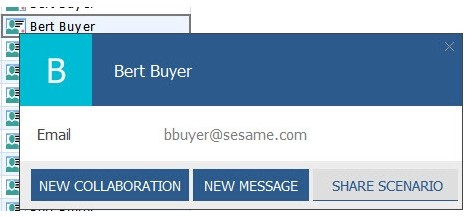
 You want to identify the buyer responsible for the component part in a worksheet based on the BillofMaterial table. Additionally, you want to have the option of inviting that buyer to a collaboration, messaging that buyer, and sharing a scenario with them. Which set of column expressions and configuration changes will enable this capability?
-
A
Create a column with an expression of Responsibility($Role_Buyers, Component). On the Column Formatting tab, Check the "Display as user name" checkbox.
-
B
Create a column with an expression of Responsibility($Role_Buyers, Component). On the Column Formatting tab, Check the "Display as image" checkbox and select an appropriate image.
-
C
Create a column with an expression of Responsibility($Role_Buyers, Component.Name).
On the Column Formatting tab, Check the "Display as user name" checkbox.
-
D
Create a column with an expression of Responsibility($Role_Buyers, Component.Name).
On the Column Formatting tab, Check the "Display as image" checkbox and select an appropriate image.
Reveal answer details
Close answer details
Correct answerA
ExplanationTo identify the buyer responsible for the component part, you would use the Responsibility function with the appropriate role and the component part as arguments. The resulting column should display the user name, which allows you to interact with that user directly from the worksheet, including inviting to a collaboration, messaging, and sharing scenarios. Enabling the "Display as user name" checkbox on the Column Formatting tab would provide this functionality directly in the worksheet. ReferencesThe Kinaxis RapidResponse function library contains the Responsibility function and outlines how to display responsible parties for certain records. Additional user interface functionalities such as messaging and collaboration options are detailed in the system's user management and worksheet configuration sections.
Question 2
Multiple choice
Your suppliers need to receive a report listing their outstanding purchase orders. Each supplier should receive the report in the same format but it should only display the purchase orders associated with their supplier ID. Based on this situation, which two actions will be required to support this requirement? (Choose two.)
-
A
Define a profile variable to assign the supplier ID to the supplier's user group. Add the profile variable to the filter expression in the workbook.
-
B
Define a list workbook variable to provide a selector for the supplier list. Add the workbook variable to the filter expression in the workbook.
-
C
Assign a master Supplier group in the Advanced properties of the Alert properties window.
-
D
Add the supplier's user group in the Notify tab of the Alert properties window.
Reveal answer details
Close answer details
Correct answersA, D
ExplanationTo ensure that suppliers only receive reports relevant to their purchase orders, a profile variable tied to the supplier's user group is used to filter the report data. The Notify tab in the Alert properties window is used to configure the report distribution to the appropriate supplier's user group, ensuring that each supplier gets the tailored report.
References:
Kinaxis RapidResponse documentation on creating user groups, profile variables, and configuring alerts for report distribution.
Kinaxis training materials on workbook filter expressions and alert notification settings.
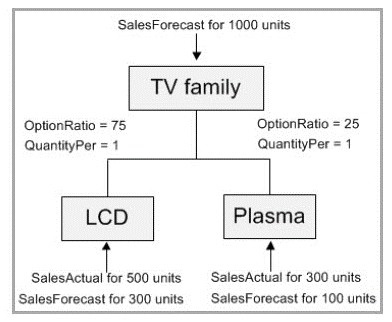 Referring to the graphic, the TV Family represents an MPSConfig planning BOM. No supply is available. What will be the quantity of the planned order created for the TV family?
-
A
-
B
-
C
-
D
Reveal answer details
Close answer details
Correct answerD
ExplanationThe SalesForecast for the TV family is for 1000 units, as shown in the graphic. The MPSConfig planning BOM will generate a planned order equal to the SalesForecast quantity because there is no available supply. OptionRatio and QuantityPer indicatethe proportion of the forecast to be planned for each product type (LCD and Plasma), not the total quantity to be planned. Therefore, the planned order quantity will match the total forecasted demand, which is 1000 units. ReferencesThis conclusion is drawn from the Master Production Schedule (MPS) and Bill of Materials (BOM) configuration rules within Kinaxis RapidResponse. When there is no supply to meet demand and forecasts are being translated into planned production, the full amount of the forecast typically becomes the planned order quantity.
Question 4
Multiple choice
You are developing a worksheet that will be used to run a script through a form. For the script to work properly, you will need to pass information from two columns as script arguments. Which two actions will accomplish this task? (Choose two.)
-
A
Select the columns when mapping drill links to forms.
-
B
Map the Form controls to Script arguments.
-
C
Select the columns when setting an Open Form Command.
-
D
Match the script arguments names with the Form controls ID.
Reveal answer details
Close answer details
Correct answersB, D
ExplanationTo pass information from columns in a worksheet to a script, the form controls used to collect input from users need to be mapped to the script arguments. This mapping allows the script to receive the column data as arguments. Additionally, making sure the names of the script arguments match the ID of the form controls is necessary for the script to correctly identify and use the data passed from the form.
ReferencesKinaxis RapidResponse documentation and best practices for forms and scripting indicate that mapping form controls to script arguments and ensuring the argument names match the control IDs are critical for passing data to scripts.
You are asked to report data based on the ScheduledReceipt table that also displays information from a custom table, WorkOrderInfo. There will be at most one WorkOrderInfo record for any ScheduledReceipt record and WorkOrderInfo will be used often in worksheets reporting ScheduledReceipt data. Following Kinaxis best practices, what should you do to accomplish this task?
-
A
1. Create two worksheets: one based on ScheduledReceipts and one based on WorkOrderInfo.
2. Create a column in the ScheduledReceipts worksheet to lookup values in the WorkOrderInfo worksheet.
-
B
1. Create a composite worksheet using two component worksheets, ScheduledReceipt and WorkOrderInfo.
2. Use left join and grouping to align the two sets of data.
-
C
1. Create a reference field on the WorkOrderInfo table to the ScheduledReceipt table.
2. Display relevant work order data in worksheets based on the WorkOrderInfo table and the referenced ScheduledReceipt table.
-
D
1. Create a reference field on the ScheduledReceipt table to the WorkOrderInfo table.
2. Display relevant work order data in worksheets based on the ScheduledReceipt table and the referenced WorkOrderInfo table.
Reveal answer details
Close answer details
Correct answerD
ExplanationCreate a reference field on the ScheduledReceipt table to the WorkOrderInfo table.
Display relevant work order data in worksheets based on the ScheduledReceipt table and the referenced WorkOrderInfo table.
Very Detailed ExplanationThe best practice in this scenario, according to Kinaxis, is to create a reference from the ScheduledReceipt table to the WorkOrderInfo table. This allows for direct linking of records between these tables. The worksheets based on the ScheduledReceipt data can then leverage this reference to display related information from the WorkOrderInfo table, ensuring that the data is accurately aligned and easily accessible for reporting and analysis.
ReferencesThis recommendation aligns with Kinaxis's guidance for structuring worksheets and data models to efficiently report and analyze data from multiple related tables without the need for redundant worksheets or complex lookup structures.
Question 6
Multiple choice
A user wants to build a crosstab worksheet that shows historical data in daily buckets for the last two years. Currently, historical data is stored in days. What are two ways to accomplish this task? (Choose two.)
-
A
Enable the Bucket data by date checkbox, then select Day in the Bucket Size and 730 (365*2) in the Number of Buckets.
-
B
Enable Advanced Bucketing, select Day in the Bucket Size and 365 in the Number of Buckets, and then adjust the Anchor date by 1 Year.
-
C
Create calendar interval, start date, and end date variables using the CalendarDate table, and then reference these variables in the worksheet that displays historical data.
-
D
Clear the Bucket data by date checkbox and then filter the worksheet for the last 2 years as Date >=
MRPDate - 730 and Date <= MRPDate
Reveal answer details
Close answer details
Correct answersA, C
ExplanationA. Enabling the Bucket data by date checkbox and setting the Bucket Size to Day and the Number of
Buckets to 730 would directly create a view that organizes daily historical data into daily buckets spanning the last two years (since there are 365 days in a year, multiplied by 2).
C. Creating calendar interval, start date, and end date variables using the CalendarDate table allows for
the configuration of a custom time range in the worksheet. These variables can be referenced to display historical data for the desired period. B is not correct because adjusting the Anchor date by 1 year would only provide data for the last year, not two. D is not correct because it suggests a method of filtering data by date without bucketing, which does not align with the requirement to show historical data in daily buckets.
References:
Kinaxis RapidResponse documentation on bucketing data by date. Kinaxis support resources on configuring worksheets with date variables and bucketing.
Question 7
Multiple choice
A client wants to provide their sales staff the ability to add forecasts for the global total of demand across all SKUs by each customer by month. The client wants to use their historical demand to allocate from a monthly forecast to a weekly forecast. Which three actions would accomplish this task? (Choose three.)
-
A
Create a worksheet based on the HistoricalDemandActual table.
-
B
Create workbook variables for Start Date and End Date.
-
C
Create a workbook variable for Calendar with a value of Month.
-
D
Define a custom Insert Definition.
-
E
Include only columns for Part, Site, and Customer from the HistoricalDemandActual table.
Reveal answer details
Close answer details
Correct answersB, C, D
ExplanationFor the sales staff to add forecasts, they need a framework that allows them to inputdata within a specified range (hence Start Date and End Date variables). A Calendar workbook variable set to 'Month' will align the input with the monthly granularity required. A custom Insert Definition is needed to facilitate the input of new forecast data. Including only the necessary columns would streamline the process, but it does not directly contribute to enabling the forecast addition as required by the client, hence why E is not a correct choice here. References:
Kinaxis RapidResponse documentation on setting up worksheets for forecast entry.
Kinaxis learning resources on workbook variables and custom insert definitions.
Question 8
Multiple choice
At a customer site, there are multiple TimePhasedSafety records that are duplicated in the Baseline scenario. This is caused by the cross-scenario update from a child scenario. What are two Kinaxis best practices for cross-scenario updates to prevent this situation? (Choose two.)
-
A
Include all key fields and all reference fields in the update to help the database clearly identify matching records.
-
B
Identify fields that should be used to match records by making them read-only.
-
C
List the identifying fields ahead of the other columns.
-
D
Delete all records in Baseline before the update to allow the database to re-link records that have a corrupted version chain.
Reveal answer details
Close answer details
Correct answersA, C
ExplanationTo prevent duplication of TimePhasedSafety records in cross-scenario updates: Statement A:Including all key and reference fields in the update is a best practice. This ensures that the database can accurately match records across scenarios, reducing the risk of duplications.
Statement C:Listing identifying fields ahead of other columns in the update process helps in prioritizing these fields during the matching process, enhancing the accuracy of record linkage and minimizing duplication errors.
References
Kinaxis RapidResponse documentation and best practices on Automation Chains and Scheduled Tasks.
References:
The search did not yield specific documentation on best practices for cross-scenario updates
in Kinaxis RapidResponse. However, these answers are aligned with general best practices for database management and updates to prevent duplication and ensure data integrity.
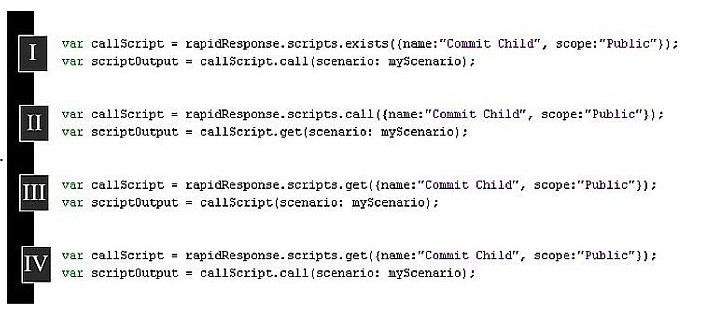 You are creating a new script that must insert a new customer record, archive that record weekly in a new scenario, and then commit the child scenario to a parent scenario. You already have a script that commits child scenarios. Referring to the graphic, which code will call the script that commits child scenarios in your new script?
-
A
-
B
-
C
-
D
Reveal answer details
Close answer details
Correct answerD
ExplanationThe code block IV is correctly using the script execution pattern in RapidResponse. It first gets the script usingrapidResponse.scripts.get()method with the correct parameters for the name and scope, and then calls the script with.call()method, passing the necessary scenario argument. This is how you would invoke another script from within a script.
ReferencesThe use ofrapidResponse.scripts.get()andcall()methods is standard practice in Kinaxis RapidResponse for executing one script from within another, as detailed in the Kinaxis RapidResponse scripting documentation.
|