You need to run a packet capture on a CX switch and be able to view the full output on a remote device in real-time. What is the best way to do this?
-
A
Configure a mirror session using ERSPAN to a computer running Wireshark
-
B
Inspect the summary of the packets in real time on the switch using tcpdump
-
C
Configure a mirror session with another port on the switch as the destination
-
D
Configure a mirror session to the CPU, use tshark to capture it to a PCAP file
Reveal answer details
Close answer details
Correct answerA
ExplanationTo capture packets on an HPE Aruba CX switch and view the output remotely in real-time, the best practice is to use a mirror session that forwards traffic to a remote device running a packet analyzer such as Wireshark. ERSPAN (Encapsulated Remote Switched Port Analyzer) allows the mirror traffic to be encapsulated in GRE and sent over an IP network to a remote monitoring station. This method ensures full packet capture with no local resource constraints and provides full visibility to the analyst.
Option B (using tcpdump on the switch) only provides summarized or limited capture locally.
Option C (mirroring to another switch port) only allows local monitoring and does not provide remote real-time viewing.
Option D (mirror to CPU and then use tshark) is less efficient and may be resource-intensive on the switch.
Therefore, configuring ERSPAN to a remote Wireshark host is the recommended and best way. References:
HPE Aruba CX Switch Documentation ?Packet Capture and ERSPAN configuration guide ArubaOS-CX Configuration Guide, Monitoring and Troubleshooting Chapter
Refer to the exhibit: 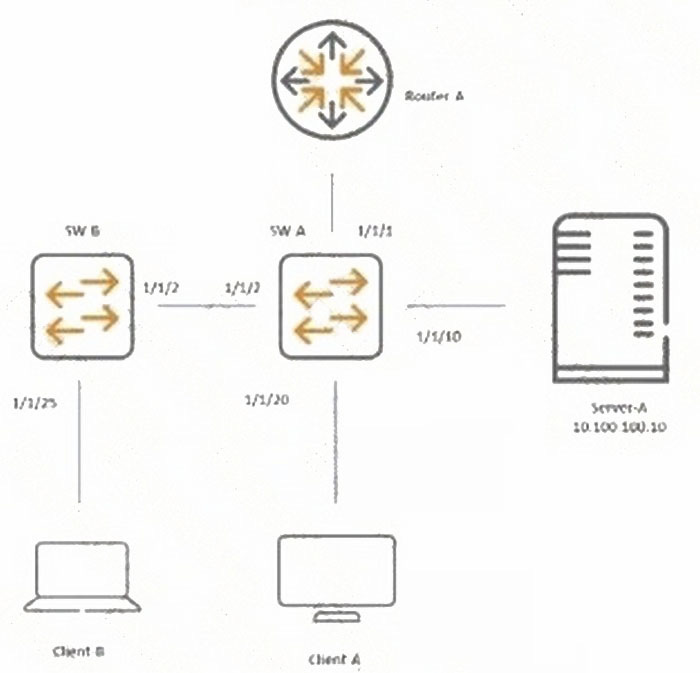 SW-A is the Layer 3 gateway for: 1. Server-A in VLAN 100, subnet 10.100.100.0/24
2. Client-A in VLAN 20, subnet 10.100.20.0/24
3. Client-B in VLAN 30, subnet 10.100.30.0/24 What must be done to prevent rogue DHCP servers in VLAN 30 on SW-B?
-
A
Enable dhcpv4-snooping trust 10.100.100.10 on VLAN 30
-
B
Enable dhcpv4-snooping authorized-server 10.100.100.10 on VLAN 30
-
C
Enable snooping globally and on VLAN 30
-
D
Enable dhcpv4-snooping globally and on interface VLAN 30
Reveal answer details
Close answer details
Correct answerB
ExplanationTo prevent rogue DHCP servers in a VLAN, DHCP snooping authorized-server commands are used to specify trusted DHCP servers allowed to respond.
Option A (dhcpv4-snooping trust 10.100.100.10) configures a trusted port, but it is not VLAN specific and not precise enough for this purpose.
Enabling DHCP snooping globally and on VLAN or interface (Options C and D) are prerequisites but do not prevent rogue servers unless authorized servers are defined.
Option B correctly enables an authorized DHCP server IP on VLAN 30, blocking unauthorized DHCP responses. References:
ArubaOS-CX DHCP Snooping Configuration Guide
HPE Aruba Network Security Best Practices
Aruba DHCP Snooping Technical Whitepaper
You are about to make a change to the HPE Aruba Networking CX switch in HPE Aruba Networking Central and are encountering the condition displayed above. What needs to be done to make a change to the switch with multi-edit? 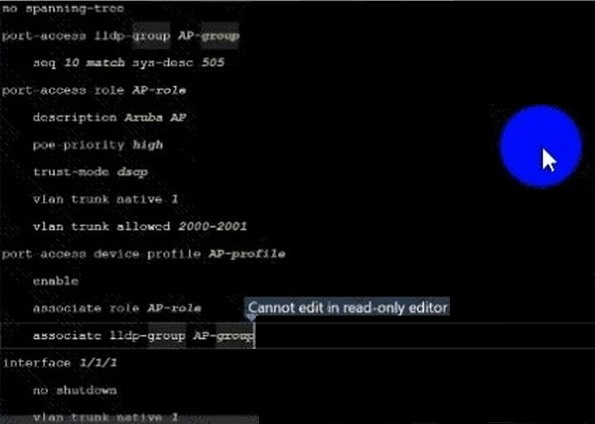
-
A
Select configuration status and enable edit config
-
B
Enable edit config mode using the gear icon
-
C
-
D
Select the device in multi-edit and enable edit config mode
Reveal answer details
Close answer details
Correct answerB
ExplanationTo make configuration changes using multi-edit in Aruba Central when encountering the shown condition, you must enable edit config mode using the gear icon. This unlocks the configuration for editing and allows you to make batch changes safely.
Selecting configuration status or device in multi-edit alone is not sufficient. Overriding state is not a standard approach in Aruba Central for editing configs. References:
Aruba Central User Guide ?Multi-Edit Features
HPE Aruba Configuration Management Best Practices
Aruba Central GUI Documentation
You are remotely connected to an HPE Aruba Networking CX 6200F switch using SSH to change the Control Plane ACL, allowing only defined subnets to access the switch. Which AOS-CX command allows you to roll back your change if the ACL change is wrongly formed and you can no longer log in to the switch?
-
A
Use the checkpoint commit command after you commit the change.
-
B
Use the checkpoint auto command before you commit the change.
-
C
Use the checkpoint auto command after you commit the change.
-
D
Use the checkpoint commit command before you commit the change.
Reveal answer details
Close answer details
Correct answerB
ExplanationWhen making changes remotely to critical configurations such as Control Plane ACLs on a CX switch, to protect against accidental lockout due to misconfiguration, you should enable checkpoint auto before committing the changes.
Checkpoint auto creates an automatic rollback timer. If the administrator loses connectivity (e.g., because of the ACL change), the system automatically rolls back the change after the timer expires, preventing lockout. checkpoint commit is used after committing to save the checkpoint explicitly, but it does not provide automatic rollback.
Running checkpoint auto before committing is essential to have the rollback safety net. References:
ArubaOS-CX Configuration Rollback and Checkpoint Documentation Aruba CLI User Guide ?Checkpoint Commands
HPE Aruba Best Practices for Remote Configuration
You've rebooted s-agg2 in a VSX configuration in an attempt to live-upgrade the cluster, and then you see this condition: 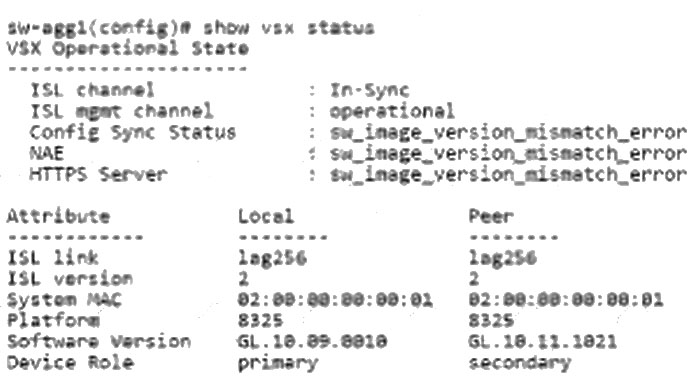 What would be the correct way to live-upgrade the VSX cluster?
-
A
Always reload the primary switch first with the new image.
-
B
Use the issu update-software option.
-
C
Use vsx update-software option.
-
D
Set the VSX to compatibility mode first, before rebooting the secondary switch.
Reveal answer details
Close answer details
Correct answerC
ExplanationComprehensive Detailed Explanation:
For live upgrading a VSX cluster, the correct procedure is to use the vsx update-software option, which allows in-service software upgrade (ISSU) with minimal disruption by upgrading switches one at a time while maintaining synchronization. issu update-software is not a recognized command in Aruba CX.
Reloading the primary first risks service disruption.
Compatibility mode is not required prior to reboot. References:
Aruba VSX Upgrade Procedures Guide
HPE Aruba VSX Best Practices for Software Upgrades ArubaOS-CX VSX Documentation
Refer to the exhibit from an HPE Aruba Networking CX6000: 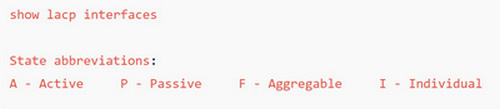 Two CX 6000 switches are configured with the same configuration for LAG 1. What needs to be done to remove the LACP block state?
-
A
On one of the switches, change the LACP mode to passive
-
B
Change the LACP mode from passive to active on one of the switches
-
C
Change the LACP mode from passive to static on one of the switches
-
D
On both of the switches, change the LACP timeout to short
Reveal answer details
Close answer details
Correct answerB
ExplanationLACP (Link Aggregation Control Protocol) modes can be active or passive. When two switches are both configured in passive mode, no LACP packets are initiated, causing the link aggregation to fail or go into a block state.
Changing one side from passive to active causes that switch to initiate LACP negotiation, resolving the block state.
Changing to static mode disables LACP negotiation, which is not recommended unless both sides are static.
Changing timeout does not solve LACP block issues caused by mode mismatches.
Therefore, changing one switch's LACP mode from passive to active is necessary to resolve the block. References:
ArubaOS-CX LACP Configuration Guide
IEEE 802.3ad Standard for LACP
Aruba VSX and LACP Troubleshooting Guide
Which data format do CX switches support for the REST API?
-
A
-
B
-
C
-
D
Reveal answer details
Close answer details
Correct answerC
ExplanationThe Aruba CX switches REST API supports the JSON (JavaScript Object Notation) data format for both requests and responses. JSON is widely adopted for REST APIs due to its lightweight and readable format.
XML and YAML are not supported for REST API on CX switches.
SOAP is a different protocol not used by Aruba CX REST API.
Therefore, JSON is the correct and supported data format. References:
ArubaOS-CX REST API User Guide
HPE Aruba Networking Developer Portal
Aruba CX Switch API Documentation
A multicast configuration on an HPE Aruba Networking CX 6300 VSF is used for a group address 239.0.0.1. The configuration is having issues, and the video streaming clients are not receiving the stream. What would be a possible root cause for the problems experienced?
-
A
The IGMP-snooping is using version 2 configured for the SVI.
-
B
The selected multicast address will overlay with Link-Local Multicast address scope.
-
C
The selected multicast address will overlay with PIM-SM discovery address.
-
D
The IGMP is enabled on the VLANs without any multicast traffic.
Reveal answer details
Close answer details
Correct answerB
ExplanationThe multicast group address 239.0.0.1 falls within the administratively scoped multicast addresses but overlaps with the Link-Local Multicast address scope (224.0.0.0/24), which is reserved for protocol control traffic and should not be used for application multicast groups. Using an address that overlaps with the Link-Local scope can cause multicast routing and forwarding issues, leading to video streaming clients not receiving the stream.
IGMP snooping version or enabling IGMP without multicast traffic do not cause this issue.
PIM-SM discovery addresses are different multicast addresses. References:
RFC 2365 (Administratively Scoped IP Multicast)
ArubaOS-CX Multicast and IGMP Configuration Guide
HPE Aruba Networking Multicast Best Practices
How does an HPE Aruba Networking CX VSX solution make the hardware replacement of a single switch a non-disruptive operation for Layer 2 configurations?
-
A
By the utilization of any of the four reserved ranges as system-MAC addresses.
-
B
By the VSX-sync option for synchronization of the system-MAC.
-
C
By entering the primary switch system-MAC on the secondary switch.
-
D
By allowing the system MAC in the ServiceOS to be changed to the original system MAC.
Reveal answer details
Close answer details
Correct answerD
ExplanationIn HPE Aruba CX VSX, the hardware replacement of a single switch is non-disruptive for Layer 2 configurations because the system MAC address in the ServiceOS can be changed to the original system MAC address. This ensures consistent MAC address usage, avoiding disruptions in Layer 2 forwarding and preventing MAC flapping in the network.
Options involving VSX-sync or reserved system MAC ranges do not specifically address hardware replacement scenarios as effectively.
Changing the ServiceOS system MAC to match the original maintains Layer 2 stability during switch replacement. References:
Aruba VSX Hardware Replacement Best Practices
HPE Aruba CX VSX Technical Reference Guide
ArubaOS-CX ServiceOS and System MAC Documentation
Question 10
Single choice
You are implementing a design where the campus network should be in an isolated spanning tree topology from the data centre network. The core switches are connected by a single Layer-2 interface carrying multiple VLANs. When you examine the switches, you discover that the campus core sees the data centre core as the root bridge. What configuration can you apply to the campus-to-data centre core link to resolve the issue?
-
A
-
B
-
C
-
D
Reveal answer details
Close answer details
Correct answerA
ExplanationTo prevent the campus core from seeing the data center core as the root bridge in a spanning tree topology (which can cause suboptimal paths or loops), Root Guard should be applied on the campus-to-data center core link. Root Guard enforces root bridge placement by blocking any superior BPDU from a downstream switch, maintaining the intended root bridge location.
BPDU filter blocks BPDUs entirely, which can cause problems. Admin edge and BPDU guard are related to edge port protection, not root placement control. References:
Aruba Spanning Tree Configuration Guide
HPE Aruba Network Design Best Practices
IEEE 802.1D Root Guard Documentation
Question 11
Single choice
Two companies have merged, and BGP is used for routing. The customer has informed you that they currently have about 3600 routes in the routing table and would like to keep the total number of routes below 5000 A BGP routing table from the company to be merged is provided as an example below: show bgp ipv4 unicast 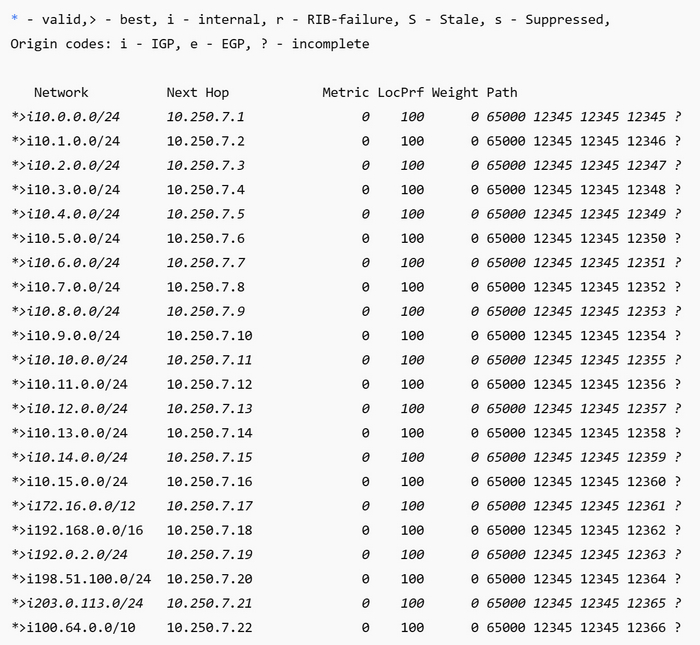 Based on the provided example of the BGP routing table from the merging company, what should the customer consider to achieve the routing table size requirement?
-
A
Set the route metrics equal for each prefix
-
B
Advertise routes only using a primary path
-
C
Enforce routing policies with aggregation
-
D
Import only 0.0.0.0/0 route
Reveal answer details
Close answer details
Correct answerC
ExplanationTo keep the BGP routing table size manageable and below a specified threshold, the customer should consider enforcing routing policies with aggregation. Route aggregation reduces the number of individual routes advertised and stored by combining multiple routes into a summarized one.
Setting route metrics equal or advertising only a primary path does not reduce the number of routes as effectively.
Importing only the default route (0.0.0.0/0) is impractical for normal operations.
Thus, route aggregation is the best practice for controlling routing table size in merged BGP environments. References:
ArubaOS-CX BGP Route Aggregation Guide
BGP Best Practices RFCs (e.g., RFC 4271)
HPE Aruba Routing and BGP Configuration Documentation
Question 12
Single choice
Your company needs to run BGP in a multi-homed configuration to two ISPs, advertising a block of public address space you own. Which AS number would be an example of a suitable number?
-
A
-
B
-
C
-
D
Reveal answer details
Close answer details
Correct answerB
ExplanationFor BGP in a multi-homed configuration advertising public IP blocks, the AS number should be a valid public AS number allocated by the regional internet registry (RIR). Numbers in the private AS range (64512?5534) are not suitable for public Internet announcements. 63472 falls in the public AS range (16-bit AS numbers below 64512). 64813, 65535, and 65218 are in the private or reserved range.
Therefore, 63472 is an example of a suitable public AS number. References:
IANA Autonomous System Number Registry
RFC 6996 (Private AS Numbers)
ArubaOS-CX BGP Configuration Guide
Question 13
Single choice
Refer to the exhibit: 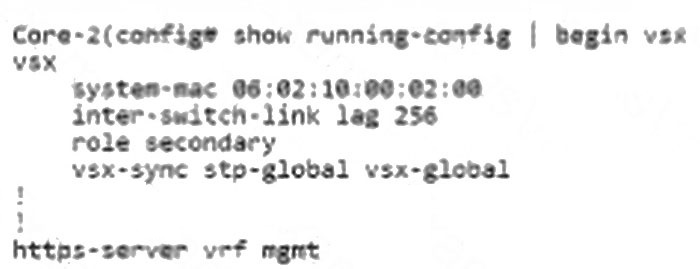 The primary VSX switch has a DHCP relay configured; however, the secondary switch does not display the
DHCP relay configuration in the running configuration. How can the VSX configuration be changed to have the same config on both nodes?
-
A
On the secondary switch, add vsx-sync ip-helper under VSX configuration.
-
B
On the primary switch, add vsx-sync ip-helper under VSX configuration.
-
C
On the primary switch, add vsx-sync dhcp-relay under VSX configuration.
-
D
On the secondary switch, add vsx-sync dhcp-relay under VSX configuration.
Reveal answer details
Close answer details
Correct answerC
ExplanationIn a VSX cluster, certain configurations such as DHCP relay need to be synchronized between both nodes.
To sync DHCP relay configuration from the primary to the secondary, the command:
vsx-sync dhcp-relay
must be added under the VSX configuration on the primary switch. This ensures that DHCP relay settings are pushed to the secondary member automatically.
Adding vsx-sync ip-helper relates to IP helper addresses, not DHCP relay specifically.
Adding the sync command on the secondary has no effect as synchronization originates from primary. References:
Aruba VSX Configuration Synchronization Guide
HPE Aruba DHCP Relay and VSX Documentation
ArubaOS-CX VSX Best Practices
Question 14
Single choice
An Aruba CX B100 VSX has the following state for LACP: 2024-06-08T19:48:34.713434+03:00 VSX1 lacpd[837]: Event|1321|LOG_INFO|AMM|1/1|LAG 253 State
change for interface 1/1/25:3: Actor state: ALFNCD, Partner state: ASFNCD 2024-06-06T19:48:34.675496+03:00 VSX1 lacpd[837]: Event|1308|LOG_INFO|AMM|1/1|LACP rate set to
slow for LAG 253 What can be observed based on the output?
-
A
The LAG 253 has a mismatching configuration with a peer
-
B
The global LACP rate has been configured for LACP ports
-
C
The LAG 253 has been negotiated automatically with peer timeout values
-
D
The local LAG 253 has a matching LACP configuration with peer
Reveal answer details
Close answer details
Correct answerD
ExplanationThe LACP state event Actor state: ALFNCD, Partner state: ASFNCD indicates that the LACP negotiation between the local (actor) and peer (partner) is successful with all flags matching and no errors.
ALFNCD and ASFNCD are standard LACP states indicating Active, Long timeout, Aggregation capable, Not synchronized, Collecting, and Distributing flags set as expected.
Also, the log shows the LACP rate is set to slow, which is the default.
Thus, the output shows the LAG 253 has a matching LACP configuration with its peer. References:
ArubaOS-CX LACP Debugging and Logs Guide IEEE 802.3ad Link Aggregation Control Protocol Specification Aruba VSX LAG Best Practices Documentation
|