Review the question wording, option layout, and available explanations before choosing a study plan.
Question 1
Single choice
When performing live firmware upgrades on Aruba APs. which technology partitions all the APs based on RF neighborhood data minimizing the impact on clients?
A
Aruba ClientMatch
B
Aruba Ai insights
C
Aruba AirMatch
D
Aruba ESP
Reveal answer detailsClose answer details
Correct answerC
Explanation
Aruba AirMatch is a feature that optimizes RF Radio Frequency. RF is any frequency within the electromagnetic spectrum associated with radio wave propagation. When an RF current is supplied to an antenna, an electromagnetic field is created that then is able to propagate through space. performance and user experience by using machine learning algorithms and historical data to dynamically adjust AP power levels, channel assignments, and channel width. AirMatch performs live firmware upgrades on Aruba APs by partitioning all the APs based on RF neighborhood data and minimizing the impact on clients. AirMatch uses a rolling upgrade process that upgrades one partition at a time while ensuring that adjacent partitions are not upgraded simultaneously.
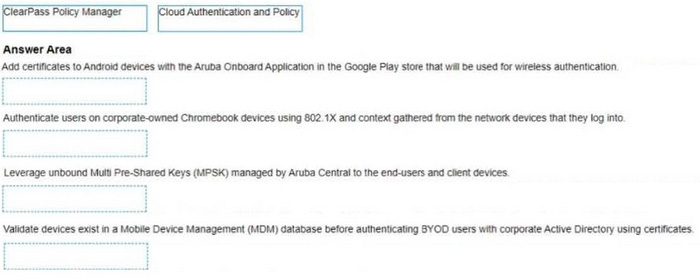
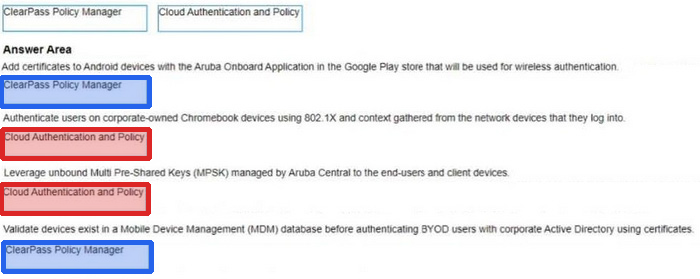
Please match the use case to the appropriate authentication technology.
Reveal answer detailsClose answer details
Explanation
Add certificates to Android devices with the Aruba Onboard Application in the Google Play store that will be used for wireless authentication A) ClearPass Policy Manager Authenticate users on corporate-owned Chromebook devices using 802.1X and context gathered from the network devices that they log into B) Cloud Authentication and Policy Leverage unbound Mum Pre-Shared Keys (MPSK) managed by Aruoa Central to the end-users and client devices B) Cloud Authentication and Policy Validate devices exist in a Mobile Device Management (MDM) database before authenticating BYOD users with corporate Active Directory using certificates A) ClearPass Policy Manager https://www.arubanetworks.com/techdocs/ClearPass/6.11/PolicyManager/Content/CPPM_UserGuide/About%20ClearPass/About_ClearPass.htm https://www.arubanetworks.com/products/security/network-access-control/
Question 3
Single choice
Which component determines when a wireless client roams between access points?
A
Wireless controller
B
Access point
C
Aruba Central
D
Client device
Reveal answer detailsClose answer details
Correct answerD
Explanation
Roaming decisions are made by the client device based on signal quality, RSSI, SNR, and internal roaming algorithms.
Question 4
Single choice
Which WPA3 feature protects against offline dictionary attacks?
A
Opportunistic Wireless Encryption (OWE)
B
Pairwise Temporal Key (PTK)
C
Simultaneous Authentication of Equals (SAE)
D
802.1X authentication
Reveal answer detailsClose answer details
Correct answerC
Explanation
SAE replaces the PSK exchange used in WPA2-Personal and prevents attackers from capturing handshakes to perform offline password attacks.
Question 5
Single choice
Describe the purpose of the administrative distance
A
Routes teamed via external BGP have a higher administrative distance than routes learned via OSPF
B
The administrative distance is used as a trust rating For route entries
C
The administrative distance for a static route is 10
D
The higher administrative distance is preferred
Reveal answer detailsClose answer details
Correct answerB
Explanation
The administrative distance is used as a trust rating for route entries (B). It is a metric used by routers to select the best path when there are two or more different routes to the same destination from two different routing protocols. The lower the administrative distance value, the more trustworthy the source of the route. For example, a directly connected network has an administrative distance of 0 because it is the most trusted source of routing information. In contrast, routes learned from different routing protocols have higher administrative distances, reflecting their relative trustworthiness.
Question 6
Single choice
Which three channels can be used simultaneously in a 2.4GHz WLAN environment while avoiding any co-channel interference?
A
1,6, 11
B
1,5, 10
C
3,6, 9
D
2,7, 11
Reveal answer detailsClose answer details
Correct answerA
Explanation
In a 2.4GHz WLAN environment, channels 1, 6, and 11 are recommended for use simultaneously to avoid co-channel interference because these channels do not overlap with each other. Each of these channels is separated by enough frequency space to ensure that the signals do not interfere, which is not the case with other channel combinations.
Question 7
Single choice
How does a single Aruba CX 6300M switch configuration use L3 connectivity to establish routing traffic between switch virtual interfaces 120 and 130?
A
Routing is enabled by default with Aruba 6300M.
B
Route leaking must be configured in default VRF.
C
Delete 'no routing' from the SVI interfaces.
D
Create static routes between SVI 120 and 130.
Reveal answer detailsClose answer details
Correct answerA
Explanation
On an Aruba CX 6300M switch, routing between Switch Virtual Interfaces (SVIs) is enabled by default. Therefore, traffic between SVIs, like 120 and 130, can be routed internally without the need for additional configuration such as route leaking or static routes, as long as there is no 'no routing' configuration present on the SVIs.
Question 8
Single choice
You have been asked to onboard a new Aruba 6300M in a customer deployment You are working remotely rather than on-site You have a colleague installing the switch The colleague has provided you with a remote console session to configure the edge switch You have been asked to configure a link aggregation going back to the cores using interfaces 1/1/51 and 1/1/52 The Senior Engineer of the project has asked you to configure the switch and 1Q uplink with these guidelines
1. Add VLAN 20 to the local VLAN database with name Mgmt
2. Add L3 SVl on VLAN 20 for Management using address 10 in the 10.1.1 0/24 subnet 3. Add LAG 1 using LACP mode active for the uplink
4 use vlan 20 as the native vlan on the LAG 5. Make sure the interfaces are all ON.
Which configuration script will achieve the task?
A
Edge1# conf t vlan 20 name Mgmt interface vlan 20 ip address 10.1.1.10/24 no shut interface lag 1 shut vlan access 20 lacp mode active Int 1/1/51.1/1/52 shut no routing lag 1 interface lag 1 no shut
B
Edgel# conf t vlan 20 name Mgmt interface vlan 20 ip address 10 1.1 10/24 no shut interface 1/1/51.1/1 /52 shut vlan trunk native 20 vlan trunk allowed all lag 1 lacp mode active interface 1/1/51.1/1/52 no shut
C
Edgel# conf t vlan 20 name Mgmt interface vlan 20 ip address 10 1 1 10/24 no shut interface lag 1 shut vlan trunk native 20 vlan trunk allowed all lacp mode active Int 1/1/51.1/1/52 shut no routing lag 1 interface lag 1 no shut interface 1/1/51.1/1/52 no shut
D
conf t vlan 20 name Mgmt ip address 10 1 1.10/24 no shut interface lag 1 shut vlan trunk native 1 vlan trunk allowed all lacp mode active int 1/1/51.1/1/52 shut no routing interface lag 1 no shut interface 1/1 /51.1/1/52 no shut
Reveal answer detailsClose answer details
Correct answerC
Explanation
This configuration script will achieve the task as it follows the guidelines given by the Senior Engineer. It creates VLAN 20 with name Mgmt, adds L3 SVI on VLAN 20 with IP address 10.1.1.10/24, creates LAG 1 with LACP mode active for the uplink, uses VLAN 20 as the native VLAN on the LAG, and ensures that the interfaces are all ON. References: https://www.arubanetworks.com/techdocs/AOS-CX/10.04/HTML/5200- 6790 /GUID-8F0E7E8B-0F4B-4A3C-AE7F-0F1B5A7F9C5D.html Edge1# conf t vlan 20 name Mgmt interface vlan 20 ip address 10.1.1.10/24 no shut interface lag 1 no shut vlan trunk native 20 vlan trunk allowed all lacp mode active interface 1/1/51 no shut lag 1 interface 1/1/52 no shut lag 1 exit This script correctly creates VLAN 20 with the name 'Mgmt', adds an L3 SVI for management using the specified IP address, and configures LACP for link aggregation (LAG 1) using the active mode. It also sets VLAN 20 as the native VLAN on the LAG and ensures all interfaces are enabled ('no shut' is the command to bring up the interface if it has been administratively shut down).
Question 9
Single choice
The customer has a requirement to create authorization policies for their users with Windows 10 clients, with a requirement Tor authorizing both device and user credentials within one Radius session.
What would be the correct solution for the requirement?
A
ClearPass 6.9 with EAP-TTLS
B
ClearPass 6.9 with EAP-TLS
C
ClearPass 6.9 with PEAP
D
ClearPass 6.9 with EAP-TEAP
Reveal answer detailsClose answer details
Correct answerD
Explanation
EAP-TEAP is a tunnel-based authentication method that supports both device and user authentication within a single RADIUS session. ClearPass 6.9 supports EAP-TEAP as an authentication method for Windows 10 clients.
References: https://www.arubanetworks.com/techdocs/ClearPass/6.9/Guest/Content/CPPM_UserGuide/EAP-TEAP/EAP-TEAP.htm For the requirement to authorize both device and user credentials within one Radius session, the correct solution would be ClearPass 6.9 with EAP-TEAP (EAP-Tunneled Extensible Authentication Protocol). EAP-TEAP is a tunneling protocol that creates a secure communication channel between the client and the server, allowing for the transmission of multiple authentication transactions within a single session. This capability is particularly useful in scenarios where both user and device credentials need to be verified before granting access to network resources, providing an additional layer of security and ensuring that both the user and the device are authorized to access the network.
Question 10
Single choice
Which Aruba technology will allow for device-specific passphrases to securely add headless devices to the WLAN?
A
Wired Equivalent Privacy (WEP)
B
Multiple Pre-Shared Key (MPSK)
C
Opportunistic Wireless Encryption (OWE)
D
Temporal Key Integrity Protocol (TKIP)
Reveal answer detailsClose answer details
Correct answerB
Explanation
Multiple Pre-Shared Key (MPSK) is a feature that allows device-specific or group-specific passphrases to securely add headless devices to the WLAN Wireless Local Area Network. WLAN is a wireless computer network that links two or more devices using wireless communication to form a local area network (LAN) within a limited area such as a home, school, computer laboratory, campus, or office building. . MPSK enhances the WPA2 PSK Wi-Fi Protected Access 2 Pre-Shared Key. WPA2 PSK is a method of securing your network using WPA2 with the use of the optional Pre-Shared Key (PSK) authentication, which was designed for home users without an enterprise authentication server. mode by allowing different PSKs for different devices on the same SSID Service Set Identifier. SSID is a case-sensitive, 32 alphanumeric character unique identifier attached to the header of packets sent over a wireless local-area network (WLAN). The SSID acts as a password when a mobile device tries to connect to the basic service set (BSS) -- a component of the IEEE 802.11 WLAN architecture. . MPSK passwords can be generated or user-created and are managed by ClearPass Policy Manager .
What can be done to dynamically set the PoE Priority on a switch port when deploying IP cameras APs. and other PoE devices?
A
Enable Quick PoE on the switch modules
B
Enable profiling for device provisioning
C
Configure PoE power management to Class-based Mode
D
Configure PoE power management to Dynamic Mode
Reveal answer detailsClose answer details
Correct answerB
Explanation
Profiling is a feature that allows Aruba switches to automatically identify and classify devices connected to them based on various attributes such as MAC address, DHCP options, LLDP information, etc. Profiling can be used to dynamically set the PoE priority on a switch port based on the device type and power requirements. For example, an IP camera may have a higher PoE priority than a printer or a PC. Profiling can also be used to apply other configuration settings such as VLANs, ACLs, QoS, etc. based on the device profile References: https://www.arubanetworks.com/techdocs/ArubaOS_86_Web_Help/Content/arubaos-solutions/1-overview/profiling.htm
Question 12
Single choice
What is an advantage of using Layer 2 MAC authentication?
A
MAC allow lists are easily maintained over time.
B
No setup is required on the client.
C
It matches user names to MAC address.
D
MAC identifiers are hard to spoof.
Reveal answer detailsClose answer details
Correct answerB
Explanation
The advantage of Layer 2 MAC authentication is that it does not require any setup or configuration on the client device. The network devices (like switches or access points) perform the authentication automatically based on the MAC address of the device when it tries to connect to the network.
Question 13
Single choice
When would you bond multiple 20MHz wide 802.11 channels?
A
To decrease the Signal to Noise Ratio (SNR)
B
To increase throughput between the client and AP
C
To provision highly available AP groups
D
To utilize high gain omni-directional antennas
Reveal answer detailsClose answer details
Correct answerB
Explanation
Bonding multiple 20MHz wide 802.11 channels is a technique to create a wider bandwidth channel that supports higher data rate transmissions. It can increase the throughput between the client and AP by using more spectrum resources and reducing interference. References: https://ieeexplore.ieee.org/document/9288995 Bonding multiple 20MHz wide 802.11 channels is a technique used to increase the throughput between the client device and the Access Point (AP). By combining two or more 20MHz channels into a wider channel (e. g., 40MHz, 80MHz, or even 160MHz), the data carrying capacity and, consequently, the overall throughput of the wireless connection are increased. This method is particularly useful in high-bandwidth applications or environments where higher data rates are required.
Question 14
Multiple choice
Which device configuration group types can a user define in Aruba Central during group creation? (Select two.)
A
ESP group
B
Security group
C
Ul group
D
Default group
E
Template group
Reveal answer detailsClose answer details
Correct answersB, E
Explanation
In Aruba Central during group creation, users can define various configuration groups to manage settings for multiple devices. A Security group allows you to apply consistent security settings across devices, and a Template group enables you to apply pre-defined configurations to devices. These groups help streamline the deployment and management of network devices in Aruba Central.
Question 15
Single choice
You are configuring a network with a stacked pair of 6300M switches used for distribution and layer 3 services.
You create a new VLAN for users that will be used on multiple access stacks of CX6200 switches connected downstream of the distribution stack You will be creating multiple VLANs/subnets similar to this will be utilized in multiple access stacks What is the correct way to configure the routable interface for the subnet to be associated with this VLAN?
A
Create a physically routed interface in the subnet on the 6300M stack for each downstream switch.
B
Create an SVl in the subnet on each downstream switch
C
Create an SVl in the subnet on the 6300M stack, and assign the management address of each downstream switch stack to a different IP address in the same subnet
D
Create an SVl in the subnet on the 6300M stack.
Reveal answer detailsClose answer details
Correct answerD
Explanation
The correct way to configure the routable interface for the subnet to be associated with this VLAN is to create an SVI Switched Virtual Interface (SVI) Switched Virtual Interface (SVI) is a virtual interface on a switch that represents a VLAN and provides Layer 3 routing functions for that VLAN . SVIs are used to enable inter-VLAN routing , provide gateway addresses for hosts in VLANs , apply ACLs or QoS policies to VLANs , etc . SVIs have some advantages over physical routed interfaces such as saving interface ports, reducing cable costs , simplifying network design , etc . SVIs are usually numbered according to their VLAN IDs (e.g., vlan 10) and assigned IP addresses within the subnet of their VLANs . SVIs can be created and configured by using commandssuch as interface vlan , ip address , no shutdown , etc . SVIs can be verified by using commands such as show ip interface brief , show vlan , show ip route , etc . in the subnet on the 6300M stack. An SVI is a virtual interface on a switch that represents a VLAN and provides Layer 3 routing functions for that VLAN. Creating an SVI in the subnet on the 6300M stack allows the switch to act as a gateway for the users in that VLAN and enable inter-VLAN routing between different subnets. Creating an SVI in the subnet on the 6300M stack also simplifies network design and management by reducing the
number of physical interfaces and cables required for routing.
The other options are not correct ways to configure the routable interface for the subnet to be associated with this VLAN because:
Create a physically routed interface in the subnet on the 6300M stack for each downstream switch: This option is incorrect because creating a physically routed interface in the subnet on the 6300M stack for each downstream switch would require using one physical port and cable per downstream switch, which would consume interface resources and increase cable costs. Creating a physically routed interface in the subnet on the 6300M stack for each downstream switch would also complicate network design and management by requiring separate routing configurations and policies for each interface.
Create an SVl in the subnet on each downstream switch: This option is incorrect because creating an SVI in the subnet on each downstream switch would not enable inter-VLAN routing between different subnets, as each downstream switch would act as a gateway for its own VLAN only. Creating an SVI in the subnet on each downstream switch would also create duplicate IP addresses in the same subnet, which would cause IP conflicts and routing errors.
Create an SVl in the subnet on the 6300M stack, and assign the management address of each downstream switch stack to a different IP address in the same subnet: This option is incorrect because creating an SVI in the subnet on the 6300M stack, and assigning the management address of each downstream switch stack to a different IP address in the same subnet would not enable inter-VLAN routing between different subnets, as each downstream switch would still act as a gateway for its own VLAN only. Creating an SVI in the subnet on the 6300M stack, and assigning the management address of each downstream switch stack to a different IP address in the same subnet would also create unnecessary IP addresses in the same subnet, which would waste IP space and complicate network management.
Based on the "snow ip route" output on an AruDaCX 8400. what type of route is "10.1 20 0/24, vrf default via 10.1.12.2. [1/0]"?
A
local
B
static
C
OSPF
D
connected
Reveal answer detailsClose answer details
Correct answerB
Explanation
A static route is a route that is manually configured on a router or switch and does not change unless it is modified by an administrator. Static routes are used to specify how traffic should reach specific destinations that are not directly connected to the device or that are not reachable by dynamic routing protocols. In Aruba CX switches, static routes can be configured using the ip route command in global configuration mode. Based on the "show ip route" output on an Aruba CX 8400 switch, the route "10.1 20 0/24, vrf default via 10.1.12.2, [1/0]" is a static route because it has an administrative distance of 1 and a metric of 0, which are typical values for static routes.
A network technician is using Aruba Central to troubleshoot network issues
Which dashboard can be used to view and acknowledge issues when beginning the troubleshooting process?
A
the Alerts and Events dashboard
B
the Audit Trail dashboard
C
the Reports dashboard
D
the Tools dashboard
Reveal answer detailsClose answer details
Correct answerA
Explanation
The Alerts and Events dashboard displays all types of alerts and events generated for events pertaining to device provisioning, configuration, and user management. You can use the Config icon to configure alerts and notifications for different alert categories and severities . You can also view the alerts and events in the List 1 view and Summary view . References: 2 1 (https://www.arubanetworks.com/techdocs/central/latest/content/nms/alerts/configuring-alerts.htm) 2 (https://www.arubanetworks.com/techdocs/central/latest/content/nms/alerts/viewing-alerts.htm)
Question 18
Single choice
A network technician is troubleshooting one new AP at a branch office that will not receive Its configuration from Aruba Central The other APs at the branch are working as expected. The output of the 'show ap debug cloud-server command' shows that the "cloud conflg received" Is FALSE.
After confirming the new AP has internet access, what would you check next?
A
Disable and enable activate to trigger provisioning refresh
B
Verify the AP can ping the device on arubanetworks.com
C
Verify the AP has a license assigned
D
Disable and enable Aruba Central to trigger configuration refresh
Reveal answer detailsClose answer details
Correct answerA
Explanation
When an Aruba AP is not receiving its configuration from Aruba Central, and other APs at the location are functioning normally, a common troubleshooting step is to disable and then re-enable the activation process on the AP. This action can trigger a provisioning refresh, prompting the AP to attempt to retrieve its configuration from Aruba Central again. This step is often effective in resolving communication or provisioning issues between the AP and the management platform.