Refer to the scenario. An organization wants the AOS-CX switch to trigger an alert if its RADIUS server (cp.acnsxtest.local) rejects an unusual number of client authentication requests per hour. After some discussions with other Aruba admins, you are still not sure how many rejections are usual or unusual. You expect that the value could be different on each switch. You are helping the developer understand how to develop an NAE script for this use case. The developer explains that they plan to define the rule with logic like this: monitor > value However, the developer asks you what value to include. What should you recommend?
-
A
Checking one of the access switches' RADIUS statistics and adding 10 to the number listed for rejects
-
B
Defining a baseline and referring to it for the value
-
C
Using 10 (per hour) as a good starting point for the value
-
D
Defining a parameter and referring to it (self ^ramsfname]) for the value
Reveal answer details
Close answer details
Correct answerD
ExplanationThis is because a parameter is a variable that can be defined and modified by the user or the script, and can be used to customize the behavior and output of the NAE script. A parameter can be referred to by using the syntax self ^ramsfname], where ramsfname is the name of the parameter.
By defining a parameter for the value, the developer can make the NAE script more flexible and adaptable to different scenarios and switches. The parameter can be set to a default value, such as 10, but it can also be changed by the user or the script based on the network conditions and requirements. For example, the parameter can be adjusted dynamically based on the average or standard deviation of the number of rejects per hour, or based on the feedback from the user or other admins. This way, the NAE script can trigger an alert only when the number of rejects is truly unusual and not just arbitrary.
A. Checking one of the access switches' RADIUS statistics and adding 10 to the number listed for rejects. This is not a good recommendation because it does not account for the variability and diversity of the network environment and switches. The number of rejects listed for one switch might not be representative or relevant for another switch, as different switches might have different traffic patterns, client types, RADIUS configurations, etc. Moreover, adding 10 to the number of rejects is an arbitrary and fixed value that might not reflect the actual threshold for triggering an alert.
B. Defining a baseline and referring to it for the value.
This is not a bad recommendation, but it is not as good as defining a parameter. A baseline is a reference point that represents the normal or expected state of a network metric or performance indicator. A baseline can be used to compare and contrast the current network situation and detect any anomalies or deviations.
However, a baseline might not be easy or accurate to define, as it might require historical data, statistical analysis, or expert judgment. Moreover, a baseline might not be stable or constant, as it might change over time due to network growth, evolution, or optimization.
C. Using 10 (per hour) as a good starting point for the value. This is not a good recommendation because
it is an arbitrary and fixed value that might not reflect the actual threshold for triggering an alert. Using 10 (per hour) as the value might result in false positives or false negatives, depending on the network conditions and switches. For example, if the normal number of rejects per hour is 5, then using 10 as the value might trigger an alert too frequently and unnecessarily. On the other hand, if the normal number of rejects per hour is 15, then using 10 as the value might miss some important alerts and risks.
Refer to the exhibit. 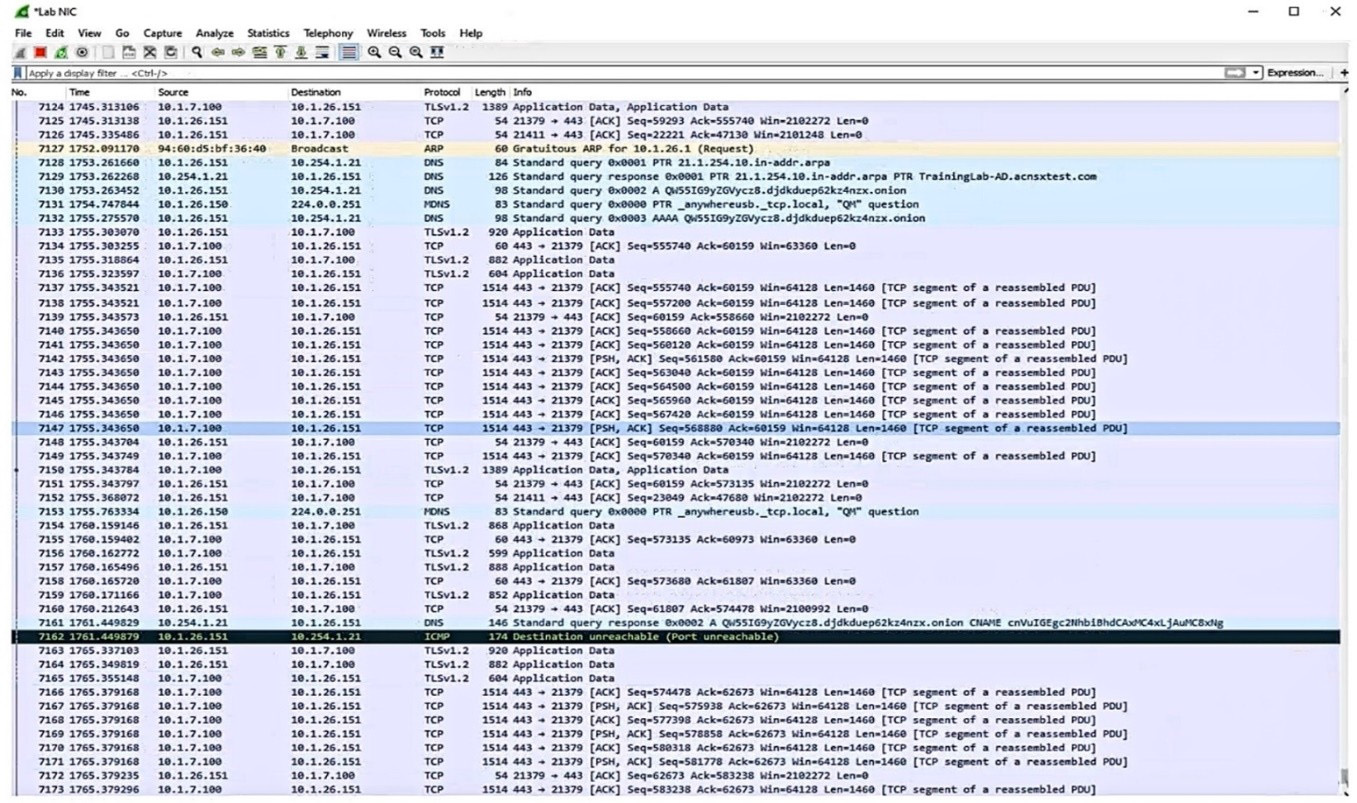 Which IP address should you record as a possibly compromised client?
-
A
-
B
-
C
-
D
Reveal answer details
Close answer details
Correct answerA
ExplanationThe exhibit shows a screenshot of a Malwarebytes alert that indicates that a website was blocked due to compromise. The alert contains the following information: The type of protection: Web Protection
The website that was blocked: 10.254.1.21
The port that was used: 80
The process that initiated the connection: C:\Program Files (x86)\Google\Chrome\Application\chrome.exe
The IP address of the device that initiated the connection: 10.1.26.151 The IP address of the device that initiated the connection is the one that should be recorded as a possibly compromised client, as it indicates that the device tried to access a malicious website that could infect it with malware or steal its data. In this case, the IP address of the possibly compromised client is 10.1.26.151.
A company has Aruba gateways that are Implementing gateway IDS/IPS in IDS mode. The customer complains that admins are receiving too frequent of repeat email notifications for the same threat. The threat itself might be one that the admins should investigate, but the customer does not want the email notification to repeat as often. Which setting should you adjust in Aruba Central?
-
A
Report scheduling settings
-
B
Alert duration and threshold settings
-
C
The IDS policy setting (strict, medium, or lenient)
-
D
The allowlist settings in the IDS policy
Reveal answer details
Close answer details
Correct answerB
ExplanationAlert duration and threshold settings are used to control how often and under what conditions email notifications are sent for gateway IDS/IPS events 1. By adjusting these settings, the customer can reduce the frequency of repeat email notifications for the same threat, while still being informed of any critical or new threats. To adjust the alert duration and threshold settings in Aruba Central, the customer can follow these steps 1: In the Aruba Central app, set the filter to Global, a group, or a device.
Under Analyze, click Alerts & Events.
Click the Config icon to open the Alert Severities & Notifications page. Select the Gateway IDS/IPS tab to view the alert categories and severities for gateway IDS/IPS events.
Click on an alert category to expand it and view the alert duration and threshold settings for each severity level.
Enter a value in minutes for the alert duration. This is the time period during which the alert is active and email notifications are sent. Enter a value for the alert threshold. This is the number of times the alert must be triggered within the alert duration before an email notification is sent.
Click Save.
By increasing the alert duration and/or threshold values, the customer can reduce the number of email notifications for recurring threats, as they will only be sent when the threshold is reached within the duration. For example, if the customer sets the alert duration to 60 minutes and the alert threshold to 10 for a Critical severity level, then an email notification will only be sent if the same threat occurs 10 times or more within an hour.
Refer to the scenario. A customer has an AOS10 architecture that is managed by Aruba Central. Aruba infrastructure devices authenticate clients to an Aruba ClearPass cluster. In Aruba Central, you are examining network traffic flows on a wireless IoT device that is categorized as "Raspberry Pi" clients. You see SSH traffic. You then check several more wireless IoT clients and see that they are sending SSH also. You want a relatively easy way to communicate the information that an IoT client has used SSH to Aruba CPPM. What is one prerequisite?
-
A
Enable event processing on subscribers in the ClearPass cluster.
-
B
In CPPM's CA trust list, add the Aruba Infrastructure usage to the DigiCert certificate.
-
C
Obtain a data collector token from Central's platform integration settings.
-
D
Create an API application and token within the REST API settings.
Reveal answer details
Close answer details
The customer needs a way for users to enroll new wired clients in Intune. The clients should have limited access that only lets them enroll and receive certificates. You plan to set up these rights in an AOS-CX role named "provision." The customer's security team dictates that you must limit these clients' Internet access to only the necessary sites. Your switch software supports IPv4 and IPv6 addresses for the rules applied in the
"provision" role. What should you recommend?
-
A
Configuring the rules for the "provision" role with IPv6 addresses, which tend to be more stable
-
B
Enabling tunneling to the MCs on the "provision" role and then setting up the privileges on the MCs
-
C
Configuring the "provision" role as a downloadable user role (DUR) in CPPM
-
D
Assigning the "provision" role to a VLAN and then setting up the rules within a Layer 2 access control list (ACL)
Reveal answer details
Close answer details
Correct answerC
ExplanationThis is because a downloadable user role (DUR) is a feature that allows the switch to use a central ClearPass server to download user-roles to the switch for authenticated users12 A DUR can contain various attributes and rules that define the access level and privileges of the user, such as VLAN, ACL, PoE, reauthentication period, etc3 A DUR can also be customized and updated on the ClearPass server without requiring any changes on the switch1
A DUR can be used to create a "provision" role that allows users to enroll new wired clients in Intune. The "provision" role can have limited access that only lets them enroll and receive certificates from the Intune service. The "provision" role can also have rules that restrict the Internet access of the users to only the necessary sites, such as the Intune portal and the certificate authority. The rules can be based on IPv4 or IPv6 addresses, depending on the network configuration and preference2 A. Configuring the rules for the "provision" role with IPv6 addresses, which tend to be more stable. This is not a valid recommendation because it does not address how to create and apply the "provision" role on the switch. Moreover, IPv6 addresses do not necessarily tend to be more stable than IPv4 addresses, as both protocols have their own advantages and disadvantages4
B. Enabling tunneling to the MCs on the "provision" role and then setting up the privileges on the MCs.
This is not a valid recommendation because it does not explain how to enable tunneling or what MCs are.
Moreover, tunneling is a technique that encapsulates one network protocol within another, which adds complexity and overhead to the network communication5
D. Assigning the "provision" role to a VLAN and then setting up the rules within a Layer 2 access control
list (ACL). This is not a valid recommendation because it does not explain how to assign a role to a VLAN or how to create a Layer 2 ACL on the switch. Moreover, a Layer 2 ACL is limited in its filtering capabilities, as it can only match on MAC addresses or Ethernet types, which might not be sufficient for restricting Internet access to specific sites
Refer to the scenario. A hospital has an AOS10 architecture that is managed by Aruba Central. The customer has deployed a pair of Aruba 9000 Series gateways with Security licenses at each clinic. The gateways implement IDS/IPS in IDS mode. The Security Dashboard shows these several recent events with the same signature, as shown below: 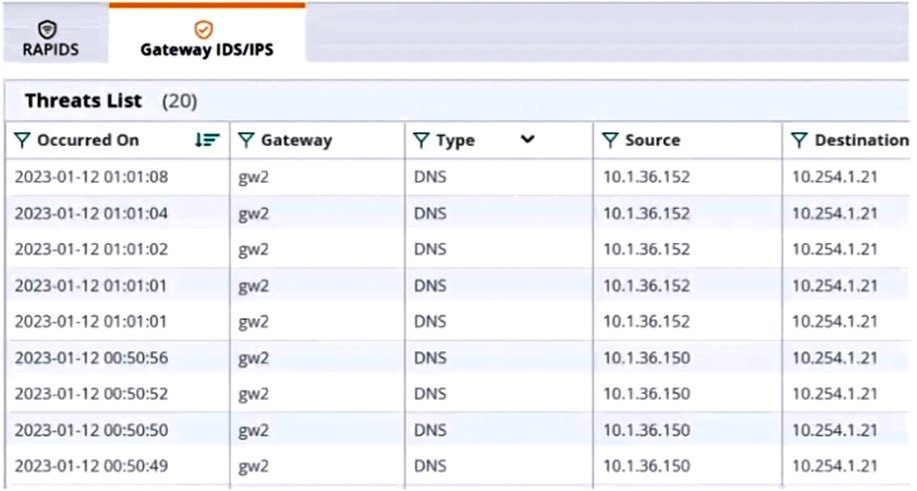 Which step could give you valuable context about the incident?
-
A
View firewall sessions on the APs and record the threat sources' type and OS.
-
B
View the user-table on APs and record the threat sources' 802.11 settings.
-
C
View the RAPIDS Security Dashboard and see if the threat sources are listed as rogues.
-
D
Find the Central client profile for the threat sources and note their category and family.
Reveal answer details
Close answer details
Correct answerC
ExplanationThe RAPIDS Security Dashboard is a feature of Aruba Central that provides a comprehensive view of the network security status, including IDS/IPS events, rogue APs, and wireless intrusion detection. By viewing the RAPIDS Security Dashboard, you can see if the threat sources are rogue APs that are spoofing legitimate DNS servers or clients. This can give you valuable context about the incident and help you identify the root cause of the attack1
References:
Aruba Central User Guide
A customer has an AOS 10 architecture, which includes Aruba APs. Admins have recently enabled WIDS at the high level. They also enabled alerts and email notifications for several events, as shown in the exhibit. 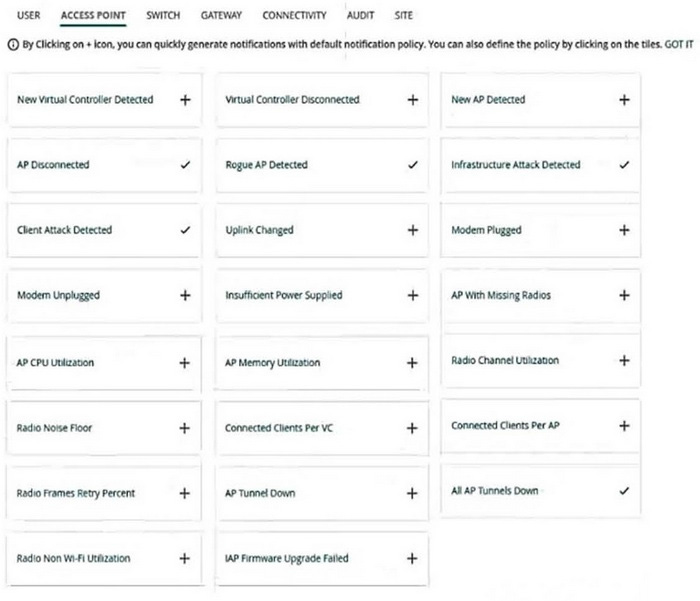 Admins are complaining that they are getting so many emails that they have to ignore them, so they are going to turn off all notifications. What is one step you could recommend trying first?
-
A
Send the email notifications directly to a specific folder, and only check the folder once a week.
-
B
Disable email notifications for Roque AP, but leave the Infrastructure Attack Detected and Client Attack Detected notifications on.
-
C
Change the WIDS level to custom, and enable only the checks most likely to indicate real threats.
-
D
Disable just the Rogue AP and Client Attack Detected alerts, as they overlap with the Infrastructure Attack Detected alert.
Reveal answer details
Close answer details
Correct answerC
ExplanationAccording to the AOS 10 documentation1, WIDS is a feature that monitors the radio spectrum for the presence of unauthorized, rogue access points and the use of wireless attack tools. WIDS can be configured at different levels, such as low, medium, high, or custom. The higher the level, the more checks are enabled and the more alerts are generated. However, not all checks are equally relevant or indicative of real threats. Some checks may generate false positives or unnecessary alerts that can overwhelm the administrators and reduce the effectiveness of WIDS. Therefore, one step that could be recommended to reduce the number of email notifications is to change the WIDS level to custom, and enable only the checks most likely to indicate real threats. This way, the administrators can fine-tune the WIDS settings to suit their network environment and security needs, and avoid getting flooded with irrelevant or redundant alerts. Option C is the correct answer.
Option A is incorrect because sending the email notifications directly to a specific folder and only checking the folder once a week is not a good practice for security management. This could lead to missing or ignoring important alerts that require immediate attention or action. Moreover, this does not solve the problem of getting too many emails in the first place.
Option B is incorrect because disabling email notifications for Rogue AP, but leaving the Infrastructure Attack Detected and Client Attack Detected notifications on, is not a sufficient solution. Rogue APs are unauthorized access points that can pose a serious security risk to the network, as they can be used to intercept or steal sensitive data, launch attacks, or compromise network performance. Therefore, disabling email notifications for Rogue APs could result in missing critical alerts that need to be addressed.
Option D is incorrect because disabling just the Rogue AP and Client Attack Detected alerts, as they overlap with the Infrastructure Attack Detected alert, is not a valid assumption. The Infrastructure Attack Detected alert covers a broad range of attacks that target the network infrastructure, such as deauthentication attacks, spoofing attacks, denial-of-service attacks, etc. The Rogue AP and Client Attack Detected alerts are more specific and focus on detecting and classifying rogue devices and clients that may be involved in such attacks. Therefore, disabling these alerts could result in losing valuable information about the source and nature of the attacks.
Refer to the exhibit. 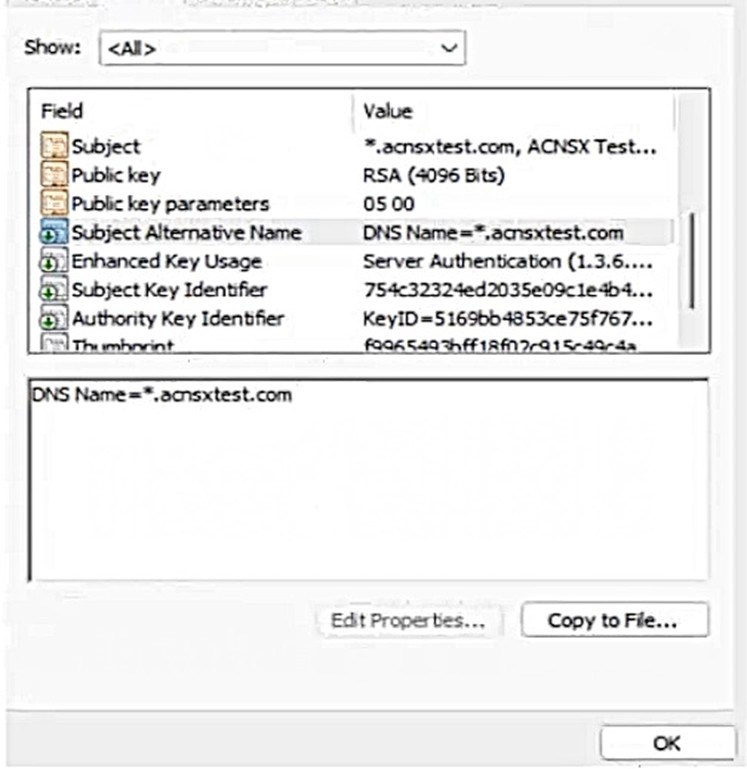 You have been given this certificate to install on a ClearPass server for the RADIUS/EAP and RadSec usages. What is one issue?
-
A
The certificate has a wildcard in the subject common name.
-
B
The certificate uses a fully qualified the '.local" domain name.
-
C
The certificate does not have a URI subject alternative name
-
D
The certificate does not have an IP subject alternative name
Reveal answer details
Close answer details
Correct answerB
ExplanationThe exhibit shows a screenshot of a certificate that has the following information: The subject common name (CN) is *.clearpass.local, which is a wildcard domain name that matches any subdomain under clearpass.local. The subject alternative names (SANs) are DNS Name=clearpass.local and DNS Name=*.clearpass.local, which are the same as the subject CN. The issuer CN is clearpass.local, which is the same as the subject domain name. The key usage (KU) is Digital Signature and Key Encipherment, which are required for RADIUS/EAP and RadSec usages.
The extended key usage (EKU) is Server Authentication and Client Authentication, which are also required for RADIUS/EAP and RadSec usages. The issue with this certificate is that it uses a fully qualified the `.local' domain name, which is a reserved domain name for local networks that cannot be registered on the
public Internet. This means that the certificate cannot be verified by any public certificate authority (CA), and therefore cannot be trusted by any external devices or servers that communicate with ClearPass. This could cause problems for RADIUS/EAP and RadSec usages, as they rely on secure and authenticated connections between ClearPass and other devices or servers.
To avoid this issue, the certificate should use a valid domain name that can be registered on the public Internet, such as clearpass.com or clearpass.net. This way, the certificate can be issued by a public CA that is trusted by most devices and servers, and can be verified by them. Alternatively, if the certificate is intended to be used only within a private network, it should be issued by a private CA that is trusted by all devices and servers within that network.
Refer to the exhibit. 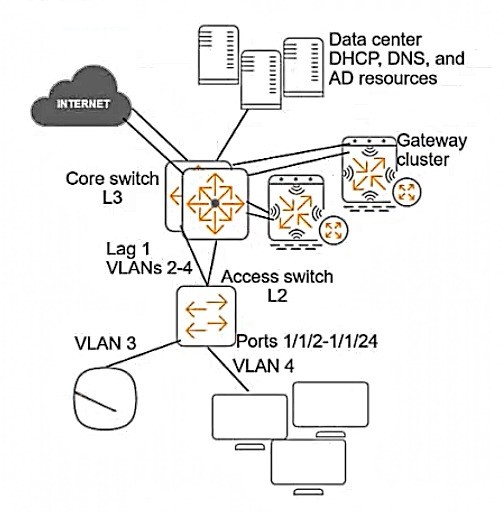 A customer requires protection against ARP poisoning in VLAN 4. Below are listed all settings for VLAN 4 and the VLAN 4 associated physical interfaces on the AOS-CX access layer switch: 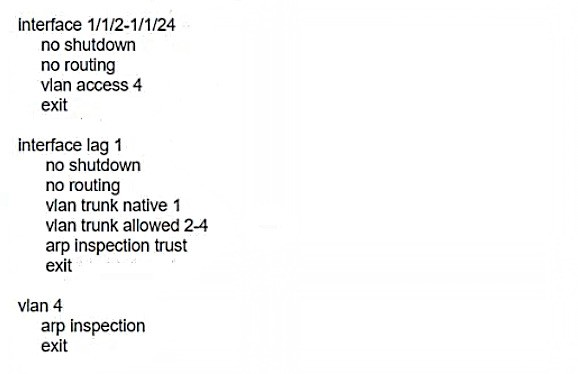 What is one issue with this configuration?
-
A
ARP proxy is not enabled on VLAN 4.
-
B
LAG 1 is configured as trusted for ARP inspection but should be untrusted.
-
C
DHCP snooping is not enabled on VLAN 4.
-
D
Edge ports are not configured as untrusted for ARP inspection.
Reveal answer details
Close answer details
Correct answerD
ExplanationThis is because ARP inspection is a security feature that validates ARP packets in a network and prevents ARP poisoning attacks12 ARP inspection works by intercepting, logging, and discarding ARP packets with invalid IP-to-MAC address bindings1 To enable ARP inspection, the switch needs to know which ports are trusted and which are untrusted. Trusted ports are those that connect to authorized DHCP servers or other network devices that are not vulnerable to ARP spoofing. Untrusted ports are those that connect to end hosts or devices that might send forged ARP packets13 In the exhibit, LAG 1 is configured as a trusted port for ARP inspection, which is correct because it connects to the core switch. However, the edge ports (1/1/1-1/1/24) are not configured as untrusted ports for ARP inspection, which is incorrect because they connect to end hosts that might be compromised by an attacker. By default, all ports are untrusted for ARP inspection, but this can be changed by using the command ip arp inspection trust on the interface configuration mode3 Therefore, to protect VLAN 4 against ARP poisoning, the edge ports should be configured as untrusted for ARP inspection by using the command no ip arp inspection trust on the interface configuration mode. This way, the switch will validate the ARP packets received on these ports against the DHCP snooping database or an ARP access-list and drop any invalid packets34
A. ARP proxy is not enabled on VLAN 4. This is not an issue because ARP proxy is an optional feature that allows the switch to respond to ARP requests on behalf of hosts in different subnets5 It is not related to ARP poisoning or ARP inspection.
B. LAG 1 is configured as trusted for ARP inspection but should be untrusted. This is not an issue because LAG 1 connects to the core switch, which is a trusted device that
does not send forged ARP packets.
C. DHCP snooping is not enabled on VLAN 4. This is not an issue because DHCP snooping is a separate
feature that prevents rogue DHCP servers from offering IP addresses to clients6 It is not directly related to ARP poisoning or ARP inspection, although it can provide information for ARP inspection validation if enabled
|