A vulnerability scan report has revealed that a user has generated traffic to the website example.com (10.10.10.10) using a weak SSL/TLS version supported by the HTTPS web server. What can the firewall administrator do to block all outdated SSL/TLS versions on any HTTPS web server to prevent possible attacks on user traffic?
-
A
Configure the unsupported SSL version and set the minimum allowed SSL version in the HTTPS settings of the SSL/SSH inspection profile.
-
B
Enable auto-detection of outdated SSL/TLS versions in the SSL/SSH inspection profile to block vulnerable websites.
-
C
Install the required certificate in the client's browser or use Active Directory policies to block specific websites as defined in the SSL/SSH inspection profile.
-
D
Use the latest certificate, Fortinet_SSL_ECDSA256, and replace the CA certificate in the SSL/SSH inspection profile.
Reveal answer details
Close answer details
Correct answerA
ExplanationThe best way to block outdated SSL/TLS versions is to configure the SSL/SSH inspection profile to enforce a minimum SSL/TLS version and disable weak SSL versions. By setting the minimum allowed SSL version in the HTTPS settings of the SSL/SSH inspection profile , FortiGate will: # Block any connection using outdated SSL/TLS versions (such as SSLv3, TLS 1.0, or TLS 1.1). # Enforce secure communication using only strong SSL/TLS versions (such as TLS 1.2 or TLS 1.3). # Protect users from man-in-the-middle (MITM) and downgrade attacks that exploit weak encryption.
Question 2
Multiple choice
Which two statements about FortiGate session helpers are correct? (Choose two.)
-
A
Session helpers dynamically open secondary ports for specific protocols such as FTP and SIP.
-
B
Session helpers only apply to UDP traffic.
-
C
Disabling session helpers for SIP prevents FortiGate from handling NAT traversal.
-
D
Session helpers must be manually enabled in every firewall policy.
Reveal answer details
Close answer details
Correct answersA, C
ExplanationSession helpers monitor control channels to dynamically open required data ports for complex protocols like FTP, SIP, or H.323. Disabling the SIP helper disables NAT traversal for voice signaling. Helpers are global features, not per-policy options.
An administrator needs to inspect HTTPS traffic without overloading FortiGate resources. Which SSL/SSH inspection mode should be configured to achieve this goal while maintaining security visibility?
-
A
-
B
SSL certificate inspection
-
C
-
D
Deep certificate validation
Reveal answer details
Close answer details
Correct answerB
ExplanationSSL certificate inspection allows FortiGate to examine the SSL handshake and extract metadata such as the Server Name Indication (SNI) and certificate details without decrypting the full payload. This approach supports features like application control and web filtering while consuming fewer CPU and memory resources compared to full inspection.
Question 4
Multiple choice
Refer to the exhibit, which contains the partial output of an OSPF command. 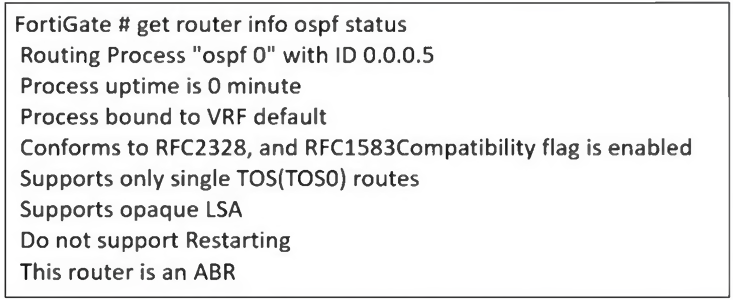 An administrator is checking the OSPF status of a FortiGate device and receives the output shown in the exhibit. What two conclusions can the administrator draw? (Choose two.)
-
A
The FortiGate device is a backup designated router
-
B
The FortiGate device is connected to multiple areas
-
C
The FortiGate device injects external routing information
-
D
The FortiGate device has OSPF ECMP enabled
Reveal answer details
Close answer details
Correct answersB, C
ExplanationThe output of the get router info ospf status command provides key information about the OSPF (Open Shortest Path First) configuration on the FortiGate device. The FortiGate device is connected to multiple areas # The output states: "This router is an ABR" # ABR (Area Border Router) means the device is connected to multiple OSPF areas and maintains routing information between them. # This confirms that the FortiGate is not just in one area , but at least one backbone area (Area 0) and another OSPF area . The FortiGate device injects external routing information # The output states: "Supports opaque LSA" # Opaque LSAs (Type 9, 10, and 11) are used in OSPF extensions , including those that support external route injection. # Typically, ABRs or ASBRs (Autonomous System Boundary Routers) inject external routes , allowing routes from other routing protocols (such as BGP or static routes) to be advertised into OSPF .
A company's users on an IPsec VPN between FortiGate A and B have experienced intermittent issues since implementing VXLAN. The administrator suspects that packets exceeding the 1500-byte default MTU are causing the problems. In which situation would adjusting the interface's maximum MTU value help resolve issues caused by protocols that add extra headers to IP packets?
-
A
Adjust the MTU on interfaces only if FortiGate has the FortiGuard enterprise bundle, which allows MTU modification.
-
B
Adjust the MTU on interfaces in all FortiGate devices that support the latest family of Fortinet SPUs:
NP7, CP9 and SP5.
-
C
Adjust the MTU on interfaces in controlled environments where all devices along the path allow MTU interface changes.
-
D
Adjust the MTU on interfaces only in wired connections like PPPoE, optic fiber, and ethernet cable.
Reveal answer details
Close answer details
Correct answerC
ExplanationWhen using IPsec VPNs and VXLAN , additional headers are added to packets, which can exceed the default 1500-byte MTU . This can lead to fragmentation issues, dropped packets, or degraded performance . To resolve this, the MTU (Maximum Transmission Unit) should be adjusted only if all devices in the network path support it . Otherwise, some devices may still drop or fragment packets, leading to continued issues. Why adjusting MTU helps: # VXLAN adds a 50-byte overhead to packets. # IPsec adds additional encapsulation (ESP, GRE, etc.), increasing the packet size. # If packets exceed the MTU, they may be fragmented or dropped , causing intermittent connectivity issues. # Lowering the MTU on interfaces ensures packets stay within the supported size limit across all network devices.
Refer to the exhibit, which shows theADVPNIPsec interface representing the VPN IPsec phase 1 from Hub
A to Spoke 1 and Spoke 2, and from Hub # to Spoke 3 and Spoke 4. 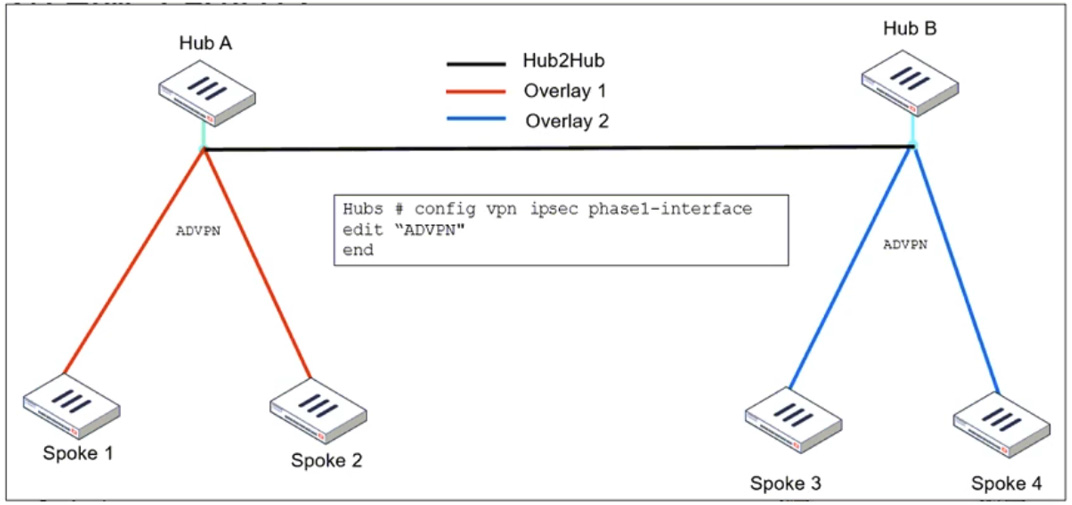 An administrator must configure an ADVPN using IBGP and EBGP to connect overlay network 1 with 2. What must the administrator configure in the phase 1 VPN IPsec configuration of theADVPNtunnels?
-
A
set auto-discovery-sender enable and set network-id x
-
B
set auto-discovery-forwarder enable and set remote-as x
-
C
set auto-discovery-crossover enable and set enforce-multihop enable
-
D
set auto-discovery-receiver enable and set npu-offload enable
Reveal answer details
Close answer details
Correct answerC
ExplanationWhen configuringADVPN (Auto-Discovery VPN)to connectoverlay networks across different hubs using IBGP and EBGP, special configurations are required to allow spokes from different overlay networks to dynamically establish tunnels. #set auto-discovery-crossover enable # Thisallows cross-hub tunnel discoveryin an ADVPN deployment where multiple hubs are used. # SinceHub A and Hub Bbelong to different overlays, enablingcrossover discoveryensures that spokes from one overlay can dynamically create direct tunnels to spokes in the other overlay when needed. #set enforce-multihop enable # This setting ensures thatBGP peers using loopback interfacescan establish connectivityeven if they are not directly connected. #Multihop BGP sessionsare required when usingloopback addresses as BGP peer sourcesbecause the connection might need to traverse multiple routers before reaching the BGP neighbor. # This is especially useful inADVPN deployments with multiple hubs, where routes might need to cross from one hub to another.
Refer to the exhibits. 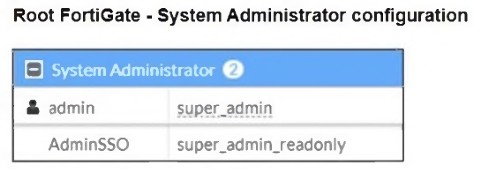 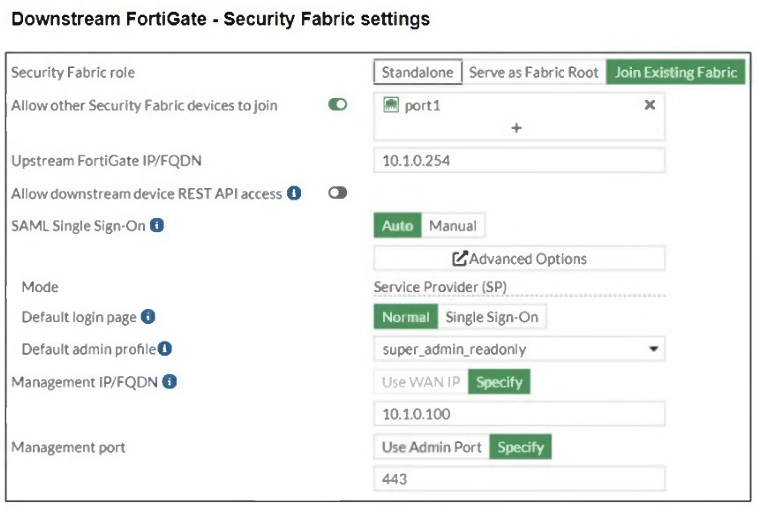 The Administrators section of a root FortiGate device and the Security Fabric Settings section of a downstream FortiGate device are shown. When prompted to sign in with Security Fabric in the downstream FortiGate device, a user enters the AdminSSO credentials. What is the next status for the user?
-
A
The user is prompted to create an SSO administrator account for AdminSSO.
-
B
The user receives an authentication failure message.
-
C
The user accesses the downstream FortiGate with super_admin_readonly privileges.
-
D
The user accesses the downstream FortiGate with super_admin privileges.
Reveal answer details
Close answer details
Correct answerC
ExplanationFrom the Root FortiGate - System Administrator Configuration exhibit: # The AdminSSO account has the super_admin_readonly role. From the Downstream FortiGate - Security Fabric Settings exhibit: # The Security Fabric role is set to Join Existing Fabric , meaning it will authenticate with the root FortiGate. # SAML Single Sign-On (SSO) is enabled , and the default admin profile is set to super_admin_readonly . When the AdminSSO user logs into the downstream FortiGate using SSO , the authentication request is sent to the root FortiGate, where AdminSSO has super_admin_readonly permissions. Since the downstream FortiGate inherits this permission through the Security Fabric configuration, the user will be granted super_admin_readonly access.
Refer to the exhibit, which shows the HA status of an active-passive cluster. 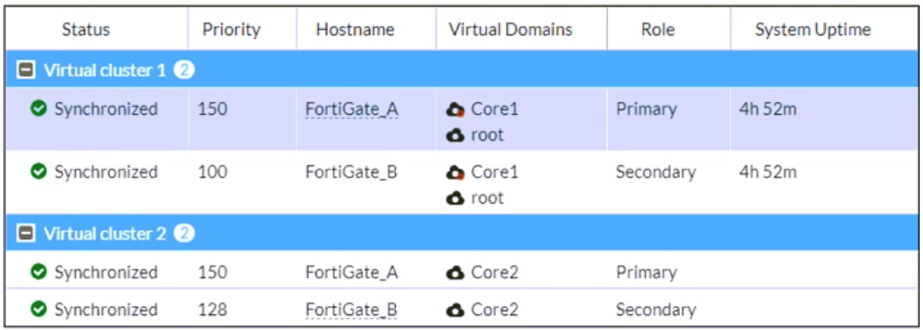 An administrator wants FortiGate_B to handle the Core2 VDOM traffic. Which modification must the administrator apply to achieve this?
-
A
The administrator must disable override on FortiGate_A.
-
B
The administrator must change the priority from 100 to 160 for FortiGate_B.
-
C
The administrator must change the load balancing method on FortiGate_B.
-
D
The administrator must change the priority from 128 to 200 for FortiGate_B.
Reveal answer details
Close answer details
Correct answerD
ExplanationThe exhibit shows an active-passive HA (high availability) cluster with two virtual clusters, where FortiGate_A is the primary device for both Core1 and Core2. If the goal is to haveFortiGate_B take over Core2 traffic , its priority must be higher than FortiGate_A for Virtual Cluster 2 . Currently, FortiGate_A has a priority of 150 for Core2, while FortiGate_B has 128 . Increasing FortiGate_B's priority to 200 ensures it becomes the primary for Virtual Cluster 2 , taking over the Core2 VDOM traffic while keeping Core1 traffic on FortiGate_A. Disabling override would prevent forced failovers but wouldn't change the role distribution. Adjusting the load-balancing method is irrelevant in an active-passive setup , as it only applies to active-active configurations.
Question 9
Multiple choice
Refer to the exhibit, which shows an ADVPN network 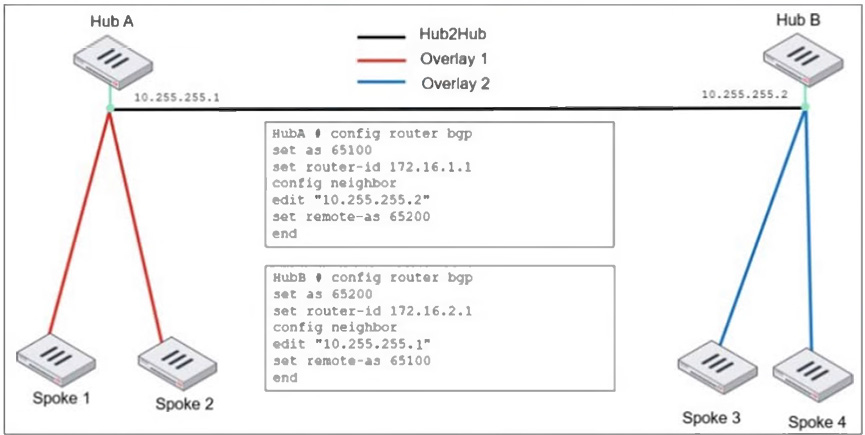 An administrator must configure an ADVPN using IBGP and EBGP to connect overlay network 1 with 2. What two options must the administrator configure in BGP? (Choose two.)
-
A
set ebgp-enforce-multrhop enable
-
B
-
C
set ibgp-enforce-multihop advpn
-
D
set attribute-unchanged next-hop
Reveal answer details
Close answer details
Correct answersA, B
ExplanationIn this ADVPN (Auto-Discovery VPN) network , there are two hubs ( Hub A and Hub B ) connected via EBGP , while IBGP is used within each overlay. To ensure proper BGP routing between the overlays, the administrator must configure specific BGP options.. set ebgp-enforce-multihop enable By default, EBGP requires directly connected neighbors. Since Hub A and Hub B are not directly connected but reach each other over an IPsec tunnel, multihop must be enabled for EBGP sessions to work. set next-hop-self enable In IBGP, the next-hop attribute does not change by default. When an IBGP route is advertised from a spoke to another hub or spoke, the next-hop needs to be updated to ensure proper reachability. Enabling next-hop-self forces the BGP speaker to advertise itself as the next-hop, ensuring that all spokes properly reach routes across the overlays.
Question 10
Single choice
Refer to the exhibit, which shows a revision history window in the FortiManager device layer. 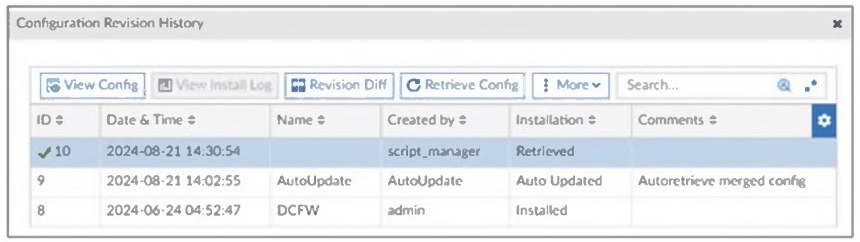 The IT team is trying to identify the administrator responsible for the most recent update in the FortiGate device database. Which conclusion can you draw about this scenario?
-
A
This retrieved process was automatically triggered by a Remote FortiGate Directly (via CLI) script.
-
B
The user script_manager is an API user from the Fortinet Developer Network (FDN) retrieving a configuration.
-
C
To identify the user who created the event, check it on the Configuration and Installation widget on FortiGate within the FortiManager device layer.
-
D
Find the user in the FortiManager system logs and use the type=script command to find the administrator user in the user field.
Reveal answer details
Close answer details
Correct answerD
ExplanationThe Configuration Revision History window in FortiManager shows that the most recent configuration change (ID 10) was created by script_manager with the action Retrieved . Since script_manager is a system-level script execution user, the IT team needs to find who actually triggered this script . This can be done by: # Checking the FortiManager system logs for script execution events . # Using the type=script filter to locate the administrator associated with the script execution.
Question 11
Multiple choice
Why does the ISDB block layers 3 and 4 of the OSI model when applying content filtering? (Choose two.)
-
A
FortiGate has a predefined list of all IPs and ports for specific applications downloaded from FortiGuard.
-
B
The ISDB blocks the IP addresses and ports of an application predefined by FortiGuard.
-
C
The ISDB works in proxy mode, allowing the analysis of packets in layers 3 and 4 of the OSI model.
-
D
The ISDB limits access by URL and domain.
Reveal answer details
Close answer details
Correct answersA, B
ExplanationThe Internet Service Database (ISDB) in FortiGate is used to enforce content filtering at Layer 3 (Network Layer) and Layer 4 (Transport Layer) of the OSI model by identifying applications based on their predefined IP addresses and ports . FortiGate has a predefined list of all IPs and ports for specific applications downloaded from FortiGuard: # FortiGate retrieves and updates a predefined list of IPs and ports for different internet services from FortiGuard . # This allows FortiGate to block specific services at Layer 3 and Layer 4 without requiring deep packet inspection. The ISDB blocks the IP addresses and ports of an application predefined by FortiGuard: # ISDB works by matching traffic to known IP addresses and ports of categorized services. # When an application or service is blocked, FortiGate prevents communication bydenying traffic based on its destination IP and port number .
|