Refer to the exhibits, which show the firewall policy and the security profile for Facebook. 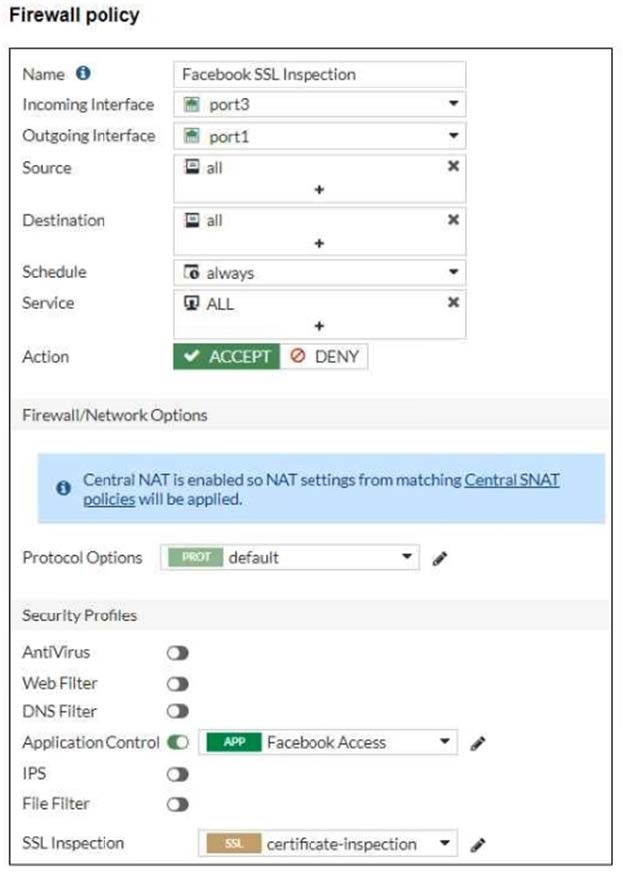 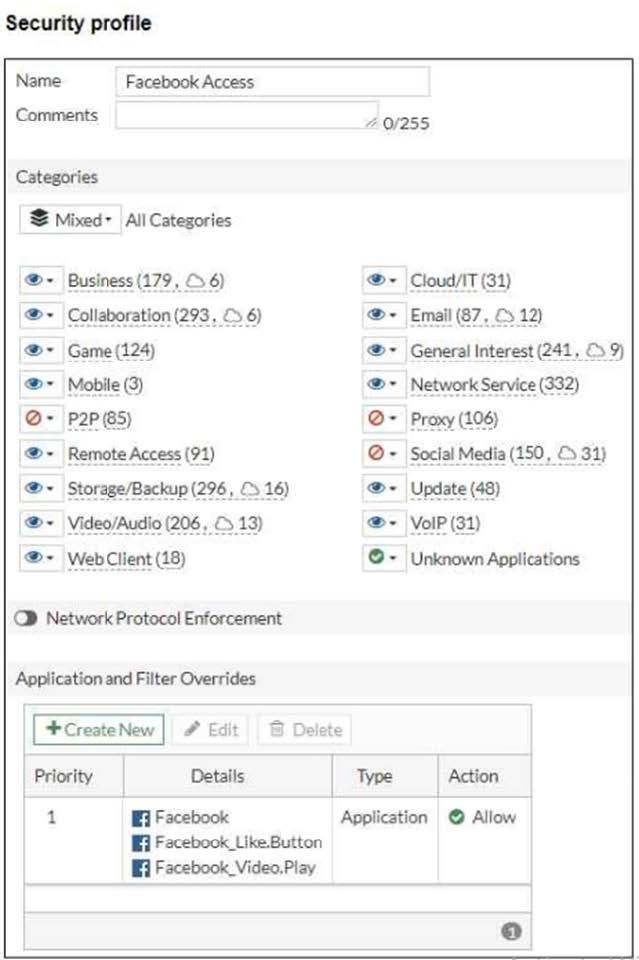 Users are given access to the Facebook web application. They can play video content hosted on Facebook but they are unable to leave reactions on videos or other types of posts. Which part of the configuration must you change to resolve the issue?
-
A
Make the SSL inspection a deep content inspection
-
B
Add Facebook to the URL category in the security policy
-
C
Disable HTTP redirect to HTTPS on the web browser
-
D
Get the additional application signatures required to add to the security policy
Reveal answer details
Close answer details
Refer to exhibit. 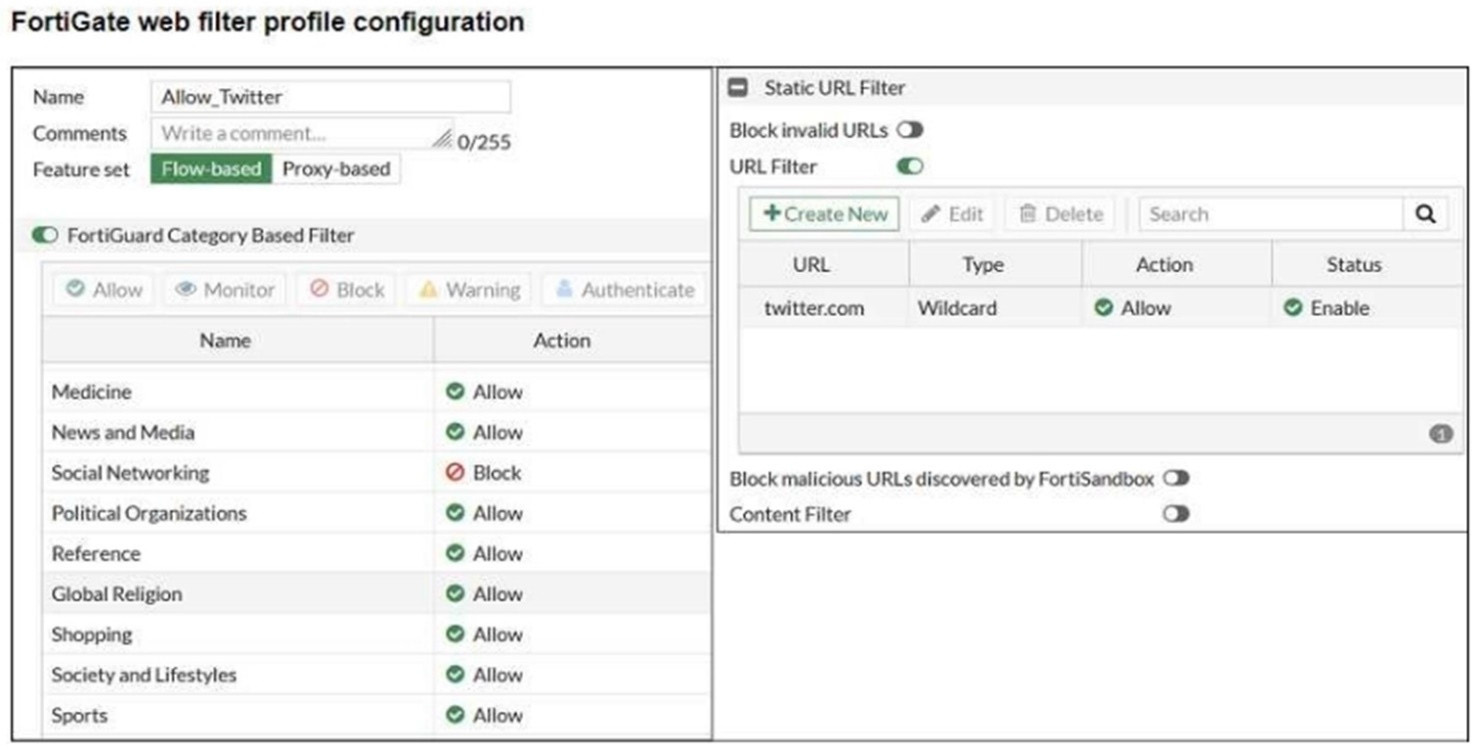 An administrator configured the web filtering profile shown in the exhibit to block access to all social networking sites except Twitter. However, when users try to accesstwitter.com, they are redirected to a FortiGuard web filtering block page. Based on the exhibit, which configuration change can the administrator make to allow Twitter while blocking all other social networking sites?
-
A
On the Static URL Filter configuration set Type to Simple
-
B
On the FortiGuard Category Based Filter configuration set Action to Warning for Social Networking
-
C
On the Static URL Filter configuration set Action to Monitor
-
D
On the Static URL Filter configuration set Action to Exempt
Reveal answer details
Close answer details
Correct answerD
ExplanationIn the current configuration, although "twitter.com" is allowed in the Static URL Filter, the category "Social Networking" is set to "Block" under the FortiGuard Category Based Filter. To resolve the issue, setting the action to "Exempt" in the Static URL Filter for "twitter.com" will bypass the category-based block for this specific URL while still enforcing the block on other social networking sites.
Question 3
Multiple choice
Refer to the exhibit, which shows the IPS sensor configuration. 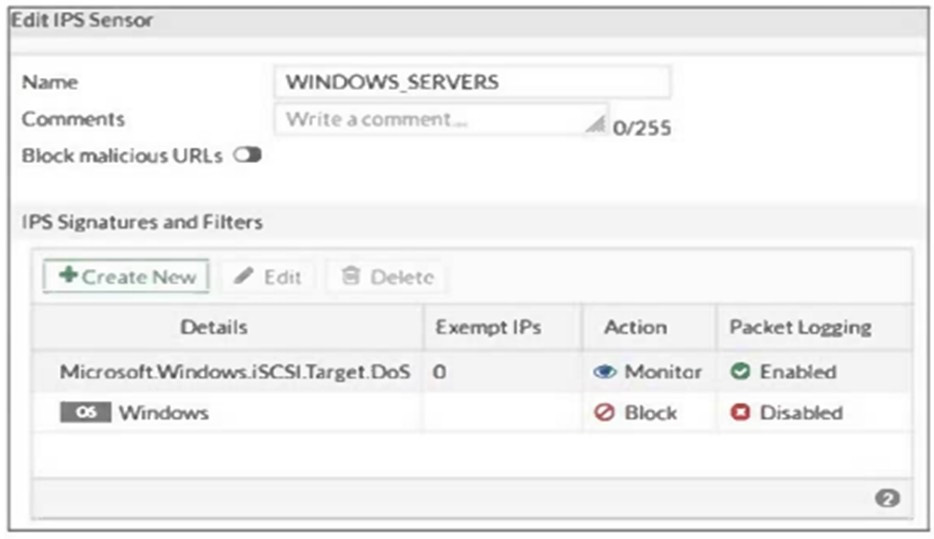 If traffic matches this IPS sensor, which two actions is the sensor expected to take? (Choose two.)
-
A
The sensor will gather a packet log for all matched traffic.
-
B
The sensor will reset all connections that match these signatures.
-
C
The sensor will allow attackers matching the Microsoft.Windows.iSCSl.Target.DoS signature.
-
D
The sensor will block all attacks aimed at Windows servers.
Reveal answer details
Close answer details
A network administrator has enabled full SSL inspection and web filtering on FortiGate. When visiting any HTTPS websites, the browser reports certificate warning errors. When visiting HTTP websites, the browser
does not report errors. What is the reason for the certificate warning errors?
-
A
The option invalid SSL certificates is set to allow on the SSL/SSH inspection profile
-
B
The browser does not trust the certificate used by FortiGate for SSL inspection
-
C
The certificate used by FortiGate for SSL inspection does not contain the required certificate extensions.
-
D
The matching firewall policy is set to proxy inspection mode
Reveal answer details
Close answer details
Correct answerB
ExplanationWhen full SSL inspection is enabled, FortiGate intercepts HTTPS traffic, decrypts it for inspection, and re-encrypts it using its own SSL certificate before forwarding it to the browser. If the browser does not trustthe SSL certificate being used by FortiGate for re-encryption, it will display certificate warning errors. To resolve this, the certificate used by FortiGate for SSL inspection must be installed and trusted in the
browser's certificate store.
Which method allows management access to the FortiGate CLI without network connectivity?
-
A
-
B
-
C
-
D
Reveal answer details
Close answer details
Correct answerC
ExplanationThe serial console method allows management access to the FortiGate CLI without relying on network connectivity. This method involves directly connecting a computer to the FortiGate device using a serial cable (such as a DB-9 to RJ-45 cable or USB to RJ-45 cable) and using terminal emulation software to interact with the FortiGate CLI. This method is essential for situations where network-based access methods (such as SSH or Telnet) are not available or feasible.
References:
FortiOS 7.4.1 Administration Guide: Console connection
Question 6
Multiple choice
Which three statements about SD-WAN zones are true? (Choose three.)
-
A
An SD-WAN zone can contain physical and logical interfaces
-
B
You can use an SD-WAN zone in static route definitions
-
C
You can define up to three SD-WAN zones per FortiGate device
-
D
An SD-WAN zone must contains at least two members
-
E
An SD-WAN zone is a logical grouping of members
Reveal answer details
Close answer details
Correct answersA, B, E
ExplanationAn SD-WAN zone can contain physical and logical interfaces SD-WAN zones can include both physical and logical interfaces, allowing flexible configuration for different network types.
You can use an SD-WAN zone in static route definitions SD-WAN zones can be referenced in static routes, enabling dynamic path selection based on SD-WAN rules.
An SD-WAN zone is a logical grouping of members
An SD-WAN zone is a logical grouping of interfaces (members), used to simplify the management and application of SD-WAN rules.
How can you disable RPF checking?
-
A
Disable src-check on the interface level settings
-
B
Unset fail-alert-interfaces on the interface level settings.
-
C
Disable fail-detect on the interface level settings.
-
D
Disable strict-src-check under system settings.
Reveal answer details
Close answer details
Correct answerA
ExplanationTo disable RPF (Reverse Path Forwarding) checking on a FortiGate interface, you need to disable the src-check option in the interface settings. This action disables the RPF check, allowing traffic to bypass the verification that it is arriving on the correct interface based on the routing table.
Question 8
Multiple choice
Refer to the exhibits. 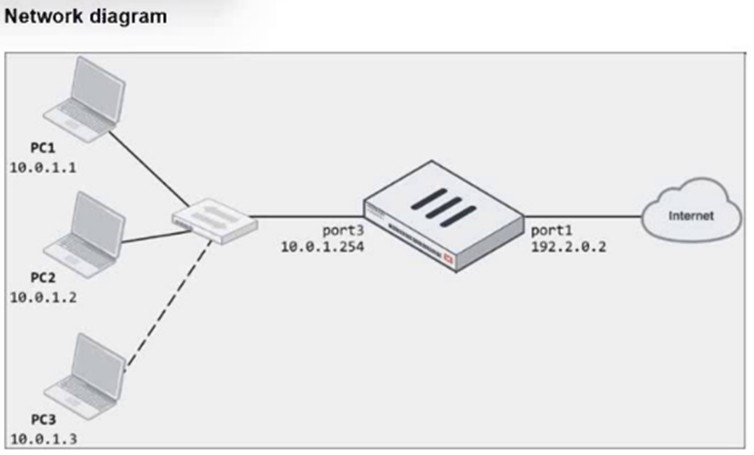 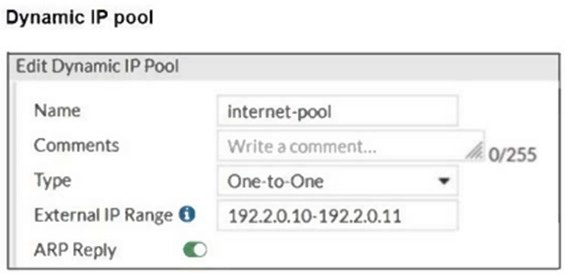 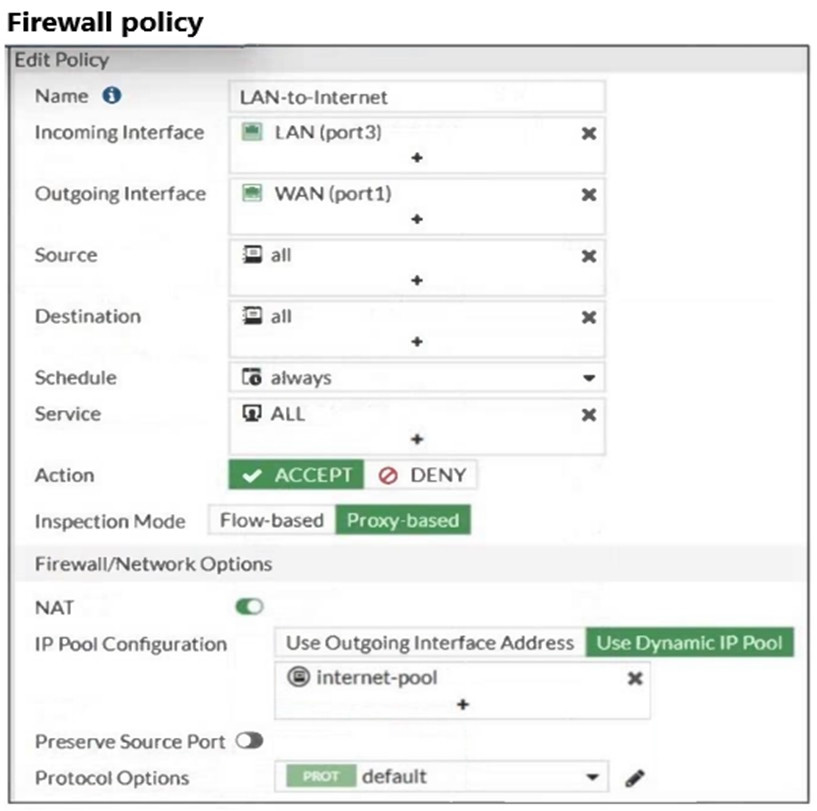 The exhibits show a diagram of a FortiGate device connected to the network, as well as the firewall policy and IP pool configuration on the FortiGate device. Two PCs, PC1 and PC2, are connected behind FortiGate and can access the internet successfully.
However, when the administrator adds a third PC to the network (PC3), the PC cannot connect to the internet. Based on the information shown in the exhibit, which two configuration options can the administrator use to fix the connectivity issue for PC3? (Choose two.)
-
A
In the firewall policy configuration, add 10. o. l. 3 as an address object in the source field.
-
B
In the IP pool configuration, set endig to 192.2.0.12.
-
C
Configure another firewall policy that matches only the address of PC3 as source, and then place the policy on top of the list.
-
D
In the IP pool configuration, set cype to overload.
Reveal answer details
Close answer details
Correct answersB, D
ExplanationTo resolve the issue of PC3 not being able to access the internet, the administrator needs to adjust the IP pool configuration or the firewall policy. The following two options will fix the connectivity issue:
B. In the IP pool configuration, set the ending IP to 192.2.0.12:The current IP pool range is 192.2.0.10-
192.2.0.11, which only provides two IP addresses for network address translation (NAT). To allow PC3 to access the internet, the IP pool should be expanded to include an additional IP address by changing the end of the range to 192.2.0.12.
D. In the IP pool configuration, set type to overload:Instead of using a one-to-one NAT, changing the type
to overload will allow multiple internal addresses (such as PC1, PC2, and PC3) to share a single external IP address. This will solve the issue without needing additional public IP addresses.
The other options are not suitable:
A. In the firewall policy configuration, add 10.0.1.3 as an address object in the source field:This option is
unnecessary since the firewall policy already allows all addresses from the source (LAN port3).
C. Configure another firewall policy that matches only the address of PC3 as the source, and then place
the policy on top of the list:This option is redundant and would not resolve the underlying issue with the IP pool configuration.
References
FortiOS 7.4.1 Administration Guide -Configuring Firewall Policies, page 512. FortiOS 7.4.1 Administration
Guide -Configuring NAT with IP Pools, page 518.
Refer to the exhibit. 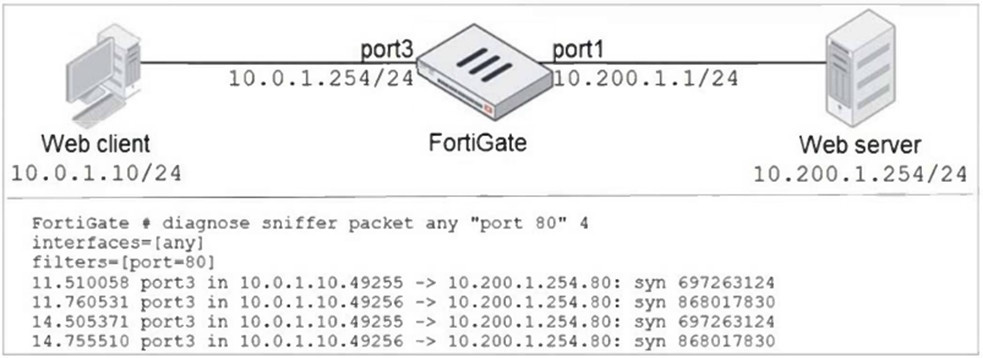 In the network shown in the exhibit, the web client cannot connect to the HTTP web server. The administrator runs the FortiGate built-in sniffer and gets the output shown in the exhibit. What should the administrator do next, to troubleshoot the problem?
-
A
-
B
Capture the traffic using an external sniffer connected to part1.
-
C
Execute another sniffer on FortiGate, this time with the filter "hose 10.o.1.10".
-
D
Run a sniffer on the web server.
Reveal answer details
Close answer details
Correct answerA
ExplanationThe sniffer output shows that packets from the web client are reaching the FortiGate and being forwarded to the web server, but there is no indication that the web server is responding. To troubleshoot this issue, executing a debug flow will help analyze the traffic path and pinpoint where the problem might be occurring, such as a possible issue in firewall policy or route settings that is causing the server not to respond correctly.
References:
FortiOS 7.4.1 Administration Guide: Troubleshooting network connectivity
Question 10
Multiple choice
FortiGate is operating in NAT mode and has two physical interfaces connected to the LAN and DMZ networks respectively. Which two statements are true about the requirements of connected physical interfaces on FortiGate? (Choose two.)
-
A
Both interfaces must have the interface role assigned
-
B
Both interfaces must have directly connected routes on the routing table
-
C
Both interfaces must have DHCP enabled
-
D
Both interfaces must have IP addresses assigned
Reveal answer details
Close answer details
Correct answersB, D
ExplanationBoth interfaces must have directly connected routes on the routing table In NAT mode, each interface must have a corresponding entry in the routing table, typically as a directly connected route, to route traffic between them effectively.
Both interfaces must have IP addresses assigned
In NAT mode, each interface must have an IP address to participate in routing and NAT operations. The IP addresses allow the FortiGate to forward traffic between different network segments.
Question 11
Single choice
Which statement is a characteristic of automation stitches?
-
A
They can be run only on devices in the Security Fabric.
-
B
They can be created only on downstream devices in the fabric.
-
C
They can have one or more triggers.
-
D
They can run multiple actions at the same time.
Reveal answer details
Close answer details
Correct answerD
Explanation"To create an automation stitch, A TRIGGER EVENT (singular) and a response action or ACTIONS (plural) are selected." See the documentation:
https://docs.fortinet.com/document/fortigate/7.4.0/administration-guide/351998
Question 12
Multiple choice
What are two features of the NGFW profile-based mode? (Choose two.)
-
A
NGFW profile-based mode can only be applied globally and not on individual VDOMs.
-
B
NGFW profile-based mode must require the use of central source NAT policy
-
C
NGFW profile-based mode policies support both flow inspection and proxy inspection.
-
D
NGFW profile-based mode supports applying applications and web filtering profiles in a firewall policy.
Reveal answer details
Close answer details
Correct answersC, D
ExplanationNGFW (Next Generation Firewall) profile-based mode in FortiGate allows policies to use both flow-based and proxy-based inspection modes, providing flexibility depending on security and performance requirements. Additionally, profile-based mode supports applying applications and web filtering profiles directly in a firewall policy, allowing granular control over the traffic.
References:
FortiOS 7.4.1 Administration Guide: NGFW Mode Configuration
Question 13
Single choice
A network administrator is configuring an IPsec VPN tunnel for a sales employee travelling abroad. Which IPsec Wizard template must the administrator apply?
-
A
-
B
-
C
-
D
Reveal answer details
Close answer details
Correct answerA
ExplanationFor configuring an IPsec VPN tunnel for a sales employee traveling abroad, the "Remote Access" template is the most appropriate choice. This template is designed to allow remote users to securely connect to the internal network of an organization from any location using FortiClient or a compatible client. The other options, such as "Site to Site," "Dial up User," and "iHub-and-Spoke," are used for connecting different networks or sites, not individual remote users.
References:
FortiOS 7.4.1 Administration Guide: IPsec Wizard Template Types
Question 14
Multiple choice
Which two statements are true regarding FortiGate HA configuration synchronization? (Choose two.)
-
A
Checksums of devices are compared against each other to ensure configurations are the same.
-
B
Incremental configuration synchronization can occur only from changes made on the primary FortiGate device.
-
C
Incremental configuration synchronization can occur from changes made on any FortiGate device within the HA cluster
-
D
Checksums of devices will be different from each other because some configuration items are not synced to other HA members.
Reveal answer details
Close answer details
Correct answersA, C
Explanation"After the initial synchronization is complete, whenever a change is made to the configuration of an HA cluster device (primary or secondary), incremental synchronization sends the same configuration change to all other cluster devices over the HA heartbeat link"
|