Which SQL query is in the correct order to query to database in the FortiAnalyzer?
-
A
SELECT devid FROM $log GROUP BY devid WHERE 'user',,' users1'
-
B
SELECT FROM $log WHERE devid 'user',, USER1' GROUP BY devid
-
C
SELCT devid WHERE 'user'-' USER1' FROM $log GROUP By devid
-
D
SELECT devid FROM $log WHERE 'user'=' GROUP BY devid
Reveal answer details
Close answer details
Correct answerD
ExplanationIn FortiAnalyzer's SQL query syntax, the typical order for querying the database follows the standard SQL format, which is: SELECT <column(s)> FROM <table> WHERE <condition(s)> GROUP BY <column(s)> Option Dcorrectly
follows this structure:
SELECT devid FROM $log: This specifies that the query is selecting the devid column from the $log table.
WHERE 'user' = ': This part of the query is intended to filter results based on a condition involving the user column. Although there appears to be a minor typographical issue (possibly missing the user value after =), it structurally adheres to the correct SQL order.
GROUP BY devid: This groups the results by devid, which is correctly positioned at the end of the query.
Let's briefly examine why the other options are incorrect:
Option A: SELECT devid FROM $log GROUP BY devid WHERE 'user', 'users1' This is incorrect because the GROUP BY clause appears before the WHERE clause, which is out of order in SQL syntax.
Option B: SELECT FROM $log WHERE devid 'user', USER1' GROUP BY devid This is incorrect because it lacks a column in the SELECT statement and the WHERE clause syntax is malformed.
Option C: SELCT devid WHERE 'user' - 'USER1' FROM $log GROUP BY devid This is incorrect because the SELECT keyword is misspelled as SELCT, and the WHERE condition syntax is invalid. : FortiAnalyzer documentation for SQLqueries indicates that the standard SQL order should be followed when querying logs in FortiAnalyzer.
Queries should follow the format SELECT... FROM... WHERE...
GROUP BY..., as demonstrated in option D.
Which statement regarding macros on FortiAnalyzer is true?
-
A
Macros are predefined templates for reports and cannot be customized.
-
B
Macros are useful in generating excel log files automatically based on the report settings.
-
C
Macros are ADOM-specific and each ADOM type have unique macros relevant to that ADOM.
-
D
Macros are supported only on the FortiGate ADOMs.
Reveal answer details
Close answer details
Correct answerB
ExplanationMacros in FortiAnalyzer are used to streamline reporting tasks by automating dataextraction and report generation. Here's a breakdown of each option to determine the correct answer: Option A - Macros are Predefined Templates for Reports and Cannot be Customized.
This statement is incorrect. Macros in FortiAnalyzer are not simply fixed templates; they allow for customization to tailor data
extraction and reporting based on specific needs and configurations. Conclusion Incorrect.
Option B - Macros are Useful in Generating Excel Log Files Automatically Based on the Report Settings This statement is accurate. Macros in FortiAnalyzer can be configured to automate the generation of reports, including outputting log data to Excel format based on predefined report settings. This makes them especially useful for scheduled reporting and data analysis.
Conclusion Correct.
Option C - Macros are ADOM-Specific and Each ADOM Type Has Unique Macros Relevant to that ADOM Macros are not limited to specific ADOMs, nor are they ADOM-specific. Macros can be applied across various ADOMs based on report configurations but are not inherently tied to or unique for each ADOM type.
Conclusion Incorrect.
Option D - Macros are Supported Only on the FortiGate ADOMs This is not true. Macros in FortiAnalyzer are not restricted to FortiGate ADOMs; they can be utilized across different ADOMs that FortiAnalyzer
manages.
Conclusion Incorrect.
Conclusion:
Correct Answer B. Macros are useful in generating excel log files automatically based on the report settings.
This answer correctly describes thefunctionality of macros in FortiAnalyzer, emphasizing their role in automating report generation, especially for Excel log files. References:
FortiAnalyzer 7.4.1 documentation on macros and report generation functionalities.
Refer to the exhibit with partial output: 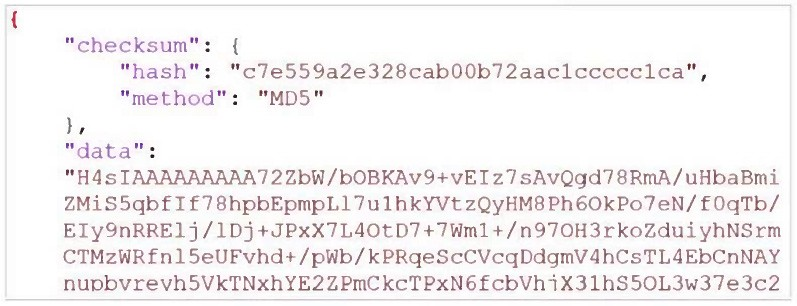 Your colleagueexported a playbook and has sent it to you for review. You open the file in a text editor and observer the output as shown in the exhibit. Which statement about the export is true?
-
A
The export data type is zipped.
-
B
The playbook is misconfigured.
-
C
The option to include the connector was not selected.
-
D
Your colleague put a password on the export.
Reveal answer details
Close answer details
Correct answerA
ExplanationIn the exhibit, the data structure shows a checksum field and a data field with a long, seemingly encoded string. This format is indicative of a file that has been compressed or encoded for storage and transfer.
Export Data Type
The data field is likely a base64-encoded string, which is commonly used to represent binary data in text format. Base64 encoding is often applied to data that has been compressed (zipped) for easier handling and transfer. The checksum field, with an MD5 hash, provides a way to verify the integrity of the data after decompression.
Option Analysis
A. The export data type is zipped: Correct. The compressed and encoded format of the data suggests that
the export is in a zipped format, allowing for efficient storage and transfer.
B. The playbook is misconfigured: There is no indication of misconfiguration in this exhibit. The presence of the checksum and data fields aligns with standard export practices.
C. The option to include the connector was not selected: There is no evidence in the output to conclude that connectors are missing. Connectors are typically listed separately and would not directly affect the checksum and encoded data structure.
D. Your colleague put a password on the export: There's no indication of password protection in the
exhibit. Password protection would likely alter the data structure, and there would be some mention of encryption.
Conclusion:
Correct Answer A. The export data type is zipped.
This answer is consistent with the typical use of base64 encoding for compressed (zipped) data exports in FortiAnalyzer. References:
FortiAnalyzer 7.4.1 documentation on exporting playbooks and data compression methods.
What does FortiAnalyzer use ADOMs for in an operational environment?
-
A
To provide administrative and data separation for managed devices and logs.
-
B
To encrypt every report attachment with a unique public key.
-
C
To prevent FortiGate devices from sending logs.
-
D
To remove the need for role-based administrator access.
Reveal answer details
Close answer details
Correct answerA
ExplanationThe correct answer is A. ADOMs provide logical separation for devices, logs, and administration. They do not inherently encrypt every report attachment, prevent devices from sending logs, or remove the need for
role-based access controls.
Exhibit. 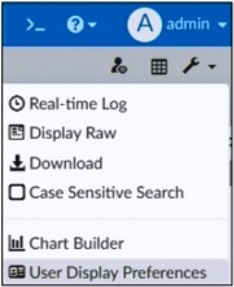 What is the purpose of using the Chart Builder feature On FortiAnalyzer?
-
A
To build a chart automatically based on the top 100 log entries
-
B
To add charts directly to generatereports in the current ADOM.
-
C
To add a new chart under FortiView to be used in new reports
-
D
To build a dataset and chart based on the filtered search results
Reveal answer details
Close answer details
Exhibit.  What can you conclude from this output?
-
A
There is not disk quota allocated to quarantining files.
-
B
FGT_B is the Security Fabric root.
-
C
The allocated disk quote to ADOM1 is 3 GB.
-
D
Archive logs are using more space than analytic logs.
Reveal answer details
Close answer details
Question 7
Multiple choice
Which two statements about playbook execution are true? (Choose two)
-
A
FortiAnalyzer will not commit changes made by a Failed playbook
-
B
The Playbook Monitor provides troubleshooting logs
-
C
You can run the default debugging playbook to investigate playbook errors.
-
D
Even I the playbook status is Failed, individual tasks may have succeeded.
Reveal answer details
Close answer details
You created a playbook on FortiAnalyzer that uses a FortiOS connector. When configuring the FortiGate side, which type of trigger must be used so that the actions in an automation stich are available in the FortiOS connector?
-
A
FortiAnalyzer Event Handler
-
B
-
C
-
D
Reveal answer details
Close answer details
Correct answerD
ExplanationWhen using FortiAnalyzer to create playbooks that interact with FortiOS devices, anIncoming Webhook trigger is required on the FortiGate side to make the actions in an automation stitch accessible through the FortiOS connector. The incoming webhook trigger allows FortiAnalyzer to initiate actions on FortiGate by sending HTTP POST requests to specified endpoints, which in turn trigger automation stitches defined on the FortiGate.
Here's an analysis of each option: Option A: FortiAnalyzer Event Handler This is incorrect. The FortiAnalyzer Event Handler is used within FortiAnalyzer itself for handling log events and alerts, but it does not trigger automation stitches on FortiGate.
Option B: Fabric Connector event
This is incorrect. Fabric Connector events are related to Fortinet's Security Fabric integrations but are not specifically used to trigger FortiGate automation stitches from FortiAnalyzer.
Option C: FortiOS Event Log
This is incorrect. While FortiOS event logs can be used for monitoring, they are not designed to trigger automation stitches directly from FortiAnalyzer. Option D: Incoming webhook This is correct. The Incoming Webhook trigger on FortiGate enables it to receive requests fromFortiAnalyzer, allowing playbooks to activate automation stitches defined on the FortiGate device. This method is commonly used to integrate actions from FortiAnalyzer to FortiGate via the FortiOS connector. : According to FortiOS and FortiAnalyzer documentation, when integrating FortiAnalyzer playbooks with FortiGate automation stitches, the recommended trigger type on FortiGate is anIncoming Webhook, allowing FortiAnalyzer to interact with FortiGate's automation framework through the FortiOS connector.
Aplaybook contains five tasks in total. An administrator runs the playbook and four out of five tasks finish successfully, but one task fails. What will be the status of the playbook after it is run?
-
A
-
B
-
C
-
D
Reveal answer details
Close answer details
Correct answerA
ExplanationIn FortiAnalyzer, when a playbook is run, each task's status impacts the overall playbook status. Here's what happens based on task outcomes: Status When All Tasks Succeed
If all tasks finish successfully, the playbook status ismarked asSuccess.
Status When Some Tasks Fail
If one or more tasks in the playbook fail, but others succeed, the playbook status generally changes toAttention required. This status indicates that the playbook completed execution but requires review due to one or more tasks failing. This is different from a completeFailedstatus, which is used if the playbook cannot proceed due to a critical error in an early task, often one that upstream tasks depend on.
Option Analysis
A. Attention required: This is correct as the playbook has completed, but with partial success and a task
requiring review.
B. Upstream_failed: This status is used if a task cannot run because a prerequisite or "upstream" task
failed. Since four out of five tasks completed, this is not the case here. C. Failed: This status would imply that the playbook completely failed, which does not match the scenario where only one task out of five failed.
D. Success: This status would apply if all tasks had completed successfully, which is not the case here.
Conclusion:
Correct Answer A. Attention required
The playbook status reflects that it completed, but an error occurred in one of the tasks, prompting the administrator to review the failed task. References:
FortiAnalyzer 7.4.1documentation on playbook execution statuses and task error handling.
Question 10
Single choice
Exhibit. 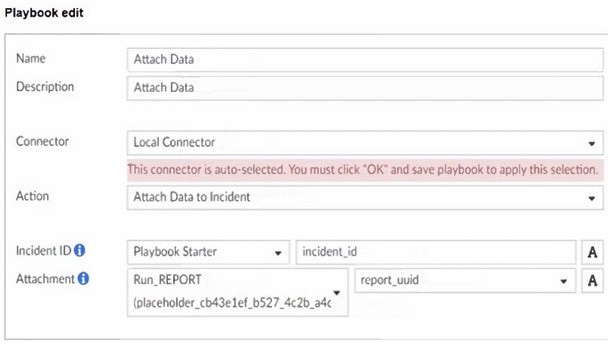 What is the analyst trying to create?
-
A
The analyst is trying to create a trigger variable to the used in the playbook.
-
B
The analyst is trying to create an output variable to be used in the playbook.
-
C
The analyst is trying to create a report in the playbook.
-
D
The analyst is trying to create a SOC report inthe playbook.
Reveal answer details
Close answer details
Correct answerB
ExplanationIn the exhibit, the playbook configuration shows the analyst working with the "Attach Data" action within a playbook. Here's a breakdown of key aspects: Incident ID: This field is linked to the "Playbook Starter," which indicates that the playbook will attach data to an existing incident. Attachment: The analyst is configuring an attachment by selecting Run_REPORT with a placeholder ID for report_uuid. This suggests that the report's UUID will dynamically populate as part of the playbook execution.
Analysis of Options:
Option A - Creating a Trigger Variable
A trigger variable would typically be set up in the playbook starter or initiation configuration, not within the "Attach Data" action. The setup here does not indicate a trigger, as it's focusing on data attachment.
Conclusion Incorrect.
Option B - Creating an Output Variable
The field Attachment with a report_uuid placeholder suggests that the analyst is defining an output variable that will store the report data or ID,allowing it to be attached to the incident. This variable can then be referenced or passed within the playbook for further actions or reporting.
Conclusion Correct.
Option C - Creating a Report in the Playbook While Run_REPORT is selected, it appears to be an attachment action rather than a report generation task. The purpose here is to attach an existing or dynamically generated report to an incident, not to create the report itself.
Conclusion Incorrect.
Option D - Creating a SOC Report Similarly, this configuration is focused on attaching data, not specifically generating a SOC report. SOC reports are generally predefined and generated outside the playbook.
Conclusion Incorrect.
Conclusion:
Correct Answer B. The analyst is trying to create an output variable to be used in the playbook. The setup allows the playbook to dynamically assign the report_uuid as an output variable, which can then be used in further actions within the playbook.
References:
FortiAnalyzer 7.4.1 documentation on playbook configurations, output variables, and data attachment functionalities.
Question 11
Single choice
Which FortiAnalyzer component is used by charts and macros to retrieve log data for reports?
-
A
-
B
-
C
-
D
Reveal answer details
Close answer details
Correct answerB
ExplanationThe correct answer is B. Datasets define the log queries that populate report charts and macros. Indicators are used for threat analysis and incident investigation. Playbook connectors provide automation actions.
Event handlers detect matching conditions in logs and events; they do not directly provide the report query source for charts and macros.
Question 12
Single choice
Which statement about sending notifications with incident update is true?
-
A
You can send notifications to multiple external platforms.
-
B
Notifications can be sent only by email.
-
C
If you use multiple fabric connectors, all connectors must have the same settings.
-
D
Notifications can be sent only when an incident is updated or deleted.
Reveal answer details
Close answer details
Correct answerA
ExplanationIn FortiOS and FortiAnalyzer,incident notificationscan be sent to multiple external platforms, not limited to a single method such as email. Fortinet's security fabric and integration capabilities allow notifications to be sent through various fabric connectors and third-party integrations. This flexibility is designed to ensure that incident updates reach relevant personnel or systems using preferred communication channels, such as email, Syslog, SNMP, or integration with SIEM platforms.
Let's review each answer option for clarity: Option A: You can send notifications to multiple external platforms.
This is correct. Fortinet's notification system is capable of sending updates to multiple platforms, thanks to its support for fabric connectors and external integrations. This includes options such as email, Syslog, SNMP, and others based on configured connectors.
Option B: Notifications can be sent only by email This is incorrect. Although email is a common method, FortiOS and FortiAnalyzer support multiple notification methods through various connectors, allowing notifications to be directed to different platforms as per the organization's setup.
Option C: If you use multiple fabric connectors, all connectors must have the same settings.
This is incorrect. Each fabric connector can have its unique configuration, allowing different connectors to be tailored for specific notification and integration requirements. Option D: Notifications can be sent only when an incident is updated or deleted This is incorrect. Notifications can be sent upon the creation of incidents, as well as upon updates or deletion, depending on the configuration.
:According to FortiOS and FortiAnalyzer 7.4.1 documentation, notifications for incidents can be configured across various platforms by using multiple connectors, and they are not limited to email alone. This capability is part of the Fortinet Security Fabric, allowing for a broad range of integrations with external systems and platforms for effective incident response.
Question 13
Single choice
Refer to the exhibit. 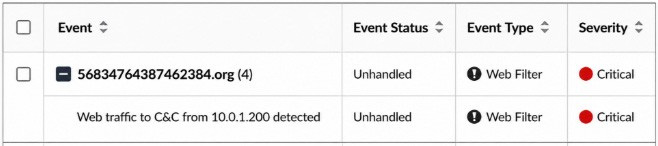 Which statement about the displayed event is correct? (Choose one answer))
-
A
An incident was created from this event.
-
B
The risk source is isolated.
-
C
The security risk was escalated.
-
D
The security event risk is considered open.
Reveal answer details
Close answer details
Correct answerD
ExplanationComprehensive and Detailed Explanation From Exact Extract of knowledge of FortiAnalyzer 7.6 Study guide documents:
In the exhibit, theEvent Statusshown isUnhandled(Event Type: Web Filter; Severity: Critical). The FortiAnalyzer study guide definesUnhandledevents as events whose security risk has not been addressed and is therefore still active/open.
Specifically, it states:"Unhandled: The security risk is considered open." This directly matches optionD.
The other options correspond to different statuses or actions: Isolated/Containedapplies when the risk source is isolated (statusContained), notUnhandled.
Escalatedrefers to events moved/raised for further action (statusEscalated), notUnhandled. Whether an incident was created cannot be concluded solely from the status "Unhandled" in the exhibit; the study
guide ties incident creation to incident management workflows rather than equating "Unhandled" with an incident being created.
Question 14
Single choice
You are tasked with finding logs corresponding to a suspected attack on your network. You need to use an interface where all identified threats within timeframe are listed and organized. You also need to be able to quickly export the information to a PDF file. Where can you go to accomplish this task?
-
A
-
B
-
C
-
D
Reveal answer details
Close answer details
|