JAVASCRIPT-DEVELOPER-I Real Exam Questions

Salesforce Certified JavaScript Developer (JS-Dev-101)

223 questions available · Page 1 of 23

Updated Exam DumpsVerified AnswersPass Guarantee

Get Complete Exam Dumps
Question 1 Single choice

Which function should a developer use to repeatedly execute code at a fixed interval ?

  1. A

    setIntervel

  2. B

    setTimeout

  3. C

    setPeriod

  4. D

    setInteria

Show answer and explanation

Correct answer: A

Question 2 Single choice

is below:

<input type="file" onchange="previewFile()">
<img src="" height="200" alt="Image Preview..."/>

The JavaScript portion is:

01 function previewFile(){

02const preview = document.querySelector(`img');

03 const file = document.querySelector(`input[type=file]').files[0];

04 //line 4 code

05 reader.addEventListener("load", () => {

06 preview.src = reader.result;
07 },false);

08 //line 8 code

09 }

In lines 04 and 08, which code allows the user to select an image from their local computer , and to display the image in the browser?

  1. A

    04 const reader = new File();
    08 if (file) URL.createObjectURL(file);

  2. B

    04 const reader = new FileReader();
    08 if (file) URL.createObjectURL(file);

  3. C

    04 const reader = new File();
    08 if (file) reader.readAsDataURL(file);

  4. D

    04 const reader = new FileReader();
    08 if (file) reader.readAsDataURL(file);

Show answer and explanation

Correct answer: D

Question 3 Single choice

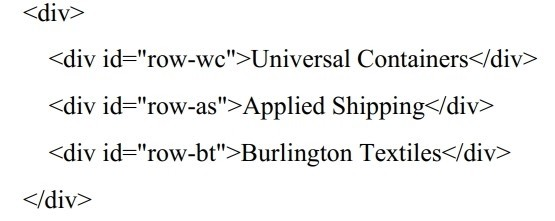
Given the HTML below:

Which statement adds the priority-account css class to the Applied Shipping row?

  1. A

    document.querySelector('#row-as').classList.add('priority-account');

  2. B

    PlaceHolder

  3. C

    PlaceHolder

  4. D

    PlaceHolder

Show answer and explanation

Correct answer: A

Question 4 Multiple choice

Given two expressions var1 and var2.

What are two valid ways to return the logical AND of the two expressions and ensure it is data type Boolean? Choose 2 answers:

  1. A

    Boolean(var1 && var2)

  2. B

    var1 && var2

  3. C

    var1.toBoolean() && var2toBoolean()

  4. D

    Boolean(var1) && Boolean(var2)

Show answer and explanation

Correct answers: A, D

Question 5 Single choice

Given the following code:

document.body.addEventListener(` click ', (event) => {

if (/* CODE REPLACEMENT HERE */) {

console.log(`button clicked!');

)

});

Which replacement for the conditional statement on line 02 allows a developer to correctlydetermine that a button on page is clicked?

  1. A

    Event.clicked

  2. B

    e.nodeTarget ==this

  3. C

    event.target.nodeName == `BUTTON'

  4. D

    button.addEventListener(`click')

Show answer and explanation

Correct answer: C

Question 6 Single choice

A developer implements and calls the following code when an application state change occurs:

Const onStateChange =innerPageState) => {

window.history.pushState(newPageState,` ', null);

}

If the back button is clicked after this method is executed, what can a developer expect?

  1. A

    A navigate event is fired with a state property that details the previous application state.

  2. B

    The page is navigated away from and the previous page in the browser's history is loaded.

  3. C

    The page reloads and all Javascript is reinitialized.

  4. D

    A popstate event is fired with a state property that details the application's last state.

Show answer and explanation

Correct answer: B

Question 7 Single choice

Which code statement below correctly persists an objects in local Storage ?

  1. A

    const setLocalStorage = (storageKey, jsObject) => { window.localStorage.setItem(storageKey,
    JSON.stringify(jsObject)); }

  2. B

    const setLocalStorage = ( jsObject) => {window.localStorage.connectObject(jsObject));}

  3. C

    const setLocalStorage = ( jsObject) => {window.localStorage.setItem(jsObject);}

  4. D

    const setLocalStorage = (storageKey, jsObject) => { window.localStorage.persist(storageKey,

    jsObject); }

Show answer and explanation

Correct answer: A

Question 8 Single choice

A developer is working on an ecommerce website where the delivery date is dynamically calculated based on the current day. The code line below is responsible for this calculation.

Const deliveryDate = new Date ();

Due to changes in the business requirements, the delivery date must now be today's date + 9 days.

Which code meets thisnew requirement?

  1. A

    deliveryDate.setDate(( new Date ( )).getDate () +9);

  2. B

    deliveryDate.setDate( Date.current () + 9);

  3. C

    deliveryDate.date = new Date(+9) ;

  4. D

    deliveryDate.date = Date.current () + 9;

Show answer and explanation

Correct answer: A

Question 9 Single choice

In the browser, the window object is often used to assign variables that require the broadest scope in an application Node.js application does not have access to the window object by default.

Which two methods are used to address this ? Choose 2 answers

  1. A

    Use the document object instead of the window object.

  2. B

    Assign variables to the global object.

  3. C

    Create a new window object in the root file.

  4. D

    Assign variables to module.exports and require them as needed.

Show answer and explanation

Correct answer: B

Question 10 Single choice

A developer at Universal Containers is creating their new landing page basedon HTML, CSS, and JavaScript. The website includes multiple external resources that are loaded when the page is opened.

To ensure that visitors have a good experience, a script named personalizeWebsiteContent needs to be executed when the webpage Is loaded and there Is no need to wait for the resources to be available.

Which statement should be used to call personalizeWebsiteContent based on the above business requirement?

  1. A

    windows,addEventListener('load', personalizeWebsiteContent);

  2. B

    windows,addEventListener('DOMContent Loaded ', personalizeWebsiteContent);

  3. C

    windows,addEventListener('onload', personalizeWebsiteContent);

  4. D

    windows,addEventListener('onDOMCContentLoaded', personalizeWebsiteContent);

Show answer and explanation

Correct answer: A