Review the question wording, option layout, and available explanations before choosing a study plan.
Question 1
Hotspot
HOTSPOT
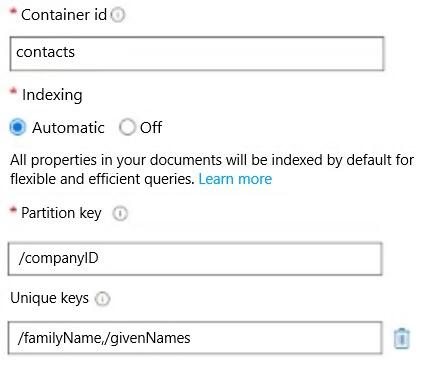
You have an Azure Cosmos DB for NoSQL container named Contacts that is configured as shown in the following exhibit.
Contacts contains the items shown in the following table.
To Contacts, you plan to Insert the items shown in the following table.
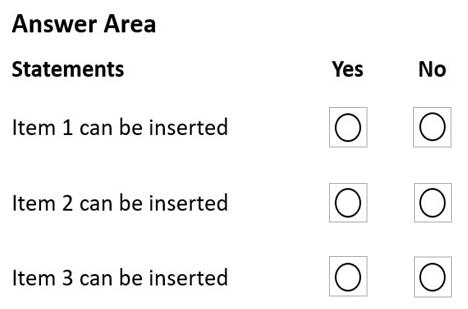
For each of the following statements, select Yes if the statement is true. Otherwise, select No.
NOTE: Each correct selection is worth one point.
Reveal answer detailsClose answer details
Explanation
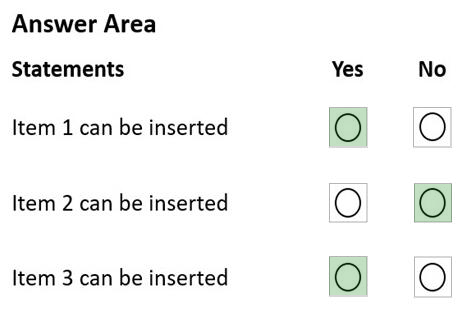
Box 1: Yes Existing "Terry John" is not the same as Item1's "terry john"
Box 2: No Item2 "Rogers" "null" already exists.
Note: Sparse unique keys are not supported. If some unique path values are missing, they're treated as null values, which take part in the uniqueness constraint. For this reason, there can be only a single item with a null value to satisfy this constraint.
Box 3: Yes As companyID for Item3 is 2, and not 1, this is fine.
Note: Unique key constraints in Azure Cosmos DB Unique keys add a layer of data integrity to an Azure Cosmos DB container. You create a unique key policy when you create an Azure Cosmos DB container. With unique keys, you make sure that one or more values within a logical partition is unique. You also can guarantee uniqueness per partition key.
After you create a container with a unique key policy, the creation of a new or an update of an existing item resulting in a duplicate within a logical partition is prevented, as specified by the unique key constraint. The partition key combined with the unique key guarantees the uniqueness of an item within the scope of the container.
For example, consider an Azure Cosmos DB container with Email address as the unique key constraint and CompanyID as the partition key. When you configure the user's email address with a unique key, each item has a unique email address within a given CompanyID. Two items can't be created with duplicate email addresses and with the same partition key value. In Azure Cosmos DB's API for NoSQL, items are stored as JSON values. These JSON values are case sensitive. When you choose a property as a unique key, you can insert case sensitive values for that property. For example, if you have a unique key defined on the name property, "Gaby" is different from "gaby" and you can insert both into the container.
You have an application named App1 that reads the data in an Azure Cosmos DB Core (SQL) API account. App1 runs the same read queries every minute. The default consistency level for the account is set to eventual.
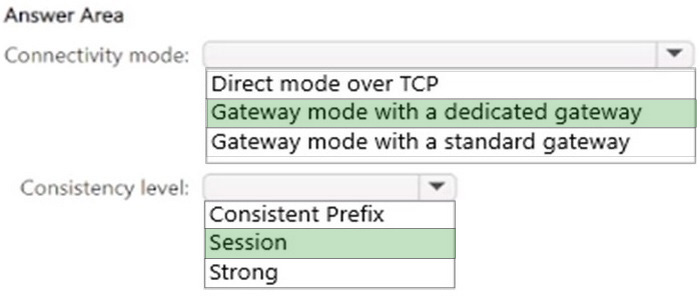
You discover that every query consumes request units (RUs) instead of using the cache.
You verify the IntegratedCacheiteItemHitRate metric and the IntegratedCacheQueryHitRate metric. Both metrics have values of 0.
You verify that the dedicated gateway cluster is provisioned and used in the connection string.
You need to ensure that App1 uses the Azure Cosmos DB integrated cache.
What should you configure?
A
the indexing policy of the Azure Cosmos DB container
B
the consistency level of the requests from App1
C
the connectivity mode of the App1 CosmosClient
D
the default consistency level of the Azure Cosmos DB account
Reveal answer detailsClose answer details
Correct answerC
Explanation
Because the integrated cache is specific to your Azure Cosmos DB account and requires significant CPU and memory, it requires a dedicated gateway node. Connect to Azure Cosmos DB using gateway mode.
Litware, Inc. is a United States-based grocery retailer. Litware has a main office and a primary datacenter in Seattle. The company has 50 retail stores across the United States and an emerging online presence. Each store connects directly to the internet.
Existing environment. Cloud and Data Service Environments.
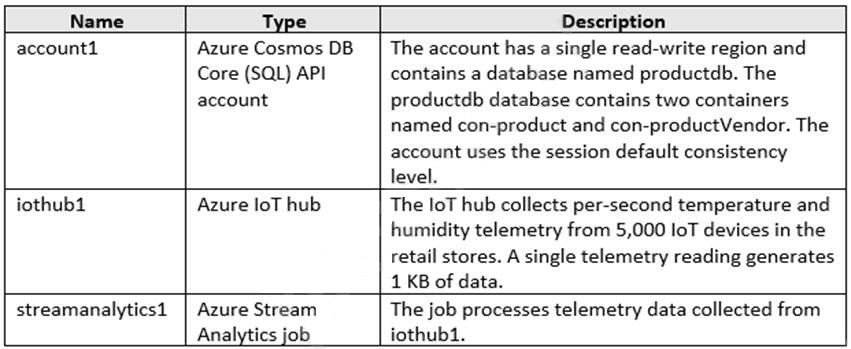
Litware has an Azure subscription that contains the resources shown in the following table.
Each container in productdb is configured for manual throughput.
The con-product container stores the company's product catalog data. Each document in con-product includes a con-productvendor value. Most queries targeting the data in con-product are in the following format.
SELECT * FROM con-product p WHERE p.con-productVendor - 'name'
Most queries targeting the data in the con-productVendor container are in the following format
SELECT * FROM con-productVendor pv ORDER BY pv.creditRating, pv.yearFounded
Existing environment. Current Problems.
Litware identifies the following issues:
1. Updates to product categories in the con-productVendor container do not propagate automatically to documents in the con-product container. 2. Application updates in con-product frequently cause HTTP status code 429 "Too many requests". You discover that the 429 status code relates to excessive request unit (RU) consumption during the updates.
Requirements. Planned Changes
Litware plans to implement a new Azure Cosmos DB Core (SQL) API account named account2 that will contain a database named iotdb. The iotdb database will contain two containers named con-iot1 and con- iot2.
Litware plans to make the following changes:
1. Store the telemetry data in account2. 2. Configure account1 to support multiple read-write regions. 3. Implement referential integrity for the con-product container. 4. Use Azure Functions to send notifications about product updates to different recipients. 5. Develop an app named App1 that will run from all locations and query the data in account1. 6. Develop an app named App2 that will run from the retail stores and query the data in account2. App2 must be limited to a single DNS endpoint when accessing account2.
Requirements. Business Requirements
Litware identifies the following business requirements:
1. Whenever there are multiple solutions for a requirement, select the solution that provides the best performance, as long as there are no additional costs associated. 2. Ensure that Azure Cosmos DB costs for IoT-related processing are predictable. 3. Minimize the number of firewall changes in the retail stores.
Requirements. Product Catalog Requirements
Litware identifies the following requirements for the product catalog:
1. Implement a custom conflict resolution policy for the product catalog data. 2. Minimize the frequency of errors during updates of the con-product container. 3. Once multi-region writes are configured, maximize the performance of App1 queries against the data in account1. 4. Trigger the execution of two Azure functions following every update to any document in the con-product container.
Question 4
Testlet 1Single choice
You configure multi-region writes for account1.
You need to ensure that App1 supports the new configuration for account1. The solution must meet the business requirements and the product catalog requirements.
What should you do?
A
Set the default consistency level of account1 to bounded staleness.
B
Create a private endpoint connection.
C
Modify the connection policy of App1.
D
Increase the number of request units per second (RU/s) allocated to the con-product and con-productVendor containers.
Reveal answer detailsClose answer details
Correct answerC
Question 5
Single choice
You are implementing an Azure Data Factory data flow that will use an Azure Cosmos DB (SQL API) sink to write a dataset. The data flow will use 2,000 Apache Spark partitions. You need to ensure that the ingestion from each Spark partition is balanced to optimize throughput.
Which sink setting should you configure?
A
Throughput
B
Write throughput budget
C
Batch size
D
Collection action
Reveal answer detailsClose answer details
Correct answerC
Explanation
Batch size: An integer that represents how many objects are being written to Cosmos DB collection in each batch. Usually, starting with the default batch size is sufficient. To further tune this value, note:
Cosmos DB limits single request's size to 2MB. The formula is "Request Size = Single Document Size *
Batch Size". If you hit error saying "Request size is too large", reduce the batch size value. The larger the batch size, the better throughput the service can achieve, while make sure you allocate enough RUs to empower your workload.
Incorrect Answers: A: Throughput: Set an optional value for the number of RUs you'd like to apply to your CosmosDB collection for each execution of this data flow. Minimum is 400.
B: Write throughput budget: An integer that represents the RUs you want to allocate for this Data Flow write operation, out of the total throughput allocated to the collection.
D: Collection action: Determines whether to recreate the destination collection prior to writing.
None: No action will be done to the collection. Recreate: The collection will get dropped and recreated
You have operational data in an Azure Cosmos OB for NoSQL database.
Database users report that the performance of the database degrades significantly when a business analytics team runs large Apache Spark-based queries against the database.
You need to reduce the impact that running the Spark-based queries has on the database users.
What should you implement?
A
Azure Synapse Link
B
a default consistency level of Consistent Prefix
C
a default consistency level of Strong
D
the Spark connector
Reveal answer detailsClose answer details
Correct answerA
Question 7
Single choice
You are designing an Azure Cosmos DB for NoSQL data model that will contain authors, books the authors have written, and reviews of the books.
You need to maintain referential integrity between entities by using server-side transactional support.
What is the largest scope of the transactions you can use?
A
items in the same container
B
a single item
C
items in the same database
D
items in the same logical partition
Reveal answer detailsClose answer details
Correct answerA
Explanation
Transactional batch operations in Azure Cosmos DB Transactional batch describes a group of point operations that need to either succeed or fail together with the same partition key in a container. Operations are defined, added to the batch, and the batch is executed. If all operations succeed in the order they're described within the transactional batch operation, the transaction will be committed. However, if any operation fails, the entire transaction is rolled back.
Does Azure Cosmos DB for NoSQL support ACID (atomicity, consistency, isolation, durability) transactions? Yes, the API for NoSQL supports cross-document transactions expressed using either batches in the SDKs or as JavaScript-stored procedures and triggers. Transactions are scoped to a single partition within each container and executed with ACID semantics as "all or nothing," isolated from other concurrently executing code and user requests. If exceptions occur, the entire transaction is rolled back.
Question 8
Single choice
You have a database named db1in an Azure Cosmos DB for NoSQL account named account 1.
You need to write JSON data to db1 by using Azure Stream Analytics. The solution must minimize costs.
Which should you do before you can use db1 as an output of Stream Analytics?
A
in account, add a private endpoint.
B
In db1, create containers that have a custom indexing policy and analytical store disabled.
C
In account, enable a dedicated gateway.
D
In db1, create containers that have an automatic indexing policy and analytical store enabled.
Reveal answer detailsClose answer details
Correct answerB
Question 9
Single choice
Note: This question is part of a series of questions that present the same scenario. Each question in the series contains a unique solution that might meet the stated goals. Some question sets might have more than one correct solution, while others might not have a correct solution.
After you answer a question in this section, you will NOT be able to return to it. As a result, these questions will not appear in the review screen.
You have a container named container1 in an Azure Cosmos DB Core (SQL) API account.
You need to make the contents of container1 available as reference data for an Azure Stream Analytics job.
Solution: You create an Azure function that uses Azure Cosmos DB Core (SQL) API change feed as a trigger and Azure event hub as the output.
Does this meet the goal?
A
Yes
B
No
Reveal answer detailsClose answer details
Correct answerB
Explanation
The Azure Cosmos DB change feed is a mechanism to get a continuous and incremental feed of records from an Azure Cosmos container as those records are being created or modified. Change feed support works by listening to container for any changes. It then outputs the sorted list of documents that were changed in the order in which they were modified.
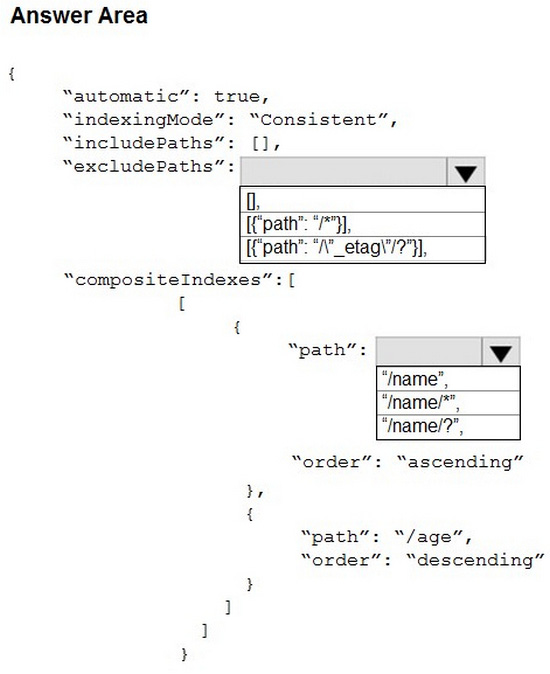
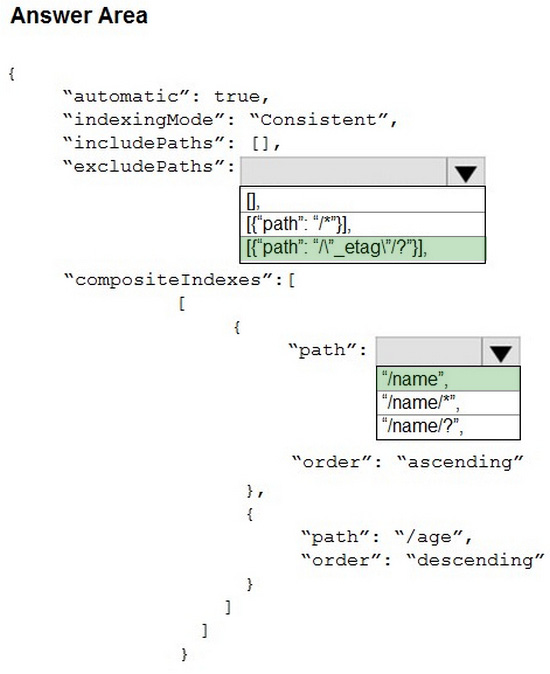
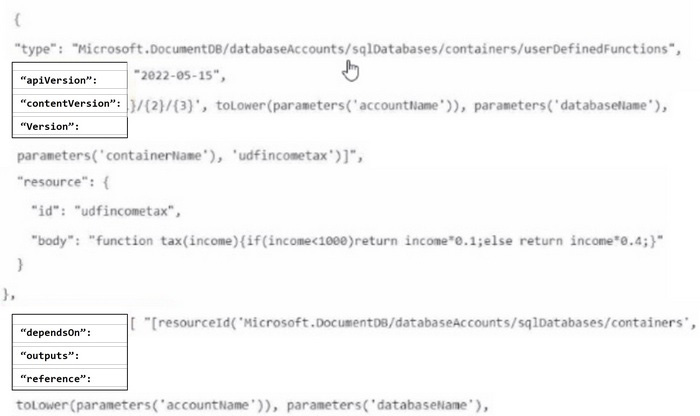
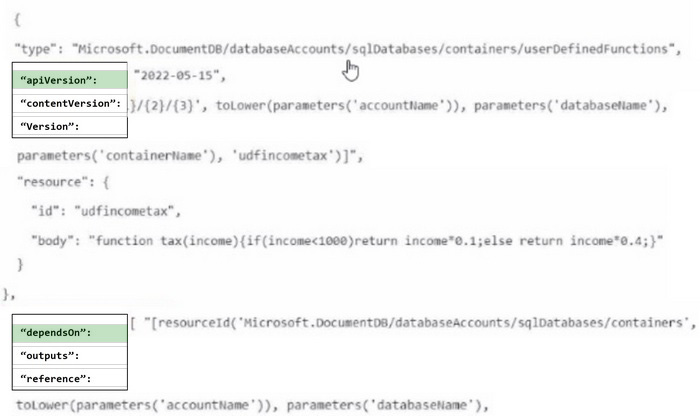
You need to deploy the following resources to an Azure Cosmos DB for NoSQL account:
1. A container
2. A user-defined function (UDF)
The solution must minimize the possibility of the deployment failing.
How should you complete the template? To answer, select the appropriate options in the answer area.
NOTE: Each correct selection is worth one point.
Reveal answer detailsClose answer details
Question 11
Drag & drop
DRAG DROP
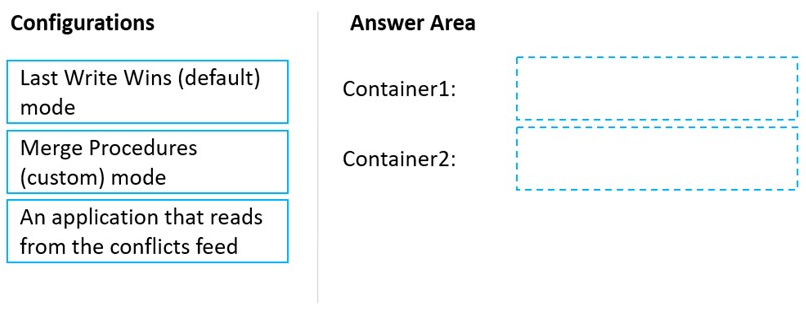
You have an Azure Cosmos DB Core (SQL) API account that is configured for multi-region writes. The account contains a database that has two containers named container1 and container2.
The following is a sample of a document in container1:
You need to configure conflict resolution to meet the following requirements:
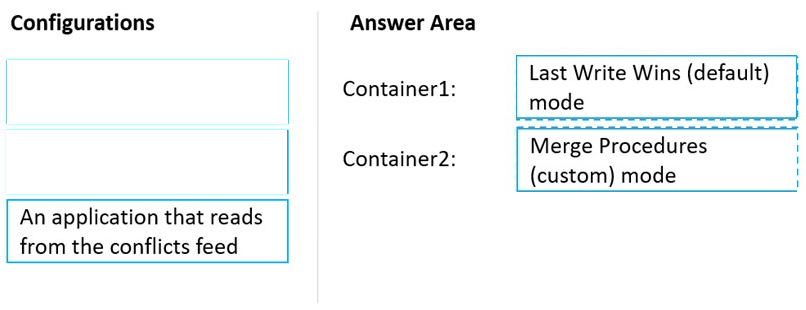
1. For container1 you must resolve conflicts by using the highest value for policyYear. 2. For container2 you must resolve conflicts by accepting the distance closest to latitude: 40.730610 and longitude: -73.935242. 3. Administrative effort must be minimized to implement the solution.
What should you configure for each container? To answer, drag the appropriate configurations to the correct containers. Each configuration may be used once, more than once, or not at all. You may need to drag the split bar between panes or scroll to view content.
NOTE: Each correct selection is worth one point.
Reveal answer detailsClose answer details
Explanation
Box 1: Last Write Wins (LWW) (default) mode Last Write Wins (LWW): This resolution policy, by default, uses a system-defined timestamp property. It's based on the time-synchronization clock protocol.
Box 2: Merge Procedures (custom) mode Custom: This resolution policy is designed for application-defined semantics for reconciliation of conflicts. When you set this policy on your Azure Cosmos container, you also need to register a merge stored procedure. This procedure is automatically invoked when conflicts are detected under a database transaction on the server. The system provides exactly once guarantee for the execution of a merge procedure as part of the commitment protocol.
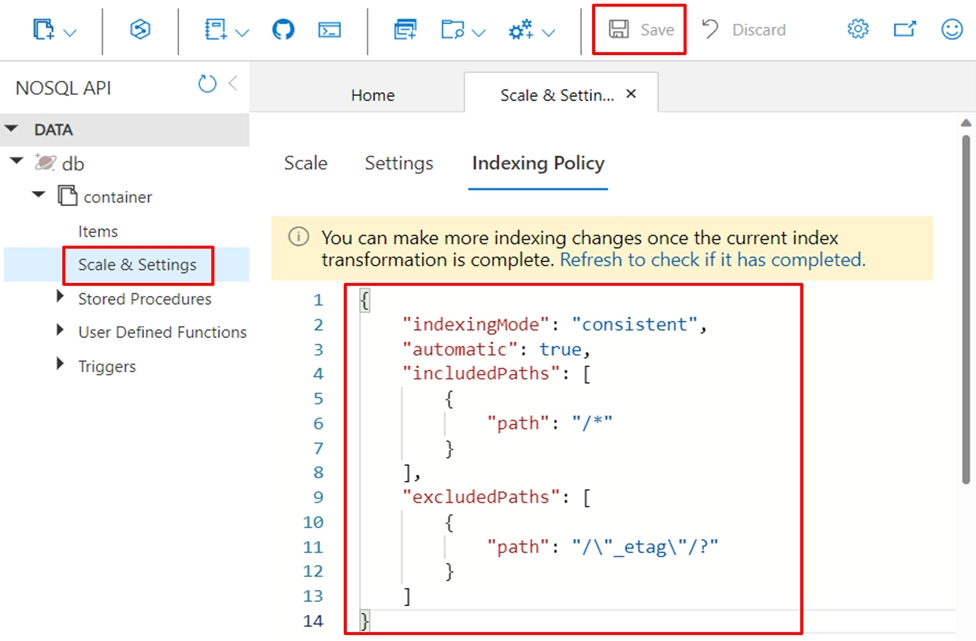
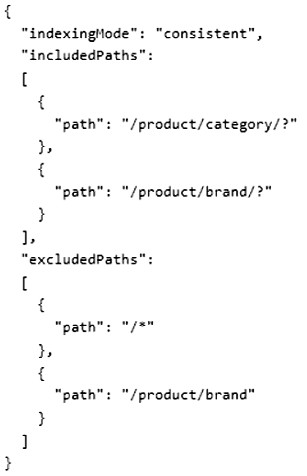
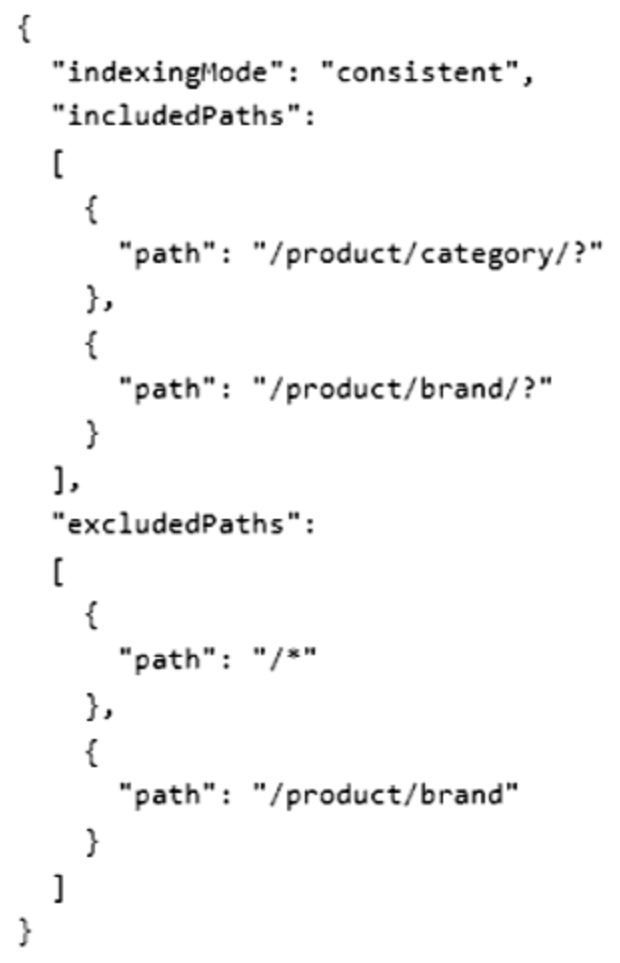
You have an Azure Cosmos DB database named databaset contains a container named container1. The container1 container store product data and has the following indexing policy.
Which path will be indexed?
A
/product/brand
B
/product/category
C
/product/[ ]/category
D
/product/brand/tailspin
Reveal answer detailsClose answer details
Correct answerA
Explanation
The indexing policy has an includedPaths array that contains only one path: /product/brand/ . This means that only the properties under /product/brand will be indexed. The symbol indicates that only scalar values will be indexed, not arrays or objects 1. The excludedPaths array contains a single path: /* . This means that all other properties will be excluded from indexing. The * symbol indicates a wildcard that matches any property name 1. Therefore, the paths /product/category , /product/[ ]/category , and /product/brand/tailspin will not be indexed.
Question 13
Hotspot
HOTSPOT
You have an on-premises network.
You have an Azure subscription that contains an Azure Cosmos DB account named account1 and an Azure virtual network named VNet1. VNet1 contains two virtual machines named VM1 and VM2. VNet1 is
connected to the on-premises network by using a Site-to-Site (S2S) VPN.
You need to meet the following requirements:
1. Block access to the public endpoint of account1. 2. Allow only VM1 to access account1.
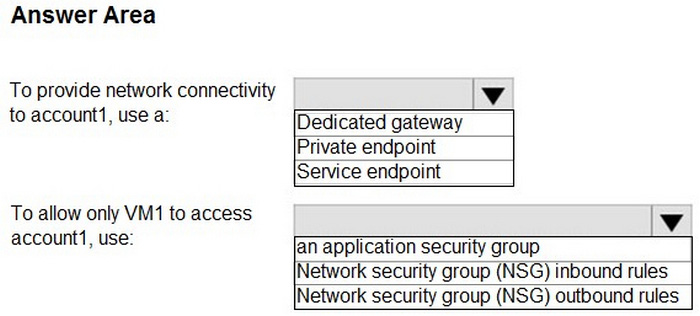
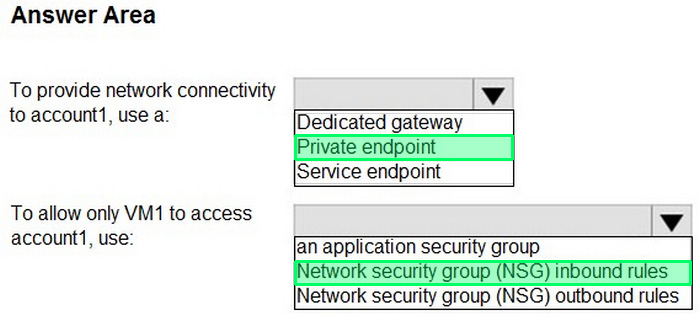
What should you include in the solution? To answer, select the appropriate options in the answer area.
NOTE: Each correct selection is worth one point.
Reveal answer detailsClose answer details
Explanation
Box 1: Service endpoint Block access to the public endpoint of account 1.
Configure access to Azure Cosmos DB from virtual networks (VNet) You can configure the Azure Cosmos DB account to allow access only from a specific subnet of a virtual network (VNET). Enable service endpoint on a subnet within a virtual network to control access to Azure Cosmos DB. The traffic from that subnet is sent to Azure Cosmos DB with the identity of the subnet and Virtual Network. Once the Azure Cosmos DB service endpoint is enabled, you can limit access to the subnet by adding it to your Azure Cosmos DB account.
Note: You can configure Azure Cosmos DB accounts to allow access from only a specific subnet of an Azure virtual network. To limit access to an Azure Cosmos DB account with connections from a subnet in a virtual network:
1. Enable the service endpoint for Azure Cosmos DB to send the subnet and virtual network identity to Azure Cosmos DB.
2. Add a rule in the Azure Cosmos DB account to specify the subnet as a source from which the account can be accessed.
Box 2: Network security group (NSG) outbound rules Allow only VM1 to access account 1.
Network security groups and service endpoints help you secure your virtual machines and Azure services from unauthorized network access.
Security rules A network security group contains one or more security rules. You can configure security rules to either allow or deny traffic.
Question 14
Single choice
You plan to create an Azure Cosmos DB for NoSQL database named db1 that will contain two containers. One of the containers will contain blog posts, and the other will contain users. Each item in the blog post container will include:
1. A single blog post 2. The top 10 comments associated to the blog post 3. The names of the users who created the blog post and the associated comments
You need to automatically update the usernames in the blog post container whenever a username in the user container changes.
What should you implement for the user container?
A
a stored procedure
B
a change feed processor
C
a post-trigger
D
a user-defined function (UDF)
Reveal answer detailsClose answer details
Correct answerB
Explanation
The names of the users who created the blog post and added the comments
Change feed in Azure Cosmos DB is a persistent record of changes to a container in the order they occur. Change feed support in Azure Cosmos DB works by listening to an Azure Cosmos DB container for any changes. It then outputs the sorted list of documents that were changed in the order in which they were modified.
Incorrect: Not C: a post-trigger¨ The post-trigger could be defined on the blog post container when a new blog post is created, not on the User container.
Note: Azure Cosmos DB supports pre-triggers and post-triggers. Pre-triggers are executed before modifying a database item, and post-triggers are executed after modifying a database item. Triggers aren't automatically executed. They must be specified for each database operation where you want them to execute.
Question 15
Hotspot
HOTSPOT
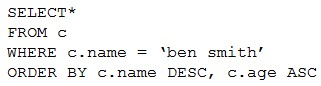
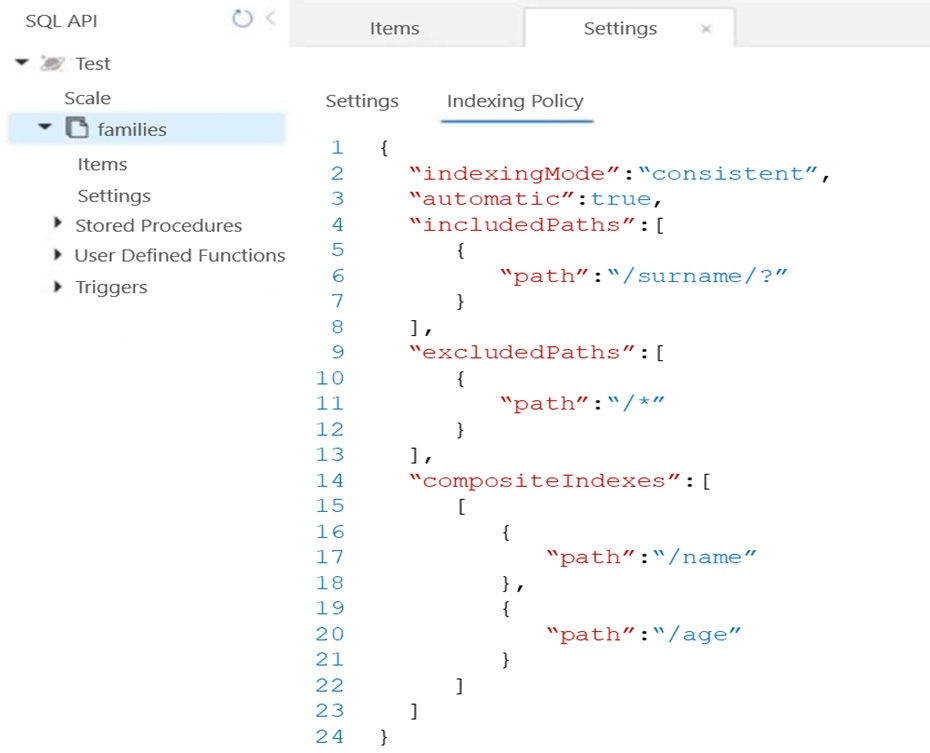
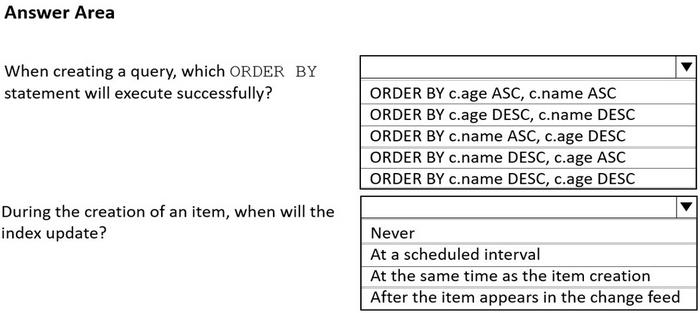
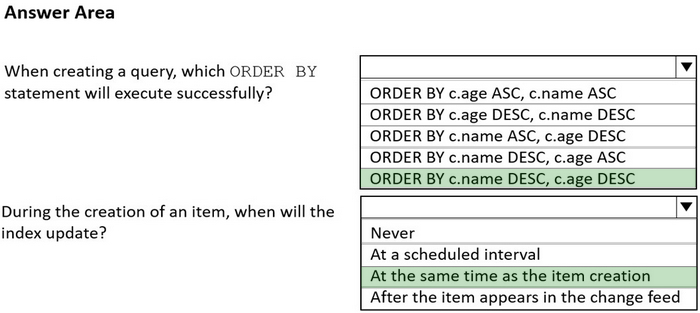
You have the indexing policy shown in the following exhibit.
Use the drop-down menus to select the answer choice that answers each question based on the information presented in the graphic.
NOTE: Each correct selection is worth one point.
Reveal answer detailsClose answer details
Explanation
Box 1: ORDER BY c.name DESC, c.age DESC Queries that have an ORDER BY clause with two or more properties require a composite index.
The following considerations are used when using composite indexes for queries with an ORDER BY clause with two or more properties: 1. If the composite index paths do not match the sequence of the properties in the ORDER BY clause, then the composite index can't support the query. 2. The order of composite index paths (ascending or descending) should also match the order in the ORDER BY clause. 3. The composite index also supports an ORDER BY clause with the opposite order on all paths.
Box 2: At the same time as the item creation Azure Cosmos DB supports two indexing modes: 1. Consistent: The index is updated synchronously as you create, update or delete items. This means that the consistency of your read queries will be the consistency configured for the account. 2. None: Indexing is disabled on the container.
You have a database in an Azure Cosmos DB Core (SQL) API account.
You need to create an Azure function that will access the database to retrieve records based on a variable named accountnumber. The solution must protect against SQL injection attacks.
How should you define the command statement in the function?
A
cmd = "SELECT * FROM Persons p WHERE p.accountnumber = 'accountnumber'"
B
cmd = "SELECT * FROM Persons p WHERE p.accountnumber = LIKE @accountnumber"
C
cmd = "SELECT * FROM Persons p WHERE p.accountnumber = @accountnumber"
D
cmd = "SELECT * FROM Persons p WHERE p.accountnumber = '" + accountnumber + "'"
Reveal answer detailsClose answer details
Correct answerC
Explanation
Azure Cosmos DB supports queries with parameters expressed by the familiar @ notation. Parameterized SQL provides robust handling and escaping of user input, and prevents accidental exposure of data through SQL injection.
For example, you can write a query that takes lastName and address.state as parameters, and execute it for various values of lastName and address.state based on user input.
SELECT * FROM Families f WHERE f.lastName = @lastName AND f.address.state = @addressState
You have an on-premises computer named Computer1 that runs Windows 11.
On Computer1, you install the Azure Cosmos DB Emulator by using the default settings.
You need to connect to the API for NoSQL clients hosted by the emulator.
What should you use?
A
Computer1 and the credentials used when installing the emulator
B
localhost :443 and the built-in Administrator user account credentials
C
Computer1 and a randomly-generated key
D
localhost: 8681 and a well-known key
Reveal answer detailsClose answer details
Correct answerD
Question 18
Single choice
You have an Azure Cosmos DB database named database1 that contains a container named container1. The container1 container stores product data and has the following indexing policy.
Which path will be indexed?
A
/product/category
B
/product/brand/tailspin
C
/product/brand
D
/product/[]/category
Reveal answer detailsClose answer details
Correct answerB
Question 19
Hotspot
HOTSPOT
You have an Azure Cosmos DB for NoSQL account named account1.
You plan to implement the integrated cache for account1.
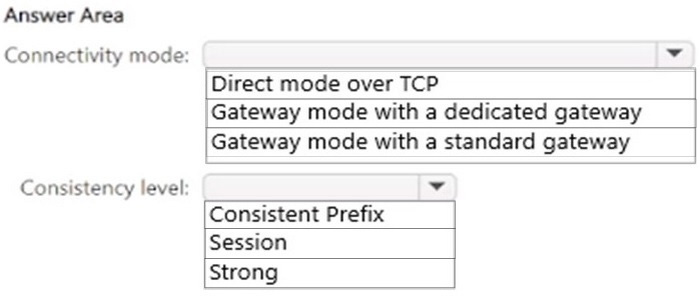
You need to configure the connectivity mode and the consistency level for requests that target account1. The solution must maximize consistency while using the integrated cache.
What should you configure? To answer, select the appropriate options in the answer area.
NOTE: Each correct selection is worth one point.
Reveal answer detailsClose answer details
Explanation
Box 1: Gateway mode with a dedicated Gateway Connectivity mode
How to configure the Azure Cosmos DB integrated cache
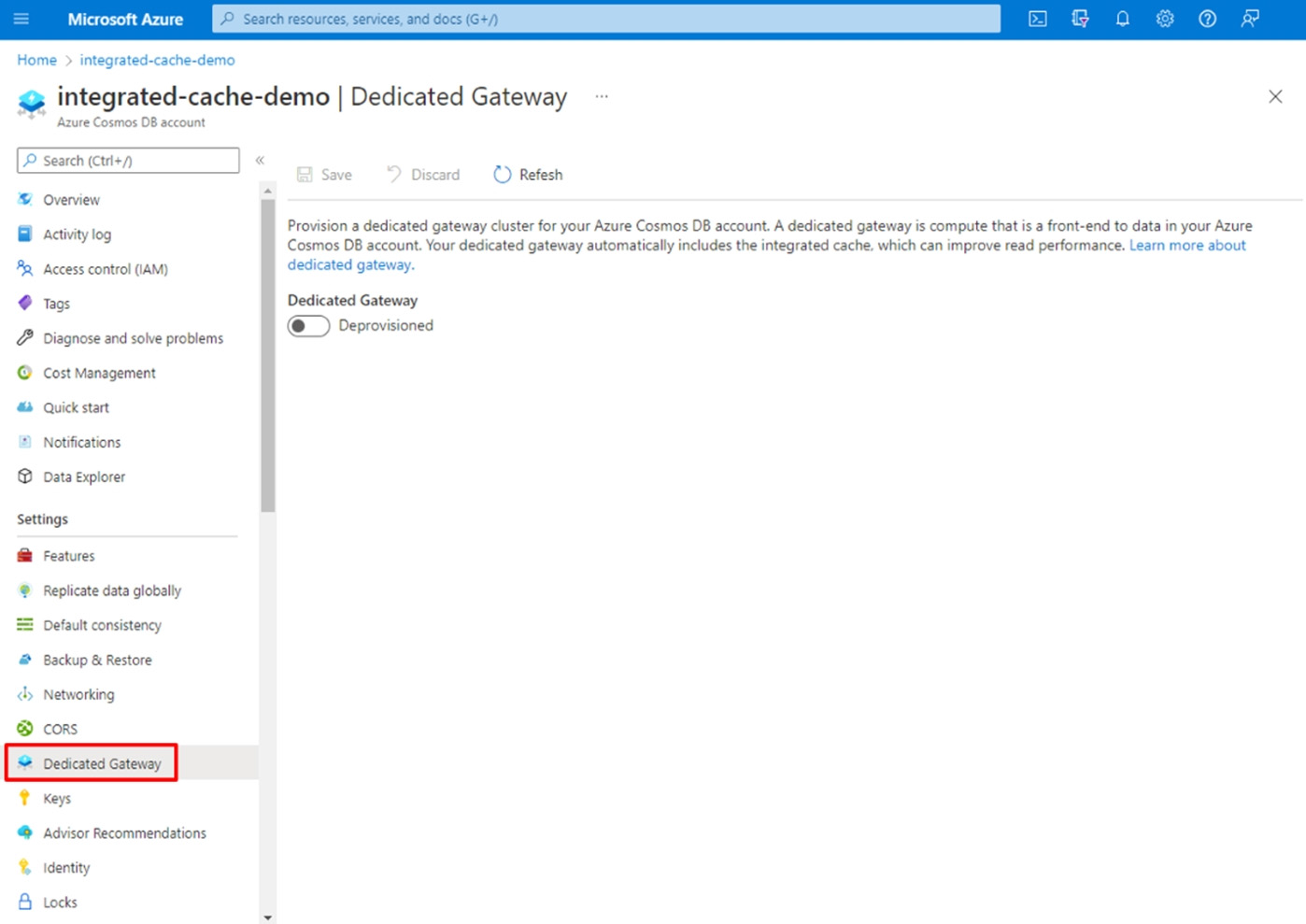
Provision the dedicated gateway 1. Navigate to an Azure Cosmos DB account in the Azure portal and select the Dedicated Gateway tab.
2. Fill out the Dedicated gateway form with the following details:
*-> Dedicated Gateway - Turn on the toggle to Provisioned. SKU - Select a SKU with the required compute and memory size. The integrated cache will use approximately 50% of the memory, and the remaining memory is used for metadata and routing requests to the backend partitions. Number of instances - Number of nodes. For development purpose, we recommend starting with one node of the D4 size. Based on the amount of data you need to cache and to achieve high availability, you can increase the node size after initial testing.
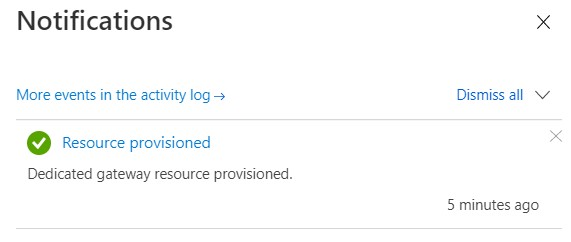
3. Select Save and wait about 5-10 minutes for the dedicated gateway provisioning to complete. When the provisioning is done, you'll see the following notification:
Box 2: session Consistency level
Adjust request consistency You must ensure the request consistency is session or eventual. If not, the request will always bypass the integrated cache. The easiest way to configure a specific consistency for all read operations is to set it at the account-level. You can also configure consistency at the request-level, which is recommended if you only want a subset of your reads to utilize the integrated cache.
Question 20
Single choice
You have an Azure subscription that contains an Azure Cosmos DB for NoSQL account named account1.
Backups for account1 have the following configurations:
1. Interval: 2 hours 2. Retention period: 4 days
You need to estimate the charges associated with the retention of the backups.
How many copies of the backups will incur additional charges?
A
8
B
12
C
46
D
48
Reveal answer detailsClose answer details
Correct answerC
Explanation
4 days is 96 (4x24) hours. A backup every 2 hours will give 48 backups within 4 days. 2 copies are free. 46 of the copies will incur additional charges.
Note: Backups are retained for 8 hours by default, but you can request retention for up to 30 days if you need. However, this is where you begin to incur charges for periodic backups, since the longer you retain backups, the more snapshot copies need to be kept in Azure Blob Storage - and only the first two are free. So depending on how frequently you set the backup interval, and how long you request backup retention -
Cosmos DB may keep anywhere from 2 to 720 snapshots in Azure Blob Storage available for restore.
Question 21
Hotspot
HOTSPOT
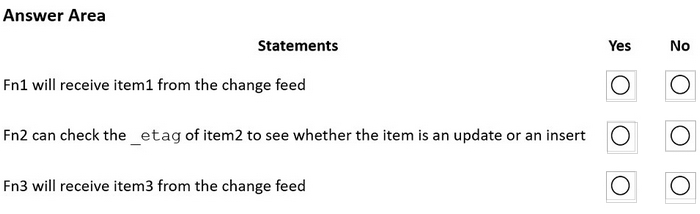
You have three containers in an Azure Cosmos DB Core (SQL) API account as shown in the following table.
You have the following Azure functions:
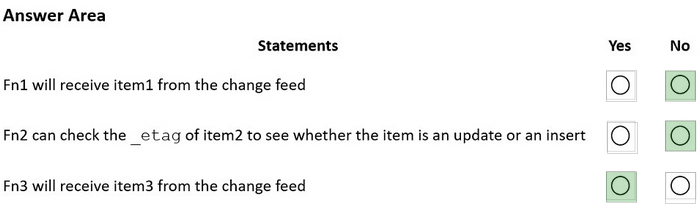
1. A function named Fn1 that reads the change feed of cn1 2. A function named Fn2 that reads the change feed of cn2 3. A function named Fn3 that reads the change feed of cn3
You perform the following actions:
1. Delete an item named item1 from cn1. 2. Update an item named item2 in cn2. 3. For an item named item3 in cn3, update the item time to live to 3,600 seconds.
For each of the following statements, select Yes if the statement is true. Otherwise, select No.
NOTE: Each correct selection is worth one point.
Reveal answer detailsClose answer details
Explanation
Box 1: No Azure Cosmos DB's change feed is a great choice as a central data store in event sourcing architectures where all data ingestion is modeled as writes (no updates or deletes).
Note: The change feed does not capture deletes. If you delete an item from your container, it is also removed from the change feed. The most common method of handling this is adding a soft marker on the items that are being deleted. You can add a property called "deleted" and set it to "true" at the time of deletion. This document update will show up in the change feed. You can set a TTL on this item so that it can be automatically deleted later.
Box 2: No The_etag format is internal and you should not take dependency on it, because it can change anytime.
Box 3: Yes Change feed support in Azure Cosmos DB works by listening to an Azure Cosmos container for any changes.
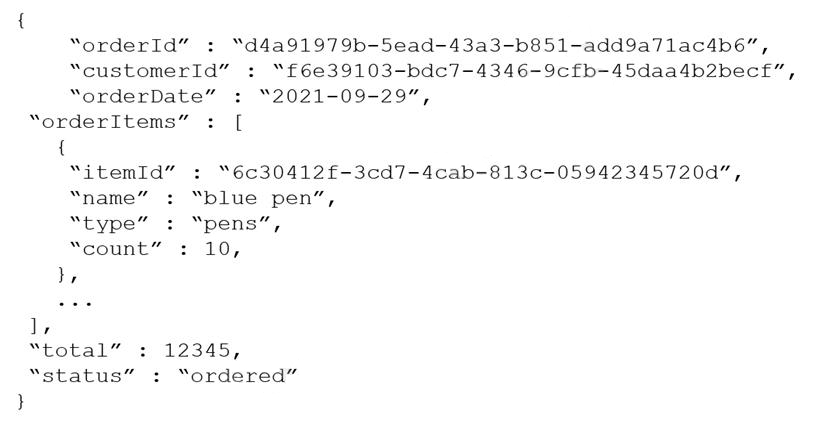
The following is a sample of a document in orders.
The orders container uses customerId as the partition key.
You need to provide a report of the total items ordered per month by item type. The solution must meet the following requirements:
1. Ensure that the report can run as quickly as possible. 2. Minimize the consumption of request units (RUs).
What should you do?
A
Configure the report to query orders by using a SQL query.
B
Configure the report to query a new aggregate container. Populate the aggregates by using the change feed.
C
Configure the report to query orders by using a SQL query through a dedicated gateway.
D
Configure the report to query a new aggregate container. Populate the aggregates by using SQL queries that run daily.
Reveal answer detailsClose answer details
Correct answerB
Explanation
The compute containers are shared among all materialized views within an Azure Cosmos DB account. Each provisioned compute container initiates multiple tasks that read the change feed from the base container partitions and write data to the target materialized view or views. The compute container transforms the data per the materialized view definition for each materialized view in the account.
Note: Materialized views for Azure Cosmos DB for NoSQL (preview) Applications frequently are required to make queries that don't specify a partition key. In these cases, the queries might scan through all data for a small result set. The queries end up being expensive because they inadvertently run as a cross-partition query.
Materialized views, when defined, help provide a way to efficiently query a base container in Azure Cosmos DB by using filters that don't include the partition key. When users write to the base container, the materialized view is built automatically in the background. This view can have a different partition key for efficient lookups. The view also contains only fields that are explicitly projected from the base container. This view is a read-only table.
With a materialized view, you can:
Use the view as a lookup or mapping container to persist cross-partition scans that would otherwise be expensive queries. Provide a SQL-based predicate (without conditions) to populate only specific fields. Use change feed triggers to create real-time views to simplify event-based scenarios that are commonly stored as separate containers.
Question 23
Single choice
You have an Azure Cosmos DB for NoSQL account.
The change feed is enabled on a container named invoice.
You create an Azure function that has a trigger on the change feed.
What is received by the Azure function?
A
all the properties of the updated items
B
only the partition key and the changed properties of the updated items
C
all the properties of the original items and the updated items
D
only the changed properties and the system-defined properties of the updated items
Reveal answer detailsClose answer details
Correct answerA
Explanation
According to the Azure Cosmos DB documentation12, the change feed is a persistent record of changes to a container in the order they occur. The change feed outputs the sorted list of documents that were changed in the order in which they were modified. The Azure function that has a trigger on the change feed receives all the properties of the updated items 2. The change feed does not include the original items or only the changed properties. The change feed also includes some system-defined properties such as_ts (the last modified timestamp) and_lsn (the logical sequence number)3. Therefore, the correct answer is "all the properties of the updated items"
Question 24
Single choice
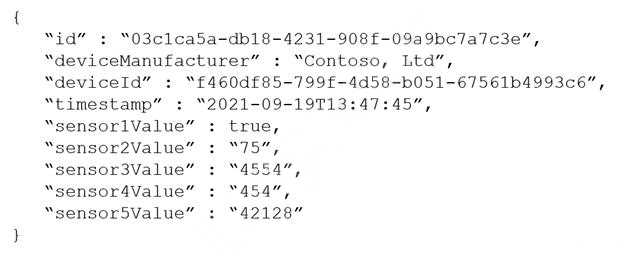
You are designing an Azure Cosmos DB Core (SQL) API solution to store data from IoT devices. Writes from the devices will be occur every second.
The following is a sample of the data.
You need to select a partition key that meets the following requirements for writes:
1. Minimizes the partition skew 2. Avoids capacity limits 3. Avoids hot partitions
What should you do?
A
Create a new synthetic key that contains deviceId and timestamp.
B
Use timestamp as the partition key.
C
Use sensor1Value as the partition key.
D
Create a new synthetic key that contains deviceId and deviceManufacturer.
Reveal answer detailsClose answer details
Correct answerA
Explanation
It's the best practice to have a partition key with many distinct values, such as hundreds or thousands. The goal is to distribute your data and workload evenly across the items associated with these partition key values. If such a property doesn't exist in your data, you can construct a synthetic partition key.
Concatenate multiple properties of an item You can form a partition key by concatenating multiple property values into a single artificial partitionKey property. These keys are referred to as synthetic keys. For example, consider the following example document:
{ "deviceId": "abc-123", "date": 2018 }
Question 25
Single choice
You plan to create an Azure Cosmos DB account that will use the NoSQL API.
You need to create a grouping strategy for items that will be stored in the account. The solution must ensure that write and read operations on the items can be performed within the same transact!
What should you use to group the items?
A
logical partitions
B
physical partitions
C
databases
D
containers
Reveal answer detailsClose answer details
Correct answerA
Explanation
Transactions (in stored procedures or triggers) are allowed only against items in a single logical partition.
A logical partition also defines the scope of database transactions. You can update items within a logical partition by using a transaction with snapshot isolation. When new items are added to a container, the system transparently creates new logical partitions. You don't have to worry about deleting a logical partition when the underlying data is deleted.
Transactions (in stored procedures or triggers) are allowed only against items in a single logical partition.
Question 26
Drag & drop
DRAG DROP
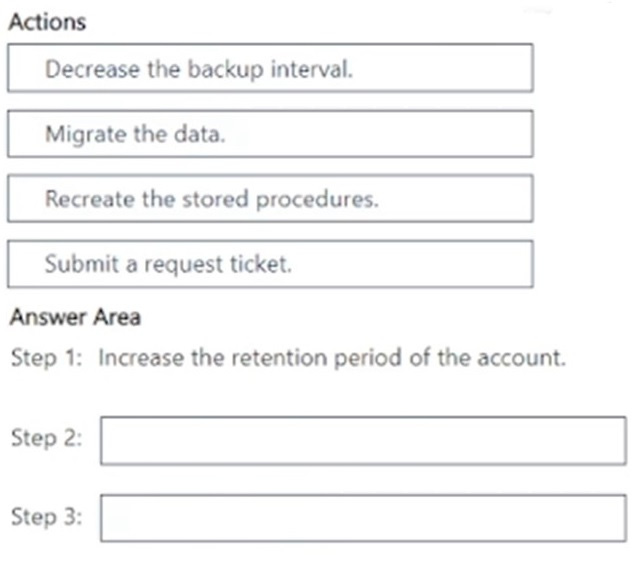
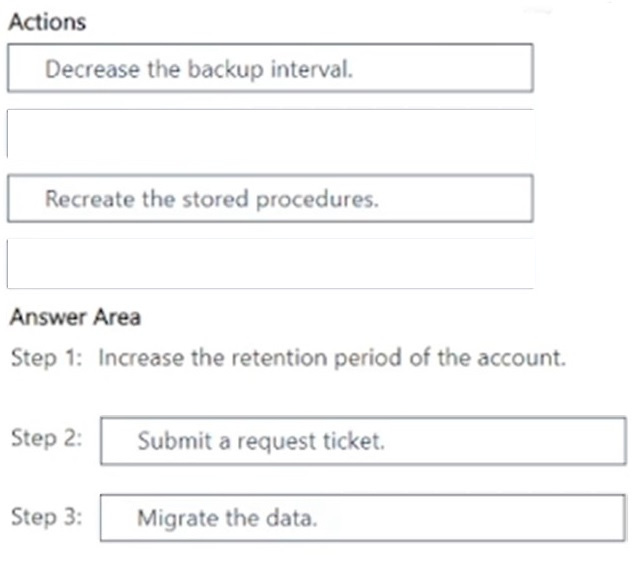
You have an Azure Cosmos DB for NoSQL account named account1 that has a periodic backup policy with a four-hour backup interval and an eight-hour retention period. The account1 account contains a single database named db1 and containers that have stored procedures.
An administrator deletes db1 accidentally.
You need to ensure that the contents of db1, including all of its items, is available as soon as possible.
How should you perform the procedure? To answer, drag the missing actions to the correct order. Each action may be used once, more than once, or not at all. You may need to drag the split bar between panes or scroll to view content.
NOTE: Each correct selection is worth one point.
Reveal answer detailsClose answer details
Explanation
Step 1: Increase the retention period of the account Request data restoration from an Azure Cosmos DB backup If you accidentally delete your database or a container, you can file a support ticket or call the Azure support to restore the data from automatic online backups.
In order to prevent the backup from being overwritten, increase the backup retention for your account to at least seven days. It's best to increase your retention within 8 hours from the data corruption.
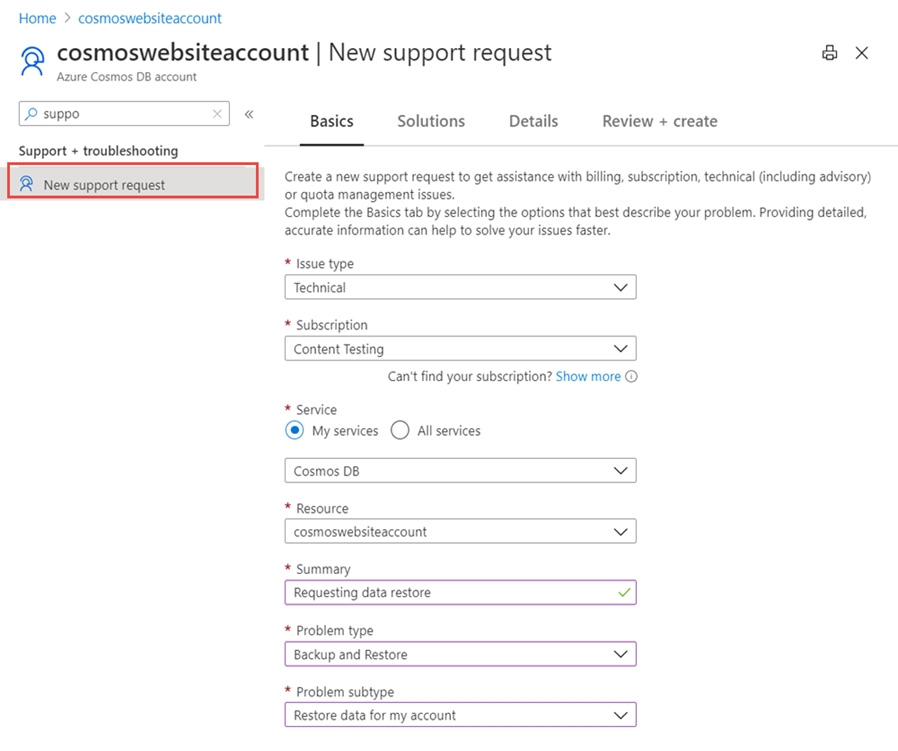
Step 2: Submit a request ticket The following screenshot illustrates how to create a support request for a container(collection/graph/table) to restore data by using Azure portal. Provide other details such as type of data, purpose of the restore, time when the data was deleted to help us prioritize the request.
Step 3: Migrate the data Post-restore actions The primary goal of the data restore is to recover the data that you've accidentally deleted or modified. So, we recommend that you first inspect the content of the recovered data to ensure it contains what you are expecting. If everything looks good, you can migrate the data back to the primary account. Although it's possible to use the restored account as your new active account, it's not a recommended option if you have production workloads.
After you restore the data, you get a notification about the name of the new account (it's typically in the format <original-name>-restored1) and the time when the account was restored to. The restored account has the same provisioned throughput, indexing policies and it is in same region as the original account. A user who is the subscription admin or a coadmin can see the restored account.
Migrate data to the original account The following are different ways to migrate data back to the original account:
Use the Azure Data Factory. Use the change feed in Azure Cosmos DB. You can write your own custom code. It's advised that you delete the container or database immediately after migrating the data. If you don't delete the restored databases or containers, they incur cost for request units, storage, and egress.
Question 27
Single choice
You have an Azure Cosmos DB for NoSQL account that has multiple write regions.
You need to receive an alert when requests that target the database exceed the available request units per second (RU/s).