Will this sequence of steps completely delete an image from disk in the Docker Trusted Registry? Solution: Delete the image and delete the image repository from Docker Trusted Registry
-
A
-
B
Reveal answer details
Close answer details
Correct answerB
ExplanationDeleting the image and deleting the image repository from Docker Trusted Registry (DTR) does not completely delete an image from disk in DTR. Deleting an image only removes its tag and association with a repository, but does not delete its underlying layers from disk. Deleting a repository only removes its metadata and tags, but does not delete its underlying layers from disk either. To completely delete an image from disk in DTR, you need to run a garbage collection job after deleting the image or the repository. A garbage collection job scans the DTR storage and removes any unused layers that are not referenced by any images or repositories.
Is this the purpose of Docker Content Trust? Solution: Indicate an image on Docker Hub is an official image.
-
A
-
B
Reveal answer details
Close answer details
Correct answerB
ExplanationIndicating an image on Docker Hub is an official image is not the purpose of Docker Content Trust. Official images are curated images that are provided and maintained by Docker, Inc. or by upstream software maintainers. Official images have a special badge on Docker Hub that indicates their status. Official images are not necessarily signed by Docker Content Trust, although some of them are. The purpose of Docker Content Trust is to sign and verify image tags, not to indicate official images.
What behavior is expected when a service is created with the following command: 'docker service create --publish 8000:80 nginx'
-
A
All nodes in the cluster will listen on port 8080 and forward to port 80 in the container.
-
B
Only a single node in the cluster will listen on port 8080 and forward to port 80 in the container.
-
C
All nodes in the cluster will listen on port 80 and forward to port 8080 in the container.
-
D
Only a single node in the cluster will listen on port 80 and forward to port 8080 in the container.
Reveal answer details
Close answer details
The following Docker Compose file is deployed as a stack: 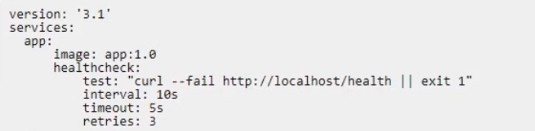 Is this statement correct about this health check definition? Solution: Health checks test for app health ten seconds apart. If the test fails, the container will be
restarted three times before it gets rescheduled.
-
A
-
B
Reveal answer details
Close answer details
You are troubleshooting a Kubernetes deployment called api, and want to see the events table for this object. Does this command display it? Solution: kubectl events deployment api
-
A
-
B
Reveal answer details
Close answer details
Correct answerB
ExplanationUsing kubectl events deployment api does not display the events table for this object. The kubectl events command shows cluster-level events, but it does not accept a resource name as an argument. To see the events table for this object, you need to use kubectl describe deployment api.
A server is running low on disk space. What command can be used to check the disk usage of images, containers, and volumes for Docker engine?
-
A
-
B
-
C
-
D
Reveal answer details
Close answer details
A docker service 'web' is running with a scale factor of 1 (replicas = 1). Bob intends to use the command 'docker service update --replicas=3 web'. Alice intends to use the command 'docker service scale web=3'. How do the outcomes oft these two commands differ?
-
A
Bob's command results in an error. Alice's command updates the number of replicas of the 'web' service to 3.
-
B
Bob's command only updates the service definition, but no new replicas are started. Alice's command results in the actual scaling up of the 'web' service.
-
C
Bob's command updates the number of replicas of the 'web' service to 3. Alice's command results in an error.
-
D
Both Bob's and Alice's commands result in exactly the same outcome, which is 3 instances of the 'web' service.
Reveal answer details
Close answer details
Two development teams in your organization use Kubernetes and want to deploy their applications while ensuring that Kubernetes-specific resources, such as secrets, are grouped together for each application. Is this a way to accomplish this? Solution: Create one pod and add all the resources needed for each application
-
A
-
B
Reveal answer details
Close answer details
Correct answerB
Explanationhis is not a way to accomplish this, because creating one pod and adding all the resources needed for each application is not a good practice for deploying applications in Kubernetes. According to the official documentation, pods are not intended to run multiple instances of an application or different applications that are tightly coupled. Pods are also not meant to hold resources that are shared across applications, such as secrets or configMaps.
Is this a function of UCP?
Solution: scans images to detect any security vulnerability
-
A
-
B
Reveal answer details
Close answer details
Correct answerB
ExplanationScanning images to detect any security vulnerability is not a function of UCP. UCP stands for Universal Control Plane, which is a web-based user interface for managing Docker Enterprise clusters and applications. UCP does not provide image scanning capabilities, but it integrates with Docker Trusted Registry (DTR), which does offer image scanning as part of its security features.
Question 10
Single choice
A user's attempts to set the system time from inside a Docker container are unsuccessful.
Could this be blocking this operation? Solution: SELinux
-
A
-
B
Reveal answer details
Close answer details
Correct answerB
ExplanationSELinux is not blocking this operation. SELinux is a security module that enforces mandatory access control policies on Linux systems. SELinux can restrict the actions of processes and users based on their security contexts and labels. However, SELinux does not prevent a user from setting the system time from inside a Docker container. The reason why a user's attempts to set the system time from inside a Docker container are unsuccessful is because Docker containers share the same kernel and clock as the host by default. Therefore, changing the system time inside a container requires privileged access to the host kernel, which is not allowed by default for security reasons. To allow a user to set the system time from inside a Docker container, you need to run the container with the --privileged flag or the --cap-add SYS_TIME flag.
Question 11
Single choice
Is this an advantage of multi-stage builds? Solution: better logical separation of Dockerfile instructions for increased readability
-
A
-
B
Reveal answer details
Close answer details
Correct answerB
ExplanationBetter logical separation of Dockerfile instructions for increased readability is not an advantage of multi-stage builds. Multi-stage builds are a feature that allows you to use multiple FROM statements in your Dockerfile. Each FROM statement begins a new stage of the build. You can selectively copy artifacts from one stage to another, leaving behind everything you don't want in the final image. The main advantage of multi-stage builds is that they allow you to reduce the size of your final image by only including the essential components and dependencies. Another advantage of multi-stage builds is that they allow you to optimize the build cache by grouping similar instructions in each stage. Better logical separation of Dockerfile instructions for increased readability is not an inherent advantage of multi-stage builds, as it depends on how you write and organize your Dockerfile.
Question 12
Single choice
Will this command list all nodes in a swarm cluster from the command line? Solution: `docker Is -a'
-
A
-
B
Reveal answer details
Close answer details
Correct answerB
ExplanationUsing `docker ls -a' does not list all nodes in a swarm cluster from the command line. The docker ls command is not a valid command. To list containers, you need to use `docker container ls' or `docker ps'.
To list images, you need to use `docker image ls' or `docker images'. To list nodes in a swarm cluster, you need to use `docker node ls'.
Question 13
Single choice
Can this set of commands identify the published port(s) for a container? Solution: `docker container inspect", docker port'
-
A
-
B
Reveal answer details
Close answer details
Correct answerA
ExplanationThis set of commands can identify the published port(s) for a container. The docker container inspect command shows low-level information about a container in JSON format. This information includes the network settings of the container, such as the port bindings and exposed ports. The docker port command shows the public port(s) that are mapped to a private port inside the container. By using these two commands, you can identify the published port(s) for a container.
Question 14
Single choice
Will this command display a list of volumes for a specific container? Solution: docker volume logs nginx --containers'
-
A
-
B
Reveal answer details
Close answer details
Correct answerB
ExplanationThis command will not display a list of volumes for a specific container, because it uses docker volume inspect with an image name instead of a volume name. According to the official documentation, docker volume inspect requires one or more volume names as arguments and will show detailed information about the volumes, not the containers that use them.
References:
https://docs.docker.com/engine/reference/commandline/volume_inspect/
Question 15
Single choice
Will this command list all nodes in a swarm cluster from the command line? Solution: docker inspect nodes
-
A
-
B
Reveal answer details
Close answer details
Correct answerB
ExplanationThis command does not list all nodes in a swarm cluster from the command line. The docker inspect command shows low-level information about one or more objects, such as containers, images, networks, etc. It does not show information about nodes or services. To list all nodes in a swarm cluster from the command line, you need to use docker node ls command. This command shows information about all the nodes that are part of the swarm, such as their ID, hostname, status, availability, etc.
Question 16
Single choice
Is this a way to configure the Docker engine to use a registry without a trusted TLS certificate? Solution: Pass the '--insecure-registry' flag to the daemon at run time.
-
A
-
B
Reveal answer details
Close answer details
Question 17
Single choice
In the context of a swarm mode cluster, does this describe a node? Solution: an instance of the Docker CLI connected to the swarm
-
A
-
B
Reveal answer details
Close answer details
Correct answerB
ExplanationAn instance of the Docker CLI connected to the swarm does not describe a node in the context of a swarm mode cluster. A node is a physical or virtual machine that runs the Docker Engine and participates in the swarm. A node can have one of two roles: manager or worker. Manager nodes maintain the cluster state and orchestrate tasks. Worker nodes execute tasks assigned by manager nodes. An instance of the Docker CLI connected to the swarm is a client that can interact with the swarm using commands such as docker service, docker node, docker stack, etc. A client can connect to any manager node in the swarm using the --host or -H flag.
Question 18
Multiple choice
Which of the following are types of namespaces used by Docker to provide isolation? (Choose 2.)
-
A
-
B
-
C
-
D
-
E
Reveal answer details
Close answer details
Question 19
Single choice
Is this an advantage of multi-stage builds? Solution: better caching when building Docker images
-
A
-
B
Reveal answer details
Close answer details
Correct answerB
ExplanationBetter caching when building Docker images is not an advantage of multi-stage builds. Multi-stage builds are a feature that allows you to use multiple FROM statements in a single Dockerfile. Each FROM statement begins a new stage of the build, with its own base image and instructions. You can selectively copy artifacts from one stage to another, leaving behind everything you don't want in the final image. The advantages of multi-stage builds are: Reducing the size of the final image by removing unnecessary dependencies or intermediate files.
Improving the security of the final image by minimizing the attack surface and avoiding leaking secrets.
Simplifying the development workflow by using different tools or environments in different stages. Better caching when building Docker images is not an advantage of multi-stage builds, as it depends on other factors, such as the order and content of the instructions in each stage, the availability and freshness of the base images and intermediate layers, and the use of build arguments or environment variables that may invalidate the cache.
Question 20
Single choice
In Docker Trusted Registry, is this how a user can prevent an image, such as 'nginx:latest', from being overwritten by another user with push access to the repository? Solution: Use the DTR web Ul to make all tags in the repository immutable.
-
A
-
B
Reveal answer details
Close answer details
Correct answerB
ExplanationThis is not how a user can prevent an image from being overwritten by another user with push access to the repository, because making all tags in the repository immutable will also prevent the user from updating their own image tags. According to the official documentation, a better way to prevent an image from being overwritten is to use promotion policies that only allow certain users or teams to push images with specific tags.
Question 21
Single choice
Which of the following commands will create a swarm service which only listens on port 53 using the UDP protocol?
-
A
docker service create --name dns-cache -p 53:53/udp dns-cache
-
B
docker service create --name dns-cache -p 53:53 --service udp dns-cache
-
C
docker service create --name dns-cache -p 53:53 ..constraint networking.protocol.udp=true dns-cache
-
D
docker service create --name dns-cache -p 53:53 --udp dns-cache
Reveal answer details
Close answer details
Question 22
Single choice
You add a new user to the engineering organization in DTR.
Will this action grant them read/write access to the engineering/api repository? Solution: Mirror the engineering/api repository to one of the user's own private repositories.
-
A
-
B
Reveal answer details
Close answer details
Correct answerB
ExplanationMirroring the engineering/api repository to one of the user's own private repositories does not grant them read/write access to the engineering/api repository. Mirroring is a feature that allows you to automatically replicate images from one repository to another, either within the same DTR or across different DTRs.
Mirroring does not change the permissions or access levels of the source or destination repositories. It only copies the images and tags from one repository to another. To grant a user read/write access to the engineering/api repository, you need to add them as a collaborator with read/write role on that repository, or add them to a team that has read/write role on that repository.
Question 23
Single choice
Is this a type of Linux kernel namespace that provides container isolation? Solution: Process ID
-
A
-
B
Reveal answer details
Close answer details
Correct answerA
ExplanationProcess ID is a type of Linux kernel namespace that provides container isolation. Process ID (pid) namespace isolates the process ID number space, which means that processes in different pid namespaces can have the same PID. This allows each container to have its own init process (PID 1), which is the first process to start in a container and the ancestor of all other processes in the container. Pid namespace also prevents processes in one container from seeing or signaling processes in another container or on the host system, unless they share the same pid namespace or have the CAP_SYS_PTRACE capability.
Question 24
Single choice
Will this action upgrade Docker Engine CE to Docker Engine EE? Solution: Uninstall 'docker-ce' package before installing 'docker-ee' package.
-
A
-
B
Reveal answer details
Close answer details
Correct answerA
ExplanationUninstalling `docker-ce' package before installing `docker-ee' package does upgrade Docker Engine CE to Docker Engine EE. Docker Engine CE is the free and open source edition of Docker Engine, while Docker Engine EE is the enterprise-ready edition that includes additional features and support. To upgrade from
CE to EE, you need to uninstall the `docker-ce' package and its dependencies, and then install the `docker-ee' package from the Docker repository.
Question 25
Single choice
Can this set of commands identify the published port(s) for a container? Solution: `docker port inspect", docker container inspect"
-
A
-
B
Reveal answer details
Close answer details
Correct answerB
ExplanationThis set of commands cannot identify the published port(s) for a container. The docker port inspect command does not exist and will cause an error. The docker container inspect command shows low-level information about a container in JSON format, but it does not show the public port(s) that are mapped to a private port inside the container. To identify the published port(s) for a container, you can use docker container inspect and docker port commands.
Question 26
Single choice
Is this a Linux kernel namespace that is disabled by default and must be enabled at Docker engine runtime to be used? Solution: pid
-
A
-
B
Reveal answer details
Close answer details
Correct answerB
Explanationpid is not a Linux kernel namespace that is disabled by default and must be enabled at Docker engine runtime to be used. pid is a Linux kernel namespace that provides process isolation for containers. It ensures that processes in one container cannot see or signal processes in another container or on the host system. pid is enabled by default for Docker containers and does not require any special flag or option to be used. However, you can disable pid isolation for a container by using --pid host option when creating or running a container. This option connects the container to the host's pid namespace and allows the container to see and signal processes on the host system.
Question 27
Single choice
Are these conditions sufficient for Kubernetes to dynamically provision a persistentVolume, assuming there are no limitations on the amount and type of available external storage? Solution: A default provisioner is specified, and subsequently a persistentVolumeClaim is created.
-
A
-
B
Reveal answer details
Close answer details
Correct answerB
ExplanationThese conditions are not sufficient for Kubernetes to dynamically provision a persistentVolume, because a default provisioner is not enough to determine how to create a persistentVolume. According to the official documentation, you also need to specify a default storageClass or annotate your persistentVolumeClaim with a specific storageClass name.
Question 28
Single choice
How do you change the default logging driver for the docker daemon in Linux?
-
A
Set the value of log-driver to the name of the logging driver In the daemon.json In /etc/doc
-
B
Use the -log-driver' flag when you run a container.
-
C
At the command line, type: docker log driver set <driver name>
-
D
Install a logging agent on the Linux host.
Reveal answer details
Close answer details
Question 29
Single choice
Will this action upgrade Docker Engine CE to Docker Engine EE? Solution: Manually download the 'docker-ee' package
-
A
-
B
Reveal answer details
Close answer details
Question 30
Single choice
The Kubernetes yaml shown below describes a networkPolicy. 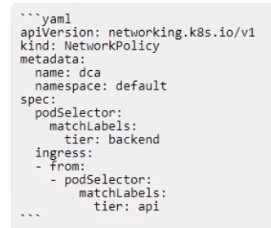 Will the networkPolicy BLOCK this traffic? Solution: a request issued from a pod bearing the tier: backend label, to a pod bearing the tier: frontend label
-
A
-
B
Reveal answer details
Close answer details
Correct answerA
ExplanationThe networkPolicy will block this traffic. A networkPolicy is a Kubernetes resource that defines how pods are allowed to communicate with each other and with other network endpoints. A networkPolicy has two main sections: podSelector and policyTypes. The podSelector selects which pods the networkPolicy applies to. The policyTypes specifies whether the networkPolicy affects ingress (incoming) traffic, egress (outgoing) traffic, or both. In this case, the networkPolicy applies to pods that have a label app: webserver and affects both ingress and egress traffic. The networkPolicy also has two optional sections: ingress and egress. The ingress section defines the rules for allowing ingress traffic to the selected pods.
The egress section defines the rules for allowing egress traffic from the selected pods. If either section is missing or empty, it means that no traffic of that type is allowed. In this case, the networkPolicy has an empty ingress section, which means that no ingress traffic is allowed to the pods that have a label app: webserver. Therefore, a request issued from a pod bearing the tier: backend label, to a pod bearing the tier: frontend label will be blocked by this networkPolicy, since it is an ingress traffic to a pod that has a label app: webserver.
|