Preview real exam questions, verified answers and available explanations before choosing a study plan.
Question 1
Single choice
What is a characteristic of FAST VP?
A
Fast VP data relocation runs in the background at all times once it is enabled.
B
Fast VP optimizes data replacement by moving 1 GB slices between disk tiers.
C
Users can set the Fast VP data relocation rate.
D
Users can enable or disable FAST VP at the LUN level.
Reveal answer detailsClose answer details
Correct answerC
Explanation
FAST VP (Fully Automated Storage Tiering for Virtual Pools) is a feature that automatically moves data within a storage pool based on the performance requirements and access patterns of the data. FAST VP data relocation runs in the background according to a user-defined schedule and rate. The schedule determines when the data relocation starts and ends, and the rate determines how much system resources are used for the data relocation. Users can set the Fast VP data relocation rate to High, Medium, Low, or None. High means that the data relocation has the highest priority and uses the most system resources, while None means that the data relocation is disabled. Fast VP data relocation does not run at all times, but only during the scheduled window. Fast VP optimizes data placement by moving 256 MB slices between disk tiers, not 1 GB slices. Users cannot enable or disable FAST VP at the LUN level, but only at the storage pool level.
References: [Dell EMC Unity: FAST Technology Overview], [Dell EMC Unity: Storage Pools and RAID Groups]
Question 2
Single choice
What is the maximum time difference allowed between the current system time (UTC) and the NTP server time during the initial configuration of a Dell Unity system?
A
17 min
B
7 min
C
5 min
D
15 min
Reveal answer detailsClose answer details
Correct answerA
Explanation
If the time difference between the current system (UTC) time and the NTP server time is too large (approximately 17 minutes), the user cannot configure an NTP server during initial configuration. The user will need to adjust the time while in "Set time manually" mode before changing to "Enable NTP synchronization". This is to avoid potential issues with data replication, snapshots, and audit logs that rely on accurate time stamps. References: Dell EMC Unity: How to change System Time from `Set time manually' option to NTP2, page 1.
Question 3
Multiple choice
Which are two features of the Dell UnityVSA? (Choose two.)
A
NVMe Connectivity
B
iSCSI Connectivity
C
Asynchronous Replication
D
FC Connectivity
E
Dynamic Pools
Reveal answer detailsClose answer details
Correct answersB, C
Explanation
The Dell UnityVSA is a software-defined storage solution that runs the Dell Unity operating environment on a VMware ESXi server. The Dell UnityVSA provides the same features and functions as the Dell Unity hardware platform, such as block and file storage, snapshots, thin clones, data reduction, replication, and encryption. Some of the features of the Dell UnityVSA are:
iSCSI Connectivity: The Dell UnityVSA supports iSCSI connectivity for block storage access. The iSCSI protocol enables hosts to communicate with the DellUnityVSA over an IP network and access LUNs as SCSI devices. The Dell UnityVSA can support up to 64 iSCSI interfaces and up to 256 iSCSI sessions per interface. Asynchronous Replication: The Dell UnityVSA supports asynchronous replication for block and file storage. Asynchronous replication is a feature that copies data from a source storage resource to a destination storage resource over a network at scheduled intervals. Asynchronous replication can be used for disaster recovery, data migration, or backup purposes. The Dell UnityVSA can support up to 256 replication sessions per system. References: Dell EMC Unity: Introduction to the Platform Dell EMC Unity: Deploying VMware vSphere with Dell EMC UnityVSA Dell EMC Unity: Configuring Hosts to Access Block Storage Dell EMC Unity: Replication Technologies
Question 4
Single choice
Which feature can be configured for a Dell Unity XT file system NFS share?
A
Access-Based Enumeration
B
Protocol Encryption
C
Host Access Level
D
Distributed File System
Reveal answer detailsClose answer details
Correct answerC
Explanation
A feature that can be configured for a Dell Unity XT file system NFS share is the Host Access Level. This feature allows the user to specify the access permissions for each host or host group that is allowed to access the NFS share. The access permissions can be set to Read/Write, Read Only, or No Access. The Host Access Level feature can be used to control the security and performance of the NFS share. Access- Based Enumeration, Protocol Encryption, and Distributed File System are features that can be configured for a Dell Unity XT file system SMB share, not NFS share. References: [Dell EMC Unity: File System Configuration], [Dell EMC Unity: SMB Share Configuration]
Question 5
Drag & drop
DRAG DROP
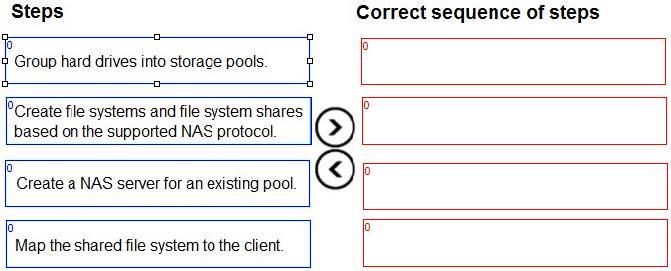
What is the correct sequence of steps to provision storage for SMB NAS clients?
Reveal answer detailsClose answer details
Explanation
The correct sequence of steps to provision storage for SMB NAS clients is: 1. Group hard drives into storage pools. This allows you to create a pool of storage resources that can be allocated to different types of storage objects, such as NAS servers, file systems, and LUNs.You can create different pools based on the performance and capacity requirements of your applications 2. Create a NAS server for an existing pool. A NAS server is a logical entity that provides file-level access to clients using SMB, NFS, or FTP/SFTP protocols. You need to create a NAS server before you can create file systems and shares.You can specify the pool, network settings, domain membership, and other properties for the NAS server 3. Create file systems and file system shares based on the supported NAS protocol. A file system is a logical container that stores files and folders on a NAS server. A file system share is a logical representation of a file system that can be accessed by clients using a specific protocol. For SMB NAS clients, you need to create SMB file system shares that support the SMB protocol.You can configure the share name, permissions, access policies, and other settings for the SMB share 4. Map the shared file system to the client. This allows the client to access the files and folders on the SMB share using a drive letter or a UNC path.You can use the Windows Explorer or the net use command to map the shared file system to the client
Question 6
Single choice
A storage administrator has a Dell Unity XT 480 system with one pool of flash drives, 192 GB of RAM, and 1.2 TB of FAST Cache.
What is the total cache availability for caching the flash drives?
A
3.2 TB
B
1.39 TB
C
3.58 TB
D
I6.0 TB
Reveal answer detailsClose answer details
Correct answerC
Explanation
The total cache availability for caching the flash drives on a Dell Unity XT 480 system with one pool of flash drives, 192 GB of RAM, and 1.2 TB of FAST Cache is 3.58 TB. This is calculated by adding the system memory (RAM), the FAST Cache, and the pool cache. The system memory is 192 GB, which is equivalent to 0.18 TB. The FAST Cache is 1.2 TB, which is a dedicated cache for the flash drives. The pool cache is 2.2 TB, which is a portion of the flash drives that is reserved for caching the pool data. Therefore, the total cache availability is 0.18 + 1.2 + 2.2 = 3.58 TB. References: [Dell EMC Unity: Performance Metrics], [Dell EMC Unity: FAST Cache Overview]
Fast VP data relocation runs in the background at all times once it is enabled.
B.
Fast VP optimizes data replacement by moving 1 GB slices between disk tiers.
C.
Users can set the Fast VP data relocation rate.
D.
Users can enable or disable FAST VP at the LUN level.
Correct Answer: C
Explanation
Explanation/Reference:
FAST VP (Fully Automated Storage Tiering for Virtual Pools) is a feature that automatically moves data within a storage pool based on the performance requirements and access patterns of the data. FAST VP data relocation runs in the background according to a user-defined schedule and rate. The schedule determines when the data relocation starts and ends, and the rate determines how much system resources are used for the data relocation. Users can set the Fast VP data relocation rate to High, Medium, Low, or None. High means that the data relocation has the highest priority and uses the most system resources, while None means that the data relocation is disabled. Fast VP data relocation does not run at all times, but only during the scheduled window. Fast VP optimizes data placement by moving 256 MB slices between disk tiers, not 1 GB slices. Users cannot enable or disable FAST VP at the LUN level, but only at the storage pool level.
References: [Dell EMC Unity: FAST Technology Overview], [Dell EMC Unity: Storage Pools and RAID Groups]
QUESTION 2
What is the maximum time difference allowed between the current system time (UTC) and the NTP server time during the initial configuration of a Dell Unity system?
A.
17 min
B.
7 min
C.
5 min
D.
15 min
Correct Answer: A
Explanation
Explanation/Reference:
If the time difference between the current system (UTC) time and the NTP server time is too large (approximately 17 minutes), the user cannot configure an NTP server during initial configuration. The user will need to adjust the time while in "Set time manually" mode before changing to "Enable NTP synchronization". This is to avoid potential issues with data replication, snapshots, and audit logs that rely on accurate time stamps. References: Dell EMC Unity: How to change System Time from `Set time manually' option to NTP2, page 1.
QUESTION 3
Which are two features of the Dell UnityVSA? (Choose two.)
A.
NVMe Connectivity
B.
iSCSI Connectivity
C.
Asynchronous Replication
D.
FC Connectivity
E.
Dynamic Pools
Correct Answer: BC
Explanation
Explanation/Reference:
The Dell UnityVSA is a software-defined storage solution that runs the Dell Unity operating environment on a VMware ESXi server. The Dell UnityVSA provides the same features and functions as the Dell Unity hardware platform, such as block and file storage, snapshots, thin clones, data reduction, replication, and encryption. Some of the features of the Dell UnityVSA are:
iSCSI Connectivity: The Dell UnityVSA supports iSCSI connectivity for block storage access. The iSCSI protocol enables hosts to communicate with the DellUnityVSA over an IP network and access LUNs as SCSI devices. The Dell UnityVSA can support up to 64 iSCSI interfaces and up to 256 iSCSI sessions per interface. Asynchronous Replication: The Dell UnityVSA supports asynchronous replication for block and file storage. Asynchronous replication is a feature that copies data from a source storage resource to a destination storage resource over a network at scheduled intervals. Asynchronous replication can be used for disaster recovery, data migration, or backup purposes. The Dell UnityVSA can support up to 256 replication sessions per system. References: Dell EMC Unity: Introduction to the Platform Dell EMC Unity: Deploying VMware vSphere with Dell EMC UnityVSA Dell EMC Unity: Configuring Hosts to Access Block Storage Dell EMC Unity: Replication Technologies
QUESTION 4
Which feature can be configured for a Dell Unity XT file system NFS share?
A.
Access-Based Enumeration
B.
Protocol Encryption
C.
Host Access Level
D.
Distributed File System
Correct Answer: C
Explanation
Explanation/Reference:
A feature that can be configured for a Dell Unity XT file system NFS share is the Host Access Level. This feature allows the user to specify the access permissions for each host or host group that is allowed to access the NFS share. The access permissions can be set to Read/Write, Read Only, or No Access. The Host Access Level feature can be used to control the security and performance of the NFS share. Access- Based Enumeration, Protocol Encryption, and Distributed File System are features that can be configured for a Dell Unity XT file system SMB share, not NFS share. References: [Dell EMC Unity: File System Configuration], [Dell EMC Unity: SMB Share Configuration]
QUESTION 5
DRAG DROP
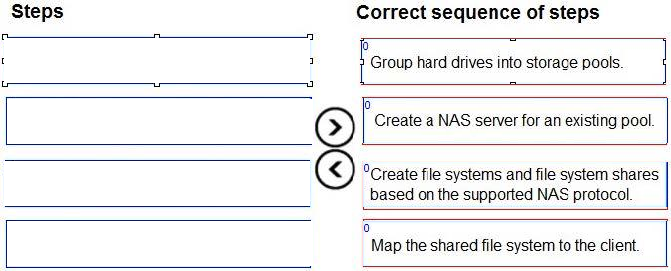
What is the correct sequence of steps to provision storage for SMB NAS clients?
Correct Answer:
Explanation
Explanation/Reference:
The correct sequence of steps to provision storage for SMB NAS clients is: 1. Group hard drives into storage pools. This allows you to create a pool of storage resources that can be allocated to different types of storage objects, such as NAS servers, file systems, and LUNs.You can create different pools based on the performance and capacity requirements of your applications 2. Create a NAS server for an existing pool. A NAS server is a logical entity that provides file-level access to clients using SMB, NFS, or FTP/SFTP protocols. You need to create a NAS server before you can create file systems and shares.You can specify the pool, network settings, domain membership, and other properties for the NAS server 3. Create file systems and file system shares based on the supported NAS protocol. A file system is a logical container that stores files and folders on a NAS server. A file system share is a logical representation of a file system that can be accessed by clients using a specific protocol. For SMB NAS clients, you need to create SMB file system shares that support the SMB protocol.You can configure the share name, permissions, access policies, and other settings for the SMB share 4. Map the shared file system to the client. This allows the client to access the files and folders on the SMB share using a drive letter or a UNC path.You can use the Windows Explorer or the net use command to map the shared file system to the client
QUESTION 6
A storage administrator has a Dell Unity XT 480 system with one pool of flash drives, 192 GB of RAM, and 1.2 TB of FAST Cache.
What is the total cache availability for caching the flash drives?
A.
3.2 TB
B.
1.39 TB
C.
3.58 TB
D.
I6.0 TB
Correct Answer: C
Explanation
Explanation/Reference:
The total cache availability for caching the flash drives on a Dell Unity XT 480 system with one pool of flash drives, 192 GB of RAM, and 1.2 TB of FAST Cache is 3.58 TB. This is calculated by adding the system memory (RAM), the FAST Cache, and the pool cache. The system memory is 192 GB, which is equivalent to 0.18 TB. The FAST Cache is 1.2 TB, which is a dedicated cache for the flash drives. The pool cache is 2.2 TB, which is a portion of the flash drives that is reserved for caching the pool data. Therefore, the total cache availability is 0.18 + 1.2 + 2.2 = 3.58 TB. References: [Dell EMC Unity: Performance Metrics], [Dell EMC Unity: FAST Cache Overview]