When integrating with WebLogic (WLDeploy plugin), one required field is the location of the "WLDeploy Ant Task Jar." Where can you obtain this important file that is required for integration?
-
A
You can download it from http://oracle.com.
-
B
You can find it in the WebLogic's server directory.
-
C
You can build the jar file manually in the WebLogic's server/lib directory.
-
D
You can download it from the WebLogic interface.
Reveal answer details
Close answer details
Correct answerC
ExplanationBasic Steps for Using wldeploy
To use the wldeploy Ant task: 1. Set your environment.
On Windows NT, execute the setWLSEnv.cmd command, located in the directory WL_HOME\server\bin, where WL_HOME is the top-level directory of your WebLogic Server installation. On UNIX, execute the setWLSEnv.sh command, located in the directory WL_HOME/server/bin, where WL_HOME is the top-level directory of your WebLogic Server installation.
2. In the staging directory, create the Ant build file (build.xml by default). If you want to use an Ant installation that is different from the one installed with WebLogic Server, start by defining the wldeploy Ant task definition:
<taskdef name="wldeploy" classname="weblogic.ant.taskdefs.management.WLDeploy"/> 3. If necessary, add task definitions and calls to the wlserver and wlconfig tasks in the build script to create and start a new WebLogic Server domain.
4. Add a call to wldeploy to deploy your application to one or more WebLogic Server instances or clusters.
See Sample build.xml Files for wldeploy and wldeploy Ant Task Attribute Reference.
5. Execute the Ant task or tasks specified in the build.xml file by typing ant in the staging directory, optionally passing the command a target argument:
prompt> ant References:
https://docs.oracle.com/cd/E13222_01/wls/docs92/programming/wldeploy.html
IBM UrbanCode Deploy (UCD) offers an integration with Chef. How does this integration work?
-
A
IBM UCD installs Chef solo as part of the deployment process and also allows users to execute Chef nodes.
-
B
IBM UCD integrates with Chef server and manages updating Chef endpoints by running scripts against the Chef server.
-
C
Chef server and Chef solo poll the IBM UCD repository for new artifacts to deploy, and then deploy them.
-
D
Chef server and Chef solo allows for the IBM UCD agent to be automatically installed on Chef endpoints.
Reveal answer details
Close answer details
Correct answerC
ExplanationIncorrect Answers:
A: Set up a UCD server with the Chef plug-in installed.
To use the IBM Integration Bus cookbook with UCD, you must install the Chef plug-ins, as these are not there by default. References:
https://developer.ibm.com/integration/blog/2014/06/23/how-to-automate-ibm-integration-bus-deployments-using-ibm-urbancode-deploy-and-chef/
In order to set up an integration with WebSphere, you first perform a WebSphere Topology Discovery.
WebSphere is not installed in a default location and so you must notify IBM UCD concerning the location of the wsadmin executable. What is the name of the property that you must set, and where do you set it?
-
A
You must set the wsadmin.location property on the correct resource.
-
B
You must set the wsadmin.path property on the correct agent.
-
C
You must set the wsadmin.executable on the correct resource.
-
D
You must set the wsadmin.location on the correct agent.
Reveal answer details
Close answer details
Correct answerB
ExplanationIf WebSphere Application Server is deployed in a directory other than the default directory, you must set a property on the agent before you can run the WebSphere Topology Discovery step.
1. Go to Resources > Agents > <agent-name> > Configuration > Agent Properties.
2. Add a property named wsadmin.path.
3. Set wsadmin.path to the fully qualified path to the wsadmin script (including the script name). References:
http://www.ibm.com/support/knowledgecenter/SS4GSP_6.0.1/com.ibm.udeploy.plugins.doc/topics/plugins_websphereportal_config_deploy.html
Question 4
Multiple choice
Which three statements are true about creating new component versions? (Select three.)
-
A
New component versions can be created using the IBM UrbanCode Deploy client.
-
B
New component versions can be created when updating the application configuration.
-
C
New component versions can be created from the versions tab of the component.
-
D
New component versions can be created using an IBM UrbanCode Deploy generic process.
Reveal answer details
Close answer details
Correct answersA, C, D
ExplanationAD: Each time a component's artifacts are imported into the repository, including the first time, a separate version is stored in CodeStation. Versions can be assigned automatically by IBM UrbanCode Deploy, applied manually, or come from a build server. If the component does not import new versions automatically, you can import versions manually.
C:
Step 1: 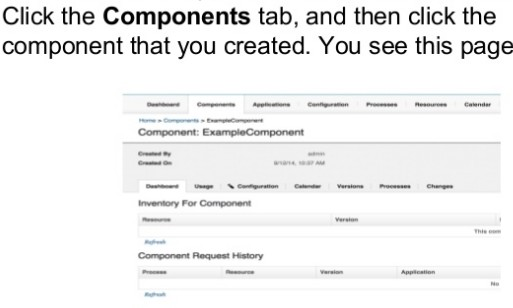 Step 2: 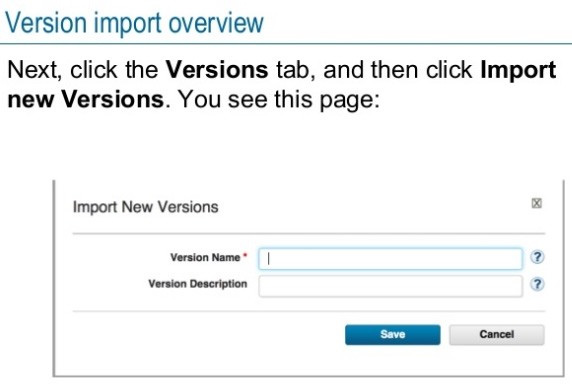 References:
http://www.slideshare.net/ibmrational/ucd-components
(page 26) (http://www.ibm.com/support/knowledgecenter/SS4GSP_6.2.2/com.ibm.udeploy.doc/topics/)
comp_version.html
Which file contains the step definitions for a Deploy plugin named FileUtils?
-
A
-
B
-
C
-
D
Reveal answer details
Close answer details
Correct answerC
ExplanationYou can create your own plug-ins for use with IBM UrbanCode Deploy. A plug-in consists of XML files and supporting script files that the plug-in requires.
* The plugin.xml file defines the steps that constitute the plug-in; plug-in steps define a plug-in's functions.
Each step is an independently configurable entity in the IBM UrbanCode Deploy editor.
* The info.xml file contains a version ID and other information that describes the plug-in. References:
http://www.ibm.com/support/knowledgecenter/SS4GSP_6.1.3/com.ibm.udeploy.reference.doc/topics/reference_plugins_create.html
What should be defined in an IBM UrbanCode Deploy application?
-
A
Components, Baselines and Environments
-
B
Components, Environments and Processes
-
C
Components, Snapshots and Recourses
-
D
Agents, Versions and Resources
Reveal answer details
Close answer details
Correct answerB
ExplanationApplications are responsible for bringing together all the components that must be deployed together.
Applications do this task by defining the different versions of each component and defining the different environments that the components must go through on the way to production. In addition, applications also map the constituent hosts and systems (called resources) that a component needs within every environment.
Applications also implement automated deployments, rollbacks, and similar tasks. These tasks are called processes. However, at the application level, processes are concerned only with the components and resources that are necessary for deployment, and related tasks References:
http://www.ibm.com/support/knowledgecenter/SS4GSP_6.2.0/com.ibm.udeploy.doc/topics/
applications_ch.html
When a snapshot has versions that are marked incremental or full, what will a deployment process do when it deploys using the snapshot?
-
A
Deploy the latest component version
-
B
Deploy the first component version
-
C
Deploy all versions in sequence from first to latest
-
D
Deploy all versions in sequence from latest to first
Reveal answer details
Close answer details
Correct answerC
ExplanationAll version will be deployed, see step 4 below, and the latest version will be deployed last. After you create a snapshot, you can deploy the snapshot to an environment.
Procedure 1. From the IBM UrbanCode Deploy dashboard, click Applications, and then select an application.
2. On the application page, click Snapshots, and then select a snapshot. The environments that are defined for the application are listed at the bottom of the Dashboard page.
3. For the environment where you plan to deploy the snapshot, click the Request Process icon.
4. To deploy component versions whether or not they are already deployed, clear the Only Changed
Version check box. By default, the Only Changed Version check box is selected so that only changed versions of components are deployed.
5. Select the deployment process to run from the Process list.
6. To run the process in the future, select the Schedule Deployment check box. If you select the Schedule
Deployment check box, more fields become available so that you can specify the date and time to run the process, and configure the process to run on a recurring basis.
7. Click Submit. Unless you scheduled the process to run in the future, the application process starts and deploys the snapshot. Note: A snapshot is a collection of specific versions of components and processes. Typically, a snapshot represents a set of component versions that are known to work together. References:
https://www.ibm.com/support/knowledgecenter/SS4GSP_6.1.0/com.ibm.udeploy.doc/topics/
app_snapshot_deploy.html
Question 8
Multiple choice
Which three statements are true about version statuses? (Select three.)
-
A
Version statuses must be used in conjunction with tokens to mark which versions are ready for deployment.
-
B
Version statuses must be used in conjunction with environment gates to govern which versions are allowed into specific environments.
-
C
Version statuses must be used in conjunction with locks to identify which environments are locked for marked versions.
-
D
Version statuses must be used in conjunction with component tags to tag which versions can be deployed.
Reveal answer details
Close answer details
Correct answersB, C, D
ExplanationBD: In IBM UrbanCode Deploy, Environment Gates and Version Statuses can help you define policies restricting which versions of components and applications may be deployed into certain environments. For example, you would use Gates and Statuses to enforce a rule that anything being deployed into Production has passed security reviews. Unlike approvals which act on a specific request, Gates establish checks on the versions of components or applications being deployed.
C: Environments can be configured to specifically lock either snapshot versions or snapshot configuration, or both, when snapshots are deployed to the environment. In addition, users can now manually lock snapshots so that they cannot be changed in the future References:
https://developer.ibm.com/urbancode/docs/introduction-environment-gates-urbancode-deploy/
https://developer.ibm.com/urbancode/products/urbancode-deploy/whats-new/6-1-0-1/
What happens when a new version of a plugin is loaded which adds new properties to a process' steps?
-
A
Nothing happens because the process continues to use the older versions of the process steps (the step code is embedded in the process definition).
-
B
The user must repair the process by using each modified step's properties editor to define the new properties.
-
C
The user may define values for new properties when the process is invoked.
-
D
IBM UrbanCode Deploy provides a message that the previously-defined process is obsolete and needs to be repaired.
Reveal answer details
Close answer details
Correct answerA
ExplanationNote: A process step has access to properties set earlier by other steps within the process, to properties set by the application that started the component process, and to properties on the target environment and resource. Step property values become unavailable after the component process ends. References:
http://www.ibm.com/support/knowledgecenter/SS4GSP_6.0.1/com.ibm.udeploy.reference.doc/topics/ud_properties.html
|