Preview real exam questions, verified answers and available explanations before choosing a study plan.
Question 1
Single choice
You have 50 on-premises servers that run Windows Server. You have an Azure subscription that contains 50 virtual machines that run Windows Server.
You need to create an Azure Monitor alert that will be triggered if one of the servers or virtual machines has less than 10 percent available disk space.
What should you do first?
A
Create an Alert Rule
B
Install the Azure Monitor agent on each server.
C
Enable System Insights on each server.
D
Create a Log Analytics workspace and configure the Agent management settings.
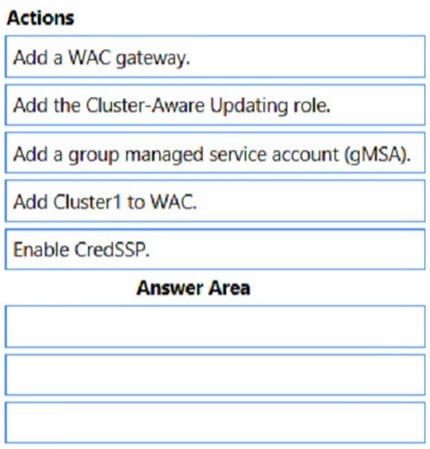
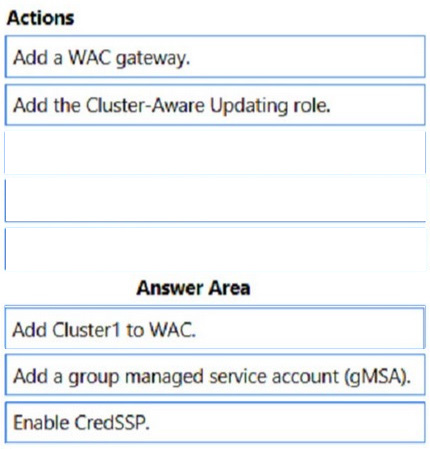
Your network contains an Active Directory Domain Services (AD DS) domain. The domain contains a failover cluster named Cluster1.
You need to configure Cluster-Aware Updating (CAU) on the cluster by using Windows Admin Center (WAC).
Which three actions should you perform in sequence? To answer, move the appropriate actions from the list of actions to the answer area and arrange them in the correct order.
Reveal answer detailsClose answer details
Question 3
Single choice
You have a Hyper-V host named Server1 that runs Windows Server 2019. Server1 hosts a virtual machine
Virtual network → NOT guaranteed → depends on matching virtual switch name on Server2; otherwise becomes "Not connected"
Therefore, preserved configurations: IP address + configuration version + generation → D
Question 4
Single choice
Your network contains an Active Directory Domain Services (AD DS) domain. The domain contains a domain controller named DC1.
The domain uses Microsoft Entra Connect sync with a Microsoft Entra tenant and uses Microsoft Entra Password Protection to enforce a custom banned password list.
You deploy a new domain controller named DC2 to the domain.
You discover that the custom banned password list is applied inconsistently and often allows banned passwords to be used.
You need to ensure that the custom banned password list is always enforced.
What should you do on DC2?
A
Install the Microsoft Entra Password Protection DC agent.
B
Install the Microsoft Entra Password Protection proxy service.
C
Provide access to the https://login.microsoftonline.com and https://enterpriseregistration.windows.net URLS.
D
Install the Microsoft Entra provisioning agent.
E
Install the Azure Monitor Agent.
Reveal answer detailsClose answer details
Correct answerA
Explanation
Incremental deployment Microsoft Entra Password Protection supports incremental deployment across DCs in an AD DS domain. It's important to understand what this really means and what the tradeoffs are.
The Microsoft Entra Password Protection DC agent software can only validate passwords when it's installed on a DC, and only for password changes that are sent to that DC. It's not possible to control which DCs are chosen by Windows client machines for processing user password changes. To guarantee consistent behavior and universal Microsoft Entra Password Protection security enforcement, the DC agent software must be installed on all DCs in a domain.
References: https://learn.microsoft.com/en-us/entra/identity/authentication/concept-password-ban-bad-on-premises Implement and manage Windows Server high availability
Question 5
Drag & drop
DRAG DROP
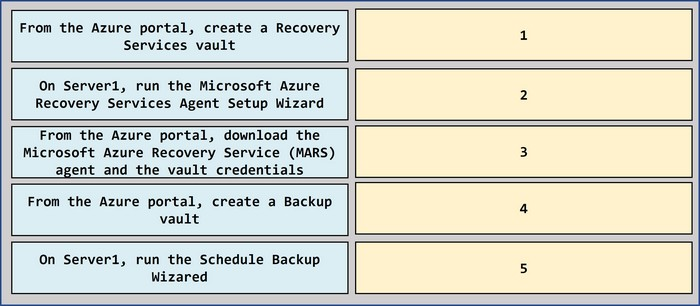
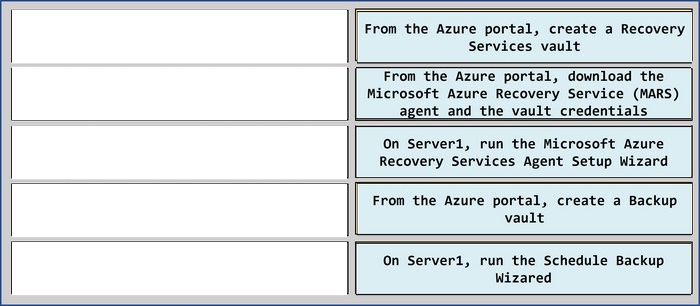
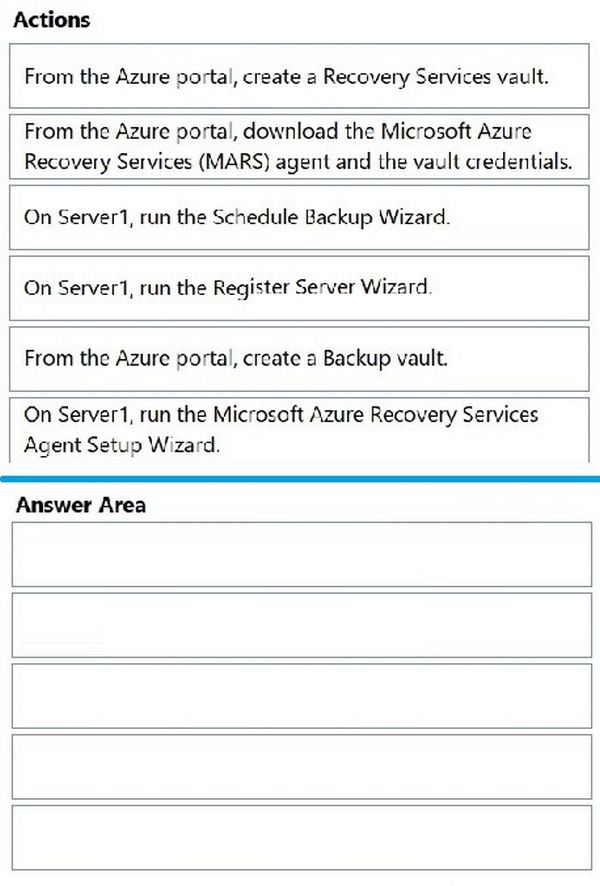
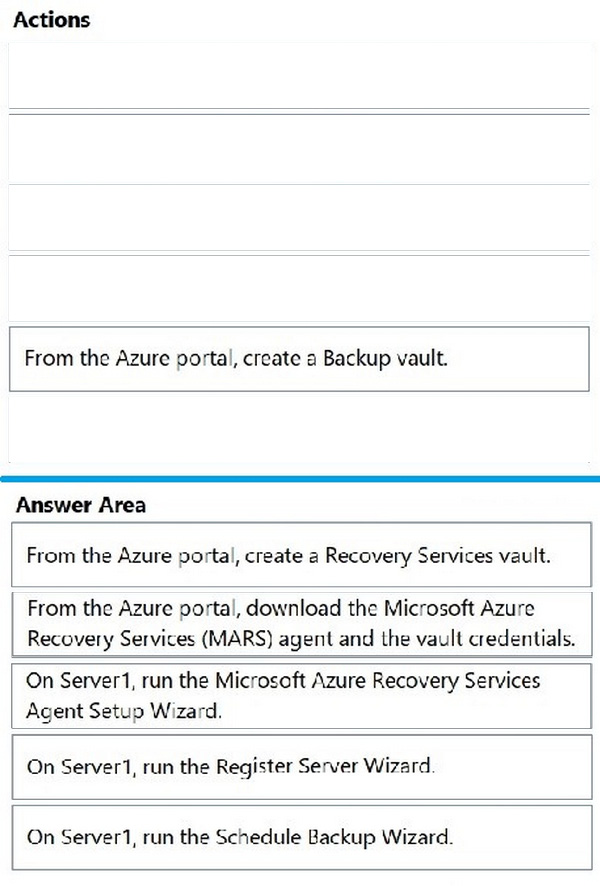
You have an on-premises server named Server1 that runs Windows Server. You need to perform an on-demand backup of the files on Server 1 by using Azure Backup.
Which five actions should you perform in sequence? To answer, move the appropriate actions actions from the list of actions to the answer are and arrange them in the correct order.
Reveal answer detailsClose answer details
Case study
Case Study 1
Overview
Fabrikam, Inc. is a manufacturing company that has a main office in Chicago and a branch office in Paris.
Existing Environment
Identity Infrastructure
Fabrikam has an Active Directory Domain Services (AD DS) forest that syncs with an Azure Active Directory (Azure AD) tenant. The AD DS forest contains two domains named corp.fabrikam.com and europe.fabrikam.com.
Chicago Office On-Premises Servers
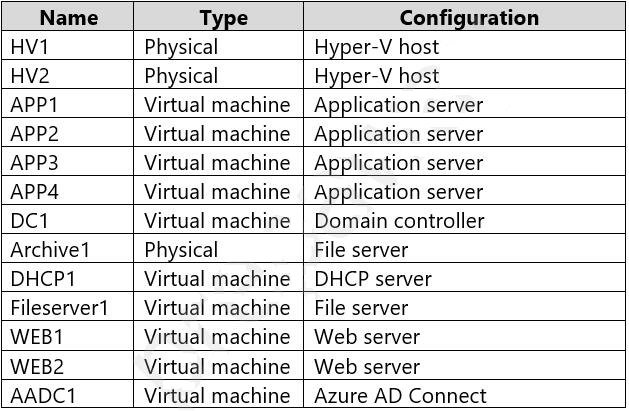
The office in Chicago contains on-premises servers that run Windows Server 2016 as shown in the following table.
All the servers in the Chicago office are in the corp.fabrikam.com domain.
All the virtual machines in the Chicago office are hosted on HV1 and HV2. HV1 and HV2 are nodes in a failover cluster named Cluster1.
WEB1 and WEB2 run an Internet Information Services (IIS) website. Internet users connect to the website by using a URL of https://www.fabrikam.com.
All the users in the Chicago office run an application that connects to a UNC path of \\Fileserver1\Data.
Paris On-Premises Servers
The office in Paris contains a physical server named dc2.europe.fabrikam.com that runs Windows Server 2016 and is a domain controller for the europe.fabrikam.com domain.
Network Infrastructure
The networks in both the Chicago and Paris offices have local internet connections. The Chicago and Paris offices are connected by using VPN connections.
The client computers in the Chicago office get IP addresses from DHCP1.
Security Risks
Fabrikam identifies the following security risks:
Some accounts connect to AD DS resources by using insecure protocols such as NTLMv1, SMB1, and unsigned LDAP. Servers have Windows Defender Firewall enabled. Server administrators sometimes modify firewall rules and allow risky connections.
Requirements
Security Requirements
Fabrikam identifies the following security requirements:
Prevent server administrators from configuring Windows Defender Firewalls rules. Encrypt all the data disks on the servers by using BitLocker Drive Encryption (BitLocker). Ensure that only authorized applications can be installed or run on the servers in the forest. Implement Microsoft Sentinel as a reporting solution to identify all connections to the domain controllers that use insecure protocols.
On-Premises Migration Plan
Fabrikam plans to migrate all the existing servers and identifies the following migration requirements:
Move the APP1 and APP2 virtual machines in the Chicago office to a new Hyper-V failover cluster named Cluster2 that will run Windows Server 2022. - Cluster2 will contain two new nodes named HV3 and HV4. - All virtual machine files will be stored on a Cluster Shared Volume (CSV). Migrate Archive1 to a new failover cluster named Cluster3 that will run Windows Server 2022. - Cluster3 will contain two physical nodes named Node1 and Node2. - The file shares on Cluster3 will be a failover cluster role in active-passive mode. Migrate all users, groups, and client computers from europe.fabrikam.com to corp.fabrikam.com. - The migration will be performed by using the Active Directory Migration Tool (ADMT). - A computer named ADMTcomputer will be deployed to the corp.fabrikam.com domain to run ADMT migration procedures. - User accounts will retain their existing password. Migrate the data share from Fileserver1 to a new server named Fileserver2 that will run Windows Server 2022. After the migration, the data share must be accessible by using the existing UNC path.
Azure Migration Plan
Fabrikam plans to migrate some resources to Azure and identifies the following migration requirements:
Create an Azure subscription named Sub1. Create an Azure virtual network named Vnet1. Use ExpressRoute to connect the Paris and Chicago offices to Vnet1. License all servers for Microsoft Defender for servers. Migrate APP3 and APP4 to Azure. Migrate the www.fabrikam.com website to an Azure App Service web app named WebApp1. Decommission WEB1 and WEB2.
DHCP Migration Plan
Fabrikam plans to replace DHCP1 with a new server named DHCP2 and identifies the following migration requirements:
Ensure that DHCP2 provides the same IP addresses that are currently available from DHCP1. Prevent DHCP1 from servicing clients once services are enabled on DHCP2. Ensure that the existing leases and reservations are migrated.
Question 6
Testlet 1Hotspot
HOTSPOT
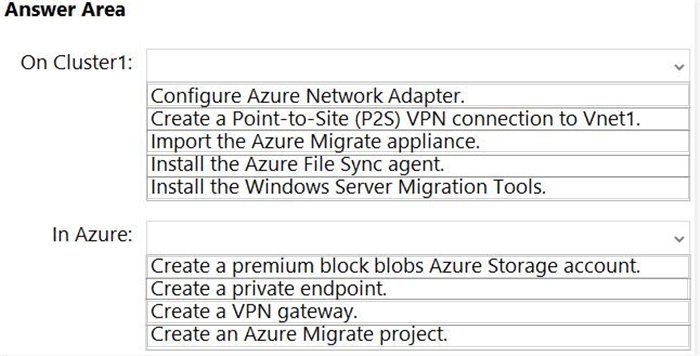
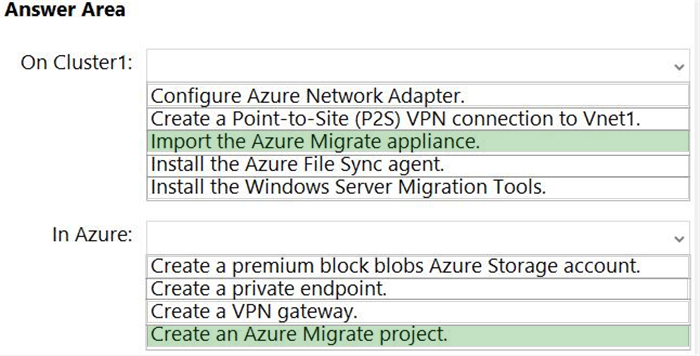
You are planning the migration of APP3 and APP4 to support the Azure migration plan.
What should you do on Cluster1 and in Azure before you perform the migration? To answer, select the appropriate options in the answer area.
Note: This question is part of a series of questions that present the same scenario. Each question in the series contains a unique solution that might meet the stated goals. Some question sets might have more than one correct solution, while others might not have a correct solution.
After you answer a question in this section, you will NOT be able to return to it. As a result, these questions will not appear in the review screen.
You have an on-premises server named Server1 that runs Windows Server.
You have a Microsoft Sentinel instance.
You add the Windows Firewall data connector in Microsoft Sentine1.
You need to ensure that Microsoft Sentinel can collect Windows Firewall logs from Server1.
Solution: You install the Azure Connected Machine agent on Server1.
Does this meet the goal?
A
Yes
B
No
Reveal answer detailsClose answer details
Correct answerB
Question 8
Single choice
You have an on-premises Active Directory Domain Services (AD DS) domain that syncs with an Azure Active Directory (Azure AD) tenant by using password hash synchronization.
You have a Microsoft 365 subscription.
All devices are hybrid Azure AD-joined.
Users report that they must enter their password manually when accessing Microsoft 365 applications.
You need to reduce the number of times the users are prompted for their password when they access Microsoft 365 and Azure services.
What should you do?
A
In Azure AD. configure a Conditional Access policy for the Microsoft Office 365 applications.
B
In the DNS zone of the AD DS domain, create an autodiscover record.
C
From Azure AD Connect, enable single sign-on (SSO).
D
From Azure AD Connect, configure pass-through authentication.
Your network contains an Active Directory Domain Services (AD DS) forest that has a Windows Server 2008 R2 forest functional level.
The forest contains the domains shown in the following table.
You need to perform an in-place upgrade of the domain controllers in east.contoso.com to Windows Server 2025.
The solution must minimize administrative effort.
What should you do first?
A
Raise the domain functional level of east.contoso.com to Windows Server 2025.
B
Raise the domain functional level of contoso.com to Windows Server 2016.
C
Raise the forest functional level to Windows Server 2025.
D
Extend the schema.
Reveal answer detailsClose answer details
Correct answerB
Explanation
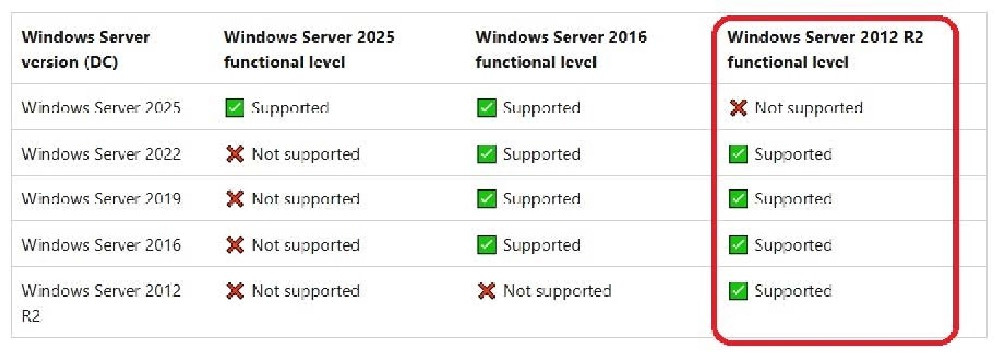
The first step is to raise the forest functional level to Windows Server 2016, and then raise the domain functional level of the east.contoso.com domain to Windows Server 2016. Windows Server 2016 is the most recent functional level, and it supports domain controllers running Windows Server 2025. You must have all domain controllers upgraded to the new operating system before you can raise the functional level.
1. Raise the forest functional level to Windows Server 2016. This can be done using the Active Directory Domains and Trusts console.
Raise the domain functional level for east.contoso.com to Windows Server 2025.
Note:
Windows Server functional level interoperability. The following interoperability matrix summarizes which Windows Server versions you can run as domain controllers for each currently supported AD DS forest and domain functional level.
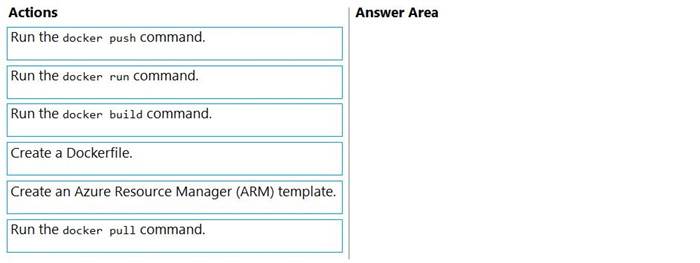
You have a server named Server1 that runs Windows Server and has the Web Server (IIS) server role installed. Server1 hosts an ASP.NET Core web app named WebApp1 and the app's source files.
You install Docker on Server1.
You need to ensure that you can deploy WebApp1 to an Azure App Service web app from the Azure Container Registry.
Which three actions should you perform in sequence? To answer, move the appropriate actions from the list of actions to the answer area and arrange them in the correct order.
Reveal answer detailsClose answer details
Explanation
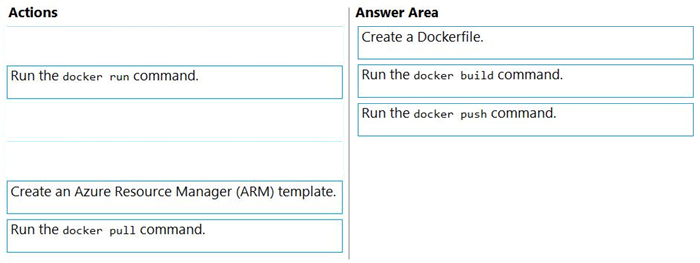
Step 1: Create a Dockerfile. This file contains instructions for the build process. Step 2: Run the docker build command to create a container image. Step 3: Run the docker push command to upload the image to Azure Container Registry.
Question 11
Hotspot
HOTSPOT
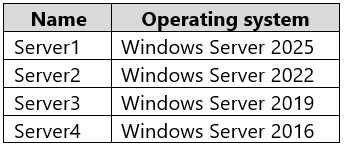
You have the on-premises servers shown in the following table.
You are evaluating OSConfig and security baselines.
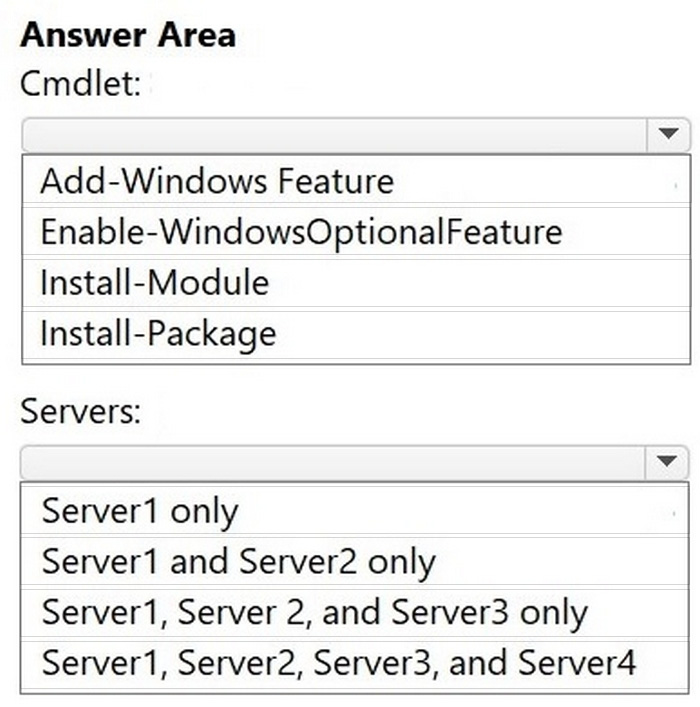
Which cmdlet should you use to deploy OSConfig, and which servers support OSConfig? To answer, select the appropriate options in the answer area.
NOTE: Each correct selection is worth one point.
Reveal answer detailsClose answer details
Question 12
Hotspot
HOTSPOT
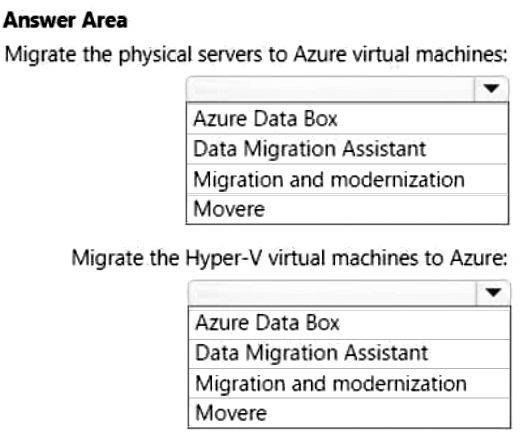
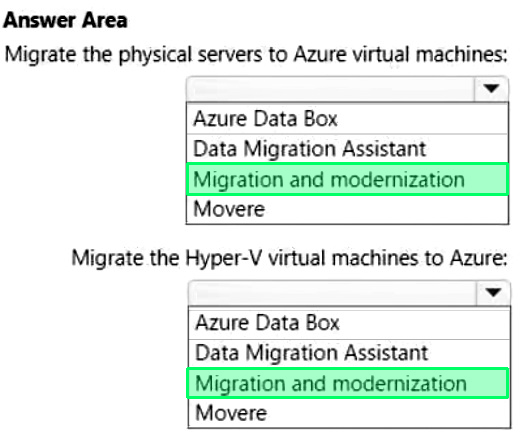
Your on-premises datacenter contains physical servers and Hyper-V virtual machines.
You have an Azure subscription.
You plan to use Azure Migrate to perform the following tasks:
1. Migrate the physical servers to Azure virtual machines. 2. Migrate the Hyper-V virtual machines to Azure.
What should you use for each task? To answer, select the appropriate options in the answer area.
NOTE: Each correct selection is worth one point.
Reveal answer detailsClose answer details
Case study
Case Study 1
Overview
Fabrikam, Inc. is a manufacturing company that has a main office in Chicago and a branch office in Paris.
Existing Environment
Identity Infrastructure
Fabrikam has an Active Directory Domain Services (AD DS) forest that syncs with an Azure Active Directory (Azure AD) tenant. The AD DS forest contains two domains named corp.fabrikam.com and europe.fabrikam.com.
Chicago Office On-Premises Servers
The office in Chicago contains on-premises servers that run Windows Server 2016 as shown in the following table.
All the servers in the Chicago office are in the corp.fabrikam.com domain.
All the virtual machines in the Chicago office are hosted on HV1 and HV2. HV1 and HV2 are nodes in a failover cluster named Cluster1.
WEB1 and WEB2 run an Internet Information Services (IIS) website. Internet users connect to the website by using a URL of https://www.fabrikam.com.
All the users in the Chicago office run an application that connects to a UNC path of \\Fileserver1\Data.
Paris On-Premises Servers
The office in Paris contains a physical server named dc2.europe.fabrikam.com that runs Windows Server 2016 and is a domain controller for the europe.fabrikam.com domain.
Network Infrastructure
The networks in both the Chicago and Paris offices have local internet connections. The Chicago and Paris offices are connected by using VPN connections.
The client computers in the Chicago office get IP addresses from DHCP1.
Security Risks
Fabrikam identifies the following security risks:
Some accounts connect to AD DS resources by using insecure protocols such as NTLMv1, SMB1, and unsigned LDAP. Servers have Windows Defender Firewall enabled. Server administrators sometimes modify firewall rules and allow risky connections.
Requirements
Security Requirements
Fabrikam identifies the following security requirements:
Prevent server administrators from configuring Windows Defender Firewalls rules. Encrypt all the data disks on the servers by using BitLocker Drive Encryption (BitLocker). Ensure that only authorized applications can be installed or run on the servers in the forest. Implement Microsoft Sentinel as a reporting solution to identify all connections to the domain controllers that use insecure protocols.
On-Premises Migration Plan
Fabrikam plans to migrate all the existing servers and identifies the following migration requirements:
Move the APP1 and APP2 virtual machines in the Chicago office to a new Hyper-V failover cluster named Cluster2 that will run Windows Server 2022. - Cluster2 will contain two new nodes named HV3 and HV4. - All virtual machine files will be stored on a Cluster Shared Volume (CSV). Migrate Archive1 to a new failover cluster named Cluster3 that will run Windows Server 2022. - Cluster3 will contain two physical nodes named Node1 and Node2. - The file shares on Cluster3 will be a failover cluster role in active-passive mode. Migrate all users, groups, and client computers from europe.fabrikam.com to corp.fabrikam.com. - The migration will be performed by using the Active Directory Migration Tool (ADMT). - A computer named ADMTcomputer will be deployed to the corp.fabrikam.com domain to run ADMT migration procedures. - User accounts will retain their existing password. Migrate the data share from Fileserver1 to a new server named Fileserver2 that will run Windows Server 2022. After the migration, the data share must be accessible by using the existing UNC path.
Azure Migration Plan
Fabrikam plans to migrate some resources to Azure and identifies the following migration requirements:
Create an Azure subscription named Sub1. Create an Azure virtual network named Vnet1. Use ExpressRoute to connect the Paris and Chicago offices to Vnet1. License all servers for Microsoft Defender for servers. Migrate APP3 and APP4 to Azure. Migrate the www.fabrikam.com website to an Azure App Service web app named WebApp1. Decommission WEB1 and WEB2.
DHCP Migration Plan
Fabrikam plans to replace DHCP1 with a new server named DHCP2 and identifies the following migration requirements:
Ensure that DHCP2 provides the same IP addresses that are currently available from DHCP1. Prevent DHCP1 from servicing clients once services are enabled on DHCP2. Ensure that the existing leases and reservations are migrated.
Question 13
Testlet 1Drag & drop
DRAG DROP
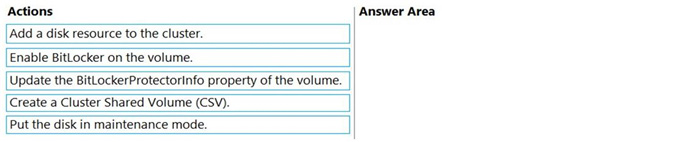
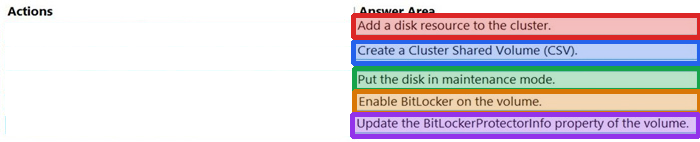
You are planning the implementation of Cluster2 to support the on-premises migration plan.
You need to ensure that the disks on Cluster2 meet the security requirements.
In which order should you perform the actions? To answer, move all actions from the list of actions to the answer area and arrange them in the correct order.
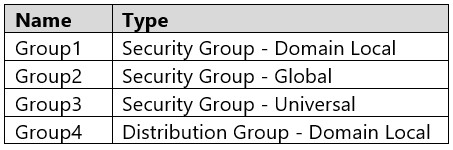
Your network contains two Active Directory Domain Services (AD DS) forests named contoso.com and fabrikam.com.
Contoso.com includes the groups shown in the following table.
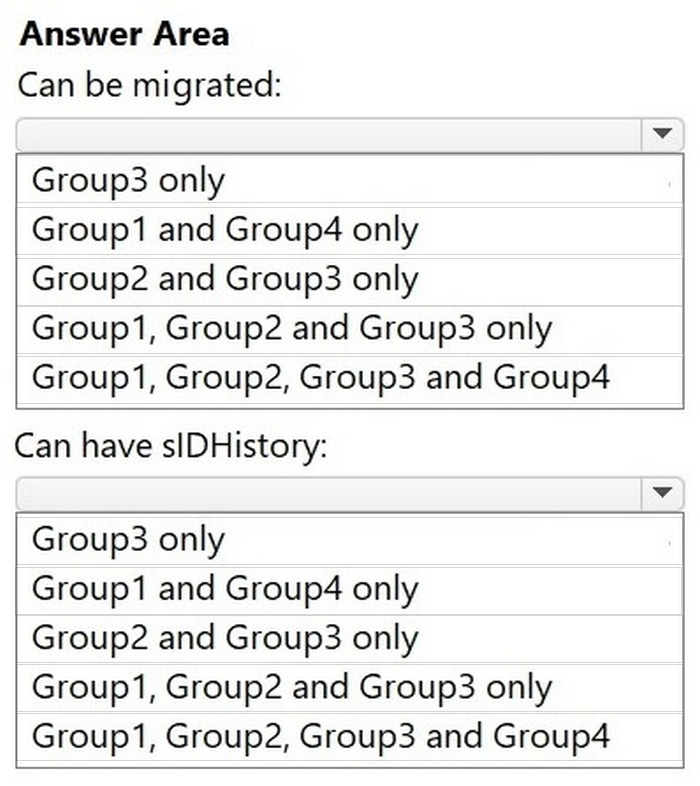
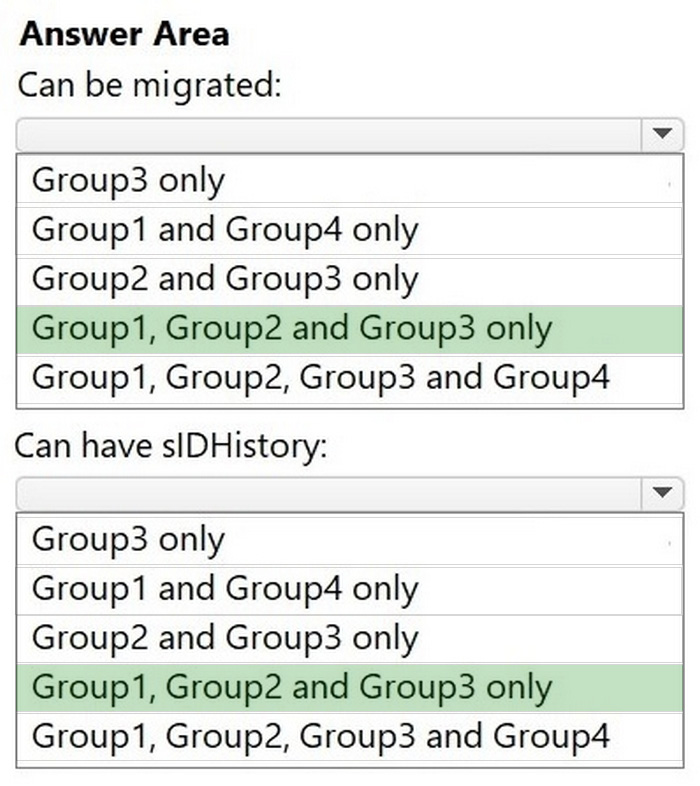
You need to migrate the groups to fabrikam.com by using ADMT.
Which groups can be migrated and which groups can have the sIDHistory attribute populated after the migration?
Reveal answer detailsClose answer details
Question 15
Hotspot
HOTSPOT
Your network contains an Active Directory Domain Services (AD DS) domain named contoso.com. The domain contains domain controllers that run Windows Server 2016.
You build a new AD DS forest named nwtraders.com. The forest contains domain controllers that run Windows Server 2025.
You plan to perform a phased migration from contoso.com to nwtraders.com.
You perform the following actions:
Migrate the users in contoso.com to nwtraders.com and enable SIDHistory. Establish a two-way forest trust between contoso.com and nwtraders.com. Install the Active Directory Migration Tool (ADMT) in nwtraders.com. Install the Password Export Server (PES) service in contoso.com.
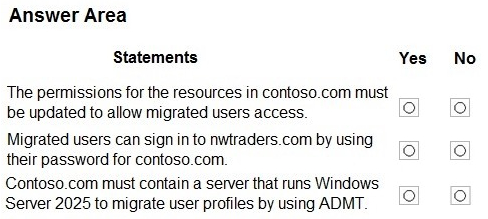
For each of the following statements, select Yes if the statement is true. Otherwise, select No.
NOTE: Each correct selection is worth one point.
Reveal answer detailsClose answer details
Explanation
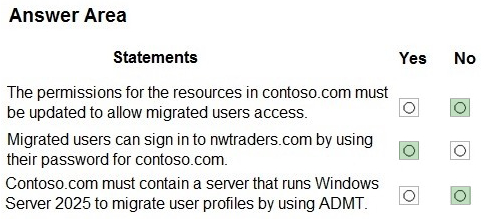
Box 1: No No - The permissions for the resources in contoso.com must be updated to allow migrated users access.
Note: SID History is an Active Directory (AD) attribute that stores previous SIDs of an object, such as a user or group, to maintain access to resources in a previous domain after migration. It allows users to retain access to old resources during a domain consolidation or forest restructuring without requiring permissions to be re-assigned. Storing old SIDs enables historical Access Control List (ACL) entries to continue working, ensuring a smoother, less disruptive transition.
Box 2: Yes Yes - Migrated users can sign in to nwtraders.com by using their password for contoso.com.
Note: The Password Export Server (PES) is a Microsoft tool, version 3.1, that works with the Active Directory Migration Tool (ADMT) to securely migrate user account passwords when moving users between different Active Directory Domain Services (AD DS) environments, such as when changing Active Directory forests. To perform password migration, a user must install PES on a domain controller in the source domain and create a special encryption key file that establishes a trusted connection with the ADMT, enabling the migration of passwords.
How it works: Installation: PES is installed on a domain controller within the source Active Directory domain. Key Generation: A unique encryption key file is generated for the source domain using the Domain Migration Administrator (DMA) and stored on removable media for security. Trusted Connection: This key file is used during the PES installation to establish a secure, trusted connection between the PES service and the ADMT. Password Migration: When ADMT performs an account migration, PES intercepts the request and provides the user's password to the target domain, allowing it to be set for the new account.
Box 3: No No - Contoso.com must contain a server that runs Windows Server 2025 to migrate user profiles by using ADMT.
you would not need to install a Windows Server 2025 in the original domain to migrate user profiles to a new domain. A user migration involves joining clients to the new domain, and then setting up user profiles within that domain. You will need a Windows Server 2025 or a machine with the necessary Remote Server Administration Tools (RSAT) installed in the target domain to perform the migration, not in the source domain..
You have an on-premises server named Server1 that runs Windows Server.
You have an Azure subscription.
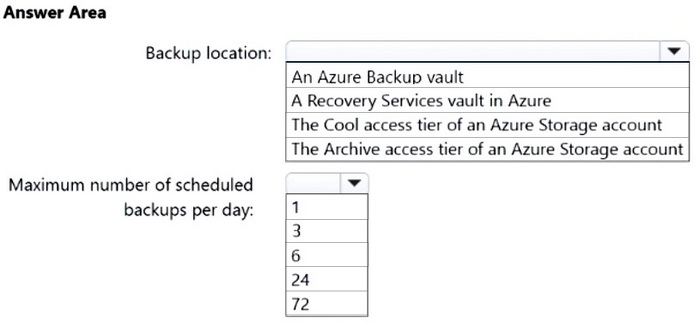
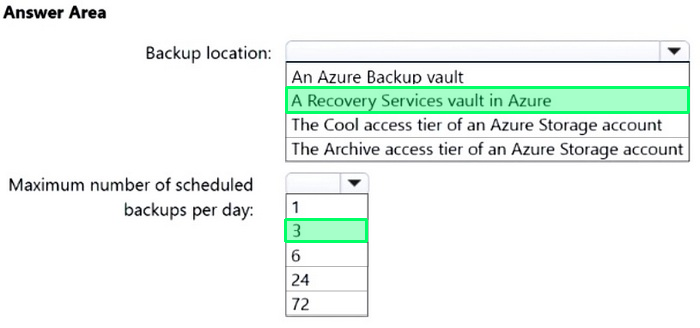
You plan to back up the files and folders on Server1 by using the Microsoft Azure Recovery Services (MARS) agent.
You need to identify to which location the backups can be written and the maximum number of scheduled backups that can be performed per day.
What should you identify? To answer, select the appropriate options in the answer area.
NOTE: Each correct selection is worth one point
Reveal answer detailsClose answer details
Question 18
Single choice
You have multiple servers that run Windows Server.
You plan to use System Insights to collect information about your environment and systems.
How many default System Insights capabilities can you use for capacity forecasting?
A
3
B
4
C
5
D
6
Reveal answer detailsClose answer details
Correct answerB
Explanation
You can use four default System Insights capabilities for capacity forecasting: CPU capacity, network capacity, total storage consumption, and volume consumption. These capabilities use historical data to predict future resource usage and statuses, like OK, Warning, or Critical.
Note: This question is part of a series of questions that present the same scenario. Each question in the series contains a unique solution that might meet the stated goals. Some question sets might have more than one correct solution, while others might not have a correct solution.
After you answer a question in this section, you will NOT be able to return to it. As a result, these questions will not appear in the review screen.
You deploy Azure Migrate to an on-premises network.
You have an on-premises physical server named Server1 that runs Windows Server and has the following configurations:
1. Operating system disk: 600 GB 2. Data disk: 3 TB 3. NIC Teaming: Enabled 4. Mobility service: Installed 5. Windows Defender Firewall: Enabled 6. Microsoft Defender Antivirus: Enabled
You need to ensure that you can use Azure Migrate to migrate Server1.
Solution: You disable Windows Defender Firewall on Server1.
Does this meet the goal?
A
Yes
B
No
Reveal answer detailsClose answer details
Correct answerB
Question 20
Hotspot
HOTSPOT
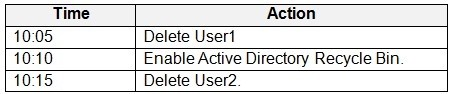
Your network contains an Active Directory Domain Services (AD DS) domain. The domain contains two users named User1 and User2.
You use the following tools to manage Active Directory:
Active Directory Users and Computers Active Directory Administrative Center Ntdsutil Ldp
You perform the actions shown in the following table.
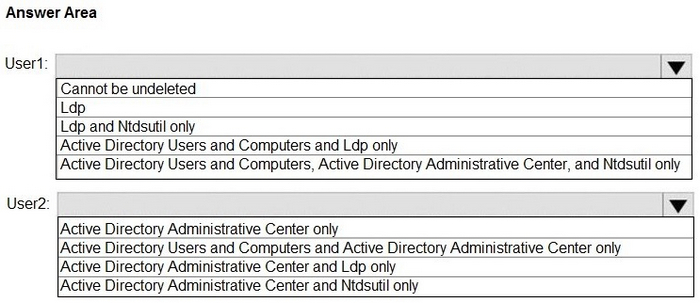
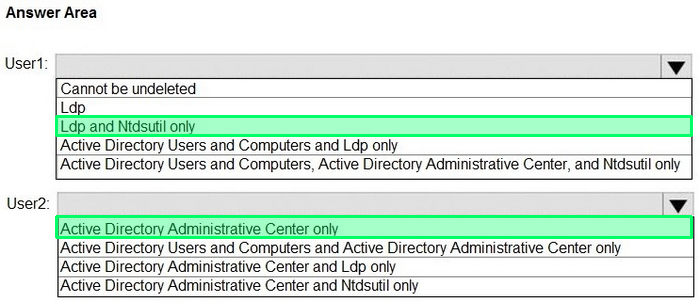
What can you use to undelete each user? To answer, select the appropriate options in the answer area.
Reveal answer detailsClose answer details
Explanation
Box 1: Ldp and Ntdsautil only User1 ldp
You can restore a deleted Active Directory (AD) object using the ldp.exe utility, but it requires manually changing the isDeleted attribute to restore the object from the tombstone period. However, restoring with ldp.exe is a complex, legacy method; using Active Directory Administrative Center (dsac.exe) or PowerShell with the AD Recycle Bin enabled is the recommended and much simpler approach for restoring deleted objects.
Ntdsutil In Active Directory, ntdsutil is the command-line tool used to initiate an authoritative restore by entering the authoritative restore context and then selecting the appropriate backup data for the restoration.
Note: To restore a user deleted from an Active Directory (AD) domain without the Recycle Bin, you must perform an authoritative restore using a previous backup of the Active Directory database. There is no other built-in method to undelete an object if the AD Recycle Bin is not enabled, as the object is permanently removed from the AD database and is not stored in a "deleted objects" container.
Box 2: Active Directory Administrative Center only User2
To undelete a user in an AD DS domain with the Recycle Bin activated, open the Active Directory Administrative Center (ADAC), navigate to your domain's Deleted Objects container, right-click the deleted user, and select Restore or Restore to... to return the account to its original location. After restoration, you will need to enable the account and reset its password.
Note: You can only restore AD DS items that were deleted after Active Directory Recycle Bin is enabled. You can't use Active Directory Recycle Bin to recover items that were deleted before enabling this functionality.
Incorrect: Active Directory Users and Computers Active Directory Users and Computers cannot be used to restore a deleted user when the Active Directory Recycle Bin is enabled ldp ldp.exe is not used to restore deleted users when the Active Directory Recycle Bin is active.
Ntdsutil The Ntdsutil.exe tool is not used to restore objects from the Active Directory Recycle Bin
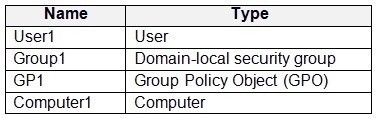
Your network contains two Active Directory Domain Services (AD DS) forests named contoso.com and fabrikam.com. The contoso.com forest contains the resources shown in the following table.
You need to use the Active Directory Migration Tool (ADMT) to migrate the resources from contoso.com to fabrikam.com.
Which resources can be migrated?
A
User1 and Group1 only
B
User1, Group1, and GP1 only
C
User1, Group1, and Computer1 only
D
User1, Group1, GP1, and Computer1
Reveal answer detailsClose answer details
Correct answerC
Explanation
Use Active Directory Migration Tool (ADMT) to migrate user accounts, groups, and computer accounts.
Use Group Policy Management Console (GPMC) to back up GPOs from the source domain and restore them to the target domain.
The Active Directory Migration Tool version 3.2 (ADMT v3.2) simplifies the process of migrating objects and restructuring tasks in an Active Directory?Domain Service (AD DS) environment. You can use ADMT v3.2 to migrate users, groups, and computers between AD DS domains in different forests (inter-forest migration) or between AD DS domains in the same forest (intra-forest migration). ADMT can also perform security translation (to migrate local user profiles) when performing inter-forest migrations.
Note: This question is part of a series of questions that present the same scenario. Each question in the series contains a unique solution that might meet the stated goals. Some question sets might have more than one correct solution, while others might not have a correct solution.
After you answer a question in this section, you will NOT be able to return to it. As a result, these questions will not appear in the review screen.
You have an on-premises server named Server1 that runs Windows Server.
You have a Microsoft Sentinel instance.
You add the Windows Firewall data connector in Microsoft Sentinel.
You need to ensure that Microsoft Sentinel can collect Windows Firewall logs from Server1.
Solution: You install the Microsoft Integration Runtime on Server1.
Does this meet the goal?
A
Yes
B
No
Reveal answer detailsClose answer details
Correct answerB
Question 23
Single choice
You have 200 Azure virtual machines.
You create a recovery plan in Azure Site Recovery to fail over all the virtual machines to an Azure region. The plan has three manual actions.
You need to replace one of the manual actions with an automated process.
What should you use?
A
an Azure Desired State Configuration (DSC) virtual machine extension
You have an Azure subscription named Sub1 that contains a resource group named RG1. RG1 contains the resources shown in the following table.
Sub1 has Microsoft Defender for Servers enabled. You are assigned the Contributor role for Sub1.
You need to implement just-in-time (JIT) VM access for VM1.
What should you do first?
A
Create a network security group (NSG).
B
Enable enhanced security in Microsoft Defender for Cloud.
C
Request the Owner role for Sub1.
D
Create an application security group.
Reveal answer detailsClose answer details
Correct answerA
Question 25
Single choice
Your network contains an Active Directory Domain Services (AD DS) domain. The domain contains two Windows Server Failover Cluster (WSFC) instances named Cluster1 and Cluster2. Cluster1 hosts Hyper-V virtual machines. Cluster2 does NOT have any high availability roles configured.
You need to create a Storage Spaces Direct cluster in Cluster2 that will store the virtual machine hard disk files for Cluster1.
Which role should you configure for Cluster2? To answer, select the appropriate options in the answer area.
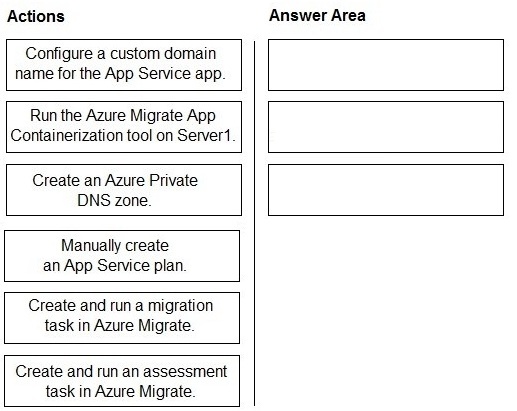
You have a server named Server1 that runs Windows Server and is hosted in a VMWare environment. Server1 contains an ASP.NET application named App1. Users access App1 by using the following URL:
https://app1.contoso.com.
You need to use the integrated flow in Azure Migrate to migrate App1 to Azure App Service. After the migration, users must be able to access App1 by using the same URL.
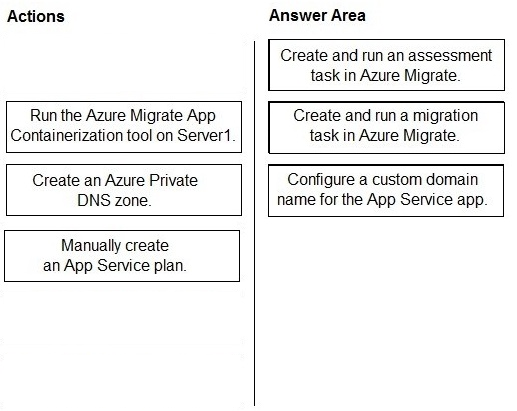
Which three actions should you perform in sequence? To answer, move the appropriate actions from the list of actions to the answer area and arrange them in the correct order.
Reveal answer detailsClose answer details
Explanation
Because the question explicitly says use the integrated flow in Azure Migrate, the sequence follows the standard migration workflow:
First → Create and run an assessment task in Azure Migrate You must assess the on-premises app/VM to determine readiness, dependencies, and compatibility for App Service migration.
Second → Create and run a migration task in Azure Migrate This performs the actual migration (using the integrated App Containerization / App Service flow under Azure Migrate).
Third → Configure a custom domain name for the App Service app After migration, Azure App Service uses a default *.azurewebsites.net domain. To keep the same URL ( https://app1.contoso.com ), you must configure:
Custom domain (and SSL, though not listed here)
Why others are wrong:
Run Azure Migrate App Containerization tool → used for container scenarios, not required in this integrated flow Create Private DNS zone → not needed for public web app access Manually create App Service plan → Azure Migrate creates required resources automatically
You have an on-premises server named Server1 that runs Windows Server.
You need to perform an on-demand backup of the files on Server1 by using Azure Backup.
Which five actions should you perform in sequence? To answer, move the appropriate actions from the list of actions to the answer area and arrange them in the correct order.
Reveal answer detailsClose answer details
Question 29
Single choice
You have the resources shown in the following table.
Your on-premises network is connected to VNet1 by using a Site-to Site VPN.
The network traffic sent from Server fails to reach VM1.
You need to review the contents of the network traffic sent from Server1 to VM1.
What should you do first?
A
From Server1, enable Windows Firewall logs.
B
From Windows Admin Center, enable the Packet Monitoring extension.
C
From NSG1, enable NSG flow logs.
D
From Azure Network Watcher, add a packet capture
Reveal answer detailsClose answer details
Correct answerD
Explanation
To review the actual contents of network traffic (packet-level analysis) between Server1 and VM1, you need a packet capture.
Azure Network Watcher packet capture:
Captures full packet data (headers + payload) Can be targeted directly on VM1's NIC Allows deep inspection of traffic to troubleshoot connectivity issues
Why others are wrong: A → Windows Firewall logs only show allowed/blocked traffic, not packet content B → Packet Monitoring in Windows Admin Center applies to on-prem servers, not Azure VM traffic path C → NSG flow logs show metadata (source/destination/port/allow/deny), NOT packet contents
Therefore, the correct first step is to add a packet capture using Network Watcher.
Question 30
Drag & drop
DRAG DROP
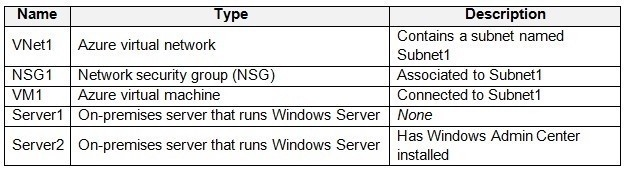
You have two on-premises servers named Server1 and Server2 that run Windows Server.
Server1 hosts a virtual machine named VM1.
You have an Azure subscription.
You plan to back up VM1 by using Microsoft Azure Backup Server (MABS).
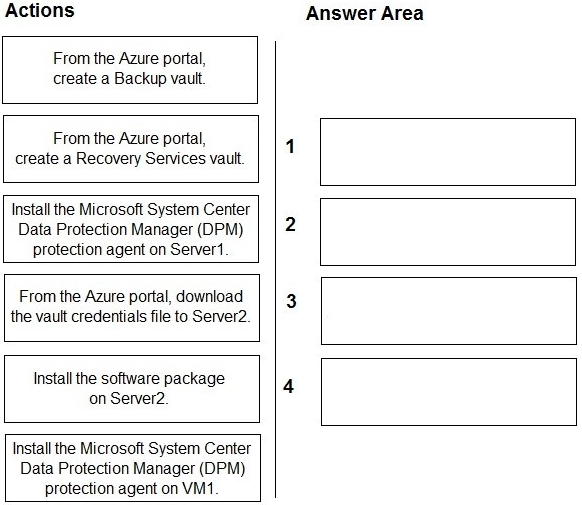
You need to deploy an on-premises MABS server. The solution must ensure that you can restore VM1, including its configuration data.
Which four actions should you perform in sequence? To answer, move the appropriate actions from the list of actions to the answer area and arrange them in the correct order.
Reveal answer detailsClose answer details
Explanation
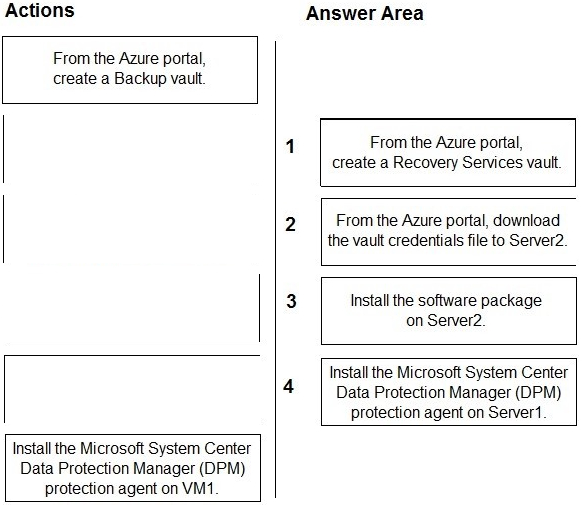
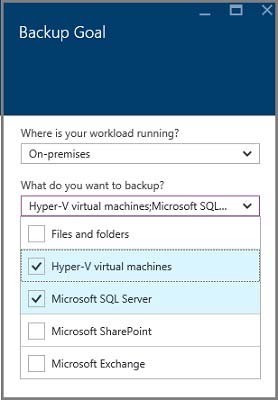
Step 1: From the Azure Portal, create a Recovery Services vault. Create a Recovery Services vault A Recovery Services vault is a management entity that stores recovery points that are created over time, and it provides an interface to perform backup-related operations. These operations include taking on-demand backups, performing restores, and creating backup policies.
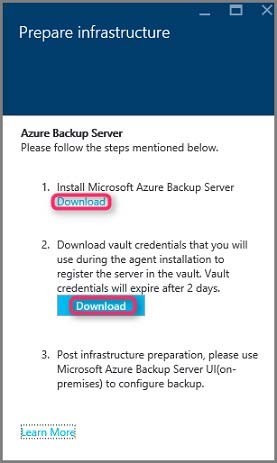
Step 2: From the Azure portal, download the vault credentials file to Server1.
Software package Downloading the software package 1. Sign in to the Azure portal 2. Select the Recovery Services vault you created in step 1. 3. The Settings pane opens up by default. If it's closed, select Settings to open the settings pane. 4. Select Backup to open the Getting Started wizard. In the Getting Started with backup pane that opens, Backup Goals will be auto-selected. 5. In the Backup Goal pane, from the Where is your workload running menu, select On-premises.
6. In the Prepare infrastructure pane that opens, select the Download links for Install Azure Backup Server and Download vault credentials. You use the vault credentials during registration of Azure Backup Server to the Recovery Services vault. The links take you to the Download Center where the software package can be downloaded.
7. Etc.
Step 3: Install the software package on Server2 Install the software package
Step 4: Install the Microsoft System Center Data Protection Manager protection (DPM) agent on Server1.
Install and update the Data Protection Manager protection agent MABS uses the System Center Data Protection Manager protection agent. The System Center Data Protection Manager (DPM) protection agent is the software you install on each computer that contains data you want to back up with DPM.
Note: For backing up a virtual machine with System Center Data Protection Manager (DPM) (DPM), the DPM protection agent should be installed on the Hyper-V host or cluster, not on the guest virtual machine, for host-level backup. For guest-level backup, which is used for protecting specific applications or passthrough disk data, the agent is installed on each virtual machine that contains the workload.
You have an on-premises server named Server1 that runs Windows Server.
You have an Azure subscription.
You need to onboard Server1 to Microsoft Defender for Cloud.
What should you install on Server1?
A
the Azure File Sync agent
B
the Microsoft Entra provisioning agent
C
the Device Health Attestation role
D
the Azure Connected Machine agent
Reveal answer detailsClose answer details
Correct answerD
Explanation
To onboard an on-premises server like Server1 to Microsoft Defender for Cloud, you need to install the Azure Connected Machine agent. This agent connects on-premises or other cloud servers to Azure services, enabling you to monitor and secure the server using Azure features like Microsoft Defender for Cloud.
Question 32
Single choice
You have an on-premises server that runs Windows Server and has the Web Server (IIS) server role installed. The server hosts a web app that connects to an on-premises Microsoft SQL Server database.
You plan to migrate the web app to an Azure App Services web app. The database will remain on-premises.
You need to ensure that the migrated web app can access the database.
Note: This question is part of a series of questions that present the same scenario. Each question in the series contains a unique solution that might meet the stated goals. Some question sets might have more than one correct solution, while others might not have a correct solution.
After you answer a question in this section, you will NOT be able to return to it. As a result, these questions will not appear in the review screen.
You deploy Azure Migrate to an on-premises network.
You have an on-premises physical server named Server1 that runs Windows Server and has the following configuration.
1. Operating system disk 600 GB 2. Data disic 3 TB 3. NIC Teaming: Enabled 4. Mobility service: installed 5. Windows Firewall: Enabled 6. Microsoft Defender Antivirus: Enabled
You need to ensure that you can use Azure Migrate to migrate Server1.
Solution: You disable Microsoft Defender Antivirus on Server1.
Does this meet the goal?
A
Yes
B
No
Reveal answer detailsClose answer details
Correct answerB
Question 34
Hotspot
HOTSPOT
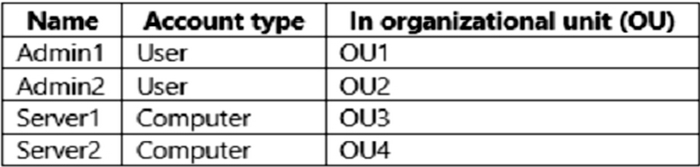
Your network contains an on-premises Active Directory Domain Services (AD DS) domain named contos.com. The domain contains the accounts shown in the following table.
The domain is configured to store BitLocker recovery keys in Active Directory.
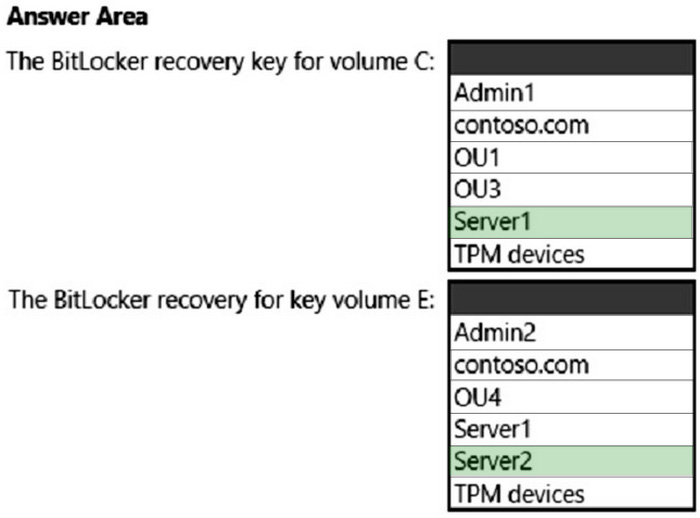
1. Admin1 turns on BitLocker Drive Encryption (BitLocker) for volume C on Server1. 2. Admin1 moves Server1 to OU1. 3. Admin2 turns on BitLocker for removable volume E on Server2. 4. Admin2 moves removable volume E from Server2 to Server1 and unlocks the volume.
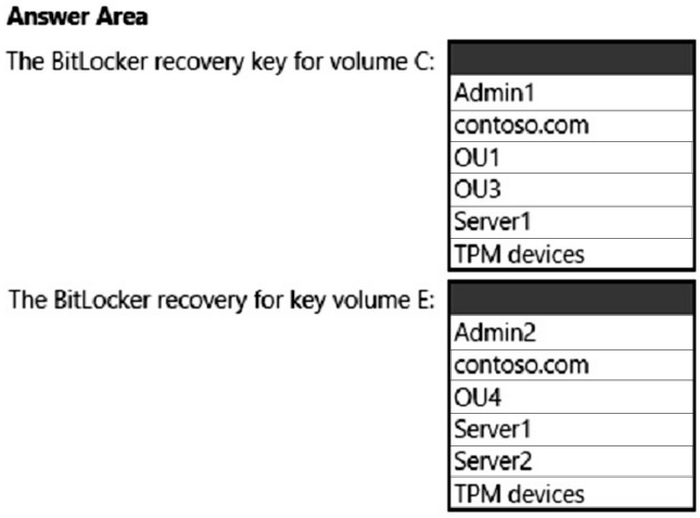
On which Active Directory object can you each BitLocker recovery key? To answer, select the appropriate options in the answer area.
NOTE: Each correct selection is worth on point.
Reveal answer detailsClose answer details
Explanation
Box 1: Server1 You can configure Group Policies in your domain so that when encrypting any drive with BitLocker, the computer will save the recovery key in its computer object account in AD (like storing a local computer administrator password generated using LAPS).
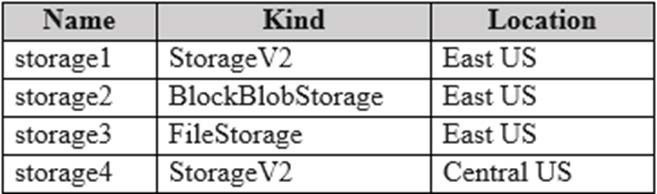
You have an Azure subscription. The subscription contains a virtual machine named VM1 that runs Windows Server and is in the East US Azure region. The subscription contains the storage accounts shown in the following table.
You plan to configure the Diagnostic settings for VM1.
Which storage accounts should you specify for the settings?
A
storage1 only
B
storage1 and storage2 only
C
storage1 and storage4 only
D
storage1, storage2, and storage3 only
E
storage1, storage2, storage3, and storage4
Reveal answer detailsClose answer details
Correct answerA
Explanation
For Azure VM Diagnostic settings (classic diagnostics storage), the storage account must meet:
Same region as the VM General-purpose (StorageV2 or GPv1) Support for blobs (not specialized storage types)
Analyze options:
storage1 (StorageV2, East US) ✅ → Correct (same region + supported type) storage2 (BlockBlobStorage, East US) ❌ → Not supported for VM diagnostics (specialized blob-only account) storage3 (FileStorage, East US) ❌ → Not supported (file-only storage account) storage4 (StorageV2, Central US) ❌ → Wrong region
Therefore only storage1 meets all requirements.
Question 36
Single choice
You have two servers named Host1 and Host2 that run Windows Server and have the Hyper-V server role installed. Host2 is configured as a replica server.
Host1 contains a virtual machine named VM1.
You plan to use Hyper-V Replica to replicate VM1 to Host2. You need to ensure that you can restore a replica of VM1 to a specific state from the past eight hours.
What should you do?
A
From the Hyper-V Settings of Host2, configure NUMA spanning.
B
From the Enable Replication wizard, configure recovery points.
C
From the Properties of VM1, enable automatic checkpoints.
D
From the Enable Replication wizard, modify the replication frequency.
Reveal answer detailsClose answer details
Correct answerB
Explanation
To restore a Hyper-V Replica VM to a specific state from the past eight hours, you configure additional recovery points during the Enable Replication wizard. The default only saves the latest recovery point, but specifying more recovery points allows you to select an earlier point in time during a failover event, providing recovery to a specific past state.
How to Configure Recovery Points: 1. Access the Enable Replication Wizard: Right-click the virtual machine in Hyper-V Manager and select Replication > Configure Replication. 2. Select Additional Recovery Points: During the wizard, find the setting for recovery points and choose to store additional points to meet your desired recovery point objectives. 3. Maximum Recovery Points: You can store a maximum of 24 hourly points, which means you can restore to any point within the last 24 hours if configured. 4. Complete the Wizard: Follow the remaining steps of the wizard to complete the configuration.
Fabrikam, Inc. is a manufacturing company that has a main office in Chicago and a branch office in Paris.
Existing Environment
Identity Infrastructure
Fabrikam has an Active Directory Domain Services (AD DS) forest that syncs with an Azure Active Directory (Azure AD) tenant. The AD DS forest contains two domains named corp.fabrikam.com and europe.fabrikam.com.
Chicago Office On-Premises Servers
The office in Chicago contains on-premises servers that run Windows Server 2016 as shown in the following table.
All the servers in the Chicago office are in the corp.fabrikam.com domain.
All the virtual machines in the Chicago office are hosted on HV1 and HV2. HV1 and HV2 are nodes in a failover cluster named Cluster1.
WEB1 and WEB2 run an Internet Information Services (IIS) website. Internet users connect to the website by using a URL of https://www.fabrikam.com.
All the users in the Chicago office run an application that connects to a UNC path of \\Fileserver1\Data.
Paris On-Premises Servers
The office in Paris contains a physical server named dc2.europe.fabrikam.com that runs Windows Server 2016 and is a domain controller for the europe.fabrikam.com domain.
Network Infrastructure
The networks in both the Chicago and Paris offices have local internet connections. The Chicago and Paris offices are connected by using VPN connections.
The client computers in the Chicago office get IP addresses from DHCP1.
Security Risks
Fabrikam identifies the following security risks:
Some accounts connect to AD DS resources by using insecure protocols such as NTLMv1, SMB1, and unsigned LDAP. Servers have Windows Defender Firewall enabled. Server administrators sometimes modify firewall rules and allow risky connections.
Requirements
Security Requirements
Fabrikam identifies the following security requirements:
Prevent server administrators from configuring Windows Defender Firewalls rules. Encrypt all the data disks on the servers by using BitLocker Drive Encryption (BitLocker). Ensure that only authorized applications can be installed or run on the servers in the forest. Implement Microsoft Sentinel as a reporting solution to identify all connections to the domain controllers that use insecure protocols.
On-Premises Migration Plan
Fabrikam plans to migrate all the existing servers and identifies the following migration requirements:
Move the APP1 and APP2 virtual machines in the Chicago office to a new Hyper-V failover cluster named Cluster2 that will run Windows Server 2022. - Cluster2 will contain two new nodes named HV3 and HV4. - All virtual machine files will be stored on a Cluster Shared Volume (CSV). Migrate Archive1 to a new failover cluster named Cluster3 that will run Windows Server 2022. - Cluster3 will contain two physical nodes named Node1 and Node2. - The file shares on Cluster3 will be a failover cluster role in active-passive mode. Migrate all users, groups, and client computers from europe.fabrikam.com to corp.fabrikam.com. - The migration will be performed by using the Active Directory Migration Tool (ADMT). - A computer named ADMTcomputer will be deployed to the corp.fabrikam.com domain to run ADMT migration procedures. - User accounts will retain their existing password. Migrate the data share from Fileserver1 to a new server named Fileserver2 that will run Windows Server 2022. After the migration, the data share must be accessible by using the existing UNC path.
Azure Migration Plan
Fabrikam plans to migrate some resources to Azure and identifies the following migration requirements:
Create an Azure subscription named Sub1. Create an Azure virtual network named Vnet1. Use ExpressRoute to connect the Paris and Chicago offices to Vnet1. License all servers for Microsoft Defender for servers. Migrate APP3 and APP4 to Azure. Migrate the www.fabrikam.com website to an Azure App Service web app named WebApp1. Decommission WEB1 and WEB2.
DHCP Migration Plan
Fabrikam plans to replace DHCP1 with a new server named DHCP2 and identifies the following migration requirements:
Ensure that DHCP2 provides the same IP addresses that are currently available from DHCP1. Prevent DHCP1 from servicing clients once services are enabled on DHCP2. Ensure that the existing leases and reservations are migrated.
Question 37
Testlet 1Single choice
You are remediating the firewall security risks to meet the security requirements.
What should you configure to reduce the risks?
A
a Group Policy Object (GPO)
B
adaptive network hardening in Microsoft Defender for Cloud
C
a network security group (NSG) in Sub1
D
an Azure Firewall policy
Reveal answer detailsClose answer details
Correct answerA
Explanation
Firewall rules configured in a Group Policy Object cannot be modified by local server administrators.
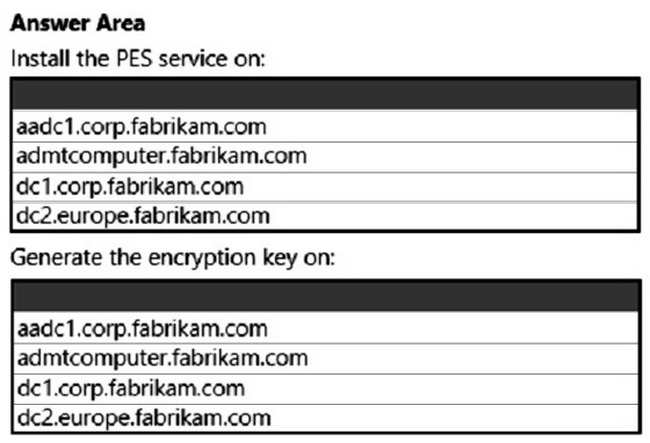
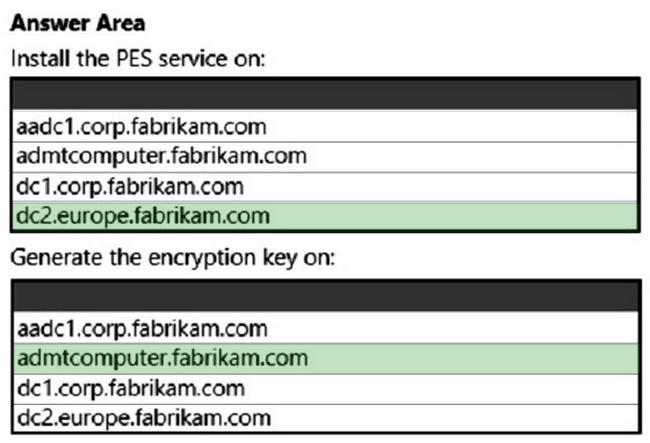
You are planning the europe.fabrikam.com migration to support the on-premises migration plan
Where should you install the Password Export Server (PES) service, where should you generate the encryption key?
To answer, select the appropriate options in the answer area.
NOTE: Each correct selection is worth one point.
Reveal answer detailsClose answer details
Question 39
Single choice
You have an Azure virtual machine named VM1. You need to diagnose why an extension deployment failed.
Which Azure log should you review?
A
the Azure Activity log
B
Azure AD sign-in logs
C
Azure Security Center alerts
D
Network Watcher logs
Reveal answer detailsClose answer details
Correct answerA
Question 40
Single choice
Note: This question is part of a series of questions that present the same scenario. Each question in the series contains a unique solution that might meet the stated goals. Some question sets might have more than one correct solution, while others might not have a correct solution.
After you answer a question in this section, you will NOT be able to return to it. As a result, these questions will not appear in the review screen.
You have a server named Server1 that runs Windows Server.
You need to ensure that only specific applications can modify the data in protected folders on Server1.
Solution: From App & browser control, you configure the Exploit protection settings. Does this meet the goal?
You have an Azure Site Recovery deployment for several Azure virtual machines. You need to ensure that the virtual machines fail over together in a specific order.
What should you configure?
A
an availability set
B
an availability zone
C
a recovery plan
D
a scale set
Reveal answer detailsClose answer details
Correct answerC
Question 42
Single choice
You have the on-premises servers shown in the following table.
You have an Azure subscription.
You plan to migrate the servers to Azure generation 2 virtual machines.
Which servers can be migrated to Azure by using Azure Migrate?
A
Server1 only
B
Server2 only
C
Server1 and Server2 only
D
Server2 and Server3 only
E
Server1, Server2, and Server3
Reveal answer detailsClose answer details
Correct answerD
Explanation
* Server1 - No Azure Migrate does not support the direct upgrade of OS volumes that are encrypted with BitLocker; you must disable BitLocker on the OS volume before you can replicate and migrate the machine to Azure.
* All listed operating systems are supported.
Azure Migrate supports migrating the following Windows Server operating systems to Azure Generation 2 (UEFI-based) virtual machines: Windows Server 2012 R2, 2016, 2019, 2022, and 2025. Older versions like Windows Server 2012 can also be migrated but require an upgrade to a newer version to function as a Generation 2 VM.
* All listed OS disk size are supported.
Azure generation 2 VMs do not have a minimum OS disk size, but a common default is 127 GiB, and the smallest possible disk size for any OS disk is 127 GiB. The OS disk can be expanded up to 4 TiB (or 4095 GiB).
References: https://learn.microsoft.com/en-us/azure/migrate/migrate-support-matrix-physical-migration Monitor and troubleshoot Windows Server environments
Question 43
Single choice
Your on-premises network contains an Active Directory Domain Services (AD DS) forest named contoso.com. The forest contains the domains shown in the following table.
You create a user named User1 that has the following attributes: distinguishedName: CN=User1, OU=OU1, DC=contoso, DC=com objectGUID: ff06ad4b-2e43-4a7d-b34c-8ea53f909422 objectSID: S-1-5-21-913749354-169946239-1665692169-4612
You plan to migrate User1 to OU3 by using the Active Directory Migration Tool (ADMT).
Which attributes will change if User1 is migrated to OU3?
A
distinguishedName only
B
objectSID only
C
objectGUID, and objectSID only
D
distinguishedName, objectSID, and whenCreated only
E
distinguishedName, objectGUID, objectSID and whenCreated
Reveal answer detailsClose answer details
Correct answerE
Explanation
Because OU3 is in a different domain, using ADMT does not perform a simple move. ADMT creates a new user object in the target domain.
Therefore:
distinguishedName Changes because the user is placed in the target domain and target OU.
objectGUID Changes because the target domain receives a newly created object.
objectSID Changes because the user receives a new SID from the target domain. The old SID can be stored in SIDHistory.
whenCreated Changes because the target object is newly created during migration.
So the changed attributes are distinguishedName, objectGUID, objectSID, and whenCr
Question 44
Single choice
You have an Active Directory Domain Services (AD DS) domain. The domain contains a server named Server1 that runs Windows Server.
You need to prevent the registration of specific COM objects on Server1.
What should you use?
A
Windows Defender Application Control (WDAC)
B
exploit protection
C
Smart App Control
Reveal answer detailsClose answer details
Correct answerA
Explanation
Windows Defender Application Control (WDAC) is a Microsoft security feature that creates a software-based security layer to prevent unauthorized and malicious code from running on Windows devices. It functions as an application whitelisting solution, allowing administrators to define which applications and drivers are explicitly approved to execute, rather than relying on a default "trust all" model. By enforcing these code integrity policies, WDAC significantly reduces the attack surface and mitigates risks from malware and untrusted software.
How to Implement WDAC for Preventing COM Objects:
1. Define a Policy: Create a WDAC policy using tools such as the WDAC Wizard or by manually defining a policy XML file that specifies the allowed applications and object registrations.
2. Deploy the Policy: Implement the policy on Server1 using the tools provided by Windows Server, like Group Policy or Microsoft Endpoint Manager.
3. Monitor and Audit: After deployment, regularly monitor the system to ensure that only allowed COM objects are being used and serve audit logs preventively to enforce security policies.
Using WDAC in this scenario will provide a controlled environment where unauthorized COM objects can't be registered, thus enhancing the security posture of the server.
You have a failover cluster named Cluster1 that contains three nodes.
You plan to add two file server cluster roles named File1 and File2 to Cluster1. File1 will use the File Server for general use role. File2 will use the Scale-Out File Server for application data role.
What is the maximum number of nodes for File1 and File2 that can concurrently serve client connections? To answer, select the appropriate options in the answer area.
Your network contains an Active Directory Domain Services (AD DS) domain. The domain contains a server named Server1 that runs Windows Server.
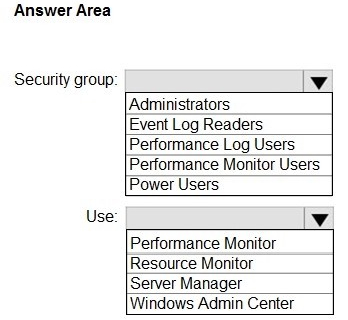
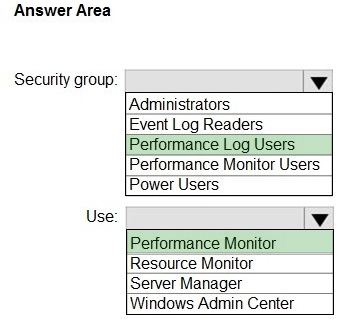
You add a user named Admin1 to the domain.
You need to ensure that Admin1 can create a Data Collector Set on Server1. The solution must follow the principle of least privilege.
To which security group should you add Admin1, and what should Admin1 use to create the Data Collector Set? To answer, select the appropriate options in the answer area.
NOTE: Each correct selection is worth one point.
Reveal answer detailsClose answer details
Explanation
Box 1: Performance Log Users Security group
To create Data Collector Sets on a server in an Active Directory domain, a user needs to be a member of the Performance Log Users security group. This group allows users to manage performance logs, counters, and alerts locally on the server, and they can also be granted the user right to "Log on as a batch job," which is necessary for managing Data Collector Sets.
Box 2: Performance Monitor Use
1. On the Start screen, type Performance Monitor, and then press Enter.
2. In the console tree, expand Data Collector Sets, right-click User Defined > New, and then click Data Collector Set. The Create New Data Collector Set wizard appears.
Your network contains an Active Directory Domain Services (AD DS) forest. The forest functional level is Windows Server 2012 R2. The forest contains the domains shown in the following table.
You create a user named Admin1.
You need to ensure that Admin1 can add a new domain controller that runs Windows Server 2022 to the east.contoso.com domain. The solution must follow the principle of least privilege.
To which groups should you add Admin1?
A
EAST\Domain Admins only
B
CONTOSO\Enterprise Admins only
C
CONTOSO/Schema Admins and EAST\Domain Admins
D
CONTOSO\Enterprise Admins and CONTOSO/Schema Admins
Reveal answer detailsClose answer details
Correct answerA
Question 48
Single choice
Note: This question is part of a series of questions that present the same scenario. Each question in the series contains a unique solution that might meet the stated goals. Some question sets might have more than one correct solution, while others might not have a correct solution.
After you answer a question in this section, you will NOT be able to return to it. As a result, these questions will not appear in the review screen.
You have a server named Server1 that runs Windows Server.
You need to ensure that only specific applications can modify the data in protected folders on Server1.
Solution: From App & browser control, you configure Reputation-based protection.
Does this meet the goal?
A
Yes
B
No
Reveal answer detailsClose answer details
Correct answerB
Question 49
Single choice
You have a server named Server1 that runs Windows Server.
You install System Insights on Server1.
You need to modify the schedule for storage consumption forecasting.
What should you use?
A
Resource Monitor
B
Server Manager
C
Windows Admin Center
D
Performance Monitor
Reveal answer detailsClose answer details
Correct answerC
Explanation
To modify the storage consumption forecasting schedule with Windows Server System Insights, open Windows Admin Center, navigate to the System Insights landing page, select the Storage usage capability, and click on Settings to find and update the Schedule tab for your desired frequency. The capability's schedule controls when it processes collected data, allowing you to adjust the timing or disable it entirely to avoid conflicts with production hours.
You have 50 on-premises servers that run Windows Server. You have an Azure subscription that contains 50 virtual machines that run Windows Server.
You need to create an Azure Monitor alert that will be triggered if one of the servers or virtual machines has less than 10 percent available disk space.
What should you do first?
A.
Create an Alert Rule
B.
Install the Azure Monitor agent on each server.
C.
Enable System Insights on each server.
D.
Create a Log Analytics workspace and configure the Agent management settings.
Your network contains an Active Directory Domain Services (AD DS) domain. The domain contains a failover cluster named Cluster1.
You need to configure Cluster-Aware Updating (CAU) on the cluster by using Windows Admin Center (WAC).
Which three actions should you perform in sequence? To answer, move the appropriate actions from the list of actions to the answer area and arrange them in the correct order.
Correct Answer:
QUESTION 3
You have a Hyper-V host named Server1 that runs Windows Server 2019. Server1 hosts a virtual machine
Virtual network → NOT guaranteed → depends on matching virtual switch name on Server2; otherwise becomes "Not connected"
Therefore, preserved configurations: IP address + configuration version + generation → D
QUESTION 4
Your network contains an Active Directory Domain Services (AD DS) domain. The domain contains a domain controller named DC1.
The domain uses Microsoft Entra Connect sync with a Microsoft Entra tenant and uses Microsoft Entra Password Protection to enforce a custom banned password list.
You deploy a new domain controller named DC2 to the domain.
You discover that the custom banned password list is applied inconsistently and often allows banned passwords to be used.
You need to ensure that the custom banned password list is always enforced.
What should you do on DC2?
A.
Install the Microsoft Entra Password Protection DC agent.
B.
Install the Microsoft Entra Password Protection proxy service.
C.
Provide access to the https://login.microsoftonline.com and https://enterpriseregistration.windows.net URLS.
D.
Install the Microsoft Entra provisioning agent.
E.
Install the Azure Monitor Agent.
Correct Answer: A
Explanation
Explanation/Reference:
Incremental deployment Microsoft Entra Password Protection supports incremental deployment across DCs in an AD DS domain. It's important to understand what this really means and what the tradeoffs are.
The Microsoft Entra Password Protection DC agent software can only validate passwords when it's installed on a DC, and only for password changes that are sent to that DC. It's not possible to control which DCs are chosen by Windows client machines for processing user password changes. To guarantee consistent behavior and universal Microsoft Entra Password Protection security enforcement, the DC agent software must be installed on all DCs in a domain.
References: https://learn.microsoft.com/en-us/entra/identity/authentication/concept-password-ban-bad-on-premises Implement and manage Windows Server high availability
QUESTION 5
DRAG DROP
You have an on-premises server named Server1 that runs Windows Server. You need to perform an on-demand backup of the files on Server 1 by using Azure Backup.
Which five actions should you perform in sequence? To answer, move the appropriate actions actions from the list of actions to the answer are and arrange them in the correct order.
Correct Answer:
Case Study 1
Case Study Questions
Overview
Fabrikam, Inc. is a manufacturing company that has a main office in Chicago and a branch office in Paris.
Existing Environment
Identity Infrastructure
Fabrikam has an Active Directory Domain Services (AD DS) forest that syncs with an Azure Active Directory (Azure AD) tenant. The AD DS forest contains two domains named corp.fabrikam.com and europe.fabrikam.com.
Chicago Office On-Premises Servers
The office in Chicago contains on-premises servers that run Windows Server 2016 as shown in the following table.
All the servers in the Chicago office are in the corp.fabrikam.com domain.
All the virtual machines in the Chicago office are hosted on HV1 and HV2. HV1 and HV2 are nodes in a failover cluster named Cluster1.
WEB1 and WEB2 run an Internet Information Services (IIS) website. Internet users connect to the website by using a URL of https://www.fabrikam.com.
All the users in the Chicago office run an application that connects to a UNC path of \\Fileserver1\Data.
Paris On-Premises Servers
The office in Paris contains a physical server named dc2.europe.fabrikam.com that runs Windows Server 2016 and is a domain controller for the europe.fabrikam.com domain.
Network Infrastructure
The networks in both the Chicago and Paris offices have local internet connections. The Chicago and Paris offices are connected by using VPN connections.
The client computers in the Chicago office get IP addresses from DHCP1.
Security Risks
Fabrikam identifies the following security risks:
Some accounts connect to AD DS resources by using insecure protocols such as NTLMv1, SMB1, and unsigned LDAP. Servers have Windows Defender Firewall enabled. Server administrators sometimes modify firewall rules and allow risky connections.
Requirements
Security Requirements
Fabrikam identifies the following security requirements:
Prevent server administrators from configuring Windows Defender Firewalls rules. Encrypt all the data disks on the servers by using BitLocker Drive Encryption (BitLocker). Ensure that only authorized applications can be installed or run on the servers in the forest. Implement Microsoft Sentinel as a reporting solution to identify all connections to the domain controllers that use insecure protocols.
On-Premises Migration Plan
Fabrikam plans to migrate all the existing servers and identifies the following migration requirements:
Move the APP1 and APP2 virtual machines in the Chicago office to a new Hyper-V failover cluster named Cluster2 that will run Windows Server 2022. - Cluster2 will contain two new nodes named HV3 and HV4. - All virtual machine files will be stored on a Cluster Shared Volume (CSV). Migrate Archive1 to a new failover cluster named Cluster3 that will run Windows Server 2022. - Cluster3 will contain two physical nodes named Node1 and Node2. - The file shares on Cluster3 will be a failover cluster role in active-passive mode. Migrate all users, groups, and client computers from europe.fabrikam.com to corp.fabrikam.com. - The migration will be performed by using the Active Directory Migration Tool (ADMT). - A computer named ADMTcomputer will be deployed to the corp.fabrikam.com domain to run ADMT migration procedures. - User accounts will retain their existing password. Migrate the data share from Fileserver1 to a new server named Fileserver2 that will run Windows Server 2022. After the migration, the data share must be accessible by using the existing UNC path.
Azure Migration Plan
Fabrikam plans to migrate some resources to Azure and identifies the following migration requirements:
Create an Azure subscription named Sub1. Create an Azure virtual network named Vnet1. Use ExpressRoute to connect the Paris and Chicago offices to Vnet1. License all servers for Microsoft Defender for servers. Migrate APP3 and APP4 to Azure. Migrate the www.fabrikam.com website to an Azure App Service web app named WebApp1. Decommission WEB1 and WEB2.
DHCP Migration Plan
Fabrikam plans to replace DHCP1 with a new server named DHCP2 and identifies the following migration requirements:
Ensure that DHCP2 provides the same IP addresses that are currently available from DHCP1. Prevent DHCP1 from servicing clients once services are enabled on DHCP2. Ensure that the existing leases and reservations are migrated.
QUESTION 6
HOTSPOT
You are planning the migration of APP3 and APP4 to support the Azure migration plan.
What should you do on Cluster1 and in Azure before you perform the migration? To answer, select the appropriate options in the answer area.
Note: This question is part of a series of questions that present the same scenario. Each question in the series contains a unique solution that might meet the stated goals. Some question sets might have more than one correct solution, while others might not have a correct solution.
After you answer a question in this section, you will NOT be able to return to it. As a result, these questions will not appear in the review screen.
You have an on-premises server named Server1 that runs Windows Server.
You have a Microsoft Sentinel instance.
You add the Windows Firewall data connector in Microsoft Sentine1.
You need to ensure that Microsoft Sentinel can collect Windows Firewall logs from Server1.
Solution: You install the Azure Connected Machine agent on Server1.
Does this meet the goal?
A.
Yes
B.
No
Correct Answer: B
QUESTION 8
You have an on-premises Active Directory Domain Services (AD DS) domain that syncs with an Azure Active Directory (Azure AD) tenant by using password hash synchronization.
You have a Microsoft 365 subscription.
All devices are hybrid Azure AD-joined.
Users report that they must enter their password manually when accessing Microsoft 365 applications.
You need to reduce the number of times the users are prompted for their password when they access Microsoft 365 and Azure services.
What should you do?
A.
In Azure AD. configure a Conditional Access policy for the Microsoft Office 365 applications.
B.
In the DNS zone of the AD DS domain, create an autodiscover record.
C.
From Azure AD Connect, enable single sign-on (SSO).
D.
From Azure AD Connect, configure pass-through authentication.
Your network contains an Active Directory Domain Services (AD DS) forest that has a Windows Server 2008 R2 forest functional level.
The forest contains the domains shown in the following table.
You need to perform an in-place upgrade of the domain controllers in east.contoso.com to Windows Server 2025.
The solution must minimize administrative effort.
What should you do first?
A.
Raise the domain functional level of east.contoso.com to Windows Server 2025.
B.
Raise the domain functional level of contoso.com to Windows Server 2016.
C.
Raise the forest functional level to Windows Server 2025.
D.
Extend the schema.
Correct Answer: B
Explanation
Explanation/Reference:
The first step is to raise the forest functional level to Windows Server 2016, and then raise the domain functional level of the east.contoso.com domain to Windows Server 2016. Windows Server 2016 is the most recent functional level, and it supports domain controllers running Windows Server 2025. You must have all domain controllers upgraded to the new operating system before you can raise the functional level.
1. Raise the forest functional level to Windows Server 2016. This can be done using the Active Directory Domains and Trusts console.
Raise the domain functional level for east.contoso.com to Windows Server 2025.
Note:
Windows Server functional level interoperability. The following interoperability matrix summarizes which Windows Server versions you can run as domain controllers for each currently supported AD DS forest and domain functional level.
You have a server named Server1 that runs Windows Server and has the Web Server (IIS) server role installed. Server1 hosts an ASP.NET Core web app named WebApp1 and the app's source files.
You install Docker on Server1.
You need to ensure that you can deploy WebApp1 to an Azure App Service web app from the Azure Container Registry.
Which three actions should you perform in sequence? To answer, move the appropriate actions from the list of actions to the answer area and arrange them in the correct order.
Correct Answer:
Explanation
Explanation/Reference:
Step 1: Create a Dockerfile. This file contains instructions for the build process. Step 2: Run the docker build command to create a container image. Step 3: Run the docker push command to upload the image to Azure Container Registry.
QUESTION 11
HOTSPOT
You have the on-premises servers shown in the following table.
You are evaluating OSConfig and security baselines.
Which cmdlet should you use to deploy OSConfig, and which servers support OSConfig? To answer, select the appropriate options in the answer area.
NOTE: Each correct selection is worth one point.
Correct Answer:
QUESTION 12
HOTSPOT
Your on-premises datacenter contains physical servers and Hyper-V virtual machines.
You have an Azure subscription.
You plan to use Azure Migrate to perform the following tasks:
1. Migrate the physical servers to Azure virtual machines. 2. Migrate the Hyper-V virtual machines to Azure.
What should you use for each task? To answer, select the appropriate options in the answer area.
NOTE: Each correct selection is worth one point.
Correct Answer:
Case Study 1
Case Study Questions
Overview
Fabrikam, Inc. is a manufacturing company that has a main office in Chicago and a branch office in Paris.
Existing Environment
Identity Infrastructure
Fabrikam has an Active Directory Domain Services (AD DS) forest that syncs with an Azure Active Directory (Azure AD) tenant. The AD DS forest contains two domains named corp.fabrikam.com and europe.fabrikam.com.
Chicago Office On-Premises Servers
The office in Chicago contains on-premises servers that run Windows Server 2016 as shown in the following table.
All the servers in the Chicago office are in the corp.fabrikam.com domain.
All the virtual machines in the Chicago office are hosted on HV1 and HV2. HV1 and HV2 are nodes in a failover cluster named Cluster1.
WEB1 and WEB2 run an Internet Information Services (IIS) website. Internet users connect to the website by using a URL of https://www.fabrikam.com.
All the users in the Chicago office run an application that connects to a UNC path of \\Fileserver1\Data.
Paris On-Premises Servers
The office in Paris contains a physical server named dc2.europe.fabrikam.com that runs Windows Server 2016 and is a domain controller for the europe.fabrikam.com domain.
Network Infrastructure
The networks in both the Chicago and Paris offices have local internet connections. The Chicago and Paris offices are connected by using VPN connections.
The client computers in the Chicago office get IP addresses from DHCP1.
Security Risks
Fabrikam identifies the following security risks:
Some accounts connect to AD DS resources by using insecure protocols such as NTLMv1, SMB1, and unsigned LDAP. Servers have Windows Defender Firewall enabled. Server administrators sometimes modify firewall rules and allow risky connections.
Requirements
Security Requirements
Fabrikam identifies the following security requirements:
Prevent server administrators from configuring Windows Defender Firewalls rules. Encrypt all the data disks on the servers by using BitLocker Drive Encryption (BitLocker). Ensure that only authorized applications can be installed or run on the servers in the forest. Implement Microsoft Sentinel as a reporting solution to identify all connections to the domain controllers that use insecure protocols.
On-Premises Migration Plan
Fabrikam plans to migrate all the existing servers and identifies the following migration requirements:
Move the APP1 and APP2 virtual machines in the Chicago office to a new Hyper-V failover cluster named Cluster2 that will run Windows Server 2022. - Cluster2 will contain two new nodes named HV3 and HV4. - All virtual machine files will be stored on a Cluster Shared Volume (CSV). Migrate Archive1 to a new failover cluster named Cluster3 that will run Windows Server 2022. - Cluster3 will contain two physical nodes named Node1 and Node2. - The file shares on Cluster3 will be a failover cluster role in active-passive mode. Migrate all users, groups, and client computers from europe.fabrikam.com to corp.fabrikam.com. - The migration will be performed by using the Active Directory Migration Tool (ADMT). - A computer named ADMTcomputer will be deployed to the corp.fabrikam.com domain to run ADMT migration procedures. - User accounts will retain their existing password. Migrate the data share from Fileserver1 to a new server named Fileserver2 that will run Windows Server 2022. After the migration, the data share must be accessible by using the existing UNC path.
Azure Migration Plan
Fabrikam plans to migrate some resources to Azure and identifies the following migration requirements:
Create an Azure subscription named Sub1. Create an Azure virtual network named Vnet1. Use ExpressRoute to connect the Paris and Chicago offices to Vnet1. License all servers for Microsoft Defender for servers. Migrate APP3 and APP4 to Azure. Migrate the www.fabrikam.com website to an Azure App Service web app named WebApp1. Decommission WEB1 and WEB2.
DHCP Migration Plan
Fabrikam plans to replace DHCP1 with a new server named DHCP2 and identifies the following migration requirements:
Ensure that DHCP2 provides the same IP addresses that are currently available from DHCP1. Prevent DHCP1 from servicing clients once services are enabled on DHCP2. Ensure that the existing leases and reservations are migrated.
QUESTION 13
DRAG DROP
You are planning the implementation of Cluster2 to support the on-premises migration plan.
You need to ensure that the disks on Cluster2 meet the security requirements.
In which order should you perform the actions? To answer, move all actions from the list of actions to the answer area and arrange them in the correct order.
Your network contains two Active Directory Domain Services (AD DS) forests named contoso.com and fabrikam.com.
Contoso.com includes the groups shown in the following table.
You need to migrate the groups to fabrikam.com by using ADMT.
Which groups can be migrated and which groups can have the sIDHistory attribute populated after the migration?
Correct Answer:
QUESTION 15
HOTSPOT
Your network contains an Active Directory Domain Services (AD DS) domain named contoso.com. The domain contains domain controllers that run Windows Server 2016.
You build a new AD DS forest named nwtraders.com. The forest contains domain controllers that run Windows Server 2025.
You plan to perform a phased migration from contoso.com to nwtraders.com.
You perform the following actions:
Migrate the users in contoso.com to nwtraders.com and enable SIDHistory. Establish a two-way forest trust between contoso.com and nwtraders.com. Install the Active Directory Migration Tool (ADMT) in nwtraders.com. Install the Password Export Server (PES) service in contoso.com.
For each of the following statements, select Yes if the statement is true. Otherwise, select No.
NOTE: Each correct selection is worth one point.
Correct Answer:
Explanation
Explanation/Reference:
Box 1: No No - The permissions for the resources in contoso.com must be updated to allow migrated users access.
Note: SID History is an Active Directory (AD) attribute that stores previous SIDs of an object, such as a user or group, to maintain access to resources in a previous domain after migration. It allows users to retain access to old resources during a domain consolidation or forest restructuring without requiring permissions to be re-assigned. Storing old SIDs enables historical Access Control List (ACL) entries to continue working, ensuring a smoother, less disruptive transition.
Box 2: Yes Yes - Migrated users can sign in to nwtraders.com by using their password for contoso.com.
Note: The Password Export Server (PES) is a Microsoft tool, version 3.1, that works with the Active Directory Migration Tool (ADMT) to securely migrate user account passwords when moving users between different Active Directory Domain Services (AD DS) environments, such as when changing Active Directory forests. To perform password migration, a user must install PES on a domain controller in the source domain and create a special encryption key file that establishes a trusted connection with the ADMT, enabling the migration of passwords.
How it works: Installation: PES is installed on a domain controller within the source Active Directory domain. Key Generation: A unique encryption key file is generated for the source domain using the Domain Migration Administrator (DMA) and stored on removable media for security. Trusted Connection: This key file is used during the PES installation to establish a secure, trusted connection between the PES service and the ADMT. Password Migration: When ADMT performs an account migration, PES intercepts the request and provides the user's password to the target domain, allowing it to be set for the new account.
Box 3: No No - Contoso.com must contain a server that runs Windows Server 2025 to migrate user profiles by using ADMT.
you would not need to install a Windows Server 2025 in the original domain to migrate user profiles to a new domain. A user migration involves joining clients to the new domain, and then setting up user profiles within that domain. You will need a Windows Server 2025 or a machine with the necessary Remote Server Administration Tools (RSAT) installed in the target domain to perform the migration, not in the source domain..
You have an on-premises server named Server1 that runs Windows Server.
You have an Azure subscription.
You plan to back up the files and folders on Server1 by using the Microsoft Azure Recovery Services (MARS) agent.
You need to identify to which location the backups can be written and the maximum number of scheduled backups that can be performed per day.
What should you identify? To answer, select the appropriate options in the answer area.
NOTE: Each correct selection is worth one point
Correct Answer:
QUESTION 18
You have multiple servers that run Windows Server.
You plan to use System Insights to collect information about your environment and systems.
How many default System Insights capabilities can you use for capacity forecasting?
A.
3
B.
4
C.
5
D.
6
Correct Answer: B
Explanation
Explanation/Reference:
You can use four default System Insights capabilities for capacity forecasting: CPU capacity, network capacity, total storage consumption, and volume consumption. These capabilities use historical data to predict future resource usage and statuses, like OK, Warning, or Critical.
Note: This question is part of a series of questions that present the same scenario. Each question in the series contains a unique solution that might meet the stated goals. Some question sets might have more than one correct solution, while others might not have a correct solution.
After you answer a question in this section, you will NOT be able to return to it. As a result, these questions will not appear in the review screen.
You deploy Azure Migrate to an on-premises network.
You have an on-premises physical server named Server1 that runs Windows Server and has the following configurations:
1. Operating system disk: 600 GB 2. Data disk: 3 TB 3. NIC Teaming: Enabled 4. Mobility service: Installed 5. Windows Defender Firewall: Enabled 6. Microsoft Defender Antivirus: Enabled
You need to ensure that you can use Azure Migrate to migrate Server1.
Solution: You disable Windows Defender Firewall on Server1.
Does this meet the goal?
A.
Yes
B.
No
Correct Answer: B
QUESTION 20
HOTSPOT
Your network contains an Active Directory Domain Services (AD DS) domain. The domain contains two users named User1 and User2.
You use the following tools to manage Active Directory:
Active Directory Users and Computers Active Directory Administrative Center Ntdsutil Ldp
You perform the actions shown in the following table.
What can you use to undelete each user? To answer, select the appropriate options in the answer area.
Correct Answer:
Explanation
Explanation/Reference:
Box 1: Ldp and Ntdsautil only User1 ldp
You can restore a deleted Active Directory (AD) object using the ldp.exe utility, but it requires manually changing the isDeleted attribute to restore the object from the tombstone period. However, restoring with ldp.exe is a complex, legacy method; using Active Directory Administrative Center (dsac.exe) or PowerShell with the AD Recycle Bin enabled is the recommended and much simpler approach for restoring deleted objects.
Ntdsutil In Active Directory, ntdsutil is the command-line tool used to initiate an authoritative restore by entering the authoritative restore context and then selecting the appropriate backup data for the restoration.
Note: To restore a user deleted from an Active Directory (AD) domain without the Recycle Bin, you must perform an authoritative restore using a previous backup of the Active Directory database. There is no other built-in method to undelete an object if the AD Recycle Bin is not enabled, as the object is permanently removed from the AD database and is not stored in a "deleted objects" container.
Box 2: Active Directory Administrative Center only User2
To undelete a user in an AD DS domain with the Recycle Bin activated, open the Active Directory Administrative Center (ADAC), navigate to your domain's Deleted Objects container, right-click the deleted user, and select Restore or Restore to... to return the account to its original location. After restoration, you will need to enable the account and reset its password.
Note: You can only restore AD DS items that were deleted after Active Directory Recycle Bin is enabled. You can't use Active Directory Recycle Bin to recover items that were deleted before enabling this functionality.
Incorrect: Active Directory Users and Computers Active Directory Users and Computers cannot be used to restore a deleted user when the Active Directory Recycle Bin is enabled ldp ldp.exe is not used to restore deleted users when the Active Directory Recycle Bin is active.
Ntdsutil The Ntdsutil.exe tool is not used to restore objects from the Active Directory Recycle Bin
Your network contains two Active Directory Domain Services (AD DS) forests named contoso.com and fabrikam.com. The contoso.com forest contains the resources shown in the following table.
You need to use the Active Directory Migration Tool (ADMT) to migrate the resources from contoso.com to fabrikam.com.
Which resources can be migrated?
A.
User1 and Group1 only
B.
User1, Group1, and GP1 only
C.
User1, Group1, and Computer1 only
D.
User1, Group1, GP1, and Computer1
Correct Answer: C
Explanation
Explanation/Reference:
Use Active Directory Migration Tool (ADMT) to migrate user accounts, groups, and computer accounts.
Use Group Policy Management Console (GPMC) to back up GPOs from the source domain and restore them to the target domain.
The Active Directory Migration Tool version 3.2 (ADMT v3.2) simplifies the process of migrating objects and restructuring tasks in an Active Directory?Domain Service (AD DS) environment. You can use ADMT v3.2 to migrate users, groups, and computers between AD DS domains in different forests (inter-forest migration) or between AD DS domains in the same forest (intra-forest migration). ADMT can also perform security translation (to migrate local user profiles) when performing inter-forest migrations.
Note: This question is part of a series of questions that present the same scenario. Each question in the series contains a unique solution that might meet the stated goals. Some question sets might have more than one correct solution, while others might not have a correct solution.
After you answer a question in this section, you will NOT be able to return to it. As a result, these questions will not appear in the review screen.
You have an on-premises server named Server1 that runs Windows Server.
You have a Microsoft Sentinel instance.
You add the Windows Firewall data connector in Microsoft Sentinel.
You need to ensure that Microsoft Sentinel can collect Windows Firewall logs from Server1.
Solution: You install the Microsoft Integration Runtime on Server1.
Does this meet the goal?
A.
Yes
B.
No
Correct Answer: B
QUESTION 23
You have 200 Azure virtual machines.
You create a recovery plan in Azure Site Recovery to fail over all the virtual machines to an Azure region. The plan has three manual actions.
You need to replace one of the manual actions with an automated process.
What should you use?
A.
an Azure Desired State Configuration (DSC) virtual machine extension
You have an Azure subscription named Sub1 that contains a resource group named RG1. RG1 contains the resources shown in the following table.
Sub1 has Microsoft Defender for Servers enabled. You are assigned the Contributor role for Sub1.
You need to implement just-in-time (JIT) VM access for VM1.
What should you do first?
A.
Create a network security group (NSG).
B.
Enable enhanced security in Microsoft Defender for Cloud.
C.
Request the Owner role for Sub1.
D.
Create an application security group.
Correct Answer: A
QUESTION 25
Your network contains an Active Directory Domain Services (AD DS) domain. The domain contains two Windows Server Failover Cluster (WSFC) instances named Cluster1 and Cluster2. Cluster1 hosts Hyper-V virtual machines. Cluster2 does NOT have any high availability roles configured.
You need to create a Storage Spaces Direct cluster in Cluster2 that will store the virtual machine hard disk files for Cluster1.
Which role should you configure for Cluster2? To answer, select the appropriate options in the answer area.
You have a server named Server1 that runs Windows Server and is hosted in a VMWare environment. Server1 contains an ASP.NET application named App1. Users access App1 by using the following URL:
https://app1.contoso.com.
You need to use the integrated flow in Azure Migrate to migrate App1 to Azure App Service. After the migration, users must be able to access App1 by using the same URL.
Which three actions should you perform in sequence? To answer, move the appropriate actions from the list of actions to the answer area and arrange them in the correct order.
Correct Answer:
Explanation
Explanation/Reference:
Because the question explicitly says use the integrated flow in Azure Migrate, the sequence follows the standard migration workflow:
First → Create and run an assessment task in Azure Migrate You must assess the on-premises app/VM to determine readiness, dependencies, and compatibility for App Service migration.
Second → Create and run a migration task in Azure Migrate This performs the actual migration (using the integrated App Containerization / App Service flow under Azure Migrate).
Third → Configure a custom domain name for the App Service app After migration, Azure App Service uses a default *.azurewebsites.net domain. To keep the same URL ( https://app1.contoso.com ), you must configure:
Custom domain (and SSL, though not listed here)
Why others are wrong:
Run Azure Migrate App Containerization tool → used for container scenarios, not required in this integrated flow Create Private DNS zone → not needed for public web app access Manually create App Service plan → Azure Migrate creates required resources automatically
You have an on-premises server named Server1 that runs Windows Server.
You need to perform an on-demand backup of the files on Server1 by using Azure Backup.
Which five actions should you perform in sequence? To answer, move the appropriate actions from the list of actions to the answer area and arrange them in the correct order.
Correct Answer:
QUESTION 29
You have the resources shown in the following table.
Your on-premises network is connected to VNet1 by using a Site-to Site VPN.
The network traffic sent from Server fails to reach VM1.
You need to review the contents of the network traffic sent from Server1 to VM1.
What should you do first?
A.
From Server1, enable Windows Firewall logs.
B.
From Windows Admin Center, enable the Packet Monitoring extension.
C.
From NSG1, enable NSG flow logs.
D.
From Azure Network Watcher, add a packet capture
Correct Answer: D
Explanation
Explanation/Reference:
To review the actual contents of network traffic (packet-level analysis) between Server1 and VM1, you need a packet capture.
Azure Network Watcher packet capture:
Captures full packet data (headers + payload) Can be targeted directly on VM1's NIC Allows deep inspection of traffic to troubleshoot connectivity issues
Why others are wrong: A → Windows Firewall logs only show allowed/blocked traffic, not packet content B → Packet Monitoring in Windows Admin Center applies to on-prem servers, not Azure VM traffic path C → NSG flow logs show metadata (source/destination/port/allow/deny), NOT packet contents
Therefore, the correct first step is to add a packet capture using Network Watcher.
QUESTION 30
DRAG DROP
You have two on-premises servers named Server1 and Server2 that run Windows Server.
Server1 hosts a virtual machine named VM1.
You have an Azure subscription.
You plan to back up VM1 by using Microsoft Azure Backup Server (MABS).
You need to deploy an on-premises MABS server. The solution must ensure that you can restore VM1, including its configuration data.
Which four actions should you perform in sequence? To answer, move the appropriate actions from the list of actions to the answer area and arrange them in the correct order.
Correct Answer:
Explanation
Explanation/Reference:
Step 1: From the Azure Portal, create a Recovery Services vault. Create a Recovery Services vault A Recovery Services vault is a management entity that stores recovery points that are created over time, and it provides an interface to perform backup-related operations. These operations include taking on-demand backups, performing restores, and creating backup policies.
Step 2: From the Azure portal, download the vault credentials file to Server1.
Software package Downloading the software package 1. Sign in to the Azure portal 2. Select the Recovery Services vault you created in step 1. 3. The Settings pane opens up by default. If it's closed, select Settings to open the settings pane. 4. Select Backup to open the Getting Started wizard. In the Getting Started with backup pane that opens, Backup Goals will be auto-selected. 5. In the Backup Goal pane, from the Where is your workload running menu, select On-premises.
6. In the Prepare infrastructure pane that opens, select the Download links for Install Azure Backup Server and Download vault credentials. You use the vault credentials during registration of Azure Backup Server to the Recovery Services vault. The links take you to the Download Center where the software package can be downloaded.
7. Etc.
Step 3: Install the software package on Server2 Install the software package
Step 4: Install the Microsoft System Center Data Protection Manager protection (DPM) agent on Server1.
Install and update the Data Protection Manager protection agent MABS uses the System Center Data Protection Manager protection agent. The System Center Data Protection Manager (DPM) protection agent is the software you install on each computer that contains data you want to back up with DPM.
Note: For backing up a virtual machine with System Center Data Protection Manager (DPM) (DPM), the DPM protection agent should be installed on the Hyper-V host or cluster, not on the guest virtual machine, for host-level backup. For guest-level backup, which is used for protecting specific applications or passthrough disk data, the agent is installed on each virtual machine that contains the workload.
You have an on-premises server named Server1 that runs Windows Server.
You have an Azure subscription.
You need to onboard Server1 to Microsoft Defender for Cloud.
What should you install on Server1?
A.
the Azure File Sync agent
B.
the Microsoft Entra provisioning agent
C.
the Device Health Attestation role
D.
the Azure Connected Machine agent
Correct Answer: D
Explanation
Explanation/Reference:
To onboard an on-premises server like Server1 to Microsoft Defender for Cloud, you need to install the Azure Connected Machine agent. This agent connects on-premises or other cloud servers to Azure services, enabling you to monitor and secure the server using Azure features like Microsoft Defender for Cloud.
QUESTION 32
You have an on-premises server that runs Windows Server and has the Web Server (IIS) server role installed. The server hosts a web app that connects to an on-premises Microsoft SQL Server database.
You plan to migrate the web app to an Azure App Services web app. The database will remain on-premises.
You need to ensure that the migrated web app can access the database.
Note: This question is part of a series of questions that present the same scenario. Each question in the series contains a unique solution that might meet the stated goals. Some question sets might have more than one correct solution, while others might not have a correct solution.
After you answer a question in this section, you will NOT be able to return to it. As a result, these questions will not appear in the review screen.
You deploy Azure Migrate to an on-premises network.
You have an on-premises physical server named Server1 that runs Windows Server and has the following configuration.
1. Operating system disk 600 GB 2. Data disic 3 TB 3. NIC Teaming: Enabled 4. Mobility service: installed 5. Windows Firewall: Enabled 6. Microsoft Defender Antivirus: Enabled
You need to ensure that you can use Azure Migrate to migrate Server1.
Solution: You disable Microsoft Defender Antivirus on Server1.
Does this meet the goal?
A.
Yes
B.
No
Correct Answer: B
QUESTION 34
HOTSPOT
Your network contains an on-premises Active Directory Domain Services (AD DS) domain named contos.com. The domain contains the accounts shown in the following table.
The domain is configured to store BitLocker recovery keys in Active Directory.
1. Admin1 turns on BitLocker Drive Encryption (BitLocker) for volume C on Server1. 2. Admin1 moves Server1 to OU1. 3. Admin2 turns on BitLocker for removable volume E on Server2. 4. Admin2 moves removable volume E from Server2 to Server1 and unlocks the volume.
On which Active Directory object can you each BitLocker recovery key? To answer, select the appropriate options in the answer area.
NOTE: Each correct selection is worth on point.
Correct Answer:
Explanation
Explanation/Reference:
Box 1: Server1 You can configure Group Policies in your domain so that when encrypting any drive with BitLocker, the computer will save the recovery key in its computer object account in AD (like storing a local computer administrator password generated using LAPS).
You have an Azure subscription. The subscription contains a virtual machine named VM1 that runs Windows Server and is in the East US Azure region. The subscription contains the storage accounts shown in the following table.
You plan to configure the Diagnostic settings for VM1.
Which storage accounts should you specify for the settings?
A.
storage1 only
B.
storage1 and storage2 only
C.
storage1 and storage4 only
D.
storage1, storage2, and storage3 only
E.
storage1, storage2, storage3, and storage4
Correct Answer: A
Explanation
Explanation/Reference:
For Azure VM Diagnostic settings (classic diagnostics storage), the storage account must meet:
Same region as the VM General-purpose (StorageV2 or GPv1) Support for blobs (not specialized storage types)
Analyze options:
storage1 (StorageV2, East US) ✅ → Correct (same region + supported type) storage2 (BlockBlobStorage, East US) ❌ → Not supported for VM diagnostics (specialized blob-only account) storage3 (FileStorage, East US) ❌ → Not supported (file-only storage account) storage4 (StorageV2, Central US) ❌ → Wrong region
Therefore only storage1 meets all requirements.
QUESTION 36
You have two servers named Host1 and Host2 that run Windows Server and have the Hyper-V server role installed. Host2 is configured as a replica server.
Host1 contains a virtual machine named VM1.
You plan to use Hyper-V Replica to replicate VM1 to Host2. You need to ensure that you can restore a replica of VM1 to a specific state from the past eight hours.
What should you do?
A.
From the Hyper-V Settings of Host2, configure NUMA spanning.
B.
From the Enable Replication wizard, configure recovery points.
C.
From the Properties of VM1, enable automatic checkpoints.
D.
From the Enable Replication wizard, modify the replication frequency.
Correct Answer: B
Explanation
Explanation/Reference:
To restore a Hyper-V Replica VM to a specific state from the past eight hours, you configure additional recovery points during the Enable Replication wizard. The default only saves the latest recovery point, but specifying more recovery points allows you to select an earlier point in time during a failover event, providing recovery to a specific past state.
How to Configure Recovery Points: 1. Access the Enable Replication Wizard: Right-click the virtual machine in Hyper-V Manager and select Replication > Configure Replication. 2. Select Additional Recovery Points: During the wizard, find the setting for recovery points and choose to store additional points to meet your desired recovery point objectives. 3. Maximum Recovery Points: You can store a maximum of 24 hourly points, which means you can restore to any point within the last 24 hours if configured. 4. Complete the Wizard: Follow the remaining steps of the wizard to complete the configuration.
Fabrikam, Inc. is a manufacturing company that has a main office in Chicago and a branch office in Paris.
Existing Environment
Identity Infrastructure
Fabrikam has an Active Directory Domain Services (AD DS) forest that syncs with an Azure Active Directory (Azure AD) tenant. The AD DS forest contains two domains named corp.fabrikam.com and europe.fabrikam.com.
Chicago Office On-Premises Servers
The office in Chicago contains on-premises servers that run Windows Server 2016 as shown in the following table.
All the servers in the Chicago office are in the corp.fabrikam.com domain.
All the virtual machines in the Chicago office are hosted on HV1 and HV2. HV1 and HV2 are nodes in a failover cluster named Cluster1.
WEB1 and WEB2 run an Internet Information Services (IIS) website. Internet users connect to the website by using a URL of https://www.fabrikam.com.
All the users in the Chicago office run an application that connects to a UNC path of \\Fileserver1\Data.
Paris On-Premises Servers
The office in Paris contains a physical server named dc2.europe.fabrikam.com that runs Windows Server 2016 and is a domain controller for the europe.fabrikam.com domain.
Network Infrastructure
The networks in both the Chicago and Paris offices have local internet connections. The Chicago and Paris offices are connected by using VPN connections.
The client computers in the Chicago office get IP addresses from DHCP1.
Security Risks
Fabrikam identifies the following security risks:
Some accounts connect to AD DS resources by using insecure protocols such as NTLMv1, SMB1, and unsigned LDAP. Servers have Windows Defender Firewall enabled. Server administrators sometimes modify firewall rules and allow risky connections.
Requirements
Security Requirements
Fabrikam identifies the following security requirements:
Prevent server administrators from configuring Windows Defender Firewalls rules. Encrypt all the data disks on the servers by using BitLocker Drive Encryption (BitLocker). Ensure that only authorized applications can be installed or run on the servers in the forest. Implement Microsoft Sentinel as a reporting solution to identify all connections to the domain controllers that use insecure protocols.
On-Premises Migration Plan
Fabrikam plans to migrate all the existing servers and identifies the following migration requirements:
Move the APP1 and APP2 virtual machines in the Chicago office to a new Hyper-V failover cluster named Cluster2 that will run Windows Server 2022. - Cluster2 will contain two new nodes named HV3 and HV4. - All virtual machine files will be stored on a Cluster Shared Volume (CSV). Migrate Archive1 to a new failover cluster named Cluster3 that will run Windows Server 2022. - Cluster3 will contain two physical nodes named Node1 and Node2. - The file shares on Cluster3 will be a failover cluster role in active-passive mode. Migrate all users, groups, and client computers from europe.fabrikam.com to corp.fabrikam.com. - The migration will be performed by using the Active Directory Migration Tool (ADMT). - A computer named ADMTcomputer will be deployed to the corp.fabrikam.com domain to run ADMT migration procedures. - User accounts will retain their existing password. Migrate the data share from Fileserver1 to a new server named Fileserver2 that will run Windows Server 2022. After the migration, the data share must be accessible by using the existing UNC path.
Azure Migration Plan
Fabrikam plans to migrate some resources to Azure and identifies the following migration requirements:
Create an Azure subscription named Sub1. Create an Azure virtual network named Vnet1. Use ExpressRoute to connect the Paris and Chicago offices to Vnet1. License all servers for Microsoft Defender for servers. Migrate APP3 and APP4 to Azure. Migrate the www.fabrikam.com website to an Azure App Service web app named WebApp1. Decommission WEB1 and WEB2.
DHCP Migration Plan
Fabrikam plans to replace DHCP1 with a new server named DHCP2 and identifies the following migration requirements:
Ensure that DHCP2 provides the same IP addresses that are currently available from DHCP1. Prevent DHCP1 from servicing clients once services are enabled on DHCP2. Ensure that the existing leases and reservations are migrated.
QUESTION 37
You are remediating the firewall security risks to meet the security requirements.
What should you configure to reduce the risks?
A.
a Group Policy Object (GPO)
B.
adaptive network hardening in Microsoft Defender for Cloud
C.
a network security group (NSG) in Sub1
D.
an Azure Firewall policy
Correct Answer: A
Explanation
Explanation/Reference:
Firewall rules configured in a Group Policy Object cannot be modified by local server administrators.
You are planning the europe.fabrikam.com migration to support the on-premises migration plan
Where should you install the Password Export Server (PES) service, where should you generate the encryption key?
To answer, select the appropriate options in the answer area.
NOTE: Each correct selection is worth one point.
Correct Answer:
QUESTION 39
You have an Azure virtual machine named VM1. You need to diagnose why an extension deployment failed.
Which Azure log should you review?
A.
the Azure Activity log
B.
Azure AD sign-in logs
C.
Azure Security Center alerts
D.
Network Watcher logs
Correct Answer: A
QUESTION 40
Note: This question is part of a series of questions that present the same scenario. Each question in the series contains a unique solution that might meet the stated goals. Some question sets might have more than one correct solution, while others might not have a correct solution.
After you answer a question in this section, you will NOT be able to return to it. As a result, these questions will not appear in the review screen.
You have a server named Server1 that runs Windows Server.
You need to ensure that only specific applications can modify the data in protected folders on Server1.
Solution: From App & browser control, you configure the Exploit protection settings. Does this meet the goal?
You have an Azure Site Recovery deployment for several Azure virtual machines. You need to ensure that the virtual machines fail over together in a specific order.
What should you configure?
A.
an availability set
B.
an availability zone
C.
a recovery plan
D.
a scale set
Correct Answer: C
QUESTION 42
You have the on-premises servers shown in the following table.
You have an Azure subscription.
You plan to migrate the servers to Azure generation 2 virtual machines.
Which servers can be migrated to Azure by using Azure Migrate?
A.
Server1 only
B.
Server2 only
C.
Server1 and Server2 only
D.
Server2 and Server3 only
E.
Server1, Server2, and Server3
Correct Answer: D
Explanation
Explanation/Reference:
* Server1 - No Azure Migrate does not support the direct upgrade of OS volumes that are encrypted with BitLocker; you must disable BitLocker on the OS volume before you can replicate and migrate the machine to Azure.
* All listed operating systems are supported.
Azure Migrate supports migrating the following Windows Server operating systems to Azure Generation 2 (UEFI-based) virtual machines: Windows Server 2012 R2, 2016, 2019, 2022, and 2025. Older versions like Windows Server 2012 can also be migrated but require an upgrade to a newer version to function as a Generation 2 VM.
* All listed OS disk size are supported.
Azure generation 2 VMs do not have a minimum OS disk size, but a common default is 127 GiB, and the smallest possible disk size for any OS disk is 127 GiB. The OS disk can be expanded up to 4 TiB (or 4095 GiB).
References: https://learn.microsoft.com/en-us/azure/migrate/migrate-support-matrix-physical-migration Monitor and troubleshoot Windows Server environments
QUESTION 43
Your on-premises network contains an Active Directory Domain Services (AD DS) forest named contoso.com. The forest contains the domains shown in the following table.
You create a user named User1 that has the following attributes: distinguishedName: CN=User1, OU=OU1, DC=contoso, DC=com objectGUID: ff06ad4b-2e43-4a7d-b34c-8ea53f909422 objectSID: S-1-5-21-913749354-169946239-1665692169-4612
You plan to migrate User1 to OU3 by using the Active Directory Migration Tool (ADMT).
Which attributes will change if User1 is migrated to OU3?
A.
distinguishedName only
B.
objectSID only
C.
objectGUID, and objectSID only
D.
distinguishedName, objectSID, and whenCreated only
E.
distinguishedName, objectGUID, objectSID and whenCreated
Correct Answer: E
Explanation
Explanation/Reference:
Because OU3 is in a different domain, using ADMT does not perform a simple move. ADMT creates a new user object in the target domain.
Therefore:
distinguishedName Changes because the user is placed in the target domain and target OU.
objectGUID Changes because the target domain receives a newly created object.
objectSID Changes because the user receives a new SID from the target domain. The old SID can be stored in SIDHistory.
whenCreated Changes because the target object is newly created during migration.
So the changed attributes are distinguishedName, objectGUID, objectSID, and whenCr
QUESTION 44
You have an Active Directory Domain Services (AD DS) domain. The domain contains a server named Server1 that runs Windows Server.
You need to prevent the registration of specific COM objects on Server1.
What should you use?
A.
Windows Defender Application Control (WDAC)
B.
exploit protection
C.
Smart App Control
Correct Answer: A
Explanation
Explanation/Reference:
Windows Defender Application Control (WDAC) is a Microsoft security feature that creates a software-based security layer to prevent unauthorized and malicious code from running on Windows devices. It functions as an application whitelisting solution, allowing administrators to define which applications and drivers are explicitly approved to execute, rather than relying on a default "trust all" model. By enforcing these code integrity policies, WDAC significantly reduces the attack surface and mitigates risks from malware and untrusted software.
How to Implement WDAC for Preventing COM Objects:
1. Define a Policy: Create a WDAC policy using tools such as the WDAC Wizard or by manually defining a policy XML file that specifies the allowed applications and object registrations.
2. Deploy the Policy: Implement the policy on Server1 using the tools provided by Windows Server, like Group Policy or Microsoft Endpoint Manager.
3. Monitor and Audit: After deployment, regularly monitor the system to ensure that only allowed COM objects are being used and serve audit logs preventively to enforce security policies.
Using WDAC in this scenario will provide a controlled environment where unauthorized COM objects can't be registered, thus enhancing the security posture of the server.
You have a failover cluster named Cluster1 that contains three nodes.
You plan to add two file server cluster roles named File1 and File2 to Cluster1. File1 will use the File Server for general use role. File2 will use the Scale-Out File Server for application data role.
What is the maximum number of nodes for File1 and File2 that can concurrently serve client connections? To answer, select the appropriate options in the answer area.
Your network contains an Active Directory Domain Services (AD DS) domain. The domain contains a server named Server1 that runs Windows Server.
You add a user named Admin1 to the domain.
You need to ensure that Admin1 can create a Data Collector Set on Server1. The solution must follow the principle of least privilege.
To which security group should you add Admin1, and what should Admin1 use to create the Data Collector Set? To answer, select the appropriate options in the answer area.
NOTE: Each correct selection is worth one point.
Correct Answer:
Explanation
Explanation/Reference:
Box 1: Performance Log Users Security group
To create Data Collector Sets on a server in an Active Directory domain, a user needs to be a member of the Performance Log Users security group. This group allows users to manage performance logs, counters, and alerts locally on the server, and they can also be granted the user right to "Log on as a batch job," which is necessary for managing Data Collector Sets.
Box 2: Performance Monitor Use
1. On the Start screen, type Performance Monitor, and then press Enter.
2. In the console tree, expand Data Collector Sets, right-click User Defined > New, and then click Data Collector Set. The Create New Data Collector Set wizard appears.
Your network contains an Active Directory Domain Services (AD DS) forest. The forest functional level is Windows Server 2012 R2. The forest contains the domains shown in the following table.
You create a user named Admin1.
You need to ensure that Admin1 can add a new domain controller that runs Windows Server 2022 to the east.contoso.com domain. The solution must follow the principle of least privilege.
To which groups should you add Admin1?
A.
EAST\Domain Admins only
B.
CONTOSO\Enterprise Admins only
C.
CONTOSO/Schema Admins and EAST\Domain Admins
D.
CONTOSO\Enterprise Admins and CONTOSO/Schema Admins
Correct Answer: A
QUESTION 48
Note: This question is part of a series of questions that present the same scenario. Each question in the series contains a unique solution that might meet the stated goals. Some question sets might have more than one correct solution, while others might not have a correct solution.
After you answer a question in this section, you will NOT be able to return to it. As a result, these questions will not appear in the review screen.
You have a server named Server1 that runs Windows Server.
You need to ensure that only specific applications can modify the data in protected folders on Server1.
Solution: From App & browser control, you configure Reputation-based protection.
Does this meet the goal?
A.
Yes
B.
No
Correct Answer: B
QUESTION 49
You have a server named Server1 that runs Windows Server.
You install System Insights on Server1.
You need to modify the schedule for storage consumption forecasting.
What should you use?
A.
Resource Monitor
B.
Server Manager
C.
Windows Admin Center
D.
Performance Monitor
Correct Answer: C
Explanation
Explanation/Reference:
To modify the storage consumption forecasting schedule with Windows Server System Insights, open Windows Admin Center, navigate to the System Insights landing page, select the Storage usage capability, and click on Settings to find and update the Schedule tab for your desired frequency. The capability's schedule controls when it processes collected data, allowing you to adjust the timing or disable it entirely to avoid conflicts with production hours.