Question 1
Multiple choice
To build a debug APK, you can open a command line and navigate to the root of your project directory. To initiate a debug build, invoke the assembleDebug task: gradlew assembleDebug This creates an APK named [module_name]-debug.apk in
[project_name]/[module_name]/build/outputs/apk/ Select correct statements about generated file. (Choose all that apply.)
-
A
The file is already signed with the debug key
-
B
The file is already aligned with zipalign
-
C
You can immediately install this file on a device.
Reveal answer details
Close answer details
Correct answersA, B, C
ExplanationReferences:
https://developer.android.com/studio/run
What is a correct part of an Implicit Intent for sharing data implementation?
-
A
Intent sendIntent = new Intent(this, UploadService.class) sendIntent.putExtra(Intent.EXTRA_TEXT, textMessage);
-
B
Intent sendIntent = new Intent(); sendIntent.setType(Intent.ACTION_SEND);
-
C
Intent sendIntent = new Intent(this, UploadService.class) sendIntent.setData(Uri.parse(fileUrl));
-
D
Intent sendIntent = new Intent(); sendIntent.setAction(Intent.ACTION_SEND);
Reveal answer details
Close answer details
Correct answerD
ExplanationExplanation:
Create the text message with a string Intent sendIntent = new Intent();
sendIntent.setAction(Intent.ACTION_SEND);
sendIntent.putExtra(Intent.EXTRA_TEXT, textMessage);
sendIntent.setType("text/plain"); References:
https://developer.android.com/guide/components/fundamentals
Assume that you have the following situation: The app code calls for R.string.text_a
Three relevant resource files are available: - res/values/strings.xml, which includes text_a in the app's default language, in this case English.
- res/values-mcc404/strings.xml, which includes text_a in the app's default language, in this case
English.
- res/values-hi/strings.xml, which includes text_a in Hindi.
The app is running on a device that has the following configuration: - The SIM card is connected to a mobile network in India (MCC 404).
- The language is set to Hindi (hi). Which is the correct statement below?
-
A
Android loads text_a from res/values/strings.xml (in English)
-
B
Android loads text_a from res/values-mcc404/strings.xml (in English)
-
C
Android loads text_a from res/values-hi/strings.xml (in Hindi)
Reveal answer details
Close answer details
Correct answerB
ExplanationExplanation:
Android loads text_a from res/values-mcc404/strings.xml (in English), even if the device is configured for Hindi. That is because in the resource-selection process, Android prefers an MCC match over a language match (as a priority Exception).
References:
https://developer.android.com/guide/topics/resources/localization
An example. In our ViewModelFactory (that implements ViewModelProvider.Factory) we have an instance of our Repository, named mRepository. Our ViewModel has such constructor: public MyViewModel(MyRepository myRepository)...
Next, in our ViewModelFactory create ViewModel method (overriden) looks like this:
@NonNull
@Override
public <T extends ViewModel> T create(@NonNull Class<T> modelClass) {
try {
//MISSED RETURN VALUE HERE
}
catch (InstantiationException | IllegalAccessException |
NoSuchMethodException | InvocationTargetException e) {
throw new RuntimeException("Cannot create an instance of " + modelClass, e);
}
} What should we write instead of "//MISSED RETURN VALUE HERE"?
-
A
return modelClass.getConstructor() .newInstance(mRepository);
-
B
return modelClass.getConstructor(MyRepository.class) .newInstance();
-
C
return modelClass.getConstructor(MyRepository.class) .newInstance(mRepository);
Reveal answer details
Close answer details
Question 5
Multiple choice
If no any folder like res/anim-<qualifiers>, res/drawable-<qualifiers>, res/layout-<qualifiers>, res/raw-<qualifiers>, res/xml-<qualifiers> exist in the project.Which folders are required in the project anyway? (Choose two.)
-
A
-
B
-
C
-
D
-
E
Reveal answer details
Close answer details
Correct answersB, C
ExplanationReferences:
https://developer.android.com/guide/topics/resources/localization
For example, we have a BufferedReader reader, associated with the json file through InputStreamReader. To get a file data we can do this:
-
A
String line; try {
while ((line = reader.readLine()) != null) {
builder.append(line);
}
JSONObject json = new JSONObject(builder.toString());
return json;
}
catch (IOException | JSONException exception) {
exception.printStackTrace();
}
-
B
JSONObject line; try {
while ((line = reader.readJSONObject ()) != null) {
builder.append(line);
}
JSONObject json = new JSONObject(builder.toString()); return json;
}
catch (IOException | JSONException exception) {
exception.printStackTrace();
}
-
C
String line; try {
while ((line = reader.readLine()) != null) {
builder.append(line);
}
JSONObject json = new JSONObject(builder.toString());
return json;
}
catch (RuntimeException|ArrayIndexOutOfBoundsException exception) {
exception.printStackTrace();
}
Reveal answer details
Close answer details
For example, we have a file in our assets folder app/src/main/assets/sample_teas.json. To get an InputStream for reading it, from out Context context, we can try doing this:
-
A
InputStream input = context.getResources().openRawResource (R.raw.sample_teas);
-
B
InputStream input = context.getAssets().open("sample_teas.json");
-
C
InputStream input = context.getResources().getAssets().open ("sample_teas.json");
Reveal answer details
Close answer details
LiveData.postValue() and LiveData.setValue() methods have some differences. So if you have a following code executed in the main thread: liveData.postValue("a");
liveData.setValue("b"); What will be the correct statement?
-
A
The value "b" would be set at first and later the main thread would override it with the value "a".
-
B
The value "a" would be set at first and later the main thread would override it with the value "b".
-
C
The value "b" would be set at first and would not be overridden with the value "a".
-
D
The value "a" would be set at first and would not be overridden with the value "b".
Reveal answer details
Close answer details
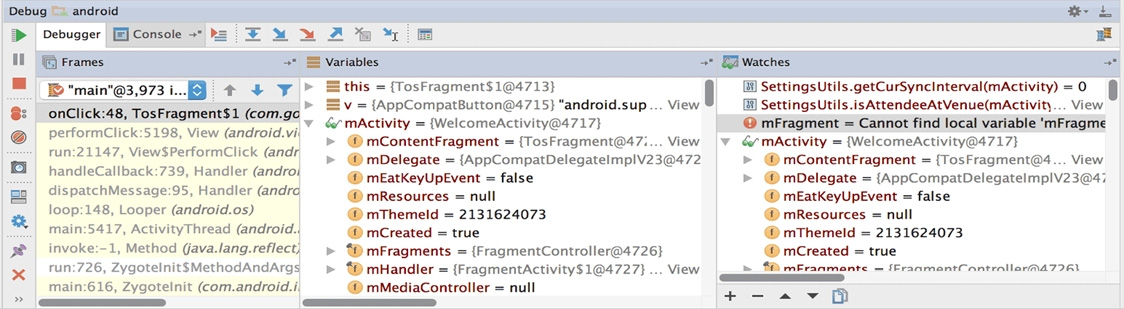 What is illustrated in the picture?
-
A
Logcat window with filter settings
-
B
Debugging native code using LLDB
-
C
The Variables and Watches panes in the Debugger window
-
D
The Breakpoints window lists all the current breakpoints and includes behavior settings for each
-
E
Adding a watchpoint to a variable in memory
Reveal answer details
Close answer details
Question 10
Single choice
What is demonstrated by the code below? // RawDao.kt
@Dao
interface RawDao {
@RawQuery
fun getUserViaQuery(query: SupportSQLiteQuery?): User?
} // Usage of RawDao
...
val query =
SimpleSQLiteQuery("SELECT * FROM User WHERE id = ? LIMIT 1",
arrayOf<Any>(sortBy))
val user = rawDao.getUserViaQuery(query)
...
-
A
A method in a Dao annotated class as a raw query method where you can pass the query as a SupportSQLiteQuery.
-
B
A method in a Dao annotated class as a query method.
-
C
A method in a RoomDatabase class as a query method.
Reveal answer details
Close answer details
Question 11
Single choice
When your code execution reaches the breakpoint, Android Studio pauses execution of your app. You can  then use the tools in the Debugger tab to identify the state of the app. With Evaluate Expression you can
-
A
examine the object tree for a variable; expand it in the Variables view
-
B
evaluate an expression at the current execution point
-
C
advance to the next line in the code (without entering a method)
-
D
advance to the first line inside a method call
-
E
advance to the next line outside the current method
-
F
continue running the app normally
Reveal answer details
Close answer details
Question 12
Single choice
Which build options in the Build menu to choose to delete all intermediate/cached build files.
-
A
-
B
Generate Signed Bundle / APK
-
C
-
D
-
E
Reveal answer details
Close answer details
Correct answerD
ExplanationReferences:
https://developer.android.com/studio/run
Question 13
Single choice
Filter logcat messages. If in the filter menu, a filter option "Edit Filter Configuration"? means:
-
A
Display the messages produced by the app code only (the default). Logcat filters the log messages using the PID of the active app.
-
B
Apply no filters. Logcat displays all log messages from the device, regardless of which process you selected.
-
C
Create or modify a custom filter. For example, you could create a filter to view log messages from two apps at the same time.
Reveal answer details
Close answer details
Question 14
Single choice
To create a basic JUnit 4 test class, create a class that contains one or more test methods. A test method begins with the specific annotation and contains the code to exercise and verify a single functionality in the component that you want to test. What is the annotation?
-
A
-
B
-
C
-
D
Reveal answer details
Close answer details
Question 15
Single choice
"workManager" is an instance of WorkManager. Select correct demonstration of WorkRequest cancellation:
-
A
workManager.enqueue(new OneTimeWorkRequest.Builder(FooWorker.class).build ());
-
B
WorkRequest request = new OneTimeWorkRequest.Builder(FooWorker.class).build ();
workManager.enqueue(request);
LiveData<WorkInfo> status = workManager.getWorkInfoByIdLiveData
(request.getId());
status.observe(...);
-
C
WorkRequest request = new OneTimeWorkRequest.Builder(FooWorker.class).build ();
workManager.enqueue(request);
workManager.cancelWorkById(request.getId());
-
D
WorkRequest request1 = new OneTimeWorkRequest.Builder(FooWorker.class).build ();
WorkRequest request2 = new OneTimeWorkRequest.Builder
(BarWorker.class).build();
WorkRequest request3 = new OneTimeWorkRequest.Builder
(BazWorker.class).build();
workManager.beginWith(request1, request2).then(request3).enqueue();
-
E
WorkRequest request = new OneTimeWorkRequest.Builder(FooWorker.class).build ();
workManager.enqueue(request);
workManager.cancelWork(request);
Reveal answer details
Close answer details
Correct answerC
ExplanationExplanation:
Videos:
1. Working with WorkManager, from the 2018 Android Dev Summit 2. WorkManager: Beyond the basics, from the 2019 Android Dev Summit References:
https://developer.android.com/reference/androidx/work/WorkManager?hl=en
Question 16
Single choice
About running a debuggable build variant. Usually, you can just select the default "debug" variant that's included in every Android Studio project (even though it's not visible in the build.gradle file). But if you define new build types that should be debuggable, you must add 'debuggable true' to the build type.
Is that mostly true?
-
A
-
B
No, if you define new build types that should be debuggable, you must add 'debuggable false'
-
C
No, the debug variant should be visible in the build.gradle file anyway.
Reveal answer details
Close answer details
Question 17
Multiple choice
What statements about InputStreamReader (java.io.InputStreamReader) are correct? (Choose two.)
-
A
An InputStreamReader is a bridge from byte streams to character streams: It reads bytes and decodes them into characters using a specified charset. The charset that it uses may be specified by name or may be given explicitly, or the platform's default charset may be accepted.
-
B
An InputStreamReader is a bridge from character streams to byte streams: It reads characters using a specified charset and encodes them into bytes. The charset that it uses may be specified by name or may be given explicitly, or the platform's default charset may be accepted.
-
C
Each invocation of one of an InputStreamReader's read() methods may cause one or more bytes to be read from the underlying byte-input stream. To enable the efficient conversion of bytes to characters, more bytes may be read ahead from the underlying stream than are necessary to satisfy the current read operation.
-
D
No any invocation of one of an InputStreamReader's read() methods can cause some bytes to be read from the underlying byte-input stream.
Reveal answer details
Close answer details
Question 18
Single choice
Filter logcat messages. If in the filter menu, a filter option "Show only selected application"? means:
-
A
Display the messages produced by the app code only (the default). Logcat filters the log messages using the PID of the active app.
-
B
Apply no filters. Logcat displays all log messages from the device, regardless of which process you selected.
-
C
Create or modify a custom filter. For example, you could create a filter to view log messages from two apps at the same time.
Reveal answer details
Close answer details
Question 19
Single choice
What do you want from Room when you create a DAO method and annotate it with @Delete? Example: @Dao
public interface MyDao {
@Delete
public void deleteUsers(User... users);
}
-
A
Room generates an implementation that inserts all parameters into the database in a single transaction.
-
B
Room modifies a set of entities, given as parameters, in the database. It uses a query that matches against the primary key of each entity.
-
C
Room removes a set of entities, given as parameters, from the database. It uses the primary keys to find the entities to delete.
Reveal answer details
Close answer details
Question 20
Single choice
Select correct demonstration of WorkRequest cancellation.
-
A
workManager.enqueue(OneTimeWorkRequest.Builder(FooWorker::class.java).build ())
-
B
val request: WorkRequest = OneTimeWorkRequest.Builder (FooWorker::class.java).build()
workManager.enqueue(request)
val status = workManager.getWorkInfoByIdLiveData(request.id)
status.observe(...)
-
C
val request: WorkRequest = OneTimeWorkRequest.Builder (FooWorker::class.java).build()
workManager.enqueue(request)
workManager.cancelWorkById(request.id)
-
D
val request1: WorkRequest = OneTimeWorkRequest.Builder (FooWorker::class.java).build()
val request2: WorkRequest = OneTimeWorkRequest.Builder
(BarWorker::class.java).build()
val request3: WorkRequest = OneTimeWorkRequest.Builder
(BazWorker::class.java).build()
workManager.beginWith(request1, request2).then(request3).enqueue()
-
E
val request: WorkRequest = OneTimeWorkRequest.Builder (FooWorker::class.java).build()
workManager.enqueue(request)
workManager.cancelWork(request)
Reveal answer details
Close answer details
Correct answerC
ExplanationExplanation:
Videos:
1. Working with WorkManager, from the 2018 Android Dev Summit 2. WorkManager: Beyond the basics, from the 2019 Android Dev Summit References:
https://developer.android.com/reference/androidx/work/WorkManager?hl=en
|