Michael manages the Adobe Marketo Engage instance for his company. In order to ensure that each regional team can view and edit only their own programs, Michael has implemented Workspaces. The team recently hired an intern in the Asia Pacific Japan (APJ) region who will be responsible for cloning and preparing programs for launch, working strictly within the APJ Workspace. Custom Roles have not been set up in their Adobe Marketo Engage instance. What is one step Michael must take in order to limit the intern's access to work strictly to the APJ Workspace?
-
A
Create a Role for the intern that grants permissions only for the APJ Partition.
-
B
Create a Role for the intern that grants permissions only for the APJ Workspace.
-
C
Create a User for the intern that grants access only to the APJ Workspace.
Reveal answer details
Close answer details
Correct answerC
ExplanationTo limit the intern's access to work strictly to the APJ Workspace, Michael must create a User for the intern that grants access only to the APJ Workspace. This can be done by selecting the APJ Workspace from the Workspaces drop-down menu when creating the User. The User will then only be able to view and edit programs and assets within that Workspace.
Bhaskar has implemented a new naming convention that calls for users to include PRODI, PR0D2, PROD3, or MULTI. These are to indicate which product line(s) the program is related to. What is one new benefit Bhaskar will gain by implementing this new naming convention?
-
A
Bhaskar will be able to create a global product-specific scoring program that triggers off Program Status Changes with a Program Name constraint.
-
B
Bhaskar will be able to create product-specific dynamic content.
-
C
Bhaskar will be able to create product-specific nurtures.
Reveal answer details
Close answer details
Correct answerA
ExplanationOne new benefit Bhaskar will gain by implementing this new naming convention is that he will be able to create a global product-specific scoring program that triggers off Program Status Changes with a Program Name constraint. This will help him score leads based on their engagement with different product lines across different programs. For example, he can create a trigger that fires when Program Status is Changed and Program Name contains PROD1, and then add a flow step that increases the score for PROD1 by a certain amount. Creating product-specific dynamic content or nurtures does not require this naming convention.
An Engagement Program has not deployed the next new email even though there are people in the stream and the cadence set correctly. What is one possible reason the email has not been launched?
-
A
The new email has not been activated.
-
B
The stream has not been set as activated.
-
C
All Persons in the stream have exhausted their content.
Reveal answer details
Close answer details
Correct answerA
ExplanationA possible reason the email has not been launched is that the new email has not been activated. An email must be approved and activated before it can be sent out by an Engagement Program. If the email is not activated, it will be skipped by the cast. The stream and the content do not need to be activated for the email to be launched.
Garrin is building a smart campaign with the goal of sending an automated alert to sales when a person fills out a form and clicks a link in an email. He wants the automated email to only be sent out if that person is not unsubscribed and is located in the United States or Canada. To solve for this, Garrin built this smart list: 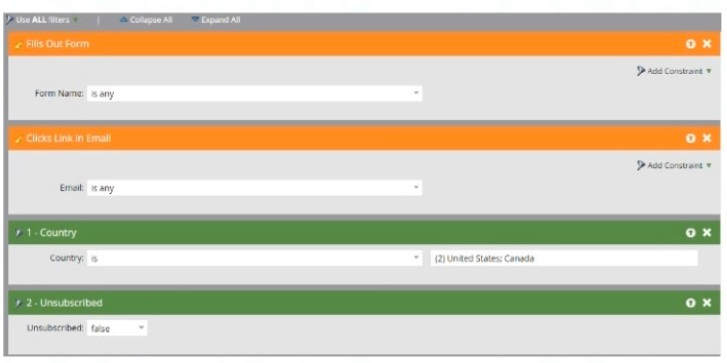 Given the smart list logic, did Garrin set the campaign up correctly to achieve his desired results?
-
A
Yes. The campaign will fire if a person fills out a form and clicks a link in an email.
-
B
No. The campaign will fire If a person fills out a form or clicks a link In an email.
-
C
No. Since the smart list has triggers and filters, it will only apply the trigger criteria.
Reveal answer details
Close answer details
Correct answerB
ExplanationGarrin did not set up the campaign correctly to achieve his desired results. The campaign will fire if a person fills out a form or clicks a link in an email, not both. This is because he used an "or" filter logic for his triggers, which means that any one of them will qualify a person for the campaign. To make sure that a person fills out a form and clicks a link in an email, he should use an "and" filter logic instead
Question 5
Multiple choice
Rishi has identified a particular person that Adobe Marketo Engage consistently and repeatedly excludes from email sends. This issue persists even when the person qualifies for the smart list, even when Rishi marks the email operational, and even when Rishi turns off communication limits. What are two fields on the persons record that have the power to prevent email sends to this extent? (Choose two.)
-
A
-
B
-
C
-
D
Reveal answer details
Close answer details
Correct answersA, D
ExplanationTwo fields on the person's record that have the power to prevent email sends to this extent are Unsubscribed and Email Invalid. Unsubscribed is a field that indicates whether a person has opted out of receiving marketing emails. If this field is set to True, Marketo Engage will not send any non-operational emails to that person. Email Invalid is a field that indicates whether a person's email address is valid or not.
If this field is set to True, Marketo Engage will not send any emails (operational or non-operational) to that person. Marketing Suspended and Email Address do not have the same effect as Unsubscribed and Email Invalid.
Review the flow step from a smart campaign: 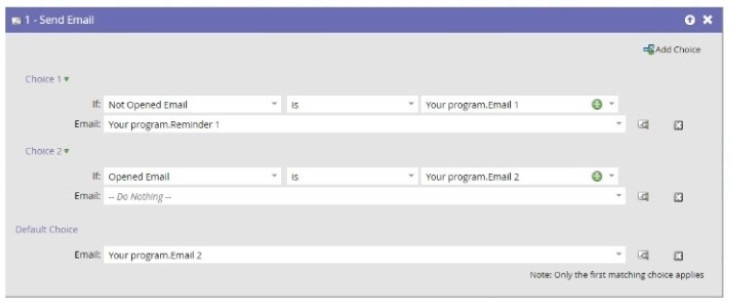 Which email will a person receive who has opened Email 1, but not Email 2?
-
A
They will receive no email.
-
B
They will receive Email 2.
-
C
They will receive Reminder 1.
Reveal answer details
Close answer details
Correct answerB
ExplanationThe person will receive Email 2. This is because the flow step uses the "If Not Opened Email" choice with Email 1 as the constraint. This means that if a person has not opened Email 1, they will receive Email 2. If a person has opened Email 1, they will receive Reminder 1. If a person has opened both Email 1 and Email 2, they will receive no email.
Question 7
Multiple choice
Sally has built a webinar program, which she is due to launch in a few days. She has started to QA (quality
assurance check) the program to ensure that the {{member.webinar url}} token is working correctly. In what two ways can Sally test the confirmation email? (Choose two.)
-
A
Preview the Confirmation Email, send herself a sample, and click on the Join Webinar' CTA on D the Confirmation Email she receives in her mbox.
-
B
View Approved Registration Landing Page, complete the registration form, and click on the 'Join Webinar' CTA on the Confirmation Email she receives in her Inbox.
-
C
Preview the Confirmation Email and view by 'Person', send herself a sample, and click on the 'Join Webinar' CTA on the Confirmation Email she receives in her Inbox.
-
D
Click the Register Now' CTA on the invite email, complete the registration form, and click eft the Join Webinar' CTA on the Confirmation Email she receives in her inbox.
Reveal answer details
Close answer details
Correct answersB, D
ExplanationTwo ways that Sally can test the confirmation email are to view the approved registration landing page, complete the registration form, and click on the `Join Webinar' CTA on the confirmation email she receives
in her inbox and to click the `Register Now' CTA on the invite email, complete the registration form, and click on the `Join Webinar' CTA on the confirmation email she receives in her inbox. These methods will
allow Sally to test the confirmation email as a real person who registers for the webinar and verify that the {{member.webinar url}} token is working correctly. Previewing the confirmation email or sending herself a sample will not show the actual webinar URL for the token, as it depends on the person's membership in the webinar program.
A marketer would like lo set an interesting moment once per day if a person has visited any web page that day, and they would like for the interesting moment to show which page each person has visited. They have set their Smart Campaign up as follows:  Their interesting moments however did not show the web page each person had visited. Why not?
-
A
A trigger token cannot successfully be used within a batch smart campaign
-
B
A different Smart Campaign must be used for each web page to accomplish this.
-
C
It Is not possible to customize what is shown in an Interesting Moment view.
Reveal answer details
Close answer details
Correct answerA
ExplanationA trigger token cannot successfully be used within a batch smart campaign. This is because a trigger token references a value that is specific to a trigger event, such as {{trigger.web page}} or {{trigger.email name}}.
A batch smart campaign does not have any trigger events, so the trigger token will not have any value. A different smart campaign must be used for each web page or a custom field must be used to accomplish this. It is possible to customize what is shown in an interesting moment view
|