You just started working as a scrum master in the Engine team. The first thing you do is to analyze the Velocity Chart of the team's scrumboard as shown 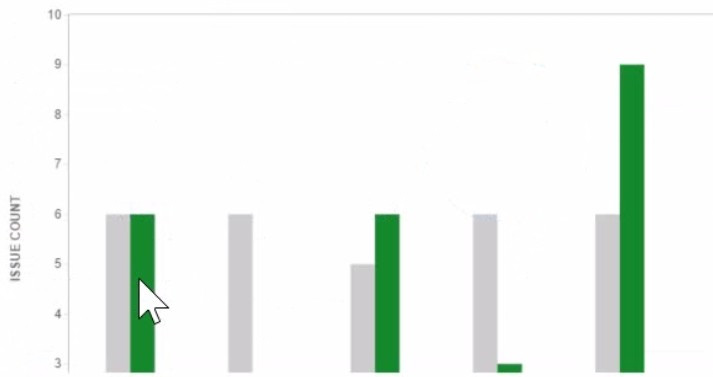
-
A
Issues not completed in Combo Sprint 3 were completed in Combo Sprint 4.
-
B
Combo Sprint 1 has been deleted after it was completed.
-
C
There was a scope change during Combo Sprint 4.
-
D
The team only completed 2 out of 6 Story Points in Combo Sprint 3.
-
E
All issues in Combo Sprint 3 were estimated before the sprint was started.
Reveal answer details
Close answer details
Correct answerC
ExplanationThe Velocity Chart shows the amount of work completed by a team in each sprint. The green area represents the completed work, and the gray area represents the estimated work. The difference between the green and gray areas indicates a scope change, which means that issues were added or removed from the sprint after it started. In Combo Sprint 4, we can see that the green area is larger than the gray area, which means that more work was completed than estimated. This implies that some issues were added to the sprint after it started, or that some issues were re-estimated with higher values. Therefore, option C is correct.
References:
Velocity Chart, Managing Jira Projects Data Center and Server: Certification Bundle
Question 2
Multiple choice
You want to update a workflow that is not shared. You are a project administrator and "Extended project administration" is enabled. Which two actions can you complete? (Choose two.)
-
A
Add a field to a transition screen.
-
B
Add a condition to limit who can approve issues,
-
C
Add new transitions to the workflow.
-
D
Delete transitions from the workflow.
-
E
Delete the Review status from Jira
Reveal answer details
Close answer details
The team requests that you update the name of your project. What impact will this have on Jira?
-
A
The URL for issues will change.
-
B
The project key will change.
-
C
Issue filters may need to be updated.
-
D
Issue search will not find issues from that project until Jira is re indexed.
Reveal answer details
Close answer details
Correct answerC
ExplanationUpdating the name of your project will not affect the URL for issues, as they are based on the project key, not the name. The project key will also remain unchanged unless you explicitly change it. Issue search will still find issues from that project regardless of the name change. However, issue filters may need to be updated if they use the project name as a criterion. Therefore, the correct answer is C.
References:
Editing a project's details, Changing the project key, Searching for issues using filters
The `'Open issuesfilter of your project shows bugs, along with epics and stones. You then view the project's Scrum board where you only see epics and stories but not bugs. Which configuration is responsible for this behavior?
-
A
-
B
-
C
-
D
-
E
Reveal answer details
Close answer details
You manage a Scrum project with two development teams. Issues are associated with each team using a custom field called Jean. Parallel sprints have been disabled. Which setup will provide each team with an individual Burndown Chart?
-
A
a single Scrum board with quick filters
-
B
a single Scrum board using the Team field as the Estimation Statistic
-
C
two Scrum boards using the Team field as the Estimation Statistic
-
D
two Scrum boards using the Team field in their board filters
Reveal answer details
Close answer details
Correct answerD
ExplanationIf you manage a Scrum project with two development teams and want to provide each team with an individual Burndown Chart, you can create two Scrum boards using the Team field in their board filters. A Burndown Chart is a report that shows the amount of work remaining in a sprint, based on the issues that are included in the board filter. By using the Team field in the board filter, you can ensure that each board only shows the issues that belong to a specific team, and thus generate a separate Burndown Chart for each team. The other options will either show a combined Burndown Chart for both teams or not use the Team field at all. Therefore, the correct answer is D.
References:
[Creating a board], [Configuring filters], [Viewing the Burndown Chart]
The team wants to flag issues using a category. Their requirements are: 1. more than one category value can be selected on an issue
2. new category values can be added by any user
3. category values can be selected via a dropdown menu
4. category values can be re-used across all projects Which field meets their requirements?
-
A
-
B
-
C
-
D
-
E
Reveal answer details
Close answer details
Correct answerD
ExplanationThe label field meets the team's requirements for flagging issues using a category. Labels are a type of custom field that allow users to add one or more descriptive tags to issues. Users can add new labels on the fly, and select existing labels from a dropdown menu. Labels can be re-used across all projects, and can be searched and filtered easily. A text field does not allow multiple values or a dropdown menu. A component does not allow multiple values or adding new values by any user. A user picker does not allow multiple values or adding new values byany user. Checkboxes do not allow adding new values by any user.
References:
[Adding, removing and searching for labels], [Managing Jira Projects Data Center and Server: Certification Bundle]
Jon notices that an issue was created incorrectly in project A. He needs to move it to project B. Which permissions are required to complete that move?
-
A
Move Issues. Transition Issues
-
B
Administer Projects. Assign Issues
-
C
Move Issues, Create Issues
-
D
Administer Projects, Create Issues
Reveal answer details
Close answer details
Correct answerC
ExplanationJon needs Move Issues and Create Issues permissions to move an issue from project A to project B. Move Issues permission allows him to initiate the move operation, while Create Issues permission allows him to create the issue in the destination project. Transition Issues permission is not relevant for moving issues, as it only affects workflow transitions. Administer Projects permission is not required for moving issues, unless the issue type or workflow needs to be changed during the move. Assign Issues permission is not required for moving issues, unless the assignee needs to be changed during the move.
References:
[Moving an issue], [Managing Jira Projects Data Center and Server: Certification Bundle]
All stories in your project are linked to epics within the same project. Using a bulk operation, you moved some stories to another project. What happens to the epics?
-
A
Epics and epic links are moved automatically.
-
B
Epics and epic links are unaffected
-
C
Epics are moved automatically but epic links are lost
-
D
Epics are unaffected but epic links are lost.
Reveal answer details
Close answer details
Correct answerC
ExplanationEpics are moved automatically but epic links are lost when stories are moved to another project using a bulk operation. This is because epics are a type of issue, and issues can be moved across projects.
However, epic links are a type of issue link, and issue links cannot be moved across projects. Therefore, the stories will lose their epic links after the move, and the epics will remain in the original project.
References:
[Moving multiple issues], [Managing Jira Projects Data Center and Server: Certification
Bundle]
A Scrum project has the following five configured versions: 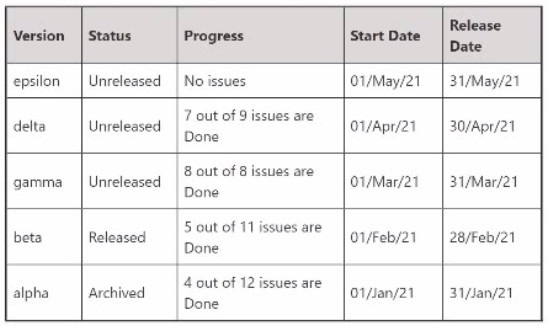 Howmany of them will be available in the versions panel of the project backlog?
-
A
-
B
-
C
-
D
-
E
Reveal answer details
Close answer details
Correct answerE
ExplanationThree versions will be available in the versions panel of the project backlog: epsilon, delta, and gamma. These are the three unreleased versions in the project, as shown in the image.
The versions panel only shows unreleased versions, as they are used to plan and track the progress of upcoming releases. Released and archived versions are not shown in the versions panel, as they are considered completed and no longer relevant for planning purposes.
References:
[Working with versions], [Managing Jira Projects Data Center and Server: Certification Bundle]
Question 10
Single choice
You are reviewing the Velocity Chart for your team and notice that they completed more story points than they committed in their last sprint. You are definitely the only person who can add issues to sprints in your project. How did your learn complete more story points than they committed?
-
A
The sprint was completed early.
-
B
An epic with a story point estimate was completed during the sprint.
-
C
Someone increased the story point value on an issue mid-sprint.
-
D
A sub-task was in an unmapped status at the start of the sprint.
-
E
A new sub-task was created drying the sprint
Reveal answer details
Close answer details
Correct answerC
ExplanationThe reason why your team completed more story points than they committed in their last sprint is that someone increased the story point value on an issue mid-sprint. This will increase the total story points completed at the end of the sprint, but not affect the total story points committed at the start of the sprint.
Therefore, it will result in a positive scope change. The other reasons mentioned in the question do not explain why your team completed more story points than they committed, as they either do not affect story points at all, or affect both committed and completed story points equally.
References:
Viewing the Velocity Chart, Scope change
Question 11
Multiple choice
You are a project administrator of DEV.Omar is a Jira administrator. Identify two project settings that Omar can update in DEV but you cannot. (Choose two.)
-
A
-
B
-
C
-
D
-
E
-
F
Reveal answer details
Close answer details
Correct answersA, C
ExplanationAs a project administrator of DEV, you can update some project settings such as project shortcuts, description, name, and versions. However, you cannot update the notification scheme or the key of the project, as these are global settings that require Jira administratorpermissions. Therefore, the correct answer is A and C.
References:
Managing project permissions, Managing project notifications, Changing the project key
Question 12
Single choice
Development team A is consistently overestimating the work they can complete per sprint. They want to be able to compare work committed and work completed in sprints over time. Which single report provides this information?
-
A
-
B
-
C
-
D
Created vs Resolved Issues Report
-
E
Reveal answer details
Close answer details
Correct answerE
ExplanationThe Velocity Chart is the best report to compare work committed and work completed in sprints over time.
It shows the average amount of work that a team can complete in a sprint, based on the historical data of previous sprints. It also shows how much work was planned and how much was actually completed in each sprint. By looking at the Velocity Chart, a team can see if they are overestimating or underestimating their capacity, and adjust their planning accordingly. Therefore, option E is correct.
References:
Velocity Chart, Managing Jira Projects Data Center and Server: Certification Bundle
|