Your billing preview appears as shown. 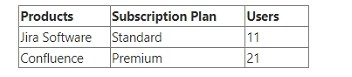 In order to keep your license count in control, you just removed a user who had access to both products. What will happen to your subscriptions immediately afterward?
-
A
The subscriptions will remain the same.
-
B
Confluence will be downgraded to a Standard plan.
-
C
Confluence will begin a Standard plan trial period.
-
D
Jira Software will be downgraded to a Free plan.
-
E
Jira Software will begin a Free plan trial period.
Reveal answer details
Close answer details
Correct answerA
ExplanationRemoving a user from an Atlassian Cloud Organization does not affect the subscription plan for the products. The subscription plan remains the same until you change it manually or it expires. The billing preview shows the estimated cost for the next billing cycle based on the current number of users and the subscription plan. If you remove a user, the billing preview will reflect the reduced cost, but the subscription plan will not change12 References = Manage product access, Manage your bill for Standard and Premium plans
Martha needs to be able to use and update global templates and blueprints. Which product access configuration is correct for Martha? 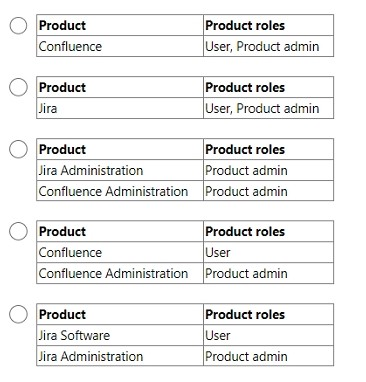
-
A
-
B
-
C
-
D
-
E
Reveal answer details
Close answer details
Correct answerD
ExplanationMartha needs to be able to use and update global templates and blueprints. The correct product access configuration for Martha is Confluence Administration with Product admin role. This role allows her to manage global templates and blueprints, as well as other site-wide settings for Confluence. She also needs the User role for Confluence to access and edit pages.
References:
Manage product access, Administer global templates
You just approved an access request for Ann to access Jira Software. She logged in and can access one project. Identify one other access request you might see for Ann on the Access Requests page.
-
A
-
B
access to be an org admin
-
C
access to another project
-
D
access to be a Jira admin
-
E
access to another product
Reveal answer details
Close answer details
Correct answerE
ExplanationOne other access request you might see for Ann on the Access Requests page is access to another product. This could happen if Ann tries to access a product that she does not have access to, such as Confluence or Jira Service Management. She would see a message prompting her to request access, and you would see her request on the Access Requests page. You can approve or deny her request from there1 References = Approve or deny product access requests
Victor performed the following task. He revoked a global permission that allows users to create personal spaces, by removing all the groups from that permission. What admin privileges does Victor definitely have?
-
A
-
B
Product admin role for Confluence
-
C
-
D
Product admin role for Jira Administration
-
E
Reveal answer details
Close answer details
The following tasks need to be performed: 1. Verify an email domain 2. Configure an email handler in Jira Software 3. Add a custom email address. 4. Customize a notification scheme for a Jira Software project 5. Manage personal notification settings How many of these tasks can be performed only by an org admin?
-
A
-
B
-
C
-
D
-
E
Reveal answer details
Close answer details
Correct answerC
ExplanationOut of the five tasks, only verifying an email domain and adding a custom email address require org admin permissions. Configuring an email handler, customizing a notification scheme, and managing personal notification settings can be done by project admins or site admins.
References:
Verify a domain to manage accounts, Add custom email addresses for product notifications,
Create issues and comments from email, Configure notification schemes, Manage your Jira personal settings
Your Cloud organization has the following: . 2 production instances of Jira Software . 2 production instances of Confluence. What else does your organization definitely have?
-
A
-
B
at least 1 verified domain
-
C
exactly 4 landing products
-
D
at least 1 Premium subscription plan
-
E
Reveal answer details
Close answer details
Correct answerA
ExplanationAn Atlassian Cloud organization can have one or more sites, each containing one instance of each product 1. A site has its own URL and administration settings 2. Since your organization has two instances of Jira Software and two instances of Confluence, it must have at least two sites to host them. For example, one site could have the URL acme.atlassian.net and contain Jira Software and Confluence, while another site could have the URL acme-dev.atlassian.net and contain another instance of Jira Software and Confluence.
The other options are not necessarily true for your organization. Having multiple sites does not imply that you have verified your domain, which is a process that allows you to manage the Atlassian accounts of your users and apply security policies to them 3. You may or may not have verified your domain, depending on whether you have access to your domain's DNS or HTTPS settings. Verifying your domain is not required to use Atlassian cloud products.
A landing product is the product that your users see first when they log in to your site 4. You can only set the landing product to Jira or Confluence. Therefore, you cannot have exactly four landing products, as you can only have one landing product per site. You may have two landing products if you set one for each site, or you may have none if you do not set any.
A Premium subscription plan is a plan that offers advanced features, unlimited storage, 99.9% uptime SLA, and 24/7 Premium support for Jira Software, Confluence, Jira Service Management, and Jira Work Management5. You may or may not have a Premium subscription plan for your products, depending on your needs and budget. Having multiple sites or products does not automatically mean that you have a Premium subscription plan. A sandbox is an isolated environment where you can test and experiment before making changes to production 6. A sandbox is available for Jira Software, Jira Service Management, and Confluence with Premium and Enterprise plans 6. You may or may not have sandboxes for your products, depending on whether you have a Premium or Enterpriseplan and whether you have created a sandbox from your organization. Having multiple sites or products does not automatically mean that you have sandboxes.
References:
Understand Atlassian sites and organizations.
What is an Atlassian organization?
Verify a domain to manage accounts
Set your site's landing product
Atlassian Cloud Premium
Manage product sandboxes
You received the access request shown below. 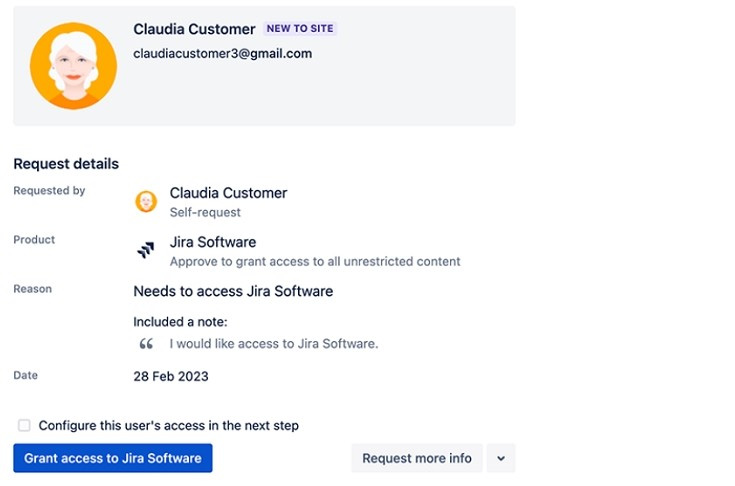 You clicked "Grant access to Jira Software". Which statement is definitely true?
-
A
Claudia is added to multiple product access groups.
-
B
Claudia is granted the User role for Jira Software.
-
C
Claudia is added to only one default group.
-
D
Claudia is granted access to Jira Software only.
-
E
Claudia is not granted any Product Admin roles.
Reveal answer details
Close answer details
Correct answerD
ExplanationWhen you click "Grant access to Jira Software" in the access request, the user is granted access to Jira Software only. They are not added to multiple product access groups, granted the User role for Jira Software, added to only one default group, or granted any Product Admin roles.
References:
Manage product access, [Manage users and groups]
You are looking at the Jira Service Management product page on the "beta" site. On this page, product access to Jira Service Management is granted to three groups, as shown.  Which action can the org admin perform on this page?
-
A
Update "jira-servicemanagement-users-beta" so it is not a default group.
-
B
Remove "hr-managers" from the product.
-
C
Remove "jira-servicemanagement-users-beta" from the product.
-
D
Make "site-admins" a default group.
-
E
Delete "hr-managers" group.
Reveal answer details
Close answer details
Correct answerC
ExplanationThe org admin can remove a group from a product, but they cannot update or delete a group, or make a group a default group.
References:
How to prepare for ACP-520 Atlassian Cloud Organization Admin Learn about Atlassian organizations
Your site currently only has Confluence and product access is granted to these 3 groups, among others: . confluence-users . confluence-admins . site-admins You have just added the Jira Software product to the site and are configuring its product access. Which action is NOT possible?
-
A
Grant "site-admins" the Product admin role for Jira Administration.
-
B
Make "site-admins" a default group for Jira Software.
-
C
Grant "confluence-admins" the Product admin role for Jira Administration.
-
D
Make "confluence-admins" a default group for Jira Software.
-
E
Make "confluence-users" a default group for Jira Software.
Reveal answer details
Close answer details
Correct answerC
ExplanationThe Product admin role for Jira Administration is only available for groups that have access to Jira Software1. The "confluence-admins" group does not have access to Jira Software by default, so you cannot grant them this role. You can only grant this role to groups that have the Jira Software User role or the Jira Software Admin role 2.
References:
Manage groups
Manage product roles
Question 10
Single choice
Your products appear as shown. 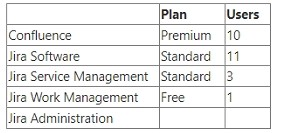 You have a sandbox for Confluence. How many additional sandboxes does your organization have?
-
A
-
B
-
C
-
D
-
E
Reveal answer details
Close answer details
Correct answerA
ExplanationCurrently, you can only create one sandbox for each linked product 1. Since you have only two products (Jira Software and Confluence), and you already have a sandbox for Confluence, you cannot create any more sandboxes for your organization.
References:
Manage product sandboxes
|