Using a View, you pull a report on different employee transactions. You receive the following error: "a!queryEntity: An error occurred while retrieving the data."
What is the most likely root cause?
(Choose the best answer.)
-
A
The view contains a large number of rows, requiring more time to fetch the data.
-
B
The view doesn't have a column mapped as a Primary Key in its corresponding CDT.
-
C
The required inputs were not provided.
-
D
The rule contains a missing syntax.
Reveal answer details
Close answer details
Correct answerA
ExplanationThe most likely root cause of the error is that the view contains a large number of rows, requiring more time to fetch the data. This can result in a timeout or an out-of-memory error. To avoid this, you can use pagination or filters to limit the number of rows returned by the view. You can also optimize the view performance by using indexes, avoiding unnecessary joins, and reducing the number of columns.
References:
[Views], [View Performance]
Question 2
Multiple choice
You are troubleshooting a process model instance with an error in a node. Which two options will allow you to obtain more information about the error? (Choose two.)
-
A
Open the process model from the process instance.
-
B
View the Process Details dialog.
-
C
View the process model properties.
-
D
View the properties dialog of the affected node.
Reveal answer details
Close answer details
Correct answersB, D
ExplanationWhen troubleshooting a process model instance with an error in a node, two options that can provide more information about the error are to view the Process Details dialog and to view the properties dialog of the affected node. The Process Details dialog shows the status, history, and variables of the process instance, as well as any errors or warnings that occurred during the execution. The properties dialog of the affected node shows the configuration, inputs, outputs, and expressions of the node, as well as any errors or warnings that occurred during the evaluation. These options can help to identify the cause and location of the error, and to apply any necessary fixes. Therefore, the correct answers are B and D.
References:
[Process Details Dialog]
[Properties Dialog]
Question 3
Multiple choice
Which two practices are strongly discouraged for activity chaining? (Choose two.)
-
A
Less than or equal to 5 seconds between attended activities.
-
B
More than 50 node instances
-
C
More than 5 seconds between attended activities
-
D
Less than or equal to 50 node instances
Reveal answer details
Close answer details
Correct answersB, C
ExplanationActivity chaining is a feature that allows users to complete multiple tasks in a row without returning to their task list. However, activity chaining can also have some drawbacks, such as increased memory consumption, longer transaction times, and reduced user feedback. Therefore, some practices are strongly discouraged for activity chaining, such as having more than 50 node instances or more than 5 seconds between attended activities. These practices can cause performance issues, user frustration, or process failures. Therefore, the correct answers are B and C.
References:
Activity Chaining
Performance Best Practices
Question 4
Multiple choice
You are on a project where the goal is to use Appian Sites to create and edit invoices issued to customers. This process model is being used as a related action, to edit an Invoice. You have already created a record for invoices. Review the following image: 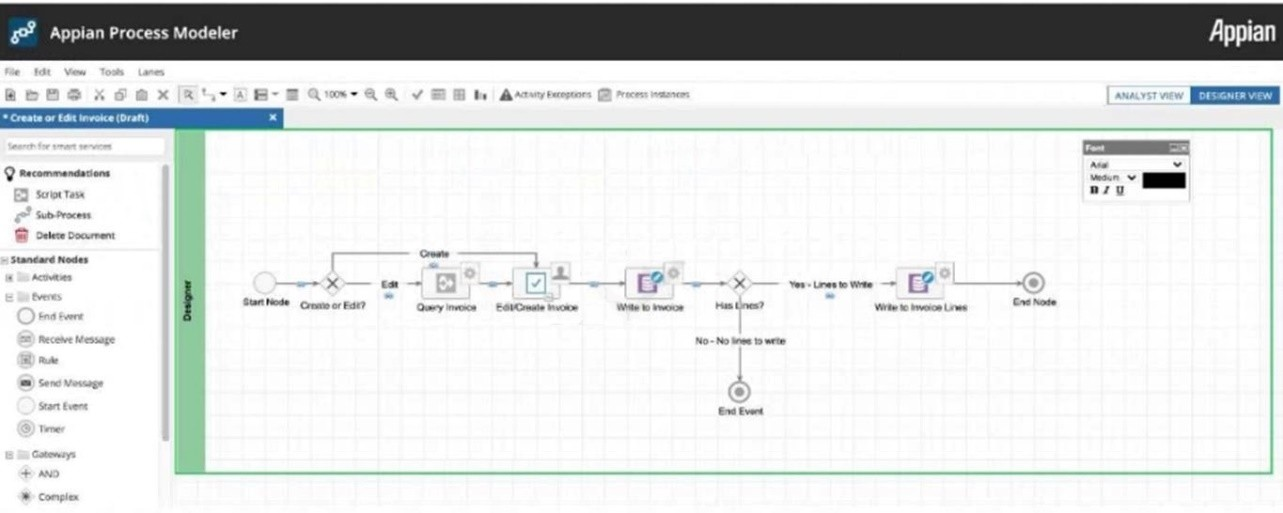 Which two suggestions regarding this process are valid? (Choose two.)
-
A
We should consider adding a timer exception which skips the "Edit/Credit Invoice" node after 24 hours.
-
B
We should add this process model as a related action on the Invoices record called "Edit Invoice."
-
C
We should add two pages to the site, one of which is a Record List of Invoices, and the other which has this process model as a Report.
-
D
To improve performance, we should consider removing activity chaining from all flows.
Reveal answer details
Close answer details
Correct answersA, B
ExplanationTwo valid suggestions regarding this process are: We should consider adding a timer exception which skips the "Edit/Credit Invoice" node after 24 hours.
This suggestion would improve the user experience by preventing users from editing or crediting an invoice that is too old or has been already processed by another system. A timer exception can be added to any activity node to specify a deadline for completing the task. If the deadline is reached, the process flow will follow the exception path instead of the normal path. We should add this process model as a related action on the Invoices record called "Edit Invoice." This suggestion would make it easier for users to access and execute this process from the context of a specific invoice record. A related action is a process model that can be initiated from a record or a record list in Tempo or sites. A related action can use record data as inputs and update record data as outputs.
References:
Timer Exception, Create Record
Actions
A user is uploading a document in the Appian environment and wants to restrict the uploading of documents without extensions. How can this be done at the environment level?
-
A
Enable File Upload > Block files without an extension, under Administration Console.
-
B
Document can be uploaded but cannot be restricted.
-
C
Configure Validation rules wherever required.
-
D
No actions are required from the developer; Appian auto-validates these documents.
Reveal answer details
Close answer details
Correct answerA
ExplanationThe best way to restrict the uploading of documents without extensions at the environment level is to enable the File Upload > Block files without an extension option under the Administration Console. This
option will prevent users from uploading files that do not have a valid file extension, such as .docx, .pdf, or .png. This can help to avoid security risks and compatibility issues with unsupported file types. Therefore, the correct answer is A.
References:
[File Upload Settings]
[File Extensions]
You want to display a Gender dropdown, and its choice label may change in the future as per the business requirement. Given transactional database tables rely on this data for reporting, what is the most appropriate action? (Choose the best answer.)
-
A
Create a constant and update it as per the business requirement.
-
B
Create a stored procedure and update it as per the business requirement.
-
C
Create an expression rule and update it as per the business requirement.
-
D
Create these entries in a table and reference them through a query entity rule as per the business requirement.
Reveal answer details
Close answer details
Correct answerD
ExplanationThe most appropriate action to display a Gender dropdown whose choice label may change in the future as per the business requirement is to create these entries in a table and reference them through a query entity rule as per the business requirement. This is because storing the choice labels in a table allows for easy maintenance and modification of the data without affecting the transactional database tables that rely on this data for reporting. Using a query entity rule allows for retrieving the data from the table and populating the dropdown component dynamically and consistently across different interfaces or processes that use this data.
References:
Dropdown Component, Query Entity Rule, Data Management
More than one user is editing the same record in database. With XSD, how do you avoid the collision of data from Application? (Choose the best answer.)
-
A
-
B
-
C
-
D
Reveal answer details
Close answer details
Correct answerA
ExplanationThe @Version annotation is used to avoid the collision of data from an application when more than one user is editing the same record in a database. The @Version annotation enables optimistic locking, which is a mechanism to detect and prevent concurrent updates on the same record. Optimistic locking assumes that multiple transactions can complete without affecting each other, and that therefore transactions do not need to lock data resources until they are ready to commit. However, if a transaction tries to commit changes to a record that has been modified by another transaction since it was last read, an OptimisticLockException is thrown and the transaction is rolled back. The @Version annotation can be applied to a field or property of a CDT that stores a numeric value. This value is used as a version number that is automatically incremented by Appian every time the record is updated.
References:
Does Appian support @Version JPA Annotation?, JPA - Optimistic Locking and Use of @Version annotation
You are tasked with configuring a process model to store the result of an expression rule for every item in a list. Which process model design has the lowest memory footprint?
-
A
Run MNI over a script task for each item in the list.
-
B
Call a sub-process for each item in the list.
-
C
Configure a script task to use a!foreach to iterate over each item in the list.
-
D
Create a loop of smart service nodes in the process model and execute it for each item in the list.
Reveal answer details
Close answer details
Correct answerC
ExplanationThe question is about designing a process model to store the result of an expression rule for every item in a list with the lowest memory footprint. The best design for this purpose is to configure a script task to use a!foreach to iterate over each item in the list, as it allows you to execute an expression rule for each element of an array without creating multiple nodes or subprocesses in the process model. A script task is a node that executes an expression without user interaction, and a!foreach is a function that applies an expression to each element of an array and returns an array of results. The other options are not optimal for this purpose, as they either create more nodes or subprocesses in the process model, which consume more memory and resources.
References:
Script Task a!foreach()
You need to show joined data from 5 tables. Each table contains a large number of rows and could generate a large result set after executing the Joins. The business is not expecting live data, and a 2-hour refresh is acceptable. Performance is a top priority. What should you use? (Choose the best answer.)
-
A
-
B
-
C
-
D
Reveal answer details
Close answer details
Correct answerD
ExplanationA materialized view is the best option to show joined data from 5 tables that contain a large number of rows and could generate a large result set after executing the joins. A materialized view is a physical table that holds the results of the SQL that a view would normally be constructed from and can be generated periodically. A materialized view can improve performance by reducing the execution time of complex queries that involve multiple joins, aggregations, or calculations. A materialized view can also reduce the load on the database server by storing the query results in advance. A materialized view can be refreshed at regular intervals or on demand to reflect the changes in the underlying tables.
References:
[Materialized Views], [View Performance]
Question 10
Single choice
You are reviewing process model metrics and looking at AMUs to evaluate a process's memory usage. Which statement is correct regarding this metric?
-
A
Memory usage is considered low when it is below 10,000 AMUs.
-
B
Memory usage is considered low when it is below 1,000 AMUs.
-
C
Memory usage is considered low when it is below 100,000 AMUs.
-
D
AMUs is not a good measurement for process memory usage.
Reveal answer details
Close answer details
Correct answerC
ExplanationThe question is about AMUs (Appian Memory Units), which is a metric that measures the memory usage of a process model. The following statement is correct regarding this metric: Memory usage is considered low when it is below 100,000 AMUs. This is based on the Appian recommendation that each process model should use less than 100,000 AMUs on average, as higher memory usage can affect the performance or stability of Appian.
The following statements are not correct regarding this metric: Memory usage is considered low when it is below 10,000 AMUs. This is too low, as most process models will use more than 10,000 AMUs on average, depending on their complexity and data size.
Memory usage is considered low when it is below 1,000 AMUs. This is too low, as even simple process models will use more than 1,000 AMUs on average, depending on their configuration and parameters.
AMUs is not a good measurement for process memory usage. This is not true, as AMUs is a standardized and consistent measurement that reflects the relative memory usage of different process models in Appian.
References:
AMUs (Appian Memory Units)
Question 11
Multiple choice
You have a requirement that can only be achieved by using a plug-in, where more than one plug-in does a similar job. What are three primary considerations in choosing the right plugin? (Choose three.)
-
A
What are the compatible Appian versions?
-
B
Is the plug-in Cloud-approved?
-
C
What are the limitations of the plug-in?
-
D
What is the size of the plug-in?
-
E
Who is the plug-in author?
Reveal answer details
Close answer details
Correct answersA, B, C
ExplanationThe question is about choosing the right plug-in for a requirement that can only be achieved by using a plug-in. The following are three primary considerations in choosing the right plug-in: What are the compatible Appian versions? This is important because some plug-ins may not work with older or newer versions of Appian due to changes in APIs or features. You should check the plug-in documentation or release notes to see which Appian versions are supported by the plug-in. Is the plug-in Cloud-approved? This is important because some plug-ins may not be allowed in Appian Cloud environments due to security or performance reasons. You should check the Appian Cloud Approved Plug-ins list to see which plug-ins are approved for use in Appian Cloud.
What are the limitations of the plug-in? This is important because some plug-ins may have known issues or limitations that could affect your requirement or use case. You should check the plug-in documentation or forums to see if there are any reported bugs or limitations for the plug-in. The following are not primary considerations in choosing the right plug-in: What is the size of the plug-in? This is not a major factor, as plug-ins are usually small in size and do not affect the performance or storage of Appian significantly. However, you should still follow the best practices for managing plug-ins and avoid installing unnecessary or unused plug-ins.
Who is the plug-in author? This is not a decisive factor, as plug-ins can be authored by Appian, third-party vendors, or community members. However, you should still consider the reputation and reliability of the plug-in author and check their support and update policies.
References:
Plug-ins
Appian Cloud Approved Plug-ins
Question 12
Single choice
In Scrum, who is the right person responsible for prioritizing product backlog? (Choose the best answer.)
-
A
-
B
-
C
-
D
Reveal answer details
Close answer details
Correct answerB
ExplanationIn Scrum, the product owner is the person who represents the voice of the customer and the stakeholders.
The product owner is responsible for defining and prioritizing the product backlog, which is a list of features, requirements, enhancements, and fixes that need to be delivered by the team. The product owner collaborates with the team and the scrum master to ensure that the product backlog is clear, valuable, and aligned with the product vision and goals.
|