Preview real exam questions, verified answers and available explanations before choosing a study plan.
Question 1
Hotspot
HOTSPOT
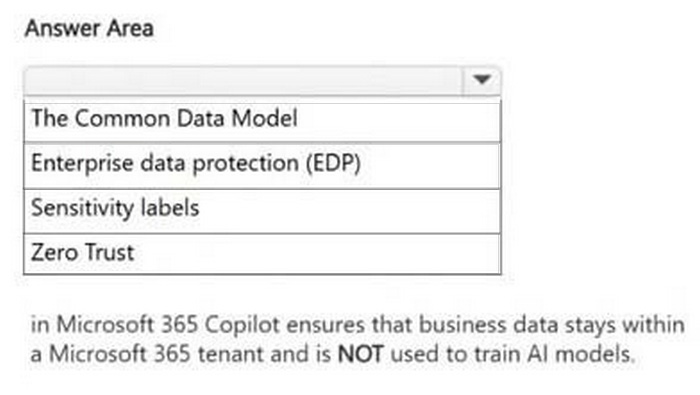
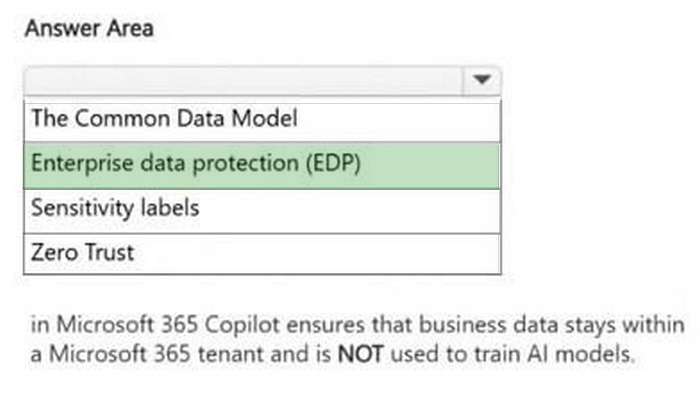
Select the answer that correctly completes the sentence.
Reveal answer detailsClose answer details
Explanation
The selected completion is Enterprise data protection (EDP). EDP is the Microsoft 365 Copilot protection model that keeps business data within the tenant boundary and prevents customer prompts, responses, and work data from being used to train foundation models. Sensitivity labels and Zero Trust are important security concepts, but the sentence specifically describes tenant-contained business data protection and no model training. The exam takeaway is to connect EDP with enterprise-grade privacy, security, and tenant data protection for Copilot.
Question 2
Hotspot
HOTSPOT
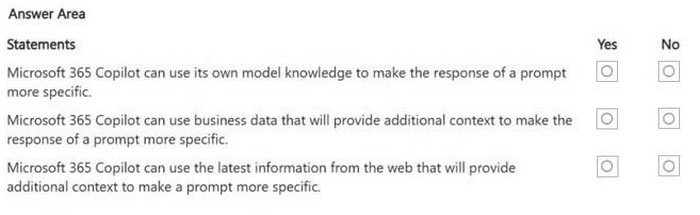
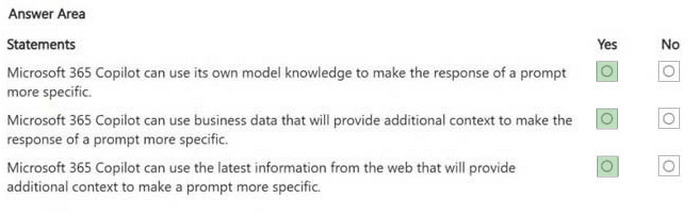
For each of the following statements, select Yes if the statement is true. Otherwise, select No.
NOTE: Each correct selection is worth one point.
Reveal answer detailsClose answer details
Explanation
All three statements are selected as Yes. Copilot can use general model knowledge, accessible business data, and current web information when those sources are available and appropriate for the selected scope. Model knowledge helps with general concepts, work data provides organization-specific grounding, and web grounding can add up-to-date public information. The exam point is that strong Copilot responses can combine multiple grounding sources, but only within the user's permissions and enabled settings.
Question 3
Single choice
You have a Microsoft Excel workbook open that contains a table. The table contains sales data and the following columns:
- OrderDate - OrderNumber - Amount
You plan to use Microsoft Copilot in Excel to generate a monthly summary of the sales data in the table.
What should you include in the prompt to generate an effective summary?
More than one answer choice may achieve the goal. Select the BEST answer.
A
the desired format of the response
B
a specific cell range from the worksheet
C
the file name of the workbook
D
the clear goal of the summary
E
a formula to calculate monthly totals
Reveal answer detailsClose answer details
Correct answerD
Explanation
An effective prompt needs a clear goal so Copilot knows what result to produce from the workbook data. Asking for a monthly sales summary directly communicates the intended analysis, while a file name or cell range alone does not define the desired outcome. A desired format can improve the response, but the best foundational detail is the goal of the summary. Formulas may be useful in Excel, but they are not required when the prompt is asking Copilot to generate the summary.
Question 4
Multiple choice
You need to manage previous Microsoft 365 Copilot Chat conversations.
Which two actions can you perform from the conversation history experience?
Each correct answer presents part of the solution.
NOTE: Each correct selection is worth one point.
A
Continue a previous conversation by selecting it.
B
Change the organization's Conditional Access policy for Copilot.
C
Rename or delete a conversation from its more actions menu.
D
Convert every previous chat into a Teams meeting transcript automatically.
E
Increase another user's file permissions for a referenced SharePoint site.
Reveal answer detailsClose answer details
Correct answersA, C
Explanation
The conversation history experience lets users return to previous Copilot chats and continue them. It also provides management actions such as renaming or deleting a conversation from the more actions menu. Conditional Access policy changes, permission changes, and automatic conversion to Teams meeting transcripts are administrative or unrelated tasks. The history feature is for finding, continuing, renaming, and deleting the user's own conversations.
Question 5
Hotspot
HOTSPOT
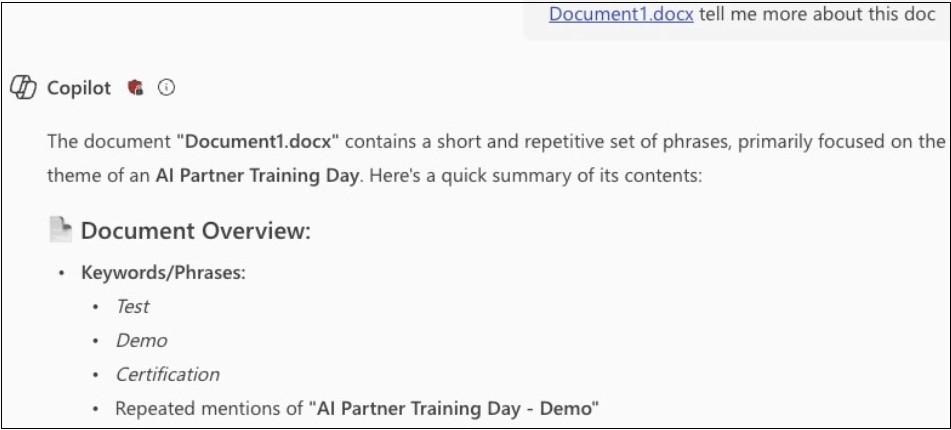
You have a Microsoft 365 Copilot conversation as shown in the following exhibit.
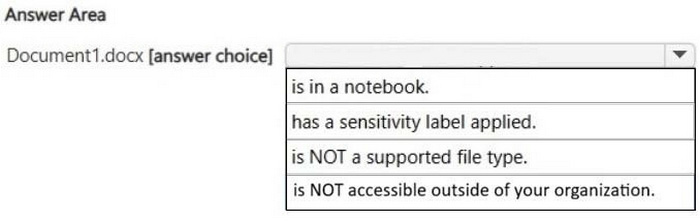
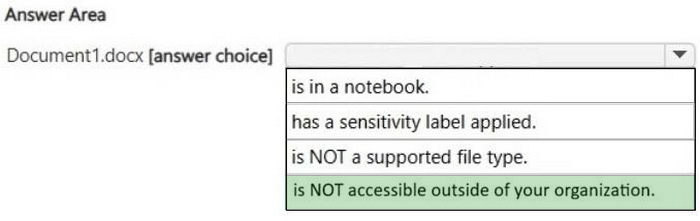
Use the drop-down menus to select the answer choice that completes the statement based on the information presented in the graphic.
Reveal answer detailsClose answer details
Explanation
The selected completion says the document is NOT accessible outside of your organization. The exhibit shows Copilot summarizing Document1.docx, so the file is supported and accessible to the signed-in user in the current organization. The issue being tested is external accessibility, not whether the file is in a notebook or protected by a sensitivity label. A document can be usable by Copilot internally while still not being available to people outside the organization.
Question 6
Hotspot
HOTSPOT
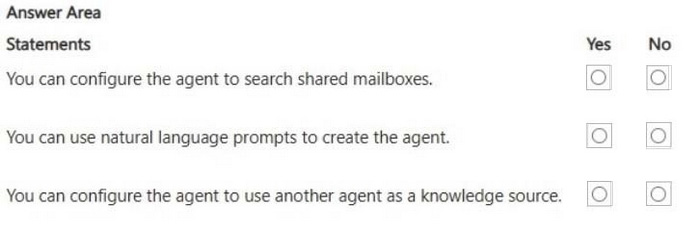
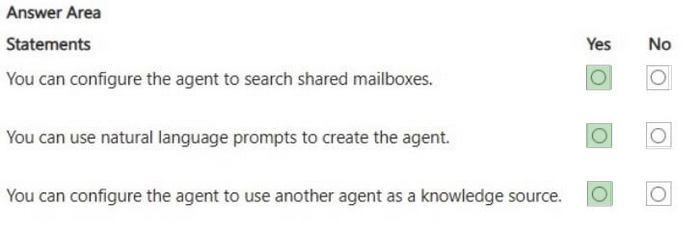
You are creating an agent in the Microsoft 365 Copilot app. For each of the following statements, select Yes if the statement is true. Otherwise, select No.
NOTE: Each correct selection is worth one point.
Reveal answer detailsClose answer details
Explanation
All three statements are selected as Yes. Agent configuration can include mailbox-related sources when the environment and permissions support them, natural-language creation assistance, and other agents or agent outputs as part of a broader agent design. The important point is that Microsoft 365 Copilot agent building is designed around configurable knowledge and capabilities rather than only static manual setup. These options still remain subject to tenant policy, connector availability, and user permissions.
Question 7
Single choice
You have an open Microsoft 365 Copilot conversation.
You need to chat with an agent named Agent1 during the conversation.
What should you enter to call Agent1?
A
[Agent1]
B
#Agent1
C
/Agent1
D
@Agent1
Reveal answer detailsClose answer details
Correct answerD
Explanation
In Microsoft 365 Copilot conversations, agents are invoked by mentioning them with the at sign followed by the agent name. This mirrors the familiar mention pattern used across Microsoft 365 collaboration experiences. Brackets, a hash sign, or a slash do not represent the standard way to call an agent by name in the conversation. The key operational detail is to use an agent mention when switching or calling an agent inside chat.
Question 8
Multiple choice
You are explaining how Microsoft 365 Copilot protects organizational data.
Which two statements are correct?
Each correct answer presents part of the solution.
NOTE: Each correct selection is worth one point.
A
Copilot uses the signed-in user's existing Microsoft 365 permissions when grounding responses in work data.
B
Copilot can summarize any file in the tenant if the prompt names the file exactly.
C
Copilot removes sensitivity labels from generated content so users can edit it freely.
D
Sensitivity labels, encryption, and SharePoint or OneDrive access controls can affect what Copilot can reference.
E
Copilot grants temporary access to restricted content when a business justification is included in the prompt.
Reveal answer detailsClose answer details
Correct answersA, D
Explanation
Microsoft 365 Copilot uses the signed-in user's existing permissions when grounding answers in organizational data. Sensitivity labels, encryption, SharePoint permissions, and OneDrive permissions can all affect whether Copilot can access or use a piece of content. Copilot does not summarize any tenant file just because the prompt names it, and it does not remove labels or grant temporary access based on a business justification. The security model is permission-respecting, not tenant-wide by default.
Question 9
Single choice
You plan to use a notebook in Microsoft 365 Copilot.
What is the purpose of a notebook?
A
to create a transcript of a conversation that you can easily email to other users
B
to provide a private location that can be used to organize reference materials across related conversations
C
to generate a summary of all the interactions you had with Copilot during a specific conversation
Reveal answer detailsClose answer details
Correct answerB
Explanation
A Microsoft 365 Copilot Notebook is a private, scoped workspace for collecting related reference material and using it as context across related Copilot work. It is not primarily a transcript export tool and it does not simply summarize one chat conversation. The value of a notebook is that it lets the user curate the source material Copilot should use for a topic or project. Students should associate notebooks with organized references and context-aware conversations.
Question 10
Hotspot
HOTSPOT
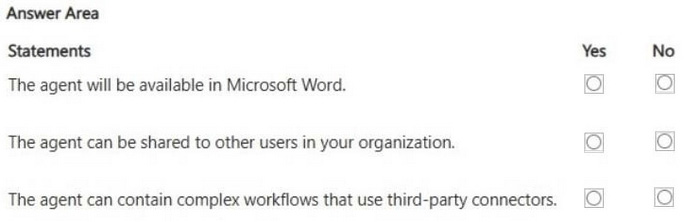
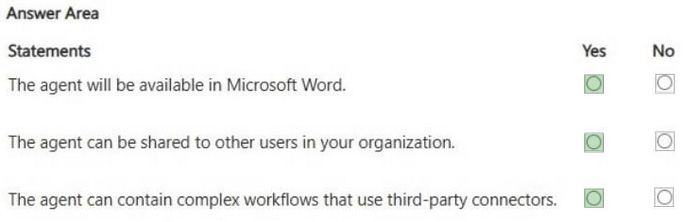
You plan to create an agent by using the Microsoft 365 Copilot app. For each of the following statements, select Yes if the statement is true. Otherwise, select No.
NOTE: Each correct selection is worth one point.
Reveal answer detailsClose answer details
Explanation
All three statements are selected as Yes. A Microsoft 365 Copilot agent can be made available in Microsoft Word when supported by the host experience, and it can be shared with other users in the organization. Agents can also include complex workflows or connector-based capabilities when configured through the appropriate Microsoft 365 agent tooling. The exam point is that agents are not limited to simple chat answers; they can be integrated into Microsoft 365 apps and extended with connectors and workflows.
Question 11
Single choice
A team is discussing a confidential issue in a Teams meeting.
They want to use Copilot during the meeting, but they do not want to record or transcribe the meeting, and they do not need Copilot content after the meeting ends.
Which meeting configuration best matches the requirement?
A
Use Copilot only during the meeting without turning on recording or transcription.
B
Turn on transcription so Copilot will be available after the meeting.
C
Record the meeting and then delete the recording immediately.
D
Move the meeting chat to a Copilot Page before the meeting starts.
Reveal answer detailsClose answer details
Correct answerA
Explanation
Teams meeting Copilot can be configured for use only during the meeting, including scenarios where participants do not want a transcript or recording retained for after-meeting use. If the team needs Copilot content after the meeting, transcription is important because post-meeting Copilot relies on transcript or meeting chat availability. Recording and deleting the recording is unnecessary and creates the wrong artifact. The configuration that matches the requirement is in-meeting Copilot without after-meeting persistence.
Question 12
Hotspot
HOTSPOT
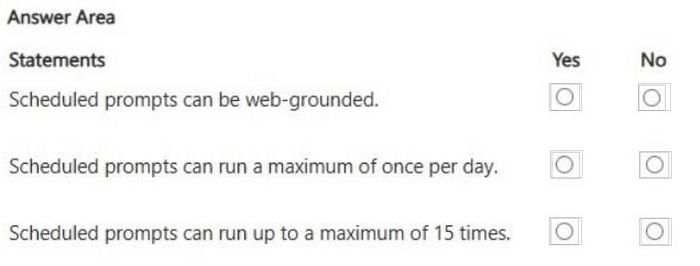
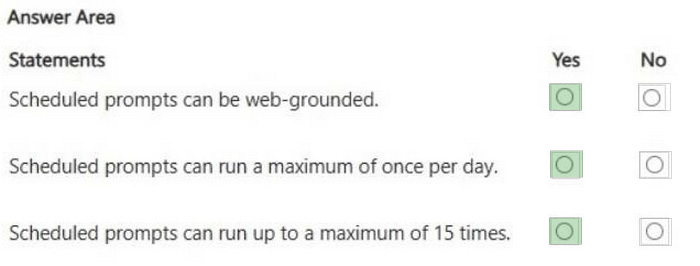
For each of the following statements, select Yes if the statement is true. Otherwise, select No.
NOTE: Each correct selection is worth one point.
Reveal answer detailsClose answer details
Question 13
Hotspot
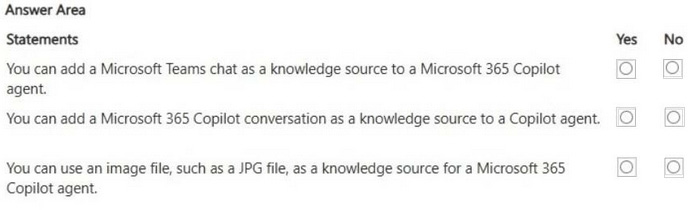
HOTSPOT
For each of the following statements, select Yes if the statement is true. Otherwise, select No. NOTE: Each correct selection is worth one point.
Reveal answer detailsClose answer details
Explanation
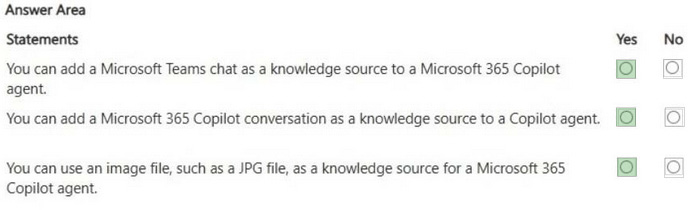
All three statements are selected as Yes. Microsoft 365 Copilot agents can use configured knowledge sources, including Teams chat content, Copilot conversations, and image files when those source types are supported and accessible. These sources give the agent grounding material for its answers and behavior. The important constraint is that each source still depends on Microsoft 365 permissions, supported formats, and tenant policy.
Question 14
Hotspot
HOTSPOT
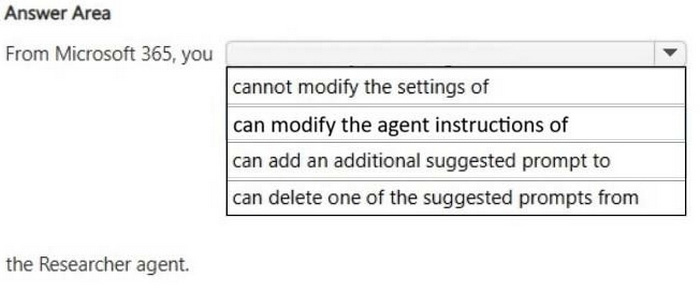
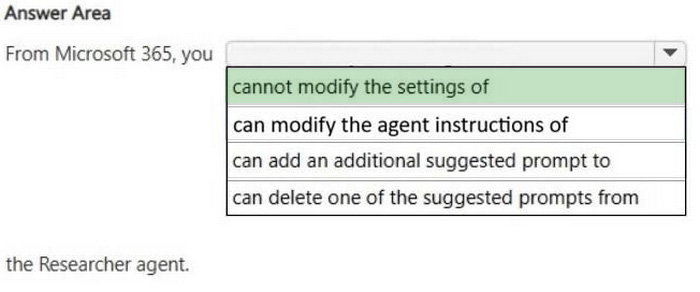
Select the answer that correctly completes the sentence.
Reveal answer detailsClose answer details
Explanation
The selected completion says you cannot modify the settings of the Researcher agent. Researcher is a Microsoft-provided advanced agent, not a custom agent that the user owns and configures. Users can run Researcher for research tasks, but they do not edit its underlying settings, instructions, or suggested prompts as if it were their own custom agent. The distinction is between built-in Microsoft agents and agents you create or administer.
Question 15
Single choice
You create a Microsoft 365 Copilot notebook and add a file named Process.docx from a local folder.
Yesterday, you updated Process.docx in the local folder.
What will occur when you chat in the notebook?
A
The chat will reference the most recent version of Process.docx.
B
The chat will reference both versions of Process.docx.
C
The chat will reference only the original version of Process.docx.
Reveal answer detailsClose answer details
Correct answerC
Explanation
When a local file is uploaded to a Copilot Notebook, the notebook works from the uploaded copy rather than maintaining a live link to the file in the local folder. Updating the original local file later does not automatically update the copy already added as a notebook reference. This differs from references stored in SharePoint or OneDrive, where cloud-backed content can stay current as the source changes. The operational rule is that local uploads are snapshots unless they are replaced or reuploaded.
Question 16
Single choice
You attend many Microsoft Teams meetings.
You want to ensure that you can catch up on key points and next steps after each meeting.
Which Microsoft 365 Copilot feature should you use after the meetings?
A
Recap
B
Meeting Whiteboard
C
Meeting info
D
Thread summaries
Reveal answer detailsClose answer details
Correct answerA
Explanation
Meeting Recap is the post-meeting place to catch up on key points, decisions, and next steps from Teams meetings when the necessary meeting artifacts are available. A whiteboard is for visual collaboration, and meeting info contains scheduling details rather than Copilot-generated catch-up content. Thread summaries apply to Teams channel or chat threads, not the full meeting recap workflow. The practical rule is to use Recap after meetings and Copilot during or after meetings depending on the configuration.
Select the answer that correctly completes the sentence.
Correct Answer:
Explanation
Explanation/Reference:
The selected completion is Enterprise data protection (EDP). EDP is the Microsoft 365 Copilot protection model that keeps business data within the tenant boundary and prevents customer prompts, responses, and work data from being used to train foundation models. Sensitivity labels and Zero Trust are important security concepts, but the sentence specifically describes tenant-contained business data protection and no model training. The exam takeaway is to connect EDP with enterprise-grade privacy, security, and tenant data protection for Copilot.
QUESTION 2
HOTSPOT
For each of the following statements, select Yes if the statement is true. Otherwise, select No.
NOTE: Each correct selection is worth one point.
Correct Answer:
Explanation
Explanation/Reference:
All three statements are selected as Yes. Copilot can use general model knowledge, accessible business data, and current web information when those sources are available and appropriate for the selected scope. Model knowledge helps with general concepts, work data provides organization-specific grounding, and web grounding can add up-to-date public information. The exam point is that strong Copilot responses can combine multiple grounding sources, but only within the user's permissions and enabled settings.
QUESTION 3
You have a Microsoft Excel workbook open that contains a table. The table contains sales data and the following columns:
- OrderDate - OrderNumber - Amount
You plan to use Microsoft Copilot in Excel to generate a monthly summary of the sales data in the table.
What should you include in the prompt to generate an effective summary?
More than one answer choice may achieve the goal. Select the BEST answer.
A.
the desired format of the response
B.
a specific cell range from the worksheet
C.
the file name of the workbook
D.
the clear goal of the summary
E.
a formula to calculate monthly totals
Correct Answer: D
Explanation
Explanation/Reference:
An effective prompt needs a clear goal so Copilot knows what result to produce from the workbook data. Asking for a monthly sales summary directly communicates the intended analysis, while a file name or cell range alone does not define the desired outcome. A desired format can improve the response, but the best foundational detail is the goal of the summary. Formulas may be useful in Excel, but they are not required when the prompt is asking Copilot to generate the summary.
QUESTION 4
You need to manage previous Microsoft 365 Copilot Chat conversations.
Which two actions can you perform from the conversation history experience?
Each correct answer presents part of the solution.
NOTE: Each correct selection is worth one point.
A.
Continue a previous conversation by selecting it.
B.
Change the organization's Conditional Access policy for Copilot.
C.
Rename or delete a conversation from its more actions menu.
D.
Convert every previous chat into a Teams meeting transcript automatically.
E.
Increase another user's file permissions for a referenced SharePoint site.
Correct Answer: AC
Explanation
Explanation/Reference:
The conversation history experience lets users return to previous Copilot chats and continue them. It also provides management actions such as renaming or deleting a conversation from the more actions menu. Conditional Access policy changes, permission changes, and automatic conversion to Teams meeting transcripts are administrative or unrelated tasks. The history feature is for finding, continuing, renaming, and deleting the user's own conversations.
QUESTION 5
HOTSPOT
You have a Microsoft 365 Copilot conversation as shown in the following exhibit.
Use the drop-down menus to select the answer choice that completes the statement based on the information presented in the graphic.
Correct Answer:
Explanation
Explanation/Reference:
The selected completion says the document is NOT accessible outside of your organization. The exhibit shows Copilot summarizing Document1.docx, so the file is supported and accessible to the signed-in user in the current organization. The issue being tested is external accessibility, not whether the file is in a notebook or protected by a sensitivity label. A document can be usable by Copilot internally while still not being available to people outside the organization.
QUESTION 6
HOTSPOT
You are creating an agent in the Microsoft 365 Copilot app. For each of the following statements, select Yes if the statement is true. Otherwise, select No.
NOTE: Each correct selection is worth one point.
Correct Answer:
Explanation
Explanation/Reference:
All three statements are selected as Yes. Agent configuration can include mailbox-related sources when the environment and permissions support them, natural-language creation assistance, and other agents or agent outputs as part of a broader agent design. The important point is that Microsoft 365 Copilot agent building is designed around configurable knowledge and capabilities rather than only static manual setup. These options still remain subject to tenant policy, connector availability, and user permissions.
QUESTION 7
You have an open Microsoft 365 Copilot conversation.
You need to chat with an agent named Agent1 during the conversation.
What should you enter to call Agent1?
A.
[Agent1]
B.
#Agent1
C.
/Agent1
D.
@Agent1
Correct Answer: D
Explanation
Explanation/Reference:
In Microsoft 365 Copilot conversations, agents are invoked by mentioning them with the at sign followed by the agent name. This mirrors the familiar mention pattern used across Microsoft 365 collaboration experiences. Brackets, a hash sign, or a slash do not represent the standard way to call an agent by name in the conversation. The key operational detail is to use an agent mention when switching or calling an agent inside chat.
QUESTION 8
You are explaining how Microsoft 365 Copilot protects organizational data.
Which two statements are correct?
Each correct answer presents part of the solution.
NOTE: Each correct selection is worth one point.
A.
Copilot uses the signed-in user's existing Microsoft 365 permissions when grounding responses in work data.
B.
Copilot can summarize any file in the tenant if the prompt names the file exactly.
C.
Copilot removes sensitivity labels from generated content so users can edit it freely.
D.
Sensitivity labels, encryption, and SharePoint or OneDrive access controls can affect what Copilot can reference.
E.
Copilot grants temporary access to restricted content when a business justification is included in the prompt.
Correct Answer: AD
Explanation
Explanation/Reference:
Microsoft 365 Copilot uses the signed-in user's existing permissions when grounding answers in organizational data. Sensitivity labels, encryption, SharePoint permissions, and OneDrive permissions can all affect whether Copilot can access or use a piece of content. Copilot does not summarize any tenant file just because the prompt names it, and it does not remove labels or grant temporary access based on a business justification. The security model is permission-respecting, not tenant-wide by default.
QUESTION 9
You plan to use a notebook in Microsoft 365 Copilot.
What is the purpose of a notebook?
A.
to create a transcript of a conversation that you can easily email to other users
B.
to provide a private location that can be used to organize reference materials across related conversations
C.
to generate a summary of all the interactions you had with Copilot during a specific conversation
Correct Answer: B
Explanation
Explanation/Reference:
A Microsoft 365 Copilot Notebook is a private, scoped workspace for collecting related reference material and using it as context across related Copilot work. It is not primarily a transcript export tool and it does not simply summarize one chat conversation. The value of a notebook is that it lets the user curate the source material Copilot should use for a topic or project. Students should associate notebooks with organized references and context-aware conversations.
QUESTION 10
HOTSPOT
You plan to create an agent by using the Microsoft 365 Copilot app. For each of the following statements, select Yes if the statement is true. Otherwise, select No.
NOTE: Each correct selection is worth one point.
Correct Answer:
Explanation
Explanation/Reference:
All three statements are selected as Yes. A Microsoft 365 Copilot agent can be made available in Microsoft Word when supported by the host experience, and it can be shared with other users in the organization. Agents can also include complex workflows or connector-based capabilities when configured through the appropriate Microsoft 365 agent tooling. The exam point is that agents are not limited to simple chat answers; they can be integrated into Microsoft 365 apps and extended with connectors and workflows.
QUESTION 11
A team is discussing a confidential issue in a Teams meeting.
They want to use Copilot during the meeting, but they do not want to record or transcribe the meeting, and they do not need Copilot content after the meeting ends.
Which meeting configuration best matches the requirement?
A.
Use Copilot only during the meeting without turning on recording or transcription.
B.
Turn on transcription so Copilot will be available after the meeting.
C.
Record the meeting and then delete the recording immediately.
D.
Move the meeting chat to a Copilot Page before the meeting starts.
Correct Answer: A
Explanation
Explanation/Reference:
Teams meeting Copilot can be configured for use only during the meeting, including scenarios where participants do not want a transcript or recording retained for after-meeting use. If the team needs Copilot content after the meeting, transcription is important because post-meeting Copilot relies on transcript or meeting chat availability. Recording and deleting the recording is unnecessary and creates the wrong artifact. The configuration that matches the requirement is in-meeting Copilot without after-meeting persistence.
QUESTION 12
HOTSPOT
For each of the following statements, select Yes if the statement is true. Otherwise, select No.
NOTE: Each correct selection is worth one point.
Correct Answer:
QUESTION 13
HOTSPOT
For each of the following statements, select Yes if the statement is true. Otherwise, select No. NOTE: Each correct selection is worth one point.
Correct Answer:
Explanation
Explanation/Reference:
All three statements are selected as Yes. Microsoft 365 Copilot agents can use configured knowledge sources, including Teams chat content, Copilot conversations, and image files when those source types are supported and accessible. These sources give the agent grounding material for its answers and behavior. The important constraint is that each source still depends on Microsoft 365 permissions, supported formats, and tenant policy.
QUESTION 14
HOTSPOT
Select the answer that correctly completes the sentence.
Correct Answer:
Explanation
Explanation/Reference:
The selected completion says you cannot modify the settings of the Researcher agent. Researcher is a Microsoft-provided advanced agent, not a custom agent that the user owns and configures. Users can run Researcher for research tasks, but they do not edit its underlying settings, instructions, or suggested prompts as if it were their own custom agent. The distinction is between built-in Microsoft agents and agents you create or administer.
QUESTION 15
You create a Microsoft 365 Copilot notebook and add a file named Process.docx from a local folder.
Yesterday, you updated Process.docx in the local folder.
What will occur when you chat in the notebook?
A.
The chat will reference the most recent version of Process.docx.
B.
The chat will reference both versions of Process.docx.
C.
The chat will reference only the original version of Process.docx.
Correct Answer: C
Explanation
Explanation/Reference:
When a local file is uploaded to a Copilot Notebook, the notebook works from the uploaded copy rather than maintaining a live link to the file in the local folder. Updating the original local file later does not automatically update the copy already added as a notebook reference. This differs from references stored in SharePoint or OneDrive, where cloud-backed content can stay current as the source changes. The operational rule is that local uploads are snapshots unless they are replaced or reuploaded.
QUESTION 16
You attend many Microsoft Teams meetings.
You want to ensure that you can catch up on key points and next steps after each meeting.
Which Microsoft 365 Copilot feature should you use after the meetings?
A.
Recap
B.
Meeting Whiteboard
C.
Meeting info
D.
Thread summaries
Correct Answer: A
Explanation
Explanation/Reference:
Meeting Recap is the post-meeting place to catch up on key points, decisions, and next steps from Teams meetings when the necessary meeting artifacts are available. A whiteboard is for visual collaboration, and meeting info contains scheduling details rather than Copilot-generated catch-up content. Thread summaries apply to Teams channel or chat threads, not the full meeting recap workflow. The practical rule is to use Recap after meetings and Copilot during or after meetings depending on the configuration.