Disks are the actual storage hardware; partitions are logical divisions of a disk used to define the storage
space; and volumes, contained inside partitions, are used to define how the individual files and folders are
saved to the storage.
-
A
Where are application preferences stored?
-
B
How are items inside the Finder's Network folder populated?
-
C
How does IPv4 addressing differ from IPv6 addressing?
-
D
How are disks, partitions, and volumes different from one another?
Reveal answer details
Close answer details
You have a user account on an OS X Mountain Lion computer that has multiple user accounts. How can you interact with another user's Dropbox folder that has default permissions?
-
A
You can see its contents, but you cannot add files to it.
-
B
You can neither see its contents nor add files to it.
-
C
You cannot see its contents, but you can add files to it.
-
D
You can see its contents and you can add files to it.
Reveal answer details
Close answer details
Disk Utility and System Information can both be used to gather information about storage devices.
-
A
What OS X application is set as the default for opening archive files?
-
B
Which keyboard shortcut can be used to temporarily choose another startup disk?
-
C
Which two built-in OS X applications can be used to gather information about storage devices?
-
D
Which application is used to examine open applications on OS X?
Reveal answer details
Close answer details
Local account passwords can be reset by an administrator in Users & Groups, the master password at login, an Apple ID at login, a FileVault 2 recovery key at startup, and by the Reset Password application in
OS X Recovery.
-
A
What three methods can be used to uninstall applications?
-
B
What does OS X use bundles or packages for?
-
C
What methods can be used to reset a user's lost account password?
-
D
What four methods can be used to restore from a Time Machine backup?
Reveal answer details
Close answer details
How is the Domain Name Service (DNS) used to facilitate network naming?
-
A
The OS X Mavericks installer can be downloaded from the Mac App Store for free.
-
B
Keychains are used to store secrets such as resource passwords, digital certificates, and encryption keys. The keychain system can also securely store Safari AutoFill information, Internet Account settings, and secure text notes.
-
C
The Archive option in the Finder creates compressed zip archive files.
-
D
The DNS service is used to translate host names to IP addresses via forward lookups and translate IP addresses to host names via reverse lookups. DNS is architected as a hierarchy of worldwide domain servers. Local DNS servers provide name resolution and possibly host names for local clients. These local DNS servers connect to DNS servers higher in the DNS hierarchy to resolve both unknown host names and host local domain names.
Reveal answer details
Close answer details
Migration Assistant is open on a Mac with OS X Mountain Lion installed. It CANNOT migrate user files from ________.
-
A
a Time Machine backup on a connected USB hard disk
-
B
an archive stored on iCloud
-
C
another volume on the same computer
-
D
a Windows XP computer with Service Pack 3 or later installed
Reveal answer details
Close answer details
Safe Sleep is a feature of all OS X compatible portable Macs that saves the system's state to permanent storage in cases where the computer's battery drains completely. Power Nap is a feature of Mac systems introduced after mid-2011 that use all-flash storage. Power Nap allows the Mac to automatically wake in a low-power mode so the system can perform a variety of application and system updates.
-
A
What happens during system shutdown?
-
B
What are Safe Sleep and Power Nap?
-
C
Which sharing services can OS X provide?
-
D
What does the master password do?
Reveal answer details
Close answer details
How can you verify that the system can establish a connection to a remote network host?
-
A
All Apple software updates are handled via the Mac App Store.
-
B
The Activity Monitor application is used to monitor open processes and applications.
-
C
The Traceroute tab of Network Utility allows you to verify the connection hops between your Mac and a remote host.
-
D
A Safe Boot is initiated by holding down the Shift key during system startup
Reveal answer details
Close answer details
What role does the system launchd process serve during system startup?
-
A
The master password is used to reset local account passwords.
-
B
A Safe Boot is initiated by holding down the Shift key during system startup
-
C
The system launchd process is ultimately responsible for starting every system process.
It also manages system initialization and starts the login window process.
-
D
The system version, build number, and hardware serial number are located in the About This Mac dialog or the login screen. The system version number defines the specific version of OS X currently installed. The system build number is an even more specific identifier used primarily by developers.
Finally, the hardware serial number is a unique number used to identify your specific Mac.
Reveal answer details
Close answer details
Question 10
Single choice
In a default OS X configuration, you want to change the way that Finder handles ZIP archives. Where can you make that change?
-
A
-
B
-
C
Archive Utility Preferences
-
D
Reveal answer details
Close answer details
Question 11
Single choice
Any item downloaded using one of the built-in OS X applications will be marked for quarantine. Third-party applications may not mark downloaded items for quarantine.
-
A
Which items fall under the file quarantine system?
-
B
Which keyboard shortcut is used to Safe Boot OS X?
-
C
What happens during user logout?
-
D
Which sharing services can OS X provide?
Reveal answer details
Close answer details
Question 12
Single choice
Review the screenshot, and then answer the question below. 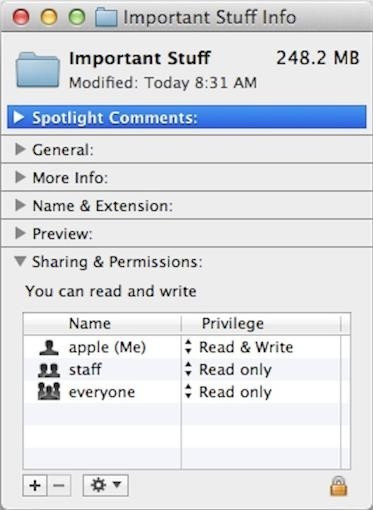 If you change the folder privilege for "everyone" to Read & Write, Finder, by default, will change the permissions of items inside the folder to match.
-
A
-
B
Reveal answer details
Close answer details
Question 13
Single choice
Which of these files will Time Machine, by default, NOT back up?
-
A
An encrypted file that was created to track passwords
-
B
A file that Time Machine identifies as conflicting with a previously backed-up file
-
C
A Time Machine preference .plist file
-
D
Reveal answer details
Close answer details
Question 14
Single choice
In what order do these three OS X components load at startup?
-
A
1. Firmware
2. Booter
3. Kernel
-
B
1. Kernel
2. Firmware
3. Booter
-
C
1. Firmware
2. Kernel
3. Booter
-
D
1. Booter
2. Kernel
3. Firmware
Reveal answer details
Close answer details
Question 15
Single choice
A Safe Boot performs the following permanent actions: attempting to repair the system volume structure, deleting system KEXT caches, and deleting font caches.
-
A
How can you acquire the OS X Mavericks installer?
-
B
Where are the keychain files stored?
-
C
Which changes are made when OS X Safe Boots?
-
D
What does the master password do?
Reveal answer details
Close answer details
Question 16
Single choice
The master password is used to reset local account passwords.
-
A
How can you identify duplicate fonts?
-
B
Where are application preferences stored?
-
C
What are the advantages of code signing?
-
D
What does the master password do?
Reveal answer details
Close answer details
Question 17
Single choice
What do the terms "interface," "protocol," and "service" mean in relation to computer networks?
-
A
A Service Set Identifier, or SSID, is used to identify a Wi-Fi network name and associated configuration.
-
B
An interface is any channel through which network data can flow. Hardware network interfaces are defined by physical network connections, and virtual network interfaces are logical network connections that ride on top of hardware network connections. A protocol is a set of rules used to describe a specific type of network communication. Protocols are necessary for separate network devices to communicate properly. Finally, a network service (as it pertains to Network preferences) is the collection of settings that define a network connection.
-
C
A Safe Boot is initiated c. by holding down the Shift key during system startup
-
D
Client software is used to access network services provided by server software. The connection is established using a common network protocol known by both the client and server software. Thus, the client and server software can be from different sources.
Reveal answer details
Close answer details
Question 18
Single choice
What's the best source for acquiring printer drivers for OS X?
-
A
The network service order list is used to determine the primary network service interface if there is more than one active service. All network traffic that isn't better handled via local connection to an active network service interface is sent to the primary network service interface. So in most cases all WAN traffic, Internet traffic, and DNS resolution is sent through the primary network service interface.
-
B
The Apple print drivers are the best source for configuring OS X printers. One method is to let the software update system automatically download and install the appropriate printer drivers. Or you can manually download and install printer drivers from the Apple support website.
-
C
The master password is used to reset local account passwords.
-
D
The Activity Monitor application is used to monitor open processes and applications.
Reveal answer details
Close answer details
Question 19
Single choice
The local hidden OS X Recovery HD doesn't include the OS X installation assets. So reinstalling OS X Mavericks from here requires high-speed Internet access and the ability to verify access to the installation assets. Upgraded Mac systems are verified by entering the Apple ID used to purchase OS X Mavericks.
Verification is automatic for Mac systems that included OS X Mavericks when purchased new.
-
A
What role does the system launched process serve during system startup?
-
B
What two methods are used to hide items from the Finder?
-
C
What two resources does the local hidden OS X Recovery HD need to reinstall OS X Mavericks?
-
D
What three methods can be used to uninstall applications?
Reveal answer details
Close answer details
Question 20
Single choice
The Font Book application shows a small dot next to the name of any font that has duplicate resources.
-
A
What happens during user logout?
-
B
How is 802.1X configured on OS X systems?
-
C
How can you identify duplicate fonts?
-
D
How can you limit the use of Location Services?
Reveal answer details
Close answer details
Question 21
Single choice
How does the default organization of the file system allow users to safely share local files and folders?
-
A
The volume formats supported as system volumes for OS X are Mac OS Extended (Journaled) and
Mac OS Extended (Journaled, Encrypted).
-
B
The keychain system manages encrypted files that are used to securely save your items. By default, every user has login and Local Items keychains that use the same password as his account. Not even other administrative users can access your keychain secrets without knowing the keychain's password.
-
C
Every home folder contains a Public folder that other users can read and a Drop Box folder that other users can write to. All other subfolders in a user's home folder (except the optional Sites folder) have default permissions that don't allow access to other users. The Shared folder is also set for all users to share items.
-
D
The Archive option in the Finder creates compressed zip archive files.
Reveal answer details
Close answer details
Question 22
Single choice
How does a user that changes his own account password affect his login keychain?
-
A
When a user changes his own account password, the system will keep his login keychain password in sync.
-
B
The Archive option in the Finder creates compressed zip archive files.
-
C
The master password is used to reset local account passwords.
-
D
Time Machine starts with a full copy of the file system to the backup disk. Then it maintains a list of changes to the file system, and every hour copies only the changes to the backup disk. In the backup, it creates a simulation of the full file system using hard links for files that haven't changed.
Reveal answer details
Close answer details
Question 23
Single choice
On your OS X Mountain Lion computer, you want the Finder to display filename extensions by default. How can you configure this setting from the Finder?
-
A
Choose Preferences from the Finder menu, click Advanced, and select the option "Show all filename extensions."
-
B
Control-click anywhere on the Desktop, select Preferences from the pop-up menu, click Advanced, and select the option "Show all filename extensions."
-
C
Choose Show View Options from the View menu, and select the option "Show all filename extensions."
-
D
Select any file icon, and choose Get Info from the File menu. In the Info window, click the disclosure triangle next to Name & Extension, deselect the option "Hide extension," and click Change All.
Reveal answer details
Close answer details
Question 24
Single choice
How do ACLs differ from standard UNIX file system permissions?
-
A
An item's ownership and permissions can be identified using the Info or Inspector windows in the Finder.
-
B
Standard UNIX file system permissions allow only for permissions to be set for one owner, one group, and all others. ACLs, on the other hand, allow for an essentially unlimited list of permissions entries.
-
C
The Disk Utility Repair Permissions feature repairs only the ownership and permissions for items installed by Apple. However, this may resolve issues with third-party products.
-
D
You can use the System Information application to easily scan all the appropriate application locations and return a list of installed applications.
Reveal answer details
Close answer details
Question 25
Single choice
How can you identify the MAC addresses for all the Mac computer's network interfaces?
-
A
You can identify all the MAC addresses for the Mac computer's network interfaces from the Info pane of Network Utility.
-
B
The firmware initializes the Mac computer's hardware and locates the booter file on a system volume.
The Power-On
Self-Test (POST) checks for basic hardware functionality when the Mac powers on.
-
C
The network service order list is used to determine the primary network service interface if there is more than one active service. All network traffic that isn't better handled via local connection to an active network service interface is sent to the primary network service interface. So in most cases all WAN traffic, Internet traffic, and DNS resolution is sent through the primary network service interface.
-
D
Time Machine can back up to any Mac OS Extended volume or network shares hosted from Time Capsule or OS X Server.
Reveal answer details
Close answer details
Question 26
Single choice
Along with IMAP, POP, and SMTP, which protocol does the Mail application in OS X Mountain Lion support?
-
A
-
B
-
C
-
D
Reveal answer details
Close answer details
Question 27
Single choice
If you use the Get Info window to change Sharing & Permissions settings on a file or folder, Finder preserves and can revert to the previous settings until the window is closed.
-
A
-
B
Reveal answer details
Close answer details
Question 28
Single choice
How do you start up an OS X Mountain Lion computer in single-user mode?
-
A
Hold down Shift-Option while the computer restarts.
-
B
Hold down Command-S while the computer restarts.
-
C
Start up from the Mountain Lion Recovery system partition, and enter the command reboot -single in Terminal.
-
D
Select Single-User Mode in the Startup Disk pane of System Preferences and restart the computer.
Reveal answer details
Close answer details
Question 29
Single choice
What does the Disk Utility Verify and Repair feature do?
-
A
The system version, build number, and hardware serial number are located in the About This Mac dialog or the login screen. The system version number defines the specific version of OS X currently installed. The system build number is an even more specific identifier used primarily by developers.
Finally, the hardware serial number is a unique number used to identify your specific Mac.
-
B
The Disk Utility Verify and Repair feature is used to verify or repair the partition scheme and directory structure of a volume. These elements contain the information used to locate files and folders on the volume.
-
C
The Traceroute tab of Network Utility allows you to verify the connection hops between your Mac and a remote host.
-
D
The master password is used to reset local account passwords.
Reveal answer details
Close answer details
Question 30
Single choice
The function of journaling in the Mac OS Extended (Journaled) file system is to ________.
-
A
protect volume structure integrity in cases of unexpected shutdown
-
B
provide a backup of user files
-
C
provide support for resource forks, extended attributes, and metadata
-
D
provide support for Spotlight searches
Reveal answer details
Close answer details
Question 31
Single choice
Which of these is a recovery key storage location that FileVault 2 offers when you enable it?
-
A
-
B
-
C
The OS X Recovery partition
-
D
Reveal answer details
Close answer details
Question 32
Single choice
How can an OS X system automatically connect to a Wi-Fi network?
-
A
A new OS X system can only automatically connect to Wi-Fi networks that have no standard authentication mechanism, otherwise known as an "open network." However, a configured OS X system can automatically reconnect to authenticated Wi-Fi networks, provided that the appropriate information was saved to the Keychain system.
-
B
Code-signed items include a digital signature that the system can use to verify the authenticity and integrity of the application or process and its resources.
-
C
A standard user can connect to any non-WPA Enterprise Wi-Fi network via the Wi-Fi status menu.
Because the system Keychain must be modified for WPA Enterprise connections, only an administrative user can establish these types of connections.
-
D
The Activity Monitor application is used to monitor open processes and applications.
Reveal answer details
Close answer details
Question 33
Single choice
Improperly unmounting or ejecting a drive or volume may cause data corruption. The system automatically verifies and repairs an improperly unmounted or ejected volume the next time it becomes available to the
Mac.
-
A
What types of files are omitted from Time Machine backups?
-
B
What role does the system launchd process serve during system startup?
-
C
What's required to set up the iCloud Keychain service on multiple Apple devices?
-
D
What's the potential side effect of improperly unmounting or ejecting a disk or volume?
Reveal answer details
Close answer details
|