Single choice
You notice using Pixel Preview that the edges of some objects appear fuzzy.
How should you identify these objects?
Reveal answer details Close answer details
Correct answerB
Adobe · 9A0-351
Preview real exam questions, verified answers and available explanations before choosing a study plan.
|
Single choice
You notice using Pixel Preview that the edges of some objects appear fuzzy. How should you identify these objects? Reveal answer details Close answer detailsCorrect answerB
Single choice
You select a path that contains a solid color fill and choose Object > Create Gradient Mesh. Reveal answer details Close answer detailsCorrect answerB
Single choice
You apply a drop shadow to your object and notice it appears to be low resolution. What is the reason for this? Reveal answer details Close answer detailsCorrect answerA
Single choice
Which properties are only displayed in the Info panel when transforming or moving an object? Reveal answer details Close answer detailsCorrect answerC
Single choice
You are printing a document with multiple artboards. What will happen if "Ignore Artboards" is enabled? Reveal answer details Close answer detailsCorrect answerC
Single choice
Click the Exhibit tab to see the exhibit. 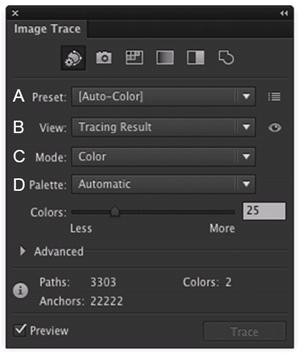 Which Image Trace Panel option gives you the ability to trace your image using the Document Library swatches? Reveal answer details Close answer detailsCorrect answerD
Multiple choice
Which two image types are acceptable choices when creating an art brush? (Choose two.) Reveal answer details Close answer detailsCorrect answersD, E
Single choice
You have built a color illustration. Before printing, you want to see how each ink color plate will appear, individually. Which technique should you use? Reveal answer details Close answer detailsCorrect answerB |