Question 1
Multiple choice
In which of the following formats should line art be saved for creating graphics files? Each correct answer represents a complete solution. Choose all that apply.
-
A
-
B
-
C
-
D
Reveal answer details
Close answer details
Correct answersB, C, D
ExplanationFollowing are the two basic rules for creating graphics files: 1. Line art should be saved in the EPS, PDF, Adobe Illustrator, WMF, EMF, or PICT format.
2. Bitmaps such as photos and scans should be saved in the TIFF, Adobe Photoshop, PNG, JPEG, PCX, MP, GIF, SCT, or PICT format. 
Which of the following guidelines for conditional documents defines how many versions your finished project will contain?
-
A
Number of condition tags required
-
B
-
C
-
D
Reveal answer details
Close answer details
Correct answerD
ExplanationFor conditional documents Number of versions defines how many versions your finished project will contain. Answer: B is incorrect. This option is invalid.
Answer: A is incorrect. The Number of condition tags required decides how many condition tags you need to produce the desired versions.
Answer: C is incorrect. Tagging strategy determines the smallest unit of conditional text.
Question 3
Multiple choice
You are working on an InDesign document. You have created a table with 4 body rows and 3 columns.
Suddenly, you change your mind and now you want to add 3 more rows to the table below the last row. What can you do to accomplish the task? Each correct answer represents a complete solution. Choose all that apply.
-
A
Choose Table > Insert > Row > select 3 on the Number option and then click on Below > click the OK
button.
-
B
Place your cursor in the last cell and choose Table > Insert Table option > select 4 Body rows with 3
columns and 3 Footer rows > click the OK button.
-
C
Choose Table > Insert Table > select 4 Body rows with 3 columns and 3 Footer rows > click the OK
button.
-
D
Place your cursor in the last cell and press the Tab key 3 times to add 3 additional rows to the table below the last row.
Reveal answer details
Close answer details
Correct answersA, C, D
ExplanationFor this, place your cursor in the last cell and press the Tab key on your keyboard as many times as you want additional rows to be added to your table below the last row. It can be done by two other methods, which are as follows: 1.Choose Table > Insert Table > select 4 Body rows with 3 columns and 3 Footer
rows, and then click the OK button. 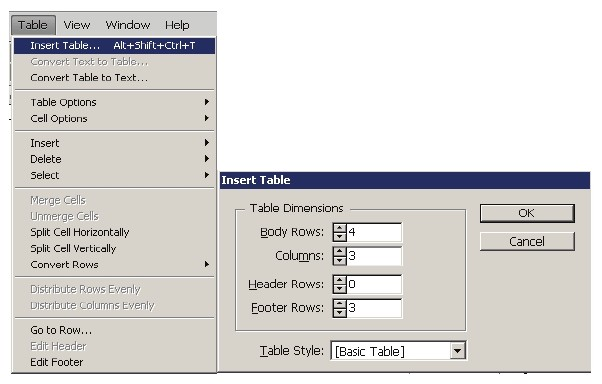 2. Choose Table > Insert > Row > select 3 on Number option, and then click on Below > click the OK button. 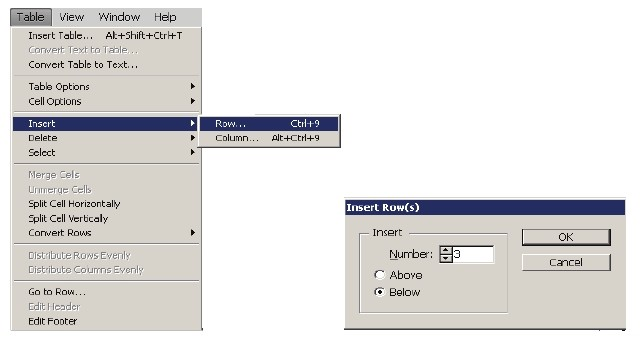
Which of the following variables insert the first or last occurrence on the page of the text to which a specified style is applied?
-
A
-
B
-
C
-
D
Last Page Number variables
Reveal answer details
Close answer details
Correct answerB
ExplanationThe Running Header variables insert the first or last occurrence on the page of the text to which the specified style is applied. Answer: D is incorrect. Last Page Number variables are commonly used for inserting placeholder text, or a text string that may need to be changed quickly.
Answer: A is incorrect. Chapter Number variables insert the chapter number. You can insert text before or after the chapter number and you can also specify a numbering style.
Answer: C is incorrect. Custom Text variables are commonly used for inserting placeholder text or a text string that may need to be changed quickly.
Which of the following tools can be used to create straight lines?
-
A
-
B
-
C
-
D
Reveal answer details
Close answer details
Correct answerD
ExplanationFollowing are the various objects that can be created with InDesign's object-creation tools. 1. Straight lines created by using the Line tool 2. Lines and shapes created by using the Pen tool or the Pencil tool
3. Basic shapes created by using Ellipse, Rectangle, and Polygon 4. Basic frames created by using Ellipse Frame, Rectangle Frame, and Polygon Frame 
You are creating a document in InDesign CS5. You choose Optimized Original Images or Optimized Formatted Images in the Images tab of the Export XML dialog box. Which of the following options will you choose to specify which file format to use for the converted image?
-
A
-
B
-
C
-
D
Reveal answer details
Close answer details
Correct answerC
ExplanationThe Image Conversion option specifies which file format to use for the converted image. If you choose Automatic, InDesign chooses the best file type based on the image. Further, you may also want to specify both GIF and JPEG Options. Answer: B is incorrect. GIF Options specify the formatting for images that are converted into the GIF format when exported to XML.
Answer: A is incorrect. JPEG Options specify the formatting for images that are converted into the JPEG format when exported to XML.
Answer: D is incorrect. There is no such option in the Images tab of the Export XML dialog box.
Which of the following is the animation file format supported by InDesign?
-
A
Flash player presentation
-
B
-
C
-
D
Reveal answer details
Close answer details
Correct answerA
ExplanationFollowing are the file formats supported by InDesign: 1. Video files such as Flash video, QuickTime movie, and Microsoft AVI video 2. Animation files such as Flash player presentation
3. Audio files such as MP3 music, Apple AIFF, and Microsoft WAV sound
Which of the following is similar to EPS?
-
A
-
B
-
C
-
D
Reveal answer details
Close answer details
Correct answerC
Explanation1. BMP. It is the native Windows bitmap format.
2. EPS. EPS or Encapsulated PostScript file format is favored by professional publishers. One of its color-separated variant is DCS or Desktop Color Separation.
3. GIF. GIF or Graphics Interchange Format is common in Web documents.
4. Illustrator. It is similar to EPS.
5. InDesign. Other InDesign documents can be imported, as if they are graphics. Specific pages can also be chosen to be imported.
6. JPEG. JPEG or Joint Photographic Expert Group compresses bitmap format used on the Web.
7. PCX. PCX or PC Paintbrush was very popular in earlier versions of Windows and DOS programs. It has been supplanted by other formats.
8. PDF. PDF or Portable Document Format is a variant of PostScript and is used for Web-based, network-based, and CD-based documents.
9. Photoshop. Photoshop is the native format in Adobe Photoshop 5.0 through CS5.
10. PICT. PICT or Picture is used in professional documents.
11. PNG. PNG or Portable Network Graphics is more capable than GIF.
12. Scitex CT. It is the continuous-tone bitmap format used on Scitex prepress systems.  13. TIFF. TIFF or Tagged Image File Format is the bitmap standard for image editors and publishers.
14. Windows Metafile. Windows Metafile is used in professional documents. 
Question 9
Multiple choice
Which of the following tools can be used to create basic frames? Each correct answer represents a complete solution. Choose all that apply.
-
A
-
B
-
C
-
D
Reveal answer details
Close answer details
Correct answersA, C
ExplanationFollowing are the various objects that can be created with InDesign's object-creation tools. 1. Straight lines created by using the Line tool 2. Lines and shapes created by using the Pen tool or the Pencil tool
3. Basic shapes created by using Ellipse, Rectangle, and Polygon 4. Basic frames created by using Ellipse Frame, Rectangle Frame, and Polygon Frame 
Question 10
Single choice
Which of the following features allows you to change the shape of an object in an InDesign document?
-
A
-
B
-
C
-
D
Reveal answer details
Close answer details
Correct answerA
ExplanationThe Pathfinder panel is used to combine selected objects into new shapes. This panel can be opened by choosing Window > Object and Layout >Pathfinder. 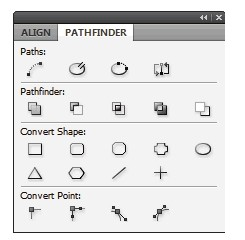 Answer: B is incorrect. The Preflight panel is a feature of InDesign CS5 that warns of the problems that could prevent a document or book from printing or outputting as expected while a document is being edited. These problems include missing files or fonts, low-resolution images, overset text, and a number of other conditions. The preflight settings can be configured to define which conditions are detected. These preflight settings are stored in preflight profiles for easy reuse. To open the Preflight panel, choose Window
> Output > Preflight, and double-click the Preflight icon at the bottom of the document window. The Preflight icon is green if no errors are detected or red if errors are detected. The Preflight panel is shown in the image below. 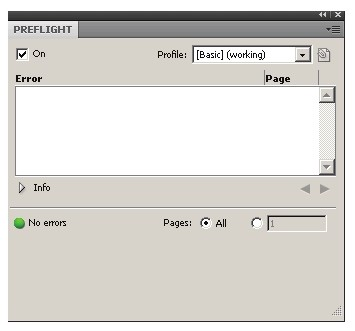 Answer: C is incorrect. The Stroke panel allows a user to modify the strokes applied to objects. The attributes of this panel affect how the path of an object looks. This panel can be opened by choosing Window > Stroke. Its keyboard shortcut is Ctrl+F10. It provides the following options to change the stroke of a selected object: Cap. It refers to the end of an open line. Following types of caps are available: Butt cap. It creates squared ends that abut (stop at) the endpoints. Round cap. It creates semi-circular ends that extend half the stroke width beyond the endpoints. Projecting cap. It creates squared ends that extend half the stroke width beyond the endpoints. This option makes the stroke weight extend evenly in all directions around the path. Join. It specifies the appearance of the stroke at corner points. Following types of joins are available. Miter join. It creates pointed corners that extend beyond the endpoint when the miter's length is within the miter limit. Round join. It creates rounded corners that extend half the stroke width beyond the endpoints. Bevel join. It creates squared corners that abut the endpoints. 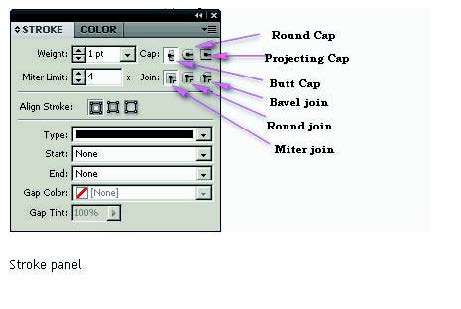 Answer: D is incorrect. The Swatches panel stores colors. It is used to import, export, delete, and modify the color palette. Besides, a user can store custom colors in the Swatches panel. To add a color in the Swatches panel, move the cursor to the empty area of the Swatches panel (the cursor will change into the paint bucket) and click. To access the Swatches panel, select Window > Swatches.
Question 11
Multiple choice
Which of the following formats are NOT supported by InDesign? Each correct answer represents a complete solution. Choose all that apply.
-
A
AutoCAD Document Exchange Format (DXF)
-
B
Computer Graphics Metafile (CGM)
-
C
-
D
Reveal answer details
Close answer details
Correct answersA, B, C
ExplanationThe following formats are not supported by InDesign: 1. AutoCAD Document Exchange Format (DXF)
2. Computer Graphics Metafile (CGM)
3. CorelDraw 4. Eastman Kodak's Photo CD
5. Scalable Vector Graphics (SVG) 
Question 12
Multiple choice
For which of the following tasks is a page tool used? Each correct answer represents a complete solution.
Choose all that apply.
-
A
To resize several objects that have commonly aligned edges simultaneously, while keeping the gaps between them fixed
-
B
To open a set of menu options to change the page size and orientation
-
C
To move the entire page's contents
-
D
To adjust the size of a gap between two or more objects
Reveal answer details
Close answer details
Correct answersB, C
ExplanationThe shortcut for a page tool is Shift+P. The page tool is used for the following tasks: 1. To move the entire page's contents 2. To open a set of menu options to change the page size and orientation Answer: D and A are incorrect. A gap tool is used to adjust the size of a gap between two or more bjects.
It also allows a user to resize several objects that have commonly aligned edges simultaneously, while keeping the gaps between them fixed. It is a one-step way to adjust the layout by directly manipulating the space between objects.
Question 13
Single choice
You work as a Design Expert for company Inc. You are creating a document. The document is showing the Bleed and slug error in the error pane of the Preflight panel. You want to know the solution to fix this problem. What will you do?
-
A
Double Click to expand the Document menu and then click on the red dot in the lower-right corner of the Preflight panel.
-
B
Double Click to expand the Document menu in the Preflight panel and then click the error in question.
-
C
Double Click to expand the Document menu in the Preflight panel and then click the Info pane.
-
D
Click on the icon on the left side from the profile pop menu in the Preflight panel.
Reveal answer details
Close answer details
Correct answerB
ExplanationTo view document errors, double click to expand the Document menu and to view information about specific errors such as in the above scenario the Bleed and slug error, click the error in question. appear in the Info pane at the bottom of the Preflight panel along with suggestions to fix the error as shown in the figure given below: 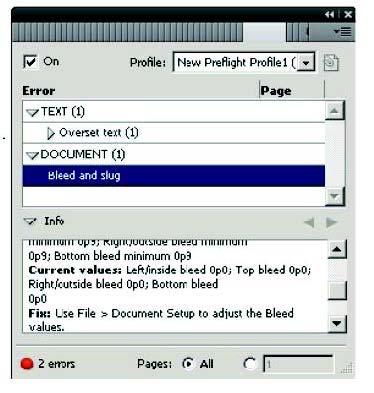 Answer: C is incorrect. Although the Info pane at the bottom of the Preflight panel contains the description of the error and the solution to fix that problem, if you double Click to expand the Document menu in the Preflight panel and then click the Info pane, it will not show the document error because this is not the right way to see the description of the error. Answer: A is incorrect. If you double Click to expand the Document menu and then click on the red dot in the lower-right corner of the Preflight panel, nothing will happen.
Answer: D is incorrect. If you click on the icon in the Preflight panel, it will embed the selected profile.
Question 14
Single choice
You are creating a newsletter in InDesign. You have applied page transitions on several pages of this document. What will you do to include page transitions when you export the PDF document?
-
A
Select the Bookmarks option in the Export PDF dialog box.
-
B
Select the Non-Printing Objects option in the Export PDF dialog box.
-
C
Select the Interactive Elements option in the Export PDF dialog box.
-
D
Select the Embed Page Thumbnails option in the Export PDF dialog box.
Reveal answer details
Close answer details
Correct answerC
ExplanationTo include page transitions when you export the PDF document, you have to select the Interactive Elements option in the Export PDF dialog box. The following diagram shows the Interactive Elements option in the Export PDF dialog box. 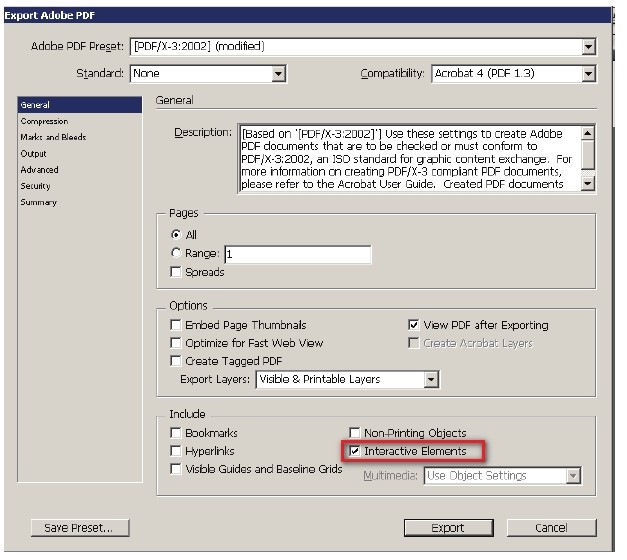 Answer: D is incorrect. Select this option to create a thumbnail preview for each page being exported.
Adding thumbnails increases the PDF file size.
Answer: A is incorrect. Select this option to create bookmarks for table of contents entries, preserving the TOC levels. Bookmarks are created from the information specified in the Bookmarks panel.
Answer: B is incorrect. Select this option to export objects to which you have applied the Non-Printing option in the Attributes panel.
Question 15
Single choice
Which of the following options in the General Pane of the Export Adobe PDF dialog box takes InDesign table-of-contents (TOC) information and preserves it in the exported PDF file?
-
A
-
B
-
C
-
D
Reveal answer details
Close answer details
Correct answerC
ExplanationBookmarks option in the General Pane of the Export Adobe PDF dialog box takes InDesign table-of-contents (TOC) information and preserves it as bookmarks in the exported PDF file. Answer: B is incorrect. This option preserves hyperlinks added in InDesign.
Answer: A is incorrect. This option preserves interactive objects meaning buttons and their page actions rather than converting them to static graphics.
Answer: D is incorrect. This pop-up menu lets you control how embedded sound and video are handled.
|