Preview real exam questions, verified answers and available explanations before choosing a study plan.
Question 1
Single choice
You work as an Office Manager for Blue Well Inc. The company has a Windows-based network. You have a formula that uses one or two variables or multiple formulas that all use one common variable. You want to examine a range of possibilities at a glance.
Which of the following will you use to accomplish the task?
A
Goal Seek
B
Solver add-in
C
Data table
D
Scenario
Reveal answer detailsClose answer details
Correct answerC
Explanation
Explanation: A data table is used to see all the outcomes in one place. It is defined as a type of what-if analysis tools. It is used if a user has a formula that uses one or two variables or multiple formulas that all use one common variable. It is used to examine a range of possibilities at a glance and since the user focuses on only one or two variables, results are easy to read and share in tabular form. If automatic recalculation is enabled, it is possible to recalculate the data in data tables immediately and as a result, the user always gets fresh data. Answer option D is incorrect. A scenario is defined as a type of what-if analysis tools. It is a set of values saved by Excel and can be substituted automatically in cells on a worksheet. A user can create and save different groups of values on a worksheet and then switch to any of these new scenarios to view different results. Scenario reports are not automatically recalculated. If the user changes the values of a scenario, those changes will not be displayed in an existing summary report and he must create a new summary report to show the reflection of the changed report. Answer option A is incorrect. Goal Seek is defined as a type of what-if analysis tools. It is used if a user knows the result that he wants from a formula, but he is not sure what input value the formula needs to get that result. It works with only one variable input value. Answer option B is incorrect. The Solver add-in is used if a user knows the result that he wants from a formula, but he is not sure what input value the formula needs to get that result. It is used for more than one input value. It works with a group of cells related to the formula in the objective cell.
Question 2
Multiple choice
You work as an Office Assistant for Blue Well Inc. The company has a Windows-based network. You want to get the trend of the Business data range. For this purpose, you want to use trendlines in the chart. Which of the following steps will you take to apply the trendlines in the chart? Each correct answer represents a part of the solution. Choose all that apply.
A
Clear the check box of any Trendline fields to disconnect a slicer.
B
Select the type that you want from Trendline options.
C
Click the Insert Trendline arrow, and then click Trendline Connections on the Options tab in the Sort & Filter group.
D
Select a chart and then navigate to the Chart Tools Layout tab.
Reveal answer detailsClose answer details
Correct answersB, D
Question 3
Single choice
You work as an Office Assistant for Tech Perfect Inc. You are working in a spreadsheet. You are facing a problem that when you type in a function and press Enter, the cell shows the function as you typed it, instead of returning the function's value as shown below:
Which of the following is the reason that is causing the above problem?
A
You are inserting a new column, next to a column that is already formatted as text.
B
Excel is trying to reference an invalid cell.
C
You are inserting a new column, next to a column containing Dates or Times.
D
The lookup_value or the array you are searching resides in a cell containing unseen spaces at the start or end of that cell.
Reveal answer detailsClose answer details
Correct answerA
Explanation
Explanation: The Excel Won't Calculate My Function error occurs when a user types in a function and presses Enter, the cell shows the function as the user typed it, instead of returning the function's value. The reason that causes this problem is that the cells containing the formula are formatted as 'text' instead of the 'General' type. This happens when the user inserts a new column, next to a column that is already formatted as text due to which the new column inherits the formatting of the adjacent column. Answer option D is incorrect. The Failure to Look Up Values in Excel error occurs when a user gets an unexpected error while trying to look up or match a lookup_value within an array and Excel is not able to recognize the matching value. If the lookup_value or the array the user is searching resides in a cell, the user can have unseen spaces at the start or end of that cell. This will create the situation where the contents of the two cells that the user is comparing look the same but extra spaces in one of the cells cause the cells to have slightly different content. The other reason is that the contents of the cells that are being compared may have different data types.
Answer option B is incorrect. The Lookup Function Won't Copy Down to Other Rows error occurs when a user uses a function in one cell and it works perfectly but when he attempts to copy the function down to other rows, he gets the #REF error. The #REF! error arises when Excel tries to reference an invalid cell. This error occurs if the user has referenced an entire worksheet by clicking on the grey square at the top left of the worksheet. For Excel, this reference range is 1 to 1048576. Since the references are Relative References, Excel automatically increases the row references when this cell is copied down to other rows in the spreadsheet. Answer option C is incorrect. The Cell Shows a Date or Time Instead of a Number error occurs because the cell that contains the formula is formatted as a 'date' or 'time' instead of a 'General' type or a number. This situation arises because a user has inserted a new column, next to a column containing Dates or Times, the new column has 'inherited' the formatting of the adjacent column.
Question 4
Single choice
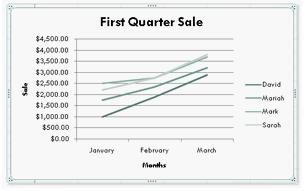
You work as an Office Assistant for Blue Well Inc. The company has a Windows-based network. You are creating a chart in Excel 2010. You want to show the slope of data points in the chart to know the trend of the Business Intelligence data range.
Which of the following will you use to accomplish the task?
A
Trendline
B
Sparkline
C
Backstage view
D
Line charts
Reveal answer detailsClose answer details
Correct answerA
Explanation
Explanation: A trendline is defined in Excel 2010. It is a data visualization tool to display the trend of a particular data range. It is used to show the slope of data points in a chart. There are various types of trendlines, such as linear trendlines, exponential trendlines, and linear forecast trendlines. Answer option B is incorrect. A sparkline is defined as a tiny chart in the background of a cell. Unlike charts on an Excel worksheet, sparklines are not objects. It is used because data presented in a row or column is useful, but patterns can be hard to spot at a glance. It is used to display a trend based on adjacent data in a clear and compact graphical representation by taking up a small amount of space. The benefit of using the sparklines is that these can be printed when a user prints a worksheet that contains them. This feature is not available in charts. Answer option C is incorrect. The Microsoft Office Backstage view is used to replace the traditional file menu with a new approach that uses In and Out features for efficiency. The improved Ribbon enables users to access their preferred commands rapidly and create custom tabs to personalize the way they work.Answer option D is incorrect. Excel provides a column chart facility to display data that is arranged in columns or rows on a worksheet. Line charts are used to display continuous data over time, set against a common scale. In a line chart, category data is distributed along the horizontal axis, and all value data is distributed along the vertical axis. Line charts are ideal for showing trends in data at equal intervals.
A line chart should be used where category labels are text, and are representing evenly spaced values such as months, quarters, or years.
Question 5
Hotspot
HOTSPOT
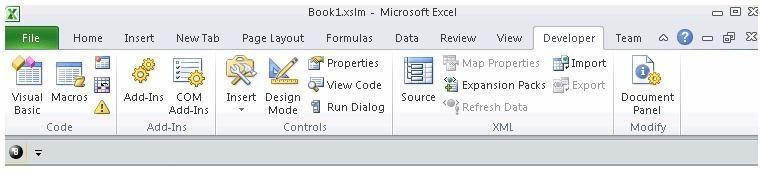
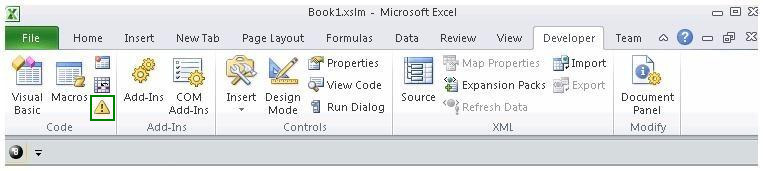
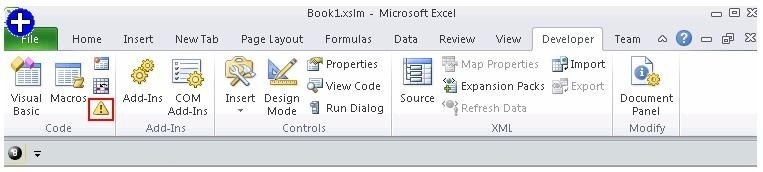
You work as an Office Assistant for Blue well Inc. The company has a Windows-based network. You want to create a VBA procedure for the open event of a workbook. You are required to set the security level temporarily for enabling all macros. Mark the option that you will choose first to accomplish the task.
Point and Shoot:
Reveal answer detailsClose answer details
Explanation
Explanation:
Question 6
Multiple choice
You work as an Office Assistant for Blue well Inc. You want to record a macro and save it with the name "Auto_Open" so that the macro will run whenever you open the workbook containing the macro. While doing so, you observe that the Auto_Open macro fails every time. Which of the following are the causes of this? Each correct answer represents a complete solution. Choose all that apply.
A
The default workbook or a workbook loaded from the XLStart folder is opened before running the macro.
B
The workbook is opened programmatically using the Open method.
C
The workbook where a user wants to save the Auto_Open macro already contains a VBAprocedure in its Open event.
D
The workbook is based on the record button that is disabled by default before running the Auto_Open macro.
Reveal answer detailsClose answer details
Correct answersA, B, C
Explanation
Explanation: The various limitations of recording an Auto_Open macro are as follows: 1. If the workbook where a user wants to save the Auto_Open macro already contains a VBA procedure in its Open event, then all actions in the Auto_Open macro are overridden by the VBA procedure used for the Open event. 2. The Auto_Open macro will be ignored when a workbook is opened programmatically using the Open method. 3. The Auto_Open macro runs before any other workbooks are opened. Therefore, if the user records actions he wants Excel to perform on the default workbook or a workbook loaded from the XLStart folder, the Auto_Open macro will fail when the user restarts Excel because it runs before the default and start-up workbooks are opened. Answer option D is incorrect. This is an invalid answer option.
Question 7
Single choice
Rick works as an Office Assistant for Tech Perfect Inc. He is creating a report through Microsoft Excel 2010. Rick wants to interact with cell data but his computer does not contain VBA code and few features of his computer are still Excel 5. 0 features.
Which of the following will Rick use to accomplish the task?
A
Accounting template
B
Trust Center
C
Form control
D
Evaluate Formula
Reveal answer detailsClose answer details
Correct answerC
Explanation
Explanation: A form control is an original control that is compatible with old versions of Excel, beginning with Excel 5. 0. It is designed for use on XLM macro sheets. It can be used when a user wants to simply interact with cell data without using VBA code and when he wants to add controls to chart sheets. By using form controls, the user can run macros. He can attach an existing macro to a control, or write or record a new macro. These controls cannot be added to UserForms, used to control events, or modified to run Web scripts on Web pages. Answer option A is incorrect. The accounting template is used for numbering months of a financial year to period numbering. It is used to compare month to month, actual v budget, quarter to quarter, year to year variances. It is the initial point for other reports that need the use of months. Answer option D is incorrect. Evaluate Formula is the formula examination tool provided by Microsoft Excel. This tool is useful for examining formulas that do not produce any error but are not generating the expected result.Answer option B is incorrect. Trust Center is where a user can find security and privacy settings for Microsoft Office 2010 programs.
Question 8
Single choice
Rick works as an Office Assistant for Tech Perfect Inc. He is creating a report through Microsoft Excel 2010. Rick wants to trace the project with the actual requirements. For this purpose, he is required to compare month to month, actual v budget, quarter to quarter, year to year variances.
Which of the following will Rick use to accomplish the task?
A
Evaluate Formula
B
Accounting template
C
Form control
D
Trust Center
Reveal answer detailsClose answer details
Correct answerB
Explanation
Explanation: The accounting template is used for numbering months of a financial year to period numbering. It is used to compare month to month, actual v budget, quarter to quarter, year to year variances. It is the initial point for other reports that need the use of months. Answer option C is incorrect. A form control is an original 5. 0. It is designed for use on XLM macro sheets. It can be used when a user wants to simply interact with cell data without using VBA code and when he wants to add controls to chart sheets. By using form controls, the user can run macros. He can attach anexisting macro to a control, or write or record a new macro. These controls cannot be added to User Forms, used to control events, or modified to run Web scripts on Web pages. Answer option A is incorrect. Evaluate Formula is the formula examination tool provided by Microsoft Excel. This tool is useful for examining formulas that do not produce any error but are not generating the expected result. Answer option D is incorrect. Trust Center is where a user can find security and privacy settings For Microsoft Office 2010 programs.
Question 9
Hotspot
HOTSPOT
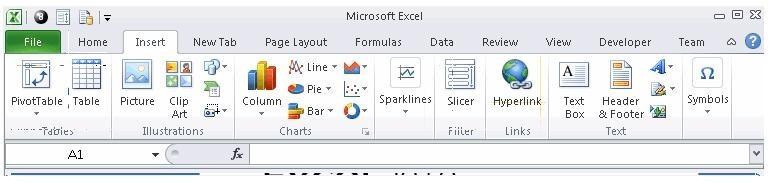
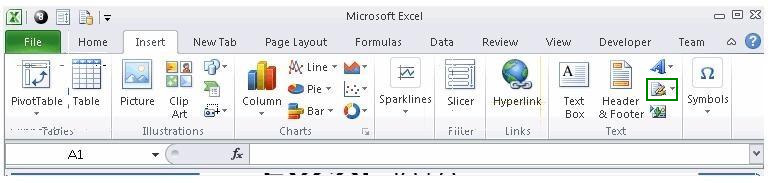
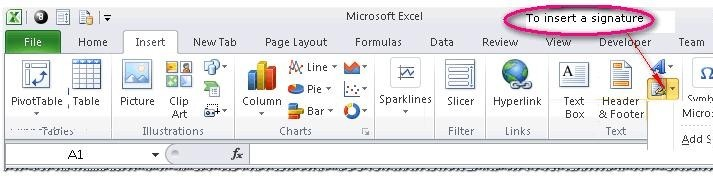
You work as an Office Assistant for Blue Well Inc. The company has a Windows-based network. You want to insert a signature line that specifies the individual who must sign. Mark the option that you will choose to accomplish the task.
Point and Shoot:
Reveal answer detailsClose answer details
Explanation
Explanation: The following figure shows the option used to insert a signature line that specifies the individual who must sign.
Question 10
Single choice
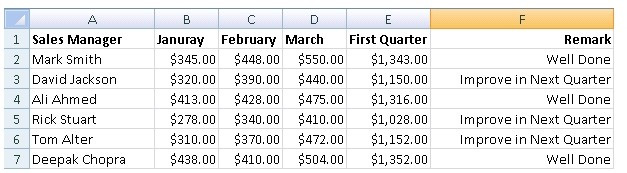
You work as a Sales Manager for Tech Perfect Inc. You are creating a report for your sales team Using Microsoft Excel. You want the report to appear in the following format:
You want the Remark column to be filled through a conditional formula. The criteria to give the remark is as follows: If the sales of the First Quarter are greater than or equal to 1200, display "Well Done" If the sales of the First Quarter is less than 1200, display "Improve in Next Quarter" You have done most of the entries in a workbook.
You select the F2 cell as shown in the image given below: Which of the following conditional formulas will you insert to accomplish the task?
A
=IF(E2>=1200,"Improve in Next Quarter","Well Done")
B
=IF(E2<=1200,"Well Done","Improve in Next Quarter")
C
=IF(E2>=1200,"Well Done","Improve in Next Quarter")
D
=IF(E2>1200,"Improve in Next Quarter","Well Done")
Reveal answer detailsClose answer details
Correct answerC
Explanation
Explanation: In order to accomplish the task, you will have to insert the following formula in the F2 cell: =IF(E2>=1200,"Well Done","Improve in Next Quarter") Answer option A is incorrect. This will display the wrong messages for the given conditions. The first expression after the logical condition is returned by the IF function when the condition is TRUE. Answer option B is incorrect. This formula will not accomplish the task as the logical condition is not correct. The specified condition in this formula is testing for values less than or equal to 1200. Whereas, the question's requirement is to evaluate values greater than or equal to 1200. Answer option D is incorrect. This formula will not accomplish the task because of the two reasons. First, the equal sign is missing in the condition. Second, the expressions are not in the correct order.
You work as an Office Manager for Blue Well Inc. The company has a Windows-based network. You have a formula that uses one or two variables or multiple formulas that all use one common variable. You want to examine a range of possibilities at a glance.
Which of the following will you use to accomplish the task?
A.
Goal Seek
B.
Solver add-in
C.
Data table
D.
Scenario
Correct Answer: C
Explanation
Explanation/Reference:
Explanation: A data table is used to see all the outcomes in one place. It is defined as a type of what-if analysis tools. It is used if a user has a formula that uses one or two variables or multiple formulas that all use one common variable. It is used to examine a range of possibilities at a glance and since the user focuses on only one or two variables, results are easy to read and share in tabular form. If automatic recalculation is enabled, it is possible to recalculate the data in data tables immediately and as a result, the user always gets fresh data. Answer option D is incorrect. A scenario is defined as a type of what-if analysis tools. It is a set of values saved by Excel and can be substituted automatically in cells on a worksheet. A user can create and save different groups of values on a worksheet and then switch to any of these new scenarios to view different results. Scenario reports are not automatically recalculated. If the user changes the values of a scenario, those changes will not be displayed in an existing summary report and he must create a new summary report to show the reflection of the changed report. Answer option A is incorrect. Goal Seek is defined as a type of what-if analysis tools. It is used if a user knows the result that he wants from a formula, but he is not sure what input value the formula needs to get that result. It works with only one variable input value. Answer option B is incorrect. The Solver add-in is used if a user knows the result that he wants from a formula, but he is not sure what input value the formula needs to get that result. It is used for more than one input value. It works with a group of cells related to the formula in the objective cell.
QUESTION 2
You work as an Office Assistant for Blue Well Inc. The company has a Windows-based network. You want to get the trend of the Business data range. For this purpose, you want to use trendlines in the chart. Which of the following steps will you take to apply the trendlines in the chart? Each correct answer represents a part of the solution. Choose all that apply.
A.
Clear the check box of any Trendline fields to disconnect a slicer.
B.
Select the type that you want from Trendline options.
C.
Click the Insert Trendline arrow, and then click Trendline Connections on the Options tab in the Sort & Filter group.
D.
Select a chart and then navigate to the Chart Tools Layout tab.
Correct Answer: BD
QUESTION 3
You work as an Office Assistant for Tech Perfect Inc. You are working in a spreadsheet. You are facing a problem that when you type in a function and press Enter, the cell shows the function as you typed it, instead of returning the function's value as shown below:
Which of the following is the reason that is causing the above problem?
A.
You are inserting a new column, next to a column that is already formatted as text.
B.
Excel is trying to reference an invalid cell.
C.
You are inserting a new column, next to a column containing Dates or Times.
D.
The lookup_value or the array you are searching resides in a cell containing unseen spaces at the start or end of that cell.
Correct Answer: A
Explanation
Explanation/Reference:
Explanation: The Excel Won't Calculate My Function error occurs when a user types in a function and presses Enter, the cell shows the function as the user typed it, instead of returning the function's value. The reason that causes this problem is that the cells containing the formula are formatted as 'text' instead of the 'General' type. This happens when the user inserts a new column, next to a column that is already formatted as text due to which the new column inherits the formatting of the adjacent column. Answer option D is incorrect. The Failure to Look Up Values in Excel error occurs when a user gets an unexpected error while trying to look up or match a lookup_value within an array and Excel is not able to recognize the matching value. If the lookup_value or the array the user is searching resides in a cell, the user can have unseen spaces at the start or end of that cell. This will create the situation where the contents of the two cells that the user is comparing look the same but extra spaces in one of the cells cause the cells to have slightly different content. The other reason is that the contents of the cells that are being compared may have different data types.
Answer option B is incorrect. The Lookup Function Won't Copy Down to Other Rows error occurs when a user uses a function in one cell and it works perfectly but when he attempts to copy the function down to other rows, he gets the #REF error. The #REF! error arises when Excel tries to reference an invalid cell. This error occurs if the user has referenced an entire worksheet by clicking on the grey square at the top left of the worksheet. For Excel, this reference range is 1 to 1048576. Since the references are Relative References, Excel automatically increases the row references when this cell is copied down to other rows in the spreadsheet. Answer option C is incorrect. The Cell Shows a Date or Time Instead of a Number error occurs because the cell that contains the formula is formatted as a 'date' or 'time' instead of a 'General' type or a number. This situation arises because a user has inserted a new column, next to a column containing Dates or Times, the new column has 'inherited' the formatting of the adjacent column.
QUESTION 4
You work as an Office Assistant for Blue Well Inc. The company has a Windows-based network. You are creating a chart in Excel 2010. You want to show the slope of data points in the chart to know the trend of the Business Intelligence data range.
Which of the following will you use to accomplish the task?
A.
Trendline
B.
Sparkline
C.
Backstage view
D.
Line charts
Correct Answer: A
Explanation
Explanation/Reference:
Explanation: A trendline is defined in Excel 2010. It is a data visualization tool to display the trend of a particular data range. It is used to show the slope of data points in a chart. There are various types of trendlines, such as linear trendlines, exponential trendlines, and linear forecast trendlines. Answer option B is incorrect. A sparkline is defined as a tiny chart in the background of a cell. Unlike charts on an Excel worksheet, sparklines are not objects. It is used because data presented in a row or column is useful, but patterns can be hard to spot at a glance. It is used to display a trend based on adjacent data in a clear and compact graphical representation by taking up a small amount of space. The benefit of using the sparklines is that these can be printed when a user prints a worksheet that contains them. This feature is not available in charts. Answer option C is incorrect. The Microsoft Office Backstage view is used to replace the traditional file menu with a new approach that uses In and Out features for efficiency. The improved Ribbon enables users to access their preferred commands rapidly and create custom tabs to personalize the way they work.Answer option D is incorrect. Excel provides a column chart facility to display data that is arranged in columns or rows on a worksheet. Line charts are used to display continuous data over time, set against a common scale. In a line chart, category data is distributed along the horizontal axis, and all value data is distributed along the vertical axis. Line charts are ideal for showing trends in data at equal intervals.
A line chart should be used where category labels are text, and are representing evenly spaced values such as months, quarters, or years.
QUESTION 5
HOTSPOT
You work as an Office Assistant for Blue well Inc. The company has a Windows-based network. You want to create a VBA procedure for the open event of a workbook. You are required to set the security level temporarily for enabling all macros. Mark the option that you will choose first to accomplish the task.
Point and Shoot:
Correct Answer:
Explanation
Explanation/Reference:
Explanation:
QUESTION 6
You work as an Office Assistant for Blue well Inc. You want to record a macro and save it with the name "Auto_Open" so that the macro will run whenever you open the workbook containing the macro. While doing so, you observe that the Auto_Open macro fails every time. Which of the following are the causes of this? Each correct answer represents a complete solution. Choose all that apply.
A.
The default workbook or a workbook loaded from the XLStart folder is opened before running the macro.
B.
The workbook is opened programmatically using the Open method.
C.
The workbook where a user wants to save the Auto_Open macro already contains a VBAprocedure in its Open event.
D.
The workbook is based on the record button that is disabled by default before running the Auto_Open macro.
Correct Answer: ABC
Explanation
Explanation/Reference:
Explanation: The various limitations of recording an Auto_Open macro are as follows: 1. If the workbook where a user wants to save the Auto_Open macro already contains a VBA procedure in its Open event, then all actions in the Auto_Open macro are overridden by the VBA procedure used for the Open event. 2. The Auto_Open macro will be ignored when a workbook is opened programmatically using the Open method. 3. The Auto_Open macro runs before any other workbooks are opened. Therefore, if the user records actions he wants Excel to perform on the default workbook or a workbook loaded from the XLStart folder, the Auto_Open macro will fail when the user restarts Excel because it runs before the default and start-up workbooks are opened. Answer option D is incorrect. This is an invalid answer option.
QUESTION 7
Rick works as an Office Assistant for Tech Perfect Inc. He is creating a report through Microsoft Excel 2010. Rick wants to interact with cell data but his computer does not contain VBA code and few features of his computer are still Excel 5. 0 features.
Which of the following will Rick use to accomplish the task?
A.
Accounting template
B.
Trust Center
C.
Form control
D.
Evaluate Formula
Correct Answer: C
Explanation
Explanation/Reference:
Explanation: A form control is an original control that is compatible with old versions of Excel, beginning with Excel 5. 0. It is designed for use on XLM macro sheets. It can be used when a user wants to simply interact with cell data without using VBA code and when he wants to add controls to chart sheets. By using form controls, the user can run macros. He can attach an existing macro to a control, or write or record a new macro. These controls cannot be added to UserForms, used to control events, or modified to run Web scripts on Web pages. Answer option A is incorrect. The accounting template is used for numbering months of a financial year to period numbering. It is used to compare month to month, actual v budget, quarter to quarter, year to year variances. It is the initial point for other reports that need the use of months. Answer option D is incorrect. Evaluate Formula is the formula examination tool provided by Microsoft Excel. This tool is useful for examining formulas that do not produce any error but are not generating the expected result.Answer option B is incorrect. Trust Center is where a user can find security and privacy settings for Microsoft Office 2010 programs.
QUESTION 8
Rick works as an Office Assistant for Tech Perfect Inc. He is creating a report through Microsoft Excel 2010. Rick wants to trace the project with the actual requirements. For this purpose, he is required to compare month to month, actual v budget, quarter to quarter, year to year variances.
Which of the following will Rick use to accomplish the task?
A.
Evaluate Formula
B.
Accounting template
C.
Form control
D.
Trust Center
Correct Answer: B
Explanation
Explanation/Reference:
Explanation: The accounting template is used for numbering months of a financial year to period numbering. It is used to compare month to month, actual v budget, quarter to quarter, year to year variances. It is the initial point for other reports that need the use of months. Answer option C is incorrect. A form control is an original 5. 0. It is designed for use on XLM macro sheets. It can be used when a user wants to simply interact with cell data without using VBA code and when he wants to add controls to chart sheets. By using form controls, the user can run macros. He can attach anexisting macro to a control, or write or record a new macro. These controls cannot be added to User Forms, used to control events, or modified to run Web scripts on Web pages. Answer option A is incorrect. Evaluate Formula is the formula examination tool provided by Microsoft Excel. This tool is useful for examining formulas that do not produce any error but are not generating the expected result. Answer option D is incorrect. Trust Center is where a user can find security and privacy settings For Microsoft Office 2010 programs.
QUESTION 9
HOTSPOT
You work as an Office Assistant for Blue Well Inc. The company has a Windows-based network. You want to insert a signature line that specifies the individual who must sign. Mark the option that you will choose to accomplish the task.
Point and Shoot:
Correct Answer:
Explanation
Explanation/Reference:
Explanation: The following figure shows the option used to insert a signature line that specifies the individual who must sign.
QUESTION 10
You work as a Sales Manager for Tech Perfect Inc. You are creating a report for your sales team Using Microsoft Excel. You want the report to appear in the following format:
You want the Remark column to be filled through a conditional formula. The criteria to give the remark is as follows: If the sales of the First Quarter are greater than or equal to 1200, display "Well Done" If the sales of the First Quarter is less than 1200, display "Improve in Next Quarter" You have done most of the entries in a workbook.
You select the F2 cell as shown in the image given below: Which of the following conditional formulas will you insert to accomplish the task?
A.
=IF(E2>=1200,"Improve in Next Quarter","Well Done")
B.
=IF(E2<=1200,"Well Done","Improve in Next Quarter")
C.
=IF(E2>=1200,"Well Done","Improve in Next Quarter")
D.
=IF(E2>1200,"Improve in Next Quarter","Well Done")
Correct Answer: C
Explanation
Explanation/Reference:
Explanation: In order to accomplish the task, you will have to insert the following formula in the F2 cell: =IF(E2>=1200,"Well Done","Improve in Next Quarter") Answer option A is incorrect. This will display the wrong messages for the given conditions. The first expression after the logical condition is returned by the IF function when the condition is TRUE. Answer option B is incorrect. This formula will not accomplish the task as the logical condition is not correct. The specified condition in this formula is testing for values less than or equal to 1200. Whereas, the question's requirement is to evaluate values greater than or equal to 1200. Answer option D is incorrect. This formula will not accomplish the task because of the two reasons. First, the equal sign is missing in the condition. Second, the expressions are not in the correct order.