Review sample questions, verified answers and available explanations before choosing a study plan.
Question 1
Single choice
Rick works as an Office Assistant for Tech Perfect Inc. He is creating a report through Microsoft Excel
2013. Rick wants to trace the project with the actual requirements. For this purpose, he is required to compare month to month, actual v budget, quarter to quarter, year to year variances.
Which of the following will Rick use to accomplish the task?
A
Evaluate Formula
B
Accounting template
C
Form control
D
Trust Center
Reveal answer detailsClose answer details
Correct answerB
Explanation
The accounting template is used for numbering months of a financial year to period numbering. It is used to compare month to month, actual v budget, quarter to quarter, year to year variances. It is the initial point for other reports that need the use of months. Answer option C is incorrect. A form control is an original 5. 0. It is designed for use on XLM macro sheets. It can be used when a user wants to simply interact with cell data without using VBA code and when he wants to add controls to chart sheets. By using form controls, the user can run macros. He can attach anexisting macro to a control, or write or record a new macro. These controls cannot be added to User Forms, used to control events, or modified to run Web scripts on Web pages. Answer option A is incorrect. Evaluate Formula is the formula examination tool provided by Microsoft Excel. This tool is useful for examining formulas that do not produce any error but are not generating the expected result. Answer option D is incorrect. Trust Center is where a user can find security and privacy settings For Microsoft Office 2013 programs.
Question 2
Hotspot
HOTSPOT
You work as a technician in Tech Perfect Inc. The Network Administrator of the company installs the Microsoft Excel 2013 application on the network. You open the application and see various changes in Excel 2013. You have to open an existing worksheet through the application. You are unable to find the Office button. Mark the option that you will click to accomplish the task.
Reveal answer detailsClose answer details
Explanation
You will have to click File button to accomplish the task. Clicking the File button will open the full-screen Backstage View of the sheet.
Question 3
Single choice
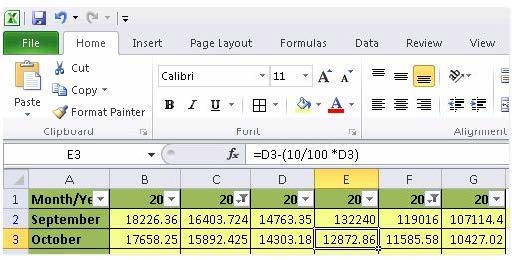
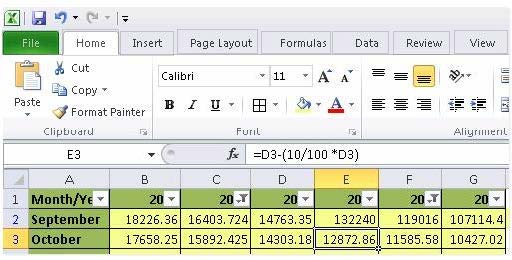
You work as an Office Assistant for Tech Perfect Inc. You are working in a spreadsheet. You are facing a problem that when you type in a function and press Enter, the cell shows the function as you typed it, instead of returning the function's value as shown below:
Which of the following is the reason that is causing the above problem?
A
You are inserting a new column, next to a column that is already formatted as text.
B
Excel is trying to reference an invalid cell.
C
You are inserting a new column, next to a column containing Dates or Times.
D
The lookup_value or the array you are searching resides in a cell containing unseen spaces at the start or end of that cell.
Reveal answer detailsClose answer details
Correct answerA
Explanation
The Excel Won't Calculate My Function error occurs when a user types in a function and presses Enter, the cell shows the function as the user typed it, instead of returning the function's value. The reason that causes this problem is that the cells containing the formula are formatted as 'text' instead of the 'General' type. This happens when the user inserts a new column, next to a column that is already formatted as text due to which the new column inherits the formatting of the adjacent column. Answer option D is incorrect. The Failure to Look Up Values in Excel error occurs when a user gets an unexpected error while trying to look up or match a lookup_value within an array and Excel is not able to recognize the matching value. If the lookup_value or the array the user is searching resides in a cell, the user can have unseen spaces at the start or end of that cell. This will create the situation where the contents of the two cells that the user is comparing look the same but extra spaces in one of the cells cause the cells to have slightly different content. The other reason is that the contents of the cells that are being compared may have different data types.
Answer option B is incorrect. The Lookup Function Won't Copy Down to Other Rows error occurs when a user uses a function in one cell and it works perfectly but when he attempts to copy the function down to other rows, he gets the #REF error. The #REF! error arises when Excel tries to reference an invalid cell. This error occurs if the user has referenced an entire worksheet by clicking on the grey square at the top left of the worksheet. For Excel, this reference range is 1 to 1048576. Since the references are Relative References, Excel automatically increases the row references when this cell is copied down to other rows in the spreadsheet. Answer option C is incorrect. The Cell Shows a Date or Time Instead of a Number error occurs because the cell that contains the formula is formatted as a 'date' or 'time' instead of a 'General' type or a number. This situation arises because a user has inserted a new column, next to a column containing Dates or Times, the new column has 'inherited' the formatting of the adjacent column.
Question 4
Multiple choice
You work as an Office Assistant for Tech Perfect Inc. You are working in the spreadsheet of the
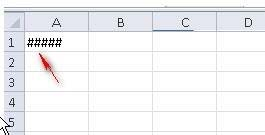
company's high selling products. You input a formula for calculating the monthly sell of a particular product but your Excel cell shows a string of # symbols instead of returning a value as shown below:
Which of the following are the reasons that are causing the above problem? Each correct answer represents a complete solution. Choose all that apply.
A
You are inserting a new column, next to a column that is already formatted as text.
B
The cell is not wide enough for displaying the calculated value.
C
The lookup_value or the array you are searching resides in a cell containing unseen spaces at the start or end of that cell.
D
Excel is trying to show the contents of the cell as a date or time stored as positive numeric values within Excel, but the cell contains a negative value.
Reveal answer detailsClose answer details
Correct answersB, D
Explanation
The Cell Shows ##### error occurs because the cell is not wide enough for displaying the calculated value. The other reason is that Excel is trying to show the contents of the cell as a date or time stored as positive numeric values within Excel, but the cell contains a negative value. Answer option C is incorrect. The Failure to Look Up Values in Excel error occurs when a user gets an unexpected error while trying to look up or match a lookup_value within an array and Excel is not able to recognize the matching value. If the lookup_value or the array the user is searching resides in a cell, the user can have unseen spaces at the start or end of that cell. This will create the situation where the contents of the two cells that the user is comparing look the same but extra spaces in one of the cells cause the cells to have slightly different content. The other reason is that the contents of the cells that are being compared may have different data types. Answer option A is incorrect. The Excel Won't Calculate My Function error occurs when a user types in a function and presses Enter, the cell shows the function as the user typed it, instead of returning the function's value. The reason that causes this problem is that the cells containing the formula are formatted as 'text' instead of the 'General' type. This happens when the user inserts a new column, next to a column that is already formatted as text due to which the new column inherits the formatting of the adjacent column
Question 5
Single choice
Rick works as an Office Assistant for Tech Perfect Inc. The company has a Windows-based network. He is creating a form through Microsoft Excel 2013. He wants to enable worksheet forms to satisfy the flexible design requirements and to customize their appearance, behavior, fonts, and other characteristics.
Which of the following will Rick use to accomplish the task?
A
Form control
B
Accounting template
C
Trust Center
D
ActiveX control
Reveal answer detailsClose answer details
Correct answerD
Explanation
ActiveX controls are used on worksheet forms, with or without the use of VBA code, and on VBA UserForms. They are used when a user needs more flexible design requirements than those provided by Form controls. They have extensive properties that can be used to customize their appearance, behavior, fonts, and other characteristics. The user can control different events that occur when an ActiveX control is interacted with. He can also write macros that respond to events associated with the ActiveX controls. When a user interacts with the control, the VBA code runs to process any events that occur for that control. The ActiveX controls cannot be added to chart sheets from the user interface or to XLM macro sheets. It is not possible to assign a macro to run directly from the ActiveX control. Answer option A is incorrect. A form control is an original control that is compatible with old versions of 5. 0. It is designed for use on XLM macro sheets. It can be used when a user wants to simply interact with cell data without using VBA code and when he wants to add controls to chart sheets. By using form controls, the user can run macros. He can attach an existing macro to a control, or write or record a new macro. These controls cannot be added to UserForms, used to control events, or modified to run Web scripts on Web pages. Answer option B is incorrect. The accounting template is used for numbering months of a financial year to period numbering. It is used to compare month to month, actual v budget, quarter to quarter, year to year variances. It is the initial point for other reports that need the use of months. Answer option C is incorrect. Trust Center is where a user can find security and privacy settings for Microsoft Office 2013 programs.
Question 6
Single choice
Rick works as an Office Assistant for Tech Perfect Inc. The company has a Windows-based network.
Rick wants to display data series, categories, data markers, and axes in the report.
Which of the following actions will Rick take to accomplish the task?
A
He will use stand-alone slicers.
B
He will create a PivotTable report.
C
He will configure form controls.
D
He will create a PivotChart report.
Reveal answer detailsClose answer details
Correct answerD
Explanation
The PivotChart report is used to provide a graphical representation of data in a PivotTable report in an interactive way. Whenever a user creates the PivotChart report, PivotChart report filters are displayed in the chart area. These are used for sorting and filtering the underlying data of the PivotChart report. Changes made to the layout and data in the associated PivotTable report are immediately reflected in the layout and data in the PivotChart report. The PivotChart report shows data series, categories, data markers, and axes in the same way as the standard charts do. It is possible to change the chart type and other options such as titles, legend placement, data labels, and chart location. Answer option A is incorrect. Stand-alone slicers are referenced from Online Analytical Processing (OLAP) Cube functions. These stand-alone slicers can be connected with any PivotTable in future. They can be added by using the slicer button on the Ribbon. They need to be manually linked into grids as required. Answer option C is incorrect. A form control is an original control that is compatible with old versions of 5. 0. It is designed for use on XLM macro sheets. It can be used when a user wants to simply interact with cell data without using VBA code and when he wants to add controls to chart sheets. By using form controls, the user can run macros. He can attach an existing macro to a control, or write or record a new macro. These controls cannot be added to UserForms, used to control
events, or modified to run Web scripts on Web pages. Answer option B is incorrect. A PivotTable report is used to summarize large amounts of data, to analyze numerical data, and to answer unexpected questions about data.
Question 7
Single choice
You work as an Office Assistant for Blue Well Inc. The company has a Windows-based network. You have changed some data in the worksheet of the company. You are submitting the sell workbook of the company to the Administrator of the company for comments. Now, you want to merge input that you receive into a copy of that workbook, including the changes and comments that you want to keep. For this purpose, it is required to access and use the stored change history.
Which of the following will you use to accomplish the task?
A
Slicer-enabled highlighting
B
Onscreen highlighting
C
Reviewing of changes
D
History tracking
Reveal answer detailsClose answer details
Correct answerC
Explanation
The following ways are provided by Excel to access and use the stored change history: 1. Onscreen highlighting: It is used when a workbook does not contain many changes and a user wants to see all changes at a glance. 2. History tracking: It is used when a workbook has many changes and a user wants to investigate what occurred in a series of changes. 3. Reviewing of changes: It is used when a user is evaluating comments from other users. Answer option A is incorrect. This is an invalid answer option.
Question 8
Single choice
Rick works as an Office Assistant for Tech Perfect Inc. He is creating a user form through
Microsoft Excel 2013. While creating forms for a number of users, he is required to repeat some of the actions multiple times. It is a very time consuming process. To resolve this issue, he wants to record the sequence of actions to perform a certain task and to play them back in the same order.
Which of the following actions will Rick take to accomplish the task?
A
He will use the Trust Center bar.
B
He will use the Evaluate Formula tool.
C
He will put the workbook in a trusted location.
D
He will create and run a macro.
Reveal answer detailsClose answer details
Correct answerD
Explanation
A macro is defined as a tool that permits a user to automate tasks and add several functionalities to forms, reports, and controls. For example, if a user adds a command button to a form, he associates the button's OnClick event to a macro, and the macro consists of the commands that are to be performed by the button each time it is clicked. The macro records the user's mouse clicks and keystrokes while he works and lets him play them back later. The macro can be used to record the sequence of commands that the user uses to perform a certain task. When the user runs the macro, it plays those exact commands back in the same order. Answer option B is incorrect. Evaluate Formula is a formula examination tool provided by Microsoft Excel. This tool is useful for examining formulas that do not produce any error but are not generating the expected result. Answer options A and C are incorrect. The benefit of connecting to external data from Microsoft Excel is that a user can automatically update Excel workbooks from the real data source wheneverthe data source is updated with new information. It is possible that the external data connection might be disabled on the computer. For connecting to the data source whenever a workbook is opened, it is required to enable data connections by using the Trust Center bar or by putting the workbook in a trusted location.
Question 9
Multiple choice
Which of the following steps will you take to merge copies of a shared workbook? Each correct answer represents a part of the solution. Choose all that apply.
A
In the Select Files to Merge into Current Workbook dialog box, click a copy of the workbook containing changes to be merged, and then click OK.
B
Click Compare and Merge Workbooks on Quick Access Toolbar.
C
Open the copy of the shared workbook to merge the changes.
D
Save the workbook if prompted.
E
Add Compare and Merge Workbooks.
F
Click Compare and Merge Workbooks on Macro Enabled Access Toolbar.
Reveal answer detailsClose answer details
Correct answersA, B, C, D, E
Explanation
Take the following steps to merge copies of a shared workbook:
1. Add Compare and Merge Workbooks. 2. Open the copy of the shared workbook to merge the changes. 3. Click Compare and Merge Workbooks on Quick Access Toolbar. 4. Save the workbook if prompted. 5. In the Select Files to Merge into Current Workbook dialog box, click a copy of the workbook containing changes to be merged, and then click OK.
Question 10
Single choice
Rick works as an Office Assistant for Tech Perfect Inc. The company has a Windows-based network.
Rick is creating a project through Microsoft Excel 2013. The project on which he is working has 98 project tasks and 57 team members. Rick wants to check the progress of his project quickly and easily.
Which of the following will Rick use to accomplish the task?
A
Gantt Chart Template
B
Form control
C
Trust Center
D
Accounting template
Reveal answer detailsClose answer details
Correct answerA
Explanation
The Gantt Chart Template Deluxe Edition for Excel is used to generate quick and easy Gantt charts that define the progress of a user's projects containing up to 100 project tasks and team members. Answer option B is incorrect. A form control is an original control that is compatible with old versions of Excel, 5. 0. It is designed for use on XLM macro sheets. It can be used when a user wants to simply interact with cell data without using VBA code and when he wants to add controls to chart sheets. By using form controls, the user can run macros. He can attach an existing macro to a control, or write or record a new macro. These controls cannot be added to UserForms, used to control events, or modified to run Web scripts on Web pages. Answer option D is incorrect. The accounting template is used for numbering months of a financial year to period numbering. It is used to compare month to month, actual v budget, quarter to quarter, year to year variances. It is the initial point for other reports that need the use of months. Answer option C is incorrect. Trust Center is where a user can find security and privacy settings for Microsoft Office 2013 programs.
Rick works as an Office Assistant for Tech Perfect Inc. He is creating a report through Microsoft Excel
2013. Rick wants to trace the project with the actual requirements. For this purpose, he is required to compare month to month, actual v budget, quarter to quarter, year to year variances.
Which of the following will Rick use to accomplish the task?
A.
Evaluate Formula
B.
Accounting template
C.
Form control
D.
Trust Center
Correct Answer: B
Explanation
Explanation/Reference:
The accounting template is used for numbering months of a financial year to period numbering. It is used to compare month to month, actual v budget, quarter to quarter, year to year variances. It is the initial point for other reports that need the use of months. Answer option C is incorrect. A form control is an original 5. 0. It is designed for use on XLM macro sheets. It can be used when a user wants to simply interact with cell data without using VBA code and when he wants to add controls to chart sheets. By using form controls, the user can run macros. He can attach anexisting macro to a control, or write or record a new macro. These controls cannot be added to User Forms, used to control events, or modified to run Web scripts on Web pages. Answer option A is incorrect. Evaluate Formula is the formula examination tool provided by Microsoft Excel. This tool is useful for examining formulas that do not produce any error but are not generating the expected result. Answer option D is incorrect. Trust Center is where a user can find security and privacy settings For Microsoft Office 2013 programs.
QUESTION 2
HOTSPOT
You work as a technician in Tech Perfect Inc. The Network Administrator of the company installs the Microsoft Excel 2013 application on the network. You open the application and see various changes in Excel 2013. You have to open an existing worksheet through the application. You are unable to find the Office button. Mark the option that you will click to accomplish the task.
Correct Answer:
Explanation
Explanation/Reference:
You will have to click File button to accomplish the task. Clicking the File button will open the full-screen Backstage View of the sheet.
QUESTION 3
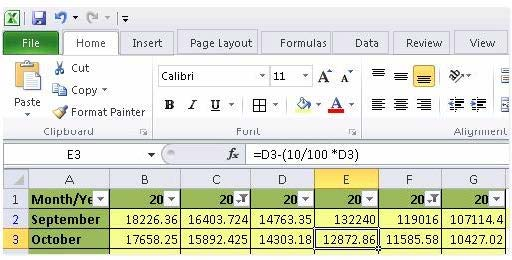
You work as an Office Assistant for Tech Perfect Inc. You are working in a spreadsheet. You are facing a problem that when you type in a function and press Enter, the cell shows the function as you typed it, instead of returning the function's value as shown below:
Which of the following is the reason that is causing the above problem?
A.
You are inserting a new column, next to a column that is already formatted as text.
B.
Excel is trying to reference an invalid cell.
C.
You are inserting a new column, next to a column containing Dates or Times.
D.
The lookup_value or the array you are searching resides in a cell containing unseen spaces at the start or end of that cell.
Correct Answer: A
Explanation
Explanation/Reference:
The Excel Won't Calculate My Function error occurs when a user types in a function and presses Enter, the cell shows the function as the user typed it, instead of returning the function's value. The reason that causes this problem is that the cells containing the formula are formatted as 'text' instead of the 'General' type. This happens when the user inserts a new column, next to a column that is already formatted as text due to which the new column inherits the formatting of the adjacent column. Answer option D is incorrect. The Failure to Look Up Values in Excel error occurs when a user gets an unexpected error while trying to look up or match a lookup_value within an array and Excel is not able to recognize the matching value. If the lookup_value or the array the user is searching resides in a cell, the user can have unseen spaces at the start or end of that cell. This will create the situation where the contents of the two cells that the user is comparing look the same but extra spaces in one of the cells cause the cells to have slightly different content. The other reason is that the contents of the cells that are being compared may have different data types.
Answer option B is incorrect. The Lookup Function Won't Copy Down to Other Rows error occurs when a user uses a function in one cell and it works perfectly but when he attempts to copy the function down to other rows, he gets the #REF error. The #REF! error arises when Excel tries to reference an invalid cell. This error occurs if the user has referenced an entire worksheet by clicking on the grey square at the top left of the worksheet. For Excel, this reference range is 1 to 1048576. Since the references are Relative References, Excel automatically increases the row references when this cell is copied down to other rows in the spreadsheet. Answer option C is incorrect. The Cell Shows a Date or Time Instead of a Number error occurs because the cell that contains the formula is formatted as a 'date' or 'time' instead of a 'General' type or a number. This situation arises because a user has inserted a new column, next to a column containing Dates or Times, the new column has 'inherited' the formatting of the adjacent column.
QUESTION 4
You work as an Office Assistant for Tech Perfect Inc. You are working in the spreadsheet of the
company's high selling products. You input a formula for calculating the monthly sell of a particular product but your Excel cell shows a string of # symbols instead of returning a value as shown below:
Which of the following are the reasons that are causing the above problem? Each correct answer represents a complete solution. Choose all that apply.
A.
You are inserting a new column, next to a column that is already formatted as text.
B.
The cell is not wide enough for displaying the calculated value.
C.
The lookup_value or the array you are searching resides in a cell containing unseen spaces at the start or end of that cell.
D.
Excel is trying to show the contents of the cell as a date or time stored as positive numeric values within Excel, but the cell contains a negative value.
Correct Answer: BD
Explanation
Explanation/Reference:
The Cell Shows ##### error occurs because the cell is not wide enough for displaying the calculated value. The other reason is that Excel is trying to show the contents of the cell as a date or time stored as positive numeric values within Excel, but the cell contains a negative value. Answer option C is incorrect. The Failure to Look Up Values in Excel error occurs when a user gets an unexpected error while trying to look up or match a lookup_value within an array and Excel is not able to recognize the matching value. If the lookup_value or the array the user is searching resides in a cell, the user can have unseen spaces at the start or end of that cell. This will create the situation where the contents of the two cells that the user is comparing look the same but extra spaces in one of the cells cause the cells to have slightly different content. The other reason is that the contents of the cells that are being compared may have different data types. Answer option A is incorrect. The Excel Won't Calculate My Function error occurs when a user types in a function and presses Enter, the cell shows the function as the user typed it, instead of returning the function's value. The reason that causes this problem is that the cells containing the formula are formatted as 'text' instead of the 'General' type. This happens when the user inserts a new column, next to a column that is already formatted as text due to which the new column inherits the formatting of the adjacent column
QUESTION 5
Rick works as an Office Assistant for Tech Perfect Inc. The company has a Windows-based network. He is creating a form through Microsoft Excel 2013. He wants to enable worksheet forms to satisfy the flexible design requirements and to customize their appearance, behavior, fonts, and other characteristics.
Which of the following will Rick use to accomplish the task?
A.
Form control
B.
Accounting template
C.
Trust Center
D.
ActiveX control
Correct Answer: D
Explanation
Explanation/Reference:
ActiveX controls are used on worksheet forms, with or without the use of VBA code, and on VBA UserForms. They are used when a user needs more flexible design requirements than those provided by Form controls. They have extensive properties that can be used to customize their appearance, behavior, fonts, and other characteristics. The user can control different events that occur when an ActiveX control is interacted with. He can also write macros that respond to events associated with the ActiveX controls. When a user interacts with the control, the VBA code runs to process any events that occur for that control. The ActiveX controls cannot be added to chart sheets from the user interface or to XLM macro sheets. It is not possible to assign a macro to run directly from the ActiveX control. Answer option A is incorrect. A form control is an original control that is compatible with old versions of 5. 0. It is designed for use on XLM macro sheets. It can be used when a user wants to simply interact with cell data without using VBA code and when he wants to add controls to chart sheets. By using form controls, the user can run macros. He can attach an existing macro to a control, or write or record a new macro. These controls cannot be added to UserForms, used to control events, or modified to run Web scripts on Web pages. Answer option B is incorrect. The accounting template is used for numbering months of a financial year to period numbering. It is used to compare month to month, actual v budget, quarter to quarter, year to year variances. It is the initial point for other reports that need the use of months. Answer option C is incorrect. Trust Center is where a user can find security and privacy settings for Microsoft Office 2013 programs.
QUESTION 6
Rick works as an Office Assistant for Tech Perfect Inc. The company has a Windows-based network.
Rick wants to display data series, categories, data markers, and axes in the report.
Which of the following actions will Rick take to accomplish the task?
A.
He will use stand-alone slicers.
B.
He will create a PivotTable report.
C.
He will configure form controls.
D.
He will create a PivotChart report.
Correct Answer: D
Explanation
Explanation/Reference:
The PivotChart report is used to provide a graphical representation of data in a PivotTable report in an interactive way. Whenever a user creates the PivotChart report, PivotChart report filters are displayed in the chart area. These are used for sorting and filtering the underlying data of the PivotChart report. Changes made to the layout and data in the associated PivotTable report are immediately reflected in the layout and data in the PivotChart report. The PivotChart report shows data series, categories, data markers, and axes in the same way as the standard charts do. It is possible to change the chart type and other options such as titles, legend placement, data labels, and chart location. Answer option A is incorrect. Stand-alone slicers are referenced from Online Analytical Processing (OLAP) Cube functions. These stand-alone slicers can be connected with any PivotTable in future. They can be added by using the slicer button on the Ribbon. They need to be manually linked into grids as required. Answer option C is incorrect. A form control is an original control that is compatible with old versions of 5. 0. It is designed for use on XLM macro sheets. It can be used when a user wants to simply interact with cell data without using VBA code and when he wants to add controls to chart sheets. By using form controls, the user can run macros. He can attach an existing macro to a control, or write or record a new macro. These controls cannot be added to UserForms, used to control
events, or modified to run Web scripts on Web pages. Answer option B is incorrect. A PivotTable report is used to summarize large amounts of data, to analyze numerical data, and to answer unexpected questions about data.
QUESTION 7
You work as an Office Assistant for Blue Well Inc. The company has a Windows-based network. You have changed some data in the worksheet of the company. You are submitting the sell workbook of the company to the Administrator of the company for comments. Now, you want to merge input that you receive into a copy of that workbook, including the changes and comments that you want to keep. For this purpose, it is required to access and use the stored change history.
Which of the following will you use to accomplish the task?
A.
Slicer-enabled highlighting
B.
Onscreen highlighting
C.
Reviewing of changes
D.
History tracking
Correct Answer: C
Explanation
Explanation/Reference:
The following ways are provided by Excel to access and use the stored change history: 1. Onscreen highlighting: It is used when a workbook does not contain many changes and a user wants to see all changes at a glance. 2. History tracking: It is used when a workbook has many changes and a user wants to investigate what occurred in a series of changes. 3. Reviewing of changes: It is used when a user is evaluating comments from other users. Answer option A is incorrect. This is an invalid answer option.
QUESTION 8
Rick works as an Office Assistant for Tech Perfect Inc. He is creating a user form through
Microsoft Excel 2013. While creating forms for a number of users, he is required to repeat some of the actions multiple times. It is a very time consuming process. To resolve this issue, he wants to record the sequence of actions to perform a certain task and to play them back in the same order.
Which of the following actions will Rick take to accomplish the task?
A.
He will use the Trust Center bar.
B.
He will use the Evaluate Formula tool.
C.
He will put the workbook in a trusted location.
D.
He will create and run a macro.
Correct Answer: D
Explanation
Explanation/Reference:
A macro is defined as a tool that permits a user to automate tasks and add several functionalities to forms, reports, and controls. For example, if a user adds a command button to a form, he associates the button's OnClick event to a macro, and the macro consists of the commands that are to be performed by the button each time it is clicked. The macro records the user's mouse clicks and keystrokes while he works and lets him play them back later. The macro can be used to record the sequence of commands that the user uses to perform a certain task. When the user runs the macro, it plays those exact commands back in the same order. Answer option B is incorrect. Evaluate Formula is a formula examination tool provided by Microsoft Excel. This tool is useful for examining formulas that do not produce any error but are not generating the expected result. Answer options A and C are incorrect. The benefit of connecting to external data from Microsoft Excel is that a user can automatically update Excel workbooks from the real data source wheneverthe data source is updated with new information. It is possible that the external data connection might be disabled on the computer. For connecting to the data source whenever a workbook is opened, it is required to enable data connections by using the Trust Center bar or by putting the workbook in a trusted location.
QUESTION 9
Which of the following steps will you take to merge copies of a shared workbook? Each correct answer represents a part of the solution. Choose all that apply.
A.
In the Select Files to Merge into Current Workbook dialog box, click a copy of the workbook containing changes to be merged, and then click OK.
B.
Click Compare and Merge Workbooks on Quick Access Toolbar.
C.
Open the copy of the shared workbook to merge the changes.
D.
Save the workbook if prompted.
E.
Add Compare and Merge Workbooks.
F.
Click Compare and Merge Workbooks on Macro Enabled Access Toolbar.
Correct Answer: ABCDE
Explanation
Explanation/Reference:
Take the following steps to merge copies of a shared workbook:
1. Add Compare and Merge Workbooks. 2. Open the copy of the shared workbook to merge the changes. 3. Click Compare and Merge Workbooks on Quick Access Toolbar. 4. Save the workbook if prompted. 5. In the Select Files to Merge into Current Workbook dialog box, click a copy of the workbook containing changes to be merged, and then click OK.
QUESTION 10
Rick works as an Office Assistant for Tech Perfect Inc. The company has a Windows-based network.
Rick is creating a project through Microsoft Excel 2013. The project on which he is working has 98 project tasks and 57 team members. Rick wants to check the progress of his project quickly and easily.
Which of the following will Rick use to accomplish the task?
A.
Gantt Chart Template
B.
Form control
C.
Trust Center
D.
Accounting template
Correct Answer: A
Explanation
Explanation/Reference:
The Gantt Chart Template Deluxe Edition for Excel is used to generate quick and easy Gantt charts that define the progress of a user's projects containing up to 100 project tasks and team members. Answer option B is incorrect. A form control is an original control that is compatible with old versions of Excel, 5. 0. It is designed for use on XLM macro sheets. It can be used when a user wants to simply interact with cell data without using VBA code and when he wants to add controls to chart sheets. By using form controls, the user can run macros. He can attach an existing macro to a control, or write or record a new macro. These controls cannot be added to UserForms, used to control events, or modified to run Web scripts on Web pages. Answer option D is incorrect. The accounting template is used for numbering months of a financial year to period numbering. It is used to compare month to month, actual v budget, quarter to quarter, year to year variances. It is the initial point for other reports that need the use of months. Answer option C is incorrect. Trust Center is where a user can find security and privacy settings for Microsoft Office 2013 programs.