Avaya Session Border Controller for Enterprise (ASBCE) provides an integrated (local) WebLM server. Which ASBCE deployment supports a license file installed on the local WebLM server?
-
A
a multi-server deployment with a virtualized EMS and virtualized ASBCEs
-
B
a multi-server deployment with a virtualized EMS and hardware based ASBCEs
-
C
a single-server virtualized deployment
-
D
a single-server hardware-based deployment
Reveal answer details
Close answer details
Correct answerD
ExplanationThe Avaya Session Border Controller for Enterprise (ASBCE) provides an integrated (local) WebLM server that can be used to install and manage licenses for the ASBCE server. The local WebLM server is only supported in a single-server hardware-based deployment, which is a deployment where the ASBCE server runs on a dedicated hardware appliance, such as an Avaya SBCe 1U or 2U server. In this deployment, the local WebLM server runs on the same hardware appliance as the ASBCE server and can be accessed using the ASBCE web interface or CLI. The local WebLM server can store up to 10 license files and can handle up to 5000 concurrent sessions.
You are deploying the Avaya Aura Presence Services on Avaya Breeze? When looking under Elements > Avaya Breeze> Service Management > Services in Avaya Aura System Manager, which status would you expect to see for a Presence Services snap-in that is ready to support Presence and IM?
-
A
-
B
-
C
-
D
Reveal answer details
Close answer details
Correct answerA
ExplanationWhen deploying the Avaya Aura Presence Services on Avaya Breeze? you can check the status of the Presence Services snap-in in System Manager, under Elements > Avaya Breeze> Service Management >
Services. The status indicates the state of the snap-in on the Avaya Breeze?cluster. The status Active means that the snap-in is running and ready to support Presence and IM. The other statuses are either intermediate or error states that indicate that the snap-in is not fully functional or operational.
Which statement about the Avaya Aura Presence Services Port Management is true?
-
A
It collects port usage statistics from each Presence-compatible endpoint across the network.
-
B
It enables filtering undesired messages on a user basis.
-
C
It enables user multimedia services via a standard web-browser.
-
D
Port 5222 is used by endpoints like Avaya one-X?Communicators to establish client-to-server XMPP connections, while port 5269 is used for connections with the third-party XMPP servers.
Reveal answer details
Close answer details
Correct answerD
ExplanationAvaya Aura Presence Services uses different ports for different purposes. Port 5222 is used by endpoints like Avaya one-X?Communicators, Avaya Equinox? or Avaya IXTM Workplace to establish client-to-server XMPP connections with the Presence Services snap-in on the Avaya Breeze?server. Port 5269 is used for server-to-server XMPP connections with the third-party XMPP servers, such as Google Talk or Jabber.
These ports enable the presence and instant messaging features for the users34
If the customer requires High Availability (HA) for the Avaya Session Border Controller for Enterprise (ASBCE), what is the minimum number of servers / virtual machines that are required?
-
A
-
B
-
C
-
D
Reveal answer details
Close answer details
Correct answerC
ExplanationIf the customer requires High Availability (HA) for the Avaya Session Border Controller for Enterprise (ASBCE), the minimum number of servers or virtual machines that are required is 2. High Availability (HA) is a feature that provides redundancy and fault tolerance for the ASBCE server by deploying two ASBCE servers in a pair, either in the same location or geographically dispersed. The two ASBCE servers act as a single logical entity and share a common configuration and license. One ASBCE server is designated as the active server and handles all traffic, while the other ASBCE server is designated as the standby server and monitors the status of the active server. If the active server fails or becomes unreachable, the standby server takes over and becomes the new active server, ensuring continuity ofservice. The two ASBCE servers synchronize their configuration and state information using a dedicated HA link between them
From which interface are the Presence related messages delivered to the Avaya Workplace client.
-
A
from the Avaya Breeze?Security Module
-
B
from the Avaya Session Manager (SM) Security Module
-
C
from Communication Manager (CM)
-
D
from the Avaya Breeze?Management Interface
Reveal answer details
Close answer details
Correct answerA
ExplanationThe Avaya Workplace client is an application that provides voice, video, messaging, presence, and collaboration features for users. The Avaya Workplace client uses the XMPP protocol to communicate with the Avaya Aura Presence Services snap-in on the Avaya Breeze?server. The Presence Services snap-in delivers the presence related messages to the Avaya Workplace client from the Avaya Breeze?Security Module (SM100) interface. The SM100 is a component of the Avaya Breeze?server that provides security and encryption functions for SIP signaling and media. The SM100 interface uses port 5222 for client-to-server XMPP connections.
Which Avaya Breeze?
cluster type is required to install the Avaya Aura Presence Services snap-in?
-
A
-
B
-
C
-
D
Reveal answer details
Close answer details
Correct answerC
ExplanationThe Avaya Breeze?cluster type determines the functionality and features of the Avaya Breeze?platform.
There are four cluster types: General Purpose, IM_Presence, Core Platform, and Presence Services. The Core Platform cluster type is required to install the Avaya Aura Presence Services snap-in, as it provides the basic services and components for the Avaya Breeze?platform, such as security, clustering, management, and routing. The other cluster types are either deprecated or not compatible with the Presence Services snap-in.
In the Avaya Session Border Controller for Enterprise (ASBCE), what is the state of a Network Interface, after the deployment?
-
A
-
B
-
C
-
D
Reveal answer details
Close answer details
Correct answerC
ExplanationIn the Avaya Session Border Controller for Enterprise (ASBCE), the state of a Network Interface, after the deployment, is Disabled. A Network Interface is a logical interface that represents a physical port on the ASBCE server. A Network Interface can be configured with an IP address, subnet mask, gateway, and VLAN ID. After the deployment of the ASBCE server, the Network Interfaces are in a Disabled state by default. To enable a Network Interface, you need to use the ASBCE web interface or CLI and configure the interface parameters. You also need to assign the interface to a Zone, which is a logical grouping of interfaces that defines the security and routing policies for the ASBCE server
Question 8
Multiple choice
Which two statements describe the steps for deploying the Avaya Presence Services snap-in? (Choose two.)
-
A
Install the Presence Services snap-in onto the Breeze?server.
-
B
Load the Presence Services snap-in to System Manager.
-
C
Load the Presence Services snap-in into the Breeze?cluster.
-
D
Install the Presence Services snap-in, and then load it onto the Breeze?server.
Reveal answer details
Close answer details
Correct answersB, C
ExplanationThe steps for deploying the Avaya Presence Services snap-in are as follows: Download the Presence Services snap-in software bundle from the Avaya Support website.
Log in to System Manager and navigate to Elements > Inventory > Manage Elements.
Select the Breeze?cluster where you want to deploy the Presence Services snap-in and click Edit.
In the Snap-ins tab, click Add Snap-in and browse to the location where you saved the Presence Services snap-in software bundle.
Select the Presence Services snap-in file and click Open. Click Commit to load the Presence Services snap-in to System Manager. Navigate to Elements > Inventory > Cluster Administration. Select the
Breeze?cluster where you loaded the Presence Services snap-in and click Manage Snap-ins.
In the Snap-ins tab, select the Presence Services snap-in and click Activate/Upgrade/Downgrade.
Click OK to load the Presence Services snap-in into the Breeze?cluster
Which CLI tool is used to trace messages in real-time as they pass through the Avaya Session Border Controller for Enterprise (ASBCE)?
-
A
-
B
-
C
-
D
Reveal answer details
Close answer details
Correct answerB
ExplanationThe CLI tool that is used to trace messages in real-time as they pass through the Avaya Session Border Controller for Enterprise (ASBCE) is tracesbc. The tracesbc tool is a CLI tool that runs on the SBC component of the ASBCE server and captures and displays SIP messages and media statistics for calls that traverse the ASBCE server. You can use various filters and options to specify which calls or messages you want to trace. For example, you can filter by source or destination IP address, port, protocol, or call ID.
You can also specify how long you want to run the trace and how many messages you want to display.
The tracesbc tool can help you troubleshoot and diagnose issues with SIP registration and call setup.
Question 10
Single choice
Refer to the exhibit.  With Dynamic Licensing configured in the Avaya Session Border Controller for Enterprise (ASBCE), when will the ASBCE issue a request to the WebLM server to allocate additional licenses based on "Fetch Count" value?
-
A
when the percentage of free (available) standard sessions licenses reaches 50% (High Watermark)
-
B
when the percentage of free (available) standard sessions licenses reaches 30% (Low Watermark)
-
C
when the percentage of free (available) standard sessions licenses drops below 30% (Low Watermark)
-
D
when the percentage of free (available) standard sessions licenses drops below 50% (High Watermark)
Reveal answer details
Close answer details
Correct answerC
ExplanationWith Dynamic Licensing configured in the Avaya Session Border Controller for Enterprise (ASBCE), the ASBCE will issue a request to the WebLM server to allocate additional licenses based on the Fetch Count value when the percentage of free (available) standard sessions licenses drops below 30% (Low Watermark). Dynamic Licensing is a feature that allows the ASBCE to dynamically allocate and release licenses from a pool of licenses managed by the WebLM server. The Fetch Count value is a parameter that specifies how many licenses are requested from the WebLM server at a time. The Low Watermark value is a parameter that specifies the threshold percentage of free licenses that triggers a request for more licenses from the WebLM server. The High Watermark value is a parameter that specifies the threshold percentage of free licenses that triggers a release of unused licenses to the WebLM server
Question 11
Single choice
Refer to the exhibit. 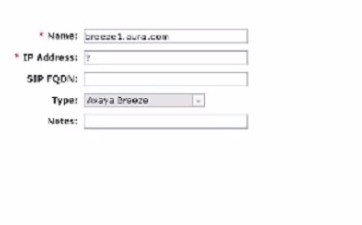 You are creating a SIP Entity for Avaya Breeze?hosting the Avaya Aura Presence Services in System Manager > Elements > Routing > SIP Entities. What must be entered in the field labeled IP Address?
-
A
General Purpose Cluster IP Address or FQDN
-
B
Core Platform Cluster IP Address or FQDN
-
C
Avaya Breeze?server Security Module IP Address or FQDN
-
D
Avaya Breeze?server Management IP Address or FQDN
Reveal answer details
Close answer details
Correct answerC
ExplanationWhen creating a SIP Entity for Avaya Breeze?hosting the Avaya Aura Presence Services, you need to enter the IP address or FQDN of the Avaya Breeze?server Security Module (SM100) in the field labeled IP
Address. The SM100 is a component of the Avaya Breeze?server that provides security and encryption functions for SIP signaling and media. The SM100 IP address or FQDN is used by the Presence Services snap-in to communicate with other SIP entities in the network, such as Session Manager or Communication Manager
|