Review sample questions, verified answers and available explanations before choosing a study plan.
Question 1
Hotspot
HOTSPOT
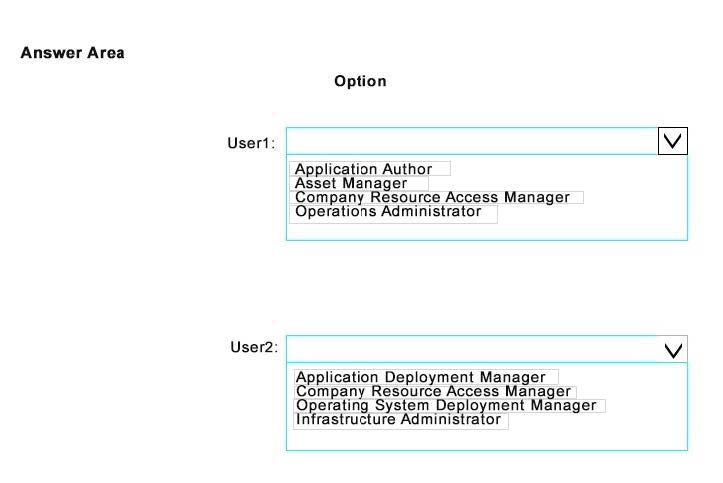
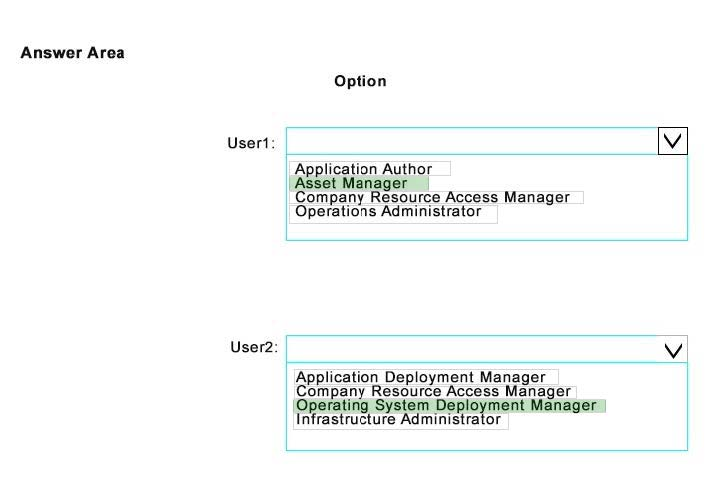
You have a System Center 2012 R2 Configuration Manager Service Pack 1 (SP1) deployment. You have two domain users named User1 and User2. The users will perform the following administrative tasks: - User1 will create device collections. - User2 will create task sequences. You need to identify to which security role each user must be added. The solution must use the principle of least privilege.
Which security roles should you identify? To answer, select the appropriate options in the answer area.
Reveal answer detailsClose answer details
Explanation
Box 1: Asset Manager. Grants permissions to manage the Asset Intelligence Synchronization Point, Asset Intelligence reportingclasses, software inventory, hardware inventory, and metering rules. This role also has the permission to create device collections. Operations Manager can also create task sequences but Asset Manager has least privilege. Box 2: Operating System Deployment Manager Grants permissions to create operating system images and deploy them to computers. Administrative users who are associated with this role can manage operating system installation packages and images, task sequences, drivers, boot images, and state migration settings.
Question 2
Single choice
Your network contains a System Center 2012 R2 Configuration Manager Service Pack 1 (SP1) environment.
You are creating a configuration item that contains application settings for Microsoft Office 2013.
You need to detect whether Office 2013 is installed before validating the configuration item.
What should you do?
A
Set Software Inventory to True.
B
Create a report to display all installedsoftware.
C
Set Hardware Inventory to False.
D
Enable Use a custom script to detect this application.
Reveal answer detailsClose answer details
Correct answerD
Explanation
A detection method in Configuration Manager contains rules that check whether an application is already installed on a device.This detection occurs before the application is installed, immediately after the application is installed, and at regular intervals afterward. This detection can prevent Configuration Manager from needlessly reinstalling the application and can also determine whether the user has already uninstalled the application. A custom script can be used to determine the presence of a deployment type.
Note: A System Center 2012 Configuration Manager application contains the files and information that are required todeploy software to a device. An application contains one or more deployment types that comprise the installation files and information that are required to install software. A deployment type also contains rules that specify when and how the software is deployed.
Question 3
Multiple choice
You manage a System Center 2012 R2 Configuration Manager Service Pack 1 (SP1) deployment.
In the Configuration Manager inventory, you need to include the desk number where each client computer is located.
Which two actions should you perform? Each correct answer presents part of the solution.
A
On each computer, create a Noidmif.mif file.
B
B. Enable an existing hardware inventory class.
C
Modify the Default Client Settings.
D
Add an Asset Intelligence synchronization point.
E
On eachcomputer, create an Idmif.mif file.
Reveal answer detailsClose answer details
Correct answersA, B
Explanation
How to Extend Hardware Inventory in Configuration Manager A: Use NOIDMIF files to collect information about client devices that cannot be inventoried by Configuration Manager. For example, youmight want to collect device asset number information that exists only as a label on the device. NOIDMIF inventory is automatically associated with the client device that it was collected from. B: You can enable or disable the default inventory classes used by Configuration Manager or you can create custom client settings that allow you to collect different hardware inventory classes from specified collections of clients.
Your network contains a System Center 2012 R2 Configuration Manager Service Pack 1 (SP1) environment. Software Inventory and Hardware Inventory are enabled for all of the client computers.
All of the client computers have an application named App1 installed. App1 saves files to the C:\ABC folder. All of the files saved by App1 have a file name extension of .abc.
You configure Software Inventory to inventory all of the files that have the .abc extension and the .exe extension.
After six months, you discover that some of the client computers fail to inventory .abc files.
All of the client computers inventory .exe files.
You need to ensure that the .abc files are inventoried.
What should you do?
A
Modify C:\ABC\Skpswi.dat.
B
Delete C:\ABC\Skpswi.dat.
C
Modify C:\Program Files\App1\NO_SMS_On_Drive.sms.
D
Delete C:\Program Files\App1\NO_SMS_On_Drive.sms.
Reveal answer detailsClose answer details
Correct answerB
Explanation
Youcan create a hidden file named Skpswi.dat and place it in the root of a client hard drive to exclude it from software inventory. You can also place this file in the root of any folder structure you want to exclude from software inventory.
To exclude folders from software inventory
Question 5
Hotspot
HOTSPOT
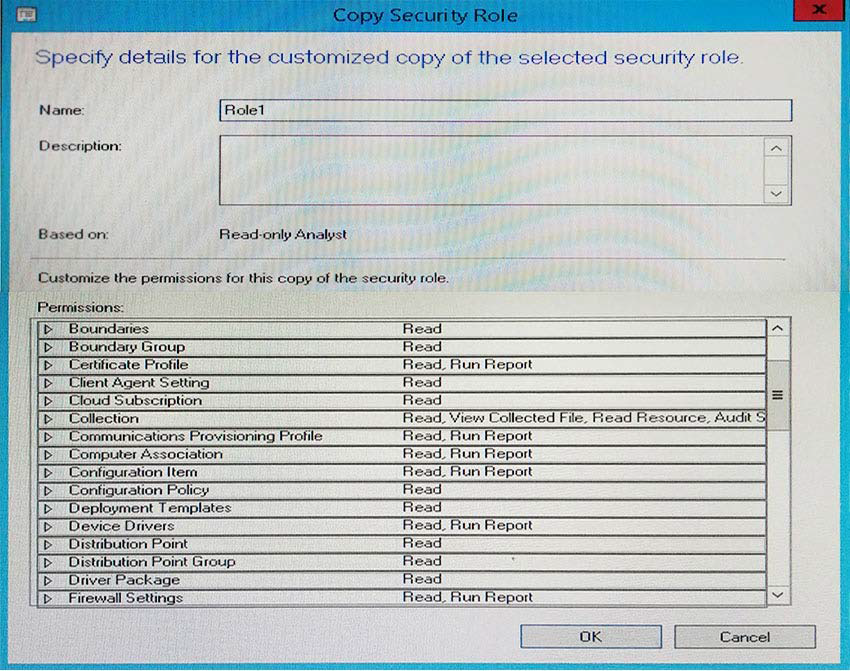
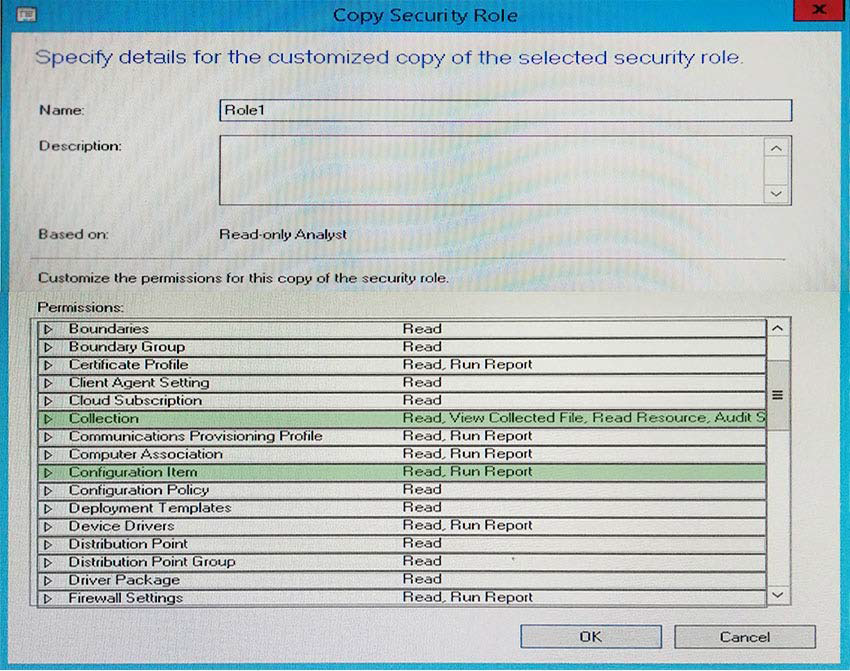
You have a System Center 2012 R2 Configuration Manager Service Pack 1 (SP1) deployment. You are creating a custom security role named Role1. You need to ensure that users to whom Role1 is assigned can create and deploy configuration baselines.
Which two permissions should you modify for Role1? To answer, select the appropriate permissions in the answer area.
Reveal answer detailsClose answer details
Question 6
Multiple choice
Your network contains a System Center 2012 Configuration Manager environment.
In Default Client Agent Settings, you enable Hardware Inventory and Software Inventory.
You discover that a group of client computers fails to report software inventory data.
The client computers report hardware inventory data.
You confirm that Configuration Manager can deploy Applications to the group of client computers.
You need to identify what is causing the reporting issue.
Which log files should you review? (Choose all that Apply.)
A
Filesystemfile.log
B
Dataldr.log
C
Mp_sinv.log
D
Inventoryagent.log
E
Hman.log
Reveal answer detailsClose answer details
Correct answersA, B, D
Explanation
A: FileSystemFile.log is a client log file that records the activity of the Windows Management Instrumentation (WMI) provider for software inventory and file collection.
B: Dataldr.log is a site server log file that records information about the processing of Management Information Format (MIF) files and hardware inventory in the Configuration Manager database.
D: Inventoryagent.log is a client log file that records activities of hardware inventory, software inventory, and heartbeat discovery actions on the client.
Question 7
Single choice
Your network contains a System Center 2012 R2 Configuration Manager Service Pack 1 (SP1) environment.
Your company deploys 1,000 client computers.
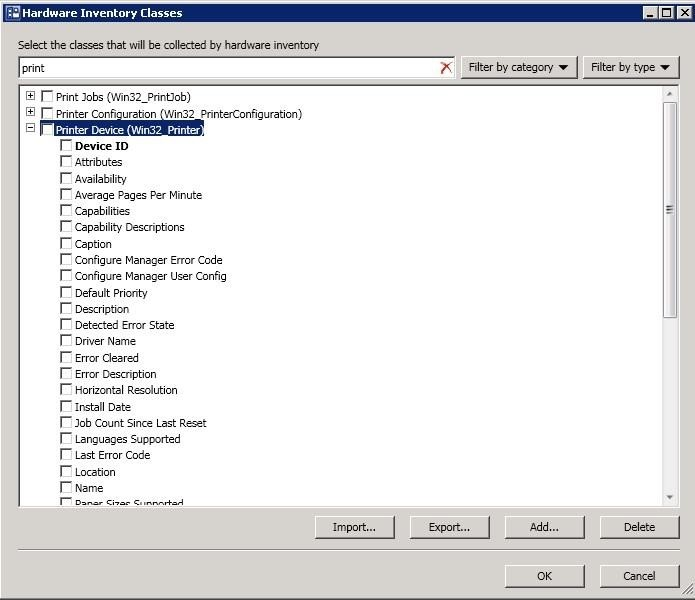
You discover that information about printers fails to appear in any inventory queries or reports.
Information about other hardware devices appears in the inventory queries and reports.
You need to ensure that Configuration Manager data includes information about the printers.
What should you do?
A
Add a WMI class to the Hardware Inventory Classes list.
B
Enable a default WMI class in the Hardware Inventory Classes list.
C
Add a file name to the Software Inventory configuration.
D
Add a file name to the Hardware inventory configuration.
E
Add a file name to Software Metering.
F
SelectCollect NOIDMIFfiles in Hardware Inventory.
G
Add a WMI class to the Sms_def.mof file.
H
Modify the Enable software inventory on clients setting.
I
Modify the Enable hardware inventory on clientssetting.
Reveal answer detailsClose answer details
Correct answerB
Explanation
How to Extend Hardware Inventory in Configuration Manager System Center 2012 Configuration Manager hardware inventory reads information about devices by using Windows Management Instrumentation (WMI). WMI is the Microsoft implementation of web-based Enterprise Management (WBEM), which is an industry standard for accessing management information in an enterprise environment.
In previous versions of Configuration Manager, you could extend hardware inventory by modifying the file sms_def.mof onthe site server.
In System Center 2012 Configuration Manager, you no longer edit the sms_def.mof file as you did in Configuration Manager 2007. Instead, you can enable and disable WMI classes, and add new classes to collect by hardware inventory by using client settings. Configuration Manager provides the following methods to extend hardware inventory: Enable or disable existing inventory classes - You can enable or disable the default inventory classes used by Configuration Manager or you can create custom client settings that allow you to collect different hardware inventory classes from specified collections of clients.
Add a new inventory class - You can add a new inventory class from the WMI namespace of another device. Import and export hardware inventory classes - You can import and export Managed Object Format (MOF) files that contain inventory classes from the Configuration Manager console. Create NOIDMIF Files - Use NOIDMIF files to collect information about client devices that cannot be inventoried by Configuration Manager. Create IDMIF Files - Use IDMIF files to collect information about assets in your organization that are not associated with a Configuration Manager client, for example, projectors, photocopiers and networkprinters.
Note:
References: How to Extend Hardware Inventory in Configuration Manager (http://technet.microsoft.com/en-us/library/gg712290.aspx)
Question 8
Multiple choice
Your network contains a System Center 2012 R2 Configuration Manager Service Pack 1 (SP1) environment.
In Default Client Settings, you enable Hardware Inventory and Software Inventory.
You discover that a group of client computers fails to report hardware inventory data. The client computers report software inventory data.
You verify that Configuration Manager can deploy applications to the client computers.
You need to identify what is causing the reporting issue.
Which two log files should you review? Each correct answer presents part of the solution.
A
Hman.log
B
Filesystemfile.log
C
Dataldr.log
D
Mp_sinv.log
E
Inventoryagent.log
Reveal answer detailsClose answer details
Correct answersC, E
Explanation
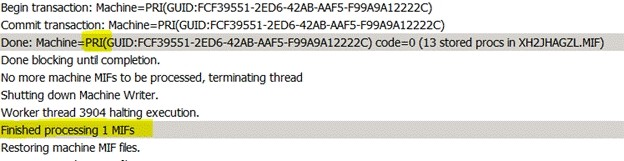
C: Dataldr.log is a site server log file that records information about the processing of Management Information Format (MIF) files and hardware inventory in the Configuration Manager database.
Example of contents of dataldr.log:
E: Inventoryagent.log is aclient log file that records activities of hardware inventory, software inventory, and heartbeat discovery actions on the client.
Example: The InventoryAgent.log will show that four new attributes regarding the Class "Department_Name" need to be collectedfor hardware Inventory data and that info needs to be sent to server. Content of inventoryagent.log:
Question 9
Single choice
You manage a System Center 2012 R2 Configuration Manager Service Pack 1 (SP1) deployment. The deployment contains a reporting services point.
You subscribe to all client status reports.
You need to subscribe to an Asset Intelligence report.
From where should you configure the subscription?
A
Reporting Services Configuration Manager
B
the Report Server Web service site
C
the Administration workspace from the Configuration Manager Console
D
SQL Server Configuration Manager
Reveal answer detailsClose answer details
Correct answerA
Explanation
The reporting services point site system role must be installed before software updates reports can be displayed.
References: Prerequisites for Asset Intelligence in Configuration Manager (https://technet.microsoft.com/en-us/library/gg712306.aspx)
Question 10
Multiple choice
You are the network administrator for a company named Contoso, Ltd.
The network contains 1,000 desktop computers and 500 servers.
The network contains a System Center 2012 R2 Configuration Manager Service Pack (SP1) environment.
The names of all the desktop computers in the human resources department start with the letters HR, for
example HR001 and HR023.
A device collection named All Server Devices contains all of the servers.
A device collection named All Desktop Devices contains all of the desktop computers. You plan to create a new collection named All HR Computers and Servers.
The new collection must contain all of the human resources department computers and all of the servers. The collection must not contain any other computers. You need to create a membership rule for the new collection.
Which rule should you include in the membership rule? (Choose all that Apply.)
A
QUERY RULE: select * from SMS_R_System where SMS_R_system.NetbiosName like "HR%"
B
INCLUDE RULE: All Server Devices
C
EXCLUDE RULE: All NON HR Computers
D
EXCLUDE RULE: All Desktop Devices
E
QUERY RULE-select * from SMS_R_System where SMS_R_system.OperatingSystemNameandVersion like. *%Workstation*
F
QUERY RULE-select * fromSMS_R_System where SMS_R_system.OperatingSystemNameandVersion not like. *%Server*
Reveal answer detailsClose answer details
Correct answersA, B
Explanation
Select * from SMS_R_System where SMS_R_system.NetbiosName like "HR%" SQL command to select all Systems whose names begin with HR INCLUDE RULE: All Server DevicesSelects all the Server Devices as asked in the question.
Question 11
Multiple choice
Your network contains a Windows Server Update Services (WSUS) server. All client computers are configured as WSUS clients.
All of the client computers have Windows Firewall enabled. Windows Firewall is configured to allow File and Printer Sharing.
Users are not configured as local Administrators on their client computers.
You deploy System Center 2012 Configuration Manager.
You need to identify which methods you can use to deploy the Configuration Manager client to an of the client computers.
Which client installation methods should you identify? (Choose all that Apply.)
A
a logon script installation
B
a manual client installation
C
a software update-based client installation
D
a Client Push Installation
E
an Active Directory Group Policy-based installation
Reveal answer detailsClose answer details
Correct answersC, D, E
Explanation
C. Software update point uses the local SYSTEM account and All client computers are configured as WSUS clients. So the firewall should notaffect functionality. D: Client Push Installation requires File and Printer Sharing and runs with the local SYSTEM account. E: Group Policy Installation requires File and Printer Sharing and runs with the local SYSTEM account.
Question 12
Drag & drop
DRAG DROP
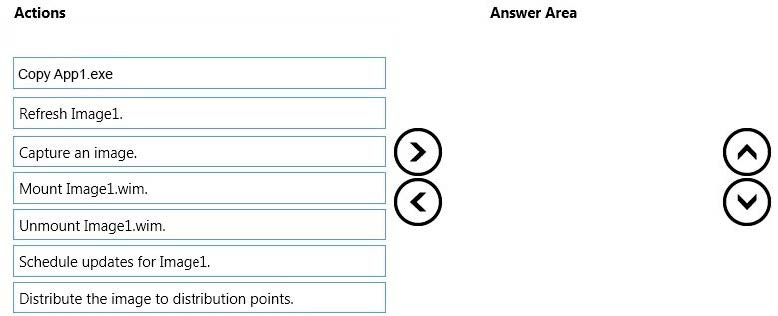
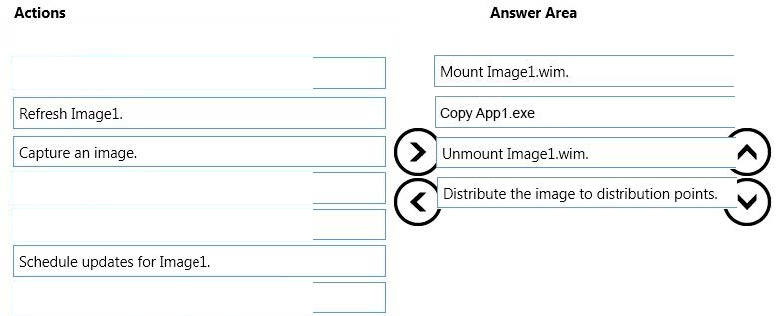
Your network contains a single Active Directory domain named contoso.com. System Center 2012 R2 Configuration Manager Service Pack 1 (SP1) is deployed to contoso.com. You have a Windows 8.1 operating system image named Image1 in Configuration Manager. Image1 has the data source of \\server1.contoso.com\source\Image1.wim. New client computers are deployed by using Image1.
You have an application named App1.exe. App1 is a configuration utility that does not require installation. You need to ensure that App1.exe is included in all future deployments of Image1.
Which four actions should you perform in sequence? To answer, move the appropriate actions from the list of actions to the answer area and arrange them in the correct order.
Reveal answer detailsClose answer details
Question 13
Hotspot
HOTSPOT
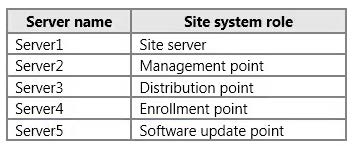
Your network contains a single Active Directory named contoso.com. A System Center 2012 R2 Configuration Manager Service Pack 1 (SP1) primary site named S01 is deployed to contoso.com. The Configuration Manager deployment includes the servers configured as shown in the following table.
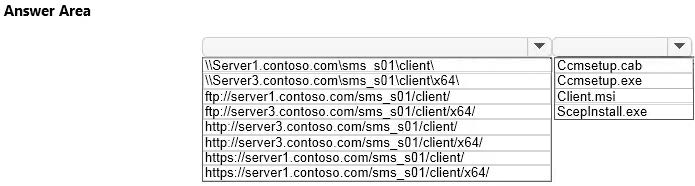
The distribution point is configured to require HTTPS for client communications. You have a domain computer named Computer1 that runs the 64-bit version of Windows 8.1. You need to install the Configuration Manager client on Computer1 manually.
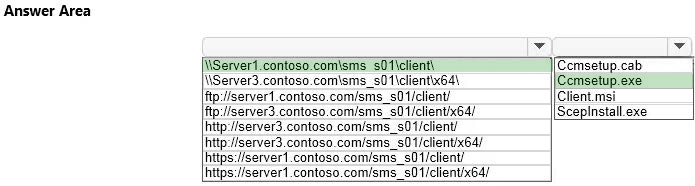
Which network location should you use to start the installation? To answer, select the appropriate options in the answer area.
Reveal answer detailsClose answer details
Explanation
You can manually install the System Center 2012 Configuration Manager client software on computers in your enterprise by using the CCMSetup.exeprogram. This program and its supporting files can be found in the Client folder of the System Center 2012 Configuration Manager installation folder on the site server and on management points in your site. This folder is shared to the network as <Site Server Name> \SMS_<Site Code>\Client.
Question 14
Drag & drop
DRAG DROP
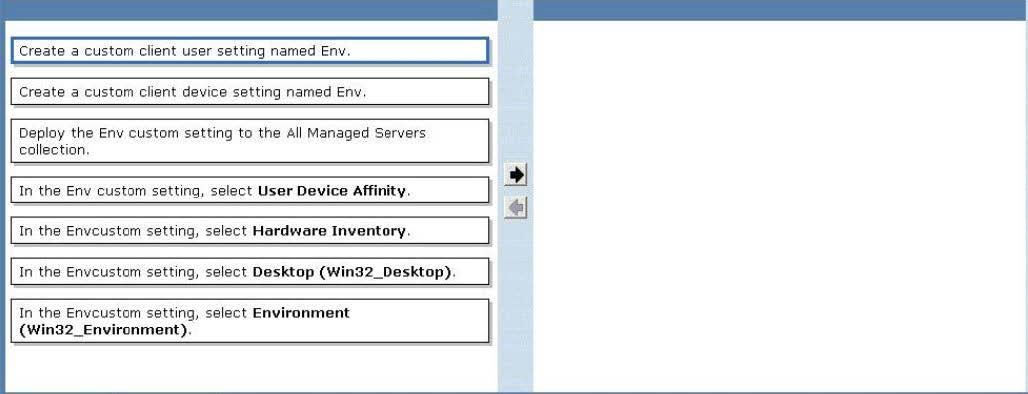
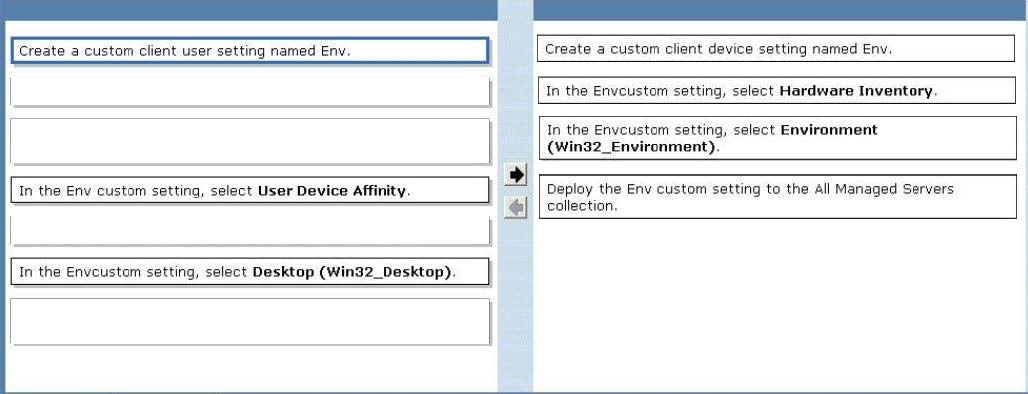
Your network contains a System Center 2012 R2 Configuration Manager Service Pack 1 (SP1) environment. You create a collection named All Managed Servers. You need to inventory the environment variables of the All Managed Servers collection.
Which four actions should you perform in sequence? To answer, move the appropriate actions from the list of actions to the answer area and arrange them in the correct order.
Reveal answer detailsClose answer details
Explanation
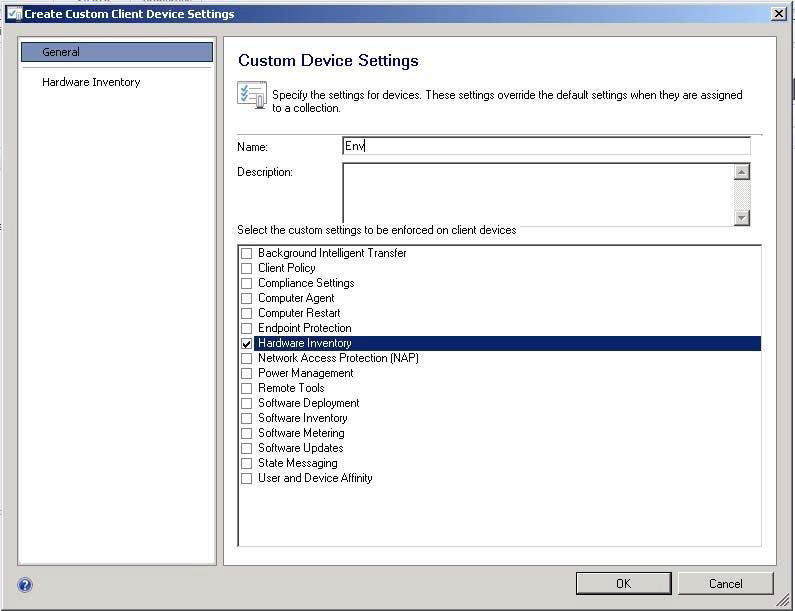
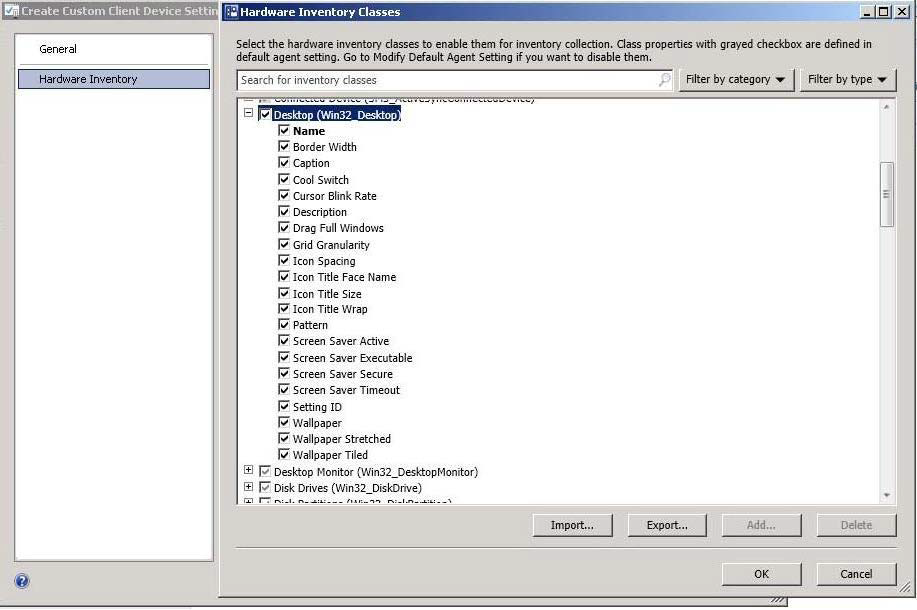
* Win32_Environment class (Windows) TheWin32_Environment WMI class represents an environment or system environment setting on a Windows computer system. Querying this class returns environment variables found in: HKEY_LOCAL_MACHINE\System\CurrentControlSet\Control\Sessionmanager\Environment And HKEY_USERS\<user>\Environment
Since we need to inventory WMI information, that means we need Hardware Inventory and you can only do that with a Custom Client Device Setting:
Question 15
Hotspot
HOTSPOT
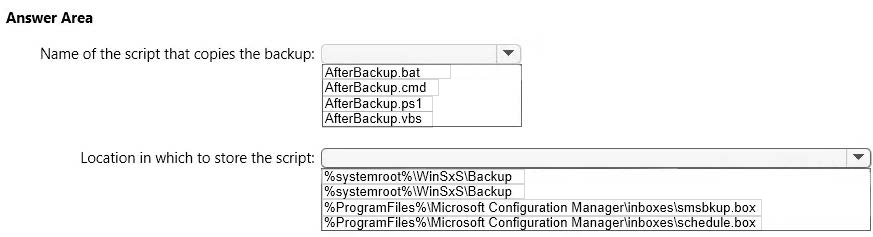
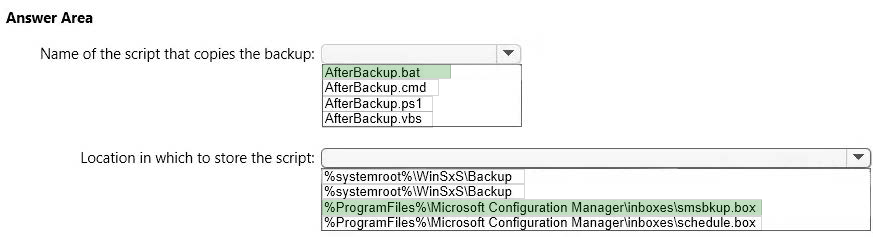
You have a System Center 2012 R2 Configuration Manager Service Pack 1 (SP1) deployment. You enable the Backup Site Server maintenance task and you configure the task to back up to a local drive. You need to copy the backup to a network share automatically as soon as the backup completes.
What should you do? To answer, select the appropriate options in the answer area.
Reveal answer detailsClose answer details
Explanation
The AfterBackup.bat file is used to perform post-backup actions automatically after theBackup Site Server maintenance task runs successfully. To create the AfterBackup.bat batch file
Question 16
Hotspot
HOTSPOT
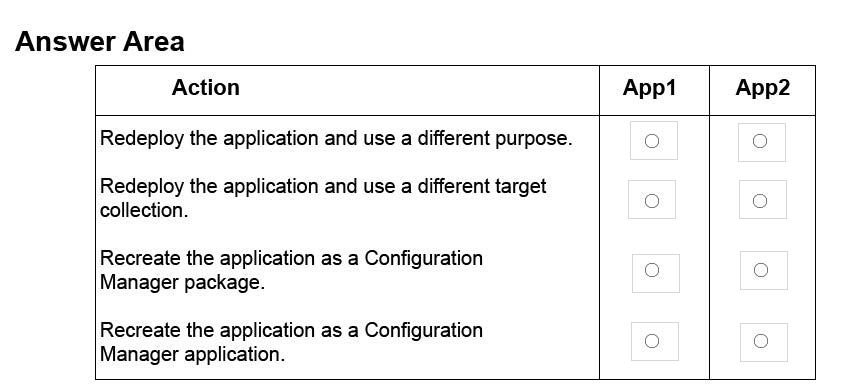
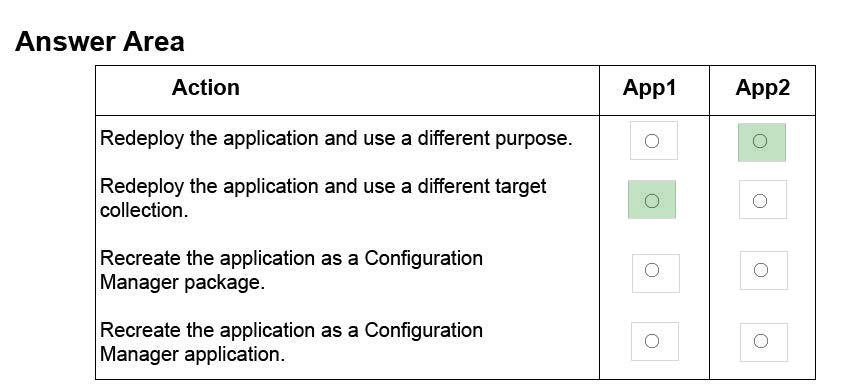
You manage a System Center 2012 R2 Configuration Manager Service Pack 1 (SP1) stand-alone primary site. You have two line-of-business applications named App1 and App2. App1 is deployed by using a Configuration Manager application and is deployed to a computer collection that has the purpose set to Available. App2 is deployed by using a Configuration Manager package and is deployed to a user collection that has the purpose set to Required. You need to ensure that users will be able to install App1 and App2 by using the Application Catalog. The solution must minimize administrative effort. In the table below, identify the action to perform for App1 and App2. NOTE: Make only one selection on each column.
Reveal answer detailsClose answer details
Question 17
Drag & drop
DRAG DROP
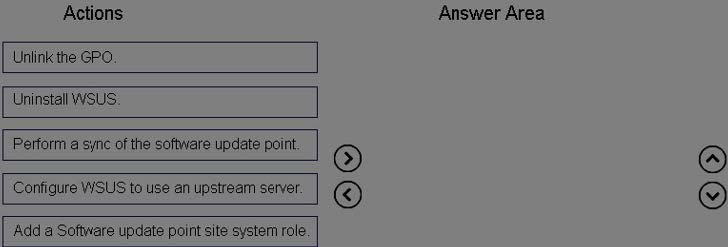
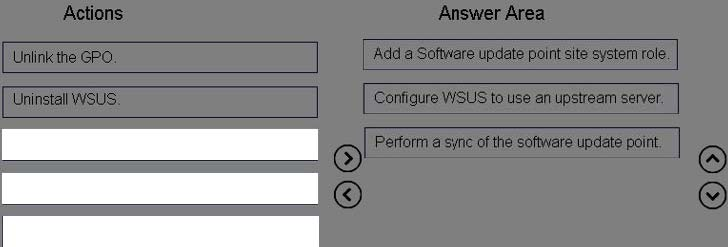
You use Windows Server Update Services (WSUS) to deploy software updates. Automatic update settings are configured by using Group Policy objects (GPOs). You deploy System Center 2012 R2 Configuration Manager Service Pack 1 (SP1). You need to ensure that software update are managed by using Configuration Manager. The solution must ensure that software updates are managed centrally always.
Which three actions should you perform in sequence? To answer, move the appropriate actions from the list of actions to the answer area and arrange them in the correct order.
Reveal answer detailsClose answer details
Explanation
Configuring Software Updates in Configuration Manager Step 1: The software update point is required on the central administration site and on the primary sites in order to enable software updates compliance assessment and to deploy software updates to clients. The software update point is optional on secondary sites. The software update point site system role must be created on a server that has WSUS installed. Step 2: You can configure the upstream synchronization source for software updates synchronization on the Synchronization Source page of the wizard, or on the on the Sync Settings tab in Software Update Point Component Properties. Step 3: Synchronize software updates on a connected software update point
Your network contains a System Center 2012 R2 Configuration Manager Service Pack 1 (SP1) environment.
You need to create a report that lists all of the client computers that do not have an Application named App1 installed.
Which query should you use to create the report?
A
SELECTSYS.Netbios_Name0, ARP.DisplayName0FROM v_R_System AS SYS INNER JOINv_GS_ADD_REMOVE_PROGRAMS AS ARP ON SYS.ResourceID = ARP. ResourceID WHERE ARP.DisplayName0 NOT IN ('App1')
B
SELECT SYS.Netbios_Name0 from v_R_System SYSWHERE SYS.ResourceID IN(SELECT SYS.ResourceIDFROM v_R_System ASSYS INNER JOINv_GS_ADD_REMOVE_PROGRAMS AS ARP ON SYS.ResourceID - ARP.ResourceID. WHERE ARP.DisplayName0 = 'App1')
C
SELECT SYS.Netbios_Name0 from v_R_System SYSWHERE SYS.ResourceID NOT IN(SELECT SYS.ResourceIDFROM v_R_SystemAS SYS INNER JOINv_GS_ADD_REMOVE_PROGRAMS AS ARP ON SYS.ResourceID = ARP.ResourceID WHERE ARP.DisplayName0 = 'App1')
D
SELECT SYS.Netbios_Name0, ARP.DisplayName0FROM v_R_System AS SYS INNER JOINV_GS_ADD_REMOVE_PROGRAMS AS ARP ON SYS.ResourceID - ARP.ResourceID WHERE ARP.DisplayName0NOT LIKE 'App1'
Reveal answer detailsClose answer details
Correct answerC
Explanation
SELECT computer name FROM table v_R_System (SQL Syntax) WHERE resource ResourceID is NOT IN Add Remove Programs WHERE DisplayName0 = 'App1'
SQL INNER JOIN Keyword The INNER JOINkeyword returns rows when there is atleast one match in both tables.
Question 19
Single choice
You have a System Center 2012 R2 Configuration Manager Service Pack 1 (SP1) deployment.
All of the client computers in the marketing department are in two device collections named Collection1 and Collection2. Configuration Manager has the client settings configured as shown in the following table.
Remote Tools is disabled for all three client settings.
You need to enable Remote Tools for the marketing department computers.
What should you do?
A
Enable Remote Tools in Settings2.
B
Enable Remote Tools in Settings1.
C
Create a new client setting that enables Remote Tools.
D
Enable Remote Tools in the Default Client Settings.
Reveal answer detailsClose answer details
Correct answerA
Explanation
1 is thehighest priority.
When you create a client setting a priority is assigned to it, those with a higher priority win over settings with a lower priority. Note that the default client settings has the priority of 10000, which means you can have 9999 client settings that would have higher priority over the default client settings.
You have Windows 7 images that are rebuilt quarterly and sported to System Center 2012 Configuration Manager.
The Microsoft Deployment Toolkit (MDT) 2012 is integrated with Configuration Manager.
You need to reduce the network security risks when the images are deployed by using Operating System Deployment (OSD).
What should you do? (Choose all that Apply.)
A
After the Apply Operating System Image task sequence step, add a step to install software updates offline.
B
Before the Apply Operating System image task sequence step, add a step to install Deployment Imaging Servicing and Management (DISM).
C
After the installation of the final Application, add an Install Software Updates task sequence step.
D
Afterthe Apply Operating System Image task sequence step, add a Run Command line step that runs wuauclt.exe /detectnow
E
Before the Apply Operating System image task sequence step, add a step to install the Windows Automated Installation Kit (Windows AIK).
Reveal answer detailsClose answer details
Correct answersA, C
Explanation
A: To dothe updates offline to reduce network security risks. C: Install software updates to minimize network security risks
Note: Configuration Manager 2012: Offline Servicing for Operating System Images In Configuration Manager2012 there is a new feature for applying updates to operating system images while they are in the Configuration Manager library. This means any operating system image you see in the Operating Systems > Operating Systems Images node from the Software Library wunderbar can be updated with Component Based Servicing (CBS) updates. By updating an image in the Software Library instead of performing a new build and capture of the operating system image you will gain a few distinct advantages. You will be able to reduce the risk of vulnerabilities during operating system deployments and reduce the overall operating system deployment to the end user. You will also reduce the administrative effort to maintain your operating system images.
Task Sequence Steps in Configuration Manager The following task sequence steps can be added to a System Center 2012 Configuration Manager task sequence:
Install Software Updates Use the Install Software Updates task sequence step to install software updates on the destination computer. The destination computer is not evaluated for applicable software updates until this task sequence step runs. At that time, the destination computer is evaluated for software updates like any other Configuration Manager-managed client. In particular, this step installs only the software updates that are targeted to collections of which the computer is currently a member. This task sequence step runs only in a standard operating system. It does not run in Windows PE.
Deployment Image Servicing and Management (DISM) Technical Reference Deployment Image Servicing and Management (DISM) is a command-line tool that is used to mount and service Windows?images before deployment. You can use DISM image management commands to mount, and get information about, Windows image (.wim) files or virtual hard disks (VHD) and to capture, split, and otherwise manage .wim files.
Question 21
Multiple choice
You have a server named Server1 that runs Windows Server 2012 R2.
You plan to install System Center 2012 R2 Configuration Manager Service Pack 1 (SP1) on Server1.
You need to install the prerequisites on Server1.
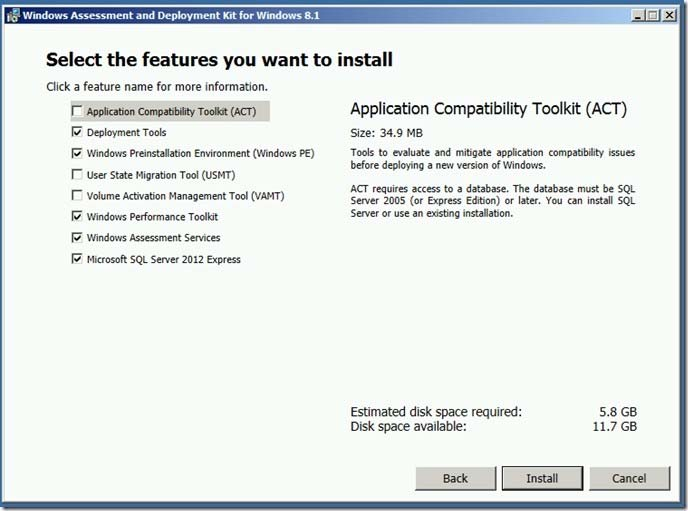
Which three features should you install from the Windows Assessment and Deployment Kit for Windows 8.1? Each correct answer presents part of the solution.
A
Deployment Tools
B
User State Migration Tool (USMT)
C
Application Compatibility Toolkit (ACT)
D
Windows Preinstallation Environment (Windows PE)
E
WindowsAssessment Services
F
Microsoft SQL Server 2012 Express
G
Volume Activation Management Tool (VAMT)
H
Windows Performance Toolkit
Reveal answer detailsClose answer details
Correct answersA, B, D
Explanation
When choosing the features toinstall make sure that you install at least the Deployment Tools, Windows Preinstallation Environment (Windows PE), and User State Migration Tool (USMIT). The screenshot does not show the addition of USMT ?but that is a requirement.
You need to generate an error message for all of the Web servers that do NOT comply with the corporate policy.
What should you do?
A
Add a new configuration item that has a registry value setting type to the configuration baseline.
B
Create a query-based collection that contains all of the Web servers, and then initiate an inventory collection.
C
Create a query that returns a list of all the Web servers, and then search the query results for the registry value.
D
Add a new configuration item that has an Internet Information Services (IIS) metabase setting type to the configuration baseline.
Reveal answer detailsClose answer details
Correct answerA
Explanation
Compliance is evaluated by defining a configuration baseline that contains the configuration items that you want toevaluate and settings and rules that describe the level of compliance you must have.
Question 24
Drag & drop
DRAG DROP
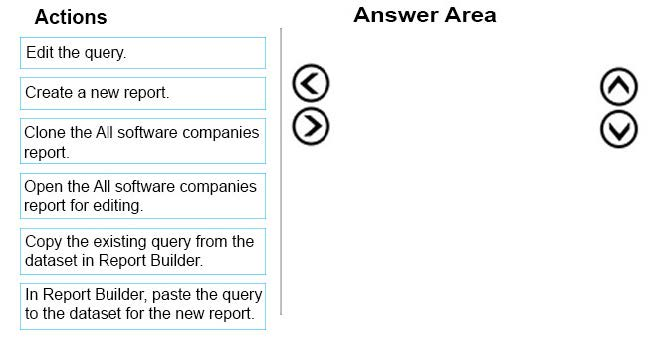
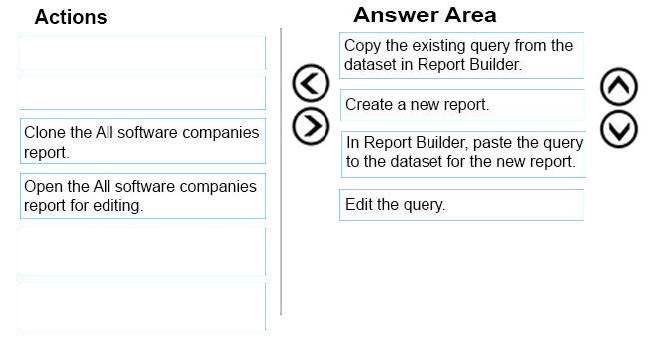
Your network contains a System Center 2012 R2 Configuration Manager Service Pack 1 (SP1) environment. You need to create a new report based on the report named All software companies. The new report must exclude a software company named Litware, Inc.
Which four actions should you perform in sequence? To answer, move the appropriate actions from the list of actions to the answer area and arrange them in the correct order.
Reveal answer detailsClose answer details
MICROSOFT
Administering and Deploying System Center 2012 Configuration Manager
You have a System Center 2012 R2 Configuration Manager Service Pack 1 (SP1) deployment. You have two domain users named User1 and User2. The users will perform the following administrative tasks: - User1 will create device collections. - User2 will create task sequences. You need to identify to which security role each user must be added. The solution must use the principle of least privilege.
Which security roles should you identify? To answer, select the appropriate options in the answer area.
Correct Answer:
Explanation
Explanation/Reference:
Box 1: Asset Manager. Grants permissions to manage the Asset Intelligence Synchronization Point, Asset Intelligence reportingclasses, software inventory, hardware inventory, and metering rules. This role also has the permission to create device collections. Operations Manager can also create task sequences but Asset Manager has least privilege. Box 2: Operating System Deployment Manager Grants permissions to create operating system images and deploy them to computers. Administrative users who are associated with this role can manage operating system installation packages and images, task sequences, drivers, boot images, and state migration settings.
QUESTION 2
Your network contains a System Center 2012 R2 Configuration Manager Service Pack 1 (SP1) environment.
You are creating a configuration item that contains application settings for Microsoft Office 2013.
You need to detect whether Office 2013 is installed before validating the configuration item.
What should you do?
A.
Set Software Inventory to True.
B.
Create a report to display all installedsoftware.
C.
Set Hardware Inventory to False.
D.
Enable Use a custom script to detect this application.
Correct Answer: D
Explanation
Explanation/Reference:
A detection method in Configuration Manager contains rules that check whether an application is already installed on a device.This detection occurs before the application is installed, immediately after the application is installed, and at regular intervals afterward. This detection can prevent Configuration Manager from needlessly reinstalling the application and can also determine whether the user has already uninstalled the application. A custom script can be used to determine the presence of a deployment type.
Note: A System Center 2012 Configuration Manager application contains the files and information that are required todeploy software to a device. An application contains one or more deployment types that comprise the installation files and information that are required to install software. A deployment type also contains rules that specify when and how the software is deployed.
QUESTION 3
You manage a System Center 2012 R2 Configuration Manager Service Pack 1 (SP1) deployment.
In the Configuration Manager inventory, you need to include the desk number where each client computer is located.
Which two actions should you perform? Each correct answer presents part of the solution.
A.
On each computer, create a Noidmif.mif file.
B.
B. Enable an existing hardware inventory class.
C.
Modify the Default Client Settings.
D.
Add an Asset Intelligence synchronization point.
E.
On eachcomputer, create an Idmif.mif file.
Correct Answer: AB
Explanation
Explanation/Reference:
How to Extend Hardware Inventory in Configuration Manager A: Use NOIDMIF files to collect information about client devices that cannot be inventoried by Configuration Manager. For example, youmight want to collect device asset number information that exists only as a label on the device. NOIDMIF inventory is automatically associated with the client device that it was collected from. B: You can enable or disable the default inventory classes used by Configuration Manager or you can create custom client settings that allow you to collect different hardware inventory classes from specified collections of clients.
Your network contains a System Center 2012 R2 Configuration Manager Service Pack 1 (SP1) environment. Software Inventory and Hardware Inventory are enabled for all of the client computers.
All of the client computers have an application named App1 installed. App1 saves files to the C:\ABC folder. All of the files saved by App1 have a file name extension of .abc.
You configure Software Inventory to inventory all of the files that have the .abc extension and the .exe extension.
After six months, you discover that some of the client computers fail to inventory .abc files.
All of the client computers inventory .exe files.
You need to ensure that the .abc files are inventoried.
What should you do?
A.
Modify C:\ABC\Skpswi.dat.
B.
Delete C:\ABC\Skpswi.dat.
C.
Modify C:\Program Files\App1\NO_SMS_On_Drive.sms.
D.
Delete C:\Program Files\App1\NO_SMS_On_Drive.sms.
Correct Answer: B
Explanation
Explanation/Reference:
Youcan create a hidden file named Skpswi.dat and place it in the root of a client hard drive to exclude it from software inventory. You can also place this file in the root of any folder structure you want to exclude from software inventory.
To exclude folders from software inventory
QUESTION 5
HOTSPOT
You have a System Center 2012 R2 Configuration Manager Service Pack 1 (SP1) deployment. You are creating a custom security role named Role1. You need to ensure that users to whom Role1 is assigned can create and deploy configuration baselines.
Which two permissions should you modify for Role1? To answer, select the appropriate permissions in the answer area.
Correct Answer:
QUESTION 6
Your network contains a System Center 2012 Configuration Manager environment.
In Default Client Agent Settings, you enable Hardware Inventory and Software Inventory.
You discover that a group of client computers fails to report software inventory data.
The client computers report hardware inventory data.
You confirm that Configuration Manager can deploy Applications to the group of client computers.
You need to identify what is causing the reporting issue.
Which log files should you review? (Choose all that Apply.)
A.
Filesystemfile.log
B.
Dataldr.log
C.
Mp_sinv.log
D.
Inventoryagent.log
E.
Hman.log
Correct Answer: ABD
Explanation
Explanation/Reference:
A: FileSystemFile.log is a client log file that records the activity of the Windows Management Instrumentation (WMI) provider for software inventory and file collection.
B: Dataldr.log is a site server log file that records information about the processing of Management Information Format (MIF) files and hardware inventory in the Configuration Manager database.
D: Inventoryagent.log is a client log file that records activities of hardware inventory, software inventory, and heartbeat discovery actions on the client.
QUESTION 7
Your network contains a System Center 2012 R2 Configuration Manager Service Pack 1 (SP1) environment.
Your company deploys 1,000 client computers.
You discover that information about printers fails to appear in any inventory queries or reports.
Information about other hardware devices appears in the inventory queries and reports.
You need to ensure that Configuration Manager data includes information about the printers.
What should you do?
A.
Add a WMI class to the Hardware Inventory Classes list.
B.
Enable a default WMI class in the Hardware Inventory Classes list.
C.
Add a file name to the Software Inventory configuration.
D.
Add a file name to the Hardware inventory configuration.
E.
Add a file name to Software Metering.
F.
SelectCollect NOIDMIFfiles in Hardware Inventory.
G.
Add a WMI class to the Sms_def.mof file.
H.
Modify the Enable software inventory on clients setting.
I.
Modify the Enable hardware inventory on clientssetting.
Correct Answer: B
Explanation
Explanation/Reference:
How to Extend Hardware Inventory in Configuration Manager System Center 2012 Configuration Manager hardware inventory reads information about devices by using Windows Management Instrumentation (WMI). WMI is the Microsoft implementation of web-based Enterprise Management (WBEM), which is an industry standard for accessing management information in an enterprise environment.
In previous versions of Configuration Manager, you could extend hardware inventory by modifying the file sms_def.mof onthe site server.
In System Center 2012 Configuration Manager, you no longer edit the sms_def.mof file as you did in Configuration Manager 2007. Instead, you can enable and disable WMI classes, and add new classes to collect by hardware inventory by using client settings. Configuration Manager provides the following methods to extend hardware inventory: Enable or disable existing inventory classes - You can enable or disable the default inventory classes used by Configuration Manager or you can create custom client settings that allow you to collect different hardware inventory classes from specified collections of clients.
Add a new inventory class - You can add a new inventory class from the WMI namespace of another device. Import and export hardware inventory classes - You can import and export Managed Object Format (MOF) files that contain inventory classes from the Configuration Manager console. Create NOIDMIF Files - Use NOIDMIF files to collect information about client devices that cannot be inventoried by Configuration Manager. Create IDMIF Files - Use IDMIF files to collect information about assets in your organization that are not associated with a Configuration Manager client, for example, projectors, photocopiers and networkprinters.
Note:
References: How to Extend Hardware Inventory in Configuration Manager (http://technet.microsoft.com/en-us/library/gg712290.aspx)
QUESTION 8
Your network contains a System Center 2012 R2 Configuration Manager Service Pack 1 (SP1) environment.
In Default Client Settings, you enable Hardware Inventory and Software Inventory.
You discover that a group of client computers fails to report hardware inventory data. The client computers report software inventory data.
You verify that Configuration Manager can deploy applications to the client computers.
You need to identify what is causing the reporting issue.
Which two log files should you review? Each correct answer presents part of the solution.
A.
Hman.log
B.
Filesystemfile.log
C.
Dataldr.log
D.
Mp_sinv.log
E.
Inventoryagent.log
Correct Answer: CE
Explanation
Explanation/Reference:
C: Dataldr.log is a site server log file that records information about the processing of Management Information Format (MIF) files and hardware inventory in the Configuration Manager database.
Example of contents of dataldr.log:
E: Inventoryagent.log is aclient log file that records activities of hardware inventory, software inventory, and heartbeat discovery actions on the client.
Example: The InventoryAgent.log will show that four new attributes regarding the Class "Department_Name" need to be collectedfor hardware Inventory data and that info needs to be sent to server. Content of inventoryagent.log:
QUESTION 9
You manage a System Center 2012 R2 Configuration Manager Service Pack 1 (SP1) deployment. The deployment contains a reporting services point.
You subscribe to all client status reports.
You need to subscribe to an Asset Intelligence report.
From where should you configure the subscription?
A.
Reporting Services Configuration Manager
B.
the Report Server Web service site
C.
the Administration workspace from the Configuration Manager Console
D.
SQL Server Configuration Manager
Correct Answer: A
Explanation
Explanation/Reference:
The reporting services point site system role must be installed before software updates reports can be displayed.
References: Prerequisites for Asset Intelligence in Configuration Manager (https://technet.microsoft.com/en-us/library/gg712306.aspx)
QUESTION 10
You are the network administrator for a company named Contoso, Ltd.
The network contains 1,000 desktop computers and 500 servers.
The network contains a System Center 2012 R2 Configuration Manager Service Pack (SP1) environment.
The names of all the desktop computers in the human resources department start with the letters HR, for
example HR001 and HR023.
A device collection named All Server Devices contains all of the servers.
A device collection named All Desktop Devices contains all of the desktop computers. You plan to create a new collection named All HR Computers and Servers.
The new collection must contain all of the human resources department computers and all of the servers. The collection must not contain any other computers. You need to create a membership rule for the new collection.
Which rule should you include in the membership rule? (Choose all that Apply.)
A.
QUERY RULE: select * from SMS_R_System where SMS_R_system.NetbiosName like "HR%"
B.
INCLUDE RULE: All Server Devices
C.
EXCLUDE RULE: All NON HR Computers
D.
EXCLUDE RULE: All Desktop Devices
E.
QUERY RULE-select * from SMS_R_System where SMS_R_system.OperatingSystemNameandVersion like. *%Workstation*
F.
QUERY RULE-select * fromSMS_R_System where SMS_R_system.OperatingSystemNameandVersion not like. *%Server*
Correct Answer: AB
Explanation
Explanation/Reference:
Select * from SMS_R_System where SMS_R_system.NetbiosName like "HR%" SQL command to select all Systems whose names begin with HR INCLUDE RULE: All Server DevicesSelects all the Server Devices as asked in the question.
QUESTION 11
Your network contains a Windows Server Update Services (WSUS) server. All client computers are configured as WSUS clients.
All of the client computers have Windows Firewall enabled. Windows Firewall is configured to allow File and Printer Sharing.
Users are not configured as local Administrators on their client computers.
You deploy System Center 2012 Configuration Manager.
You need to identify which methods you can use to deploy the Configuration Manager client to an of the client computers.
Which client installation methods should you identify? (Choose all that Apply.)
A.
a logon script installation
B.
a manual client installation
C.
a software update-based client installation
D.
a Client Push Installation
E.
an Active Directory Group Policy-based installation
Correct Answer: CDE
Explanation
Explanation/Reference:
C. Software update point uses the local SYSTEM account and All client computers are configured as WSUS clients. So the firewall should notaffect functionality. D: Client Push Installation requires File and Printer Sharing and runs with the local SYSTEM account. E: Group Policy Installation requires File and Printer Sharing and runs with the local SYSTEM account.
QUESTION 12
DRAG DROP
Your network contains a single Active Directory domain named contoso.com. System Center 2012 R2 Configuration Manager Service Pack 1 (SP1) is deployed to contoso.com. You have a Windows 8.1 operating system image named Image1 in Configuration Manager. Image1 has the data source of \\server1.contoso.com\source\Image1.wim. New client computers are deployed by using Image1.
You have an application named App1.exe. App1 is a configuration utility that does not require installation. You need to ensure that App1.exe is included in all future deployments of Image1.
Which four actions should you perform in sequence? To answer, move the appropriate actions from the list of actions to the answer area and arrange them in the correct order.
Correct Answer:
QUESTION 13
HOTSPOT
Your network contains a single Active Directory named contoso.com. A System Center 2012 R2 Configuration Manager Service Pack 1 (SP1) primary site named S01 is deployed to contoso.com. The Configuration Manager deployment includes the servers configured as shown in the following table.
The distribution point is configured to require HTTPS for client communications. You have a domain computer named Computer1 that runs the 64-bit version of Windows 8.1. You need to install the Configuration Manager client on Computer1 manually.
Which network location should you use to start the installation? To answer, select the appropriate options in the answer area.
Correct Answer:
Explanation
Explanation/Reference:
You can manually install the System Center 2012 Configuration Manager client software on computers in your enterprise by using the CCMSetup.exeprogram. This program and its supporting files can be found in the Client folder of the System Center 2012 Configuration Manager installation folder on the site server and on management points in your site. This folder is shared to the network as <Site Server Name> \SMS_<Site Code>\Client.
QUESTION 14
DRAG DROP
Your network contains a System Center 2012 R2 Configuration Manager Service Pack 1 (SP1) environment. You create a collection named All Managed Servers. You need to inventory the environment variables of the All Managed Servers collection.
Which four actions should you perform in sequence? To answer, move the appropriate actions from the list of actions to the answer area and arrange them in the correct order.
Correct Answer:
Explanation
Explanation/Reference:
* Win32_Environment class (Windows) TheWin32_Environment WMI class represents an environment or system environment setting on a Windows computer system. Querying this class returns environment variables found in: HKEY_LOCAL_MACHINE\System\CurrentControlSet\Control\Sessionmanager\Environment And HKEY_USERS\<user>\Environment
Since we need to inventory WMI information, that means we need Hardware Inventory and you can only do that with a Custom Client Device Setting:
QUESTION 15
HOTSPOT
You have a System Center 2012 R2 Configuration Manager Service Pack 1 (SP1) deployment. You enable the Backup Site Server maintenance task and you configure the task to back up to a local drive. You need to copy the backup to a network share automatically as soon as the backup completes.
What should you do? To answer, select the appropriate options in the answer area.
Correct Answer:
Explanation
Explanation/Reference:
The AfterBackup.bat file is used to perform post-backup actions automatically after theBackup Site Server maintenance task runs successfully. To create the AfterBackup.bat batch file
QUESTION 16
HOTSPOT
You manage a System Center 2012 R2 Configuration Manager Service Pack 1 (SP1) stand-alone primary site. You have two line-of-business applications named App1 and App2. App1 is deployed by using a Configuration Manager application and is deployed to a computer collection that has the purpose set to Available. App2 is deployed by using a Configuration Manager package and is deployed to a user collection that has the purpose set to Required. You need to ensure that users will be able to install App1 and App2 by using the Application Catalog. The solution must minimize administrative effort. In the table below, identify the action to perform for App1 and App2. NOTE: Make only one selection on each column.
Correct Answer:
QUESTION 17
DRAG DROP
You use Windows Server Update Services (WSUS) to deploy software updates. Automatic update settings are configured by using Group Policy objects (GPOs). You deploy System Center 2012 R2 Configuration Manager Service Pack 1 (SP1). You need to ensure that software update are managed by using Configuration Manager. The solution must ensure that software updates are managed centrally always.
Which three actions should you perform in sequence? To answer, move the appropriate actions from the list of actions to the answer area and arrange them in the correct order.
Correct Answer:
Explanation
Explanation/Reference:
Configuring Software Updates in Configuration Manager Step 1: The software update point is required on the central administration site and on the primary sites in order to enable software updates compliance assessment and to deploy software updates to clients. The software update point is optional on secondary sites. The software update point site system role must be created on a server that has WSUS installed. Step 2: You can configure the upstream synchronization source for software updates synchronization on the Synchronization Source page of the wizard, or on the on the Sync Settings tab in Software Update Point Component Properties. Step 3: Synchronize software updates on a connected software update point
Your network contains a System Center 2012 R2 Configuration Manager Service Pack 1 (SP1) environment.
You need to create a report that lists all of the client computers that do not have an Application named App1 installed.
Which query should you use to create the report?
A.
SELECTSYS.Netbios_Name0, ARP.DisplayName0FROM v_R_System AS SYS INNER JOINv_GS_ADD_REMOVE_PROGRAMS AS ARP ON SYS.ResourceID = ARP. ResourceID WHERE ARP.DisplayName0 NOT IN ('App1')
B.
SELECT SYS.Netbios_Name0 from v_R_System SYSWHERE SYS.ResourceID IN(SELECT SYS.ResourceIDFROM v_R_System ASSYS INNER JOINv_GS_ADD_REMOVE_PROGRAMS AS ARP ON SYS.ResourceID - ARP.ResourceID. WHERE ARP.DisplayName0 = 'App1')
C.
SELECT SYS.Netbios_Name0 from v_R_System SYSWHERE SYS.ResourceID NOT IN(SELECT SYS.ResourceIDFROM v_R_SystemAS SYS INNER JOINv_GS_ADD_REMOVE_PROGRAMS AS ARP ON SYS.ResourceID = ARP.ResourceID WHERE ARP.DisplayName0 = 'App1')
D.
SELECT SYS.Netbios_Name0, ARP.DisplayName0FROM v_R_System AS SYS INNER JOINV_GS_ADD_REMOVE_PROGRAMS AS ARP ON SYS.ResourceID - ARP.ResourceID WHERE ARP.DisplayName0NOT LIKE 'App1'
Correct Answer: C
Explanation
Explanation/Reference:
SELECT computer name FROM table v_R_System (SQL Syntax) WHERE resource ResourceID is NOT IN Add Remove Programs WHERE DisplayName0 = 'App1'
SQL INNER JOIN Keyword The INNER JOINkeyword returns rows when there is atleast one match in both tables.
QUESTION 19
You have a System Center 2012 R2 Configuration Manager Service Pack 1 (SP1) deployment.
All of the client computers in the marketing department are in two device collections named Collection1 and Collection2. Configuration Manager has the client settings configured as shown in the following table.
Remote Tools is disabled for all three client settings.
You need to enable Remote Tools for the marketing department computers.
What should you do?
A.
Enable Remote Tools in Settings2.
B.
Enable Remote Tools in Settings1.
C.
Create a new client setting that enables Remote Tools.
D.
Enable Remote Tools in the Default Client Settings.
Correct Answer: A
Explanation
Explanation/Reference:
1 is thehighest priority.
When you create a client setting a priority is assigned to it, those with a higher priority win over settings with a lower priority. Note that the default client settings has the priority of 10000, which means you can have 9999 client settings that would have higher priority over the default client settings.
You have Windows 7 images that are rebuilt quarterly and sported to System Center 2012 Configuration Manager.
The Microsoft Deployment Toolkit (MDT) 2012 is integrated with Configuration Manager.
You need to reduce the network security risks when the images are deployed by using Operating System Deployment (OSD).
What should you do? (Choose all that Apply.)
A.
After the Apply Operating System Image task sequence step, add a step to install software updates offline.
B.
Before the Apply Operating System image task sequence step, add a step to install Deployment Imaging Servicing and Management (DISM).
C.
After the installation of the final Application, add an Install Software Updates task sequence step.
D.
Afterthe Apply Operating System Image task sequence step, add a Run Command line step that runs wuauclt.exe /detectnow
E.
Before the Apply Operating System image task sequence step, add a step to install the Windows Automated Installation Kit (Windows AIK).
Correct Answer: AC
Explanation
Explanation/Reference:
A: To dothe updates offline to reduce network security risks. C: Install software updates to minimize network security risks
Note: Configuration Manager 2012: Offline Servicing for Operating System Images In Configuration Manager2012 there is a new feature for applying updates to operating system images while they are in the Configuration Manager library. This means any operating system image you see in the Operating Systems > Operating Systems Images node from the Software Library wunderbar can be updated with Component Based Servicing (CBS) updates. By updating an image in the Software Library instead of performing a new build and capture of the operating system image you will gain a few distinct advantages. You will be able to reduce the risk of vulnerabilities during operating system deployments and reduce the overall operating system deployment to the end user. You will also reduce the administrative effort to maintain your operating system images.
Task Sequence Steps in Configuration Manager The following task sequence steps can be added to a System Center 2012 Configuration Manager task sequence:
Install Software Updates Use the Install Software Updates task sequence step to install software updates on the destination computer. The destination computer is not evaluated for applicable software updates until this task sequence step runs. At that time, the destination computer is evaluated for software updates like any other Configuration Manager-managed client. In particular, this step installs only the software updates that are targeted to collections of which the computer is currently a member. This task sequence step runs only in a standard operating system. It does not run in Windows PE.
Deployment Image Servicing and Management (DISM) Technical Reference Deployment Image Servicing and Management (DISM) is a command-line tool that is used to mount and service Windows?images before deployment. You can use DISM image management commands to mount, and get information about, Windows image (.wim) files or virtual hard disks (VHD) and to capture, split, and otherwise manage .wim files.
QUESTION 21
You have a server named Server1 that runs Windows Server 2012 R2.
You plan to install System Center 2012 R2 Configuration Manager Service Pack 1 (SP1) on Server1.
You need to install the prerequisites on Server1.
Which three features should you install from the Windows Assessment and Deployment Kit for Windows 8.1? Each correct answer presents part of the solution.
A.
Deployment Tools
B.
User State Migration Tool (USMT)
C.
Application Compatibility Toolkit (ACT)
D.
Windows Preinstallation Environment (Windows PE)
E.
WindowsAssessment Services
F.
Microsoft SQL Server 2012 Express
G.
Volume Activation Management Tool (VAMT)
H.
Windows Performance Toolkit
Correct Answer: ABD
Explanation
Explanation/Reference:
When choosing the features toinstall make sure that you install at least the Deployment Tools, Windows Preinstallation Environment (Windows PE), and User State Migration Tool (USMIT). The screenshot does not show the addition of USMT ?but that is a requirement.
You need to generate an error message for all of the Web servers that do NOT comply with the corporate policy.
What should you do?
A.
Add a new configuration item that has a registry value setting type to the configuration baseline.
B.
Create a query-based collection that contains all of the Web servers, and then initiate an inventory collection.
C.
Create a query that returns a list of all the Web servers, and then search the query results for the registry value.
D.
Add a new configuration item that has an Internet Information Services (IIS) metabase setting type to the configuration baseline.
Correct Answer: A
Explanation
Explanation/Reference:
Compliance is evaluated by defining a configuration baseline that contains the configuration items that you want toevaluate and settings and rules that describe the level of compliance you must have.
QUESTION 24
DRAG DROP
Your network contains a System Center 2012 R2 Configuration Manager Service Pack 1 (SP1) environment. You need to create a new report based on the report named All software companies. The new report must exclude a software company named Litware, Inc.
Which four actions should you perform in sequence? To answer, move the appropriate actions from the list of actions to the answer area and arrange them in the correct order.