What can the administrator use to identify overlay segments in an NSX environment if troubleshooting is required?
-
A
-
B
-
C
-
D
Reveal answer details
Close answer details
Correct answerB
ExplanationIn an NSX environment, each overlay segment is uniquely identified by a VNI ID (Virtual Network Identifier). The VNI is used to distinguish different overlay networks within the NSX environment and is essential for troubleshooting, as it helps administrators identify specific segments where traffic is encapsulated and isolated.
Question 2
Multiple choice
Which two tools are used for centralized logging in VMware NSX? (Choose two.)
-
A
-
B
-
C
VMware Aria Operations for Logs
-
D
VMware Aria Operations for Networks
-
E
Reveal answer details
Close answer details
Correct answersA, C
ExplanationSyslog Server: NSX supports forwarding logs to a centralized syslog server, which is a standard tool for centralized logging in network environments. VMware Aria Operations for Logs (formerly known as vRealize Log Insight): This tool provides centralized log management and analytics, specifically designed to integrate with VMware environments, including NSX, for enhanced log collection, analysis, and troubleshooting.
Question 3
Multiple choice
Which two choices are solutions offered by the VMware NSX portfolio? (Choose two.)
-
A
VMware Tanzu Kubernetes Grid
-
B
VMware Tanzu Kubernetes Cluster
-
C
VMware NSX Advanced Load Balancer
-
D
VMware NSX Distributed IDS/IPS
-
E
Reveal answer details
Close answer details
Correct answersC, D
ExplanationVMware NSX is a portfolio of networking and security solutions that enables consistent policy, operations, and automation across multiple cloud environments
The VMware NSX portfolio includes the following solutions: VMware NSX Data Center: A platform for data center network virtualization and security that delivers a complete L2-L7 networking stack and overlay services for any workload VMware NSX Cloud: A service that extends consistent networking and security to public clouds such as
AWS and Azure VMware NSX Advanced Load Balancer: A solution that provides load balancing, web application firewall, analytics, and monitoring for applications across any cloud VMware NSX Distributed IDS/IPS: A feature that provides distributed intrusion detection and prevention for workloads across any cloud VMware NSX Intelligence: A service that provides planning, observability, and intelligence for network and micro-segmentation VMware NSX Federation: A capability that enables multi-site networking and security management with consistent policy and operational state synchronization VMware NSX Service Mesh: A service that connects, secures, and monitors microservices across multiple clusters and clouds1 VMware NSX for Horizon: A solution that delivers secure desktops and applications across any device, location, or network1 VMware NSX for vSphere: A solution that provides network agility and security for vSphere environments with a built-in console in vCenter VMware NSX-T Data Center: A platform for cloud-native applications that supports containers, Kubernetes, bare metal hosts, and multi-hypervisor environments1 VMware Tanzu Kubernetes Grid and VMware Tanzu Kubernetes Cluster are not part of the VMware NSX portfolio. They are solutions for running Kubernetes clusters on any cloud3 VMware Aria Automation is not a real product name. It is a fictional name that does not exist in the VMware portfolio. https://blogs.vmware.com/networkvirtualization/2020/01/nsx-hero.html/
Question 4
Multiple choice
What are two supported host switch modes? (Choose two.)
-
A
-
B
-
C
-
D
-
E
Reveal answer details
Close answer details
Correct answersC, D
ExplanationStandard Datapath: This is the traditional mode used by the NSX host switch. It is typically used in environments where performance requirements are standard and no special acceleration techniques are needed.
Enhanced Datapath: This mode is designed to improve performance and provide better scalability, especially for environments with higher traffic loads or more demanding applications. It can provide better performance in certain scenarios by improving packet processing efficiency.
Question 5
Multiple choice
Which two choices are use cases for Distributed Intrusion Detection? (Choose two.)
-
A
Use agentless antivirus with Guest Introspection.
-
B
Quarantine workloads based on vulnerabilities.
-
C
Identify risk and reputation of accessed websites.
-
D
Gain Insight about micro-segmentation traffic flows.
-
E
Identify security vulnerabilities in the workloads.
Reveal answer details
Close answer details
Correct answersB, E
ExplanationAccording to the VMware NSX Documentation, these are two of the use cases for Distributed Intrusion Detection, which is a feature of NSX Network Detection and Response: Quarantine workloads based on vulnerabilities: You can use Distributed Intrusion Detection to detect vulnerabilities in your workloads and apply quarantine actions to isolate them from the network until they are remediated. Identify security vulnerabilities in the workloads: You can use Distributed Intrusion Detection to scan your workloads for known vulnerabilities and generate reports that show the severity, impact, and remediation steps for each vulnerability.
As part of an organization's IT security compliance requirement, NSX Manager must be configured for 2FA (two-factor authentication). What should an NSX administrator have ready before the integration can be configured?
-
A
Active Directory LDAP integration with ADFS
-
B
VMware Identity Manager with NSX added as a Web Application
-
C
VMware Identity Manager with an OAuth Client added
-
D
Active Directory LDAP integration with OAuth Client added
Reveal answer details
Close answer details
Correct answerB
ExplanationTo enable two-factor authentication (2FA) for NSX Manager, VMware Identity Manager must be configured and integrated with NSX. The NSX Manager should be added as a web application in VMware Identity Manager, which will allow 2FA to be applied during the authentication process. VMware Identity Manager supports 2FA methods, including integration with external identity providers, and it can manage access to NSX with additional security layers.
Question 7
Multiple choice
Which three data collection sources are used by NSX Network Detection and Response to create correlations/Intrusion campaigns? (Choose three.)
-
A
Files and anti-malware (lie events from the NSX Edge nodes and the Security Analyzer
-
B
East-West anti-malware events from the ESXi hosts
-
C
Distributed Firewall flow data from the ESXi hosts
-
D
IDS/IPS events from the ESXi hosts and NSX Edge nodes
-
E
Suspicious Traffic Detection events from NSX Intelligence
Reveal answer details
Close answer details
Correct answersA, D, E
ExplanationThe correct answers are
A. Files and anti-malware (file) events from the NSX Edge nodes and the Security Analyzer,
D. IDS/IPS events from the ESXi hosts and NSX Edge nodes, and
E. Suspicious Traffic Detection events from NSX Intelligence. According to the VMware NSX Documentation, these are the three data collection sources that are used by NSX Network Detection and Response to create correlations/intrusion campaigns. The other options are incorrect or not supported by NSX Network Detection and Response. East-West anti-malware events from the ESXi hosts are not collected by NSX Network Detection and Response3. Distributed Firewall flow data from the ESXi hosts are not used for correlation/intrusion campaigns by NSX Network Detection and Response.
Which CLI command would an administrator use to allow syslog on an ESXi transport node when using the esxcli utility?
-
A
esxcli network firewall ruleset set-a-e false
-
B
esxcli network firewall ruleset set-r syslog-e false
-
C
esxcli network firewall ruleset-e syslog
-
D
esxcli network firewall ruleset set-r syslog-e true
Reveal answer details
Close answer details
Correct answerD
ExplanationThe esxcli network firewall ruleset set-r syslog-e true command is used to enable the firewall ruleset for syslog on an ESXi host. Setting the-e flag to true allows syslog traffic through the ESXi firewall, enabling remote logging for syslog messages from the transport node.
Which of the following statements is true regarding the use of a Dynamic Routing Protocol on a Tier-1 Gateway?
-
A
Both BGP and OSPF can be used on a Tier-1 Gateway.
-
B
You can only use OSPF on the Tier-1 Gateway
-
C
A Dynamic Routing Protocol cannot be used on a Tier-1 Gateway.
-
D
You can only use BGP on the Tier-1 Gateway.
Reveal answer details
Close answer details
Correct answerD
ExplanationIn NSX, BGP is the only supported dynamic routing protocol on a Tier-1 Gateway. OSPF is not supported at the Tier-1 level; it is only available on Tier-0 Gateways. This limitation means that for dynamic routing on
a Tier-1 Gateway, administrators can configure BGP to exchange routing information with connected Tier-0
Gateways.
Question 10
Single choice
Which VMware GUI tool is used to identify problems in a physical network?
-
A
VMware Aria Operations Networks
-
B
-
C
VMware Site Recovery Manager
-
D
Reveal answer details
Close answer details
Correct answerA
ExplanationVMware Aria Operations Networks (formerly known as vRealize Network Insight) is a tool specifically designed for network visibility and troubleshooting. It provides insights into both virtual and physical network infrastructures, making it ideal for identifying problems in a physical network.
Question 11
Single choice
A company Is deploying NSX micro-segmentation in their vSphere environment to secure a simple application composed of web. app, and database tiers. The naming convention will be: 1. WKS-WEB-SRV-XXX
2. WKY-APP-SRR-XXX
3. WKI-DB-SRR-XXX What is the optimal way to group them to enforce security policies from NSX?
-
A
Use Edge as a firewall between tiers.
-
B
Do a service insertion to accomplish the task.
-
C
Group all by means of tags membership.
-
D
Create an Ethernet based security policy.
Reveal answer details
Close answer details
Correct answerC
ExplanationThe answer is C. Group all by means of tags membership. Tags are metadata that can be applied to physical servers, virtual machines, logical ports, and logical segments in NSX. Tags can be used for dynamic security group membership, which allows for granular and flexible enforcement of security policies based on various criteria
In the scenario, the company is deploying NSX micro-segmentation to secure a simple application composed of web, app, and database tiers. The naming convention will be: WKS-WEB-SRV-XXX WKY-APP-SRR-XXX WKI-DB-SRR-XXX
The optimal way to group them to enforce security policies from NSX is to use tags membership. For example, the company can create three tags: Web, App, and DB, and assign them to the corresponding VMs based on their names. Then, the company can create three security groups: Web-SG, App-SG, and DB-SG, and use the tags as the membership criteria. Finally, the company can create and apply security policies to the security groups based on the desired rules and actions2 Using tags membership has several advantages over the other options: It is more scalable and dynamic than using Edge as a firewall between tiers. Edge firewall is a centralized solution that can create bottlenecks and performance issues when handling large amounts of traffic3
It is more simple and efficient than doing a service insertion to accomplish the task. Service insertion is a feature that allows for integrating third-party services with NSX, such as antivirus or intrusion prevention systems. Service insertion is not necessary for basic micro-segmentation and can introduce additional complexity and overhead.
It is more flexible and granular than creating an Ethernet based security policy. Ethernet based security policy is a type of policy that uses MAC addresses as the source or destination criteria. Ethernet based security policy is limited by the scope of layer 2 domains and does not support logical constructs such as segments or groups.
To learn more about tags membership and how to use it for micro-segmentation in NSX, you can refer to the following resources: VMware NSX Documentation: Security Tag 1 VMware NSX Micro-segmentation Day 1: Chapter 4-Security Policy Design 2 VMware NSX 4.x
Professional: Security Groups
VMware NSX 4.x Professional: Security Policies
Question 12
Multiple choice
Which two are supported by L2 VPN clients? (Choose two.)
-
A
-
B
-
C
-
D
3rd party Hardware VPN Device
Reveal answer details
Close answer details
Correct answersB, D
ExplanationThe NSX Edge supports L2 VPN (Layer 2 VPN) functionality, which allows it to connect different Layer 2 networks over an IP transport.
Third-party hardware VPN devices can also be used as L2 VPN clients, providing connectivity between different Layer 2 networks through an external device.
Question 13
Single choice
An NSX administrator is troubleshooting a connectivity issue with virtual machines running on an ESXi transport node. Which feature in the NSX UI shows the mapping between the virtual NIC and the host's physical adapter?
-
A
-
B
-
C
-
D
Reveal answer details
Close answer details
Correct answerD
ExplanationSwitch Visualization in the NSX UI provides a clear mapping between virtual NICs (vNICs) and the physical adapters on the host. This feature allows administrators to see how virtual network interfaces connect to the underlying physical network infrastructure, which is essential for troubleshooting connectivity issues on transport nodes.
Question 14
Single choice
Which is the only supported mode in NSX Global Manager when using Federation?
-
A
-
B
-
C
-
D
Reveal answer details
Close answer details
Correct answerB
ExplanationWhen using NSX Federation, Policy mode is the only supported mode in NSX Global Manager. This mode allows centralized management and consistent policy enforcement across multiple NSX environments, providing a unified approach to managing network and security policies in federated deployments.
Question 15
Multiple choice
Which two of the following will be used for ingress traffic on the Edge node supporting a Single Tier topology? (Choose two.)
-
A
-
B
-
C
Downlink Interface for the Tier-0 DR
-
D
Downlink Interface for the Tier-1 DR
-
E
Inter-Tier interface on the Tier-0 gateway
Reveal answer details
Close answer details
Correct answersA, B
ExplanationTier-1 SR Router Port: This port is used for ingress traffic on the Tier-1 Service Router (SR), which handles traffic as it enters the Tier-1 gateway. Tier-1 SR Router Port: This port is used for ingress traffic on the Tier-1 Service Router (SR), which handles traffic as it enters the Tier-1 gateway.
Question 16
Multiple choice
When configuring OSPF on Tier-0 Gateway, which three of the following must match in order to establish a neighbor relationship with an upstream router? (Choose three.)
-
A
-
B
-
C
-
D
-
E
-
F
Reveal answer details
Close answer details
Correct answersA, B, E
ExplanationArea ID: Both routers must belong to the same OSPF area for a neighbor relationship to form.
MTU of the Uplink: Mismatched MTU settings can prevent the OSPF adjacency from forming, as OSPF packets may be dropped if they exceed the MTU size. Subnet mask: Both routers must have the same subnet mask on the interface where OSPF is configured to establish a neighbor relationship.
Question 17
Multiple choice
A customer has a network where BGP has been enabled and the BGP neighbor is configured on the Tier-0
Gateway. An NSX administrator used the get gateways command to retrieve this information: 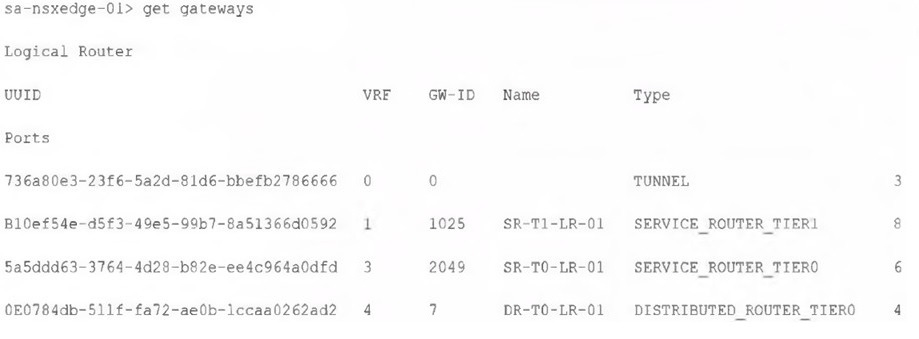 Which two commands must be executed to check BGP neighbor status? (Choose two.)
-
A
-
B
sa-nsxedge-01(tier0_dr)> get bgp neighbor
-
C
-
D
sa-nsxedge-01(tier1_sr)> get bgp neighbor
-
E
sa-nsxedge-01(tier0_sr)> get bgp neighbor
-
F
Reveal answer details
Close answer details
Correct answersA, E
Explanationvrf 3: The VRF ID for the Tier-0 Service Router (SR) is 3, as indicated in the output. To check the BGP neighbor status, you need to enter the correct VRF context.
sa-nsxedge-01(tier0_sr)> get bgp neighbor: This command retrieves the BGP neighbor status on the Tier- 0 Service Router, which is where BGP neighbors are configured in NSX environments.
Question 18
Multiple choice
Which two of the following are used to configure Distributed Firewall on VDS? (Choose two.)
-
A
-
B
-
C
-
D
-
E
Reveal answer details
Close answer details
Correct answersB, E
ExplanationAccording to the VMware NSX Documentation, these are two of the ways that you can use to configure Distributed Firewall on VDS: NSX API: This is a RESTful API that allows you to programmatically configure and manage Distributed Firewall on VDS using HTTP methods and JSON payloads. You can use tools such as Postman or curl to send API requests to the NSX Manager node.
NSX UI: This is a graphical user interface that allows you to configure and manage Distributed Firewall on VDS using menus, tabs, buttons, and forms. You can access the NSX UI by logging in to the NSX Manager node using a web browser.
https://docs.vmware.com/en/VMware-NSX/4.1/administration/GUID-0DEF9F18-608D-4B5C-9175-5514750E901B.html
|