Review the question wording, option layout, and available explanations before choosing a study plan.
Question 1
Single choice
What is the VMware recommended way to deploy a virtual NSX Edge Node?
A
Through the OVF command line tool
B
Through the vSphere Web Client
C
Through automated or Interactive mode using an ISO
D
Through the NSXUI
Reveal answer detailsClose answer details
Correct answerD
Explanation
Through the NSX UI. According to the VMware NSX Documentation2, you can deploy NSX Edge nodes as virtual appliances through the NSX UI by clicking Add Edge Node and providing the required information. The other options are either outdated or not applicable for virtual NSX Edge nodes. https://docs.vmware.com/en/VMware-NSX/4.1/installation/GUID-E9A01C68-93E7-4140-B306-19CD6806199F.html
Question 2
Single choice
An administrator has connected two virtual machines on the same overlay segment. Ping between both virtual machines is successful.
What type of network boundary does this represent?
A
Layer 2 VPN
B
Layer 2 bridge
C
Layer 2 broadcast domain
D
Layer 3 route
Reveal answer detailsClose answer details
Correct answerC
Explanation
An overlay segment is a logical construct that provides Layer 2 connectivity between virtual machines that are attached to it. An overlay segment can span multiple hosts and can be extended across different subnets or locations using Geneve encapsulation 3. Therefore, two virtual machines on the same overlay segment belong to the same Layer 2 broadcast domain, which means they can communicate with each other using their MAC addresses without requiring any routing. The other options are incorrect because they involve Layer 3 or higher network boundaries, which require routing or tunneling to connect different segments. References: VMware NSX Documentation
Question 3
Multiple choice
Which two tools are used for centralized logging in VMware NSX? (Choose two.)
A
VMware Aria Operations
B
Syslog Server
C
VMware Aria Automation
D
VMware Aria Operations for Logs
E
VMware Aria Operations for Networks
Reveal answer detailsClose answer details
Correct answersB, D
Explanation
Two tools that are used for centralized logging in VMware NSX are Syslog Server and VMware Aria Operations for Logs. Syslog Server is a standard protocol for sending log messages from various network devices to a centralized server 1. VMware NSX supports syslog for long term retention of logs and all NSX components can send syslog messages to a configured syslog server 2. VMware Aria Operations for Logs is a VMware product that provides intelligent log analytics for NSX3. It provides monitoring and troubleshooting capabilities and customizable dashboards for network virtualization, flow analysis, and alerts 3. The other options are incorrect because they are not tools for centralized logging in VMware NSX. VMware Aria Operations is a VMware product that provides operations management and automation for NSX4, but it is not the same as VMware Aria Operations for Logs. VMware Aria Automation is a VMware product that provides automation and orchestration for NSX5, but it is not related to logging. VMware Aria Operations for Networks is not a valid product name. References: Syslog, NSX Logging and System Events, VMware vRealize Log Insight for NSX, VMware vRealize Operations Management Pack for NSX, VMware vRealize Automation
Question 4
Multiple choice
What are three NSX Manager roles? (Choose three.)
A
master
B
cloud
C
zookeepet
D
manager
E
policy
F
controller
Reveal answer detailsClose answer details
Correct answersD, E, F
Explanation
According to the VMware NSX 4.x Professional documents and tutorials, an NSX Manager is a standalone appliance that hosts the API services, the management plane, control plane, and policy management. The NSX Manager has three built-in roles: policy, manager, and controller 2. The policy role handles the declarative configuration of the system and translates it into desired state for the manager role. The manager role receives and validates the configuration from the policy role and stores it in a distributed persistent database. The manager role also publishes the configuration to the central control plane. The controller role implements the central control plane that computes the network state based on the configuration and topology information 3. The other roles (master, cloud, and zookeeper) are not valid NSX Manager roles.
Question 5
Multiple choice
Which two built-in VMware tools will help Identify the cause of packet loss on VLAN Segments? (Choose two.)
A
Flow Monitoring
B
Packet Capture
C
Live Flow
D
Activity Monitoring
E
Traceflow
Reveal answer detailsClose answer details
Correct answersB, E
Explanation
According to the VMware NSX Documentation1, Packet Capture and Traceflow are two built-in VMware tools that can help identify the cause of packet loss on VLAN segments. Packet Capture allows you to capture packets on a specific interface or segment and analyze them using tools such as Wireshark or tcpdump. Packet Capture can help you diagnose network issues such as misconfigured MTU, incorrect VLAN tags, or firewall drops. Traceflow allows you to inject synthetic packets into the network and trace their path from source to destination. Traceflow can help you verify connectivity, routing, and firewall rules between virtual machines or segments. Traceflow can also show you where packets are dropped or modified along the way.
Question 6
Single choice
Which command is used to display the network configuration of the Tunnel Endpoint (TEP) IP on a bare metal transport node?
A
tepconfig
B
ifconfig
C
tcpdump
D
debug
Reveal answer detailsClose answer details
Correct answerB
Explanation
The command ifconfig is used to display the network configuration of the Tunnel Endpoint (TEP) IP on a bare metal transport node 2. The TEP IP is assigned to a network interface on the bare metal server that is used for overlay traffic. The ifconfig command can show the IP address, netmask, broadcast address, and other information of the network interface. For example, the following command shows the network configuration of the TEP IP on a bare metal transport node with interface name ens192: ifconfig ens192 The output of the command would look something like this: ens192: flags=4163<UP,BROADCAST,RUNNING,MULTICAST> mtu 1500 inet 10.10.10.10 netmask 255.255.255.0 broadcast 10.10.10.255 inet6 fe80::250:56ff:fe9a:1b8c prefixlen 64 scopeid 0x20<link> ether 00:50:56:9a:1b:8c txqueuelen 1000 (Ethernet) RX packets 123456 bytes 123456789 (123.4 MB) RX errors 0 dropped 0 overruns 0 frame 0 TX packets 234567 bytes 234567890 (234.5 MB) TX errors 0 dropped 0 overruns 0 carrier 0 collisions 0 The TEP IP in this example is 10.10.10.10. References: IBM Cloud Docs
Question 7
Multiple choice
Which two statements are true about IDS Signatures? (Choose two.)
A
Users can upload their own IDS signature definitions.
B
An IDS signature contains data used to identify known exploits and vulnerabilities.
C
An IDS signature contains data used to identify the creator of known exploits and vulnerabilities.
D
IDS signatures can be High Risk, Suspicious, Low Risk and Trustworthy.
E
An IDS signature contains a set of instructions that determine which traffic is analyzed.
Reveal answer detailsClose answer details
Correct answersB, E
Explanation
According to the Network Bachelor article1, an IDS signature contains data used to identify an attacker's attempt to exploit a known vulnerability in both the operating system and applications. This implies that statement B is true. According to the VMware NSX Documentation2, IDS/IPS Profiles are used to group signatures, which can then be applied to select applications and traffic. This implies that statement E is true. Statement A is false because users cannot upload their own IDS signature definitions, they have to use the ones provided by VMware or Trustwave3. Statement C is false because an IDS signature does not contain data used to identify the creator of known exploits and vulnerabilities, only the exploits and vulnerabilities themselves. Statement D is false because IDS signatures are classified into one of the following severity categories: Critical, High, Medium, Low, or Informational1. References: 3: Distributed IDS/IPS Settings and Signatures-VMware Docs 2: Distributed IDS/IPS-VMware Docs 1: NSX-T: Exploring Distributed IDS-Network Bachelor
Question 8
Multiple choice
Which two BGP configuration parameters can be configured in the VRF Lite gateways? (Choose two.)
A
Graceful Restart
B
BGP Neighbors
C
Local AS
D
Route Distribution
E
Route Aggregation
Reveal answer detailsClose answer details
Correct answersB, E
Explanation
Route Aggregation and and D) BGP neighbours are available when configuring BGP in a VRF. "Route distribution" does not exist, what you can do is a "Route Re-Distribution" via BGP. https://docs.vmware.com/en/VMware-NSX/4.1/administration/GUID-4CB5796A-1CED-4F0E-ADE0-72BF7B3F762C.html
Question 9
Single choice
How is the RouterLink port created between a Tier-1 Gateway and Tier-O Gateway?
A
Automatically created when Tier-1 is connected with Tier-0 from NSX UI.
B
Automatically created when Tier-1 is created.
C
Manually create a Logical Switch and connect to bother Tier-1 and Tier-0 Gateways.
D
Manually create a Segment and connect to both Tier-1 and Tier-0 Gateways.
Reveal answer detailsClose answer details
Correct answerA
Explanation
The RouterLink port is automatically created when a Tier-1 Gateway is connected with a Tier-0 Gateway from the NSX UI1. The RouterLink port is a logical interface that is assigned an IP address and is associated with a physical or virtual interface. The RouterLink port acts as an end point of the IPSec tunnel and routes traffic between the Tier-1 Gateway and the Tier-0 Gateway2. The other options are incorrect because they involve manual creation of logical switches or segments, which are not required for RouterLink port creation. References: Configure NSX for Virtual Networking from vSphere Client, Virtual Private Network (VPN) (https://docs.vmware.com/jp/VMware-NSX/4.0/administration/GUID-3F163DEE-1EE6-4D80-BEBF-8D109FDB577C.html)
Question 10
Single choice
Which NSX CLI command is used to change the authentication policy for local users?
A
Set cli-timeout
B
Get auth-policy minimum-password-length
C
Set hardening-policy
D
Set auth-policy
Reveal answer detailsClose answer details
Correct answerD
Explanation
According to the VMware NSX Documentation4, the set auth-policy command is used to change the authentication policy settings for local users, such as password length, lockout period, and maximum authentication failures. The other commands are either used to view the authentication policy settings (B), change the CLI session timeout (A), or change the hardening policy settings ? References: 4: Authentication Policy Settings-VMware Docs (https://docs.vmware.com/en/VMware-NSX/4.1/administration/GUID-99BAED85-D754-4589-9050-72A1AB528C10.html)
Question 11
Multiple choice
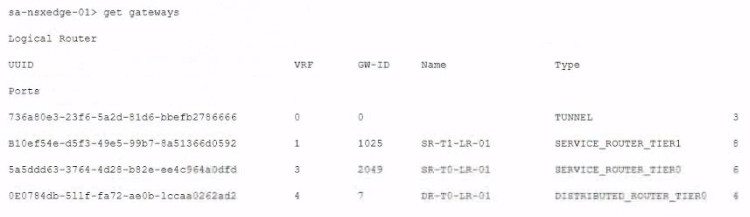
A customer has a network where BGP has been enabled and the BGP neighbor is configured on the Tier-0 Gateway. An NSX administrator used the get gateways command to retrieve this Information:
Which two commands must be executed to check BGP neighbor status? (Choose two.)
A
vrf 1
B
vrf 4
C
sa-nexedge-01(tier1_sr> get bgp neighbor
D
sa-nexedge-01(tier0_sr> get bgp neighbor
E
sa-nexedge-01(tier1_dr)> get bgp neighbor
F
vrf 3
Reveal answer detailsClose answer details
Correct answersD, F
Explanation
BGP will be configured on the T0 SR. Connect to the VRF for the T0 SR and run get bgp neighbor once connected to it. https://docs.vmware.com/en/VMware-Validated-Design/5.1/sddc-deployment-of-vmware-nsx-t-workload-domains-with-multiple-availability-zones/GUID-8BD4228A-75C6-4C60-80B4- 538D4297E11A.html For the BGP configuration on NSX-T, the Tier-0 Service Router (SR) is typically where BGP is configured. To check the BGP neighbor status:
Connect to the VRF for the T0 SR, which is VRF 3 based on the provided output. Run the command to get BGP neighbor status once connected to it.
Question 12
Drag & drop
DRAG DROP
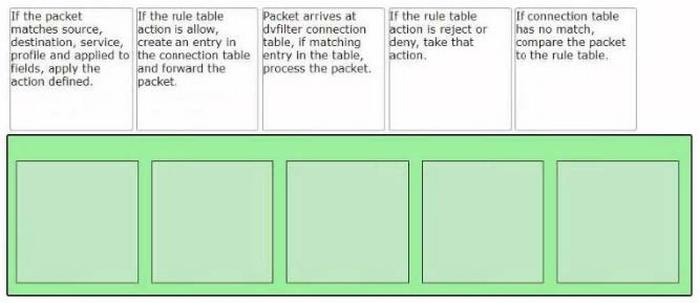
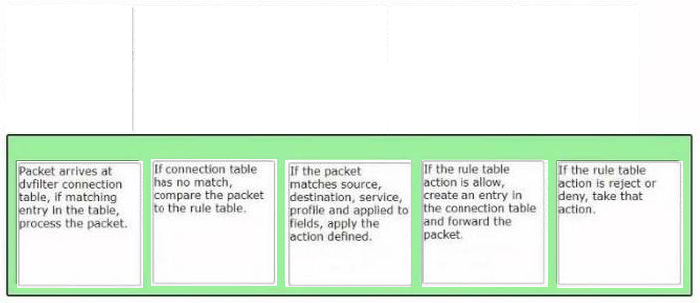
Sort the rule processing steps of the Distributed Firewall. Order responses from left to right.
Reveal answer detailsClose answer details
Explanation
The correct order of the rule processing steps of the Distributed Firewall is as follows: Packet arrives at vfilter connection table. If matching entry in the table, process the packet. If connection table has no match, compare the packet to the rule table. If the packet matches source, destination, service, profile and applied to fields, apply the action defined. If the rule table action is allow, create an entry in the connection table and forward the packet. If the rule table action is reject or deny, take that action. This order is based on the description of how the Distributed Firewall works in the web search results 1. The first step is to check if there is an existing connection entry for the packet in the vfilter connection table, which is a cache of flow entries for rules with an allow action. If there is a match, the packet is processed according to the connection entry. If there is no match, the packet is compared to the rule table, which contains all the security policy rules. The rules are evaluated from top to bottom until a match is found. The match criteria include source, destination, service, profile and applied to fields. The action defined by the matching rule is applied to the packet. The action can be allow, reject or deny. If the action is allow, a new connection entry is created for the packet and the packet is forwarded to its destination. If the action is reject or deny, the packet is dropped and an ICMP message or a TCP reset message is sent back to the source.
Question 13
Multiple choice
What are four NSX built-in rote-based access control (RBAC) roles? (Choose four.)
When deploying an NSX Edge Transport Node, what two valid IP address assignment options should be specified for the TEP IP addresses? (Choose two.)
A
Use an IP Pool
B
Use a DHCP Server
C
Use RADIUS
D
Use a Static IP List
E
Use BootP
Reveal answer detailsClose answer details
Correct answersA, D
Explanation
When deploying an NSX Edge Transport Node, two valid IP address assignment options that should be specified for the TEP IP addresses are Use an IP Pool and Use a Static IP List. These options allow the user to assign TEP IP addresses from a predefined range of IP addresses or a manually entered list of IP addresses, respectively 345. The other options are incorrect because they are not supported methods for assigning TEP IP addresses. There is no option to use a DHCP server, RADIUS, or BootP for TEP IP address assignment in NSX-T345. References: NSX-T Edge TEP networking options, Multi-TEP High Availability, Create an IP Pool for Host Tunnel Endpoint IP Addresses
Question 15
Single choice
What should an NSX administrator check to verify that VMware Identity Manager Integration Is successful?
A
From VMware Identity Manager the status of the remote access application must be green.
B
From the NSX UI the status of the VMware Identity Manager Integration must be "Enabled".
C
From the NSX CLI the status of the VMware Identity Manager Integration must be "Configured".
D
From the NSX UI the URI in the address bar must have "locaNfatse" part of it.
Reveal answer detailsClose answer details
Correct answerB
Explanation
From the NSX UI the status of the VMware Identity Manager Integration must be "Enabled". According to the VMware NSX Documentation1, after configuring VMware Identity Manager integration, you can validate the functionality by checking the status of the integration in the NSX UI. The status should be "Enabled" if the integration is successful. The other options are either incorrect or not relevant.
Question 16
Single choice
Which choice is a valid insertion point for North-South network introspection?
Where in the NSX UI would an administrator set the time attribute for a time-based Gateway Firewall rule?
A
The option to set time-based rule is a clock Icon in the rule.
B
The option to set time based rule is a field in the rule Itself.
C
There Is no option in the NSX UI. It must be done via command line interface.
D
The option to set time-based rule is a clock Icon in the policy.
Reveal answer detailsClose answer details
Correct answerD
Explanation
According to the VMware documentation1, the clock icon appears on the firewall policy section that you want to have a time window. By clicking the clock icon, you can create or select a time window that applies to all the rules in that policy section. The other options are incorrect because they either do not exist or are not related to the time-based rule feature. There is no option to set a time-based rule in the rule itself, as it is a policy-level setting. There is also an option to set a time-based rule in the NSX UI, so it does not require using the command line interface. https://docs.vmware.com/en/VMware-NSX/4.1/administration/ GUID-8572496E-A60E-48C3-A016-4A081AC80BE7.html